Searching for
Systematic Reviews
Daytona State College Library
(386)506-3518
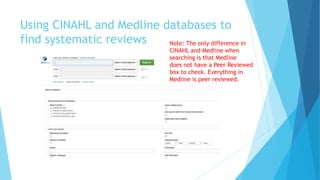
Using CINAHL and Medline databases to
find systematic reviews Note: The only difference in
CINAHL and Medline when
searching is that Medline
does not have a Peer Reviewed
box to check. Everything in
Medline is peer reviewed.
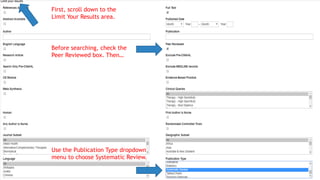
Before searching, check the
Peer Reviewed box. Then…
Use the Publication Type dropdown
menu to choose Systematic Review.
First, scroll down to the
Limit Your Results area.
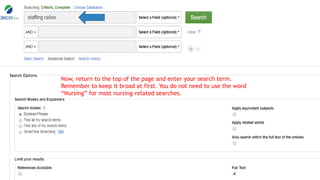
Now, return to the top of the page and enter your search term.
Remember to keep it broad at first. You do not need to use the word
“Nursing” for most nursing-related searches.
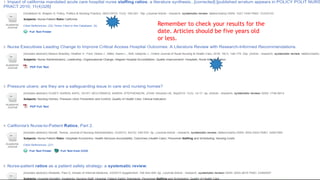
Remember to check your results for the
date. Articles should be five years old
or less.
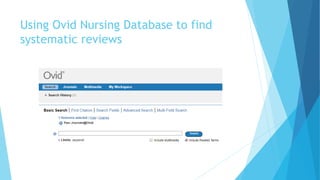
Using Ovid Nursing Database to find
systematic reviews
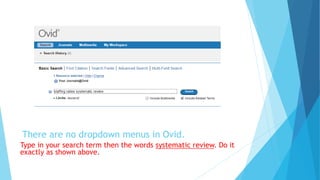
There are no dropdown menus in Ovid.
Type in your search term then the words systematic review. Do it
exactly as shown above.
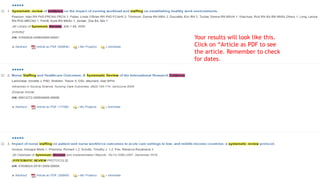
Your results will look like this.
Click on “Article as PDF to see
the article. Remember to check
for dates.
Questions?
 Call the DSC Library Research Desk at (386)506-3518
 OR
 Email rachel.owens@daytonastate.edu

Searching for Systematic reviews

  • 1.
    Searching for Systematic Reviews DaytonaState College Library (386)506-3518
  • 2.
    Using CINAHL andMedline databases to find systematic reviews Note: The only difference in CINAHL and Medline when searching is that Medline does not have a Peer Reviewed box to check. Everything in Medline is peer reviewed.
  • 3.
    Before searching, checkthe Peer Reviewed box. Then… Use the Publication Type dropdown menu to choose Systematic Review. First, scroll down to the Limit Your Results area.
  • 4.
    Now, return tothe top of the page and enter your search term. Remember to keep it broad at first. You do not need to use the word “Nursing” for most nursing-related searches.
  • 5.
    Remember to checkyour results for the date. Articles should be five years old or less.
  • 6.
    Using Ovid NursingDatabase to find systematic reviews
  • 7.
    There are nodropdown menus in Ovid. Type in your search term then the words systematic review. Do it exactly as shown above.
  • 8.
    Your results willlook like this. Click on “Article as PDF to see the article. Remember to check for dates.
  • 9.
    Questions?  Call theDSC Library Research Desk at (386)506-3518  OR  Email rachel.owens@daytonastate.edu