Our goals today ...
• Discover the biggest mistakes made by most
Internet users
• Talk about the differences between directories
and search engines (and when to use each.)
• Learn some basic Google searching
techniques.
The Biggest Mistake
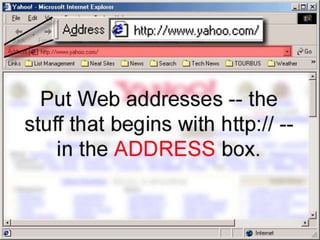
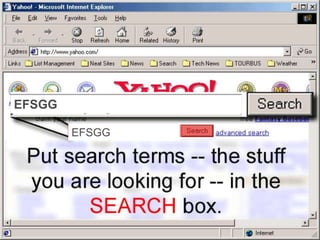
Typing URLs in the wrong box
EFSGG
EFSGG
The Second Biggest Mistake

Using the wrong tool at the
wrong time
Three questions
• Where would you find the telephone
number or address of the El Gomuhireya
theatre?
• Where you would find the definition of
the word “leadership?”
• Where would you find the name of the
Mouse Inventor?
Directories
• Usually human-compiled guides to the
web, where sites are organized by category
• Major directories:
– MSN
– Yahoo
– Netscape ODP
What directories are good for
• “What is the Web page address for some company,
organization, or entity?”
• (or “who makes product X?”)
• “Where can I find a list of Web pages that focus on a
particular, „universal‟ topic?”
• In other words, directories are GREAT for “telephone
book” searches.
Search Engine
• The three parts of a search engine:
– the spider
• A spider (also called a "crawler" or a "bot") that goes to every
page or representative pages on every Web site that wants to be
searchable and reads it, using hypertext links on each page to
discover and read a site's other pages.
Search Engine
• The three parts of a search engine:
– the catalog
• A program that creates a huge index (sometimes
called a "catalog") from the pages that have been
read.
Search Engine
• The three parts of a search engine:
– the front end
• A program that receives your search request,
compares it to the entries in the index, and returns
results to you.
Directories v Search Engines
• Directories are human-compiled and have a
small number of pages in their databases
(usually in the low millions)
• Search engines are machine-compiled and
have a HUGE number of pages in their
databases (usually in the hundreds of millions
or even the billions)
The Search Engine five rules
1. Be specific ... because if you aren‟t specific,
you‟ll end up with a bunch of garbage!
2. Use quotes to search for phrases.
3. Use the + sign to require.
4. Use the - sign to exclude.
5. Combine symbols as often as possible
(see rule #1).
Search engine rule #1
Be specific ... because if you aren‟t
specific, you‟ll end up with a bunch of
garbage!
Search engine rule #2
Use quotes to search for phrases.
“pirates of the caribbean”
Search engine rule #3
Use the + sign to
require.
“pirates of the caribbean” +disney
Search engine rule #4
Use the - sign to
exclude.
“pirates of the caribbean” -video
Search engine rule #5
Combine symbols as often as possible
(see rule #1).
“pirates of the caribbean” +disney -video
Advanced Operators
Query modifiers

•
•
•
•
•

filetype:
intitle:
inurl:
site:
synonyms

Alternative query

•
•
•
•

cache:
link:
related:
define:
A sample Google search
+inurl:apollo +moon
–”john young” +site:nasa.gov
Now, Can you guess the result? ?
• Dxcfgbkml,;.
• Azsxdcgbhjmk
•

Search engine mathematics

  • 2.
    Our goals today... • Discover the biggest mistakes made by most Internet users • Talk about the differences between directories and search engines (and when to use each.) • Learn some basic Google searching techniques.
  • 3.
    The Biggest Mistake TypingURLs in the wrong box
  • 5.
  • 7.
    The Second BiggestMistake Using the wrong tool at the wrong time
  • 8.
    Three questions • Wherewould you find the telephone number or address of the El Gomuhireya theatre? • Where you would find the definition of the word “leadership?” • Where would you find the name of the Mouse Inventor?
  • 10.
    Directories • Usually human-compiledguides to the web, where sites are organized by category • Major directories: – MSN – Yahoo – Netscape ODP
  • 11.
    What directories aregood for • “What is the Web page address for some company, organization, or entity?” • (or “who makes product X?”) • “Where can I find a list of Web pages that focus on a particular, „universal‟ topic?” • In other words, directories are GREAT for “telephone book” searches.
  • 12.
    Search Engine • Thethree parts of a search engine: – the spider • A spider (also called a "crawler" or a "bot") that goes to every page or representative pages on every Web site that wants to be searchable and reads it, using hypertext links on each page to discover and read a site's other pages.
  • 13.
    Search Engine • Thethree parts of a search engine: – the catalog • A program that creates a huge index (sometimes called a "catalog") from the pages that have been read.
  • 14.
    Search Engine • Thethree parts of a search engine: – the front end • A program that receives your search request, compares it to the entries in the index, and returns results to you.
  • 15.
    Directories v SearchEngines • Directories are human-compiled and have a small number of pages in their databases (usually in the low millions) • Search engines are machine-compiled and have a HUGE number of pages in their databases (usually in the hundreds of millions or even the billions)
  • 16.
    The Search Enginefive rules 1. Be specific ... because if you aren‟t specific, you‟ll end up with a bunch of garbage! 2. Use quotes to search for phrases. 3. Use the + sign to require. 4. Use the - sign to exclude. 5. Combine symbols as often as possible (see rule #1).
  • 17.
    Search engine rule#1 Be specific ... because if you aren‟t specific, you‟ll end up with a bunch of garbage!
  • 18.
    Search engine rule#2 Use quotes to search for phrases. “pirates of the caribbean”
  • 19.
    Search engine rule#3 Use the + sign to require. “pirates of the caribbean” +disney
  • 20.
    Search engine rule#4 Use the - sign to exclude. “pirates of the caribbean” -video
  • 21.
    Search engine rule#5 Combine symbols as often as possible (see rule #1). “pirates of the caribbean” +disney -video
  • 23.
  • 24.
    A sample Googlesearch +inurl:apollo +moon –”john young” +site:nasa.gov Now, Can you guess the result? ?
  • 27.