USB Flash Drives: ProtectingUSB Flash Drives: Protecting
Data And Enhancing StorageData And Enhancing Storage
Steffen HellmoldSteffen Hellmold
VP and General ManagerVP and General Manager
UFD BUUFD BU
LexarLexar
Presentation OutlinePresentation Outline
History of UFD standardizationHistory of UFD standardization
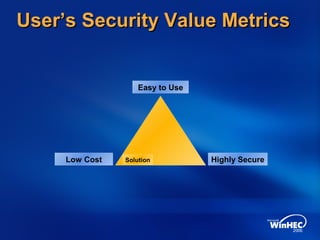
User’s security value metricsUser’s security value metrics
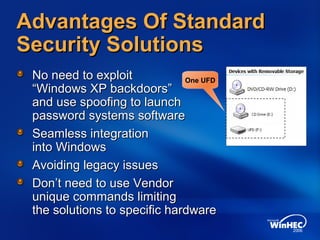
Advantages of standard security solutionsAdvantages of standard security solutions
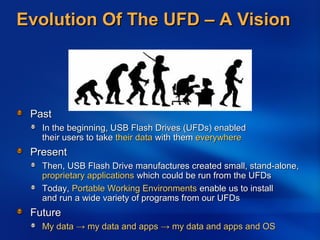
Evolution of the UFD – a visionEvolution of the UFD – a vision
USB Lockable Storage Device specificationUSB Lockable Storage Device specification
Compelling technology design considerationsCompelling technology design considerations
Future Lexar technologiesFuture Lexar technologies
DemoDemo
Call to actionCall to action
Additional resourcesAdditional resources
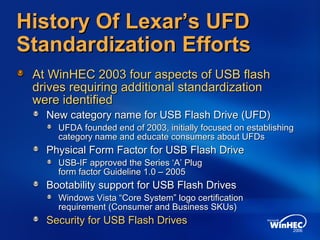
History Of Lexar’s UFDHistory Of Lexar’s UFD
Standardization EffortsStandardization Efforts
At WinHEC 2003 four aspects of USB flashAt WinHEC 2003 four aspects of USB flash
drives requiring additional standardizationdrives requiring additional standardization
were identifiedwere identified
New category name for USB Flash Drive (UFD)New category name for USB Flash Drive (UFD)
UFDA founded end of 2003, initially focused on establishingUFDA founded end of 2003, initially focused on establishing
category name and educate consumers about UFDscategory name and educate consumers about UFDs
Physical Form Factor for USB Flash DrivePhysical Form Factor for USB Flash Drive
USB-IF approved the Series ‘A’ PlugUSB-IF approved the Series ‘A’ Plug
form factor Guideline 1.0 – 2005form factor Guideline 1.0 – 2005
Bootability support for USB Flash DrivesBootability support for USB Flash Drives
Windows Vista “Core System” logo certificationWindows Vista “Core System” logo certification
requirement (Consumer and Business SKUs)requirement (Consumer and Business SKUs)
Security for USB Flash DrivesSecurity for USB Flash Drives
Easy to Use
Low Cost Highly SecureSolution
User’s Security Value MetricsUser’s Security Value Metrics
Advantages Of StandardAdvantages Of Standard
Security SolutionsSecurity Solutions
No need to exploitNo need to exploit
“Windows XP backdoors”“Windows XP backdoors”
and use spoofing to launchand use spoofing to launch
password systems softwarepassword systems software
Seamless integrationSeamless integration
into Windowsinto Windows
Avoiding legacy issuesAvoiding legacy issues
Don’t need to use VendorDon’t need to use Vendor
unique commands limitingunique commands limiting
the solutions to specific hardwarethe solutions to specific hardware
One UFD
Evolution Of The UFD – A VisionEvolution Of The UFD – A Vision
PastPast
In the beginning, USB Flash Drives (UFDs) enabledIn the beginning, USB Flash Drives (UFDs) enabled
their users to taketheir users to take their datatheir data with themwith them everywhereeverywhere
PresentPresent
Then, USB Flash Drive manufactures created small, stand-alone,Then, USB Flash Drive manufactures created small, stand-alone,
proprietary applicationsproprietary applications which could be run from the UFDswhich could be run from the UFDs
Today,Today, Portable Working EnvironmentsPortable Working Environments enable us to installenable us to install
and run a wide variety of programs from our UFDsand run a wide variety of programs from our UFDs
FutureFuture
My dataMy data →→ my data and appsmy data and apps →→ my data and apps and OSmy data and apps and OS
UFDs: Protecting DataUFDs: Protecting Data
And Enhancing StorageAnd Enhancing Storage
Martin FuruhjelmMartin Furuhjelm
Design ManagerDesign Manager
Enterprise and OEM ProductsEnterprise and OEM Products
LexarLexar
USB Lockable StorageUSB Lockable Storage
PurposePurpose
USB-IF Implementers Forum internationalUSB-IF Implementers Forum international
standard-royalty freestandard-royalty free
Extend USB Mass Storage ClassExtend USB Mass Storage Class
to allow hosts and devices to lockto allow hosts and devices to lock
and unlock storage, without breakingand unlock storage, without breaking
legacy behaviors that exists todaylegacy behaviors that exists today
Key ScenariosKey Scenarios
Protect for loss/theftProtect for loss/theft
Ensure privacy of dataEnsure privacy of data
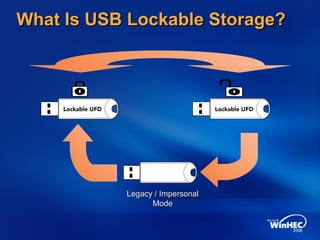
What Is USB Lockable Storage?What Is USB Lockable Storage?
Legacy / ImpersonalLegacy / Impersonal
ModeMode
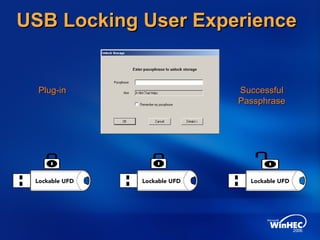
USB Locking User ExperienceUSB Locking User Experience
Plug-inPlug-in SuccessfulSuccessful
PassphrasePassphrase
USB Lockable StorageUSB Lockable Storage
Feature NegotiationFeature Negotiation
Feature negotiationFeature negotiation
No impact on legacy systemsNo impact on legacy systems
Lockable Storage InterfaceLockable Storage Interface
Extension Descriptor (LSIED)Extension Descriptor (LSIED)
USB parser already knows how to handleUSB parser already knows how to handle
Extension Descriptors from HID devicesExtension Descriptors from HID devices
Allows future features to be addedAllows future features to be added
USB Lockable StorageUSB Lockable Storage
Command SetCommand Set
Nine new USB commands specifiedNine new USB commands specified
Store, match, and change PassphraseStore, match, and change Passphrase
Erase Passphrase (return to Impersonal)Erase Passphrase (return to Impersonal)
Electronic unplugElectronic unplug
Originally used to update firmwareOriginally used to update firmware
Now we change PIDs to unlockNow we change PIDs to unlock
Compelling TechnologyCompelling Technology
Design ConsiderationsDesign Considerations
Personal storage device environmentPersonal storage device environment
Integrating support intoIntegrating support into
the Windows Storage Stackthe Windows Storage Stack
PC OEM and Enterprise concernsPC OEM and Enterprise concerns
Value add opportunitiesValue add opportunities
Reusable architectureReusable architecture
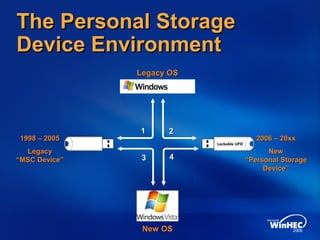
The Personal StorageThe Personal Storage
Device EnvironmentDevice Environment
Legacy OSLegacy OS
New OSNew OS
1998 – 20051998 – 2005
LegacyLegacy
“MSC Device”“MSC Device”
2006 – 20xx2006 – 20xx
NewNew
“Personal Storage“Personal Storage
Device”Device”
11 22
33 44
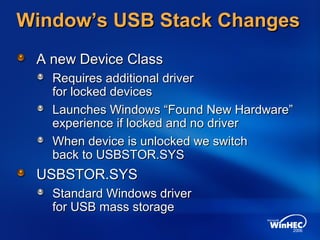
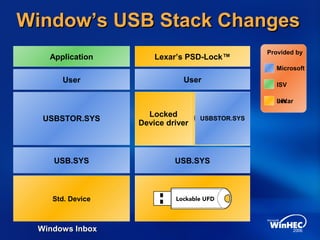
Window’s USB Stack ChangesWindow’s USB Stack Changes
A new Device ClassA new Device Class
Requires additional driverRequires additional driver
for locked devicesfor locked devices
Launches Windows “Found New Hardware”Launches Windows “Found New Hardware”
experience if locked and no driverexperience if locked and no driver
When device is unlocked we switchWhen device is unlocked we switch
back to USBSTOR.SYSback to USBSTOR.SYS
USBSTOR.SYSUSBSTOR.SYS
Standard Windows driverStandard Windows driver
for USB mass storagefor USB mass storage
USB.SYS
Hardware Device
User
Application
Vendor Unique
USB.SYS
User
Lexar’s PSD-Lock™
USBSTOR.SYS
Locked
Device driver
Window’s USB Stack ChangesWindow’s USB Stack Changes
Provided by
Microsoft
ISV
IHV
USB.SYS
Std. Device
User
Application
USBSTOR.SYS
Lexar
Windows InboxWindows Inbox
Technology BenefitsTechnology Benefits
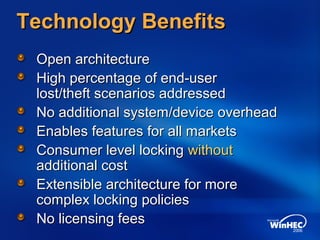
Open architectureOpen architecture
High percentage of end-userHigh percentage of end-user
lost/theft scenarios addressedlost/theft scenarios addressed
No additional system/device overheadNo additional system/device overhead
Enables features for all marketsEnables features for all markets
Consumer level lockingConsumer level locking withoutwithout
additional costadditional cost
Extensible architecture for moreExtensible architecture for more
complex locking policiescomplex locking policies
No licensing feesNo licensing fees
Added Value OpportunitiesAdded Value Opportunities
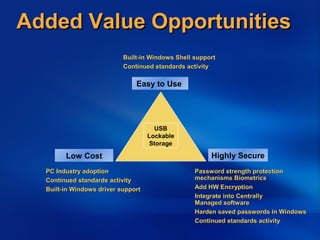
Easy to Use
Low Cost Highly Secure
USB
Lockable
Storage
Password strength protectionPassword strength protection
mechanisms Biometricsmechanisms Biometrics
Add HW EncryptionAdd HW Encryption
Integrate into CentrallyIntegrate into Centrally
Managed softwareManaged software
Harden saved passwords in WindowsHarden saved passwords in Windows
Continued standards activityContinued standards activity
Built-in Windows Shell supportBuilt-in Windows Shell support
Continued standards activityContinued standards activity
PC Industry adoptionPC Industry adoption
Continued standards activityContinued standards activity
Built-in Windows driver supportBuilt-in Windows driver support
USB Lockable StorageUSB Lockable Storage
Pat LaVarrePat LaVarre
Design EngineerDesign Engineer
OEM ProductsOEM Products
Future Lexar TechnologiesFuture Lexar Technologies
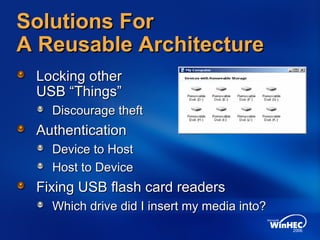
Solutions ForSolutions For
A Reusable ArchitectureA Reusable Architecture
Locking otherLocking other
USB “Things”USB “Things”
Discourage theftDiscourage theft
AuthenticationAuthentication
Device to HostDevice to Host
Host to DeviceHost to Device
Fixing USB flash card readersFixing USB flash card readers
Which drive did I insert my media into?Which drive did I insert my media into?
Call To ActionCall To Action
OEMs, ODMs, IHVs, and ISVsOEMs, ODMs, IHVs, and ISVs
Support USB Lockable StorageSupport USB Lockable Storage
Send feedback to Microsoft atSend feedback to Microsoft at
MicrosoftMicrosoft
Provide Windows logo requirementsProvide Windows logo requirements
for USB Lockable Storagefor USB Lockable Storage
Provide inbox support for USB LockableProvide inbox support for USB Lockable
Storage in Windows VistaStorage in Windows Vista
hec6stor @ microsoft.comhec6stor @ microsoft.com
Additional ResourcesAdditional Resources
Web ResourcesWeb Resources
Join USB-IFJoin USB-IF http://www.usb.orghttp://www.usb.org
AuthenticationAuthentication
IEEE 1667IEEE 1667 http://standards.ieee.org/announcements/pr_p1667.htmlhttp://standards.ieee.org/announcements/pr_p1667.html
TCGTCG https://www.trustedcomputinggroup.org/groups/storage/https://www.trustedcomputinggroup.org/groups/storage/
MicrosoftMicrosoft
Windows Logo Program 3.0Windows Logo Program 3.0
http://www.microsoft.com/whdc/winlogo/HWrequirements.mspxhttp://www.microsoft.com/whdc/winlogo/HWrequirements.mspx
Lexar White PapersLexar White Papers
USB Flash Drives to revolutionize Removable Storage in PersonalUSB Flash Drives to revolutionize Removable Storage in Personal
ComputingComputing www.lexar.comwww.lexar.com
Related SessionsRelated Sessions
Session name: Personal Storage: Opportunities and ChallengesSession name: Personal Storage: Opportunities and Challenges
for Pocket-Sized Storage Devices in the Windows Worldfor Pocket-Sized Storage Devices in the Windows World
Email aliasEmail alias Winhec2006 @Winhec2006 @ lexar.comlexar.com
© 2006 Microsoft Corporation. All rights reserved. Microsoft, Windows, Windows Vista and other product names are or may be registered trademarks and/or trademarks in the U.S. and/or other countries.
The information herein is for informational purposes only and represents the current view of Microsoft Corporation as of the date of this presentation. Because Microsoft must respond to changing market conditions,
it should not be interpreted to be a commitment on the part of Microsoft, and Microsoft cannot guarantee the accuracy of any information provided after the date of this presentation.
MICROSOFT MAKES NO WARRANTIES, EXPRESS, IMPLIED OR STATUTORY, AS TO THE INFORMATION IN THIS PRESENTATION.
Sdxscs

Sdxscs

  • 1.
    USB Flash Drives:ProtectingUSB Flash Drives: Protecting Data And Enhancing StorageData And Enhancing Storage Steffen HellmoldSteffen Hellmold VP and General ManagerVP and General Manager UFD BUUFD BU LexarLexar
  • 2.
    Presentation OutlinePresentation Outline Historyof UFD standardizationHistory of UFD standardization User’s security value metricsUser’s security value metrics Advantages of standard security solutionsAdvantages of standard security solutions Evolution of the UFD – a visionEvolution of the UFD – a vision USB Lockable Storage Device specificationUSB Lockable Storage Device specification Compelling technology design considerationsCompelling technology design considerations Future Lexar technologiesFuture Lexar technologies DemoDemo Call to actionCall to action Additional resourcesAdditional resources
  • 3.
    History Of Lexar’sUFDHistory Of Lexar’s UFD Standardization EffortsStandardization Efforts At WinHEC 2003 four aspects of USB flashAt WinHEC 2003 four aspects of USB flash drives requiring additional standardizationdrives requiring additional standardization were identifiedwere identified New category name for USB Flash Drive (UFD)New category name for USB Flash Drive (UFD) UFDA founded end of 2003, initially focused on establishingUFDA founded end of 2003, initially focused on establishing category name and educate consumers about UFDscategory name and educate consumers about UFDs Physical Form Factor for USB Flash DrivePhysical Form Factor for USB Flash Drive USB-IF approved the Series ‘A’ PlugUSB-IF approved the Series ‘A’ Plug form factor Guideline 1.0 – 2005form factor Guideline 1.0 – 2005 Bootability support for USB Flash DrivesBootability support for USB Flash Drives Windows Vista “Core System” logo certificationWindows Vista “Core System” logo certification requirement (Consumer and Business SKUs)requirement (Consumer and Business SKUs) Security for USB Flash DrivesSecurity for USB Flash Drives
  • 4.
    Easy to Use LowCost Highly SecureSolution User’s Security Value MetricsUser’s Security Value Metrics
  • 5.
    Advantages Of StandardAdvantagesOf Standard Security SolutionsSecurity Solutions No need to exploitNo need to exploit “Windows XP backdoors”“Windows XP backdoors” and use spoofing to launchand use spoofing to launch password systems softwarepassword systems software Seamless integrationSeamless integration into Windowsinto Windows Avoiding legacy issuesAvoiding legacy issues Don’t need to use VendorDon’t need to use Vendor unique commands limitingunique commands limiting the solutions to specific hardwarethe solutions to specific hardware One UFD
  • 6.
    Evolution Of TheUFD – A VisionEvolution Of The UFD – A Vision PastPast In the beginning, USB Flash Drives (UFDs) enabledIn the beginning, USB Flash Drives (UFDs) enabled their users to taketheir users to take their datatheir data with themwith them everywhereeverywhere PresentPresent Then, USB Flash Drive manufactures created small, stand-alone,Then, USB Flash Drive manufactures created small, stand-alone, proprietary applicationsproprietary applications which could be run from the UFDswhich could be run from the UFDs Today,Today, Portable Working EnvironmentsPortable Working Environments enable us to installenable us to install and run a wide variety of programs from our UFDsand run a wide variety of programs from our UFDs FutureFuture My dataMy data →→ my data and appsmy data and apps →→ my data and apps and OSmy data and apps and OS
  • 7.
    UFDs: Protecting DataUFDs:Protecting Data And Enhancing StorageAnd Enhancing Storage Martin FuruhjelmMartin Furuhjelm Design ManagerDesign Manager Enterprise and OEM ProductsEnterprise and OEM Products LexarLexar
  • 8.
    USB Lockable StorageUSBLockable Storage PurposePurpose USB-IF Implementers Forum internationalUSB-IF Implementers Forum international standard-royalty freestandard-royalty free Extend USB Mass Storage ClassExtend USB Mass Storage Class to allow hosts and devices to lockto allow hosts and devices to lock and unlock storage, without breakingand unlock storage, without breaking legacy behaviors that exists todaylegacy behaviors that exists today Key ScenariosKey Scenarios Protect for loss/theftProtect for loss/theft Ensure privacy of dataEnsure privacy of data
  • 9.
    What Is USBLockable Storage?What Is USB Lockable Storage? Legacy / ImpersonalLegacy / Impersonal ModeMode
  • 10.
    USB Locking UserExperienceUSB Locking User Experience Plug-inPlug-in SuccessfulSuccessful PassphrasePassphrase
  • 11.
    USB Lockable StorageUSBLockable Storage Feature NegotiationFeature Negotiation Feature negotiationFeature negotiation No impact on legacy systemsNo impact on legacy systems Lockable Storage InterfaceLockable Storage Interface Extension Descriptor (LSIED)Extension Descriptor (LSIED) USB parser already knows how to handleUSB parser already knows how to handle Extension Descriptors from HID devicesExtension Descriptors from HID devices Allows future features to be addedAllows future features to be added
  • 12.
    USB Lockable StorageUSBLockable Storage Command SetCommand Set Nine new USB commands specifiedNine new USB commands specified Store, match, and change PassphraseStore, match, and change Passphrase Erase Passphrase (return to Impersonal)Erase Passphrase (return to Impersonal) Electronic unplugElectronic unplug Originally used to update firmwareOriginally used to update firmware Now we change PIDs to unlockNow we change PIDs to unlock
  • 13.
    Compelling TechnologyCompelling Technology DesignConsiderationsDesign Considerations Personal storage device environmentPersonal storage device environment Integrating support intoIntegrating support into the Windows Storage Stackthe Windows Storage Stack PC OEM and Enterprise concernsPC OEM and Enterprise concerns Value add opportunitiesValue add opportunities Reusable architectureReusable architecture
  • 14.
    The Personal StorageThePersonal Storage Device EnvironmentDevice Environment Legacy OSLegacy OS New OSNew OS 1998 – 20051998 – 2005 LegacyLegacy “MSC Device”“MSC Device” 2006 – 20xx2006 – 20xx NewNew “Personal Storage“Personal Storage Device”Device” 11 22 33 44
  • 15.
    Window’s USB StackChangesWindow’s USB Stack Changes A new Device ClassA new Device Class Requires additional driverRequires additional driver for locked devicesfor locked devices Launches Windows “Found New Hardware”Launches Windows “Found New Hardware” experience if locked and no driverexperience if locked and no driver When device is unlocked we switchWhen device is unlocked we switch back to USBSTOR.SYSback to USBSTOR.SYS USBSTOR.SYSUSBSTOR.SYS Standard Windows driverStandard Windows driver for USB mass storagefor USB mass storage
  • 16.
    USB.SYS Hardware Device User Application Vendor Unique USB.SYS User Lexar’sPSD-Lock™ USBSTOR.SYS Locked Device driver Window’s USB Stack ChangesWindow’s USB Stack Changes Provided by Microsoft ISV IHV USB.SYS Std. Device User Application USBSTOR.SYS Lexar Windows InboxWindows Inbox
  • 17.
    Technology BenefitsTechnology Benefits OpenarchitectureOpen architecture High percentage of end-userHigh percentage of end-user lost/theft scenarios addressedlost/theft scenarios addressed No additional system/device overheadNo additional system/device overhead Enables features for all marketsEnables features for all markets Consumer level lockingConsumer level locking withoutwithout additional costadditional cost Extensible architecture for moreExtensible architecture for more complex locking policiescomplex locking policies No licensing feesNo licensing fees
  • 18.
    Added Value OpportunitiesAddedValue Opportunities Easy to Use Low Cost Highly Secure USB Lockable Storage Password strength protectionPassword strength protection mechanisms Biometricsmechanisms Biometrics Add HW EncryptionAdd HW Encryption Integrate into CentrallyIntegrate into Centrally Managed softwareManaged software Harden saved passwords in WindowsHarden saved passwords in Windows Continued standards activityContinued standards activity Built-in Windows Shell supportBuilt-in Windows Shell support Continued standards activityContinued standards activity PC Industry adoptionPC Industry adoption Continued standards activityContinued standards activity Built-in Windows driver supportBuilt-in Windows driver support
  • 19.
    USB Lockable StorageUSBLockable Storage Pat LaVarrePat LaVarre Design EngineerDesign Engineer OEM ProductsOEM Products
  • 20.
  • 21.
    Solutions ForSolutions For AReusable ArchitectureA Reusable Architecture Locking otherLocking other USB “Things”USB “Things” Discourage theftDiscourage theft AuthenticationAuthentication Device to HostDevice to Host Host to DeviceHost to Device Fixing USB flash card readersFixing USB flash card readers Which drive did I insert my media into?Which drive did I insert my media into?
  • 22.
    Call To ActionCallTo Action OEMs, ODMs, IHVs, and ISVsOEMs, ODMs, IHVs, and ISVs Support USB Lockable StorageSupport USB Lockable Storage Send feedback to Microsoft atSend feedback to Microsoft at MicrosoftMicrosoft Provide Windows logo requirementsProvide Windows logo requirements for USB Lockable Storagefor USB Lockable Storage Provide inbox support for USB LockableProvide inbox support for USB Lockable Storage in Windows VistaStorage in Windows Vista hec6stor @ microsoft.comhec6stor @ microsoft.com
  • 23.
    Additional ResourcesAdditional Resources WebResourcesWeb Resources Join USB-IFJoin USB-IF http://www.usb.orghttp://www.usb.org AuthenticationAuthentication IEEE 1667IEEE 1667 http://standards.ieee.org/announcements/pr_p1667.htmlhttp://standards.ieee.org/announcements/pr_p1667.html TCGTCG https://www.trustedcomputinggroup.org/groups/storage/https://www.trustedcomputinggroup.org/groups/storage/ MicrosoftMicrosoft Windows Logo Program 3.0Windows Logo Program 3.0 http://www.microsoft.com/whdc/winlogo/HWrequirements.mspxhttp://www.microsoft.com/whdc/winlogo/HWrequirements.mspx Lexar White PapersLexar White Papers USB Flash Drives to revolutionize Removable Storage in PersonalUSB Flash Drives to revolutionize Removable Storage in Personal ComputingComputing www.lexar.comwww.lexar.com Related SessionsRelated Sessions Session name: Personal Storage: Opportunities and ChallengesSession name: Personal Storage: Opportunities and Challenges for Pocket-Sized Storage Devices in the Windows Worldfor Pocket-Sized Storage Devices in the Windows World Email aliasEmail alias Winhec2006 @Winhec2006 @ lexar.comlexar.com
  • 24.
    © 2006 MicrosoftCorporation. All rights reserved. Microsoft, Windows, Windows Vista and other product names are or may be registered trademarks and/or trademarks in the U.S. and/or other countries. The information herein is for informational purposes only and represents the current view of Microsoft Corporation as of the date of this presentation. Because Microsoft must respond to changing market conditions, it should not be interpreted to be a commitment on the part of Microsoft, and Microsoft cannot guarantee the accuracy of any information provided after the date of this presentation. MICROSOFT MAKES NO WARRANTIES, EXPRESS, IMPLIED OR STATUTORY, AS TO THE INFORMATION IN THIS PRESENTATION.