Presentation on
 Looping Conditions and
Command Line Arguments
Conditional loop
• conditional loop is a way for computer
  programs to repeat one or more various
  steps depending on conditions set either
  by the programmer initially or real-time
  by the actual program.
• Basically a loop has a conditional
  statement or a command and body of that
  loop which has some list of commands or
  statements to be executed repeatedly.
While Loop
• The while loop is used to execute a set of
  commands repeatedly until some
  condition occurs.
• It is usually used when the value of a
  variable has to be manipulated repeatedly.
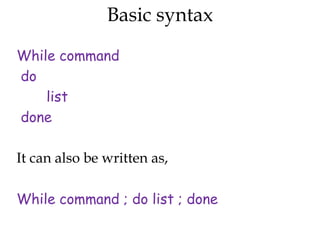
Basic syntax

While command
do
    list
done

It can also be written as,

While command ; do list ; done
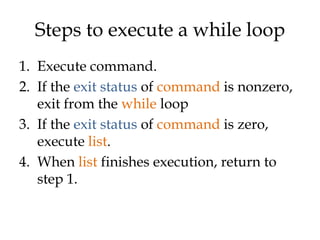
Steps to execute a while loop
1. Execute command.
2. If the exit status of command is nonzero,
   exit from the while loop
3. If the exit status of command is zero,
   execute list.
4. When list finishes execution, return to
   step 1.
For example,
                              The output looks like,
x=0                           0
while [ $x –lt 10 ]           1
do                            2
    echo $x                   3
     x=`echo “$x + 1” | bc`   4
done                          5
                              6
                              7
                              8
                              9
Example(2)
c=1                     Output,
while [ $c -le 5 ]      Welcome 1 times
 do                     Welcome 2 times
    echo "Welcome $c    Welcome 3 times
  times"                Welcome 4 times
    (( c++ ))           Welcome 5 times
 done
Nested while loop

• It is a loop in which a while loop will be a
  part of the body of another while loop.
• There is no restrictions for the number of
  nested while loops.
• But it will b better to avoid more than 5
  nested loops.
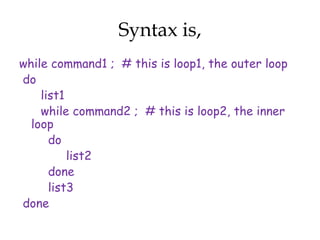
Syntax is,
while command1 ; # this is loop1, the outer loop
do
    list1
    while command2 ; # this is loop2, the inner
  loop
      do
          list2
      done
      list3
done
Example,

x=0
while [ "$x" -lt 10 ] ; # this is loop1
 do
    y="$x"
    while [ "$y" -ge 0 ] ; # this is loop2
     do
         echo "$y c"
         y=´echo "$y - 1" | bc´
     done
     echo
     x=´echo "$x + 1" | bc´
 done
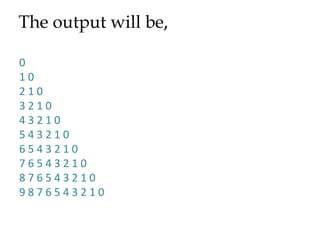
The output will be,

0
10
210
3210
43210
543210
6543210
76543210
876543210
9876543210
For loop


• The for loop is used to execute a set of
  commands repeatedly for each item in a
  list.
• One of its most common uses is in
  performing the same set of commands for
  a large number of files.
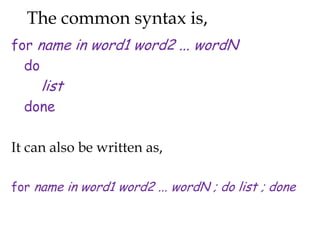
The common syntax is,
for name in word1 word2 ... wordN
  do
     list
  done

It can also be written as,

for name in word1 word2 ... wordN ; do list ; done
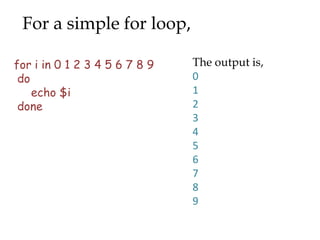
For a simple for loop,

for i in 0 1 2 3 4 5 6 7 8 9   The output is,
 do                            0
    echo $i                    1
 done                          2
                               3
                               4
                               5
                               6
                               7
                               8
                               9
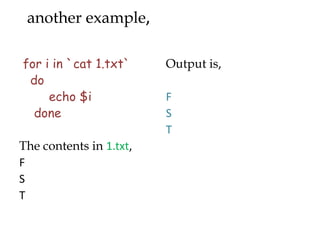
another example,

for i in `cat 1.txt`     Output is,
 do
     echo $i             F
  done                   S
                         T
The contents in 1.txt,
F
S
T
Example(3)
alphabet="a b c d e"          Output,
count=0                       a
for letter in $alphabet
                              b
 do
  count=`expr $count + 1`     c
  echo "Letter $count is      d
  [$letter]"                  e
 done
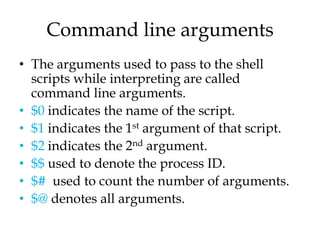
Command line arguments
• The arguments used to pass to the shell
  scripts while interpreting are called
  command line arguments.
• $0 indicates the name of the script.
• $1 indicates the 1st argument of that script.
• $2 indicates the 2nd argument.
• $$ used to denote the process ID.
• $# used to count the number of arguments.
• $@ denotes all arguments.
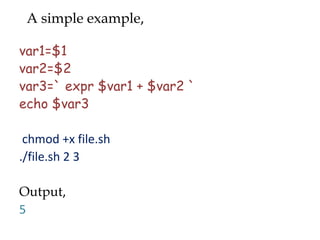
A simple example,

var1=$1
var2=$2
var3=` expr $var1 + $var2 `
echo $var3

 chmod +x file.sh
./file.sh 2 3

Output,
5
Using argument status,
var1=$1               chmod +x file1.sh
var2=$2              ./file1.sh 2 3
var3=`expr $var1 +    output,
  $var2`             5
if [$# -ne 2 ]
then                 ./file1.sh 2 3 4
echo “no”            Output,
exit 1               no
else
echo $var3
fi
Any Queries????
Thank You

Scripting ppt

  • 1.
    Presentation on LoopingConditions and Command Line Arguments
  • 2.
    Conditional loop • conditionalloop is a way for computer programs to repeat one or more various steps depending on conditions set either by the programmer initially or real-time by the actual program. • Basically a loop has a conditional statement or a command and body of that loop which has some list of commands or statements to be executed repeatedly.
  • 3.
    While Loop • Thewhile loop is used to execute a set of commands repeatedly until some condition occurs. • It is usually used when the value of a variable has to be manipulated repeatedly.
  • 4.
    Basic syntax While command do list done It can also be written as, While command ; do list ; done
  • 5.
    Steps to executea while loop 1. Execute command. 2. If the exit status of command is nonzero, exit from the while loop 3. If the exit status of command is zero, execute list. 4. When list finishes execution, return to step 1.
  • 6.
    For example, The output looks like, x=0 0 while [ $x –lt 10 ] 1 do 2 echo $x 3 x=`echo “$x + 1” | bc` 4 done 5 6 7 8 9
  • 7.
    Example(2) c=1 Output, while [ $c -le 5 ] Welcome 1 times do Welcome 2 times echo "Welcome $c Welcome 3 times times" Welcome 4 times (( c++ )) Welcome 5 times done
  • 8.
    Nested while loop •It is a loop in which a while loop will be a part of the body of another while loop. • There is no restrictions for the number of nested while loops. • But it will b better to avoid more than 5 nested loops.
  • 9.
    Syntax is, while command1; # this is loop1, the outer loop do list1 while command2 ; # this is loop2, the inner loop do list2 done list3 done
  • 10.
    Example, x=0 while [ "$x"-lt 10 ] ; # this is loop1 do y="$x" while [ "$y" -ge 0 ] ; # this is loop2 do echo "$y c" y=´echo "$y - 1" | bc´ done echo x=´echo "$x + 1" | bc´ done
  • 11.
    The output willbe, 0 10 210 3210 43210 543210 6543210 76543210 876543210 9876543210
  • 12.
    For loop • Thefor loop is used to execute a set of commands repeatedly for each item in a list. • One of its most common uses is in performing the same set of commands for a large number of files.
  • 13.
    The common syntaxis, for name in word1 word2 ... wordN do list done It can also be written as, for name in word1 word2 ... wordN ; do list ; done
  • 14.
    For a simplefor loop, for i in 0 1 2 3 4 5 6 7 8 9 The output is, do 0 echo $i 1 done 2 3 4 5 6 7 8 9
  • 15.
    another example, for iin `cat 1.txt` Output is, do echo $i F done S T The contents in 1.txt, F S T
  • 16.
    Example(3) alphabet="a b cd e" Output, count=0 a for letter in $alphabet b do count=`expr $count + 1` c echo "Letter $count is d [$letter]" e done
  • 17.
    Command line arguments •The arguments used to pass to the shell scripts while interpreting are called command line arguments. • $0 indicates the name of the script. • $1 indicates the 1st argument of that script. • $2 indicates the 2nd argument. • $$ used to denote the process ID. • $# used to count the number of arguments. • $@ denotes all arguments.
  • 18.
    A simple example, var1=$1 var2=$2 var3=`expr $var1 + $var2 ` echo $var3 chmod +x file.sh ./file.sh 2 3 Output, 5
  • 19.
    Using argument status, var1=$1 chmod +x file1.sh var2=$2 ./file1.sh 2 3 var3=`expr $var1 + output, $var2` 5 if [$# -ne 2 ] then ./file1.sh 2 3 4 echo “no” Output, exit 1 no else echo $var3 fi
  • 20.
  • 21.