SCREENSHOT AS A SERVICE
HELLO!
I am Cage Chung
I am here because I like to share my experiences.
You can find me at https://kaichu.io / QNAP 雲端應用部資深工程師
https://www.facebook.com/groups/GCPUG.TW/
https://plus.google.com/u/0/communities/116100913832589966421
[您知道”GCPUG”要怎麼唸嗎?為什麼會有一隻狗在 Logo裡面呢?]
Google Cloud Platform User Group的縮寫是GCPUG
GCPUG直接唸成G.C.P.U.G?當然可以!
但它也可以分開來,唸成 G.C. PUG喔~
Pug,指的是巴哥犬,所以 GCPUG的Logo中間才會有一隻可愛的巴哥犬喲。
下次聽到別人說G.C. PUG 的時候,您就可以大聲 說:「我也是G.C. PUG社團成員!」
Outline
◉ Waldo-gcp
◉ How to Screenshot
◉ Screenshot as service via GAE custom runtime
◉ Demo
◉ Study Info
Waldo-gcp
Let’s start with the first set of slides 1
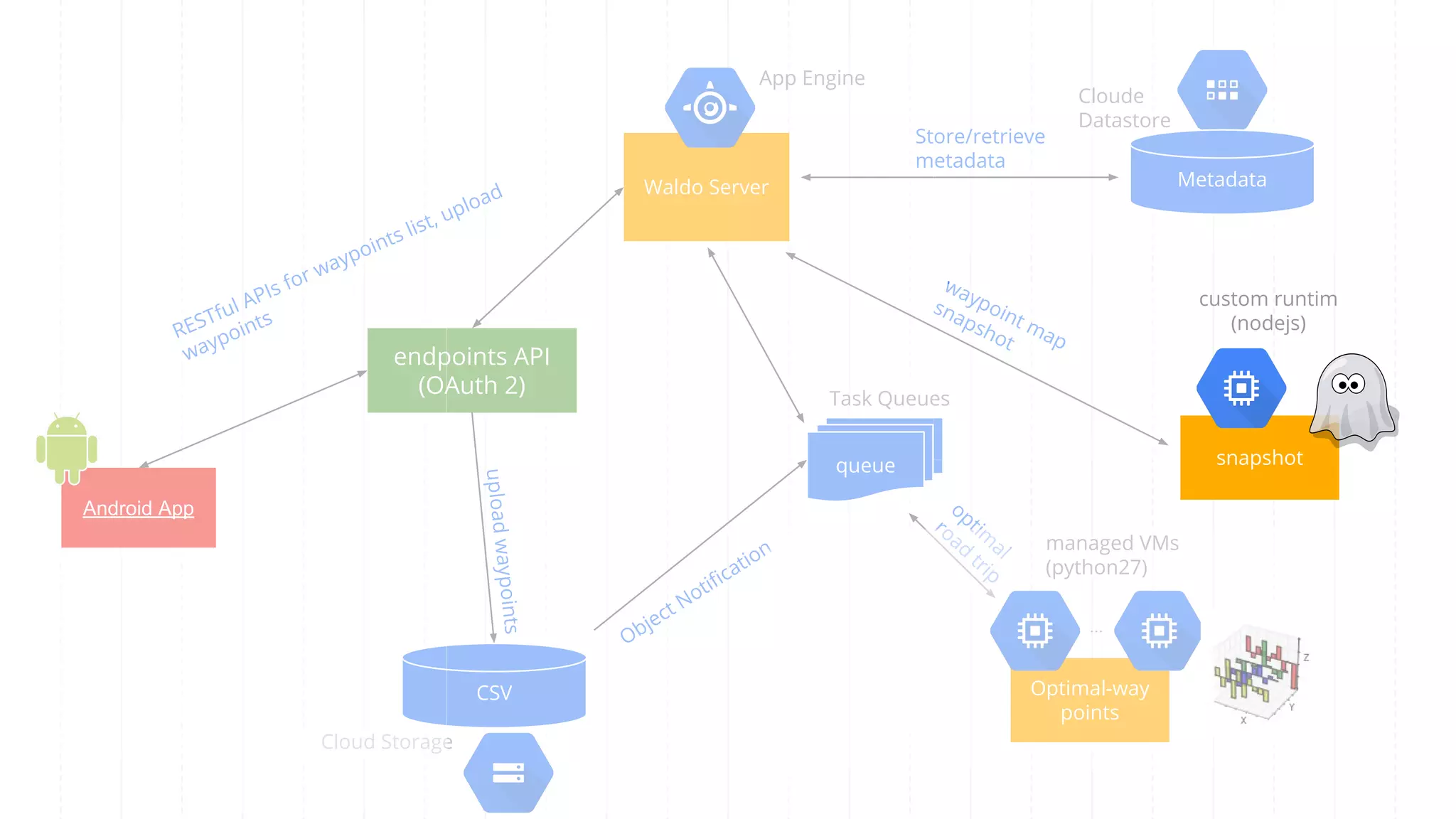
queue
MetadataWaldo Server
App Engine
Task Queues
Cloud Storage
Optimal-way
points
managed VMs
(python27)
...
endpoints API
(OAuth 2)
Object Notification
Cloude
Datastore
snapshot
custom runtim
(nodejs)
Android App
CSV
uploadwaypoints
Store/retrieve
metadata
waypoint map
snapshot
optim
al
road
trip
RESTful APIs for waypoints list, upload
waypoints
[waldo-gcp](https://waldo-gcp.appspot.com/)
Waldo-gcp
[waldo-gcp](https://waldo-gcp.appspot.com/)
Waldo-gcp
How to Screenshot
Let’s start with the second set of slides 2
Phamtonjs
// yahoo.com.tw.js
var page = require('webpage').create();
page.viewportSize = { width: 1440, height: 900 };
page.clipRect = { top: 0, left: 0, width: 1440, height: 900 };
page.open('http://yahoo.com.tw', function() {
page.render('yahoo.com.tw.png');
phantom.exit();
});
// execute
$ phantomjs yahoo.com.tw.js
[Screen Capture | PhantomJS](http://phantomjs.org/screen-capture.html)
Chromeless on AWS Lambda
const chromeless = new Chromeless({ remote: true })
const screenshot = await chromeless
.goto('http://yahoo.com.tw')
.scrollTo(0, 2000)
.screenshot()
console.log(screenshot)
await chromeless.end()
[graphcool/chromeless: Chrome automation made simple. Runs locally or headless on AWS Lambda.](https://github.com/graphcool/chromeless)
puppeteer
const puppeteer = require('puppeteer');
(async () => {
const browser = await puppeteer.launch();
const page = await browser.newPage();
await page.setViewport({width: 1440, height: 900});
await page.goto('http://yahoo.com.tw',
{ waitUntil: 'networkidle' });
await page.screenshot({
path: 'yahoo.com.tw.png'
});
browser.close();
})();
[GoogleChrome/puppeteer: Headless Chrome Node API](https://github.com/GoogleChrome/puppeteer)
Screenshot as service via GAE custom
runtime
Let’s start with the third set of slides 3
“
GAE screenshot service powered by
Express and PhantomJS.
app.yaml
runtime: custom
env: flex
service: screenshot
resources:
cpu: 1
memory_gb: 1
disk_size_gb: 10
manual_scaling:
instances: 1
handlers:
- url: /.*
script: app.js
Dockerfile
FROM launcher.gcr.io/google/debian8
RUN DEBIAN_FRONTEND=noninteractive apt-get update -y && apt-get install --no-install-recommends -y -q curl apt-utils
build-essential ca-certificates libfreetype6 libfontconfig1
RUN echo "deb http://http.debian.net/debian jessie-backports main" > /etc/apt/sources.list.d/backports.list && 
apt-get update -y && 
apt-get install -y --no-install-recommends fonts-noto fonts-noto-cjk locales-all && 
apt-get clean && 
apt-get autoclean && 
apt-get autoremove && 
rm -rf /var/lib/apt/lists/*
RUN mkdir /nodejs && curl http://nodejs.org/dist/v0.12.1/node-v0.12.1-linux-x64.tar.gz | tar xvzf - -C /nodejs
--strip-components=1
ENV PATH $PATH:/nodejs/bin
WORKDIR /app
ADD package.json /app/
RUN npm install
ADD . /app
ENTRYPOINT ["/nodejs/bin/npm", "start"]
package.json
{
"name": "screenshot-as-a-service",
"description": "Website screenshot service powered by node.js and phantomjs for Waldo-gcp",
"version": "1.1.0",
"repository": "https://github.com/cage1016/screenshot-as-a-service",
"engines": {
"node": ">=0.8.4"
},
"scripts": {
"start": "node app.js"
},
"dependencies": {
"phantomjs": "^1.9.16",
"express": "3.x",
"config": "0.4.15",
"request": "2.9.153"
}
}
dispatch.yaml
dispatch:
- url: "*/favicon.ico"
service: default
- url: "*/_ah/api/*"
service: default
- url: "*/waypoints/*"
service: waypoints
- url: "*/screenshot/*"
service: screenshot
- url: "*/googleae8f4bcce8bec00c.html"
service: ownership
- url: "*/*"
service: frontend
DEMO
Let’s start with the fourth set of slides 4
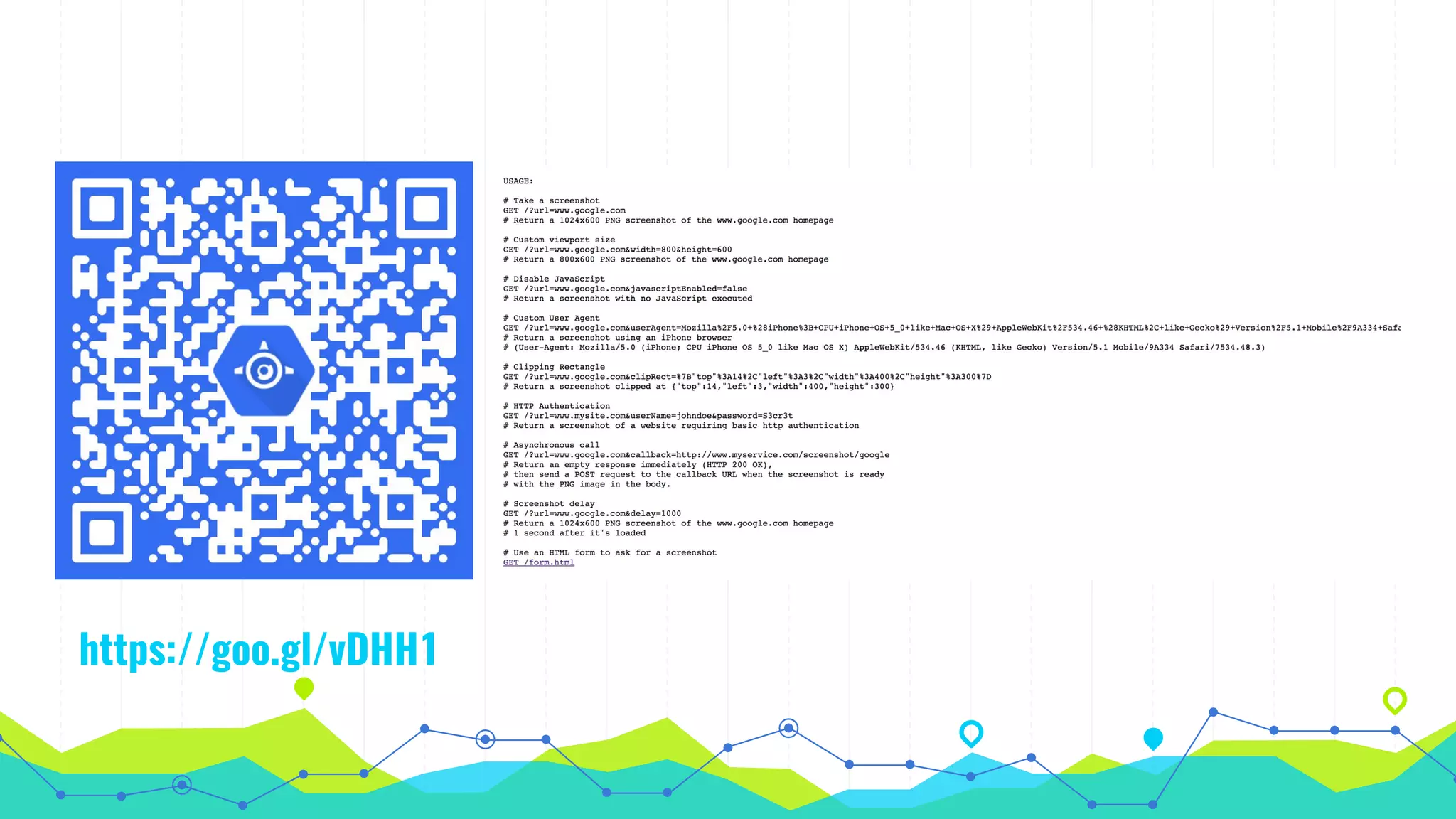
https://goo.gl/vDHH1o
Waldo-gcp
Trips and Tips
Let’s start with the fifth set of slides 5
“Puppeteer is more easier to build
screenshot as a service than
phantomjs
Study info
◉ GoogleChrome/puppeteer: Headless Chrome Node API -
https://github.com/GoogleChrome/puppeteer
◉ graphcool/chromeless: Chrome automation made simple. Runs
locally or headless on AWS Lambda. -
https://github.com/graphcool/chromeless
◉ cage1016/screenshot-as-a-service: Website screenshot service
powered by node.js and phantomjs -
https://github.com/cage1016/screenshot-as-a-service
◉ Screen Capture | PhantomJS -
http://phantomjs.org/screen-capture.html
THANKS!
Any questions?
You can find me at
https://kaichu.io / cage.chung@gmail.com

Screenshot as a service

  • 1.
  • 2.
    HELLO! I am CageChung I am here because I like to share my experiences. You can find me at https://kaichu.io / QNAP 雲端應用部資深工程師
  • 3.
    https://www.facebook.com/groups/GCPUG.TW/ https://plus.google.com/u/0/communities/116100913832589966421 [您知道”GCPUG”要怎麼唸嗎?為什麼會有一隻狗在 Logo裡面呢?] Google CloudPlatform User Group的縮寫是GCPUG GCPUG直接唸成G.C.P.U.G?當然可以! 但它也可以分開來,唸成 G.C. PUG喔~ Pug,指的是巴哥犬,所以 GCPUG的Logo中間才會有一隻可愛的巴哥犬喲。 下次聽到別人說G.C. PUG 的時候,您就可以大聲 說:「我也是G.C. PUG社團成員!」
  • 4.
    Outline ◉ Waldo-gcp ◉ Howto Screenshot ◉ Screenshot as service via GAE custom runtime ◉ Demo ◉ Study Info
  • 5.
    Waldo-gcp Let’s start withthe first set of slides 1
  • 6.
    queue MetadataWaldo Server App Engine TaskQueues Cloud Storage Optimal-way points managed VMs (python27) ... endpoints API (OAuth 2) Object Notification Cloude Datastore snapshot custom runtim (nodejs) Android App CSV uploadwaypoints Store/retrieve metadata waypoint map snapshot optim al road trip RESTful APIs for waypoints list, upload waypoints
  • 7.
  • 8.
  • 9.
    How to Screenshot Let’sstart with the second set of slides 2
  • 10.
    Phamtonjs // yahoo.com.tw.js var page= require('webpage').create(); page.viewportSize = { width: 1440, height: 900 }; page.clipRect = { top: 0, left: 0, width: 1440, height: 900 }; page.open('http://yahoo.com.tw', function() { page.render('yahoo.com.tw.png'); phantom.exit(); }); // execute $ phantomjs yahoo.com.tw.js [Screen Capture | PhantomJS](http://phantomjs.org/screen-capture.html)
  • 11.
    Chromeless on AWSLambda const chromeless = new Chromeless({ remote: true }) const screenshot = await chromeless .goto('http://yahoo.com.tw') .scrollTo(0, 2000) .screenshot() console.log(screenshot) await chromeless.end() [graphcool/chromeless: Chrome automation made simple. Runs locally or headless on AWS Lambda.](https://github.com/graphcool/chromeless)
  • 12.
    puppeteer const puppeteer =require('puppeteer'); (async () => { const browser = await puppeteer.launch(); const page = await browser.newPage(); await page.setViewport({width: 1440, height: 900}); await page.goto('http://yahoo.com.tw', { waitUntil: 'networkidle' }); await page.screenshot({ path: 'yahoo.com.tw.png' }); browser.close(); })(); [GoogleChrome/puppeteer: Headless Chrome Node API](https://github.com/GoogleChrome/puppeteer)
  • 13.
    Screenshot as servicevia GAE custom runtime Let’s start with the third set of slides 3
  • 14.
    “ GAE screenshot servicepowered by Express and PhantomJS.
  • 15.
    app.yaml runtime: custom env: flex service:screenshot resources: cpu: 1 memory_gb: 1 disk_size_gb: 10 manual_scaling: instances: 1 handlers: - url: /.* script: app.js
  • 16.
    Dockerfile FROM launcher.gcr.io/google/debian8 RUN DEBIAN_FRONTEND=noninteractiveapt-get update -y && apt-get install --no-install-recommends -y -q curl apt-utils build-essential ca-certificates libfreetype6 libfontconfig1 RUN echo "deb http://http.debian.net/debian jessie-backports main" > /etc/apt/sources.list.d/backports.list && apt-get update -y && apt-get install -y --no-install-recommends fonts-noto fonts-noto-cjk locales-all && apt-get clean && apt-get autoclean && apt-get autoremove && rm -rf /var/lib/apt/lists/* RUN mkdir /nodejs && curl http://nodejs.org/dist/v0.12.1/node-v0.12.1-linux-x64.tar.gz | tar xvzf - -C /nodejs --strip-components=1 ENV PATH $PATH:/nodejs/bin WORKDIR /app ADD package.json /app/ RUN npm install ADD . /app ENTRYPOINT ["/nodejs/bin/npm", "start"]
  • 17.
    package.json { "name": "screenshot-as-a-service", "description": "Websitescreenshot service powered by node.js and phantomjs for Waldo-gcp", "version": "1.1.0", "repository": "https://github.com/cage1016/screenshot-as-a-service", "engines": { "node": ">=0.8.4" }, "scripts": { "start": "node app.js" }, "dependencies": { "phantomjs": "^1.9.16", "express": "3.x", "config": "0.4.15", "request": "2.9.153" } }
  • 18.
    dispatch.yaml dispatch: - url: "*/favicon.ico" service:default - url: "*/_ah/api/*" service: default - url: "*/waypoints/*" service: waypoints - url: "*/screenshot/*" service: screenshot - url: "*/googleae8f4bcce8bec00c.html" service: ownership - url: "*/*" service: frontend
  • 19.
    DEMO Let’s start withthe fourth set of slides 4
  • 20.
  • 21.
  • 22.
    Trips and Tips Let’sstart with the fifth set of slides 5
  • 23.
    “Puppeteer is moreeasier to build screenshot as a service than phantomjs
  • 24.
    Study info ◉ GoogleChrome/puppeteer:Headless Chrome Node API - https://github.com/GoogleChrome/puppeteer ◉ graphcool/chromeless: Chrome automation made simple. Runs locally or headless on AWS Lambda. - https://github.com/graphcool/chromeless ◉ cage1016/screenshot-as-a-service: Website screenshot service powered by node.js and phantomjs - https://github.com/cage1016/screenshot-as-a-service ◉ Screen Capture | PhantomJS - http://phantomjs.org/screen-capture.html
  • 25.
    THANKS! Any questions? You canfind me at https://kaichu.io / cage.chung@gmail.com