Scientific
Visualization
M. Maxson
M.Ed
SCIVIS DESIGN PROCESS
Brainstorming, idea building, questioning
Sketching out by hand
Digitization
2D Design (Adobe Illustrator)
3D Design (3DsMax)
Saving to electronic portfolio
Publishing??
PROCESS
BRAINSTORMING, IDEA BUILDING,
QUESTIONING
SKETCHING OUT BY HAND
DIGITIZATION
 Adobe Illustrator
2D DESIGN
 Autodesk 3DsMax
3D DESIGN
There are many services on the
Internet for Creating and Saving
Electronic Portfolios of your
Visualizations.
Here’s an example using Google:
SAVING TO ELECTRONIC PORTFOLIO
March, 2016
**Google Drive
is constantly
changing it’s
look and
features.
EXAMPLE: CREATING A
PORTFOLIO WITH
GOOGLE DRIVE
CREATE A FOLDER ON YOUR GOOGLE
DRIVE
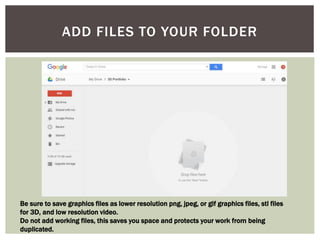
ADD FILES TO YOUR FOLDER
Be sure to save graphics files as lower resolution png, jpeg, or gif graphics files, stl files
for 3D, and low resolution video.
Do not add working files, this saves you space and protects your work from being
duplicated.
RIGHT CLICK ON THE FOLDER AND
CHOOSE “SHARE”
ENTER THE NAME OR EMAIL ADDRESS OF
WHO YOU’D LIKE TO SHARE WITH AND THE
PERMISSION YOU’D LIKE TO GIVE THEM
Click “Advanced to see the Advanced Settings
THIS WILL ALLOW YOU MANY OPTIONS
SUCH AS SHARING ON SOCIAL MEDIA
Find a Mentor
Find an Agent
Social Media
Exchanges
Blogs
Beware of “self-publisher” sites; they’ll make you
pay them to publish your work.
PUBLISHING

Scientific Visulization design process

Editor's Notes

  • #4 Come up with a question that your illustration would answer or evoke. Take down notes and sketches while doing this.
  • #6 Scan or create what you’ve sketched out.