Toby Penny
Task Brief 
For this task I have been asked to create a front 
page and contents page for a school newspaper. I 
am going to stick to using the main colour scheme 
of the school which is Red, White and Black. I will 
use Red White and Black throughout the project 
and any other colours I use will be used to make the 
particular thing stand out. I am going to use 
Photoshop for everything in this project. I used 
Microsoft PowerPoint to analyse the two school 
magazines, present the audience research and to 
analyse my school newsletter.
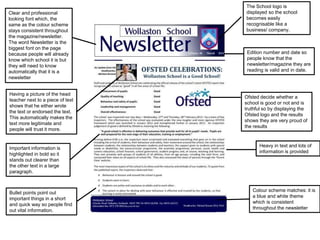
Having a picture of the head 
teacher next to a piece of text 
shows that he either wrote 
the text or endorsed the text. 
This automatically makes the 
text more legitimate and 
people will trust it more. 
The School logo is 
displayed so the school 
becomes easily 
recognisable like a 
business/ company. 
Ofsted decide whether a 
school is good or not and is 
truthful so by displaying the 
Ofsted logo and the results 
shows they are very proud of 
the results 
Important information is 
highlighted in bold so it 
stands out clearer than 
the other text in a large 
paragraph. 
Heavy in text and lots of 
information is provided 
Bullet points point out 
important things in a short 
and quick way so people find 
out vital information. 
Edition number and date so 
people know that the 
newsletter/magazine they are 
reading is valid and in date. 
Colour scheme matches: it is 
a blue and white theme 
which is consistent 
throughout the newsletter 
Clear and professional 
looking font which, the 
same as the colour scheme 
stays consistent throughout 
the magazine/newsletter. 
The word Newsletter is the 
biggest font on the page 
because people will already 
know which school it is but 
they will need to know 
automatically that it is a 
newsletter
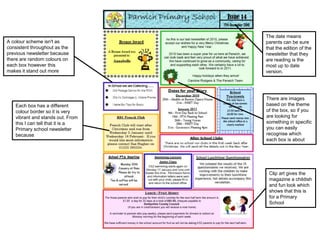
A colour scheme isn't as 
consistent throughout as the 
previous newsletter because 
there are random colours on 
each box however this 
makes it stand out more 
The date means 
parents can be sure 
that the edition of the 
newsletter that they 
are reading is the 
most up to date 
version. 
There are images 
based on the theme 
of the box, so if you 
are looking for 
something in specific 
you can easily 
recognise which 
each box is about 
Each box has a different 
colour border so it is very 
vibrant and stands out. From 
this I can tell that it is a 
Primary school newsletter 
because 
Clip art gives the 
magazine a childish 
and fun look which 
shows that this is 
for a Primary 
School
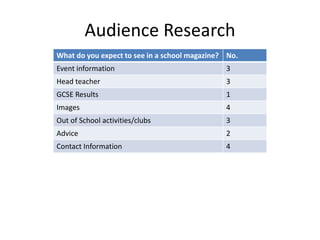
Audience Research 
What do you expect to see in a school magazine? No. 
Event information 3 
Head teacher 3 
GCSE Results 1 
Images 4 
Out of School activities/clubs 3 
Advice 2 
Contact Information 4
AS Media Studies Preliminary Task – School Magazine Front Page Proposal Form 
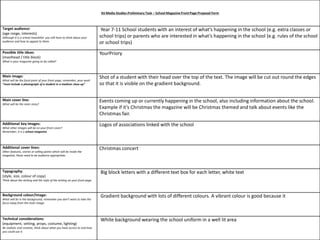
Target audience: 
(age range, interests) 
Although it is a school newsletter you still have to think about your 
audience and how to appeal to them. 
Year 7-11 School students with an interest of what’s happening in the school (e.g. extra classes or 
school trips) or parents who are interested in what’s happening in the school (e.g. rules of the school 
or school trips) 
Possible title ideas: 
(masthead / title block) 
What is your magazine going to be called? 
YourPriory 
Main image: 
What will be the focal point of your front page, remember, your work 
ā€œmust include a photograph of a student in a medium close-upā€ 
Shot of a student with their head over the top of the text. The image will be cut out round the edges 
so that it is visible on the gradient background. 
Main cover line: 
What will be the main story? 
Events coming up or currently happening in the school, also including information about the school. 
Example if it’s Christmas the magazine will be Christmas themed and talk about events like the 
Christmas fair. 
Additional key images: 
What other images will be on your front cover? 
Remember, it is a school magazine. 
Logos of associations linked with the school 
Additional cover lines: 
Other features, stories or selling points which will be inside the 
magazine, these need to be audience appropriate. 
Christmas concert 
Typography: 
(style, size, colour of copy) 
Think about the writing and the style of the writing on your front page. 
Big block letters with a different text box for each letter, white text 
Background colour/image: 
What will be in the background, remember you don’t want to take the 
focus away from the main image. 
Gradient background with lots of different colours. A vibrant colour is good because it 
Technical considerations: 
(equipment, setting, props, costume, lighting) 
Be realistic and creative, think about what you have access to and how 
you could use it. 
White background wearing the school uniform in a well lit area
Preliminary exercise: produce a front page and contents page of a school magazine. Front covers must include a 
photograph of a student in a medium close-up with appropriately laid out text and use of an image manipulation 
programme (Photoshop). 
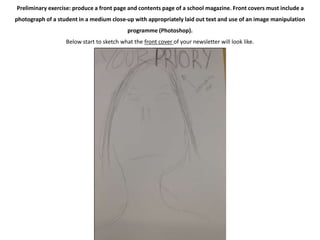
Below start to sketch what the front cover of your newsletter will look like.
Preliminary exercise: produce a front page and contents page of a school magazine. Front covers must include a 
photograph of a student in a medium close-up with appropriately laid out text and use of an image manipulation 
programme (Photoshop). 
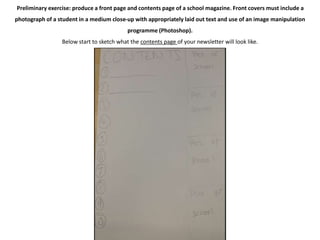
Below start to sketch what the contents page of your newsletter will look like.
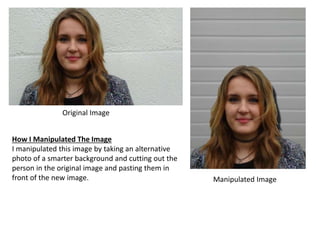
Original Image 
Manipulated Image 
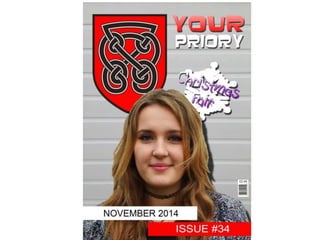
How I Manipulated The Image 
I manipulated this image by taking an alternative 
photo of a smarter background and cutting out the 
person in the original image and pasting them in 
front of the new image.
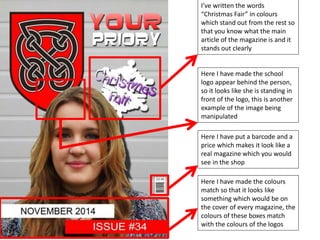
I’ve written the words 
ā€œChristmas Fairā€ in colours 
which stand out from the rest so 
that you know what the main 
article of the magazine is and it 
stands out clearly 
Here I have made the school 
logo appear behind the person, 
so it looks like she is standing in 
front of the logo, this is another 
example of the image being 
manipulated 
Here I have put a barcode and a 
price which makes it look like a 
real magazine which you would 
see in the shop 
Here I have made the colours 
match so that it looks like 
something which would be on 
the cover of every magazine, the 
colours of these boxes match 
with the colours of the logos
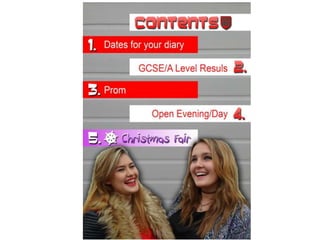
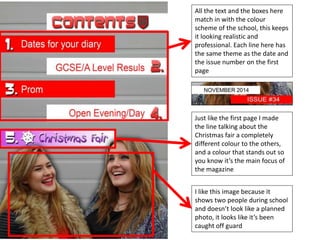
All the text and the boxes here 
match in with the colour 
scheme of the school, this keeps 
it looking realistic and 
professional. Each line here has 
the same theme as the date and 
the issue number on the first 
page 
Just like the first page I made 
the line talking about the 
Christmas fair a completely 
different colour to the others, 
and a colour that stands out so 
you know it’s the main focus of 
the magazine 
I like this image because it 
shows two people during school 
and doesn’t look like a planned 
photo, it looks like it’s been 
caught off guard
What I’ve learned in this task 
Most of the skills that I have learned in this task are 
within Photoshop. Prior to the task I already knew 
how to cut round an image to make the background 
transparent, but I learned how to tidy it up and 
make it look more professional by using the rubber 
tool, and also how to add the shadow effect. This is 
done with the Magnetic Lasso tool. I was already 
familiar with most of the tools on the program, 
however there are so many tools and there is still 
lots to be learned in Photoshop

School magazine treatment & planning

  • 1.
  • 2.
    Task Brief Forthis task I have been asked to create a front page and contents page for a school newspaper. I am going to stick to using the main colour scheme of the school which is Red, White and Black. I will use Red White and Black throughout the project and any other colours I use will be used to make the particular thing stand out. I am going to use Photoshop for everything in this project. I used Microsoft PowerPoint to analyse the two school magazines, present the audience research and to analyse my school newsletter.
  • 3.
    Having a pictureof the head teacher next to a piece of text shows that he either wrote the text or endorsed the text. This automatically makes the text more legitimate and people will trust it more. The School logo is displayed so the school becomes easily recognisable like a business/ company. Ofsted decide whether a school is good or not and is truthful so by displaying the Ofsted logo and the results shows they are very proud of the results Important information is highlighted in bold so it stands out clearer than the other text in a large paragraph. Heavy in text and lots of information is provided Bullet points point out important things in a short and quick way so people find out vital information. Edition number and date so people know that the newsletter/magazine they are reading is valid and in date. Colour scheme matches: it is a blue and white theme which is consistent throughout the newsletter Clear and professional looking font which, the same as the colour scheme stays consistent throughout the magazine/newsletter. The word Newsletter is the biggest font on the page because people will already know which school it is but they will need to know automatically that it is a newsletter
  • 4.
    A colour schemeisn't as consistent throughout as the previous newsletter because there are random colours on each box however this makes it stand out more The date means parents can be sure that the edition of the newsletter that they are reading is the most up to date version. There are images based on the theme of the box, so if you are looking for something in specific you can easily recognise which each box is about Each box has a different colour border so it is very vibrant and stands out. From this I can tell that it is a Primary school newsletter because Clip art gives the magazine a childish and fun look which shows that this is for a Primary School
  • 5.
    Audience Research Whatdo you expect to see in a school magazine? No. Event information 3 Head teacher 3 GCSE Results 1 Images 4 Out of School activities/clubs 3 Advice 2 Contact Information 4
  • 6.
    AS Media StudiesPreliminary Task – School Magazine Front Page Proposal Form Target audience: (age range, interests) Although it is a school newsletter you still have to think about your audience and how to appeal to them. Year 7-11 School students with an interest of what’s happening in the school (e.g. extra classes or school trips) or parents who are interested in what’s happening in the school (e.g. rules of the school or school trips) Possible title ideas: (masthead / title block) What is your magazine going to be called? YourPriory Main image: What will be the focal point of your front page, remember, your work ā€œmust include a photograph of a student in a medium close-upā€ Shot of a student with their head over the top of the text. The image will be cut out round the edges so that it is visible on the gradient background. Main cover line: What will be the main story? Events coming up or currently happening in the school, also including information about the school. Example if it’s Christmas the magazine will be Christmas themed and talk about events like the Christmas fair. Additional key images: What other images will be on your front cover? Remember, it is a school magazine. Logos of associations linked with the school Additional cover lines: Other features, stories or selling points which will be inside the magazine, these need to be audience appropriate. Christmas concert Typography: (style, size, colour of copy) Think about the writing and the style of the writing on your front page. Big block letters with a different text box for each letter, white text Background colour/image: What will be in the background, remember you don’t want to take the focus away from the main image. Gradient background with lots of different colours. A vibrant colour is good because it Technical considerations: (equipment, setting, props, costume, lighting) Be realistic and creative, think about what you have access to and how you could use it. White background wearing the school uniform in a well lit area
  • 7.
    Preliminary exercise: producea front page and contents page of a school magazine. Front covers must include a photograph of a student in a medium close-up with appropriately laid out text and use of an image manipulation programme (Photoshop). Below start to sketch what the front cover of your newsletter will look like.
  • 8.
    Preliminary exercise: producea front page and contents page of a school magazine. Front covers must include a photograph of a student in a medium close-up with appropriately laid out text and use of an image manipulation programme (Photoshop). Below start to sketch what the contents page of your newsletter will look like.
  • 9.
    Original Image ManipulatedImage How I Manipulated The Image I manipulated this image by taking an alternative photo of a smarter background and cutting out the person in the original image and pasting them in front of the new image.
  • 12.
    I’ve written thewords ā€œChristmas Fairā€ in colours which stand out from the rest so that you know what the main article of the magazine is and it stands out clearly Here I have made the school logo appear behind the person, so it looks like she is standing in front of the logo, this is another example of the image being manipulated Here I have put a barcode and a price which makes it look like a real magazine which you would see in the shop Here I have made the colours match so that it looks like something which would be on the cover of every magazine, the colours of these boxes match with the colours of the logos
  • 13.
    All the textand the boxes here match in with the colour scheme of the school, this keeps it looking realistic and professional. Each line here has the same theme as the date and the issue number on the first page Just like the first page I made the line talking about the Christmas fair a completely different colour to the others, and a colour that stands out so you know it’s the main focus of the magazine I like this image because it shows two people during school and doesn’t look like a planned photo, it looks like it’s been caught off guard
  • 14.
    What I’ve learnedin this task Most of the skills that I have learned in this task are within Photoshop. Prior to the task I already knew how to cut round an image to make the background transparent, but I learned how to tidy it up and make it look more professional by using the rubber tool, and also how to add the shadow effect. This is done with the Magnetic Lasso tool. I was already familiar with most of the tools on the program, however there are so many tools and there is still lots to be learned in Photoshop