SAP MEMORY MANAGEMENT
,WORKLOAD AND
PERFORMANCE ANALYSIS
Presented by :
(Sweta Prakash
Sahoo)
SAP MEMORY MANAGEMENT
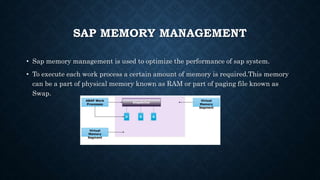
• Sap memory management is used to optimize the performance of sap system.
• To execute each work process a certain amount of memory is required.This memory
can be a part of physical memory known as RAM or part of paging file known as
Swap.
CONCEPT OF MEMORY
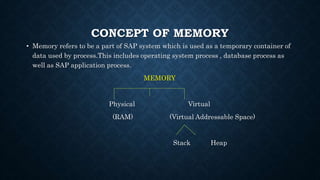
• Memory refers to be a part of SAP system which is used as a temporary container of
data used by process.This includes operating system process , database process as
well as SAP application process.
MEMORY
Physical Virtual
(RAM) (Virtual Addressable Space)
Stack Heap
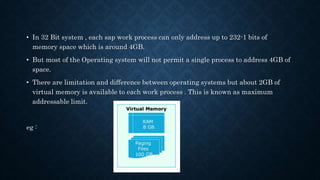
• In 32 Bit system , each sap work process can only address up to 232-1 bits of
memory space which is around 4GB.
• But most of the Operating system will not permit a single process to address 4GB of
space.
• There are limitation and difference between operating systems but about 2GB of
virtual memory is available to each work process . This is known as maximum
addressable limit.
eg :
SAP MEMORY
SAP ROLL AREA SAP EXTENDED MEMORY PRIVATE
MEMORY
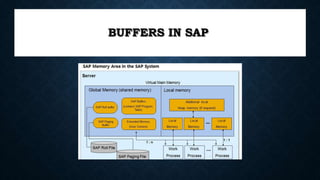
BUFFERS IN SAP
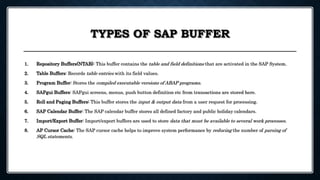
TYPES OF SAP BUFFER
1. Repository Buffers(NTAB): This buffer contains the table and field definitions that are activated in the SAP System.
2. Table Buffers: Records table entries with its field values.
3. Program Buffer: Stores the compiled executable versions of ABAP programs.
4. SAPgui Buffers: SAPgui screens, menus, push button definition etc from transactions are stored here.
5. Roll and Paging Buffers: This buffer stores the input & output data from a user request for processing.
6. SAP Calendar Buffer: The SAP calendar buffer stores all defined factory and public holiday calendars.
7. Import/Export Buffer: Import/export buffers are used to store data that must be available to several work processes.
8. AP Cursor Cache: The SAP cursor cache helps to improve system performance by reducing the number of parsing of
SQL statements.
HOW TO TUNE SAP BUFFER?
You can change, or tune, the sizes of buffers to optimize
performance for a particular hardware configuration.
You can use table buffering to fine-tune applications, that
is, some or all of the contents of infrequently changed
tables can be held in local buffers.
USE OF ST02 IN
BUFFER
MANAGEMENT
WORKLOAD ANALYSIS :
• Workload monitor is used to analyse statistical data for the ABAP kernel.
• ST03N transaction plays a vital role for workload analysis. It provides the data
stacks.
• If we are analyzing the system performance then first we have to start with the
workload overview.
• By this we can display the total values for all instances and compare the
performance of particular instances over a period of time.
• The analysis views and data helps us to find the source of performance problems
quickly and easily.
ST03N TRANSACTION :
• Transaction ST03N provides information on system performance , response time for
SAP , database and frontend and dialog steps information per user , per transaction.
• The informations available as a snapshot as well as aggregated over days , months
and weeks.
• This transaction provides critical data for trouble shooting SAP performance issue.
USE OF WORKLOAD MONITOR :
• We can use workload monitor to display following things i.e
(a)Number of instances configured for a system
(b)Number of users working on a different instances
(c)Response time distribution
(d)Distribution of workload by transaction steps , transaction
and applications
(e)Transaction with the largest response time and database
time
(f)Memory usage for each transaction or each user for dialog
step etc……..
FEATURES :
• The workload monitor interface is devided into 2 parts i.e
(1)Using the tree structure which is on left we can make settings
i.e
(a)Select the USER mode
(b)Select the period for which you want to display the
workload
(c)Select the different function and analytic view
(2)By a standardized ALV grid control we can do following things i.e
(a)Adjust the layout of data output
(b)Save user-specific views
(c)Find any information using sort and filter function
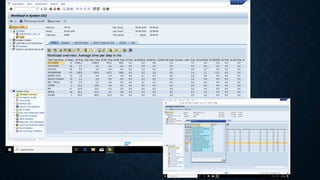
• By clicking on transaction profile we can see the all transaction executed on that day.
• The time profile information provides clues on the behavioral pattern of the system. You
can identify load and activity on the system by looking at the number of steps and the
average response time for each step
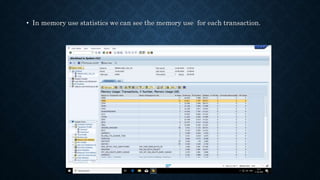
• In memory use statistics we can see the memory use for each transaction.
PERFORMANCE ANALYSIS USING ST06
• SAP provides ST06 for performance measurement of system by looking at the
hardware configuration.
• These elements include the CPU’s, Memory, Filesystem, Disk and LAN Activity
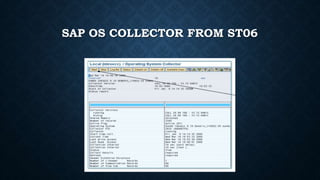
• ST06 uses the SAP OS Collector, which runs as a process in Unix and as a service in
Windows OS.
• The SAP OS Collector must be active in order for the information to be collected.
SAP OS COLLECTOR FROM ST06
SAP OS COLLECTOR IN UNIX
CPU USAGE
Sap memory management ,workload and performance analysis.pptx

Sap memory management ,workload and performance analysis.pptx

  • 1.
    SAP MEMORY MANAGEMENT ,WORKLOADAND PERFORMANCE ANALYSIS Presented by : (Sweta Prakash Sahoo)
  • 2.
    SAP MEMORY MANAGEMENT •Sap memory management is used to optimize the performance of sap system. • To execute each work process a certain amount of memory is required.This memory can be a part of physical memory known as RAM or part of paging file known as Swap.
  • 3.
    CONCEPT OF MEMORY •Memory refers to be a part of SAP system which is used as a temporary container of data used by process.This includes operating system process , database process as well as SAP application process. MEMORY Physical Virtual (RAM) (Virtual Addressable Space) Stack Heap
  • 4.
    • In 32Bit system , each sap work process can only address up to 232-1 bits of memory space which is around 4GB. • But most of the Operating system will not permit a single process to address 4GB of space. • There are limitation and difference between operating systems but about 2GB of virtual memory is available to each work process . This is known as maximum addressable limit. eg :
  • 5.
    SAP MEMORY SAP ROLLAREA SAP EXTENDED MEMORY PRIVATE MEMORY
  • 7.
  • 8.
    TYPES OF SAPBUFFER 1. Repository Buffers(NTAB): This buffer contains the table and field definitions that are activated in the SAP System. 2. Table Buffers: Records table entries with its field values. 3. Program Buffer: Stores the compiled executable versions of ABAP programs. 4. SAPgui Buffers: SAPgui screens, menus, push button definition etc from transactions are stored here. 5. Roll and Paging Buffers: This buffer stores the input & output data from a user request for processing. 6. SAP Calendar Buffer: The SAP calendar buffer stores all defined factory and public holiday calendars. 7. Import/Export Buffer: Import/export buffers are used to store data that must be available to several work processes. 8. AP Cursor Cache: The SAP cursor cache helps to improve system performance by reducing the number of parsing of SQL statements.
  • 9.
    HOW TO TUNESAP BUFFER? You can change, or tune, the sizes of buffers to optimize performance for a particular hardware configuration. You can use table buffering to fine-tune applications, that is, some or all of the contents of infrequently changed tables can be held in local buffers.
  • 10.
    USE OF ST02IN BUFFER MANAGEMENT
  • 14.
    WORKLOAD ANALYSIS : •Workload monitor is used to analyse statistical data for the ABAP kernel. • ST03N transaction plays a vital role for workload analysis. It provides the data stacks. • If we are analyzing the system performance then first we have to start with the workload overview. • By this we can display the total values for all instances and compare the performance of particular instances over a period of time. • The analysis views and data helps us to find the source of performance problems quickly and easily.
  • 15.
    ST03N TRANSACTION : •Transaction ST03N provides information on system performance , response time for SAP , database and frontend and dialog steps information per user , per transaction. • The informations available as a snapshot as well as aggregated over days , months and weeks. • This transaction provides critical data for trouble shooting SAP performance issue.
  • 16.
    USE OF WORKLOADMONITOR : • We can use workload monitor to display following things i.e (a)Number of instances configured for a system (b)Number of users working on a different instances (c)Response time distribution (d)Distribution of workload by transaction steps , transaction and applications (e)Transaction with the largest response time and database time (f)Memory usage for each transaction or each user for dialog step etc……..
  • 17.
    FEATURES : • Theworkload monitor interface is devided into 2 parts i.e (1)Using the tree structure which is on left we can make settings i.e (a)Select the USER mode (b)Select the period for which you want to display the workload (c)Select the different function and analytic view
  • 18.
    (2)By a standardizedALV grid control we can do following things i.e (a)Adjust the layout of data output (b)Save user-specific views (c)Find any information using sort and filter function
  • 20.
    • By clickingon transaction profile we can see the all transaction executed on that day.
  • 21.
    • The timeprofile information provides clues on the behavioral pattern of the system. You can identify load and activity on the system by looking at the number of steps and the average response time for each step
  • 22.
    • In memoryuse statistics we can see the memory use for each transaction.
  • 23.
    PERFORMANCE ANALYSIS USINGST06 • SAP provides ST06 for performance measurement of system by looking at the hardware configuration. • These elements include the CPU’s, Memory, Filesystem, Disk and LAN Activity • ST06 uses the SAP OS Collector, which runs as a process in Unix and as a service in Windows OS. • The SAP OS Collector must be active in order for the information to be collected.
  • 24.
  • 25.
  • 26.