PROFESIONALŲ KOMANDA
SAP S4HANA Group Reporting
v.1909
Presentatation March 2020
S4HANAGROUPREPORTING
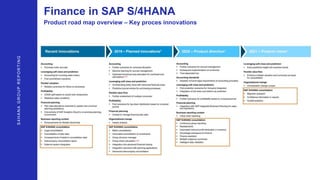
Finance in SAP S/4HANA
Product road map overview – Key proces innovations
S4HANAGROUPREPORTING
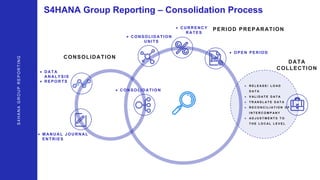
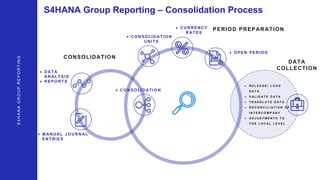
S4HANA Group Reporting – Consolidation Process
S4HANAGROUPREPORTING
 R E L E A S E / L O A D
D A T A
 V A L I D A T E D A T A
 T R A N S L A T E D A T A
 R E C O N C I L I A T I O N O F
I N T E R C O M P A N Y
 A D J U S T M E N T S T O
T H E L O C A L L E V E L
 CO NSO LI DATI O N
UNI TS
 O PEN PERI O D
 DATA
ANALYSI S
 REPO RTS
CONSOLIDATION
DATA
COLLECTION
PERIOD PREPARATION CURRENCY
RATES
 M ANUAL JO URNAL
ENTRI ES
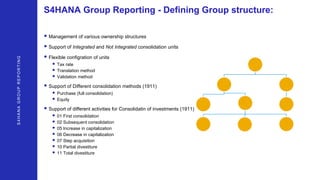
S4HANA Group Reporting - Defining Group structure:
S4HANAGROUPREPORTING
• Management of various ownership structures
• Support of Integrated and Not Integrated consolidation units
• Flexible configration of units
• Tax rate
• Translation method
• Validation method
• Support of Different consolidation methods (1911)
• Purchase (full consolidation)
• Equity
• Support of different activities for Consolidatin of investments (1911)
• 01 First consolidation
• 02 Subsequent consolidation
• 05 Increase in capitalization
• 06 Decrease in capitalization
• 07 Step acquisition
• 10 Partial divestiture
• 11 Total divestiture
S4HANAGROUPREPORTING
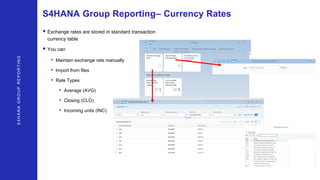
S4HANA Group Reporting– Currency Rates
• Exchange rates are stored in standard transaction
currency table
• You can
• Maintain exchange rate manually
• Import from files
• Rate Types
• Average (AVG)
• Closing (CLO)
• Incoming units (INC)
S4HANAGROUPREPORTING
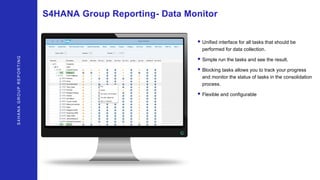
S4HANA Group Reporting- Data Monitor
• Unified interface for all tasks that should be
performed for data collection.
• Simple run the tasks and see the result.
• Blocking tasks allows you to track your progress
and monitor the status of tasks in the consolidation
process.
• Flexible and configurable
S4HANAGROUPREPORTING
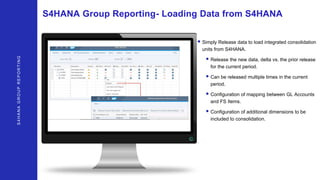
S4HANA Group Reporting- Loading Data from S4HANA
• Simply Release data to load integrated consolidation
units from S4HANA.
• Release the new data, delta vs. the prior release
for the current period.
• Can be released multiple times in the current
period.
• Configuration of mapping between GL Accounts
and FS Items.
• Configuration of additional dimensions to be
included to consolidation.
S4HANAGROUPREPORTING
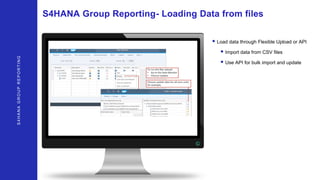
S4HANA Group Reporting- Loading Data from files
• Load data through Flexible Upload or API
• Import data from CSV files
• Use API for bulk import and update
S4HANAGROUPREPORTING
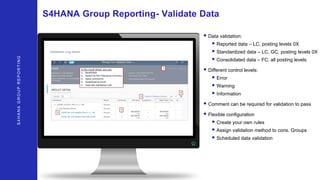
S4HANA Group Reporting- Validate Data
• Data validation:
• Reported data – LC, posting levels 0X
• Standardized data – LC, GC, posting levels 0X
• Consolidated data – FC, all posting levels
• Different control levels:
• Error
• Warning
• Information
• Comment can be required for validation to pass
• Flexible configuration
• Create your own rules
• Assign validation method to cons. Groups
• Scheduled data validation
S4HANAGROUPREPORTING
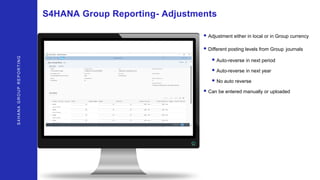
S4HANA Group Reporting- Adjustments
• Adjustment either in local or in Group currency
• Different posting levels from Group journals
• Auto-reverse in next period
• Auto-reverse in next year
• No auto reverse
• Can be entered manually or uploaded
S4HANAGROUPREPORTING
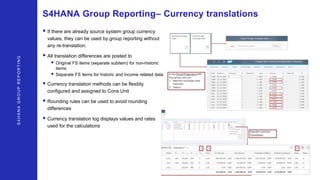
S4HANA Group Reporting– Currency translations
• If there are already source system group currency
values, they can be used by group reporting without
any re-translation.
• All translation differences are posted to
• Original FS items (separate subitem) for non-historic
items
• Separate FS items for historic and income related data
• Currency translation methods can be flexibly
configured and assigned to Cons Unit
• Rounding rules can be used to avoid rounding
differences
• Currency translation log displays values and rates
used for the calculations
S4HANAGROUPREPORTING
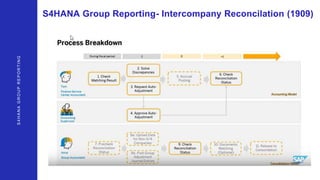
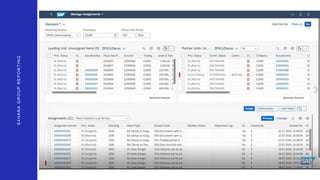
S4HANA Group Reporting- Intercompany Reconcilation (1909)
S4HANAGROUPREPORTING
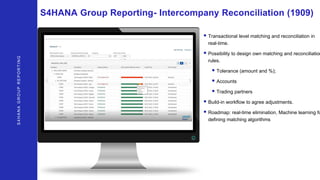
S4HANA Group Reporting- Intercompany Reconciliation (1909)
• Transactional level matching and reconciliation in
real-time.
• Possibility to design own matching and reconciliation
rules.
• Tolerance (amount and %);
• Accounts
• Trading partners
• Build-in workflow to agree adjustments.
• Roadmap: real-time elimination, Machine learning fo
defining matching algorithms
S4HANAGROUPREPORTING
S4HANA Group Reporting- Local Reports
• Detalisation of company BS ir PL reports by
movements and consolidation units
• Flexible data analysis
• Analysis of currency translation differences
S4HANAGROUPREPORTING
S4HANA Group Reporting- Local Reports
• Detalisation of company BS ir PL reports by
movements and consolidation units
• Flexible data analysis
• Analysis of currency translation differences
S4HANA Group Reporting – Consolidation Process
S4HANAGROUPREPORTING
 R E L E A S E / L O A D
D A T A
 V A L I D A T E D A T A
 T R A N S L A T E D A T A
 R E C O N C I L I A T I O N O F
I N T E R C O M P A N Y
 A D J U S T M E N T S T O
T H E L O C A L L E V E L
 CO NSO LI DATI O N
UNI TS
 O PEN PERI O D
 DATA
ANALYSI S
 REPO RTS
CONSOLIDATION
DATA
COLLECTION
PERIOD PREPARATION CURRENCY
RATES
 M ANUAL JO URNAL
ENTRI ES
S4HANAGROUPREPORTING
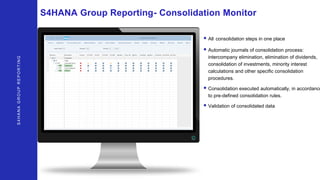
S4HANA Group Reporting- Consolidation Monitor
• All consolidation steps in one place
• Automatic journals of consolidation process:
intercompany elimination, elimination of dividends,
consolidation of investments, minority interest
calculations and other specific consolidation
procedures.
• Consolidation executed automatically, in accordance
to pre-defined consolidation rules.
• Validation of consolidated data
S4HANAGROUPREPORTING
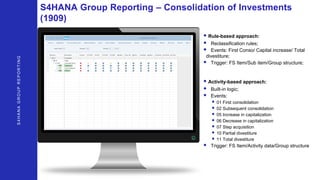
S4HANA Group Reporting – Consolidation of Investments
(1909)
• Rule-based approach:
• Reclassification rules;
• Events: First Conso/ Capital increase/ Total
divestiture;
• Trigger: FS Item/Sub item/Group structure;
• Activity-based approach:
• Built-in logic;
• Events:
• 01 First consolidation
• 02 Subsequent consolidation
• 05 Increase in capitalization
• 06 Decrease in capitalization
• 07 Step acquisition
• 10 Partial divestiture
• 11 Total divestiture
• Trigger: FS Item/Activity data/Group structure
S4HANAGROUPREPORTING
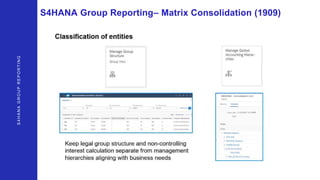
S4HANA Group Reporting– Matrix Consolidation (1909)
S4HANAGROUPREPORTING
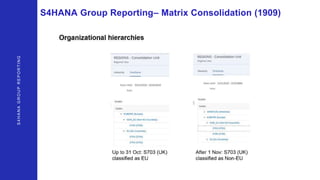
S4HANA Group Reporting– Matrix Consolidation (1909)
S4HANAGROUPREPORTING
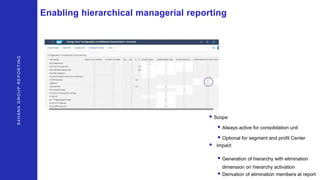
Enabling hierarchical managerial reporting
• Scope
• Always active for consolidation unit
• Optional for segment and profit Center
• Impact
• Generation of hierarchy with elimination
dimension on hierarchy activation
• Derivation of elimination members at report
S4HANAGROUPREPORTING
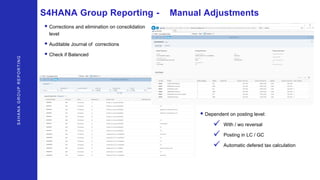
S4HANA Group Reporting - Manual Adjustments
• Corrections and elimination on consolidation
level
• Auditable Journal of corrections
• Check if Balanced
• Dependent on posting level:
 With / wo reversal
 Posting in LC / GC
 Automatic defered tax calculation
S4HANAGROUPREPORTING
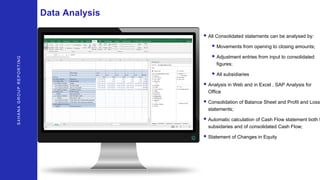
Data Analysis
• All Consolidated statements can be analysed by:
• Movements from opening to closing amounts;
• Adjustment entries from input to consolidated
figures;
• All subsidiaries
• Analysis in Web and in Excel , SAP Analysis for
Office
• Consolidation of Balance Sheet and Profit and Loss
statements;
• Automatic calculation of Cash Flow statement both f
subsidaries and of consolidated Cash Flow;
• Statement of Changes in Equity
Kontakt
SAP SALES MANAGER
+48 504 403 810
psiwicki@alna.com
Paweł Siwicki

About Group reporting

  • 1.
    PROFESIONALŲ KOMANDA SAP S4HANAGroup Reporting v.1909 Presentatation March 2020
  • 2.
  • 3.
  • 4.
    Finance in SAPS/4HANA Product road map overview – Key proces innovations S4HANAGROUPREPORTING
  • 5.
    S4HANA Group Reporting– Consolidation Process S4HANAGROUPREPORTING  R E L E A S E / L O A D D A T A  V A L I D A T E D A T A  T R A N S L A T E D A T A  R E C O N C I L I A T I O N O F I N T E R C O M P A N Y  A D J U S T M E N T S T O T H E L O C A L L E V E L  CO NSO LI DATI O N  CO NSO LI DATI O N UNI TS  O PEN PERI O D  DATA ANALYSI S  REPO RTS CONSOLIDATION DATA COLLECTION PERIOD PREPARATION CURRENCY RATES  M ANUAL JO URNAL ENTRI ES
  • 6.
    S4HANA Group Reporting- Defining Group structure: S4HANAGROUPREPORTING • Management of various ownership structures • Support of Integrated and Not Integrated consolidation units • Flexible configration of units • Tax rate • Translation method • Validation method • Support of Different consolidation methods (1911) • Purchase (full consolidation) • Equity • Support of different activities for Consolidatin of investments (1911) • 01 First consolidation • 02 Subsequent consolidation • 05 Increase in capitalization • 06 Decrease in capitalization • 07 Step acquisition • 10 Partial divestiture • 11 Total divestiture
  • 7.
    S4HANAGROUPREPORTING S4HANA Group Reporting–Currency Rates • Exchange rates are stored in standard transaction currency table • You can • Maintain exchange rate manually • Import from files • Rate Types • Average (AVG) • Closing (CLO) • Incoming units (INC)
  • 8.
    S4HANAGROUPREPORTING S4HANA Group Reporting-Data Monitor • Unified interface for all tasks that should be performed for data collection. • Simple run the tasks and see the result. • Blocking tasks allows you to track your progress and monitor the status of tasks in the consolidation process. • Flexible and configurable
  • 9.
    S4HANAGROUPREPORTING S4HANA Group Reporting-Loading Data from S4HANA • Simply Release data to load integrated consolidation units from S4HANA. • Release the new data, delta vs. the prior release for the current period. • Can be released multiple times in the current period. • Configuration of mapping between GL Accounts and FS Items. • Configuration of additional dimensions to be included to consolidation.
  • 10.
    S4HANAGROUPREPORTING S4HANA Group Reporting-Loading Data from files • Load data through Flexible Upload or API • Import data from CSV files • Use API for bulk import and update
  • 11.
    S4HANAGROUPREPORTING S4HANA Group Reporting-Validate Data • Data validation: • Reported data – LC, posting levels 0X • Standardized data – LC, GC, posting levels 0X • Consolidated data – FC, all posting levels • Different control levels: • Error • Warning • Information • Comment can be required for validation to pass • Flexible configuration • Create your own rules • Assign validation method to cons. Groups • Scheduled data validation
  • 12.
    S4HANAGROUPREPORTING S4HANA Group Reporting-Adjustments • Adjustment either in local or in Group currency • Different posting levels from Group journals • Auto-reverse in next period • Auto-reverse in next year • No auto reverse • Can be entered manually or uploaded
  • 13.
    S4HANAGROUPREPORTING S4HANA Group Reporting–Currency translations • If there are already source system group currency values, they can be used by group reporting without any re-translation. • All translation differences are posted to • Original FS items (separate subitem) for non-historic items • Separate FS items for historic and income related data • Currency translation methods can be flexibly configured and assigned to Cons Unit • Rounding rules can be used to avoid rounding differences • Currency translation log displays values and rates used for the calculations
  • 14.
    S4HANAGROUPREPORTING S4HANA Group Reporting-Intercompany Reconcilation (1909)
  • 15.
  • 16.
    S4HANAGROUPREPORTING S4HANA Group Reporting-Intercompany Reconciliation (1909) • Transactional level matching and reconciliation in real-time. • Possibility to design own matching and reconciliation rules. • Tolerance (amount and %); • Accounts • Trading partners • Build-in workflow to agree adjustments. • Roadmap: real-time elimination, Machine learning fo defining matching algorithms
  • 17.
    S4HANAGROUPREPORTING S4HANA Group Reporting-Local Reports • Detalisation of company BS ir PL reports by movements and consolidation units • Flexible data analysis • Analysis of currency translation differences
  • 18.
    S4HANAGROUPREPORTING S4HANA Group Reporting-Local Reports • Detalisation of company BS ir PL reports by movements and consolidation units • Flexible data analysis • Analysis of currency translation differences
  • 19.
    S4HANA Group Reporting– Consolidation Process S4HANAGROUPREPORTING  R E L E A S E / L O A D D A T A  V A L I D A T E D A T A  T R A N S L A T E D A T A  R E C O N C I L I A T I O N O F I N T E R C O M P A N Y  A D J U S T M E N T S T O T H E L O C A L L E V E L  CO NSO LI DATI O N  CO NSO LI DATI O N UNI TS  O PEN PERI O D  DATA ANALYSI S  REPO RTS CONSOLIDATION DATA COLLECTION PERIOD PREPARATION CURRENCY RATES  M ANUAL JO URNAL ENTRI ES
  • 20.
    S4HANAGROUPREPORTING S4HANA Group Reporting-Consolidation Monitor • All consolidation steps in one place • Automatic journals of consolidation process: intercompany elimination, elimination of dividends, consolidation of investments, minority interest calculations and other specific consolidation procedures. • Consolidation executed automatically, in accordance to pre-defined consolidation rules. • Validation of consolidated data
  • 21.
    S4HANAGROUPREPORTING S4HANA Group Reporting– Consolidation of Investments (1909) • Rule-based approach: • Reclassification rules; • Events: First Conso/ Capital increase/ Total divestiture; • Trigger: FS Item/Sub item/Group structure; • Activity-based approach: • Built-in logic; • Events: • 01 First consolidation • 02 Subsequent consolidation • 05 Increase in capitalization • 06 Decrease in capitalization • 07 Step acquisition • 10 Partial divestiture • 11 Total divestiture • Trigger: FS Item/Activity data/Group structure
  • 22.
  • 23.
  • 24.
    S4HANAGROUPREPORTING Enabling hierarchical managerialreporting • Scope • Always active for consolidation unit • Optional for segment and profit Center • Impact • Generation of hierarchy with elimination dimension on hierarchy activation • Derivation of elimination members at report
  • 25.
    S4HANAGROUPREPORTING S4HANA Group Reporting- Manual Adjustments • Corrections and elimination on consolidation level • Auditable Journal of corrections • Check if Balanced • Dependent on posting level:  With / wo reversal  Posting in LC / GC  Automatic defered tax calculation
  • 26.
    S4HANAGROUPREPORTING Data Analysis • AllConsolidated statements can be analysed by: • Movements from opening to closing amounts; • Adjustment entries from input to consolidated figures; • All subsidiaries • Analysis in Web and in Excel , SAP Analysis for Office • Consolidation of Balance Sheet and Profit and Loss statements; • Automatic calculation of Cash Flow statement both f subsidaries and of consolidated Cash Flow; • Statement of Changes in Equity
  • 27.
    Kontakt SAP SALES MANAGER +48504 403 810 psiwicki@alna.com Paweł Siwicki

Editor's Notes

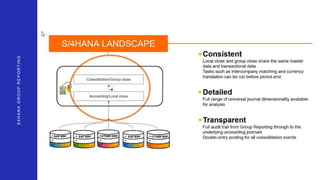
  • #3 So today we will speak about pretty new SAP product integrated to S4HANA finance- group consolidation.
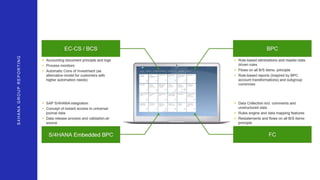
  • #4 Previously SAP had 4 different products for consolidation: BCS which was integrated with old SAP , BPC which is rather popular and propogated by SAP tool for planning and consolidation, FC which is more niche , was aquired from France company Cartesis many years ago and that because still more popular in France. It have very powerfull and flexible consolidation engine and is suitable for large and complex consolidations. S4HANA BPC which is the same BPC but more integrated with S4HANA So now, SAP combined all this together, took from each tool the best it had and created new Griyo Consolidation. What we would like to stress now; as Pawel already mentioned, we have the practice expirience with consolidation in almost all this tools and know all the principles that were taked to new Group Reporting. So for us is really easier to understand this new tool and to handle new projects based on the previous expirience
  • #5 SAP Group reporting is pretty new. SAP took iterational principle for its development. Som, of course the changes from version to versiinb currently are not so small. But from another hand, it is just new features on the same base that is not changed in principle. That becase, although the new 1909 version is available already from September, we will provide you today the demo of 1809, just explaining and showing the differences using not live system, but other tools.
  • #6 So here is a consolidation process using system. Actually, consolidation is a circle that never ends as result of previous consolidation is become a base for a new one. So everything begins when the person responsible for consolidation opens the consolidation period. For this he should copy opening balances from the pervious period. So he runs the automatic job that performs this job and starts the process to let everyone know that consolidation begins. Immediately after process starts each in the Groups who is responsible for data providing for consolidation receives email messages with link where they should go to connect to the system. When opening this link they have exact list of actions what they should do in the current consolidation circle: what data to provide, which processes to run, what check etc.
  • #7 With S/4HANA Cloud for group reporting 1902, we release two new apps to help you manage your group structure: The first — Manage Group Structure, Group View — provides a group structure maintenance by group view The second — Manage Group Structure, Unit View — by unit view With these two apps, you can manage the assignments of consolidation units to consolidation groups. You can also define the relevant consolidation settings for these assignments, such as the period of the first consolidation, the period of the divestiture, and the consolidation method. Our Manage Group Structure apps deliver on the following key features: Display a consolidation group and its assignments Display a consolidation unit and the consolidation groups it is assigned to Assign consolidation units to a consolidation group Edit or delete assignments Create your user-specific views in addition to the standard view One-click switch from group view to unit view and vice versa Export to Excel
  • #8 Possibility of converting according to the indicated exchange rate tables from the currency of unit data into the currency of the group DEMO????
  • #9 Here is example how the steps for users can look like. Each step on the left consist of several actions and each action is the link to exact place in the system when it will be performed – in this case when the user press to Balance Sheet the Excel with BS data entry form is opened with all needed parameters. So these actions of course depends on the Group structure. ERP systems used etc. For example if all the Group have the common ERP system, actuals can be loaded centrally by Consolidation administrator. However if companies have different ERP systems they can make data import from files or enter data manually. When the data loaded they can make adjustments in case ERP data have some inconsistency – of course here also depends on Group politics if such adjustments are allowed. Each company provide intercompany transactions – meaning operations with other companies in the Groups. And the system allows to view reconciled information already on the stage of data entry. Furthermore, system provides a set of automatic validation controls to make sure that data is correct – from the obvious that assets are equal to liabilities to more complex. And the responsible cannot submit the data till all the blocking controls are passed. This allows to ensure that all the data that is provided to consolidation is 100% good and consistent. And that is solved automatically already on the level of company, this is not headache of headquarter accountant. So only after the company’s data is checked it can be submitted. And the HQ receive it for approval. He can reject the data in case something is still wrong or can correct it by himself if needed – this also is configurable and depends on Group process. And during all the data process of data import the HQ can monitor data entry process: review which companies are already finished which are still in progress and who is responsible for the data entry.
  • #10 Direct integration with the source ERP system based on a group chart of accounts Possibility of downloading unit data for the needs of consolidation according to various needs (financial consolidation versus management) Possibility of supplying unit data with a file
  • #11 Direct integration with the source ERP system based on a group chart of accounts Possibility of downloading unit data for the needs of consolidation according to various needs (financial consolidation versus management) Possibility of supplying unit data with a file
  • #12 Data quality is essential for effective and efficient consolidation
  • #13 Data quality is essential for effective and efficient consolidation
  • #14 Possibility of converting according to the indicated exchange rate tables from the currency of unit data into the currency of the group DEMO????
  • #15 Possibility of converting according to the indicated exchange rate tables from the currency of unit data into the currency of the group DEMO????
  • #16 Possibility of converting according to the indicated exchange rate tables from the currency of unit data into the currency of the group DEMO????
  • #17 Possibility of converting according to the indicated exchange rate tables from the currency of unit data into the currency of the group DEMO????
  • #18 The ability to automatically move and update repetitive corrections from year to year
  • #19 The ability to automatically move and update repetitive corrections from year to year
  • #20 So here is a consolidation process using system. Actually, consolidation is a circle that never ends as result of previous consolidation is become a base for a new one. So everything begins when the person responsible for consolidation opens the consolidation period. For this he should copy opening balances from the pervious period. So he runs the automatic job that performs this job and starts the process to let everyone know that consolidation begins. Immediately after process starts each in the Groups who is responsible for data providing for consolidation receives email messages with link where they should go to connect to the system. When opening this link they have exact list of actions what they should do in the current consolidation circle: what data to provide, which processes to run, what check etc.
  • #21 The ability to automatically move and update repetitive corrections from year to year
  • #22 The ability to automatically move and update repetitive corrections from year to year
  • #23 Possibility of performing the consolidation process in the multi-level structure of the capital group financial consolidation versus management
  • #24 Possibility of performing the consolidation process in the multi-level structure of the capital group financial consolidation versus management
  • #25 Possibility of performing the consolidation process in the multi-level structure of the capital group financial consolidation versus management
  • #26 The ability to automatically move and update repetitive corrections from year to year Possibility to make the following corrections: adjustment of trade receivables and liabilities (short and long term) loan correction income / expense adjustment correction of margin calculation on inventory * correction of margin calculation on fixed assets correction (calculation and accounting) of deferred tax in the scope of consolidation adjustments korekta dot.odpisów i rezerw adjustment equity / minority capital / goodwill/ shares correction of goodwill write-off correction of margin depreciation on fixed assets   in-kind correction
  • #27 Possibility to report unit data in the consolidation module The ability to present the structure of consolidation adjustments Possibility of preparing a balance sheet / income statement / cash flow based on consolidated data Possibility to show the consistency of corrections within the report over the reporting years / periods