SAP FI
General Ledger
Table of Contents
 GL Overview
 Sub Processes
Master Data
Transaction Processing
Account Analysis / Reconciliation
Periodic Processing
Reporting
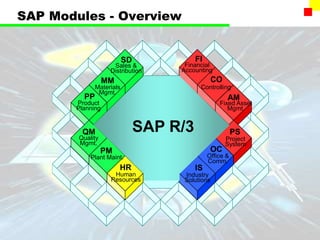
SAP Modules - Overview
Sales &
Distribution
SD
MM
PP
QM
PM
HR
FI
CO
AM
PS
OC
IS
Materials
Mgmt.
Product
Planning
Quality
Mgmt.
Plant Maint.
Human
Resources
Financial
Accounting
Controlling
Fixed Asset
Mgmt.
Project
System
Office &
Comm.
Industry
Solutions
SAP R/3
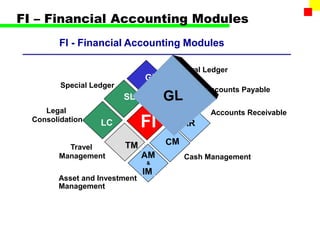
FI – Financial Accounting Modules
FI - Financial Accounting Modules
FI
Accounts Payable
Cash Management
Special Ledger
LC
Legal
Consolidation
TM
Travel
Management
Asset and Investment
Management
General Ledger
Accounts Receivable
Financial Accounting / Controlling
 Financial Accounting
• Legal / Statutory Accounts
• Standard Ledgers
• Master Data Integrates with Controlling
 Controlling
• Management Accounts
• Manage Budget Expenditure
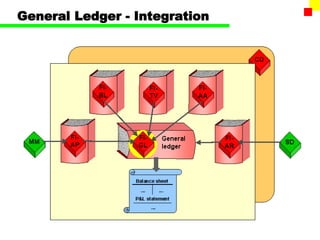
General Ledger - Integration
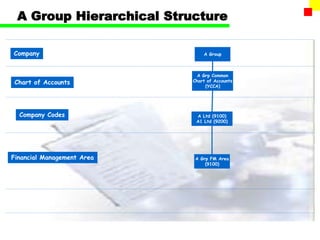
A Group Hierarchical Structure
A Grp Common
Chart of Accounts
(YCCA)
Company
Chart of Accounts
Company Codes
Financial Management Area A Grp FM Area
(9100)
A Ltd (9100)
A1 Ltd (9200)
A Group
Chart of Accounts
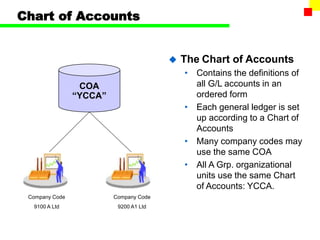
 The Chart of Accounts
• Contains the definitions of
all G/L accounts in an
ordered form
• Each general ledger is set
up according to a Chart of
Accounts
• Many company codes may
use the same COA
• All A Grp. organizational
units use the same Chart
of Accounts: YCCA.
COA
“YCCA”
Company Code
9100 A Ltd
Company Code
9200 A1 Ltd
Company Code
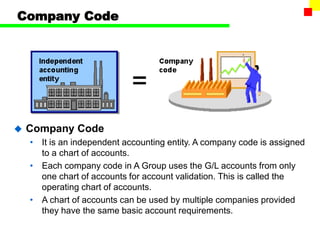
 Company Code
• It is an independent accounting entity. A company code is assigned
to a chart of accounts.
• Each company code in A Group uses the G/L accounts from only
one chart of accounts for account validation. This is called the
operating chart of accounts.
• A chart of accounts can be used by multiple companies provided
they have the same basic account requirements.
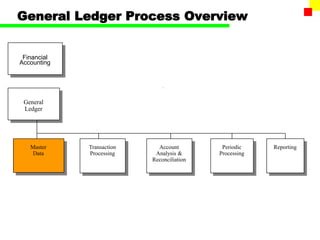
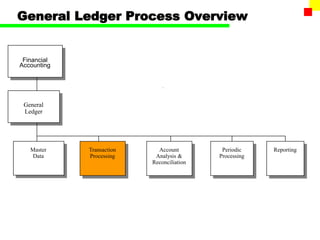
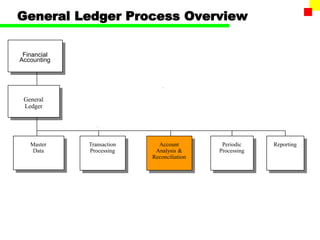
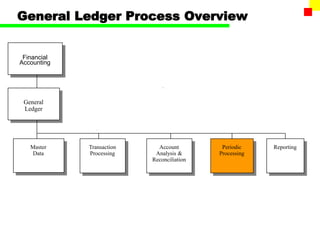
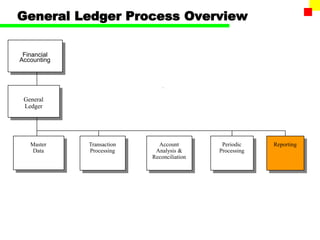
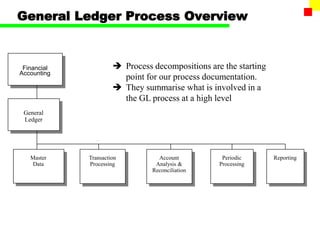
General Ledger Process Overview
Transaction
Processing
Master
Data
General
Ledger
Account
Analysis &
Reconciliation
Reporting
Financial
Accounting
Periodic
Processing
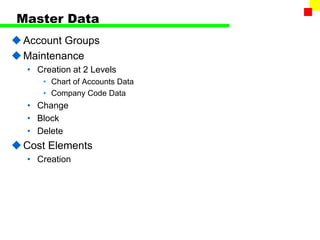
Master Data
Account Groups
Maintenance
• Creation at 2 Levels
• Chart of Accounts Data
• Company Code Data
• Change
• Block
• Delete
Cost Elements
• Creation
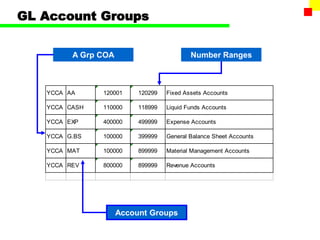
GL Account Groups
YCCA AA 120001 120299 Fixed Assets Accounts
YCCA CASH 110000 118999 Liquid Funds Accounts
YCCA EXP 400000 499999 Expense Accounts
YCCA G.BS 100000 399999 General Balance Sheet Accounts
YCCA MAT 100000 899999 Material Management Accounts
YCCA REV 800000 899999 Revenue Accounts
A Grp COA
Account Groups
Number Ranges
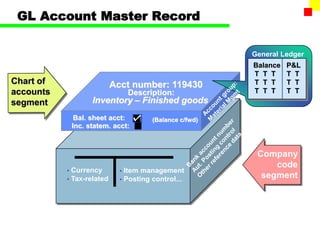
GL Account Master Record
• Item management
• Posting control...
• Currency
• Tax-related
Acct number: 119430
Inventory – Finished goods
Bal. sheet acct:
Inc. statem. acct:
Chart of
accounts
segment
Company
code
segment
Description:
(Balance c/fwd)
General Ledger
Balance P&L
T T T T T
T T T T T
T T T T T
Balance P&L
T T T T T
T T T T T
T T T T T
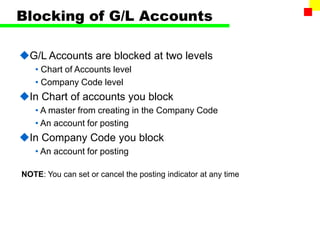
Blocking of G/L Accounts
G/L Accounts are blocked at two levels
• Chart of Accounts level
• Company Code level
In Chart of accounts you block
• A master from creating in the Company Code
• An account for posting
In Company Code you block
• An account for posting
NOTE: You can set or cancel the posting indicator at any time
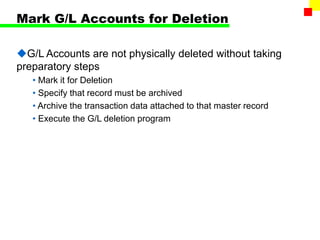
Mark G/L Accounts for Deletion
G/L Accounts are not physically deleted without taking
preparatory steps
• Mark it for Deletion
• Specify that record must be archived
• Archive the transaction data attached to that master record
• Execute the G/L deletion program
9
Controlling
Controlling
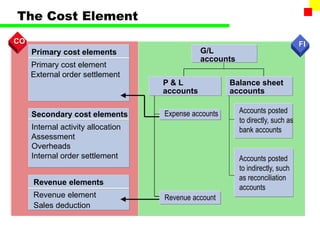
Revenue
elements
1 2 3
Assets
4
Liabilities Equity
Financial Accounting
Expense
accounts
8
Revenue
Profit Center Accounting
1
Current
financial
assets
and
short-
term
capital
2
Non-
opera-
ting
costs,
revenue
3
Material
inventory
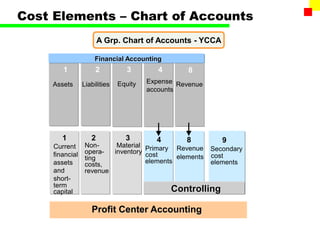
Cost Elements – Chart of Accounts
A Grp. Chart of Accounts - YCCA
Primary
cost
elements
Secondary
cost
elements
4 8
Primary cost elements
Primary cost element
External order settlement
Secondary cost elements
Internal activity allocation
Assessment
Overheads
Internal order settlement
Revenue elements
Revenue element
Sales deduction
Revenue account
Expense accounts Accounts posted
to directly, such as
bank accounts
Accounts posted
to indirectly, such
as reconciliation
accounts
Balance sheet
accounts
P & L
accounts
G/L
accounts
FI
FI
CO
CO
The Cost Element
General Ledger Process Overview
Transaction
Processing
Master
Data
General
Ledger
Account
Analysis &
Reconciliation
Reporting
Financial
Accounting
Periodic
Processing
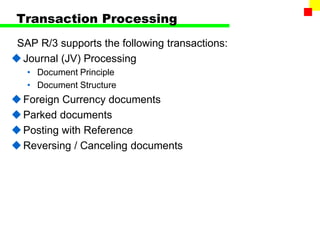
Transaction Processing
SAP R/3 supports the following transactions:
Journal (JV) Processing
• Document Principle
• Document Structure
Foreign Currency documents
Parked documents
Posting with Reference
Reversing / Canceling documents
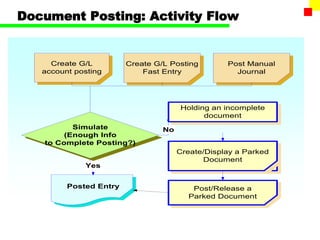
Document Posting: Activity Flow
Create G/L
account posting
Create G/L Posting
Fast Entry
Simulate
(Enough Info
to Complete Posting?)
No
Posted Entry
Post Manual
Journal
Create/Display a Parked
Document
Post/Release a
Parked Document
Yes
Holding an incomplete
document
The Accounting Documents
Header
Line items
Document No: 123456
Date: 6/5/1000x
Company Code: 5200
Currency: US$ ,,,,
Total:
Debit Credit
1,000,000
800,000
200,000
1,000,000
1,000,000
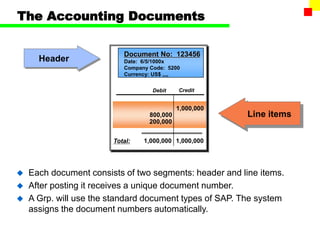
 Each document consists of two segments: header and line items.
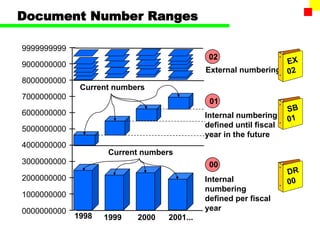
 After posting it receives a unique document number.
 A Grp. will use the standard document types of SAP. The system
assigns the document numbers automatically.
Document Number Ranges
0000000000
1000000000
2000000000
3000000000
4000000000
5000000000
6000000000
7000000000
8000000000
9000000000
9999999999
00
01
02
Internal
numbering
defined per fiscal
year
External numbering
Internal numbering
defined until fiscal
year in the future
Current numbers
1998
Current numbers
1999 2000 2001...
The Document’s Header
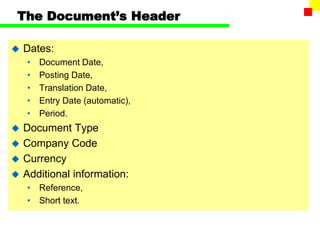
 Dates:
• Document Date,
• Posting Date,
• Translation Date,
• Entry Date (automatic),
• Period.
 Document Type
 Company Code
 Currency
 Additional information:
• Reference,
• Short text.
Posting keys
Field
?
Priority
Account
yes
no
suppress
Posted with which
posting key?
Posted on
which account?
PK ...
PK ...
Relevant for postings
on accounts of this type?
Line items
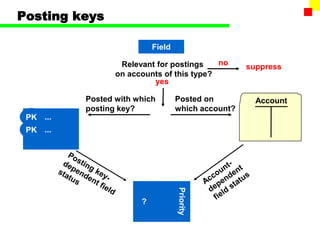
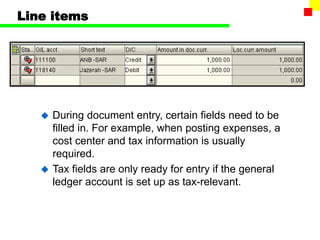
 During document entry, certain fields need to be
filled in. For example, when posting expenses, a
cost center and tax information is usually
required.
 Tax fields are only ready for entry if the general
ledger account is set up as tax-relevant.
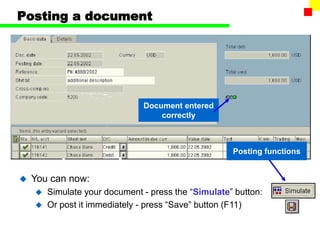
Posting a document
Document entered
correctly
 You can now:
 Simulate your document - press the “Simulate” button:
 Or post it immediately - press “Save” button (F11)
Posting functions
Posting in Foreign Currency
Local currency - Functional currency of the company code
Document currency - Currency of the document
Group currency - Alternative currency for group reporting
 For every Company Code there’s defined a company code currency, ie,
every company code has a “local” currency.
 Every document, posted in different currency than company code
currency, is processed as a foreign currency document.
 Accounting documents can be posted in a foreign currency
 The foreign currency is converted to local currency and both are stored
in the document along with the exchange rate
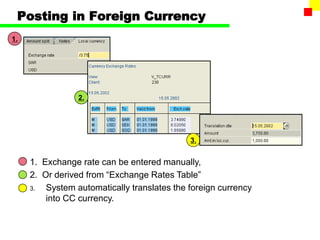
Posting in Foreign Currency
1.
3.
2.
1. Exchange rate can be entered manually,
2. Or derived from “Exchange Rates Table”
3. System automatically translates the foreign currency
into CC currency.
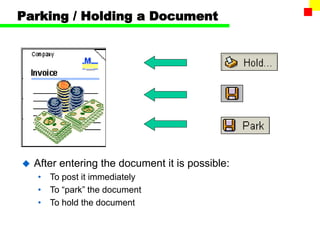
Parking / Holding a Document
 After entering the document it is possible:
• To post it immediately
• To “park” the document
• To hold the document
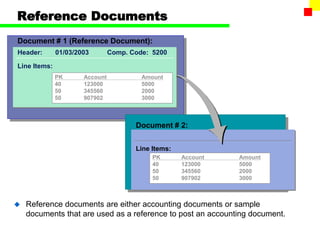
Reference Documents
Header: 01/03/2003 Comp. Code: 5200
Document # 1 (Reference Document):
Line Items:
PK Account Amount
40 123000 5000
50 345560 2000
50 907902 3000
Document # 2:
Line Items:
PK Account Amount
40 123000 5000
50 345560 2000
50 907902 3000
 Reference documents are either accounting documents or sample
documents that are used as a reference to post an accounting document.
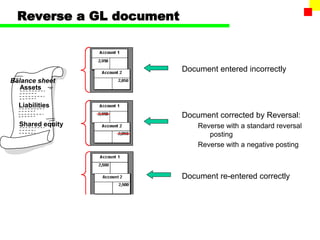
Reverse a GL document
Document entered incorrectly
Document corrected by Reversal:
Reverse with a standard reversal
posting
Reverse with a negative posting
Document re-entered correctly
Balance sheet
Assets
Liabilities
Shared equity
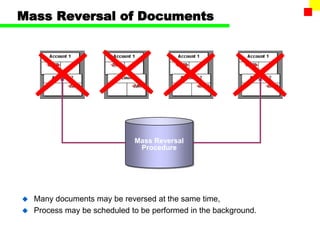
Mass Reversal of Documents
 Many documents may be reversed at the same time,
 Process may be scheduled to be performed in the background.
Mass Reversal
Procedure
General Ledger Process Overview
Transaction
Processing
Master
Data
General
Ledger
Account
Analysis &
Reconciliation
Reporting
Financial
Accounting
Periodic
Processing
Account Analysis / Reconciliation
SAP R/3 supports the following transactions:
Display G/L account balance
Display G/L line items
G/L account analysis functions
Clear outstanding items on G/L account
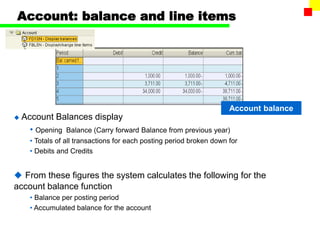
Account: balance and line items
Account balance
 Account Balances display
• Opening Balance (Carry forward Balance from previous year)
• Totals of all transactions for each posting period broken down for
• Debits and Credits
 From these figures the system calculates the following for the
account balance function
• Balance per posting period
• Accumulated balance for the account
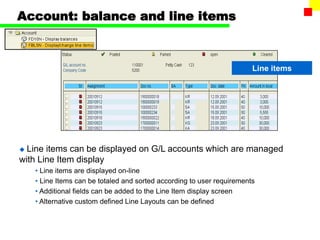
Account: balance and line items
Line items
 Line items can be displayed on G/L accounts which are managed
with Line Item display
• Line items are displayed on-line
• Line Items can be totaled and sorted according to user requirements
• Additional fields can be added to the Line Item display screen
• Alternative custom defined Line Layouts can be defined
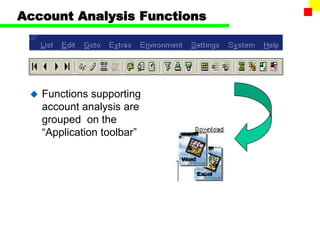
Account Analysis Functions
 Functions supporting
account analysis are
grouped on the
“Application toolbar”
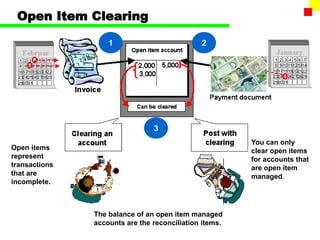
Open Item Clearing
1 2
3
The balance of an open item managed
accounts are the reconciliation items.
Open items
represent
transactions
that are
incomplete.
You can only
clear open items
for accounts that
are open item
managed.
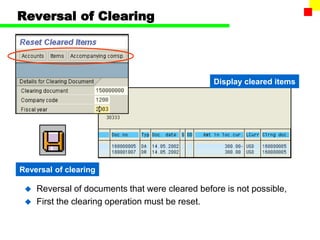
Reversal of Clearing
 Reversal of documents that were cleared before is not possible,
 First the clearing operation must be reset.
Display cleared items
Reversal of clearing
General Ledger Process Overview
Transaction
Processing
Master
Data
General
Ledger
Account
Analysis &
Reconciliation
Reporting
Financial
Accounting
Periodic
Processing
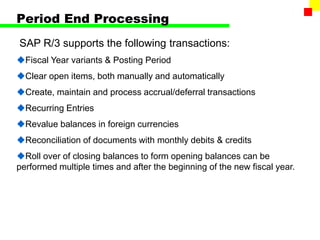
Period End Processing
SAP R/3 supports the following transactions:
Fiscal Year variants & Posting Period
Clear open items, both manually and automatically
Create, maintain and process accrual/deferral transactions
Recurring Entries
Revalue balances in foreign currencies
Reconciliation of documents with monthly debits & credits
Roll over of closing balances to form opening balances can be
performed multiple times and after the beginning of the new fiscal year.
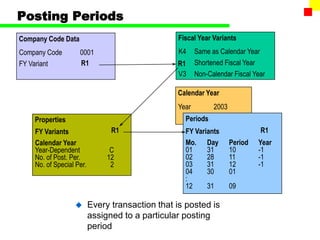
Posting Periods
 Every transaction that is posted is
assigned to a particular posting
period
K4 Same as Calendar Year
Shortened Fiscal Year
V3 Non-Calendar Fiscal Year
Company Code Data Fiscal Year Variants
Company Code 0001
FY Variant R1 R1
Calendar Year
Year 2003
Periods
FY Variants
Mo. Day Period Year
01 31 10 -1
02 28 11 -1
03 31 12 -1
04 30 01
:
12 31 09
Properties
FY Variants
Calendar Year
Year-Dependent C
No. of Post. Per. 12
No. of Special Per. 2
R1 R1
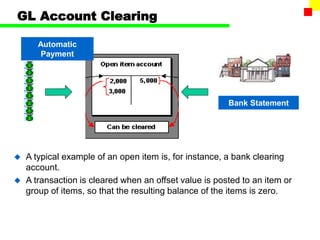
GL Account Clearing
Bank Statement
Automatic
Payment
 A typical example of an open item is, for instance, a bank clearing
account.
 A transaction is cleared when an offset value is posted to an item or
group of items, so that the resulting balance of the items is zero.
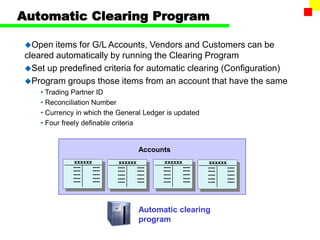
Automatic Clearing Program
Open items for G/L Accounts, Vendors and Customers can be
cleared automatically by running the Clearing Program
Set up predefined criteria for automatic clearing (Configuration)
Program groups those items from an account that have the same
• Trading Partner ID
• Reconciliation Number
• Currency in which the General Ledger is updated
• Four freely definable criteria
Accounts
xxxxxx
----
----
----
----
----
----
----
----
----
----
xxxxxx
----
----
----
----
----
----
----
----
----
----
xxxxxx
----
----
----
----
----
----
----
----
----
----
xxxxxx
----
----
----
----
----
----
----
----
----
----
Automatic clearing
program
Deferrals & Accruals
 Accruals and deferrals can be handled automatically by the SAP R/3
system
 Accrual/Deferral Documents are created on a monthly basis to record
expenses/income which were anticipated but not yet realized
 Once a transaction has been approved, it can be set up and run
automatically each month.
 The recurring entry program helps to maintain Accruals / Deferrals
postings
• Standard Journal Posting
• Has a reversing date
• Reversal Date can be any date in the future
• Monthly job is scheduled to reverse all Accrual/Deferral Documents automatically
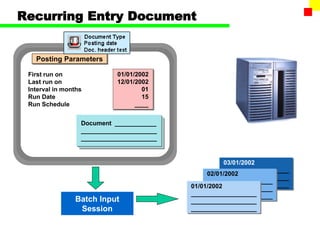
Recurring Entry Document
Posting Parameters
First run on
Last run on
Interval in months
Run Date
Run Schedule
01/01/2002
12/01/2002
01
15
____
Document ____________
______________________
______________________
03/01/2002
___________________
___________________
___________________
02/01/2002
___________________
___________________
___________________
01/01/2002
___________________
___________________
___________________
Batch Input
Session
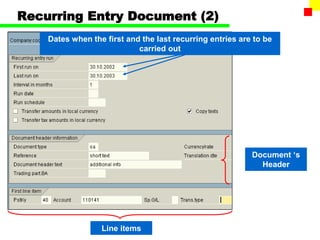
Recurring Entry Document (2)
Dates when the first and the last recurring entries are to be
carried out
Document ‘s
Header
Line items
General Ledger Process Overview
Transaction
Processing
Master
Data
General
Ledger
Account
Analysis &
Reconciliation
Reporting
Financial
Accounting
Periodic
Processing
Reporting
 SAP system offers number of reports that help analyzing
entered business transactions:
• Financial Statement Version (Balance Sheet and P&L)
• Account Balances
• Line Items
• Documents
• Master Data
 Report can be:
• Printed out directly to the printer,
• Saved as a local file (txt format, Excel file etc.)
• Sent by e-mail
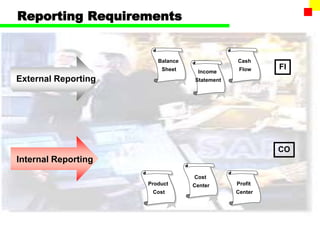
Reporting Requirements
Balance
Sheet Income
Statement
Cash
Flow
Internal Reporting
External Reporting
FI
CO
Product
Cost
Cost
Center Profit
Center
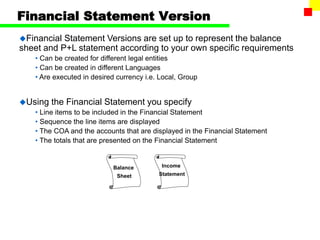
Financial Statement Version
Financial Statement Versions are set up to represent the balance
sheet and P+L statement according to your own specific requirements
• Can be created for different legal entities
• Can be created in different Languages
• Are executed in desired currency i.e. Local, Group
Using the Financial Statement you specify
• Line items to be included in the Financial Statement
• Sequence the line items are displayed
• The COA and the accounts that are displayed in the Financial Statement
• The totals that are presented on the Financial Statement
Balance
Sheet
Income
Statement
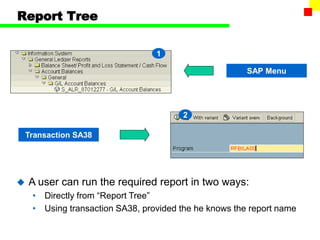
Report Tree
2
1
SAP Menu
Transaction SA38
 A user can run the required report in two ways:
• Directly from “Report Tree”
• Using transaction SA38, provided the he knows the report name
Report Tree
2
1
SAP Menu
Transaction SA38
 A user can run the required report in two ways:
• Directly from “Report Tree”
• Using transaction SA38, provided the he knows the report name
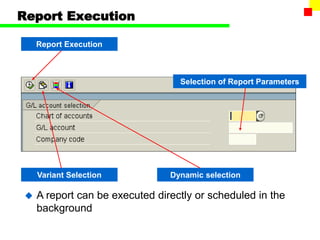
Report Execution
Selection of Report Parameters
Report Execution
Variant Selection Dynamic selection
 A report can be executed directly or scheduled in the
background
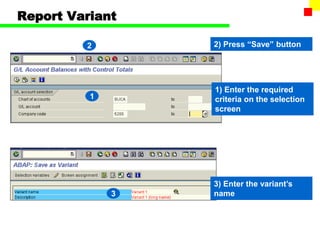
Report Variant
1) Enter the required
criteria on the selection
screen
1
2
3
2) Press “Save” button
3) Enter the variant’s
name
General Ledger Process Overview
Transaction
Processing
Master
Data
General
Ledger
Account
Analysis &
Reconciliation
Reporting
Financial
Accounting
 Process decompositions are the starting
point for our process documentation.
 They summarise what is involved in a
the GL process at a high level
Periodic
Processing

FI_GL_Configuration.pptFI_GL_Configuration.ppt

  • 1.
  • 2.
    Table of Contents GL Overview  Sub Processes Master Data Transaction Processing Account Analysis / Reconciliation Periodic Processing Reporting
  • 3.
    SAP Modules -Overview Sales & Distribution SD MM PP QM PM HR FI CO AM PS OC IS Materials Mgmt. Product Planning Quality Mgmt. Plant Maint. Human Resources Financial Accounting Controlling Fixed Asset Mgmt. Project System Office & Comm. Industry Solutions SAP R/3
  • 4.
    FI – FinancialAccounting Modules FI - Financial Accounting Modules FI Accounts Payable Cash Management Special Ledger LC Legal Consolidation TM Travel Management Asset and Investment Management General Ledger Accounts Receivable
  • 5.
    Financial Accounting /Controlling  Financial Accounting • Legal / Statutory Accounts • Standard Ledgers • Master Data Integrates with Controlling  Controlling • Management Accounts • Manage Budget Expenditure
  • 6.
    General Ledger -Integration
  • 7.
    A Group HierarchicalStructure A Grp Common Chart of Accounts (YCCA) Company Chart of Accounts Company Codes Financial Management Area A Grp FM Area (9100) A Ltd (9100) A1 Ltd (9200) A Group
  • 8.
    Chart of Accounts The Chart of Accounts • Contains the definitions of all G/L accounts in an ordered form • Each general ledger is set up according to a Chart of Accounts • Many company codes may use the same COA • All A Grp. organizational units use the same Chart of Accounts: YCCA. COA “YCCA” Company Code 9100 A Ltd Company Code 9200 A1 Ltd
  • 9.
    Company Code  CompanyCode • It is an independent accounting entity. A company code is assigned to a chart of accounts. • Each company code in A Group uses the G/L accounts from only one chart of accounts for account validation. This is called the operating chart of accounts. • A chart of accounts can be used by multiple companies provided they have the same basic account requirements.
  • 10.
    General Ledger ProcessOverview Transaction Processing Master Data General Ledger Account Analysis & Reconciliation Reporting Financial Accounting Periodic Processing
  • 11.
    Master Data Account Groups Maintenance •Creation at 2 Levels • Chart of Accounts Data • Company Code Data • Change • Block • Delete Cost Elements • Creation
  • 12.
    GL Account Groups YCCAAA 120001 120299 Fixed Assets Accounts YCCA CASH 110000 118999 Liquid Funds Accounts YCCA EXP 400000 499999 Expense Accounts YCCA G.BS 100000 399999 General Balance Sheet Accounts YCCA MAT 100000 899999 Material Management Accounts YCCA REV 800000 899999 Revenue Accounts A Grp COA Account Groups Number Ranges
  • 13.
    GL Account MasterRecord • Item management • Posting control... • Currency • Tax-related Acct number: 119430 Inventory – Finished goods Bal. sheet acct: Inc. statem. acct: Chart of accounts segment Company code segment Description: (Balance c/fwd) General Ledger Balance P&L T T T T T T T T T T T T T T T Balance P&L T T T T T T T T T T T T T T T
  • 14.
    Blocking of G/LAccounts G/L Accounts are blocked at two levels • Chart of Accounts level • Company Code level In Chart of accounts you block • A master from creating in the Company Code • An account for posting In Company Code you block • An account for posting NOTE: You can set or cancel the posting indicator at any time
  • 15.
    Mark G/L Accountsfor Deletion G/L Accounts are not physically deleted without taking preparatory steps • Mark it for Deletion • Specify that record must be archived • Archive the transaction data attached to that master record • Execute the G/L deletion program
  • 16.
    9 Controlling Controlling Revenue elements 1 2 3 Assets 4 LiabilitiesEquity Financial Accounting Financial Accounting Expense accounts 8 Revenue Profit Center Accounting Profit Center Accounting 1 Current financial assets and short- term capital 2 Non- opera- ting costs, revenue 3 Material inventory Cost Elements – Chart of Accounts A Grp. Chart of Accounts - YCCA Primary cost elements Secondary cost elements 4 8
  • 17.
    Primary cost elements Primarycost element External order settlement Secondary cost elements Internal activity allocation Assessment Overheads Internal order settlement Revenue elements Revenue element Sales deduction Revenue account Expense accounts Accounts posted to directly, such as bank accounts Accounts posted to indirectly, such as reconciliation accounts Balance sheet accounts P & L accounts G/L accounts FI FI CO CO The Cost Element
  • 18.
    General Ledger ProcessOverview Transaction Processing Master Data General Ledger Account Analysis & Reconciliation Reporting Financial Accounting Periodic Processing
  • 19.
    Transaction Processing SAP R/3supports the following transactions: Journal (JV) Processing • Document Principle • Document Structure Foreign Currency documents Parked documents Posting with Reference Reversing / Canceling documents
  • 20.
    Document Posting: ActivityFlow Create G/L account posting Create G/L Posting Fast Entry Simulate (Enough Info to Complete Posting?) No Posted Entry Post Manual Journal Create/Display a Parked Document Post/Release a Parked Document Yes Holding an incomplete document
  • 21.
    The Accounting Documents Header Lineitems Document No: 123456 Date: 6/5/1000x Company Code: 5200 Currency: US$ ,,,, Total: Debit Credit 1,000,000 800,000 200,000 1,000,000 1,000,000  Each document consists of two segments: header and line items.  After posting it receives a unique document number.  A Grp. will use the standard document types of SAP. The system assigns the document numbers automatically.
  • 22.
    Document Number Ranges 0000000000 1000000000 2000000000 3000000000 4000000000 5000000000 6000000000 7000000000 8000000000 9000000000 9999999999 00 01 02 Internal numbering definedper fiscal year External numbering Internal numbering defined until fiscal year in the future Current numbers 1998 Current numbers 1999 2000 2001...
  • 23.
    The Document’s Header Dates: • Document Date, • Posting Date, • Translation Date, • Entry Date (automatic), • Period.  Document Type  Company Code  Currency  Additional information: • Reference, • Short text.
  • 24.
    Posting keys Field ? Priority Account yes no suppress Posted withwhich posting key? Posted on which account? PK ... PK ... Relevant for postings on accounts of this type?
  • 25.
    Line items  Duringdocument entry, certain fields need to be filled in. For example, when posting expenses, a cost center and tax information is usually required.  Tax fields are only ready for entry if the general ledger account is set up as tax-relevant.
  • 26.
    Posting a document Documententered correctly  You can now:  Simulate your document - press the “Simulate” button:  Or post it immediately - press “Save” button (F11) Posting functions
  • 27.
    Posting in ForeignCurrency Local currency - Functional currency of the company code Document currency - Currency of the document Group currency - Alternative currency for group reporting  For every Company Code there’s defined a company code currency, ie, every company code has a “local” currency.  Every document, posted in different currency than company code currency, is processed as a foreign currency document.  Accounting documents can be posted in a foreign currency  The foreign currency is converted to local currency and both are stored in the document along with the exchange rate
  • 28.
    Posting in ForeignCurrency 1. 3. 2. 1. Exchange rate can be entered manually, 2. Or derived from “Exchange Rates Table” 3. System automatically translates the foreign currency into CC currency.
  • 29.
    Parking / Holdinga Document  After entering the document it is possible: • To post it immediately • To “park” the document • To hold the document
  • 30.
    Reference Documents Header: 01/03/2003Comp. Code: 5200 Document # 1 (Reference Document): Line Items: PK Account Amount 40 123000 5000 50 345560 2000 50 907902 3000 Document # 2: Line Items: PK Account Amount 40 123000 5000 50 345560 2000 50 907902 3000  Reference documents are either accounting documents or sample documents that are used as a reference to post an accounting document.
  • 31.
    Reverse a GLdocument Document entered incorrectly Document corrected by Reversal: Reverse with a standard reversal posting Reverse with a negative posting Document re-entered correctly Balance sheet Assets Liabilities Shared equity
  • 32.
    Mass Reversal ofDocuments  Many documents may be reversed at the same time,  Process may be scheduled to be performed in the background. Mass Reversal Procedure
  • 33.
    General Ledger ProcessOverview Transaction Processing Master Data General Ledger Account Analysis & Reconciliation Reporting Financial Accounting Periodic Processing
  • 34.
    Account Analysis /Reconciliation SAP R/3 supports the following transactions: Display G/L account balance Display G/L line items G/L account analysis functions Clear outstanding items on G/L account
  • 35.
    Account: balance andline items Account balance  Account Balances display • Opening Balance (Carry forward Balance from previous year) • Totals of all transactions for each posting period broken down for • Debits and Credits  From these figures the system calculates the following for the account balance function • Balance per posting period • Accumulated balance for the account
  • 36.
    Account: balance andline items Line items  Line items can be displayed on G/L accounts which are managed with Line Item display • Line items are displayed on-line • Line Items can be totaled and sorted according to user requirements • Additional fields can be added to the Line Item display screen • Alternative custom defined Line Layouts can be defined
  • 37.
    Account Analysis Functions Functions supporting account analysis are grouped on the “Application toolbar”
  • 38.
    Open Item Clearing 12 3 The balance of an open item managed accounts are the reconciliation items. Open items represent transactions that are incomplete. You can only clear open items for accounts that are open item managed.
  • 39.
    Reversal of Clearing Reversal of documents that were cleared before is not possible,  First the clearing operation must be reset. Display cleared items Reversal of clearing
  • 40.
    General Ledger ProcessOverview Transaction Processing Master Data General Ledger Account Analysis & Reconciliation Reporting Financial Accounting Periodic Processing
  • 41.
    Period End Processing SAPR/3 supports the following transactions: Fiscal Year variants & Posting Period Clear open items, both manually and automatically Create, maintain and process accrual/deferral transactions Recurring Entries Revalue balances in foreign currencies Reconciliation of documents with monthly debits & credits Roll over of closing balances to form opening balances can be performed multiple times and after the beginning of the new fiscal year.
  • 42.
    Posting Periods  Everytransaction that is posted is assigned to a particular posting period K4 Same as Calendar Year Shortened Fiscal Year V3 Non-Calendar Fiscal Year Company Code Data Fiscal Year Variants Company Code 0001 FY Variant R1 R1 Calendar Year Year 2003 Periods FY Variants Mo. Day Period Year 01 31 10 -1 02 28 11 -1 03 31 12 -1 04 30 01 : 12 31 09 Properties FY Variants Calendar Year Year-Dependent C No. of Post. Per. 12 No. of Special Per. 2 R1 R1
  • 43.
    GL Account Clearing BankStatement Automatic Payment  A typical example of an open item is, for instance, a bank clearing account.  A transaction is cleared when an offset value is posted to an item or group of items, so that the resulting balance of the items is zero.
  • 44.
    Automatic Clearing Program Openitems for G/L Accounts, Vendors and Customers can be cleared automatically by running the Clearing Program Set up predefined criteria for automatic clearing (Configuration) Program groups those items from an account that have the same • Trading Partner ID • Reconciliation Number • Currency in which the General Ledger is updated • Four freely definable criteria Accounts xxxxxx ---- ---- ---- ---- ---- ---- ---- ---- ---- ---- xxxxxx ---- ---- ---- ---- ---- ---- ---- ---- ---- ---- xxxxxx ---- ---- ---- ---- ---- ---- ---- ---- ---- ---- xxxxxx ---- ---- ---- ---- ---- ---- ---- ---- ---- ---- Automatic clearing program
  • 45.
    Deferrals & Accruals Accruals and deferrals can be handled automatically by the SAP R/3 system  Accrual/Deferral Documents are created on a monthly basis to record expenses/income which were anticipated but not yet realized  Once a transaction has been approved, it can be set up and run automatically each month.  The recurring entry program helps to maintain Accruals / Deferrals postings • Standard Journal Posting • Has a reversing date • Reversal Date can be any date in the future • Monthly job is scheduled to reverse all Accrual/Deferral Documents automatically
  • 46.
    Recurring Entry Document PostingParameters First run on Last run on Interval in months Run Date Run Schedule 01/01/2002 12/01/2002 01 15 ____ Document ____________ ______________________ ______________________ 03/01/2002 ___________________ ___________________ ___________________ 02/01/2002 ___________________ ___________________ ___________________ 01/01/2002 ___________________ ___________________ ___________________ Batch Input Session
  • 47.
    Recurring Entry Document(2) Dates when the first and the last recurring entries are to be carried out Document ‘s Header Line items
  • 48.
    General Ledger ProcessOverview Transaction Processing Master Data General Ledger Account Analysis & Reconciliation Reporting Financial Accounting Periodic Processing
  • 49.
    Reporting  SAP systemoffers number of reports that help analyzing entered business transactions: • Financial Statement Version (Balance Sheet and P&L) • Account Balances • Line Items • Documents • Master Data  Report can be: • Printed out directly to the printer, • Saved as a local file (txt format, Excel file etc.) • Sent by e-mail
  • 50.
    Reporting Requirements Balance Sheet Income Statement Cash Flow InternalReporting External Reporting FI CO Product Cost Cost Center Profit Center
  • 51.
    Financial Statement Version FinancialStatement Versions are set up to represent the balance sheet and P+L statement according to your own specific requirements • Can be created for different legal entities • Can be created in different Languages • Are executed in desired currency i.e. Local, Group Using the Financial Statement you specify • Line items to be included in the Financial Statement • Sequence the line items are displayed • The COA and the accounts that are displayed in the Financial Statement • The totals that are presented on the Financial Statement Balance Sheet Income Statement
  • 52.
    Report Tree 2 1 SAP Menu TransactionSA38  A user can run the required report in two ways: • Directly from “Report Tree” • Using transaction SA38, provided the he knows the report name
  • 53.
    Report Tree 2 1 SAP Menu TransactionSA38  A user can run the required report in two ways: • Directly from “Report Tree” • Using transaction SA38, provided the he knows the report name
  • 54.
    Report Execution Selection ofReport Parameters Report Execution Variant Selection Dynamic selection  A report can be executed directly or scheduled in the background
  • 55.
    Report Variant 1) Enterthe required criteria on the selection screen 1 2 3 2) Press “Save” button 3) Enter the variant’s name
  • 56.
    General Ledger ProcessOverview Transaction Processing Master Data General Ledger Account Analysis & Reconciliation Reporting Financial Accounting  Process decompositions are the starting point for our process documentation.  They summarise what is involved in a the GL process at a high level Periodic Processing

Editor's Notes