
SAP BusinessObjects Security:
Authentication
Security Token Service
Problems, Pitfalls, Tips & Tricks
 The configuration information in this presentation will cover a complex, multi-server
SAP BusinessObjects BI 4 environment:
- Running on a Windows platform
- Using the Tomcat version supplied with BI 4.1
 The authentication types we will concentrate on will be:
- Active Directory
- SAP
- Enterprise
 Where configuration differs significantly from that covered, relevant links are
provided in the resource library at the end the presentation.
Introduction
Security in SAP BI 4
Agenda
Authentication
Security Tokens
Closing Remarks
Xoomworks BI
bi@xoomworks.com | www.xoomworks.com/bi
SAP BI 4 Security
Security Model Requirement Gathering
 Start by defining the different types of users needed by the business
- For example: Info Consumers, with minimal view and refresh rights
 Each of these types of users will be their own group within your User and Group structure
 They will also have their own Custom Access Level (CAL)
 If there are going to be multiple projects on the environment, considerusing the Multi-tenancy
Management module within the CMC
 If these projects need different rights to different folders, replicate each of the Group types within
each project.
Security in SAP BO BI 4.1 Authentication Security Token Service Concluding Remarks Xoomworks BI
Security Model Requirement Gathering (cont.)
 Next, decide on the Applications that your users will need access to
- E.g. Web Intelligence, Universe Design Tool, Design Studio
 The folder structure is also important
- Do you need a basic folder structure?
- Consider using the Multi-tenancy Management module within the CMC
 If you only need a basic folder structure then no additional groups are required
 If a more complex folder structure is required, you need to replicate the group on a project-by-project
basis
Security in SAP BO BI 4.1 Authentication Security Token Service Concluding Remarks Xoomworks BI
Creating Flexible Custom Access Level
 If the CustomAccess Levels (CALs) are flexible, the security model will need to be more powerful
 Build CustomAccess Levels to satisfy the requirements of each type of user
 Assign each right in only one CAL, so that you build up a user type’s permissions by assigning
multiple CALs
- So if Info Consumer is your lowest level, an Info Worker will have both Info Consumer and Info Worker CALs
assigned to them
 Do not:
- Deny permissions in the CALs, leave the rights as “Not Assigned”
- Assign granular rights on any content. If you need these permissions work them into an existing CAL or
create a new one. If one user or group needs them, you can bet others will too!
Security in SAP BO BI 4.1 Authentication Security Token Service Concluding Remarks Xoomworks BI
Custom Access Levels: Application and Content CALs
 While it is possible to create a single CAL which covers both Application and Content permissions, it
is better to ensure the CALs satisfy a single purpose
 Create separate CALs for Application (e.g., WebI, CMC, Crystal Reports) and Content (e.g., reports,
universes, connections)
 CALs should be broken down into the various functional areas as well as being modular
 An Info Worker should have all previous access levels as well as the CALs named after their user
types
Security in SAP BO BI 4.1 Authentication Security Token Service Concluding Remarks Xoomworks BI
Security Model vs. Performance
 It might not seem obvious but your BI 4 security model does have an impact on the user experience
and performance
- For example: Info Consumers, with minimal view and refresh rights
- The deeper and more complex your security model, the slower navigating the system
can be
- In the CMC, for example, each section you click on requires BI 4.1 to calculate your security in advance so
the application can only show you the options your profile allows
- The more groups your user is a member of, the longer the CMS takes to calculate your permissions
- If you have multiple authentication methods and multiple aliases in the user accounts then your users will be
members of more groups
Security in SAP BO BI 4.1 Authentication Security Token Service Concluding Remarks Xoomworks BI
InfoStore Queries
 InfoStore queries are “SELECT” statements run by the CMS against CI_INFOOBJECTS,
CI_SYSTEMOBJECTS and CI_APPOBJECT metadata tables
 The performance of these queries is an important factor in the end user experience
 While the above tables are not actual database tables, the CMS queries them as if they are tables
 While rebuilding the CMS indexes it’s worthwhile doing the same to the Audit Database
- One way to do this is to rebuild the indexes on the CMS database
- Doing this will make your CMS function faster and can remove potential bottlenecks
Security in SAP BO BI 4.1 Authentication Security Token Service Concluding Remarks Xoomworks BI
Maintaining your Security Model
 A BI 4 Security Model is a living environment that needs to
be maintained and needs to evolve with the needs of the
business
 As new applications are introduced, new CALs will be
required and existing CALs will need to be reviewed
 Problems in the security model implementation are often
caused by shortcuts taken by support organisations
 These issues and “breaks” in the security need to be
monitored and fixed as soon as possible
Security in SAP BO BI 4.1 Authentication Security Token Service Concluding Remarks Xoomworks BI
Example: Due to a stray
“View” permission for one
group, a single user sent 16
reports to 30,000 other users
and caused a Production
outage
Authentication
bi@xoomworks.com | www.xoomworks.com/bi
Security in SAP BO BI 4.1 Authentication Security Token Service Concluding Remarks Xoomworks BI
Managing Authentication in SAP BusinessObjects BI 4
 Authentication can vary from simple Enterprise-only requirements to complex mixes of AD, SAP
and/or LDAP
 Each authentication type can be managed from within the Authentication module in
the CMC
 Third-party authentication can be set to update via Schedules
 This will allow new users to be automatically imported into the system
 Each mapped group from a third-party authentication provider will, by default, be imported into the
root of the group structure
Security in SAP BO BI 4.1 Authentication Security Token Service Concluding Remarks Xoomworks BI
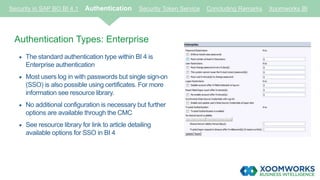
Authentication Types: Enterprise
 The standard authentication type within BI 4 is
Enterprise authentication
 Most users log in with passwords but single sign-on
(SSO) is also possible using certificates. For more
information see resource library.
 No additional configuration is necessary but further
options are available through the CMC
 See resource library for link to article detailing
available options for SSO in BI 4
Security in SAP BO BI 4.1 Authentication Security Token Service Concluding Remarks Xoomworks BI
Authentication Types: Active Directory
 Active Directory authentication allows users to either:
- Log in with their Windows password
- SSO into BI Launchpad or the Client Tools
 SSO via the Web Application Server can also allow End-to-End (E2E) SSO to some reporting
database types
 Security Groups are created at Active Directory level, and are then mapped into the CMC.
 A Group will appear at the root level, this should be added to an Enterprise group, which can have
security applied to it. This will make it easier to move the security structure via Promotion
Management
 Additional configuration is required on the operating system, web application server and theCMC
 See resource library for link to SAP support document onActive Directory Configuration
Security in SAP BO BI 4.1 Authentication Security Token Service Concluding Remarks Xoomworks BI
Authentication Types: SAP Authentication
 SAP authentication allows users to either:
- Log in with their SAP BW password
- SSO into BI Launchpad or the Client Tools
 Security is controlled by roles defined in BW, which are then imported into the CMC
 A Group will appear at the root level, this should be added to an Enterprise group, which can have
security applied to it. This will make it easier to move the security structure via Promotion
Management
Security in SAP BO BI 4.1 Authentication Security Token Service Concluding Remarks Xoomworks BI
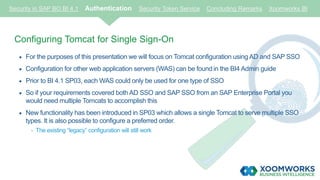
Configuring Tomcat for Single Sign-On
 For the purposes of this presentation we will focus on Tomcat configuration using AD and SAP SSO
 Configuration for other web application servers (WAS) can be foundin the BI4 Admin guide
 Prior to BI 4.1 SP03, each WAS could only be used for one type of SSO
 So if your requirements covered both AD SSO and SAP SSO from an SAP Enterprise Portal you
would need multiple Tomcats to accomplish this
 New functionality has been introduced in SP03 which allows a single Tomcat to serve multiple SSO
types. It is also possible to configure a preferred order.
- The existing “legacy” configuration will still work
Security in SAP BO BI 4.1 Authentication Security Token Service Concluding Remarks Xoomworks BI
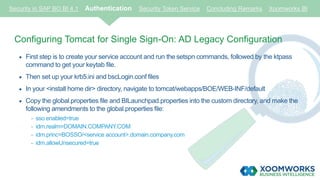
Configuring Tomcat for Single Sign-On: AD Legacy Configuration
 First step is to create your service account and run the setspn commands, followed by the ktpass
command to get your keytab file.
 Then set up your krb5.ini and bscLogin.conf files
 In your <install home dir> directory, navigate to tomcat/webapps/BOE/WEB-INF/default
 Copy the global.properties file and BILaunchpad.properties into the custom directory, and make the
following amendments to the global.properties file:
- sso.enabled=true
- idm.realm=DOMAIN.COMPANY.COM
- idm.princ=BOSSO/<service account>.domain.company.com
- idm.allowUnsecured=true
Security in SAP BO BI 4.1 Authentication Security Token Service Concluding Remarks Xoomworks BI
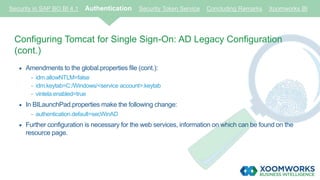
Configuring Tomcat for Single Sign-On: AD Legacy Configuration
(cont.)
 Amendments to the global.properties file (cont.):
- idm.allowNTLM=false
- idm.keytab=C:/Windows/<service account>.keytab
- vintela.enabled=true
 In BILaunchPad.properties make the following change:
- authentication.default=secWinAD
 Further configuration is necessary for the web services, information on which can be found on the
resource page.
Security in SAP BO BI 4.1 Authentication Security Token Service Concluding Remarks Xoomworks BI
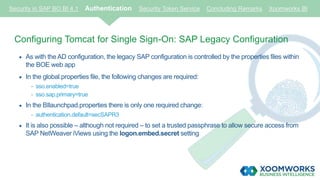
Configuring Tomcat for Single Sign-On: SAP Legacy Configuration
 As with the AD configuration, the legacy SAP configuration is controlled by the properties files within
the BOE web app
 In the global.properties file, the following changes are required:
- sso.enabled=true
- sso.sap.primary=true
 In the BIlaunchpad.properties there is only one required change:
- authentication.default=secSAPR3
 It is also possible – although not required – to set a trusted passphrase to allow secure access from
SAP NetWeaver iViews using the logon.embed.secret setting
Security in SAP BO BI 4.1 Authentication Security Token Service Concluding Remarks Xoomworks BI
Configuring Tomcat for Single Sign-On: New Configuration
 While the configuration is still controlled by the properties file, the first check is on the
sso.types.and.order parameter
 Define all the types of SSO you require and what the preferred order is
 The IDM parameters are still used for AD but the other parameters are ignored when anything is set
in the sso.types.and.order setting
Security in SAP BO BI 4.1 Authentication Security Token Service Concluding Remarks Xoomworks BI
SAP SSO Tip: In the CMC, there is a dropdown box to allow you to select a default SAP
system, if you have multiple BW systems connected to BI 4 then it is best to leave this empty
 When you have links from the SAP Enterprise Portal, by default Tomcat will try and sign the users
in against the default system
 The default system can be changed by anyone with access to this screen and there is no message
prompting you to confirm your selection
 This impacts the URLs that are used in the iViews and open document links
- E.g. https://bi4system:8080/BOE/BI?sap_sysid=BWx&sap_client=yyy
 The default system does not need to specify the sap_sysid and sap_client parameters in the link.
 However, the non default systems need these parameters, it is easier to have no default system
and force all links to use these parameters
Security Tokens
bi@xoomworks.com | www.xoomworks.com/bi
Security Token Service
• Introduced in SAP BusinessOjects BI 4.0, the Security Token Service (STS) is an Identity
Provider service which runs as part of the Adaptive Processing Server (APS)
• It is a one way trust, in that the BW systems trust BI 4, but BI 4 does not trust the
BW systems
• The STS can issue assertion tickets which will allow a user access to a trusting BW system if
the user has access to that system
• As this was introduced in BI 4.0, the STS is primarily involved in new workflows, such as
Crystal Reports for Enterprise (CR4E) against UNX, WebI via BICS and Analysis Edition for
OLAP (AOLAP)
Security in SAP BO BI 4.1 Authentication Security Token Service Concluding Remarks Xoomworks BI
Configuring the Security Token Service
• Commands should be run on one of the BI 4 servers using the CMD prompt
- Pushd <BI4 Home Dir>SAP BusinessObjects Enterprise XI 4.0javalib
- “<BI4 Home Dir>SAP BusinessObjects Enterprise XI 4.0win64_x64sapjvmbinjava” -jar
PKCS12Tool.jar -alias <env specific alias> -storepass <password> -dname CN=BI4ENV
• This will generate a p12 file. You’ll need this later.
• Next run the following:
- “<BI4 Home Dir>SAP BusinessObjects Enterprise XI 4.0win64_x64sapjvmbinkeytool” -exportcert -
keystore keystore.p12 -storetype pkcs12 -file <filename>.der -alias <env specific alias>
• You will now have a DER file. This should be loaded into any BW system that you need set
up in BI 4
Security in SAP BO BI 4.1 Authentication Security Token Service Concluding Remarks Xoomworks BI
Configuring the Security Token
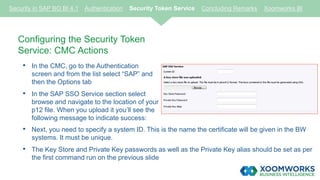
Service: CMC Actions
• In the CMC, go to the Authentication
screen and from the list select “SAP” and
then the Options tab
• In the SAP SSO Service section select
browse and navigate to the location of your
p12 file. When you upload it you’ll see the
following message to indicate success:
Security in SAP BO BI 4.1 Authentication Security Token Service Concluding Remarks Xoomworks BI
• Next, you need to specify a system ID. This is the name the certificate will be given in the BW
systems. It must be unique.
• The Key Store and Private Key passwords as well as the Private Key alias should be set as per
the first command run on the previous slide
Configuring the Security Token Service:
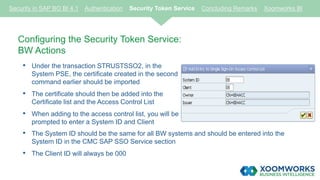
BW Actions
• Under the transaction STRUSTSSO2, in the
System PSE, the certificate created in the second
command earlier should be imported
• The certificate should then be added into the
Certificate list and the Access Control List
• When adding to the access control list, you will be
prompted to enter a System ID and Client
Security in SAP BO BI 4.1 Authentication Security Token Service Concluding Remarks Xoomworks BI
• The System ID should be the same for all BW systems and should be entered into the
System ID in the CMC SAP SSO Service section
• The Client ID will always be 000
How Does the STS Help You?
• The STS helps you most in the following scenarios:
- Multiple BW Systems
- Multiple Authentication Types
• In these scenarios it allows the user to log in via one method and still use the functionality
supplied by another method
• For example, if a user logs in with credentials for one BW System, they will be able to use
SSO to connect to another BW system (see Tip 1 on following slide)
- For this to work, the simple name registry fix must be activated unless the users are manually aliased
together
• Additionally, if a user was to SSO into BI Launchpad via AD SSO they could then SSO
to BW (see Tip 2 on following slides)
- This requires the AD and SAP accounts to be aliased together in the CMC
Security in SAP BO BI 4.1 Authentication Security Token Service Concluding Remarks Xoomworks BI
Security Token Service - Tip 1
• This registry change will remove the System and Client prefix from the BW users
• So for example, my XY5~110martin would become martin
• If you have multiple BW systems then all user accounts of the same name will be aliased
together
• Previously there would be a different user account for each BW system
• This will enable users to log in against one BW system and refresh reports against a different
BW system
• To activate this functionality make the following registry changes on all CMS servers:
- HKEY_LOCAL_MACHINESOFTWARESAP BusinessObjectsSuite XI 4.0EnterpriseAuth
PluginssecSAPR3SimpleUsernameFormat = Yes
Security in SAP BO BI 4.1 Authentication Security Token Service Concluding Remarks Xoomworks BI
Security Token Service - Tip 2
• Aliasing AD and SAP users together
• If the AD and SAP usernames are the same then the users will automatically be aliased
together. If this is not the case, then the users can be manually aliased
• In the user properties, the Assign Alias button will take you through the process of searching
for the other account you wish to merge
- Beware! Removing all user aliases from an account will delete the original account including all of the
personal documents
• Depending on the complexity of the security model this can be a slow process
• It is possible to have this done automatically by creating a jar file using the SDK or a third
party tool (e.g. GB&Smith 360 suite), to run through the users in the system and match AD
and SAP users
Security in SAP BO BI 4.1 Authentication Security Token Service Concluding Remarks Xoomworks BI
Single Sign-On to HANA
• BI 4 can SSO to HANA in multiple ways
• The “legacy” method is to use Kerberos to SSO to the back-end HANA database
• This passes the ticket created at login to BI Launchpad through to the HANA database
• As of BI 4.1 however, SAML can be used to create a secure trusted connection to the
database
• The majority of the SAML configuration actually takes place on the HANA side
Security in SAP BO BI 4.1 Authentication Security Token Service Concluding Remarks Xoomworks BI
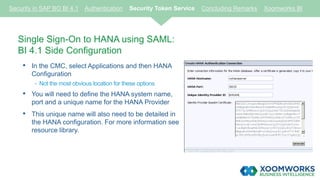
Single Sign-On to HANA using SAML:
BI 4.1 Side Configuration
• In the CMC, select Applications and then HANA
Configuration
- Not the most obvious location for these options
• You will need to define the HANA system name,
port and a unique name for the HANA Provider
• This unique name will also need to be detailed in
the HANA configuration. For more information see
resource library.
Security in SAP BO BI 4.1 Authentication Security Token Service Concluding Remarks Xoomworks BI
Single Sign-On to HANA using SAML: BI 4.1 Side Configuration
(cont.)
• BI 4.1 will generate certificate code, which will then need to be converted into a certificate file
• See link in Resource library for website that will do this for you
• This certificate should be imported in HANA
Single Sign-On to HANA using SAML: HANA Side Configuration
• For the full configuration workflow for the HANA side configuration please check the links in the
resource library at the end of the presentation.
Security in SAP BO BI 4.1 Authentication Security Token Service Concluding Remarks Xoomworks BI
Secure Network Configuration
• Setting up Secure Network Configuration (SNC) between BI 4 and SAP BW involves using
the SAP Crypto Libraries
- Supplied with the application as of BI 4.1, previously it was a manual download and config.
• In SAP BusinessObjects XI 3.1, two different methods of SNC communication were used:
- Client SNC – used for importing roles from SAP BW
- Server SNC – used for report processing
• In BI 4, Client SNC is no longer supported per info from SAP Support
- This appears to be down to the introduction of 64-bit Tomcat
- Client SNC would be 64-bit while Server SNC is still 32-bit
- As a result, using both SNC types on a single machine would be unworkable
Security in SAP BO BI 4.1 Authentication Security Token Service Concluding Remarks Xoomworks BI
Secure Network Configuration (cont.)
• In BI 4, SNC is largely replaced by the Security Token Service
• SNC can be used only in legacy workflows
- Crystal Reports 2013 (not Crystal Reports for Enterprise)
- MDX Universes
• As of BI 4.1, the SAP Cryptolib files are stored in
- <installation dir>sap
• However, it is not configured by default
Security in SAP BO BI 4.1 Authentication Security Token Service Concluding Remarks Xoomworks BI
Configuring SNC with BI 4.1
• The first step for the configuration is to create the following two System Environment
variables
- SECUDIR = <install home dir>sapsec (the sec directory will need to be created)
- SNC_LIB = <install home dir>sapsapcrypto.dll
• Next you should create the PSE container. From a command prompt run the following
commands:
- pushd <install home dir>sap
- sapgenpse gen_pse –v –p BOE.pse
- To avoid confusion, use a different distinguished name from that used in the STS
• The sapgenpse command will prompt you to enter a Pin as well as a distinguished name
- To avoid confusion, use a different distinguished name from that used in the STS
Security in SAP BO BI 4.1 Authentication Security Token Service Concluding Remarks Xoomworks BI
Configuring SNC with BI 4.1 (cont.)
• To configure the SNC trust on the BW side you will need to export the certificate from the
PSE container
- sapgenpse export_own_cert –v –p BOE.pse –o BI4SNC.crt
- The syntax above is a lower case “o”, upper case “O” has a different use
• In BW, run the transaction STRUSTSSO2 and select the SNC (SAPCryptolib) item and
import the certificate
• Add the Certificate to the Certificate list but not the Access Control List
• Export the system’s own certificate as this will need to be loaded into the BI 4 PSE Container
Security in SAP BO BI 4.1 Authentication Security Token Service Concluding Remarks Xoomworks BI
Configuring SNC with BI 4.1 (cont.)
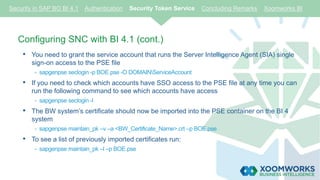
• You need to grant the service account that runs the Server Intelligence Agent (SIA) single
sign-on access to the PSE file
- sapgenpse seclogin -p BOE.pse -O DOMAINServiceAccount
• If you need to check which accounts have SSO access to the PSE file at any time you can
run the following command to see which accounts have access
- sapgenpse seclogin -l
• The BW system’s certificate should now be imported into the PSE container on the BI 4
system
- sapgenpse maintain_pk –v –a <BW_Certificate_Name>.crt –p BOE.pse
• To see a list of previously imported certificates run:
- sapgenpse maintain_pk –l –p BOE.pse
Security in SAP BO BI 4.1 Authentication Security Token Service Concluding Remarks Xoomworks BI
Configuring SNC with BI 4.1 (cont.)
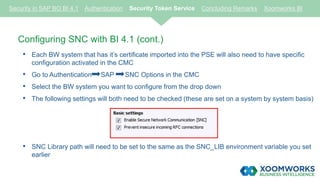
• Each BW system that has it’s certificate imported into the PSE will also need to have specific
configuration activated in the CMC
• Go to Authentication SAP SNC Options in the CMC
• Select the BW system you want to configure from the drop down
• The following settings will both need to be checked (these are set on a system by system basis)
• SNC Library path will need to be set to the same as the SNC_LIB environment variable you set
earlier
Security in SAP BO BI 4.1 Authentication Security Token Service Concluding Remarks Xoomworks BI
Configuring SNC with BI 4.1 (cont.)
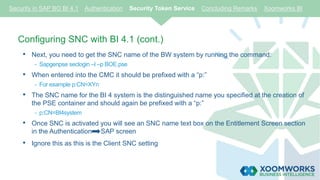
• Next, you need to get the SNC name of the BW system by running the command:
- Sapgenpse seclogin –l –p BOE.pse
• When entered into the CMC it should be prefixed with a “p:”
- For example p:CN=XYn
• The SNC name for the BI 4 system is the distinguished name you specified at the creation of
the PSE container and should again be prefixed with a “p:”
- p:CN=BI4system
• Once SNC is activated you will see an SNC name text box on the Entitlement Screen section
in the Authentication SAP screen
• Ignore this as this is the Client SNC setting
Security in SAP BO BI 4.1 Authentication Security Token Service Concluding Remarks Xoomworks BI
Closing Remarks
bi@xoomworks.com | www.xoomworks.com/bi
Security in SAP BO BI 4.1 Authentication Security Token Service Concluding Remarks Xoomworks BI
Remember…..
• Make your security model as flexible as you can, you never know when your requirements
might change
• The more new applications you add to your environment the more you need to add to your
security model
• Don’t ever assume that because your security model is well designed that shortcuts aren’t
being taken
• Fix your security model issues as soon as you find them
• Authentication types can be mixed and matched as required, but manual aliasing might be
required to allow the Security Token Service to do its job
Security in SAP BO BI 4.1 Authentication Security Token Service Concluding Remarks Xoomworks BI
Remember…..
• The more complex your environment, the more the Security Token Service can help you
• Aliasing users can both make your end users’ lives easier but also have a negative impact
on performance
• The more groups your user is a member of, the more time the CMS will take to
authenticate users and process requests
• SNC, while still used, has been marginalised by the STS and is now used only by legacy
workflows
1. Your security model is a living, breathing entity
2. Keep on top of your requirements and adjust your security model accordingly
3. Make your security model as flexible as possible
4. The more complex your security and authentication requirements are, the more impact
this will have on performance
5. If you have multiple authentication types, BI 4.1 SP03 will allow you to reduce the
number of Web Application servers you require
6. The Security Token Service can help make your life easier
7. Aliasing your users together can allow your users to log in to the system via multiple
routes
7 Take Home Messages
“Having the strong technical capability of Xoomworks behind
us has enabled us to prove what SAP BusinessObjects can
achieve, and that’s how we’ve managed to build up and
maintain a single platform concept for all our management
information.”
The Solution Delivery Manager for a major petro-chemical company.
“Their consultants were very diligent, spending a lot of
time working on the material for the training so that they
were very well prepared for the sessions.”
Raf Wayne, CTO, Neural Technologies Limited.
THANK YOU
To find out more:
Visit our website at www.xoomworks.com
Email us at bi@xoomworks.com
Resource Library
(Slide 14): SCN article giving an overview of available SSO options with BI 4.1
(Slide 15): Fantastic SAP support PDF document detailing the setup required for Active
Directory Configuration*
(Slide 19): Configuring AD authentication when the CMS is on Unix/Linux*
(Slide 32): Information from SCN on how to configure BI 4.1 and HANA via SAML
(Slide 33): a) Defining the HANA system name, port and a unique name for the HANA Provider
b) Website for converting BI 4 certificate code into a certificate file
* Requires login credentials to the SAP Service Marketplace

SAP BusinessObjects Security

  • 1.
    SAP BusinessObjects Security: Authentication SecurityToken Service Problems, Pitfalls, Tips & Tricks
  • 2.
     The configurationinformation in this presentation will cover a complex, multi-server SAP BusinessObjects BI 4 environment: - Running on a Windows platform - Using the Tomcat version supplied with BI 4.1  The authentication types we will concentrate on will be: - Active Directory - SAP - Enterprise  Where configuration differs significantly from that covered, relevant links are provided in the resource library at the end the presentation. Introduction
  • 3.
    Security in SAPBI 4 Agenda Authentication Security Tokens Closing Remarks Xoomworks BI
  • 4.
  • 5.
    Security Model RequirementGathering  Start by defining the different types of users needed by the business - For example: Info Consumers, with minimal view and refresh rights  Each of these types of users will be their own group within your User and Group structure  They will also have their own Custom Access Level (CAL)  If there are going to be multiple projects on the environment, considerusing the Multi-tenancy Management module within the CMC  If these projects need different rights to different folders, replicate each of the Group types within each project. Security in SAP BO BI 4.1 Authentication Security Token Service Concluding Remarks Xoomworks BI
  • 6.
    Security Model RequirementGathering (cont.)  Next, decide on the Applications that your users will need access to - E.g. Web Intelligence, Universe Design Tool, Design Studio  The folder structure is also important - Do you need a basic folder structure? - Consider using the Multi-tenancy Management module within the CMC  If you only need a basic folder structure then no additional groups are required  If a more complex folder structure is required, you need to replicate the group on a project-by-project basis Security in SAP BO BI 4.1 Authentication Security Token Service Concluding Remarks Xoomworks BI
  • 7.
    Creating Flexible CustomAccess Level  If the CustomAccess Levels (CALs) are flexible, the security model will need to be more powerful  Build CustomAccess Levels to satisfy the requirements of each type of user  Assign each right in only one CAL, so that you build up a user type’s permissions by assigning multiple CALs - So if Info Consumer is your lowest level, an Info Worker will have both Info Consumer and Info Worker CALs assigned to them  Do not: - Deny permissions in the CALs, leave the rights as “Not Assigned” - Assign granular rights on any content. If you need these permissions work them into an existing CAL or create a new one. If one user or group needs them, you can bet others will too! Security in SAP BO BI 4.1 Authentication Security Token Service Concluding Remarks Xoomworks BI
  • 8.
    Custom Access Levels:Application and Content CALs  While it is possible to create a single CAL which covers both Application and Content permissions, it is better to ensure the CALs satisfy a single purpose  Create separate CALs for Application (e.g., WebI, CMC, Crystal Reports) and Content (e.g., reports, universes, connections)  CALs should be broken down into the various functional areas as well as being modular  An Info Worker should have all previous access levels as well as the CALs named after their user types Security in SAP BO BI 4.1 Authentication Security Token Service Concluding Remarks Xoomworks BI
  • 9.
    Security Model vs.Performance  It might not seem obvious but your BI 4 security model does have an impact on the user experience and performance - For example: Info Consumers, with minimal view and refresh rights - The deeper and more complex your security model, the slower navigating the system can be - In the CMC, for example, each section you click on requires BI 4.1 to calculate your security in advance so the application can only show you the options your profile allows - The more groups your user is a member of, the longer the CMS takes to calculate your permissions - If you have multiple authentication methods and multiple aliases in the user accounts then your users will be members of more groups Security in SAP BO BI 4.1 Authentication Security Token Service Concluding Remarks Xoomworks BI
  • 10.
    InfoStore Queries  InfoStorequeries are “SELECT” statements run by the CMS against CI_INFOOBJECTS, CI_SYSTEMOBJECTS and CI_APPOBJECT metadata tables  The performance of these queries is an important factor in the end user experience  While the above tables are not actual database tables, the CMS queries them as if they are tables  While rebuilding the CMS indexes it’s worthwhile doing the same to the Audit Database - One way to do this is to rebuild the indexes on the CMS database - Doing this will make your CMS function faster and can remove potential bottlenecks Security in SAP BO BI 4.1 Authentication Security Token Service Concluding Remarks Xoomworks BI
  • 11.
    Maintaining your SecurityModel  A BI 4 Security Model is a living environment that needs to be maintained and needs to evolve with the needs of the business  As new applications are introduced, new CALs will be required and existing CALs will need to be reviewed  Problems in the security model implementation are often caused by shortcuts taken by support organisations  These issues and “breaks” in the security need to be monitored and fixed as soon as possible Security in SAP BO BI 4.1 Authentication Security Token Service Concluding Remarks Xoomworks BI Example: Due to a stray “View” permission for one group, a single user sent 16 reports to 30,000 other users and caused a Production outage
  • 12.
  • 13.
    Security in SAPBO BI 4.1 Authentication Security Token Service Concluding Remarks Xoomworks BI Managing Authentication in SAP BusinessObjects BI 4  Authentication can vary from simple Enterprise-only requirements to complex mixes of AD, SAP and/or LDAP  Each authentication type can be managed from within the Authentication module in the CMC  Third-party authentication can be set to update via Schedules  This will allow new users to be automatically imported into the system  Each mapped group from a third-party authentication provider will, by default, be imported into the root of the group structure
  • 14.
    Security in SAPBO BI 4.1 Authentication Security Token Service Concluding Remarks Xoomworks BI Authentication Types: Enterprise  The standard authentication type within BI 4 is Enterprise authentication  Most users log in with passwords but single sign-on (SSO) is also possible using certificates. For more information see resource library.  No additional configuration is necessary but further options are available through the CMC  See resource library for link to article detailing available options for SSO in BI 4
  • 15.
    Security in SAPBO BI 4.1 Authentication Security Token Service Concluding Remarks Xoomworks BI Authentication Types: Active Directory  Active Directory authentication allows users to either: - Log in with their Windows password - SSO into BI Launchpad or the Client Tools  SSO via the Web Application Server can also allow End-to-End (E2E) SSO to some reporting database types  Security Groups are created at Active Directory level, and are then mapped into the CMC.  A Group will appear at the root level, this should be added to an Enterprise group, which can have security applied to it. This will make it easier to move the security structure via Promotion Management  Additional configuration is required on the operating system, web application server and theCMC  See resource library for link to SAP support document onActive Directory Configuration
  • 16.
    Security in SAPBO BI 4.1 Authentication Security Token Service Concluding Remarks Xoomworks BI Authentication Types: SAP Authentication  SAP authentication allows users to either: - Log in with their SAP BW password - SSO into BI Launchpad or the Client Tools  Security is controlled by roles defined in BW, which are then imported into the CMC  A Group will appear at the root level, this should be added to an Enterprise group, which can have security applied to it. This will make it easier to move the security structure via Promotion Management
  • 17.
    Security in SAPBO BI 4.1 Authentication Security Token Service Concluding Remarks Xoomworks BI Configuring Tomcat for Single Sign-On  For the purposes of this presentation we will focus on Tomcat configuration using AD and SAP SSO  Configuration for other web application servers (WAS) can be foundin the BI4 Admin guide  Prior to BI 4.1 SP03, each WAS could only be used for one type of SSO  So if your requirements covered both AD SSO and SAP SSO from an SAP Enterprise Portal you would need multiple Tomcats to accomplish this  New functionality has been introduced in SP03 which allows a single Tomcat to serve multiple SSO types. It is also possible to configure a preferred order. - The existing “legacy” configuration will still work
  • 18.
    Security in SAPBO BI 4.1 Authentication Security Token Service Concluding Remarks Xoomworks BI Configuring Tomcat for Single Sign-On: AD Legacy Configuration  First step is to create your service account and run the setspn commands, followed by the ktpass command to get your keytab file.  Then set up your krb5.ini and bscLogin.conf files  In your <install home dir> directory, navigate to tomcat/webapps/BOE/WEB-INF/default  Copy the global.properties file and BILaunchpad.properties into the custom directory, and make the following amendments to the global.properties file: - sso.enabled=true - idm.realm=DOMAIN.COMPANY.COM - idm.princ=BOSSO/<service account>.domain.company.com - idm.allowUnsecured=true
  • 19.
    Security in SAPBO BI 4.1 Authentication Security Token Service Concluding Remarks Xoomworks BI Configuring Tomcat for Single Sign-On: AD Legacy Configuration (cont.)  Amendments to the global.properties file (cont.): - idm.allowNTLM=false - idm.keytab=C:/Windows/<service account>.keytab - vintela.enabled=true  In BILaunchPad.properties make the following change: - authentication.default=secWinAD  Further configuration is necessary for the web services, information on which can be found on the resource page.
  • 20.
    Security in SAPBO BI 4.1 Authentication Security Token Service Concluding Remarks Xoomworks BI Configuring Tomcat for Single Sign-On: SAP Legacy Configuration  As with the AD configuration, the legacy SAP configuration is controlled by the properties files within the BOE web app  In the global.properties file, the following changes are required: - sso.enabled=true - sso.sap.primary=true  In the BIlaunchpad.properties there is only one required change: - authentication.default=secSAPR3  It is also possible – although not required – to set a trusted passphrase to allow secure access from SAP NetWeaver iViews using the logon.embed.secret setting
  • 21.
    Security in SAPBO BI 4.1 Authentication Security Token Service Concluding Remarks Xoomworks BI Configuring Tomcat for Single Sign-On: New Configuration  While the configuration is still controlled by the properties file, the first check is on the sso.types.and.order parameter  Define all the types of SSO you require and what the preferred order is  The IDM parameters are still used for AD but the other parameters are ignored when anything is set in the sso.types.and.order setting
  • 22.
    Security in SAPBO BI 4.1 Authentication Security Token Service Concluding Remarks Xoomworks BI SAP SSO Tip: In the CMC, there is a dropdown box to allow you to select a default SAP system, if you have multiple BW systems connected to BI 4 then it is best to leave this empty  When you have links from the SAP Enterprise Portal, by default Tomcat will try and sign the users in against the default system  The default system can be changed by anyone with access to this screen and there is no message prompting you to confirm your selection  This impacts the URLs that are used in the iViews and open document links - E.g. https://bi4system:8080/BOE/BI?sap_sysid=BWx&sap_client=yyy  The default system does not need to specify the sap_sysid and sap_client parameters in the link.  However, the non default systems need these parameters, it is easier to have no default system and force all links to use these parameters
  • 23.
  • 24.
    Security Token Service •Introduced in SAP BusinessOjects BI 4.0, the Security Token Service (STS) is an Identity Provider service which runs as part of the Adaptive Processing Server (APS) • It is a one way trust, in that the BW systems trust BI 4, but BI 4 does not trust the BW systems • The STS can issue assertion tickets which will allow a user access to a trusting BW system if the user has access to that system • As this was introduced in BI 4.0, the STS is primarily involved in new workflows, such as Crystal Reports for Enterprise (CR4E) against UNX, WebI via BICS and Analysis Edition for OLAP (AOLAP) Security in SAP BO BI 4.1 Authentication Security Token Service Concluding Remarks Xoomworks BI
  • 25.
    Configuring the SecurityToken Service • Commands should be run on one of the BI 4 servers using the CMD prompt - Pushd <BI4 Home Dir>SAP BusinessObjects Enterprise XI 4.0javalib - “<BI4 Home Dir>SAP BusinessObjects Enterprise XI 4.0win64_x64sapjvmbinjava” -jar PKCS12Tool.jar -alias <env specific alias> -storepass <password> -dname CN=BI4ENV • This will generate a p12 file. You’ll need this later. • Next run the following: - “<BI4 Home Dir>SAP BusinessObjects Enterprise XI 4.0win64_x64sapjvmbinkeytool” -exportcert - keystore keystore.p12 -storetype pkcs12 -file <filename>.der -alias <env specific alias> • You will now have a DER file. This should be loaded into any BW system that you need set up in BI 4 Security in SAP BO BI 4.1 Authentication Security Token Service Concluding Remarks Xoomworks BI
  • 26.
    Configuring the SecurityToken Service: CMC Actions • In the CMC, go to the Authentication screen and from the list select “SAP” and then the Options tab • In the SAP SSO Service section select browse and navigate to the location of your p12 file. When you upload it you’ll see the following message to indicate success: Security in SAP BO BI 4.1 Authentication Security Token Service Concluding Remarks Xoomworks BI • Next, you need to specify a system ID. This is the name the certificate will be given in the BW systems. It must be unique. • The Key Store and Private Key passwords as well as the Private Key alias should be set as per the first command run on the previous slide
  • 27.
    Configuring the SecurityToken Service: BW Actions • Under the transaction STRUSTSSO2, in the System PSE, the certificate created in the second command earlier should be imported • The certificate should then be added into the Certificate list and the Access Control List • When adding to the access control list, you will be prompted to enter a System ID and Client Security in SAP BO BI 4.1 Authentication Security Token Service Concluding Remarks Xoomworks BI • The System ID should be the same for all BW systems and should be entered into the System ID in the CMC SAP SSO Service section • The Client ID will always be 000
  • 28.
    How Does theSTS Help You? • The STS helps you most in the following scenarios: - Multiple BW Systems - Multiple Authentication Types • In these scenarios it allows the user to log in via one method and still use the functionality supplied by another method • For example, if a user logs in with credentials for one BW System, they will be able to use SSO to connect to another BW system (see Tip 1 on following slide) - For this to work, the simple name registry fix must be activated unless the users are manually aliased together • Additionally, if a user was to SSO into BI Launchpad via AD SSO they could then SSO to BW (see Tip 2 on following slides) - This requires the AD and SAP accounts to be aliased together in the CMC Security in SAP BO BI 4.1 Authentication Security Token Service Concluding Remarks Xoomworks BI
  • 29.
    Security Token Service- Tip 1 • This registry change will remove the System and Client prefix from the BW users • So for example, my XY5~110martin would become martin • If you have multiple BW systems then all user accounts of the same name will be aliased together • Previously there would be a different user account for each BW system • This will enable users to log in against one BW system and refresh reports against a different BW system • To activate this functionality make the following registry changes on all CMS servers: - HKEY_LOCAL_MACHINESOFTWARESAP BusinessObjectsSuite XI 4.0EnterpriseAuth PluginssecSAPR3SimpleUsernameFormat = Yes Security in SAP BO BI 4.1 Authentication Security Token Service Concluding Remarks Xoomworks BI
  • 30.
    Security Token Service- Tip 2 • Aliasing AD and SAP users together • If the AD and SAP usernames are the same then the users will automatically be aliased together. If this is not the case, then the users can be manually aliased • In the user properties, the Assign Alias button will take you through the process of searching for the other account you wish to merge - Beware! Removing all user aliases from an account will delete the original account including all of the personal documents • Depending on the complexity of the security model this can be a slow process • It is possible to have this done automatically by creating a jar file using the SDK or a third party tool (e.g. GB&Smith 360 suite), to run through the users in the system and match AD and SAP users Security in SAP BO BI 4.1 Authentication Security Token Service Concluding Remarks Xoomworks BI
  • 31.
    Single Sign-On toHANA • BI 4 can SSO to HANA in multiple ways • The “legacy” method is to use Kerberos to SSO to the back-end HANA database • This passes the ticket created at login to BI Launchpad through to the HANA database • As of BI 4.1 however, SAML can be used to create a secure trusted connection to the database • The majority of the SAML configuration actually takes place on the HANA side Security in SAP BO BI 4.1 Authentication Security Token Service Concluding Remarks Xoomworks BI
  • 32.
    Single Sign-On toHANA using SAML: BI 4.1 Side Configuration • In the CMC, select Applications and then HANA Configuration - Not the most obvious location for these options • You will need to define the HANA system name, port and a unique name for the HANA Provider • This unique name will also need to be detailed in the HANA configuration. For more information see resource library. Security in SAP BO BI 4.1 Authentication Security Token Service Concluding Remarks Xoomworks BI
  • 33.
    Single Sign-On toHANA using SAML: BI 4.1 Side Configuration (cont.) • BI 4.1 will generate certificate code, which will then need to be converted into a certificate file • See link in Resource library for website that will do this for you • This certificate should be imported in HANA Single Sign-On to HANA using SAML: HANA Side Configuration • For the full configuration workflow for the HANA side configuration please check the links in the resource library at the end of the presentation. Security in SAP BO BI 4.1 Authentication Security Token Service Concluding Remarks Xoomworks BI
  • 34.
    Secure Network Configuration •Setting up Secure Network Configuration (SNC) between BI 4 and SAP BW involves using the SAP Crypto Libraries - Supplied with the application as of BI 4.1, previously it was a manual download and config. • In SAP BusinessObjects XI 3.1, two different methods of SNC communication were used: - Client SNC – used for importing roles from SAP BW - Server SNC – used for report processing • In BI 4, Client SNC is no longer supported per info from SAP Support - This appears to be down to the introduction of 64-bit Tomcat - Client SNC would be 64-bit while Server SNC is still 32-bit - As a result, using both SNC types on a single machine would be unworkable Security in SAP BO BI 4.1 Authentication Security Token Service Concluding Remarks Xoomworks BI
  • 35.
    Secure Network Configuration(cont.) • In BI 4, SNC is largely replaced by the Security Token Service • SNC can be used only in legacy workflows - Crystal Reports 2013 (not Crystal Reports for Enterprise) - MDX Universes • As of BI 4.1, the SAP Cryptolib files are stored in - <installation dir>sap • However, it is not configured by default Security in SAP BO BI 4.1 Authentication Security Token Service Concluding Remarks Xoomworks BI
  • 36.
    Configuring SNC withBI 4.1 • The first step for the configuration is to create the following two System Environment variables - SECUDIR = <install home dir>sapsec (the sec directory will need to be created) - SNC_LIB = <install home dir>sapsapcrypto.dll • Next you should create the PSE container. From a command prompt run the following commands: - pushd <install home dir>sap - sapgenpse gen_pse –v –p BOE.pse - To avoid confusion, use a different distinguished name from that used in the STS • The sapgenpse command will prompt you to enter a Pin as well as a distinguished name - To avoid confusion, use a different distinguished name from that used in the STS Security in SAP BO BI 4.1 Authentication Security Token Service Concluding Remarks Xoomworks BI
  • 37.
    Configuring SNC withBI 4.1 (cont.) • To configure the SNC trust on the BW side you will need to export the certificate from the PSE container - sapgenpse export_own_cert –v –p BOE.pse –o BI4SNC.crt - The syntax above is a lower case “o”, upper case “O” has a different use • In BW, run the transaction STRUSTSSO2 and select the SNC (SAPCryptolib) item and import the certificate • Add the Certificate to the Certificate list but not the Access Control List • Export the system’s own certificate as this will need to be loaded into the BI 4 PSE Container Security in SAP BO BI 4.1 Authentication Security Token Service Concluding Remarks Xoomworks BI
  • 38.
    Configuring SNC withBI 4.1 (cont.) • You need to grant the service account that runs the Server Intelligence Agent (SIA) single sign-on access to the PSE file - sapgenpse seclogin -p BOE.pse -O DOMAINServiceAccount • If you need to check which accounts have SSO access to the PSE file at any time you can run the following command to see which accounts have access - sapgenpse seclogin -l • The BW system’s certificate should now be imported into the PSE container on the BI 4 system - sapgenpse maintain_pk –v –a <BW_Certificate_Name>.crt –p BOE.pse • To see a list of previously imported certificates run: - sapgenpse maintain_pk –l –p BOE.pse Security in SAP BO BI 4.1 Authentication Security Token Service Concluding Remarks Xoomworks BI
  • 39.
    Configuring SNC withBI 4.1 (cont.) • Each BW system that has it’s certificate imported into the PSE will also need to have specific configuration activated in the CMC • Go to Authentication SAP SNC Options in the CMC • Select the BW system you want to configure from the drop down • The following settings will both need to be checked (these are set on a system by system basis) • SNC Library path will need to be set to the same as the SNC_LIB environment variable you set earlier Security in SAP BO BI 4.1 Authentication Security Token Service Concluding Remarks Xoomworks BI
  • 40.
    Configuring SNC withBI 4.1 (cont.) • Next, you need to get the SNC name of the BW system by running the command: - Sapgenpse seclogin –l –p BOE.pse • When entered into the CMC it should be prefixed with a “p:” - For example p:CN=XYn • The SNC name for the BI 4 system is the distinguished name you specified at the creation of the PSE container and should again be prefixed with a “p:” - p:CN=BI4system • Once SNC is activated you will see an SNC name text box on the Entitlement Screen section in the Authentication SAP screen • Ignore this as this is the Client SNC setting Security in SAP BO BI 4.1 Authentication Security Token Service Concluding Remarks Xoomworks BI
  • 41.
  • 42.
    Security in SAPBO BI 4.1 Authentication Security Token Service Concluding Remarks Xoomworks BI Remember….. • Make your security model as flexible as you can, you never know when your requirements might change • The more new applications you add to your environment the more you need to add to your security model • Don’t ever assume that because your security model is well designed that shortcuts aren’t being taken • Fix your security model issues as soon as you find them • Authentication types can be mixed and matched as required, but manual aliasing might be required to allow the Security Token Service to do its job
  • 43.
    Security in SAPBO BI 4.1 Authentication Security Token Service Concluding Remarks Xoomworks BI Remember….. • The more complex your environment, the more the Security Token Service can help you • Aliasing users can both make your end users’ lives easier but also have a negative impact on performance • The more groups your user is a member of, the more time the CMS will take to authenticate users and process requests • SNC, while still used, has been marginalised by the STS and is now used only by legacy workflows
  • 44.
    1. Your securitymodel is a living, breathing entity 2. Keep on top of your requirements and adjust your security model accordingly 3. Make your security model as flexible as possible 4. The more complex your security and authentication requirements are, the more impact this will have on performance 5. If you have multiple authentication types, BI 4.1 SP03 will allow you to reduce the number of Web Application servers you require 6. The Security Token Service can help make your life easier 7. Aliasing your users together can allow your users to log in to the system via multiple routes 7 Take Home Messages
  • 45.
    “Having the strongtechnical capability of Xoomworks behind us has enabled us to prove what SAP BusinessObjects can achieve, and that’s how we’ve managed to build up and maintain a single platform concept for all our management information.” The Solution Delivery Manager for a major petro-chemical company. “Their consultants were very diligent, spending a lot of time working on the material for the training so that they were very well prepared for the sessions.” Raf Wayne, CTO, Neural Technologies Limited.
  • 46.
    THANK YOU To findout more: Visit our website at www.xoomworks.com Email us at bi@xoomworks.com
  • 47.
    Resource Library (Slide 14):SCN article giving an overview of available SSO options with BI 4.1 (Slide 15): Fantastic SAP support PDF document detailing the setup required for Active Directory Configuration* (Slide 19): Configuring AD authentication when the CMS is on Unix/Linux* (Slide 32): Information from SCN on how to configure BI 4.1 and HANA via SAML (Slide 33): a) Defining the HANA system name, port and a unique name for the HANA Provider b) Website for converting BI 4 certificate code into a certificate file * Requires login credentials to the SAP Service Marketplace

Editor's Notes

  • #3 BI 4.1 offers enhanced usability and productivity through a harmonized user experience, advanced analytical insight, and powerful new search capability The software supports and integrates new client solutions, such as SAP BusinessObjects Design Studio, SAP Lumira software, and SAP BusinessObjects Analysis software. A common chart engine, a C++ library used to generate business graphics, provides all clients with the same look and feel for charts used within existing BI content. The chart engine can be extended using partner offerings or customized to meet your specific charting requirements. BI 4.1 is designed to support future innovations: Where the XI platform used a 32-bit architecture, the new release is designed to take full advantage of modern hardware and memory using 64-bit technology. The XI platform included a collection of applications, each of which used its own connectivity stack. BI 4.1 shares a common semantic layer and dedicated services for data connectivity, creating a powerful, highly integrated solution for SAP clients.
  • #4 BI 4.1 offers enhanced usability and productivity through a harmonized user experience, advanced analytical insight, and powerful new search capability The software supports and integrates new client solutions, such as SAP BusinessObjects Design Studio, SAP Lumira software, and SAP BusinessObjects Analysis software. A common chart engine, a C++ library used to generate business graphics, provides all clients with the same look and feel for charts used within existing BI content. The chart engine can be extended using partner offerings or customized to meet your specific charting requirements. BI 4.1 is designed to support future innovations: Where the XI platform used a 32-bit architecture, the new release is designed to take full advantage of modern hardware and memory using 64-bit technology. The XI platform included a collection of applications, each of which used its own connectivity stack. BI 4.1 shares a common semantic layer and dedicated services for data connectivity, creating a powerful, highly integrated solution for SAP clients.
  • #5 BI 4.1 offers enhanced usability and productivity through a harmonized user experience, advanced analytical insight, and powerful new search capability The software supports and integrates new client solutions, such as SAP BusinessObjects Design Studio, SAP Lumira software, and SAP BusinessObjects Analysis software. A common chart engine, a C++ library used to generate business graphics, provides all clients with the same look and feel for charts used within existing BI content. The chart engine can be extended using partner offerings or customized to meet your specific charting requirements. BI 4.1 is designed to support future innovations: Where the XI platform used a 32-bit architecture, the new release is designed to take full advantage of modern hardware and memory using 64-bit technology. The XI platform included a collection of applications, each of which used its own connectivity stack. BI 4.1 shares a common semantic layer and dedicated services for data connectivity, creating a powerful, highly integrated solution for SAP clients.
  • #6 BI 4.1 offers enhanced usability and productivity through a harmonized user experience, advanced analytical insight, and powerful new search capability The software supports and integrates new client solutions, such as SAP BusinessObjects Design Studio, SAP Lumira software, and SAP BusinessObjects Analysis software. A common chart engine, a C++ library used to generate business graphics, provides all clients with the same look and feel for charts used within existing BI content. The chart engine can be extended using partner offerings or customized to meet your specific charting requirements. BI 4.1 is designed to support future innovations: Where the XI platform used a 32-bit architecture, the new release is designed to take full advantage of modern hardware and memory using 64-bit technology. The XI platform included a collection of applications, each of which used its own connectivity stack. BI 4.1 shares a common semantic layer and dedicated services for data connectivity, creating a powerful, highly integrated solution for SAP clients.
  • #7 BI 4.1 offers enhanced usability and productivity through a harmonized user experience, advanced analytical insight, and powerful new search capability The software supports and integrates new client solutions, such as SAP BusinessObjects Design Studio, SAP Lumira software, and SAP BusinessObjects Analysis software. A common chart engine, a C++ library used to generate business graphics, provides all clients with the same look and feel for charts used within existing BI content. The chart engine can be extended using partner offerings or customized to meet your specific charting requirements. BI 4.1 is designed to support future innovations: Where the XI platform used a 32-bit architecture, the new release is designed to take full advantage of modern hardware and memory using 64-bit technology. The XI platform included a collection of applications, each of which used its own connectivity stack. BI 4.1 shares a common semantic layer and dedicated services for data connectivity, creating a powerful, highly integrated solution for SAP clients.
  • #8 BI 4.1 offers enhanced usability and productivity through a harmonized user experience, advanced analytical insight, and powerful new search capability The software supports and integrates new client solutions, such as SAP BusinessObjects Design Studio, SAP Lumira software, and SAP BusinessObjects Analysis software. A common chart engine, a C++ library used to generate business graphics, provides all clients with the same look and feel for charts used within existing BI content. The chart engine can be extended using partner offerings or customized to meet your specific charting requirements. BI 4.1 is designed to support future innovations: Where the XI platform used a 32-bit architecture, the new release is designed to take full advantage of modern hardware and memory using 64-bit technology. The XI platform included a collection of applications, each of which used its own connectivity stack. BI 4.1 shares a common semantic layer and dedicated services for data connectivity, creating a powerful, highly integrated solution for SAP clients.
  • #9 BI 4.1 offers enhanced usability and productivity through a harmonized user experience, advanced analytical insight, and powerful new search capability The software supports and integrates new client solutions, such as SAP BusinessObjects Design Studio, SAP Lumira software, and SAP BusinessObjects Analysis software. A common chart engine, a C++ library used to generate business graphics, provides all clients with the same look and feel for charts used within existing BI content. The chart engine can be extended using partner offerings or customized to meet your specific charting requirements. BI 4.1 is designed to support future innovations: Where the XI platform used a 32-bit architecture, the new release is designed to take full advantage of modern hardware and memory using 64-bit technology. The XI platform included a collection of applications, each of which used its own connectivity stack. BI 4.1 shares a common semantic layer and dedicated services for data connectivity, creating a powerful, highly integrated solution for SAP clients.
  • #10 BI 4.1 offers enhanced usability and productivity through a harmonized user experience, advanced analytical insight, and powerful new search capability The software supports and integrates new client solutions, such as SAP BusinessObjects Design Studio, SAP Lumira software, and SAP BusinessObjects Analysis software. A common chart engine, a C++ library used to generate business graphics, provides all clients with the same look and feel for charts used within existing BI content. The chart engine can be extended using partner offerings or customized to meet your specific charting requirements. BI 4.1 is designed to support future innovations: Where the XI platform used a 32-bit architecture, the new release is designed to take full advantage of modern hardware and memory using 64-bit technology. The XI platform included a collection of applications, each of which used its own connectivity stack. BI 4.1 shares a common semantic layer and dedicated services for data connectivity, creating a powerful, highly integrated solution for SAP clients.
  • #11 BI 4.1 offers enhanced usability and productivity through a harmonized user experience, advanced analytical insight, and powerful new search capability The software supports and integrates new client solutions, such as SAP BusinessObjects Design Studio, SAP Lumira software, and SAP BusinessObjects Analysis software. A common chart engine, a C++ library used to generate business graphics, provides all clients with the same look and feel for charts used within existing BI content. The chart engine can be extended using partner offerings or customized to meet your specific charting requirements. BI 4.1 is designed to support future innovations: Where the XI platform used a 32-bit architecture, the new release is designed to take full advantage of modern hardware and memory using 64-bit technology. The XI platform included a collection of applications, each of which used its own connectivity stack. BI 4.1 shares a common semantic layer and dedicated services for data connectivity, creating a powerful, highly integrated solution for SAP clients.
  • #12 BI 4.1 offers enhanced usability and productivity through a harmonized user experience, advanced analytical insight, and powerful new search capability The software supports and integrates new client solutions, such as SAP BusinessObjects Design Studio, SAP Lumira software, and SAP BusinessObjects Analysis software. A common chart engine, a C++ library used to generate business graphics, provides all clients with the same look and feel for charts used within existing BI content. The chart engine can be extended using partner offerings or customized to meet your specific charting requirements. BI 4.1 is designed to support future innovations: Where the XI platform used a 32-bit architecture, the new release is designed to take full advantage of modern hardware and memory using 64-bit technology. The XI platform included a collection of applications, each of which used its own connectivity stack. BI 4.1 shares a common semantic layer and dedicated services for data connectivity, creating a powerful, highly integrated solution for SAP clients.
  • #13 BI 4.1 offers enhanced usability and productivity through a harmonized user experience, advanced analytical insight, and powerful new search capability The software supports and integrates new client solutions, such as SAP BusinessObjects Design Studio, SAP Lumira software, and SAP BusinessObjects Analysis software. A common chart engine, a C++ library used to generate business graphics, provides all clients with the same look and feel for charts used within existing BI content. The chart engine can be extended using partner offerings or customized to meet your specific charting requirements. BI 4.1 is designed to support future innovations: Where the XI platform used a 32-bit architecture, the new release is designed to take full advantage of modern hardware and memory using 64-bit technology. The XI platform included a collection of applications, each of which used its own connectivity stack. BI 4.1 shares a common semantic layer and dedicated services for data connectivity, creating a powerful, highly integrated solution for SAP clients.
  • #14 BI 4.1 offers enhanced usability and productivity through a harmonized user experience, advanced analytical insight, and powerful new search capability The software supports and integrates new client solutions, such as SAP BusinessObjects Design Studio, SAP Lumira software, and SAP BusinessObjects Analysis software. A common chart engine, a C++ library used to generate business graphics, provides all clients with the same look and feel for charts used within existing BI content. The chart engine can be extended using partner offerings or customized to meet your specific charting requirements. BI 4.1 is designed to support future innovations: Where the XI platform used a 32-bit architecture, the new release is designed to take full advantage of modern hardware and memory using 64-bit technology. The XI platform included a collection of applications, each of which used its own connectivity stack. BI 4.1 shares a common semantic layer and dedicated services for data connectivity, creating a powerful, highly integrated solution for SAP clients.
  • #15 BI 4.1 offers enhanced usability and productivity through a harmonized user experience, advanced analytical insight, and powerful new search capability The software supports and integrates new client solutions, such as SAP BusinessObjects Design Studio, SAP Lumira software, and SAP BusinessObjects Analysis software. A common chart engine, a C++ library used to generate business graphics, provides all clients with the same look and feel for charts used within existing BI content. The chart engine can be extended using partner offerings or customized to meet your specific charting requirements. BI 4.1 is designed to support future innovations: Where the XI platform used a 32-bit architecture, the new release is designed to take full advantage of modern hardware and memory using 64-bit technology. The XI platform included a collection of applications, each of which used its own connectivity stack. BI 4.1 shares a common semantic layer and dedicated services for data connectivity, creating a powerful, highly integrated solution for SAP clients.
  • #16 BI 4.1 offers enhanced usability and productivity through a harmonized user experience, advanced analytical insight, and powerful new search capability The software supports and integrates new client solutions, such as SAP BusinessObjects Design Studio, SAP Lumira software, and SAP BusinessObjects Analysis software. A common chart engine, a C++ library used to generate business graphics, provides all clients with the same look and feel for charts used within existing BI content. The chart engine can be extended using partner offerings or customized to meet your specific charting requirements. BI 4.1 is designed to support future innovations: Where the XI platform used a 32-bit architecture, the new release is designed to take full advantage of modern hardware and memory using 64-bit technology. The XI platform included a collection of applications, each of which used its own connectivity stack. BI 4.1 shares a common semantic layer and dedicated services for data connectivity, creating a powerful, highly integrated solution for SAP clients.
  • #17 BI 4.1 offers enhanced usability and productivity through a harmonized user experience, advanced analytical insight, and powerful new search capability The software supports and integrates new client solutions, such as SAP BusinessObjects Design Studio, SAP Lumira software, and SAP BusinessObjects Analysis software. A common chart engine, a C++ library used to generate business graphics, provides all clients with the same look and feel for charts used within existing BI content. The chart engine can be extended using partner offerings or customized to meet your specific charting requirements. BI 4.1 is designed to support future innovations: Where the XI platform used a 32-bit architecture, the new release is designed to take full advantage of modern hardware and memory using 64-bit technology. The XI platform included a collection of applications, each of which used its own connectivity stack. BI 4.1 shares a common semantic layer and dedicated services for data connectivity, creating a powerful, highly integrated solution for SAP clients.
  • #18 BI 4.1 offers enhanced usability and productivity through a harmonized user experience, advanced analytical insight, and powerful new search capability The software supports and integrates new client solutions, such as SAP BusinessObjects Design Studio, SAP Lumira software, and SAP BusinessObjects Analysis software. A common chart engine, a C++ library used to generate business graphics, provides all clients with the same look and feel for charts used within existing BI content. The chart engine can be extended using partner offerings or customized to meet your specific charting requirements. BI 4.1 is designed to support future innovations: Where the XI platform used a 32-bit architecture, the new release is designed to take full advantage of modern hardware and memory using 64-bit technology. The XI platform included a collection of applications, each of which used its own connectivity stack. BI 4.1 shares a common semantic layer and dedicated services for data connectivity, creating a powerful, highly integrated solution for SAP clients.
  • #19 BI 4.1 offers enhanced usability and productivity through a harmonized user experience, advanced analytical insight, and powerful new search capability The software supports and integrates new client solutions, such as SAP BusinessObjects Design Studio, SAP Lumira software, and SAP BusinessObjects Analysis software. A common chart engine, a C++ library used to generate business graphics, provides all clients with the same look and feel for charts used within existing BI content. The chart engine can be extended using partner offerings or customized to meet your specific charting requirements. BI 4.1 is designed to support future innovations: Where the XI platform used a 32-bit architecture, the new release is designed to take full advantage of modern hardware and memory using 64-bit technology. The XI platform included a collection of applications, each of which used its own connectivity stack. BI 4.1 shares a common semantic layer and dedicated services for data connectivity, creating a powerful, highly integrated solution for SAP clients.
  • #20 BI 4.1 offers enhanced usability and productivity through a harmonized user experience, advanced analytical insight, and powerful new search capability The software supports and integrates new client solutions, such as SAP BusinessObjects Design Studio, SAP Lumira software, and SAP BusinessObjects Analysis software. A common chart engine, a C++ library used to generate business graphics, provides all clients with the same look and feel for charts used within existing BI content. The chart engine can be extended using partner offerings or customized to meet your specific charting requirements. BI 4.1 is designed to support future innovations: Where the XI platform used a 32-bit architecture, the new release is designed to take full advantage of modern hardware and memory using 64-bit technology. The XI platform included a collection of applications, each of which used its own connectivity stack. BI 4.1 shares a common semantic layer and dedicated services for data connectivity, creating a powerful, highly integrated solution for SAP clients.
  • #21 BI 4.1 offers enhanced usability and productivity through a harmonized user experience, advanced analytical insight, and powerful new search capability The software supports and integrates new client solutions, such as SAP BusinessObjects Design Studio, SAP Lumira software, and SAP BusinessObjects Analysis software. A common chart engine, a C++ library used to generate business graphics, provides all clients with the same look and feel for charts used within existing BI content. The chart engine can be extended using partner offerings or customized to meet your specific charting requirements. BI 4.1 is designed to support future innovations: Where the XI platform used a 32-bit architecture, the new release is designed to take full advantage of modern hardware and memory using 64-bit technology. The XI platform included a collection of applications, each of which used its own connectivity stack. BI 4.1 shares a common semantic layer and dedicated services for data connectivity, creating a powerful, highly integrated solution for SAP clients.
  • #22 BI 4.1 offers enhanced usability and productivity through a harmonized user experience, advanced analytical insight, and powerful new search capability The software supports and integrates new client solutions, such as SAP BusinessObjects Design Studio, SAP Lumira software, and SAP BusinessObjects Analysis software. A common chart engine, a C++ library used to generate business graphics, provides all clients with the same look and feel for charts used within existing BI content. The chart engine can be extended using partner offerings or customized to meet your specific charting requirements. BI 4.1 is designed to support future innovations: Where the XI platform used a 32-bit architecture, the new release is designed to take full advantage of modern hardware and memory using 64-bit technology. The XI platform included a collection of applications, each of which used its own connectivity stack. BI 4.1 shares a common semantic layer and dedicated services for data connectivity, creating a powerful, highly integrated solution for SAP clients.
  • #23 BI 4.1 offers enhanced usability and productivity through a harmonized user experience, advanced analytical insight, and powerful new search capability The software supports and integrates new client solutions, such as SAP BusinessObjects Design Studio, SAP Lumira software, and SAP BusinessObjects Analysis software. A common chart engine, a C++ library used to generate business graphics, provides all clients with the same look and feel for charts used within existing BI content. The chart engine can be extended using partner offerings or customized to meet your specific charting requirements. BI 4.1 is designed to support future innovations: Where the XI platform used a 32-bit architecture, the new release is designed to take full advantage of modern hardware and memory using 64-bit technology. The XI platform included a collection of applications, each of which used its own connectivity stack. BI 4.1 shares a common semantic layer and dedicated services for data connectivity, creating a powerful, highly integrated solution for SAP clients.
  • #24 BI 4.1 offers enhanced usability and productivity through a harmonized user experience, advanced analytical insight, and powerful new search capability The software supports and integrates new client solutions, such as SAP BusinessObjects Design Studio, SAP Lumira software, and SAP BusinessObjects Analysis software. A common chart engine, a C++ library used to generate business graphics, provides all clients with the same look and feel for charts used within existing BI content. The chart engine can be extended using partner offerings or customized to meet your specific charting requirements. BI 4.1 is designed to support future innovations: Where the XI platform used a 32-bit architecture, the new release is designed to take full advantage of modern hardware and memory using 64-bit technology. The XI platform included a collection of applications, each of which used its own connectivity stack. BI 4.1 shares a common semantic layer and dedicated services for data connectivity, creating a powerful, highly integrated solution for SAP clients.
  • #25 BI 4.1 offers enhanced usability and productivity through a harmonized user experience, advanced analytical insight, and powerful new search capability The software supports and integrates new client solutions, such as SAP BusinessObjects Design Studio, SAP Lumira software, and SAP BusinessObjects Analysis software. A common chart engine, a C++ library used to generate business graphics, provides all clients with the same look and feel for charts used within existing BI content. The chart engine can be extended using partner offerings or customized to meet your specific charting requirements. BI 4.1 is designed to support future innovations: Where the XI platform used a 32-bit architecture, the new release is designed to take full advantage of modern hardware and memory using 64-bit technology. The XI platform included a collection of applications, each of which used its own connectivity stack. BI 4.1 shares a common semantic layer and dedicated services for data connectivity, creating a powerful, highly integrated solution for SAP clients.
  • #26 BI 4.1 offers enhanced usability and productivity through a harmonized user experience, advanced analytical insight, and powerful new search capability The software supports and integrates new client solutions, such as SAP BusinessObjects Design Studio, SAP Lumira software, and SAP BusinessObjects Analysis software. A common chart engine, a C++ library used to generate business graphics, provides all clients with the same look and feel for charts used within existing BI content. The chart engine can be extended using partner offerings or customized to meet your specific charting requirements. BI 4.1 is designed to support future innovations: Where the XI platform used a 32-bit architecture, the new release is designed to take full advantage of modern hardware and memory using 64-bit technology. The XI platform included a collection of applications, each of which used its own connectivity stack. BI 4.1 shares a common semantic layer and dedicated services for data connectivity, creating a powerful, highly integrated solution for SAP clients.
  • #27 BI 4.1 offers enhanced usability and productivity through a harmonized user experience, advanced analytical insight, and powerful new search capability The software supports and integrates new client solutions, such as SAP BusinessObjects Design Studio, SAP Lumira software, and SAP BusinessObjects Analysis software. A common chart engine, a C++ library used to generate business graphics, provides all clients with the same look and feel for charts used within existing BI content. The chart engine can be extended using partner offerings or customized to meet your specific charting requirements. BI 4.1 is designed to support future innovations: Where the XI platform used a 32-bit architecture, the new release is designed to take full advantage of modern hardware and memory using 64-bit technology. The XI platform included a collection of applications, each of which used its own connectivity stack. BI 4.1 shares a common semantic layer and dedicated services for data connectivity, creating a powerful, highly integrated solution for SAP clients.
  • #28 BI 4.1 offers enhanced usability and productivity through a harmonized user experience, advanced analytical insight, and powerful new search capability The software supports and integrates new client solutions, such as SAP BusinessObjects Design Studio, SAP Lumira software, and SAP BusinessObjects Analysis software. A common chart engine, a C++ library used to generate business graphics, provides all clients with the same look and feel for charts used within existing BI content. The chart engine can be extended using partner offerings or customized to meet your specific charting requirements. BI 4.1 is designed to support future innovations: Where the XI platform used a 32-bit architecture, the new release is designed to take full advantage of modern hardware and memory using 64-bit technology. The XI platform included a collection of applications, each of which used its own connectivity stack. BI 4.1 shares a common semantic layer and dedicated services for data connectivity, creating a powerful, highly integrated solution for SAP clients.
  • #29 BI 4.1 offers enhanced usability and productivity through a harmonized user experience, advanced analytical insight, and powerful new search capability The software supports and integrates new client solutions, such as SAP BusinessObjects Design Studio, SAP Lumira software, and SAP BusinessObjects Analysis software. A common chart engine, a C++ library used to generate business graphics, provides all clients with the same look and feel for charts used within existing BI content. The chart engine can be extended using partner offerings or customized to meet your specific charting requirements. BI 4.1 is designed to support future innovations: Where the XI platform used a 32-bit architecture, the new release is designed to take full advantage of modern hardware and memory using 64-bit technology. The XI platform included a collection of applications, each of which used its own connectivity stack. BI 4.1 shares a common semantic layer and dedicated services for data connectivity, creating a powerful, highly integrated solution for SAP clients.
  • #30 BI 4.1 offers enhanced usability and productivity through a harmonized user experience, advanced analytical insight, and powerful new search capability The software supports and integrates new client solutions, such as SAP BusinessObjects Design Studio, SAP Lumira software, and SAP BusinessObjects Analysis software. A common chart engine, a C++ library used to generate business graphics, provides all clients with the same look and feel for charts used within existing BI content. The chart engine can be extended using partner offerings or customized to meet your specific charting requirements. BI 4.1 is designed to support future innovations: Where the XI platform used a 32-bit architecture, the new release is designed to take full advantage of modern hardware and memory using 64-bit technology. The XI platform included a collection of applications, each of which used its own connectivity stack. BI 4.1 shares a common semantic layer and dedicated services for data connectivity, creating a powerful, highly integrated solution for SAP clients.
  • #31 BI 4.1 offers enhanced usability and productivity through a harmonized user experience, advanced analytical insight, and powerful new search capability The software supports and integrates new client solutions, such as SAP BusinessObjects Design Studio, SAP Lumira software, and SAP BusinessObjects Analysis software. A common chart engine, a C++ library used to generate business graphics, provides all clients with the same look and feel for charts used within existing BI content. The chart engine can be extended using partner offerings or customized to meet your specific charting requirements. BI 4.1 is designed to support future innovations: Where the XI platform used a 32-bit architecture, the new release is designed to take full advantage of modern hardware and memory using 64-bit technology. The XI platform included a collection of applications, each of which used its own connectivity stack. BI 4.1 shares a common semantic layer and dedicated services for data connectivity, creating a powerful, highly integrated solution for SAP clients.
  • #32 BI 4.1 offers enhanced usability and productivity through a harmonized user experience, advanced analytical insight, and powerful new search capability The software supports and integrates new client solutions, such as SAP BusinessObjects Design Studio, SAP Lumira software, and SAP BusinessObjects Analysis software. A common chart engine, a C++ library used to generate business graphics, provides all clients with the same look and feel for charts used within existing BI content. The chart engine can be extended using partner offerings or customized to meet your specific charting requirements. BI 4.1 is designed to support future innovations: Where the XI platform used a 32-bit architecture, the new release is designed to take full advantage of modern hardware and memory using 64-bit technology. The XI platform included a collection of applications, each of which used its own connectivity stack. BI 4.1 shares a common semantic layer and dedicated services for data connectivity, creating a powerful, highly integrated solution for SAP clients.
  • #33 BI 4.1 offers enhanced usability and productivity through a harmonized user experience, advanced analytical insight, and powerful new search capability The software supports and integrates new client solutions, such as SAP BusinessObjects Design Studio, SAP Lumira software, and SAP BusinessObjects Analysis software. A common chart engine, a C++ library used to generate business graphics, provides all clients with the same look and feel for charts used within existing BI content. The chart engine can be extended using partner offerings or customized to meet your specific charting requirements. BI 4.1 is designed to support future innovations: Where the XI platform used a 32-bit architecture, the new release is designed to take full advantage of modern hardware and memory using 64-bit technology. The XI platform included a collection of applications, each of which used its own connectivity stack. BI 4.1 shares a common semantic layer and dedicated services for data connectivity, creating a powerful, highly integrated solution for SAP clients.
  • #34 BI 4.1 offers enhanced usability and productivity through a harmonized user experience, advanced analytical insight, and powerful new search capability The software supports and integrates new client solutions, such as SAP BusinessObjects Design Studio, SAP Lumira software, and SAP BusinessObjects Analysis software. A common chart engine, a C++ library used to generate business graphics, provides all clients with the same look and feel for charts used within existing BI content. The chart engine can be extended using partner offerings or customized to meet your specific charting requirements. BI 4.1 is designed to support future innovations: Where the XI platform used a 32-bit architecture, the new release is designed to take full advantage of modern hardware and memory using 64-bit technology. The XI platform included a collection of applications, each of which used its own connectivity stack. BI 4.1 shares a common semantic layer and dedicated services for data connectivity, creating a powerful, highly integrated solution for SAP clients.
  • #35 BI 4.1 offers enhanced usability and productivity through a harmonized user experience, advanced analytical insight, and powerful new search capability The software supports and integrates new client solutions, such as SAP BusinessObjects Design Studio, SAP Lumira software, and SAP BusinessObjects Analysis software. A common chart engine, a C++ library used to generate business graphics, provides all clients with the same look and feel for charts used within existing BI content. The chart engine can be extended using partner offerings or customized to meet your specific charting requirements. BI 4.1 is designed to support future innovations: Where the XI platform used a 32-bit architecture, the new release is designed to take full advantage of modern hardware and memory using 64-bit technology. The XI platform included a collection of applications, each of which used its own connectivity stack. BI 4.1 shares a common semantic layer and dedicated services for data connectivity, creating a powerful, highly integrated solution for SAP clients.
  • #36 BI 4.1 offers enhanced usability and productivity through a harmonized user experience, advanced analytical insight, and powerful new search capability The software supports and integrates new client solutions, such as SAP BusinessObjects Design Studio, SAP Lumira software, and SAP BusinessObjects Analysis software. A common chart engine, a C++ library used to generate business graphics, provides all clients with the same look and feel for charts used within existing BI content. The chart engine can be extended using partner offerings or customized to meet your specific charting requirements. BI 4.1 is designed to support future innovations: Where the XI platform used a 32-bit architecture, the new release is designed to take full advantage of modern hardware and memory using 64-bit technology. The XI platform included a collection of applications, each of which used its own connectivity stack. BI 4.1 shares a common semantic layer and dedicated services for data connectivity, creating a powerful, highly integrated solution for SAP clients.
  • #37 BI 4.1 offers enhanced usability and productivity through a harmonized user experience, advanced analytical insight, and powerful new search capability The software supports and integrates new client solutions, such as SAP BusinessObjects Design Studio, SAP Lumira software, and SAP BusinessObjects Analysis software. A common chart engine, a C++ library used to generate business graphics, provides all clients with the same look and feel for charts used within existing BI content. The chart engine can be extended using partner offerings or customized to meet your specific charting requirements. BI 4.1 is designed to support future innovations: Where the XI platform used a 32-bit architecture, the new release is designed to take full advantage of modern hardware and memory using 64-bit technology. The XI platform included a collection of applications, each of which used its own connectivity stack. BI 4.1 shares a common semantic layer and dedicated services for data connectivity, creating a powerful, highly integrated solution for SAP clients.
  • #38 BI 4.1 offers enhanced usability and productivity through a harmonized user experience, advanced analytical insight, and powerful new search capability The software supports and integrates new client solutions, such as SAP BusinessObjects Design Studio, SAP Lumira software, and SAP BusinessObjects Analysis software. A common chart engine, a C++ library used to generate business graphics, provides all clients with the same look and feel for charts used within existing BI content. The chart engine can be extended using partner offerings or customized to meet your specific charting requirements. BI 4.1 is designed to support future innovations: Where the XI platform used a 32-bit architecture, the new release is designed to take full advantage of modern hardware and memory using 64-bit technology. The XI platform included a collection of applications, each of which used its own connectivity stack. BI 4.1 shares a common semantic layer and dedicated services for data connectivity, creating a powerful, highly integrated solution for SAP clients.
  • #39 BI 4.1 offers enhanced usability and productivity through a harmonized user experience, advanced analytical insight, and powerful new search capability The software supports and integrates new client solutions, such as SAP BusinessObjects Design Studio, SAP Lumira software, and SAP BusinessObjects Analysis software. A common chart engine, a C++ library used to generate business graphics, provides all clients with the same look and feel for charts used within existing BI content. The chart engine can be extended using partner offerings or customized to meet your specific charting requirements. BI 4.1 is designed to support future innovations: Where the XI platform used a 32-bit architecture, the new release is designed to take full advantage of modern hardware and memory using 64-bit technology. The XI platform included a collection of applications, each of which used its own connectivity stack. BI 4.1 shares a common semantic layer and dedicated services for data connectivity, creating a powerful, highly integrated solution for SAP clients.
  • #40 BI 4.1 offers enhanced usability and productivity through a harmonized user experience, advanced analytical insight, and powerful new search capability The software supports and integrates new client solutions, such as SAP BusinessObjects Design Studio, SAP Lumira software, and SAP BusinessObjects Analysis software. A common chart engine, a C++ library used to generate business graphics, provides all clients with the same look and feel for charts used within existing BI content. The chart engine can be extended using partner offerings or customized to meet your specific charting requirements. BI 4.1 is designed to support future innovations: Where the XI platform used a 32-bit architecture, the new release is designed to take full advantage of modern hardware and memory using 64-bit technology. The XI platform included a collection of applications, each of which used its own connectivity stack. BI 4.1 shares a common semantic layer and dedicated services for data connectivity, creating a powerful, highly integrated solution for SAP clients.
  • #41 BI 4.1 offers enhanced usability and productivity through a harmonized user experience, advanced analytical insight, and powerful new search capability The software supports and integrates new client solutions, such as SAP BusinessObjects Design Studio, SAP Lumira software, and SAP BusinessObjects Analysis software. A common chart engine, a C++ library used to generate business graphics, provides all clients with the same look and feel for charts used within existing BI content. The chart engine can be extended using partner offerings or customized to meet your specific charting requirements. BI 4.1 is designed to support future innovations: Where the XI platform used a 32-bit architecture, the new release is designed to take full advantage of modern hardware and memory using 64-bit technology. The XI platform included a collection of applications, each of which used its own connectivity stack. BI 4.1 shares a common semantic layer and dedicated services for data connectivity, creating a powerful, highly integrated solution for SAP clients.
  • #42 BI 4.1 offers enhanced usability and productivity through a harmonized user experience, advanced analytical insight, and powerful new search capability The software supports and integrates new client solutions, such as SAP BusinessObjects Design Studio, SAP Lumira software, and SAP BusinessObjects Analysis software. A common chart engine, a C++ library used to generate business graphics, provides all clients with the same look and feel for charts used within existing BI content. The chart engine can be extended using partner offerings or customized to meet your specific charting requirements. BI 4.1 is designed to support future innovations: Where the XI platform used a 32-bit architecture, the new release is designed to take full advantage of modern hardware and memory using 64-bit technology. The XI platform included a collection of applications, each of which used its own connectivity stack. BI 4.1 shares a common semantic layer and dedicated services for data connectivity, creating a powerful, highly integrated solution for SAP clients.
  • #43 BI 4.1 offers enhanced usability and productivity through a harmonized user experience, advanced analytical insight, and powerful new search capability The software supports and integrates new client solutions, such as SAP BusinessObjects Design Studio, SAP Lumira software, and SAP BusinessObjects Analysis software. A common chart engine, a C++ library used to generate business graphics, provides all clients with the same look and feel for charts used within existing BI content. The chart engine can be extended using partner offerings or customized to meet your specific charting requirements. BI 4.1 is designed to support future innovations: Where the XI platform used a 32-bit architecture, the new release is designed to take full advantage of modern hardware and memory using 64-bit technology. The XI platform included a collection of applications, each of which used its own connectivity stack. BI 4.1 shares a common semantic layer and dedicated services for data connectivity, creating a powerful, highly integrated solution for SAP clients.
  • #44 BI 4.1 offers enhanced usability and productivity through a harmonized user experience, advanced analytical insight, and powerful new search capability The software supports and integrates new client solutions, such as SAP BusinessObjects Design Studio, SAP Lumira software, and SAP BusinessObjects Analysis software. A common chart engine, a C++ library used to generate business graphics, provides all clients with the same look and feel for charts used within existing BI content. The chart engine can be extended using partner offerings or customized to meet your specific charting requirements. BI 4.1 is designed to support future innovations: Where the XI platform used a 32-bit architecture, the new release is designed to take full advantage of modern hardware and memory using 64-bit technology. The XI platform included a collection of applications, each of which used its own connectivity stack. BI 4.1 shares a common semantic layer and dedicated services for data connectivity, creating a powerful, highly integrated solution for SAP clients.
  • #46 BI 4.1 offers enhanced usability and productivity through a harmonized user experience, advanced analytical insight, and powerful new search capability The software supports and integrates new client solutions, such as SAP BusinessObjects Design Studio, SAP Lumira software, and SAP BusinessObjects Analysis software. A common chart engine, a C++ library used to generate business graphics, provides all clients with the same look and feel for charts used within existing BI content. The chart engine can be extended using partner offerings or customized to meet your specific charting requirements. BI 4.1 is designed to support future innovations: Where the XI platform used a 32-bit architecture, the new release is designed to take full advantage of modern hardware and memory using 64-bit technology. The XI platform included a collection of applications, each of which used its own connectivity stack. BI 4.1 shares a common semantic layer and dedicated services for data connectivity, creating a powerful, highly integrated solution for SAP clients.
  • #47 BI 4.1 offers enhanced usability and productivity through a harmonized user experience, advanced analytical insight, and powerful new search capability The software supports and integrates new client solutions, such as SAP BusinessObjects Design Studio, SAP Lumira software, and SAP BusinessObjects Analysis software. A common chart engine, a C++ library used to generate business graphics, provides all clients with the same look and feel for charts used within existing BI content. The chart engine can be extended using partner offerings or customized to meet your specific charting requirements. BI 4.1 is designed to support future innovations: Where the XI platform used a 32-bit architecture, the new release is designed to take full advantage of modern hardware and memory using 64-bit technology. The XI platform included a collection of applications, each of which used its own connectivity stack. BI 4.1 shares a common semantic layer and dedicated services for data connectivity, creating a powerful, highly integrated solution for SAP clients.
  • #48 BI 4.1 offers enhanced usability and productivity through a harmonized user experience, advanced analytical insight, and powerful new search capability The software supports and integrates new client solutions, such as SAP BusinessObjects Design Studio, SAP Lumira software, and SAP BusinessObjects Analysis software. A common chart engine, a C++ library used to generate business graphics, provides all clients with the same look and feel for charts used within existing BI content. The chart engine can be extended using partner offerings or customized to meet your specific charting requirements. BI 4.1 is designed to support future innovations: Where the XI platform used a 32-bit architecture, the new release is designed to take full advantage of modern hardware and memory using 64-bit technology. The XI platform included a collection of applications, each of which used its own connectivity stack. BI 4.1 shares a common semantic layer and dedicated services for data connectivity, creating a powerful, highly integrated solution for SAP clients.