______________________________________________________________
Author: Co-author: Chief Architect:
Dipti Suchak Yogendra Vaithilingam Jothi Periasamy
SAP EPM/BPC Consultant SAP EPM/BPC Consultant SAP HANA/EPM/BI/EIM Community Leader
Diptisuchak@gmail.com Yogi@cubeinsights.com SAP BPC/BOBJ/BI/MDM Domain Champion
Jothi@cubeinsights.com, (916)-296-0228 - Cell
SAP EPM/HANA Community Service
CloneSkills, Inc., http://www.CloneSkills.com , Info@CloneSkills.com , 1.800.836.8959, Page - 1
SAP BPC on HANA 10.0 | KNOWLEDGEBASE
SAP BPC Environment Export Import
Implementation Guide
A Step By Step Guide to Export and Import an Environment
______________________________________________________________
Author: Co-author: Chief Architect:
Dipti Suchak Yogendra Vaithilingam Jothi Periasamy
SAP EPM/BPC Consultant SAP EPM/BPC Consultant SAP HANA/EPM/BI/EIM Community Leader
Diptisuchak@gmail.com Yogi@cubeinsights.com SAP BPC/BOBJ/BI/MDM Domain Champion
Jothi@cubeinsights.com, (916)-296-0228 - Cell
SAP EPM/HANA Community Service
CloneSkills, Inc., http://www.CloneSkills.com , Info@CloneSkills.com , 1.800.836.8959, Page - 2
Table of Contents
1. Login to SAP HANA ......................................................................................... 3
2. Export the BPC environment............................................................................ 4
3. Import the BPC environment ............................................................................ 7
4. Login to BPC and verify the imported environment ........................................ 10
______________________________________________________________
Author: Co-author: Chief Architect:
Dipti Suchak Yogendra Vaithilingam Jothi Periasamy
SAP EPM/BPC Consultant SAP EPM/BPC Consultant SAP HANA/EPM/BI/EIM Community Leader
Diptisuchak@gmail.com Yogi@cubeinsights.com SAP BPC/BOBJ/BI/MDM Domain Champion
Jothi@cubeinsights.com, (916)-296-0228 - Cell
SAP EPM/HANA Community Service
CloneSkills, Inc., http://www.CloneSkills.com , Info@CloneSkills.com , 1.800.836.8959, Page - 3
1. Login to SAP HANA
1.1. Launch SAP GUI and double click on ‘BW740 HANA’ to login to SAP BW.
1.3. Enter Username and Password and click on Enter button.
______________________________________________________________
Author: Co-author: Chief Architect:
Dipti Suchak Yogendra Vaithilingam Jothi Periasamy
SAP EPM/BPC Consultant SAP EPM/BPC Consultant SAP HANA/EPM/BI/EIM Community Leader
Diptisuchak@gmail.com Yogi@cubeinsights.com SAP BPC/BOBJ/BI/MDM Domain Champion
Jothi@cubeinsights.com, (916)-296-0228 - Cell
SAP EPM/HANA Community Service
CloneSkills, Inc., http://www.CloneSkills.com , Info@CloneSkills.com , 1.800.836.8959, Page - 4
2. Export the BPC environment
2.1. Enter the command ‘/OUJBR’ in the text box as shown below and click on
Enter symbol.
______________________________________________________________
Author: Co-author: Chief Architect:
Dipti Suchak Yogendra Vaithilingam Jothi Periasamy
SAP EPM/BPC Consultant SAP EPM/BPC Consultant SAP HANA/EPM/BI/EIM Community Leader
Diptisuchak@gmail.com Yogi@cubeinsights.com SAP BPC/BOBJ/BI/MDM Domain Champion
Jothi@cubeinsights.com, (916)-296-0228 - Cell
SAP EPM/HANA Community Service
CloneSkills, Inc., http://www.CloneSkills.com , Info@CloneSkills.com , 1.800.836.8959, Page - 5
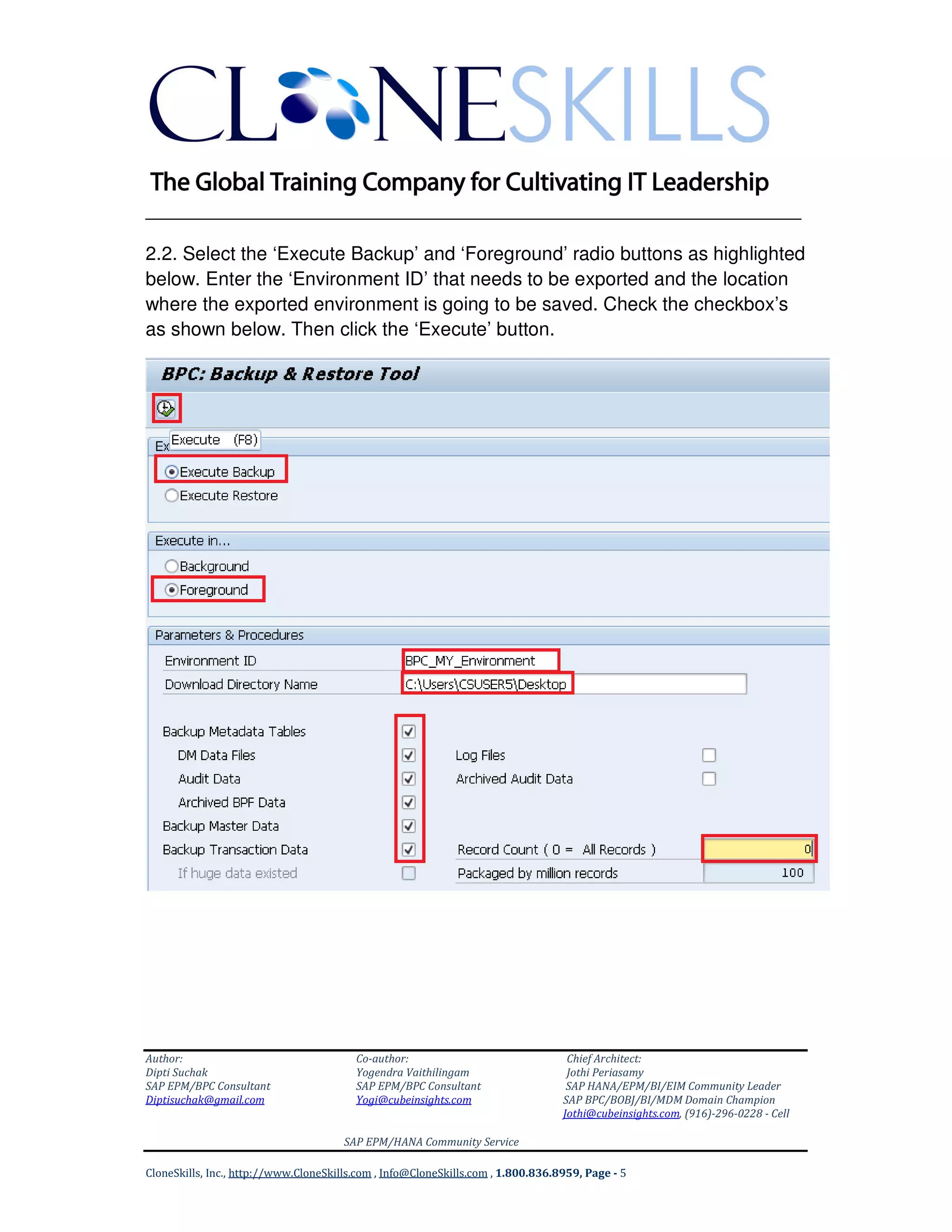
2.2. Select the ‘Execute Backup’ and ‘Foreground’ radio buttons as highlighted
below. Enter the ‘Environment ID’ that needs to be exported and the location
where the exported environment is going to be saved. Check the checkbox’s
as shown below. Then click the ‘Execute’ button.
______________________________________________________________
Author: Co-author: Chief Architect:
Dipti Suchak Yogendra Vaithilingam Jothi Periasamy
SAP EPM/BPC Consultant SAP EPM/BPC Consultant SAP HANA/EPM/BI/EIM Community Leader
Diptisuchak@gmail.com Yogi@cubeinsights.com SAP BPC/BOBJ/BI/MDM Domain Champion
Jothi@cubeinsights.com, (916)-296-0228 - Cell
SAP EPM/HANA Community Service
CloneSkills, Inc., http://www.CloneSkills.com , Info@CloneSkills.com , 1.800.836.8959, Page - 6
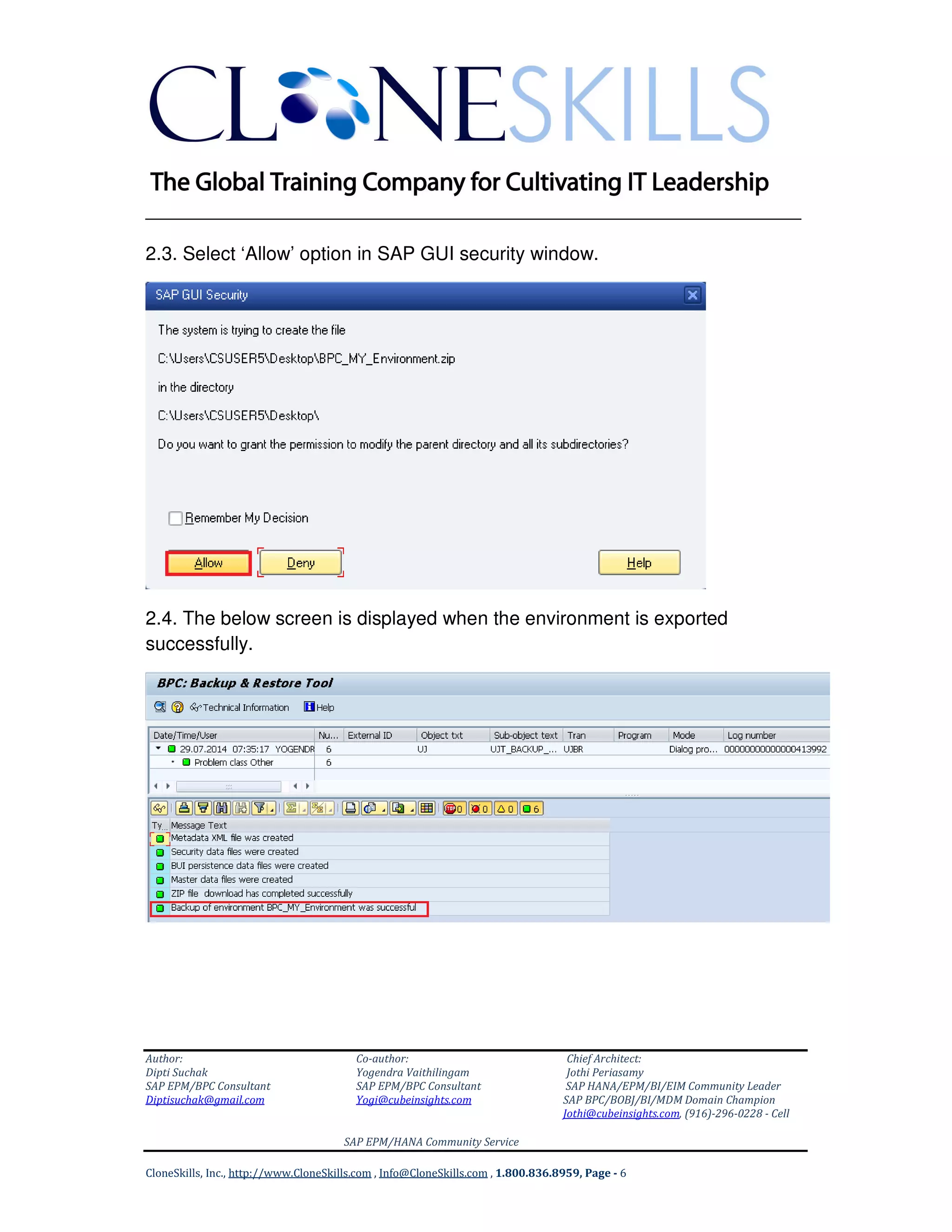
2.3. Select ‘Allow’ option in SAP GUI security window.
2.4. The below screen is displayed when the environment is exported
successfully.
______________________________________________________________
Author: Co-author: Chief Architect:
Dipti Suchak Yogendra Vaithilingam Jothi Periasamy
SAP EPM/BPC Consultant SAP EPM/BPC Consultant SAP HANA/EPM/BI/EIM Community Leader
Diptisuchak@gmail.com Yogi@cubeinsights.com SAP BPC/BOBJ/BI/MDM Domain Champion
Jothi@cubeinsights.com, (916)-296-0228 - Cell
SAP EPM/HANA Community Service
CloneSkills, Inc., http://www.CloneSkills.com , Info@CloneSkills.com , 1.800.836.8959, Page - 7
3. Import the BPC environment
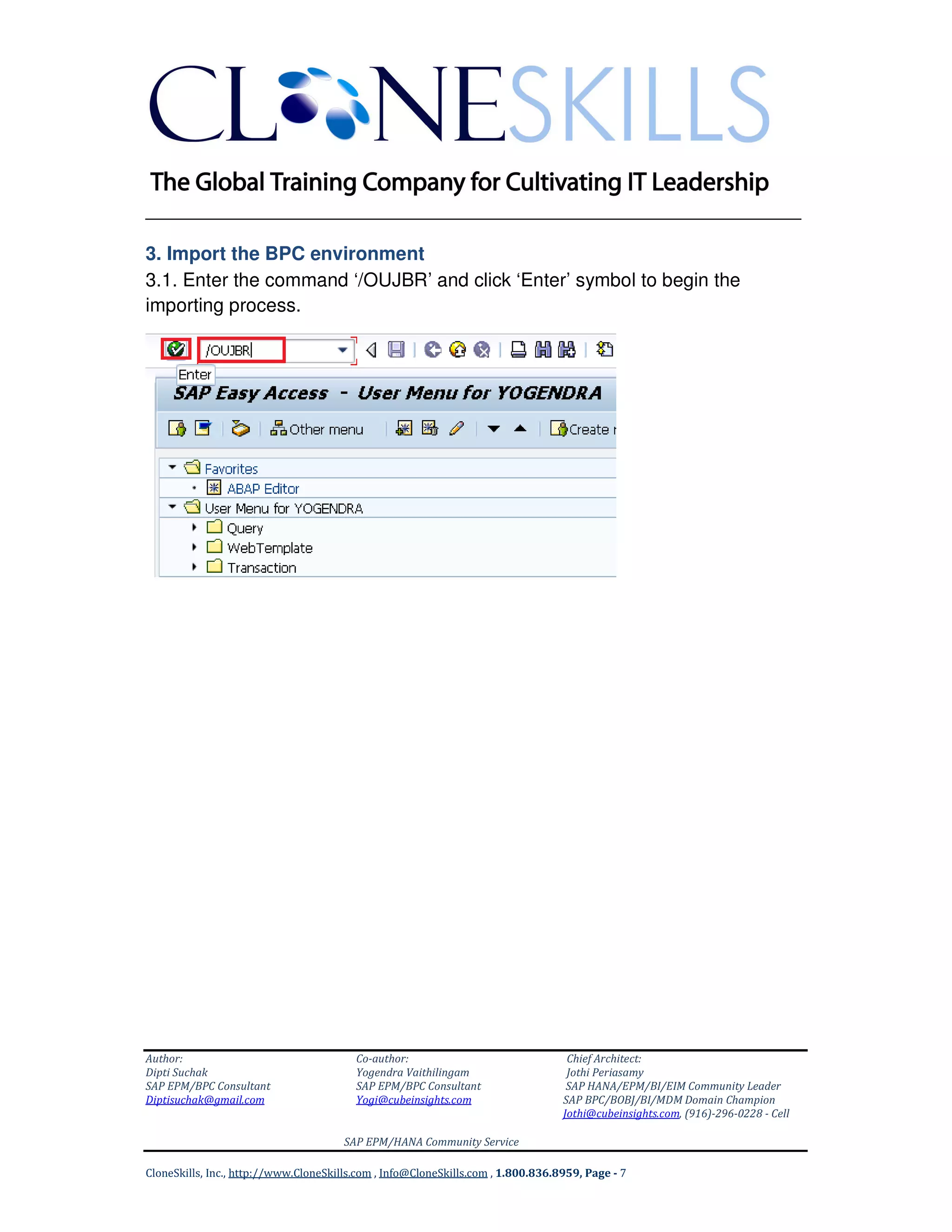
3.1. Enter the command ‘/OUJBR’ and click ‘Enter’ symbol to begin the
importing process.
______________________________________________________________
Author: Co-author: Chief Architect:
Dipti Suchak Yogendra Vaithilingam Jothi Periasamy
SAP EPM/BPC Consultant SAP EPM/BPC Consultant SAP HANA/EPM/BI/EIM Community Leader
Diptisuchak@gmail.com Yogi@cubeinsights.com SAP BPC/BOBJ/BI/MDM Domain Champion
Jothi@cubeinsights.com, (916)-296-0228 - Cell
SAP EPM/HANA Community Service
CloneSkills, Inc., http://www.CloneSkills.com , Info@CloneSkills.com , 1.800.836.8959, Page - 8
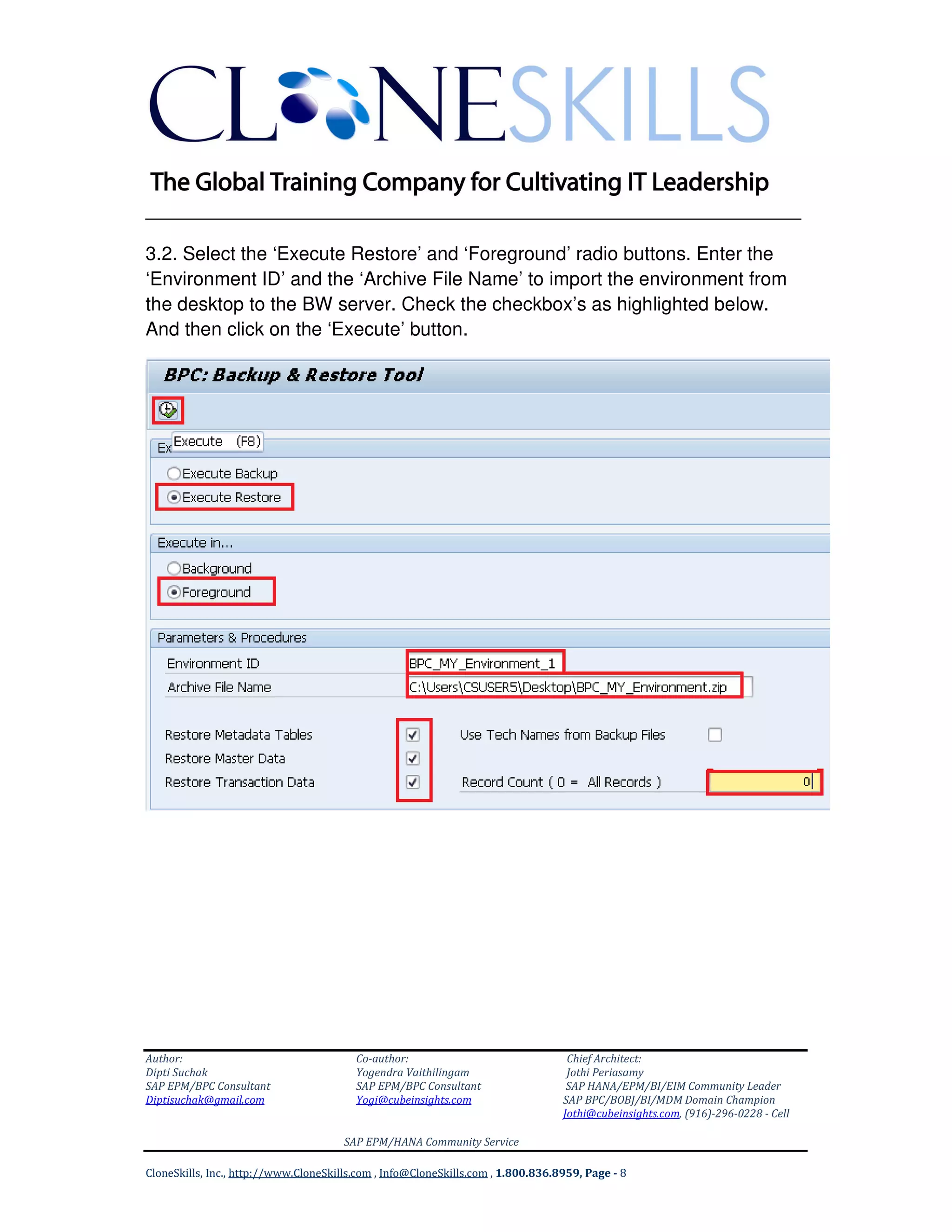
3.2. Select the ‘Execute Restore’ and ‘Foreground’ radio buttons. Enter the
‘Environment ID’ and the ‘Archive File Name’ to import the environment from
the desktop to the BW server. Check the checkbox’s as highlighted below.
And then click on the ‘Execute’ button.
______________________________________________________________
Author: Co-author: Chief Architect:
Dipti Suchak Yogendra Vaithilingam Jothi Periasamy
SAP EPM/BPC Consultant SAP EPM/BPC Consultant SAP HANA/EPM/BI/EIM Community Leader
Diptisuchak@gmail.com Yogi@cubeinsights.com SAP BPC/BOBJ/BI/MDM Domain Champion
Jothi@cubeinsights.com, (916)-296-0228 - Cell
SAP EPM/HANA Community Service
CloneSkills, Inc., http://www.CloneSkills.com , Info@CloneSkills.com , 1.800.836.8959, Page - 9
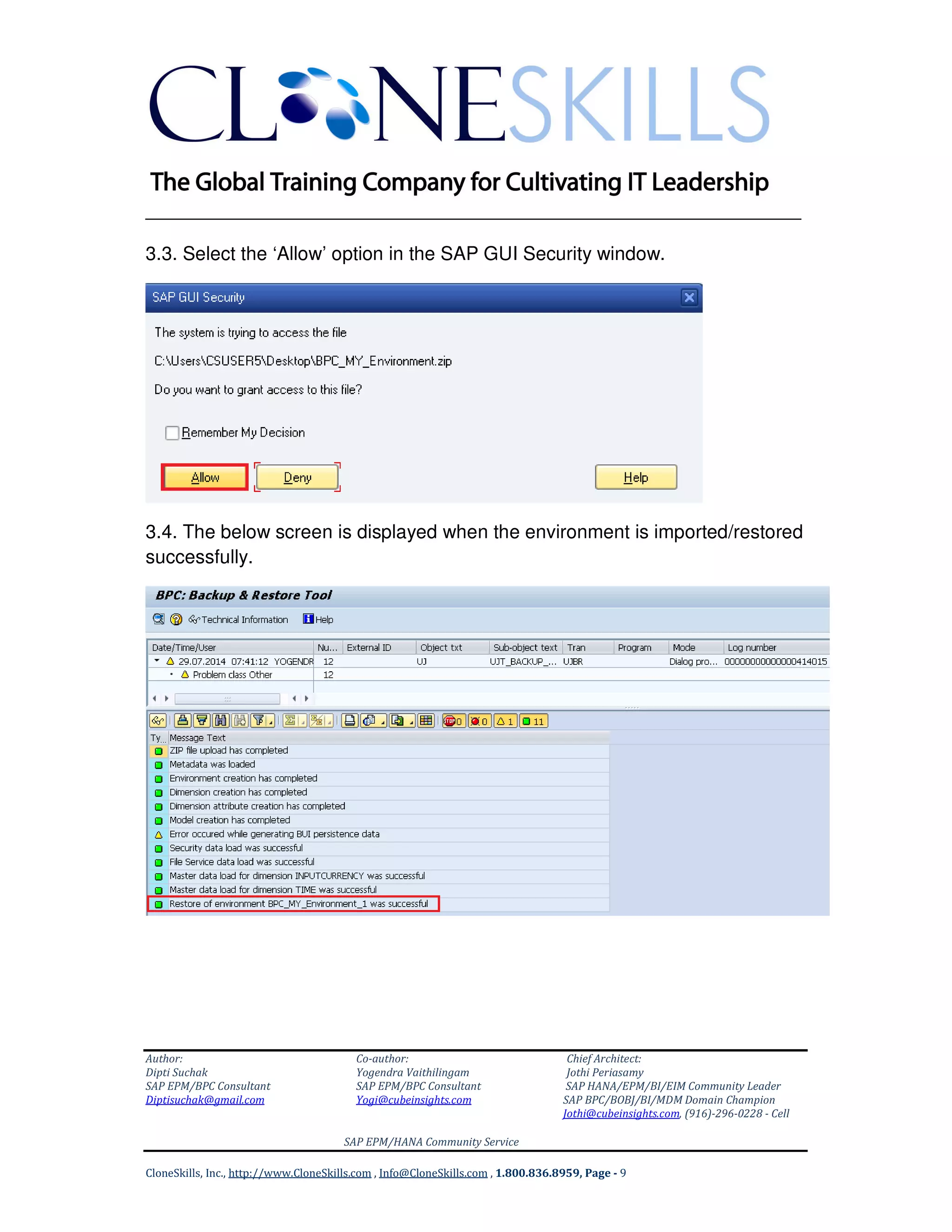
3.3. Select the ‘Allow’ option in the SAP GUI Security window.
3.4. The below screen is displayed when the environment is imported/restored
successfully.
______________________________________________________________
Author: Co-author: Chief Architect:
Dipti Suchak Yogendra Vaithilingam Jothi Periasamy
SAP EPM/BPC Consultant SAP EPM/BPC Consultant SAP HANA/EPM/BI/EIM Community Leader
Diptisuchak@gmail.com Yogi@cubeinsights.com SAP BPC/BOBJ/BI/MDM Domain Champion
Jothi@cubeinsights.com, (916)-296-0228 - Cell
SAP EPM/HANA Community Service
CloneSkills, Inc., http://www.CloneSkills.com , Info@CloneSkills.com , 1.800.836.8959, Page - 10
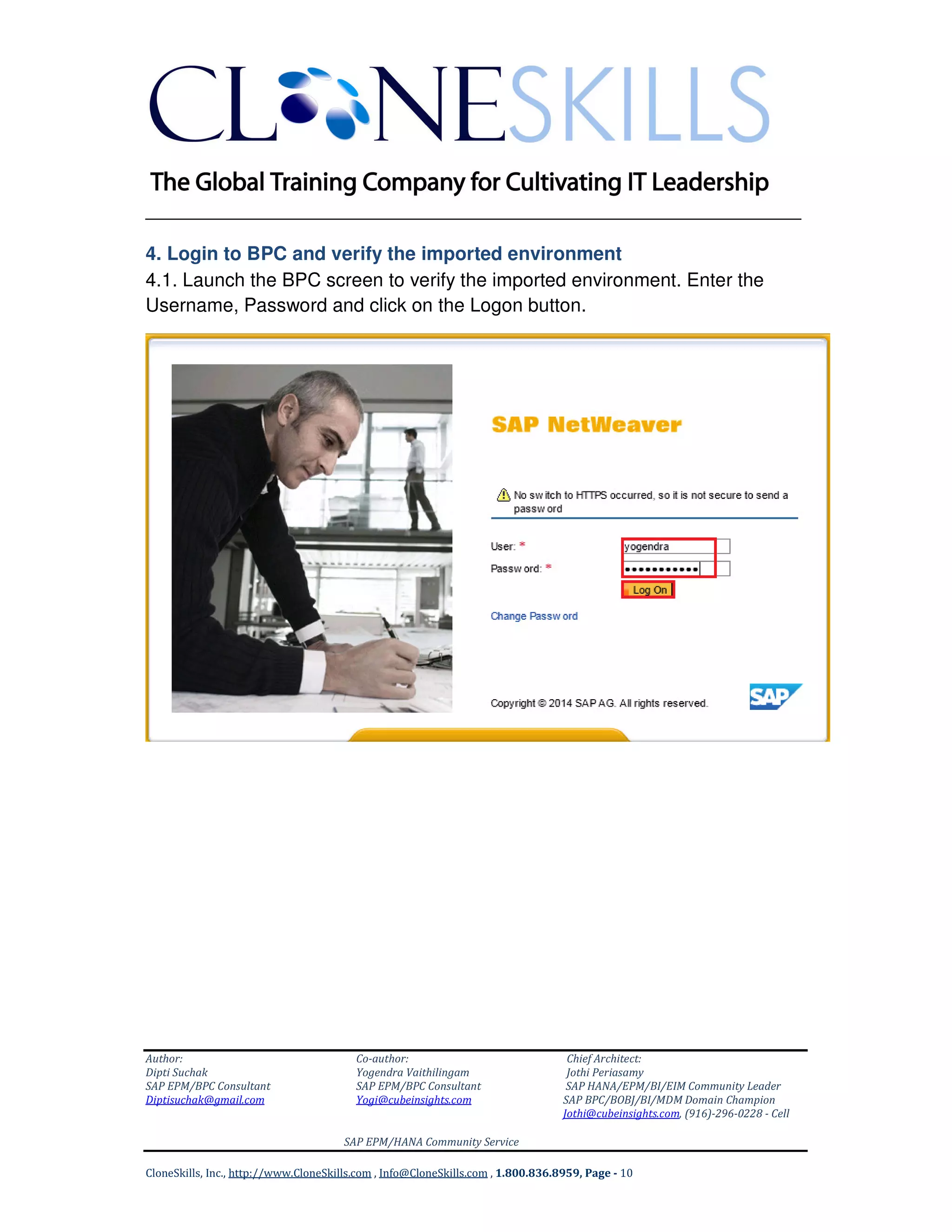
4. Login to BPC and verify the imported environment
4.1. Launch the BPC screen to verify the imported environment. Enter the
Username, Password and click on the Logon button.
______________________________________________________________
Author: Co-author: Chief Architect:
Dipti Suchak Yogendra Vaithilingam Jothi Periasamy
SAP EPM/BPC Consultant SAP EPM/BPC Consultant SAP HANA/EPM/BI/EIM Community Leader
Diptisuchak@gmail.com Yogi@cubeinsights.com SAP BPC/BOBJ/BI/MDM Domain Champion
Jothi@cubeinsights.com, (916)-296-0228 - Cell
SAP EPM/HANA Community Service
CloneSkills, Inc., http://www.CloneSkills.com , Info@CloneSkills.com , 1.800.836.8959, Page - 11
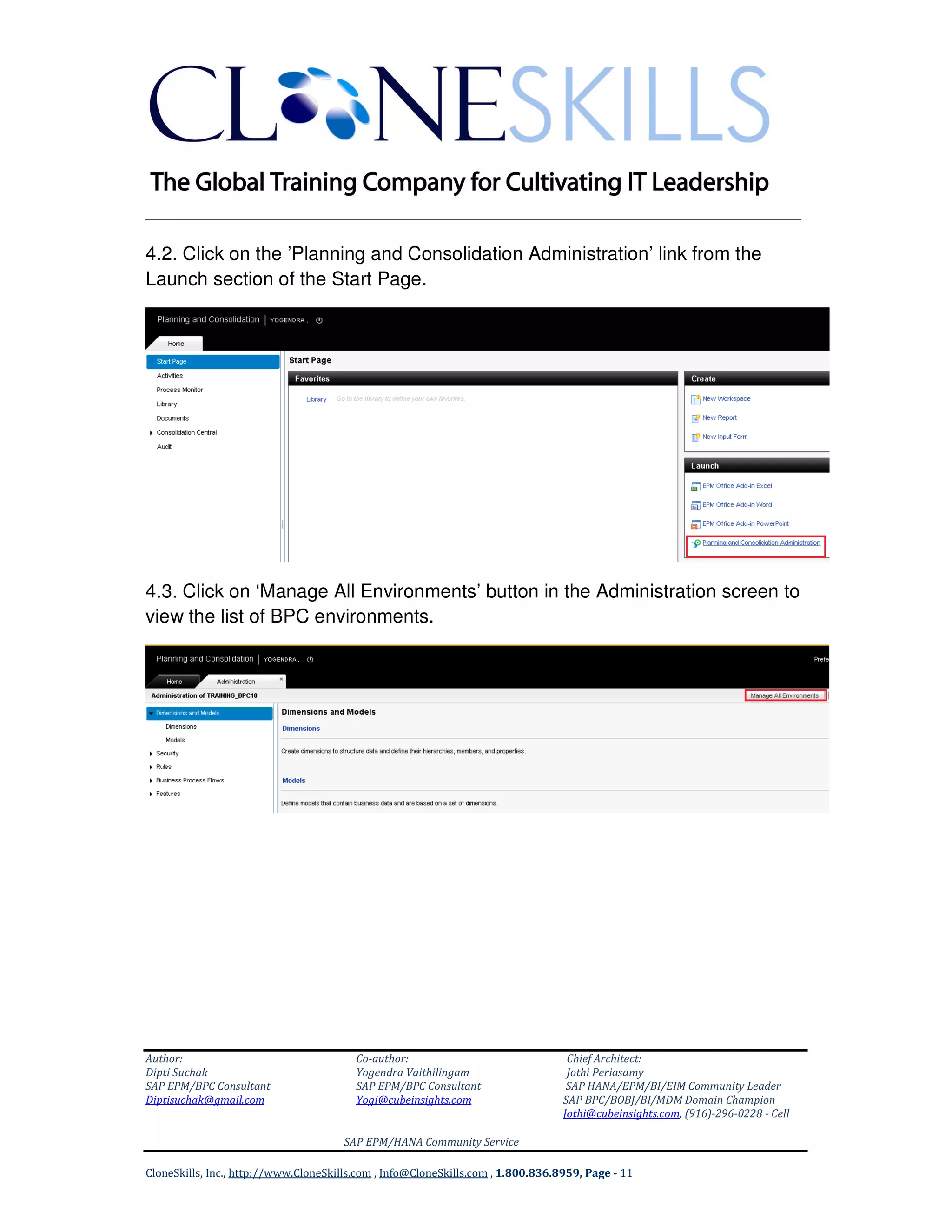
4.2. Click on the ’Planning and Consolidation Administration’ link from the
Launch section of the Start Page.
4.3. Click on ‘Manage All Environments’ button in the Administration screen to
view the list of BPC environments.
______________________________________________________________
Author: Co-author: Chief Architect:
Dipti Suchak Yogendra Vaithilingam Jothi Periasamy
SAP EPM/BPC Consultant SAP EPM/BPC Consultant SAP HANA/EPM/BI/EIM Community Leader
Diptisuchak@gmail.com Yogi@cubeinsights.com SAP BPC/BOBJ/BI/MDM Domain Champion
Jothi@cubeinsights.com, (916)-296-0228 - Cell
SAP EPM/HANA Community Service
CloneSkills, Inc., http://www.CloneSkills.com , Info@CloneSkills.com , 1.800.836.8959, Page - 12
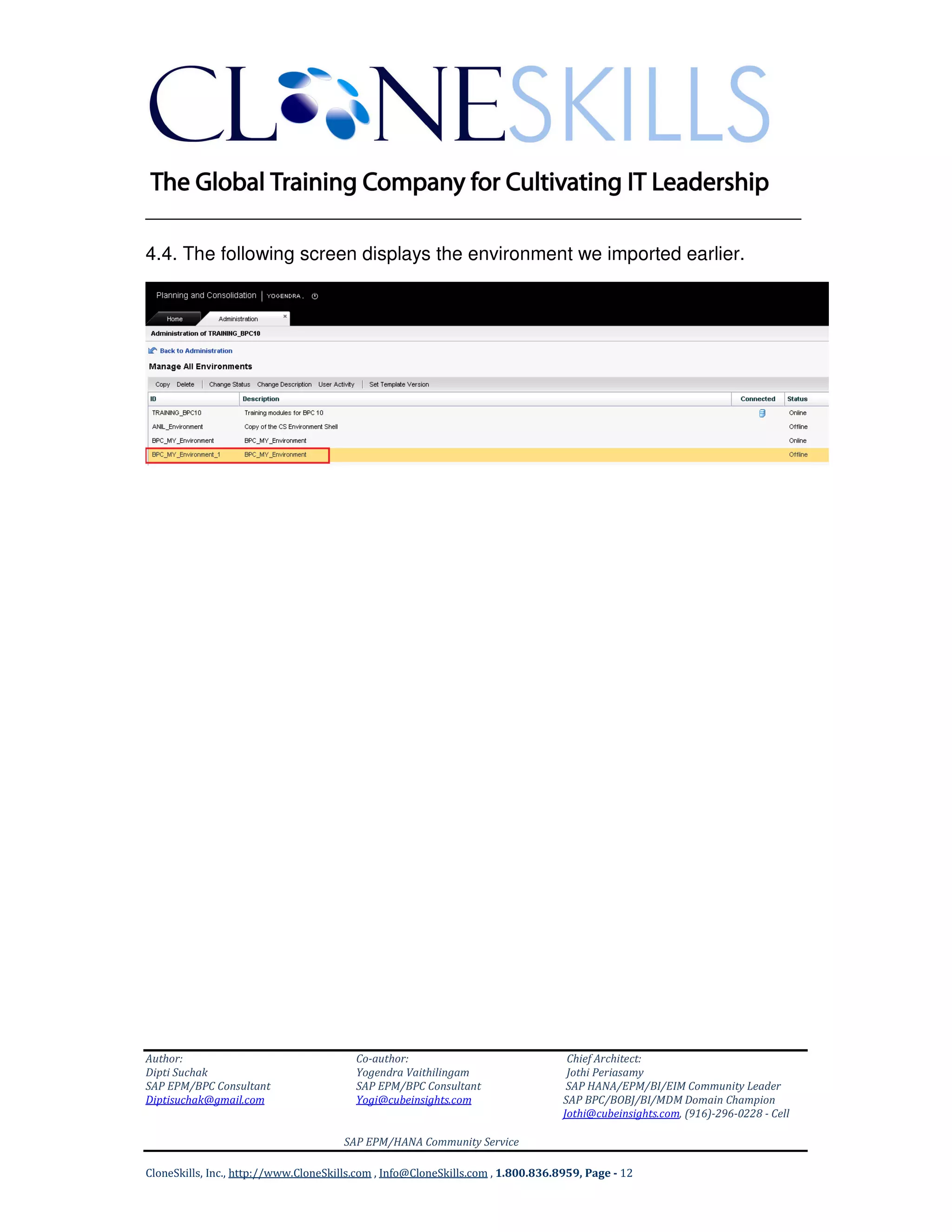
4.4. The following screen displays the environment we imported earlier.
______________________________________________________________
Author: Co-author: Chief Architect:
Dipti Suchak Yogendra Vaithilingam Jothi Periasamy
SAP EPM/BPC Consultant SAP EPM/BPC Consultant SAP HANA/EPM/BI/EIM Community Leader
Diptisuchak@gmail.com Yogi@cubeinsights.com SAP BPC/BOBJ/BI/MDM Domain Champion
Jothi@cubeinsights.com, (916)-296-0228 - Cell
SAP EPM/HANA Community Service
CloneSkills, Inc., http://www.CloneSkills.com , Info@CloneSkills.com , 1.800.836.8959, Page - 13
Author:
Dipti Suchak
SAP EPM/BPC Solutions Consultant
SAP HANA Solutions Expert
Diptisuchak@gmail.com
Co-Author:
Yogendra Vaithilingam
SAP EPM/BPC Consultant
SAP HANA Solutions Expert
Yogi@cubeinsights.com
Chief Architect:
Jothi Periasamy
Chief Data Scientist
SAP HANA/EPM/BI/EIM Community Leader
SAP BPC/BOBJ/BI/MDM Domain Champion
Joesaran@gmail.com
(916)-296-0228
Our SAP EPM/BPC Community Free Services
Our SAP EPM/BPC community has been
growing very rapidly, we have around
300 (three) hundred certified SAP EPM
professionals on our network. Sixty(60)
percent of our community contributors
are working professionals at fortune
500 companies such as IBM, Accenture,
Capgemini, PG&E, PwC, and much more
As of now, We implemented more than
one hundred (100) SAP BPC projects on
various SAP BPC platform such as
Microsoft, SAP NetWeaver and SAP
HANA
We trained around 10000 (ten
thousand) SAP Professionals and we
supported around 100 (one hundred)
customers.
Please feel free to contact us for any of the
following FREE services.
SAP EPM/BPC on HANA 10.1
Implementation
SAP EPM/BPC on NW 10.0
Implementation
Planning and Forecasting Solution
Design
Consolidation Design and
Implementation
IC Matching and Booking
IC Eliminations
Eliminations and Adjustments
Journals Management
Ownership Management

SAP BPC on HANA Environment Export Import Implementation Guide v9

  • 1.
    ______________________________________________________________ Author: Co-author: ChiefArchitect: Dipti Suchak Yogendra Vaithilingam Jothi Periasamy SAP EPM/BPC Consultant SAP EPM/BPC Consultant SAP HANA/EPM/BI/EIM Community Leader Diptisuchak@gmail.com Yogi@cubeinsights.com SAP BPC/BOBJ/BI/MDM Domain Champion Jothi@cubeinsights.com, (916)-296-0228 - Cell SAP EPM/HANA Community Service CloneSkills, Inc., http://www.CloneSkills.com , Info@CloneSkills.com , 1.800.836.8959, Page - 1 SAP BPC on HANA 10.0 | KNOWLEDGEBASE SAP BPC Environment Export Import Implementation Guide A Step By Step Guide to Export and Import an Environment
  • 2.
    ______________________________________________________________ Author: Co-author: ChiefArchitect: Dipti Suchak Yogendra Vaithilingam Jothi Periasamy SAP EPM/BPC Consultant SAP EPM/BPC Consultant SAP HANA/EPM/BI/EIM Community Leader Diptisuchak@gmail.com Yogi@cubeinsights.com SAP BPC/BOBJ/BI/MDM Domain Champion Jothi@cubeinsights.com, (916)-296-0228 - Cell SAP EPM/HANA Community Service CloneSkills, Inc., http://www.CloneSkills.com , Info@CloneSkills.com , 1.800.836.8959, Page - 2 Table of Contents 1. Login to SAP HANA ......................................................................................... 3 2. Export the BPC environment............................................................................ 4 3. Import the BPC environment ............................................................................ 7 4. Login to BPC and verify the imported environment ........................................ 10
  • 3.
    ______________________________________________________________ Author: Co-author: ChiefArchitect: Dipti Suchak Yogendra Vaithilingam Jothi Periasamy SAP EPM/BPC Consultant SAP EPM/BPC Consultant SAP HANA/EPM/BI/EIM Community Leader Diptisuchak@gmail.com Yogi@cubeinsights.com SAP BPC/BOBJ/BI/MDM Domain Champion Jothi@cubeinsights.com, (916)-296-0228 - Cell SAP EPM/HANA Community Service CloneSkills, Inc., http://www.CloneSkills.com , Info@CloneSkills.com , 1.800.836.8959, Page - 3 1. Login to SAP HANA 1.1. Launch SAP GUI and double click on ‘BW740 HANA’ to login to SAP BW. 1.3. Enter Username and Password and click on Enter button.
  • 4.
    ______________________________________________________________ Author: Co-author: ChiefArchitect: Dipti Suchak Yogendra Vaithilingam Jothi Periasamy SAP EPM/BPC Consultant SAP EPM/BPC Consultant SAP HANA/EPM/BI/EIM Community Leader Diptisuchak@gmail.com Yogi@cubeinsights.com SAP BPC/BOBJ/BI/MDM Domain Champion Jothi@cubeinsights.com, (916)-296-0228 - Cell SAP EPM/HANA Community Service CloneSkills, Inc., http://www.CloneSkills.com , Info@CloneSkills.com , 1.800.836.8959, Page - 4 2. Export the BPC environment 2.1. Enter the command ‘/OUJBR’ in the text box as shown below and click on Enter symbol.
  • 5.
    ______________________________________________________________ Author: Co-author: ChiefArchitect: Dipti Suchak Yogendra Vaithilingam Jothi Periasamy SAP EPM/BPC Consultant SAP EPM/BPC Consultant SAP HANA/EPM/BI/EIM Community Leader Diptisuchak@gmail.com Yogi@cubeinsights.com SAP BPC/BOBJ/BI/MDM Domain Champion Jothi@cubeinsights.com, (916)-296-0228 - Cell SAP EPM/HANA Community Service CloneSkills, Inc., http://www.CloneSkills.com , Info@CloneSkills.com , 1.800.836.8959, Page - 5 2.2. Select the ‘Execute Backup’ and ‘Foreground’ radio buttons as highlighted below. Enter the ‘Environment ID’ that needs to be exported and the location where the exported environment is going to be saved. Check the checkbox’s as shown below. Then click the ‘Execute’ button.
  • 6.
    ______________________________________________________________ Author: Co-author: ChiefArchitect: Dipti Suchak Yogendra Vaithilingam Jothi Periasamy SAP EPM/BPC Consultant SAP EPM/BPC Consultant SAP HANA/EPM/BI/EIM Community Leader Diptisuchak@gmail.com Yogi@cubeinsights.com SAP BPC/BOBJ/BI/MDM Domain Champion Jothi@cubeinsights.com, (916)-296-0228 - Cell SAP EPM/HANA Community Service CloneSkills, Inc., http://www.CloneSkills.com , Info@CloneSkills.com , 1.800.836.8959, Page - 6 2.3. Select ‘Allow’ option in SAP GUI security window. 2.4. The below screen is displayed when the environment is exported successfully.
  • 7.
    ______________________________________________________________ Author: Co-author: ChiefArchitect: Dipti Suchak Yogendra Vaithilingam Jothi Periasamy SAP EPM/BPC Consultant SAP EPM/BPC Consultant SAP HANA/EPM/BI/EIM Community Leader Diptisuchak@gmail.com Yogi@cubeinsights.com SAP BPC/BOBJ/BI/MDM Domain Champion Jothi@cubeinsights.com, (916)-296-0228 - Cell SAP EPM/HANA Community Service CloneSkills, Inc., http://www.CloneSkills.com , Info@CloneSkills.com , 1.800.836.8959, Page - 7 3. Import the BPC environment 3.1. Enter the command ‘/OUJBR’ and click ‘Enter’ symbol to begin the importing process.
  • 8.
    ______________________________________________________________ Author: Co-author: ChiefArchitect: Dipti Suchak Yogendra Vaithilingam Jothi Periasamy SAP EPM/BPC Consultant SAP EPM/BPC Consultant SAP HANA/EPM/BI/EIM Community Leader Diptisuchak@gmail.com Yogi@cubeinsights.com SAP BPC/BOBJ/BI/MDM Domain Champion Jothi@cubeinsights.com, (916)-296-0228 - Cell SAP EPM/HANA Community Service CloneSkills, Inc., http://www.CloneSkills.com , Info@CloneSkills.com , 1.800.836.8959, Page - 8 3.2. Select the ‘Execute Restore’ and ‘Foreground’ radio buttons. Enter the ‘Environment ID’ and the ‘Archive File Name’ to import the environment from the desktop to the BW server. Check the checkbox’s as highlighted below. And then click on the ‘Execute’ button.
  • 9.
    ______________________________________________________________ Author: Co-author: ChiefArchitect: Dipti Suchak Yogendra Vaithilingam Jothi Periasamy SAP EPM/BPC Consultant SAP EPM/BPC Consultant SAP HANA/EPM/BI/EIM Community Leader Diptisuchak@gmail.com Yogi@cubeinsights.com SAP BPC/BOBJ/BI/MDM Domain Champion Jothi@cubeinsights.com, (916)-296-0228 - Cell SAP EPM/HANA Community Service CloneSkills, Inc., http://www.CloneSkills.com , Info@CloneSkills.com , 1.800.836.8959, Page - 9 3.3. Select the ‘Allow’ option in the SAP GUI Security window. 3.4. The below screen is displayed when the environment is imported/restored successfully.
  • 10.
    ______________________________________________________________ Author: Co-author: ChiefArchitect: Dipti Suchak Yogendra Vaithilingam Jothi Periasamy SAP EPM/BPC Consultant SAP EPM/BPC Consultant SAP HANA/EPM/BI/EIM Community Leader Diptisuchak@gmail.com Yogi@cubeinsights.com SAP BPC/BOBJ/BI/MDM Domain Champion Jothi@cubeinsights.com, (916)-296-0228 - Cell SAP EPM/HANA Community Service CloneSkills, Inc., http://www.CloneSkills.com , Info@CloneSkills.com , 1.800.836.8959, Page - 10 4. Login to BPC and verify the imported environment 4.1. Launch the BPC screen to verify the imported environment. Enter the Username, Password and click on the Logon button.
  • 11.
    ______________________________________________________________ Author: Co-author: ChiefArchitect: Dipti Suchak Yogendra Vaithilingam Jothi Periasamy SAP EPM/BPC Consultant SAP EPM/BPC Consultant SAP HANA/EPM/BI/EIM Community Leader Diptisuchak@gmail.com Yogi@cubeinsights.com SAP BPC/BOBJ/BI/MDM Domain Champion Jothi@cubeinsights.com, (916)-296-0228 - Cell SAP EPM/HANA Community Service CloneSkills, Inc., http://www.CloneSkills.com , Info@CloneSkills.com , 1.800.836.8959, Page - 11 4.2. Click on the ’Planning and Consolidation Administration’ link from the Launch section of the Start Page. 4.3. Click on ‘Manage All Environments’ button in the Administration screen to view the list of BPC environments.
  • 12.
    ______________________________________________________________ Author: Co-author: ChiefArchitect: Dipti Suchak Yogendra Vaithilingam Jothi Periasamy SAP EPM/BPC Consultant SAP EPM/BPC Consultant SAP HANA/EPM/BI/EIM Community Leader Diptisuchak@gmail.com Yogi@cubeinsights.com SAP BPC/BOBJ/BI/MDM Domain Champion Jothi@cubeinsights.com, (916)-296-0228 - Cell SAP EPM/HANA Community Service CloneSkills, Inc., http://www.CloneSkills.com , Info@CloneSkills.com , 1.800.836.8959, Page - 12 4.4. The following screen displays the environment we imported earlier.
  • 13.
    ______________________________________________________________ Author: Co-author: ChiefArchitect: Dipti Suchak Yogendra Vaithilingam Jothi Periasamy SAP EPM/BPC Consultant SAP EPM/BPC Consultant SAP HANA/EPM/BI/EIM Community Leader Diptisuchak@gmail.com Yogi@cubeinsights.com SAP BPC/BOBJ/BI/MDM Domain Champion Jothi@cubeinsights.com, (916)-296-0228 - Cell SAP EPM/HANA Community Service CloneSkills, Inc., http://www.CloneSkills.com , Info@CloneSkills.com , 1.800.836.8959, Page - 13 Author: Dipti Suchak SAP EPM/BPC Solutions Consultant SAP HANA Solutions Expert Diptisuchak@gmail.com Co-Author: Yogendra Vaithilingam SAP EPM/BPC Consultant SAP HANA Solutions Expert Yogi@cubeinsights.com Chief Architect: Jothi Periasamy Chief Data Scientist SAP HANA/EPM/BI/EIM Community Leader SAP BPC/BOBJ/BI/MDM Domain Champion Joesaran@gmail.com (916)-296-0228 Our SAP EPM/BPC Community Free Services Our SAP EPM/BPC community has been growing very rapidly, we have around 300 (three) hundred certified SAP EPM professionals on our network. Sixty(60) percent of our community contributors are working professionals at fortune 500 companies such as IBM, Accenture, Capgemini, PG&E, PwC, and much more As of now, We implemented more than one hundred (100) SAP BPC projects on various SAP BPC platform such as Microsoft, SAP NetWeaver and SAP HANA We trained around 10000 (ten thousand) SAP Professionals and we supported around 100 (one hundred) customers. Please feel free to contact us for any of the following FREE services. SAP EPM/BPC on HANA 10.1 Implementation SAP EPM/BPC on NW 10.0 Implementation Planning and Forecasting Solution Design Consolidation Design and Implementation IC Matching and Booking IC Eliminations Eliminations and Adjustments Journals Management Ownership Management