i
AbouttheTutorial
SAP Business Planning and Consolidation (BPC) tool helps to automate and streamline
business forecast, planning, and consolidation activities in an organization. It is used to
support all operational and financial activities in an organization. Using SAP BPC, it also
becomes easier to use reporting tools. This tutorial explains the key concepts of SAP BPC.
Audience
This tutorial is designed for those who want to learn the basics of SAP BPC and advance
in the field of software development.
Prerequisites
You need to have a basic understanding of any programming language to make the most
of this tutorial. However, moderate skills in BI, ABAP, and data modeling is a plus.
Disclaimer&Copyright
 Copyright 2018 by Tutorials Point (I) Pvt. Ltd.
All the content and graphics published in this e-book are the property of Tutorials Point (I)
Pvt. Ltd. The user of this e-book is prohibited to reuse, retain, copy, distribute or republish
any contents or a part of contents of this e-book in any manner without written consent
of the publisher.
We strive to update the contents of our website and tutorials as timely and as precisely as
possible, however, the contents may contain inaccuracies or errors. Tutorials Point (I) Pvt.
Ltd. provides no guarantee regarding the accuracy, timeliness or completeness of our
website or its contents including this tutorial. If you discover any errors on our website or
in this tutorial, please notify us at contact@tutorialspoint.com.
ii
TableofContents
About the Tutorial....................................................................................................................................i
Audience..................................................................................................................................................i
Prerequisites............................................................................................................................................i
Disclaimer & Copyright.............................................................................................................................i
Table of Contents....................................................................................................................................ii
1. SAP BPC – OVERVIEW..........................................................................................................1
What is EPM?..........................................................................................................................................1
SAP BPC NetWeaver vs BPC MS...............................................................................................................2
SAP BPC with NetWeaver Architecture ...................................................................................................3
SAP NetWeaver BW Objects....................................................................................................................4
SAP BPC Objects......................................................................................................................................5
2. SAP BPC - TERMINOLOGIES .................................................................................................7
3. SAP BPC – APPLICATIONS ....................................................................................................9
Application Architecture .........................................................................................................................9
Creating Applications and Applying Dimensions ...................................................................................10
4. SAP BPC – MODEL DESIGN ................................................................................................13
Building Models in BPC .........................................................................................................................13
Environment Management ...................................................................................................................14
Dimension Management.......................................................................................................................15
Designing Security Model......................................................................................................................17
5. SAP BPC – DATA LOADING.................................................................................................20
Loading Data from Source System to Cube in SAP NetWeaver BW........................................................20
Loading Data from SAP NetWeaver BW to SAP BPC ..............................................................................23
iii
Creating Transformation File.................................................................................................................24
Creating a Conversion File.....................................................................................................................27
Loading Master Data from Flat File into a Dimension............................................................................28
6. SAP BPC – REPORTING.......................................................................................................31
SAP EPM Add-In Interface for Excel.......................................................................................................31
Developing Reports Using Dynamic Templates .....................................................................................33
Developing Reports Using EPM Functions .............................................................................................35
Migration of EvDRE Reports..................................................................................................................36
7. SAP BPC – PLANNING ........................................................................................................39
Planning Process ...................................................................................................................................39
Planning Models ...................................................................................................................................39
Input Forms/ Input Schedules ...............................................................................................................39
Input Schedule Templates.....................................................................................................................40
Developing an Input Form.....................................................................................................................40
Integration with SAP BO Dashboard......................................................................................................42
8. SAP BPC – BUSINESS LOGIC ...............................................................................................45
Dimension Logic ....................................................................................................................................45
How to Define Dimension Logic?...........................................................................................................45
Logic Scripts ..........................................................................................................................................47
Business Rules.......................................................................................................................................47
Script Logic............................................................................................................................................49
Worksheet Logic....................................................................................................................................50
9. SAP BPC – BUSINESS FUNCTIONS ......................................................................................51
Currency Conversion .............................................................................................................................51
iv
10. SAP BPC – PROCESS FLOW MANAGEMENT .......................................................................53
Work Status ..........................................................................................................................................54
Defining the Work Status ......................................................................................................................55
Controlling the Work Status..................................................................................................................56
Book Publishing.....................................................................................................................................58
11. SAP BPC – WORD INTEGRATION........................................................................................60
Publishing from Microsoft Word ...........................................................................................................61
12. SAP BPC – POWERPOINT INTEGRATION ............................................................................62
Publishing to PowerPoint......................................................................................................................62
13. SAP BPC – ESSENTIAL TOOLS .............................................................................................63
Documents............................................................................................................................................63
Audit .....................................................................................................................................................65
Journals.................................................................................................................................................66
14. SAP BPC – BUSINESS PROCESS FLOWS...............................................................................69
Personal To-do List................................................................................................................................69
Reopen and Reset .................................................................................................................................69
Completed Steps...................................................................................................................................70
Locked Dimension Precedence..............................................................................................................70
15. SAP BPC – CUSTOM MENU................................................................................................71
Designing a Custom Menu.....................................................................................................................71
Custom Menu Content..........................................................................................................................72
16. SAP BPC – CONSOLIDATION...............................................................................................74
Setting Up Environments and Master Data ...........................................................................................74
Creating Models for Consolidation........................................................................................................77
Creating Consolidation Logic .................................................................................................................81
v
17. SAP BPC – PREPARING ELIMINATION.................................................................................83
Consolidation Central............................................................................................................................83
Setting Up Journals ...............................................................................................................................84
Translating Local Currency ....................................................................................................................85
Performing Currency Translation ..........................................................................................................86
18. SAP BPC – CONFIGURING ELIMINATION............................................................................88
Configuring Intercompany Eliminations ................................................................................................88
Reviewing Ownership Terms and Concepts...........................................................................................90
Purchase Method..................................................................................................................................92
19. SAP BPC – EMBEDDED ENVIRONMENT..............................................................................94
SAP BW Integrated Planning .................................................................................................................94
Tools in BW Modeling ...........................................................................................................................95
Creating Data Model in SAP BW............................................................................................................95
20. SAP BPC – SECURITY........................................................................................................102
21. SAP BPC – HOT ANALYSIS ................................................................................................104
22. SAP BPC – PARK N GO......................................................................................................105
23. SAP BPC – INTERVIEW QUESTIONS..................................................................................107
1
SAP Business Planning and Consolidation (BPC) tool is used to support all operational
and financial activities in an organization. SAP BPC helps in automating and streamlining
business forecast, planning, and consolidation activities in your organization.
SAP BPC supports two types of migration - SAP NetWeaver and Microsoft Excel. BPC with
Microsoft version enables you to perform modeling, application maintenance, importing
data and applying transformations, creating scripts, etc. It leverages the power of MS
Excel and provides the user with an Enterprise Power Management (EPM) solution,
collaborative tool with robust, readily accepted environment.
SAP BPC provides support for existing Microsoft functionality and various enhancement
features like drag and drop report builder, etc.
Following are the key benefits provided by SAP BPC:
 It allows the user to make better business decisions by supporting What-If analysis
and allows you to perform scenario-based planning.
 It allows you to collaborate data and thus increase accuracy in business planning
and accountability.
 It helps in aligning your plans with strategic goals and hence decrease the cycle
time.
 You have an option to choose the version of SAP NetWeaver or Microsoft Platform.
Following are the key benefits that can be achieved by using BPC:
 Business Forecasting
 Analytical Reporting and Analysis
 Budget Planning
 Predictive Analysis and Recommendations
 Improve Compliance
 Consolidation
 Business Process Flows and Smooth Collaboration
WhatisEPM?
SAP Enterprise Performance Management (EPM) allows your organization to improve its
financial and operational performance management. SAP EPM supports various
functionalities with SAP Business Planning and Consolidation - BPC-NW or BPC-MS, like
financial consolidation, financial information management, supply chain performance
management, strategy management and many more areas.
1. SAP BPC – Overview
2
SAPBPCNetWeavervsBPCMS
SAP Business Planning and Consolidation NW version is based on the functionality of
NetWeaver platform. This is built on NetWeaver HTML5 and supports various user
environment capabilities. It also provides various prebuilt components to reuse in different
applications.
SAP BPC NW version supports RESTful connection to ABAP backend component and
provides regular access to user interface. It also supports client-side logging capabilities.
The following table illustrates the name of the platform and the supported components:
Client
Microsoft Windows Vista 32
bit and 64 bit, MS windows
7 32 bit and 64 bit
Window Server 2003, 2008
and 2008 R2 terminal
server 32 bit and 64 bit
Microsoft Office 2007, 2010
and 2013
Internet Explorer 9.0 and 10.0
Mozilla Firefox 17 and higher
Apple Safari for iPad IOS7 and
upper versions
NetWeaver Application
Server
Any OS supported by
NetWeaver
SAP NetWeaver 7.4. Refer PAM
for supported database
SAP BPC for NetWeaver provides various advantages since it is integrated with BW system
and allows you to store data in InfoCubes.
Some key advantages of using SAP BPC with NW system are:
Star Schema for Exceptional Reporting: SAP BPC uses NW InfoCubes to store the
data. The dimension model used is extended star schema so it makes BPC with NW system
and exceptional system for reporting.
No Database Dependence Version: BPC NW version is not dependent on database
version and can run common databases like DB2, Oracle, SQL Server, etc.
BW Accelerator Support: SAP NetWeaver BW accelerator tool is an additional feature
that can be used to enhance the performance of reporting in the system, even if you are
using large datasets. It indirectly helps in saving the cost for a company as less number
of performance issues are reported.
BAdI Development and ABAP Support: SAP BPC with NetWeaver allows you to use
ABAP programming to develop K2 script logic. It enables to create business add-in BAdi
interface in the back-end system, which can be called later from script logic developed in
BPC system.
It helps in solving the complex business requirements and to reduce the development time
for an organization.
3
Some key advantages of using SAP BPC MS are:
Apart from common features provided in BPC like currency translation, allocations,
validation and account transformations, automatic adjustments and carry forward of
opening balance, the following features can be achieved in BPC MS version:
 Dimension Logic: This can be configured in BPC system using simple
mathematical formulas.
 Business Rules: This allows you to create rules in BPC system to perform specific
functions.
 K2 Script Logic: This is used to perform some specific functions which can’t be
achieved using out-of-box functionality to meet business requirements. You can
create K2 script logics to perform certain functions, which can be performed in a
standard system.
Many organizations use MS Excel to manage business planning and consolidation but it
has some disadvantages. Following are the disadvantages of using BPC MS over
NetWeaver:
 Tough to Manage Excel Spreadsheets: As business planning and consolidation
data is stored in the form of spreadsheets, it creates a security issue and an option
to control access is by keeping the files on the shared network drive. In SAP BPC,
you can save the data in database and this provides security of data.
 Version Control: To create a new version of data, SAP BPC with NW allows you
to maintain the version of data in the system and you can maintain the current
data too. While using Excel spreadsheets for data store, you need to name the file
with new name every time.
 Integrity of Spreadsheets: Using spreadsheets make it tough to manage the
integrity of the sheets as the same file is accessed by multiple users and it’s tough
to find out the latest version of spreadsheet. However, SAP system has a central
repository to maintain financial and business planning data.
 Collaboration: SAP BPC allows you to collaborate data from different users and
you can put comments on critical information and Excel doesn’t support
collaboration feature.
SAPBPCwithNetWeaverArchitecture
Requirement: SAP NetWeaver ABAP 7.3 or 7.31
Database: Any of the above version of SAP NetWeaver support.
Operating System: Any supported version of SAP NetWeaver system and database
engine.
4
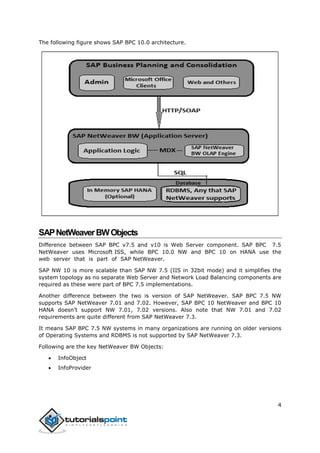
The following figure shows SAP BPC 10.0 architecture.
SAPNetWeaverBWObjects
Difference between SAP BPC v7.5 and v10 is Web Server component. SAP BPC 7.5
NetWeaver uses Microsoft ISS, while BPC 10.0 NW and BPC 10 on HANA use the
web server that is part of SAP NetWeaver.
SAP NW 10 is more scalable than SAP NW 7.5 (IIS in 32bit mode) and it simplifies the
system topology as no separate Web Server and Network Load Balancing components are
required as these were part of BPC 7.5 implementations.
Another difference between the two is version of SAP NetWeaver. SAP BPC 7.5 NW
supports SAP NetWeaver 7.01 and 7.02. However, SAP BPC 10 NetWeaver and BPC 10
HANA doesn’t support NW 7.01, 7.02 versions. Also note that NW 7.01 and 7.02
requirements are quite different from SAP NetWeaver 7.3.
It means SAP BPC 7.5 NW systems in many organizations are running on older versions
of Operating Systems and RDBMS is not supported by SAP NetWeaver 7.3.
Following are the key NetWeaver BW Objects:
 InfoObject
 InfoProvider
5
SAPBPCObjects
As per the above architecture, following are the key objects in BPC 10.0:
Client Interface: At the top, you have client interface which is a web-based tool used for
configuration and reporting for business planning. It consists of MS Office client, Excel
based admin clients, and web-based tool for reporting.
Microsoft-based admin tool is used for configuration of application and Microsoft Office
tools such as Word and PowerPoint are used for reporting data.
Web Server and .NET Application Server: This tool uses web services to connect to
.NET Application Server. It receives the request from client interface and directs all the
requests to ABAP server, which is a part of SAP NetWeaver BW system.
This server is used for data conversion between client tools and SAP NetWeaver BW
system.
SAP NetWeaver Application Server: This server is used to process all the requests from
client tool. The request from .NET Application server is processed in this server as Remote
Function Call RFC. This is used to process requests to create reports or to update the
database.
When a request is processed by the Application Server, it gets the data and passes to .NET
Application Server, and then sends it back to client interface.
Database Server: This layer is responsible to store all the data in the database. SAP NW
back-end system is responsible to create objects and data is stored for BPC system. The
NetWeaver supports most of the databases like SQL Server, DB2, Oracle and many more.
Release Strategy
Following are the release notes from SAP for SAP BPC 10.0:
 Product Version 10.0, SAP NetWeaver
 Area CPM-BPC
BPC now supports the following platforms:
 Server Support: Any operating system that is supported by SAP NetWeaver.
VMware support as per SAP standard. Virtualization, VMware, Microsoft, Windows,
Hyper-V, XEN, vSphere, IBM, INxHY, KVM, zBX. SAP NetWeaver Support for NW
7.3. No support for older versions.
 Database Support: BPC supports all database that are supported by SAP
NetWeaver system.
 Client Support: Microsoft Windows, WIN XP (32 bit), Windows Vista (32 bit and
64 bit), and Windows 7 (32 bit and 64 bit).
 Microsoft .Net Framework: .Net Framework 3.5 is required.
6
 Web Browser Support: BPC supports the web browsers - IE 8.0 and IE 9.0.
 Microsoft Office Support: Microsoft Office 2007 (32 bit and 64 bit) and Microsoft
Office 2010 (32 bit and 64 bit). .NET server is no longer required in latest BPC
versions.
7
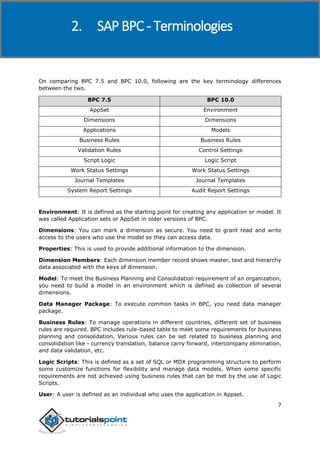
On comparing BPC 7.5 and BPC 10.0, following are the key terminology differences
between the two.
BPC 7.5 BPC 10.0
AppSet Environment
Dimensions Dimensions
Applications Models
Business Rules Business Rules
Validation Rules Control Settings
Script Logic Logic Script
Work Status Settings Work Status Settings
Journal Templates Journal Templates
System Report Settings Audit Report Settings
Environment: It is defined as the starting point for creating any application or model. It
was called Application sets or AppSet in older versions of BPC.
Dimensions: You can mark a dimension as secure. You need to grant read and write
access to the users who use the model so they can access data.
Properties: This is used to provide additional information to the dimension.
Dimension Members: Each dimension member record shows master, text and hierarchy
data associated with the keys of dimension.
Model: To meet the Business Planning and Consolidation requirement of an organization,
you need to build a model in an environment which is defined as collection of several
dimensions.
Data Manager Package: To execute common tasks in BPC, you need data manager
package.
Business Rules: To manage operations in different countries, different set of business
rules are required. BPC includes rule-based table to meet some requirements for business
planning and consolidation. Various rules can be set related to business planning and
consolidation like - currency translation, balance carry forward, intercompany elimination,
and data validation, etc.
Logic Scripts: This is defined as a set of SQL or MDX programming structure to perform
some customize functions for flexibility and manage data models. When some specific
requirements are not achieved using business rules that can be met by the use of Logic
Scripts.
User: A user is defined as an individual who uses the application in Appset.
2. SAP BPC - Terminologies
8
Team: A team is defined as a group of users based on user roles.
Task: All the activities that are performed in SAP BPC system are called tasks.
9
An Application in BPC system is defined as multidimensional data model used in EPM.
Few examples of Applications are - Operation, Legal or Finance team.
There are two types of applications in BPC system - Reporting and Non-Reporting.
Reporting applications are used for analysis purpose and you can pass inputs from the
users. Non-Reporting applications are used to contain reference data like currency
rates, carry forward balances, etc.
An Appset consists of one or multiple applications in system. Each application consists of
the master data for an application, which is used to control data in the application set. An
application can also share one or multiple dimensions with other applications.
ApplicationArchitecture
Each Reporting application consists of a dimension, properties to hold the additional
information, and dimension members.
Consider a Consolidation Rate application, which consists of Rate app to store currency
exchange rates and an Owner application, which stores the relationship between Owner
company and its subsidiary companies.
3. SAP BPC – Applications
10
CreatingApplicationsandApplyingDimensions
To add an application to the Application set, you can use an existing application by
selecting reference applications and any set of business rules. You can also add dimensions
in new application and these can be defined as secure or non-secure. When you define
dimensions as secure it ensures the read and write access is controlled through user
profiles.
You can add an application through an admin console: Application -> Add a New
Application
To copy an application: Application -> Copy an Application
To create a Consolidation application, you need to define AppSet for consolidation and
dimension set for consolidation.
You should set the following parameters after creating the application set.
 ALLOW_FILE_SIZE
 UPLOADTEMP
 TEMPLATEVERSION
 JREPORTZOOM
 LOGLEVEL
 SYSTEM
 MESSAGE
 STATUS
In SAP BPC NetWeaver version, all these parameters are maintained in ABAP DDIC table.
Once the application set is created, the next step is to set up the parameters for Dimension
set.
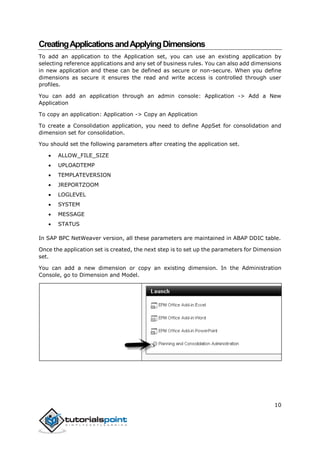
You can add a new dimension or copy an existing dimension. In the Administration
Console, go to Dimension and Model.
11
Go to Dimensions and Models -> Dimension.
Click on +New -> Enter ID, Description, Type -> Create
To create a Legal Consolidation application, following dimension types are needed. These
are default dimensions and can be created in Web Portal as shown in the above image.
 C_Acct (A) - For maintaining Charts of Account.
 C_Category (C) - To define Category.
 Groups (R) – Like GROUP A (USD), GROUP B (EUR), and GROUP C (RMB).
 Entity (E) – It contains the business unit used to derive process.
 C_Datasrc (D) - Data Source Dimension.
 IntCo (I) - It determines the level of entity hierarchy at which level the elimination
needs to be performed.
 Time (T) – Time in all dimensions.
 Flow (S) – To keep track of movements in Consolidation.
12
To create a rate application which contains the exchange rate, following dimension types
are needed:
 R_Acct (A) - For maintaining different types of Rate.
 InputCurrency(R) – Currency Type Dimension.
 C_Category (C) - To define Category.
 R_Entity (E) – Rate application.
 Time (T) – Time in all dimensions.
To create an ownership, Consolidation application contains the ownership information. The
following dimension types are needed:
 O_Acct (A) - for Ownership
 C_Category (C) - To define Category
 Entity (E) - It contains the business unit used to derive process.
 IntCo (I) - It determines level of the entity hierarchy at which level the elimination
needs to be performed.
 Groups (R) – Used to implement separate group type.
 Time (T) – Time in all dimensions.
To set up a consolidation application, three applications are required - Rate, Ownership,
and Consolidation.
13
With the release of BPC 10.1 with NetWeaver, there are two models that can be used to
fulfill the business requirements. BPC models are often referred to as BPC applications and
BPC environment is normally called Application.
BuildingModelsinBPC
The following types of model can be built in BPC:
Standard Model
This model provides an option within host BW’s protected namespace “/CPMB/”. When
you separate the BPC transaction data and master data inside the namespace (“/CPMB/”),
all the sub-processes that are associated with standard model are closely secured, and
only closely managed by the department running the app.
This model is designed by SAP to provide a protected area for customers who to plan and
consolidate in their own department without wanting to share or coordinate the resources
with other Business Warehouse community users.
As the code set of Standard model has been coordinated with version BPC 10.0 so all the
changes to BPC 10.0 are shown in BPC 10.1 Standard model and changes to the version
BPC 10.1 Standard model are shown in version BPC 10.0.
This allows a code compatibility between BPC 10.0 and BPC 10.1, and clients can easily
perform migrations while upgrading BPC version from 10.0 to 10.1 Standard Model.
In short, you can say in Standard model, BPC environment contains the BPC applications
or models and each model generates a BW InfoCube which is hidden.
Embedded Model
This model is different from Standard model and includes data access to all community
users. For Embedded design model, initial versions used were SAP BW Integrated Planning
and Planning Application Kit i.e. BW-IP and PAK.
This model provides a different level of data access where master and transactional data
from host EDW environment is accessible by the application. In Embedded model, it allows
easy access to transactional and master data within the host BW, and this data is shared
with many other users and controlled by the administrator group.
In Embedded model, migration from older versions of Business Warehouse IP, BW-IP to
this data model is relatively easy and migration from earlier versions like (BPC 10.0 and
earlier) is considered as a new implementation.
In short, you can say that in embedded model, any number of InfoProviders can be
assigned to a single BPC model/application.
4. SAP BPC – Model Design
14
EnvironmentManagement
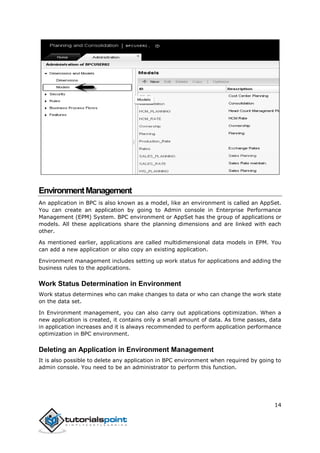
An application in BPC is also known as a model, like an environment is called an AppSet.
You can create an application by going to Admin console in Enterprise Performance
Management (EPM) System. BPC environment or AppSet has the group of applications or
models. All these applications share the planning dimensions and are linked with each
other.
As mentioned earlier, applications are called multidimensional data models in EPM. You
can add a new application or also copy an existing application.
Environment management includes setting up work status for applications and adding the
business rules to the applications.
Work Status Determination in Environment
Work status determines who can make changes to data or who can change the work state
on the data set.
In Environment management, you can also carry out applications optimization. When a
new application is created, it contains only a small amount of data. As time passes, data
in application increases and it is always recommended to perform application performance
optimization in BPC environment.
Deleting an Application in Environment Management
It is also possible to delete any application in BPC environment when required by going to
admin console. You need to be an administrator to perform this function.
15
DimensionManagement
Dimension management in BPC includes creating new dimensions, defining members in
dimensions, and assigning properties. Dimension contains member and there is a
hierarchy between members that is defined like parent, child and sibling.
You can create a new dimension by going to Admin Console -> Dimension -> New
Dimension.
Dimension name is not case sensitive and it should be unique.
When adding a new dimension, you have to enter reference type. Planning and
Consolidation checks the value of reference type while processing the dimension.
Click Create button in the above window. You have to enter referential integrity for Rate
type in the new window. Click ‘Save’ icon.
16
You can also edit structure, edit members, delete or copy an existing dimension. To copy
a dimension, select an existing dimension and go to Copy.
Enter the name of dimension and description. Click ‘Copy’ button.
17
Naming Conventions in Dimensions: You shouldn’t use special characters while naming
a dimension, member, and application in BW table.
You can create dimension name up to 16 characters and it shouldn’t contain comma,
double comma, back slashes, ampersands. However, you can use underscore.
You shouldn’t use the following names - App, AppAccess, AvlObject, CategoryAccess,
CollabDoc, CollabIcons, CollabRecipient, CollabSupport, CollabType, DBVERSION,
Defaults, DesktopStyleDef, Dimension, DrillDef, DTIParam, Function, Formula, Group,
InvestParam, MemberAccess, MessageLog, Packages, PageDef, Permission,
PublishedBooks, Rate, ReportParam, SectionDef, Status, StatusCode, TaskAccess, User,
UserGroup, UserPackages, UserPovDef, WebContents, SOURCE, SIGNEDDATA.
Description of dimension shouldn’t be more than 50 characters.
You can delete a dimension by selecting it and clicking the ‘Delete’ button.
DesigningSecurityModel
BPC security is managed in Administration console. You have to login to BPC portal and
go to Planning and Consolidation Administration.
There are four key components in BPC security:
 Users
 Teams
 Task Profiles
 Data Access Profiles
18
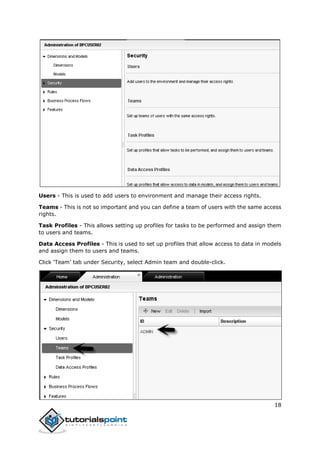
Users - This is used to add users to environment and manage their access rights.
Teams - This is not so important and you can define a team of users with the same access
rights.
Task Profiles - This allows setting up profiles for tasks to be performed and assign them
to users and teams.
Data Access Profiles - This is used to set up profiles that allow access to data in models
and assign them to users and teams.
Click ‘Team’ tab under Security, select Admin team and double-click.
19
You will see the details of Team name – ADMIN, which users are part of this team, task
profiles, and data access profiles.
You can edit the team details and click ‘Save’ icon to apply changes.
Going to the user tab, you can add new users, edit existing users, and delete any user.
20
End of ebook preview
If you liked what you saw…
Buy it from our store @ https://store.tutorialspoint.com

Bpc

  • 2.
    i AbouttheTutorial SAP Business Planningand Consolidation (BPC) tool helps to automate and streamline business forecast, planning, and consolidation activities in an organization. It is used to support all operational and financial activities in an organization. Using SAP BPC, it also becomes easier to use reporting tools. This tutorial explains the key concepts of SAP BPC. Audience This tutorial is designed for those who want to learn the basics of SAP BPC and advance in the field of software development. Prerequisites You need to have a basic understanding of any programming language to make the most of this tutorial. However, moderate skills in BI, ABAP, and data modeling is a plus. Disclaimer&Copyright  Copyright 2018 by Tutorials Point (I) Pvt. Ltd. All the content and graphics published in this e-book are the property of Tutorials Point (I) Pvt. Ltd. The user of this e-book is prohibited to reuse, retain, copy, distribute or republish any contents or a part of contents of this e-book in any manner without written consent of the publisher. We strive to update the contents of our website and tutorials as timely and as precisely as possible, however, the contents may contain inaccuracies or errors. Tutorials Point (I) Pvt. Ltd. provides no guarantee regarding the accuracy, timeliness or completeness of our website or its contents including this tutorial. If you discover any errors on our website or in this tutorial, please notify us at contact@tutorialspoint.com.
  • 3.
    ii TableofContents About the Tutorial....................................................................................................................................i Audience..................................................................................................................................................i Prerequisites............................................................................................................................................i Disclaimer& Copyright.............................................................................................................................i Table of Contents....................................................................................................................................ii 1. SAP BPC – OVERVIEW..........................................................................................................1 What is EPM?..........................................................................................................................................1 SAP BPC NetWeaver vs BPC MS...............................................................................................................2 SAP BPC with NetWeaver Architecture ...................................................................................................3 SAP NetWeaver BW Objects....................................................................................................................4 SAP BPC Objects......................................................................................................................................5 2. SAP BPC - TERMINOLOGIES .................................................................................................7 3. SAP BPC – APPLICATIONS ....................................................................................................9 Application Architecture .........................................................................................................................9 Creating Applications and Applying Dimensions ...................................................................................10 4. SAP BPC – MODEL DESIGN ................................................................................................13 Building Models in BPC .........................................................................................................................13 Environment Management ...................................................................................................................14 Dimension Management.......................................................................................................................15 Designing Security Model......................................................................................................................17 5. SAP BPC – DATA LOADING.................................................................................................20 Loading Data from Source System to Cube in SAP NetWeaver BW........................................................20 Loading Data from SAP NetWeaver BW to SAP BPC ..............................................................................23
  • 4.
    iii Creating Transformation File.................................................................................................................24 Creatinga Conversion File.....................................................................................................................27 Loading Master Data from Flat File into a Dimension............................................................................28 6. SAP BPC – REPORTING.......................................................................................................31 SAP EPM Add-In Interface for Excel.......................................................................................................31 Developing Reports Using Dynamic Templates .....................................................................................33 Developing Reports Using EPM Functions .............................................................................................35 Migration of EvDRE Reports..................................................................................................................36 7. SAP BPC – PLANNING ........................................................................................................39 Planning Process ...................................................................................................................................39 Planning Models ...................................................................................................................................39 Input Forms/ Input Schedules ...............................................................................................................39 Input Schedule Templates.....................................................................................................................40 Developing an Input Form.....................................................................................................................40 Integration with SAP BO Dashboard......................................................................................................42 8. SAP BPC – BUSINESS LOGIC ...............................................................................................45 Dimension Logic ....................................................................................................................................45 How to Define Dimension Logic?...........................................................................................................45 Logic Scripts ..........................................................................................................................................47 Business Rules.......................................................................................................................................47 Script Logic............................................................................................................................................49 Worksheet Logic....................................................................................................................................50 9. SAP BPC – BUSINESS FUNCTIONS ......................................................................................51 Currency Conversion .............................................................................................................................51
  • 5.
    iv 10. SAP BPC– PROCESS FLOW MANAGEMENT .......................................................................53 Work Status ..........................................................................................................................................54 Defining the Work Status ......................................................................................................................55 Controlling the Work Status..................................................................................................................56 Book Publishing.....................................................................................................................................58 11. SAP BPC – WORD INTEGRATION........................................................................................60 Publishing from Microsoft Word ...........................................................................................................61 12. SAP BPC – POWERPOINT INTEGRATION ............................................................................62 Publishing to PowerPoint......................................................................................................................62 13. SAP BPC – ESSENTIAL TOOLS .............................................................................................63 Documents............................................................................................................................................63 Audit .....................................................................................................................................................65 Journals.................................................................................................................................................66 14. SAP BPC – BUSINESS PROCESS FLOWS...............................................................................69 Personal To-do List................................................................................................................................69 Reopen and Reset .................................................................................................................................69 Completed Steps...................................................................................................................................70 Locked Dimension Precedence..............................................................................................................70 15. SAP BPC – CUSTOM MENU................................................................................................71 Designing a Custom Menu.....................................................................................................................71 Custom Menu Content..........................................................................................................................72 16. SAP BPC – CONSOLIDATION...............................................................................................74 Setting Up Environments and Master Data ...........................................................................................74 Creating Models for Consolidation........................................................................................................77 Creating Consolidation Logic .................................................................................................................81
  • 6.
    v 17. SAP BPC– PREPARING ELIMINATION.................................................................................83 Consolidation Central............................................................................................................................83 Setting Up Journals ...............................................................................................................................84 Translating Local Currency ....................................................................................................................85 Performing Currency Translation ..........................................................................................................86 18. SAP BPC – CONFIGURING ELIMINATION............................................................................88 Configuring Intercompany Eliminations ................................................................................................88 Reviewing Ownership Terms and Concepts...........................................................................................90 Purchase Method..................................................................................................................................92 19. SAP BPC – EMBEDDED ENVIRONMENT..............................................................................94 SAP BW Integrated Planning .................................................................................................................94 Tools in BW Modeling ...........................................................................................................................95 Creating Data Model in SAP BW............................................................................................................95 20. SAP BPC – SECURITY........................................................................................................102 21. SAP BPC – HOT ANALYSIS ................................................................................................104 22. SAP BPC – PARK N GO......................................................................................................105 23. SAP BPC – INTERVIEW QUESTIONS..................................................................................107
  • 7.
    1 SAP Business Planningand Consolidation (BPC) tool is used to support all operational and financial activities in an organization. SAP BPC helps in automating and streamlining business forecast, planning, and consolidation activities in your organization. SAP BPC supports two types of migration - SAP NetWeaver and Microsoft Excel. BPC with Microsoft version enables you to perform modeling, application maintenance, importing data and applying transformations, creating scripts, etc. It leverages the power of MS Excel and provides the user with an Enterprise Power Management (EPM) solution, collaborative tool with robust, readily accepted environment. SAP BPC provides support for existing Microsoft functionality and various enhancement features like drag and drop report builder, etc. Following are the key benefits provided by SAP BPC:  It allows the user to make better business decisions by supporting What-If analysis and allows you to perform scenario-based planning.  It allows you to collaborate data and thus increase accuracy in business planning and accountability.  It helps in aligning your plans with strategic goals and hence decrease the cycle time.  You have an option to choose the version of SAP NetWeaver or Microsoft Platform. Following are the key benefits that can be achieved by using BPC:  Business Forecasting  Analytical Reporting and Analysis  Budget Planning  Predictive Analysis and Recommendations  Improve Compliance  Consolidation  Business Process Flows and Smooth Collaboration WhatisEPM? SAP Enterprise Performance Management (EPM) allows your organization to improve its financial and operational performance management. SAP EPM supports various functionalities with SAP Business Planning and Consolidation - BPC-NW or BPC-MS, like financial consolidation, financial information management, supply chain performance management, strategy management and many more areas. 1. SAP BPC – Overview
  • 8.
    2 SAPBPCNetWeavervsBPCMS SAP Business Planningand Consolidation NW version is based on the functionality of NetWeaver platform. This is built on NetWeaver HTML5 and supports various user environment capabilities. It also provides various prebuilt components to reuse in different applications. SAP BPC NW version supports RESTful connection to ABAP backend component and provides regular access to user interface. It also supports client-side logging capabilities. The following table illustrates the name of the platform and the supported components: Client Microsoft Windows Vista 32 bit and 64 bit, MS windows 7 32 bit and 64 bit Window Server 2003, 2008 and 2008 R2 terminal server 32 bit and 64 bit Microsoft Office 2007, 2010 and 2013 Internet Explorer 9.0 and 10.0 Mozilla Firefox 17 and higher Apple Safari for iPad IOS7 and upper versions NetWeaver Application Server Any OS supported by NetWeaver SAP NetWeaver 7.4. Refer PAM for supported database SAP BPC for NetWeaver provides various advantages since it is integrated with BW system and allows you to store data in InfoCubes. Some key advantages of using SAP BPC with NW system are: Star Schema for Exceptional Reporting: SAP BPC uses NW InfoCubes to store the data. The dimension model used is extended star schema so it makes BPC with NW system and exceptional system for reporting. No Database Dependence Version: BPC NW version is not dependent on database version and can run common databases like DB2, Oracle, SQL Server, etc. BW Accelerator Support: SAP NetWeaver BW accelerator tool is an additional feature that can be used to enhance the performance of reporting in the system, even if you are using large datasets. It indirectly helps in saving the cost for a company as less number of performance issues are reported. BAdI Development and ABAP Support: SAP BPC with NetWeaver allows you to use ABAP programming to develop K2 script logic. It enables to create business add-in BAdi interface in the back-end system, which can be called later from script logic developed in BPC system. It helps in solving the complex business requirements and to reduce the development time for an organization.
  • 9.
    3 Some key advantagesof using SAP BPC MS are: Apart from common features provided in BPC like currency translation, allocations, validation and account transformations, automatic adjustments and carry forward of opening balance, the following features can be achieved in BPC MS version:  Dimension Logic: This can be configured in BPC system using simple mathematical formulas.  Business Rules: This allows you to create rules in BPC system to perform specific functions.  K2 Script Logic: This is used to perform some specific functions which can’t be achieved using out-of-box functionality to meet business requirements. You can create K2 script logics to perform certain functions, which can be performed in a standard system. Many organizations use MS Excel to manage business planning and consolidation but it has some disadvantages. Following are the disadvantages of using BPC MS over NetWeaver:  Tough to Manage Excel Spreadsheets: As business planning and consolidation data is stored in the form of spreadsheets, it creates a security issue and an option to control access is by keeping the files on the shared network drive. In SAP BPC, you can save the data in database and this provides security of data.  Version Control: To create a new version of data, SAP BPC with NW allows you to maintain the version of data in the system and you can maintain the current data too. While using Excel spreadsheets for data store, you need to name the file with new name every time.  Integrity of Spreadsheets: Using spreadsheets make it tough to manage the integrity of the sheets as the same file is accessed by multiple users and it’s tough to find out the latest version of spreadsheet. However, SAP system has a central repository to maintain financial and business planning data.  Collaboration: SAP BPC allows you to collaborate data from different users and you can put comments on critical information and Excel doesn’t support collaboration feature. SAPBPCwithNetWeaverArchitecture Requirement: SAP NetWeaver ABAP 7.3 or 7.31 Database: Any of the above version of SAP NetWeaver support. Operating System: Any supported version of SAP NetWeaver system and database engine.
  • 10.
    4 The following figureshows SAP BPC 10.0 architecture. SAPNetWeaverBWObjects Difference between SAP BPC v7.5 and v10 is Web Server component. SAP BPC 7.5 NetWeaver uses Microsoft ISS, while BPC 10.0 NW and BPC 10 on HANA use the web server that is part of SAP NetWeaver. SAP NW 10 is more scalable than SAP NW 7.5 (IIS in 32bit mode) and it simplifies the system topology as no separate Web Server and Network Load Balancing components are required as these were part of BPC 7.5 implementations. Another difference between the two is version of SAP NetWeaver. SAP BPC 7.5 NW supports SAP NetWeaver 7.01 and 7.02. However, SAP BPC 10 NetWeaver and BPC 10 HANA doesn’t support NW 7.01, 7.02 versions. Also note that NW 7.01 and 7.02 requirements are quite different from SAP NetWeaver 7.3. It means SAP BPC 7.5 NW systems in many organizations are running on older versions of Operating Systems and RDBMS is not supported by SAP NetWeaver 7.3. Following are the key NetWeaver BW Objects:  InfoObject  InfoProvider
  • 11.
    5 SAPBPCObjects As per theabove architecture, following are the key objects in BPC 10.0: Client Interface: At the top, you have client interface which is a web-based tool used for configuration and reporting for business planning. It consists of MS Office client, Excel based admin clients, and web-based tool for reporting. Microsoft-based admin tool is used for configuration of application and Microsoft Office tools such as Word and PowerPoint are used for reporting data. Web Server and .NET Application Server: This tool uses web services to connect to .NET Application Server. It receives the request from client interface and directs all the requests to ABAP server, which is a part of SAP NetWeaver BW system. This server is used for data conversion between client tools and SAP NetWeaver BW system. SAP NetWeaver Application Server: This server is used to process all the requests from client tool. The request from .NET Application server is processed in this server as Remote Function Call RFC. This is used to process requests to create reports or to update the database. When a request is processed by the Application Server, it gets the data and passes to .NET Application Server, and then sends it back to client interface. Database Server: This layer is responsible to store all the data in the database. SAP NW back-end system is responsible to create objects and data is stored for BPC system. The NetWeaver supports most of the databases like SQL Server, DB2, Oracle and many more. Release Strategy Following are the release notes from SAP for SAP BPC 10.0:  Product Version 10.0, SAP NetWeaver  Area CPM-BPC BPC now supports the following platforms:  Server Support: Any operating system that is supported by SAP NetWeaver. VMware support as per SAP standard. Virtualization, VMware, Microsoft, Windows, Hyper-V, XEN, vSphere, IBM, INxHY, KVM, zBX. SAP NetWeaver Support for NW 7.3. No support for older versions.  Database Support: BPC supports all database that are supported by SAP NetWeaver system.  Client Support: Microsoft Windows, WIN XP (32 bit), Windows Vista (32 bit and 64 bit), and Windows 7 (32 bit and 64 bit).  Microsoft .Net Framework: .Net Framework 3.5 is required.
  • 12.
    6  Web BrowserSupport: BPC supports the web browsers - IE 8.0 and IE 9.0.  Microsoft Office Support: Microsoft Office 2007 (32 bit and 64 bit) and Microsoft Office 2010 (32 bit and 64 bit). .NET server is no longer required in latest BPC versions.
  • 13.
    7 On comparing BPC7.5 and BPC 10.0, following are the key terminology differences between the two. BPC 7.5 BPC 10.0 AppSet Environment Dimensions Dimensions Applications Models Business Rules Business Rules Validation Rules Control Settings Script Logic Logic Script Work Status Settings Work Status Settings Journal Templates Journal Templates System Report Settings Audit Report Settings Environment: It is defined as the starting point for creating any application or model. It was called Application sets or AppSet in older versions of BPC. Dimensions: You can mark a dimension as secure. You need to grant read and write access to the users who use the model so they can access data. Properties: This is used to provide additional information to the dimension. Dimension Members: Each dimension member record shows master, text and hierarchy data associated with the keys of dimension. Model: To meet the Business Planning and Consolidation requirement of an organization, you need to build a model in an environment which is defined as collection of several dimensions. Data Manager Package: To execute common tasks in BPC, you need data manager package. Business Rules: To manage operations in different countries, different set of business rules are required. BPC includes rule-based table to meet some requirements for business planning and consolidation. Various rules can be set related to business planning and consolidation like - currency translation, balance carry forward, intercompany elimination, and data validation, etc. Logic Scripts: This is defined as a set of SQL or MDX programming structure to perform some customize functions for flexibility and manage data models. When some specific requirements are not achieved using business rules that can be met by the use of Logic Scripts. User: A user is defined as an individual who uses the application in Appset. 2. SAP BPC - Terminologies
  • 14.
    8 Team: A teamis defined as a group of users based on user roles. Task: All the activities that are performed in SAP BPC system are called tasks.
  • 15.
    9 An Application inBPC system is defined as multidimensional data model used in EPM. Few examples of Applications are - Operation, Legal or Finance team. There are two types of applications in BPC system - Reporting and Non-Reporting. Reporting applications are used for analysis purpose and you can pass inputs from the users. Non-Reporting applications are used to contain reference data like currency rates, carry forward balances, etc. An Appset consists of one or multiple applications in system. Each application consists of the master data for an application, which is used to control data in the application set. An application can also share one or multiple dimensions with other applications. ApplicationArchitecture Each Reporting application consists of a dimension, properties to hold the additional information, and dimension members. Consider a Consolidation Rate application, which consists of Rate app to store currency exchange rates and an Owner application, which stores the relationship between Owner company and its subsidiary companies. 3. SAP BPC – Applications
  • 16.
    10 CreatingApplicationsandApplyingDimensions To add anapplication to the Application set, you can use an existing application by selecting reference applications and any set of business rules. You can also add dimensions in new application and these can be defined as secure or non-secure. When you define dimensions as secure it ensures the read and write access is controlled through user profiles. You can add an application through an admin console: Application -> Add a New Application To copy an application: Application -> Copy an Application To create a Consolidation application, you need to define AppSet for consolidation and dimension set for consolidation. You should set the following parameters after creating the application set.  ALLOW_FILE_SIZE  UPLOADTEMP  TEMPLATEVERSION  JREPORTZOOM  LOGLEVEL  SYSTEM  MESSAGE  STATUS In SAP BPC NetWeaver version, all these parameters are maintained in ABAP DDIC table. Once the application set is created, the next step is to set up the parameters for Dimension set. You can add a new dimension or copy an existing dimension. In the Administration Console, go to Dimension and Model.
  • 17.
    11 Go to Dimensionsand Models -> Dimension. Click on +New -> Enter ID, Description, Type -> Create To create a Legal Consolidation application, following dimension types are needed. These are default dimensions and can be created in Web Portal as shown in the above image.  C_Acct (A) - For maintaining Charts of Account.  C_Category (C) - To define Category.  Groups (R) – Like GROUP A (USD), GROUP B (EUR), and GROUP C (RMB).  Entity (E) – It contains the business unit used to derive process.  C_Datasrc (D) - Data Source Dimension.  IntCo (I) - It determines the level of entity hierarchy at which level the elimination needs to be performed.  Time (T) – Time in all dimensions.  Flow (S) – To keep track of movements in Consolidation.
  • 18.
    12 To create arate application which contains the exchange rate, following dimension types are needed:  R_Acct (A) - For maintaining different types of Rate.  InputCurrency(R) – Currency Type Dimension.  C_Category (C) - To define Category.  R_Entity (E) – Rate application.  Time (T) – Time in all dimensions. To create an ownership, Consolidation application contains the ownership information. The following dimension types are needed:  O_Acct (A) - for Ownership  C_Category (C) - To define Category  Entity (E) - It contains the business unit used to derive process.  IntCo (I) - It determines level of the entity hierarchy at which level the elimination needs to be performed.  Groups (R) – Used to implement separate group type.  Time (T) – Time in all dimensions. To set up a consolidation application, three applications are required - Rate, Ownership, and Consolidation.
  • 19.
    13 With the releaseof BPC 10.1 with NetWeaver, there are two models that can be used to fulfill the business requirements. BPC models are often referred to as BPC applications and BPC environment is normally called Application. BuildingModelsinBPC The following types of model can be built in BPC: Standard Model This model provides an option within host BW’s protected namespace “/CPMB/”. When you separate the BPC transaction data and master data inside the namespace (“/CPMB/”), all the sub-processes that are associated with standard model are closely secured, and only closely managed by the department running the app. This model is designed by SAP to provide a protected area for customers who to plan and consolidate in their own department without wanting to share or coordinate the resources with other Business Warehouse community users. As the code set of Standard model has been coordinated with version BPC 10.0 so all the changes to BPC 10.0 are shown in BPC 10.1 Standard model and changes to the version BPC 10.1 Standard model are shown in version BPC 10.0. This allows a code compatibility between BPC 10.0 and BPC 10.1, and clients can easily perform migrations while upgrading BPC version from 10.0 to 10.1 Standard Model. In short, you can say in Standard model, BPC environment contains the BPC applications or models and each model generates a BW InfoCube which is hidden. Embedded Model This model is different from Standard model and includes data access to all community users. For Embedded design model, initial versions used were SAP BW Integrated Planning and Planning Application Kit i.e. BW-IP and PAK. This model provides a different level of data access where master and transactional data from host EDW environment is accessible by the application. In Embedded model, it allows easy access to transactional and master data within the host BW, and this data is shared with many other users and controlled by the administrator group. In Embedded model, migration from older versions of Business Warehouse IP, BW-IP to this data model is relatively easy and migration from earlier versions like (BPC 10.0 and earlier) is considered as a new implementation. In short, you can say that in embedded model, any number of InfoProviders can be assigned to a single BPC model/application. 4. SAP BPC – Model Design
  • 20.
    14 EnvironmentManagement An application inBPC is also known as a model, like an environment is called an AppSet. You can create an application by going to Admin console in Enterprise Performance Management (EPM) System. BPC environment or AppSet has the group of applications or models. All these applications share the planning dimensions and are linked with each other. As mentioned earlier, applications are called multidimensional data models in EPM. You can add a new application or also copy an existing application. Environment management includes setting up work status for applications and adding the business rules to the applications. Work Status Determination in Environment Work status determines who can make changes to data or who can change the work state on the data set. In Environment management, you can also carry out applications optimization. When a new application is created, it contains only a small amount of data. As time passes, data in application increases and it is always recommended to perform application performance optimization in BPC environment. Deleting an Application in Environment Management It is also possible to delete any application in BPC environment when required by going to admin console. You need to be an administrator to perform this function.
  • 21.
    15 DimensionManagement Dimension management inBPC includes creating new dimensions, defining members in dimensions, and assigning properties. Dimension contains member and there is a hierarchy between members that is defined like parent, child and sibling. You can create a new dimension by going to Admin Console -> Dimension -> New Dimension. Dimension name is not case sensitive and it should be unique. When adding a new dimension, you have to enter reference type. Planning and Consolidation checks the value of reference type while processing the dimension. Click Create button in the above window. You have to enter referential integrity for Rate type in the new window. Click ‘Save’ icon.
  • 22.
    16 You can alsoedit structure, edit members, delete or copy an existing dimension. To copy a dimension, select an existing dimension and go to Copy. Enter the name of dimension and description. Click ‘Copy’ button.
  • 23.
    17 Naming Conventions inDimensions: You shouldn’t use special characters while naming a dimension, member, and application in BW table. You can create dimension name up to 16 characters and it shouldn’t contain comma, double comma, back slashes, ampersands. However, you can use underscore. You shouldn’t use the following names - App, AppAccess, AvlObject, CategoryAccess, CollabDoc, CollabIcons, CollabRecipient, CollabSupport, CollabType, DBVERSION, Defaults, DesktopStyleDef, Dimension, DrillDef, DTIParam, Function, Formula, Group, InvestParam, MemberAccess, MessageLog, Packages, PageDef, Permission, PublishedBooks, Rate, ReportParam, SectionDef, Status, StatusCode, TaskAccess, User, UserGroup, UserPackages, UserPovDef, WebContents, SOURCE, SIGNEDDATA. Description of dimension shouldn’t be more than 50 characters. You can delete a dimension by selecting it and clicking the ‘Delete’ button. DesigningSecurityModel BPC security is managed in Administration console. You have to login to BPC portal and go to Planning and Consolidation Administration. There are four key components in BPC security:  Users  Teams  Task Profiles  Data Access Profiles
  • 24.
    18 Users - Thisis used to add users to environment and manage their access rights. Teams - This is not so important and you can define a team of users with the same access rights. Task Profiles - This allows setting up profiles for tasks to be performed and assign them to users and teams. Data Access Profiles - This is used to set up profiles that allow access to data in models and assign them to users and teams. Click ‘Team’ tab under Security, select Admin team and double-click.
  • 25.
    19 You will seethe details of Team name – ADMIN, which users are part of this team, task profiles, and data access profiles. You can edit the team details and click ‘Save’ icon to apply changes. Going to the user tab, you can add new users, edit existing users, and delete any user.
  • 26.
    20 End of ebookpreview If you liked what you saw… Buy it from our store @ https://store.tutorialspoint.com