UKOLN is supported  by: Salience, Focus and Bandwidth Emma Tonkin – Research Officer Strathclyde Workshop on Distance Conferencing  –  22 nd  October 2009
Why remote participation? Simple premise: Travel costs £money, £time and £patience Remote participation  = Cut down on travel => Cheaper, faster, less irritating?
Really? Remote access has penalties Limited opportunity to interact/contribute Sense of presence limited – doesn’t feel like being there ‘ Incidental’ interactions limited – doesn’t work like being there
Plan… I will discuss: Brief review of factors Scenarios + Experiences Some of our research in the area
Factors All the obvious questions: What? (are you trying to achieve?) Who? (will be taking part?) How many people?  What are they used to? How much?  Money – equipment – bandwidth – time? How best to emulate and support?
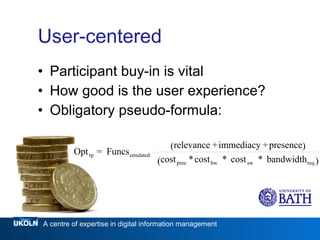
User-centered  Participant buy-in is vital How good is the user experience? Obligatory pseudo-formula:
Relevant theory from CMC Cues filtered out –  is CMC poorer, because [non-verbal] cues aren’t transmissible? Cues filtered in  – despite the lack of inherent [non-verbal] cues, people will find a way?
 
Scenarios Conference keynote/paper presentation SIG/board meeting Social conventions and etiquette: Well-understood for each scenario Potentially easier to support than arbitrary interactions!
Conference keynote: rough rules During presentation: Watch quietly, even if you disagree  (but it’s ok to mutter darkly to your neighbour) After presentation: Signal intent to ask question to session chair (who explicitly directs focus of audience attention) When asked, ask question; discuss.
Problems for remote viewer Boring  video streams: Not enough detail, too few cues to guide gaze – faded into background Some nuances are lost No sense of presence; no incidental interaction Signaling intent to contribute
Strategies (1) Use low-bandwidth channels (twitter, irc, chat) for external contributions Alter conventions for the chair to accommodate remote participants Direct gaze through video stream; qualitatively appears more immersive
Strategies (2) Obvious approach: improve quality of transmitted data Problem: typically taken to mean ‘higher resolution video’ Much more expensive.  Most additional data irrelevant, so filtered out – by viewer! (visual attention)
Strategies (3) What really makes a difference? In our case, we found:  High-quality audio* Relevance of data transmitted; shot, focus, framing… camera directs interpretation? Simple mechanisms for contribution Fielding social s/w: twitter, etc.
* For certain definitions of ‘high quality’ Psychoaccoustic/psychovisual modeling Perceived quality… depends on perception
Further aside about audio… ‘ Cocktail party effect’ – focusing  listening  attention; source separation Permits us to locate & focus attention on a speaker; as accurate as visual localization, but less efficient Required info to achieve this is difficult to retain – but very important
Board meeting: rough rules Session chair controls discussion, explicitly directs attention Signal intent to contribute Meeting minutes taken by nominated individuals; actions identified, declared during discussion
Problems-remote participant Cues and signals  Gaze/attention  (what’s so funny? What are we looking at/talking about?) Identity of participants;  visual name tags? Fault-tolerance:  Time zone, jet lag and burnout rate Handling language difficulties Bandwidth limits
Strategies (1) Build effective conventions between chair and remote participants Create fault-tolerant procedures Circulate notes/actions within minutes  Take turns to complete tasks, so that departure of one participant is minimally disruptive
Strategies (2) Focus on what matters: Video dispensable, given desktop sharing or even async file sharing High-quality audio is very important Back-channel enables informal discussion between participants, and can mediate requests to contribute
Research Best use of limited bandwidth/dev time in various contexts What data to collect/use/represent? How to represent it?
Services shared by local and remote participants Long tradition of hackery –eg. graffiti wall (bluetooth & web), etc. Cheap, fun, simple to set up – but little active interaction sparked as a result
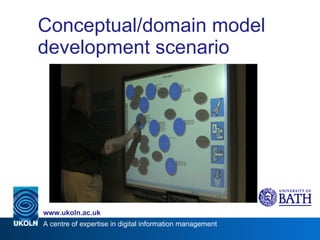
Conceptual/domain model development scenario
Usual solution - committee Coffee in, specification out Goal: shared reference, ‘common ground’ But: Expensive, limited attendance CMC problem. Multi-touch – Where should I be looking? What just changed? Is someone else about to edit what I’m looking at?
Strategies Versioning/diffs Simplified visualisation – remote user relative position; distance from screen Audio significant; conversation analysis a useful tool in eliciting design issues.
Discussion Smarter hardware, software, etc. collect relevant, pre-filtered information Cheap to transmit But how easy is it to interpret? Prior work - reaction times to filtered data can be very fast. Significance+ equivalence of data must be taught, learned, ’intuitive’
Overall Conclusion More detailed data not necessarily better Getting the  right  data Lots of design time goes into figuring out which data matters most Representation may differ significantly from initial form of information Hearing gaze and seeing speech? – ambient + intuitive
Conclusion (2) Handy buzzword list: Emergent, self-organising, etc… Agile, user-centred design . Imagination is free
Comments, questions, rotten tomatoes?

Salience, Focus and Bandwidth

  • 1.
    UKOLN is supported by: Salience, Focus and Bandwidth Emma Tonkin – Research Officer Strathclyde Workshop on Distance Conferencing – 22 nd October 2009
  • 2.
    Why remote participation?Simple premise: Travel costs £money, £time and £patience Remote participation = Cut down on travel => Cheaper, faster, less irritating?
  • 3.
    Really? Remote accesshas penalties Limited opportunity to interact/contribute Sense of presence limited – doesn’t feel like being there ‘ Incidental’ interactions limited – doesn’t work like being there
  • 4.
    Plan… I willdiscuss: Brief review of factors Scenarios + Experiences Some of our research in the area
  • 5.
    Factors All theobvious questions: What? (are you trying to achieve?) Who? (will be taking part?) How many people? What are they used to? How much? Money – equipment – bandwidth – time? How best to emulate and support?
  • 6.
    User-centered Participantbuy-in is vital How good is the user experience? Obligatory pseudo-formula:
  • 7.
    Relevant theory fromCMC Cues filtered out – is CMC poorer, because [non-verbal] cues aren’t transmissible? Cues filtered in – despite the lack of inherent [non-verbal] cues, people will find a way?
  • 8.
  • 9.
    Scenarios Conference keynote/paperpresentation SIG/board meeting Social conventions and etiquette: Well-understood for each scenario Potentially easier to support than arbitrary interactions!
  • 10.
    Conference keynote: roughrules During presentation: Watch quietly, even if you disagree (but it’s ok to mutter darkly to your neighbour) After presentation: Signal intent to ask question to session chair (who explicitly directs focus of audience attention) When asked, ask question; discuss.
  • 11.
    Problems for remoteviewer Boring video streams: Not enough detail, too few cues to guide gaze – faded into background Some nuances are lost No sense of presence; no incidental interaction Signaling intent to contribute
  • 12.
    Strategies (1) Uselow-bandwidth channels (twitter, irc, chat) for external contributions Alter conventions for the chair to accommodate remote participants Direct gaze through video stream; qualitatively appears more immersive
  • 13.
    Strategies (2) Obviousapproach: improve quality of transmitted data Problem: typically taken to mean ‘higher resolution video’ Much more expensive. Most additional data irrelevant, so filtered out – by viewer! (visual attention)
  • 14.
    Strategies (3) Whatreally makes a difference? In our case, we found: High-quality audio* Relevance of data transmitted; shot, focus, framing… camera directs interpretation? Simple mechanisms for contribution Fielding social s/w: twitter, etc.
  • 15.
    * For certaindefinitions of ‘high quality’ Psychoaccoustic/psychovisual modeling Perceived quality… depends on perception
  • 16.
    Further aside aboutaudio… ‘ Cocktail party effect’ – focusing listening attention; source separation Permits us to locate & focus attention on a speaker; as accurate as visual localization, but less efficient Required info to achieve this is difficult to retain – but very important
  • 17.
    Board meeting: roughrules Session chair controls discussion, explicitly directs attention Signal intent to contribute Meeting minutes taken by nominated individuals; actions identified, declared during discussion
  • 18.
    Problems-remote participant Cuesand signals Gaze/attention (what’s so funny? What are we looking at/talking about?) Identity of participants; visual name tags? Fault-tolerance: Time zone, jet lag and burnout rate Handling language difficulties Bandwidth limits
  • 19.
    Strategies (1) Buildeffective conventions between chair and remote participants Create fault-tolerant procedures Circulate notes/actions within minutes Take turns to complete tasks, so that departure of one participant is minimally disruptive
  • 20.
    Strategies (2) Focuson what matters: Video dispensable, given desktop sharing or even async file sharing High-quality audio is very important Back-channel enables informal discussion between participants, and can mediate requests to contribute
  • 21.
    Research Best useof limited bandwidth/dev time in various contexts What data to collect/use/represent? How to represent it?
  • 22.
    Services shared bylocal and remote participants Long tradition of hackery –eg. graffiti wall (bluetooth & web), etc. Cheap, fun, simple to set up – but little active interaction sparked as a result
  • 23.
  • 24.
    Usual solution -committee Coffee in, specification out Goal: shared reference, ‘common ground’ But: Expensive, limited attendance CMC problem. Multi-touch – Where should I be looking? What just changed? Is someone else about to edit what I’m looking at?
  • 25.
    Strategies Versioning/diffs Simplifiedvisualisation – remote user relative position; distance from screen Audio significant; conversation analysis a useful tool in eliciting design issues.
  • 26.
    Discussion Smarter hardware,software, etc. collect relevant, pre-filtered information Cheap to transmit But how easy is it to interpret? Prior work - reaction times to filtered data can be very fast. Significance+ equivalence of data must be taught, learned, ’intuitive’
  • 27.
    Overall Conclusion Moredetailed data not necessarily better Getting the right data Lots of design time goes into figuring out which data matters most Representation may differ significantly from initial form of information Hearing gaze and seeing speech? – ambient + intuitive
  • 28.
    Conclusion (2) Handybuzzword list: Emergent, self-organising, etc… Agile, user-centred design . Imagination is free
  • 29.