Spring ’21 Release Overview
Flow Builder Demo + App-Guidance Demo
03/02/2021 – 18h00
Martin LEZER
Salesforce Group Leader
Statement under the Private Securities Litigation Reform Act of 1995:
This presentation contains forward-looking statements about the company’s financial and operating results, which may include expected GAAP and non-GAAP financial and other
operating and non-operating results, including revenue, net income, diluted earnings per share, operating cash flow growth, operating margin improvement, expected revenue
growth, expected current remaining performance obligation growth, expected tax rates, the one-time accounting non-cash charge that was incurred in connection with the
Salesforce.org combination; stock-based compensation expenses, amortization of purchased intangibles, shares outstanding, market growth and sustainability goals. The
achievement or success of the matters covered by such forward-looking statements involves risks, uncertainties and assumptions. If any such risks or uncertainties materialize or if
any of the assumptions prove incorrect, the company’s results could differ materially from the results expressed or implied by the forward-looking statements we make.
The risks and uncertainties referred to above include -- but are not limited to -- risks associated with the effect of general economic and market conditions; the impact of
geopolitical events; the impact of foreign currency exchange rate and interest rate fluctuations on our results; our business strategy and our plan to build our business, including our
strategy to be the leading provider of enterprise cloud computing applications and platforms; the pace of change and innovation in enterprise cloud computing services; the
seasonal nature of our sales cycles; the competitive nature of the market in which we participate; our international expansion strategy; the demands on our personnel and
infrastructure resulting from significant growth in our customer base and operations, including as a result of acquisitions; our service performance and security, including the
resources and costs required to avoid unanticipated downtime and prevent, detect and remediate potential security breaches; the expenses associated with new data centers and
third-party infrastructure providers; additional data center capacity; real estate and office facilities space; our operating results and cash flows; new services and product features,
including any efforts to expand our services beyond the CRM market; our strategy of acquiring or making investments in complementary businesses, joint ventures, services,
technologies and intellectual property rights; the performance and fair value of our investments in complementary businesses through our strategic investment portfolio; our ability
to realize the benefits from strategic partnerships, joint ventures and investments; the impact of future gains or losses from our strategic investment portfolio, including gains or
losses from overall market conditions that may affect the publicly traded companies within the company's strategic investment portfolio; our ability to execute our business plans;
our ability to successfully integrate acquired businesses and technologies, including delays related to the integration of Tableau due to regulatory review by the United Kingdom
Competition and Markets Authority; our ability to continue to grow unearned revenue and remaining performance obligation; our ability to protect our intellectual property rights;
our ability to develop our brands; our reliance on third-party hardware, software and platform providers; our dependency on the development and maintenance of the
infrastructure of the Internet; the
effect of evolving domestic and foreign government regulations, including those related to the provision of services on the Internet, those related to accessing the Internet, and
those addressing data privacy, cross-border data transfers and import and export controls; the valuation of our deferred tax assets and the release of related valuation allowances;
the potential availability of additional tax assets in the future; the impact of new accounting pronouncements and tax laws; uncertainties affecting our ability to estimate our tax
rate; the impact of expensing stock options and other equity awards; the sufficiency of our capital resources; factors related to our outstanding debt, revolving credit facility, term
loan and loan associated with 50 Fremont; compliance with our debt covenants and lease obligations; current and potential litigation involving us; and the impact of climate
change.
Further information on these and other factors that could affect the company’s financial results is included in the reports on Forms 10-K, 10-Q and 8-K and in other filings it makes
with the Securities and Exchange Commission from time to time. These documents are available on the SEC Filings section of the Investor Information section of the company’s
website at www.salesforce.com/investor.
Salesforce.com, inc. assumes no obligation and does not intend to update these forward-looking statements, except as required by law.
Forward-Looking Statements
Overall User Productivity
Manual Sharing
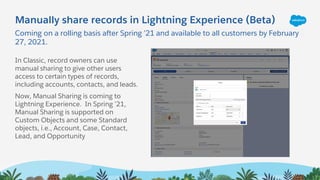
Coming on a rolling basis after Spring ’21 and available to all customers by February
27, 2021.
Manually share records in Lightning Experience (Beta)
In Classic, record owners can use
manual sharing to give other users
access to certain types of records,
including accounts, contacts, and leads.
Now, Manual Sharing is coming to
Lightning Experience. In Spring ’21,
Manual Sharing is supported on
Custom Objects and some Standard
objects, i.e., Account, Case, Contact,
Lead, and Opportunity
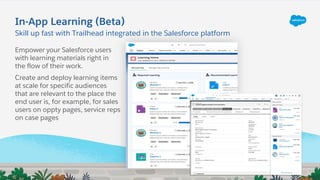
In-App Learning (Beta)
Empower your Salesforce users
with learning materials right in
the flow of their work.
Create and deploy learning items
at scale for specific audiences
that are relevant to the place the
end user is, for example, for sales
users on oppty pages, service reps
on case pages
Skill up fast with Trailhead integrated in the Salesforce platform
Search
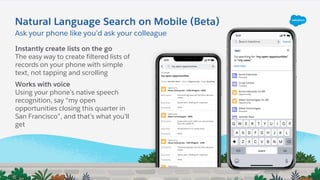
Ask your phone like you’d ask your colleague
Natural Language Search on Mobile (Beta)
Instantly create lists on the go
The easy way to create filtered lists of
records on your phone with simple
text, not tapping and scrolling
Works with voice
Using your phone’s native speech
recognition, say “my open
opportunities closing this quarter in
San Francisco”, and that’s what you’ll
get
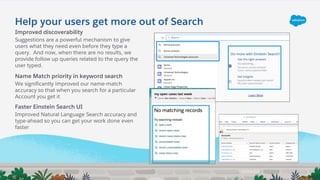
Help your users get more out of Search
Improved discoverability
Suggestions are a powerful mechanism to give
users what they need even before they type a
query. And now, when there are no results, we
provide follow up queries related to the query the
user typed.
Name Match priority in keyword search
We significantly improved our name-match
accuracy so that when you search for a particular
Account you get it
Faster Einstein Search UI
Improved Natural Language Search accuracy and
type-ahead so you can get your work done even
faster
Operational Analytics
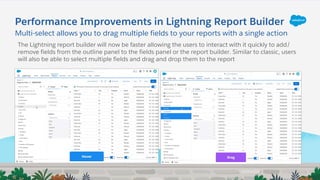
Multi-select allows you to drag multiple fields to your reports with a single action
Performance Improvements in Lightning Report Builder
The Lightning report builder will now be faster allowing the users to interact with it quickly to add/
remove fields from the outline panel to the fields panel or the report builder. Similar to classic, users
will also be able to select multiple fields and drag and drop them to the report
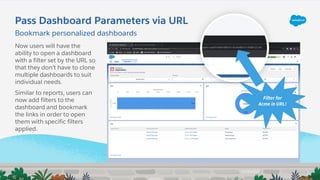
Pass Dashboard Parameters via URL
Filter for
Acme in URL!
Now users will have the
ability to open a dashboard
with a filter set by the URL so
that they don’t have to clone
multiple dashboards to suit
individual needs.
Similar to reports, users can
now add filters to the
dashboard and bookmark
the links in order to open
them with specific filters
applied.
Bookmark personalized dashboards
Sales Cloud
Opportunity Management
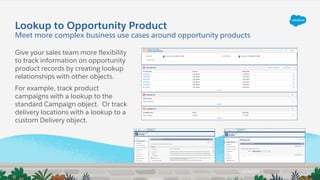
Lookup to Opportunity Product
Give your sales team more flexibility
to track information on opportunity
product records by creating lookup
relationships with other objects.
For example, track product
campaigns with a lookup to the
standard Campaign object. Or track
delivery locations with a lookup to a
custom Delivery object.
Meet more complex business use cases around opportunity products
Lightning Email
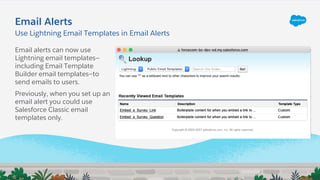
Email Alerts
Email alerts can now use
Lightning email templates—
including Email Template
Builder email templates—to
send emails to users.
Previously, when you set up an
email alert you could use
Salesforce Classic email
templates only.
Use Lightning Email Templates in Email Alerts
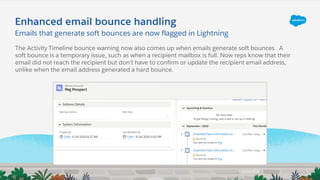
Enhanced email bounce handling
Emails that generate soft bounces are now flagged in Lightning
The Activity Timeline bounce warning now also comes up when emails generate soft bounces. A
soft bounce is a temporary issue, such as when a recipient mailbox is full. Now reps know that their
email did not reach the recipient but don’t have to confirm or update the recipient email address,
unlike when the email address generated a hard bounce.
Calendar
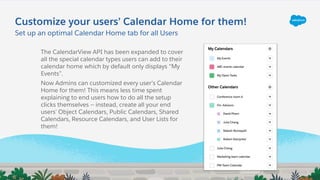
Customize your users’ Calendar Home for them!
Set up an optimal Calendar Home tab for all Users
The CalendarView API has been expanded to cover
all the special calendar types users can add to their
calendar home which by default only displays “My
Events”.
Now Admins can customized every user’s Calendar
Home for them! This means less time spent
explaining to end users how to do all the setup
clicks themselves -- instead, create all your end
users’ Object Calendars, Public Calendars, Shared
Calendars, Resource Calendars, and User Lists for
them!
Service Cloud
Case Management
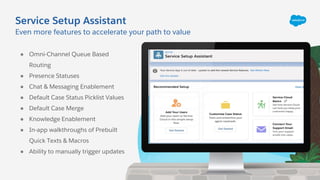
Service Setup Assistant
Even more features to accelerate your path to value
● Omni-Channel Queue Based
Routing
● Presence Statuses
● Chat & Messaging Enablement
● Default Case Status Picklist Values
● Default Case Merge
● Knowledge Enablement
● In-app walkthroughs of Prebuilt
Quick Texts & Macros
● Ability to manually trigger updates
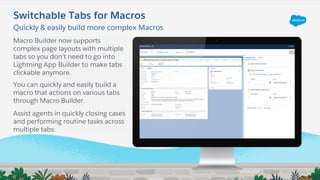
Macro Builder now supports
complex page layouts with multiple
tabs so you don’t need to go into
Lightning App Builder to make tabs
clickable anymore.
You can quickly and easily build a
macro that actions on various tabs
through Macro Builder.
Assist agents in quickly closing cases
and performing routine tasks across
multiple tabs.
Switchable Tabs for Macros
Quickly & easily build more complex Macros
Tableau CRM
+
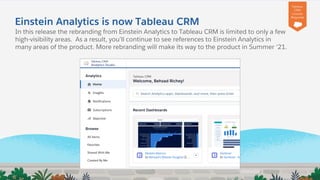
Einstein Analytics is now Tableau CRM
In this release the rebranding from Einstein Analytics to Tableau CRM is limited to only a few
high-visibility areas. As a result, you’ll continue to see references to Einstein Analytics in
many areas of the product. More rebranding will make its way to the product in Summer ‘21.
Tableau
CRM
License
Required
Experience Cloud
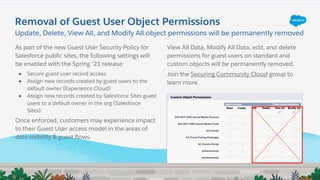
Removal of Guest User Object Permissions
As part of the new Guest User Security Policy for
Salesforce public sites, the following settings will
be enabled with the Spring ‘21 release:
● Secure guest user record access
● Assign new records created by guest users to the
default owner (Experience Cloud)
● Assign new records created by Salesforce Sites guest
users to a default owner in the org (Salesforce
Sites).
Once enforced, customers may experience impact
to their Guest User access model in the areas of
data visibility & guest flows.
Update, Delete, View All, and Modify All object permissions will be permanently removed
View All Data, Modify All Data, edit, and delete
permissions for guest users on standard and
custom objects will be permanently removed.
Join the Securing Community Cloud group to
learn more.
Lightning Web Runtime
Introducing the brand new Marketing Website template created with incredible
page speed performance and enhanced developer productivity.
Additional
License
may be
Required
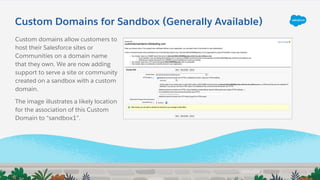
Custom Domains for Sandbox (Generally Available)
Custom domains allow customers to
host their Salesforce sites or
Communities on a domain name
that they own. We are now adding
support to serve a site or community
created on a sandbox with a custom
domain.
The image illustrates a likely location
for the association of this Custom
Domain to “sandbox1”.
Mobile
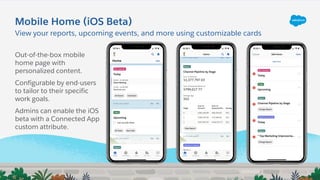
Out-of-the-box mobile
home page with
personalized content.
Configurable by end-users
to tailor to their specific
work goals.
Admins can enable the iOS
beta with a Connected App
custom attribute.
Mobile Home (iOS Beta)
View your reports, upcoming events, and more using customizable cards
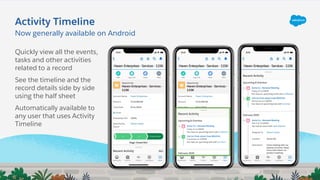
Activity Timeline
Now generally available on Android
Quickly view all the events,
tasks and other activities
related to a record
See the timeline and the
record details side by side
using the half sheet
Automatically available to
any user that uses Activity
Timeline
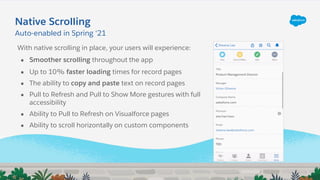
Native Scrolling
With native scrolling in place, your users will experience:
● Smoother scrolling throughout the app
● Up to 10% faster loading times for record pages
● The ability to copy and paste text on record pages
● Pull to Refresh and Pull to Show More gestures with full
accessibility
● Ability to Pull to Refresh on Visualforce pages
● Ability to scroll horizontally on custom components
Auto-enabled in Spring ‘21
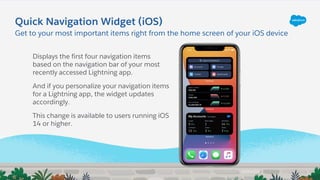
Displays the first four navigation items
based on the navigation bar of your most
recently accessed Lightning app.
And if you personalize your navigation items
for a Lightning app, the widget updates
accordingly.
This change is available to users running iOS
14 or higher.
Quick Navigation Widget (iOS)
Get to your most important items right from the home screen of your iOS device
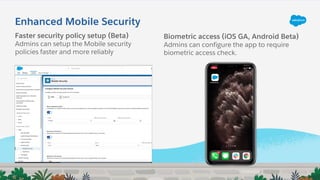
Enhanced Mobile Security
Faster security policy setup (Beta)
Admins can setup the Mobile security
policies faster and more reliably
Biometric access (iOS GA, Android Beta)
Admins can configure the app to require
biometric access check.
Customization
Salesforce Flow
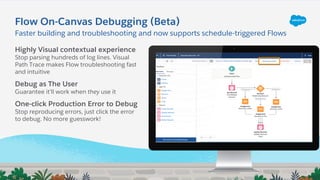
Flow On-Canvas Debugging (Beta)
Highly Visual contextual experience
Stop parsing hundreds of log lines. Visual
Path Trace makes Flow troubleshooting fast
and intuitive
Debug as The User
Guarantee it’ll work when they use it
One-click Production Error to Debug
Stop reproducing errors, just click the error
to debug. No more guesswork!
Faster building and troubleshooting and now supports schedule-triggered Flows
Dynamic Actions
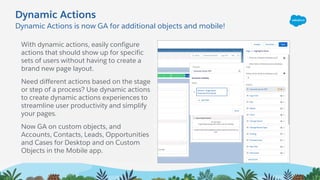
Dynamic Actions is now GA for additional objects and mobile!
Dynamic Actions
With dynamic actions, easily configure
actions that should show up for specific
sets of users without having to create a
brand new page layout.
Need different actions based on the stage
or step of a process? Use dynamic actions
to create dynamic actions experiences to
streamline user productivity and simplify
your pages.
Now GA on custom objects, and
Accounts, Contacts, Leads, Opportunities
and Cases for Desktop and on Custom
Objects in the Mobile app.
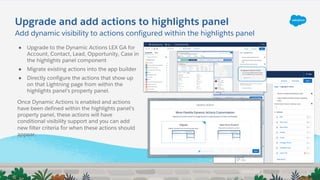
Upgrade and add actions to highlights panel
● Upgrade to the Dynamic Actions LEX GA for
Account, Contact, Lead, Opportunity, Case in
the highlights panel component
● Migrate existing actions into the app builder
● Directly configure the actions that show up
on that Lightning page from within the
highlights panel’s property panel.
Add dynamic visibility to actions configured within the highlights panel
Once Dynamic Actions is enabled and actions
have been defined within the highlights panel’s
property panel, these actions will have
conditional visibility support and you can add
new filter criteria for when these actions should
appear.
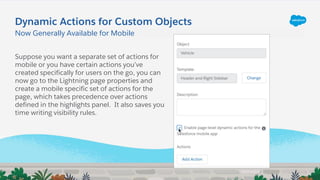
Now Generally Available for Mobile
Suppose you want a separate set of actions for
mobile or you have certain actions you’ve
created specifically for users on the go, you can
now go to the Lightning page properties and
create a mobile specific set of actions for the
page, which takes precedence over actions
defined in the highlights panel. It also saves you
time writing visibility rules.
Dynamic Actions for Custom Objects
Lightning App Builder
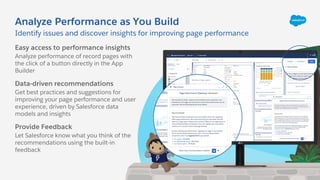
Analyze Performance as You Build
Identify issues and discover insights for improving page performance
Easy access to performance insights
Analyze performance of record pages with
the click of a button directly in the App
Builder
Data-driven recommendations
Get best practices and suggestions for
improving your page performance and user
experience, driven by Salesforce data
models and insights
Provide Feedback
Let Salesforce know what you think of the
recommendations using the built-in
feedback
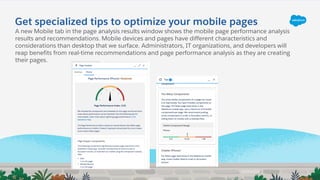
Get specialized tips to optimize your mobile pages
A new Mobile tab in the page analysis results window shows the mobile page performance analysis
results and recommendations. Mobile devices and pages have different characteristics and
considerations than desktop that we surface. Administrators, IT organizations, and developers will
reap benefits from real-time recommendations and page performance analysis as they are creating
their pages.
General Setup
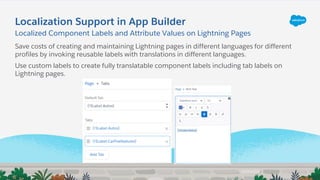
Localization Support in App Builder
Save costs of creating and maintaining Lightning pages in different languages for different
profiles by invoking reusable labels with translations in different languages.
Use custom labels to create fully translatable component labels including tab labels on
Lightning pages.
Localized Component Labels and Attribute Values on Lightning Pages
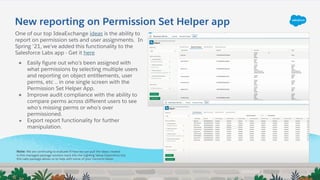
New reporting on Permission Set Helper app
One of our top IdeaExchange ideas is the ability to
report on permission sets and user assignments. In
Spring ‘21, we’ve added this functionality to the
Salesforce Labs app - Get it here
● Easily figure out who’s been assigned with
what permissions by selecting multiple users
and reporting on object entitlements, user
perms, etc .. in one single screen with the
Permission Set Helper App.
● Improve audit compliance with the ability to
compare perms across different users to see
who’s missing perms or who’s over
permissioned.
● Export report functionality for further
manipulation.
Note: We are continuing to evaluate if/how we can pull the ideas created
in this managed package solution back into the Lighting Setup Experience but
this Labs package allows us to help with some of your concerns faster.
Developer Highlights
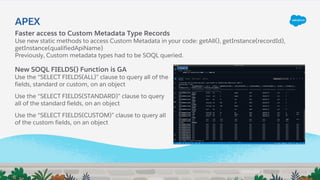
Faster access to Custom Metadata Type Records
Use new static methods to access Custom Metadata in your code: getAll(), getInstance(recordId),
getInstance(qualifiedApiName)
Previously, Custom metadata types had to be SOQL queried.
APEX
New SOQL FIELDS() Function is GA
Use the “SELECT FIELDS(ALL)” clause to query all of the
fields, standard or custom, on an object
Use the “SELECT FIELDS(STANDARD)” clause to query
all of the standard fields, on an object
Use the “SELECT FIELDS(CUSTOM)” clause to query all
of the custom fields, on an object
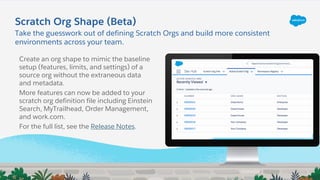
Scratch orgs
Take the guesswork out of defining Scratch Orgs and build more consistent
environments across your team.
Scratch Org Shape (Beta)
Create an org shape to mimic the baseline
setup (features, limits, and settings) of a
source org without the extraneous data
and metadata.
More features can now be added to your
scratch org definition file including Einstein
Search, MyTrailhead, Order Management,
and work.com.
For the full list, see the Release Notes.
Sandboxes
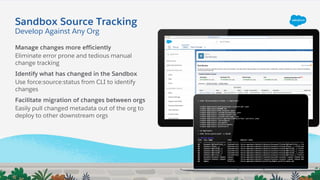
Sandbox Source Tracking
Manage changes more efficiently
Eliminate error prone and tedious manual
change tracking
Identify what has changed in the Sandbox
Use force:source:status from CLI to identify
changes
Facilitate migration of changes between orgs
Easily pull changed metadata out of the org to
deploy to other downstream orgs
Develop Against Any Org

Salesforce Spring '21 - Release Overview

  • 1.
    Spring ’21 ReleaseOverview Flow Builder Demo + App-Guidance Demo 03/02/2021 – 18h00 Martin LEZER Salesforce Group Leader
  • 2.
    Statement under thePrivate Securities Litigation Reform Act of 1995: This presentation contains forward-looking statements about the company’s financial and operating results, which may include expected GAAP and non-GAAP financial and other operating and non-operating results, including revenue, net income, diluted earnings per share, operating cash flow growth, operating margin improvement, expected revenue growth, expected current remaining performance obligation growth, expected tax rates, the one-time accounting non-cash charge that was incurred in connection with the Salesforce.org combination; stock-based compensation expenses, amortization of purchased intangibles, shares outstanding, market growth and sustainability goals. The achievement or success of the matters covered by such forward-looking statements involves risks, uncertainties and assumptions. If any such risks or uncertainties materialize or if any of the assumptions prove incorrect, the company’s results could differ materially from the results expressed or implied by the forward-looking statements we make. The risks and uncertainties referred to above include -- but are not limited to -- risks associated with the effect of general economic and market conditions; the impact of geopolitical events; the impact of foreign currency exchange rate and interest rate fluctuations on our results; our business strategy and our plan to build our business, including our strategy to be the leading provider of enterprise cloud computing applications and platforms; the pace of change and innovation in enterprise cloud computing services; the seasonal nature of our sales cycles; the competitive nature of the market in which we participate; our international expansion strategy; the demands on our personnel and infrastructure resulting from significant growth in our customer base and operations, including as a result of acquisitions; our service performance and security, including the resources and costs required to avoid unanticipated downtime and prevent, detect and remediate potential security breaches; the expenses associated with new data centers and third-party infrastructure providers; additional data center capacity; real estate and office facilities space; our operating results and cash flows; new services and product features, including any efforts to expand our services beyond the CRM market; our strategy of acquiring or making investments in complementary businesses, joint ventures, services, technologies and intellectual property rights; the performance and fair value of our investments in complementary businesses through our strategic investment portfolio; our ability to realize the benefits from strategic partnerships, joint ventures and investments; the impact of future gains or losses from our strategic investment portfolio, including gains or losses from overall market conditions that may affect the publicly traded companies within the company's strategic investment portfolio; our ability to execute our business plans; our ability to successfully integrate acquired businesses and technologies, including delays related to the integration of Tableau due to regulatory review by the United Kingdom Competition and Markets Authority; our ability to continue to grow unearned revenue and remaining performance obligation; our ability to protect our intellectual property rights; our ability to develop our brands; our reliance on third-party hardware, software and platform providers; our dependency on the development and maintenance of the infrastructure of the Internet; the effect of evolving domestic and foreign government regulations, including those related to the provision of services on the Internet, those related to accessing the Internet, and those addressing data privacy, cross-border data transfers and import and export controls; the valuation of our deferred tax assets and the release of related valuation allowances; the potential availability of additional tax assets in the future; the impact of new accounting pronouncements and tax laws; uncertainties affecting our ability to estimate our tax rate; the impact of expensing stock options and other equity awards; the sufficiency of our capital resources; factors related to our outstanding debt, revolving credit facility, term loan and loan associated with 50 Fremont; compliance with our debt covenants and lease obligations; current and potential litigation involving us; and the impact of climate change. Further information on these and other factors that could affect the company’s financial results is included in the reports on Forms 10-K, 10-Q and 8-K and in other filings it makes with the Securities and Exchange Commission from time to time. These documents are available on the SEC Filings section of the Investor Information section of the company’s website at www.salesforce.com/investor. Salesforce.com, inc. assumes no obligation and does not intend to update these forward-looking statements, except as required by law. Forward-Looking Statements
  • 3.
  • 4.
  • 5.
    Coming on arolling basis after Spring ’21 and available to all customers by February 27, 2021. Manually share records in Lightning Experience (Beta) In Classic, record owners can use manual sharing to give other users access to certain types of records, including accounts, contacts, and leads. Now, Manual Sharing is coming to Lightning Experience. In Spring ’21, Manual Sharing is supported on Custom Objects and some Standard objects, i.e., Account, Case, Contact, Lead, and Opportunity
  • 6.
    In-App Learning (Beta) Empoweryour Salesforce users with learning materials right in the flow of their work. Create and deploy learning items at scale for specific audiences that are relevant to the place the end user is, for example, for sales users on oppty pages, service reps on case pages Skill up fast with Trailhead integrated in the Salesforce platform
  • 7.
  • 8.
    Ask your phonelike you’d ask your colleague Natural Language Search on Mobile (Beta) Instantly create lists on the go The easy way to create filtered lists of records on your phone with simple text, not tapping and scrolling Works with voice Using your phone’s native speech recognition, say “my open opportunities closing this quarter in San Francisco”, and that’s what you’ll get
  • 9.
    Help your usersget more out of Search Improved discoverability Suggestions are a powerful mechanism to give users what they need even before they type a query. And now, when there are no results, we provide follow up queries related to the query the user typed. Name Match priority in keyword search We significantly improved our name-match accuracy so that when you search for a particular Account you get it Faster Einstein Search UI Improved Natural Language Search accuracy and type-ahead so you can get your work done even faster
  • 10.
  • 11.
    Multi-select allows youto drag multiple fields to your reports with a single action Performance Improvements in Lightning Report Builder The Lightning report builder will now be faster allowing the users to interact with it quickly to add/ remove fields from the outline panel to the fields panel or the report builder. Similar to classic, users will also be able to select multiple fields and drag and drop them to the report
  • 12.
    Pass Dashboard Parametersvia URL Filter for Acme in URL! Now users will have the ability to open a dashboard with a filter set by the URL so that they don’t have to clone multiple dashboards to suit individual needs. Similar to reports, users can now add filters to the dashboard and bookmark the links in order to open them with specific filters applied. Bookmark personalized dashboards
  • 13.
  • 14.
  • 15.
    Lookup to OpportunityProduct Give your sales team more flexibility to track information on opportunity product records by creating lookup relationships with other objects. For example, track product campaigns with a lookup to the standard Campaign object. Or track delivery locations with a lookup to a custom Delivery object. Meet more complex business use cases around opportunity products
  • 16.
  • 17.
    Email Alerts Email alertscan now use Lightning email templates— including Email Template Builder email templates—to send emails to users. Previously, when you set up an email alert you could use Salesforce Classic email templates only. Use Lightning Email Templates in Email Alerts
  • 18.
    Enhanced email bouncehandling Emails that generate soft bounces are now flagged in Lightning The Activity Timeline bounce warning now also comes up when emails generate soft bounces. A soft bounce is a temporary issue, such as when a recipient mailbox is full. Now reps know that their email did not reach the recipient but don’t have to confirm or update the recipient email address, unlike when the email address generated a hard bounce.
  • 19.
  • 20.
    Customize your users’Calendar Home for them! Set up an optimal Calendar Home tab for all Users The CalendarView API has been expanded to cover all the special calendar types users can add to their calendar home which by default only displays “My Events”. Now Admins can customized every user’s Calendar Home for them! This means less time spent explaining to end users how to do all the setup clicks themselves -- instead, create all your end users’ Object Calendars, Public Calendars, Shared Calendars, Resource Calendars, and User Lists for them!
  • 21.
  • 22.
  • 23.
    Service Setup Assistant Evenmore features to accelerate your path to value ● Omni-Channel Queue Based Routing ● Presence Statuses ● Chat & Messaging Enablement ● Default Case Status Picklist Values ● Default Case Merge ● Knowledge Enablement ● In-app walkthroughs of Prebuilt Quick Texts & Macros ● Ability to manually trigger updates
  • 24.
    Macro Builder nowsupports complex page layouts with multiple tabs so you don’t need to go into Lightning App Builder to make tabs clickable anymore. You can quickly and easily build a macro that actions on various tabs through Macro Builder. Assist agents in quickly closing cases and performing routine tasks across multiple tabs. Switchable Tabs for Macros Quickly & easily build more complex Macros
  • 25.
  • 26.
    + Einstein Analytics isnow Tableau CRM In this release the rebranding from Einstein Analytics to Tableau CRM is limited to only a few high-visibility areas. As a result, you’ll continue to see references to Einstein Analytics in many areas of the product. More rebranding will make its way to the product in Summer ‘21. Tableau CRM License Required
  • 27.
  • 28.
    Removal of GuestUser Object Permissions As part of the new Guest User Security Policy for Salesforce public sites, the following settings will be enabled with the Spring ‘21 release: ● Secure guest user record access ● Assign new records created by guest users to the default owner (Experience Cloud) ● Assign new records created by Salesforce Sites guest users to a default owner in the org (Salesforce Sites). Once enforced, customers may experience impact to their Guest User access model in the areas of data visibility & guest flows. Update, Delete, View All, and Modify All object permissions will be permanently removed View All Data, Modify All Data, edit, and delete permissions for guest users on standard and custom objects will be permanently removed. Join the Securing Community Cloud group to learn more.
  • 29.
    Lightning Web Runtime Introducingthe brand new Marketing Website template created with incredible page speed performance and enhanced developer productivity. Additional License may be Required
  • 30.
    Custom Domains forSandbox (Generally Available) Custom domains allow customers to host their Salesforce sites or Communities on a domain name that they own. We are now adding support to serve a site or community created on a sandbox with a custom domain. The image illustrates a likely location for the association of this Custom Domain to “sandbox1”.
  • 31.
  • 32.
    Out-of-the-box mobile home pagewith personalized content. Configurable by end-users to tailor to their specific work goals. Admins can enable the iOS beta with a Connected App custom attribute. Mobile Home (iOS Beta) View your reports, upcoming events, and more using customizable cards
  • 33.
    Activity Timeline Now generallyavailable on Android Quickly view all the events, tasks and other activities related to a record See the timeline and the record details side by side using the half sheet Automatically available to any user that uses Activity Timeline
  • 34.
    Native Scrolling With nativescrolling in place, your users will experience: ● Smoother scrolling throughout the app ● Up to 10% faster loading times for record pages ● The ability to copy and paste text on record pages ● Pull to Refresh and Pull to Show More gestures with full accessibility ● Ability to Pull to Refresh on Visualforce pages ● Ability to scroll horizontally on custom components Auto-enabled in Spring ‘21
  • 35.
    Displays the firstfour navigation items based on the navigation bar of your most recently accessed Lightning app. And if you personalize your navigation items for a Lightning app, the widget updates accordingly. This change is available to users running iOS 14 or higher. Quick Navigation Widget (iOS) Get to your most important items right from the home screen of your iOS device
  • 36.
    Enhanced Mobile Security Fastersecurity policy setup (Beta) Admins can setup the Mobile security policies faster and more reliably Biometric access (iOS GA, Android Beta) Admins can configure the app to require biometric access check.
  • 37.
  • 38.
  • 39.
    Flow On-Canvas Debugging(Beta) Highly Visual contextual experience Stop parsing hundreds of log lines. Visual Path Trace makes Flow troubleshooting fast and intuitive Debug as The User Guarantee it’ll work when they use it One-click Production Error to Debug Stop reproducing errors, just click the error to debug. No more guesswork! Faster building and troubleshooting and now supports schedule-triggered Flows
  • 40.
  • 41.
    Dynamic Actions isnow GA for additional objects and mobile! Dynamic Actions With dynamic actions, easily configure actions that should show up for specific sets of users without having to create a brand new page layout. Need different actions based on the stage or step of a process? Use dynamic actions to create dynamic actions experiences to streamline user productivity and simplify your pages. Now GA on custom objects, and Accounts, Contacts, Leads, Opportunities and Cases for Desktop and on Custom Objects in the Mobile app.
  • 42.
    Upgrade and addactions to highlights panel ● Upgrade to the Dynamic Actions LEX GA for Account, Contact, Lead, Opportunity, Case in the highlights panel component ● Migrate existing actions into the app builder ● Directly configure the actions that show up on that Lightning page from within the highlights panel’s property panel. Add dynamic visibility to actions configured within the highlights panel Once Dynamic Actions is enabled and actions have been defined within the highlights panel’s property panel, these actions will have conditional visibility support and you can add new filter criteria for when these actions should appear.
  • 43.
    Now Generally Availablefor Mobile Suppose you want a separate set of actions for mobile or you have certain actions you’ve created specifically for users on the go, you can now go to the Lightning page properties and create a mobile specific set of actions for the page, which takes precedence over actions defined in the highlights panel. It also saves you time writing visibility rules. Dynamic Actions for Custom Objects
  • 44.
  • 45.
    Analyze Performance asYou Build Identify issues and discover insights for improving page performance Easy access to performance insights Analyze performance of record pages with the click of a button directly in the App Builder Data-driven recommendations Get best practices and suggestions for improving your page performance and user experience, driven by Salesforce data models and insights Provide Feedback Let Salesforce know what you think of the recommendations using the built-in feedback
  • 46.
    Get specialized tipsto optimize your mobile pages A new Mobile tab in the page analysis results window shows the mobile page performance analysis results and recommendations. Mobile devices and pages have different characteristics and considerations than desktop that we surface. Administrators, IT organizations, and developers will reap benefits from real-time recommendations and page performance analysis as they are creating their pages.
  • 47.
  • 48.
    Localization Support inApp Builder Save costs of creating and maintaining Lightning pages in different languages for different profiles by invoking reusable labels with translations in different languages. Use custom labels to create fully translatable component labels including tab labels on Lightning pages. Localized Component Labels and Attribute Values on Lightning Pages
  • 49.
    New reporting onPermission Set Helper app One of our top IdeaExchange ideas is the ability to report on permission sets and user assignments. In Spring ‘21, we’ve added this functionality to the Salesforce Labs app - Get it here ● Easily figure out who’s been assigned with what permissions by selecting multiple users and reporting on object entitlements, user perms, etc .. in one single screen with the Permission Set Helper App. ● Improve audit compliance with the ability to compare perms across different users to see who’s missing perms or who’s over permissioned. ● Export report functionality for further manipulation. Note: We are continuing to evaluate if/how we can pull the ideas created in this managed package solution back into the Lighting Setup Experience but this Labs package allows us to help with some of your concerns faster.
  • 50.
  • 51.
    Faster access toCustom Metadata Type Records Use new static methods to access Custom Metadata in your code: getAll(), getInstance(recordId), getInstance(qualifiedApiName) Previously, Custom metadata types had to be SOQL queried. APEX New SOQL FIELDS() Function is GA Use the “SELECT FIELDS(ALL)” clause to query all of the fields, standard or custom, on an object Use the “SELECT FIELDS(STANDARD)” clause to query all of the standard fields, on an object Use the “SELECT FIELDS(CUSTOM)” clause to query all of the custom fields, on an object
  • 52.
  • 53.
    Take the guessworkout of defining Scratch Orgs and build more consistent environments across your team. Scratch Org Shape (Beta) Create an org shape to mimic the baseline setup (features, limits, and settings) of a source org without the extraneous data and metadata. More features can now be added to your scratch org definition file including Einstein Search, MyTrailhead, Order Management, and work.com. For the full list, see the Release Notes.
  • 54.
  • 55.
    Sandbox Source Tracking Managechanges more efficiently Eliminate error prone and tedious manual change tracking Identify what has changed in the Sandbox Use force:source:status from CLI to identify changes Facilitate migration of changes between orgs Easily pull changed metadata out of the org to deploy to other downstream orgs Develop Against Any Org