By Ramakrishna Narkedamilli
Salesforce is a cloud based CRM system and stores all the
customer related data. There are several ways to
communicate to Salesforce among that Mule ESB technology
is one way to Integrate.
Using Mule ESB Saleforce connector you can easily integrate
Salesofrce. Mule provides Saleforce connector that allows to
perform multiple operations like create, update and delete
and built with so many parameters and can help you to pass
the values for the methods.
Although Some time you may find issues in the parameters.
Connector may not have all the parameters that you required. In my
past experience, I had same issue where I was unable to found
parameter “OwnerId” for the convertLead opertaion.
When I googled for this issue then I found this parameter is not
included in Salesforce connector as this filed is not required for
most of the scenarioes. To overcome this type of scenarios we can
do things like below
1) Modify the Salesforce connector provided by Mule using its
source code .
2) Integrate Salesforce Using Java code for this operation.
Before going to Java code for Saleforce integration, we need below
thing to integrate and authenticate in Saleforce
1) Salsforce endPoint
2) Salesforce userName
3) Salesforce Password ( Typically Password is combination of
Password + Security Token )
In Java code, will break the process steps like below
1) Setup the connection with Salesforce using the above values.
2) Prepare request that you need to pass to salesforce.
3) Execute the required method using coonection that was setup
using point1.
4) Process the response that is being returned from Salesforce after
successful execution of method.
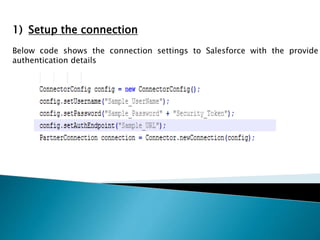
1) Setup the connection
Below code shows the connection settings to Salesforce with the provide
authentication details
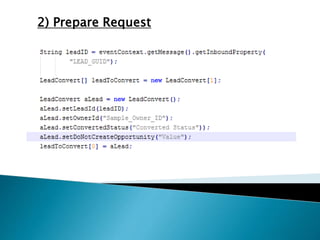
2) Prepare Request
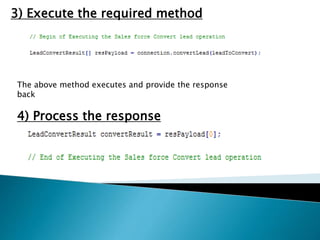
3) Execute the required method
The above method executes and provide the response
back
4) Process the response
Now You fetch the values in side the response object to see the
response Status.
This is how you can integrate Salesforce using Java code.
THANKS YOU
By Ramakrishna Narkedamilli

Salesforce Integration Using javacode

  • 1.
  • 2.
    Salesforce is acloud based CRM system and stores all the customer related data. There are several ways to communicate to Salesforce among that Mule ESB technology is one way to Integrate. Using Mule ESB Saleforce connector you can easily integrate Salesofrce. Mule provides Saleforce connector that allows to perform multiple operations like create, update and delete and built with so many parameters and can help you to pass the values for the methods.
  • 3.
    Although Some timeyou may find issues in the parameters. Connector may not have all the parameters that you required. In my past experience, I had same issue where I was unable to found parameter “OwnerId” for the convertLead opertaion. When I googled for this issue then I found this parameter is not included in Salesforce connector as this filed is not required for most of the scenarioes. To overcome this type of scenarios we can do things like below 1) Modify the Salesforce connector provided by Mule using its source code . 2) Integrate Salesforce Using Java code for this operation.
  • 4.
    Before going toJava code for Saleforce integration, we need below thing to integrate and authenticate in Saleforce 1) Salsforce endPoint 2) Salesforce userName 3) Salesforce Password ( Typically Password is combination of Password + Security Token )
  • 5.
    In Java code,will break the process steps like below 1) Setup the connection with Salesforce using the above values. 2) Prepare request that you need to pass to salesforce. 3) Execute the required method using coonection that was setup using point1. 4) Process the response that is being returned from Salesforce after successful execution of method.
  • 6.
    1) Setup theconnection Below code shows the connection settings to Salesforce with the provide authentication details
  • 7.
  • 8.
    3) Execute therequired method The above method executes and provide the response back 4) Process the response
  • 9.
    Now You fetchthe values in side the response object to see the response Status. This is how you can integrate Salesforce using Java code.
  • 10.