Data Quality Excel Connector Maria Pergolino  (w slides taken from salesforce.com/community
ADMINISTRATOR DATA PAIN POINTS Mass Data Import Import Activities/Cases in Mass Mass Updates/Territory Realignment Field Validation Ensure Opportunity Close Dates are filled in De-Duplication Correct Data Linking Opportunities are linked to correct Accounts Removal of Unused and/or Unclean Data Activities from previous years/ Disqualified Leads.
DATA QUALITY BENEFITS Drive User Adoption Increase Productivity Provide data visibility Accurate Analytics Customer Satisfaction
DATA QUALITY BEST PRACTICES Search before you create Standardize naming conventions Merge records Use the Excel Connector Set up data quality dashboards Adopt partner solutions
EXCEL CONNECTOR - DESCRIPTION Cost Free tool Limits It is not a supported product. If you have questions, please use the Excel Connector Documentation and the Force.com discussion boards on the topic. Open source excel add-in Bi-directional access to Salesforce.com from Excel spreadsheet Leverages sforce Toolkit for Office
EXCEL CONNECTOR - DESCRIPTION Purpose Enabler: Data Management Activities Security Login employs the role and the profile Drives the visibility and permissions Meta-data Based on Partner WSDL  Real time and complete representation of the meta-data
EXCEL CONNECTOR – IMPORTANT LINKS To learn how to use the Excel Connector, see the  Excel Connector Training .  For tips on loading data using the Excel Connector, see  How to Upload Data into Salesforce .  For more information about the Excel Connector, see the  Excel Connector Documentation .   For community discussion board on the Excel Connector, see the  Dedicated Community Site .
IMPORTANT NOTE YOU ARE MANIPULATING YOUR DATA AND CAN NOT UNDO CHANGES TEST IN SANDBOX OR IN DEVELOPER ACCOUNT BACK-UP YOUR DATA
DOWNLOADING TOOL Download the Office Connector Setup | Desktop Integration | Connect for Office Download the Excel Connector  For Professional Edition   For Enterprise Edition
USING TOOL – SIGNING IN Sign into the Connector (set the API to 14.0) Change endpoint to   test .salesforce.com  if using a sandbox API Token unless Trusted IP Table Query Wizard
DEMO Using Query Wizard Editing a cell, Updating data Inserting a new record Querying a record Deleting a record
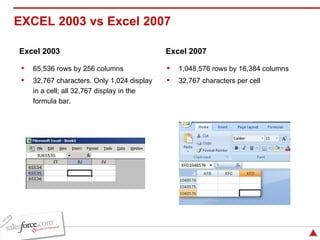
1,048,576 rows by 16,384 columns 32,767 characters per cell 65,536 rows by 256 columns 32,767 characters. Only 1,024 display in a cell; all 32,767 display in the formula bar. EXCEL 2003 vs Excel 2007  Excel 2003 Excel 2007
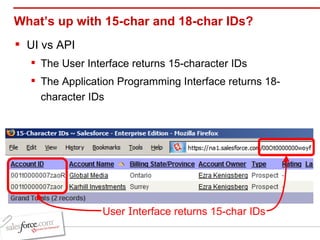
What’s up with 15-char and 18-char IDs? UI vs API The User Interface returns 15-character IDs The Application Programming Interface returns 18-character IDs User  I nterface returns 15-char IDs
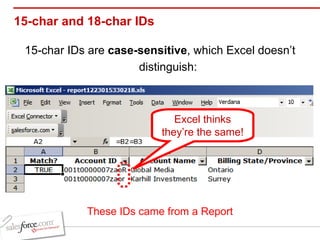
15-char and 18-char IDs  15-char IDs are  case-sensitive , which Excel doesn’t distinguish: Excel thinks they’re the same! These IDs came from a Report
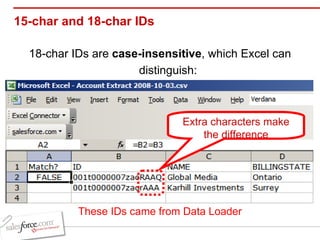
15-char and 18-char IDs 18-char IDs are  case-insensitive , which Excel can distinguish: Extra characters make the difference These IDs came from Data Loader
15-char and 18-char IDs Use Excel Connector’s  FixID()  function: Bottom line : whenever you work with IDs in Excel,  always make sure to use 18-character IDs.

Salesforce Excel Connector Presentation

  • 1.
    Data Quality ExcelConnector Maria Pergolino (w slides taken from salesforce.com/community
  • 2.
    ADMINISTRATOR DATA PAINPOINTS Mass Data Import Import Activities/Cases in Mass Mass Updates/Territory Realignment Field Validation Ensure Opportunity Close Dates are filled in De-Duplication Correct Data Linking Opportunities are linked to correct Accounts Removal of Unused and/or Unclean Data Activities from previous years/ Disqualified Leads.
  • 3.
    DATA QUALITY BENEFITSDrive User Adoption Increase Productivity Provide data visibility Accurate Analytics Customer Satisfaction
  • 4.
    DATA QUALITY BESTPRACTICES Search before you create Standardize naming conventions Merge records Use the Excel Connector Set up data quality dashboards Adopt partner solutions
  • 5.
    EXCEL CONNECTOR -DESCRIPTION Cost Free tool Limits It is not a supported product. If you have questions, please use the Excel Connector Documentation and the Force.com discussion boards on the topic. Open source excel add-in Bi-directional access to Salesforce.com from Excel spreadsheet Leverages sforce Toolkit for Office
  • 6.
    EXCEL CONNECTOR -DESCRIPTION Purpose Enabler: Data Management Activities Security Login employs the role and the profile Drives the visibility and permissions Meta-data Based on Partner WSDL Real time and complete representation of the meta-data
  • 7.
    EXCEL CONNECTOR –IMPORTANT LINKS To learn how to use the Excel Connector, see the Excel Connector Training . For tips on loading data using the Excel Connector, see How to Upload Data into Salesforce . For more information about the Excel Connector, see the Excel Connector Documentation .  For community discussion board on the Excel Connector, see the Dedicated Community Site .
  • 8.
    IMPORTANT NOTE YOUARE MANIPULATING YOUR DATA AND CAN NOT UNDO CHANGES TEST IN SANDBOX OR IN DEVELOPER ACCOUNT BACK-UP YOUR DATA
  • 9.
    DOWNLOADING TOOL Downloadthe Office Connector Setup | Desktop Integration | Connect for Office Download the Excel Connector For Professional Edition For Enterprise Edition
  • 10.
    USING TOOL –SIGNING IN Sign into the Connector (set the API to 14.0) Change endpoint to test .salesforce.com if using a sandbox API Token unless Trusted IP Table Query Wizard
  • 11.
    DEMO Using QueryWizard Editing a cell, Updating data Inserting a new record Querying a record Deleting a record
  • 12.
    1,048,576 rows by16,384 columns 32,767 characters per cell 65,536 rows by 256 columns 32,767 characters. Only 1,024 display in a cell; all 32,767 display in the formula bar. EXCEL 2003 vs Excel 2007 Excel 2003 Excel 2007
  • 13.
    What’s up with15-char and 18-char IDs? UI vs API The User Interface returns 15-character IDs The Application Programming Interface returns 18-character IDs User I nterface returns 15-char IDs
  • 14.
    15-char and 18-charIDs 15-char IDs are case-sensitive , which Excel doesn’t distinguish: Excel thinks they’re the same! These IDs came from a Report
  • 15.
    15-char and 18-charIDs 18-char IDs are case-insensitive , which Excel can distinguish: Extra characters make the difference These IDs came from Data Loader
  • 16.
    15-char and 18-charIDs Use Excel Connector’s FixID() function: Bottom line : whenever you work with IDs in Excel, always make sure to use 18-character IDs.