Atlanta Salesforce User
                                     Group
                                         August 31, 2012
                                             Sales


Configero Proprietary and Confidential             1
Introduction: Configero – Paul Blanchard


 Configero is a certified Salesforce.com Partner, delivering
 Configero delivers a clear and complete approach for
 companies looking to optimize their CRM investment for
 increased adoption, savings, ROI and revenue.


Broad Platform Experience

                                         Paul Blanchard, Senior Project Manager
                                         •   25+ years of software development and IT experience
                                         •   Experience designing, deploying, and optimizing CRM technology for
                                             maximum business impact
                                         •   Lead hundreds of successful deployments and optimization projects
                                             ranging from a few users up to over 1,600 seats.


Configero Proprietary and Confidential                         2
Session Agenda

  Adoption Strategies:

     Adoption Objectives
     Adoption Strategies
     Adoption Monitoring Tools
     Review Check Points


Configero Proprietary and Confidential   3
Your Role


 Adoption Evangelists


Configero Proprietary and Confidential   4
Your Role

  Leaders, Facilitators and Advocates


Configero Proprietary and Confidential   5
Your Role

  Leaders, Facilitators and Advocates

  Expectations:
       Stay abreast of new features and functionality added by your
        Organization (in-house or via Consultants)
       Stay abreast of new Releases from Salesforce and new Apps on the
        App Exchange
       Assist in Data Quality efforts to help ensure that incomplete,
        duplicate or incorrect data is not a pain point for End-Users
       Raise visibility of the benefits of Salesforce features and functionality
        to the Executive Team
       Provide input that will help improve usability
       Be a part of the Salesforce Community through Answers, Ideas or
        any of the Groups on LinkedIn, Facebook and Twitter


Configero Proprietary and Confidential       6
Getting Started


 Getting Started


Configero Proprietary and Confidential   7
Getting Started

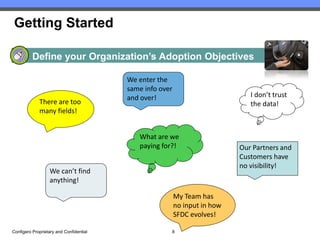
          Define your Organization’s Adoption Objectives

                                         We enter the
                                         same info over
                                         and over!                             I don’t trust
             There are too                                                     the data!
             many fields!


                                            What are we
                                            paying for?!                    Our Partners and
                                                                            Customers have
                                                                            no visibility!
                  We can’t find
                  anything!

                                                          My Team has
                                                          no input in how
                                                          SFDC evolves!

Configero Proprietary and Confidential                8
Getting Started

          Define your Organization’s Adoption Objectives

  Define the current pain points hindering Adoption:
          Do your users state that Salesforce pages are overwhelming and have “too many fields to fill out
           and too many options to choose from”?
          Do your users state that they “do not trust the data entered into Salesforce today”?
          Do your users state that “every time I enter information into Salesforce, it goes into a ‘black hole’”?
          Do your users state that they are “entering the same information over and over multiple times”?
          Do your users state that they “don’t know where to go in Salesforce to see my work to be
           completed”?
          Do your users state that they “can never find anything I need in Salesforce”?
          Do your users state that “Salesforce is just another program that adds additional labor to my job”?
          Do your users state that “I have no input regarding Salesforce functionality for my Team”?
          Do your users state that “collaboration across Teams and Departments is difficult in Salesforce”?
          Do your Customers and Partners state that “we have no visibility into Customer Service,
           Marketing or Sales”?
          Does your Executive Team state that “we have no visibility into Sales, Marketing or Operations
           and we do not know why we are paying for Salesforce”?


Configero Proprietary and Confidential                         9
Getting Started

          Define your Organization’s Adoption Strategies


Configero Proprietary and Confidential   10
Getting Started

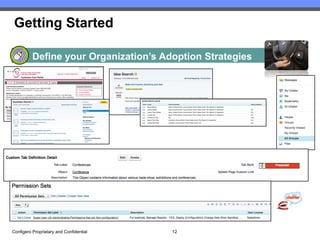
          Define your Organization’s Adoption Strategies

  Plan and implement strategies for Adoption:
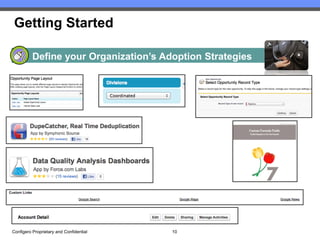
          Leverage Record Types and Field Visibility in order to streamline Page Layouts and Picklists for different teams or groups of
           Users. If you are on Professional Edition and do not have Record Types nor customizable Profiles, leverage Dependent
           Picklists.
          If your Organization has multiple Business Units and a relatively “Open” Security Model, contact Salesforce Support about
           enabling the Divisions feature to expedite Searches, List Views and Reports. Caveat: Salesforce does recommend that this
           feature only be used in Organizations with 1 million+ records; however, they are relatively flexible if a solid Business Case
           can be made for its use.
          Leverage Custom Buttons for repeatable actions that the Users must do such as “New Activity” or “New Opportunity” rather
           than having users create new records from Related Lists. The benefit of custom buttons is that you can also pass field
           values from a Parent record to a Child record and set a default Record Type so that the User does not have to choose.
          Leverage Custom Links for record-specific Reports such as “All Open Opportunities for {Account}” or “All Open Cases for
           {Contact}” and Custom Sidebar Links for high-visibility Reports such as “Stuck Opportunities” or “Aged Cases”
          Leverage AppExchange Apps for Data Quality such as Data Quality Analysis Dashboards (free from Force.com Labs),
           DupeCatcher (free from Symphonic Source) or DupeBlocker 2.0 (paid from CRM Fusion) as well as the add-on Salesforce
           feature Data.com for import of Accounts and Contacts.
          Leverage Salesforce Automation (SFA) such as Workflow Rules, Approval Processes, Validation Rules, Formula Fields,
           Lookup Filters and Triggers to reduce duplicate data entry and facilitate data accuracy. Caution on Approval Processes and
           Validation Rules – consider usability when implementing these features, for example, if every user is required to submit
           every Case for Approval before it can be closed or if Validation Rules have error messages that are unclear, then Adoption
           will be negatively impacted. This is a great post from Salesforce for 100 Sample Formula Fields for Customization.


Configero Proprietary and Confidential                                    11
Getting Started

          Define your Organization’s Adoption Strategies


Configero Proprietary and Confidential   12
Getting Started

          Adoption Strategies (Continued)
  Plan and implement strategies for Adoption (cont’d):
          Ensure that Public List Views are created and maintained by a small number of System Admins and Super Users to ensure
           that List Views are meaningful (My Accounts versus Jen Nelson’s Accounts, Jared Miller’s Accounts…) and that the visibility
           of List Views are relevant to Users by Role or Public Group so that they are not accidentally made visible to Customer or
           Partner Portal Users.
          Leverage SFA such as Escalation Rules, Assignment Rules and Workflow Rules to ensure that records are owned by the
           right Users or Queues and that records do not remain stagnant (Opportunities that never close, Cases that linger for years,
           Leads that never get converted)
          Leverage Scheduled Reports and Dashboards to raise visibility of key issues such as Aged Leads, Cases or Opportunities
           rather than sending email notifications one record at a time. Consider these two free Apps from the AppExchange created
           by Force.com Labs: Service and Support Dashboards and Sales KPI Dashboard. Both allow for easy configuration for your
           specific business needs.
          Leverage Chatter and Chatter Groups for collaboration on records as well as on Group-specific topics such as Industry
           Knowledge, Strategic Accounts and Hot Leads or Opportunities and increase collaboration across functional teams.
          Review all Apps and Tabs and consolidate per Profile so that Users only have to navigate through the Objects and Features
           that are relevant to their business functions. Customize Apps and Tabs with your Logo and cool icons!
          Leverage Permission Sets in order to further consolidate Profiles and give “À la carte” permissions to Super Users
          Configure Search Layouts and Lookup Filters for all objects to facilitate quicker and more efficient searches
          Leverage internal Ideas and Answers Communities so that your End-Users have a voice in the evolution of Salesforce and
           can share Knowledge quickly.
          Implement Self-Service, Customer and/or Partner Portals to provide controlled access to your Salesforce data and reduce
           phone and email communication.
          Provide the Executive Team with “low effort” tools such as Chatter Desktop or Chatter Mobile, Dashboard Components in
           Chatter, Chatter and Mobile Approvals and Scheduled Reports


Configero Proprietary and Confidential                                   13
Getting Started

          Adoption Monitoring Tools

  Implement tools to monitor adoption and refine the process as you
  grow:
          Salesforce Adoption Dashboards – Free from Force.com Labs
            Includes Login History metrics, New records created and Activity on existing records, Leads
               and Opportunity metrics and is configurable by a System Admin or other user with the Manage
               Public Reports permission
          User Adoption Dashboard – Free from Arrowpointe Corp.
            Includes metrics for Leads, Accounts, Contacts, Opportunities, Cases, Tasks, Events and
               Users and is configurable by a System Admin or other user with the Manage Public Reports
               permission
          Chatter Usage Dashboards – Free from Force.com Labs
            Includes 20 Dashboard Components, 25 Reports and 7 Custom Report Types and is
               configurable by a System Admin or other user with the Manage Public Reports permission
          The Chatter Game – Free from Force.com Labs
            One of the hot topics at another User Group session this Summer was Gamification in the
               Workplace and the discussion was around motivating and incenting users toward adoption
               through competition and increased visibility. Several large organizations have gone to
               gamification, particularly with the Chatter feature, as an additional mechanism for bringing together
                 Business Units in other regions or countries.

Configero Proprietary and Confidential                           14
Review Check Point

  Topics:

  Know your Adoption Objectives
  Plan your Adoption Strategies
  Implement Tools to monitor your End-User Adoption and refine
   the process as your business grows.


Configero Proprietary and Confidential   15
Force.com Success
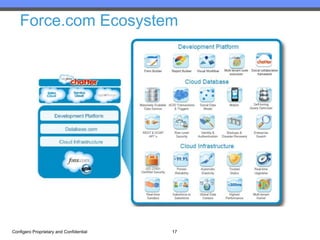
Force.com Ecosystem


Configero Proprietary and Confidential   17
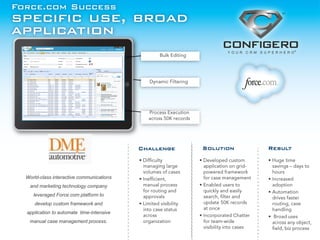
Force.com Success
specific use, broad
application


                                           Challenge   Solution   Result


  World-class interactive communications
   and marketing technology company
     leveraged Force.com platform to
     develop custom framework and
  application to automate time-intensive
   manual case management process.
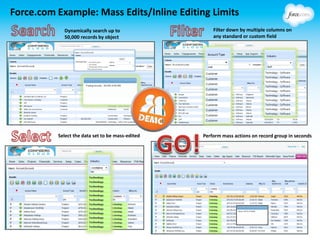
Force.com Example: Mass Edits/Inline Editing Limits
            Dynamically search up to                  Filter down by multiple columns on
            50,000 records by object                  any standard or custom field


          Select the data set to be mass-edited   Perform mass actions on record group in seconds
Getting Started…
  • In-house development vs. expert support?

  • Gather requirements from key stakeholders

  • Determine supporting technology framework or integration
    that best aligns with your needs (APEX, VisualForce)

  • AppExchange research

  • Community Answers, Ideas

  • Access universe of Developer Resources


Configero Proprietary and Confidential   20
Best Practices
• Develop clear business case for executive buy-in

• Determine roadmap for success and adoption

• Focus on PROCESS before technology

• Build incrementally and capitalize on platform flexibility

• Leverage mobile and social integration for increased visibility
  and on-the-go access

• Utilize resources for QA, testing and enhancement feedback


Configero Proprietary and Confidential   21
Resources
   • Developer Force - Force.com
     Community

   • Salesforce Power Users Group

   • Force.com Developer Workbook


Configero Proprietary and Confidential   22
Thank you!
Get Started Today:

 Business Process Review
 Onsite Discovery Session
 Force.com Demo
 WEBINAR: Social Enterprise Comes to Life
  at AVEDA Distributor on 9/12
 Learn more at Dreamforce 2012


                         Contact Us
                 www.configero.com

Configero Proprietary and Confidential   23

Salesforce Adoption and Best Practices

  • 1.
    Atlanta Salesforce User Group August 31, 2012 Sales Configero Proprietary and Confidential 1
  • 2.
    Introduction: Configero –Paul Blanchard Configero is a certified Salesforce.com Partner, delivering Configero delivers a clear and complete approach for companies looking to optimize their CRM investment for increased adoption, savings, ROI and revenue. Broad Platform Experience Paul Blanchard, Senior Project Manager • 25+ years of software development and IT experience • Experience designing, deploying, and optimizing CRM technology for maximum business impact • Lead hundreds of successful deployments and optimization projects ranging from a few users up to over 1,600 seats. Configero Proprietary and Confidential 2
  • 3.
    Session Agenda Adoption Strategies:  Adoption Objectives  Adoption Strategies  Adoption Monitoring Tools  Review Check Points Configero Proprietary and Confidential 3
  • 4.
    Your Role AdoptionEvangelists Configero Proprietary and Confidential 4
  • 5.
    Your Role Leaders, Facilitators and Advocates Configero Proprietary and Confidential 5
  • 6.
    Your Role Leaders, Facilitators and Advocates  Expectations:  Stay abreast of new features and functionality added by your Organization (in-house or via Consultants)  Stay abreast of new Releases from Salesforce and new Apps on the App Exchange  Assist in Data Quality efforts to help ensure that incomplete, duplicate or incorrect data is not a pain point for End-Users  Raise visibility of the benefits of Salesforce features and functionality to the Executive Team  Provide input that will help improve usability  Be a part of the Salesforce Community through Answers, Ideas or any of the Groups on LinkedIn, Facebook and Twitter Configero Proprietary and Confidential 6
  • 7.
    Getting Started GettingStarted Configero Proprietary and Confidential 7
  • 8.
    Getting Started Define your Organization’s Adoption Objectives We enter the same info over and over! I don’t trust There are too the data! many fields! What are we paying for?! Our Partners and Customers have no visibility! We can’t find anything! My Team has no input in how SFDC evolves! Configero Proprietary and Confidential 8
  • 9.
    Getting Started Define your Organization’s Adoption Objectives  Define the current pain points hindering Adoption:  Do your users state that Salesforce pages are overwhelming and have “too many fields to fill out and too many options to choose from”?  Do your users state that they “do not trust the data entered into Salesforce today”?  Do your users state that “every time I enter information into Salesforce, it goes into a ‘black hole’”?  Do your users state that they are “entering the same information over and over multiple times”?  Do your users state that they “don’t know where to go in Salesforce to see my work to be completed”?  Do your users state that they “can never find anything I need in Salesforce”?  Do your users state that “Salesforce is just another program that adds additional labor to my job”?  Do your users state that “I have no input regarding Salesforce functionality for my Team”?  Do your users state that “collaboration across Teams and Departments is difficult in Salesforce”?  Do your Customers and Partners state that “we have no visibility into Customer Service, Marketing or Sales”?  Does your Executive Team state that “we have no visibility into Sales, Marketing or Operations and we do not know why we are paying for Salesforce”? Configero Proprietary and Confidential 9
  • 10.
    Getting Started Define your Organization’s Adoption Strategies Configero Proprietary and Confidential 10
  • 11.
    Getting Started Define your Organization’s Adoption Strategies  Plan and implement strategies for Adoption:  Leverage Record Types and Field Visibility in order to streamline Page Layouts and Picklists for different teams or groups of Users. If you are on Professional Edition and do not have Record Types nor customizable Profiles, leverage Dependent Picklists.  If your Organization has multiple Business Units and a relatively “Open” Security Model, contact Salesforce Support about enabling the Divisions feature to expedite Searches, List Views and Reports. Caveat: Salesforce does recommend that this feature only be used in Organizations with 1 million+ records; however, they are relatively flexible if a solid Business Case can be made for its use.  Leverage Custom Buttons for repeatable actions that the Users must do such as “New Activity” or “New Opportunity” rather than having users create new records from Related Lists. The benefit of custom buttons is that you can also pass field values from a Parent record to a Child record and set a default Record Type so that the User does not have to choose.  Leverage Custom Links for record-specific Reports such as “All Open Opportunities for {Account}” or “All Open Cases for {Contact}” and Custom Sidebar Links for high-visibility Reports such as “Stuck Opportunities” or “Aged Cases”  Leverage AppExchange Apps for Data Quality such as Data Quality Analysis Dashboards (free from Force.com Labs), DupeCatcher (free from Symphonic Source) or DupeBlocker 2.0 (paid from CRM Fusion) as well as the add-on Salesforce feature Data.com for import of Accounts and Contacts.  Leverage Salesforce Automation (SFA) such as Workflow Rules, Approval Processes, Validation Rules, Formula Fields, Lookup Filters and Triggers to reduce duplicate data entry and facilitate data accuracy. Caution on Approval Processes and Validation Rules – consider usability when implementing these features, for example, if every user is required to submit every Case for Approval before it can be closed or if Validation Rules have error messages that are unclear, then Adoption will be negatively impacted. This is a great post from Salesforce for 100 Sample Formula Fields for Customization. Configero Proprietary and Confidential 11
  • 12.
    Getting Started Define your Organization’s Adoption Strategies Configero Proprietary and Confidential 12
  • 13.
    Getting Started Adoption Strategies (Continued)  Plan and implement strategies for Adoption (cont’d):  Ensure that Public List Views are created and maintained by a small number of System Admins and Super Users to ensure that List Views are meaningful (My Accounts versus Jen Nelson’s Accounts, Jared Miller’s Accounts…) and that the visibility of List Views are relevant to Users by Role or Public Group so that they are not accidentally made visible to Customer or Partner Portal Users.  Leverage SFA such as Escalation Rules, Assignment Rules and Workflow Rules to ensure that records are owned by the right Users or Queues and that records do not remain stagnant (Opportunities that never close, Cases that linger for years, Leads that never get converted)  Leverage Scheduled Reports and Dashboards to raise visibility of key issues such as Aged Leads, Cases or Opportunities rather than sending email notifications one record at a time. Consider these two free Apps from the AppExchange created by Force.com Labs: Service and Support Dashboards and Sales KPI Dashboard. Both allow for easy configuration for your specific business needs.  Leverage Chatter and Chatter Groups for collaboration on records as well as on Group-specific topics such as Industry Knowledge, Strategic Accounts and Hot Leads or Opportunities and increase collaboration across functional teams.  Review all Apps and Tabs and consolidate per Profile so that Users only have to navigate through the Objects and Features that are relevant to their business functions. Customize Apps and Tabs with your Logo and cool icons!  Leverage Permission Sets in order to further consolidate Profiles and give “À la carte” permissions to Super Users  Configure Search Layouts and Lookup Filters for all objects to facilitate quicker and more efficient searches  Leverage internal Ideas and Answers Communities so that your End-Users have a voice in the evolution of Salesforce and can share Knowledge quickly.  Implement Self-Service, Customer and/or Partner Portals to provide controlled access to your Salesforce data and reduce phone and email communication.  Provide the Executive Team with “low effort” tools such as Chatter Desktop or Chatter Mobile, Dashboard Components in Chatter, Chatter and Mobile Approvals and Scheduled Reports Configero Proprietary and Confidential 13
  • 14.
    Getting Started Adoption Monitoring Tools  Implement tools to monitor adoption and refine the process as you grow:  Salesforce Adoption Dashboards – Free from Force.com Labs  Includes Login History metrics, New records created and Activity on existing records, Leads and Opportunity metrics and is configurable by a System Admin or other user with the Manage Public Reports permission  User Adoption Dashboard – Free from Arrowpointe Corp.  Includes metrics for Leads, Accounts, Contacts, Opportunities, Cases, Tasks, Events and Users and is configurable by a System Admin or other user with the Manage Public Reports permission  Chatter Usage Dashboards – Free from Force.com Labs  Includes 20 Dashboard Components, 25 Reports and 7 Custom Report Types and is configurable by a System Admin or other user with the Manage Public Reports permission  The Chatter Game – Free from Force.com Labs  One of the hot topics at another User Group session this Summer was Gamification in the Workplace and the discussion was around motivating and incenting users toward adoption through competition and increased visibility. Several large organizations have gone to gamification, particularly with the Chatter feature, as an additional mechanism for bringing together Business Units in other regions or countries. Configero Proprietary and Confidential 14
  • 15.
    Review Check Point Topics:  Know your Adoption Objectives  Plan your Adoption Strategies  Implement Tools to monitor your End-User Adoption and refine the process as your business grows. Configero Proprietary and Confidential 15
  • 16.
  • 17.
  • 18.
    Force.com Success specific use,broad application Challenge Solution Result World-class interactive communications and marketing technology company leveraged Force.com platform to develop custom framework and application to automate time-intensive manual case management process.
  • 19.
    Force.com Example: MassEdits/Inline Editing Limits Dynamically search up to Filter down by multiple columns on 50,000 records by object any standard or custom field Select the data set to be mass-edited Perform mass actions on record group in seconds
  • 20.
    Getting Started… • In-house development vs. expert support? • Gather requirements from key stakeholders • Determine supporting technology framework or integration that best aligns with your needs (APEX, VisualForce) • AppExchange research • Community Answers, Ideas • Access universe of Developer Resources Configero Proprietary and Confidential 20
  • 21.
    Best Practices • Developclear business case for executive buy-in • Determine roadmap for success and adoption • Focus on PROCESS before technology • Build incrementally and capitalize on platform flexibility • Leverage mobile and social integration for increased visibility and on-the-go access • Utilize resources for QA, testing and enhancement feedback Configero Proprietary and Confidential 21
  • 22.
    Resources • Developer Force - Force.com Community • Salesforce Power Users Group • Force.com Developer Workbook Configero Proprietary and Confidential 22
  • 23.
    Thank you! Get StartedToday:  Business Process Review  Onsite Discovery Session  Force.com Demo  WEBINAR: Social Enterprise Comes to Life at AVEDA Distributor on 9/12  Learn more at Dreamforce 2012 Contact Us www.configero.com Configero Proprietary and Confidential 23