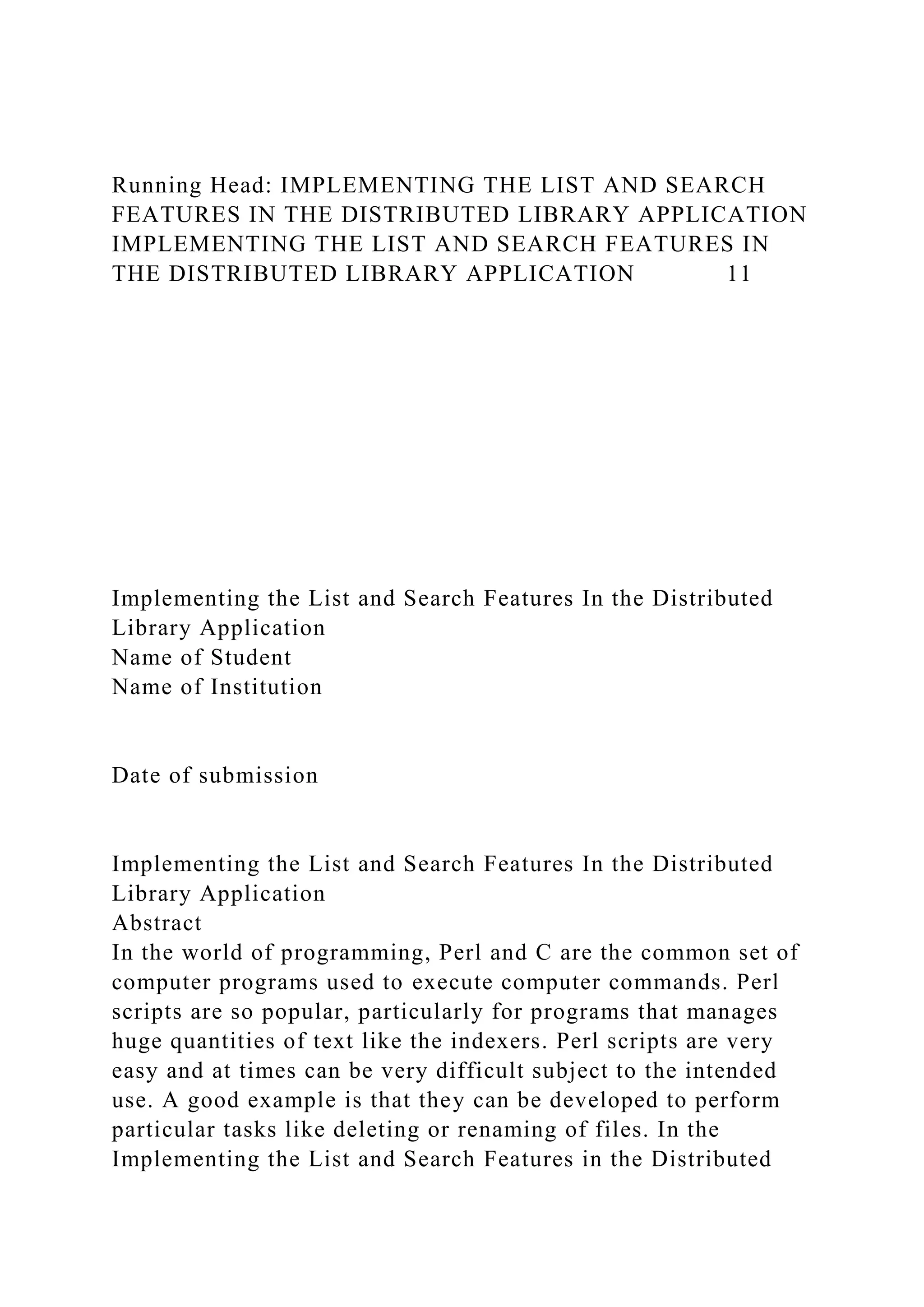
Running Head: IMPLEMENTING THE LIST AND SEARCH
FEATURES IN THE DISTRIBUTED LIBRARY APPLICATION
IMPLEMENTING THE LIST AND SEARCH FEATURES IN
THE DISTRIBUTED LIBRARY APPLICATION 11
Implementing the List and Search Features In the Distributed
Library Application
Name of Student
Name of Institution
Date of submission
Implementing the List and Search Features In the Distributed
Library Application
Abstract
In the world of programming, Perl and C are the common set of
computer programs used to execute computer commands. Perl
scripts are so popular, particularly for programs that manages
huge quantities of text like the indexers. Perl scripts are very
easy and at times can be very difficult subject to the intended
use. A good example is that they can be developed to perform
particular tasks like deleting or renaming of files. In the
Implementing the List and Search Features in the Distributed
Library Application, a client can be used to run distributed
library application at the library for the purpose of serving
books. Once installed and running, upon waiting for requests
from peers concerning books requested for the client, the
program writes a sequence of codes that are necessary for
performing the required steps
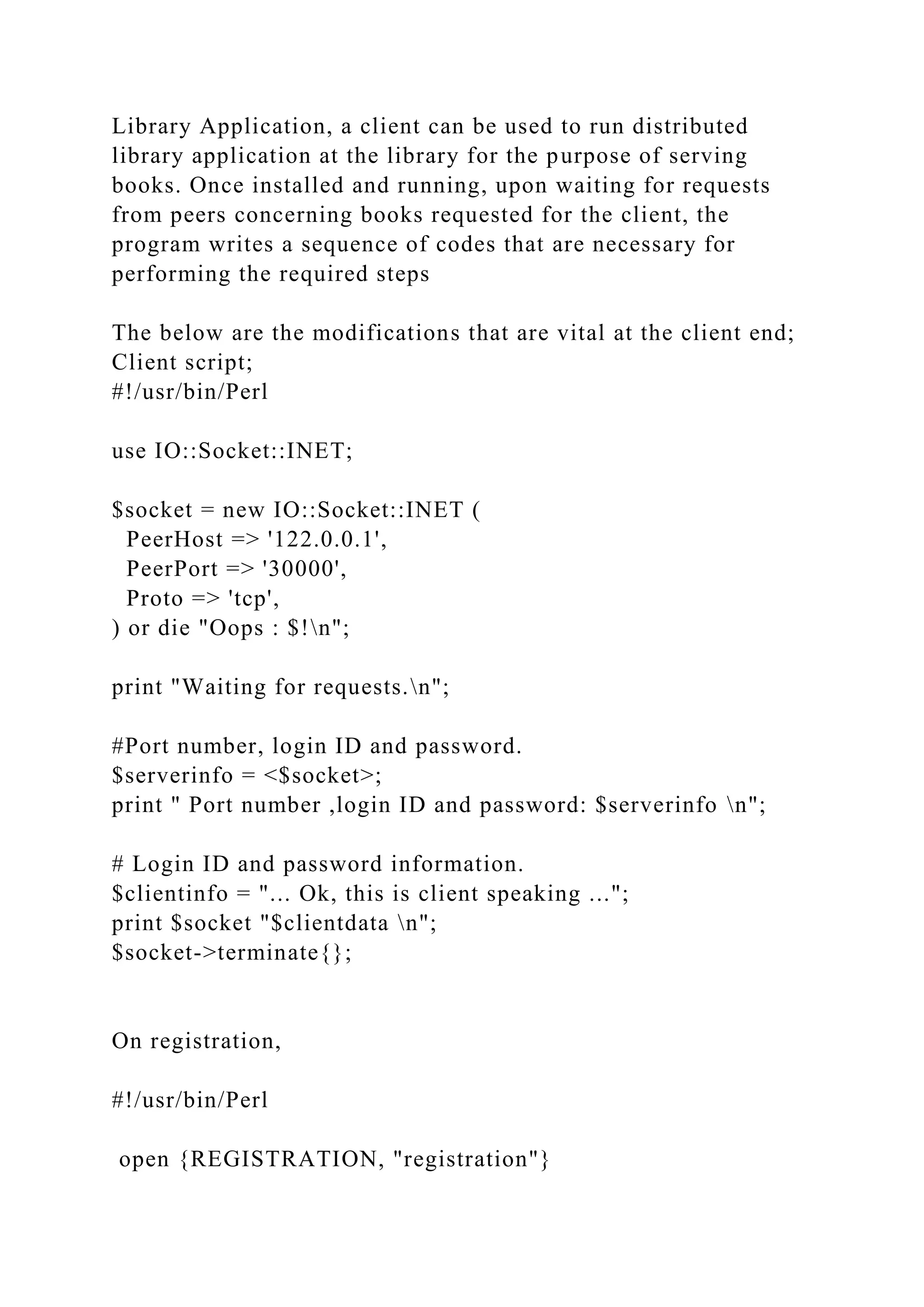
The below are the modifications that are vital at the client end;
Client script;
#!/usr/bin/Perl
use IO::Socket::INET;
$socket = new IO::Socket::INET (
PeerHost => '122.0.0.1',
PeerPort => '30000',
Proto => 'tcp',
) or die "Oops : $!n";
print "Waiting for requests.n";
#Port number, login ID and password.
$serverinfo = <$socket>;
print " Port number ,login ID and password: $serverinfo n";
# Login ID and password information.
$clientinfo = "... Ok, this is client speaking ...";
print $socket "$clientdata n";
$socket->terminate{};
On registration,
#!/usr/bin/Perl
open {REGISTRATION, "registration"}
die "Can't open registration: $!n";
· while {$line = <login ID, password, and port number(3302)>}
[
{$menu, $registration} = split{/ /, $line};
$registration[$menu ] .= $registration. " ";
]
Server script;
#!/usr/bin/perl
use IO::Socket::INET;
$socket = new IO::Socket::INET {
LocalHost => '122.0.0.1',
LocalPort => '30000',
Proto => 'tcp',
Listen => 10,
Reuse => 1
} or die "Oops: $! n";
print "Server is up and running ... n";
while {1} [
$clientsocket = $socket->registered{};
print " **** Recent Client Registered **** n ";
# Port number, login ID and password.
$serverinfo = "This is server speaking ...";
print $clientsocket "$serverinfo n";
# Login ID and password information.
$clientinfo = <$clientsocket>;
print " Login ID and password information: $clientinfon";
]
$socket->terminate{};
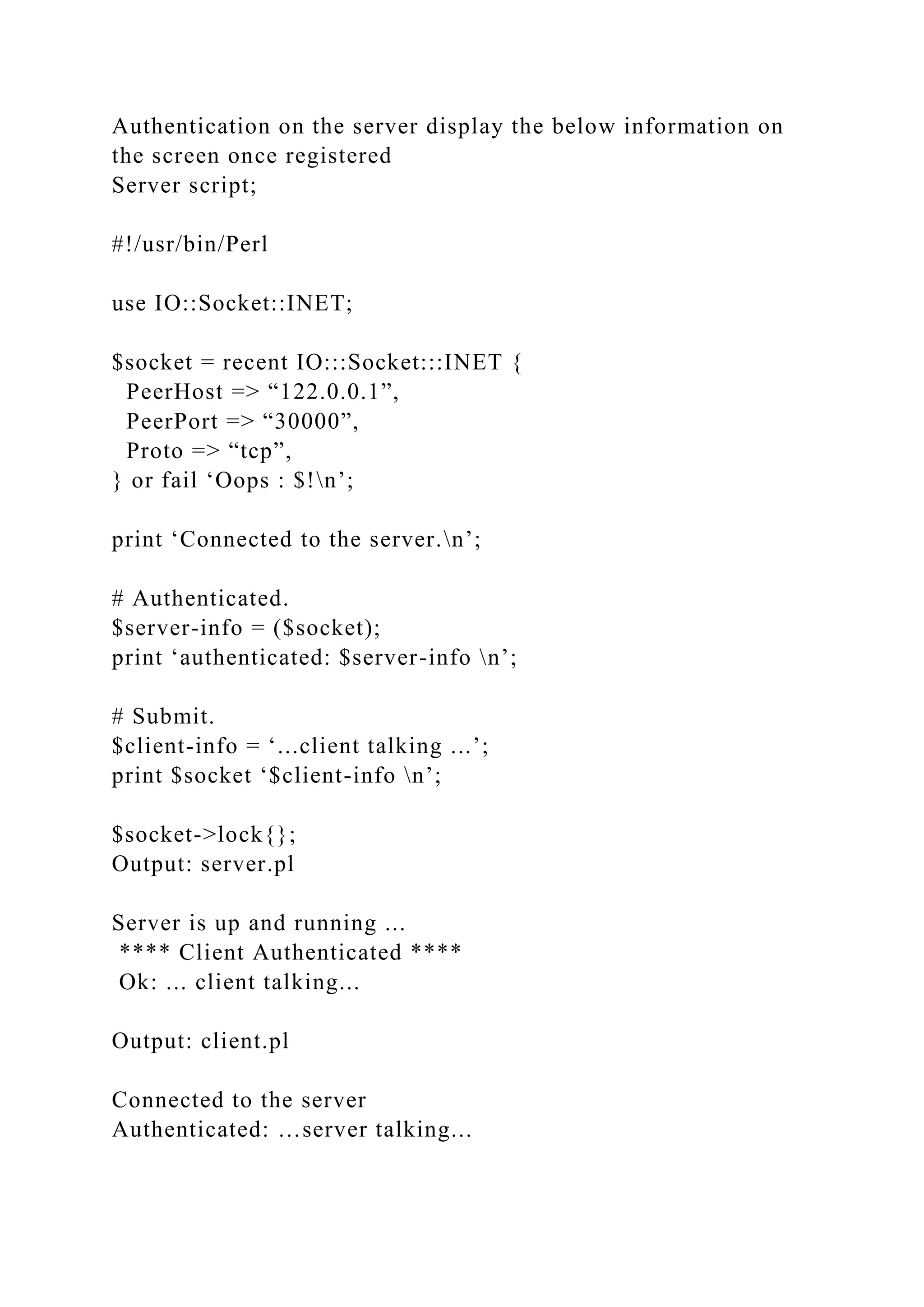
Authentication on the server display the below information on
the screen once registered
Server script;
#!/usr/bin/Perl
use IO::Socket::INET;
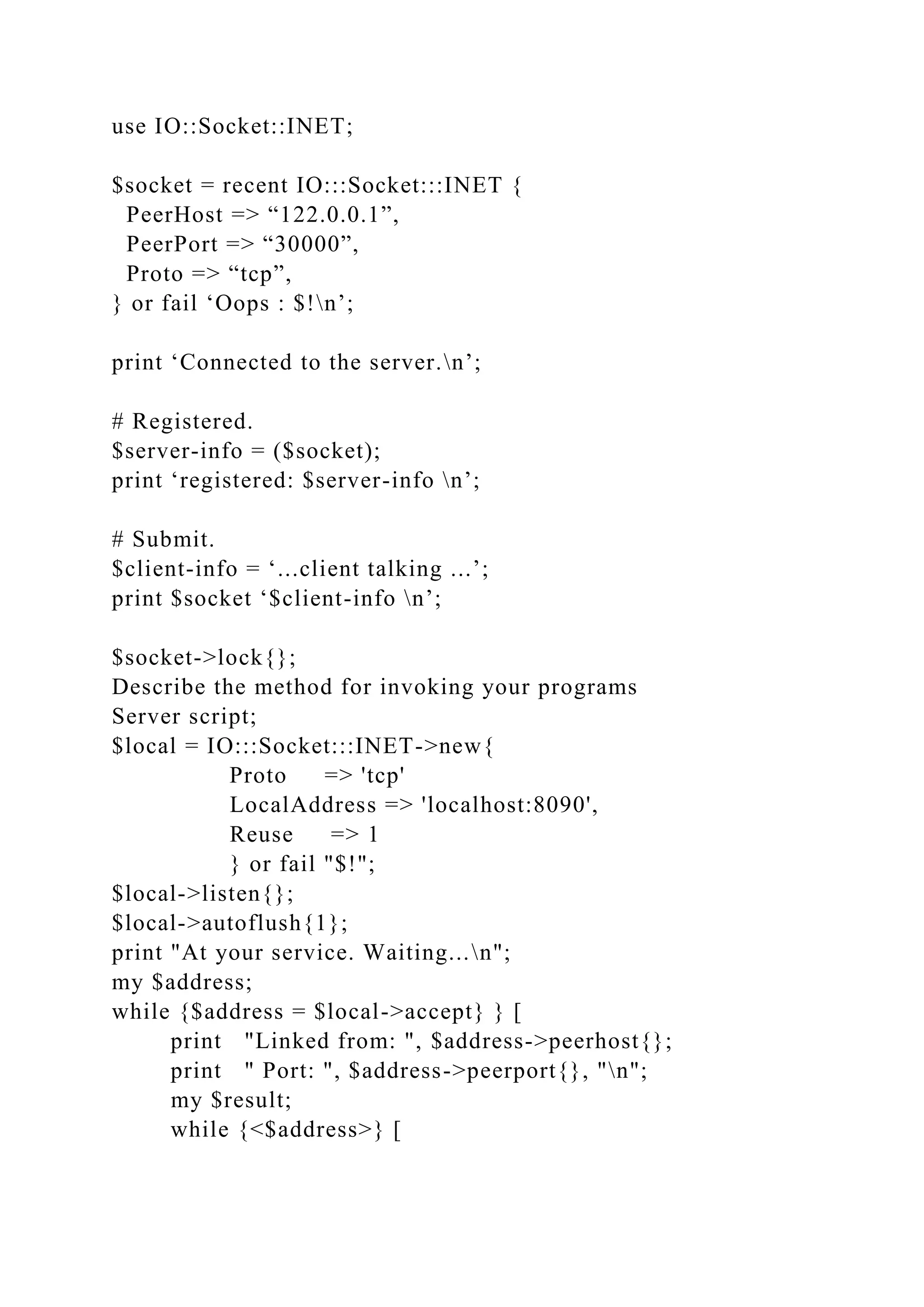
$socket = recent IO:::Socket:::INET {
PeerHost => “122.0.0.1”,
PeerPort => “30000”,
Proto => “tcp”,
} or fail ‘Oops : $!n’;
print ‘Connected to the server.n’;
# Authenticated.
$server-info = ($socket);
print ‘authenticated: $server-info n’;
# Submit.
$client-info = ‘...client talking ...’;
print $socket ‘$client-info n’;
$socket->lock{};
Output: server.pl
Server is up and running ...
**** Client Authenticated ****
Ok: ... client talking...
Output: client.pl
Connected to the server
Authenticated: …server talking...
Connected to the server
Authenticated: …server talking...
On receiving a reply from the server, the client arbitrarily picks
another client and contacts it with a time-of-day request
Client script;
#!/usr/bin/perl
use IO::Socket::INET;
$socket = new IO::Socket::INET {
LocalHost => '122.0.0.1',
LocalPort => '30000',
Proto => 'tcp',
Listen => 10,
Reuse => 1
} or die "Oops: $! n";
print "Server is up and running ... n";
while {1} [
$clientsocket = $socket->registered{};
print " **** Recent Client Added **** n ";
# Port number, login ID and password.
$serverinfo = "This is server speaking ...";
print $clientsocket "$serverinfo n";
# Login ID and password information.
$clientinfo = <$clientsocket>;
print " Login ID and password information: $clientinfon";
]
$socket->terminate{};
A copy of your client and server programs implementing the
distributed library application.
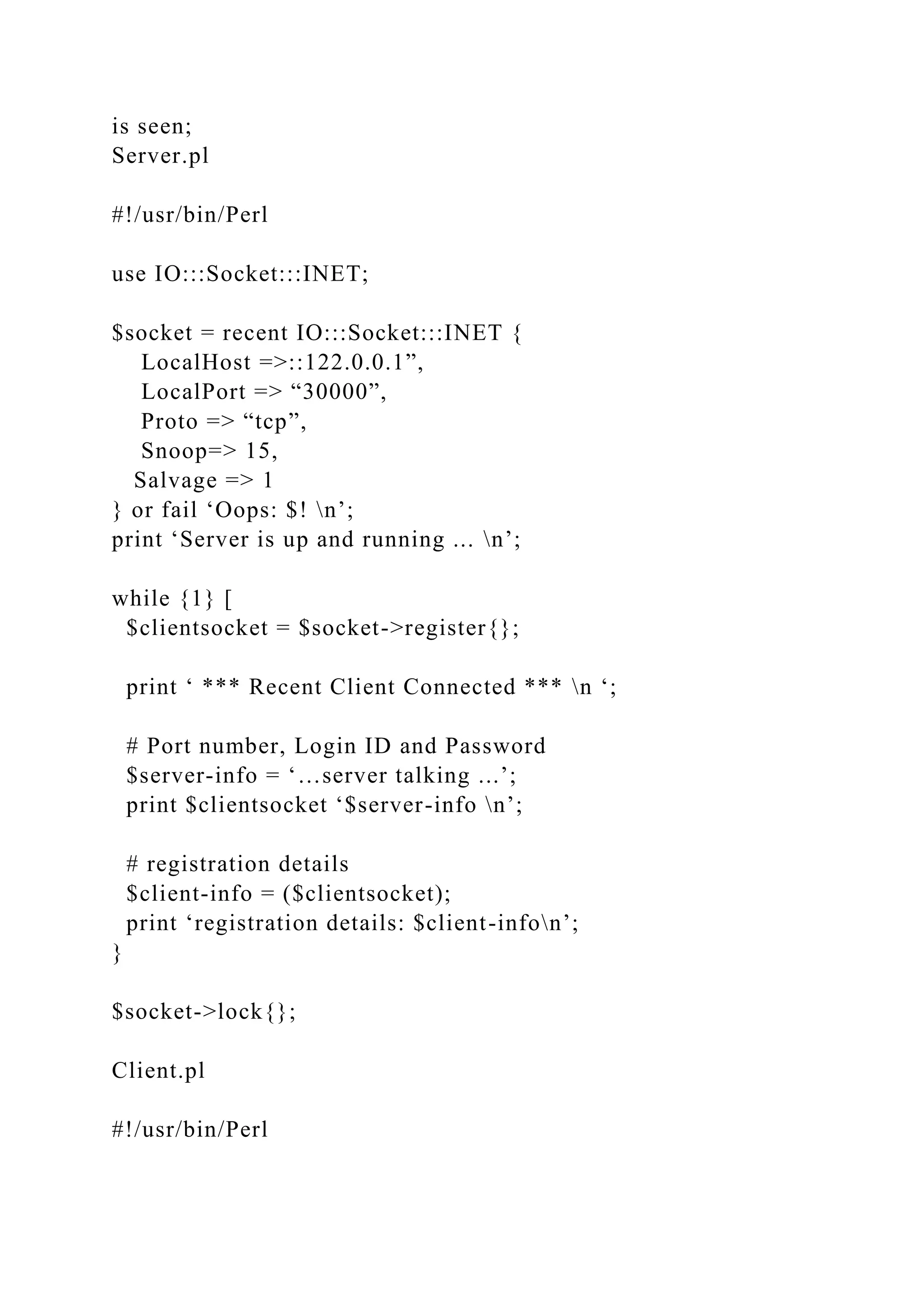
The server initiates the thread and on the screen, the following
is seen;
Server.pl
#!/usr/bin/Perl
use IO:::Socket:::INET;
$socket = recent IO:::Socket:::INET {
LocalHost =>::122.0.0.1”,
LocalPort => “30000”,
Proto => “tcp”,
Snoop=> 15,
Salvage => 1
} or fail ‘Oops: $! n’;
print ‘Server is up and running ... n’;
while {1} [
$clientsocket = $socket->register{};
print ‘ *** Recent Client Connected *** n ‘;
# Port number, Login ID and Password
$server-info = ‘…server talking ...’;
print $clientsocket ‘$server-info n’;
# registration details
$client-info = ($clientsocket);
print ‘registration details: $client-infon’;
}
$socket->lock{};
Client.pl
#!/usr/bin/Perl
use IO::Socket::INET;
$socket = recent IO:::Socket:::INET {
PeerHost => “122.0.0.1”,
PeerPort => “30000”,
Proto => “tcp”,
} or fail ‘Oops : $!n’;
print ‘Connected to the server.n’;
# Registered.
$server-info = ($socket);
print ‘registered: $server-info n’;
# Submit.
$client-info = ‘...client talking ...’;
print $socket ‘$client-info n’;
$socket->lock{};
Describe the method for invoking your programs
Server script;
$local = IO:::Socket:::INET->new{
Proto => 'tcp'
LocalAddress => 'localhost:8090',
Reuse => 1
} or fail "$!";
$local->listen{};
$local->autoflush{1};
print "At your service. Waiting...n";
my $address;
while {$address = $local->accept} } [
print "Linked from: ", $address->peerhost{};
print " Port: ", $address->peerport{}, "n";
my $result;
while {<$address>} [
last if m/^end/gi;
print "Received: $_";
print $address $_;
$result += $_;
]
chomp;
if {m/^end/gi} [
my $send = "result=$result";
print $address "$sendn";
print "Result: $sendn";
]
print "Locked connectionn";
lock $address;
print "At your service. Waiting...n";
]
Client script;
$remote = IO:::Socket:::INET->new{
Proto => 'tcp',
PeerAddress=> 'localhost',
PeerPort=> "8090",
Reuse => 1,
} or fail "$!";
print "Linked to ", $remote->peerhost,
" on port: ", $remote->peerport, "n";
$remote->autoflush{1};
while {<>} [
print $remote $_;
last if m/^end/gi;
my $line = <$remote>;
if {$line ne $_} [
print "Error in sending outputn";
exit;
]
]
my $res = <$remote>;
$res =~ m/result={d*}/gi;
print "Result: $1n";
print "Client terminatedn";
lock $remote
Client and server window screenshots to validate the
implementation.
Server window screenshot
References
Feddema, H. B. (2004). Expert one-on-one Microsoft Access
application development.
Indianapolis, IN: Wiley Pub..
Sugumaran, V. (2007). Application of agents and intelligent
information technologies. Hershey,
PA: Idea Group Pub..
Running Head: HANDLING CONCURRENT CLIENTS
HANDLING CONCURRENT CLIENTS 6
HANDLING CONCURRENT CLIENTS
Student’s Name
Institution
Date of Submission
HANDLING CONCURRENT CLIENTS
Discuss how you will design the server in the given situation to
handle multiple clients arbitrarily entering and leaving the
system?
Once a one or single client server has been established, it
becomes obvious that this server can only serve one client at a
time. In order to have a server that can handle more than a
single client at a time, a multiple or multi – client server must
be created to perform this operation. Here are the steps followed
in creating a multi – client server and its discussion.
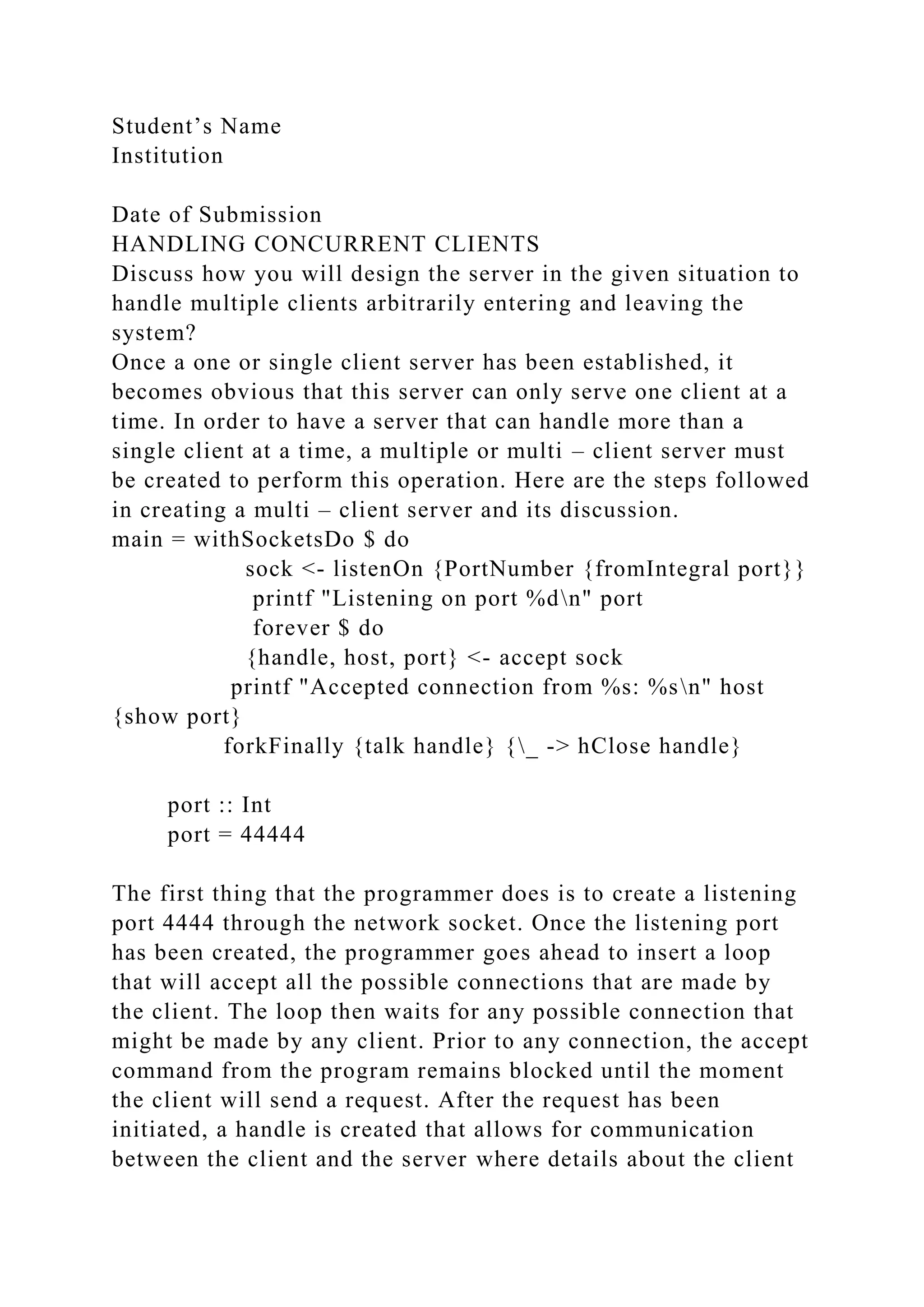
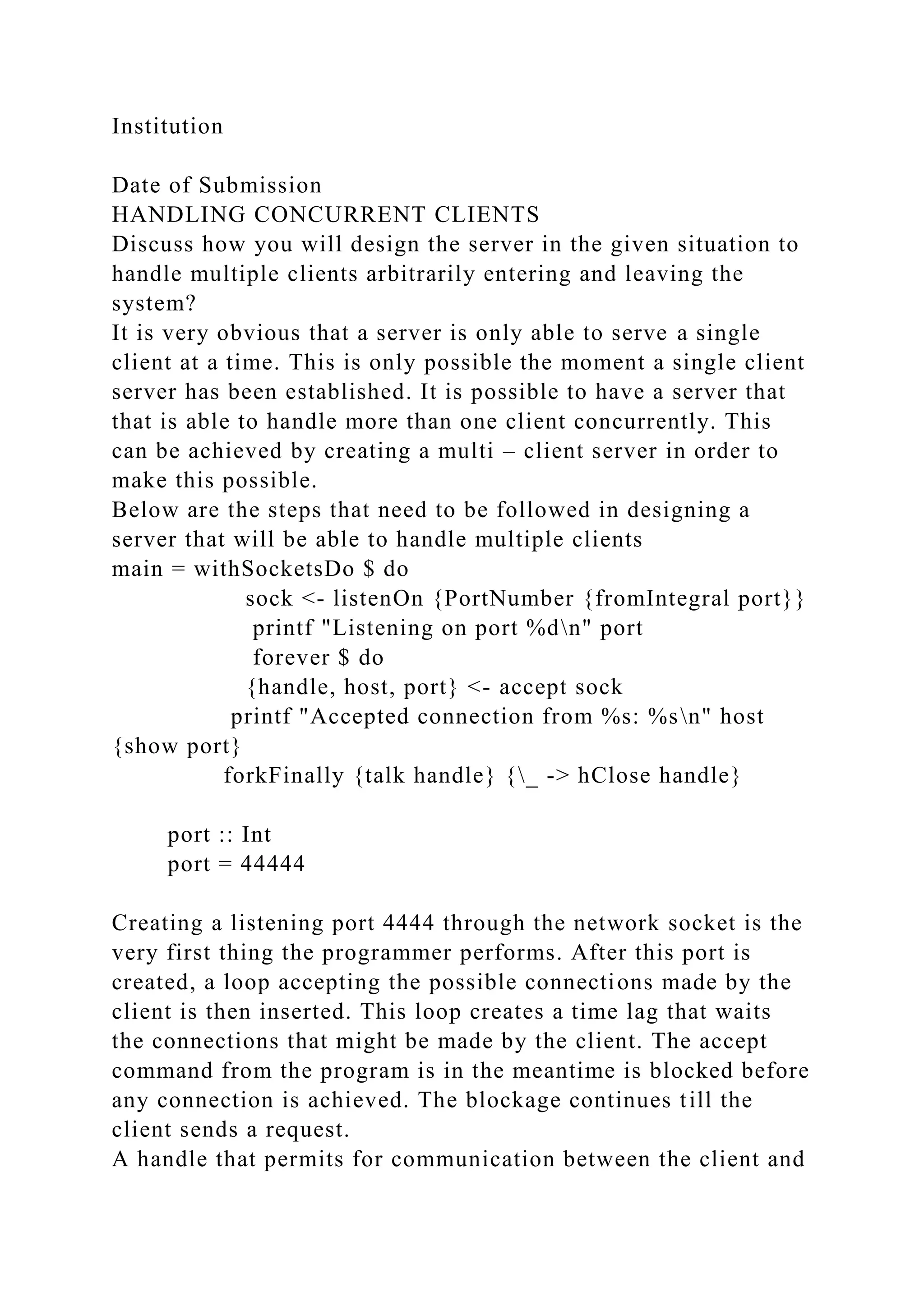
main = withSocketsDo $ do
sock <- listenOn {PortNumber {fromIntegral port}}
printf "Listening on port %dn" port
forever $ do
{handle, host, port} <- accept sock
printf "Accepted connection from %s: %sn" host
{show port}
forkFinally {talk handle} {_ -> hClose handle}
port :: Int
port = 44444
The first thing that the programmer does is to create a listening
port 4444 through the network socket. Once the listening port
has been created, the programmer goes ahead to insert a loop
that will accept all the possible connections that are made by
the client. The loop then waits for any possible connection that
might be made by any client. Prior to any connection, the accept
command from the program remains blocked until the moment
the client will send a request. After the request has been
initiated, a handle is created that allows for communication
between the client and the server where details about the client
are shared. The sharing of the client’s details enables a link to
be created between the server and the client in the form of a
binding, host to the client and port to the server. This binding
allows the client to log in to the server. Once the binding has
been made, the programmer creates a new thread that is
purposely made to handle the client’s requests. This becomes
folkfinally of the new thread formed. The interaction between
the client and the server henceforth is assigned to talk where the
handle returns after a connection call is accepted.
Describe your server design in detail.
There are four possible designs that allows for ease in handling
concurrent clients. Among the four, my choice of design is
design four that uses the STM. STM is a design that has seen
improvement from design three that uses broadcast chan. In this
design, the channel for communication between the client and
the server is avoided by storing in TVar all factors that are at
the moment.
Justification of STM Design
In STM the use of TVar reflects this on the screen:
newtype State = State [ currentFactor :: TVar Int ]
The reason for using STM design has been contributed by its
ability to block changes until something happens. Due to this it
spares the server the need to send messages overtly when a
change is made. In order to understand this, let’s follow the
explanation below:
When a client makes a sequence of events (N) to the server, the
following happens;
· The Handle receives N commands from the client and sends it
to the TChan thread of the server.
· Once received, the server makes a command on its TChan and
starts modifying the current factors in TVar.
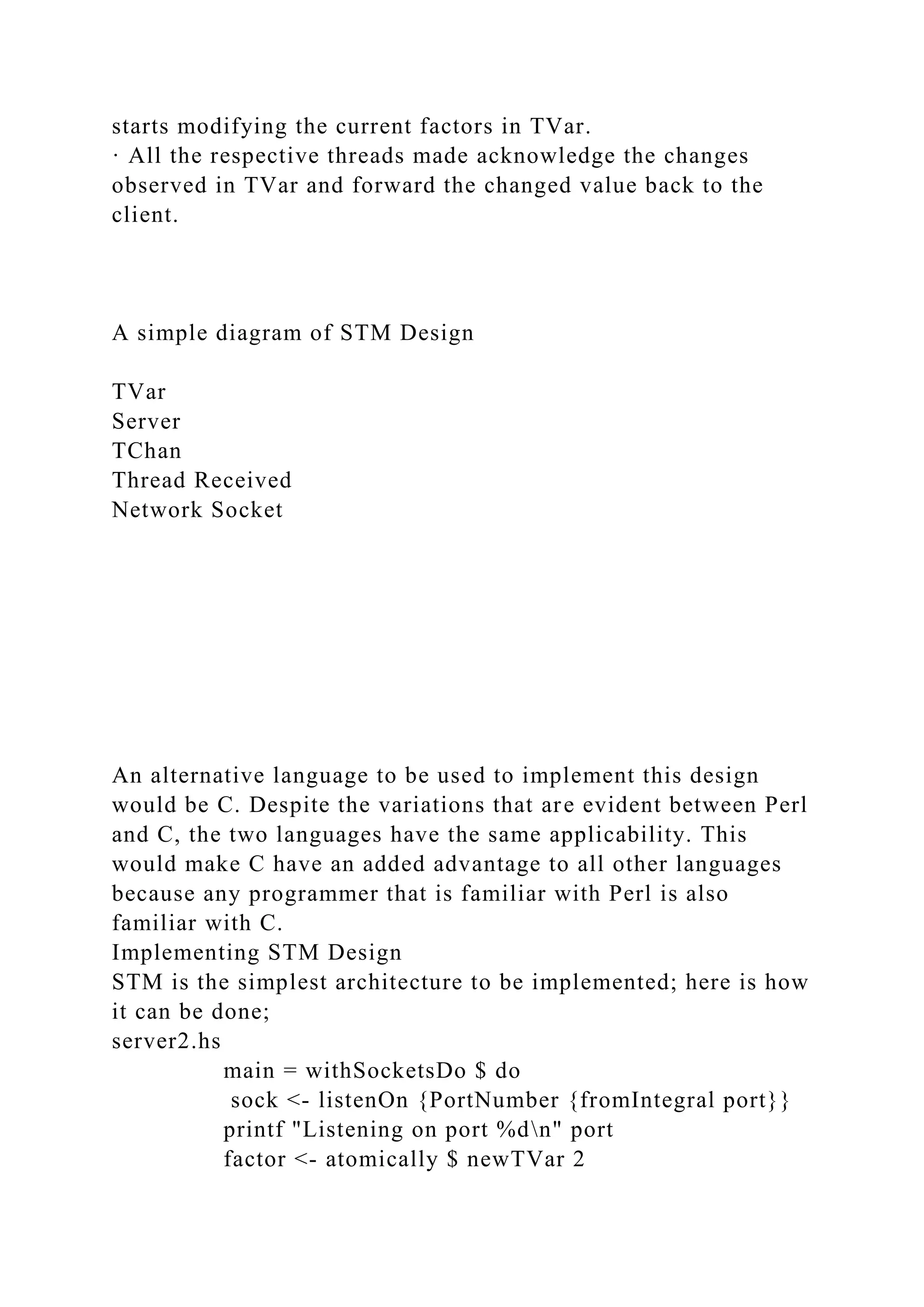
· All the respective threads made acknowledge the changes
observed in TVar and forward the changed value back to the
client.
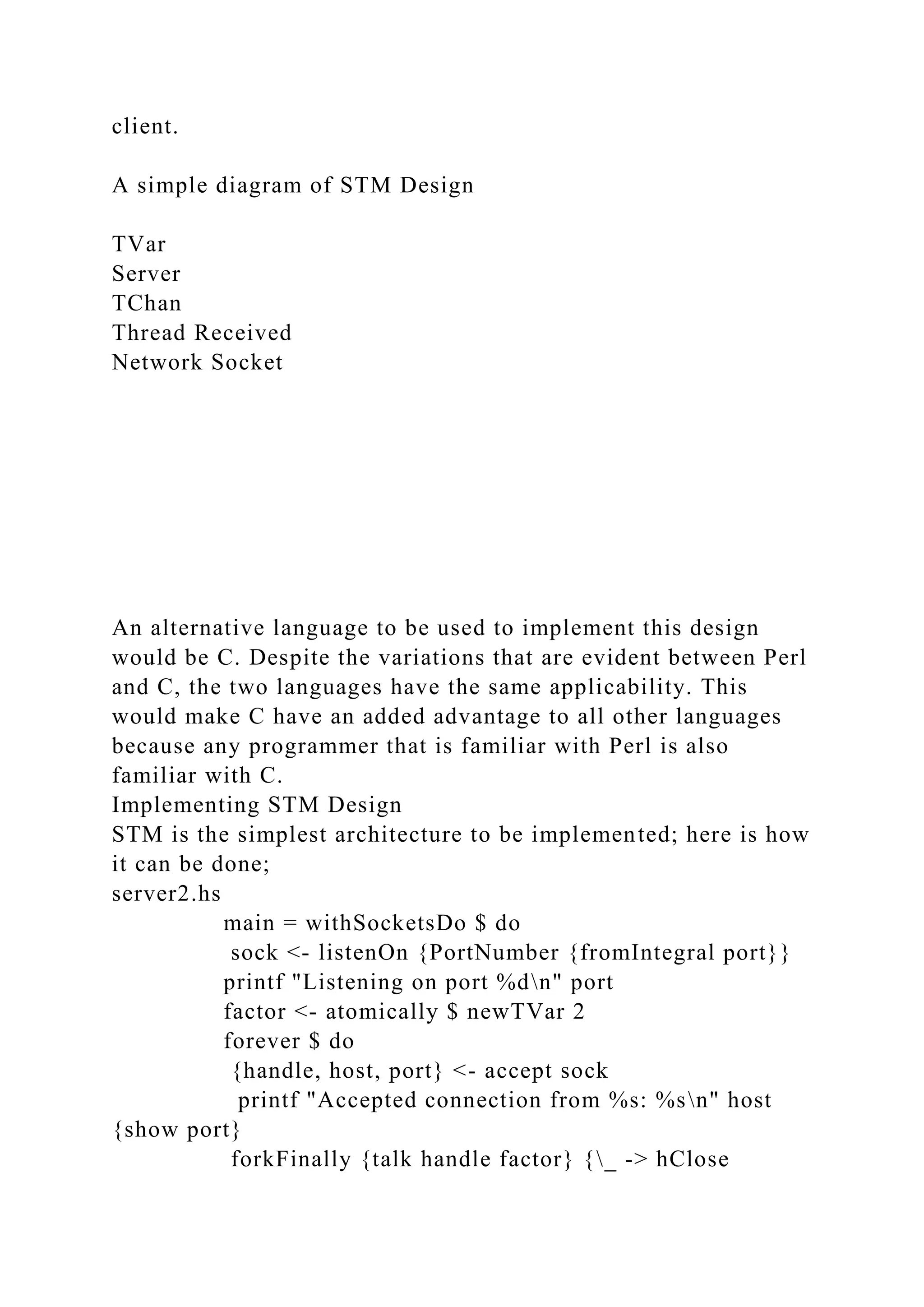
A simple diagram of STM Design
TVar
Server
TChan
Thread Received
Network Socket
An alternative language to be used to implement this design
would be C. Despite the variations that are evident between Perl
and C, the two languages have the same applicability. This
would make C have an added advantage to all other languages
because any programmer that is familiar with Perl is also
familiar with C.
Implementing STM Design
STM is the simplest architecture to be implemented; here is how
it can be done;
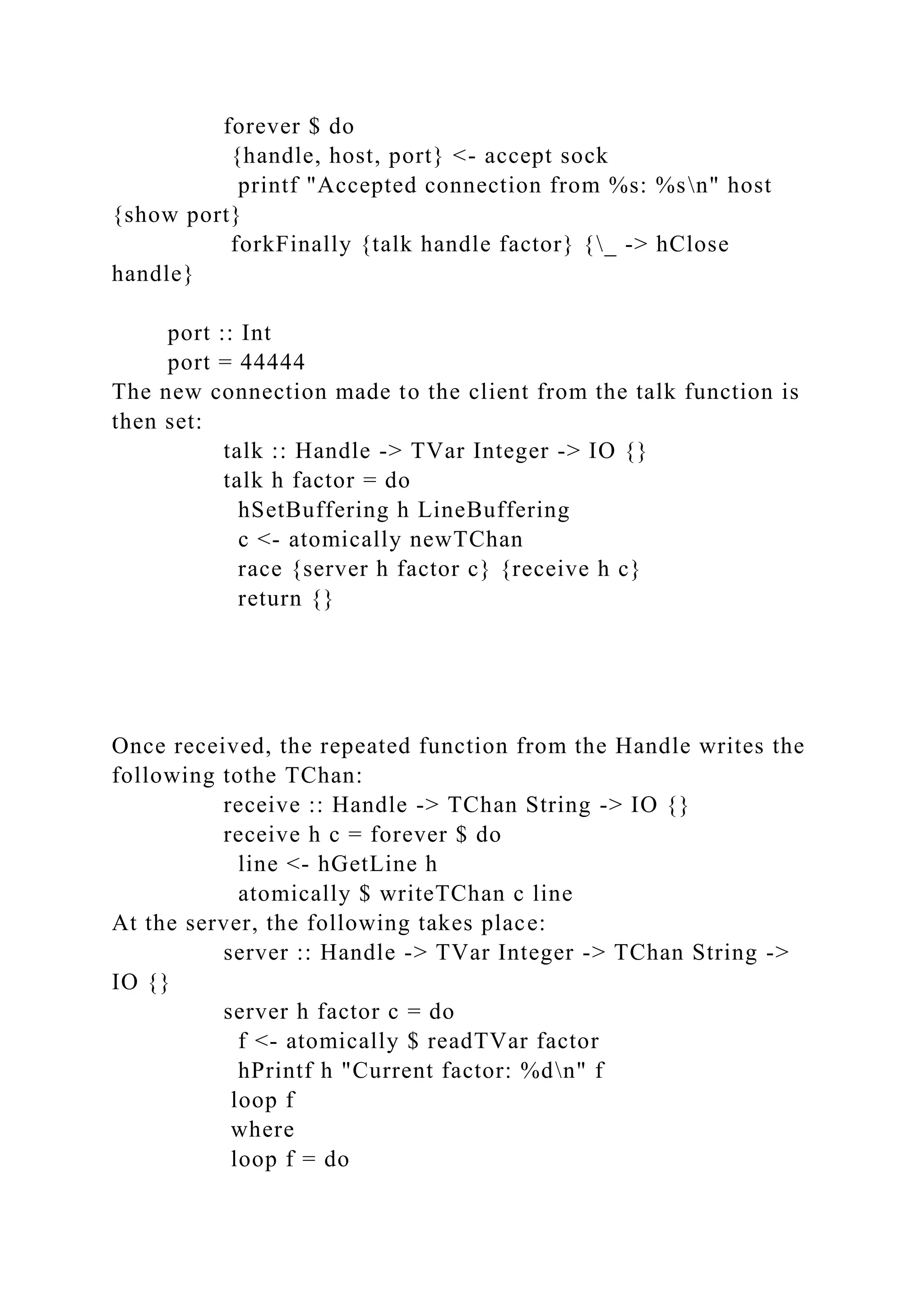
server2.hs
main = withSocketsDo $ do
sock <- listenOn {PortNumber {fromIntegral port}}
printf "Listening on port %dn" port
factor <- atomically $ newTVar 2
forever $ do
{handle, host, port} <- accept sock
printf "Accepted connection from %s: %sn" host
{show port}
forkFinally {talk handle factor} {_ -> hClose
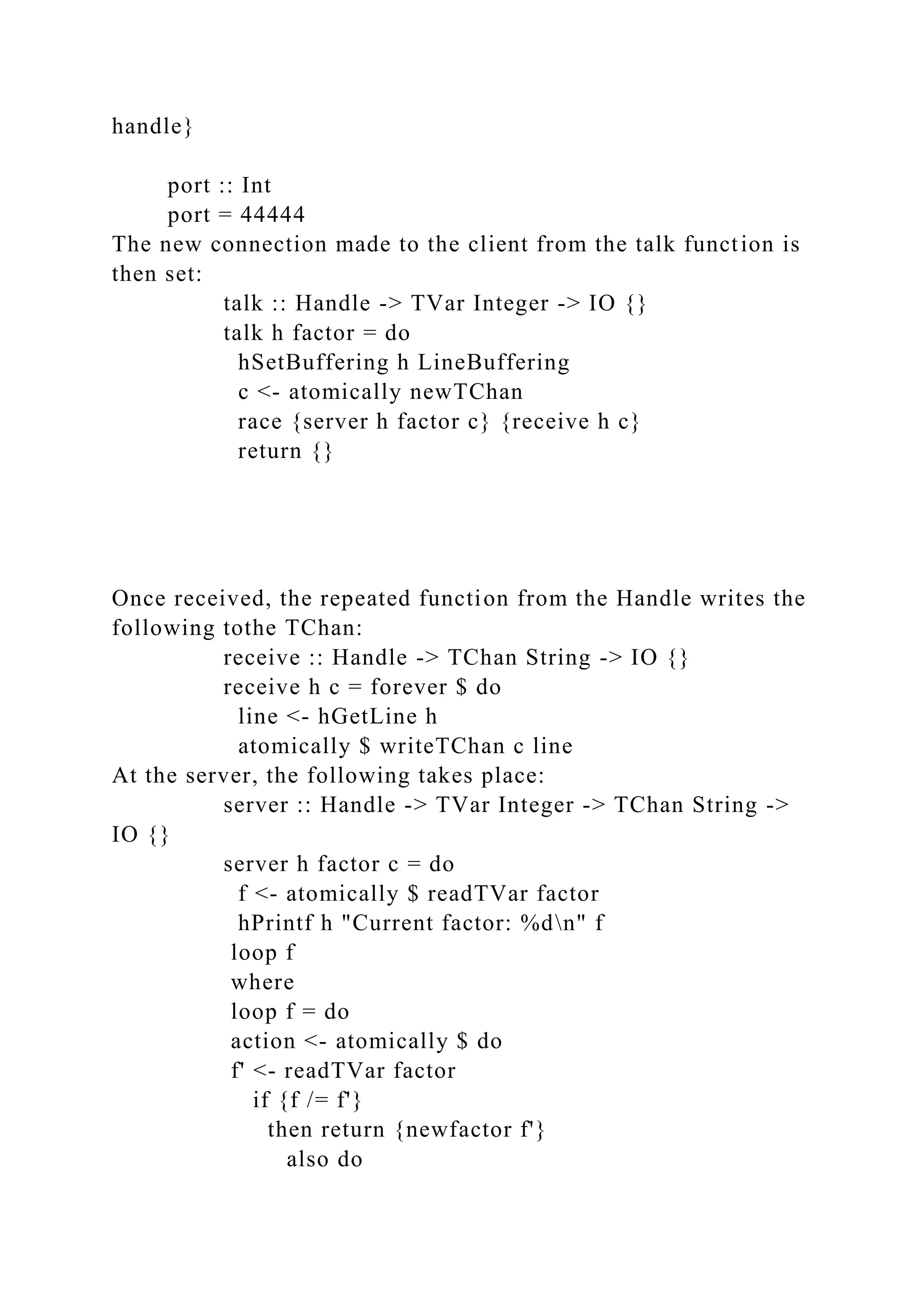
handle}
port :: Int
port = 44444
The new connection made to the client from the talk function is
then set:
talk :: Handle -> TVar Integer -> IO {}
talk h factor = do
hSetBuffering h LineBuffering
c <- atomically newTChan
race {server h factor c} {receive h c}
return {}
Once received, the repeated function from the Handle writes the
following tothe TChan:
receive :: Handle -> TChan String -> IO {}
receive h c = forever $ do
line <- hGetLine h
atomically $ writeTChan c line
At the server, the following takes place:
server :: Handle -> TVar Integer -> TChan String ->
IO {}
server h factor c = do
f <- atomically $ readTVar factor
hPrintf h "Current factor: %dn" f
loop f
where
loop f = do
action <- atomically $ do
f' <- readTVar factor
if {f /= f'}
then return {newfactor f'}
also do
l <- readTChan c
return {command f l}
action
newfactor f = do
hPrintf h "new factor: %dn" f
loop f
command f s
= case s of
"end" ->
hPutStrLn h {"Thank you for using the " ++
"Perl doubling service."}
'*':s -> do
atomically $ writeTVar factor [read s :: Integer]
loop f
line -> do
hPutStrLn h {show {f * {read line :: Integer}}}
loop f
There is no challenging task to in implementing STM design
since it’s the simplest design compared to the other three. This
is made possible by its ability to block any changes before any
command takes place.
Running Head: HANDLING CONCURRENT CLIENTS
HANDLING CONCURRENT CLIENTS 6
HANDLING CONCURRENT CLIENTS
Student’s Name
Institution
Date of Submission
HANDLING CONCURRENT CLIENTS
Discuss how you will design the server in the given situation to
handle multiple clients arbitrarily entering and leaving the
system?
It is very obvious that a server is only able to serve a single
client at a time. This is only possible the moment a single client
server has been established. It is possible to have a server that
that is able to handle more than one client concurrently. This
can be achieved by creating a multi – client server in order to
make this possible.
Below are the steps that need to be followed in designing a
server that will be able to handle multiple clients
main = withSocketsDo $ do
sock <- listenOn {PortNumber {fromIntegral port}}
printf "Listening on port %dn" port
forever $ do
{handle, host, port} <- accept sock
printf "Accepted connection from %s: %sn" host
{show port}
forkFinally {talk handle} {_ -> hClose handle}
port :: Int
port = 44444
Creating a listening port 4444 through the network socket is the
very first thing the programmer performs. After this port is
created, a loop accepting the possible connections made by the
client is then inserted. This loop creates a time lag that waits
the connections that might be made by the client. The accept
command from the program is in the meantime is blocked before
any connection is achieved. The blockage continues till the
client sends a request.
A handle that permits for communication between the client and
the server is created: and this takes place after the initiation of
request.it is here where the client’s information sharing takes
place. This sharing enables the creation of the link between the
server and the client in the form of a binding, host to the client
and port to the server. This binding allows the client to log in to
the server. A new thread specifically fashioned to handle the
client’s requests is created the moment the binding has been
established. This becomes folkfinally of the new thread formed.
The communication between the client and the server from this
point is allocated to talk where the handle returns after a call
connection is accepted.
Describe your server design in detail.
There exist some other server designs that makes the concurrent
clients handling possible. This all depends with the design used
as some are not easy to implement. The best server design
choice that works best for me is the STM design. Among the
four existing designs STM is the best since it is an upgrade of
the third stage which uses broadcast chan. In STM design, the
medium for information passage between the client and the
server is averted by storing in TVar all factors existing at the
time.
Justification of STM Design
In this design the use of TVar displays the following on the
screen:
newtype State = State [ currentFactor :: TVar Int ]
The STM ability to block changes until something takes place is
the primary reason for its choice. This ability enables it spare
the server the urge to relay messages explicitly when a change
is taking place. This is further explained below
When a client makes a sequence of events (N) to the server, the
following happens;
· The Handle receives N commands from the client and sends it
to the TChan thread of the server.
· Once received, the server makes a command on its TChan and
starts modifying the current factors in TVar.
· All the respective threads made acknowledge the changes
observed in TVar and forward the changed value back to the
client.
A simple diagram of STM Design
TVar
Server
TChan
Thread Received
Network Socket
An alternative language to be used to implement this design
would be C. Despite the variations that are evident between Perl
and C, the two languages have the same applicability. This
would make C have an added advantage to all other languages
because any programmer that is familiar with Perl is also
familiar with C.
Implementing STM Design
STM is the simplest architecture to be implemented; here is how
it can be done;
server2.hs
main = withSocketsDo $ do
sock <- listenOn {PortNumber {fromIntegral port}}
printf "Listening on port %dn" port
factor <- atomically $ newTVar 2
forever $ do
{handle, host, port} <- accept sock
printf "Accepted connection from %s: %sn" host
{show port}
forkFinally {talk handle factor} {_ -> hClose
handle}
port :: Int
port = 44444
The new connection made to the client from the talk function is
then set:
talk :: Handle -> TVar Integer -> IO {}
talk h factor = do
hSetBuffering h LineBuffering
c <- atomically newTChan
race {server h factor c} {receive h c}
return {}
Once received, the repeated function from the Handle writes the
following tothe TChan:
receive :: Handle -> TChan String -> IO {}
receive h c = forever $ do
line <- hGetLine h
atomically $ writeTChan c line
At the server, the following takes place:
server :: Handle -> TVar Integer -> TChan String ->
IO {}
server h factor c = do
f <- atomically $ readTVar factor
hPrintf h "Current factor: %dn" f
loop f
where
loop f = do
action <- atomically $ do
f' <- readTVar factor
if {f /= f'}
then return {newfactor f'}
also do
l <- readTChan c
return {command f l}
action
newfactor f = do
hPrintf h "new factor: %dn" f
loop f
command f s
= case s of
"end" ->
hPutStrLn h {"Thank you for using the " ++
"Perl doubling service."}
'*':s -> do
atomically $ writeTVar factor [read s :: Integer]
loop f
line -> do
hPutStrLn h {show {f * {read line :: Integer}}}
loop f
There is no challenging task to in implementing STM design
since it’s the simplest design compared to the other three. This
is made possible by its ability to block any changes before any
command takes place.

Running Head IMPLEMENTING THE LIST AND SEARCH FEATURES IN THE DIS.docx

  • 1.
    Running Head: IMPLEMENTINGTHE LIST AND SEARCH FEATURES IN THE DISTRIBUTED LIBRARY APPLICATION IMPLEMENTING THE LIST AND SEARCH FEATURES IN THE DISTRIBUTED LIBRARY APPLICATION 11 Implementing the List and Search Features In the Distributed Library Application Name of Student Name of Institution Date of submission Implementing the List and Search Features In the Distributed Library Application Abstract In the world of programming, Perl and C are the common set of computer programs used to execute computer commands. Perl scripts are so popular, particularly for programs that manages huge quantities of text like the indexers. Perl scripts are very easy and at times can be very difficult subject to the intended use. A good example is that they can be developed to perform particular tasks like deleting or renaming of files. In the Implementing the List and Search Features in the Distributed
  • 2.
    Library Application, aclient can be used to run distributed library application at the library for the purpose of serving books. Once installed and running, upon waiting for requests from peers concerning books requested for the client, the program writes a sequence of codes that are necessary for performing the required steps The below are the modifications that are vital at the client end; Client script; #!/usr/bin/Perl use IO::Socket::INET; $socket = new IO::Socket::INET ( PeerHost => '122.0.0.1', PeerPort => '30000', Proto => 'tcp', ) or die "Oops : $!n"; print "Waiting for requests.n"; #Port number, login ID and password. $serverinfo = <$socket>; print " Port number ,login ID and password: $serverinfo n"; # Login ID and password information. $clientinfo = "... Ok, this is client speaking ..."; print $socket "$clientdata n"; $socket->terminate{}; On registration, #!/usr/bin/Perl open {REGISTRATION, "registration"}
  • 3.
    die "Can't openregistration: $!n"; · while {$line = <login ID, password, and port number(3302)>} [ {$menu, $registration} = split{/ /, $line}; $registration[$menu ] .= $registration. " "; ] Server script; #!/usr/bin/perl use IO::Socket::INET; $socket = new IO::Socket::INET { LocalHost => '122.0.0.1', LocalPort => '30000', Proto => 'tcp', Listen => 10, Reuse => 1 } or die "Oops: $! n"; print "Server is up and running ... n"; while {1} [ $clientsocket = $socket->registered{}; print " **** Recent Client Registered **** n "; # Port number, login ID and password. $serverinfo = "This is server speaking ..."; print $clientsocket "$serverinfo n"; # Login ID and password information. $clientinfo = <$clientsocket>; print " Login ID and password information: $clientinfon"; ] $socket->terminate{};
  • 4.
    Authentication on theserver display the below information on the screen once registered Server script; #!/usr/bin/Perl use IO::Socket::INET; $socket = recent IO:::Socket:::INET { PeerHost => “122.0.0.1”, PeerPort => “30000”, Proto => “tcp”, } or fail ‘Oops : $!n’; print ‘Connected to the server.n’; # Authenticated. $server-info = ($socket); print ‘authenticated: $server-info n’; # Submit. $client-info = ‘...client talking ...’; print $socket ‘$client-info n’; $socket->lock{}; Output: server.pl Server is up and running ... **** Client Authenticated **** Ok: ... client talking... Output: client.pl Connected to the server Authenticated: …server talking...
  • 5.
    Connected to theserver Authenticated: …server talking... On receiving a reply from the server, the client arbitrarily picks another client and contacts it with a time-of-day request Client script; #!/usr/bin/perl use IO::Socket::INET; $socket = new IO::Socket::INET { LocalHost => '122.0.0.1', LocalPort => '30000', Proto => 'tcp', Listen => 10, Reuse => 1 } or die "Oops: $! n"; print "Server is up and running ... n"; while {1} [ $clientsocket = $socket->registered{}; print " **** Recent Client Added **** n "; # Port number, login ID and password. $serverinfo = "This is server speaking ..."; print $clientsocket "$serverinfo n"; # Login ID and password information. $clientinfo = <$clientsocket>; print " Login ID and password information: $clientinfon"; ] $socket->terminate{}; A copy of your client and server programs implementing the distributed library application. The server initiates the thread and on the screen, the following
  • 6.
    is seen; Server.pl #!/usr/bin/Perl use IO:::Socket:::INET; $socket= recent IO:::Socket:::INET { LocalHost =>::122.0.0.1”, LocalPort => “30000”, Proto => “tcp”, Snoop=> 15, Salvage => 1 } or fail ‘Oops: $! n’; print ‘Server is up and running ... n’; while {1} [ $clientsocket = $socket->register{}; print ‘ *** Recent Client Connected *** n ‘; # Port number, Login ID and Password $server-info = ‘…server talking ...’; print $clientsocket ‘$server-info n’; # registration details $client-info = ($clientsocket); print ‘registration details: $client-infon’; } $socket->lock{}; Client.pl #!/usr/bin/Perl
  • 7.
    use IO::Socket::INET; $socket =recent IO:::Socket:::INET { PeerHost => “122.0.0.1”, PeerPort => “30000”, Proto => “tcp”, } or fail ‘Oops : $!n’; print ‘Connected to the server.n’; # Registered. $server-info = ($socket); print ‘registered: $server-info n’; # Submit. $client-info = ‘...client talking ...’; print $socket ‘$client-info n’; $socket->lock{}; Describe the method for invoking your programs Server script; $local = IO:::Socket:::INET->new{ Proto => 'tcp' LocalAddress => 'localhost:8090', Reuse => 1 } or fail "$!"; $local->listen{}; $local->autoflush{1}; print "At your service. Waiting...n"; my $address; while {$address = $local->accept} } [ print "Linked from: ", $address->peerhost{}; print " Port: ", $address->peerport{}, "n"; my $result; while {<$address>} [
  • 8.
    last if m/^end/gi; print"Received: $_"; print $address $_; $result += $_; ] chomp; if {m/^end/gi} [ my $send = "result=$result"; print $address "$sendn"; print "Result: $sendn"; ] print "Locked connectionn"; lock $address; print "At your service. Waiting...n"; ] Client script; $remote = IO:::Socket:::INET->new{ Proto => 'tcp', PeerAddress=> 'localhost', PeerPort=> "8090", Reuse => 1, } or fail "$!"; print "Linked to ", $remote->peerhost, " on port: ", $remote->peerport, "n"; $remote->autoflush{1}; while {<>} [ print $remote $_; last if m/^end/gi; my $line = <$remote>; if {$line ne $_} [ print "Error in sending outputn"; exit; ]
  • 9.
    ] my $res =<$remote>; $res =~ m/result={d*}/gi; print "Result: $1n"; print "Client terminatedn"; lock $remote Client and server window screenshots to validate the implementation. Server window screenshot References Feddema, H. B. (2004). Expert one-on-one Microsoft Access application development. Indianapolis, IN: Wiley Pub.. Sugumaran, V. (2007). Application of agents and intelligent information technologies. Hershey, PA: Idea Group Pub.. Running Head: HANDLING CONCURRENT CLIENTS HANDLING CONCURRENT CLIENTS 6 HANDLING CONCURRENT CLIENTS
  • 10.
    Student’s Name Institution Date ofSubmission HANDLING CONCURRENT CLIENTS Discuss how you will design the server in the given situation to handle multiple clients arbitrarily entering and leaving the system? Once a one or single client server has been established, it becomes obvious that this server can only serve one client at a time. In order to have a server that can handle more than a single client at a time, a multiple or multi – client server must be created to perform this operation. Here are the steps followed in creating a multi – client server and its discussion. main = withSocketsDo $ do sock <- listenOn {PortNumber {fromIntegral port}} printf "Listening on port %dn" port forever $ do {handle, host, port} <- accept sock printf "Accepted connection from %s: %sn" host {show port} forkFinally {talk handle} {_ -> hClose handle} port :: Int port = 44444 The first thing that the programmer does is to create a listening port 4444 through the network socket. Once the listening port has been created, the programmer goes ahead to insert a loop that will accept all the possible connections that are made by the client. The loop then waits for any possible connection that might be made by any client. Prior to any connection, the accept command from the program remains blocked until the moment the client will send a request. After the request has been initiated, a handle is created that allows for communication between the client and the server where details about the client
  • 11.
    are shared. Thesharing of the client’s details enables a link to be created between the server and the client in the form of a binding, host to the client and port to the server. This binding allows the client to log in to the server. Once the binding has been made, the programmer creates a new thread that is purposely made to handle the client’s requests. This becomes folkfinally of the new thread formed. The interaction between the client and the server henceforth is assigned to talk where the handle returns after a connection call is accepted. Describe your server design in detail. There are four possible designs that allows for ease in handling concurrent clients. Among the four, my choice of design is design four that uses the STM. STM is a design that has seen improvement from design three that uses broadcast chan. In this design, the channel for communication between the client and the server is avoided by storing in TVar all factors that are at the moment. Justification of STM Design In STM the use of TVar reflects this on the screen: newtype State = State [ currentFactor :: TVar Int ] The reason for using STM design has been contributed by its ability to block changes until something happens. Due to this it spares the server the need to send messages overtly when a change is made. In order to understand this, let’s follow the explanation below: When a client makes a sequence of events (N) to the server, the following happens; · The Handle receives N commands from the client and sends it to the TChan thread of the server. · Once received, the server makes a command on its TChan and starts modifying the current factors in TVar. · All the respective threads made acknowledge the changes observed in TVar and forward the changed value back to the
  • 12.
    client. A simple diagramof STM Design TVar Server TChan Thread Received Network Socket An alternative language to be used to implement this design would be C. Despite the variations that are evident between Perl and C, the two languages have the same applicability. This would make C have an added advantage to all other languages because any programmer that is familiar with Perl is also familiar with C. Implementing STM Design STM is the simplest architecture to be implemented; here is how it can be done; server2.hs main = withSocketsDo $ do sock <- listenOn {PortNumber {fromIntegral port}} printf "Listening on port %dn" port factor <- atomically $ newTVar 2 forever $ do {handle, host, port} <- accept sock printf "Accepted connection from %s: %sn" host {show port} forkFinally {talk handle factor} {_ -> hClose
  • 13.
    handle} port :: Int port= 44444 The new connection made to the client from the talk function is then set: talk :: Handle -> TVar Integer -> IO {} talk h factor = do hSetBuffering h LineBuffering c <- atomically newTChan race {server h factor c} {receive h c} return {} Once received, the repeated function from the Handle writes the following tothe TChan: receive :: Handle -> TChan String -> IO {} receive h c = forever $ do line <- hGetLine h atomically $ writeTChan c line At the server, the following takes place: server :: Handle -> TVar Integer -> TChan String -> IO {} server h factor c = do f <- atomically $ readTVar factor hPrintf h "Current factor: %dn" f loop f where loop f = do action <- atomically $ do f' <- readTVar factor if {f /= f'} then return {newfactor f'} also do
  • 14.
    l <- readTChanc return {command f l} action newfactor f = do hPrintf h "new factor: %dn" f loop f command f s = case s of "end" -> hPutStrLn h {"Thank you for using the " ++ "Perl doubling service."} '*':s -> do atomically $ writeTVar factor [read s :: Integer] loop f line -> do hPutStrLn h {show {f * {read line :: Integer}}} loop f There is no challenging task to in implementing STM design since it’s the simplest design compared to the other three. This is made possible by its ability to block any changes before any command takes place. Running Head: HANDLING CONCURRENT CLIENTS HANDLING CONCURRENT CLIENTS 6 HANDLING CONCURRENT CLIENTS Student’s Name
  • 15.
    Institution Date of Submission HANDLINGCONCURRENT CLIENTS Discuss how you will design the server in the given situation to handle multiple clients arbitrarily entering and leaving the system? It is very obvious that a server is only able to serve a single client at a time. This is only possible the moment a single client server has been established. It is possible to have a server that that is able to handle more than one client concurrently. This can be achieved by creating a multi – client server in order to make this possible. Below are the steps that need to be followed in designing a server that will be able to handle multiple clients main = withSocketsDo $ do sock <- listenOn {PortNumber {fromIntegral port}} printf "Listening on port %dn" port forever $ do {handle, host, port} <- accept sock printf "Accepted connection from %s: %sn" host {show port} forkFinally {talk handle} {_ -> hClose handle} port :: Int port = 44444 Creating a listening port 4444 through the network socket is the very first thing the programmer performs. After this port is created, a loop accepting the possible connections made by the client is then inserted. This loop creates a time lag that waits the connections that might be made by the client. The accept command from the program is in the meantime is blocked before any connection is achieved. The blockage continues till the client sends a request. A handle that permits for communication between the client and
  • 16.
    the server iscreated: and this takes place after the initiation of request.it is here where the client’s information sharing takes place. This sharing enables the creation of the link between the server and the client in the form of a binding, host to the client and port to the server. This binding allows the client to log in to the server. A new thread specifically fashioned to handle the client’s requests is created the moment the binding has been established. This becomes folkfinally of the new thread formed. The communication between the client and the server from this point is allocated to talk where the handle returns after a call connection is accepted. Describe your server design in detail. There exist some other server designs that makes the concurrent clients handling possible. This all depends with the design used as some are not easy to implement. The best server design choice that works best for me is the STM design. Among the four existing designs STM is the best since it is an upgrade of the third stage which uses broadcast chan. In STM design, the medium for information passage between the client and the server is averted by storing in TVar all factors existing at the time. Justification of STM Design In this design the use of TVar displays the following on the screen: newtype State = State [ currentFactor :: TVar Int ] The STM ability to block changes until something takes place is the primary reason for its choice. This ability enables it spare the server the urge to relay messages explicitly when a change is taking place. This is further explained below When a client makes a sequence of events (N) to the server, the following happens; · The Handle receives N commands from the client and sends it to the TChan thread of the server. · Once received, the server makes a command on its TChan and
  • 17.
    starts modifying thecurrent factors in TVar. · All the respective threads made acknowledge the changes observed in TVar and forward the changed value back to the client. A simple diagram of STM Design TVar Server TChan Thread Received Network Socket An alternative language to be used to implement this design would be C. Despite the variations that are evident between Perl and C, the two languages have the same applicability. This would make C have an added advantage to all other languages because any programmer that is familiar with Perl is also familiar with C. Implementing STM Design STM is the simplest architecture to be implemented; here is how it can be done; server2.hs main = withSocketsDo $ do sock <- listenOn {PortNumber {fromIntegral port}} printf "Listening on port %dn" port factor <- atomically $ newTVar 2
  • 18.
    forever $ do {handle,host, port} <- accept sock printf "Accepted connection from %s: %sn" host {show port} forkFinally {talk handle factor} {_ -> hClose handle} port :: Int port = 44444 The new connection made to the client from the talk function is then set: talk :: Handle -> TVar Integer -> IO {} talk h factor = do hSetBuffering h LineBuffering c <- atomically newTChan race {server h factor c} {receive h c} return {} Once received, the repeated function from the Handle writes the following tothe TChan: receive :: Handle -> TChan String -> IO {} receive h c = forever $ do line <- hGetLine h atomically $ writeTChan c line At the server, the following takes place: server :: Handle -> TVar Integer -> TChan String -> IO {} server h factor c = do f <- atomically $ readTVar factor hPrintf h "Current factor: %dn" f loop f where loop f = do
  • 19.
    action <- atomically$ do f' <- readTVar factor if {f /= f'} then return {newfactor f'} also do l <- readTChan c return {command f l} action newfactor f = do hPrintf h "new factor: %dn" f loop f command f s = case s of "end" -> hPutStrLn h {"Thank you for using the " ++ "Perl doubling service."} '*':s -> do atomically $ writeTVar factor [read s :: Integer] loop f line -> do hPutStrLn h {show {f * {read line :: Integer}}} loop f There is no challenging task to in implementing STM design since it’s the simplest design compared to the other three. This is made possible by its ability to block any changes before any command takes place.