Running ADF Faces on
Tablets and Mobile Devices
Copyright © 2013, Oracle and/or its affiliates. All rights reserved.1
Tablets and Mobile Devices
Steven Davelaar
ADF/Webcenter A-Team
Oracle Corporation
@stevendavelaar
The following is intended to outline our general product
direction. It is intended for information purposes only, and
may not be incorporated into any contract.
It is not a commitment to deliver any material, code, or
functionality, and should not be relied upon in making
Copyright © 2013, Oracle and/or its affiliates. All rights reserved.2
functionality, and should not be relied upon in making
purchasing decisions. The development, release, and timing
of any features or functionality described for Oracle’s
products remains at the sole discretion of Oracle.
Agenda
UI Design for Tablets / Mobile Phones
Introduction into Responsive Web Design
Implementing Client-Side Responsive Web Design
Copyright © 2013, Oracle and/or its affiliates. All rights reserved.3
Implementing Server-Side Adaptive Web Design
Using HTML 5 Input Types
Mobile Device Integration
UI Design for Tablets / Mobile Phones
Understand the Mobile User Interface
– Touch screen instead of mouse
– No external keyboard
– Smaller screen size, portrait vs landscape mode
“Easy” to Deal with From Technical Perspective
Copyright © 2013, Oracle and/or its affiliates. All rights reserved.4
– Support touch gestures
– Use responsive web design to keep app usable with smaller screens
Ignores Fundamental Differences in Usage
– Natural User Interface vs Graphical User Interface
– Check Out Oracle UX Patterns and Guidelines (See tomorrow’s sessions)
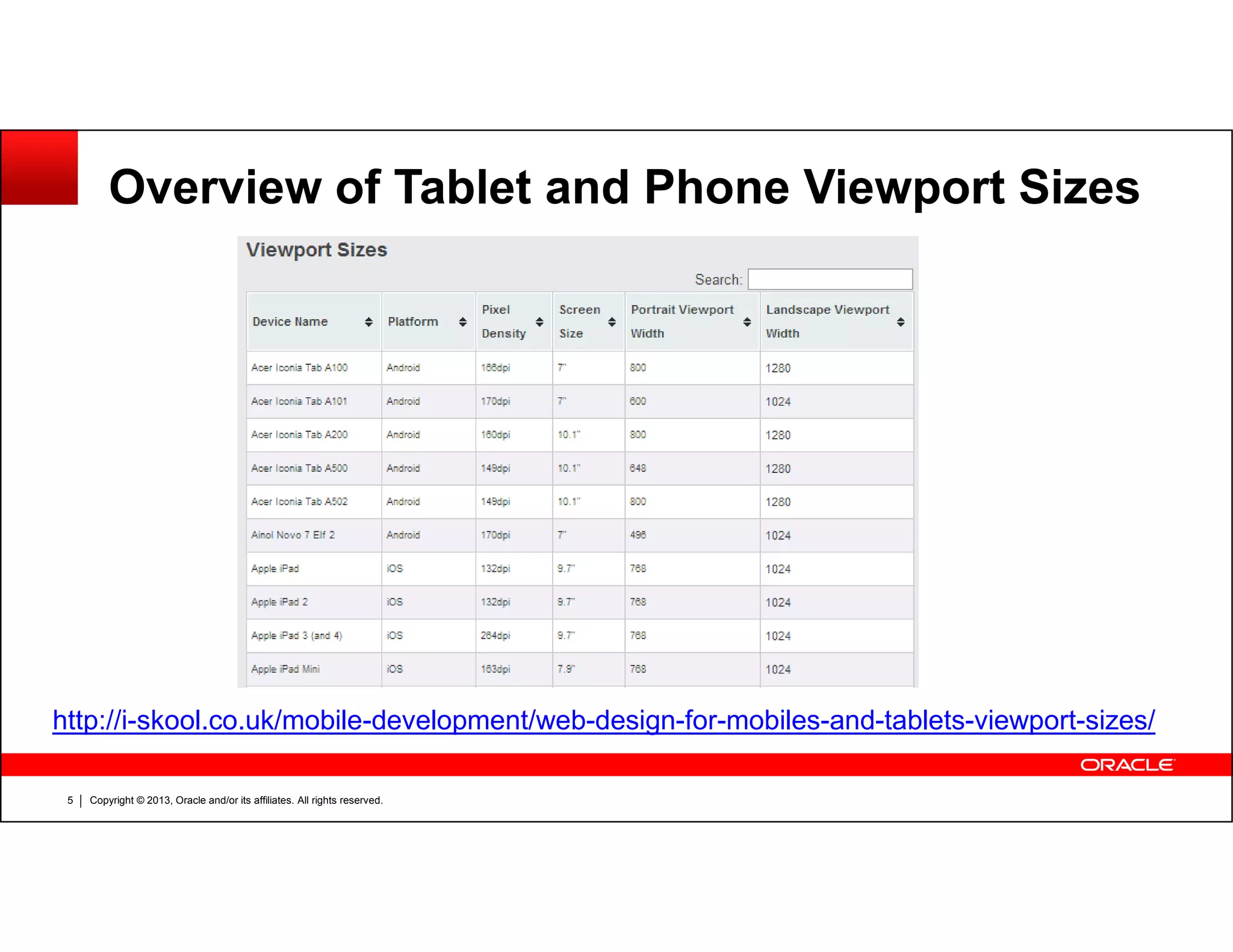
Overview of Tablet and Phone Viewport Sizes
Copyright © 2013, Oracle and/or its affiliates. All rights reserved.5
http://i-skool.co.uk/mobile-development/web-design-for-mobiles-and-tablets-viewport-sizes/
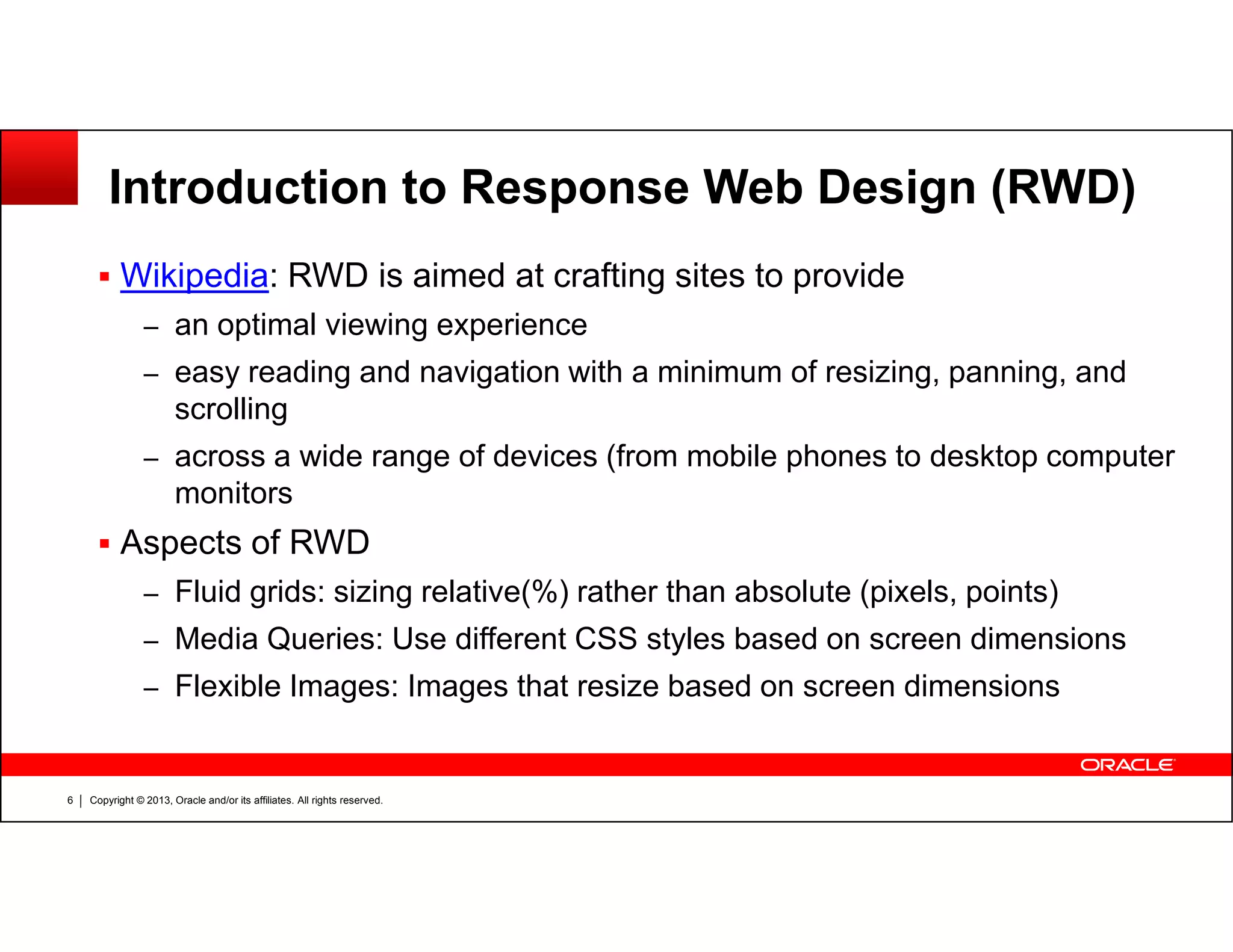
Introduction to Response Web Design (RWD)
Wikipedia: RWD is aimed at crafting sites to provide
– an optimal viewing experience
– easy reading and navigation with a minimum of resizing, panning, and
scrolling
– across a wide range of devices (from mobile phones to desktop computer
monitors
Copyright © 2013, Oracle and/or its affiliates. All rights reserved.6
monitors
Aspects of RWD
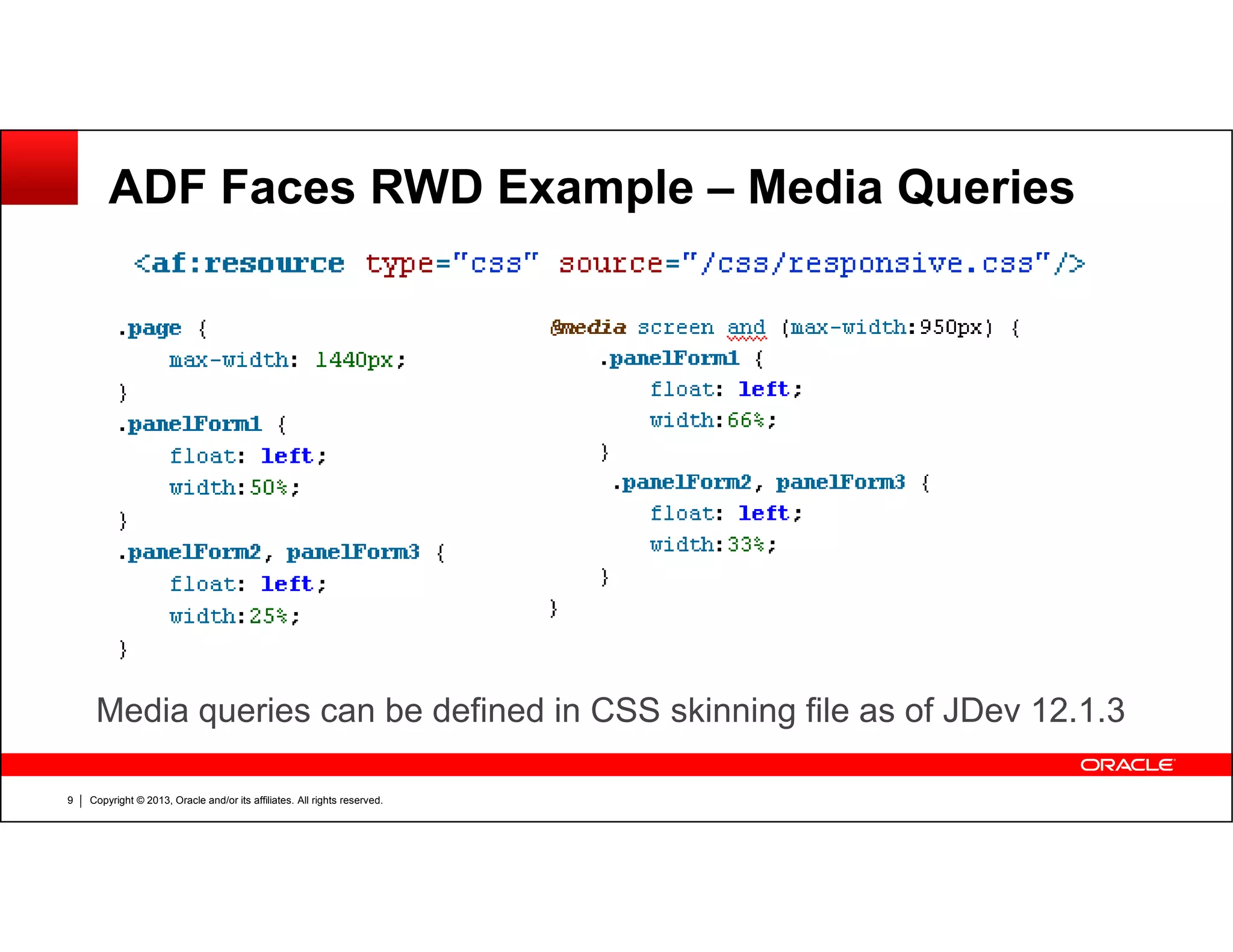
– Fluid grids: sizing relative(%) rather than absolute (pixels, points)
– Media Queries: Use different CSS styles based on screen dimensions
– Flexible Images: Images that resize based on screen dimensions
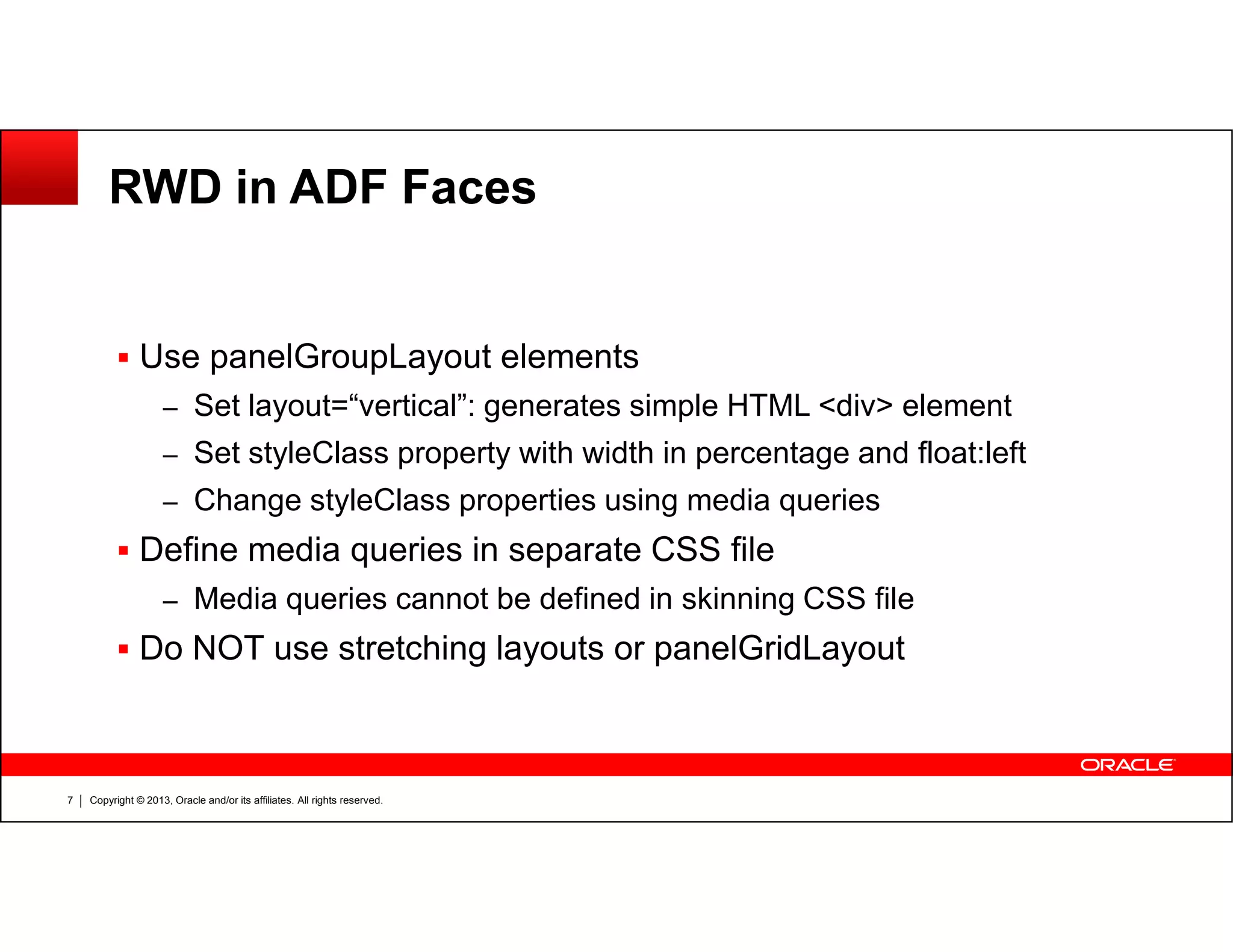
RWD in ADF Faces
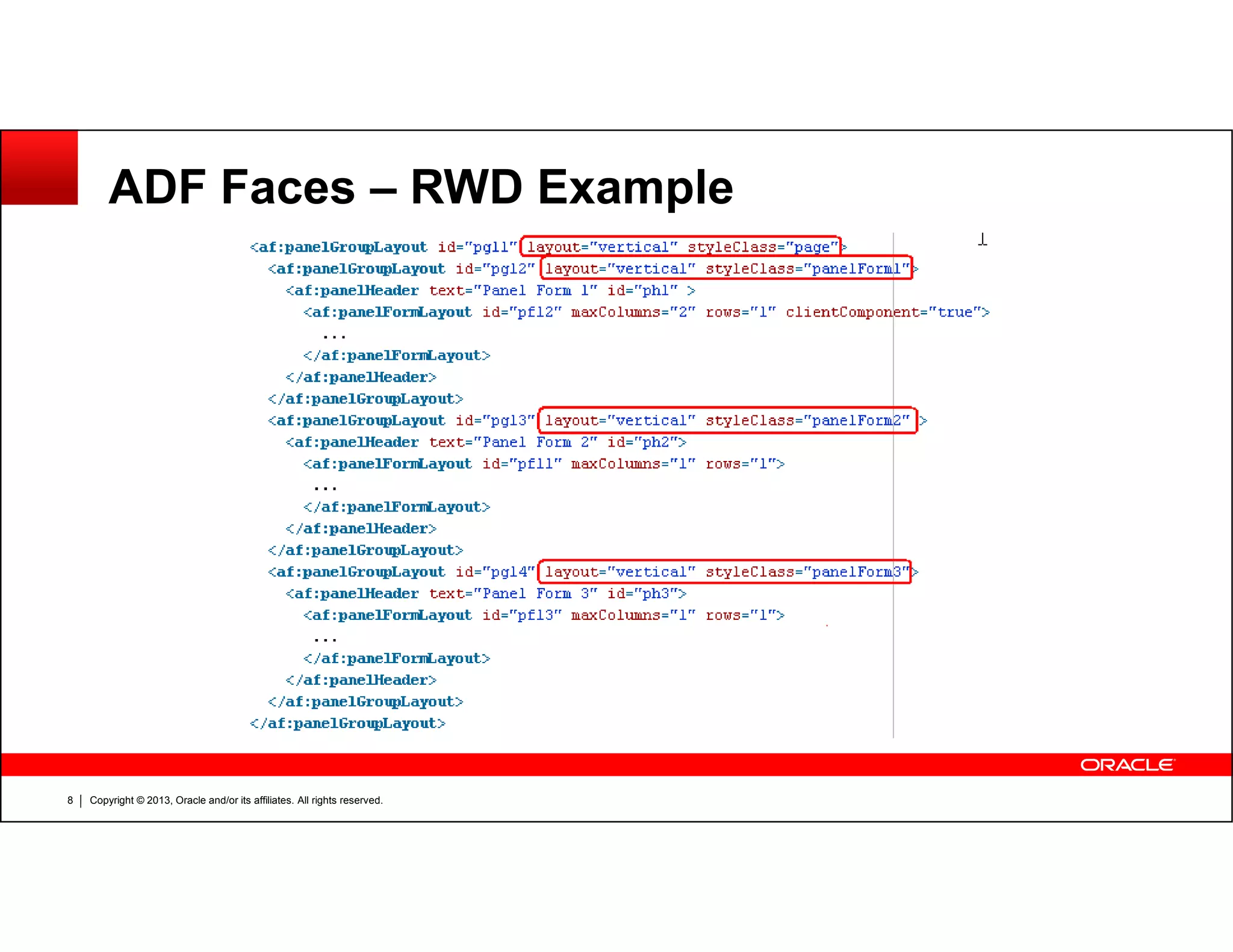
Use panelGroupLayout elements
– Set layout=“vertical”: generates simple HTML <div> element
– Set styleClass property with width in percentage and float:left
Copyright © 2013, Oracle and/or its affiliates. All rights reserved.7
– Change styleClass properties using media queries
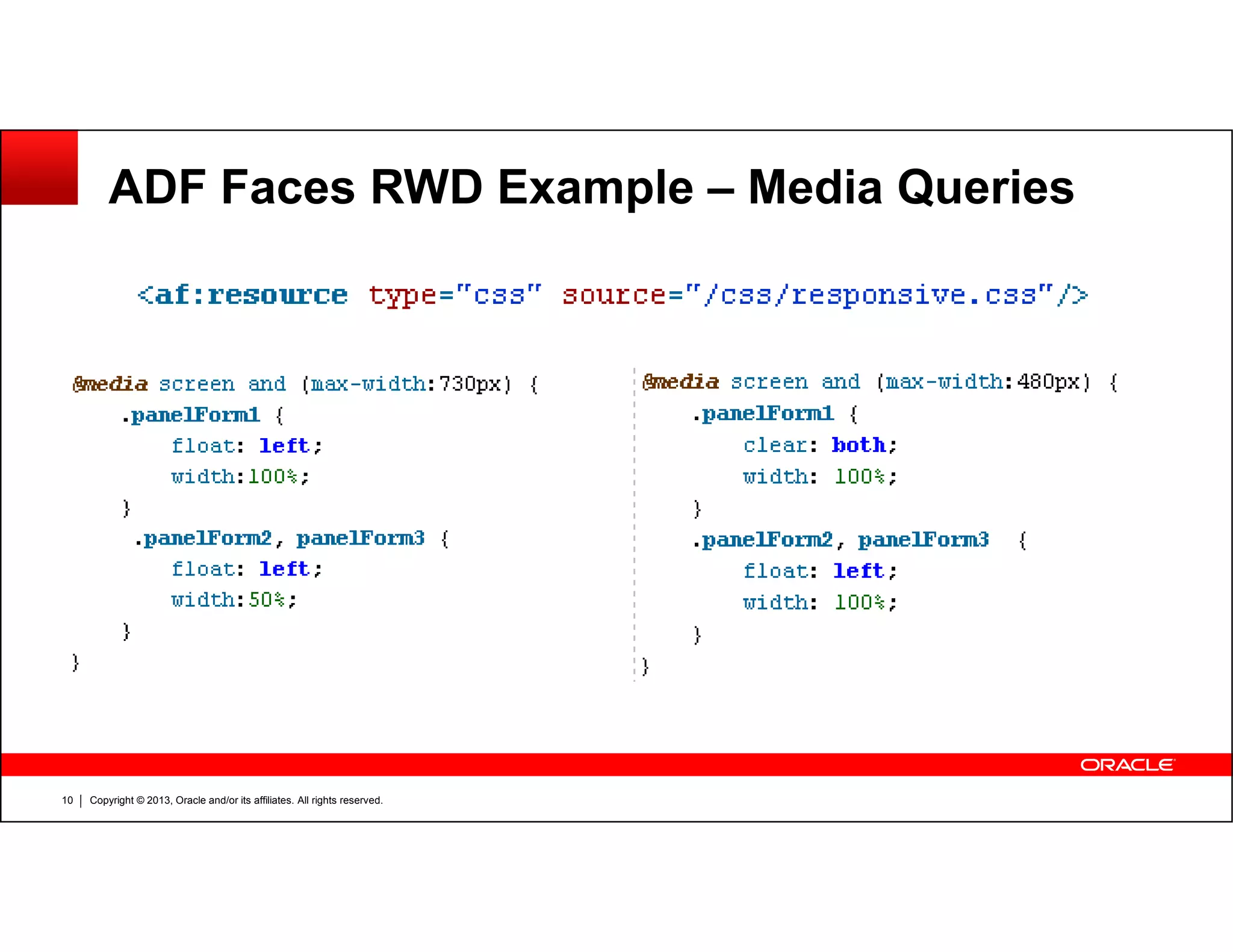
Define media queries in separate CSS file
– Media queries cannot be defined in skinning CSS file
Do NOT use stretching layouts or panelGridLayout
ADF Faces – RWD Example
Copyright © 2013, Oracle and/or its affiliates. All rights reserved.8
ADF Faces RWD Example – Media Queries
Copyright © 2013, Oracle and/or its affiliates. All rights reserved.9
Media queries can be defined in CSS skinning file as of JDev 12.1.3
ADF Faces RWD Example – Media Queries
Copyright © 2013, Oracle and/or its affiliates. All rights reserved.10
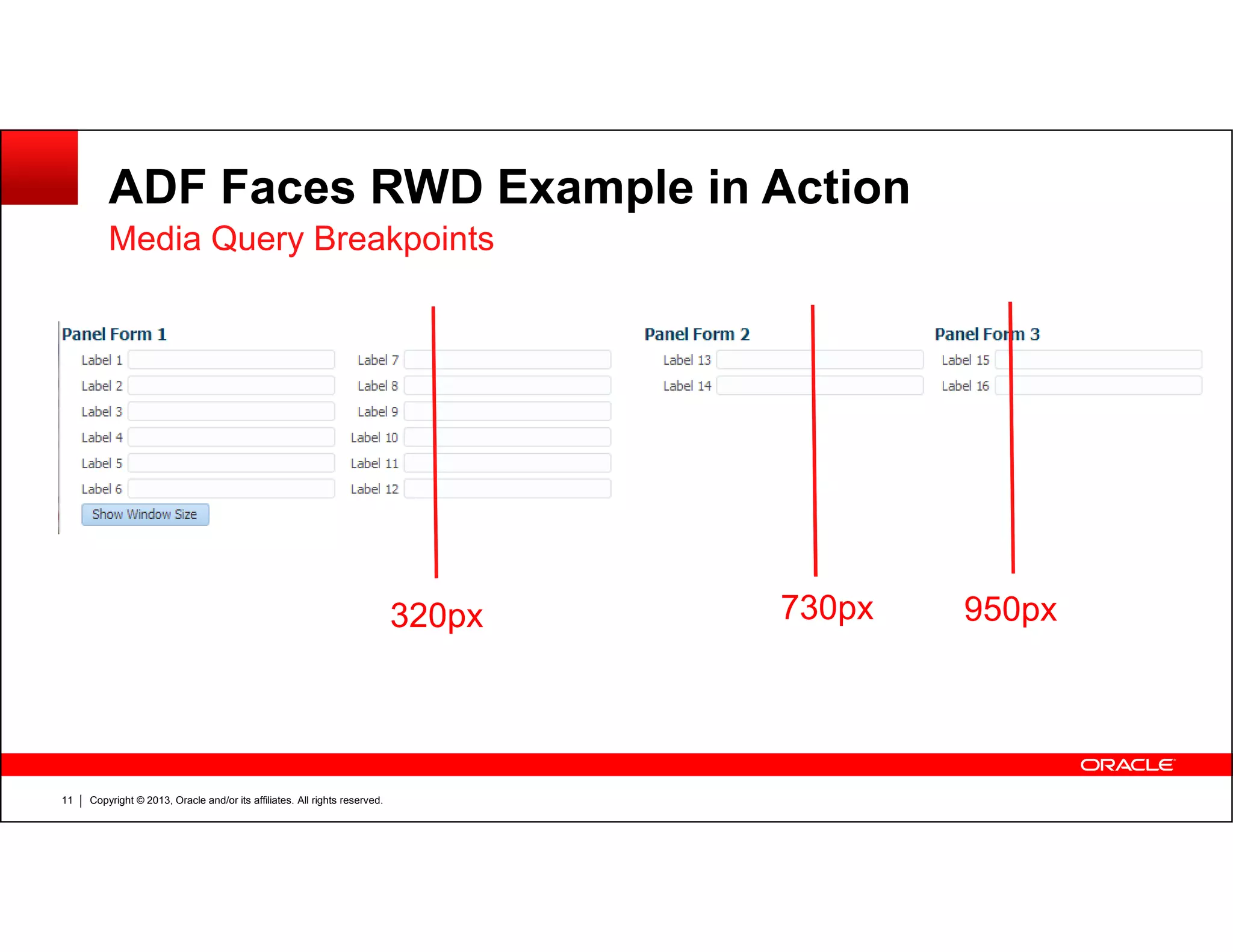
ADF Faces RWD Example in Action
Media Query Breakpoints
Copyright © 2013, Oracle and/or its affiliates. All rights reserved.11
950px730px320px
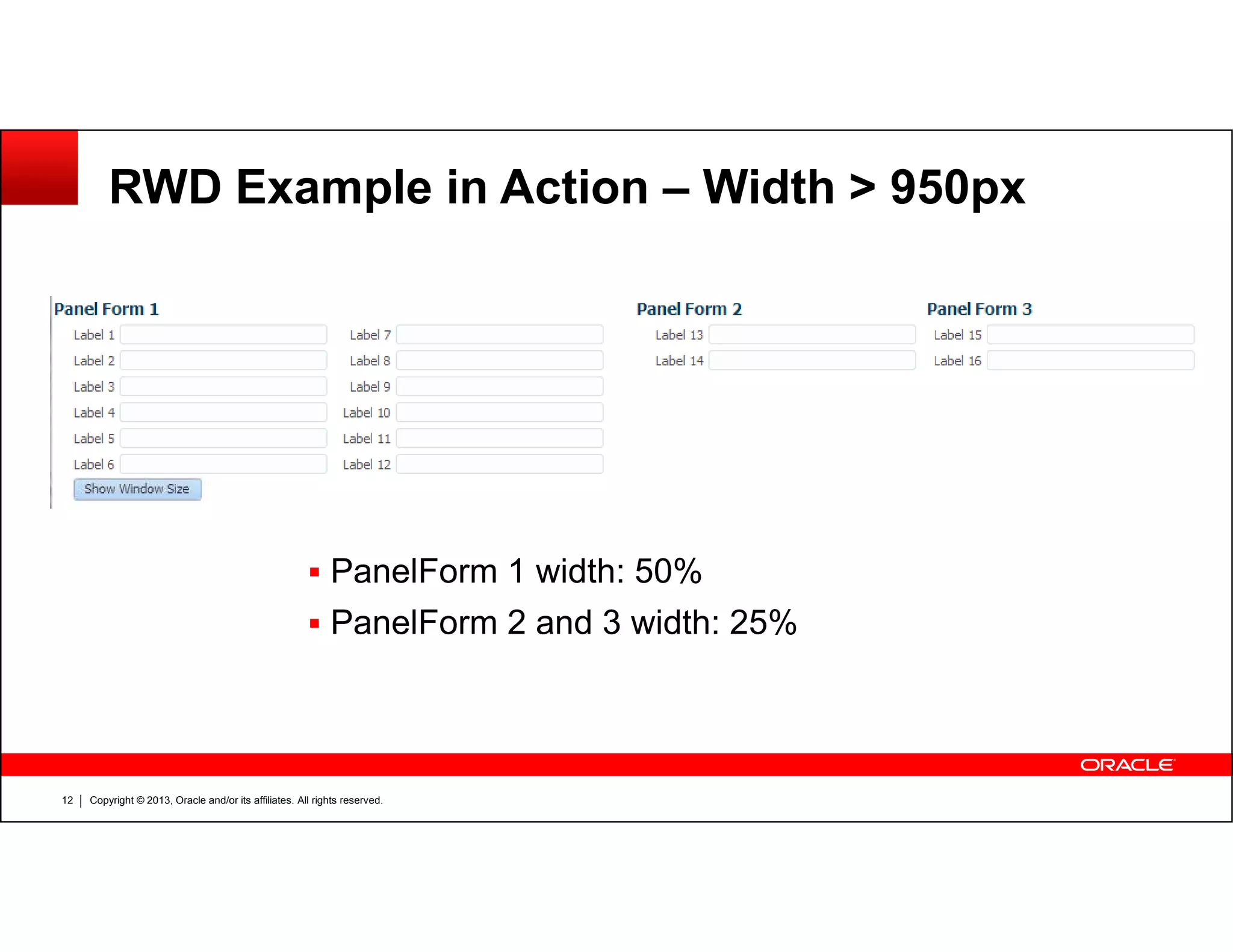
RWD Example in Action – Width > 950px
Copyright © 2013, Oracle and/or its affiliates. All rights reserved.12
PanelForm 1 width: 50%
PanelForm 2 and 3 width: 25%
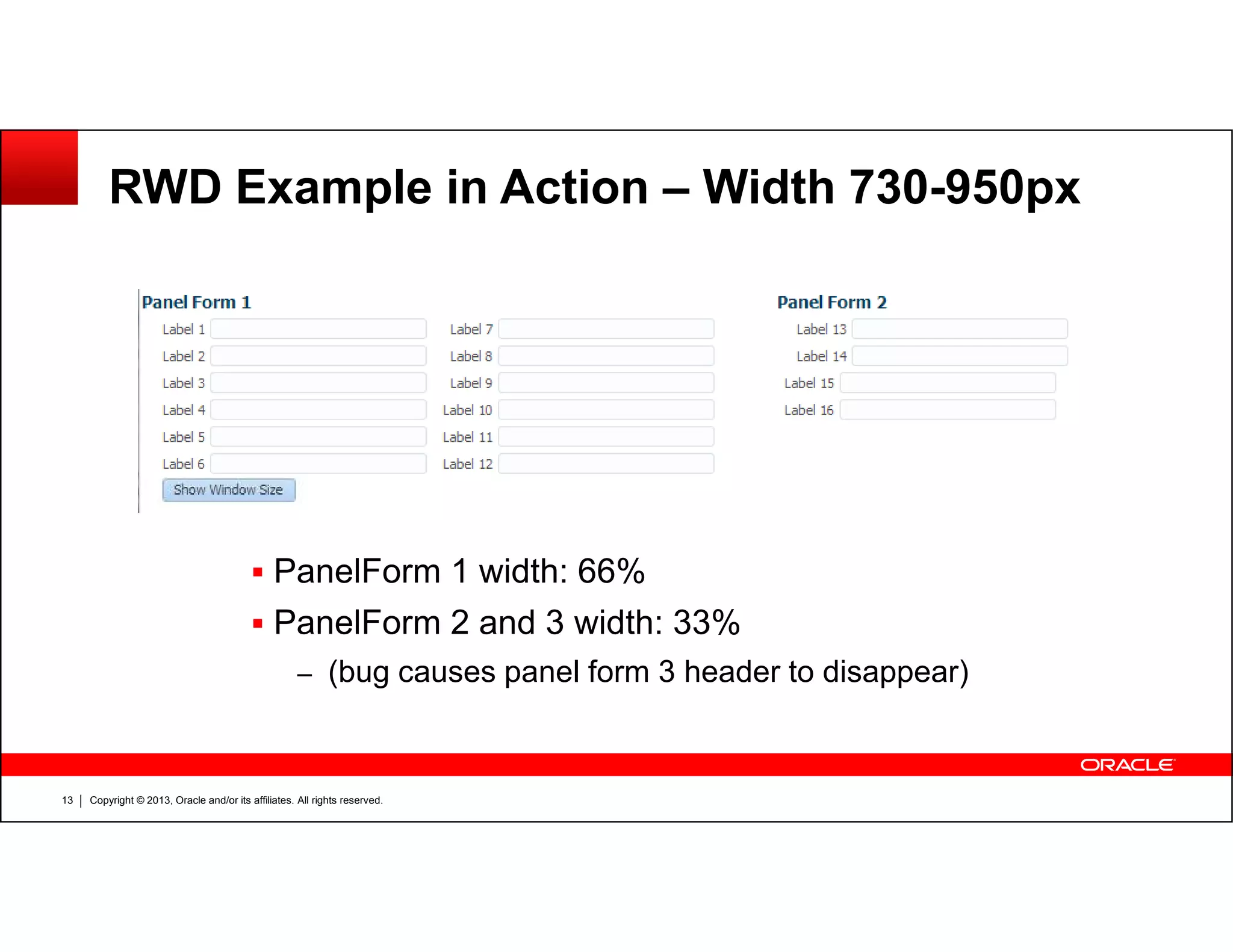
RWD Example in Action – Width 730-950px
Copyright © 2013, Oracle and/or its affiliates. All rights reserved.13
PanelForm 1 width: 66%
PanelForm 2 and 3 width: 33%
– (bug causes panel form 3 header to disappear)
RWD Example in Action – Width 320-730px
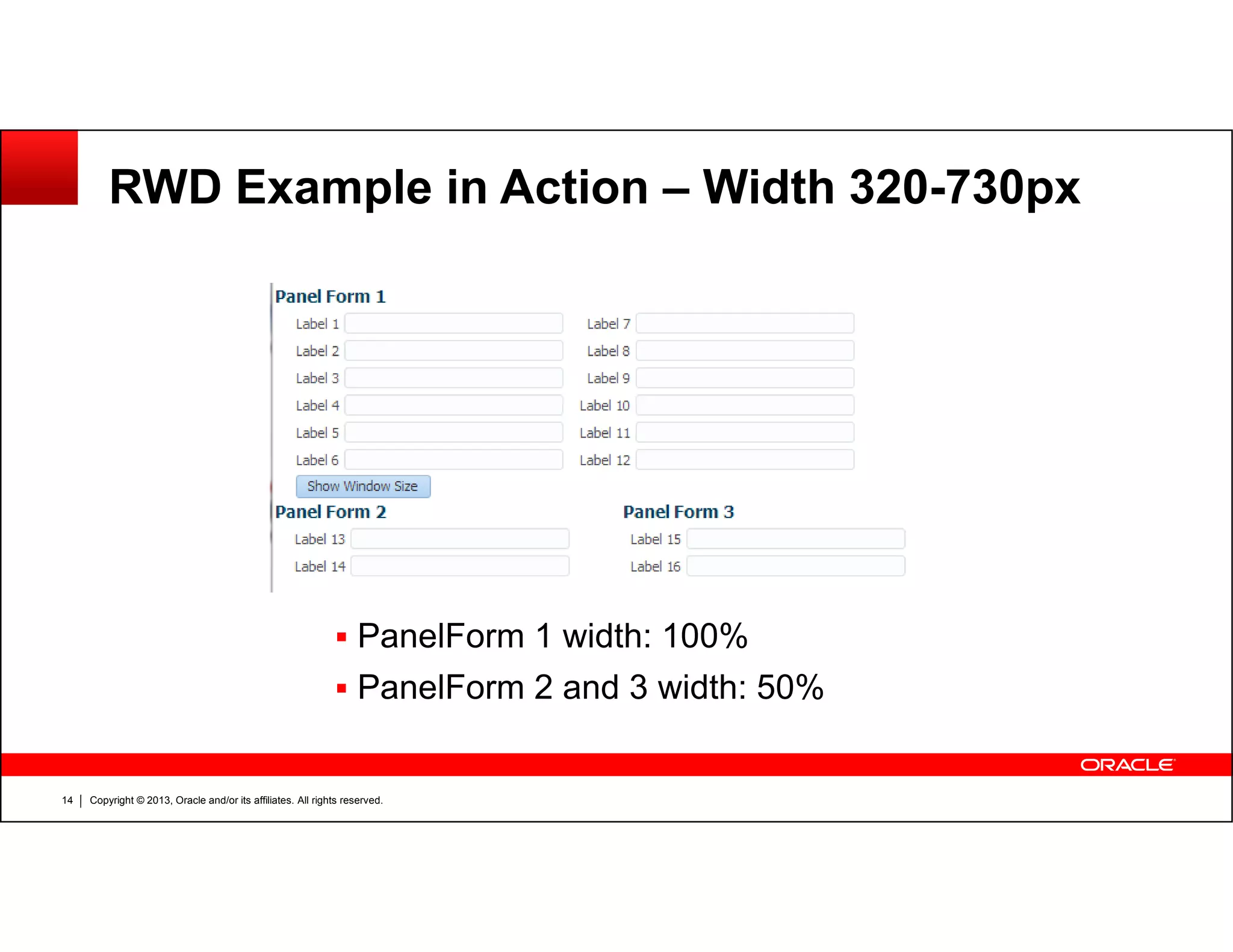
Copyright © 2013, Oracle and/or its affiliates. All rights reserved.14
PanelForm 1 width: 100%
PanelForm 2 and 3 width: 50%
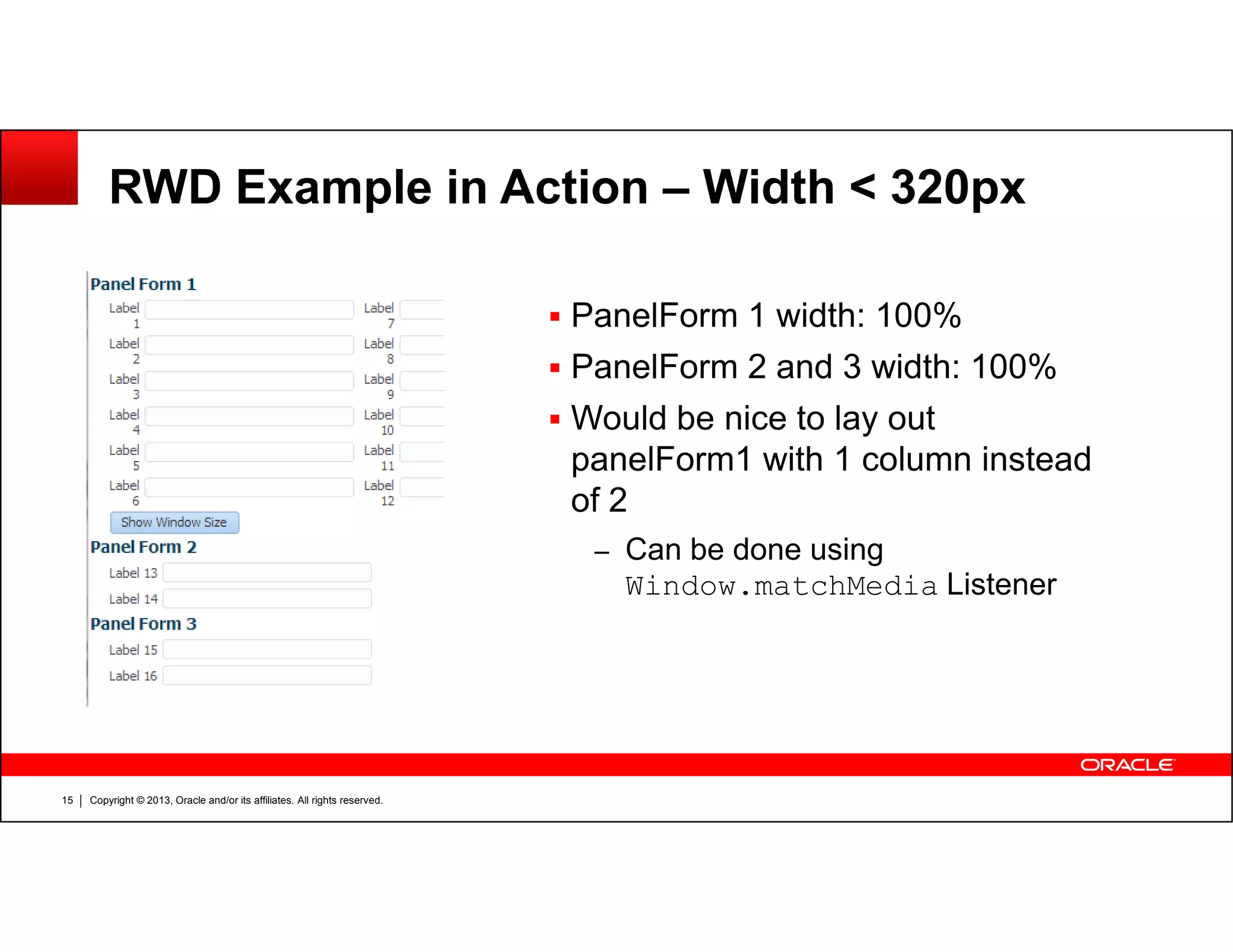
RWD Example in Action – Width < 320px
PanelForm 1 width: 100%
PanelForm 2 and 3 width: 100%
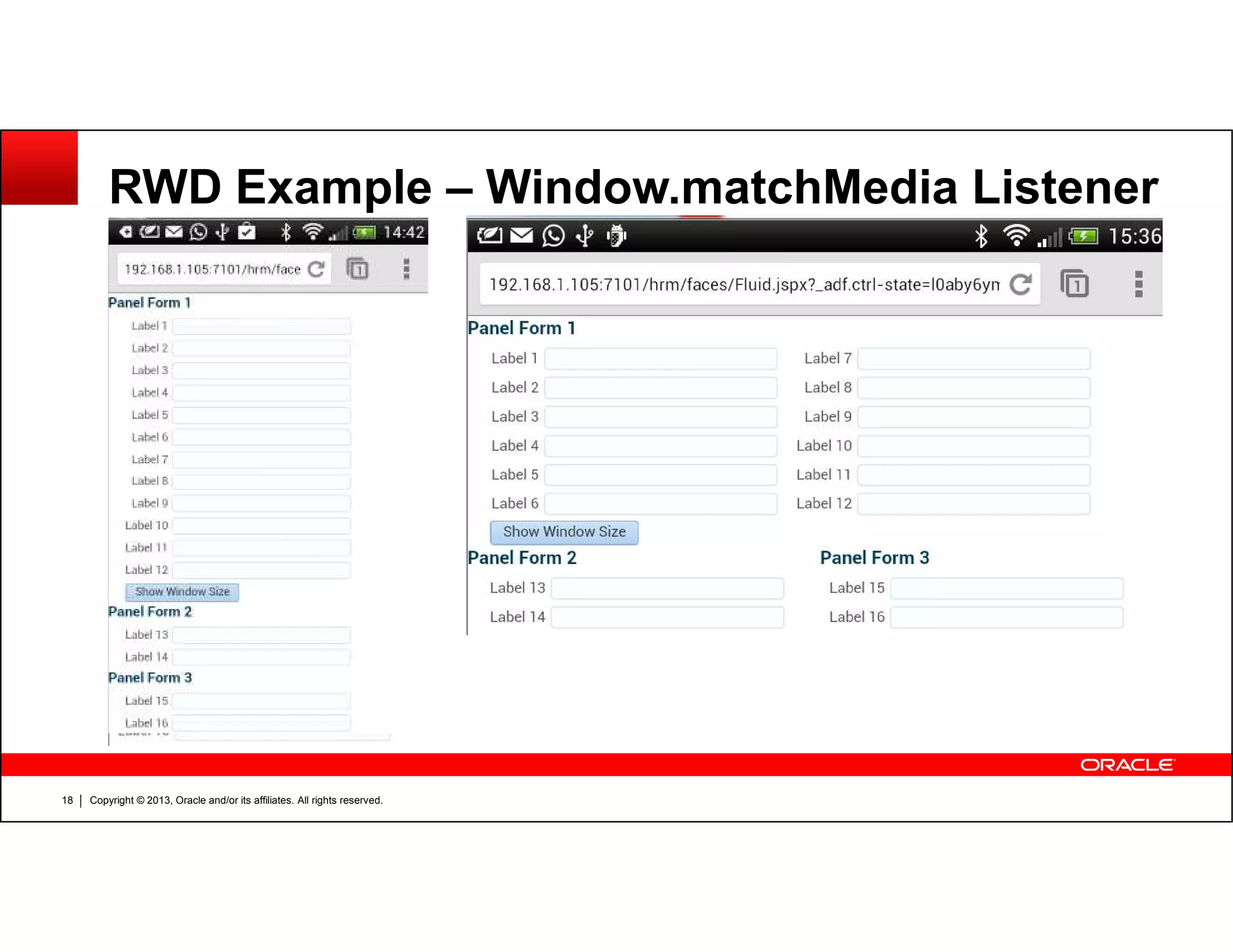
Would be nice to lay out
panelForm1 with 1 column instead
Copyright © 2013, Oracle and/or its affiliates. All rights reserved.15
panelForm1 with 1 column instead
of 2
– Can be done using
Window.matchMedia Listener
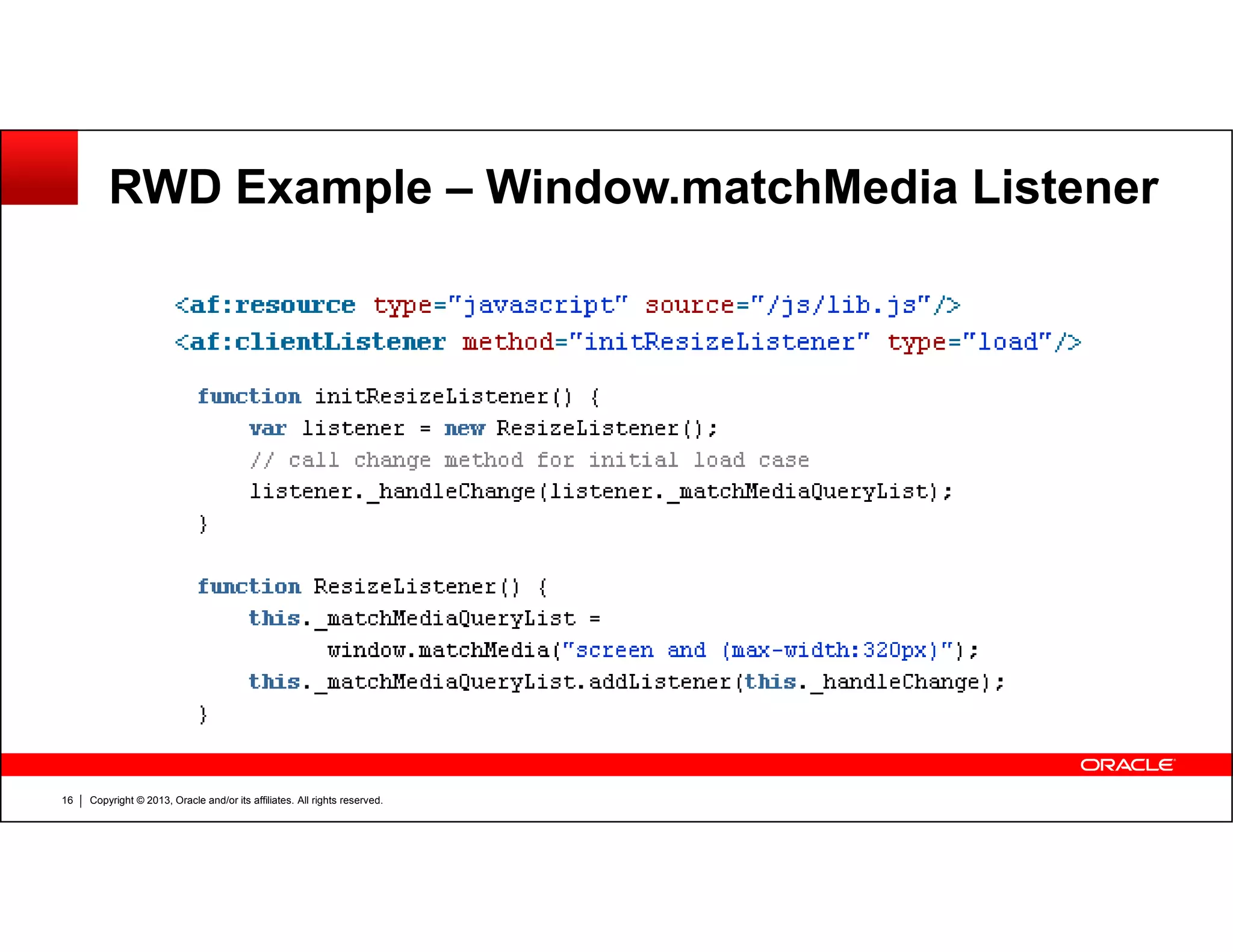
RWD Example – Window.matchMedia Listener
Copyright © 2013, Oracle and/or its affiliates. All rights reserved.16
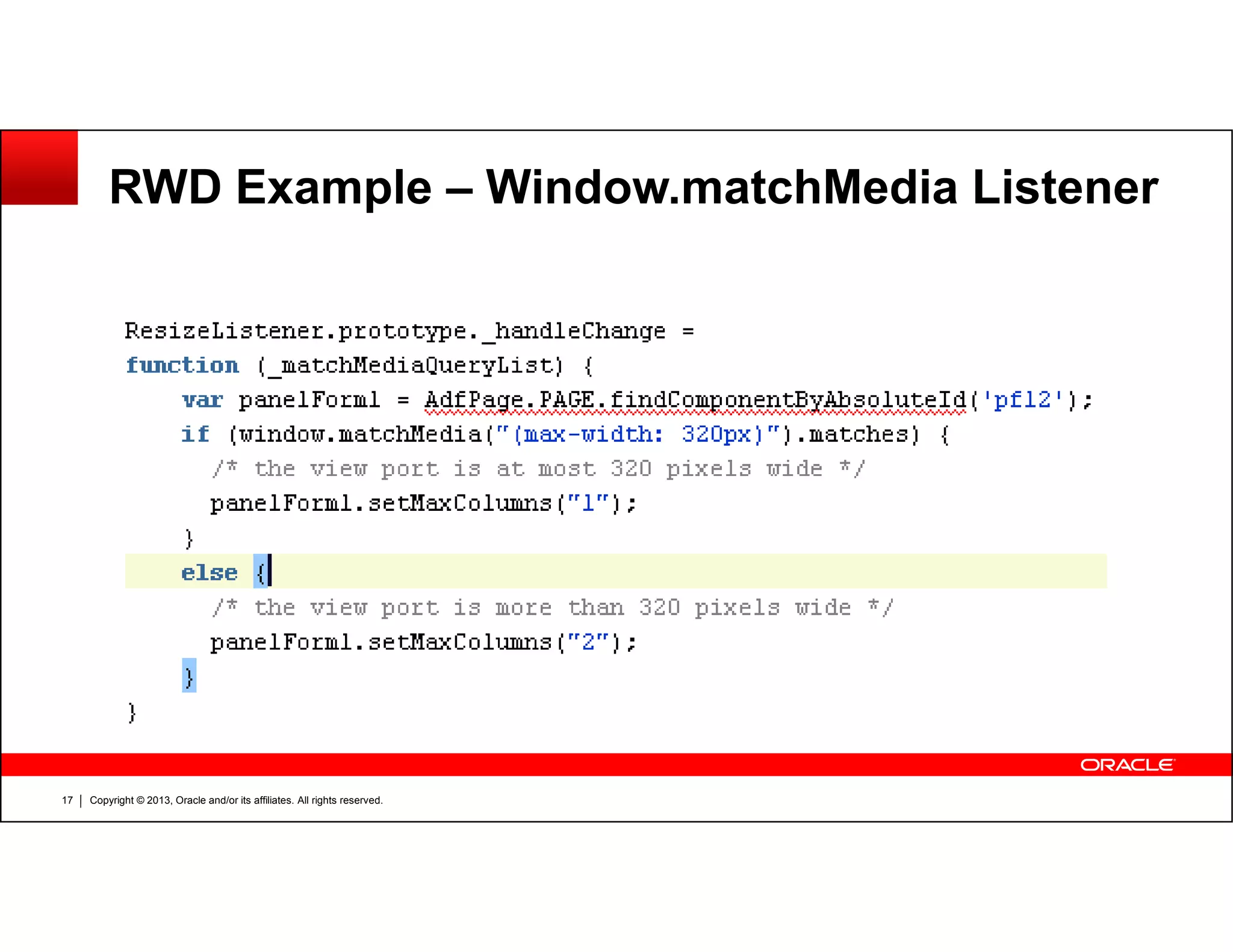
RWD Example – Window.matchMedia Listener
Copyright © 2013, Oracle and/or its affiliates. All rights reserved.17
RWD Example – Window.matchMedia Listener
Copyright © 2013, Oracle and/or its affiliates. All rights reserved.18
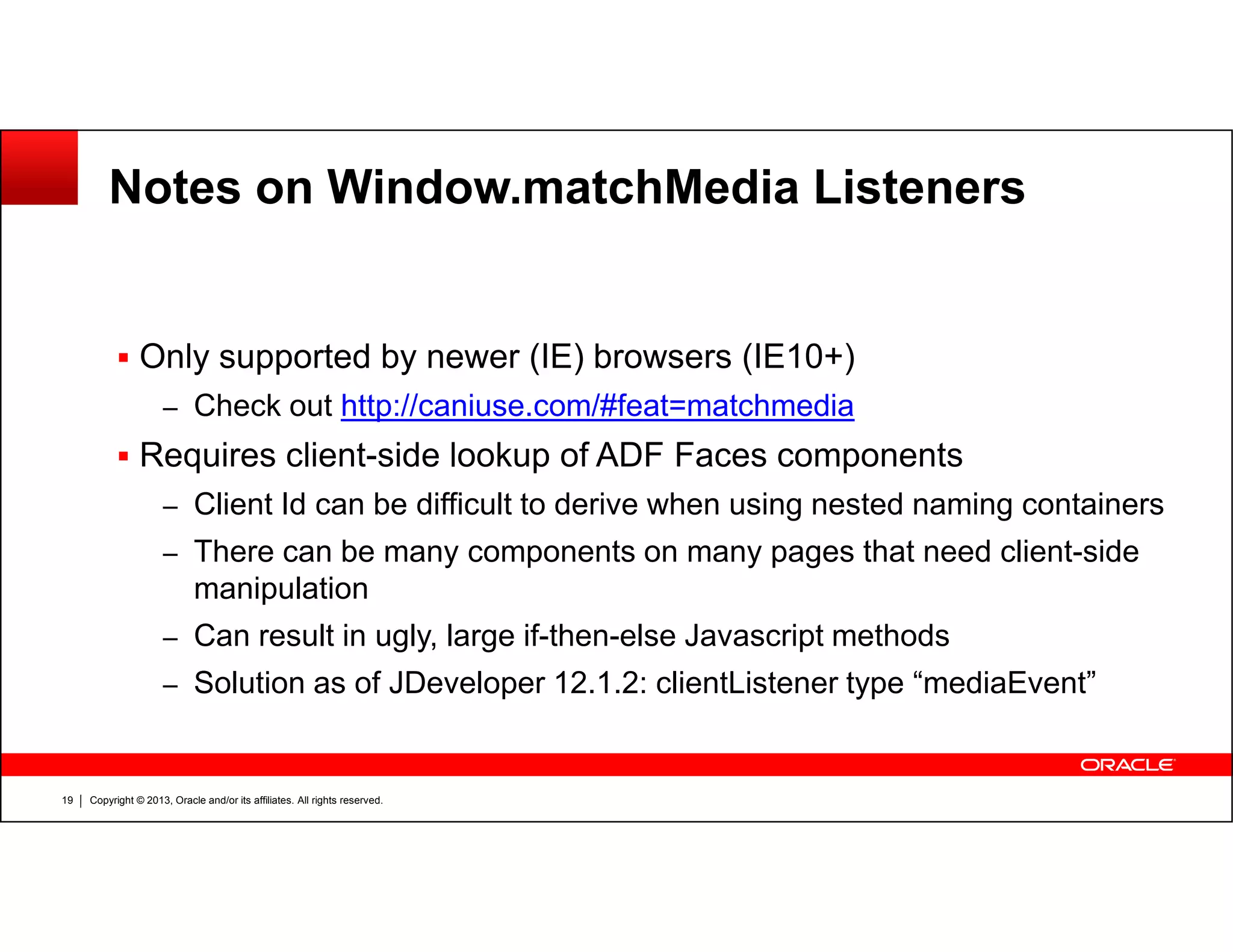
Notes on Window.matchMedia Listeners
Only supported by newer (IE) browsers (IE10+)
– Check out http://caniuse.com/#feat=matchmedia
Requires client-side lookup of ADF Faces components
Copyright © 2013, Oracle and/or its affiliates. All rights reserved.19
– Client Id can be difficult to derive when using nested naming containers
– There can be many components on many pages that need client-side
manipulation
– Can result in ugly, large if-then-else Javascript methods
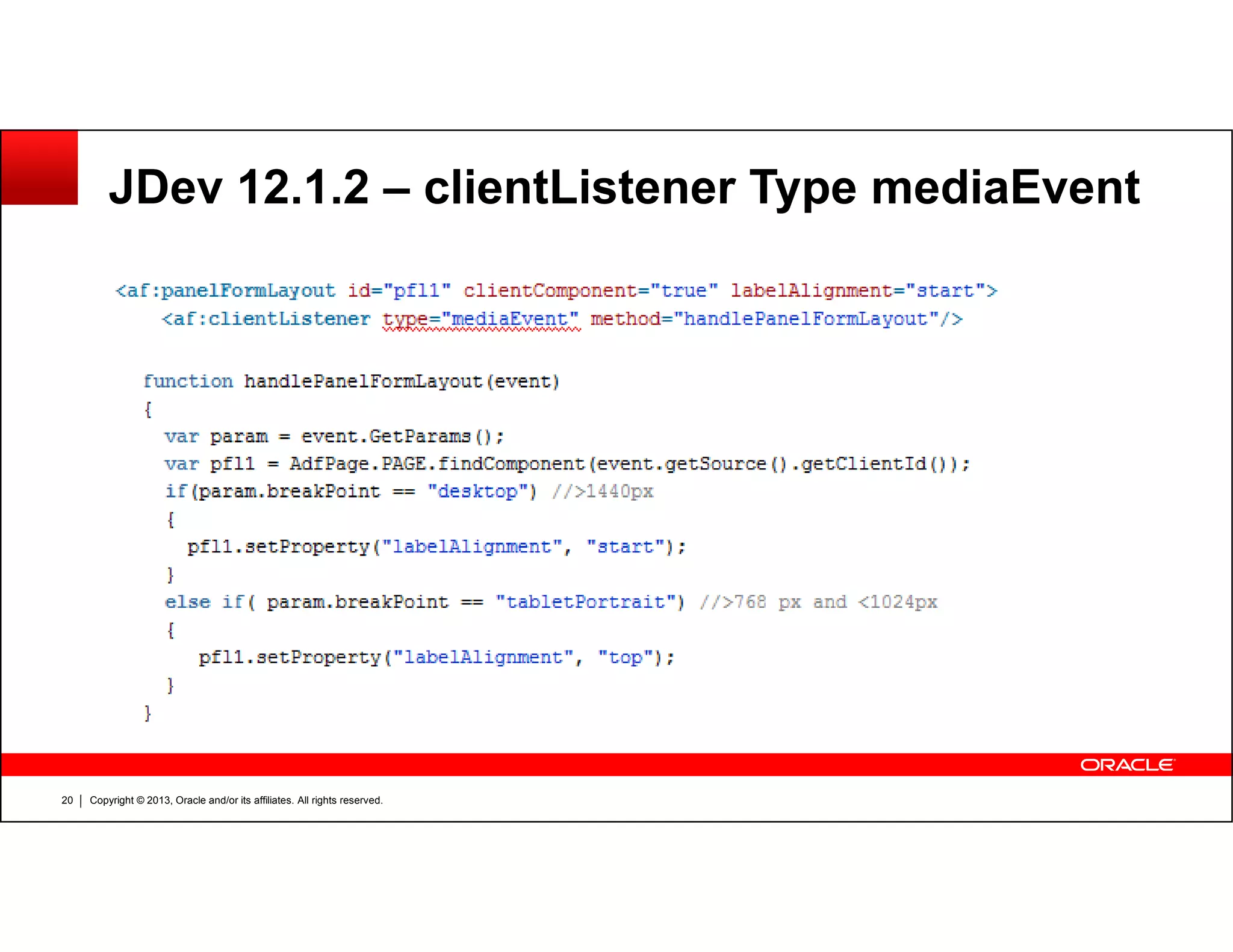
– Solution as of JDeveloper 12.1.2: clientListener type “mediaEvent”
JDev 12.1.2 – clientListener Type mediaEvent
Copyright © 2013, Oracle and/or its affiliates. All rights reserved.20
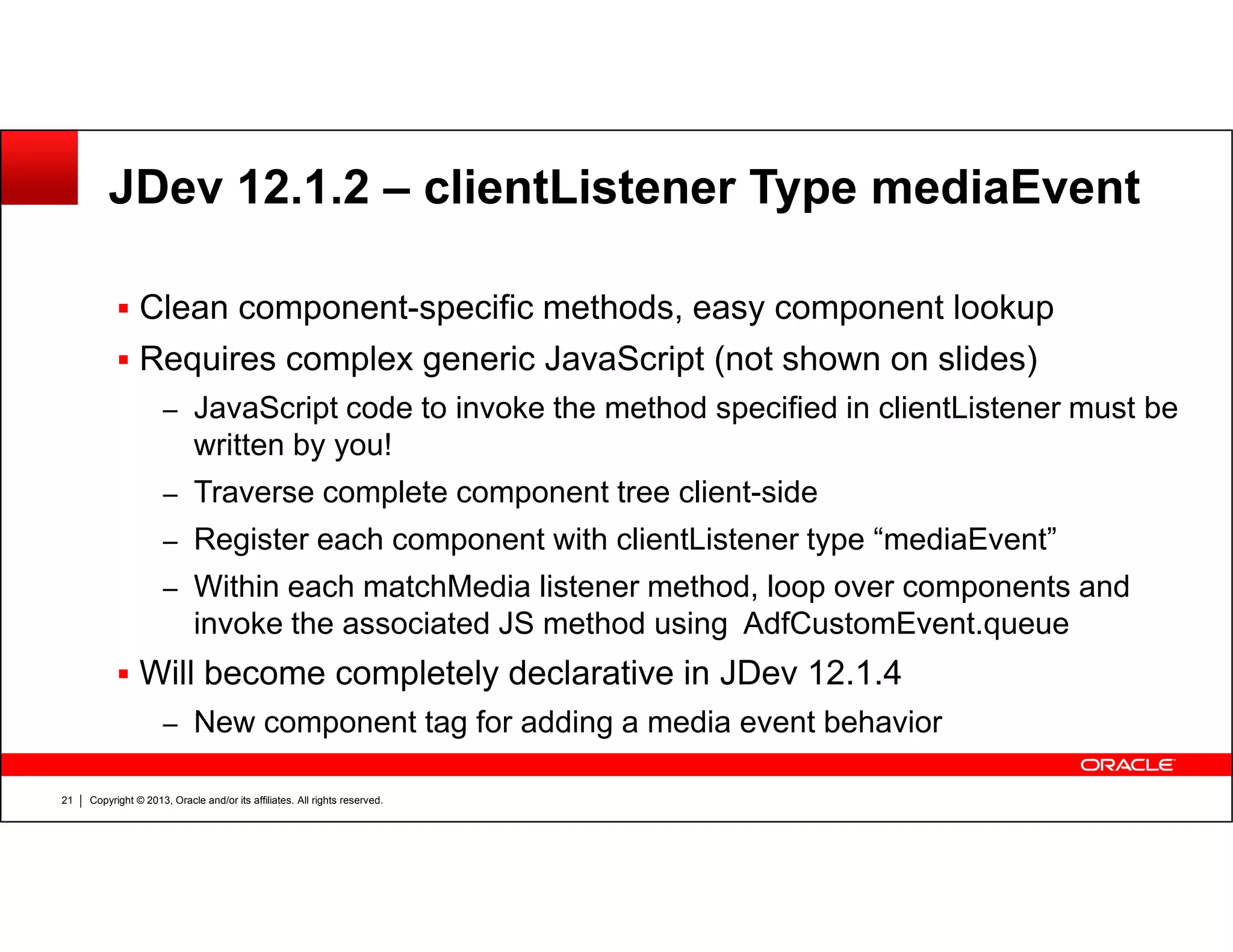
JDev 12.1.2 – clientListener Type mediaEvent
Clean component-specific methods, easy component lookup
Requires complex generic JavaScript (not shown on slides)
– JavaScript code to invoke the method specified in clientListener must be
written by you!
Traverse complete component tree client-side
Copyright © 2013, Oracle and/or its affiliates. All rights reserved.21
– Traverse complete component tree client-side
– Register each component with clientListener type “mediaEvent”
– Within each matchMedia listener method, loop over components and
invoke the associated JS method using AdfCustomEvent.queue
Will become completely declarative in JDev 12.1.4
– New component tag for adding a media event behavior
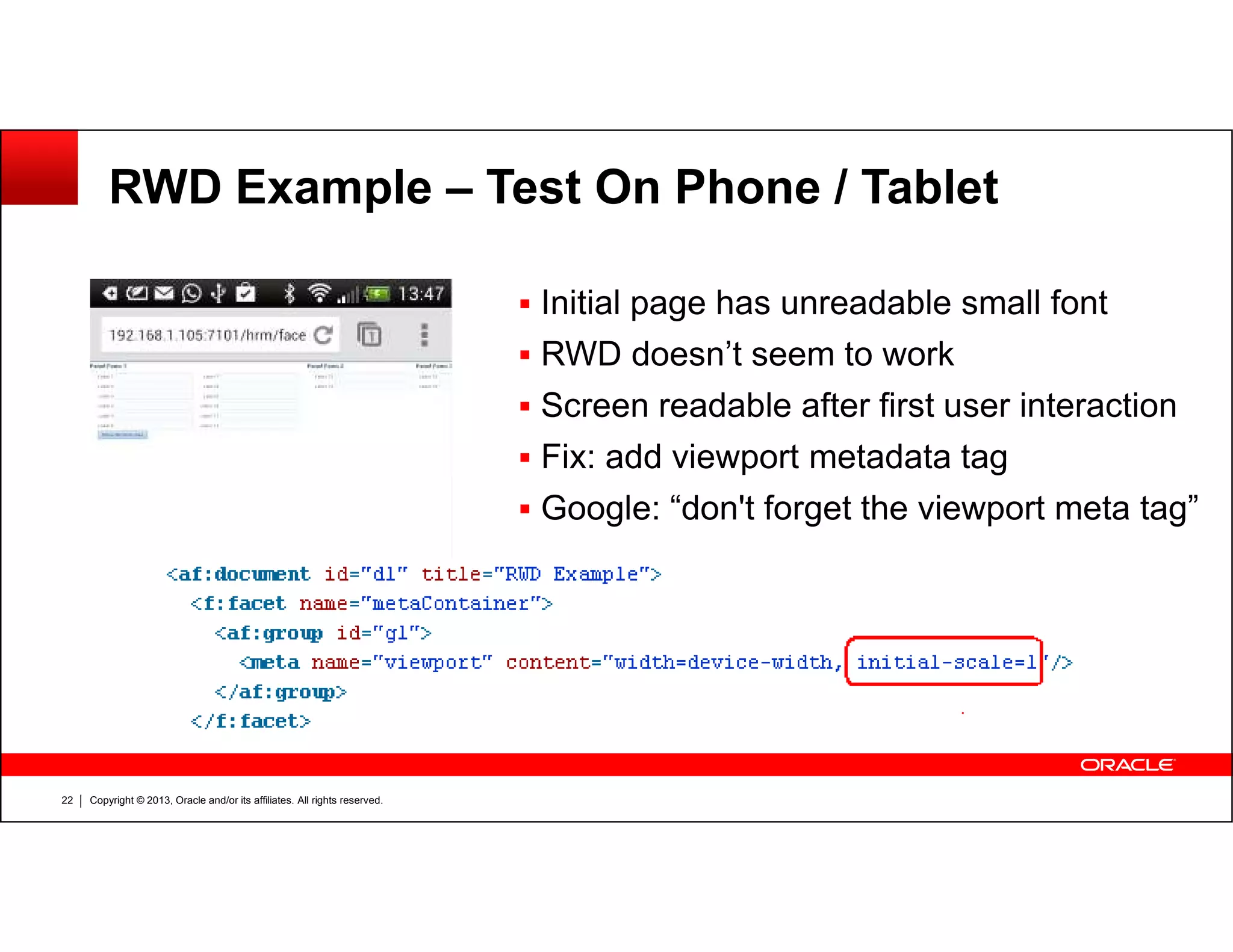
RWD Example – Test On Phone / Tablet
Initial page has unreadable small font
RWD doesn’t seem to work
Screen readable after first user interaction
Fix: add viewport metadata tag
Copyright © 2013, Oracle and/or its affiliates. All rights reserved.22
Google: “don't forget the viewport meta tag”
Server-side Adaptive Design
Client-side responsive design techniques are usually not enough for
ADF Faces applications
For more dramatic changes in layout, we need to go to the server
Copyright © 2013, Oracle and/or its affiliates. All rights reserved.23
– Use EL in layout properties that reference screen dimensions
– Dynamic switching between page templates
– Traversing UI components tree to programmatically change layout
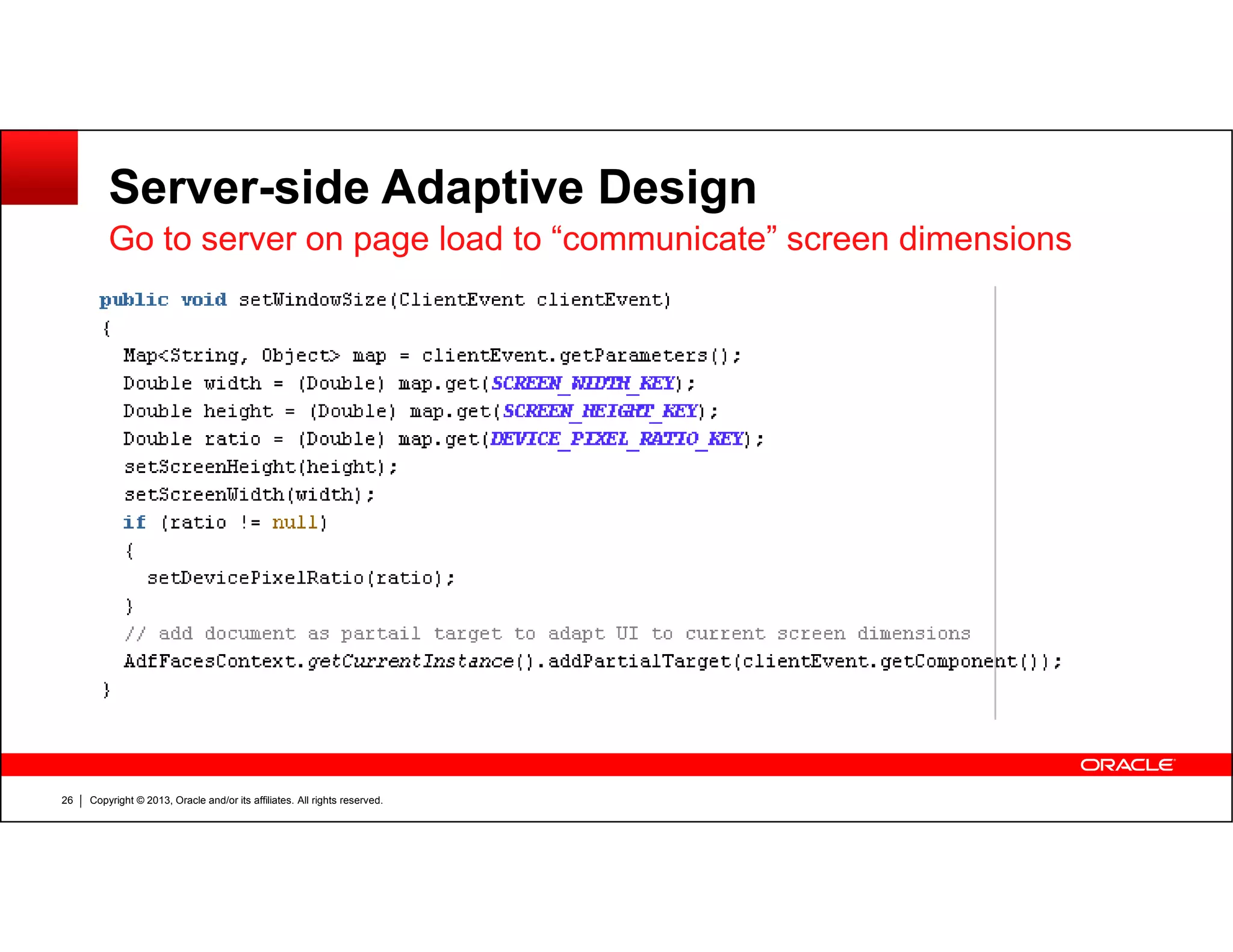
Go to server on page load to communicate screen dimensions
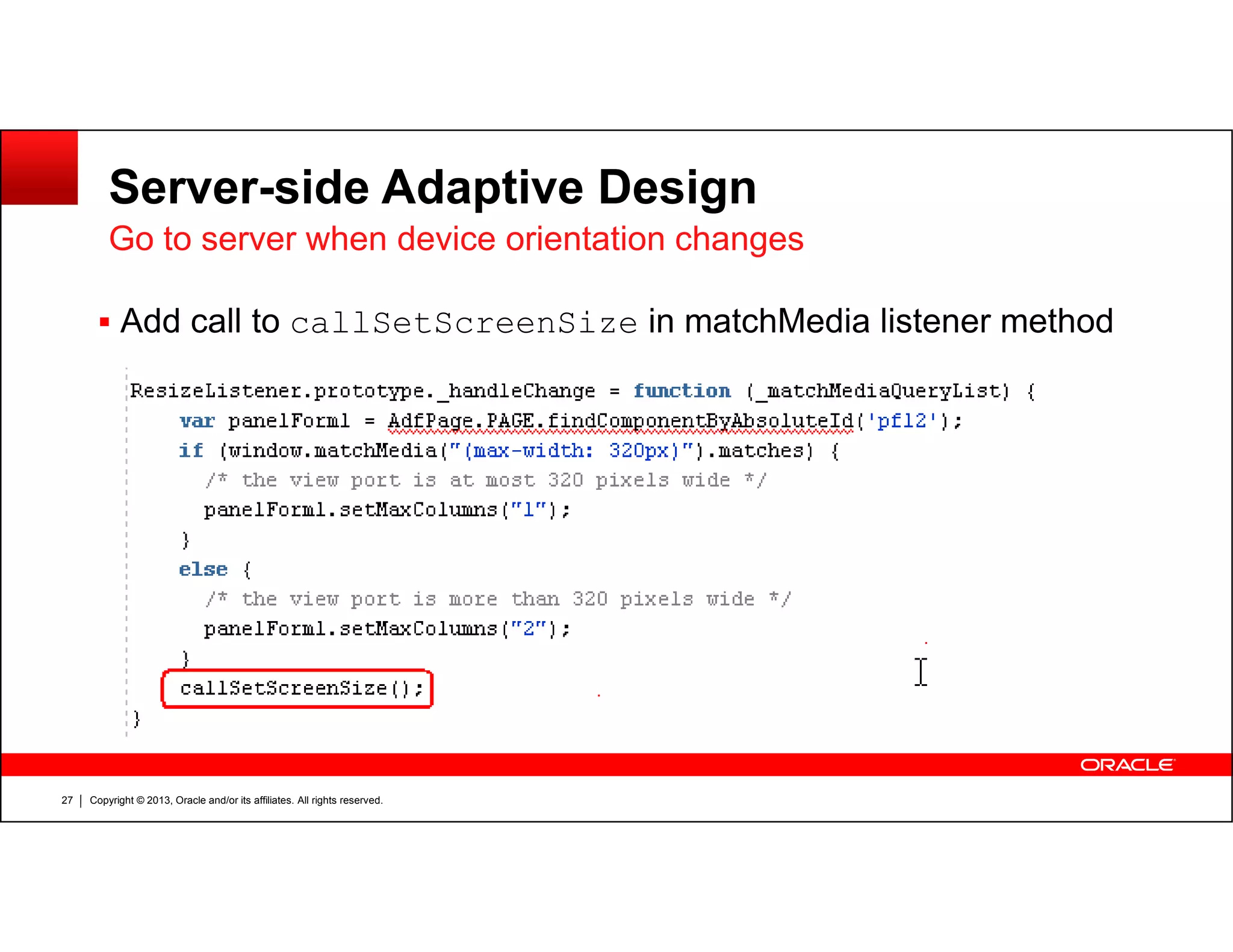
Go to server when device orientation changes
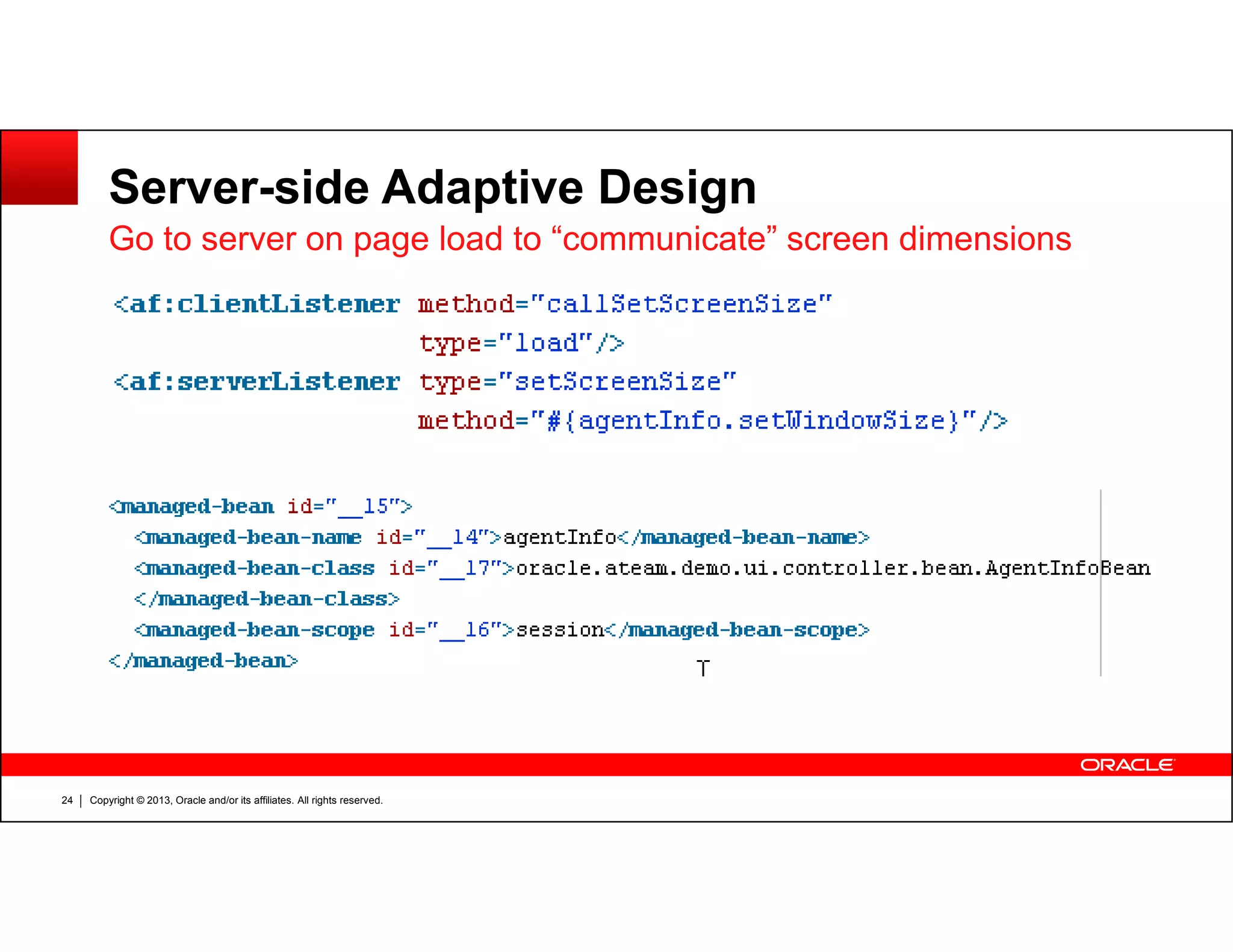
Server-side Adaptive Design
Go to server on page load to “communicate” screen dimensions
Copyright © 2013, Oracle and/or its affiliates. All rights reserved.24
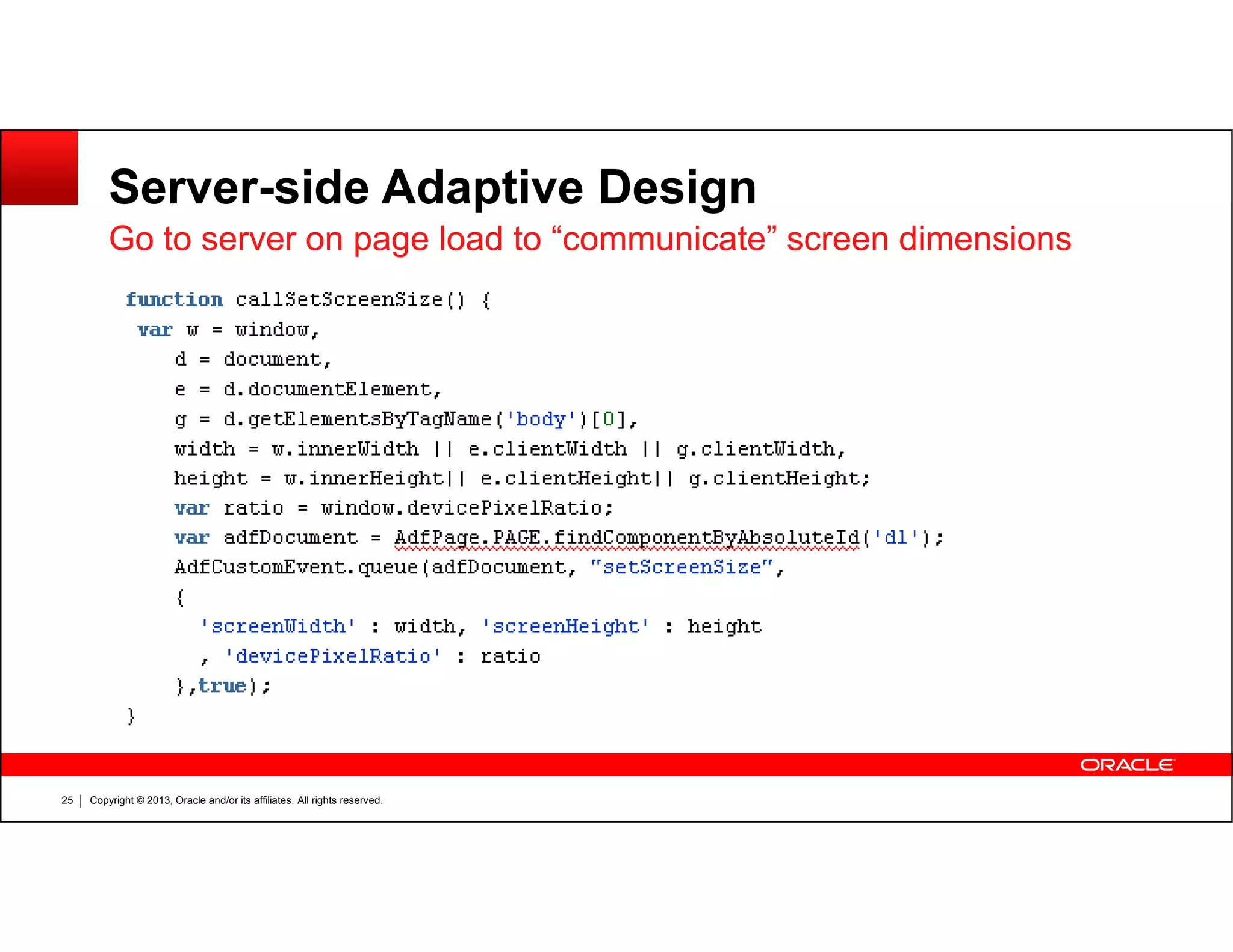
Server-side Adaptive Design
Go to server on page load to “communicate” screen dimensions
Copyright © 2013, Oracle and/or its affiliates. All rights reserved.25
Server-side Adaptive Design
Go to server on page load to “communicate” screen dimensions
Copyright © 2013, Oracle and/or its affiliates. All rights reserved.26
Server-side Adaptive Design
Go to server when device orientation changes
Add call to callSetScreenSize in matchMedia listener method
Copyright © 2013, Oracle and/or its affiliates. All rights reserved.27
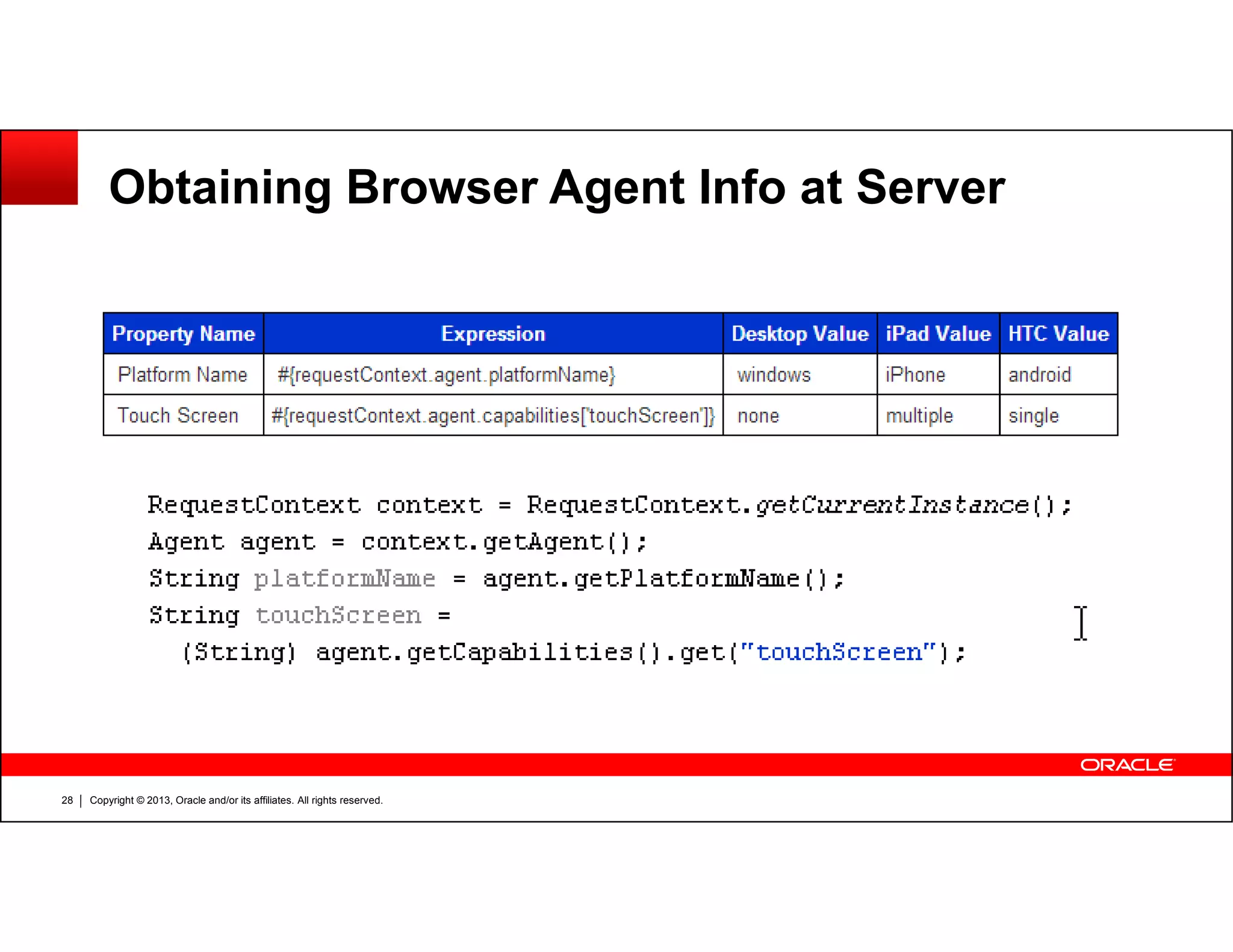
Obtaining Browser Agent Info at Server
Copyright © 2013, Oracle and/or its affiliates. All rights reserved.28
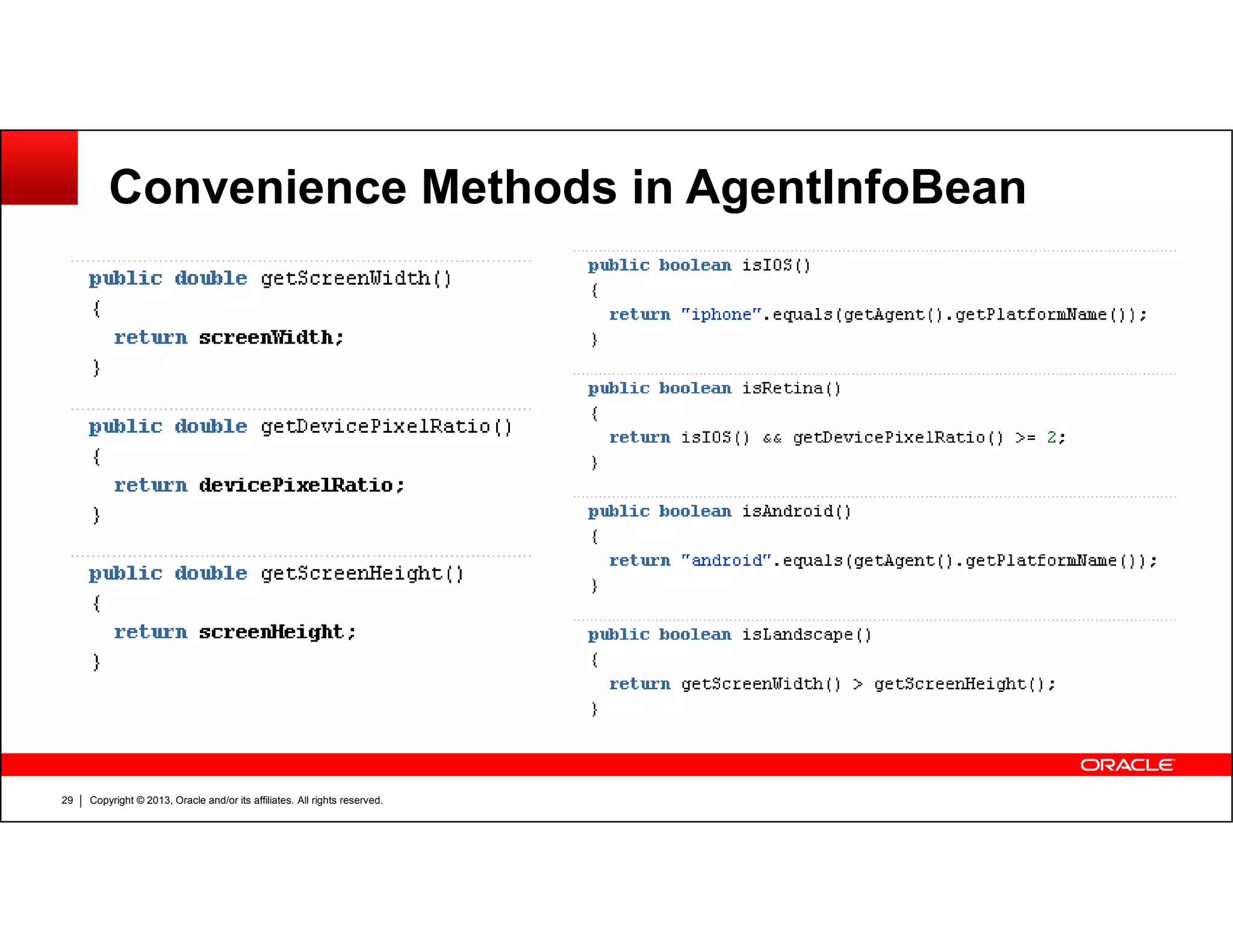
Convenience Methods in AgentInfoBean
Copyright © 2013, Oracle and/or its affiliates. All rights reserved.29
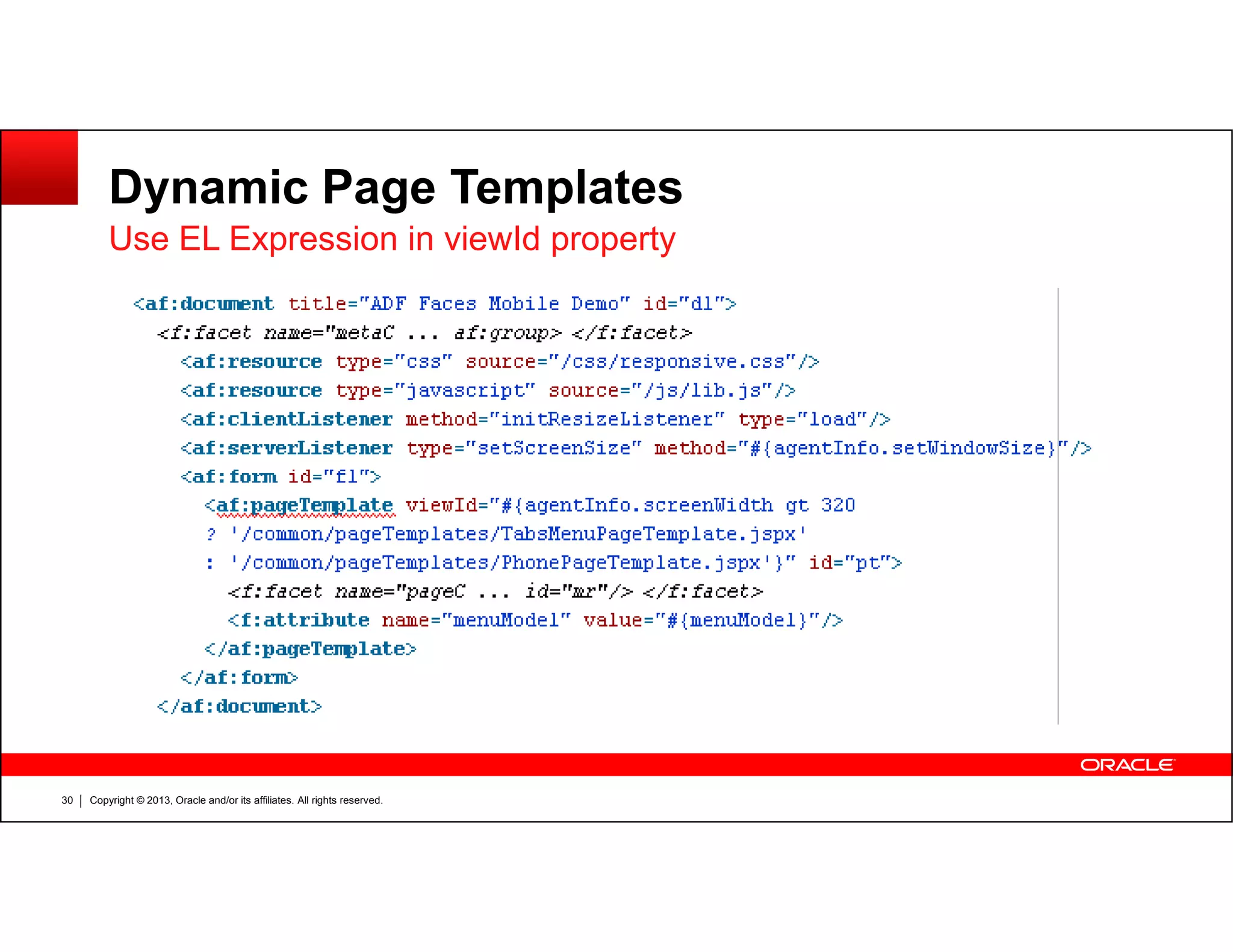
Dynamic Page Templates
Use EL Expression in viewId property
Copyright © 2013, Oracle and/or its affiliates. All rights reserved.30
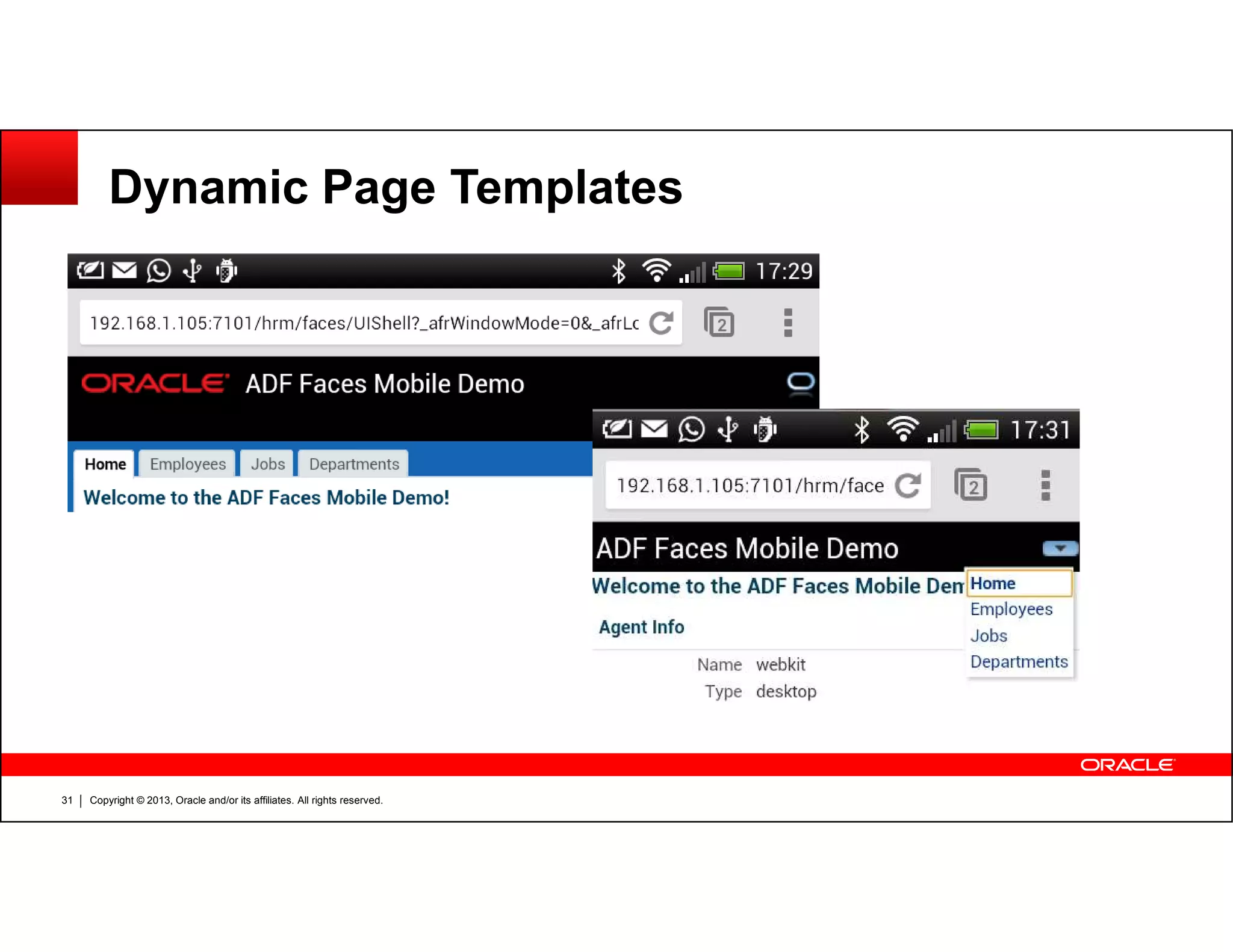
Dynamic Page Templates
Copyright © 2013, Oracle and/or its affiliates. All rights reserved.31
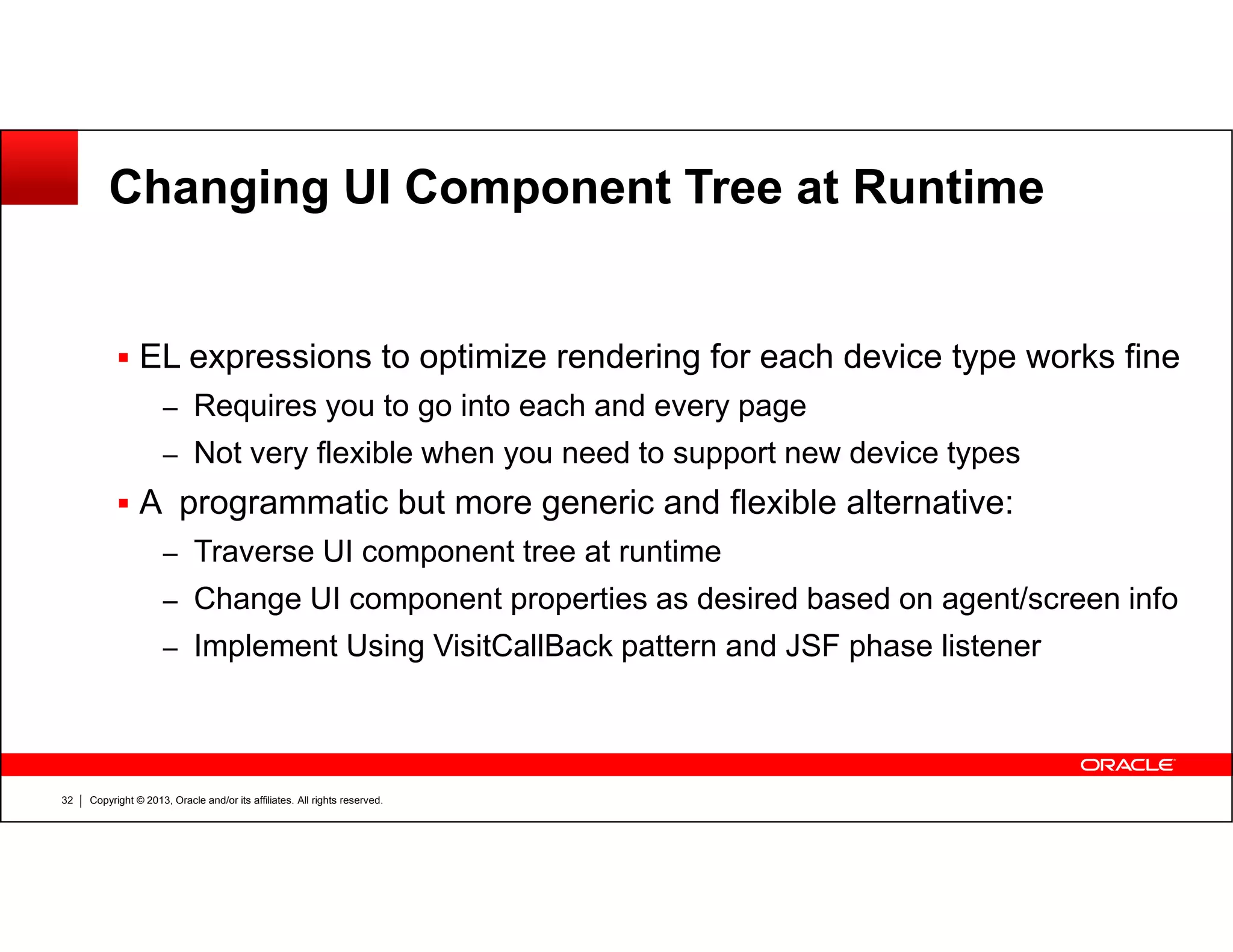
Changing UI Component Tree at Runtime
EL expressions to optimize rendering for each device type works fine
– Requires you to go into each and every page
– Not very flexible when you need to support new device types
Copyright © 2013, Oracle and/or its affiliates. All rights reserved.32
A programmatic but more generic and flexible alternative:
– Traverse UI component tree at runtime
– Change UI component properties as desired based on agent/screen info
– Implement Using VisitCallBack pattern and JSF phase listener
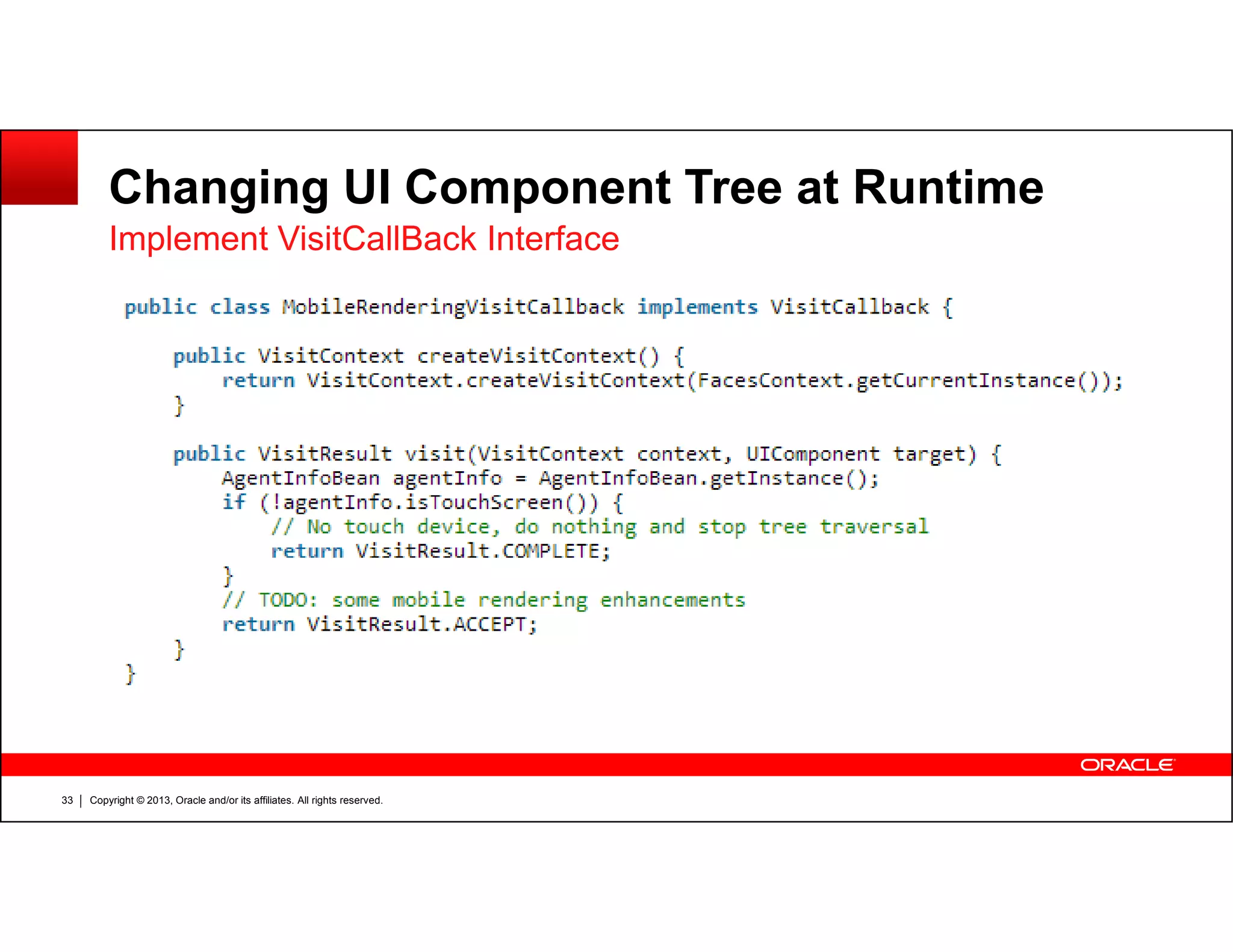
Changing UI Component Tree at Runtime
Implement VisitCallBack Interface
Copyright © 2013, Oracle and/or its affiliates. All rights reserved.33
Changing UI Component Tree at Runtime
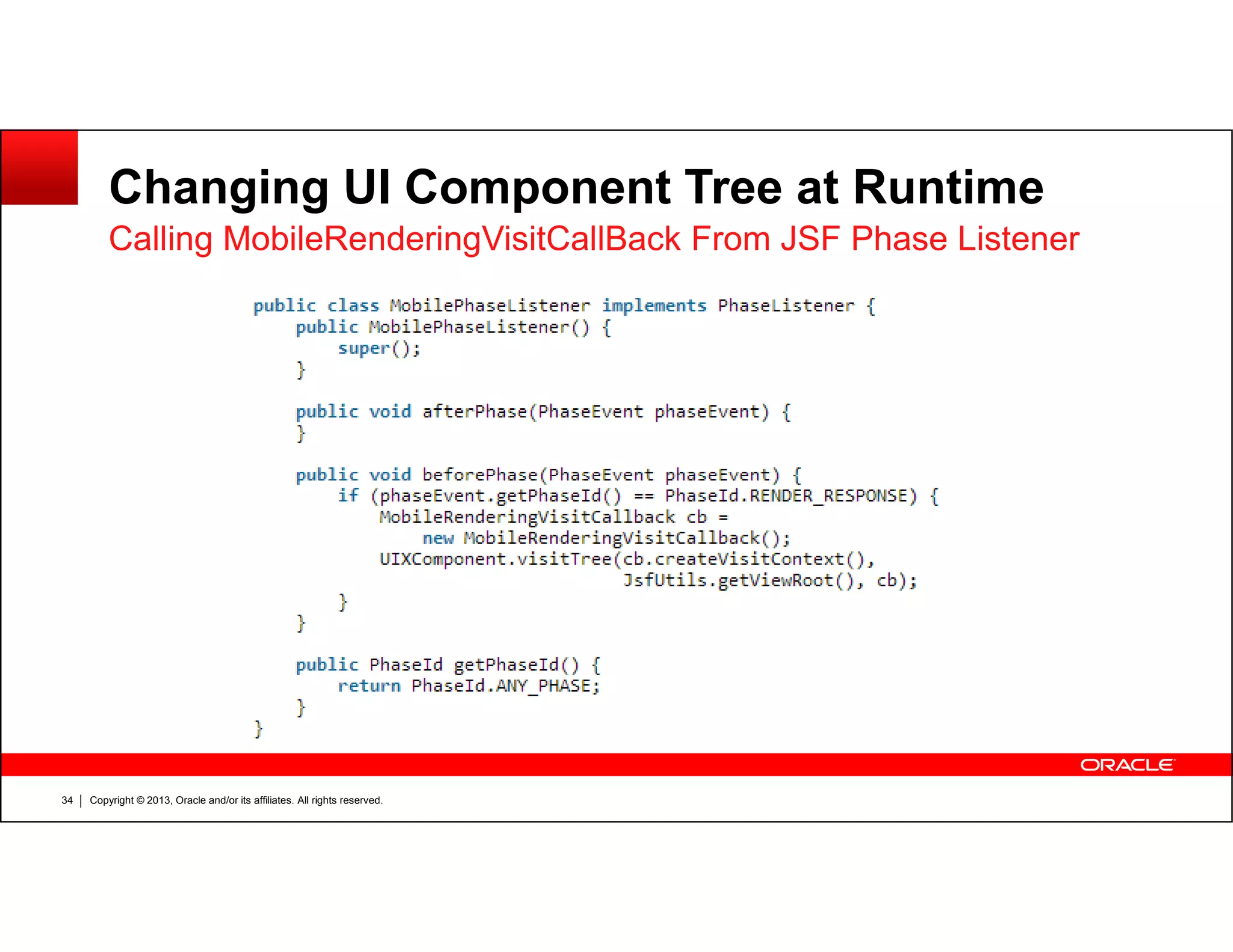
Calling MobileRenderingVisitCallBack From JSF Phase Listener
Copyright © 2013, Oracle and/or its affiliates. All rights reserved.34
Changing UI Component Tree at Runtime
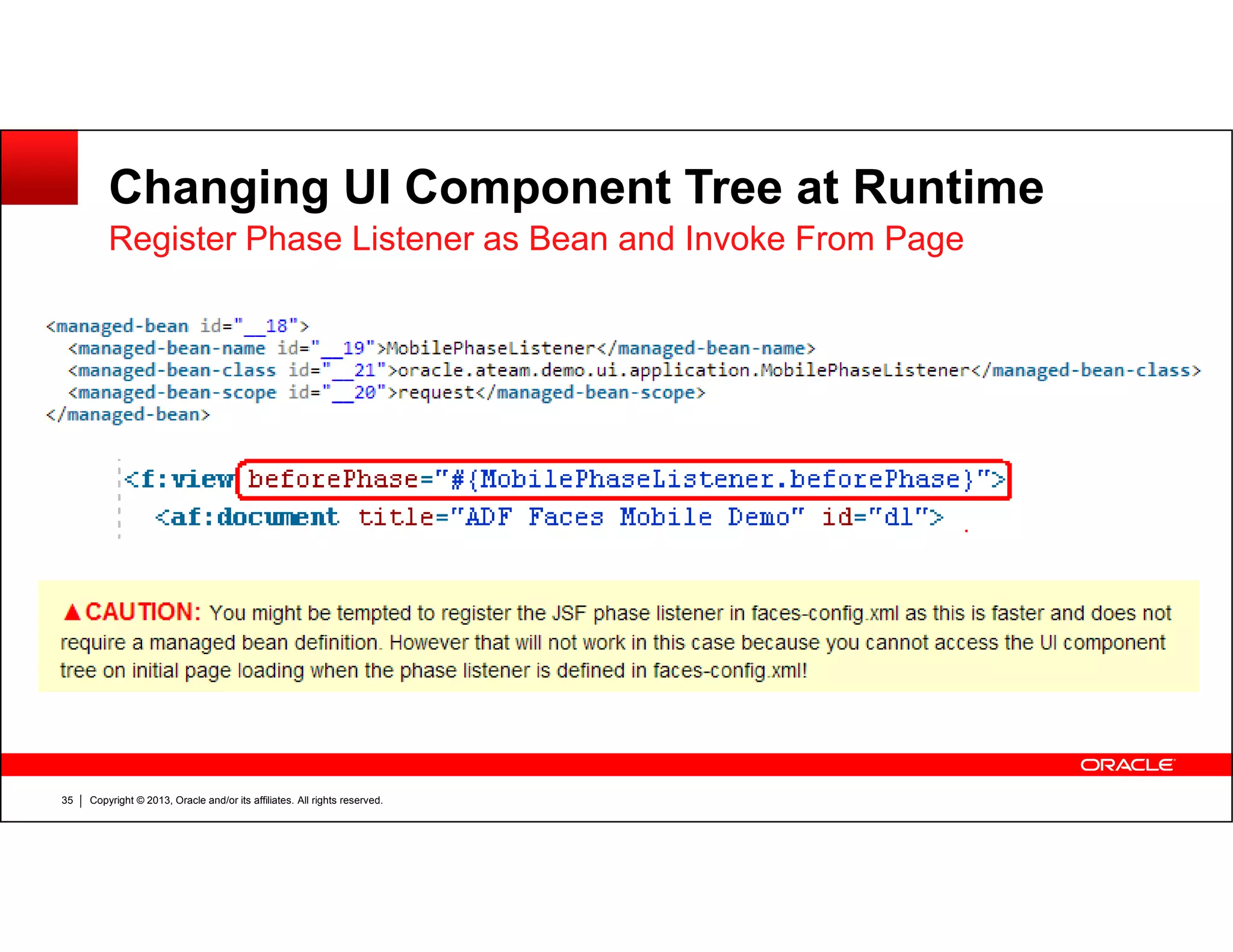
Register Phase Listener as Bean and Invoke From Page
Copyright © 2013, Oracle and/or its affiliates. All rights reserved.35
Changing UI Component Tree at Runtime
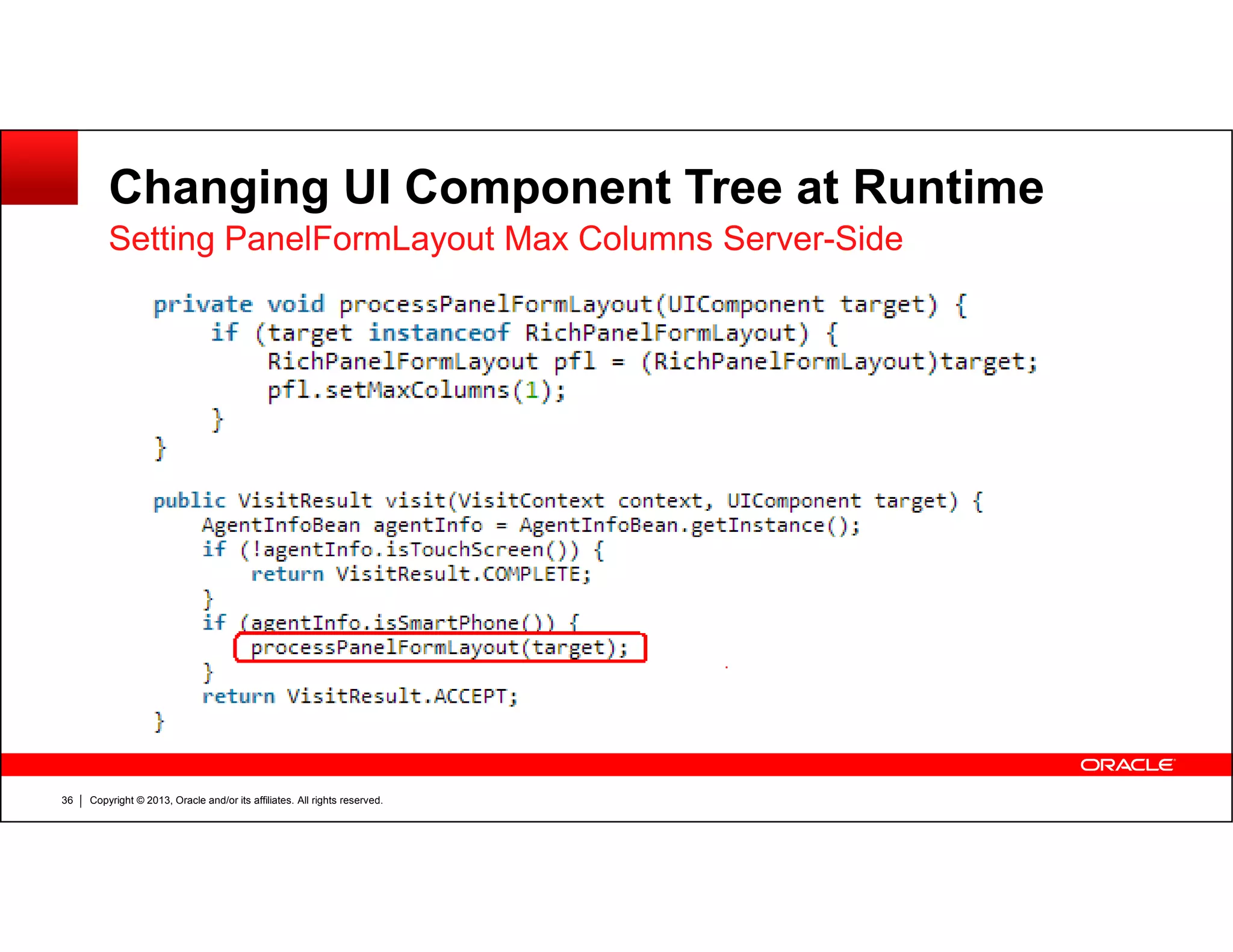
Setting PanelFormLayout Max Columns Server-Side
Copyright © 2013, Oracle and/or its affiliates. All rights reserved.36
Changing UI Component Tree at Runtime
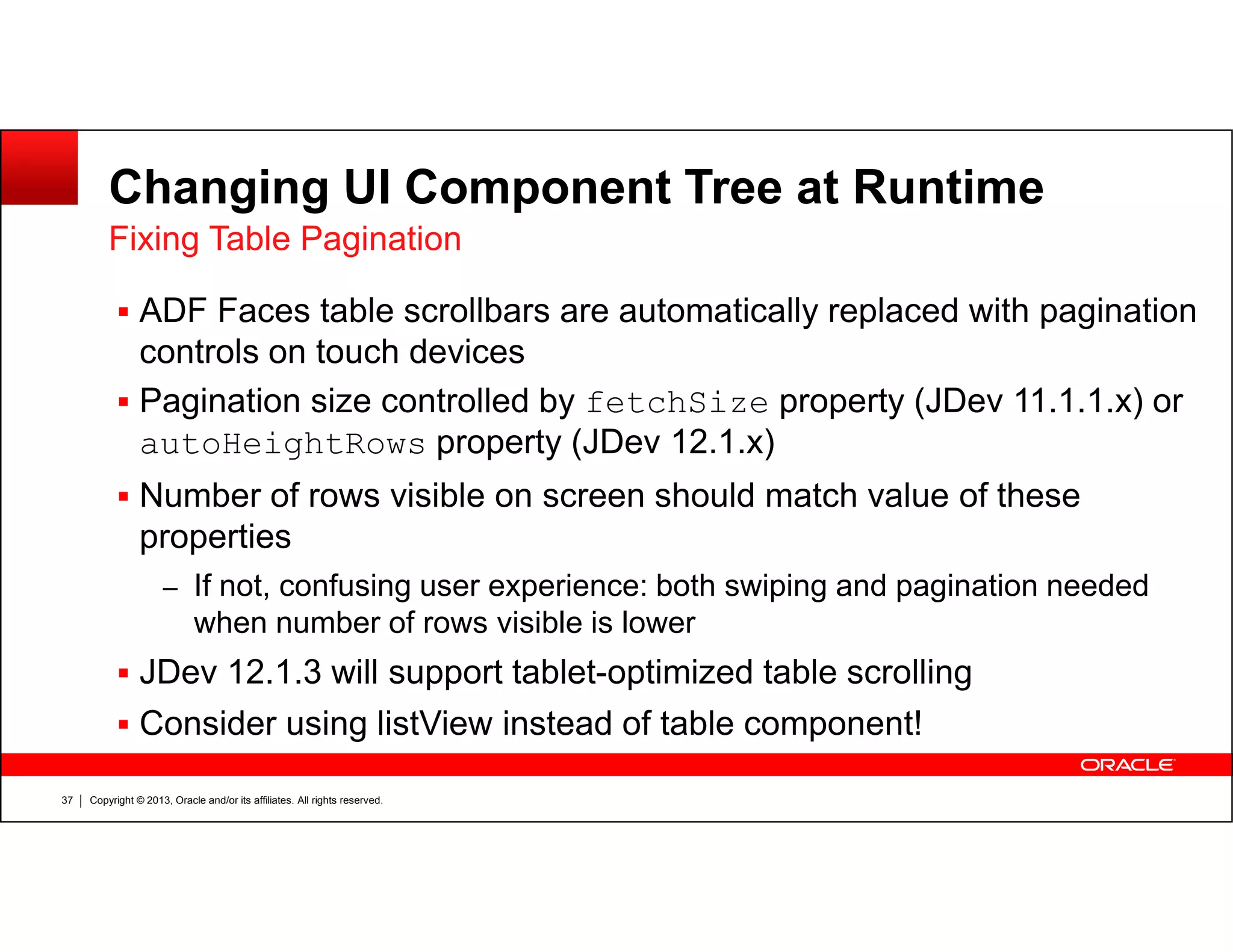
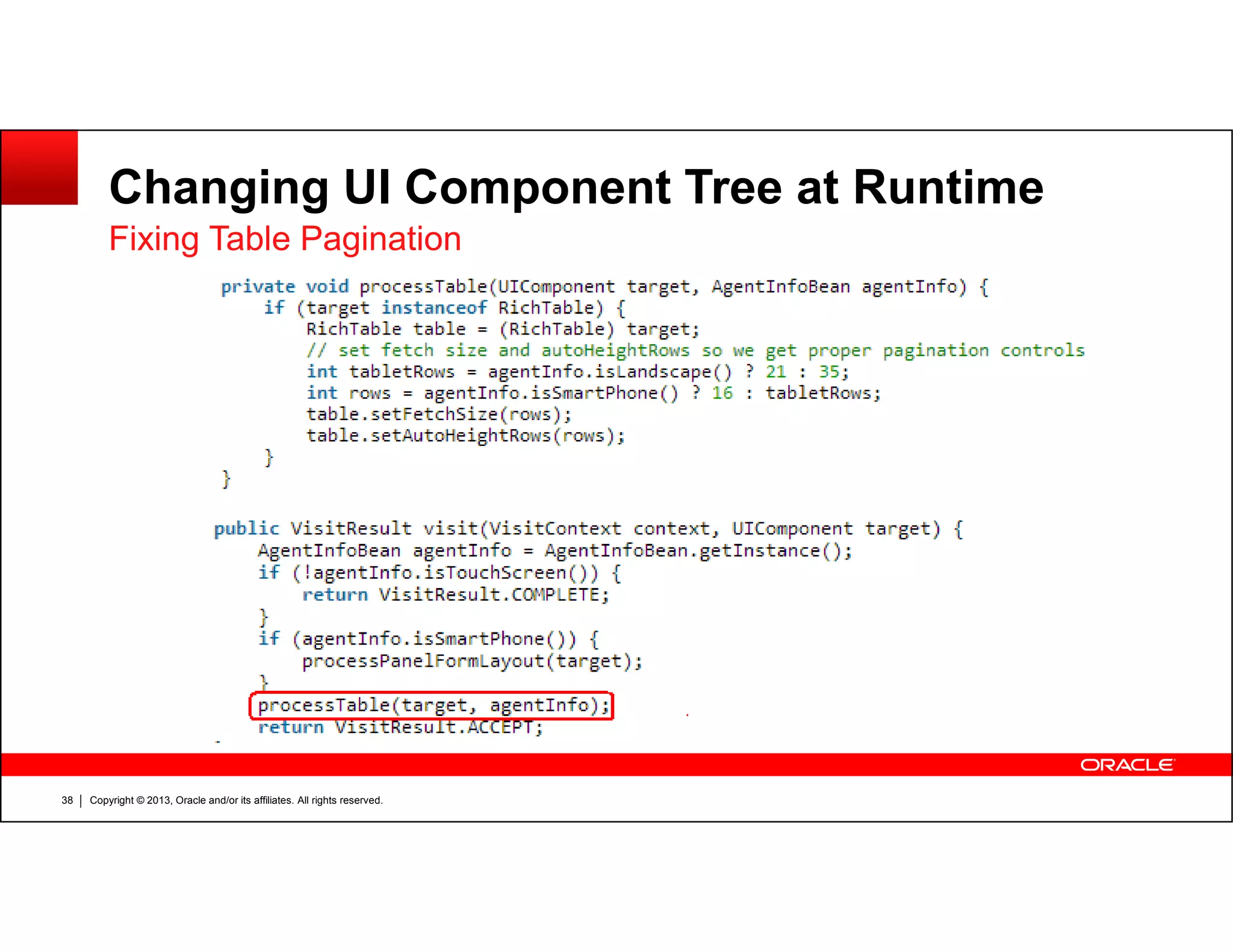
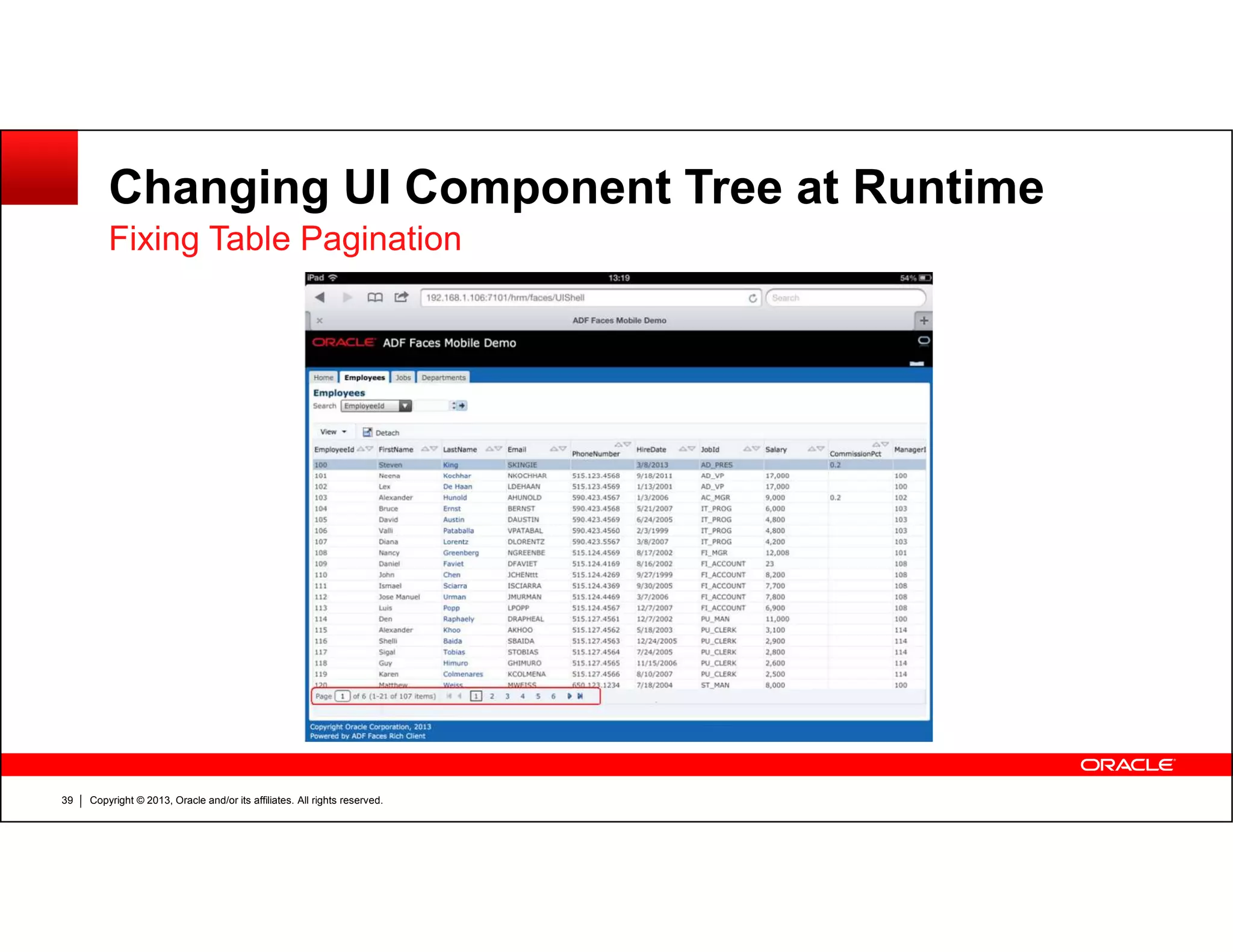
ADF Faces table scrollbars are automatically replaced with pagination
controls on touch devices
Pagination size controlled by fetchSize property (JDev 11.1.1.x) or
autoHeightRows property (JDev 12.1.x)
Fixing Table Pagination
Copyright © 2013, Oracle and/or its affiliates. All rights reserved.37
Number of rows visible on screen should match value of these
properties
– If not, confusing user experience: both swiping and pagination needed
when number of rows visible is lower
JDev 12.1.3 will support tablet-optimized table scrolling
Consider using listView instead of table component!
Changing UI Component Tree at Runtime
Fixing Table Pagination
Copyright © 2013, Oracle and/or its affiliates. All rights reserved.38
Changing UI Component Tree at Runtime
Fixing Table Pagination
Copyright © 2013, Oracle and/or its affiliates. All rights reserved.39
Changing UI Component Tree at Runtime
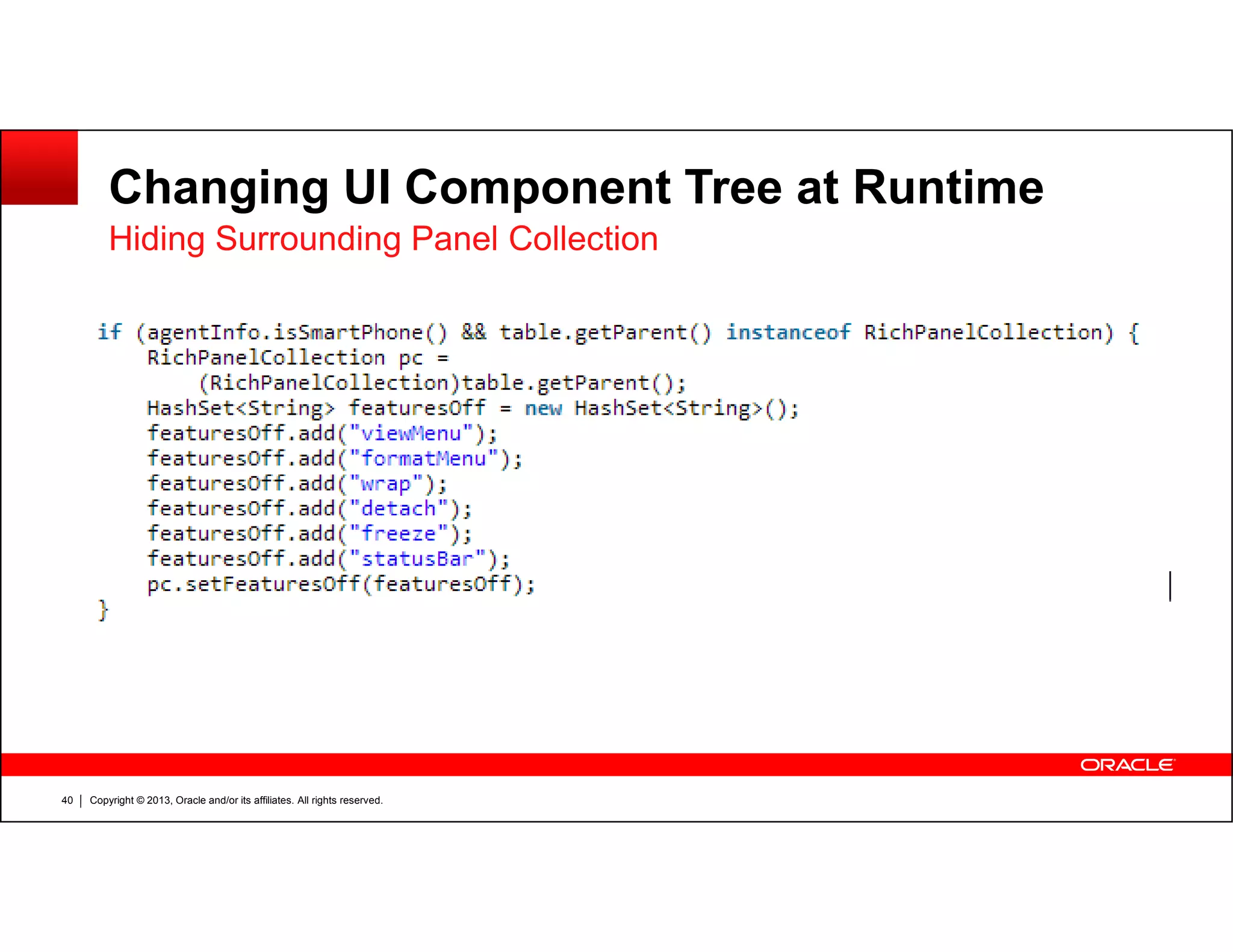
Hiding Surrounding Panel Collection
Copyright © 2013, Oracle and/or its affiliates. All rights reserved.40
Changing UI Component Tree at Runtime
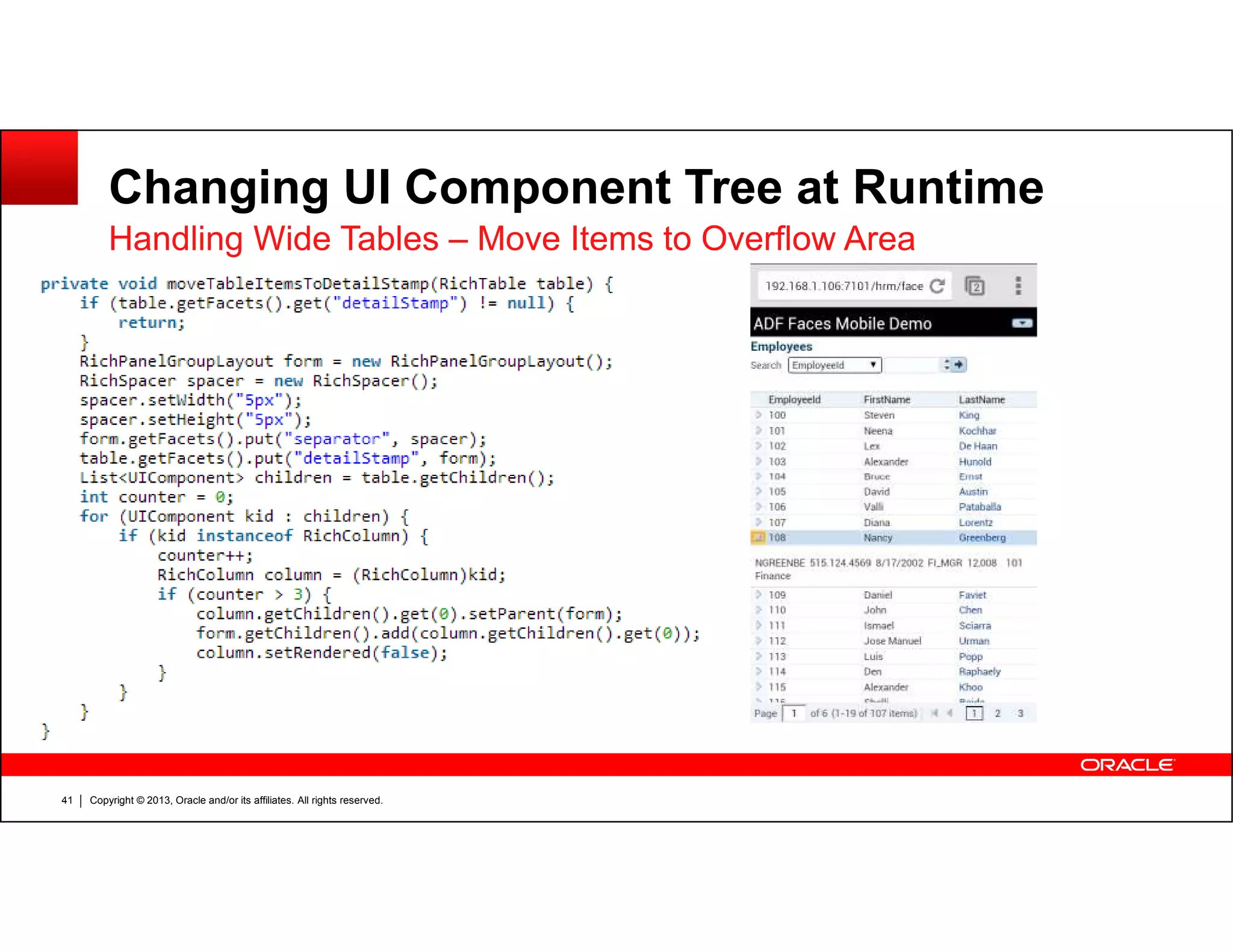
Handling Wide Tables – Move Items to Overflow Area
Copyright © 2013, Oracle and/or its affiliates. All rights reserved.41
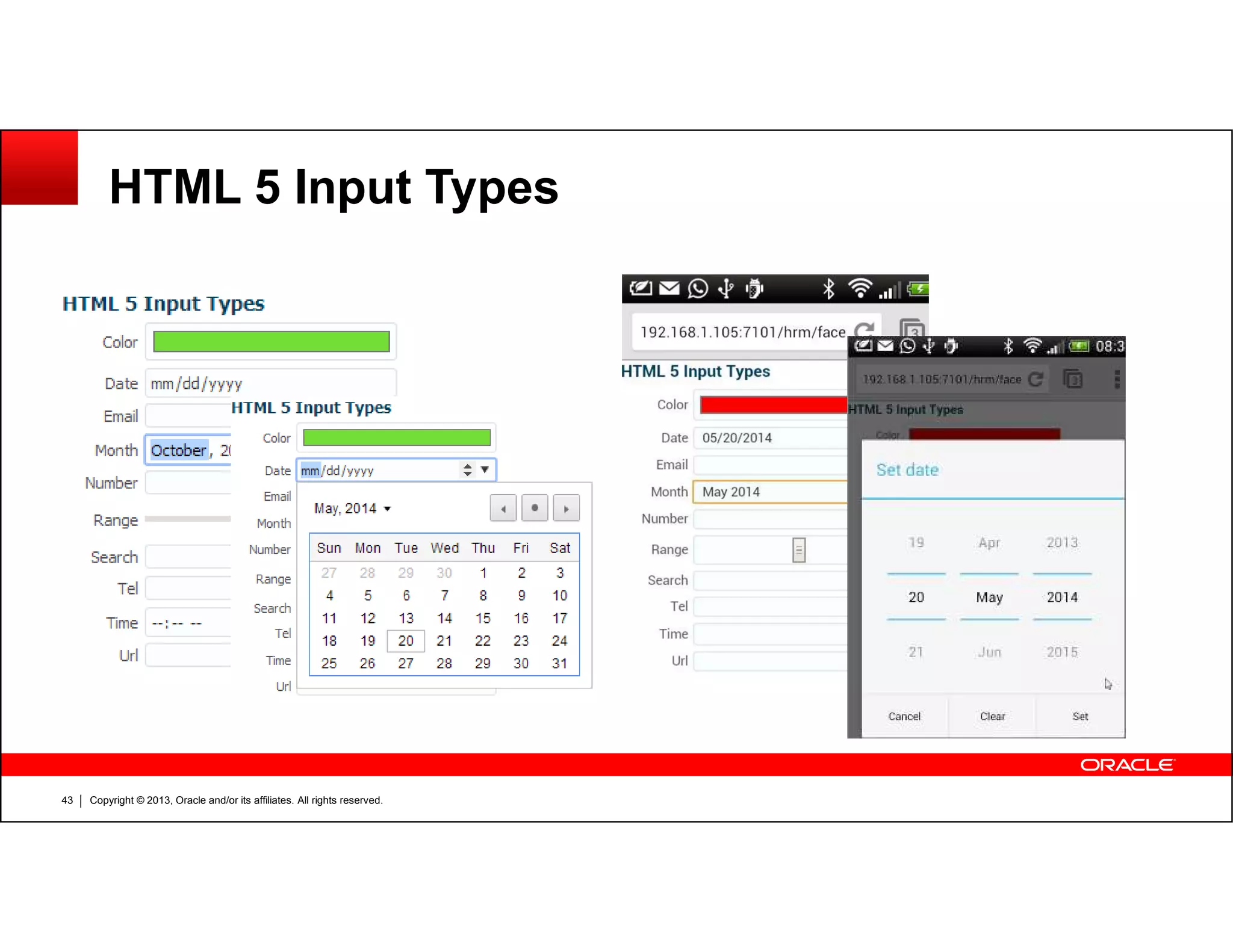
HTML 5 Input Types
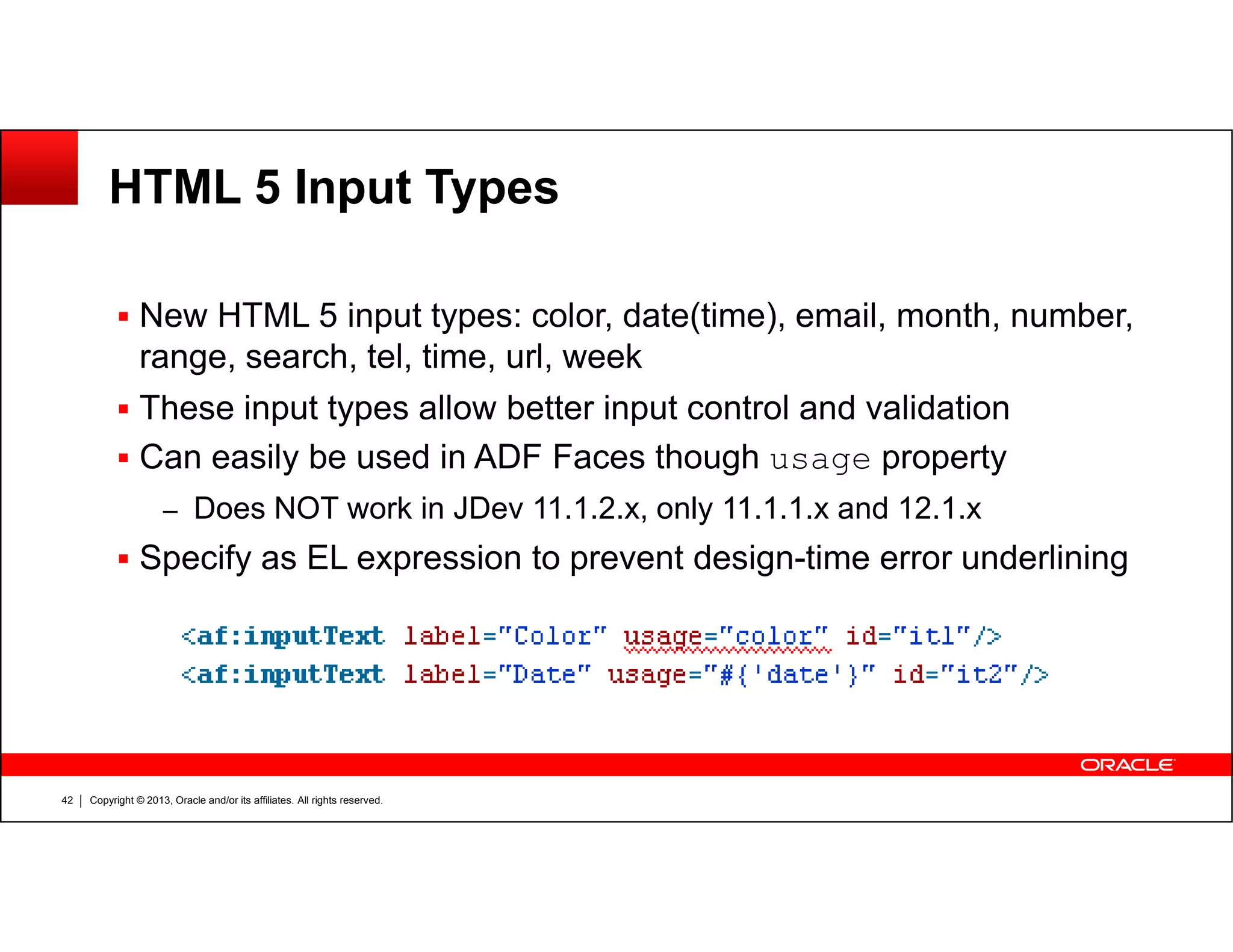
New HTML 5 input types: color, date(time), email, month, number,
range, search, tel, time, url, week
These input types allow better input control and validation
Can easily be used in ADF Faces though usage property
Copyright © 2013, Oracle and/or its affiliates. All rights reserved.42
usage
– Does NOT work in JDev 11.1.2.x, only 11.1.1.x and 12.1.x
Specify as EL expression to prevent design-time error underlining
HTML 5 Input Types
Copyright © 2013, Oracle and/or its affiliates. All rights reserved.43
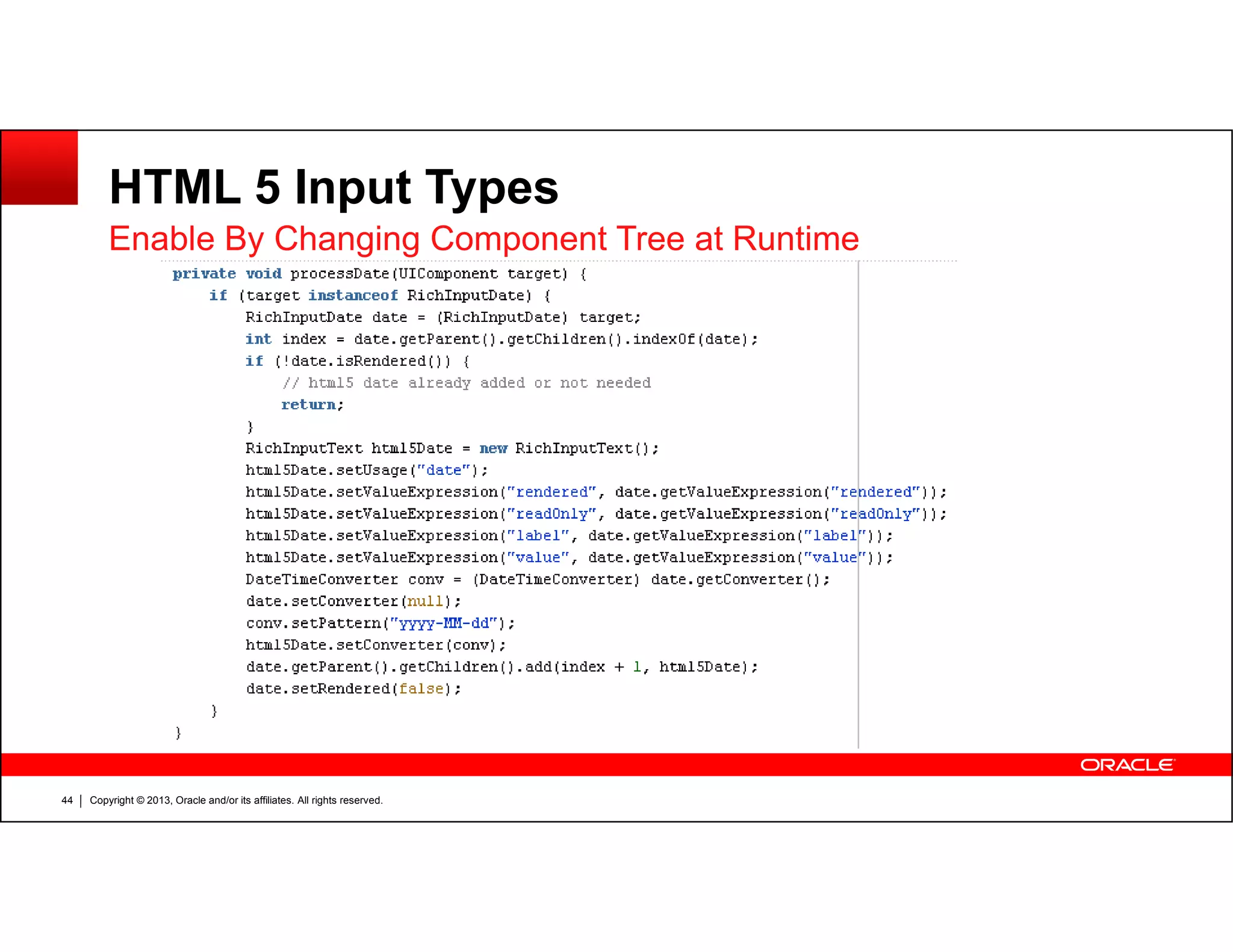
HTML 5 Input Types
Enable By Changing Component Tree at Runtime
Copyright © 2013, Oracle and/or its affiliates. All rights reserved.44
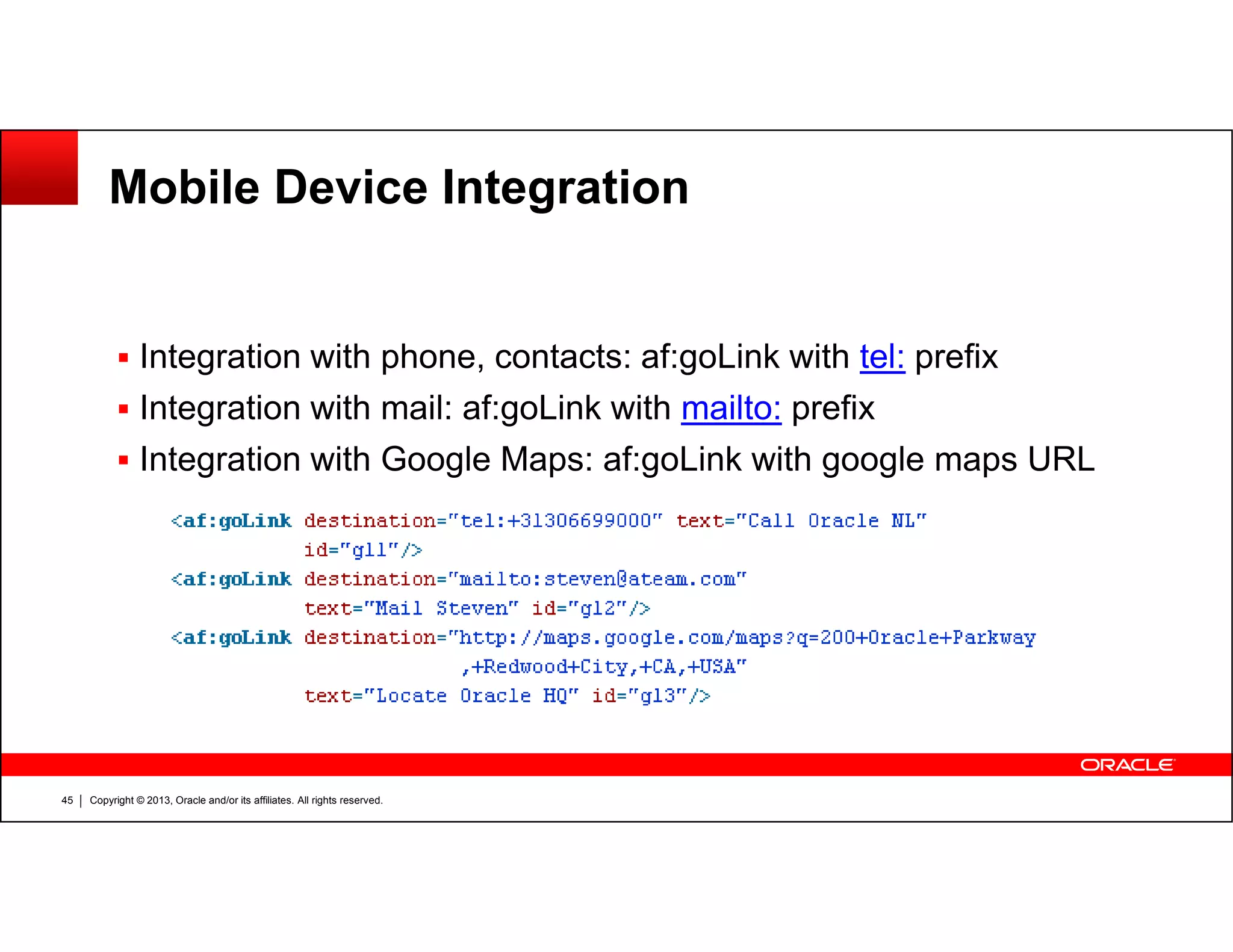
Mobile Device Integration
Integration with phone, contacts: af:goLink with tel: prefix
Integration with mail: af:goLink with mailto: prefix
Integration with Google Maps: af:goLink with google maps URL
Copyright © 2013, Oracle and/or its affiliates. All rights reserved.45
Integration with Google Maps: af:goLink with google maps URL
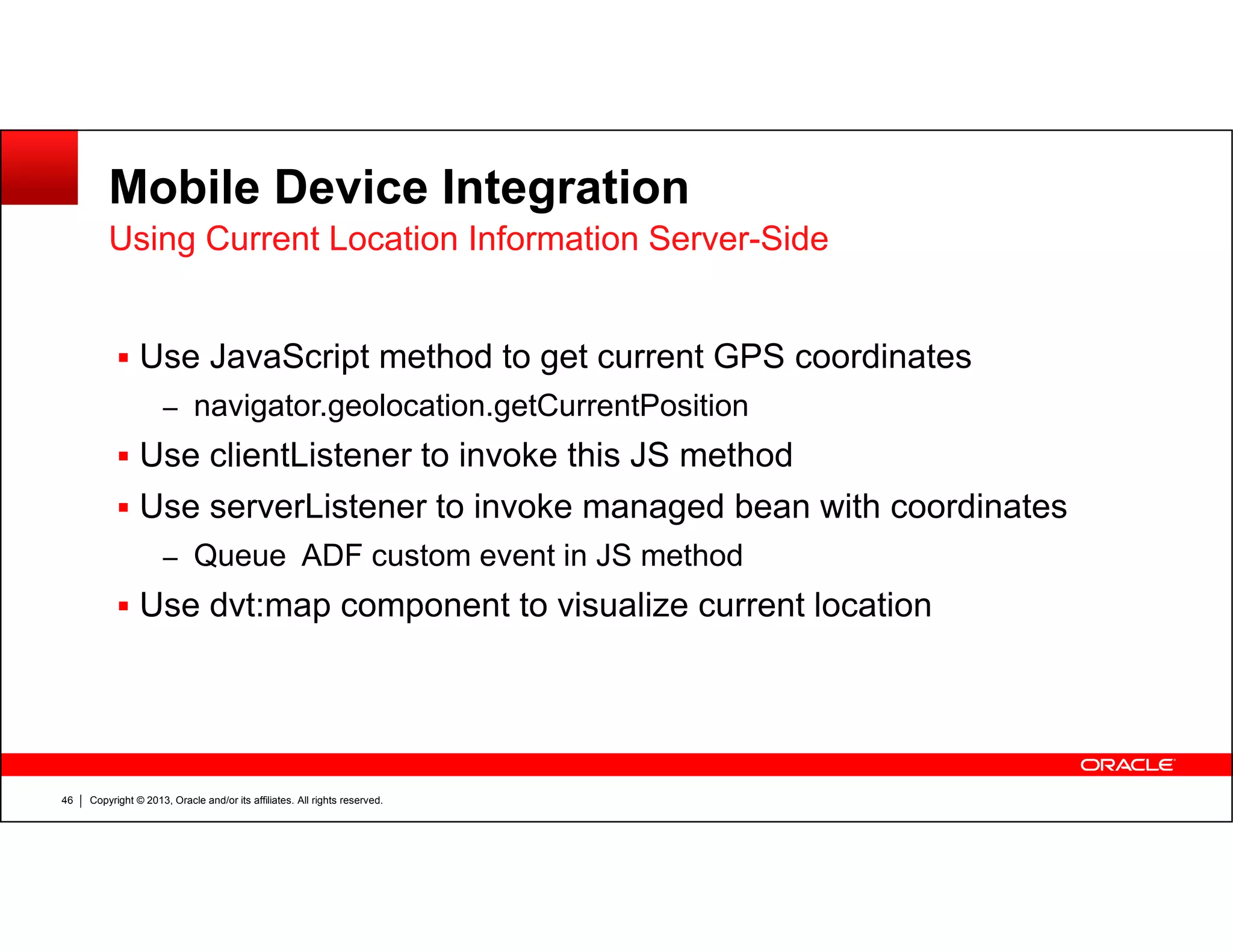
Mobile Device Integration
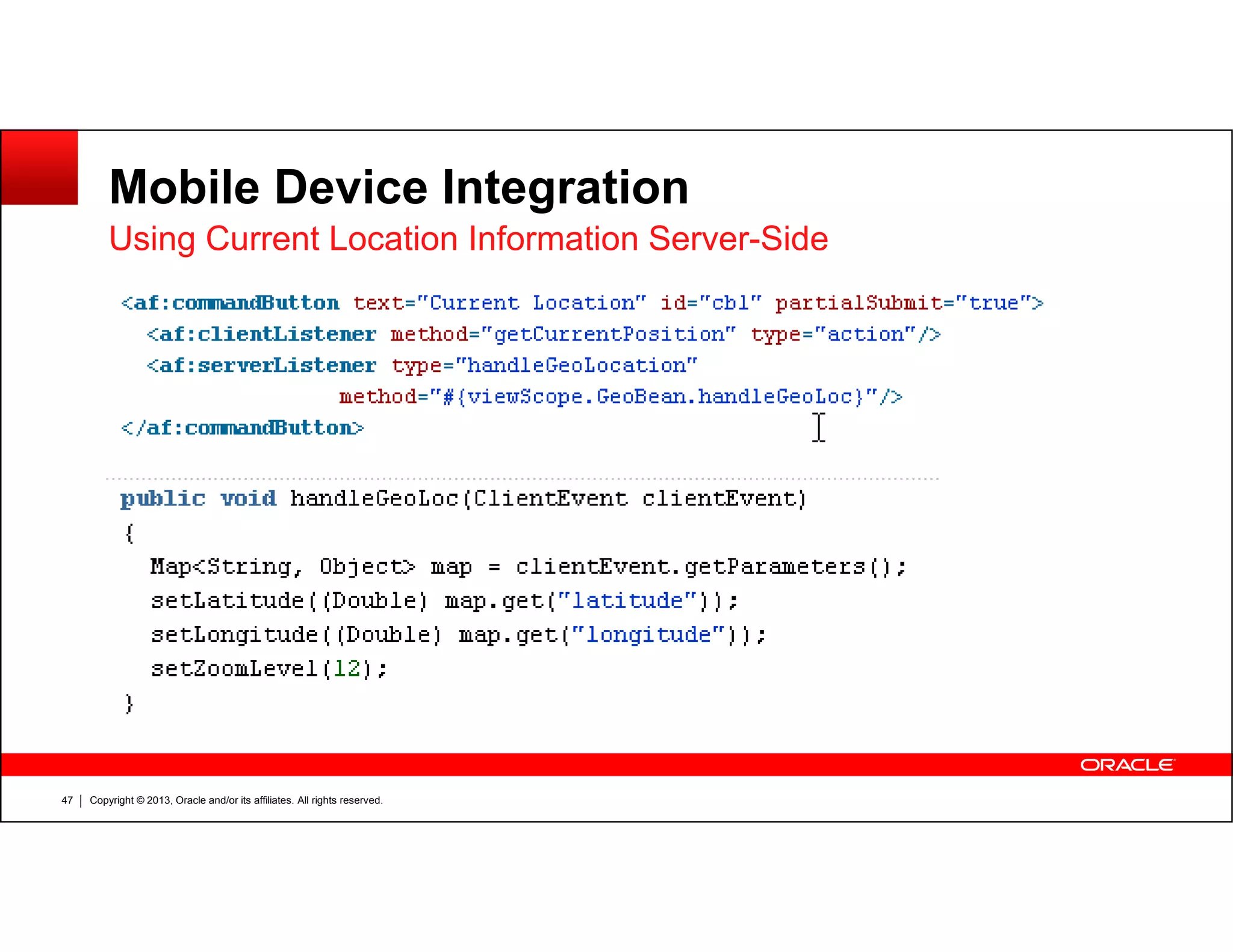
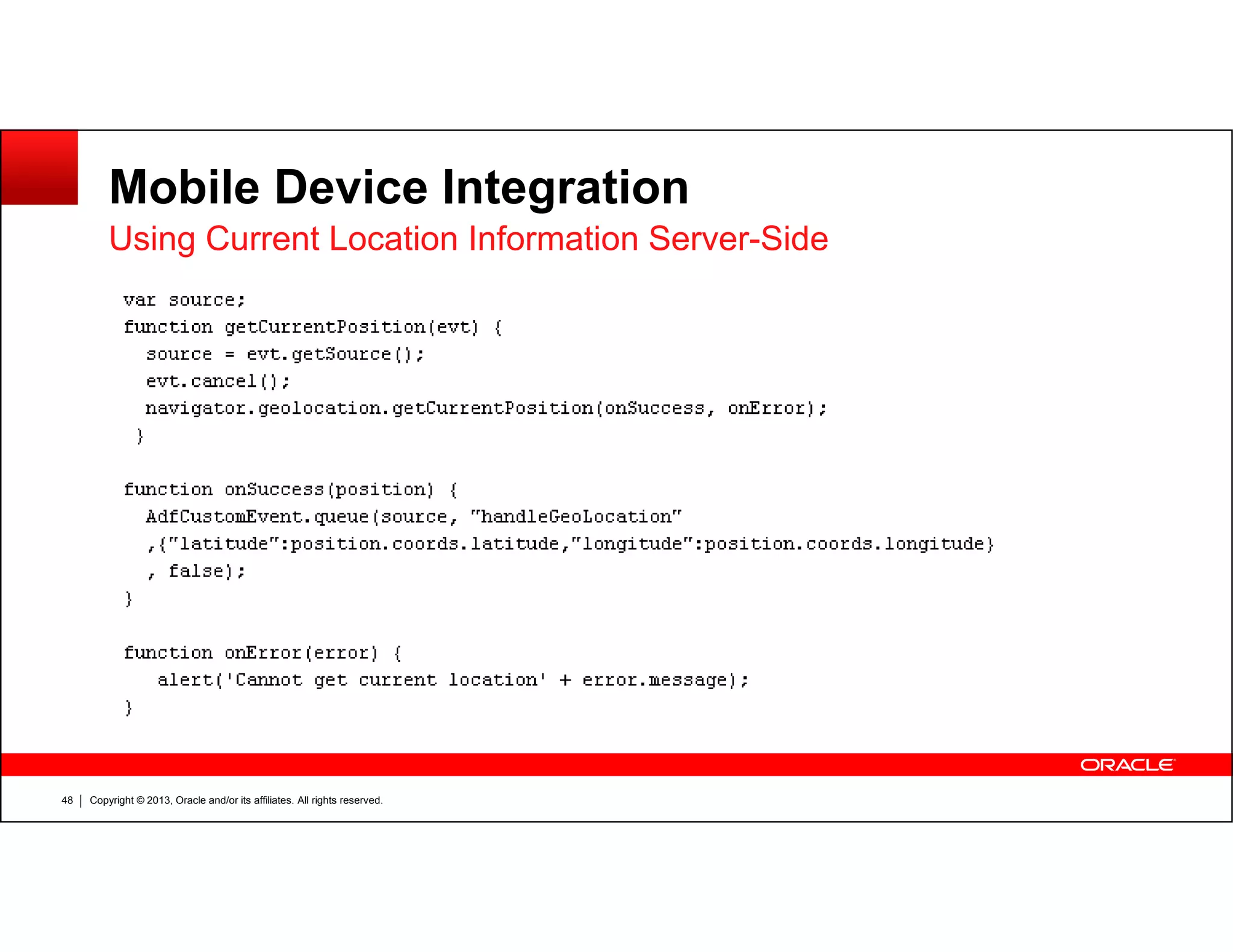
Use JavaScript method to get current GPS coordinates
– navigator.geolocation.getCurrentPosition
Use clientListener to invoke this JS method
Using Current Location Information Server-Side
Copyright © 2013, Oracle and/or its affiliates. All rights reserved.46
Use serverListener to invoke managed bean with coordinates
– Queue ADF custom event in JS method
Use dvt:map component to visualize current location
Mobile Device Integration
Using Current Location Information Server-Side
Copyright © 2013, Oracle and/or its affiliates. All rights reserved.47
Mobile Device Integration
Using Current Location Information Server-Side
Copyright © 2013, Oracle and/or its affiliates. All rights reserved.48
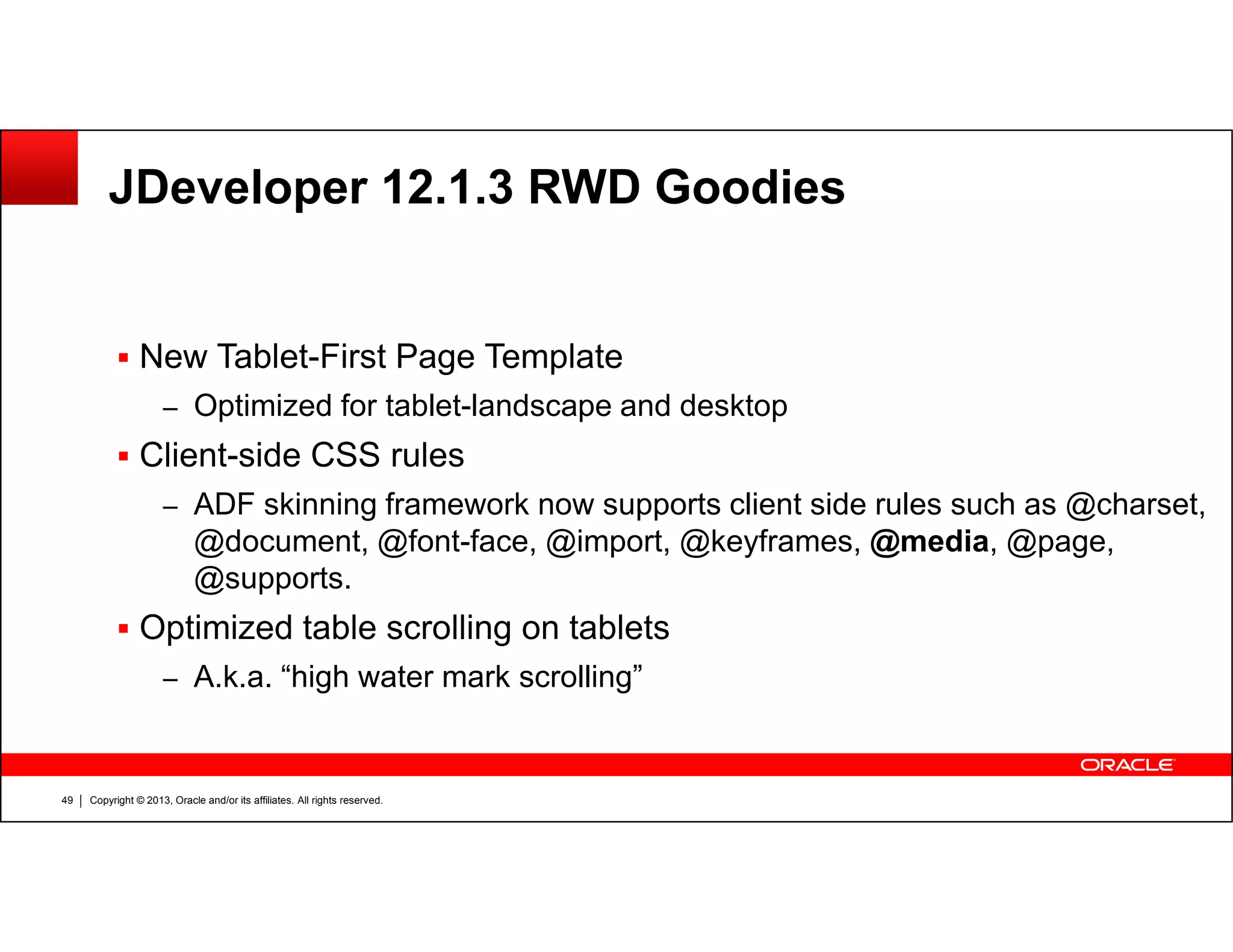
JDeveloper 12.1.3 RWD Goodies
New Tablet-First Page Template
– Optimized for tablet-landscape and desktop
Client-side CSS rules
Copyright © 2013, Oracle and/or its affiliates. All rights reserved.49
– ADF skinning framework now supports client side rules such as @charset,
@document, @font-face, @import, @keyframes, @media, @page,
@supports.
Optimized table scrolling on tablets
– A.k.a. “high water mark scrolling”
More Info
Going Mobile with ADF – Running ADF Faces on Mobile Phones and
Tablets
– http://www.ateam-oracle.com/going-mobile-with-adf-running-adf-faces-on-
mobile-phones-and-tablets/
ADF-WebCenter Responsive-Adaptive Design Beyond
– http://www.ateam-oracle.com/adf-webcenter-responsive-adaptive-design-
Copyright © 2013, Oracle and/or its affiliates. All rights reserved.50
– http://www.ateam-oracle.com/adf-webcenter-responsive-adaptive-design-
beyond/
Responsive Design for your ADF Faces Web Application
– https://blogs.oracle.com/shay/entry/responsive_design_for_your_adf
Copyright © 2013, Oracle and/or its affiliates. All rights reserved.51

Running ADF Faces on Tablets and Mobile Phones

  • 1.
    Running ADF Faceson Tablets and Mobile Devices Copyright © 2013, Oracle and/or its affiliates. All rights reserved.1 Tablets and Mobile Devices Steven Davelaar ADF/Webcenter A-Team Oracle Corporation @stevendavelaar
  • 2.
    The following isintended to outline our general product direction. It is intended for information purposes only, and may not be incorporated into any contract. It is not a commitment to deliver any material, code, or functionality, and should not be relied upon in making Copyright © 2013, Oracle and/or its affiliates. All rights reserved.2 functionality, and should not be relied upon in making purchasing decisions. The development, release, and timing of any features or functionality described for Oracle’s products remains at the sole discretion of Oracle.
  • 3.
    Agenda UI Design forTablets / Mobile Phones Introduction into Responsive Web Design Implementing Client-Side Responsive Web Design Copyright © 2013, Oracle and/or its affiliates. All rights reserved.3 Implementing Server-Side Adaptive Web Design Using HTML 5 Input Types Mobile Device Integration
  • 4.
    UI Design forTablets / Mobile Phones Understand the Mobile User Interface – Touch screen instead of mouse – No external keyboard – Smaller screen size, portrait vs landscape mode “Easy” to Deal with From Technical Perspective Copyright © 2013, Oracle and/or its affiliates. All rights reserved.4 – Support touch gestures – Use responsive web design to keep app usable with smaller screens Ignores Fundamental Differences in Usage – Natural User Interface vs Graphical User Interface – Check Out Oracle UX Patterns and Guidelines (See tomorrow’s sessions)
  • 5.
    Overview of Tabletand Phone Viewport Sizes Copyright © 2013, Oracle and/or its affiliates. All rights reserved.5 http://i-skool.co.uk/mobile-development/web-design-for-mobiles-and-tablets-viewport-sizes/
  • 6.
    Introduction to ResponseWeb Design (RWD) Wikipedia: RWD is aimed at crafting sites to provide – an optimal viewing experience – easy reading and navigation with a minimum of resizing, panning, and scrolling – across a wide range of devices (from mobile phones to desktop computer monitors Copyright © 2013, Oracle and/or its affiliates. All rights reserved.6 monitors Aspects of RWD – Fluid grids: sizing relative(%) rather than absolute (pixels, points) – Media Queries: Use different CSS styles based on screen dimensions – Flexible Images: Images that resize based on screen dimensions
  • 7.
    RWD in ADFFaces Use panelGroupLayout elements – Set layout=“vertical”: generates simple HTML <div> element – Set styleClass property with width in percentage and float:left Copyright © 2013, Oracle and/or its affiliates. All rights reserved.7 – Change styleClass properties using media queries Define media queries in separate CSS file – Media queries cannot be defined in skinning CSS file Do NOT use stretching layouts or panelGridLayout
  • 8.
    ADF Faces –RWD Example Copyright © 2013, Oracle and/or its affiliates. All rights reserved.8
  • 9.
    ADF Faces RWDExample – Media Queries Copyright © 2013, Oracle and/or its affiliates. All rights reserved.9 Media queries can be defined in CSS skinning file as of JDev 12.1.3
  • 10.
    ADF Faces RWDExample – Media Queries Copyright © 2013, Oracle and/or its affiliates. All rights reserved.10
  • 11.
    ADF Faces RWDExample in Action Media Query Breakpoints Copyright © 2013, Oracle and/or its affiliates. All rights reserved.11 950px730px320px
  • 12.
    RWD Example inAction – Width > 950px Copyright © 2013, Oracle and/or its affiliates. All rights reserved.12 PanelForm 1 width: 50% PanelForm 2 and 3 width: 25%
  • 13.
    RWD Example inAction – Width 730-950px Copyright © 2013, Oracle and/or its affiliates. All rights reserved.13 PanelForm 1 width: 66% PanelForm 2 and 3 width: 33% – (bug causes panel form 3 header to disappear)
  • 14.
    RWD Example inAction – Width 320-730px Copyright © 2013, Oracle and/or its affiliates. All rights reserved.14 PanelForm 1 width: 100% PanelForm 2 and 3 width: 50%
  • 15.
    RWD Example inAction – Width < 320px PanelForm 1 width: 100% PanelForm 2 and 3 width: 100% Would be nice to lay out panelForm1 with 1 column instead Copyright © 2013, Oracle and/or its affiliates. All rights reserved.15 panelForm1 with 1 column instead of 2 – Can be done using Window.matchMedia Listener
  • 16.
    RWD Example –Window.matchMedia Listener Copyright © 2013, Oracle and/or its affiliates. All rights reserved.16
  • 17.
    RWD Example –Window.matchMedia Listener Copyright © 2013, Oracle and/or its affiliates. All rights reserved.17
  • 18.
    RWD Example –Window.matchMedia Listener Copyright © 2013, Oracle and/or its affiliates. All rights reserved.18
  • 19.
    Notes on Window.matchMediaListeners Only supported by newer (IE) browsers (IE10+) – Check out http://caniuse.com/#feat=matchmedia Requires client-side lookup of ADF Faces components Copyright © 2013, Oracle and/or its affiliates. All rights reserved.19 – Client Id can be difficult to derive when using nested naming containers – There can be many components on many pages that need client-side manipulation – Can result in ugly, large if-then-else Javascript methods – Solution as of JDeveloper 12.1.2: clientListener type “mediaEvent”
  • 20.
    JDev 12.1.2 –clientListener Type mediaEvent Copyright © 2013, Oracle and/or its affiliates. All rights reserved.20
  • 21.
    JDev 12.1.2 –clientListener Type mediaEvent Clean component-specific methods, easy component lookup Requires complex generic JavaScript (not shown on slides) – JavaScript code to invoke the method specified in clientListener must be written by you! Traverse complete component tree client-side Copyright © 2013, Oracle and/or its affiliates. All rights reserved.21 – Traverse complete component tree client-side – Register each component with clientListener type “mediaEvent” – Within each matchMedia listener method, loop over components and invoke the associated JS method using AdfCustomEvent.queue Will become completely declarative in JDev 12.1.4 – New component tag for adding a media event behavior
  • 22.
    RWD Example –Test On Phone / Tablet Initial page has unreadable small font RWD doesn’t seem to work Screen readable after first user interaction Fix: add viewport metadata tag Copyright © 2013, Oracle and/or its affiliates. All rights reserved.22 Google: “don't forget the viewport meta tag”
  • 23.
    Server-side Adaptive Design Client-sideresponsive design techniques are usually not enough for ADF Faces applications For more dramatic changes in layout, we need to go to the server Copyright © 2013, Oracle and/or its affiliates. All rights reserved.23 – Use EL in layout properties that reference screen dimensions – Dynamic switching between page templates – Traversing UI components tree to programmatically change layout Go to server on page load to communicate screen dimensions Go to server when device orientation changes
  • 24.
    Server-side Adaptive Design Goto server on page load to “communicate” screen dimensions Copyright © 2013, Oracle and/or its affiliates. All rights reserved.24
  • 25.
    Server-side Adaptive Design Goto server on page load to “communicate” screen dimensions Copyright © 2013, Oracle and/or its affiliates. All rights reserved.25
  • 26.
    Server-side Adaptive Design Goto server on page load to “communicate” screen dimensions Copyright © 2013, Oracle and/or its affiliates. All rights reserved.26
  • 27.
    Server-side Adaptive Design Goto server when device orientation changes Add call to callSetScreenSize in matchMedia listener method Copyright © 2013, Oracle and/or its affiliates. All rights reserved.27
  • 28.
    Obtaining Browser AgentInfo at Server Copyright © 2013, Oracle and/or its affiliates. All rights reserved.28
  • 29.
    Convenience Methods inAgentInfoBean Copyright © 2013, Oracle and/or its affiliates. All rights reserved.29
  • 30.
    Dynamic Page Templates UseEL Expression in viewId property Copyright © 2013, Oracle and/or its affiliates. All rights reserved.30
  • 31.
    Dynamic Page Templates Copyright© 2013, Oracle and/or its affiliates. All rights reserved.31
  • 32.
    Changing UI ComponentTree at Runtime EL expressions to optimize rendering for each device type works fine – Requires you to go into each and every page – Not very flexible when you need to support new device types Copyright © 2013, Oracle and/or its affiliates. All rights reserved.32 A programmatic but more generic and flexible alternative: – Traverse UI component tree at runtime – Change UI component properties as desired based on agent/screen info – Implement Using VisitCallBack pattern and JSF phase listener
  • 33.
    Changing UI ComponentTree at Runtime Implement VisitCallBack Interface Copyright © 2013, Oracle and/or its affiliates. All rights reserved.33
  • 34.
    Changing UI ComponentTree at Runtime Calling MobileRenderingVisitCallBack From JSF Phase Listener Copyright © 2013, Oracle and/or its affiliates. All rights reserved.34
  • 35.
    Changing UI ComponentTree at Runtime Register Phase Listener as Bean and Invoke From Page Copyright © 2013, Oracle and/or its affiliates. All rights reserved.35
  • 36.
    Changing UI ComponentTree at Runtime Setting PanelFormLayout Max Columns Server-Side Copyright © 2013, Oracle and/or its affiliates. All rights reserved.36
  • 37.
    Changing UI ComponentTree at Runtime ADF Faces table scrollbars are automatically replaced with pagination controls on touch devices Pagination size controlled by fetchSize property (JDev 11.1.1.x) or autoHeightRows property (JDev 12.1.x) Fixing Table Pagination Copyright © 2013, Oracle and/or its affiliates. All rights reserved.37 Number of rows visible on screen should match value of these properties – If not, confusing user experience: both swiping and pagination needed when number of rows visible is lower JDev 12.1.3 will support tablet-optimized table scrolling Consider using listView instead of table component!
  • 38.
    Changing UI ComponentTree at Runtime Fixing Table Pagination Copyright © 2013, Oracle and/or its affiliates. All rights reserved.38
  • 39.
    Changing UI ComponentTree at Runtime Fixing Table Pagination Copyright © 2013, Oracle and/or its affiliates. All rights reserved.39
  • 40.
    Changing UI ComponentTree at Runtime Hiding Surrounding Panel Collection Copyright © 2013, Oracle and/or its affiliates. All rights reserved.40
  • 41.
    Changing UI ComponentTree at Runtime Handling Wide Tables – Move Items to Overflow Area Copyright © 2013, Oracle and/or its affiliates. All rights reserved.41
  • 42.
    HTML 5 InputTypes New HTML 5 input types: color, date(time), email, month, number, range, search, tel, time, url, week These input types allow better input control and validation Can easily be used in ADF Faces though usage property Copyright © 2013, Oracle and/or its affiliates. All rights reserved.42 usage – Does NOT work in JDev 11.1.2.x, only 11.1.1.x and 12.1.x Specify as EL expression to prevent design-time error underlining
  • 43.
    HTML 5 InputTypes Copyright © 2013, Oracle and/or its affiliates. All rights reserved.43
  • 44.
    HTML 5 InputTypes Enable By Changing Component Tree at Runtime Copyright © 2013, Oracle and/or its affiliates. All rights reserved.44
  • 45.
    Mobile Device Integration Integrationwith phone, contacts: af:goLink with tel: prefix Integration with mail: af:goLink with mailto: prefix Integration with Google Maps: af:goLink with google maps URL Copyright © 2013, Oracle and/or its affiliates. All rights reserved.45 Integration with Google Maps: af:goLink with google maps URL
  • 46.
    Mobile Device Integration UseJavaScript method to get current GPS coordinates – navigator.geolocation.getCurrentPosition Use clientListener to invoke this JS method Using Current Location Information Server-Side Copyright © 2013, Oracle and/or its affiliates. All rights reserved.46 Use serverListener to invoke managed bean with coordinates – Queue ADF custom event in JS method Use dvt:map component to visualize current location
  • 47.
    Mobile Device Integration UsingCurrent Location Information Server-Side Copyright © 2013, Oracle and/or its affiliates. All rights reserved.47
  • 48.
    Mobile Device Integration UsingCurrent Location Information Server-Side Copyright © 2013, Oracle and/or its affiliates. All rights reserved.48
  • 49.
    JDeveloper 12.1.3 RWDGoodies New Tablet-First Page Template – Optimized for tablet-landscape and desktop Client-side CSS rules Copyright © 2013, Oracle and/or its affiliates. All rights reserved.49 – ADF skinning framework now supports client side rules such as @charset, @document, @font-face, @import, @keyframes, @media, @page, @supports. Optimized table scrolling on tablets – A.k.a. “high water mark scrolling”
  • 50.
    More Info Going Mobilewith ADF – Running ADF Faces on Mobile Phones and Tablets – http://www.ateam-oracle.com/going-mobile-with-adf-running-adf-faces-on- mobile-phones-and-tablets/ ADF-WebCenter Responsive-Adaptive Design Beyond – http://www.ateam-oracle.com/adf-webcenter-responsive-adaptive-design- Copyright © 2013, Oracle and/or its affiliates. All rights reserved.50 – http://www.ateam-oracle.com/adf-webcenter-responsive-adaptive-design- beyond/ Responsive Design for your ADF Faces Web Application – https://blogs.oracle.com/shay/entry/responsive_design_for_your_adf
  • 51.
    Copyright © 2013,Oracle and/or its affiliates. All rights reserved.51