More Related Content

KEY
Alfresco勉強会20120829: やさしいShareダッシュレットの作り方 
PPTX
Alfresco勉強会#36 alfresco 5でカスタムREST APIを作ってみよう 
PPTX
Alfresco勉強会#33 alfresco 5.1でコンテンツ自動削除を実装してみた 
PDF
20130606 alfresco study16audit 
PPTX
Alfresco勉強会#30 alfrescoとshareのJavaScriptをデバッグしよう 
PDF
![[Alfresco]ドキュメントライブラリのUIカスタマイズ](https://cdn.slidesharecdn.com/ss_thumbnails/ui-121011034109-phpapp01-thumbnail.jpg?width=640&height=640&fit=bounds)
PDF
[Alfresco]ドキュメントライブラリのUIカスタマイズ 
PDF
15分でCakePHPを始める方法(Nseg 2013-11-09 ) What's hot

PDF

PPTX

PPTX
Alfresco勉強会#28 alfresco 5.0の検索機能をみてみよう 
PDF

KEY

PDF

PDF

PDF

PPTX

PDF
omoon.org の裏側 〜FuelPHP の task 活用例〜 
PDF
FuelPHPで3種のprofilerを使ってみた 
PDF

PDF

PDF

KEY

PDF
ASP.NET MVC のルーティング設定を少しだけ REST ぽくする 
PDF

PDF

PDF

KEY
Viewers also liked

PPTX
Alfresco Javascript Consoleのご紹介 
PPTX

PPTX

PPTX

PPTX
Alfresco Bulk Import toolのご紹介 
PDF

PDF
gumiStudy#7 The MessagePack Project 
PDF

PDF

KEY

PDF
企業のためのコンテンツプラットホーム Alfresco 
PDF

PDF

PDF
Information sharing and Experience consistency at Cookpad mobile application 
PPTX
Similar to メタプログラミングRuby勉強会#7(fluentプラグイン)

PDF

PPTX
Fluentd+elasticsearch+kibana(fluentd編) 
PDF
Should we write such like plugin or not? ![[Black Belt Online Seminar] AWS上でのログ管理](https://cdn.slidesharecdn.com/ss_thumbnails/aws-log-mgmt-161201043056-thumbnail.jpg?width=640&height=640&fit=bounds)
PDF
[Black Belt Online Seminar] AWS上でのログ管理 
PDF
(うしなわれた)Fluentd output-convert_structure 
PDF

PDF
社内向けTech Talk資料~Fluentdの基本紹介~ 
PDF
fluent-plugin-resque_stat More from Ashitaba YOSHIOKA

PPTX

PPTX

PPT

PPT

PPT

PDF

KEY

KEY

KEY

KEY

KEY

KEY

KEY

KEY
Alfresco Java Foundation API 
KEY
Alfresco and Web Script (English) 
KEY

KEY

KEY
メタプログラミングRuby勉強会#7(fluentプラグイン)
- 1.
- 2.
- 3.
- 4.
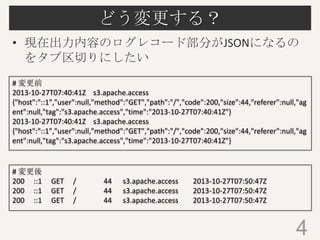
どう変更する?
• 現在出力内容のログレコード部分がJSONになるの
をタブ区切りにしたい
# 変更前
2013-10-27T07:40:41Zs3.apache.access
{"host":"::1","user":null,"method":"GET","path":"/","code":200,"size":44,"referer":null,"ag
ent":null,"tag":"s3.apache.access","time":"2013-10-27T07:40:41Z"}
2013-10-27T07:40:41Z s3.apache.access
{"host":"::1","user":null,"method":"GET","path":"/","code":200,"size":44,"referer":null,"ag
ent":null,"tag":"s3.apache.access","time":"2013-10-27T07:40:41Z"}
# 変更後
200 ::1
200 ::1
200 ::1
GET
GET
GET
/
/
/
44
44
44
s3.apache.access
s3.apache.access
s3.apache.access
2013-10-27T07:50:47Z
2013-10-27T07:50:47Z
2013-10-27T07:50:47Z
4
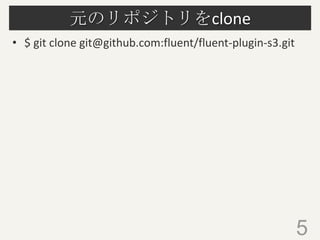
- 5.
- 6.
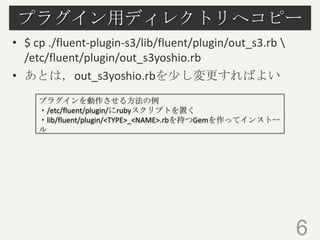
プラグイン用ディレクトリへコピー
• $ cp./fluent-plugin-s3/lib/fluent/plugin/out_s3.rb
/etc/fluent/plugin/out_s3yoshio.rb
• あとは,out_s3yoshio.rbを少し変更すればよい
プラグインを動作させる方法の例
・/etc/fluent/plugin/にrubyスクリプトを置く
・lib/fluent/plugin/<TYPE>_<NAME>.rbを持つGemを作ってインストー
ル
6
- 7.
- 8.
- 9.
- 10.
- 11.

![diff
• 変更したもの(out_s3yoshio.rb)とオリジナル
(out_s3.rb)のdiff
6c6
< Fluent::Plugin.register_output('s3yoshio', self)
--> Fluent::Plugin.register_output('s3', self)
38d37
< config_param :out_format, :string, :default => 'tab'
51c50,54
< @out_format = conf['out_format']
--> if format_json = conf['format_json']
>
@format_json = true
> else
>
@format_json = false
> end
110c113
< if @include_time_key
--> if @include_time_key || !@format_json
7](https://image.slidesharecdn.com/metaruby7-131027031516-phpapp01/85/Ruby-7-fluent-7-320.jpg)
![diff(続き)
• 変更したのはパラメータ指定,configureメソッド
およびformatメソッドを少々
122,123c125
< case @out_format
< when 'json'
--> if @format_json
125,126d126
< when 'csv'
<
record.keys.sort.map {|k| record[k] }.join(",") + "n"
128c128
<
record.keys.sort.map {|k| record[k] }.join("t") + "n"
-->
"#{time_str}t#{tag}t#{Yajl.dump(record)}n"
8](https://image.slidesharecdn.com/metaruby7-131027031516-phpapp01/85/Ruby-7-fluent-8-320.jpg)