Demonstration Scenario
UiPath/RPA
2 © NEC Corporation 2016 NEC Group Internal Use Only
Sample (Invoice Excel to AS400 (ERP)
1. Check Email 2. Received Invoice 3. Validate Data
4. Key-in ERP program5. Recheck Data6. Close Batch
3 © NEC Corporation 2016 NEC Group Internal Use Only
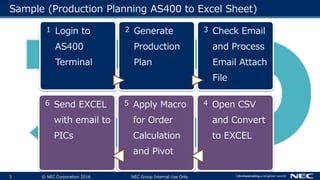
Sample (Production Planning AS400 to Excel Sheet)
1 Login to
AS400
Terminal
2 Generate
Production
Plan
3 Check Email
and Process
Email Attach
File
6 Send EXCEL
with email to
PICs
5 Apply Macro
for Order
Calculation
and Pivot
4 Open CSV
and Convert
to EXCEL
4 © NEC Corporation 2016 NEC Group Internal Use Only
Sample (Daily Exchange Rate Update on IFS/ERP)
1 Open
Browser and
Download
Exchange
Rate CSV
File
2 Convert to
Excel and
Filter need
Currency
Rate
3 Register
Exchange
Rate to ERP
5
Send EXCEL
with email to
PICs
4
Prepare Report
as Excel
5 © NEC Corporation 2016 NEC Group Internal Use Only
Sample (Register Sales Order, Inventory Transfer, Issue
Invoice)
1 Open
Browse,
Login and
Get Order
List CSV File
2 Convert to
Excel and
Validate
Item Code
with SAP
3 Register
Sales Order
on SAP
6 Send EXCEL
Summary
Report with
email to
PICs
5 If Stock is
enough,
then register
Inventory
Transfer
4 If Delivery
Date is Next
Business
Date, then
Issue
6 © NEC Corporation 2016 NEC Group Internal Use Only
Sample (Daily Inventory Report)
7 © NEC Corporation 2016 NEC Group Internal Use Only
Sample (Issuing Vendor P/O)
1 Check Email
for
Customer
Order with
Excel
Attached
file.
2 Lookup
Essential
data from
reference
Master File.
3 Register
Sales
Contract on
MS.Dynamic
/ERP
6 Send
summary
EXCEL
report with
email to
5 Check Folder
for Approved
P/O, then
Posting P/O
on ERP
4 Issue
Purchase
Order, Send
Approval
Email to
8 © NEC Corporation 2016 NEC Group Internal Use Only
Sample (Issuing Tax Invoice to Customer)
1 Read D/O
Excel File
from Share
Folder
2 Lookup
Essential
data from
reference
Master File
3 Register
Sales
Contract on
MS.Dynamic
/ERP
6 Send EXCEL
with email to
PICs
5 Apply Macro
for Order
Calculation
and Pivot
4 Open CSV
and Convert
to EXCEL
9 © NEC Corporation 2016 NEC Group Internal Use Only
End-to-End Issue Vendor Invoice
1 Read
Customer
P/O Excel &
PDF File
from Email
2 Lookup
Essential
data from
Master File &
Database
3 Register
Sales Order
on ERP by
Batch import
6 Send EXCEL
with email to
PICs and
PDF Invoice
file to
5 Convert to
Invoice then
issue Invoice
once get
approved
4 Open SAP
then register
for Vendor’s
P/O.
Rpa case study 2020 r1

Rpa case study 2020 r1

  • 1.
  • 2.
    2 © NECCorporation 2016 NEC Group Internal Use Only Sample (Invoice Excel to AS400 (ERP) 1. Check Email 2. Received Invoice 3. Validate Data 4. Key-in ERP program5. Recheck Data6. Close Batch
  • 3.
    3 © NECCorporation 2016 NEC Group Internal Use Only Sample (Production Planning AS400 to Excel Sheet) 1 Login to AS400 Terminal 2 Generate Production Plan 3 Check Email and Process Email Attach File 6 Send EXCEL with email to PICs 5 Apply Macro for Order Calculation and Pivot 4 Open CSV and Convert to EXCEL
  • 4.
    4 © NECCorporation 2016 NEC Group Internal Use Only Sample (Daily Exchange Rate Update on IFS/ERP) 1 Open Browser and Download Exchange Rate CSV File 2 Convert to Excel and Filter need Currency Rate 3 Register Exchange Rate to ERP 5 Send EXCEL with email to PICs 4 Prepare Report as Excel
  • 5.
    5 © NECCorporation 2016 NEC Group Internal Use Only Sample (Register Sales Order, Inventory Transfer, Issue Invoice) 1 Open Browse, Login and Get Order List CSV File 2 Convert to Excel and Validate Item Code with SAP 3 Register Sales Order on SAP 6 Send EXCEL Summary Report with email to PICs 5 If Stock is enough, then register Inventory Transfer 4 If Delivery Date is Next Business Date, then Issue
  • 6.
    6 © NECCorporation 2016 NEC Group Internal Use Only Sample (Daily Inventory Report)
  • 7.
    7 © NECCorporation 2016 NEC Group Internal Use Only Sample (Issuing Vendor P/O) 1 Check Email for Customer Order with Excel Attached file. 2 Lookup Essential data from reference Master File. 3 Register Sales Contract on MS.Dynamic /ERP 6 Send summary EXCEL report with email to 5 Check Folder for Approved P/O, then Posting P/O on ERP 4 Issue Purchase Order, Send Approval Email to
  • 8.
    8 © NECCorporation 2016 NEC Group Internal Use Only Sample (Issuing Tax Invoice to Customer) 1 Read D/O Excel File from Share Folder 2 Lookup Essential data from reference Master File 3 Register Sales Contract on MS.Dynamic /ERP 6 Send EXCEL with email to PICs 5 Apply Macro for Order Calculation and Pivot 4 Open CSV and Convert to EXCEL
  • 9.
    9 © NECCorporation 2016 NEC Group Internal Use Only End-to-End Issue Vendor Invoice 1 Read Customer P/O Excel & PDF File from Email 2 Lookup Essential data from Master File & Database 3 Register Sales Order on ERP by Batch import 6 Send EXCEL with email to PICs and PDF Invoice file to 5 Convert to Invoice then issue Invoice once get approved 4 Open SAP then register for Vendor’s P/O.

Editor's Notes