Oracle Database Locking
Mechanism DemystifiedProduct Manager for Database Tools
February 22nd , 2018
Pini Dibask
RMOUG
Training Days
2018
Confidential2
• Pini Dibask, Product Manager for Database Tools, Quest Software
• Oracle ACE
• Oracle Certified Professional DBA (OCP)
• Public Speaker: Oracle OpenWorld, IOUG Collaborate, RMOUG, DOAG, OUGN, AOUG
• Blogger: OracleDBPro.BlogSpot.com
Pini.Dibask@Quest.com
http://Linkedin.com/in/pinidibask
@pini_dibask
About the Speaker
Confidential3
Who is Quest Software?
9 0 % o f
F o r t u n e 1 0 0
using our
software
1 , 5 0 0
engineers building
quality products
4 M
c o m m u n i t y
m e m b e r s
sharing best practices
3 , 5 0 0
employees focused
on customers
Quest is a global software provider trusted by
100,000 customers and 6,000 partners in 100
countries.
We help IT organizations spend less time on
administration and more time on innovation.
6 , 0 0 0
partners selling
our software
Confidential4
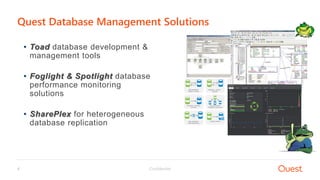
• Toad database development &
management tools
• Foglight & Spotlight database
performance monitoring
solutions
• SharePlex for heterogeneous
database replication
Quest Database Management Solutions
Confidential5
• Overview of Locks in Database Management Systems
• Oracle Database Locking Mechanism Concepts
• Advanced Locking Scenarios
• Monitoring Locks using Dictionary Views and Tools
Agenda
Overview of Locks in
Database Management
Systems
01
Confidential7
• Why locks? Because Databases need to support multiple user applications
• Used to maintain database concurrency and Integrity
• Affect the interaction of readers and writers
• Every DBMS has its own implementation of locking mechanism
Overview of Database Locks
Oracle Database Locking
Mechanism Concepts02
Confidential9
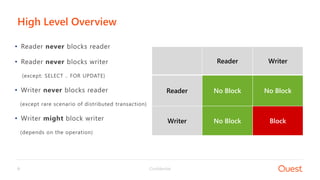
• Reader never blocks reader
• Reader never blocks writer
(except: SELECT .. FOR UPDATE)
• Writer never blocks reader
(except rare scenario of distributed transaction)
• Writer might block writer
(depends on the operation)
High Level Overview
Reader Writer
Reader No Block No Block
Writer No Block Block
Confidential10
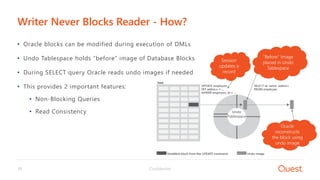
• Oracle blocks can be modified during execution of DMLs
• Undo Tablespace holds “before” image of Database Blocks
• During SELECT query Oracle reads undo images if needed
• This provides 2 important features:
• Non-Blocking Queries
• Read Consistency
Writer Never Blocks Reader - How?
“Before” Image
placed in Undo
Tablespace
Session
updates a
record
Oracle
reconstructs
the block using
undo image
Undo
Tablespace
Confidential11
• 2 Lock Modes in general:
• Share Lock – Many can be acquired on a resource
• Exclusive Lock – Only one can be acquired on a resource
• Example - User updates a row in table EMPLOYEES
• Row will be locked in exclusive mode
• Table will be locked in share mode
Lock Modes
Confidential12
• When? During DML statements:
Insert, update, delete, merge, select … for update
• DML operations acquire 2 lock types:
• Row Locks (AKA “TX Lock”)
• Table Locks (AKA “TM Lock”)
DML Locks
Confidential13
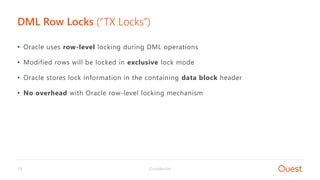
• Oracle uses row-level locking during DML operations
• Modified rows will be locked in exclusive lock mode
• Oracle stores lock information in the containing data block header
• No overhead with Oracle row-level locking mechanism
DML Row Locks (“TX Locks”)
Confidential14
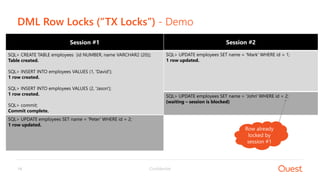
Session #2
SQL> UPDATE employees SET name = 'Mark' WHERE id = 1;
1 row updated.
Session #1
SQL> CREATE TABLE employees (id NUMBER, name VARCHAR2 (20));
Table created.
SQL> INSERT INTO employees VALUES (1, 'David');
1 row created.
SQL> INSERT INTO employees VALUES (2, 'Jason');
1 row created.
SQL> commit;
Commit complete.
DML Row Locks (“TX Locks”) - Demo
SQL> UPDATE employees SET name = 'Peter' WHERE id = 2;
1 row updated.
Row already
locked by
session #1
SQL> UPDATE employees SET name = 'John' WHERE id = 2;
(waiting – session is blocked)
Confidential15
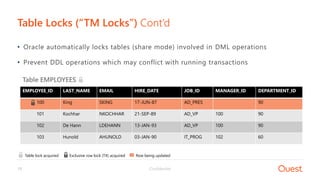
• Oracle automatically locks tables (share mode) involved in DML operations
• Prevent DDL operations which may conflict with running transactions
Table Locks (“TM Locks”) Cont’d
EMPLOYEE_ID LAST_NAME EMAIL HIRE_DATE JOB_ID MANAGER_ID DEPARTMENT_ID
100 King SKING 17-JUN-87 AD_PRES 90
101 Kochhar NKOCHHAR 21-SEP-89 AD_VP 100 90
102 De Hann LDEHANN 13-JAN-93 AD_VP 100 90
103 Hunold AHUNOLD 03-JAN-90 IT_PROG 102 60
Table EMPLOYEES
Table lock acquired Exclusive row lock (TX) acquired Row being updated
Confidential16
• There are 6 lock modes (LMODE and REQUEST columns in V$LOCK)
• [0, 1] – No lock
• 2 – (RS) Row Share
• 3 – (RX) Row Exclusive (DML Operations)
• 4 – (S) Share
• 5 – (SSX) Share Row Exclusive
• 6 – (X) Exclusive (DDL operations)
Table Locks (“TM Locks”)
2 3 4 5 6
2 Block
3 Block Block Block
4 Block Block Block
5 Block Block Block Block
6 Block Block Block Block Block
TM Blocking Matrix
Confidential17
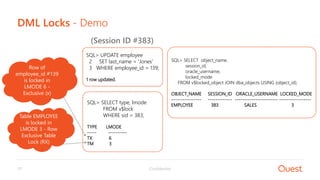
DML Locks - Demo
SQL> UPDATE employee
2 SET last_name = 'Jones'
3 WHERE employee_id = 139;
1 row updated.
SQL> SELECT type, lmode
FROM v$lock
WHERE sid = 383;
TYPE LMODE
----- ----------
TX 6
TM 3
(Session ID #383)
Row of
employee_id #139
is locked in
LMODE 6 -
Exclusive (x)
Table EMPLOYEE
is locked in
LMODE 3 - Row
Exclusive Table
Lock (RX)
SQL> SELECT object_name,
session_id,
oracle_username,
locked_mode
FROM v$locked_object JOIN dba_objects USING (object_id);
OBJECT_NAME SESSION_ID ORACLE_USERNAME LOCKED_MODE
---------------- ------------- ----------------------- -----------------
EMPLOYEE 383 SALES 3
Confidential18
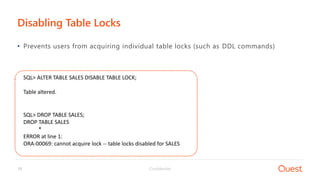
Disabling Table Locks
• Prevents users from acquiring individual table locks (such as DDL commands)
SQL> ALTER TABLE SALES DISABLE TABLE LOCK;
Table altered.
SQL> DROP TABLE SALES;
DROP TABLE SALES
*
ERROR at line 1:
ORA-00069: cannot acquire lock -- table locks disabled for SALES
Confidential19
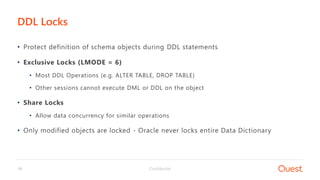
• Protect definition of schema objects during DDL statements
• Exclusive Locks (LMODE = 6)
• Most DDL Operations (e.g. ALTER TABLE, DROP TABLE)
• Other sessions cannot execute DML or DDL on the object
• Share Locks
• Allow data concurrency for similar operations
• Only modified objects are locked - Oracle never locks entire Data Dictionary
DDL Locks
Confidential20
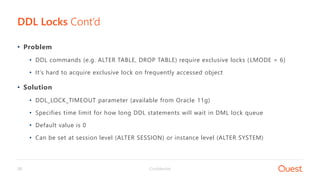
• Problem
• DDL commands (e.g. ALTER TABLE, DROP TABLE) require exclusive locks (LMODE = 6)
• It’s hard to acquire exclusive lock on frequently accessed object
• Solution
• DDL_LOCK_TIMEOUT parameter (available from Oracle 11g)
• Specifies time limit for how long DDL statements will wait in DML lock queue
• Default value is 0
• Can be set at session level (ALTER SESSION) or instance level (ALTER SYSTEM)
DDL Locks Cont’d
Confidential21
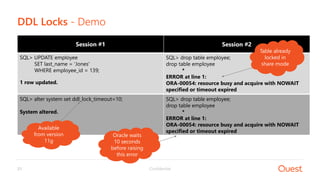
Session #1
SQL> UPDATE employee
SET last_name = 'Jones'
WHERE employee_id = 139;
1 row updated.
DDL Locks - Demo
SQL> alter system set ddl_lock_timeout=10;
System altered.
SQL> drop table employee;
drop table employee
*
ERROR at line 1:
ORA-00054: resource busy and acquire with NOWAIT
specified or timeout expired
Session #2
SQL> drop table employee;
drop table employee
*
ERROR at line 1:
ORA-00054: resource busy and acquire with NOWAIT
specified or timeout expired
Table already
locked in
share mode
Available
from version
11g
Oracle waits
10 seconds
before raising
this error
Confidential22
• Oracle automatically manages locks
• Locks will be released once transaction is over
• Lowest lock level will be used for maximum concurrency
• Oracle Database never escalates locks
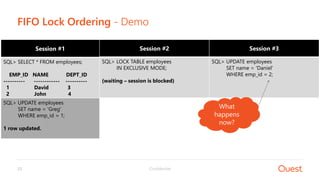
• Ordering of locks is based on FIFO (First-In-First-Out)
How Oracle Manages Locks?
Confidential23
FIFO Lock Ordering - Demo
Session #1
SQL> SELECT * FROM employees;
EMP_ID NAME DEPT_ID
---------- ------------ ----------
1 David 3
2 John 4
SQL> UPDATE employees
SET name = 'Greg'
WHERE emp_id = 1;
1 row updated.
Session #2
SQL> LOCK TABLE employees
IN EXCLUSIVE MODE;
(waiting – session is blocked)
Session #3
SQL> UPDATE employees
SET name = 'Daniel'
WHERE emp_id = 2;
What
happens
now?
Confidential24
• It is possible to override Oracle’s default locking mechanism
• Should be avoided unless there is a justified application requirement.
Example: Transaction needs exclusive access to resource and must not wait for other transactions
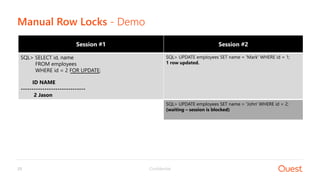
• Manual row-level locks: SELECT … FOR UPDATE statement
• Manual table-level locks: LOCK TABLE statement
Manual Data Locks
Confidential25
Manual Row Locks - Demo
Session #1
SQL> SELECT id, name
FROM employees
WHERE id = 2 FOR UPDATE;
ID NAME
------------------------------
2 Jason
Session #2
SQL> UPDATE employees SET name = 'Mark' WHERE id = 1;
1 row updated.
SQL> UPDATE employees SET name = 'John' WHERE id = 2;
(waiting – session is blocked)
Confidential26
Manual Table Locks - Demo
• LOCK TABLE IN [ ROW SHARE | ROW EXCLUSIVE | SHARE | SHARE ROW EXCLUSIVE | EXCLUSIVE ] MODE
Session #1 (SID 385)
SQL> SELECT * FROM employees FOR UPDATE;
ID NAME
------------------------------
2 Jason
Session #2 (SID 195)
SQL> LOCK TABLE employees IN ROW SHARE MODE;
Table(s) Locked.
SQL> LOCK TABLE employees IN EXCLUSIVE MODE;
(waiting - session is blocked)
SQL> SELECT sid, lmode acquired, request, blocking_session, SQL_TEXT
FROM v$lock l JOIN v$session s USING (sid) LEFT JOIN v$sqlarea USING (sql_id)
WHERE block = 1 OR request > 0 ;
SID ACQUIRED REQUEST BLOCKING_SESSION SQL_TEXT
---------- --------------- ---------- ---------------------- ------------------------------------------------
385 3 0
195 2 6 385 LOCK TABLE employees in exclusive mode
(2) (3) (4) (5) (6)
2 3 4 5 6
2 Block
3 Block Block Block
4 Block Block Block
5 Block Block Block Block
6 Block Block Block Block Block
Advanced Locking
Scenarios03
Confidential28
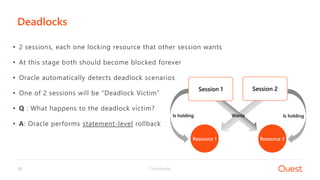
• 2 sessions, each one locking resource that other session wants
• At this stage both should become blocked forever
• Oracle automatically detects deadlock scenarios
• One of 2 sessions will be “Deadlock Victim”
• Q : What happens to the deadlock victim?
• A: Oracle performs statement-level rollback
Deadlocks
Session 1 Session 2
Resource 1 Resource 2
Is holdingIs holding Wants
Confidential29
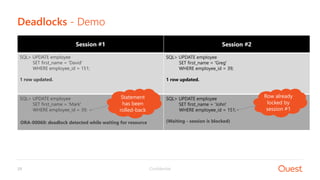
SQL> UPDATE employee
SET first_name = 'Mark'
WHERE employee_id = 39;
(Waiting - session is blocked)
Deadlocks - Demo
Session #1
SQL> UPDATE employee
SET first_name = 'David'
WHERE employee_id = 151;
1 row updated.
SQL> UPDATE employee
SET first_name = 'John'
WHERE employee_id = 151;
(Waiting - session is blocked)
Session #2
SQL> UPDATE employee
SET first_name = 'Greg'
WHERE employee_id = 39;
1 row updated.
Row already
locked by
session #2
ORA-00060: deadlock detected while waiting for resource
Row already
locked by
session #1
Statement
has been
rolled-back
Confidential30
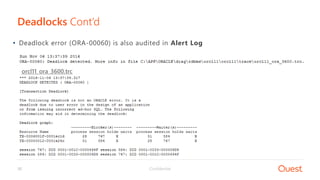
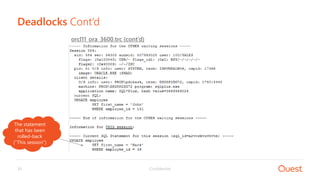
• Deadlock error (ORA-00060) is also audited in Alert Log
Deadlocks Cont’d
orcl11_ora_3600.trc
Confidential31
Deadlocks Cont’d
orcl11_ora_3600.trc (cont’d)
The statement
that has been
rolled-back
(“This session”)
Confidential32
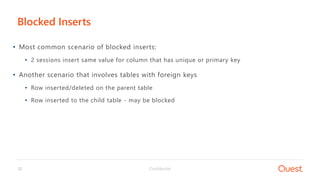
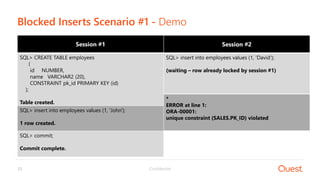
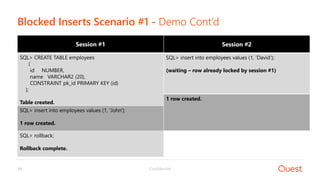
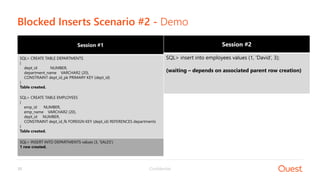
• Most common scenario of blocked inserts:
• 2 sessions insert same value for column that has unique or primary key
• Another scenario that involves tables with foreign keys
• Row inserted/deleted on the parent table
• Row inserted to the child table - may be blocked
Blocked Inserts
Confidential33
Session #2
SQL> insert into employees values (1, 'David');
(waiting – row already locked by session #1)
Blocked Inserts Scenario #1 - Demo
Session #1
SQL> CREATE TABLE employees
(
id NUMBER,
name VARCHAR2 (20),
CONSTRAINT pk_id PRIMARY KEY (id)
);
Table created.
SQL> insert into employees values (1, 'John');
1 row created.
*
ERROR at line 1:
ORA-00001:
unique constraint (SALES.PK_ID) violated
SQL> commit;
Commit complete.
Confidential34
Session #2
SQL> insert into employees values (1, 'David');
(waiting – row already locked by session #1)
Blocked Inserts Scenario #1 - Demo Cont’d
Session #1
SQL> CREATE TABLE employees
(
id NUMBER,
name VARCHAR2 (20),
CONSTRAINT pk_id PRIMARY KEY (id)
);
Table created.
SQL> insert into employees values (1, 'John');
1 row created.
SQL> rollback;
Rollback complete.
1 row created.
Confidential35
Session #2
SQL> insert into employees values (1, 'David’, 3);
(waiting – depends on associated parent row creation)
Blocked Inserts Scenario #2 - Demo
Session #1
SQL> CREATE TABLE DEPARTMENTS
(
dept_id NUMBER,
department_name VARCHAR2 (20),
CONSTRAINT dept_id_pk PRIMARY KEY (dept_id)
)
Table created.
SQL> CREATE TABLE EMPLOYEES
(
emp_id NUMBER,
emp_name VARCHAR2 (20),
dept_id NUMBER,
CONSTRAINT dept_id_fk FOREIGN KEY (dept_id) REFERENCES departments
)
Table created.
SQL> INSERT INTO DEPARTMENTS values (3, 'SALES')
1 row created.
Confidential36
2 3 4 5 6
2 Block
3 Block Block Block
4 Block Block Block
5 Block Block Block Block
6 Block Block Block Block Block
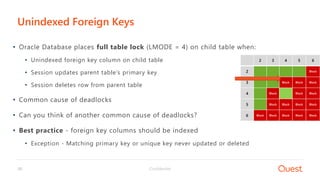
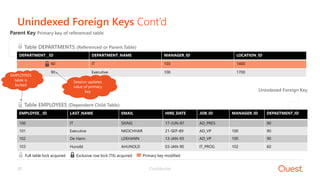
• Oracle Database places full table lock (LMODE = 4) on child table when:
• Unindexed foreign key column on child table
• Session updates parent table’s primary key
• Session deletes row from parent table
• Common cause of deadlocks
• Can you think of another common cause of deadlocks?
• Best practice - foreign key columns should be indexed
• Exception - Matching primary key or unique key never updated or deleted
Unindexed Foreign Keys
Confidential37
Unindexed Foreign Keys Cont’d
DEPARTMENT__ID DEPARTMENT_NAME MANAGER_ID LOCATION_ID
60 IT 103 1400
90 Executive 100 1700
Parent Key Primary key of referenced table
Unindexed Foreign Key
EMPLOYEE__ID LAST_NAME EMAIL HIRE_DATE JOB_ID MANAGER_ID DEPAETMENT_ID
100 IT SKING 17-JUN-87 AD_PRES 90
101 Executive NKOCHHAR 21-SEP-89 AD_VP 100 90
102 De Hann LDEHANN 13-JAN-93 AD_VP 100 90
103 Hunold AHUNOLD 03-JAN-90 IT_PROG 102 60
Full table lock acquired Exclusive row lock (TX) acquired Primary key modified
Table EMPLOYEES (Dependent Child Table)
Table DEPARTMENTS (Referenced or Parent Table)
EMPLOYEES
table is
locked
Session updates
value of primary
key
Confidential38
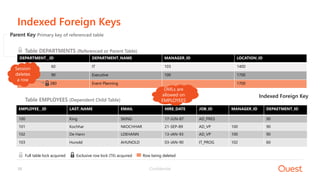
Indexed Foreign Keys
Full table lock acquired Exclusive row lock (TX) acquired Row being deleted
DEPARTMENT__ID DEPARTMENT_NAME MANAGER_ID LOCATION_ID
60 IT 103 1400
90 Executive 100 1700
280 Event Planning 1700
Parent Key Primary key of referenced table
Table DEPARTMENTS (Referenced or Parent Table)
Indexed Foreign Key
EMPLOYEE__ID LAST_NAME EMAIL HIRE_DATE JOB_ID MANAGER_ID DEPAETMENT_ID
100 King SKING 17-JUN-87 AD_PRES 90
101 Kochhar NKOCHHAR 21-SEP-89 AD_VP 100 90
102 De Hann LDEHANN 13-JAN-93 AD_VP 100 90
103 Hunold AHUNOLD 03-JAN-90 IT_PROG 102 60
Table EMPLOYEES (Dependent Child Table)
Session
deletes
a row
DMLs are
allowed on
EMPLOYEES
Monitoring Blocking
Lock Activity04
Confidential40
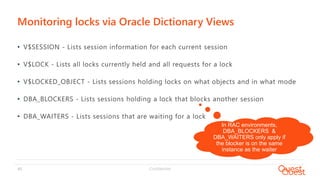
• V$SESSION - Lists session information for each current session
• V$LOCK - Lists all locks currently held and all requests for a lock
• V$LOCKED_OBJECT - Lists sessions holding locks on what objects and in what mode
• DBA_BLOCKERS - Lists sessions holding a lock that blocks another session
• DBA_WAITERS - Lists sessions that are waiting for a lock
Monitoring locks via Oracle Dictionary Views
In RAC environments,
DBA_BLOCKERS &
DBA_WAITERS only apply if
the blocker is on the same
instance as the waiter
Confidential41
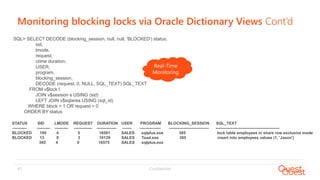
Monitoring blocking locks via Oracle Dictionary Views Cont’d
SQL> SELECT DECODE (blocking_session, null, null, 'BLOCKED') status,
sid,
lmode,
request,
ctime duration,
USER,
program,
blocking_session,
DECODE (request, 0, NULL, SQL_TEXT) SQL_TEXT
FROM v$lock l
JOIN v$session s USING (sid)
LEFT JOIN v$sqlarea USING (sql_id)
WHERE block = 1 OR request > 0
ORDER BY status
STATUS SID LMODE REQUEST DURATION USER PROGRAM BLOCKING_SESSION SQL_TEXT
----------- ---------- ---------- -------------- --------------- ------- ---------------- ------------------------------ ------------------------------------------------
BLOCKED 195 4 5 16581 SALES sqlplus.exe 385 lock table employees in share row exclusive mode
BLOCKED 13 0 3 10129 SALES Toad.exe 385 insert into employees values (1, 'Jason')
385 4 0 16575 SALES sqlplus.exe
Real-Time
Monitoring
Confidential42
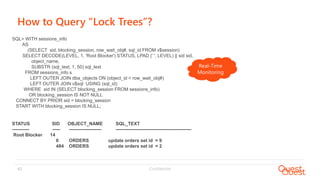
How to Query “Lock Trees”?
SQL> WITH sessions_info
AS
(SELECT sid, blocking_session, row_wait_obj#, sql_id FROM v$session)
SELECT DECODE(LEVEL, 1, 'Root Blocker') STATUS, LPAD (' ', LEVEL) || sid sid,
object_name,
SUBSTR (sql_text, 1, 50) sql_text
FROM sessions_info s
LEFT OUTER JOIN dba_objects ON (object_id = row_wait_obj#)
LEFT OUTER JOIN v$sql USING (sql_id)
WHERE sid IN (SELECT blocking_session FROM sessions_info)
OR blocking_session IS NOT NULL
CONNECT BY PRIOR sid = blocking_session
START WITH blocking_session IS NULL;
STATUS SID OBJECT_NAME SQL_TEXT
----------- ----- --------------------- -------------------------------------------------
Root Blocker 14
6 ORDERS update orders set id = 9
484 ORDERS update orders set id = 2
Real-Time
Monitoring
Confidential43
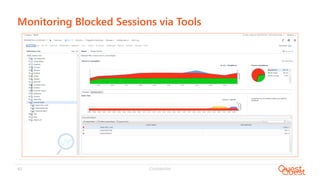
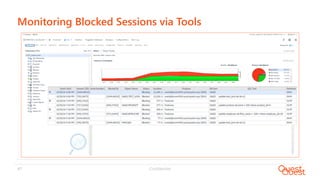
Monitoring Blocked Sessions via Tools
Confidential44
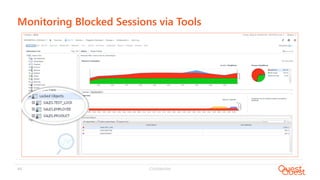
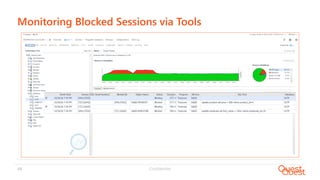
Monitoring Blocked Sessions via Tools
Confidential45
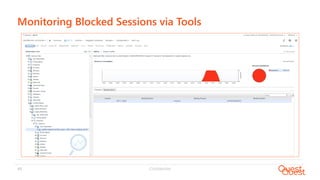
Monitoring Blocked Sessions via Tools
Confidential46
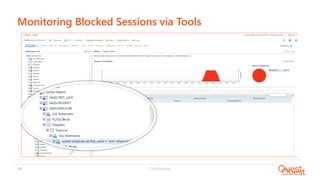
Monitoring Blocked Sessions via Tools
Confidential47
Monitoring Blocked Sessions via Tools
Confidential48
Monitoring Blocked Sessions via Tools
Confidential49
• Is lock a bad thing? No! Locks are essential!
• Hold locks as long as you need, but not more than you need
• Avoid Manual Locking unless it is justified
• Foreign keys in most cases should be indexed
• Proactively monitor your Database to identify blocked sessions
Summary
Confidential50
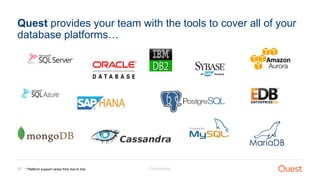
Quest provides your team with the tools to cover all of your
database platforms…
* Platform support varies from tool to tool
Questions?
Thank you

RMOUG 18 - Oracle Database Locking Mechanism Demystified

  • 1.
    Oracle Database Locking MechanismDemystifiedProduct Manager for Database Tools February 22nd , 2018 Pini Dibask RMOUG Training Days 2018
  • 2.
    Confidential2 • Pini Dibask,Product Manager for Database Tools, Quest Software • Oracle ACE • Oracle Certified Professional DBA (OCP) • Public Speaker: Oracle OpenWorld, IOUG Collaborate, RMOUG, DOAG, OUGN, AOUG • Blogger: OracleDBPro.BlogSpot.com Pini.Dibask@Quest.com http://Linkedin.com/in/pinidibask @pini_dibask About the Speaker
  • 3.
    Confidential3 Who is QuestSoftware? 9 0 % o f F o r t u n e 1 0 0 using our software 1 , 5 0 0 engineers building quality products 4 M c o m m u n i t y m e m b e r s sharing best practices 3 , 5 0 0 employees focused on customers Quest is a global software provider trusted by 100,000 customers and 6,000 partners in 100 countries. We help IT organizations spend less time on administration and more time on innovation. 6 , 0 0 0 partners selling our software
  • 4.
    Confidential4 • Toad databasedevelopment & management tools • Foglight & Spotlight database performance monitoring solutions • SharePlex for heterogeneous database replication Quest Database Management Solutions
  • 5.
    Confidential5 • Overview ofLocks in Database Management Systems • Oracle Database Locking Mechanism Concepts • Advanced Locking Scenarios • Monitoring Locks using Dictionary Views and Tools Agenda
  • 6.
    Overview of Locksin Database Management Systems 01
  • 7.
    Confidential7 • Why locks?Because Databases need to support multiple user applications • Used to maintain database concurrency and Integrity • Affect the interaction of readers and writers • Every DBMS has its own implementation of locking mechanism Overview of Database Locks
  • 8.
  • 9.
    Confidential9 • Reader neverblocks reader • Reader never blocks writer (except: SELECT .. FOR UPDATE) • Writer never blocks reader (except rare scenario of distributed transaction) • Writer might block writer (depends on the operation) High Level Overview Reader Writer Reader No Block No Block Writer No Block Block
  • 10.
    Confidential10 • Oracle blockscan be modified during execution of DMLs • Undo Tablespace holds “before” image of Database Blocks • During SELECT query Oracle reads undo images if needed • This provides 2 important features: • Non-Blocking Queries • Read Consistency Writer Never Blocks Reader - How? “Before” Image placed in Undo Tablespace Session updates a record Oracle reconstructs the block using undo image Undo Tablespace
  • 11.
    Confidential11 • 2 LockModes in general: • Share Lock – Many can be acquired on a resource • Exclusive Lock – Only one can be acquired on a resource • Example - User updates a row in table EMPLOYEES • Row will be locked in exclusive mode • Table will be locked in share mode Lock Modes
  • 12.
    Confidential12 • When? DuringDML statements: Insert, update, delete, merge, select … for update • DML operations acquire 2 lock types: • Row Locks (AKA “TX Lock”) • Table Locks (AKA “TM Lock”) DML Locks
  • 13.
    Confidential13 • Oracle usesrow-level locking during DML operations • Modified rows will be locked in exclusive lock mode • Oracle stores lock information in the containing data block header • No overhead with Oracle row-level locking mechanism DML Row Locks (“TX Locks”)
  • 14.
    Confidential14 Session #2 SQL> UPDATEemployees SET name = 'Mark' WHERE id = 1; 1 row updated. Session #1 SQL> CREATE TABLE employees (id NUMBER, name VARCHAR2 (20)); Table created. SQL> INSERT INTO employees VALUES (1, 'David'); 1 row created. SQL> INSERT INTO employees VALUES (2, 'Jason'); 1 row created. SQL> commit; Commit complete. DML Row Locks (“TX Locks”) - Demo SQL> UPDATE employees SET name = 'Peter' WHERE id = 2; 1 row updated. Row already locked by session #1 SQL> UPDATE employees SET name = 'John' WHERE id = 2; (waiting – session is blocked)
  • 15.
    Confidential15 • Oracle automaticallylocks tables (share mode) involved in DML operations • Prevent DDL operations which may conflict with running transactions Table Locks (“TM Locks”) Cont’d EMPLOYEE_ID LAST_NAME EMAIL HIRE_DATE JOB_ID MANAGER_ID DEPARTMENT_ID 100 King SKING 17-JUN-87 AD_PRES 90 101 Kochhar NKOCHHAR 21-SEP-89 AD_VP 100 90 102 De Hann LDEHANN 13-JAN-93 AD_VP 100 90 103 Hunold AHUNOLD 03-JAN-90 IT_PROG 102 60 Table EMPLOYEES Table lock acquired Exclusive row lock (TX) acquired Row being updated
  • 16.
    Confidential16 • There are6 lock modes (LMODE and REQUEST columns in V$LOCK) • [0, 1] – No lock • 2 – (RS) Row Share • 3 – (RX) Row Exclusive (DML Operations) • 4 – (S) Share • 5 – (SSX) Share Row Exclusive • 6 – (X) Exclusive (DDL operations) Table Locks (“TM Locks”) 2 3 4 5 6 2 Block 3 Block Block Block 4 Block Block Block 5 Block Block Block Block 6 Block Block Block Block Block TM Blocking Matrix
  • 17.
    Confidential17 DML Locks -Demo SQL> UPDATE employee 2 SET last_name = 'Jones' 3 WHERE employee_id = 139; 1 row updated. SQL> SELECT type, lmode FROM v$lock WHERE sid = 383; TYPE LMODE ----- ---------- TX 6 TM 3 (Session ID #383) Row of employee_id #139 is locked in LMODE 6 - Exclusive (x) Table EMPLOYEE is locked in LMODE 3 - Row Exclusive Table Lock (RX) SQL> SELECT object_name, session_id, oracle_username, locked_mode FROM v$locked_object JOIN dba_objects USING (object_id); OBJECT_NAME SESSION_ID ORACLE_USERNAME LOCKED_MODE ---------------- ------------- ----------------------- ----------------- EMPLOYEE 383 SALES 3
  • 18.
    Confidential18 Disabling Table Locks •Prevents users from acquiring individual table locks (such as DDL commands) SQL> ALTER TABLE SALES DISABLE TABLE LOCK; Table altered. SQL> DROP TABLE SALES; DROP TABLE SALES * ERROR at line 1: ORA-00069: cannot acquire lock -- table locks disabled for SALES
  • 19.
    Confidential19 • Protect definitionof schema objects during DDL statements • Exclusive Locks (LMODE = 6) • Most DDL Operations (e.g. ALTER TABLE, DROP TABLE) • Other sessions cannot execute DML or DDL on the object • Share Locks • Allow data concurrency for similar operations • Only modified objects are locked - Oracle never locks entire Data Dictionary DDL Locks
  • 20.
    Confidential20 • Problem • DDLcommands (e.g. ALTER TABLE, DROP TABLE) require exclusive locks (LMODE = 6) • It’s hard to acquire exclusive lock on frequently accessed object • Solution • DDL_LOCK_TIMEOUT parameter (available from Oracle 11g) • Specifies time limit for how long DDL statements will wait in DML lock queue • Default value is 0 • Can be set at session level (ALTER SESSION) or instance level (ALTER SYSTEM) DDL Locks Cont’d
  • 21.
    Confidential21 Session #1 SQL> UPDATEemployee SET last_name = 'Jones' WHERE employee_id = 139; 1 row updated. DDL Locks - Demo SQL> alter system set ddl_lock_timeout=10; System altered. SQL> drop table employee; drop table employee * ERROR at line 1: ORA-00054: resource busy and acquire with NOWAIT specified or timeout expired Session #2 SQL> drop table employee; drop table employee * ERROR at line 1: ORA-00054: resource busy and acquire with NOWAIT specified or timeout expired Table already locked in share mode Available from version 11g Oracle waits 10 seconds before raising this error
  • 22.
    Confidential22 • Oracle automaticallymanages locks • Locks will be released once transaction is over • Lowest lock level will be used for maximum concurrency • Oracle Database never escalates locks • Ordering of locks is based on FIFO (First-In-First-Out) How Oracle Manages Locks?
  • 23.
    Confidential23 FIFO Lock Ordering- Demo Session #1 SQL> SELECT * FROM employees; EMP_ID NAME DEPT_ID ---------- ------------ ---------- 1 David 3 2 John 4 SQL> UPDATE employees SET name = 'Greg' WHERE emp_id = 1; 1 row updated. Session #2 SQL> LOCK TABLE employees IN EXCLUSIVE MODE; (waiting – session is blocked) Session #3 SQL> UPDATE employees SET name = 'Daniel' WHERE emp_id = 2; What happens now?
  • 24.
    Confidential24 • It ispossible to override Oracle’s default locking mechanism • Should be avoided unless there is a justified application requirement. Example: Transaction needs exclusive access to resource and must not wait for other transactions • Manual row-level locks: SELECT … FOR UPDATE statement • Manual table-level locks: LOCK TABLE statement Manual Data Locks
  • 25.
    Confidential25 Manual Row Locks- Demo Session #1 SQL> SELECT id, name FROM employees WHERE id = 2 FOR UPDATE; ID NAME ------------------------------ 2 Jason Session #2 SQL> UPDATE employees SET name = 'Mark' WHERE id = 1; 1 row updated. SQL> UPDATE employees SET name = 'John' WHERE id = 2; (waiting – session is blocked)
  • 26.
    Confidential26 Manual Table Locks- Demo • LOCK TABLE IN [ ROW SHARE | ROW EXCLUSIVE | SHARE | SHARE ROW EXCLUSIVE | EXCLUSIVE ] MODE Session #1 (SID 385) SQL> SELECT * FROM employees FOR UPDATE; ID NAME ------------------------------ 2 Jason Session #2 (SID 195) SQL> LOCK TABLE employees IN ROW SHARE MODE; Table(s) Locked. SQL> LOCK TABLE employees IN EXCLUSIVE MODE; (waiting - session is blocked) SQL> SELECT sid, lmode acquired, request, blocking_session, SQL_TEXT FROM v$lock l JOIN v$session s USING (sid) LEFT JOIN v$sqlarea USING (sql_id) WHERE block = 1 OR request > 0 ; SID ACQUIRED REQUEST BLOCKING_SESSION SQL_TEXT ---------- --------------- ---------- ---------------------- ------------------------------------------------ 385 3 0 195 2 6 385 LOCK TABLE employees in exclusive mode (2) (3) (4) (5) (6) 2 3 4 5 6 2 Block 3 Block Block Block 4 Block Block Block 5 Block Block Block Block 6 Block Block Block Block Block
  • 27.
  • 28.
    Confidential28 • 2 sessions,each one locking resource that other session wants • At this stage both should become blocked forever • Oracle automatically detects deadlock scenarios • One of 2 sessions will be “Deadlock Victim” • Q : What happens to the deadlock victim? • A: Oracle performs statement-level rollback Deadlocks Session 1 Session 2 Resource 1 Resource 2 Is holdingIs holding Wants
  • 29.
    Confidential29 SQL> UPDATE employee SETfirst_name = 'Mark' WHERE employee_id = 39; (Waiting - session is blocked) Deadlocks - Demo Session #1 SQL> UPDATE employee SET first_name = 'David' WHERE employee_id = 151; 1 row updated. SQL> UPDATE employee SET first_name = 'John' WHERE employee_id = 151; (Waiting - session is blocked) Session #2 SQL> UPDATE employee SET first_name = 'Greg' WHERE employee_id = 39; 1 row updated. Row already locked by session #2 ORA-00060: deadlock detected while waiting for resource Row already locked by session #1 Statement has been rolled-back
  • 30.
    Confidential30 • Deadlock error(ORA-00060) is also audited in Alert Log Deadlocks Cont’d orcl11_ora_3600.trc
  • 31.
    Confidential31 Deadlocks Cont’d orcl11_ora_3600.trc (cont’d) Thestatement that has been rolled-back (“This session”)
  • 32.
    Confidential32 • Most commonscenario of blocked inserts: • 2 sessions insert same value for column that has unique or primary key • Another scenario that involves tables with foreign keys • Row inserted/deleted on the parent table • Row inserted to the child table - may be blocked Blocked Inserts
  • 33.
    Confidential33 Session #2 SQL> insertinto employees values (1, 'David'); (waiting – row already locked by session #1) Blocked Inserts Scenario #1 - Demo Session #1 SQL> CREATE TABLE employees ( id NUMBER, name VARCHAR2 (20), CONSTRAINT pk_id PRIMARY KEY (id) ); Table created. SQL> insert into employees values (1, 'John'); 1 row created. * ERROR at line 1: ORA-00001: unique constraint (SALES.PK_ID) violated SQL> commit; Commit complete.
  • 34.
    Confidential34 Session #2 SQL> insertinto employees values (1, 'David'); (waiting – row already locked by session #1) Blocked Inserts Scenario #1 - Demo Cont’d Session #1 SQL> CREATE TABLE employees ( id NUMBER, name VARCHAR2 (20), CONSTRAINT pk_id PRIMARY KEY (id) ); Table created. SQL> insert into employees values (1, 'John'); 1 row created. SQL> rollback; Rollback complete. 1 row created.
  • 35.
    Confidential35 Session #2 SQL> insertinto employees values (1, 'David’, 3); (waiting – depends on associated parent row creation) Blocked Inserts Scenario #2 - Demo Session #1 SQL> CREATE TABLE DEPARTMENTS ( dept_id NUMBER, department_name VARCHAR2 (20), CONSTRAINT dept_id_pk PRIMARY KEY (dept_id) ) Table created. SQL> CREATE TABLE EMPLOYEES ( emp_id NUMBER, emp_name VARCHAR2 (20), dept_id NUMBER, CONSTRAINT dept_id_fk FOREIGN KEY (dept_id) REFERENCES departments ) Table created. SQL> INSERT INTO DEPARTMENTS values (3, 'SALES') 1 row created.
  • 36.
    Confidential36 2 3 45 6 2 Block 3 Block Block Block 4 Block Block Block 5 Block Block Block Block 6 Block Block Block Block Block • Oracle Database places full table lock (LMODE = 4) on child table when: • Unindexed foreign key column on child table • Session updates parent table’s primary key • Session deletes row from parent table • Common cause of deadlocks • Can you think of another common cause of deadlocks? • Best practice - foreign key columns should be indexed • Exception - Matching primary key or unique key never updated or deleted Unindexed Foreign Keys
  • 37.
    Confidential37 Unindexed Foreign KeysCont’d DEPARTMENT__ID DEPARTMENT_NAME MANAGER_ID LOCATION_ID 60 IT 103 1400 90 Executive 100 1700 Parent Key Primary key of referenced table Unindexed Foreign Key EMPLOYEE__ID LAST_NAME EMAIL HIRE_DATE JOB_ID MANAGER_ID DEPAETMENT_ID 100 IT SKING 17-JUN-87 AD_PRES 90 101 Executive NKOCHHAR 21-SEP-89 AD_VP 100 90 102 De Hann LDEHANN 13-JAN-93 AD_VP 100 90 103 Hunold AHUNOLD 03-JAN-90 IT_PROG 102 60 Full table lock acquired Exclusive row lock (TX) acquired Primary key modified Table EMPLOYEES (Dependent Child Table) Table DEPARTMENTS (Referenced or Parent Table) EMPLOYEES table is locked Session updates value of primary key
  • 38.
    Confidential38 Indexed Foreign Keys Fulltable lock acquired Exclusive row lock (TX) acquired Row being deleted DEPARTMENT__ID DEPARTMENT_NAME MANAGER_ID LOCATION_ID 60 IT 103 1400 90 Executive 100 1700 280 Event Planning 1700 Parent Key Primary key of referenced table Table DEPARTMENTS (Referenced or Parent Table) Indexed Foreign Key EMPLOYEE__ID LAST_NAME EMAIL HIRE_DATE JOB_ID MANAGER_ID DEPAETMENT_ID 100 King SKING 17-JUN-87 AD_PRES 90 101 Kochhar NKOCHHAR 21-SEP-89 AD_VP 100 90 102 De Hann LDEHANN 13-JAN-93 AD_VP 100 90 103 Hunold AHUNOLD 03-JAN-90 IT_PROG 102 60 Table EMPLOYEES (Dependent Child Table) Session deletes a row DMLs are allowed on EMPLOYEES
  • 39.
  • 40.
    Confidential40 • V$SESSION -Lists session information for each current session • V$LOCK - Lists all locks currently held and all requests for a lock • V$LOCKED_OBJECT - Lists sessions holding locks on what objects and in what mode • DBA_BLOCKERS - Lists sessions holding a lock that blocks another session • DBA_WAITERS - Lists sessions that are waiting for a lock Monitoring locks via Oracle Dictionary Views In RAC environments, DBA_BLOCKERS & DBA_WAITERS only apply if the blocker is on the same instance as the waiter
  • 41.
    Confidential41 Monitoring blocking locksvia Oracle Dictionary Views Cont’d SQL> SELECT DECODE (blocking_session, null, null, 'BLOCKED') status, sid, lmode, request, ctime duration, USER, program, blocking_session, DECODE (request, 0, NULL, SQL_TEXT) SQL_TEXT FROM v$lock l JOIN v$session s USING (sid) LEFT JOIN v$sqlarea USING (sql_id) WHERE block = 1 OR request > 0 ORDER BY status STATUS SID LMODE REQUEST DURATION USER PROGRAM BLOCKING_SESSION SQL_TEXT ----------- ---------- ---------- -------------- --------------- ------- ---------------- ------------------------------ ------------------------------------------------ BLOCKED 195 4 5 16581 SALES sqlplus.exe 385 lock table employees in share row exclusive mode BLOCKED 13 0 3 10129 SALES Toad.exe 385 insert into employees values (1, 'Jason') 385 4 0 16575 SALES sqlplus.exe Real-Time Monitoring
  • 42.
    Confidential42 How to Query“Lock Trees”? SQL> WITH sessions_info AS (SELECT sid, blocking_session, row_wait_obj#, sql_id FROM v$session) SELECT DECODE(LEVEL, 1, 'Root Blocker') STATUS, LPAD (' ', LEVEL) || sid sid, object_name, SUBSTR (sql_text, 1, 50) sql_text FROM sessions_info s LEFT OUTER JOIN dba_objects ON (object_id = row_wait_obj#) LEFT OUTER JOIN v$sql USING (sql_id) WHERE sid IN (SELECT blocking_session FROM sessions_info) OR blocking_session IS NOT NULL CONNECT BY PRIOR sid = blocking_session START WITH blocking_session IS NULL; STATUS SID OBJECT_NAME SQL_TEXT ----------- ----- --------------------- ------------------------------------------------- Root Blocker 14 6 ORDERS update orders set id = 9 484 ORDERS update orders set id = 2 Real-Time Monitoring
  • 43.
  • 44.
  • 45.
  • 46.
  • 47.
  • 48.
  • 49.
    Confidential49 • Is locka bad thing? No! Locks are essential! • Hold locks as long as you need, but not more than you need • Avoid Manual Locking unless it is justified • Foreign keys in most cases should be indexed • Proactively monitor your Database to identify blocked sessions Summary
  • 50.
    Confidential50 Quest provides yourteam with the tools to cover all of your database platforms… * Platform support varies from tool to tool
  • 51.
  • 52.