Department of Computer ScienceDepartment of Computer Science
JAMIA HAMDARDJAMIA HAMDARD
Hamdard Nagar, New Delhi – 110062Hamdard Nagar, New Delhi – 110062
1
DATABASE SECURITY
Database security ContentsDatabase security Contents
Security and integrity threats, Defence
mechanisms, Statistical database auditing
& control. Security issue based on
granting/revoking of privileges,
Introduction to statistical database
security. PL/SQL Security – Locks –
Implicit locking, types and levels of locks,
explicit locking, Exception Handlers.
DefinitionDefinition
Database Security is
the mechanism that protect the database
against intentional or accidental threats.
We consider database security in relation
to the following situations:
- Theft and Fraud
- Loss of confidentiality
IntroductionIntroduction
◦ Loss of privacy
◦ Loss of integrity
◦ Loss of availability
Threat is :
any intentional or accidental event that
may adversely affect the system.
Introduction (Cont)Introduction (Cont)
Examples of threats:
- Using another person’s log-in name to
access data
- Unauthorized copying data
- Program/Data alteration
- Illegal entry by hacker
- Viruses
- Etc.
CountermeasuresCountermeasures
Computer-Based Controls:
- Authorization
- Views
- Backup and Recovery
- Integrity
- Encryption
AuthorizationAuthorization
The granting of a privilege that enable a user to
have a legitimate access to a system.
They are sometimes referred as access
controls.
The process of authorization involves
authenticating the user requesting access to
objects.
AuthenticatingAuthenticating
Means a mechanism that determines
whether a user is who he/she claim to be.
A system administrator is responsible for
allowing users to have access to the
system by creating individual user
accounts.
Continued...Continued...
A DBMS may permit both individual user
identifiers and group identifiers to be
created.
Certain privileges may be associated with
specific identifiers, which indicate what
kind of privilege is allowed with certain
with certain database objects.
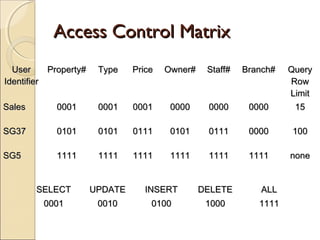
Continued…Continued…
Each privileges has a binary value associated
with it. The binary values are summed
and the total value indicates what
privileges are allowed for a specific user
or group with a particular object.
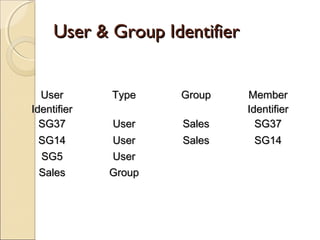
User & Group IdentifierUser & Group Identifier
UserUser
IdentifierIdentifier
TypeType GroupGroup MemberMember
IdentifierIdentifier
SG37SG37 UserUser SalesSales SG37SG37
SG14SG14 UserUser SalesSales SG14SG14
SG5SG5 UserUser
SalesSales GroupGroup
Access Control MatrixAccess Control Matrix
UserUser
IdentifierIdentifier
Property#Property# TypeType PricePrice Owner#Owner# Staff#Staff# Branch#Branch# QueryQuery
RowRow
LimitLimit
SalesSales 00010001 00010001 00010001 00000000 00000000 00000000 1515
SG37SG37 01010101 01010101 01110111 01010101 01110111 00000000 100100
SG5SG5 11111111 11111111 11111111 11111111 11111111 11111111 nonenone
SELECTSELECT UPDATEUPDATE INSERTINSERT DELETEDELETE ALLALL
00010001 00100010 01000100 10001000 11111111
ViewsViews
Is the dynamic result of one or more
relational operations operating on the
base relations to produce another
relation.
A view is a virtual relation that does not
actually exist in the database, but is
produced upon request by a particular
user, at the time of request.
Views (Cont)Views (Cont)
The view mechanism provides a powerful
and flexible security mechanism by hiding
parts of the database from certain users.
The user is not aware of the existence of
any attributes or rows that are missing
from the view.
Backup & RecoveryBackup & Recovery
Is the process of periodically taking a copy of
the database and log file on to offline storage
media.
DBMS should provide backup facilities to assist
with the recovery of a database failure.
IntegrityIntegrity
Maintaining a secure database system by
preventing data from becoming invalid.
EncryptionEncryption
The encoding of data by a special algorithm that
renders the data unreadable by any program
without the decryption key.
There will be degradation in performance
because of the time taken to decode it.
It also protects the data transmitted over
communication lines.
PL/SQL SecurityPL/SQL Security
 Types of Locks
 Level of Locks
 Explicit Locking
 Using Lock table stmt
 Releasing locks
 Explicit lock using SQL & PL/SQL
 Deadlock
 Error handling in PL/SQL
LocksLocks
Locks :-
 Locks are mechanisms used to ensure data integrity while
allowing maximum concurrent access of data.
 Oracle locking is fully automatic & requires no user
intervention.
 The oracle engine(server machine)locks table data while
executing SQL statement . This type of locking is called
“implicit locking”.
 Oracle default locking strategy is implicit locking.
 Since the oracle engine has a fully automatic strategy ,it has to
decide on two issues:-
1)Types of lock to be applied.
2)Level of lock to be applied.
 Types of Lock:-
 Shared Locks
 Exclusive Locks
1)Shared Locks:-
a)Shared locks are placed on resource whenever a READ
operation(select)is performed.
b)Multiple shared locks can be simultaneously set on a
resource.
2)Exclusive Locks:-
a)Exclusive locks are placed on resource whenever WRITE
operations (Insert, Update & Delete) are performed.
b)Only 1 exclusive lock can be placed on a resource at a time.
Level Of Locks:-
A table can be decomposed into rows & a row can be further
decomposed into fields.
1)Row Level
2)Page Level
3)Table Level
1)Row Level:-If the Where clause evaluates to only one row in
the table.
2)Page Level:- If the Where clause evaluates to a set of data.
3)Table Level:- If there is no Where clause(i.e. the query
accesses the entire table).
Explicit Locking:-
The technique of lock taken on a table or its resources by a
user is called “Explicit Locking”.
Who can Explicitly Lock?
Users can lock tables they own or any table on which they have
been granted table privilege(select ,insert, update , delete)
Table or rows can be explicitly locked by using either the select
…for update stmt. Or Lock table stmt.
The select …. For Update statement:-
This clause is generally used to signal the oracle engine that data
currently being used needs to be updated.
 Ex:-Two client machines client A & client B are recording the
transaction performed in a bank for a particular account no.
simultaneously.
 Client A fires the following select statement:
 Client A>select * from acct_mstr where acct_no=‘Sb9’ for
update;
 When the above select statement is fired the oracle engine
locks the record ‘sb9’. This lock is released when a commit
or rollback is fired by client A
 Now client B fires a select statement ., which points to
record sb9
Using Lock table stmt:-
Purpose:-
 Use the LOCK TABLE statement to lock one or more tables,
table partitions, or table sub partitions in a specified mode.
This lock manually overrides automatic locking and permits
or denies access to a table or view by other users for the
duration of your operation. A LOCK is a mechanism that
prevents destructive interaction between two simultaneous
transactions or sessions trying to access the same database
object.
Syntax:-
LOCK TABLE<TableName>[,<TableName>]…
IN{ROW SHARE|ROW EXCLUSIVE|SHARE UPDATE|
SHARE|SHARE ROW EXCLUSIVE|EXCLUSIVE}
[NOWAIT]
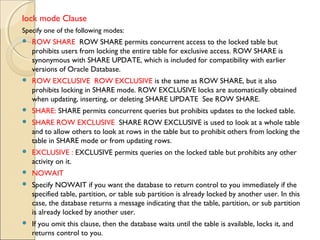
lock mode Clause
Specify one of the following modes:
 ROW SHARE  ROW SHARE permits concurrent access to the locked table but
prohibits users from locking the entire table for exclusive access. ROW SHARE is
synonymous with SHARE UPDATE, which is included for compatibility with earlier
versions of Oracle Database.
 ROW EXCLUSIVE  ROW EXCLUSIVE is the same as ROW SHARE, but it also
prohibits locking in SHARE mode. ROW EXCLUSIVE locks are automatically obtained
when updating, inserting, or deleting SHARE UPDATE  See ROW SHARE.
 SHARE: SHARE permits concurrent queries but prohibits updates to the locked table.
 SHARE ROW EXCLUSIVE  SHARE ROW EXCLUSIVE is used to look at a whole table
and to allow others to look at rows in the table but to prohibit others from locking the
table in SHARE mode or from updating rows.
 EXCLUSIVE : EXCLUSIVE permits queries on the locked table but prohibits any other
activity on it.
 NOWAIT
 Specify NOWAIT if you want the database to return control to you immediately if the
specified table, partition, or table sub partition is already locked by another user. In this
case, the database returns a message indicating that the table, partition, or sub partition
is already locked by another user.
 If you omit this clause, then the database waits until the table is available, locks it, and
returns control to you.
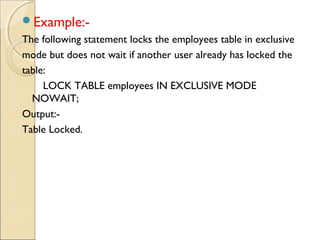
Example:-
The following statement locks the employees table in exclusive
mode but does not wait if another user already has locked the
table:
LOCK TABLE employees IN EXCLUSIVE MODE
NOWAIT;
Output:-
Table Locked.
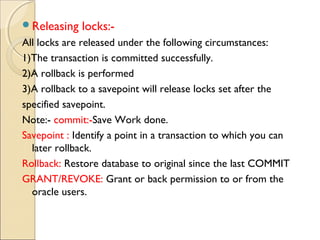
Releasing locks:-
All locks are released under the following circumstances:
1)The transaction is committed successfully.
2)A rollback is performed
3)A rollback to a savepoint will release locks set after the
specified savepoint.
Note:- commit:-Save Work done.
Savepoint : Identify a point in a transaction to which you can
later rollback.
Rollback: Restore database to original since the last COMMIT
GRANT/REVOKE: Grant or back permission to or from the
oracle users.
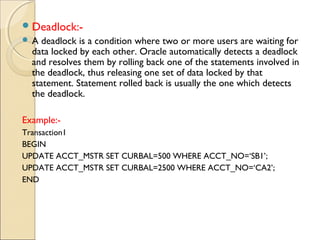
Deadlock:-
 A deadlock is a condition where two or more users are waiting for
data locked by each other. Oracle automatically detects a deadlock
and resolves them by rolling back one of the statements involved in
the deadlock, thus releasing one set of data locked by that
statement. Statement rolled back is usually the one which detects
the deadlock.
Example:-
Transaction1
BEGIN
UPDATE ACCT_MSTR SET CURBAL=500 WHERE ACCT_NO=‘SB1’;
UPDATE ACCT_MSTR SET CURBAL=2500 WHERE ACCT_NO=‘CA2’;
END
Transaction2:
BEGIN
UPDATE ACCT_MSTR SET CURBAL=5000 WHERE ACCT_NO=‘CA2’;
UPDATE ACCT_MSTR SET CURBAL=3500 WHERE ACCT_NO=‘SB1’;
END
Assume that TR1 & TR2 begin exactly at the same time . by default Oracle
automatically places exclusive lock on data that is being updated . This
causes
TR1 to wait for TR2 to complete but in turn TR2 has to wait for TR1 to
complete.
Error handling in PL/SQL
when <exception name> then
user defined actions to be carried out;
 Types Of Exceptions:
1. predefined exceptions:
They are raised automatically by the system during run
time.
2. user defined Exceptions:
They must be raised explicitly using Raise
statement.
Database security

Database security

  • 1.
    Department of ComputerScienceDepartment of Computer Science JAMIA HAMDARDJAMIA HAMDARD Hamdard Nagar, New Delhi – 110062Hamdard Nagar, New Delhi – 110062 1 DATABASE SECURITY
  • 2.
    Database security ContentsDatabasesecurity Contents Security and integrity threats, Defence mechanisms, Statistical database auditing & control. Security issue based on granting/revoking of privileges, Introduction to statistical database security. PL/SQL Security – Locks – Implicit locking, types and levels of locks, explicit locking, Exception Handlers.
  • 3.
    DefinitionDefinition Database Security is themechanism that protect the database against intentional or accidental threats. We consider database security in relation to the following situations: - Theft and Fraud - Loss of confidentiality
  • 4.
    IntroductionIntroduction ◦ Loss ofprivacy ◦ Loss of integrity ◦ Loss of availability Threat is : any intentional or accidental event that may adversely affect the system.
  • 5.
    Introduction (Cont)Introduction (Cont) Examplesof threats: - Using another person’s log-in name to access data - Unauthorized copying data - Program/Data alteration - Illegal entry by hacker - Viruses - Etc.
  • 6.
    CountermeasuresCountermeasures Computer-Based Controls: - Authorization -Views - Backup and Recovery - Integrity - Encryption
  • 7.
    AuthorizationAuthorization The granting ofa privilege that enable a user to have a legitimate access to a system. They are sometimes referred as access controls. The process of authorization involves authenticating the user requesting access to objects.
  • 8.
    AuthenticatingAuthenticating Means a mechanismthat determines whether a user is who he/she claim to be. A system administrator is responsible for allowing users to have access to the system by creating individual user accounts.
  • 9.
    Continued...Continued... A DBMS maypermit both individual user identifiers and group identifiers to be created. Certain privileges may be associated with specific identifiers, which indicate what kind of privilege is allowed with certain with certain database objects.
  • 10.
    Continued…Continued… Each privileges hasa binary value associated with it. The binary values are summed and the total value indicates what privileges are allowed for a specific user or group with a particular object.
  • 11.
    User & GroupIdentifierUser & Group Identifier UserUser IdentifierIdentifier TypeType GroupGroup MemberMember IdentifierIdentifier SG37SG37 UserUser SalesSales SG37SG37 SG14SG14 UserUser SalesSales SG14SG14 SG5SG5 UserUser SalesSales GroupGroup
  • 12.
    Access Control MatrixAccessControl Matrix UserUser IdentifierIdentifier Property#Property# TypeType PricePrice Owner#Owner# Staff#Staff# Branch#Branch# QueryQuery RowRow LimitLimit SalesSales 00010001 00010001 00010001 00000000 00000000 00000000 1515 SG37SG37 01010101 01010101 01110111 01010101 01110111 00000000 100100 SG5SG5 11111111 11111111 11111111 11111111 11111111 11111111 nonenone SELECTSELECT UPDATEUPDATE INSERTINSERT DELETEDELETE ALLALL 00010001 00100010 01000100 10001000 11111111
  • 13.
    ViewsViews Is the dynamicresult of one or more relational operations operating on the base relations to produce another relation. A view is a virtual relation that does not actually exist in the database, but is produced upon request by a particular user, at the time of request.
  • 14.
    Views (Cont)Views (Cont) Theview mechanism provides a powerful and flexible security mechanism by hiding parts of the database from certain users. The user is not aware of the existence of any attributes or rows that are missing from the view.
  • 15.
    Backup & RecoveryBackup& Recovery Is the process of periodically taking a copy of the database and log file on to offline storage media. DBMS should provide backup facilities to assist with the recovery of a database failure.
  • 16.
    IntegrityIntegrity Maintaining a securedatabase system by preventing data from becoming invalid.
  • 17.
    EncryptionEncryption The encoding ofdata by a special algorithm that renders the data unreadable by any program without the decryption key. There will be degradation in performance because of the time taken to decode it. It also protects the data transmitted over communication lines.
  • 18.
    PL/SQL SecurityPL/SQL Security Types of Locks  Level of Locks  Explicit Locking  Using Lock table stmt  Releasing locks  Explicit lock using SQL & PL/SQL  Deadlock  Error handling in PL/SQL
  • 19.
    LocksLocks Locks :-  Locksare mechanisms used to ensure data integrity while allowing maximum concurrent access of data.  Oracle locking is fully automatic & requires no user intervention.  The oracle engine(server machine)locks table data while executing SQL statement . This type of locking is called “implicit locking”.  Oracle default locking strategy is implicit locking.  Since the oracle engine has a fully automatic strategy ,it has to decide on two issues:- 1)Types of lock to be applied. 2)Level of lock to be applied.
  • 20.
     Types ofLock:-  Shared Locks  Exclusive Locks 1)Shared Locks:- a)Shared locks are placed on resource whenever a READ operation(select)is performed. b)Multiple shared locks can be simultaneously set on a resource. 2)Exclusive Locks:- a)Exclusive locks are placed on resource whenever WRITE operations (Insert, Update & Delete) are performed. b)Only 1 exclusive lock can be placed on a resource at a time.
  • 21.
    Level Of Locks:- Atable can be decomposed into rows & a row can be further decomposed into fields. 1)Row Level 2)Page Level 3)Table Level 1)Row Level:-If the Where clause evaluates to only one row in the table. 2)Page Level:- If the Where clause evaluates to a set of data. 3)Table Level:- If there is no Where clause(i.e. the query accesses the entire table).
  • 22.
    Explicit Locking:- The techniqueof lock taken on a table or its resources by a user is called “Explicit Locking”. Who can Explicitly Lock? Users can lock tables they own or any table on which they have been granted table privilege(select ,insert, update , delete) Table or rows can be explicitly locked by using either the select …for update stmt. Or Lock table stmt. The select …. For Update statement:- This clause is generally used to signal the oracle engine that data currently being used needs to be updated.
  • 23.
     Ex:-Two clientmachines client A & client B are recording the transaction performed in a bank for a particular account no. simultaneously.  Client A fires the following select statement:  Client A>select * from acct_mstr where acct_no=‘Sb9’ for update;  When the above select statement is fired the oracle engine locks the record ‘sb9’. This lock is released when a commit or rollback is fired by client A  Now client B fires a select statement ., which points to record sb9
  • 24.
    Using Lock tablestmt:- Purpose:-  Use the LOCK TABLE statement to lock one or more tables, table partitions, or table sub partitions in a specified mode. This lock manually overrides automatic locking and permits or denies access to a table or view by other users for the duration of your operation. A LOCK is a mechanism that prevents destructive interaction between two simultaneous transactions or sessions trying to access the same database object. Syntax:- LOCK TABLE<TableName>[,<TableName>]… IN{ROW SHARE|ROW EXCLUSIVE|SHARE UPDATE| SHARE|SHARE ROW EXCLUSIVE|EXCLUSIVE} [NOWAIT]
  • 25.
    lock mode Clause Specifyone of the following modes:  ROW SHARE  ROW SHARE permits concurrent access to the locked table but prohibits users from locking the entire table for exclusive access. ROW SHARE is synonymous with SHARE UPDATE, which is included for compatibility with earlier versions of Oracle Database.  ROW EXCLUSIVE  ROW EXCLUSIVE is the same as ROW SHARE, but it also prohibits locking in SHARE mode. ROW EXCLUSIVE locks are automatically obtained when updating, inserting, or deleting SHARE UPDATE  See ROW SHARE.  SHARE: SHARE permits concurrent queries but prohibits updates to the locked table.  SHARE ROW EXCLUSIVE  SHARE ROW EXCLUSIVE is used to look at a whole table and to allow others to look at rows in the table but to prohibit others from locking the table in SHARE mode or from updating rows.  EXCLUSIVE : EXCLUSIVE permits queries on the locked table but prohibits any other activity on it.  NOWAIT  Specify NOWAIT if you want the database to return control to you immediately if the specified table, partition, or table sub partition is already locked by another user. In this case, the database returns a message indicating that the table, partition, or sub partition is already locked by another user.  If you omit this clause, then the database waits until the table is available, locks it, and returns control to you.
  • 26.
    Example:- The following statementlocks the employees table in exclusive mode but does not wait if another user already has locked the table: LOCK TABLE employees IN EXCLUSIVE MODE NOWAIT; Output:- Table Locked.
  • 27.
    Releasing locks:- All locksare released under the following circumstances: 1)The transaction is committed successfully. 2)A rollback is performed 3)A rollback to a savepoint will release locks set after the specified savepoint. Note:- commit:-Save Work done. Savepoint : Identify a point in a transaction to which you can later rollback. Rollback: Restore database to original since the last COMMIT GRANT/REVOKE: Grant or back permission to or from the oracle users.
  • 28.
    Deadlock:-  A deadlockis a condition where two or more users are waiting for data locked by each other. Oracle automatically detects a deadlock and resolves them by rolling back one of the statements involved in the deadlock, thus releasing one set of data locked by that statement. Statement rolled back is usually the one which detects the deadlock. Example:- Transaction1 BEGIN UPDATE ACCT_MSTR SET CURBAL=500 WHERE ACCT_NO=‘SB1’; UPDATE ACCT_MSTR SET CURBAL=2500 WHERE ACCT_NO=‘CA2’; END
  • 29.
    Transaction2: BEGIN UPDATE ACCT_MSTR SETCURBAL=5000 WHERE ACCT_NO=‘CA2’; UPDATE ACCT_MSTR SET CURBAL=3500 WHERE ACCT_NO=‘SB1’; END Assume that TR1 & TR2 begin exactly at the same time . by default Oracle automatically places exclusive lock on data that is being updated . This causes TR1 to wait for TR2 to complete but in turn TR2 has to wait for TR1 to complete.
  • 30.
    Error handling inPL/SQL when <exception name> then user defined actions to be carried out;  Types Of Exceptions: 1. predefined exceptions: They are raised automatically by the system during run time. 2. user defined Exceptions: They must be raised explicitly using Raise statement.