Dear FRESHER: LET’S PREPARE
YOUR RESUME
1Pictoria (Resume Preparation)
Steps:
1. Signature
2. Summary
3. Professional experience
4. Education Details
5. Technical Skills
6. Awards/Achievements
7. Personal Details
2Pictoria (Resume Preparation)
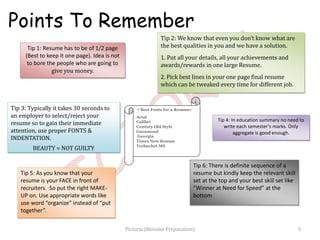
Tip 1: Resume has to be of 1/2 page
(Best to keep it one page). Idea is not
to bore the people who are going to
give you money.
Tip 3: Typically it takes 30 seconds to
an employer to select/reject your
resume so to gain their immediate
attention, use proper FONTS &
INDENTATION.
BEAUTY = NOT GUILTY
Tip 4: In education summary no need to
write each semester’s marks. Only
aggregate is good enough.
7 Best Fonts for a Resume:
Arial
Calibri
Century Old Style
Garamond
Georgia
Times New Roman
Trebuchet MS
Tip 2: We know that even you don’t know what are
the best qualities in you and we have a solution.
1. Put all your details, all your achievements and
awards/rewards in one large Resume.
2. Pick best lines in your one page final resume
which can be tweaked every time for different job.
Tip 6: There is definite sequence of a
resume but kindly keep the relevant skill
set at the top and your best skill set like
“Winner at Need for Speed” at the
bottom
Tip 5: As you know that your
resume is your FACE in front of
recruiters. So put the right MAKE-
UP on. Use appropriate words like
use word “organize” instead of “put
together”.
Points To Remember
3Pictoria (Resume Preparation)
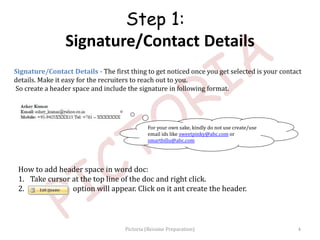
Signature/Contact Details - The first thing to get noticed once you get selected is your contact
details. Make it easy for the recruiters to reach out to you.
So create a header space and include the signature in following format.
For your own sake, kindly do not use create/use
email ids like sweetpinky@abc.com or
smartbillu@abc.com
Step 1:
Signature/Contact Details
How to add header space in word doc:
1. Take cursor at the top line of the doc and right click.
2. option will appear. Click on it ant create the header.
4Pictoria (Resume Preparation)
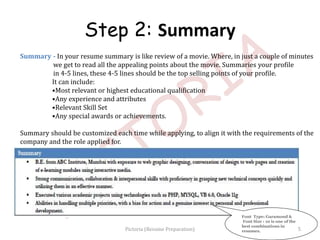
Summary - In your resume summary is like review of a movie. Where, in just a couple of minutes
we get to read all the appealing points about the movie. Summaries your profile
in 4-5 lines, these 4-5 lines should be the top selling points of your profile.
It can include:
•Most relevant or highest educational qualification
•Any experience and attributes
•Relevant Skill Set
•Any special awards or achievements.
Summary should be customized each time while applying, to align it with the requirements of the
company and the role applied for.
Font Type: Garamond &
Font Size : 10 is one of the
best combinations in
resumes.
Step 2: Summary
5Pictoria (Resume Preparation)
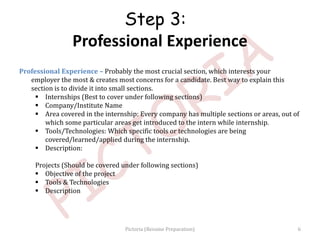
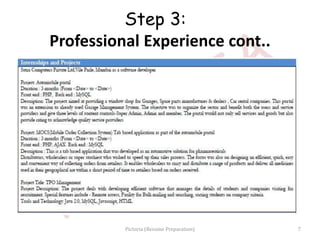
Professional Experience – Probably the most crucial section, which interests your
employer the most & creates most concerns for a candidate. Best way to explain this
section is to divide it into small sections.
 Internships (Best to cover under following sections)
 Company/Institute Name
 Area covered in the internship: Every company has multiple sections or areas, out of
which some particular areas get introduced to the intern while internship.
 Tools/Technologies: Which specific tools or technologies are being
covered/learned/applied during the internship.
 Description:
Projects (Should be covered under following sections)
 Objective of the project
 Tools & Technologies
 Description
Step 3:
Professional Experience
6Pictoria (Resume Preparation)
Step 3:
Professional Experience cont..
7Pictoria (Resume Preparation)
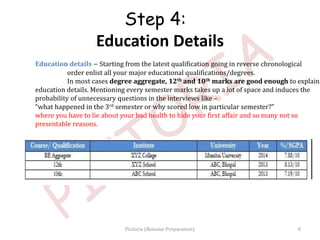
Education details – Starting from the latest qualification going in reverse chronological
order enlist all your major educational qualifications/degrees.
In most cases degree aggregate, 12th and 10th marks are good enough to explain
education details. Mentioning every semester marks takes up a lot of space and induces the
probability of unnecessary questions in the interviews like –
“what happened in the 3rd semester or why scored low in particular semester?”
where you have to lie about your bad health to hide your first affair and so many not so
presentable reasons.
8
Step 4:
Education Details
Pictoria (Resume Preparation)
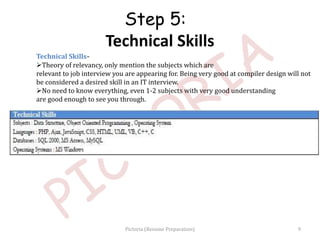
Technical Skills-
Theory of relevancy, only mention the subjects which are
relevant to job interview you are appearing for. Being very good at compiler design will not
be considered a desired skill in an IT interview.
No need to know everything, even 1-2 subjects with very good understanding
are good enough to see you through.
Step 5:
Technical Skills
9Pictoria (Resume Preparation)
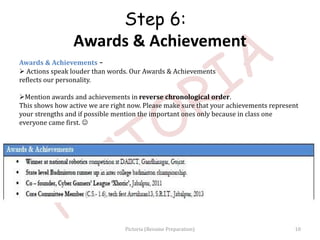
Awards & Achievements –
 Actions speak louder than words. Our Awards & Achievements
reflects our personality.
Mention awards and achievements in reverse chronological order.
This shows how active we are right now. Please make sure that your achievements represent
your strengths and if possible mention the important ones only because in class one
everyone came first. 
Step 6:
Awards & Achievement
10Pictoria (Resume Preparation)
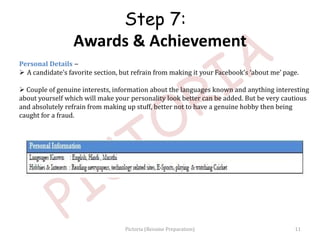
Personal Details –
 A candidate’s favorite section, but refrain from making it your Facebook’s ‘about me’ page.
 Couple of genuine interests, information about the languages known and anything interesting
about yourself which will make your personality look better can be added. But be very cautious
and absolutely refrain from making up stuff, better not to have a genuine hobby then being
caught for a fraud.
Step 7:
Awards & Achievement
11Pictoria (Resume Preparation)
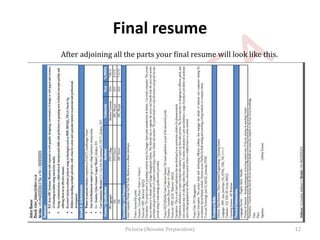
Final resume
After adjoining all the parts your final resume will look like this.
12Pictoria (Resume Preparation)
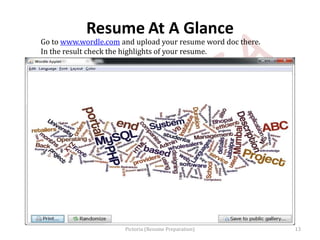
Resume At A Glance
Go to www.wordle.com and upload your resume word doc there.
In the result check the highlights of your resume.
13Pictoria (Resume Preparation)

Resume preparation pictoria slideshow

  • 1.
    Dear FRESHER: LET’SPREPARE YOUR RESUME 1Pictoria (Resume Preparation)
  • 2.
    Steps: 1. Signature 2. Summary 3.Professional experience 4. Education Details 5. Technical Skills 6. Awards/Achievements 7. Personal Details 2Pictoria (Resume Preparation)
  • 3.
    Tip 1: Resumehas to be of 1/2 page (Best to keep it one page). Idea is not to bore the people who are going to give you money. Tip 3: Typically it takes 30 seconds to an employer to select/reject your resume so to gain their immediate attention, use proper FONTS & INDENTATION. BEAUTY = NOT GUILTY Tip 4: In education summary no need to write each semester’s marks. Only aggregate is good enough. 7 Best Fonts for a Resume: Arial Calibri Century Old Style Garamond Georgia Times New Roman Trebuchet MS Tip 2: We know that even you don’t know what are the best qualities in you and we have a solution. 1. Put all your details, all your achievements and awards/rewards in one large Resume. 2. Pick best lines in your one page final resume which can be tweaked every time for different job. Tip 6: There is definite sequence of a resume but kindly keep the relevant skill set at the top and your best skill set like “Winner at Need for Speed” at the bottom Tip 5: As you know that your resume is your FACE in front of recruiters. So put the right MAKE- UP on. Use appropriate words like use word “organize” instead of “put together”. Points To Remember 3Pictoria (Resume Preparation)
  • 4.
    Signature/Contact Details -The first thing to get noticed once you get selected is your contact details. Make it easy for the recruiters to reach out to you. So create a header space and include the signature in following format. For your own sake, kindly do not use create/use email ids like sweetpinky@abc.com or smartbillu@abc.com Step 1: Signature/Contact Details How to add header space in word doc: 1. Take cursor at the top line of the doc and right click. 2. option will appear. Click on it ant create the header. 4Pictoria (Resume Preparation)
  • 5.
    Summary - Inyour resume summary is like review of a movie. Where, in just a couple of minutes we get to read all the appealing points about the movie. Summaries your profile in 4-5 lines, these 4-5 lines should be the top selling points of your profile. It can include: •Most relevant or highest educational qualification •Any experience and attributes •Relevant Skill Set •Any special awards or achievements. Summary should be customized each time while applying, to align it with the requirements of the company and the role applied for. Font Type: Garamond & Font Size : 10 is one of the best combinations in resumes. Step 2: Summary 5Pictoria (Resume Preparation)
  • 6.
    Professional Experience –Probably the most crucial section, which interests your employer the most & creates most concerns for a candidate. Best way to explain this section is to divide it into small sections.  Internships (Best to cover under following sections)  Company/Institute Name  Area covered in the internship: Every company has multiple sections or areas, out of which some particular areas get introduced to the intern while internship.  Tools/Technologies: Which specific tools or technologies are being covered/learned/applied during the internship.  Description: Projects (Should be covered under following sections)  Objective of the project  Tools & Technologies  Description Step 3: Professional Experience 6Pictoria (Resume Preparation)
  • 7.
    Step 3: Professional Experiencecont.. 7Pictoria (Resume Preparation)
  • 8.
    Education details –Starting from the latest qualification going in reverse chronological order enlist all your major educational qualifications/degrees. In most cases degree aggregate, 12th and 10th marks are good enough to explain education details. Mentioning every semester marks takes up a lot of space and induces the probability of unnecessary questions in the interviews like – “what happened in the 3rd semester or why scored low in particular semester?” where you have to lie about your bad health to hide your first affair and so many not so presentable reasons. 8 Step 4: Education Details Pictoria (Resume Preparation)
  • 9.
    Technical Skills- Theory ofrelevancy, only mention the subjects which are relevant to job interview you are appearing for. Being very good at compiler design will not be considered a desired skill in an IT interview. No need to know everything, even 1-2 subjects with very good understanding are good enough to see you through. Step 5: Technical Skills 9Pictoria (Resume Preparation)
  • 10.
    Awards & Achievements–  Actions speak louder than words. Our Awards & Achievements reflects our personality. Mention awards and achievements in reverse chronological order. This shows how active we are right now. Please make sure that your achievements represent your strengths and if possible mention the important ones only because in class one everyone came first.  Step 6: Awards & Achievement 10Pictoria (Resume Preparation)
  • 11.
    Personal Details – A candidate’s favorite section, but refrain from making it your Facebook’s ‘about me’ page.  Couple of genuine interests, information about the languages known and anything interesting about yourself which will make your personality look better can be added. But be very cautious and absolutely refrain from making up stuff, better not to have a genuine hobby then being caught for a fraud. Step 7: Awards & Achievement 11Pictoria (Resume Preparation)
  • 12.
    Final resume After adjoiningall the parts your final resume will look like this. 12Pictoria (Resume Preparation)
  • 13.
    Resume At AGlance Go to www.wordle.com and upload your resume word doc there. In the result check the highlights of your resume. 13Pictoria (Resume Preparation)