

How to promote your publications via live CV?
Stop Searching, Start Discovering
Reasons for promoting scholarly output
Scientist needs a good scholarly CV to promote his
publications for purpose of:
• Research evaluation (annually)
• Career advancement and tenure
• Collaboration opportunity
• Funding opportunity
• Knowledge sharing
• Quantify scholarly impact
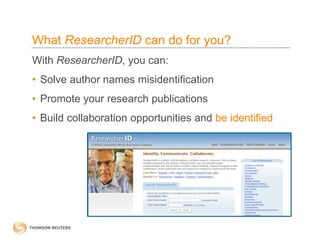
What ResearcherID can do for you?
With ResearcherID, you can:
• Solve author names misidentification
• Promote your research publications
• Build collaboration opportunities and be identified
What is ResearcherID?
www.researcherid.com
• Online registry for creating a unique ResearcherID
number
• Build a publication list identifying only your work
• Manage personal profile with flexibility and
minimum maintenance
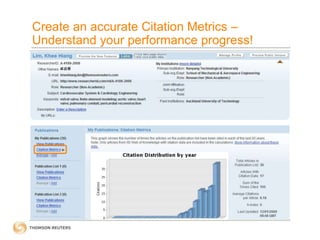
• Generate accurate personal citation metrics to
promote scholarly contributions:
• H-index
• Citation distribution per year
• Total Times Cited count
• Average Times Cited
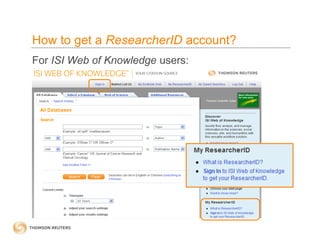
How to get a ResearcherID account?
For ISI Web of Knowledge users:
How to get a ResearcherID account?
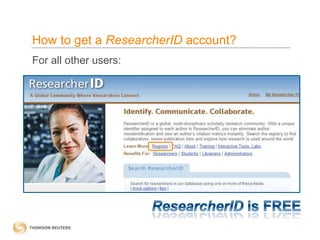
For all other users:
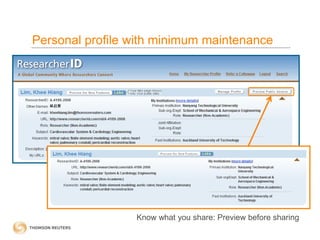
Personal profile with minimum maintenance
Know what you share: Preview before sharing
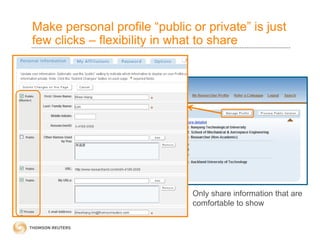
Make personal profile “public or private” is just
few clicks – flexibility in what to share
Only share information that are
comfortable to show
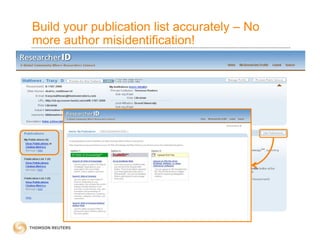
Build your publication list accurately – No
more author misidentification!
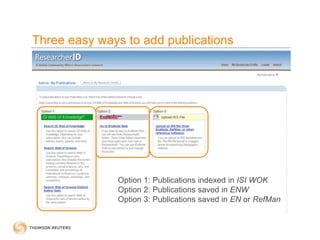
Three easy ways to add publications
Option 1: Publications indexed in ISI WOK
Option 2: Publications saved in ENW
Option 3: Publications saved in EN or RefMan
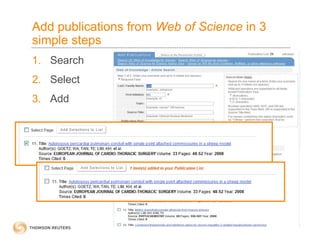
Add publications from Web of Science in 3
simple steps
1. Search
2. Select
3. Add
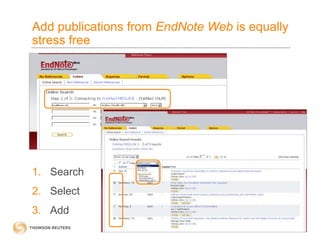
Add publications from EndNote Web is equally
stress free
1. Search
2. Select
3. Add
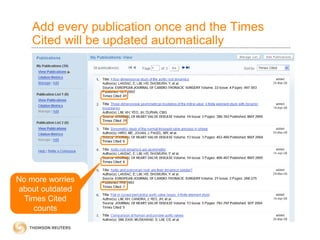
Add every publication once and the Times
Cited will be updated automatically
No more worries
about outdated
Times Cited
counts
Build a CV that is alive (Times Cited which
updates automatically and instantly)
• Times Cited is used heavily for research evaluation
exercise every year
• As academic CV is not complete without Times
Cited, scientists spend tremendous time to update
their Times Cited information
• With ResearcherID, the Times Cited information
– Will be updated automatically
– Synchronize times cited information from reliable source –
Web of Science
 Users can check most updated Times Cited Information
at anytime, anywhere
Create an accurate Citation Metrics –
Understand your performance progress!
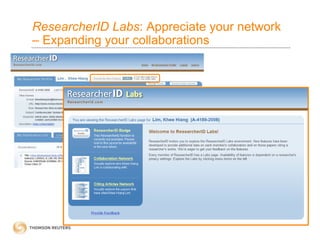
ResearcherID Labs: Appreciate your network
– Expanding your collaborations
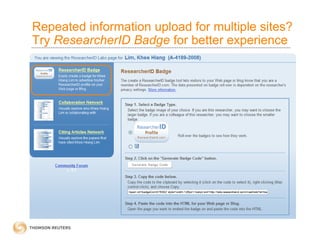
Repeated information upload for multiple sites?
Try ResearcherID Badge for better experience
ResearcherID Badge: No more multiple sites
maintenance
• Users are able to embed a ResearcherID image, or
badge, onto their university website or blog
• There are currently thousands of badges living on the
webpage of individuals
• Examples for individual include
http://web.ics.purdue.edu/~huberm/ ;
http://www.di.uniba.it/~mencar/
• Examples for entire lab group pages
http://dsm.fujita-hu.ac.jp/Members/index.html ;
http://www.pssrc.org/index.php?id=cluster_members
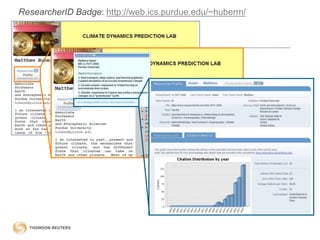
ResearcherID Badge: http://web.ics.purdue.edu/~huberm/
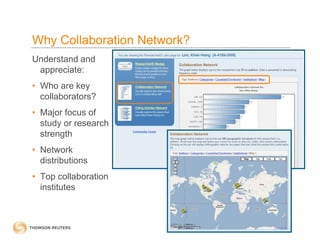
Why Collaboration Network?
Understand and
appreciate:
• Who are key
collaborators?
• Major focus of
study or research
strength
• Network
distributions
• Top collaboration
institutes
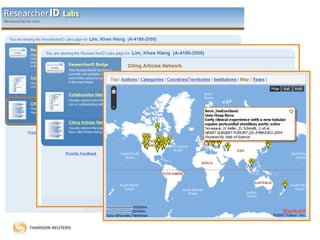
Why Citing Articles Network?
It allows user to appreciate and understand:
• Who cited your articles?
• How many research fields have your findings influenced or
impacted?
• What countries or territories has recognized your research?
• Which institutions are interested in your research?
• Which region most interested in your work?
• Which year has received the maximum citations?
• Do your researches continue to arouse interest globally?
• Most of your citations fall on recent years or previous years?
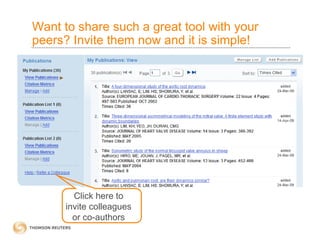
Want to share such a great tool with your
peers? Invite them now and it is simple!
Click here to
invite colleagues
or co-authors
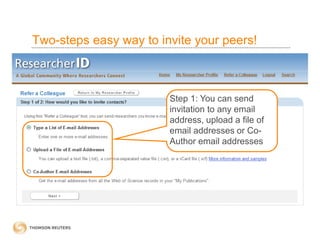
Two-steps easy way to invite your peers!
Step 1: You can send
invitation to any email
address, upload a file of
email addresses or Co-
Author email addresses
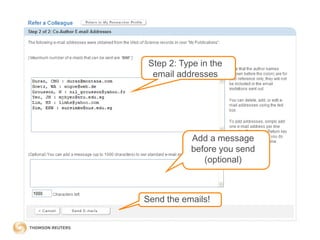
Step 2: Type in the
email addresses
Add a message
before you send
(optional)
Send the emails!
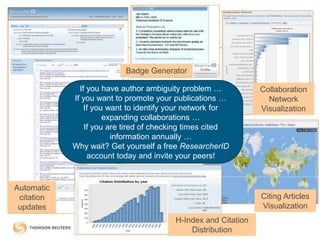
Collaboration
Network
Visualization
Citing Articles
Visualization
H-Index and Citation
Distribution
Badge Generator
If you have author ambiguity problem …
If you want to promote your publications …
If you want to identify your network for
expanding collaborations …
If you are tired of checking times cited
information annually …
Why wait? Get yourself a free ResearcherID
account today and invite your peers!
Automatic
citation
updates
Need help? Contact us
For more recorded training sessions, please visit
http://science.thomsonreuters.com/training
For technical help, please direct to
If you are from: Please write to:
Japan ts.support.jp@thomsonreuters.com
Korea ts.support.korea@thomsonreuters.com
China ts.support.china@thomsonreuters.com
ANZ ts.support.anz@thomsonreuters.com
Rest of APAC (including
SEA, HK, Taiwan, India)
ts.support.asia@thomsonreuters.com
Stop Searching, Start Discovering

Researcher id

  • 1.
    How to promoteyour publications via live CV? Stop Searching, Start Discovering
  • 2.
    Reasons for promotingscholarly output Scientist needs a good scholarly CV to promote his publications for purpose of: • Research evaluation (annually) • Career advancement and tenure • Collaboration opportunity • Funding opportunity • Knowledge sharing • Quantify scholarly impact
  • 3.
    What ResearcherID cando for you? With ResearcherID, you can: • Solve author names misidentification • Promote your research publications • Build collaboration opportunities and be identified
  • 4.
    What is ResearcherID? www.researcherid.com •Online registry for creating a unique ResearcherID number • Build a publication list identifying only your work • Manage personal profile with flexibility and minimum maintenance • Generate accurate personal citation metrics to promote scholarly contributions: • H-index • Citation distribution per year • Total Times Cited count • Average Times Cited
  • 5.
    How to geta ResearcherID account? For ISI Web of Knowledge users:
  • 6.
    How to geta ResearcherID account? For all other users:
  • 7.
    Personal profile withminimum maintenance Know what you share: Preview before sharing
  • 8.
    Make personal profile“public or private” is just few clicks – flexibility in what to share Only share information that are comfortable to show
  • 9.
    Build your publicationlist accurately – No more author misidentification!
  • 10.
    Three easy waysto add publications Option 1: Publications indexed in ISI WOK Option 2: Publications saved in ENW Option 3: Publications saved in EN or RefMan
  • 11.
    Add publications fromWeb of Science in 3 simple steps 1. Search 2. Select 3. Add
  • 12.
    Add publications fromEndNote Web is equally stress free 1. Search 2. Select 3. Add
  • 13.
    Add every publicationonce and the Times Cited will be updated automatically No more worries about outdated Times Cited counts
  • 14.
    Build a CVthat is alive (Times Cited which updates automatically and instantly) • Times Cited is used heavily for research evaluation exercise every year • As academic CV is not complete without Times Cited, scientists spend tremendous time to update their Times Cited information • With ResearcherID, the Times Cited information – Will be updated automatically – Synchronize times cited information from reliable source – Web of Science  Users can check most updated Times Cited Information at anytime, anywhere
  • 15.
    Create an accurateCitation Metrics – Understand your performance progress!
  • 16.
    ResearcherID Labs: Appreciateyour network – Expanding your collaborations
  • 17.
    Repeated information uploadfor multiple sites? Try ResearcherID Badge for better experience
  • 18.
    ResearcherID Badge: Nomore multiple sites maintenance • Users are able to embed a ResearcherID image, or badge, onto their university website or blog • There are currently thousands of badges living on the webpage of individuals • Examples for individual include http://web.ics.purdue.edu/~huberm/ ; http://www.di.uniba.it/~mencar/ • Examples for entire lab group pages http://dsm.fujita-hu.ac.jp/Members/index.html ; http://www.pssrc.org/index.php?id=cluster_members
  • 19.
  • 20.
    Why Collaboration Network? Understandand appreciate: • Who are key collaborators? • Major focus of study or research strength • Network distributions • Top collaboration institutes
  • 21.
    Why Citing ArticlesNetwork? It allows user to appreciate and understand: • Who cited your articles? • How many research fields have your findings influenced or impacted? • What countries or territories has recognized your research? • Which institutions are interested in your research? • Which region most interested in your work? • Which year has received the maximum citations? • Do your researches continue to arouse interest globally? • Most of your citations fall on recent years or previous years?
  • 23.
    Want to sharesuch a great tool with your peers? Invite them now and it is simple! Click here to invite colleagues or co-authors
  • 24.
    Two-steps easy wayto invite your peers! Step 1: You can send invitation to any email address, upload a file of email addresses or Co- Author email addresses
  • 25.
    Step 2: Typein the email addresses Add a message before you send (optional) Send the emails!
  • 26.
    Collaboration Network Visualization Citing Articles Visualization H-Index andCitation Distribution Badge Generator If you have author ambiguity problem … If you want to promote your publications … If you want to identify your network for expanding collaborations … If you are tired of checking times cited information annually … Why wait? Get yourself a free ResearcherID account today and invite your peers! Automatic citation updates
  • 27.
    Need help? Contactus For more recorded training sessions, please visit http://science.thomsonreuters.com/training For technical help, please direct to If you are from: Please write to: Japan ts.support.jp@thomsonreuters.com Korea ts.support.korea@thomsonreuters.com China ts.support.china@thomsonreuters.com ANZ ts.support.anz@thomsonreuters.com Rest of APAC (including SEA, HK, Taiwan, India) ts.support.asia@thomsonreuters.com Stop Searching, Start Discovering