Chris Westin
Software Engineer, 10gen


     © Copyright 2010 10gen Inc.
What is Replication for?
• High availability
  • If a node fails, another node can step in
  • Extra copies of data for recovery
• Scaling reads
  • Applications with high read rates can read from
    replicas
What Does Replication Look Like?

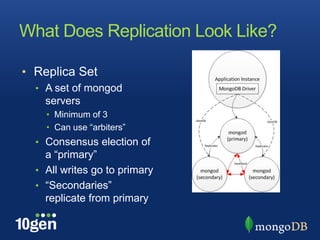
• Replica Set
  • A set of mongod
    servers
    • Minimum of 3
    • Can use “arbiters”
  • Consensus election of
    a “primary”
  • All writes go to primary
  • “Secondaries”
    replicate from primary
Configuring a Replica Set
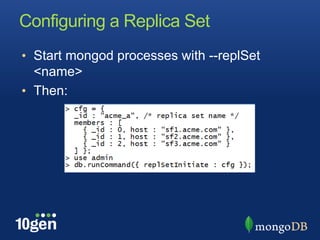
• Start mongod processes with --replSet
  <name>
• Then:
Managing a Replica Set
• rs.conf()
  • Shell helper: get current configuration
• rs.initiate([<cfg>]);
  • Shell helper: initiate replica set
• rs.add(“hostname:<port>”)
  • Shell helper: add a new member
• rs.reconfig(<cfg>)
  • Shell helper: reconfigure a replica set
• rs.remove(“hostname:<port>”)
  • Shell helper: remove a member
Some Administrative Commands
• rs.status()
  • Reports status of the replica set from one node’s
    point of view
• rs.stepDown(<secs>)
  • Request the primary to step down
• rs.freeze(<secs>)
  • Prevents any changes to the current replica set
    configuration (primary/secondary status)
  • Use during backups
How Does it Work?
• Change operations are written to the oplog
  • Changes are described in an idempotent form
    • They are safe to apply more than once!
  • The oplog is in the “local” database
• Secondaries periodically query the primary’s
  oplog and apply what they find
• Change timestamps are in local server time
  • Keep time skew at a minimum using NTP to avoid
    pauses during failover
A Few Words About the Oplog
• The oplog is a capped collection
  • Must have enough space to allow new
    secondaries to catch up after copying from a
    primary
  • Must have enough space to cope with any
    applicable slaveDelay
  • The required oplog size depends on the level of
    activity
  • If necessary, the oplog can be resized
    • Or, use the first-time mongod startup option –
      oplogSize <MB> to choose size of replication log
Adding More Replicas
• You can add more replicas after your initial
  setup
  • Add an empty server
    • This will slowly copy documents and then apply any
      necessary oplog to look like the primary
  • Add a new server based on a recent backup
    • Begins applying oplog records as if the replica had
      temporarily been cut off from the primary
Failover
• Replica set members monitor each other via
  heartbeats (every 2 seconds)
• If the primary can’t be reached, a new one is
  elected
  • The secondary with the most up-to-date oplog is
    chosen
  • If, after election, a secondary has changes not on
    the new primary, those are undone, and moved
    aside (changes saved to a BSON file)
  • If you require a guarantee, ensure data is written
    to a majority of the replica set
Priority
• Optional parameter to replica set member
  configuration
• All other things being equal, the highest
  priority member wins the election for primary
  • Changes in secondaries’ relative lag, i.e.,
    catching up to primary, can trigger an election
• Zero priority: can never become primary
  • Use for remote DR, delayed slaves, backups,
    analytics sources
For Applications
• getLastError( { w : … } )
  • Application blocks until changes are written to the
    specified number of servers
  • Defaults can be set in the replica set’s configuration
• “Safe mode” for critical writes:
  setWriteConcern()
  • Another way to force writes to a number of servers
• Drivers support “slaveOk” for sending queries to
  a secondary
  • This is for scaling reads
Replication and Sharding
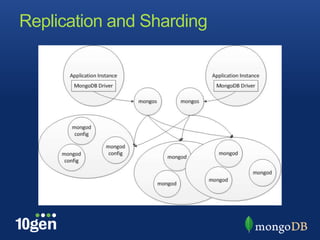
• Each shard is its own replica set
• Drivers use a mongos process to route
  queries to the appropriate shard(s)
• Configuration servers maintain the shard key
  range metadata
Replication and Sharding
Data Center Awareness
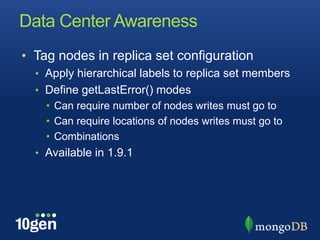
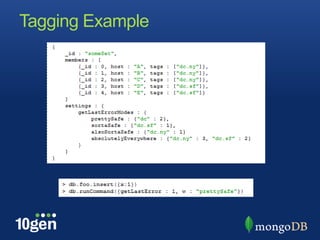
• Tag nodes in replica set configuration
  • Apply hierarchical labels to replica set members
  • Define getLastError() modes
    • Can require number of nodes writes must go to
    • Can require locations of nodes writes must go to
    • Combinations
  • Available in 1.9.1
Tagging Example
Documentation
• http://www.mongodb.org/display/DOCS/Repli
 ca+Sets
  • Index of documents on replication topics
Replication and replica sets

Replication and replica sets

  • 1.
    Chris Westin Software Engineer,10gen © Copyright 2010 10gen Inc.
  • 2.
    What is Replicationfor? • High availability • If a node fails, another node can step in • Extra copies of data for recovery • Scaling reads • Applications with high read rates can read from replicas
  • 3.
    What Does ReplicationLook Like? • Replica Set • A set of mongod servers • Minimum of 3 • Can use “arbiters” • Consensus election of a “primary” • All writes go to primary • “Secondaries” replicate from primary
  • 4.
    Configuring a ReplicaSet • Start mongod processes with --replSet <name> • Then:
  • 5.
    Managing a ReplicaSet • rs.conf() • Shell helper: get current configuration • rs.initiate([<cfg>]); • Shell helper: initiate replica set • rs.add(“hostname:<port>”) • Shell helper: add a new member • rs.reconfig(<cfg>) • Shell helper: reconfigure a replica set • rs.remove(“hostname:<port>”) • Shell helper: remove a member
  • 6.
    Some Administrative Commands •rs.status() • Reports status of the replica set from one node’s point of view • rs.stepDown(<secs>) • Request the primary to step down • rs.freeze(<secs>) • Prevents any changes to the current replica set configuration (primary/secondary status) • Use during backups
  • 7.
    How Does itWork? • Change operations are written to the oplog • Changes are described in an idempotent form • They are safe to apply more than once! • The oplog is in the “local” database • Secondaries periodically query the primary’s oplog and apply what they find • Change timestamps are in local server time • Keep time skew at a minimum using NTP to avoid pauses during failover
  • 8.
    A Few WordsAbout the Oplog • The oplog is a capped collection • Must have enough space to allow new secondaries to catch up after copying from a primary • Must have enough space to cope with any applicable slaveDelay • The required oplog size depends on the level of activity • If necessary, the oplog can be resized • Or, use the first-time mongod startup option – oplogSize <MB> to choose size of replication log
  • 9.
    Adding More Replicas •You can add more replicas after your initial setup • Add an empty server • This will slowly copy documents and then apply any necessary oplog to look like the primary • Add a new server based on a recent backup • Begins applying oplog records as if the replica had temporarily been cut off from the primary
  • 10.
    Failover • Replica setmembers monitor each other via heartbeats (every 2 seconds) • If the primary can’t be reached, a new one is elected • The secondary with the most up-to-date oplog is chosen • If, after election, a secondary has changes not on the new primary, those are undone, and moved aside (changes saved to a BSON file) • If you require a guarantee, ensure data is written to a majority of the replica set
  • 11.
    Priority • Optional parameterto replica set member configuration • All other things being equal, the highest priority member wins the election for primary • Changes in secondaries’ relative lag, i.e., catching up to primary, can trigger an election • Zero priority: can never become primary • Use for remote DR, delayed slaves, backups, analytics sources
  • 12.
    For Applications • getLastError({ w : … } ) • Application blocks until changes are written to the specified number of servers • Defaults can be set in the replica set’s configuration • “Safe mode” for critical writes: setWriteConcern() • Another way to force writes to a number of servers • Drivers support “slaveOk” for sending queries to a secondary • This is for scaling reads
  • 13.
    Replication and Sharding •Each shard is its own replica set • Drivers use a mongos process to route queries to the appropriate shard(s) • Configuration servers maintain the shard key range metadata
  • 14.
  • 15.
    Data Center Awareness •Tag nodes in replica set configuration • Apply hierarchical labels to replica set members • Define getLastError() modes • Can require number of nodes writes must go to • Can require locations of nodes writes must go to • Combinations • Available in 1.9.1
  • 16.
  • 17.