Syd Johnson 2018
Regular Expression Cheat Sheet
This cheat sheet exists to support you throughout your journey
conquering Regular Expression. Use it to discover, organize, and
implement your ideas. Read it. Learn it. Visit it often.
Expression Function Example

Common Tokens
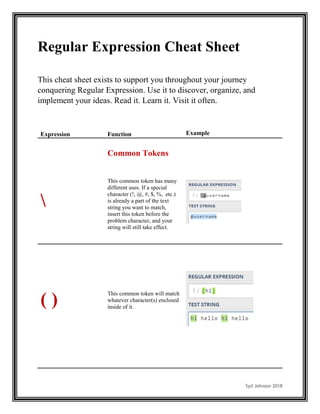
This common token has many
different uses. If a special
character (!, @, #, $, %, etc.)
is already a part of the text
string you want to match,
insert this token before the
problem character, and your
string will still take effect.
( )
This common token will match
whatever character(s) enclosed
inside of it.
Syd Johnson 2018
[ ]
Trap your characters in square
brackets to convey a range of
numbers or letters.
Your square brackets don’t
have to contain ranges; try a
few specific characters for a
more tailored approach. This
function works with any
characters in any order.
Include both uppercase and
lowercase ranges in your
brackets to exclude case
sensitivity.
Insert a ^ before your
range/characters in your square
brackets to exclude whatever
follows it.
. This common token will find
absolutely any character,
whether numerical or
alphabetical.
Syd Johnson 2018
.
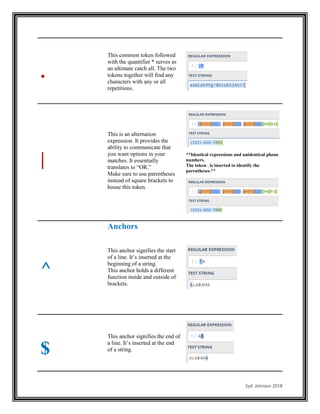
This common token followed
with the quantifier * serves as
an ultimate catch all. The two
tokens together will find any
characters with any or all
repetitions.
|
This is an alternation
expression. It provides the
ability to communicate that
you want options in your
matches. It essentially
translates to “OR.”
Make sure to use parentheses
instead of square brackets to
house this token.
**Identical expressions and unidentical phone
numbers.
The token . is inserted to identify the
parentheses.**
^
Anchors
This anchor signifies the start
of a line. It’s inserted at the
beginning of a string.
This anchor holds a different
function inside and outside of
brackets.
$
This anchor signifies the end of
a line. It’s inserted at the end
of a string.
Syd Johnson 2018
$
An exact sentence match can
be made when the anchors ^
and $ are used in the same
string.
A This anchor serves to match at
the starting point of the
character string. This anchor is
inserted at the beginning of the
regex.
A not included:
A included:
**In the Regex above, [0-9]+ signifies a string
of digits with one or more repetitions**
Z This anchor serves to match at
the ending point of the
character string. This anchor is
inserted at the end of the regex.
B not included:
B included:
**In the Regex above, [0-9]+ signifies a string
of digits with one or more repetitions**
Syd Johnson 2018
b
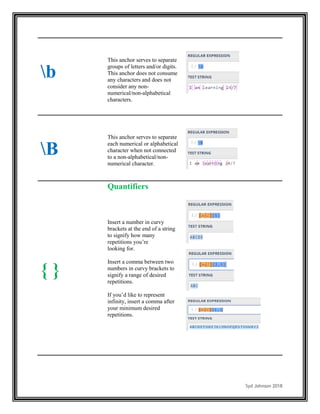
This anchor serves to separate
groups of letters and/or digits.
This anchor does not consume
any characters and does not
consider any non-
numerical/non-alphabetical
characters.
B
This anchor serves to separate
each numerical or alphabetical
character when not connected
to a non-alphabetical/non-
numerical character.
{ }
Quantifiers
Insert a number in curvy
brackets at the end of a string
to signify how many
repetitions you’re
looking for.
Insert a comma between two
numbers in curvy brackets to
signify a range of desired
repetitions.
If you’d like to represent
infinity, insert a comma after
your minimum desired
repetitions.
Syd Johnson 2018
?
Insert this quantifier at the end
of a string to signify up to one
repetition. It’s essentially
making the string optional.
+
Insert this quantifier at the end
of a string to signify one to an
infinite amount of repetitions
({1,}).
*
Insert this quantifier at the end
of a string to signify zero to an
infinite amount of repetitions.
This is a catch all; it could
either inform you that the
desired string doesn’t exist or
that it exists many times.
Syd Johnson 2018
s
Meta Sequences
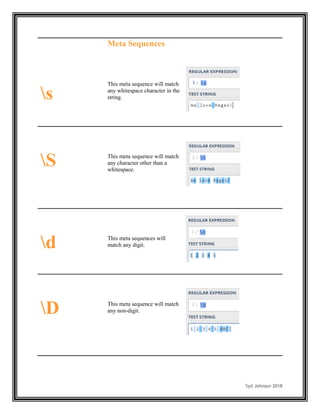
This meta sequence will match
any whitespace character in the
string.
S This meta sequence will match
any character other than a
whitespace.
d This meta sequences will
match any digit.
D This meta sequence will match
any non-digit.
Syd Johnson 2018
w
This meta sequence will match
any alphabetical or numerical
character.
When the quantifier + (one to
infinite repetitions) is inserted
following this token, it will
match whole words.
W
This meta sequence will match
any character other than a letter
or number.
v
This meta sequence serves to
recognize the number of
newlines. It won’t consume
any characters.
K
This meta sequence will
modify the regular expression
to begin to match characters at
a certain point.
**The [0-9]+ in this expression signifies one or
more repetitions of numerical characters, the
[A-Za-z]+ signifies one or more repetitions of
non-case sensitive alphabetical characters,
and the s serves to match whitespace.**
Syd Johnson 2018
Q E
When special characters are
enclosed in between these two
meta sequences, those
character are then treated as
literals.
CHALLENGER
Once you understand the functions above, see if you can build a
Regular Expression that will match your home address. Be sure
to use https://www.regex101.com to check your answer.
TIP
The meta sequence /s matches non-character spaces (the white
space!), and the quantifier + signifies one or more repetitions.
ANSWER
With some flexibility, your Regular Expression could look
something like this:
[0-9]+s[A-Za-z]+s[A-Za-z]+
Syd Johnson 2018
(?<regex)
Group Constructs
This group construct is called a
positive lookahead. It assists in
identifying characters that are
preceded with other known
characters.
This construct is inserted at the
beginning of a string.
To identify a set of letters preceded by
a set of numbers:
**The quantifier + in this Regex is
signifying one to an infinite number
of repetitions**
(?=regex)
This group construct is called a
negative lookbehind. It assists in
identifying characters that are
followed by other known
characters.
This construct is inserted at the
end of a string.
To identify a set of letters followed by a
set of numbers:
**The quantifier + in this Regex is
signifying one to an infinite number
of repetitions**
[[:<:]]
Character Classes
This character class will match
the first character of your choice
wherever it begins a word/group
of characters. The desired
letter/number must be inserted
at the end of the expression.
[[:>:]]
This character class will match
the first character of your choice
whenever it ends a word/group
of characters. The desired
letter/number must be inserted
at the beginning of the
expression

Regular Expression Cheat Sheet

  • 1.
    Syd Johnson 2018 RegularExpression Cheat Sheet This cheat sheet exists to support you throughout your journey conquering Regular Expression. Use it to discover, organize, and implement your ideas. Read it. Learn it. Visit it often. Expression Function Example Common Tokens This common token has many different uses. If a special character (!, @, #, $, %, etc.) is already a part of the text string you want to match, insert this token before the problem character, and your string will still take effect. ( ) This common token will match whatever character(s) enclosed inside of it.
  • 2.
    Syd Johnson 2018 [] Trap your characters in square brackets to convey a range of numbers or letters. Your square brackets don’t have to contain ranges; try a few specific characters for a more tailored approach. This function works with any characters in any order. Include both uppercase and lowercase ranges in your brackets to exclude case sensitivity. Insert a ^ before your range/characters in your square brackets to exclude whatever follows it. . This common token will find absolutely any character, whether numerical or alphabetical.
  • 3.
    Syd Johnson 2018 . Thiscommon token followed with the quantifier * serves as an ultimate catch all. The two tokens together will find any characters with any or all repetitions. | This is an alternation expression. It provides the ability to communicate that you want options in your matches. It essentially translates to “OR.” Make sure to use parentheses instead of square brackets to house this token. **Identical expressions and unidentical phone numbers. The token . is inserted to identify the parentheses.** ^ Anchors This anchor signifies the start of a line. It’s inserted at the beginning of a string. This anchor holds a different function inside and outside of brackets. $ This anchor signifies the end of a line. It’s inserted at the end of a string.
  • 4.
    Syd Johnson 2018 $ Anexact sentence match can be made when the anchors ^ and $ are used in the same string. A This anchor serves to match at the starting point of the character string. This anchor is inserted at the beginning of the regex. A not included: A included: **In the Regex above, [0-9]+ signifies a string of digits with one or more repetitions** Z This anchor serves to match at the ending point of the character string. This anchor is inserted at the end of the regex. B not included: B included: **In the Regex above, [0-9]+ signifies a string of digits with one or more repetitions**
  • 5.
    Syd Johnson 2018 b Thisanchor serves to separate groups of letters and/or digits. This anchor does not consume any characters and does not consider any non- numerical/non-alphabetical characters. B This anchor serves to separate each numerical or alphabetical character when not connected to a non-alphabetical/non- numerical character. { } Quantifiers Insert a number in curvy brackets at the end of a string to signify how many repetitions you’re looking for. Insert a comma between two numbers in curvy brackets to signify a range of desired repetitions. If you’d like to represent infinity, insert a comma after your minimum desired repetitions.
  • 6.
    Syd Johnson 2018 ? Insertthis quantifier at the end of a string to signify up to one repetition. It’s essentially making the string optional. + Insert this quantifier at the end of a string to signify one to an infinite amount of repetitions ({1,}). * Insert this quantifier at the end of a string to signify zero to an infinite amount of repetitions. This is a catch all; it could either inform you that the desired string doesn’t exist or that it exists many times.
  • 7.
    Syd Johnson 2018 s MetaSequences This meta sequence will match any whitespace character in the string. S This meta sequence will match any character other than a whitespace. d This meta sequences will match any digit. D This meta sequence will match any non-digit.
  • 8.
    Syd Johnson 2018 w Thismeta sequence will match any alphabetical or numerical character. When the quantifier + (one to infinite repetitions) is inserted following this token, it will match whole words. W This meta sequence will match any character other than a letter or number. v This meta sequence serves to recognize the number of newlines. It won’t consume any characters. K This meta sequence will modify the regular expression to begin to match characters at a certain point. **The [0-9]+ in this expression signifies one or more repetitions of numerical characters, the [A-Za-z]+ signifies one or more repetitions of non-case sensitive alphabetical characters, and the s serves to match whitespace.**
  • 9.
    Syd Johnson 2018 QE When special characters are enclosed in between these two meta sequences, those character are then treated as literals. CHALLENGER Once you understand the functions above, see if you can build a Regular Expression that will match your home address. Be sure to use https://www.regex101.com to check your answer. TIP The meta sequence /s matches non-character spaces (the white space!), and the quantifier + signifies one or more repetitions. ANSWER With some flexibility, your Regular Expression could look something like this: [0-9]+s[A-Za-z]+s[A-Za-z]+
  • 10.
    Syd Johnson 2018 (?<regex) GroupConstructs This group construct is called a positive lookahead. It assists in identifying characters that are preceded with other known characters. This construct is inserted at the beginning of a string. To identify a set of letters preceded by a set of numbers: **The quantifier + in this Regex is signifying one to an infinite number of repetitions** (?=regex) This group construct is called a negative lookbehind. It assists in identifying characters that are followed by other known characters. This construct is inserted at the end of a string. To identify a set of letters followed by a set of numbers: **The quantifier + in this Regex is signifying one to an infinite number of repetitions** [[:<:]] Character Classes This character class will match the first character of your choice wherever it begins a word/group of characters. The desired letter/number must be inserted at the end of the expression. [[:>:]] This character class will match the first character of your choice whenever it ends a word/group of characters. The desired letter/number must be inserted at the beginning of the expression