Registration process and
signup requirements
In this module we will discuss:
1. How to register with Paytm Mall- Signup DIY?
How to register with Paytm Mall ?
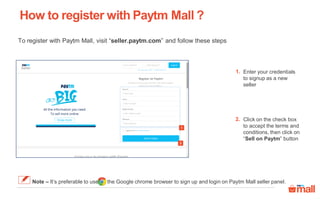
Enter your credentials
to signup as a new
seller
1.
Click on the check box
to accept the terms and
conditions, then click on
“Sell on Paytm” button
2.
2
1
To register with Paytm Mall, visit “seller.paytm.com” and follow these steps
Note – It’s preferable to use the Google chrome browser to sign up and login on Paytm Mall seller panel.
How to register with Paytm Mall ?
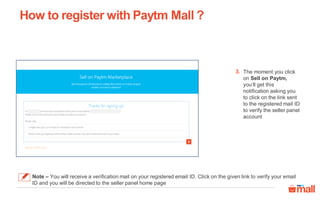
The moment you click
on Sell on Paytm,
you‘ll get this
notification asking you
to click on the link sent
to the registered mail ID
to verify the seller panel
account
3.
3
Note – You will receive a verification mail on your registered email ID. Click on the given link to verify your email
ID and you will be directed to the seller panel home page
How to register with Paytm Mall ?
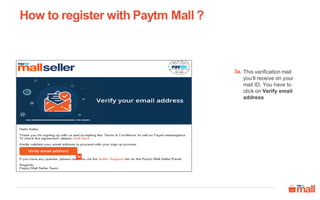
This verification mail
you’ll receive on your
mail ID. You have to
click on Verify email
address
3a.
3a
How to register with Paytm Mall ?
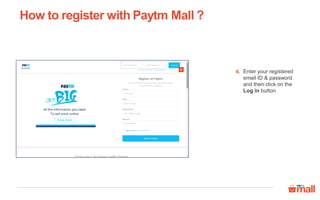
Enter your registered
email ID & password
and then click on the
Log in button
4.4
5
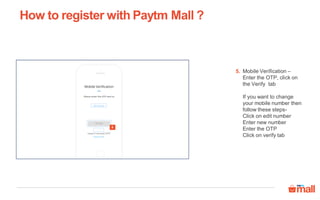
Mobile Verification –
Enter the OTP, click on
the Verify tab
If you want to change
your mobile number then
follow these steps-
Click on edit number
Enter new number
Enter the OTP
Click on verify tab
How to register with Paytm Mall ?
5.
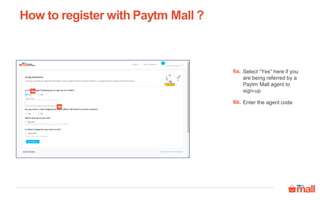
Select “Yes” here if you
are being referred by a
Paytm Mall agent to
sign-up
How to register with Paytm Mall ?
6a.
6a
6b
Enter the agent code6b.
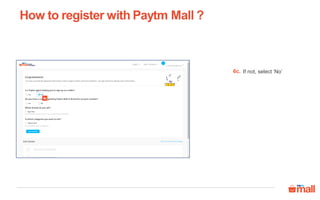
If not, select ‘No’
How to register with Paytm Mall ?
6c.
6c
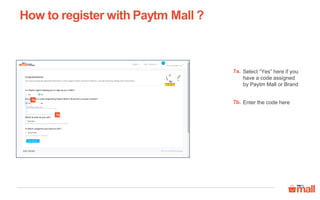
Select “Yes” here if you
have a code assigned
by Paytm Mall or Brand
How to register with Paytm Mall ?
7a.
Enter the code here7b.
7a
7b
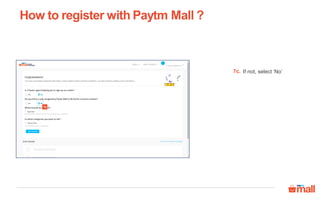
If not, select ‘No’
How to register with Paytm Mall ?
7c.
7c
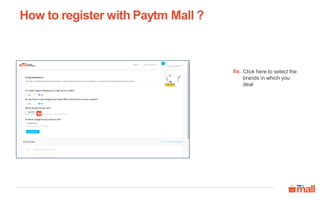
Click here to select the
brands in which you
deal
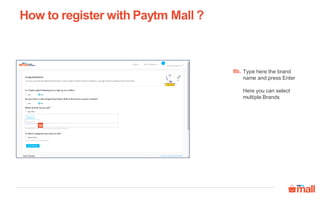
How to register with Paytm Mall ?
8a.
8a
Type here the brand
name and press Enter
Here you can select
multiple Brands
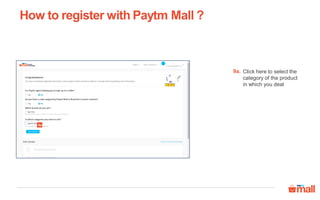
How to register with Paytm Mall ?
8b.
8b
Click here to select the
category of the product
in which you deal
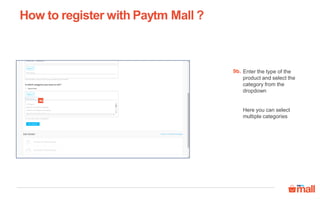
How to register with Paytm Mall ?
9a.
9a
Enter the type of the
product and select the
category from the
dropdown
Here you can select
multiple categories
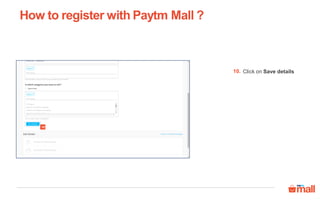
How to register with Paytm Mall ?
9b.
9b
Click on Save details
How to register with Paytm Mall ?
10.
10
How to register with Paytm Mall ?
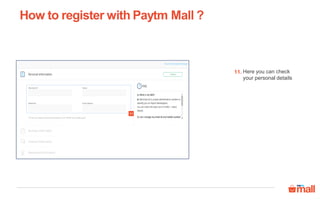
Here you can check
your personal details
11.
11
How to register with Paytm Mall ?
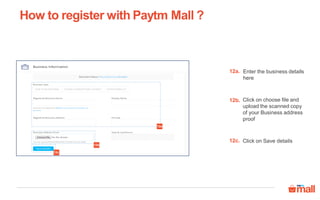
Enter the business details
here
12a.
12a
Click on choose file and
upload the scanned copy
of your Business address
proof
12b.
Click on Save details12c.
12b
12c
How to register with Paytm Mall ?
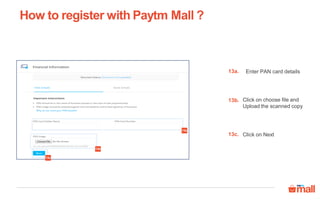
Enter PAN card details
Click on choose file and
Upload the scanned copy
13b.
Click on Next13c.
13a.
13a
13b
13c
How to register with Paytm Mall ?
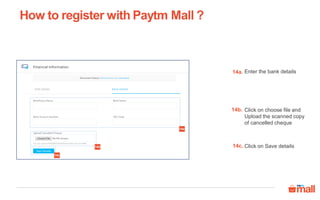
Enter the bank details
Click on choose file and
Upload the scanned copy
of cancelled cheque
14a.
14b.
Click on Save details14c.
14a
14b
14c
How to register with Paytm Mall ?
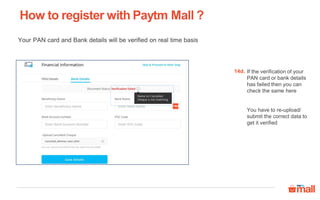
If the verification of your
PAN card or bank details
has failed then you can
check the same here
You have to re-upload/
submit the correct data to
get it verified
14d.
Your PAN card and Bank details will be verified on real time basis
14d
How to register with Paytm Mall ?
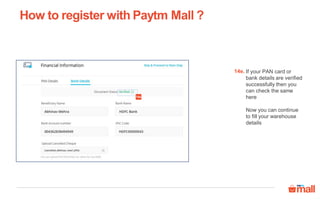
If your PAN card or
bank details are verified
successfully then you
can check the same
here
Now you can continue
to fill your warehouse
details
14e.
14e
How to register with Paytm Mall ?
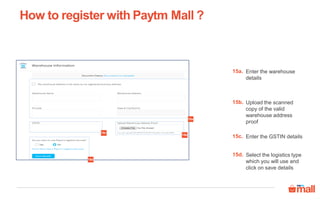
Enter the warehouse
details
15a.
Upload the scanned
copy of the valid
warehouse address
proof
15b.
Enter the GSTIN details15c.
Select the logistics type
which you will use and
click on save details
15d.
15a
15b
15c
15d
How to register with Paytm Mall ?
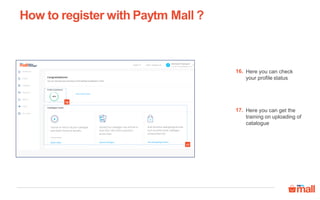
Here you can check
your profile status
16.
17
16
Here you can get the
training on uploading of
catalogue
17.
How to register with Paytm Mall ?
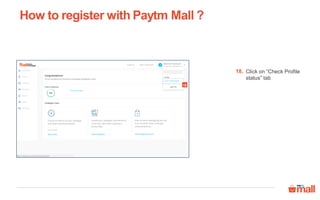
Click on “Check Profile
status” tab
18.
18
How to register with Paytm Mall ?
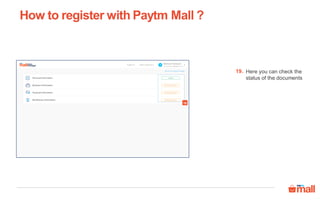
Here you can check the
status of the documents
19.
19
How to register with Paytm Mall ?
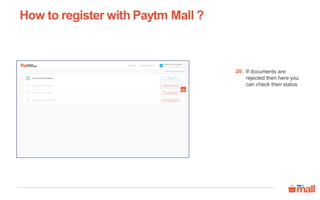
If documents are
rejected then here you
can check their status
20.
20
How to register with Paytm Mall ?
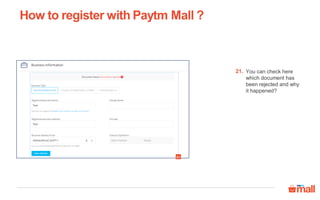
You can check here
which document has
been rejected and why
it happened?
21.
21
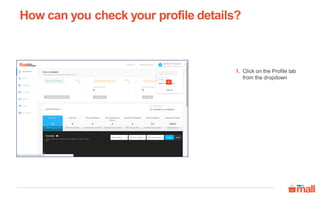
How can you check your profile details?
Click on the Profile tab
from the dropdown
1.
1
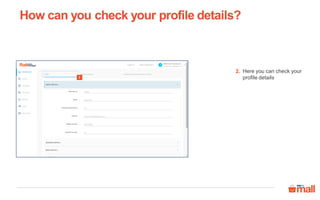
How can you check your profile details?
Here you can check your
profile details
2.
2
Thanks everyone!
For any query please raise a ticket on support

Registration process

  • 1.
    Registration process and signuprequirements In this module we will discuss: 1. How to register with Paytm Mall- Signup DIY?
  • 2.
    How to registerwith Paytm Mall ? Enter your credentials to signup as a new seller 1. Click on the check box to accept the terms and conditions, then click on “Sell on Paytm” button 2. 2 1 To register with Paytm Mall, visit “seller.paytm.com” and follow these steps Note – It’s preferable to use the Google chrome browser to sign up and login on Paytm Mall seller panel.
  • 3.
    How to registerwith Paytm Mall ? The moment you click on Sell on Paytm, you‘ll get this notification asking you to click on the link sent to the registered mail ID to verify the seller panel account 3. 3 Note – You will receive a verification mail on your registered email ID. Click on the given link to verify your email ID and you will be directed to the seller panel home page
  • 4.
    How to registerwith Paytm Mall ? This verification mail you’ll receive on your mail ID. You have to click on Verify email address 3a. 3a
  • 5.
    How to registerwith Paytm Mall ? Enter your registered email ID & password and then click on the Log in button 4.4
  • 6.
    5 Mobile Verification – Enterthe OTP, click on the Verify tab If you want to change your mobile number then follow these steps- Click on edit number Enter new number Enter the OTP Click on verify tab How to register with Paytm Mall ? 5.
  • 7.
    Select “Yes” hereif you are being referred by a Paytm Mall agent to sign-up How to register with Paytm Mall ? 6a. 6a 6b Enter the agent code6b.
  • 8.
    If not, select‘No’ How to register with Paytm Mall ? 6c. 6c
  • 9.
    Select “Yes” hereif you have a code assigned by Paytm Mall or Brand How to register with Paytm Mall ? 7a. Enter the code here7b. 7a 7b
  • 10.
    If not, select‘No’ How to register with Paytm Mall ? 7c. 7c
  • 11.
    Click here toselect the brands in which you deal How to register with Paytm Mall ? 8a. 8a
  • 12.
    Type here thebrand name and press Enter Here you can select multiple Brands How to register with Paytm Mall ? 8b. 8b
  • 13.
    Click here toselect the category of the product in which you deal How to register with Paytm Mall ? 9a. 9a
  • 14.
    Enter the typeof the product and select the category from the dropdown Here you can select multiple categories How to register with Paytm Mall ? 9b. 9b
  • 15.
    Click on Savedetails How to register with Paytm Mall ? 10. 10
  • 16.
    How to registerwith Paytm Mall ? Here you can check your personal details 11. 11
  • 17.
    How to registerwith Paytm Mall ? Enter the business details here 12a. 12a Click on choose file and upload the scanned copy of your Business address proof 12b. Click on Save details12c. 12b 12c
  • 18.
    How to registerwith Paytm Mall ? Enter PAN card details Click on choose file and Upload the scanned copy 13b. Click on Next13c. 13a. 13a 13b 13c
  • 19.
    How to registerwith Paytm Mall ? Enter the bank details Click on choose file and Upload the scanned copy of cancelled cheque 14a. 14b. Click on Save details14c. 14a 14b 14c
  • 20.
    How to registerwith Paytm Mall ? If the verification of your PAN card or bank details has failed then you can check the same here You have to re-upload/ submit the correct data to get it verified 14d. Your PAN card and Bank details will be verified on real time basis 14d
  • 21.
    How to registerwith Paytm Mall ? If your PAN card or bank details are verified successfully then you can check the same here Now you can continue to fill your warehouse details 14e. 14e
  • 22.
    How to registerwith Paytm Mall ? Enter the warehouse details 15a. Upload the scanned copy of the valid warehouse address proof 15b. Enter the GSTIN details15c. Select the logistics type which you will use and click on save details 15d. 15a 15b 15c 15d
  • 23.
    How to registerwith Paytm Mall ? Here you can check your profile status 16. 17 16 Here you can get the training on uploading of catalogue 17.
  • 24.
    How to registerwith Paytm Mall ? Click on “Check Profile status” tab 18. 18
  • 25.
    How to registerwith Paytm Mall ? Here you can check the status of the documents 19. 19
  • 26.
    How to registerwith Paytm Mall ? If documents are rejected then here you can check their status 20. 20
  • 27.
    How to registerwith Paytm Mall ? You can check here which document has been rejected and why it happened? 21. 21
  • 28.
    How can youcheck your profile details? Click on the Profile tab from the dropdown 1. 1
  • 29.
    How can youcheck your profile details? Here you can check your profile details 2. 2
  • 30.
    Thanks everyone! For anyquery please raise a ticket on support