iSchool Title slide
Welcome and intro with Chris Jagusch
The rules of iSchool
What we are here to achieve
Gaining certification and what it means
The Plan
State of the Internet with Trent Helmbright
The customer journey

Attention

Interest

Desire

Action
Lunch
Social Media and Online Advertising
The devices – How are we connecting
Revision Activity - preparation
• Choose a topic
• Create a movie poster about the topic on flipchart paper
• The poster is to include:
• Four main points
• At least one picture
• Have a clear AIDA format
• Prepare to present your poster to explain the four points
and describe how the poster fits the AIDA format
Break
Revision Presentation
Day One Test
10 questions – 20 minutes
Wrap up and Tonight’s Assignment
Bring it home:
In your teams be ready to present the following tomorrow morning:
• Describe your perceptions of the online world as it is used in your
regions, for example
• Describe a business using social media or how they might use
social media
• Describe people using iPhones, iPads, Android phones in your
region
Day 2
Day 2 Revision
Present the results of last nights homework
Our Digital history and Products –
nzherald.co.nz with Thomas Du Chateau
The Product Team with Umesh Sripad
Product Team
• What is a Product
– A portal where our customers engage with brand, consume
content and interact with adverts. Eg: nzherald.co.nz, nz
regionals websites, mobile apps, tablet apps

• Who is in Product team
– Web Designers, UX specialist, Analysts, front end developers
and Product Managers

• What do we do?
– Product Managers are internal and external liaisons.
• Internally we work with the cross functional team (Editorial, commercial,
technology, marketing and senior management).
• And externally we enable our audience to engage with brand on the
technology platform of their choice.
How do we strategize initiatives or ideas

•
•
•
•
•

Organisational direction and needs
Innovation and inventions in technology space
First to market opportunity
Market trends
Competitor analysis
How is a product visualised?
Visualising the product

•
•
•
•
•

Content strategy and uniqueness
Advertising strategy and other revenue options
Strengths and weaknesses
Marketing – Audience growth and engagement
Design, UX and IA
So… from concept to development
•
•
•
•
•
•
•
•
•

Conceptualise the brief or idea
GOOB (Get out of the building) for ideas
Blank paper or whiteboard
Design (with consumer in mind, not the
stakeholders)
Usability and User Experience
Development (technology)
Go-to-Market (Marketing strategy)
Commercialisation
Continuous review and Improvements
Digital product journey 1998 - present
Some Achievements
•

The NZ Herald brand now exists on 10 separate platforms reaching over 65% of
NZ, being the first news brand to launch the iPad app, iPhone app and Windows 8 app

•

NZ Herald has the largest Social Media news audience in Australasia

•

NZ Herald launched the AU and NZ first responsive mobile site

•

Most awarded digital news brand in Australasia
(Webby’s, Panpa, Cannons, WAN/IFRA)

•

10 Regionals Sites are being integrated into the NZ Herald by July 31 = 9% audience
spike

•

Launched the first fantasy sport game in NZ this year and have a tipping game (65,000
players in 2013)

•

The Listener moved to a hard pay wall model Oct 2012 and includes all content from the
printed magazine plus some limited digital only content. Learning's for NZ Herald

•

FoodHub is a new recipe focused vertical that aggregates content from other APN
publications. Launched Oct 2012.

•

NZ Woman’s Weekly female site in NZ with over 100% audience growth year on year
How can you get involved

• Have a kick ass idea? – we’ll help shape it for
you
– Write a quick brief with what the idea is, how does it help product
to make revenue or increase audience, can we get a
sponsor, etc
– Remember all ideas are good ideas
Key Initiatives for 2014

• Personalisation (data driven)
• Develop niche products to retain audience
and grow brand engagement
• Data Journalism
• Data Driven Advertising
• Design optimisation to grow engagement
• Custom Publishing – mobile platform
• Community platform development
• Ecommerce and transactions
Any questions???
Regional Overview with Tracey Bond
Background
•

Town Centre launched new web & mobile sites for ARM and NZRNN - Nov 2012

•

Town Centre project radically de-scoped by ARM – resulting in loss of:
–
–

Community building functionality – for local communities & local business
Community related commercial opportunities
Background
•

Essentially what was delivered was a redesign

•

NZRNN web & mobile sites controlled &
developed by ARM – NZ had little/no
input into product roadmap

•

No ability to improve on initial designs

•

Site architecture resulted in poor user
experience

•

ARM URL structure limited analytics
tracking

•

Lack of timely technical help from ARM
Bringing the sites back to NZ

Benefits of integrating the NZ Regional sites into the nzherald.co.nz domain:
•
•
•
•

•
•
•
•
•

Cost savings – hosting & maintenance in AU - $285K
Greater scope to monetize the Regional inventory
Efficiencies created by a single platform
Good positioning for a potential paywall opportunity – bundled subscription
packages with NZH & NZR
Competitive advantage for APN – Increased nzherald.co.nz UB numbers –
potential to match or exceed stuff.co.nz
A more comprehensive content offering for the NZH & NZR readers
Improved analytics tracking
Maintain the same Regional URL’s (http://www.hawkesbaytoday.co.nz/)
Common user experience mechanisms
Integration - key criteria

• Brand identity - Regional sites must retain their individual
brand identity so that readers who only visit for regional
content feel they are visiting a regional site
• Strong alignment of the user experience with that of
nzherald.co.nz – this will assist NZH readers with discovery of
regional content
Driving traffic to regional sites

Publications dropdown
menu on nzherald.co.nz
will list all regionals –
driving traffic to the
Regional sites
HOMEPAGE
•

Individual brand identity

•

Clean more news focused designs

•

Larger image sizes to feature the
great photography

•

Clean navigation – all content in
top level navigation menu

•

Network navigation for NZ Herald
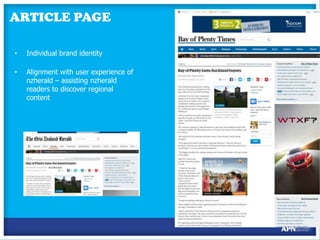
ARTICLE PAGE
•

Individual brand identity

•

Alignment with user experience of
nzherald – assisting nzherald
readers to discover regional
content
Integration
•
•
•

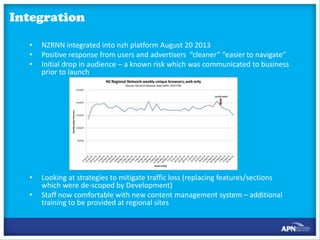
NZRNN integrated into nzh platform August 20 2013
Positive response from users and advertisers “cleaner” “easier to navigate”
Initial drop in audience – a known risk which was communicated to business
prior to launch

•

Looking at strategies to mitigate traffic loss (replacing features/sections
which were de-scoped by Development)
Staff now comfortable with new content management system – additional
training to be provided at regional sites

•
Loading content
Media Services
(Auckland)

Times Age, Wanganui Chronicle (Mon – Sat)
Daily Post, Northern Advocate (Sat)

Content
Administrators
(Auckland)

Bay of Plenty, Hawke’s Bay (Mon – Sat)
Daily Post, Northern Advocate (Mon – Fri)
Shared content, galleries, video

Digital Advocates

Extra
content, galleries, video, comments, polls, ranki
ng, editor’s picks

Ad Ops

Ad campaigns, marketplace adverts

Marketing

Promotions, marketing promo spot
The products
• Live link through to www.rotoruadailypost.co.nz?
• The products –
banner, wallpaper, mrec, marketplace
• Carousel was de-scoped (only had 3 clients)
• Other solutions for clients – rss feed
• Sections and buckets
2014 – Key challenges

•Re-build audience growth
•Improve commercial offering to Regions
•Improve National sales
2014 - Business priorities
Revenue
• Regional Sales rollout early November
• Improve Regional Advertising proposition
• Offer new advertising products
• Ensure regionals have access to new commercial
innovations
Audience Engagement
• Focus on raising time spent on site/PPV
• Emphasize discoverability of local, unique content
• More focus on of local content
• Focus on Video content
• Improve access to content through NZH Homepage
2014 – Initiatives
Revenue
1.Location based Adv for SME’s (mFlyer)
2.New Regional Mobile App
3.Marketing Services (Google trial)
4.Classified Carousels
5.Improve ‘marketplace’ to reflect local offerings
Audience Engagement
1.Introduce ‘Most Popular’
2.Regional video training
3.Launch of new tools E.G. ‘Follow the’ story
4.Focus on local SEO and specific SEP pages
5.Local Marketing to promote sites
Classifieds with Trent Helmbright
Targeting with Taryn Simmen
Digital – targeting

APN NZ Media is a division of APN New Zealand Ltd.
Section & Page Type Targeting

• Section
•

Eg. National News

• Sub-Section
•

Eg. Crime

• Page Type
•

eg.Quickread, Video and Photo Galleries, Saved articles
Note:

• When targeting to a sub-section, the ‘Section’ rates must be
used, plus an additional 10% load.
• Inventory for sub-sections needs to be checked with the Traffic team
(traffic@apn.co.nz) before booking.
Contextual Targeting
• Keyword and Tag targeting to align Ad with relevant context.
• This is booked as a product in it’s own right and is not an ‘addon’.
• 760x120 and 300x250 ad sizes to be supplied. The ad unit
which fits the page will be displayed.
• 5 Tag classifications and 30 Keywords per article page.
• It is important to carefully consider the keywords chosen.
Negative keywords can also be added to ensure you avoid the
following situations….
Geographic Targeting
• Country / Region / City targeting based on ISP location.
• All campaigns targeted to NZ Eyes by default.
GPS Targeting - Mobile
• Can select a GPS point and target a radius around it.
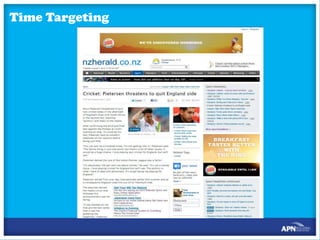
Time Targeting
• Day of Week
• E.g. Monday and Wednesday only

• Window of Time
• E.g. 10am – 12pm daily only.
Eg. Subway: 10am-12pm
Frequency Capping
• Allows reach to be maximised.
• E.g. frequency capped to 3
uniques per week.
Weather Targeting
• Weather Condition
• High / Low Temperatures
• Weather Location
Technology

• Browser Properties
• Eg. Screen resolution

• Mobile Types
• Eg. Samsung
• Connection Speeds
• Eg. Mobile, wireless
• Device Types
• Eg. tablet
Behavioural Targeting
BT – What is it?
Properties
•
•
•
•
•
•
•
•
•
•
•
•
•
•
•
•
•
•

Gender
Age
User Location
Income
Relationship Status
Interests
Education
Employment
Home Owner
Vehicle Owner
Has Children
Purchase Category
Purchase Value
Purchase Time
Purchase History
Deals Viewed
Categories Viewed
Deal Location
Frequency

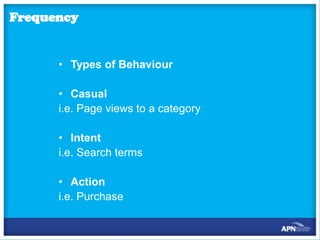
• Types of Behaviour

• Casual
i.e. Page views to a category
• Intent
i.e. Search terms
• Action
i.e. Purchase
Pro’s
•
•
•
•
•
•

Right audience for your brand
Deliver higher degree of relevance.
Improves user experience
Can buy audiences that are not available e.g. Small Business
Transparent data
Increases Site Optimisation

Con’s
•
•
•
•
•

Users can delete their cookies
Multiple users per ‘browser’
Context is King
Limited reach – Small number of uniques to page views
Impact lessened by other Behavioural targeting
Products

Pre-Built Segments
in Audience Science e.g. Travellers
50,600 unique users and 1.1million page views per week
Bespoke Solutions

e.g. Heart of the City
When to sell
• Up-selling tool rather than Primary Offering
• If audience not otherwise available
• Lower CPM than section targeting
Note – Behavioural Targeting should be measured by brand value
rather than CTR rate.
How to Book BT
•
•
•

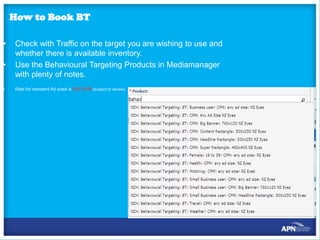
Check with Traffic on the target you are wishing to use and
whether there is available inventory.
Use the Behavioural Targeting Products in Mediamanager
with plenty of notes.
Rate for standard Ad sizes is $25 CPM (subject to review)
Measurements and analytics with Sarah
Maclennan
Data sources
• Adobe Site Catalyst (Omniture)
 Internal reporting tool for the digital product team, editorial staff and key business stake holders
Adobe services are primarily used for APN eyes only content & product performance measurement

• Nielsen NetView & Market Intelligence


Netview recently released audience measurement service using hybrid methodology – allows us to
see limited competitor data
 Market Intelligence is the legacy system that was used for measuring traffic to NZ based sites (both NZ
and international audience) plus basic demographics of that audience
Primarily used as a sales tools – but we do use it for competitive insights

• comScore
 An audience measurement tool similar to NetView but using different methodology
Primarily used as a sales tool – but we do use it for competitive insights

• Hitwise
 Competitive analysis tool that provides in-depth Mosaic demographic profiling.
Sales tool – key for demographic profiling

NOTE: All measurement services will generate different data as they use different methodologies. The key discipline
is to make sure that we are consistent is what source we are using when looking at performance.

78
Terminology
Metric

Metric for

What does it mean

Used by

Also known as

Unique browsers

Audience

Provides a guide to the number of readers that visit the
site.
It does not represent actual people, it represents web
browsers and different devices which can lead to
duplication over long periods of time (monthly data for
example).

Nielsen Market Intelligence,
Omniture

UB

Unique visitors

Audience

A metric created by comScore that best reflects actual
people.

comScore

UV, Total unique visitors

Page impressions

Traffic

The number of times a page on site has been loaded.

Nielsen Market Intelligence,
Omniture, comScore

PI, Page views, PV

Visits

Visits

The number of times a unique browser or visitor has come
to the site in a certain time period

Nielsen Market Intelligence,
Omniture, comScore

Visits, Sessions

Pages per visit

Engagement

The number of pages that are consumed each time a user
comes to the site

Nielsen Market Intelligence,
Omniture, comScore

PPV

Nielsen Market Intelligence,
Omniture, comScore

ASD, average time spent
per visit

Nielsen Market Intelligence,
Omniture, comScore

APD, average time spent
per visit

The average amount of time spent per site visit.
Average session duration

Engagement

Can be measured in seconds or minutes dependant on the
analytics tool.

The average amount of time spent on a page.
Average page duration

Engagement

Can be measured in seconds or minutes dependant on the
analytics tool.

79
Key metrics to take into account

Traffic and audience


For an advertiser they look at our unique browsers/audience to make sure their product or brand will reach
the amount of people they need it to, but they will purchased based on page impressions.

Demographics


Demographic information allows tailoring of propositions, showing that their brand can be exposed to either
their target market (if we fit that) or how we can compliment their current offering.

Engagement


Engagement metrics can be helpful in Sales when demonstrating that we can offer premium product. These
metrics would help support the traffic and audience numbers.

80
When to use us
There are a number of different scenarios that you can use Ad Ops, Research or Product
Analytics a few of which are…
Pitching to a new client or for a new campaign


This is a great chance to speak with the Research team, discuss the story we want to tell. How do we fit into
their offering, what are the latest or forecasted numbers for the period that they are looking at etc.

Inventory queries


All inventory queries should be directed to the Ad Ops team.

Audience demographics


The Research team can help with top level demographics as well as Mosaic profiling.

Post campaign reporting




Where it has been an integrated campaign it will be potentially a mix of Product Analytics, Ad Ops and
Research that will be providing reporting. To keep things easy, feel free to contact one person and we can
pull the information.
For any ad served content, Ad Ops will help

Section numbers


For information on specific sections come through to Product Analytics
81
What else can we provide?
APN tracks all of the core components of a site and page specific elements such as the section
ID’s, tags, page types, content types, page names etc., through to the hour of day, day of week
and content placement on a page.
A few key ways where Product Analytics can help are:
 Using the insights we collect to see how people use the site, how long do they spend in a
section, what other sections are they likely to view in an average visit, etc.
 What the performance is like from different referrers, if an advertiser wants to target social
users and they have a campaign linked to editorial content on the site, we can look at how
much will that reader consume on average in the sections.
 If a lofty target has been insisted upon by an advertiser, we can provide insights in what
changes may be needed to achieve the target (if there are any).
 Work with Ad Ops with Mobile App traffic and audience estimates.

82
Break
Making it Happen, Provisioning and Process
with Melissa Evans and Sophie Scott
Commercial Team Ad Ops

APN NZ Media is a division of APN New Zealand Ltd.
What is Ad Ops
•

Ad Ops controls and operates the ad servers as their primary responsibility.
Almost everyone in the company depends on us for something. Whether it’s the
marketing team trying to get a promotion live, the finance needing accurate
historical reports, the Product development team trying to evaluate and implement
a new technology, or just the day to day interaction with the Sales team to
understand what clients want. Ad Ops is an information hub within the
company, and a key resource for getting things done!

•

From a strategic standpoint, virtually any new technology, from workflow
management to analytics to data management eventually needs to interact with
the ad server, so Ad Ops is inherently at the centre of those conversations and
product rollouts

•

Responsible for pricing, ad product creation, inventory management etc

•

In summary Ad Ops refers to processes and systems that support the sale and delivery of
online advertising, we really do it all..
Our Team

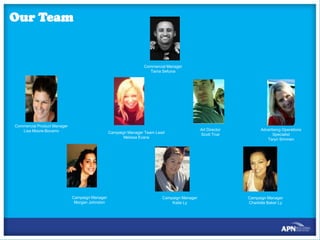
Commercial Manager
Tama Sefuiva

Commercial Product Manager
Lisa Moore-Bocarro

Campaign Manager Team Lead
Melissa Evans

Campaign Manager
Morgan Johnston

Campaign Manager
Katie Ly

Art Director
Scott True

Advertising Operations
Specialist
Taryn Simmen

Campaign Manager
Charlotte Baker Ly
When to come to us
• Supply inventory projections for future orders for sales on flights that
are more outside of the square - Sales and coordinators can pull
basic inventory reports (product)
• Generate reports internally and externally
• Deal with creative issues
• Check creative concepts executions
• Provide feedback on how successful ad/campaign might be and
provide feedback and suggestions
• You can come to the Ad Ops team for anything really relating to
digital campaigns whether that’s inventory projections, GeoTargeting, Time Targeting, BT Targeting
• Screenshots – please organise if needed with us first
Products
•

When booking in a digital campaign you need to select which product used whether you want your campaign to
run across the site or in a particular channel such as National News, Business, Sport and so on.. The product you
select determines where your advertisement will run. Words to look out for SOV, Daily Buys Freq caps, Time
Targeting, Geo Targeting, Contextual (keywords)

•

Most campaigns are sold on a cost per 1,000 or CPM therefore you always need to enter in a cost per impression
as below

•

Example: If you wanted to booked a Headline Rectangle 300x250 on the Northern Advocate for 23,500 page
impressions @ $13.90 CPM the flight would look like below

•

Please note there are a few exceptions where the cost is fixed such as sponsorship buys, production
costs, textlinks etc which are listed with a flat rate buy in the rate card, or which can't be attributed to an
impressions goal, e.g. marketplace. For these products only that you should use the Flat Rate option.
Big Banner 760x120 or
728x90 run at the top of the page

Medium Rectangles 300x250
Depending on how long the articles are
we can serve up to three rectangles on
the page
1)
Headline Rec (above the fold)
2)
Content Rec within the article
3)
Direct Rectangle
• 300x600 or
Half Pages
- this ad size runs in the headline
rectangle position

• 460x400 or
Super
Rectangles
this ad size currently runs in

the content rectangle position
Pre-Roll Videos

•
•
•

Pre-Roll Videos 620x350 15 sec” max
Two types of companion banners available
760x120 Big Banner or 620x55
Mobile and iPad
•
•
•

iPhone, Android and NGM 300x50 and 320x50
iPad 370x370 index pages only
GPS targeting
Text Links & Relevant Offers
Special Offers
Special Offers move from the bottom of
the page to the side bar. They will
maintain the same format but operate as
a carousel.
50x50 Logo with up to 90 characters.

Relevant Offers
Relevant offers are contextually targeted
by keyword, tag or article I.D. They are
given more space and are placed in line
with the content. The heading will
change dynamically depending on the
type of booking made. E.g. Now
Hiring, Now Leasing, Press Release.
Image: 140 x 93
Heading: Max 70 characters (Similar to Google
search results)
Text: Max 200 Characters
Rich Media
•

Rich Media refers to online advertising that makes use of a range of interactive digital media including streaming video and audio
that is fetching to the eye or created in a format that isn’t standard GIF. More specifically this means that the ad pulls in additional
information from a server beyond what is served up with the initial load.

•

Rich media must be 3rd party ad served – this means that we are not hosting the creative via SAS but rather a third party supplier
such as double click, media mind or facilitate. There are extra costs involved with third party ad serving but there are added
bonuses when using this service.
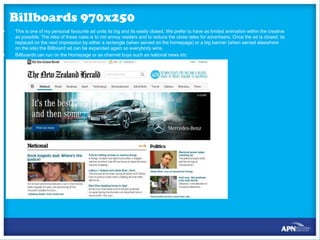
Billboards 970x250
•

•

This is one of my personal favourite ad units its big and its easily closed. We prefer to have as limited animation within the creative
as possible. The idea of these rules is to not annoy readers and to reduce the close rates for advertisers. Once the ad is closed, its
replaced on the next impression by either a rectangle (when served on the homepage) or a big banner (when served elsewhere
on the site) the Billboard ad can be expanded again so everybody wins.
Billboards can run on the Homepage or as channel buys such as national news etc
Takeovers
•

Full Takeovers: Wallpaper (1900x920) Extended Big Banner (1000x130) and Headline Rectangle (300x250) These are popular
executions.
All messaging in the wallpapers must fall within the 130 pxl line as
below, anything outside of this area will be cut off from a large part of
our audience for users on smaller screens.
Contextual Targeting
•
•

•

•

300x250 and 760x120
Is a form of targeting
your advert to specific
content via a list of
keywords
The server scans the first
250 words of an article
and if one of the
keywords supplied is
found then your ad will
be served.
This is a great way to
target your core
demographic.
Geo-Targeting
•

We can target to specific
regions or even countries

•

We can even target cities
based on weather
temperatures
Time Targeting
How to check inventory
SAS http://apnnz.aimatch.com
•
Reports > Product Reports> filter by date and
product > Run Report
You can use this tool to pull all projected inventory
except run of site. We need to use a separate report
for all ROS avails due to the tier ie Standard CPM –
Pre-emptible.
To pull ROS inventory Report> BI Reports > ROS
Inventory > and filter by dates required
How to book digital campaigns
Servers

• Media Manager

- is a system used to booked all print and digital campaigns. Once a campaign

has been entered into media manager you will export the IO and send on to client/agency to approve. Once approved you will
need to convert proposal which is when we are alerted to the booking. PLEASE BE 100% SURE THE DETAILS ARE CORRECT
BEFORE CONVERTING THE IO.

• -

is the system used to ad serve all the creative. You will need a login to pull Product reports to check inventory avails, BI

Reports (post campaign reporting)
Day Two Test
10 questions – 20 minutes
Day Two Assignment
In pairs choose two products and prepare to create a display poster that
demonstrates the following:
•
•
•
•

What it is
The main features
The benefits of those features
What tangible result will it produce for two of your customers

The poster will be produced tomorrow morning. This is your preparation
time
Remember AIDA
Day Three
Multimedia Campaigns with
Lisa Moore-Bocarro
I’ve sold it. Now what happens?
•

Brief
– What – has been sold
– When – is it live

•

Review the collateral supplied and specs
– Use apn.co.nz as a resource

•

Designs (aka mocks or flats)
– This is the time to make amends
…and to check functionality

•

Build
– This is when the coding happens…

•

Test
– Cross-browser testing

•

LIVE
MERCEDES BENZ:
Objective: Position Mercedes Benz in the invoked set
of up and coming business people
Media:
• Video
• Microsite
• Print
BNZ Closed for Good
Objective: Provide a highly visible
banner space, with Client control
over content to support an annual
one-day initiative
Media:
•
Online – billboard banner
NOKIA LUMIA:
Objective: Launch the first Windows
phone in NZ
Media:
• Video
• Microsite
• Outdoor
• Radio
VODAFONE RED
Objective: Launch the new Vodafone Red
plans – they are all about you
Media:
• Online
RAY WHITE PONSONBY
Objective: Provide a solution for the
Client to manage their mobile
advertising real time
Media:
• Online – handheld devices
TOURISM AUSTRALIA
Objective: Utilise APN assets in an integrated way
to highlight Australia as a holiday destination (vs
Pacific Islands etc)
Media:
• Online
• Print
• Video
Intro to Selling Digital and the Zero Moment
of Truth
Intro to Selling Digital and the Zero Moment
of Truth
Intro to Selling Digital and the Zero Moment
of Truth
Creating Value - What’s Keeping Them Up at
Night?
Creating Value – Unique Value – Why us?
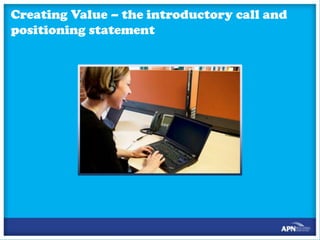
Creating Value – the introductory call and
positioning statement
Questioning
Schedules and Proposals – a Working Lunch
Objections and Closing
Final Assignment Preparation
Final Presentations
Wrap Up

Regional iSchool

  • 1.
  • 2.
    Welcome and introwith Chris Jagusch
  • 3.
    The rules ofiSchool
  • 4.
    What we arehere to achieve
  • 5.
  • 6.
  • 7.
    State of theInternet with Trent Helmbright
  • 8.
  • 9.
  • 10.
  • 11.
    Social Media andOnline Advertising
  • 12.
    Social Media andOnline Advertising
  • 13.
    The devices –How are we connecting
  • 14.
    Revision Activity -preparation • Choose a topic • Create a movie poster about the topic on flipchart paper • The poster is to include: • Four main points • At least one picture • Have a clear AIDA format • Prepare to present your poster to explain the four points and describe how the poster fits the AIDA format
  • 15.
  • 16.
  • 17.
    Day One Test 10questions – 20 minutes
  • 18.
    Wrap up andTonight’s Assignment Bring it home: In your teams be ready to present the following tomorrow morning: • Describe your perceptions of the online world as it is used in your regions, for example • Describe a business using social media or how they might use social media • Describe people using iPhones, iPads, Android phones in your region
  • 19.
  • 20.
    Day 2 Revision Presentthe results of last nights homework
  • 21.
    Our Digital historyand Products – nzherald.co.nz with Thomas Du Chateau
  • 22.
    The Product Teamwith Umesh Sripad
  • 23.
    Product Team • Whatis a Product – A portal where our customers engage with brand, consume content and interact with adverts. Eg: nzherald.co.nz, nz regionals websites, mobile apps, tablet apps • Who is in Product team – Web Designers, UX specialist, Analysts, front end developers and Product Managers • What do we do? – Product Managers are internal and external liaisons. • Internally we work with the cross functional team (Editorial, commercial, technology, marketing and senior management). • And externally we enable our audience to engage with brand on the technology platform of their choice.
  • 24.
    How do westrategize initiatives or ideas
  • 25.
    How do westrategize initiatives or ideas • • • • • Organisational direction and needs Innovation and inventions in technology space First to market opportunity Market trends Competitor analysis
  • 26.
    How is aproduct visualised?
  • 27.
    Visualising the product • • • • • Contentstrategy and uniqueness Advertising strategy and other revenue options Strengths and weaknesses Marketing – Audience growth and engagement Design, UX and IA
  • 28.
    So… from conceptto development • • • • • • • • • Conceptualise the brief or idea GOOB (Get out of the building) for ideas Blank paper or whiteboard Design (with consumer in mind, not the stakeholders) Usability and User Experience Development (technology) Go-to-Market (Marketing strategy) Commercialisation Continuous review and Improvements
  • 29.
  • 30.
    Some Achievements • The NZHerald brand now exists on 10 separate platforms reaching over 65% of NZ, being the first news brand to launch the iPad app, iPhone app and Windows 8 app • NZ Herald has the largest Social Media news audience in Australasia • NZ Herald launched the AU and NZ first responsive mobile site • Most awarded digital news brand in Australasia (Webby’s, Panpa, Cannons, WAN/IFRA) • 10 Regionals Sites are being integrated into the NZ Herald by July 31 = 9% audience spike • Launched the first fantasy sport game in NZ this year and have a tipping game (65,000 players in 2013) • The Listener moved to a hard pay wall model Oct 2012 and includes all content from the printed magazine plus some limited digital only content. Learning's for NZ Herald • FoodHub is a new recipe focused vertical that aggregates content from other APN publications. Launched Oct 2012. • NZ Woman’s Weekly female site in NZ with over 100% audience growth year on year
  • 31.
    How can youget involved • Have a kick ass idea? – we’ll help shape it for you – Write a quick brief with what the idea is, how does it help product to make revenue or increase audience, can we get a sponsor, etc – Remember all ideas are good ideas
  • 32.
    Key Initiatives for2014 • Personalisation (data driven) • Develop niche products to retain audience and grow brand engagement • Data Journalism • Data Driven Advertising • Design optimisation to grow engagement • Custom Publishing – mobile platform • Community platform development • Ecommerce and transactions
  • 33.
  • 34.
  • 35.
    Background • Town Centre launchednew web & mobile sites for ARM and NZRNN - Nov 2012 • Town Centre project radically de-scoped by ARM – resulting in loss of: – – Community building functionality – for local communities & local business Community related commercial opportunities
  • 36.
    Background • Essentially what wasdelivered was a redesign • NZRNN web & mobile sites controlled & developed by ARM – NZ had little/no input into product roadmap • No ability to improve on initial designs • Site architecture resulted in poor user experience • ARM URL structure limited analytics tracking • Lack of timely technical help from ARM
  • 37.
    Bringing the sitesback to NZ Benefits of integrating the NZ Regional sites into the nzherald.co.nz domain: • • • • • • • • • Cost savings – hosting & maintenance in AU - $285K Greater scope to monetize the Regional inventory Efficiencies created by a single platform Good positioning for a potential paywall opportunity – bundled subscription packages with NZH & NZR Competitive advantage for APN – Increased nzherald.co.nz UB numbers – potential to match or exceed stuff.co.nz A more comprehensive content offering for the NZH & NZR readers Improved analytics tracking Maintain the same Regional URL’s (http://www.hawkesbaytoday.co.nz/) Common user experience mechanisms
  • 38.
    Integration - keycriteria • Brand identity - Regional sites must retain their individual brand identity so that readers who only visit for regional content feel they are visiting a regional site • Strong alignment of the user experience with that of nzherald.co.nz – this will assist NZH readers with discovery of regional content
  • 39.
    Driving traffic toregional sites Publications dropdown menu on nzherald.co.nz will list all regionals – driving traffic to the Regional sites
  • 40.
    HOMEPAGE • Individual brand identity • Cleanmore news focused designs • Larger image sizes to feature the great photography • Clean navigation – all content in top level navigation menu • Network navigation for NZ Herald
  • 41.
    ARTICLE PAGE • Individual brandidentity • Alignment with user experience of nzherald – assisting nzherald readers to discover regional content
  • 42.
    Integration • • • NZRNN integrated intonzh platform August 20 2013 Positive response from users and advertisers “cleaner” “easier to navigate” Initial drop in audience – a known risk which was communicated to business prior to launch • Looking at strategies to mitigate traffic loss (replacing features/sections which were de-scoped by Development) Staff now comfortable with new content management system – additional training to be provided at regional sites •
  • 43.
    Loading content Media Services (Auckland) TimesAge, Wanganui Chronicle (Mon – Sat) Daily Post, Northern Advocate (Sat) Content Administrators (Auckland) Bay of Plenty, Hawke’s Bay (Mon – Sat) Daily Post, Northern Advocate (Mon – Fri) Shared content, galleries, video Digital Advocates Extra content, galleries, video, comments, polls, ranki ng, editor’s picks Ad Ops Ad campaigns, marketplace adverts Marketing Promotions, marketing promo spot
  • 44.
    The products • Livelink through to www.rotoruadailypost.co.nz? • The products – banner, wallpaper, mrec, marketplace • Carousel was de-scoped (only had 3 clients) • Other solutions for clients – rss feed • Sections and buckets
  • 45.
    2014 – Keychallenges •Re-build audience growth •Improve commercial offering to Regions •Improve National sales
  • 46.
    2014 - Businesspriorities Revenue • Regional Sales rollout early November • Improve Regional Advertising proposition • Offer new advertising products • Ensure regionals have access to new commercial innovations Audience Engagement • Focus on raising time spent on site/PPV • Emphasize discoverability of local, unique content • More focus on of local content • Focus on Video content • Improve access to content through NZH Homepage
  • 47.
    2014 – Initiatives Revenue 1.Locationbased Adv for SME’s (mFlyer) 2.New Regional Mobile App 3.Marketing Services (Google trial) 4.Classified Carousels 5.Improve ‘marketplace’ to reflect local offerings Audience Engagement 1.Introduce ‘Most Popular’ 2.Regional video training 3.Launch of new tools E.G. ‘Follow the’ story 4.Focus on local SEO and specific SEP pages 5.Local Marketing to promote sites
  • 48.
  • 49.
  • 50.
    Digital – targeting APNNZ Media is a division of APN New Zealand Ltd.
  • 51.
    Section & PageType Targeting • Section • Eg. National News • Sub-Section • Eg. Crime • Page Type • eg.Quickread, Video and Photo Galleries, Saved articles
  • 53.
    Note: • When targetingto a sub-section, the ‘Section’ rates must be used, plus an additional 10% load. • Inventory for sub-sections needs to be checked with the Traffic team (traffic@apn.co.nz) before booking.
  • 54.
    Contextual Targeting • Keywordand Tag targeting to align Ad with relevant context. • This is booked as a product in it’s own right and is not an ‘addon’. • 760x120 and 300x250 ad sizes to be supplied. The ad unit which fits the page will be displayed. • 5 Tag classifications and 30 Keywords per article page. • It is important to carefully consider the keywords chosen. Negative keywords can also be added to ensure you avoid the following situations….
  • 61.
    Geographic Targeting • Country/ Region / City targeting based on ISP location. • All campaigns targeted to NZ Eyes by default.
  • 62.
    GPS Targeting -Mobile • Can select a GPS point and target a radius around it.
  • 63.
    Time Targeting • Dayof Week • E.g. Monday and Wednesday only • Window of Time • E.g. 10am – 12pm daily only.
  • 64.
  • 65.
    Frequency Capping • Allowsreach to be maximised. • E.g. frequency capped to 3 uniques per week.
  • 66.
    Weather Targeting • WeatherCondition • High / Low Temperatures • Weather Location
  • 67.
    Technology • Browser Properties •Eg. Screen resolution • Mobile Types • Eg. Samsung • Connection Speeds • Eg. Mobile, wireless • Device Types • Eg. tablet
  • 68.
  • 69.
  • 70.
  • 71.
    • • • • • • • • • • • • • • • • • • Gender Age User Location Income Relationship Status Interests Education Employment HomeOwner Vehicle Owner Has Children Purchase Category Purchase Value Purchase Time Purchase History Deals Viewed Categories Viewed Deal Location
  • 72.
    Frequency • Types ofBehaviour • Casual i.e. Page views to a category • Intent i.e. Search terms • Action i.e. Purchase
  • 73.
    Pro’s • • • • • • Right audience foryour brand Deliver higher degree of relevance. Improves user experience Can buy audiences that are not available e.g. Small Business Transparent data Increases Site Optimisation Con’s • • • • • Users can delete their cookies Multiple users per ‘browser’ Context is King Limited reach – Small number of uniques to page views Impact lessened by other Behavioural targeting
  • 74.
    Products Pre-Built Segments in AudienceScience e.g. Travellers 50,600 unique users and 1.1million page views per week Bespoke Solutions e.g. Heart of the City
  • 75.
    When to sell •Up-selling tool rather than Primary Offering • If audience not otherwise available • Lower CPM than section targeting Note – Behavioural Targeting should be measured by brand value rather than CTR rate.
  • 76.
    How to BookBT • • • Check with Traffic on the target you are wishing to use and whether there is available inventory. Use the Behavioural Targeting Products in Mediamanager with plenty of notes. Rate for standard Ad sizes is $25 CPM (subject to review)
  • 77.
    Measurements and analyticswith Sarah Maclennan
  • 78.
    Data sources • AdobeSite Catalyst (Omniture)  Internal reporting tool for the digital product team, editorial staff and key business stake holders Adobe services are primarily used for APN eyes only content & product performance measurement • Nielsen NetView & Market Intelligence  Netview recently released audience measurement service using hybrid methodology – allows us to see limited competitor data  Market Intelligence is the legacy system that was used for measuring traffic to NZ based sites (both NZ and international audience) plus basic demographics of that audience Primarily used as a sales tools – but we do use it for competitive insights • comScore  An audience measurement tool similar to NetView but using different methodology Primarily used as a sales tool – but we do use it for competitive insights • Hitwise  Competitive analysis tool that provides in-depth Mosaic demographic profiling. Sales tool – key for demographic profiling NOTE: All measurement services will generate different data as they use different methodologies. The key discipline is to make sure that we are consistent is what source we are using when looking at performance. 78
  • 79.
    Terminology Metric Metric for What doesit mean Used by Also known as Unique browsers Audience Provides a guide to the number of readers that visit the site. It does not represent actual people, it represents web browsers and different devices which can lead to duplication over long periods of time (monthly data for example). Nielsen Market Intelligence, Omniture UB Unique visitors Audience A metric created by comScore that best reflects actual people. comScore UV, Total unique visitors Page impressions Traffic The number of times a page on site has been loaded. Nielsen Market Intelligence, Omniture, comScore PI, Page views, PV Visits Visits The number of times a unique browser or visitor has come to the site in a certain time period Nielsen Market Intelligence, Omniture, comScore Visits, Sessions Pages per visit Engagement The number of pages that are consumed each time a user comes to the site Nielsen Market Intelligence, Omniture, comScore PPV Nielsen Market Intelligence, Omniture, comScore ASD, average time spent per visit Nielsen Market Intelligence, Omniture, comScore APD, average time spent per visit The average amount of time spent per site visit. Average session duration Engagement Can be measured in seconds or minutes dependant on the analytics tool. The average amount of time spent on a page. Average page duration Engagement Can be measured in seconds or minutes dependant on the analytics tool. 79
  • 80.
    Key metrics totake into account Traffic and audience  For an advertiser they look at our unique browsers/audience to make sure their product or brand will reach the amount of people they need it to, but they will purchased based on page impressions. Demographics  Demographic information allows tailoring of propositions, showing that their brand can be exposed to either their target market (if we fit that) or how we can compliment their current offering. Engagement  Engagement metrics can be helpful in Sales when demonstrating that we can offer premium product. These metrics would help support the traffic and audience numbers. 80
  • 81.
    When to useus There are a number of different scenarios that you can use Ad Ops, Research or Product Analytics a few of which are… Pitching to a new client or for a new campaign  This is a great chance to speak with the Research team, discuss the story we want to tell. How do we fit into their offering, what are the latest or forecasted numbers for the period that they are looking at etc. Inventory queries  All inventory queries should be directed to the Ad Ops team. Audience demographics  The Research team can help with top level demographics as well as Mosaic profiling. Post campaign reporting   Where it has been an integrated campaign it will be potentially a mix of Product Analytics, Ad Ops and Research that will be providing reporting. To keep things easy, feel free to contact one person and we can pull the information. For any ad served content, Ad Ops will help Section numbers  For information on specific sections come through to Product Analytics 81
  • 82.
    What else canwe provide? APN tracks all of the core components of a site and page specific elements such as the section ID’s, tags, page types, content types, page names etc., through to the hour of day, day of week and content placement on a page. A few key ways where Product Analytics can help are:  Using the insights we collect to see how people use the site, how long do they spend in a section, what other sections are they likely to view in an average visit, etc.  What the performance is like from different referrers, if an advertiser wants to target social users and they have a campaign linked to editorial content on the site, we can look at how much will that reader consume on average in the sections.  If a lofty target has been insisted upon by an advertiser, we can provide insights in what changes may be needed to achieve the target (if there are any).  Work with Ad Ops with Mobile App traffic and audience estimates. 82
  • 83.
  • 84.
    Making it Happen,Provisioning and Process with Melissa Evans and Sophie Scott
  • 85.
    Commercial Team AdOps APN NZ Media is a division of APN New Zealand Ltd.
  • 86.
    What is AdOps • Ad Ops controls and operates the ad servers as their primary responsibility. Almost everyone in the company depends on us for something. Whether it’s the marketing team trying to get a promotion live, the finance needing accurate historical reports, the Product development team trying to evaluate and implement a new technology, or just the day to day interaction with the Sales team to understand what clients want. Ad Ops is an information hub within the company, and a key resource for getting things done! • From a strategic standpoint, virtually any new technology, from workflow management to analytics to data management eventually needs to interact with the ad server, so Ad Ops is inherently at the centre of those conversations and product rollouts • Responsible for pricing, ad product creation, inventory management etc • In summary Ad Ops refers to processes and systems that support the sale and delivery of online advertising, we really do it all..
  • 87.
    Our Team Commercial Manager TamaSefuiva Commercial Product Manager Lisa Moore-Bocarro Campaign Manager Team Lead Melissa Evans Campaign Manager Morgan Johnston Campaign Manager Katie Ly Art Director Scott True Advertising Operations Specialist Taryn Simmen Campaign Manager Charlotte Baker Ly
  • 88.
    When to cometo us • Supply inventory projections for future orders for sales on flights that are more outside of the square - Sales and coordinators can pull basic inventory reports (product) • Generate reports internally and externally • Deal with creative issues • Check creative concepts executions • Provide feedback on how successful ad/campaign might be and provide feedback and suggestions • You can come to the Ad Ops team for anything really relating to digital campaigns whether that’s inventory projections, GeoTargeting, Time Targeting, BT Targeting • Screenshots – please organise if needed with us first
  • 89.
    Products • When booking ina digital campaign you need to select which product used whether you want your campaign to run across the site or in a particular channel such as National News, Business, Sport and so on.. The product you select determines where your advertisement will run. Words to look out for SOV, Daily Buys Freq caps, Time Targeting, Geo Targeting, Contextual (keywords) • Most campaigns are sold on a cost per 1,000 or CPM therefore you always need to enter in a cost per impression as below • Example: If you wanted to booked a Headline Rectangle 300x250 on the Northern Advocate for 23,500 page impressions @ $13.90 CPM the flight would look like below • Please note there are a few exceptions where the cost is fixed such as sponsorship buys, production costs, textlinks etc which are listed with a flat rate buy in the rate card, or which can't be attributed to an impressions goal, e.g. marketplace. For these products only that you should use the Flat Rate option.
  • 90.
    Big Banner 760x120or 728x90 run at the top of the page Medium Rectangles 300x250 Depending on how long the articles are we can serve up to three rectangles on the page 1) Headline Rec (above the fold) 2) Content Rec within the article 3) Direct Rectangle
  • 91.
    • 300x600 or HalfPages - this ad size runs in the headline rectangle position • 460x400 or Super Rectangles this ad size currently runs in the content rectangle position
  • 92.
    Pre-Roll Videos • • • Pre-Roll Videos620x350 15 sec” max Two types of companion banners available 760x120 Big Banner or 620x55
  • 93.
    Mobile and iPad • • • iPhone,Android and NGM 300x50 and 320x50 iPad 370x370 index pages only GPS targeting
  • 94.
    Text Links &Relevant Offers Special Offers Special Offers move from the bottom of the page to the side bar. They will maintain the same format but operate as a carousel. 50x50 Logo with up to 90 characters. Relevant Offers Relevant offers are contextually targeted by keyword, tag or article I.D. They are given more space and are placed in line with the content. The heading will change dynamically depending on the type of booking made. E.g. Now Hiring, Now Leasing, Press Release. Image: 140 x 93 Heading: Max 70 characters (Similar to Google search results) Text: Max 200 Characters
  • 95.
    Rich Media • Rich Mediarefers to online advertising that makes use of a range of interactive digital media including streaming video and audio that is fetching to the eye or created in a format that isn’t standard GIF. More specifically this means that the ad pulls in additional information from a server beyond what is served up with the initial load. • Rich media must be 3rd party ad served – this means that we are not hosting the creative via SAS but rather a third party supplier such as double click, media mind or facilitate. There are extra costs involved with third party ad serving but there are added bonuses when using this service.
  • 96.
    Billboards 970x250 • • This isone of my personal favourite ad units its big and its easily closed. We prefer to have as limited animation within the creative as possible. The idea of these rules is to not annoy readers and to reduce the close rates for advertisers. Once the ad is closed, its replaced on the next impression by either a rectangle (when served on the homepage) or a big banner (when served elsewhere on the site) the Billboard ad can be expanded again so everybody wins. Billboards can run on the Homepage or as channel buys such as national news etc
  • 97.
    Takeovers • Full Takeovers: Wallpaper(1900x920) Extended Big Banner (1000x130) and Headline Rectangle (300x250) These are popular executions.
  • 98.
    All messaging inthe wallpapers must fall within the 130 pxl line as below, anything outside of this area will be cut off from a large part of our audience for users on smaller screens.
  • 99.
    Contextual Targeting • • • • 300x250 and760x120 Is a form of targeting your advert to specific content via a list of keywords The server scans the first 250 words of an article and if one of the keywords supplied is found then your ad will be served. This is a great way to target your core demographic.
  • 100.
    Geo-Targeting • We can targetto specific regions or even countries • We can even target cities based on weather temperatures
  • 101.
  • 102.
    How to checkinventory SAS http://apnnz.aimatch.com • Reports > Product Reports> filter by date and product > Run Report You can use this tool to pull all projected inventory except run of site. We need to use a separate report for all ROS avails due to the tier ie Standard CPM – Pre-emptible. To pull ROS inventory Report> BI Reports > ROS Inventory > and filter by dates required
  • 103.
    How to bookdigital campaigns
  • 105.
    Servers • Media Manager -is a system used to booked all print and digital campaigns. Once a campaign has been entered into media manager you will export the IO and send on to client/agency to approve. Once approved you will need to convert proposal which is when we are alerted to the booking. PLEASE BE 100% SURE THE DETAILS ARE CORRECT BEFORE CONVERTING THE IO. • - is the system used to ad serve all the creative. You will need a login to pull Product reports to check inventory avails, BI Reports (post campaign reporting)
  • 106.
    Day Two Test 10questions – 20 minutes
  • 107.
    Day Two Assignment Inpairs choose two products and prepare to create a display poster that demonstrates the following: • • • • What it is The main features The benefits of those features What tangible result will it produce for two of your customers The poster will be produced tomorrow morning. This is your preparation time Remember AIDA
  • 108.
  • 109.
  • 110.
    I’ve sold it.Now what happens? • Brief – What – has been sold – When – is it live • Review the collateral supplied and specs – Use apn.co.nz as a resource • Designs (aka mocks or flats) – This is the time to make amends …and to check functionality • Build – This is when the coding happens… • Test – Cross-browser testing • LIVE
  • 111.
    MERCEDES BENZ: Objective: PositionMercedes Benz in the invoked set of up and coming business people Media: • Video • Microsite • Print
  • 112.
    BNZ Closed forGood Objective: Provide a highly visible banner space, with Client control over content to support an annual one-day initiative Media: • Online – billboard banner
  • 113.
    NOKIA LUMIA: Objective: Launchthe first Windows phone in NZ Media: • Video • Microsite • Outdoor • Radio
  • 114.
    VODAFONE RED Objective: Launchthe new Vodafone Red plans – they are all about you Media: • Online
  • 115.
    RAY WHITE PONSONBY Objective:Provide a solution for the Client to manage their mobile advertising real time Media: • Online – handheld devices
  • 116.
    TOURISM AUSTRALIA Objective: UtiliseAPN assets in an integrated way to highlight Australia as a holiday destination (vs Pacific Islands etc) Media: • Online • Print • Video
  • 117.
    Intro to SellingDigital and the Zero Moment of Truth
  • 118.
    Intro to SellingDigital and the Zero Moment of Truth
  • 119.
    Intro to SellingDigital and the Zero Moment of Truth
  • 120.
    Creating Value -What’s Keeping Them Up at Night?
  • 121.
    Creating Value –Unique Value – Why us?
  • 122.
    Creating Value –the introductory call and positioning statement
  • 123.
  • 124.
    Schedules and Proposals– a Working Lunch
  • 125.
  • 126.
  • 127.
  • 128.

Editor's Notes

  • #6 Discuss that this is a journey
  • #10 Split up into 3 teamsDraw a illustrated flow chart about how this works for the journey of buying:ChocolateA replacement laundryA phoneDiscuss advertising across all mediums and where each one could fit.
  • #12 Only 12% of user genetated posts are seen on fb
  • #25 Also talk aboutTechnology innovations and new tech products coming out – hero strategyFirst to market – 60% market sharemarket needs also does the competitor analysis
  • #27 Product Management—finds and quantifies market problems and turns them into product requirements.User Experience—focuses on understanding the user needs and tasks, designing the product interface and assessing the design usefulness.Engineering—focuses on the technology and builds the product.
  • #29 Design – why apple is successful. Dumb it down. Design should be simple, unique to your audience. Consumers should understand without any training or educationUsability – not just being sexy, but being effectiveDevelopment – HTML5, re-usability and responsive designsMarketing – tell people and advertisers what we are doing. Get them involved. You don’t know the results until consumers use it. Through trade, media and social releasesContinuous review and improvement – through analytics and feedback (social)
  • #37 We needed a better solution so the decision was made to bring the site back to New Zealand
  • #113  CMShttp://www.cfgfeed.co.nz/ubercms Username: adminPas: b3tt3rb@nking
  • #121 Split into industry groups and brainstorm the problems they face