4TH WORLD CONFERENCE ON 
LEARNING, TEACHING AND 
EDUCATIONAL LEADERSHIP 
Reflections upon the evolution of 
technology-enhanced language learning 
and future expectations 
Ana Gimeno 
Universidad Politécnica de Valencia 
Spain
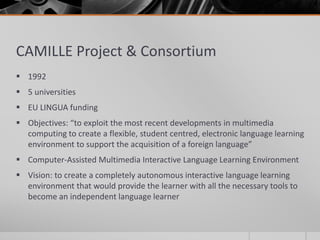
CAMILLE Project & Consortium 
 1992 
 5 universities 
 EU LINGUA funding 
 Objectives: “to exploit the most recent developments in multimedia 
computing to create a flexible, student centred, electronic language learning 
environment to support the acquisition of a foreign language” 
 Computer-Assisted Multimedia Interactive Language Learning Environment 
 Vision: to create a completely autonomous interactive language learning 
environment that would provide the learner with all the necessary tools to 
become an independent language learner
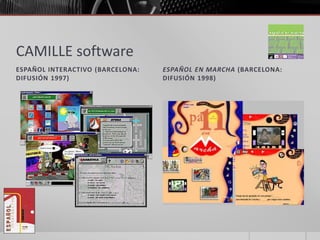
CAMILLE software 
ESPAÑOL INTERACTIVO (BARCELONA: 
DIFUSIÓN 1997) 
ESPAÑOL EN MARCHA (BARCELONA: 
DIFUSIÓN 1998)
Courseware on CD-ROM 
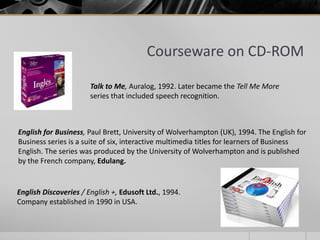
Talk to Me, Auralog, 1992. Later became the Tell Me More 
series that included speech recognition. 
English for Business, Paul Brett, University of Wolverhampton (UK), 1994. The English for 
Business series is a suite of six, interactive multimedia titles for learners of Business 
English. The series was produced by the University of Wolverhampton and is published 
by the French company, Edulang. 
English Discoveries / English +, Edusoft Ltd., 1994. 
Company established in 1990 in USA.
Courseware on CD-ROM 
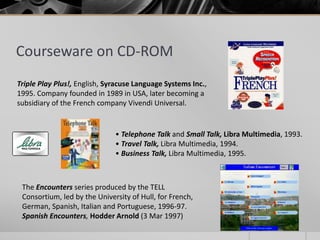
Triple Play Plus!, English, Syracuse Language Systems Inc., 
1995. Company founded in 1989 in USA, later becoming a 
subsidiary of the French company Vivendi Universal. 
• Telephone Talk and Small Talk, Libra Multimedia, 1993. 
• Travel Talk, Libra Multimedia, 1994. 
• Business Talk, Libra Multimedia, 1995. 
The Encounters series produced by the TELL 
Consortium, led by the University of Hull, for French, 
German, Spanish, Italian and Portuguese, 1996-97. 
Spanish Encounters, Hodder Arnold (3 Mar 1997)
Courseware on CD-ROM 
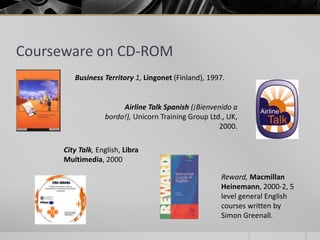
Business Territory 1, Lingonet (Finland), 1997. 
Airline Talk Spanish (¡Bienvenido a 
bordo!), Unicorn Training Group Ltd., UK, 
City Talk, English, Libra 
Multimedia, 2000 
2000. 
Reward, Macmillan 
Heinemann, 2000-2, 5 
level general English 
courses written by 
Simon Greenall.
Software reviews 
 Designers and publishers  software reviews 
 Encourage purchase & use of courseware 
 Regular software reviews 
 ReCALL (CUP)  till vol. 13(2), 2001 
 CALICO  1998-2003 
 Language Learning and Technology  1999-2003 
 Guidance for language teachers  features , contents & insight as to what 
could be expected from the software 
 Use of CD-ROMs  caused anxiety in teachers
Moving online… 
Despite their robustness, CD-ROMs seem to have been set aside by many language 
teachers, giving way to on-line learning materials in spite of the many drawbacks 
that may be encountered during the process, i.e. band width, transfer rates, 
expense, to mention but a few. These issues have not, however, prevented language 
teachers from exploring the depths of creating web-delivered materials to 
supplement their teaching, although it is a fact that these isolated initiatives have 
not been channelled in order to be made available to the language teaching 
community at large. It is true, on the other hand, that there are currently an 
increasing number of initiatives around the world to maximise the effort and cost 
that goes into developing pedagogically sound on-line language learning materials 
by creating authoring packages to facilitate and guide the creation of materials. 
Most of these authoring tools, however, have to be installed onto personal 
computers for individuals to use independently without the possibility of creating a 
pool of multimedia exercises and resources that can be shared by a larger 
community. 
(A. Gimeno, The IN6ENIO online CALL authoring shell, The EUROCALL Review, No. 7, June, 2005)
The 1990s 
 Maturity acquired in 
 making the most of technological offerings 
 How to apply that technology to the full benefit of pedagogically sound multimedia materials 
 not yet paralleled despite recent incorporation of social network applications and 
sophisticated virtual world software. 
 Typical common features till approx. 2005 
 built-in voice recording capabilities 
 hypertext reference materials (including dictionaries, grammar and culture notes, etc.) 
 abundant sound-enhanced materials 
 immediate feedback 
 catering for different learning styles (the visual, the audio-based, the relational…) 
 Major contribution toward autonomous learning and learner-centred approaches to 
teaching 
 Tutorial programmes  computer replaced teacher and/or textbook 
 Self-access learning materials
Moving online… 
When multimedia-capable microcomputers and the World Wide Web blossomed, 
promising both freedom from platform specific hardware configurations and 
ubiquitous access to materials via Web browsers, developers rushed to move their 
instructional programs to the Web. Unfortunately, because of the restrictive nature 
of the Web environment and the immaturity of Web development tools, the 
transition to Web delivery has been far from smooth. Multimedia developers felt 
that, in many respects, they had taken a giant step backward in their ability to 
control the instructional environment in ways they had been accustomed to with 
older technologies. For example, defining precise clips from a video and playing 
them back instantly and reliably at an acceptable size and quality—something that 
had been relatively easy to accomplish with videodisc technology—was, until 
recently, an elusive target because of underdeveloped streaming media technology, 
standards, and tools. Web development tools have matured and, consequently, 
there has been a dramatic increase in Web-based language learning materials. 
(S. Otto and J. Pusack, Computer-Assisted Language Learning Authoring Issues, The Modern 
Language Journal, 93, Focus Issue, 2009, pp. 784–801.)
Drawbacks 
 Use of programming tools 
 Toolbook 
 Macromedia Director 
 Need of professional software programmer 
 Need of team of professionals in 
 language teaching 
 graphic design 
 audiovisual production,… 
 Constant upgrading of the programming tools during production stages 
 To introduce more robust features 
 To allow the software to run on more advanced OS 
 Lack of upgrade led to becoming obsolete in a very short time despite being very robust 
and innovative pedagogically speaking
Funding opportunities 
 Without public funding to cover part of the production costs  these 
examples of innovative approaches to language learning would have simply 
not existed 
 Difference in approaches 
 Educational institutions 
 Emerging companies 
 Examples: Libra Multimedia, TalkFast, Camsoft  founded precisely to 
market language learning CD-ROMs 
 Libra Multimedia’s “reversible approach” (eg Business Talk) 
 More production 
 Less time & cost
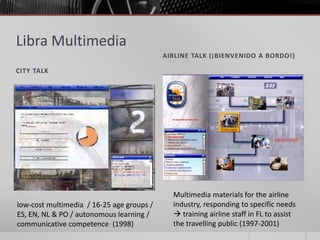
Libra Multimedia 
CITY TALK 
AIRLINE TALK (¡BIENVENIDO A BORDO!) 
low-cost multimedia / 16-25 age groups / 
ES, EN, NL & PO / autonomous learning / 
communicative competence (1998) 
Multimedia materials for the airline 
industry, responding to specific needs 
 training airline staff in FL to assist 
the travelling public (1997-2001)
The web 
 Mainstream in 1993 with introduction of the Mosaic web browser 
 Drastic turning point in the development of multimedia LL resources 
 Turn of the 21st C  web-based exercises started to shift the conception of 
CALL 
 General impression  everything freely available at no cost whatsoever 
 death of the CD-ROM 
 subsequent leap back in time with regard to the robustness and innovations brought about 
by interactive multimedia and the “all-in-one” idea that had emerged with them 
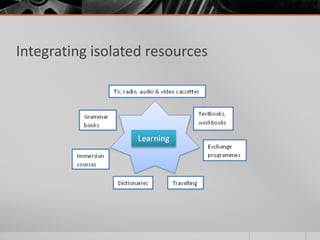
 “All-in-one” concept  novelty of being able to bring together in a single 
storage system all the media devices (TV, cassette recorder, video player, 
etc.) and reference materials (grammar books, dictionaries, etc.) that, up 
until then, were used as independent learning aids 
 Interrelation of aids thanks to hypermedia was another innovative feature 
that came about with these new massive storage devices
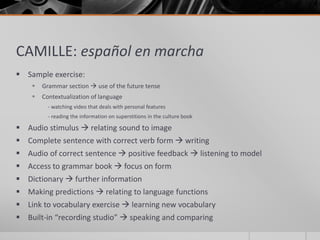
CAMILLE: español en marcha 
 Sample exercise: 
 Grammar section  use of the future tense 
 Contextualization of language 
- watching video that deals with personal features 
- reading the information on superstitions in the culture book 
 Audio stimulus  relating sound to image 
 Complete sentence with correct verb form  writing 
 Audio of correct sentence  positive feedback  listening to model 
 Access to grammar book  focus on form 
 Dictionary  further information 
 Making predictions  relating to language functions 
 Link to vocabulary exercise  learning new vocabulary 
 Built-in “recording studio”  speaking and comparing
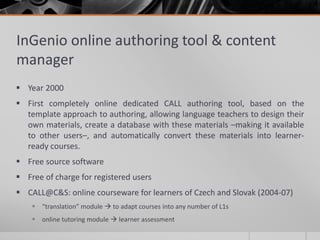
InGenio online authoring tool & content 
manager 
 Year 2000 
 First completely online dedicated CALL authoring tool, based on the 
template approach to authoring, allowing language teachers to design their 
own materials, create a database with these materials –making it available 
to other users–, and automatically convert these materials into learner-ready 
courses. 
 Free source software 
 Free of charge for registered users 
 CALL@C&S: online courseware for learners of Czech and Slovak (2004-07) 
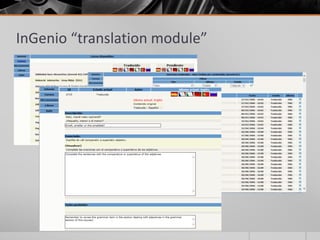
 “translation” module  to adapt courses into any number of L1s 
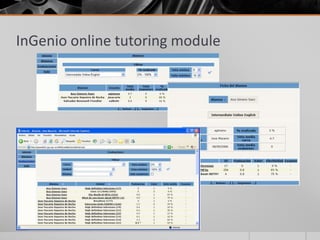
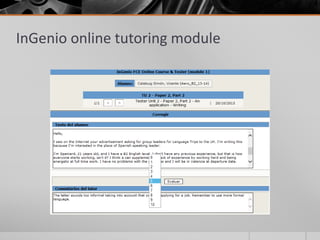
 online tutoring module  learner assessment
InGenio online tutoring module
InGenio “translation module”
HelloNet & Welcome! 
 HelloNet – Hellenic Enjoyable Language Learning on the Net 
 2001 - 2004 
 coordinated by Roula Kartali, Technical University of Thessaloniki (Greece) 
 designing a one-off online course for A1 learners of Modern Greek 
 traditional approach 
 incorporation of games to introduce ancient Greek mythology 
 http://hellonet.teithe.gr/EN/mainenglish.htm (eg Part 2, Lesson 8, game) 
 WELCOME! - Linguistic and cultural introduction module for incoming 
exchange students 
 2001-02 
 coordinated by Valere Meus , University of Ghent (Belgium) 
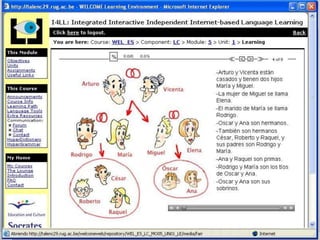
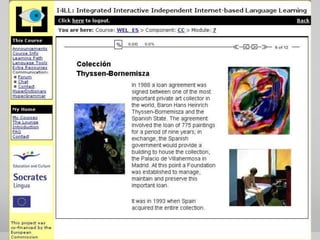
 I4LL authoring tool 
 Stand-alone concept (not cloud-computing line InGenio)
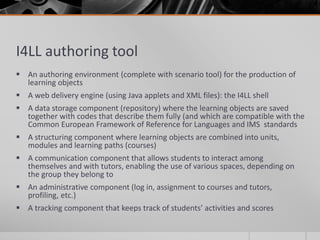
I4LL authoring tool 
 An authoring environment (complete with scenario tool) for the production of 
learning objects 
 A web delivery engine (using Java applets and XML files): the I4LL shell 
 A data storage component (repository) where the learning objects are saved 
together with codes that describe them fully (and which are compatible with the 
Common European Framework of Reference for Languages and IMS standards 
 A structuring component where learning objects are combined into units, 
modules and learning paths (courses) 
 A communication component that allows students to interact among 
themselves and with tutors, enabling the use of various spaces, depending on 
the group they belong to 
 An administrative component (log in, assignment to courses and tutors, 
profiling, etc.) 
 A tracking component that keeps track of students’ activities and scores
Early stages of web development 
 Initial online courses  far more rudimentary than their multimedia CD-ROM 
equivalents 
 Why?  simply because not enough time had elapsed yet to develop 
comparably sophisticated web-based interactive multimedia authoring 
applications 
 Not until web 2.0 and the wealth of possibilities opened up by… 
 social networks 
 cloud computing 
 high quality streaming video and crowd computing systems (including collaboration packages) 
 crowdsourcing platforms 
 information sharing software 
 wikis 
 blogs 
 alerting systems 
 social networks, SMS, MMS, Twitter, Flickr, and even mashups
Currently… 
 …no end to the things we can do in computing to enhance language learning 
and make it motivating and attractive to the learner as long as there is a very 
large dose of imagination and creativity mixed into the formula. Another basic 
ingredient is being bold enough to try to foresee what may lie ahead in the 
future. 
 Nicolas Negroponte (1995)  envisaged a completely wireless world 
 We are nearing his prediction with the newly born era of tablets and apps 
 iPAD 
 watching TV; listening to my discography; playing games; reading newspapers, fiction, academic 
papers, etc.; looking-up information on the internet; practising my French; communicating with 
friends and colleagues through Skype; delivering audiovisuals in live theatre productions; writing 
and making both text and oral notes; taking pictures and storing them in albums; listening to the 
radio; keeping in touch with family, friends and colleagues on social networks… 
 But, how do all of these advancements fit into language learning? Aren’t we all a 
bit overwhelmed by the number of technologies and applications or apps that 
are currently at our fingertips?
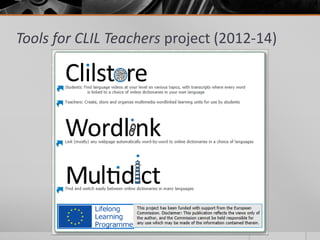
Tools for CLIL Teachers project (2012-14)
Tools for CLIL Teachers 
 2012-14 
 Free online service to author and share content-rich, multimedia learning 
units featuring the creator’s own choice of audio, video (e.g. from YouTube), 
text (e.g. a transcript) and images/graphics 
 No installation or setup of software is required 
 Unique ability to automatically link every word in a text to online 
dictionaries in over 100 languages 
 Repository of activities 
 Authoring of learning units from mobile devices 
 Compatibility with any operating system 
 Userfriendly features
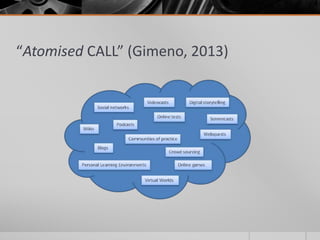
The next move… “atomised CALL” 
 Currently moving away from structured “all-in-one” contents such as those 
typically found in textbooks, CD-ROMs or online courseware to unstructured 
yet meaningful bits (resources) 
 These didactically meaningful resources are assembled together and 
integrated into the language curriculum by teachers or tutors who are in 
charge of implementing them into their everyday teaching practice 
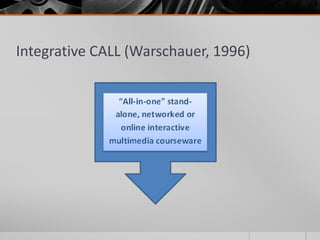
 New phase “atomised CALL” (Gimeno, 2013)  from 2010 onwards as a 
continuation of Mark Warschauer’s definition of “integrative CALL” 
 Reaching Bax’s concept of “normalisation” of CALL 
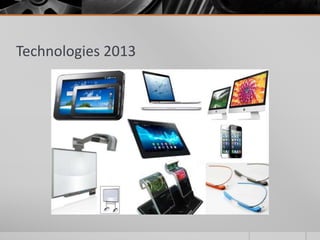
 Constant evolving of technology & emergence of new gadgets  new 
challenges for CALL developers & authors to find the optimum way of 
pedagogically exploiting those for-ever emerging technological 
developments
Technologies 2013
Resources and skills… 
 Using the web as a source of information (task-based and project-based learning) 
 WebQuests 
 Digital storytelling 
 Using the web as a translation tool (translating or writing tasks) 
 Multidict (Wordlink) 
 Duolingo (http://www.ted.com/talks/lang/en/luis_von_ahn_massive_scale_online_collaboration.html) 
 Google translator 
 Using collaboration tools for communication purposes (creative writing tasks) 
 Wikis 
 Blogs 
 Using communities of practice to mark and correct learner input (reinforcement activities) 
 Livemocha 
 Using virtual worlds for instructional and communication purposes (reinforcement activities 
through oral & written interaction) 
 Second Life (Avalon & Avatar projects) 
 OpenSim (Niflar project) 
 Using word games for vocabulary acquisition (practising new vocabulary & communicating) 
 Angry words 
 Words with friends
And more resources and skills… 
 Using mobile devices to deliver micro-lessons (reinforcement activities through mobile 
interaction) 
 WhatsApp 
 Line 
 Dedicated language learning Apps like the French TV5 Monde, 7Jours 
 Using video recordings as a source of information (reinforcement activities) 
 Videocasts 
 Screencasts 
 Using audio recordings as a source of information (listening comprehension activities) 
 Podcasts 
 Using computer-based language tests (exams) 
 Diagnostic tests 
 Placement tests 
 Achievements tests 
 Using the web as a massive reference source (broadening knowledge) 
 Ready-made online exercises 
 Grammar explanations 
 Online dictionaries 
 Encyclopaedias
Integrating isolated resources
Integrative CALL (Warschauer, 1996)
“Atomised CALL” (Gimeno, 2013)
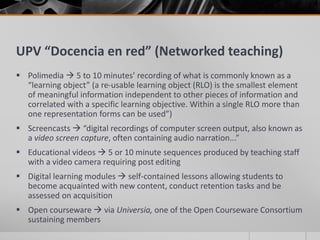
UPV “Docencia en red” (Networked teaching) 
 Polimedia  5 to 10 minutes’ recording of what is commonly known as a 
“learning object” (a re-usable learning object (RLO) is the smallest element 
of meaningful information independent to other pieces of information and 
correlated with a specific learning objective. Within a single RLO more than 
one representation forms can be used”) 
 Screencasts  “digital recordings of computer screen output, also known as 
a video screen capture, often containing audio narration...” 
 Educational videos  5 or 10 minute sequences produced by teaching staff 
with a video camera requiring post editing 
 Digital learning modules  self-contained lessons allowing students to 
become acquainted with new content, conduct retention tasks and be 
assessed on acquisition 
 Open courseware  via Universia, one of the Open Courseware Consortium 
sustaining members
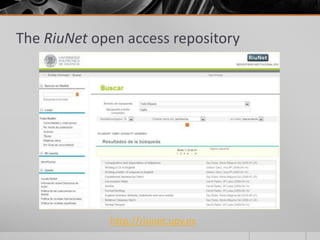
The RiuNet open access repository 
http://riunet.upv.es
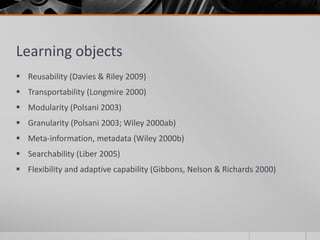
Learning objects 
 Reusability (Davies & Riley 2009) 
 Transportability (Longmire 2000) 
 Modularity (Polsani 2003) 
 Granularity (Polsani 2003; Wiley 2000ab) 
 Meta-information, metadata (Wiley 2000b) 
 Searchability (Liber 2005) 
 Flexibility and adaptive capability (Gibbons, Nelson & Richards 2000)
Benefits 
 These features will allow us to maximise the increasing efforts to provide 
learners with consistent repositories comprised of learning materials to 
enhance autonomous or independent learning 
 Example: 
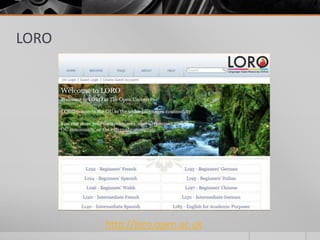
 LORO (Languages Open Resources Online) 
 Open University (London) 
 Collection of open access resources to support language teaching and learning 
 Some of the materials in LORO have been specifically designed to support OU language 
courses and are deposited in LORO as Open Educational Resources to be adapted and re-used 
freely in any context 
 Sharing of resources to avoid reinventing the wheel!!!
LORO 
http://loro.open.ac.uk
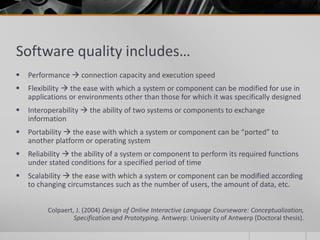
Software quality includes… 
 Performance  connection capacity and execution speed 
 Flexibility  the ease with which a system or component can be modified for use in 
applications or environments other than those for which it was specifically designed 
 Interoperability  the ability of two systems or components to exchange 
information 
 Portability  the ease with which a system or component can be “ported” to 
another platform or operating system 
 Reliability  the ability of a system or component to perform its required functions 
under stated conditions for a specified period of time 
 Scalability  the ease with which a system or component can be modified according 
to changing circumstances such as the number of users, the amount of data, etc. 
Colpaert, J. (2004) Design of Online Interactive Language Courseware: Conceptualization, 
Specification and Prototyping. Antwerp: University of Antwerp (Doctoral thesis).
THANK YOU!! 
Ana Gimeno 
agimeno@upvnet.upv.es

Reflections upon the evolution of technology-enhanced language learning and future expectations

  • 1.
    4TH WORLD CONFERENCEON LEARNING, TEACHING AND EDUCATIONAL LEADERSHIP Reflections upon the evolution of technology-enhanced language learning and future expectations Ana Gimeno Universidad Politécnica de Valencia Spain
  • 2.
    CAMILLE Project &Consortium  1992  5 universities  EU LINGUA funding  Objectives: “to exploit the most recent developments in multimedia computing to create a flexible, student centred, electronic language learning environment to support the acquisition of a foreign language”  Computer-Assisted Multimedia Interactive Language Learning Environment  Vision: to create a completely autonomous interactive language learning environment that would provide the learner with all the necessary tools to become an independent language learner
  • 3.
    CAMILLE software ESPAÑOLINTERACTIVO (BARCELONA: DIFUSIÓN 1997) ESPAÑOL EN MARCHA (BARCELONA: DIFUSIÓN 1998)
  • 4.
    Courseware on CD-ROM Talk to Me, Auralog, 1992. Later became the Tell Me More series that included speech recognition. English for Business, Paul Brett, University of Wolverhampton (UK), 1994. The English for Business series is a suite of six, interactive multimedia titles for learners of Business English. The series was produced by the University of Wolverhampton and is published by the French company, Edulang. English Discoveries / English +, Edusoft Ltd., 1994. Company established in 1990 in USA.
  • 5.
    Courseware on CD-ROM Triple Play Plus!, English, Syracuse Language Systems Inc., 1995. Company founded in 1989 in USA, later becoming a subsidiary of the French company Vivendi Universal. • Telephone Talk and Small Talk, Libra Multimedia, 1993. • Travel Talk, Libra Multimedia, 1994. • Business Talk, Libra Multimedia, 1995. The Encounters series produced by the TELL Consortium, led by the University of Hull, for French, German, Spanish, Italian and Portuguese, 1996-97. Spanish Encounters, Hodder Arnold (3 Mar 1997)
  • 6.
    Courseware on CD-ROM Business Territory 1, Lingonet (Finland), 1997. Airline Talk Spanish (¡Bienvenido a bordo!), Unicorn Training Group Ltd., UK, City Talk, English, Libra Multimedia, 2000 2000. Reward, Macmillan Heinemann, 2000-2, 5 level general English courses written by Simon Greenall.
  • 7.
    Software reviews Designers and publishers  software reviews  Encourage purchase & use of courseware  Regular software reviews  ReCALL (CUP)  till vol. 13(2), 2001  CALICO  1998-2003  Language Learning and Technology  1999-2003  Guidance for language teachers  features , contents & insight as to what could be expected from the software  Use of CD-ROMs  caused anxiety in teachers
  • 8.
    Moving online… Despitetheir robustness, CD-ROMs seem to have been set aside by many language teachers, giving way to on-line learning materials in spite of the many drawbacks that may be encountered during the process, i.e. band width, transfer rates, expense, to mention but a few. These issues have not, however, prevented language teachers from exploring the depths of creating web-delivered materials to supplement their teaching, although it is a fact that these isolated initiatives have not been channelled in order to be made available to the language teaching community at large. It is true, on the other hand, that there are currently an increasing number of initiatives around the world to maximise the effort and cost that goes into developing pedagogically sound on-line language learning materials by creating authoring packages to facilitate and guide the creation of materials. Most of these authoring tools, however, have to be installed onto personal computers for individuals to use independently without the possibility of creating a pool of multimedia exercises and resources that can be shared by a larger community. (A. Gimeno, The IN6ENIO online CALL authoring shell, The EUROCALL Review, No. 7, June, 2005)
  • 9.
    The 1990s Maturity acquired in  making the most of technological offerings  How to apply that technology to the full benefit of pedagogically sound multimedia materials  not yet paralleled despite recent incorporation of social network applications and sophisticated virtual world software.  Typical common features till approx. 2005  built-in voice recording capabilities  hypertext reference materials (including dictionaries, grammar and culture notes, etc.)  abundant sound-enhanced materials  immediate feedback  catering for different learning styles (the visual, the audio-based, the relational…)  Major contribution toward autonomous learning and learner-centred approaches to teaching  Tutorial programmes  computer replaced teacher and/or textbook  Self-access learning materials
  • 10.
    Moving online… Whenmultimedia-capable microcomputers and the World Wide Web blossomed, promising both freedom from platform specific hardware configurations and ubiquitous access to materials via Web browsers, developers rushed to move their instructional programs to the Web. Unfortunately, because of the restrictive nature of the Web environment and the immaturity of Web development tools, the transition to Web delivery has been far from smooth. Multimedia developers felt that, in many respects, they had taken a giant step backward in their ability to control the instructional environment in ways they had been accustomed to with older technologies. For example, defining precise clips from a video and playing them back instantly and reliably at an acceptable size and quality—something that had been relatively easy to accomplish with videodisc technology—was, until recently, an elusive target because of underdeveloped streaming media technology, standards, and tools. Web development tools have matured and, consequently, there has been a dramatic increase in Web-based language learning materials. (S. Otto and J. Pusack, Computer-Assisted Language Learning Authoring Issues, The Modern Language Journal, 93, Focus Issue, 2009, pp. 784–801.)
  • 11.
    Drawbacks  Useof programming tools  Toolbook  Macromedia Director  Need of professional software programmer  Need of team of professionals in  language teaching  graphic design  audiovisual production,…  Constant upgrading of the programming tools during production stages  To introduce more robust features  To allow the software to run on more advanced OS  Lack of upgrade led to becoming obsolete in a very short time despite being very robust and innovative pedagogically speaking
  • 12.
    Funding opportunities Without public funding to cover part of the production costs  these examples of innovative approaches to language learning would have simply not existed  Difference in approaches  Educational institutions  Emerging companies  Examples: Libra Multimedia, TalkFast, Camsoft  founded precisely to market language learning CD-ROMs  Libra Multimedia’s “reversible approach” (eg Business Talk)  More production  Less time & cost
  • 13.
    Libra Multimedia CITYTALK AIRLINE TALK (¡BIENVENIDO A BORDO!) low-cost multimedia / 16-25 age groups / ES, EN, NL & PO / autonomous learning / communicative competence (1998) Multimedia materials for the airline industry, responding to specific needs  training airline staff in FL to assist the travelling public (1997-2001)
  • 14.
    The web Mainstream in 1993 with introduction of the Mosaic web browser  Drastic turning point in the development of multimedia LL resources  Turn of the 21st C  web-based exercises started to shift the conception of CALL  General impression  everything freely available at no cost whatsoever  death of the CD-ROM  subsequent leap back in time with regard to the robustness and innovations brought about by interactive multimedia and the “all-in-one” idea that had emerged with them  “All-in-one” concept  novelty of being able to bring together in a single storage system all the media devices (TV, cassette recorder, video player, etc.) and reference materials (grammar books, dictionaries, etc.) that, up until then, were used as independent learning aids  Interrelation of aids thanks to hypermedia was another innovative feature that came about with these new massive storage devices
  • 15.
    CAMILLE: español enmarcha  Sample exercise:  Grammar section  use of the future tense  Contextualization of language - watching video that deals with personal features - reading the information on superstitions in the culture book  Audio stimulus  relating sound to image  Complete sentence with correct verb form  writing  Audio of correct sentence  positive feedback  listening to model  Access to grammar book  focus on form  Dictionary  further information  Making predictions  relating to language functions  Link to vocabulary exercise  learning new vocabulary  Built-in “recording studio”  speaking and comparing
  • 16.
    InGenio online authoringtool & content manager  Year 2000  First completely online dedicated CALL authoring tool, based on the template approach to authoring, allowing language teachers to design their own materials, create a database with these materials –making it available to other users–, and automatically convert these materials into learner-ready courses.  Free source software  Free of charge for registered users  CALL@C&S: online courseware for learners of Czech and Slovak (2004-07)  “translation” module  to adapt courses into any number of L1s  online tutoring module  learner assessment
  • 17.
  • 18.
  • 19.
  • 20.
    HelloNet & Welcome!  HelloNet – Hellenic Enjoyable Language Learning on the Net  2001 - 2004  coordinated by Roula Kartali, Technical University of Thessaloniki (Greece)  designing a one-off online course for A1 learners of Modern Greek  traditional approach  incorporation of games to introduce ancient Greek mythology  http://hellonet.teithe.gr/EN/mainenglish.htm (eg Part 2, Lesson 8, game)  WELCOME! - Linguistic and cultural introduction module for incoming exchange students  2001-02  coordinated by Valere Meus , University of Ghent (Belgium)  I4LL authoring tool  Stand-alone concept (not cloud-computing line InGenio)
  • 21.
    I4LL authoring tool  An authoring environment (complete with scenario tool) for the production of learning objects  A web delivery engine (using Java applets and XML files): the I4LL shell  A data storage component (repository) where the learning objects are saved together with codes that describe them fully (and which are compatible with the Common European Framework of Reference for Languages and IMS standards  A structuring component where learning objects are combined into units, modules and learning paths (courses)  A communication component that allows students to interact among themselves and with tutors, enabling the use of various spaces, depending on the group they belong to  An administrative component (log in, assignment to courses and tutors, profiling, etc.)  A tracking component that keeps track of students’ activities and scores
  • 24.
    Early stages ofweb development  Initial online courses  far more rudimentary than their multimedia CD-ROM equivalents  Why?  simply because not enough time had elapsed yet to develop comparably sophisticated web-based interactive multimedia authoring applications  Not until web 2.0 and the wealth of possibilities opened up by…  social networks  cloud computing  high quality streaming video and crowd computing systems (including collaboration packages)  crowdsourcing platforms  information sharing software  wikis  blogs  alerting systems  social networks, SMS, MMS, Twitter, Flickr, and even mashups
  • 25.
    Currently…  …noend to the things we can do in computing to enhance language learning and make it motivating and attractive to the learner as long as there is a very large dose of imagination and creativity mixed into the formula. Another basic ingredient is being bold enough to try to foresee what may lie ahead in the future.  Nicolas Negroponte (1995)  envisaged a completely wireless world  We are nearing his prediction with the newly born era of tablets and apps  iPAD  watching TV; listening to my discography; playing games; reading newspapers, fiction, academic papers, etc.; looking-up information on the internet; practising my French; communicating with friends and colleagues through Skype; delivering audiovisuals in live theatre productions; writing and making both text and oral notes; taking pictures and storing them in albums; listening to the radio; keeping in touch with family, friends and colleagues on social networks…  But, how do all of these advancements fit into language learning? Aren’t we all a bit overwhelmed by the number of technologies and applications or apps that are currently at our fingertips?
  • 26.
    Tools for CLILTeachers project (2012-14)
  • 27.
    Tools for CLILTeachers  2012-14  Free online service to author and share content-rich, multimedia learning units featuring the creator’s own choice of audio, video (e.g. from YouTube), text (e.g. a transcript) and images/graphics  No installation or setup of software is required  Unique ability to automatically link every word in a text to online dictionaries in over 100 languages  Repository of activities  Authoring of learning units from mobile devices  Compatibility with any operating system  Userfriendly features
  • 28.
    The next move…“atomised CALL”  Currently moving away from structured “all-in-one” contents such as those typically found in textbooks, CD-ROMs or online courseware to unstructured yet meaningful bits (resources)  These didactically meaningful resources are assembled together and integrated into the language curriculum by teachers or tutors who are in charge of implementing them into their everyday teaching practice  New phase “atomised CALL” (Gimeno, 2013)  from 2010 onwards as a continuation of Mark Warschauer’s definition of “integrative CALL”  Reaching Bax’s concept of “normalisation” of CALL  Constant evolving of technology & emergence of new gadgets  new challenges for CALL developers & authors to find the optimum way of pedagogically exploiting those for-ever emerging technological developments
  • 29.
  • 30.
    Resources and skills…  Using the web as a source of information (task-based and project-based learning)  WebQuests  Digital storytelling  Using the web as a translation tool (translating or writing tasks)  Multidict (Wordlink)  Duolingo (http://www.ted.com/talks/lang/en/luis_von_ahn_massive_scale_online_collaboration.html)  Google translator  Using collaboration tools for communication purposes (creative writing tasks)  Wikis  Blogs  Using communities of practice to mark and correct learner input (reinforcement activities)  Livemocha  Using virtual worlds for instructional and communication purposes (reinforcement activities through oral & written interaction)  Second Life (Avalon & Avatar projects)  OpenSim (Niflar project)  Using word games for vocabulary acquisition (practising new vocabulary & communicating)  Angry words  Words with friends
  • 31.
    And more resourcesand skills…  Using mobile devices to deliver micro-lessons (reinforcement activities through mobile interaction)  WhatsApp  Line  Dedicated language learning Apps like the French TV5 Monde, 7Jours  Using video recordings as a source of information (reinforcement activities)  Videocasts  Screencasts  Using audio recordings as a source of information (listening comprehension activities)  Podcasts  Using computer-based language tests (exams)  Diagnostic tests  Placement tests  Achievements tests  Using the web as a massive reference source (broadening knowledge)  Ready-made online exercises  Grammar explanations  Online dictionaries  Encyclopaedias
  • 32.
  • 33.
  • 34.
  • 35.
    UPV “Docencia enred” (Networked teaching)  Polimedia  5 to 10 minutes’ recording of what is commonly known as a “learning object” (a re-usable learning object (RLO) is the smallest element of meaningful information independent to other pieces of information and correlated with a specific learning objective. Within a single RLO more than one representation forms can be used”)  Screencasts  “digital recordings of computer screen output, also known as a video screen capture, often containing audio narration...”  Educational videos  5 or 10 minute sequences produced by teaching staff with a video camera requiring post editing  Digital learning modules  self-contained lessons allowing students to become acquainted with new content, conduct retention tasks and be assessed on acquisition  Open courseware  via Universia, one of the Open Courseware Consortium sustaining members
  • 36.
    The RiuNet openaccess repository http://riunet.upv.es
  • 37.
    Learning objects Reusability (Davies & Riley 2009)  Transportability (Longmire 2000)  Modularity (Polsani 2003)  Granularity (Polsani 2003; Wiley 2000ab)  Meta-information, metadata (Wiley 2000b)  Searchability (Liber 2005)  Flexibility and adaptive capability (Gibbons, Nelson & Richards 2000)
  • 38.
    Benefits  Thesefeatures will allow us to maximise the increasing efforts to provide learners with consistent repositories comprised of learning materials to enhance autonomous or independent learning  Example:  LORO (Languages Open Resources Online)  Open University (London)  Collection of open access resources to support language teaching and learning  Some of the materials in LORO have been specifically designed to support OU language courses and are deposited in LORO as Open Educational Resources to be adapted and re-used freely in any context  Sharing of resources to avoid reinventing the wheel!!!
  • 39.
  • 40.
    Software quality includes…  Performance  connection capacity and execution speed  Flexibility  the ease with which a system or component can be modified for use in applications or environments other than those for which it was specifically designed  Interoperability  the ability of two systems or components to exchange information  Portability  the ease with which a system or component can be “ported” to another platform or operating system  Reliability  the ability of a system or component to perform its required functions under stated conditions for a specified period of time  Scalability  the ease with which a system or component can be modified according to changing circumstances such as the number of users, the amount of data, etc. Colpaert, J. (2004) Design of Online Interactive Language Courseware: Conceptualization, Specification and Prototyping. Antwerp: University of Antwerp (Doctoral thesis).
  • 41.
    THANK YOU!! AnaGimeno agimeno@upvnet.upv.es