Reengineering PDF-Based Documents
Targeting Complex Software
Specifications
Moutasm tamimi, Ahid yaseen
Software Engineering
Nojoumian, M., & Lethbridge, T. C. (2011). Reengineering PDF-based documents targeting complex
software specifications. International Journal of Knowledge and Web Intelligence, 2(4), 292-319.
Outline
o Review
o Abstract
o Contribution and Motivation
o Related Work
o Document Transformation
o Evaluation
o Logical Structure Extraction
o multilayer hypertext versions elements
o Checking Well-formedness and Validity
◦ Producing Multiple Outputs
◦ Examples
◦ Concept extraction
◦ Cross referencing
◦ Evaluation, Usability, And Architecture
◦ Architecture of the proposed framework
◦ Conclusion
◦ Future Work
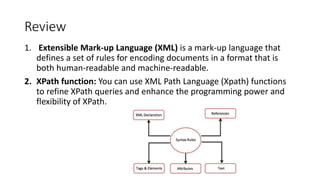
Review
1. Extensible Mark-up Language (XML) is a mark-up language that
defines a set of rules for encoding documents in a format that is
both human-readable and machine-readable.
2. XPath function: You can use XML Path Language (Xpath) functions
to refine XPath queries and enhance the programming power and
flexibility of XPath.
Abstract
• This paper investigated the process of reengineering the complex
PDF documents by focusing on the Object Management Group
(OMG) standards and roles to produce the multilayer hypertext
interfaces, which can be more applicable of electronic documents.
Contribution and Motivation
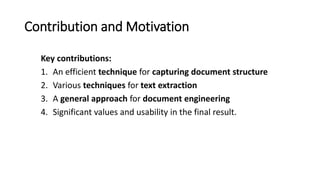
Key contributions:
1. An efficient technique for capturing document structure
2. Various techniques for text extraction
3. A general approach for document engineering
4. Significant values and usability in the final result.
Related Work
1. Document Structure Analysis
2. PDF Document Analysis
3. Leveraging Tables of Contents
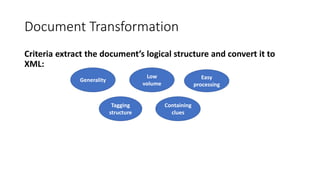
Document Transformation
Criteria extract the document’s logical structure and convert it to
XML:
Generality
Low
volume
Easy
processing
Tagging
structure
Containing
clues
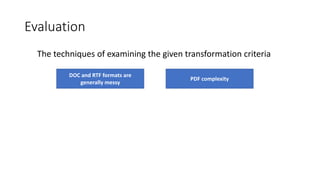
Evaluation
The techniques of examining the given transformation criteria
DOC and RTF formats are
generally messy
PDF complexity
Logical Structure Extraction
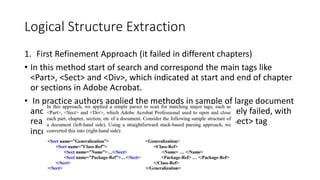
1. First Refinement Approach (it failed in different chapters)
• In this method start of search and correspond the main tags like
<Part>, <Sect> and <Div>, which indicated at start and end of chapter
or sections in Adobe Acrobat.
• In practice authors applied the methods in sample of large document
and uneven chapters and found that this method unlikely failed, with
reason of forget tagging rightly the method close for<Sect> tag
incorrectly in wrong places
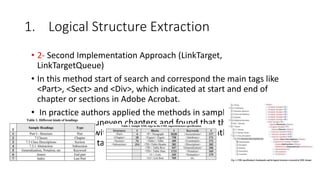
1. Logical Structure Extraction
• 2- Second Implementation Approach (LinkTarget,
LinkTargetQueue)
• In this method start of search and correspond the main tags like
<Part>, <Sect> and <Div>, which indicated at start and end of
chapter or sections in Adobe Acrobat.
• In practice authors applied the methods in sample of large
document and uneven chapters and found that this method
unlikely failed, with reason of forget tagging rightly the method
close for<Sect> tag incorrectly in wrong places
2. Text Extraction
• In 1990, Nielsen demonstrated the Hypertext and
hypermedia which considered the related information in
other data sources, the importance of these issues has
illustrated in the computer applications associated with
structured information like on-line documentation or
computer-aided learning, in order to construct a general
structure for our hypertext interfaces.
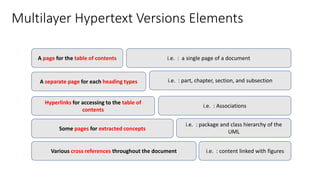
Multilayer Hypertext Versions Elements
A page for the table of contents
A separate page for each heading types
Hyperlinks for accessing to the table of
contents
Some pages for extracted concepts
Various cross references throughout the document
i.e. : a single page of a document
i.e. : part, chapter, section, and subsection
i.e. : Associations
i.e. : package and class hierarchy of the
UML
i.e. : content linked with figures
2.1 Checking Well-formedness and Validity
• A well-formed content based on the XML document with
opening and closing tags, and nested logical rules to be able
to check and validate it by Stylus Studio® XML tool. i.e.,
document must have it conducted schema, the uses tags
must be within the schema content.
2.2 Producing Multiple Outputs
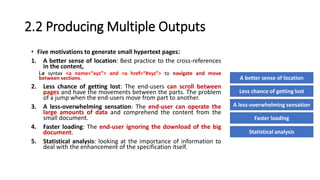
• Five motivations to generate small hypertext pages:
1. A better sense of location: Best practice to the cross-references
in the content,
i.e syntax <a name=“xyz”> and <a href=“#xyz”> to navigate and move
between sections.
2. Less chance of getting lost: The end-users can scroll between
pages and have the movements between the parts. The problem
of a jump when the end-users move from part to another.
3. A less-overwhelming sensation: The end-user can operate the
large amounts of data and comprehend the content from the
small document.
4. Faster loading: The end-user ignoring the download of the big
document.
5. Statistical analysis: looking at the importance of information to
deal with the enhancement of the specification itself.
A better sense of location
Less chance of getting lost
A less-overwhelming sensation
Faster loading
Statistical analysis
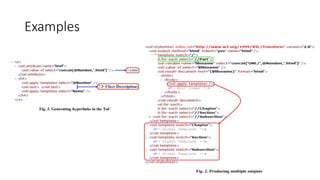
The produced function based on 3 issues
• Folder named “folder-name”: contains the hypertext files
• @Number = attribute <Part>, <Chapter>, <Section>, <Subsection>
• Outputs: I.html, 7.html, 7.1.html, 7.2.html, 7.3.html, 7.3.1.html,
7.3.2.html.
Examples
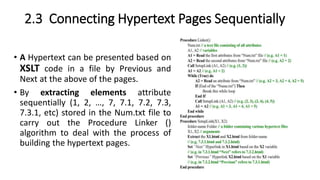
2.3 Connecting Hypertext Pages Sequentially
• A Hypertext can be presented based on
XSLT code in a file by Previous and
Next at the above of the pages.
• By extracting elements attribute
sequentially (1, 2, …, 7, 7.1, 7.2, 7.3,
7.3.1, etc) stored in the Num.txt file to
carry out the Procedure Linker ()
algorithm to deal with the process of
building the hypertext pages.
2.4 Forming Major Document Elements
• 2.4.1 Figure
• 2.4.2 Table
• 2.4.3 List
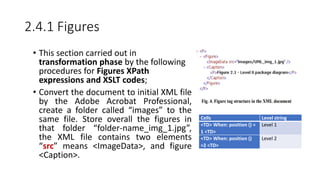
2.4.1 Figures
• This section carried out in
transformation phase by the following
procedures for Figures XPath
expressions and XSLT codes;
• Convert the document to initial XML file
by the Adobe Acrobat Professional,
create a folder called “images” to the
same file. Store overall the figures in
that folder “folder-name_img_1.jpg”,
the XML file contains two elements
“src” means <ImageData>, and figure
<Caption>.
Cells Level string
<TD> When: position () =
1 <TD>
Level 1
<TD> When: position ()
=2 <TD>
Level 2
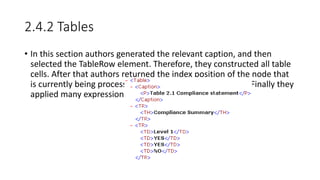
2.4.2 Tables
• In this section authors generated the relevant caption, and then
selected the TableRow element. Therefore, they constructed all table
cells. After that authors returned the index position of the node that
is currently being processed by XPath function: position(). Finally they
applied many expressions on each column.
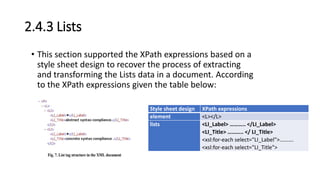
2.4.3 Lists
• This section supported the XPath expressions based on a
style sheet design to recover the process of extracting
and transforming the Lists data in a document. According
to the XPath expressions given the table below:
Style sheet design XPath expressions
element <L></L>
lists <LI_Label> ……….. </LI_Label>
<LI_Title> ……….. </ LI_Title>
<xsl:for-each select="LI_Label">……….
<xsl:for-each select="LI_Title">
3. Concept extraction
1. Modeling Class Hierarchy Extraction
2. Modeling Package Hierarchy Extraction
4. Cross referencing
• To facilitate document browsing for end users, we created hyperlinks
for major document keywords (for example, class names as well as
package names) throughout the generated user interfaces. As we
mentioned previously, since these keywords were among document
headings, each of them had an independent hypertext page or anchor
link in the final user interfaces.
Evaluation, Usability, And Architecture
1. Reengineering of Various OMG Specifications
2. Usability of Multilayer Hypertext Interfaces: following benefits
through our usability studies, which did not exist in the original
PDF formats, or Adobe-Generated HTML formats:.
• Navigating
• Scrolling
• Processing
• Learning
• Monitoring
• Downloading
• Referencing
• Coloring
• Keeping track
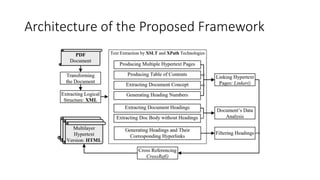
Architecture of the Proposed Framework
Conclusion
• An approach for taking raw PDF versions of complex documents (e.g.,
specifications) and converting them into multilayer hypertext
interfaces. For each document, we first generated a clean XML
document with meaningful tags, and then constructed from this a
series of hypertext pages constituting the final system.
Future Work
1. Extract the initial XML document from other formats such as DOC,
RTF, HTML, etc. This can extend our framework for other kinds of
formats and documents.
2. Automate the concept extractions or at least create some features
for the detection of the logical relationships among headings
3. Improve the current solution and discover new users’ demands.
Only by such an investigation we can have a deep understanding of
users’ difficulties.
Example
• https://www.iro.umontreal.ca/~pift1025/bigjava/Ch26/ch26.html
Thank you
Speaker Information
 Moutasm tamimi
 Masters of Software Engineering
 Independent Consultant , IT Researcher.
 CEO at ITG7.com , IT-CRG.com
 Email: tamimi@itg7.com,
Click Here
Click HereI T G 7
Click Here
Click HereIT-CRG

Reengineering PDF-Based Documents Targeting Complex Software Specifications

  • 1.
    Reengineering PDF-Based Documents TargetingComplex Software Specifications Moutasm tamimi, Ahid yaseen Software Engineering Nojoumian, M., & Lethbridge, T. C. (2011). Reengineering PDF-based documents targeting complex software specifications. International Journal of Knowledge and Web Intelligence, 2(4), 292-319.
  • 2.
    Outline o Review o Abstract oContribution and Motivation o Related Work o Document Transformation o Evaluation o Logical Structure Extraction o multilayer hypertext versions elements o Checking Well-formedness and Validity ◦ Producing Multiple Outputs ◦ Examples ◦ Concept extraction ◦ Cross referencing ◦ Evaluation, Usability, And Architecture ◦ Architecture of the proposed framework ◦ Conclusion ◦ Future Work
  • 3.
    Review 1. Extensible Mark-upLanguage (XML) is a mark-up language that defines a set of rules for encoding documents in a format that is both human-readable and machine-readable. 2. XPath function: You can use XML Path Language (Xpath) functions to refine XPath queries and enhance the programming power and flexibility of XPath.
  • 4.
    Abstract • This paperinvestigated the process of reengineering the complex PDF documents by focusing on the Object Management Group (OMG) standards and roles to produce the multilayer hypertext interfaces, which can be more applicable of electronic documents.
  • 5.
    Contribution and Motivation Keycontributions: 1. An efficient technique for capturing document structure 2. Various techniques for text extraction 3. A general approach for document engineering 4. Significant values and usability in the final result.
  • 6.
    Related Work 1. DocumentStructure Analysis 2. PDF Document Analysis 3. Leveraging Tables of Contents
  • 7.
    Document Transformation Criteria extractthe document’s logical structure and convert it to XML: Generality Low volume Easy processing Tagging structure Containing clues
  • 8.
    Evaluation The techniques ofexamining the given transformation criteria DOC and RTF formats are generally messy PDF complexity
  • 9.
    Logical Structure Extraction 1.First Refinement Approach (it failed in different chapters) • In this method start of search and correspond the main tags like <Part>, <Sect> and <Div>, which indicated at start and end of chapter or sections in Adobe Acrobat. • In practice authors applied the methods in sample of large document and uneven chapters and found that this method unlikely failed, with reason of forget tagging rightly the method close for<Sect> tag incorrectly in wrong places
  • 10.
    1. Logical StructureExtraction • 2- Second Implementation Approach (LinkTarget, LinkTargetQueue) • In this method start of search and correspond the main tags like <Part>, <Sect> and <Div>, which indicated at start and end of chapter or sections in Adobe Acrobat. • In practice authors applied the methods in sample of large document and uneven chapters and found that this method unlikely failed, with reason of forget tagging rightly the method close for<Sect> tag incorrectly in wrong places
  • 11.
    2. Text Extraction •In 1990, Nielsen demonstrated the Hypertext and hypermedia which considered the related information in other data sources, the importance of these issues has illustrated in the computer applications associated with structured information like on-line documentation or computer-aided learning, in order to construct a general structure for our hypertext interfaces.
  • 12.
    Multilayer Hypertext VersionsElements A page for the table of contents A separate page for each heading types Hyperlinks for accessing to the table of contents Some pages for extracted concepts Various cross references throughout the document i.e. : a single page of a document i.e. : part, chapter, section, and subsection i.e. : Associations i.e. : package and class hierarchy of the UML i.e. : content linked with figures
  • 13.
    2.1 Checking Well-formednessand Validity • A well-formed content based on the XML document with opening and closing tags, and nested logical rules to be able to check and validate it by Stylus Studio® XML tool. i.e., document must have it conducted schema, the uses tags must be within the schema content.
  • 14.
    2.2 Producing MultipleOutputs • Five motivations to generate small hypertext pages: 1. A better sense of location: Best practice to the cross-references in the content, i.e syntax <a name=“xyz”> and <a href=“#xyz”> to navigate and move between sections. 2. Less chance of getting lost: The end-users can scroll between pages and have the movements between the parts. The problem of a jump when the end-users move from part to another. 3. A less-overwhelming sensation: The end-user can operate the large amounts of data and comprehend the content from the small document. 4. Faster loading: The end-user ignoring the download of the big document. 5. Statistical analysis: looking at the importance of information to deal with the enhancement of the specification itself. A better sense of location Less chance of getting lost A less-overwhelming sensation Faster loading Statistical analysis
  • 15.
    The produced functionbased on 3 issues • Folder named “folder-name”: contains the hypertext files • @Number = attribute <Part>, <Chapter>, <Section>, <Subsection> • Outputs: I.html, 7.html, 7.1.html, 7.2.html, 7.3.html, 7.3.1.html, 7.3.2.html.
  • 16.
  • 17.
    2.3 Connecting HypertextPages Sequentially • A Hypertext can be presented based on XSLT code in a file by Previous and Next at the above of the pages. • By extracting elements attribute sequentially (1, 2, …, 7, 7.1, 7.2, 7.3, 7.3.1, etc) stored in the Num.txt file to carry out the Procedure Linker () algorithm to deal with the process of building the hypertext pages.
  • 18.
    2.4 Forming MajorDocument Elements • 2.4.1 Figure • 2.4.2 Table • 2.4.3 List
  • 19.
    2.4.1 Figures • Thissection carried out in transformation phase by the following procedures for Figures XPath expressions and XSLT codes; • Convert the document to initial XML file by the Adobe Acrobat Professional, create a folder called “images” to the same file. Store overall the figures in that folder “folder-name_img_1.jpg”, the XML file contains two elements “src” means <ImageData>, and figure <Caption>. Cells Level string <TD> When: position () = 1 <TD> Level 1 <TD> When: position () =2 <TD> Level 2
  • 20.
    2.4.2 Tables • Inthis section authors generated the relevant caption, and then selected the TableRow element. Therefore, they constructed all table cells. After that authors returned the index position of the node that is currently being processed by XPath function: position(). Finally they applied many expressions on each column.
  • 21.
    2.4.3 Lists • Thissection supported the XPath expressions based on a style sheet design to recover the process of extracting and transforming the Lists data in a document. According to the XPath expressions given the table below: Style sheet design XPath expressions element <L></L> lists <LI_Label> ……….. </LI_Label> <LI_Title> ……….. </ LI_Title> <xsl:for-each select="LI_Label">………. <xsl:for-each select="LI_Title">
  • 22.
    3. Concept extraction 1.Modeling Class Hierarchy Extraction 2. Modeling Package Hierarchy Extraction
  • 23.
    4. Cross referencing •To facilitate document browsing for end users, we created hyperlinks for major document keywords (for example, class names as well as package names) throughout the generated user interfaces. As we mentioned previously, since these keywords were among document headings, each of them had an independent hypertext page or anchor link in the final user interfaces.
  • 24.
    Evaluation, Usability, AndArchitecture 1. Reengineering of Various OMG Specifications 2. Usability of Multilayer Hypertext Interfaces: following benefits through our usability studies, which did not exist in the original PDF formats, or Adobe-Generated HTML formats:. • Navigating • Scrolling • Processing • Learning • Monitoring • Downloading • Referencing • Coloring • Keeping track
  • 25.
    Architecture of theProposed Framework
  • 26.
    Conclusion • An approachfor taking raw PDF versions of complex documents (e.g., specifications) and converting them into multilayer hypertext interfaces. For each document, we first generated a clean XML document with meaningful tags, and then constructed from this a series of hypertext pages constituting the final system.
  • 27.
    Future Work 1. Extractthe initial XML document from other formats such as DOC, RTF, HTML, etc. This can extend our framework for other kinds of formats and documents. 2. Automate the concept extractions or at least create some features for the detection of the logical relationships among headings 3. Improve the current solution and discover new users’ demands. Only by such an investigation we can have a deep understanding of users’ difficulties.
  • 28.
  • 29.
  • 30.
    Speaker Information  Moutasmtamimi  Masters of Software Engineering  Independent Consultant , IT Researcher.  CEO at ITG7.com , IT-CRG.com  Email: tamimi@itg7.com, Click Here Click HereI T G 7 Click Here Click HereIT-CRG