저자 직강 +스터디 그룹
Red Hat OpenStack 17
Nalee Jang,
Senior Consultant of Red Hat Korea
1
2.
About this StudyGroup
Red
Hat
OpenStack
17
저자
직강
+
스터디
그룹
2
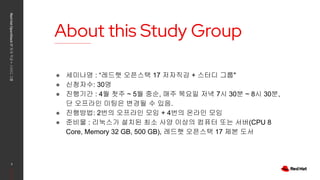
● 세미나명 : “레드햇 오픈스택 17 저자직강 + 스터디 그룹"
● 신청자수: 30명
● 진행기간 : 4월 첫주 ~ 5월 중순, 매주 목요일 저녁 7시 30분 ~ 8시 30분,
단 오프라인 미팅은 변경될 수 있음.
● 진행방법: 2번의 오프라인 모임 + 4번의 온라인 모임
● 준비물 : 리눅스가 설치된 최소 사양 이상의 컴퓨터 또는 서버(CPU 8
Core, Memory 32 GB, 500 GB), 레드햇 오픈스택 17 제본 도서
3.
The Curriculum
Red
Hat
OpenStack
17
저자
직강
+
스터디
그룹
3
언제 커리큘럼모임유형
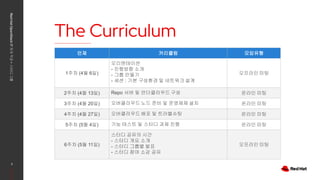
1주차 (4월 6일)
오리엔테이션
- 진행방향 소개
- 그룹 만들기
- 세션 : 기본 구성환경 및 네트워크 설계
오프라인 미팅
2주차 (4월 13일) Repo 서버 및 언더클라우드 구성 온라인 미팅
3주차 (4월 20일) 오버클라우드 노드 준비 및 운영체제 설치 온라인 미팅
4주차 (4월 27일) 오버클라우드 배포 및 트러블슈팅 온라인 미팅
5주차 (5월 4일) 기능 테스트 및 스터디 과제 진행 온라인 미팅
6주차 (5월 11일)
스터디 공유의 시간
- 스터디 개요 소개
- 스터디 그룹별 발표
- 스터디 참여 소감 공유
오프라인 미팅
4.
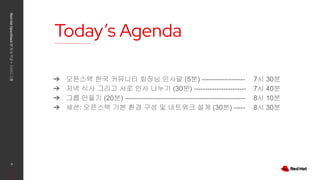
Today’s Agenda
Red
Hat
OpenStack
17
저자
직강
+
스터디
그룹
4
➔ 오픈스택한국 커뮤니티 회장님 인사말 (5분) -------------------
➔ 저녁 식사 그리고 서로 인사 나누기 (30분) -----------------------
➔ 그룹 만들기 (20분) -----------------------------------------------------
➔ 세션: 오픈스택 기본 환경 구성 및 네트워크 설계 (30분) -----
7시 30분
7시 40분
8시 10분
8시 30분
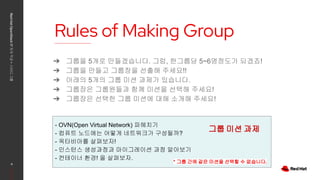
Rules of MakingGroup
Red
Hat
OpenStack
17
저자
직강
+
스터디
그룹
6
➔ 그룹을 5개로 만들겠습니다. 그럼, 한그룹당 5~6명정도가 되겠죠!
➔ 그룹을 만들고 그룹장을 선출해 주세요!!
➔ 아래의 5개의 그룹 미션 과제가 있습니다.
➔ 그룹장은 그룹원들과 함께 미션을 선택해 주세요!
➔ 그룹장은 선택한 그룹 미션에 대해 소개해 주세요!
- OVN(Open Virtual Network) 파헤치기
- 컴퓨트 노드에는 어떻게 네트워크가 구성될까?
- 옥타비아를 살펴보자!
- 인스턴스 생성과정과 마이그레이션 과정 알아보기
- 컨테이너 환경! 을 살펴보자.
그룹 미션 과제
* 그룹 간에 같은 미션을 선택할 수 없습니다.
7.
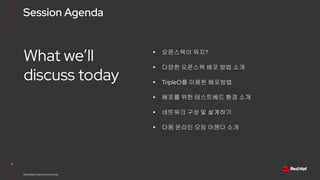
Session Agenda
7
OpenStack KoreaCommunity
What we’ll
discuss today
▸ 오픈스택이 뭐지?
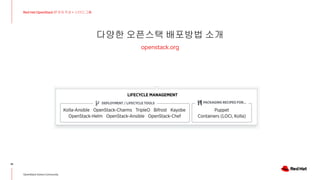
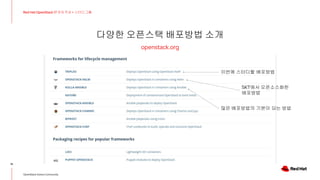
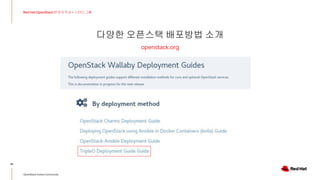
▸ 다양한 오픈스택 배포 방법 소개
▸ TripleO를 이용한 배포방법
▸ 배포를 위한 테스트베드 환경 소개
▸ 네트워크 구성 및 설계하기
▸ 다음 온라인 모임 아젠다 소개
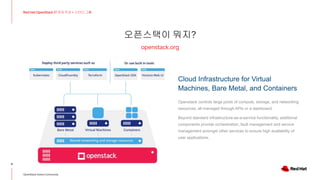
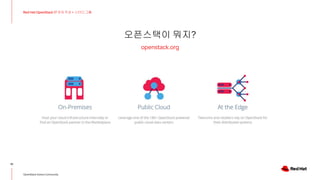
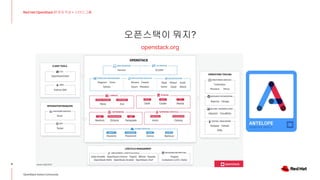
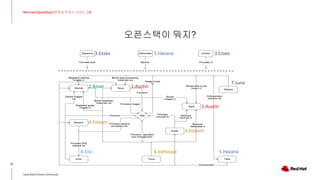
오픈스택이 뭐지?
openstack.org
9
Red HatOpenStack 17 저자 직강 + 스터디그룹
OpenStack Korea Community
Cloud Infrastructure for Virtual
Machines, Bare Metal, and Containers
Openstack controls large pools of compute, storage, and networking
resources, all managed through APIs or a dashboard.
Beyond standard infrastructure-as-a-service functionality, additional
components provide orchestration, fault management and service
management amongst other services to ensure high availability of
user applications.
TripleO를 이용한 배포방법소개
18
Red Hat OpenStack 17 저자 직강 + 스터디그룹
OpenStack Korea Community
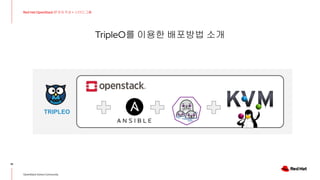
TRIPLEO
19.
TripleO를 이용한 배포방법소개
19
Red Hat OpenStack 17 저자 직강 + 스터디그룹
OpenStack Korea Community
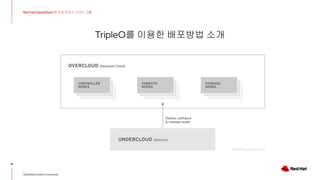
20.
TripleO를 이용한 배포방법소개
20
Red Hat OpenStack 17 저자 직강 + 스터디그룹
OpenStack Korea Community
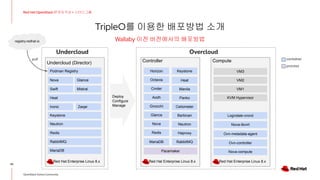
Wallaby 이전 버전에서의 배포방법
Controller Compute
Red Hat Enterprise Linux 8.x Red Hat Enterprise Linux 8.x
MariaDB RabbitMQ
Redis Haproxy
Nova Neutron
Glance Barbican
Gnocchi Ceilometer
Aodh Panko
Cinder Manila
Octavia Heat
Pacemaker
Horizon Keystone
Nova-compute
Ovn-controller
Nova-libvirt
KVM Hypervisor
Logrotate-crond
VM1
VM2
VM3
Overcloud
Deploy
Configure
Manage
Ovn-metadata-agent
container
process
Undercloud (Director)
MariaDB
RabbitMQ
Redis
Neutron
Heat
Ironic
Podman Registry
Keystone
pull
Nova Glance
Swift Mistral
Zaqar
Red Hat Enterprise Linux 8.x
registry.redhat.io
Undercloud
21.
TripleO를 이용한 배포방법소개
21
Red Hat OpenStack 17 저자 직강 + 스터디그룹
OpenStack Korea Community
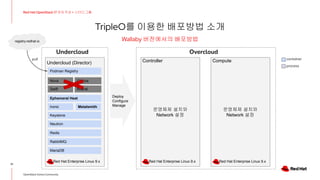
Wallaby 버전에서의 배포방법
Undercloud (Director)
운영체제 설치와
Network 설정
Controller
운영체제 설치와
Network 설정
Compute
MariaDB
RabbitMQ
Redis
Neutron
Ephemeral Heat
Ironic
Podman Registry
Keystone
Undercloud Overcloud
Deploy
Configure
Manage
container
process
registry.redhat.io
pull
Nova Glance
Swift Mistral
Metalsmith
Red Hat Enterprise Linux 9.x Red Hat Enterprise Linux 9.x Red Hat Enterprise Linux 9.x
22.
TripleO를 이용한 배포방법소개
22
Red Hat OpenStack 17 저자 직강 + 스터디그룹
OpenStack Korea Community
Wallaby 버전에서의 배포방법
Undercloud (Director) Controller Compute
MariaDB
RabbitMQ
Redis
Neutron
Ephemeral Heat
Ironic
Podman Registry
MariaDB RabbitMQ
Redis Haproxy
Nova Neutron
Glance Ceilometer
Cinder Manila
Octavia Heat
Pacemaker
Horizon Keystone
Keystone
Nova-compute
Ovn-controller
Nova-libvirt
KVM Hypervisor
Logrotate-crond
VM1
VM2
VM3
Undercloud Overcloud
Deploy
Configure
Manage
Ovn-metadata-agent
container
process
registry.redhat.io
pull
Nova Glance
Swift Mistral Ovn-controller
Ovn-cluster-northd
Metalsmith
Red Hat Enterprise Linux 9.x Red Hat Enterprise Linux 9.x Red Hat Enterprise Linux 9.x
배포를 위한 테스트베드환경 소개
24
Red Hat OpenStack 17 저자 직강 + 스터디그룹
OpenStack Korea Community
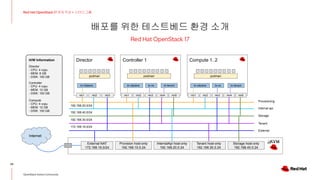
Red Hat OpenStack 17
Internet
Director Controller 1
External NAT
172.168.16.0/24
Provision host-only
192.168.10.0.24
Provisioning
Internal api
Storage
External
Tenant
nic1 nic2 nic1 nic2
br-ctlplane br-ex
br-ctlplane
podman podman
172.168.16.0/24
H/W Information
Director
- CPU: 4 vcpu
- MEM: 8 GB
- DISK: 100 GB
Controller
- CPU: 4 vcpu
- MEM: 12 GB
- DISK: 100 GB
Compute
- CPU: 4 vcpu
- MEM: 12 GB
- DISK: 100 GB
InternalApi host-only
192.168.20.0.24
Storage host-only
192.168.40.0.24
Tenant host-only
192.168.30.0.24
nic3 nic4 nic5
br-tenant
Compute 1..2
nic1 nic2
br-ex
br-ctlplane
podman
nic3 nic4 nic5
br-tenant
nic3
192.168.30.0/24
192.168.40.0/24
192.168.20.0/24
25.
배포를 위한 테스트베드환경 소개
25
Red Hat OpenStack 17 저자 직강 + 스터디그룹
OpenStack Korea Community
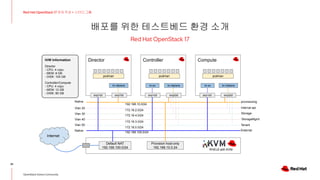
Red Hat OpenStack 17
Internet
Director Controller Compute
Default NAT
192.168.100.0/24
Provision host-only
192.168.10.0.24
provisioning
Internal api
Storage
StorageMgmt
External
Tenant
RHEL8 with KVM
Native
Native
Vlan 20
Vlan 30
Vlan 40
Vlan 50
enp1s0 enp7s0 enp1s0 enp2s0 enp1s0 enp2s0
br-ctlplane br-ctlplane
br-ex br-ctlplane
podman podman podman
192.168.10.0/24
172.16.2.0/24
172.16.4.0/24
172.16.3.0/24
172.16.0.0/24
192.168.100.0/24
H/W Information
Director
- CPU: 4 vcpu
- MEM: 8 GB
- DISK: 100 GB
Controller/Compute
- CPU: 4 vcpu
- MEM: 12 GB
- DISK: 80 GB
br-ex
26.
배포를 위한 테스트베드환경 소개
26
Red Hat OpenStack 17 저자 직강 + 스터디그룹
OpenStack Korea Community
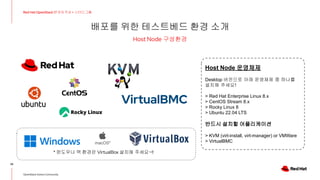
Host Node 구성환경
VirtualBMC
Host Node 운영체제
Desktop 버전으로 아래 운영체제 중 하나를
설치해 주세요!
> Red Hat Enterprise Linux 8.x
> CentOS Stream 8.x
> Rocky Linux 8
> Ubuntu 22.04 LTS
반드시 설치할 어플리케이션
> KVM (virt-install, virt-manager) or VMWare
> VirtualBMC
* 윈도우나 맥 환경은 VirtualBox 설치해 주세요~!!
네트워크 구성 및설계
28
Red Hat OpenStack 17 저자 직강 + 스터디그룹
OpenStack Korea Community
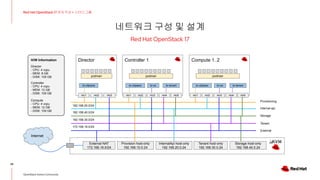
Red Hat OpenStack 17
Internet
Director Controller 1
External NAT
172.168.16.0/24
Provision host-only
192.168.10.0.24
Provisioning
Internal api
Storage
External
Tenant
nic1 nic2 nic1 nic2
br-ctlplane br-ex
br-ctlplane
podman podman
172.168.16.0/24
H/W Information
Director
- CPU: 4 vcpu
- MEM: 8 GB
- DISK: 100 GB
Controller
- CPU: 4 vcpu
- MEM: 12 GB
- DISK: 100 GB
Compute
- CPU: 4 vcpu
- MEM: 12 GB
- DISK: 100 GB
InternalApi host-only
192.168.20.0.24
Storage host-only
192.168.40.0.24
Tenant host-only
192.168.30.0.24
nic3 nic4 nic5
br-tenant
Compute 1..2
nic1 nic2
br-ex
br-ctlplane
podman
nic3 nic4 nic5
br-tenant
nic3
192.168.30.0/24
192.168.40.0/24
192.168.20.0/24
29.
네트워크 구성 및설계
29
Red Hat OpenStack 17 저자 직강 + 스터디그룹
OpenStack Korea Community
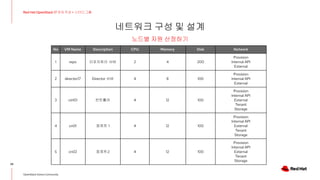
노드별 자원 산정하기
No VM Name Description CPU Memory Disk Network
1 repo 리포지토리 서버 2 4 200
Provision
Internal API
External
2 director17 Director 서버 4 8 100
Provision
Internal API
External
3 ctrl01 컨트롤러 4 12 100
Provision
Internal API
External
Tenant
Storage
4 cn01 컴퓨트 1 4 12 100
Provision
Internal API
External
Tenant
Storage
5 cn02 컴퓨트2 4 12 100
Provision
Internal API
External
Tenant
Storage
30.
네트워크 구성 및설계
30
Red Hat OpenStack 17 저자 직강 + 스터디그룹
OpenStack Korea Community
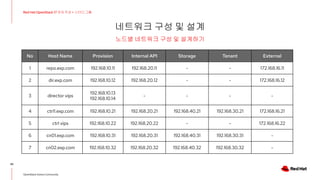
노드별 네트워크 구성 및 설계하기
No Host Name Provision Internal API Storage Tenant External
1 repo.exp.com 192.168.10.11 192.168.20.11 - - 172.168.16.11
2 dir.exp.com 192.168.10.12 192.168.20.12 - - 172.168.16.12
3 director vips
192.168.10.13
192.168.10.14
- - - -
4 ctrl1.exp.com 192.168.10.21 192.168.20.21 192.168.40.21 192.168.30.21 172.168.16.21
5 ctrl vips 192.168.10.22 192.168.20.22 - - 172.168.16.22
6 cn01.exp.com 192.168.10.31 192.168.20.31 192.168.40.31 192.168.30.31 -
7 cn02.exp.com 192.168.10.32 192.168.20.32 192.168.40.32 192.168.30.32 -
다음시간 온라인 모임아젠다 소개
32
Red Hat OpenStack 17 저자 직강 + 스터디그룹
OpenStack Korea Community
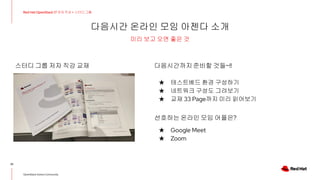
미리 보고 오면 좋은 것
스터디 그룹 저자 직강 교재 다음시간까지준비할 것들~!!
★ 테스트베드 환경 구성하기
★ 네트워크 구성도 그려보기
★ 교재 33 Page까지 미리 읽어보기
선호하는 온라인 모임 어플은?
★ Google Meet
★ Zoom




![[OpenStack] 공개 소프트웨어 오픈스택 입문 & 파헤치기](https://cdn.slidesharecdn.com/ss_thumbnails/opensource-skimmingopenstackwithkoreausergroup-180824144737-thumbnail.jpg?width=640&height=640&fit=bounds)
![[오픈소스컨설팅] Open Stack Ceph, Neutron, HA, Multi-Region](https://cdn.slidesharecdn.com/ss_thumbnails/openstackoscv0-160718105826-thumbnail.jpg?width=640&height=640&fit=bounds)
![[2018] 오픈스택 5년 운영의 경험](https://cdn.slidesharecdn.com/ss_thumbnails/cloudinfra05-190131073350-thumbnail.jpg?width=640&height=640&fit=bounds)
![[오픈소스컨설팅] 쿠버네티스와 쿠버네티스 on 오픈스택 비교 및 구축 방법](https://cdn.slidesharecdn.com/ss_thumbnails/osck8svsk8sonopenstackkhoj-210310051504-thumbnail.jpg?width=640&height=640&fit=bounds)
![[오픈소스컨설팅]오픈스택에 대하여](https://cdn.slidesharecdn.com/ss_thumbnails/random-151125103039-lva1-app6892-thumbnail.jpg?width=640&height=640&fit=bounds)


![[OpenInfra Days Korea 2018] (Track 2) Neutron LBaaS 어디까지 왔니? - Octavia 소개](https://cdn.slidesharecdn.com/ss_thumbnails/26octavia-180704054917-thumbnail.jpg?width=640&height=640&fit=bounds)

![[OpenInfra Days Korea 2018] Day 2 - CEPH 운영자를 위한 Object Storage Performance T...](https://cdn.slidesharecdn.com/ss_thumbnails/openinfradayobjectstorageperformancefinal2-180704062033-thumbnail.jpg?width=640&height=640&fit=bounds)
![[OpenStack 하반기 스터디] Interoperability with ML2: LinuxBridge, OVS and SDN](https://cdn.slidesharecdn.com/ss_thumbnails/openstackteam5interoperabilitywithml2-151221120433-thumbnail.jpg?width=640&height=640&fit=bounds)


![[OpenStack Days Korea 2016] Track2 - 아리스타 OpenStack 연동 및 CloudVision 솔루션 소개](https://cdn.slidesharecdn.com/ss_thumbnails/41arista-160226174314-thumbnail.jpg?width=640&height=640&fit=bounds)


![[2018 KOSSLAB 컨트리뷰톤] 오픈스택 (OpenStack) 프로젝트 소개 + 업스트림 컨트리뷰션](https://cdn.slidesharecdn.com/ss_thumbnails/201808openstack-upstreamcontributionandcontributhon-dist-180817004435-thumbnail.jpg?width=640&height=640&fit=bounds)
![[OpenStack Day in Korea 2015] Track 1-2 - Red hat Enterprise Linux OpenStack ...](https://cdn.slidesharecdn.com/ss_thumbnails/12-150213041733-conversion-gate01-thumbnail.jpg?width=640&height=640&fit=bounds)

![(Red hat]private cloud-osp-introduction(samuel)2017-0530(printed)](https://cdn.slidesharecdn.com/ss_thumbnails/redhatprivate-cloud-osp-introductionsamuel2017-0530printed-210414071244-thumbnail.jpg?width=640&height=640&fit=bounds)
![[OpenStack Days Korea 2016] Track4 - 오픈스택을 공부합시다 - 커뮤니티 스터디 분과 소개](https://cdn.slidesharecdn.com/ss_thumbnails/44studysession-160226174847-thumbnail.jpg?width=640&height=640&fit=bounds)
![[SOSCON 2016] 오픈스택을 살펴보는 오픈 소스 컨트리뷰션](https://cdn.slidesharecdn.com/ss_thumbnails/soscon2016openstackandopensourcecontributiondist-161118015925-thumbnail.jpg?width=640&height=640&fit=bounds)


![[오픈소스컨설팅] Cloud Big Tech 2024_오픈소스로 맞이하는 클라우드](https://cdn.slidesharecdn.com/ss_thumbnails/cloudbigtech2024v0-241024082554-c3247011-thumbnail.jpg?width=640&height=640&fit=bounds)

![[오픈테크넷서밋2022] 국내 PaaS(Kubernetes) Best Practice 및 DevOps 환경 구축 사례.pdf](https://cdn.slidesharecdn.com/ss_thumbnails/2022paaskubernetesbestpracticedevops-220927105318-84776c9a-thumbnail.jpg?width=640&height=640&fit=bounds)

![[발표자료] 오픈소스 기반 클라우드 네이티브 애플리케이션 구축 방안 (feat. Kubernetes)](https://cdn.slidesharecdn.com/ss_thumbnails/kubernetes-241219083038-3bd08c9d-thumbnail.jpg?width=640&height=640&fit=bounds)


![[Open infra] how to calculate the cloud system operating rate](https://cdn.slidesharecdn.com/ss_thumbnails/openinfrahowtocalculatethecloudsystemoperatingrate-210911051805-thumbnail.jpg?width=640&height=640&fit=bounds)

![[Red Hat] OpenStack Automation with Ansible](https://cdn.slidesharecdn.com/ss_thumbnails/redhatopenstackautomationwithansiblevereng-180704225623-thumbnail.jpg?width=640&height=640&fit=bounds)


![[OpenStack Day in Korea] Introduction to open stack](https://cdn.slidesharecdn.com/ss_thumbnails/introductiontoopenstack-140218221018-phpapp02-thumbnail.jpg?width=640&height=640&fit=bounds)


