Recovering From A Damaged
PostgreSQL Cluster
Recovering From A Damaged
PostgreSQL Cluster
@ me
Recovering From A Damaged
PostgreSQL Cluster
Asurion Mobile Applications
http://www.asurion.com/
Robert Bernier
Sr. Database Administrator, Asurion Mobile Applications
robert.bernier@asurion.com
1400 Fashion Island Blvd, San Mateo, CA 94404
Recovering From A Damaged
PostgreSQL Cluster
Recovering From A Damaged
PostgreSQL Cluster
Recovering From A Damaged
PostgreSQL Cluster
Recovering From A Damaged
PostgreSQL Cluster
Recovering From A Damaged
PostgreSQL Cluster
Recovering From A Damaged
PostgreSQL Cluster
Recovering From A Damaged
PostgreSQL Cluster
Just a little bit of
knowledge
Recovering From A Damaged
PostgreSQL Cluster
The secret is...
Recovering From A Damaged
PostgreSQL Cluster
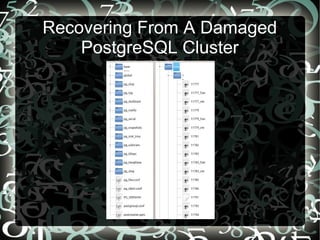
Indexes & Tables are FILES!
Recovering From A Damaged
PostgreSQL Cluster
Recovering From A Damaged
PostgreSQL Cluster
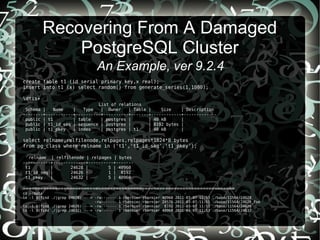
An Example, ver 9.2.4
create table t1 (id serial primary key,x real);
insert into t1 (x) select random() from generate_series(1,1000);
dtis+
List of relations
Schema | Name | Type | Owner | Table | Size | Description
--------+-----------+----------+----------+-------+------------+-------------
public | t1 | table | postgres | | 40 kB |
public | t1_id_seq | sequence | postgres | | 8192 bytes |
public | t1_pkey | index | postgres | t1 | 40 kB |
select relname,relfilenode,relpages,relpages*1024*8 bytes
from pg_class where relname in ('t1','t1_id_seq','t1_pkey');
relname | relfilenode | relpages | bytes
-----------+-------------+----------+-------
t1 | 24628 | 5 | 40960
t1_id_seq | 24626 | 1 | 8192
t1_pkey | 24632 | 5 | 40960
=========================================================================
cd ~/data
ls -l $(find ./|grep 24628) ---> -rw------- 1 rbernier rbernier 40960 2011-03-07 11:53 ./base/11564/24628
-rw------- 1 rbernier rbernier 24576 2011-03-07 11:51 ./base/11564/24628_fsm
ls -l $(find ./|grep 24626) ---> -rw------- 1 rbernier rbernier 8192 2011-03-07 11:53 ./base/11564/24626
ls -l $(find ./|grep 24632) ---> -rw------- 1 rbernier rbernier 40960 2011-03-07 11:53 ./base/11564/24632
Recovering From A Damaged
PostgreSQL Cluster
Damaged files cannot be processed
-- damage the sequence; can't insert records
rm ./base/11564/24626
touch ./base/11564/24626
_______________________________________________________________________
insert into t1(x) values(9990);
ERROR: could not read block 0 of relation base/11564/24626: read only 0 of 8192 bytes
_______________________________________________________________________
ds t1_id_seq
List of relations
Schema | Name | Type | Owner
--------+-----------+----------+----------
public | t1_id_seq | sequence | postgres
_______________________________________________________________________
table t1_id_seq;
sequence_name | last_value | start_value | increment_by | max_value | min_value | cache_value | log_cnt | is_cycled | is_called
---------------+------------+-------------+--------------+-----------+-----------+-------------+---------+-----------+-----------
Recovering From A Damaged
PostgreSQL Cluster
Damaged files cannot be processed
-- damage the index; can't perform a query
rm ./base/11564/24632
touch ./base/11564/24632
-----------------------------
explain select * from t1 where id=100;
QUERY PLAN
------------------------------------------------------------------
Index Scan using t1_pkey on t1 (cost=0.00..8.27 rows=1 width=8)
Index Cond: (id = 100)
postgres=# select * from t1 where id=100;
ERROR: could not read block 0 of relation base/11564/24632: read only 0 of 8192 bytes
Recovering From A Damaged
PostgreSQL Cluster
Damaged files cannot be processed
-- damage the table, can't perform any query
select * from t1;
ERROR: invalid page header in block 0 of relation base/11564/24628
Recovering From A Damaged
PostgreSQL Cluster
Example Invocation
Scenario: Cannot INSERT Due to Damaged Sequence
Solution: DROP and CREATE SEQUENCE
drop sequence t1_id_seq cascade;
create sequence t1_id_seq start with 10001 owned by t1.id;
alter table only t1 alter column id set default nextval('t1_id_seq'::regclass);
select pg_catalog.setval('t1_id_seq', 10002, false);
BEFORE
relname | relfilenode | relpages | bytes
-----------+-------------+----------+-------
t1_id_seq | 24626 | 1 | 8192
AFTER
relname | relfilenode | relpages | bytes
-----------+-------------+----------+-------
t1_id_seq | 189575 | 1 | 8192
Recovering From A Damaged
PostgreSQL Cluster
Example Invocation
Scenario: Rebuild Data Cluster with Corrupted Index
Solution: Rebuild index
reindex index t1_pkey;
BEFORE
relname | relfilenode | relpages | bytes
-----------+-------------+----------+-------
t1_pkey | 24632 | 5 | 40960
AFTER
relname | relfilenode | relpages | bytes
-----------+-------------+----------+-------
t1_pkey | 189578 | 5 | 40960
Recovering From A Damaged
PostgreSQL Cluster
Example Invocation
Scenario: Rebuild Data Cluster with Corrupted System Indexes
Solution: Rebuild indexes under single-user mode
- start up the damaged cluster and reindex with the following invocation
postgres --single postgres -D ~/data <<_eof_
reindex system mydatabase
_eof_
Recovering From A Damaged
PostgreSQL Cluster
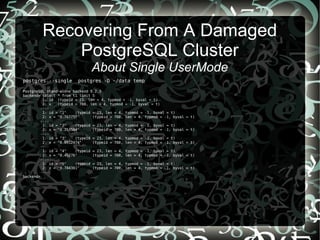
About Single UserMode
- Used during bootstrapping by initdb
- Can be used for debugging
- Can be used for disaster recovery
i.e. System indexes can be manipulated
- Can enter queries and the results are printed to the screen
Recovering From A Damaged
PostgreSQL Cluster
About Single UserMode
postgres --single postgres -D ~/data temp
PostgreSQL stand-alone backend 9.2.3
backend> select * from t1 limit 5
1: id (typeid = 23, len = 4, typmod = -1, byval = t)
2: x (typeid = 700, len = 4, typmod = -1, byval = t)
----
1: id = "1" (typeid = 23, len = 4, typmod = -1, byval = t)
2: x = "0.767757" (typeid = 700, len = 4, typmod = -1, byval = t)
----
1: id = "2" (typeid = 23, len = 4, typmod = -1, byval = t)
2: x = "0.253584" (typeid = 700, len = 4, typmod = -1, byval = t)
----
1: id = "3" (typeid = 23, len = 4, typmod = -1, byval = t)
2: x = "0.0912474" (typeid = 700, len = 4, typmod = -1, byval = t)
----
1: id = "4" (typeid = 23, len = 4, typmod = -1, byval = t)
2: x = "0.45276" (typeid = 700, len = 4, typmod = -1, byval = t)
----
1: id = "5" (typeid = 23, len = 4, typmod = -1, byval = t)
2: x = "0.784381" (typeid = 700, len = 4, typmod = -1, byval = t)
----
backend>
Recovering From A Damaged
PostgreSQL Cluster
Example Invocation
Scenario: PostgreSQL Starts Up But Queries To User-Defined Tables Fails
Solution: Generate a data-dump into a newly created data cluster
- start up the damaged cluster with the following invocation
pg_ctl -D ~/data -o '-c zero_damaged_pages=true' -l logfile.txt start
- execute standard data dump with pg_dumpall
Recovering From A Damaged
PostgreSQL Cluster
Example Invocation
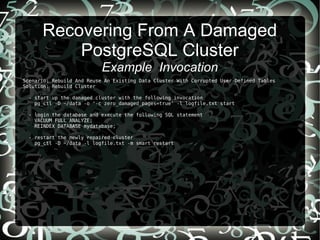
Scenario: Rebuild And Reuse An Existing Data Cluster With Corrupted User-Defined Tables
Solution: Rebuild Cluster
- start up the damaged cluster with the following invocation
pg_ctl -D ~/data -o '-c zero_damaged_pages=true' -l logfile.txt start
- login the database and execute the following SQL statement
VACUUM FULL ANALYZE;
REINDEX DATABASE mydatabase;
- restart the newly repaired cluster
pg_ctl -D ~/data -l logfile.txt -m smart restart
Recovering From A Damaged
PostgreSQL Cluster
Caveats
● DROP and CREATE damaged indexes
● Where possible, recreate the cluster on another machine... don't take a chance
● Executing a dump should be the first action i.e. don't VACUUM damaged tables
as you can actually lose data before you reuse/backup/dump
● Damaged system catalogs must be recovered in single user mode
● Tables larger 1GB+ are split
● TOASTED tables add an entirely new level of complexity
Recovering From A Damaged
PostgreSQL Cluster
One last word
Hacking the cluster...
Recovering From A Damaged
PostgreSQL Cluster
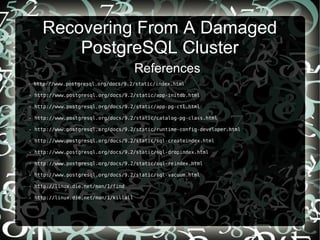
References
- http://www.postgresql.org/docs/9.2/static/index.html
- http://www.postgresql.org/docs/9.2/static/app-initdb.html
- http://www.postgresql.org/docs/9.2/static/app-pg-ctl.html
- http://www.postgresql.org/docs/9.2/static/catalog-pg-class.html
- http://www.postgresql.org/docs/9.2/static/runtime-config-developer.html
- http://www.postgresql.org/docs/9.2/static/sql-createindex.html
- http://www.postgresql.org/docs/9.2/static/sql-dropindex.html
- http://www.postgresql.org/docs/9.2/static/sql-reindex.html
- http://www.postgresql.org/docs/9.2/static/sql-vacuum.html
- http://linux.die.net/man/1/find
- http://linux.die.net/man/1/killall
Recovering From A Damaged
PostgreSQL Cluster
Asurion Mobile Applications
http://www.asurion.com/
Robert Bernier
Sr. Database Administrator, Asurion Mobile Applications
robert.bernier@asurion.com
1400 Fashion Island Blvd, San Mateo, CA 94404

Robert Bernier - Recovering From A Damaged PostgreSQL Cluster @ Postgres Open

  • 1.
    Recovering From ADamaged PostgreSQL Cluster
  • 2.
    Recovering From ADamaged PostgreSQL Cluster @ me
  • 3.
    Recovering From ADamaged PostgreSQL Cluster Asurion Mobile Applications http://www.asurion.com/ Robert Bernier Sr. Database Administrator, Asurion Mobile Applications robert.bernier@asurion.com 1400 Fashion Island Blvd, San Mateo, CA 94404
  • 4.
    Recovering From ADamaged PostgreSQL Cluster
  • 5.
    Recovering From ADamaged PostgreSQL Cluster
  • 6.
    Recovering From ADamaged PostgreSQL Cluster
  • 7.
    Recovering From ADamaged PostgreSQL Cluster
  • 8.
    Recovering From ADamaged PostgreSQL Cluster
  • 9.
    Recovering From ADamaged PostgreSQL Cluster
  • 10.
    Recovering From ADamaged PostgreSQL Cluster Just a little bit of knowledge
  • 11.
    Recovering From ADamaged PostgreSQL Cluster The secret is...
  • 12.
    Recovering From ADamaged PostgreSQL Cluster Indexes & Tables are FILES!
  • 13.
    Recovering From ADamaged PostgreSQL Cluster
  • 14.
    Recovering From ADamaged PostgreSQL Cluster An Example, ver 9.2.4 create table t1 (id serial primary key,x real); insert into t1 (x) select random() from generate_series(1,1000); dtis+ List of relations Schema | Name | Type | Owner | Table | Size | Description --------+-----------+----------+----------+-------+------------+------------- public | t1 | table | postgres | | 40 kB | public | t1_id_seq | sequence | postgres | | 8192 bytes | public | t1_pkey | index | postgres | t1 | 40 kB | select relname,relfilenode,relpages,relpages*1024*8 bytes from pg_class where relname in ('t1','t1_id_seq','t1_pkey'); relname | relfilenode | relpages | bytes -----------+-------------+----------+------- t1 | 24628 | 5 | 40960 t1_id_seq | 24626 | 1 | 8192 t1_pkey | 24632 | 5 | 40960 ========================================================================= cd ~/data ls -l $(find ./|grep 24628) ---> -rw------- 1 rbernier rbernier 40960 2011-03-07 11:53 ./base/11564/24628 -rw------- 1 rbernier rbernier 24576 2011-03-07 11:51 ./base/11564/24628_fsm ls -l $(find ./|grep 24626) ---> -rw------- 1 rbernier rbernier 8192 2011-03-07 11:53 ./base/11564/24626 ls -l $(find ./|grep 24632) ---> -rw------- 1 rbernier rbernier 40960 2011-03-07 11:53 ./base/11564/24632
  • 15.
    Recovering From ADamaged PostgreSQL Cluster Damaged files cannot be processed -- damage the sequence; can't insert records rm ./base/11564/24626 touch ./base/11564/24626 _______________________________________________________________________ insert into t1(x) values(9990); ERROR: could not read block 0 of relation base/11564/24626: read only 0 of 8192 bytes _______________________________________________________________________ ds t1_id_seq List of relations Schema | Name | Type | Owner --------+-----------+----------+---------- public | t1_id_seq | sequence | postgres _______________________________________________________________________ table t1_id_seq; sequence_name | last_value | start_value | increment_by | max_value | min_value | cache_value | log_cnt | is_cycled | is_called ---------------+------------+-------------+--------------+-----------+-----------+-------------+---------+-----------+-----------
  • 16.
    Recovering From ADamaged PostgreSQL Cluster Damaged files cannot be processed -- damage the index; can't perform a query rm ./base/11564/24632 touch ./base/11564/24632 ----------------------------- explain select * from t1 where id=100; QUERY PLAN ------------------------------------------------------------------ Index Scan using t1_pkey on t1 (cost=0.00..8.27 rows=1 width=8) Index Cond: (id = 100) postgres=# select * from t1 where id=100; ERROR: could not read block 0 of relation base/11564/24632: read only 0 of 8192 bytes
  • 17.
    Recovering From ADamaged PostgreSQL Cluster Damaged files cannot be processed -- damage the table, can't perform any query select * from t1; ERROR: invalid page header in block 0 of relation base/11564/24628
  • 18.
    Recovering From ADamaged PostgreSQL Cluster Example Invocation Scenario: Cannot INSERT Due to Damaged Sequence Solution: DROP and CREATE SEQUENCE drop sequence t1_id_seq cascade; create sequence t1_id_seq start with 10001 owned by t1.id; alter table only t1 alter column id set default nextval('t1_id_seq'::regclass); select pg_catalog.setval('t1_id_seq', 10002, false); BEFORE relname | relfilenode | relpages | bytes -----------+-------------+----------+------- t1_id_seq | 24626 | 1 | 8192 AFTER relname | relfilenode | relpages | bytes -----------+-------------+----------+------- t1_id_seq | 189575 | 1 | 8192
  • 19.
    Recovering From ADamaged PostgreSQL Cluster Example Invocation Scenario: Rebuild Data Cluster with Corrupted Index Solution: Rebuild index reindex index t1_pkey; BEFORE relname | relfilenode | relpages | bytes -----------+-------------+----------+------- t1_pkey | 24632 | 5 | 40960 AFTER relname | relfilenode | relpages | bytes -----------+-------------+----------+------- t1_pkey | 189578 | 5 | 40960
  • 20.
    Recovering From ADamaged PostgreSQL Cluster Example Invocation Scenario: Rebuild Data Cluster with Corrupted System Indexes Solution: Rebuild indexes under single-user mode - start up the damaged cluster and reindex with the following invocation postgres --single postgres -D ~/data <<_eof_ reindex system mydatabase _eof_
  • 21.
    Recovering From ADamaged PostgreSQL Cluster About Single UserMode - Used during bootstrapping by initdb - Can be used for debugging - Can be used for disaster recovery i.e. System indexes can be manipulated - Can enter queries and the results are printed to the screen
  • 22.
    Recovering From ADamaged PostgreSQL Cluster About Single UserMode postgres --single postgres -D ~/data temp PostgreSQL stand-alone backend 9.2.3 backend> select * from t1 limit 5 1: id (typeid = 23, len = 4, typmod = -1, byval = t) 2: x (typeid = 700, len = 4, typmod = -1, byval = t) ---- 1: id = "1" (typeid = 23, len = 4, typmod = -1, byval = t) 2: x = "0.767757" (typeid = 700, len = 4, typmod = -1, byval = t) ---- 1: id = "2" (typeid = 23, len = 4, typmod = -1, byval = t) 2: x = "0.253584" (typeid = 700, len = 4, typmod = -1, byval = t) ---- 1: id = "3" (typeid = 23, len = 4, typmod = -1, byval = t) 2: x = "0.0912474" (typeid = 700, len = 4, typmod = -1, byval = t) ---- 1: id = "4" (typeid = 23, len = 4, typmod = -1, byval = t) 2: x = "0.45276" (typeid = 700, len = 4, typmod = -1, byval = t) ---- 1: id = "5" (typeid = 23, len = 4, typmod = -1, byval = t) 2: x = "0.784381" (typeid = 700, len = 4, typmod = -1, byval = t) ---- backend>
  • 23.
    Recovering From ADamaged PostgreSQL Cluster Example Invocation Scenario: PostgreSQL Starts Up But Queries To User-Defined Tables Fails Solution: Generate a data-dump into a newly created data cluster - start up the damaged cluster with the following invocation pg_ctl -D ~/data -o '-c zero_damaged_pages=true' -l logfile.txt start - execute standard data dump with pg_dumpall
  • 24.
    Recovering From ADamaged PostgreSQL Cluster Example Invocation Scenario: Rebuild And Reuse An Existing Data Cluster With Corrupted User-Defined Tables Solution: Rebuild Cluster - start up the damaged cluster with the following invocation pg_ctl -D ~/data -o '-c zero_damaged_pages=true' -l logfile.txt start - login the database and execute the following SQL statement VACUUM FULL ANALYZE; REINDEX DATABASE mydatabase; - restart the newly repaired cluster pg_ctl -D ~/data -l logfile.txt -m smart restart
  • 25.
    Recovering From ADamaged PostgreSQL Cluster Caveats ● DROP and CREATE damaged indexes ● Where possible, recreate the cluster on another machine... don't take a chance ● Executing a dump should be the first action i.e. don't VACUUM damaged tables as you can actually lose data before you reuse/backup/dump ● Damaged system catalogs must be recovered in single user mode ● Tables larger 1GB+ are split ● TOASTED tables add an entirely new level of complexity
  • 26.
    Recovering From ADamaged PostgreSQL Cluster One last word Hacking the cluster...
  • 27.
    Recovering From ADamaged PostgreSQL Cluster References - http://www.postgresql.org/docs/9.2/static/index.html - http://www.postgresql.org/docs/9.2/static/app-initdb.html - http://www.postgresql.org/docs/9.2/static/app-pg-ctl.html - http://www.postgresql.org/docs/9.2/static/catalog-pg-class.html - http://www.postgresql.org/docs/9.2/static/runtime-config-developer.html - http://www.postgresql.org/docs/9.2/static/sql-createindex.html - http://www.postgresql.org/docs/9.2/static/sql-dropindex.html - http://www.postgresql.org/docs/9.2/static/sql-reindex.html - http://www.postgresql.org/docs/9.2/static/sql-vacuum.html - http://linux.die.net/man/1/find - http://linux.die.net/man/1/killall
  • 28.
    Recovering From ADamaged PostgreSQL Cluster Asurion Mobile Applications http://www.asurion.com/ Robert Bernier Sr. Database Administrator, Asurion Mobile Applications robert.bernier@asurion.com 1400 Fashion Island Blvd, San Mateo, CA 94404