Coherence, Sentences, Graphics, and
     Recommendation Reports

      ENG 3302 Business and Technical
              Report Writing


© 2012 by Bedford/St. Martin's
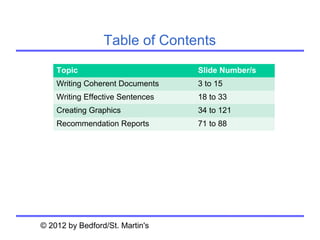
Table of Contents
    Topic                         Slide Number/s
    Writing Coherent Documents    3 to 15
    Writing Effective Sentences   18 to 33
    Creating Graphics             34 to 121
    Recommendation Reports        71 to 88


© 2012 by Bedford/St. Martin's
Writing Coherent Documents


© 2012 by Bedford/St. Martin's
Consider seven questions when
revising your document for coherence:


• Have you left out anything in turning your
  outline into a draft?
• Have you included all the elements your
  readers expect to see?
• Have you organized the document logically?
• Is the document persuasive?


     Chapter 9. Writing Coherent Documents   © 2012 by Bedford/St. Martin's   4
Consider seven questions when revising
 your document for coherence (cont.):

• Do you come across as reliable, honest, and
  helpful?
• Have you presented all the elements
  consistently?
• Is the emphasis appropriate throughout the
  document?


     Chapter 9. Writing Coherent Documents   © 2012 by Bedford/St. Martin's   5
Follow four guidelines
            when revising headings:

• Avoid long noun strings.
• Be informative.
• Use a grammatical form appropriate to your
  audience.
• Avoid back-to-back headings.


     Chapter 9. Writing Coherent Documents   © 2012 by Bedford/St. Martin's   6
Turning paragraphs into lists
          presents four advantages:


•   It forces you to look at the big picture.
•   It forces you to examine the sequence.
•   It forces you to create a helpful lead-in.
•   It forces you to tighten and clarify your prose.


       Chapter 9. Writing Coherent Documents   © 2012 by Bedford/St. Martin's   7
Study documents from other
   cultures to answer four questions:

• How does the writer make the information
  accessible?
• How does the writer show the relationship
  among types of information?
• How does the writer communicate the
  organization of the document as a whole?
• How does the writer make transitions from one
  subject to another?

     Chapter 9. Writing Coherent Documents   © 2012 by Bedford/St. Martin's   8
There are two kinds of paragraphs:

• A body paragraph is a group of sentences (or
  sometimes a single sentence) that is
  complete and self-sufficient and that
  contributes to a larger discussion.
• A transitional paragraph helps readers move
  from one major point to another.


     Chapter 9. Writing Coherent Documents   © 2012 by Bedford/St. Martin's   9
Most paragraphs contain two elements:

• The topic sentence summarizes or forecasts
  the main point of the paragraph.
• The supporting information makes the topic
  sentence clear and convincing.


     Chapter 9. Writing Coherent Documents   © 2012 by Bedford/St. Martin's   10
Avoid burying bad news in paragraphs:

• The most emphatic location is the topic
  sentence.
• The second most emphatic location is the end of
  the paragraph.
• The least emphatic location is the middle of the
  paragraph.


       Chapter 9. Writing Coherent Documents   © 2012 by Bedford/St. Martin's   11
Supporting information
      usually fulfills one of five roles:

• It defines a key term or idea included in the topic
  sentence.
• It provides examples or illustrations of the
  situation described in the topic sentence.
• It identifies causes: factors that led to the
  situation.
• It defines effects: implications of the situation.
• It supports the claim made in the topic sentence.
      Chapter 9. Writing Coherent Documents   © 2012 by Bedford/St. Martin's   12
Follow three guidelines
     when dividing long paragraphs:

• Break the discussion at a logical place.
• Make the topic sentence a separate
  paragraph and break up the supporting
  information.
• Use a list.


     Chapter 9. Writing Coherent Documents   © 2012 by Bedford/St. Martin's   13
Use three techniques
           to emphasize coherence:

• Add transitional words and phrases.
• Repeat key words.
• Use demonstrative pronouns followed by
  nouns.


     Chapter 9. Writing Coherent Documents   © 2012 by Bedford/St. Martin's   14
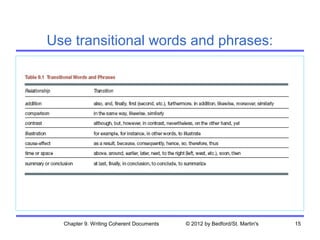
Use transitional words and phrases:


  Chapter 9. Writing Coherent Documents   © 2012 by Bedford/St. Martin's   15
Use two techniques
        to create a coherent design:

• Use headers and footers to enhance
  coherence.
• Use typefaces to enhance coherence.


     Chapter 9. Writing Coherent Documents   © 2012 by Bedford/St. Martin's   16
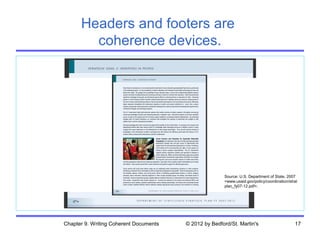
Headers and footers are
        coherence devices.


                                                       Source: U.S. Department of State, 2007
                                                       <www.usaid.gov/policy/coordination/strat
                                                       plan_fy07-12.pdf>.


Chapter 9. Writing Coherent Documents   © 2012 by Bedford/St. Martin's                       17
Writing Effective Sentences


© 2012 by Bedford/St. Martin's
Use these seven techniques
   for structuring effective sentences:

• Use lists.
• Emphasize new and important information.
• Choose an appropriate sentence length.
• Focus on the “real” subject.
• Focus on the “real” verb.
• Use parallel structure.
• Use modifiers effectively.

      Chapter 10. Writing Effective Sentences   © 2012 by Bedford/St. Martin's   19
Use these five guidelines
           for creating effective lists:

• Set off each listed item with a number, a
  letter, or a symbol (usually a bullet).
• Break up long lists.
• Present the items in a parallel structure.
• Structure and punctuate the lead-in correctly.
• Punctuate the list correctly.

     Chapter 10. Writing Effective Sentences   © 2012 by Bedford/St. Martin's   20
Use parallel structure:

• Use the same grammatical form for coordinate
  elements in a sentence.
  – all clauses either active or passive
  – all verbs either indicative or imperative
  – all nouns preceded by the same article
• Parallel structure creates a recognizable pattern
  and makes a sentence easier to follow.


        Chapter 10. Writing Effective Sentences   © 2012 by Bedford/St. Martin's   21
Use modifiers effectively:

• Distinguish between restrictive and
  nonrestrictive modifiers.
• Avoid misplaced modifiers.
• Avoid dangling modifiers.


     Chapter 10. Writing Effective Sentences   © 2012 by Bedford/St. Martin's   22
Choose the right words and phrases:

•   Select an appropriate level of formality.
•   Be clear and specific.
•   Be concise.
•   Use inoffensive language.


          Chapter 10. Writing Effective Sentences   © 2012 by Bedford/St. Martin's   23
Select an appropriate level of formality:

There are three levels of formality:
• informal
• moderately formal
• highly formal

Use a level and tone appropriate for your
• audience
• subject
• purpose


       Chapter 10. Writing Effective Sentences   © 2012 by Bedford/St. Martin's   24
Informal writing can cause two problems:

• It tends to be imprecise.
• It can be embarrassing.


     Chapter 10. Writing Effective Sentences   © 2012 by Bedford/St. Martin's   25
Use these seven techniques
    for writing clearly and specifically:

• Use the active and passive voice appropriately.
• Be specific.
• Avoid unnecessary jargon.
• Use positive constructions.
• Avoid long noun strings.
• Avoid clichés.
• Avoid euphemisms.

      Chapter 10. Writing Effective Sentences   © 2012 by Bedford/St. Martin's   26
Use the active and
        passive voice appropriately:

Use the active voice unless
• the agent is clear from the context
• the agent is unknown
• the agent is less important than the action
• a reference to the agent is embarrassing,
  dangerous, or in some other way
  inappropriate
     Chapter 10. Writing Effective Sentences   © 2012 by Bedford/St. Martin's   27
Use these three techniques
          for writing specifically:

• Use precise words.
• Provide adequate detail.
• Avoid ambiguity.


     Chapter 10. Writing Effective Sentences   © 2012 by Bedford/St. Martin's   28
Avoid unnecessary jargon for four reasons:

•    It can be imprecise.
•    It can be confusing.
•    It is often seen as condescending.
•    It is often intimidating.


          Chapter 10. Writing Effective Sentences   © 2012 by Bedford/St. Martin's   29
Be concise:

• Avoid obvious statements.
• Avoid filler.
• Avoid unnecessary prepositional phrases.
• Avoid wordy phrases.
• Avoid fancy words.


      Chapter 10. Writing Effective Sentences   © 2012 by Bedford/St. Martin's   30
Follow these six guidelines
        for avoiding sexist language:

• Replace the male-gender words with non-gender-
  specific words.
• Switch to a different form of the verb.
• Switch to the plural.
• Switch to he or she, he/she, s/he, or his or her.
• Address the reader directly.
• Alternate he and she.


      Chapter 10. Writing Effective Sentences   © 2012 by Bedford/St. Martin's   31
Follow these five guidelines
   for using the people-first approach:

• Refer to the person first, the disability second.
• Don’t confuse handicap with disability.
• Don’t refer to victimization.
• Don’t refer to a person as “wheelchair bound” or
  “confined to a wheelchair.”
• Don’t refer to people with disabilities as abnormal.


      Chapter 10. Writing Effective Sentences   © 2012 by Bedford/St. Martin's   32
Use these seven techniques
         in preparing text for translation:
•   Use short sentences.
•   Use the active voice.
•   Use simple words.
•   Include a glossary.
•   Use words that have only one meaning.
•   Use pronouns carefully.
•   Avoid jokes, puns, and culture-bound
    references.

         Chapter 10. Writing Effective Sentences   © 2012 by Bedford/St. Martin's   33
Creating Graphics


Chapter 8. Communicating Persuasively   © 2012 by
Bedford/St. Martin's
Graphics serve five functions:
• They can catch readers’ attention and interest.
• They can help writers communicate information that is
  difficult to communicate with words.
• They can help writers clarify and emphasize
  information.
• They can help nonnative speakers of English
  understand information.
• They can help writers communicate information to
  multiple audiences with different interests, aptitudes,
  and reading habits.

        Chapter 12. Creating Graphics   © 2012 by Bedford/St. Martin's   35
Graphics offer benefits
           that words alone cannot:
• Graphics are indispensable in demonstrating logical
  and numerical relationships.
• Graphics can communicate spatial information more
  effectively than words alone.
• Graphics can communicate steps in a process more
  effectively than words alone.
• Graphics can save space.
• Graphics can reduce the cost of documents intended
  for international readers.

       Chapter 12. Creating Graphics   © 2012 by Bedford/St. Martin's   36
An effective graphic has five characteristics:

  • It serves a purpose.
  • It is simple and uncluttered.
  • It presents a manageable amount of
    information.
  • It meets readers’ format expectations.
  • It is clearly labeled.

         Chapter 12. Creating Graphics   © 2012 by Bedford/St. Martin's   37
Follow these six suggestions
         to create honest graphics:
• Cite your source and obtain permission.
• Include all relevant data.
• Begin the axes in your graphs at zero—or mark
  them clearly.
• Do not use a table to hide a data point that
  would be obvious in a graph.
• Show items as they really are.
• Do not use color or shading to misrepresent an
  item’s importance.
         Chapter 12. Creating Graphics   © 2012 by Bedford/St. Martin's   38
Follow these five guidelines
    for integrating graphics and text:

• Place the graphic in an appropriate location.
• Introduce the graphic in the text.
• Explain the graphic in the text.
• Make the graphic clearly visible.
• Make the graphic accessible.


       Chapter 12. Creating Graphics   © 2012 by Bedford/St. Martin's   39
The process of creating
        graphics includes four steps:

•   planning
•   producing
•   revising
•   citing


        Chapter 12. Creating Graphics   © 2012 by Bedford/St. Martin's   40
As you plan graphics,
                consider the following:

•   audience
•   purpose of the graphic and the document
•   kind of information you want to communicate
•   physical conditions in which readers will use the
    document
•   time
•   money
•   equipment
•   expertise
          Chapter 12. Creating Graphics   © 2012 by Bedford/St. Martin's   41
When producing graphics, choose
    one of the following four approaches:

•   use existing graphics
•   modify existing graphics
•   create graphics on a computer
•   have someone else create the graphics


        Chapter 12. Creating Graphics   © 2012 by Bedford/St. Martin's   42
Use color effectively:
• Don’t overdo it.
• Use color to emphasize particular items.
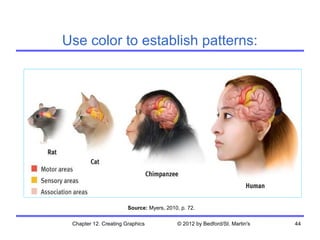
• Use color to create patterns.
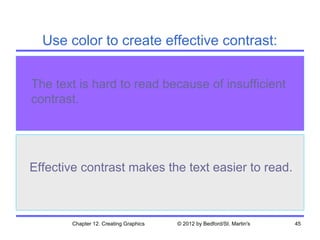
• Use contrast effectively.
• Take advantage of any symbolic meanings
  colors may already have.
• Be aware that color can obscure or
  swallow up text.

      Chapter 12. Creating Graphics   © 2012 by Bedford/St. Martin's   43
Use color to establish patterns:


                       Source: Myers, 2010, p. 72.

 Chapter 12. Creating Graphics            © 2012 by Bedford/St. Martin's   44
Use color to create effective contrast:


The text is hard to read because of insufficient
contrast.


Effective contrast makes the text easier to read.


       Chapter 12. Creating Graphics   © 2012 by Bedford/St. Martin's   45
Choose the category of technical
    information you want to communicate:

•   numerical information
•   logical relationships
•   process descriptions and instructions
•   visual and spatial characteristics


         Chapter 12. Creating Graphics   © 2012 by Bedford/St. Martin's   46
Five kinds of graphics help
       illustrate numerical information:

•   tables
•   bar graphs
•   pictographs
•   line graphs
•   pie charts


        Chapter 12. Creating Graphics   © 2012 by Bedford/St. Martin's   47
Two kinds of graphics help
      illustrate logical relationships:

• diagrams
• organization charts


       Chapter 12. Creating Graphics   © 2012 by Bedford/St. Martin's   48
Three kinds of graphics help illustrate
 process descriptions and instructions:

• checklists
• flowcharts
• logic trees


       Chapter 12. Creating Graphics   © 2012 by Bedford/St. Martin's   49
Four kinds of graphics help illustrate visual
        and spatial characteristics:

•   photographs
•   screen shots
•   line drawings
•   maps


         Chapter 12. Creating Graphics   © 2012 by Bedford/St. Martin's   50
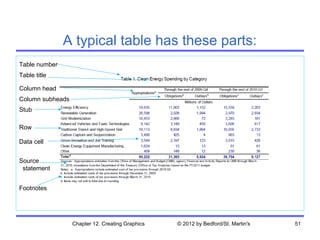
A typical table has these parts:
Table number
Table title

Column head
Column subheads
Stub

Row

Data cell


Source
 statement


Footnotes


                  Chapter 12. Creating Graphics   © 2012 by Bedford/St. Martin's   51
Follow these nine guidelines
       for creating effective tables:
• Indicate the units of measure.
• In the stub (the left-hand column), list the
  items being compared.
• In the columns, arrange the data clearly and
  logically.
• Do the math.
• Use dot leaders if a column contains a “blank”
  spot: a place where there are no appropriate
  data.
       Chapter 12. Creating Graphics   © 2012 by Bedford/St. Martin's   52
Follow these nine guidelines
     for creating effective tables (cont.):

•   Don’t make the table wider than it needs to be.
•   Minimize the use of rules.
•   Provide footnotes where necessary.
•   If you did not generate the information
    yourself, indicate your source.


         Chapter 12. Creating Graphics   © 2012 by Bedford/St. Martin's   53
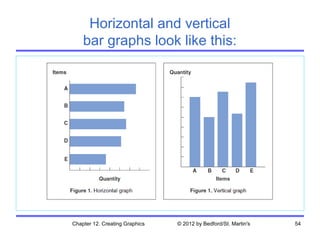
Horizontal and vertical
    bar graphs look like this:


Chapter 12. Creating Graphics   © 2012 by Bedford/St. Martin's   54
Follow these six guidelines
    for creating effective bar graphs:
• Make the proportions fair.
• If possible, begin the quantity scale at zero.
• Use tick marks (marks along the axis) to
  signal the amounts.
• Arrange the bars in a logical sequence.
• Place the title below the figure.
• Indicate the source of your information if you
  did not generate it yourself.

       Chapter 12. Creating Graphics   © 2012 by Bedford/St. Martin's   55
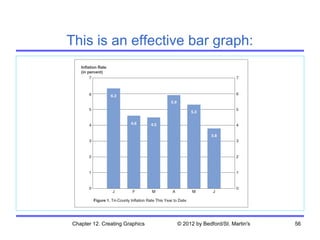
This is an effective bar graph:


Chapter 12. Creating Graphics   © 2012 by Bedford/St. Martin's   56
The basic bar graph has five variations:

•   grouped bar graph
•   subdivided bar graph
•   100-percent bar graph
•   deviation bar graph
•   stratum graph


        Chapter 12. Creating Graphics   © 2012 by Bedford/St. Martin's   57
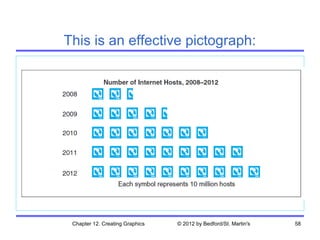
This is an effective pictograph:


 Chapter 12. Creating Graphics   © 2012 by Bedford/St. Martin's   58
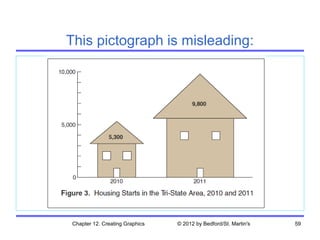
This pictograph is misleading:


Chapter 12. Creating Graphics   © 2012 by Bedford/St. Martin's   59
Follow these three guidelines
    for creating effective line graphs:

• If possible, begin the quantity scale at zero.
• Use reasonable proportions for the vertical
  and horizontal axes.
• Use grid lines—horizontal, vertical, or both—
  rather than tick marks when your readers
  need to read the quantities precisely.


       Chapter 12. Creating Graphics   © 2012 by Bedford/St. Martin's   60
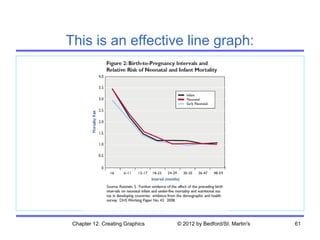
This is an effective line graph:


 Chapter 12. Creating Graphics   © 2012 by Bedford/St. Martin's   61
Follow these eight guidelines
     for creating effective pie charts:

• Restrict the number of slices to six or seven.
• Begin with the largest slice at the top and work
  clockwise in order of decreasing size.
• Include a miscellaneous slice for very small
  quantities.
• Label the slices (horizontally, not radially)
  inside the slice.


       Chapter 12. Creating Graphics   © 2012 by Bedford/St. Martin's   62
Follow these eight guidelines
 for creating effective pie charts (cont.):

• To emphasize one slice, use a bright,
  contrasting color or separate the slice from the
  pie.
• Check to see that your software follows the
  appropriate guidelines for pie charts.
• Don’t overdo fill patterns.
• Check that your percentages add up to 100.


       Chapter 12. Creating Graphics   © 2012 by Bedford/St. Martin's   63
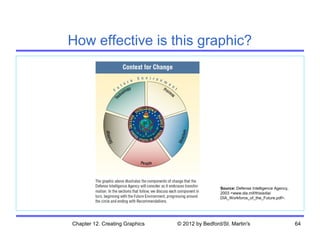
How effective is this graphic?


                                                 Source: Defense Intelligence Agency,
                                                 2003 <www.dia.mil/thisisdia/
                                                 DIA_Workforce_of_the_Future.pdf>.


Chapter 12. Creating Graphics   © 2012 by Bedford/St. Martin's                          64
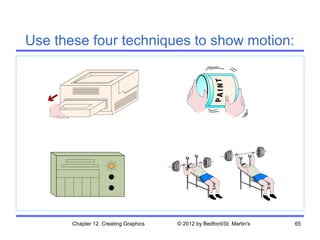
Use these four techniques to show motion:


       Chapter 12. Creating Graphics   © 2012 by Bedford/St. Martin's   65
Follow these five guidelines
 for presenting photographs effectively:
• Eliminate extraneous background clutter that
  can distract readers.
• Do not electronically manipulate the
  photograph.
• Help readers understand the perspective.
• If appropriate, include a common object to
  give readers a sense of scale.
• If appropriate, label components or important
  features.
       Chapter 12. Creating Graphics   © 2012 by Bedford/St. Martin's   66
Line drawings offer three
     advantages over photographs:

• Line drawings can focus readers’ attention on
  desired information better than a photograph
  can.
• Line drawings can highlight information that
  might be obscured by bad lighting or a bad
  angle in a photograph
• Line drawings are sometimes easier for
  readers to understand than photographs are.

       Chapter 12. Creating Graphics   © 2012 by Bedford/St. Martin's   67
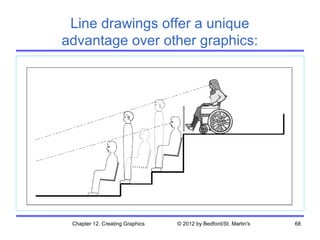
Line drawings offer a unique
advantage over other graphics:


 Chapter 12. Creating Graphics   © 2012 by Bedford/St. Martin's   68
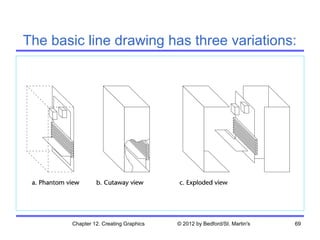
The basic line drawing has three variations:


       Chapter 12. Creating Graphics   © 2012 by Bedford/St. Martin's   69
Follow these six guidelines for creating
effective graphics for multicultural readers:
• Be aware that reading patterns differ.
• Be aware of varying cultural attitudes toward
  giving instruction.
• Deemphasize trivial details.
• Avoid culture-specific language, symbols, and
  references.
• Portray people very carefully.
• Be particularly careful in portraying hand
  gestures.
       Chapter 12. Creating Graphics   © 2012 by Bedford/St. Martin's   70
Writing Recommendation Reports


© 2012 by Bedford/St. Martin's
Recommendation reports
     address four kinds of questions:

• What should we do about Problem X?
• Should we do Function X?
• Should we use Technology A or Technology B
  to do Function X?
• We currently use Method A to do Function X.
  Should we be using Method B?


    Chapter 19. Writing Recommendation Reports   © 2012 by Bedford/St. Martin's   72
Feasibility reports
    answer three kinds of questions:

• questions of possibility
• questions of economic wisdom
• questions of perception


    Chapter 19. Writing Recommendation Reports   © 2012 by Bedford/St. Martin's   73
Use a problem-solving method
when preparing a recommendation report:

 • Identify the problem or opportunity.
 • Establish criteria for responding to the problem or
   opportunity.
 • Determine the options.
 • Study each option according to the criteria.
 • Draw conclusions about each option.
 • Formulate recommendations based on the
   conclusions.

     Chapter 19. Writing Recommendation Reports   © 2012 by Bedford/St. Martin's   74
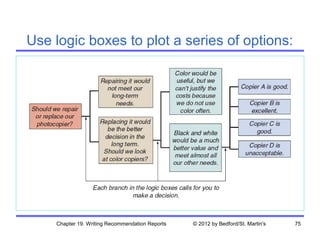
Use logic boxes to plot a series of options:


    Chapter 19. Writing Recommendation Reports   © 2012 by Bedford/St. Martin's   75
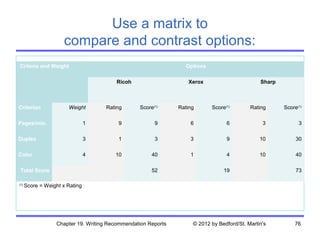
Use a matrix to
                     compare and contrast options:
 Criteria and Weight                                             Options
 
                                         Ricoh                     Xerox                       Sharp


Criterion              Weight        Rating      Score(1)      Rating      Score(1)        Rating      Score(1)

Pages/min.                      1        9             9           6             6              3            3

Duplex                          3        1             3           3             9             10           30

Color                           4       10            40           1             4             10           40

    Total Score                                       52                        19                          73

(1)
      Score = Weight x Rating


                  Chapter 19. Writing Recommendation Reports        © 2012 by Bedford/St. Martin's         76
Explain your decision matrix:

• Explain why you chose each criterion—or didn’t
  choose a criterion readers might have expected.
• Explain why you assigned a particular weight to
  each criterion.
• Explain why you assigned a particular rating to
  each option.


      Chapter 19. Writing Recommendation Reports   © 2012 by Bedford/St. Martin's   6
You can present your
    conclusions in one of three ways:

• Rank all the options.
• Classify all the options in two categories:
  acceptable and unacceptable.
• Present a compound conclusion.


    Chapter 19. Writing Recommendation Reports   © 2012 by Bedford/St. Martin's   78
Most recommendation reports
        have three major sections:

• the body of the report
• the front matter
• the back matter


    Chapter 19. Writing Recommendation Reports   © 2012 by Bedford/St. Martin's   79
A typical recommendation report
          has five body elements:

•   introduction
•   methods
•   results
•   conclusions
•   recommendations


      Chapter 19. Writing Recommendation Reports   © 2012 by Bedford/St. Martin's   80
An introduction typically
                answers nine questions:


•   What is the subject of the report?
•   What is the purpose of the report?
•   What is the background of the report?
•   What are your sources of information?
•   What is the scope of the report?


      Chapter 19. Writing Recommendation Reports   © 2012 by Bedford/St. Martin's   81
An introduction typically
       answers nine questions (cont.):


•   What are the most significant findings?
•   What are your recommendations?
•   What is the organization of the report?
•   What key terms are you using in the
    report?


      Chapter 19. Writing Recommendation Reports   © 2012 by Bedford/St. Martin's   82
Address the following four questions
      when writing the body of your report:

•   Methods. What did you do?
•   Results. What did you see?
•   Conclusions. What does it mean?
•   Recommendations. What should we do?


       Chapter 19. Writing Recommendation Reports   © 2012 by Bedford/St. Martin's   83
Consider these four factors
    when writing your recommendations:

•   content
•   tone
•   form
•   location


      Chapter 19. Writing Recommendation Reports   © 2012 by Bedford/St. Martin's   84
A typical recommendation report
contains seven elements in the front matter:

 •   letter of transmittal
 •   cover
 •   title page
 •   abstract
 •   table of contents
 •   list of illustrations
 •   executive summary

       Chapter 19. Writing Recommendation Reports   © 2012 by Bedford/St. Martin's   85
Understand the difference between
a descriptive and an informative abstract:

• A descriptive abstract describes the kinds of
  information contained in the report.
• An informative abstract presents the major
  findings.


    Chapter 19. Writing Recommendation Reports   © 2012 by Bedford/St. Martin's   86
Follow these five guidelines
  when writing an executive summary:

• Use specific evidence in describing the
  background.
• Be specific in describing the research.
• Describe the methods briefly.
• Describe the findings according to your
  readers’ needs.
• Ask an outside reader to review your draft.

    Chapter 19. Writing Recommendation Reports   © 2012 by Bedford/St. Martin's   87
A typical recommendation report
includes three elements in the back matter:

 • glossary and list of symbols
 • references
 • appendixes


     Chapter 19. Writing Recommendation Reports   © 2012 by Bedford/St. Martin's   88

Recommendation reports

  • 1.
    Coherence, Sentences, Graphics,and Recommendation Reports ENG 3302 Business and Technical Report Writing © 2012 by Bedford/St. Martin's
  • 2.
    Table of Contents Topic Slide Number/s Writing Coherent Documents 3 to 15 Writing Effective Sentences 18 to 33 Creating Graphics 34 to 121 Recommendation Reports 71 to 88 © 2012 by Bedford/St. Martin's
  • 3.
    Writing Coherent Documents ©2012 by Bedford/St. Martin's
  • 4.
    Consider seven questionswhen revising your document for coherence: • Have you left out anything in turning your outline into a draft? • Have you included all the elements your readers expect to see? • Have you organized the document logically? • Is the document persuasive? Chapter 9. Writing Coherent Documents © 2012 by Bedford/St. Martin's 4
  • 5.
    Consider seven questionswhen revising your document for coherence (cont.): • Do you come across as reliable, honest, and helpful? • Have you presented all the elements consistently? • Is the emphasis appropriate throughout the document? Chapter 9. Writing Coherent Documents © 2012 by Bedford/St. Martin's 5
  • 6.
    Follow four guidelines when revising headings: • Avoid long noun strings. • Be informative. • Use a grammatical form appropriate to your audience. • Avoid back-to-back headings. Chapter 9. Writing Coherent Documents © 2012 by Bedford/St. Martin's 6
  • 7.
    Turning paragraphs intolists presents four advantages: • It forces you to look at the big picture. • It forces you to examine the sequence. • It forces you to create a helpful lead-in. • It forces you to tighten and clarify your prose. Chapter 9. Writing Coherent Documents © 2012 by Bedford/St. Martin's 7
  • 8.
    Study documents fromother cultures to answer four questions: • How does the writer make the information accessible? • How does the writer show the relationship among types of information? • How does the writer communicate the organization of the document as a whole? • How does the writer make transitions from one subject to another? Chapter 9. Writing Coherent Documents © 2012 by Bedford/St. Martin's 8
  • 9.
    There are twokinds of paragraphs: • A body paragraph is a group of sentences (or sometimes a single sentence) that is complete and self-sufficient and that contributes to a larger discussion. • A transitional paragraph helps readers move from one major point to another. Chapter 9. Writing Coherent Documents © 2012 by Bedford/St. Martin's 9
  • 10.
    Most paragraphs containtwo elements: • The topic sentence summarizes or forecasts the main point of the paragraph. • The supporting information makes the topic sentence clear and convincing. Chapter 9. Writing Coherent Documents © 2012 by Bedford/St. Martin's 10
  • 11.
    Avoid burying badnews in paragraphs: • The most emphatic location is the topic sentence. • The second most emphatic location is the end of the paragraph. • The least emphatic location is the middle of the paragraph. Chapter 9. Writing Coherent Documents © 2012 by Bedford/St. Martin's 11
  • 12.
    Supporting information usually fulfills one of five roles: • It defines a key term or idea included in the topic sentence. • It provides examples or illustrations of the situation described in the topic sentence. • It identifies causes: factors that led to the situation. • It defines effects: implications of the situation. • It supports the claim made in the topic sentence. Chapter 9. Writing Coherent Documents © 2012 by Bedford/St. Martin's 12
  • 13.
    Follow three guidelines when dividing long paragraphs: • Break the discussion at a logical place. • Make the topic sentence a separate paragraph and break up the supporting information. • Use a list. Chapter 9. Writing Coherent Documents © 2012 by Bedford/St. Martin's 13
  • 14.
    Use three techniques to emphasize coherence: • Add transitional words and phrases. • Repeat key words. • Use demonstrative pronouns followed by nouns. Chapter 9. Writing Coherent Documents © 2012 by Bedford/St. Martin's 14
  • 15.
    Use transitional wordsand phrases: Chapter 9. Writing Coherent Documents © 2012 by Bedford/St. Martin's 15
  • 16.
    Use two techniques to create a coherent design: • Use headers and footers to enhance coherence. • Use typefaces to enhance coherence. Chapter 9. Writing Coherent Documents © 2012 by Bedford/St. Martin's 16
  • 17.
    Headers and footersare coherence devices. Source: U.S. Department of State, 2007 <www.usaid.gov/policy/coordination/strat plan_fy07-12.pdf>. Chapter 9. Writing Coherent Documents © 2012 by Bedford/St. Martin's 17
  • 18.
    Writing Effective Sentences ©2012 by Bedford/St. Martin's
  • 19.
    Use these seventechniques for structuring effective sentences: • Use lists. • Emphasize new and important information. • Choose an appropriate sentence length. • Focus on the “real” subject. • Focus on the “real” verb. • Use parallel structure. • Use modifiers effectively. Chapter 10. Writing Effective Sentences © 2012 by Bedford/St. Martin's 19
  • 20.
    Use these fiveguidelines for creating effective lists: • Set off each listed item with a number, a letter, or a symbol (usually a bullet). • Break up long lists. • Present the items in a parallel structure. • Structure and punctuate the lead-in correctly. • Punctuate the list correctly. Chapter 10. Writing Effective Sentences © 2012 by Bedford/St. Martin's 20
  • 21.
    Use parallel structure: •Use the same grammatical form for coordinate elements in a sentence. – all clauses either active or passive – all verbs either indicative or imperative – all nouns preceded by the same article • Parallel structure creates a recognizable pattern and makes a sentence easier to follow. Chapter 10. Writing Effective Sentences © 2012 by Bedford/St. Martin's 21
  • 22.
    Use modifiers effectively: •Distinguish between restrictive and nonrestrictive modifiers. • Avoid misplaced modifiers. • Avoid dangling modifiers. Chapter 10. Writing Effective Sentences © 2012 by Bedford/St. Martin's 22
  • 23.
    Choose the rightwords and phrases: • Select an appropriate level of formality. • Be clear and specific. • Be concise. • Use inoffensive language. Chapter 10. Writing Effective Sentences © 2012 by Bedford/St. Martin's 23
  • 24.
    Select an appropriatelevel of formality: There are three levels of formality: • informal • moderately formal • highly formal Use a level and tone appropriate for your • audience • subject • purpose Chapter 10. Writing Effective Sentences © 2012 by Bedford/St. Martin's 24
  • 25.
    Informal writing cancause two problems: • It tends to be imprecise. • It can be embarrassing. Chapter 10. Writing Effective Sentences © 2012 by Bedford/St. Martin's 25
  • 26.
    Use these seventechniques for writing clearly and specifically: • Use the active and passive voice appropriately. • Be specific. • Avoid unnecessary jargon. • Use positive constructions. • Avoid long noun strings. • Avoid clichés. • Avoid euphemisms. Chapter 10. Writing Effective Sentences © 2012 by Bedford/St. Martin's 26
  • 27.
    Use the activeand passive voice appropriately: Use the active voice unless • the agent is clear from the context • the agent is unknown • the agent is less important than the action • a reference to the agent is embarrassing, dangerous, or in some other way inappropriate Chapter 10. Writing Effective Sentences © 2012 by Bedford/St. Martin's 27
  • 28.
    Use these threetechniques for writing specifically: • Use precise words. • Provide adequate detail. • Avoid ambiguity. Chapter 10. Writing Effective Sentences © 2012 by Bedford/St. Martin's 28
  • 29.
    Avoid unnecessary jargonfor four reasons: • It can be imprecise. • It can be confusing. • It is often seen as condescending. • It is often intimidating. Chapter 10. Writing Effective Sentences © 2012 by Bedford/St. Martin's 29
  • 30.
    Be concise: • Avoidobvious statements. • Avoid filler. • Avoid unnecessary prepositional phrases. • Avoid wordy phrases. • Avoid fancy words. Chapter 10. Writing Effective Sentences © 2012 by Bedford/St. Martin's 30
  • 31.
    Follow these sixguidelines for avoiding sexist language: • Replace the male-gender words with non-gender- specific words. • Switch to a different form of the verb. • Switch to the plural. • Switch to he or she, he/she, s/he, or his or her. • Address the reader directly. • Alternate he and she. Chapter 10. Writing Effective Sentences © 2012 by Bedford/St. Martin's 31
  • 32.
    Follow these fiveguidelines for using the people-first approach: • Refer to the person first, the disability second. • Don’t confuse handicap with disability. • Don’t refer to victimization. • Don’t refer to a person as “wheelchair bound” or “confined to a wheelchair.” • Don’t refer to people with disabilities as abnormal. Chapter 10. Writing Effective Sentences © 2012 by Bedford/St. Martin's 32
  • 33.
    Use these seventechniques in preparing text for translation: • Use short sentences. • Use the active voice. • Use simple words. • Include a glossary. • Use words that have only one meaning. • Use pronouns carefully. • Avoid jokes, puns, and culture-bound references. Chapter 10. Writing Effective Sentences © 2012 by Bedford/St. Martin's 33
  • 34.
    Creating Graphics Chapter 8.Communicating Persuasively © 2012 by Bedford/St. Martin's
  • 35.
    Graphics serve fivefunctions: • They can catch readers’ attention and interest. • They can help writers communicate information that is difficult to communicate with words. • They can help writers clarify and emphasize information. • They can help nonnative speakers of English understand information. • They can help writers communicate information to multiple audiences with different interests, aptitudes, and reading habits. Chapter 12. Creating Graphics © 2012 by Bedford/St. Martin's 35
  • 36.
    Graphics offer benefits that words alone cannot: • Graphics are indispensable in demonstrating logical and numerical relationships. • Graphics can communicate spatial information more effectively than words alone. • Graphics can communicate steps in a process more effectively than words alone. • Graphics can save space. • Graphics can reduce the cost of documents intended for international readers. Chapter 12. Creating Graphics © 2012 by Bedford/St. Martin's 36
  • 37.
    An effective graphichas five characteristics: • It serves a purpose. • It is simple and uncluttered. • It presents a manageable amount of information. • It meets readers’ format expectations. • It is clearly labeled. Chapter 12. Creating Graphics © 2012 by Bedford/St. Martin's 37
  • 38.
    Follow these sixsuggestions to create honest graphics: • Cite your source and obtain permission. • Include all relevant data. • Begin the axes in your graphs at zero—or mark them clearly. • Do not use a table to hide a data point that would be obvious in a graph. • Show items as they really are. • Do not use color or shading to misrepresent an item’s importance. Chapter 12. Creating Graphics © 2012 by Bedford/St. Martin's 38
  • 39.
    Follow these fiveguidelines for integrating graphics and text: • Place the graphic in an appropriate location. • Introduce the graphic in the text. • Explain the graphic in the text. • Make the graphic clearly visible. • Make the graphic accessible. Chapter 12. Creating Graphics © 2012 by Bedford/St. Martin's 39
  • 40.
    The process ofcreating graphics includes four steps: • planning • producing • revising • citing Chapter 12. Creating Graphics © 2012 by Bedford/St. Martin's 40
  • 41.
    As you plangraphics, consider the following: • audience • purpose of the graphic and the document • kind of information you want to communicate • physical conditions in which readers will use the document • time • money • equipment • expertise Chapter 12. Creating Graphics © 2012 by Bedford/St. Martin's 41
  • 42.
    When producing graphics,choose one of the following four approaches: • use existing graphics • modify existing graphics • create graphics on a computer • have someone else create the graphics Chapter 12. Creating Graphics © 2012 by Bedford/St. Martin's 42
  • 43.
    Use color effectively: •Don’t overdo it. • Use color to emphasize particular items. • Use color to create patterns. • Use contrast effectively. • Take advantage of any symbolic meanings colors may already have. • Be aware that color can obscure or swallow up text. Chapter 12. Creating Graphics © 2012 by Bedford/St. Martin's 43
  • 44.
    Use color toestablish patterns: Source: Myers, 2010, p. 72. Chapter 12. Creating Graphics © 2012 by Bedford/St. Martin's 44
  • 45.
    Use color tocreate effective contrast: The text is hard to read because of insufficient contrast. Effective contrast makes the text easier to read. Chapter 12. Creating Graphics © 2012 by Bedford/St. Martin's 45
  • 46.
    Choose the categoryof technical information you want to communicate: • numerical information • logical relationships • process descriptions and instructions • visual and spatial characteristics Chapter 12. Creating Graphics © 2012 by Bedford/St. Martin's 46
  • 47.
    Five kinds ofgraphics help illustrate numerical information: • tables • bar graphs • pictographs • line graphs • pie charts Chapter 12. Creating Graphics © 2012 by Bedford/St. Martin's 47
  • 48.
    Two kinds ofgraphics help illustrate logical relationships: • diagrams • organization charts Chapter 12. Creating Graphics © 2012 by Bedford/St. Martin's 48
  • 49.
    Three kinds ofgraphics help illustrate process descriptions and instructions: • checklists • flowcharts • logic trees Chapter 12. Creating Graphics © 2012 by Bedford/St. Martin's 49
  • 50.
    Four kinds ofgraphics help illustrate visual and spatial characteristics: • photographs • screen shots • line drawings • maps Chapter 12. Creating Graphics © 2012 by Bedford/St. Martin's 50
  • 51.
    A typical tablehas these parts: Table number Table title Column head Column subheads Stub Row Data cell Source statement Footnotes Chapter 12. Creating Graphics © 2012 by Bedford/St. Martin's 51
  • 52.
    Follow these nineguidelines for creating effective tables: • Indicate the units of measure. • In the stub (the left-hand column), list the items being compared. • In the columns, arrange the data clearly and logically. • Do the math. • Use dot leaders if a column contains a “blank” spot: a place where there are no appropriate data. Chapter 12. Creating Graphics © 2012 by Bedford/St. Martin's 52
  • 53.
    Follow these nineguidelines for creating effective tables (cont.): • Don’t make the table wider than it needs to be. • Minimize the use of rules. • Provide footnotes where necessary. • If you did not generate the information yourself, indicate your source. Chapter 12. Creating Graphics © 2012 by Bedford/St. Martin's 53
  • 54.
    Horizontal and vertical bar graphs look like this: Chapter 12. Creating Graphics © 2012 by Bedford/St. Martin's 54
  • 55.
    Follow these sixguidelines for creating effective bar graphs: • Make the proportions fair. • If possible, begin the quantity scale at zero. • Use tick marks (marks along the axis) to signal the amounts. • Arrange the bars in a logical sequence. • Place the title below the figure. • Indicate the source of your information if you did not generate it yourself. Chapter 12. Creating Graphics © 2012 by Bedford/St. Martin's 55
  • 56.
    This is aneffective bar graph: Chapter 12. Creating Graphics © 2012 by Bedford/St. Martin's 56
  • 57.
    The basic bargraph has five variations: • grouped bar graph • subdivided bar graph • 100-percent bar graph • deviation bar graph • stratum graph Chapter 12. Creating Graphics © 2012 by Bedford/St. Martin's 57
  • 58.
    This is aneffective pictograph: Chapter 12. Creating Graphics © 2012 by Bedford/St. Martin's 58
  • 59.
    This pictograph ismisleading: Chapter 12. Creating Graphics © 2012 by Bedford/St. Martin's 59
  • 60.
    Follow these threeguidelines for creating effective line graphs: • If possible, begin the quantity scale at zero. • Use reasonable proportions for the vertical and horizontal axes. • Use grid lines—horizontal, vertical, or both— rather than tick marks when your readers need to read the quantities precisely. Chapter 12. Creating Graphics © 2012 by Bedford/St. Martin's 60
  • 61.
    This is aneffective line graph: Chapter 12. Creating Graphics © 2012 by Bedford/St. Martin's 61
  • 62.
    Follow these eightguidelines for creating effective pie charts: • Restrict the number of slices to six or seven. • Begin with the largest slice at the top and work clockwise in order of decreasing size. • Include a miscellaneous slice for very small quantities. • Label the slices (horizontally, not radially) inside the slice. Chapter 12. Creating Graphics © 2012 by Bedford/St. Martin's 62
  • 63.
    Follow these eightguidelines for creating effective pie charts (cont.): • To emphasize one slice, use a bright, contrasting color or separate the slice from the pie. • Check to see that your software follows the appropriate guidelines for pie charts. • Don’t overdo fill patterns. • Check that your percentages add up to 100. Chapter 12. Creating Graphics © 2012 by Bedford/St. Martin's 63
  • 64.
    How effective isthis graphic? Source: Defense Intelligence Agency, 2003 <www.dia.mil/thisisdia/ DIA_Workforce_of_the_Future.pdf>. Chapter 12. Creating Graphics © 2012 by Bedford/St. Martin's 64
  • 65.
    Use these fourtechniques to show motion: Chapter 12. Creating Graphics © 2012 by Bedford/St. Martin's 65
  • 66.
    Follow these fiveguidelines for presenting photographs effectively: • Eliminate extraneous background clutter that can distract readers. • Do not electronically manipulate the photograph. • Help readers understand the perspective. • If appropriate, include a common object to give readers a sense of scale. • If appropriate, label components or important features. Chapter 12. Creating Graphics © 2012 by Bedford/St. Martin's 66
  • 67.
    Line drawings offerthree advantages over photographs: • Line drawings can focus readers’ attention on desired information better than a photograph can. • Line drawings can highlight information that might be obscured by bad lighting or a bad angle in a photograph • Line drawings are sometimes easier for readers to understand than photographs are. Chapter 12. Creating Graphics © 2012 by Bedford/St. Martin's 67
  • 68.
    Line drawings offera unique advantage over other graphics: Chapter 12. Creating Graphics © 2012 by Bedford/St. Martin's 68
  • 69.
    The basic linedrawing has three variations: Chapter 12. Creating Graphics © 2012 by Bedford/St. Martin's 69
  • 70.
    Follow these sixguidelines for creating effective graphics for multicultural readers: • Be aware that reading patterns differ. • Be aware of varying cultural attitudes toward giving instruction. • Deemphasize trivial details. • Avoid culture-specific language, symbols, and references. • Portray people very carefully. • Be particularly careful in portraying hand gestures. Chapter 12. Creating Graphics © 2012 by Bedford/St. Martin's 70
  • 71.
    Writing Recommendation Reports ©2012 by Bedford/St. Martin's
  • 72.
    Recommendation reports address four kinds of questions: • What should we do about Problem X? • Should we do Function X? • Should we use Technology A or Technology B to do Function X? • We currently use Method A to do Function X. Should we be using Method B? Chapter 19. Writing Recommendation Reports © 2012 by Bedford/St. Martin's 72
  • 73.
    Feasibility reports answer three kinds of questions: • questions of possibility • questions of economic wisdom • questions of perception Chapter 19. Writing Recommendation Reports © 2012 by Bedford/St. Martin's 73
  • 74.
    Use a problem-solvingmethod when preparing a recommendation report: • Identify the problem or opportunity. • Establish criteria for responding to the problem or opportunity. • Determine the options. • Study each option according to the criteria. • Draw conclusions about each option. • Formulate recommendations based on the conclusions. Chapter 19. Writing Recommendation Reports © 2012 by Bedford/St. Martin's 74
  • 75.
    Use logic boxesto plot a series of options: Chapter 19. Writing Recommendation Reports © 2012 by Bedford/St. Martin's 75
  • 76.
    Use a matrixto compare and contrast options:  Criteria and Weight Options   Ricoh Xerox Sharp Criterion Weight Rating Score(1) Rating Score(1) Rating Score(1) Pages/min. 1 9 9 6 6 3 3 Duplex 3 1 3 3 9 10 30 Color 4 10 40 1 4 10 40 Total Score 52 19 73 (1) Score = Weight x Rating Chapter 19. Writing Recommendation Reports © 2012 by Bedford/St. Martin's 76
  • 77.
    Explain your decisionmatrix: • Explain why you chose each criterion—or didn’t choose a criterion readers might have expected. • Explain why you assigned a particular weight to each criterion. • Explain why you assigned a particular rating to each option. Chapter 19. Writing Recommendation Reports © 2012 by Bedford/St. Martin's 6
  • 78.
    You can presentyour conclusions in one of three ways: • Rank all the options. • Classify all the options in two categories: acceptable and unacceptable. • Present a compound conclusion. Chapter 19. Writing Recommendation Reports © 2012 by Bedford/St. Martin's 78
  • 79.
    Most recommendation reports have three major sections: • the body of the report • the front matter • the back matter Chapter 19. Writing Recommendation Reports © 2012 by Bedford/St. Martin's 79
  • 80.
    A typical recommendationreport has five body elements: • introduction • methods • results • conclusions • recommendations Chapter 19. Writing Recommendation Reports © 2012 by Bedford/St. Martin's 80
  • 81.
    An introduction typically answers nine questions: • What is the subject of the report? • What is the purpose of the report? • What is the background of the report? • What are your sources of information? • What is the scope of the report? Chapter 19. Writing Recommendation Reports © 2012 by Bedford/St. Martin's 81
  • 82.
    An introduction typically answers nine questions (cont.): • What are the most significant findings? • What are your recommendations? • What is the organization of the report? • What key terms are you using in the report? Chapter 19. Writing Recommendation Reports © 2012 by Bedford/St. Martin's 82
  • 83.
    Address the followingfour questions when writing the body of your report: • Methods. What did you do? • Results. What did you see? • Conclusions. What does it mean? • Recommendations. What should we do? Chapter 19. Writing Recommendation Reports © 2012 by Bedford/St. Martin's 83
  • 84.
    Consider these fourfactors when writing your recommendations: • content • tone • form • location Chapter 19. Writing Recommendation Reports © 2012 by Bedford/St. Martin's 84
  • 85.
    A typical recommendationreport contains seven elements in the front matter: • letter of transmittal • cover • title page • abstract • table of contents • list of illustrations • executive summary Chapter 19. Writing Recommendation Reports © 2012 by Bedford/St. Martin's 85
  • 86.
    Understand the differencebetween a descriptive and an informative abstract: • A descriptive abstract describes the kinds of information contained in the report. • An informative abstract presents the major findings. Chapter 19. Writing Recommendation Reports © 2012 by Bedford/St. Martin's 86
  • 87.
    Follow these fiveguidelines when writing an executive summary: • Use specific evidence in describing the background. • Be specific in describing the research. • Describe the methods briefly. • Describe the findings according to your readers’ needs. • Ask an outside reader to review your draft. Chapter 19. Writing Recommendation Reports © 2012 by Bedford/St. Martin's 87
  • 88.
    A typical recommendationreport includes three elements in the back matter: • glossary and list of symbols • references • appendixes Chapter 19. Writing Recommendation Reports © 2012 by Bedford/St. Martin's 88