Reality Computing
António Câmara
New University of Lisbon and
YDreams
SHIFT
September 2006
Reality Computing
• Introduction
• Micro Geo-Information
• Invisible Computing
• Conclusions
Introduction
• Reality computing
– Information and communication technology
everywhere, for everyone, at all times
– Mobile and ubiquitous computing
• Traditional computing vs reality computing
– Traditional computing: distance from user to subject
matter ->∞
– Reality computing: distance from user to subject
matter ->0
Introduction
• In the next few years:
– Radio tags will replace bar codes
– Micro sensors (bio, optical, chemical) will be
ubiquitous
– Indoor positioning will reach a standard 15 cm
precision
Mobile phones will become scanners of a micro-
geographic world and the main devices in reality
computing
Introduction
• In the next few years:
– Desktop computers will “disappear”
– The desk and the walls will become our computers
– Mobility will add to invisibility
User interfaces will increasingly follow the
invisible computing paradigm
Micro Geo-Information
Indoor positioning
Location models
Current developments
In the next few years
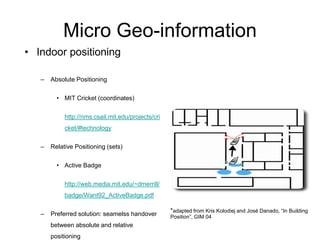
Micro Geo-information
• Indoor positioning
– Absolute Positioning
• MIT Cricket (coordinates)
http://nms.csail.mit.edu/projects/cri
cket/#technology
– Relative Positioning (sets)
• Active Badge
http://web.media.mit.edu/~dmerrill/
badge/Want92_ActiveBadge.pdf
– Preferred solution: seamelss handover
between absolute and relative
positioning
*adapted from Kris Kolodiej and José Danado, “In Building
Position”, GIM 04
Micro Geo-Information
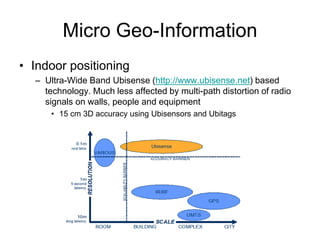
• Indoor positioning
– Ultra-Wide Band Ubisense (http://www.ubisense.net) based
technology. Much less affected by multi-path distortion of radio
signals on walls, people and equipment
• 15 cm 3D accuracy using Ubisensors and Ubitags
Micro Geo-Information
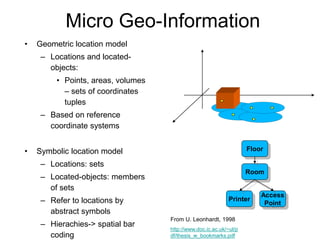
• Geometric location model
– Locations and located-
objects:
• Points, areas, volumes
– sets of coordinates
tuples
– Based on reference
coordinate systems
• Symbolic location model
– Locations: sets
– Located-objects: members
of sets
– Refer to locations by
abstract symbols
– Hierachies-> spatial bar
coding
From U. Leonhardt, 1998
http://www.doc.ic.ac.uk/~ul/p
df/thesis_w_bookmarks.pdf
Floor
Access
Point
Printer
Room
Micro Geo-Information
– Location based services typology
• Proximity and position- detection of objects
• Fencing- detect areas where special movements occur
• Navigation- instructions to go from an origin to a destination
• Tracking- monitoring the movement of an object in space
– Indoor mapping
• Built plans
• Infrastructure (up to 10 cm error)
• Map symbology is critical
– Interfaces
• Mobile phones (up to 100x100 pixels)
• Blackberry (250x120 pixels)
• PDAs (240x320 pixels)
Micro Geo-Information
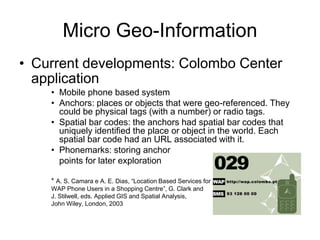
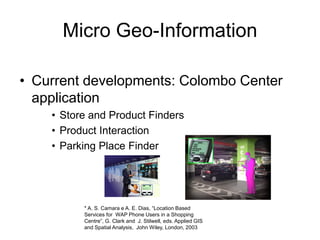
• Current developments: Colombo Center
application
• Mobile phone based system
• Anchors: places or objects that were geo-referenced. They
could be physical tags (with a number) or radio tags.
• Spatial bar codes: the anchors had spatial bar codes that
uniquely identified the place or object in the world. Each
spatial bar code had an URL associated with it.
• Phonemarks: storing anchor
points for later exploration
* A. S. Camara e A. E. Dias, “Location Based Services for
WAP Phone Users in a Shopping Centre”, G. Clark and
J. Stilwell, eds. Applied GIS and Spatial Analysis,
John Wiley, London, 2003
Micro Geo-Information
• Current developments: Colombo Center
application
• Store and Product Finders
• Product Interaction
• Parking Place Finder
* A. S. Camara e A. E. Dias, “Location Based
Services for WAP Phone Users in a Shopping
Centre”, G. Clark and J. Stilwell, eds. Applied GIS
and Spatial Analysis, John Wiley, London, 2003
Micro Geo-Information
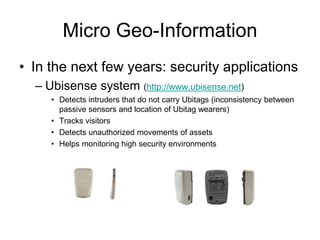
• In the next few years: security applications
– Ubisense system (http://www.ubisense.net)
• Detects intruders that do not carry Ubitags (inconsistency between
passive sensors and location of Ubitag wearers)
• Tracks visitors
• Detects unauthorized movements of assets
• Helps monitoring high security environments
Micro Geo-Information
• In the next few years: the infrastructure
– Communications infrastructure
• Cellular, Wi-Fi and Wi-Max, UWB, Bluetooth, readers and
updaters compatible with Electronic Product Code
– Positioning infrastructure
• GPS, Gallileo, Telecom and Assisted GPS, Pseudo-GPS;
WiFi based location, RFID based location, UWB based
location
• Tags and sensors
– Location models
• Towards hybrid systems (geometric and symbolic)
– Content and interfaces
• Indoor mapping and mobile devices
Invisible Computing
Invisible computing
Technological infrastructure
Interfaces
In the next few years
Invisible Computing
“The most profound technologies are those that disappear. They weave
themselves into the fabric of everyday life until they are
indistinguishable from it.”
Mark Weiser, 1991
Home heating versus computing
• Boilers <-> Computer centers
• Fireplaces<-> Computer rooms
• Heaters <-> Networked personal computers
• Air conditioning <-> Ubiquitous computing
Inivisible Computing
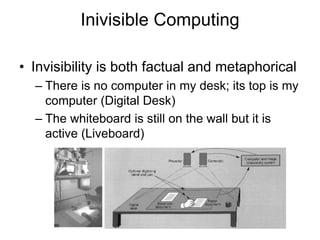
• Invisibility is both factual and metaphorical
– There is no computer in my desk; its top is my
computer (Digital Desk)
– The whiteboard is still on the wall but it is
active (Liveboard)
Invisible Computing
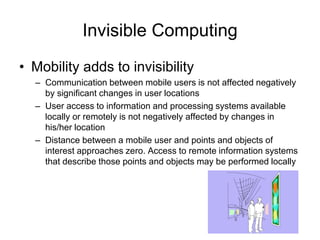
• Mobility adds to invisibility
– Communication between mobile users is not affected negatively
by significant changes in user locations
– User access to information and processing systems available
locally or remotely is not negatively affected by changes in
his/her location
– Distance between a mobile user and points and objects of
interest approaches zero. Access to remote information systems
that describe those points and objects may be performed locally
Invisible Computing
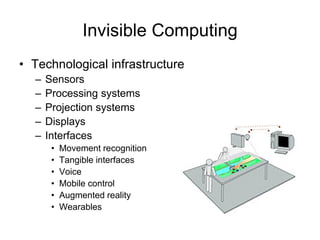
• Technological infrastructure
– Sensors
– Processing systems
– Projection systems
– Displays
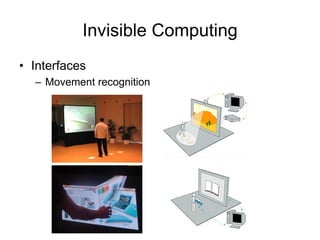
– Interfaces
• Movement recognition
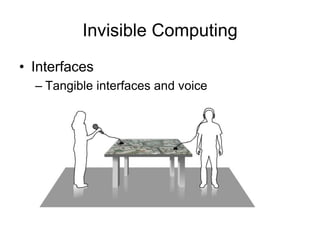
• Tangible interfaces
• Voice
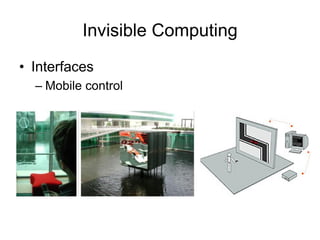
• Mobile control
• Augmented reality
• Wearables
Invisible Computing
• Interfaces
– Movement recognition
Invisible Computing
• Interfaces
– Tangible interfaces and voice
Invisible Computing
• Interfaces
– Mobile control
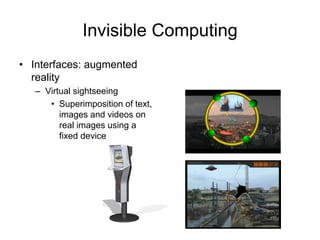
Invisible Computing
• Interfaces: augmented
reality
– Virtual sightseeing
• Superimposition of text,
images and videos on
real images using a
fixed device
Invisible Computing
• Interfaces: augmented reality
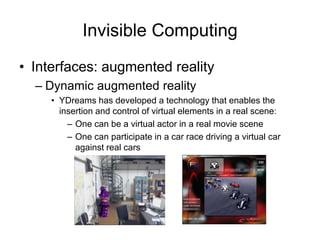
– Dynamic augmented reality
• YDreams has developed a technology that enables the
insertion and control of virtual elements in a real scene:
– One can be a virtual actor in a real movie scene
– One can participate in a car race driving a virtual car
against real cars
Invisible Computing
• Interfaces: augmented reality
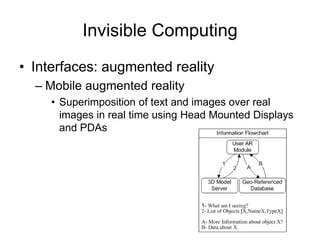
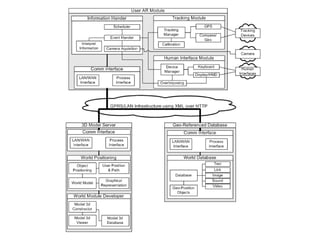
– Mobile augmented reality
• Superimposition of text and images over real
images in real time using Head Mounted Displays
and PDAs
Invisible Computing
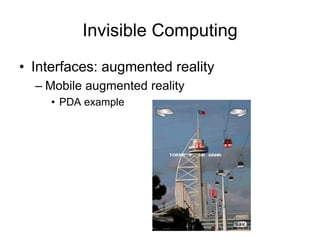
• Interfaces: augmented reality
– Mobile augmented reality
• PDA example
Invisible Computing
• Interfaces: wearables
– Mobile devices
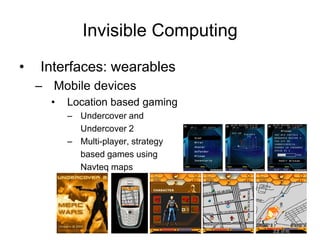
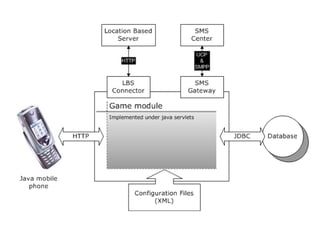
• Location based gaming
– Undercover and
Undercover 2
– Multi-player, strategy
based games using
Navteq maps
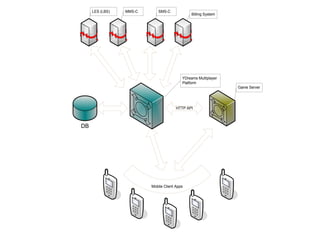
DB
Game Server
HTTP API
Mobile Client Apps
YDreams Multiplayer
Platform
Billing System
SMS-CMMS-CLES (LBS)
Invisible Computing
• Interfaces: wearables
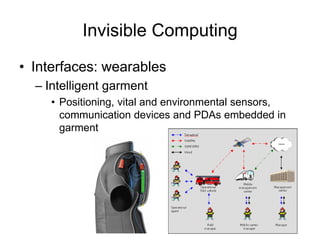
– Intelligent garment
• Positioning, vital and environmental sensors,
communication devices and PDAs embedded in
garment
Invisible Computing
• In the next few years
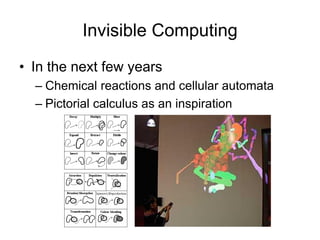
– Chemical reactions and cellular automata
– Pictorial calculus as an inspiration
Invisible Computing
• In the next few years
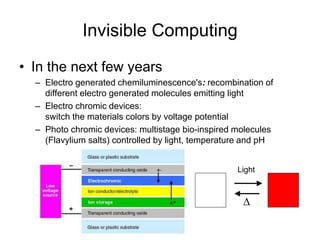
– Electro generated chemiluminescence's: recombination of
different electro generated molecules emitting light
– Electro chromic devices:
switch the materials colors by voltage potential
– Photo chromic devices: multistage bio-inspired molecules
(Flavylium salts) controlled by light, temperature and pH
Light
D
Conclusions
• Mobile phones will become scanners of a micro-
geographic world where every object will be
radio-tagged and sensors will be pervasive
• Human communication will be complemented by
human-object communication
• One transition pre-programmed computing may
not be digital
• Interfaces will increasingly follow the invisible
computing paradigm
António Câmara
asc@fct.unl.pt
antonio.camara@ydreams.com
http://gasa.dcea.fct.unl.pt/camara/
http://www.ydreams.com

Reality computing

  • 1.
    Reality Computing António Câmara NewUniversity of Lisbon and YDreams SHIFT September 2006
  • 2.
    Reality Computing • Introduction •Micro Geo-Information • Invisible Computing • Conclusions
  • 3.
    Introduction • Reality computing –Information and communication technology everywhere, for everyone, at all times – Mobile and ubiquitous computing • Traditional computing vs reality computing – Traditional computing: distance from user to subject matter ->∞ – Reality computing: distance from user to subject matter ->0
  • 4.
    Introduction • In thenext few years: – Radio tags will replace bar codes – Micro sensors (bio, optical, chemical) will be ubiquitous – Indoor positioning will reach a standard 15 cm precision Mobile phones will become scanners of a micro- geographic world and the main devices in reality computing
  • 5.
    Introduction • In thenext few years: – Desktop computers will “disappear” – The desk and the walls will become our computers – Mobility will add to invisibility User interfaces will increasingly follow the invisible computing paradigm
  • 6.
    Micro Geo-Information Indoor positioning Locationmodels Current developments In the next few years
  • 7.
    Micro Geo-information • Indoorpositioning – Absolute Positioning • MIT Cricket (coordinates) http://nms.csail.mit.edu/projects/cri cket/#technology – Relative Positioning (sets) • Active Badge http://web.media.mit.edu/~dmerrill/ badge/Want92_ActiveBadge.pdf – Preferred solution: seamelss handover between absolute and relative positioning *adapted from Kris Kolodiej and José Danado, “In Building Position”, GIM 04
  • 8.
    Micro Geo-Information • Indoorpositioning – Ultra-Wide Band Ubisense (http://www.ubisense.net) based technology. Much less affected by multi-path distortion of radio signals on walls, people and equipment • 15 cm 3D accuracy using Ubisensors and Ubitags
  • 9.
    Micro Geo-Information • Geometriclocation model – Locations and located- objects: • Points, areas, volumes – sets of coordinates tuples – Based on reference coordinate systems • Symbolic location model – Locations: sets – Located-objects: members of sets – Refer to locations by abstract symbols – Hierachies-> spatial bar coding From U. Leonhardt, 1998 http://www.doc.ic.ac.uk/~ul/p df/thesis_w_bookmarks.pdf Floor Access Point Printer Room
  • 10.
    Micro Geo-Information – Locationbased services typology • Proximity and position- detection of objects • Fencing- detect areas where special movements occur • Navigation- instructions to go from an origin to a destination • Tracking- monitoring the movement of an object in space – Indoor mapping • Built plans • Infrastructure (up to 10 cm error) • Map symbology is critical – Interfaces • Mobile phones (up to 100x100 pixels) • Blackberry (250x120 pixels) • PDAs (240x320 pixels)
  • 11.
    Micro Geo-Information • Currentdevelopments: Colombo Center application • Mobile phone based system • Anchors: places or objects that were geo-referenced. They could be physical tags (with a number) or radio tags. • Spatial bar codes: the anchors had spatial bar codes that uniquely identified the place or object in the world. Each spatial bar code had an URL associated with it. • Phonemarks: storing anchor points for later exploration * A. S. Camara e A. E. Dias, “Location Based Services for WAP Phone Users in a Shopping Centre”, G. Clark and J. Stilwell, eds. Applied GIS and Spatial Analysis, John Wiley, London, 2003
  • 12.
    Micro Geo-Information • Currentdevelopments: Colombo Center application • Store and Product Finders • Product Interaction • Parking Place Finder * A. S. Camara e A. E. Dias, “Location Based Services for WAP Phone Users in a Shopping Centre”, G. Clark and J. Stilwell, eds. Applied GIS and Spatial Analysis, John Wiley, London, 2003
  • 13.
    Micro Geo-Information • Inthe next few years: security applications – Ubisense system (http://www.ubisense.net) • Detects intruders that do not carry Ubitags (inconsistency between passive sensors and location of Ubitag wearers) • Tracks visitors • Detects unauthorized movements of assets • Helps monitoring high security environments
  • 14.
    Micro Geo-Information • Inthe next few years: the infrastructure – Communications infrastructure • Cellular, Wi-Fi and Wi-Max, UWB, Bluetooth, readers and updaters compatible with Electronic Product Code – Positioning infrastructure • GPS, Gallileo, Telecom and Assisted GPS, Pseudo-GPS; WiFi based location, RFID based location, UWB based location • Tags and sensors – Location models • Towards hybrid systems (geometric and symbolic) – Content and interfaces • Indoor mapping and mobile devices
  • 15.
    Invisible Computing Invisible computing Technologicalinfrastructure Interfaces In the next few years
  • 16.
    Invisible Computing “The mostprofound technologies are those that disappear. They weave themselves into the fabric of everyday life until they are indistinguishable from it.” Mark Weiser, 1991 Home heating versus computing • Boilers <-> Computer centers • Fireplaces<-> Computer rooms • Heaters <-> Networked personal computers • Air conditioning <-> Ubiquitous computing
  • 17.
    Inivisible Computing • Invisibilityis both factual and metaphorical – There is no computer in my desk; its top is my computer (Digital Desk) – The whiteboard is still on the wall but it is active (Liveboard)
  • 18.
    Invisible Computing • Mobilityadds to invisibility – Communication between mobile users is not affected negatively by significant changes in user locations – User access to information and processing systems available locally or remotely is not negatively affected by changes in his/her location – Distance between a mobile user and points and objects of interest approaches zero. Access to remote information systems that describe those points and objects may be performed locally
  • 19.
    Invisible Computing • Technologicalinfrastructure – Sensors – Processing systems – Projection systems – Displays – Interfaces • Movement recognition • Tangible interfaces • Voice • Mobile control • Augmented reality • Wearables
  • 20.
  • 21.
    Invisible Computing • Interfaces –Tangible interfaces and voice
  • 22.
  • 23.
    Invisible Computing • Interfaces:augmented reality – Virtual sightseeing • Superimposition of text, images and videos on real images using a fixed device
  • 24.
    Invisible Computing • Interfaces:augmented reality – Dynamic augmented reality • YDreams has developed a technology that enables the insertion and control of virtual elements in a real scene: – One can be a virtual actor in a real movie scene – One can participate in a car race driving a virtual car against real cars
  • 25.
    Invisible Computing • Interfaces:augmented reality – Mobile augmented reality • Superimposition of text and images over real images in real time using Head Mounted Displays and PDAs
  • 27.
    Invisible Computing • Interfaces:augmented reality – Mobile augmented reality • PDA example
  • 28.
    Invisible Computing • Interfaces:wearables – Mobile devices • Location based gaming – Undercover and Undercover 2 – Multi-player, strategy based games using Navteq maps
  • 30.
    DB Game Server HTTP API MobileClient Apps YDreams Multiplayer Platform Billing System SMS-CMMS-CLES (LBS)
  • 31.
    Invisible Computing • Interfaces:wearables – Intelligent garment • Positioning, vital and environmental sensors, communication devices and PDAs embedded in garment
  • 32.
    Invisible Computing • Inthe next few years – Chemical reactions and cellular automata – Pictorial calculus as an inspiration
  • 33.
    Invisible Computing • Inthe next few years – Electro generated chemiluminescence's: recombination of different electro generated molecules emitting light – Electro chromic devices: switch the materials colors by voltage potential – Photo chromic devices: multistage bio-inspired molecules (Flavylium salts) controlled by light, temperature and pH Light D
  • 34.
    Conclusions • Mobile phoneswill become scanners of a micro- geographic world where every object will be radio-tagged and sensors will be pervasive • Human communication will be complemented by human-object communication • One transition pre-programmed computing may not be digital • Interfaces will increasingly follow the invisible computing paradigm
  • 35.