Chapter 2:
Types of Data Models: Physical Data Models, Hierachichal Data Model, Network Data
Model, Relation Data Model, Entity Relationship Data Model, Object Oriented data Model
Types of Database systems: Centralized Database system, Parallel database system, Client
Server database system, Distributed database system
Data Models
• A Data Model in Database Management System (DBMS) is the concept
of tools that are developed to summarize the description of the
database. Data Models provide us with a transparent picture of data
which helps us in creating an actual database. It shows us from the
design of the data to its proper implementation of data.
• Data models define how the logical structure of a database is modeled.
Data Models are fundamental entities to introduce abstraction in a
DBMS. Data models define how data is connected to each other and
how they are processed and stored inside the system.
• A data model is a collection of high-level data description constructs
that hide many low-level storage details. A DBMS allows a user to
define the data to be stored in terms of a data model.
Data Models
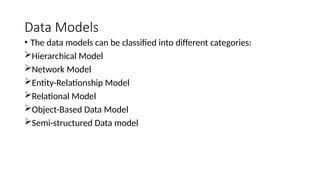
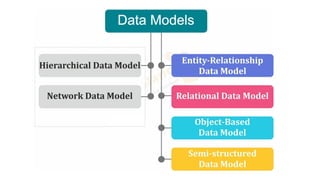
• The data models can be classified into different categories:
Hierarchical Model
Network Model
Entity-Relationship Model
Relational Model
Object-Based Data Model
Semi-structured Data model
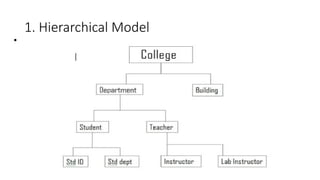
1. Hierarchical Model
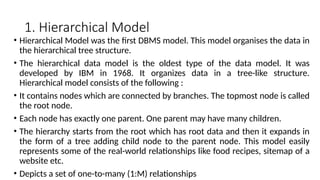
• Hierarchical Model was the first DBMS model. This model organises the data in
the hierarchical tree structure.
• The hierarchical data model is the oldest type of the data model. It was
developed by IBM in 1968. It organizes data in a tree-like structure.
Hierarchical model consists of the following :
• It contains nodes which are connected by branches. The topmost node is called
the root node.
• Each node has exactly one parent. One parent may have many children.
• The hierarchy starts from the root which has root data and then it expands in
the form of a tree adding child node to the parent node. This model easily
represents some of the real-world relationships like food recipes, sitemap of a
website etc.
• Depicts a set of one-to-many (1:M) relationships
1. Hierarchical Model
•
Hierarchical Model
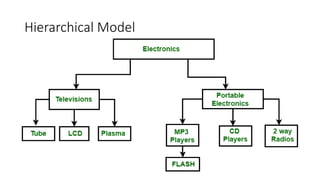
• In the above figure, Electronics is the root node which has two children i.e.
Televisions and Portable Electronics. These two has further children for which they
act as parent. For example: Television has children as Tube, LCD and Plasma, for
these three Television act as parent. It follows one to many relationship.
• Advantages of the Hierarchical Data Model
• Because of its tree form, it is easy to grasp.
• Retrieving data in a one-to-many connection is efficient.
• Disadvantages of the Hierarchical Data Model
• Inflexibility in reorganizing data.
• accessing complicated data structures may be challenging.
• redundant data storage, which might cause anomalies and inconsistencies.
• easy to design, but at the same time, it is quite complex to implement.
• This model also lacks flexibility as the changes in the new tables or segments often
yield very complex system management tasks. Here, a deletion of one segment can
lead to the involuntary deletion of all segments under it.
2. Network Model
• This model is an extension of the hierarchical model, the only difference is
that a record can have more than one parent. It replaces the hierarchical
tree with a graph.
• The network model was created to represent complex data relationships
more effectively when compared to hierarchical models, to improve
database performance and standards.
• Depicts both one-to-many (1:M) and many-to-many (M:N) relationships.
• It is the advance version of the hierarchical data model. To organize data it
uses directed graphs instead of the tree-structure. In this child can have
more than one parent. It uses the concept of the two data structures i.e.
Records and Sets.
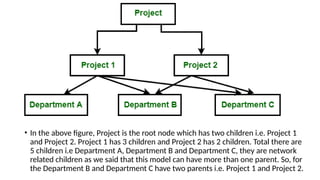
• In the above figure, Project is the root node which has two children i.e. Project 1
and Project 2. Project 1 has 3 children and Project 2 has 2 children. Total there are
5 children i.e Department A, Department B and Department C, they are network
related children as we said that this model can have more than one parent. So, for
the Department B and Department C have two parents i.e. Project 1 and Project 2.
• Advantages of the Network Data Model
• Because of its numerous parent ties, it is more adaptable than the
hierarchical approach.
• Ideal for managing intricate, many-to-many connections.
• Disadvantages of the Network Data Model
• Increased complexity in database design and management.
• requires complex programming in order to manage and work with data.
• System complexity limits efficiency.
• Any change like updating, deletion, insertion is very complex.
3. Entity-Relationship Model
• An ER model is the logical representation of data as objects and relationships
among them. These objects are known as entities, and relationship is an
association among these entities.
• ER diagram basically having three components:
• Entities − It is a real-world thing which can be a person, place, or even a
concept. For Example: Department, Admin, Courses, Teachers, Students,
Building, etc are some of the entities of a School Management System.
• Attributes − An entity which contains a real-world property called an attribute.
For Example: The entity employee has the property like employee id, salary,
age, etc.
• Relationship − Relationship tells how two attributes are related. For Example:
Employee works for a department.
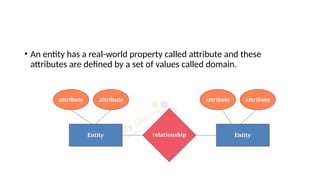
• An entity has a real-world property called attribute and these
attributes are defined by a set of values called domain.
• Entity type becomes a table.
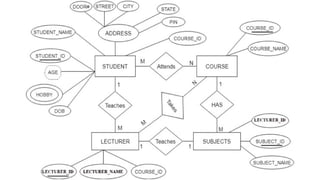
• In the given ER diagram, LECTURE, STUDENT, SUBJECT and
COURSE forms individual tables.
• All single-valued attribute becomes a column for the
table.
• In the STUDENT entity, STUDENT_NAME and STUDENT_ID
form the column of STUDENT table. Similarly,
COURSE_NAME and COURSE_ID form the column of COURSE
table and so on.
• A key attribute of the entity type represented by the primary
key.
• In the given ER diagram, COURSE_ID, STUDENT_ID, SUBJECT_ID,
and LECTURE_ID are the key attribute of the entity.
• The multivalued attribute is represented by a separate table.
• In the student table, a hobby is a multivalued attribute. So it is
not possible to represent multiple values in a single column of
STUDENT table. Hence we create a table STUD_HOBBY with
column name STUDENT_ID and HOBBY. Using both the column,
we create a composite key.
• Composite attribute represented by components.
• In the given ER diagram, student address is a composite
attribute. It contains CITY, PIN, DOOR#, STREET, and STATE.
In the STUDENT table, these attributes can merge as an
individual column.
• Derived attributes are not considered in the table.
• In the STUDENT table, Age is the derived attribute. It can be
calculated at any point of time by calculating the difference
between current date and Date of Birth.
• Using these rules, you can convert the ER diagram to tables
and columns and assign the mapping between the tables.
Table structure for the given ER diagram is as below:
• Advantages of Entity-Relationship Model
• The ER model is easy to build.
• This model is widely used by database designers for communicating their ideas.
• This model can easily convert to any other model like network model,
hierarchical model etc.
• It is integrated with the dominant relational model.
• Disadvantages of Entity-Relationship Model
• There is no industry standard for developing an ER model.
• Information might be lost or hidden in the ER model.
• There is no Data Manipulation
• There is limited relationship representation.
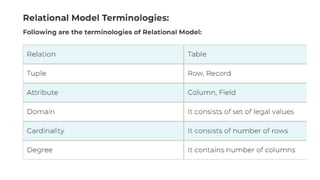
4. Relational Model
• The relational data model was developed by E.F. Codd in 1970. There are no
physical links as they are in the hierarchical data model. Following are the
properties of the relational data model :
• The relational model uses a collection of tables to represent both data and
the relationships.
• Tables are also known as relations.
• Each table has multiple columns represent as attributes, Attributes are the
properties which define a relation.
• Each row of the table represents as Tuple, Tuple is one piece of information.
•
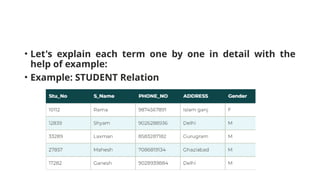
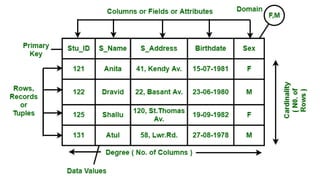
• Let's explain each term one by one in detail with the
help of example:
• Example: STUDENT Relation
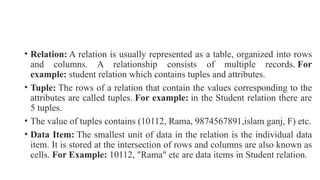
• Relation: A relation is usually represented as a table, organized into rows
and columns. A relationship consists of multiple records. For
example: student relation which contains tuples and attributes.
• Tuple: The rows of a relation that contain the values corresponding to the
attributes are called tuples. For example: in the Student relation there are
5 tuples.
• The value of tuples contains (10112, Rama, 9874567891,islam ganj, F) etc.
• Data Item: The smallest unit of data in the relation is the individual data
item. It is stored at the intersection of rows and columns are also known as
cells. For Example: 10112, "Rama" etc are data items in Student relation.
• Domain: It contains a set of atomic values that an attribute can take. It could
be accomplish explicitly by listing all possible values or specifying conditions
that all values in that domain must be confirmed. For example: the domain of
gender attributes is a set of data values "M" for male and "F" for female. No
database software fully supports domains typically allowing the users to
define very simple data types such as numbers, dates, characters etc.
• Attribute: The smallest unit of data in relational model is an attribute. It
contains the name of a column in a particular table. Each attribute Ai must
have a domain, dom(Ai). For example: Stu_No, S_Name, PHONE_NO,
ADDRESS, Gender are the attributes of a student relation. In relational
databases a column entry in any row is a single value that contains exactly
one item only.
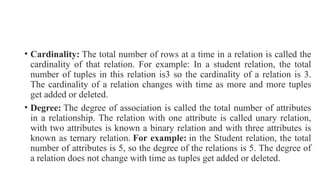
• Cardinality: The total number of rows at a time in a relation is called the
cardinality of that relation. For example: In a student relation, the total
number of tuples in this relation is3 so the cardinality of a relation is 3.
The cardinality of a relation changes with time as more and more tuples
get added or deleted.
• Degree: The degree of association is called the total number of attributes
in a relationship. The relation with one attribute is called unary relation,
with two attributes is known a binary relation and with three attributes is
known as ternary relation. For example: in the Student relation, the total
number of attributes is 5, so the degree of the relations is 5. The degree of
a relation does not change with time as tuples get added or deleted.
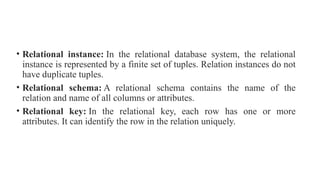
• Relational instance: In the relational database system, the relational
instance is represented by a finite set of tuples. Relation instances do not
have duplicate tuples.
• Relational schema: A relational schema contains the name of the
relation and name of all columns or attributes.
• Relational key: In the relational key, each row has one or more
attributes. It can identify the row in the relation uniquely.
• Advantages of the Relational Data Model
• High data independence and flexibility.
• offers robust and user-friendly querying features.
• removes duplication by use of normalization.
• This provides an abstract view of the data. It abstracts the physical structure from the
logical structure of data.
• This model is very easy to design. Tables can use different attributes as per
requirements.
• The relational model supports data independence. In a relational database the data is
stored in tables so that we can modify the data without changing the physical structure.
• Relational database helps the user to use a query language to query the database.
• It offers more flexibility than other models.
• By moving sensitive attributes, we can also implement database security control and
authorization in a particular table into a separate relation with its authorization controls.
• Disadvantages of the Relational Data Model
• The main disadvantage of relational models is that they do not support binary
data for example: images, documents, spreadsheets etc.
• The relational model is suitable for small databases but not suitable for
complex databases because the user needs to know the complex physical data
storage details. So, while designing the databases they don't come to light when
they may cause problems. When a database grows it will slow down the system
and will result in performance degradation and data corruption.
•
5. Object-Based Data Model
• The complex real world problems are represented as objects with different attributes. In
Object Oriented Data Model, data and their relationships are contained in a single structure
which is referred as object. All objects have multiple relationships between them. Basically,
it is combination of Object Oriented programming and Relational Database Model.
• Components of Object Oriented Data Model
• Objects: An object is an abstraction of a real world entity or we can say it is an instance of
class. Objects encapsulates data and code into a single unit which provide data abstraction by
hiding the implementation details from the user.
• Attribute: An attribute describes the properties of object.
• Methods: Method represents the behavior of an object, it represents the real-world action
• Class: A class is a collection of similar objects with shared structure i.e. attributes and
behavior.
• Inheritance: new classes are created from the existing classes
Components of Object Oriented
Data Model :
• In Object Oriented Data Model, data and their relationships are contained
in a single structure which is referred as object in this data model. In this,
real world problems are represented as objects with different attributes.
All objects have multiple relationships between them. Basically, it is
combination of Object Oriented programming and Relational Database
Model as it is clear from the following figure :
• Object Oriented Data Model = Combination of Object Oriented
Programming + Relational database model

RDBMS stands for Relational Database Management System

  • 1.
    Chapter 2: Types ofData Models: Physical Data Models, Hierachichal Data Model, Network Data Model, Relation Data Model, Entity Relationship Data Model, Object Oriented data Model Types of Database systems: Centralized Database system, Parallel database system, Client Server database system, Distributed database system
  • 2.
    Data Models • AData Model in Database Management System (DBMS) is the concept of tools that are developed to summarize the description of the database. Data Models provide us with a transparent picture of data which helps us in creating an actual database. It shows us from the design of the data to its proper implementation of data. • Data models define how the logical structure of a database is modeled. Data Models are fundamental entities to introduce abstraction in a DBMS. Data models define how data is connected to each other and how they are processed and stored inside the system. • A data model is a collection of high-level data description constructs that hide many low-level storage details. A DBMS allows a user to define the data to be stored in terms of a data model.
  • 3.
    Data Models • Thedata models can be classified into different categories: Hierarchical Model Network Model Entity-Relationship Model Relational Model Object-Based Data Model Semi-structured Data model
  • 5.
    1. Hierarchical Model •Hierarchical Model was the first DBMS model. This model organises the data in the hierarchical tree structure. • The hierarchical data model is the oldest type of the data model. It was developed by IBM in 1968. It organizes data in a tree-like structure. Hierarchical model consists of the following : • It contains nodes which are connected by branches. The topmost node is called the root node. • Each node has exactly one parent. One parent may have many children. • The hierarchy starts from the root which has root data and then it expands in the form of a tree adding child node to the parent node. This model easily represents some of the real-world relationships like food recipes, sitemap of a website etc. • Depicts a set of one-to-many (1:M) relationships
  • 6.
  • 7.
  • 8.
    • In theabove figure, Electronics is the root node which has two children i.e. Televisions and Portable Electronics. These two has further children for which they act as parent. For example: Television has children as Tube, LCD and Plasma, for these three Television act as parent. It follows one to many relationship. • Advantages of the Hierarchical Data Model • Because of its tree form, it is easy to grasp. • Retrieving data in a one-to-many connection is efficient. • Disadvantages of the Hierarchical Data Model • Inflexibility in reorganizing data. • accessing complicated data structures may be challenging. • redundant data storage, which might cause anomalies and inconsistencies. • easy to design, but at the same time, it is quite complex to implement. • This model also lacks flexibility as the changes in the new tables or segments often yield very complex system management tasks. Here, a deletion of one segment can lead to the involuntary deletion of all segments under it.
  • 9.
    2. Network Model •This model is an extension of the hierarchical model, the only difference is that a record can have more than one parent. It replaces the hierarchical tree with a graph. • The network model was created to represent complex data relationships more effectively when compared to hierarchical models, to improve database performance and standards. • Depicts both one-to-many (1:M) and many-to-many (M:N) relationships. • It is the advance version of the hierarchical data model. To organize data it uses directed graphs instead of the tree-structure. In this child can have more than one parent. It uses the concept of the two data structures i.e. Records and Sets.
  • 10.
    • In theabove figure, Project is the root node which has two children i.e. Project 1 and Project 2. Project 1 has 3 children and Project 2 has 2 children. Total there are 5 children i.e Department A, Department B and Department C, they are network related children as we said that this model can have more than one parent. So, for the Department B and Department C have two parents i.e. Project 1 and Project 2.
  • 11.
    • Advantages ofthe Network Data Model • Because of its numerous parent ties, it is more adaptable than the hierarchical approach. • Ideal for managing intricate, many-to-many connections. • Disadvantages of the Network Data Model • Increased complexity in database design and management. • requires complex programming in order to manage and work with data. • System complexity limits efficiency. • Any change like updating, deletion, insertion is very complex.
  • 12.
    3. Entity-Relationship Model •An ER model is the logical representation of data as objects and relationships among them. These objects are known as entities, and relationship is an association among these entities. • ER diagram basically having three components: • Entities − It is a real-world thing which can be a person, place, or even a concept. For Example: Department, Admin, Courses, Teachers, Students, Building, etc are some of the entities of a School Management System. • Attributes − An entity which contains a real-world property called an attribute. For Example: The entity employee has the property like employee id, salary, age, etc. • Relationship − Relationship tells how two attributes are related. For Example: Employee works for a department.
  • 13.
    • An entityhas a real-world property called attribute and these attributes are defined by a set of values called domain.
  • 15.
    • Entity typebecomes a table. • In the given ER diagram, LECTURE, STUDENT, SUBJECT and COURSE forms individual tables. • All single-valued attribute becomes a column for the table. • In the STUDENT entity, STUDENT_NAME and STUDENT_ID form the column of STUDENT table. Similarly, COURSE_NAME and COURSE_ID form the column of COURSE table and so on.
  • 16.
    • A keyattribute of the entity type represented by the primary key. • In the given ER diagram, COURSE_ID, STUDENT_ID, SUBJECT_ID, and LECTURE_ID are the key attribute of the entity. • The multivalued attribute is represented by a separate table. • In the student table, a hobby is a multivalued attribute. So it is not possible to represent multiple values in a single column of STUDENT table. Hence we create a table STUD_HOBBY with column name STUDENT_ID and HOBBY. Using both the column, we create a composite key.
  • 17.
    • Composite attributerepresented by components. • In the given ER diagram, student address is a composite attribute. It contains CITY, PIN, DOOR#, STREET, and STATE. In the STUDENT table, these attributes can merge as an individual column. • Derived attributes are not considered in the table. • In the STUDENT table, Age is the derived attribute. It can be calculated at any point of time by calculating the difference between current date and Date of Birth.
  • 18.
    • Using theserules, you can convert the ER diagram to tables and columns and assign the mapping between the tables. Table structure for the given ER diagram is as below:
  • 20.
    • Advantages ofEntity-Relationship Model • The ER model is easy to build. • This model is widely used by database designers for communicating their ideas. • This model can easily convert to any other model like network model, hierarchical model etc. • It is integrated with the dominant relational model. • Disadvantages of Entity-Relationship Model • There is no industry standard for developing an ER model. • Information might be lost or hidden in the ER model. • There is no Data Manipulation • There is limited relationship representation.
  • 21.
    4. Relational Model •The relational data model was developed by E.F. Codd in 1970. There are no physical links as they are in the hierarchical data model. Following are the properties of the relational data model : • The relational model uses a collection of tables to represent both data and the relationships. • Tables are also known as relations. • Each table has multiple columns represent as attributes, Attributes are the properties which define a relation. • Each row of the table represents as Tuple, Tuple is one piece of information.
  • 22.
  • 23.
    • Let's explaineach term one by one in detail with the help of example: • Example: STUDENT Relation
  • 24.
    • Relation: Arelation is usually represented as a table, organized into rows and columns. A relationship consists of multiple records. For example: student relation which contains tuples and attributes. • Tuple: The rows of a relation that contain the values corresponding to the attributes are called tuples. For example: in the Student relation there are 5 tuples. • The value of tuples contains (10112, Rama, 9874567891,islam ganj, F) etc. • Data Item: The smallest unit of data in the relation is the individual data item. It is stored at the intersection of rows and columns are also known as cells. For Example: 10112, "Rama" etc are data items in Student relation.
  • 25.
    • Domain: Itcontains a set of atomic values that an attribute can take. It could be accomplish explicitly by listing all possible values or specifying conditions that all values in that domain must be confirmed. For example: the domain of gender attributes is a set of data values "M" for male and "F" for female. No database software fully supports domains typically allowing the users to define very simple data types such as numbers, dates, characters etc. • Attribute: The smallest unit of data in relational model is an attribute. It contains the name of a column in a particular table. Each attribute Ai must have a domain, dom(Ai). For example: Stu_No, S_Name, PHONE_NO, ADDRESS, Gender are the attributes of a student relation. In relational databases a column entry in any row is a single value that contains exactly one item only.
  • 26.
    • Cardinality: Thetotal number of rows at a time in a relation is called the cardinality of that relation. For example: In a student relation, the total number of tuples in this relation is3 so the cardinality of a relation is 3. The cardinality of a relation changes with time as more and more tuples get added or deleted. • Degree: The degree of association is called the total number of attributes in a relationship. The relation with one attribute is called unary relation, with two attributes is known a binary relation and with three attributes is known as ternary relation. For example: in the Student relation, the total number of attributes is 5, so the degree of the relations is 5. The degree of a relation does not change with time as tuples get added or deleted.
  • 27.
    • Relational instance:In the relational database system, the relational instance is represented by a finite set of tuples. Relation instances do not have duplicate tuples. • Relational schema: A relational schema contains the name of the relation and name of all columns or attributes. • Relational key: In the relational key, each row has one or more attributes. It can identify the row in the relation uniquely.
  • 29.
    • Advantages ofthe Relational Data Model • High data independence and flexibility. • offers robust and user-friendly querying features. • removes duplication by use of normalization. • This provides an abstract view of the data. It abstracts the physical structure from the logical structure of data. • This model is very easy to design. Tables can use different attributes as per requirements. • The relational model supports data independence. In a relational database the data is stored in tables so that we can modify the data without changing the physical structure. • Relational database helps the user to use a query language to query the database. • It offers more flexibility than other models. • By moving sensitive attributes, we can also implement database security control and authorization in a particular table into a separate relation with its authorization controls.
  • 30.
    • Disadvantages ofthe Relational Data Model • The main disadvantage of relational models is that they do not support binary data for example: images, documents, spreadsheets etc. • The relational model is suitable for small databases but not suitable for complex databases because the user needs to know the complex physical data storage details. So, while designing the databases they don't come to light when they may cause problems. When a database grows it will slow down the system and will result in performance degradation and data corruption. •
  • 31.
    5. Object-Based DataModel • The complex real world problems are represented as objects with different attributes. In Object Oriented Data Model, data and their relationships are contained in a single structure which is referred as object. All objects have multiple relationships between them. Basically, it is combination of Object Oriented programming and Relational Database Model. • Components of Object Oriented Data Model • Objects: An object is an abstraction of a real world entity or we can say it is an instance of class. Objects encapsulates data and code into a single unit which provide data abstraction by hiding the implementation details from the user. • Attribute: An attribute describes the properties of object. • Methods: Method represents the behavior of an object, it represents the real-world action • Class: A class is a collection of similar objects with shared structure i.e. attributes and behavior. • Inheritance: new classes are created from the existing classes
  • 32.
    Components of ObjectOriented Data Model : • In Object Oriented Data Model, data and their relationships are contained in a single structure which is referred as object in this data model. In this, real world problems are represented as objects with different attributes. All objects have multiple relationships between them. Basically, it is combination of Object Oriented programming and Relational Database Model as it is clear from the following figure : • Object Oriented Data Model = Combination of Object Oriented Programming + Relational database model