Chapter 2
Instructor: Adane (Msc)
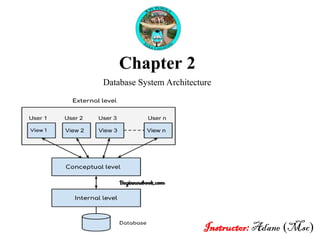
Database System Architecture
Outline
 Overview of Data Models
 Data models, Schemas, and Instances
 Architecture and Data Independence
 Database Language and Interface
 The Database System Environment
 Classification of DBMS
1. Overview of Data Models
Data models: a description of the way the data is stored in a
database.
It defines:
How Data is Arranged: like tables, trees, or documents.
How Data Relates: It shows how one piece of data connects
to another (like a student to their classes).
What Data Can Be Stored: It sets rules (constraints) for what
types of information you can keep. E.g of data type (text,
number, date…etc)
 Common type of Data model
 Tables: Like a spreadsheet with rows and columns (this is used in
most databases).
 Trees: Information is organized in a top-down structure (like a
family tree).
 Documents: Information is saved in files with a flexible format
(like a Word document)
 Helps to ensure the database is organized and that the data is
meaningful and usable!
 A data model helps you understand how to keep and manage data in a
database!
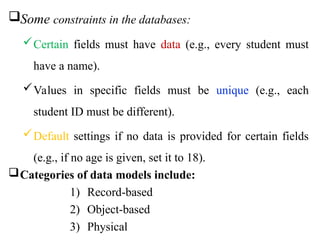
Some constraints in the databases:
Certain fields must have data (e.g., every student must
have a name).
Values in specific fields must be unique (e.g., each
student ID must be different).
Default settings if no data is provided for certain fields
(e.g., if no age is given, set it to 18).
Categories of data models include:
1) Record-based
2) Object-based
3) Physical
1) Record-based data model
 Consist of a number of pre-defined fixed format records.
 Each record type defines a fixed number of fields.
 Each field is typically of a fixed length.
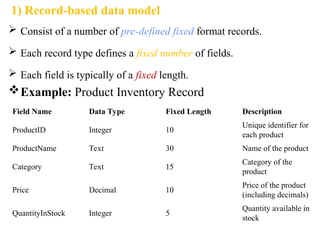
Example: Product Inventory Record
Field Name Data Type Fixed Length Description
ProductID Integer 10
Unique identifier for
each product
ProductName Text 30 Name of the product
Category Text 15
Category of the
product
Price Decimal 10
Price of the product
(including decimals)
QuantityInStock Integer 5
Quantity available in
stock
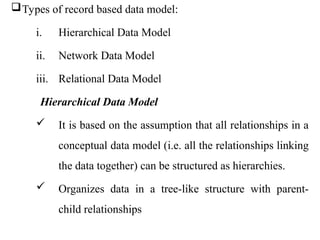
Types of record based data model:
i. Hierarchical Data Model
ii. Network Data Model
iii. Relational Data Model
Hierarchical Data Model
 It is based on the assumption that all relationships in a
conceptual data model (i.e. all the relationships linking
the data together) can be structured as hierarchies.
 Organizes data in a tree-like structure with parent-
child relationships
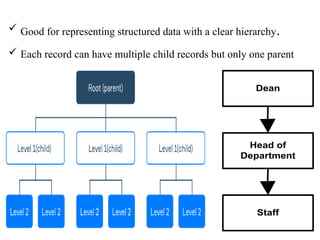
 Good for representing structured data with a clear hierarchy.
 Each record can have multiple child records but only one parent
Dean
Head of
Department
Staff
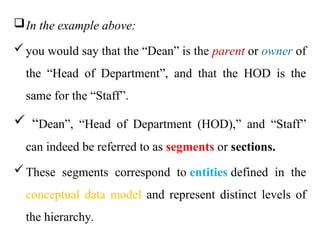
In the example above:
you would say that the “Dean” is the parent or owner of
the “Head of Department”, and that the HOD is the
same for the “Staff”.
 “Dean”, “Head of Department (HOD),” and “Staff”
can indeed be referred to as segments or sections.
These segments correspond to entities defined in the
conceptual data model and represent distinct levels of
the hierarchy.
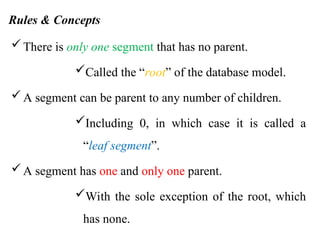
Rules & Concepts
There is only one segment that has no parent.
Called the “root” of the database model.
A segment can be parent to any number of children.
Including 0, in which case it is called a
“leaf segment”.
A segment has one and only one parent.
With the sole exception of the root, which
has none.
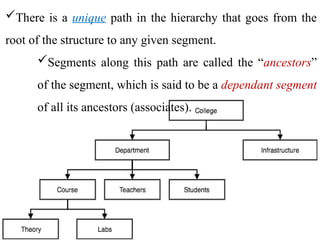
There is a unique path in the hierarchy that goes from the
root of the structure to any given segment.
Segments along this path are called the “ancestors”
of the segment, which is said to be a dependant segment
of all its ancestors (associates).
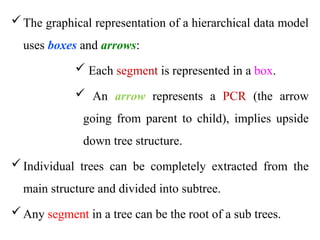
The graphical representation of a hierarchical data model
uses boxes and arrows:
 Each segment is represented in a box.
 An arrow represents a PCR (the arrow
going from parent to child), implies upside
down tree structure.
Individual trees can be completely extracted from the
main structure and divided into subtree.
Any segment in a tree can be the root of a sub trees.
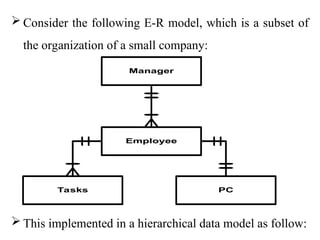
 Consider the following E-R model, which is a subset of
the organization of a small company:
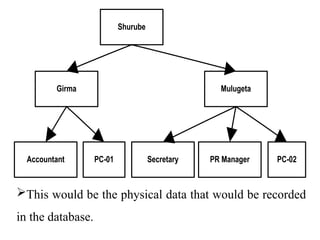
 This implemented in a hierarchical data model as follow:
Manager
Employee
Tasks PC
This would be the physical data that would be recorded
in the database.
Shurube
Girma Mulugeta
PC-01 PC-02
Accountant Secretary PR Manager
Physical storage
 Segments will be stored as records in one or several
files.
 Files would be linked together using physical
pointers, or addresses, that would yield the address of
the parent record (physical address of the record on
the disk
Strength or advantage of hierarchical data model
Conceptually simple: a tree structure is easy to design and
understand.
Allows fast and efficient searches on the data.
Weakness or disadvantage of hierarchical data model
Rigidity
Inability to store “many to many” (“N:N”) relationships, it
limited to “1:1” and “1:N”.
Linked to the use of physical pointers.
Difficulty of using it and application programming on it.
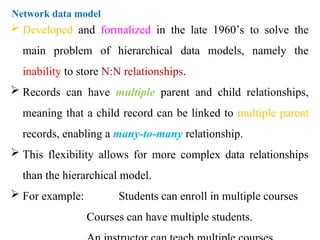
Network data model
 Developed and formalized in the late 1960’s to solve the
main problem of hierarchical data models, namely the
inability to store N:N relationships.
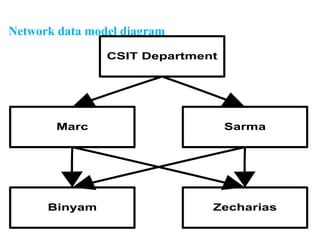
 Records can have multiple parent and child relationships,
meaning that a child record can be linked to multiple parent
records, enabling a many-to-many relationship.
 This flexibility allows for more complex data relationships
than the hierarchical model.
 For example: Students can enroll in multiple courses
Courses can have multiple students.
Network data model diagram
CSIT Department
Marc Sarma
Binyam Zecharias
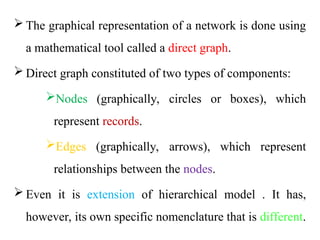
 The graphical representation of a network is done using
a mathematical tool called a direct graph.
 Direct graph constituted of two types of components:
Nodes (graphically, circles or boxes), which
represent records.
Edges (graphically, arrows), which represent
relationships between the nodes.
 Even it is extension of hierarchical model . It has,
however, its own specific nomenclature that is different.
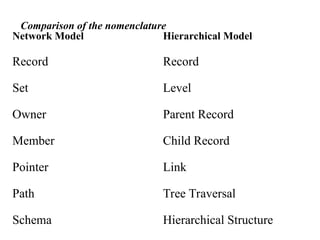
Comparison of the nomenclature
Network Model Hierarchical Model
Record Record
Set Level
Owner Parent Record
Member Child Record
Pointer Link
Path Tree Traversal
Schema Hierarchical Structure
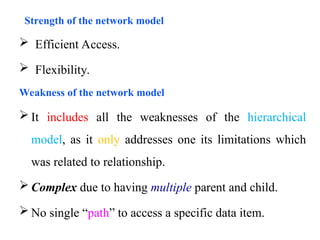
 Efficient Access.
 Flexibility.
Weakness of the network model
 It includes all the weaknesses of the hierarchical
model, as it only addresses one its limitations which
was related to relationship.
 Complex due to having multiple parent and child.
 No single “path” to access a specific data item.
Strength of the network model
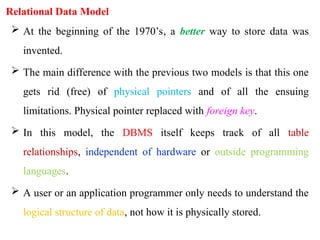
Relational Data Model
 At the beginning of the 1970’s, a better way to store data was
invented.
 The main difference with the previous two models is that this one
gets rid (free) of physical pointers and of all the ensuing
limitations. Physical pointer replaced with foreign key.
 In this model, the DBMS itself keeps track of all table
relationships, independent of hardware or outside programming
languages.
 A user or an application programmer only needs to understand the
logical structure of data, not how it is physically stored.
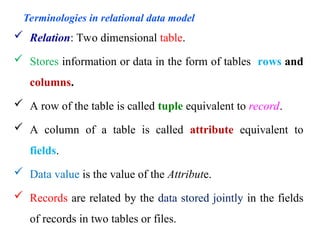
Terminologies in relational data model
 Relation: Two dimensional table.
 Stores information or data in the form of tables rows and
columns.
 A row of the table is called tuple equivalent to record.
 A column of a table is called attribute equivalent to
fields.
 Data value is the value of the Attribute.
 Records are related by the data stored jointly in the fields
of records in two tables or files.
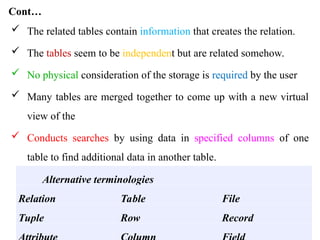
Cont…
 The related tables contain information that creates the relation.
 The tables seem to be independent but are related somehow.
 No physical consideration of the storage is required by the user
 Many tables are merged together to come up with a new virtual
view of the
 Conducts searches by using data in specified columns of one
table to find additional data in another table.
Alternative terminologies
Relation Table File
Tuple Row Record
Cont…
 In conducting searches, a relational database matches information
from a field in one table with information in a corresponding field
of another table to produce a third table that combines requested
data from both tables.
 Principles in a relational data model are:
 Tuples are ordered lists of values.
 Components of a tuple are identified by unique names, called
attributes.
 Relations are two-dimensional tables of data: they are sets of tuples.
An easy way to think of a relation is to see it as a spreadsheet (such
as in MS Excel).
Cont…
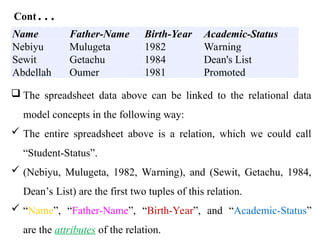
Name Father-Name Birth-Year Academic-Status
Nebiyu Mulugeta 1982 Warning
Sewit Getachu 1984 Dean's List
Abdellah Oumer 1981 Promoted
 The spreadsheet data above can be linked to the relational data
model concepts in the following way:
 The entire spreadsheet above is a relation, which we could call
“Student-Status”.
 (Nebiyu, Mulugeta, 1982, Warning), and (Sewit, Getachu, 1984,
Dean’s List) are the first two tuples of this relation.
 “Name”, “Father-Name”, “Birth-Year”, and “Academic-Status”
are the attributes of the relation.
Relation above fulfil basic rules of the relational data model.
 The order of the rows does not matter – the relation would be the same if
we re-ordered the records in alphabetical order of the name.
 The order of the columns does not matter – if “academic-status” came
before “birth-year”, the relation would still be the same.
 Each row is unique (we will come back to that later on).
 Values in one column are all of the same kind.
 The domains (or data types) for the values in the tuples must be atomic;
which means that:
Allowed: elementary data types such as text strings, integers, dates,
etc…
Not allowed: tuples, lists, sets, etc…
 In case of relational data model physical pointers are removed and
replaced by “primary key” and “foreign keys”.
House (ID, Size, Address, Landlord_ID)
Landlord (Landlord ID, Name, Father_Name)
 These relations has a single attribute primary key, called ID and Landlord
ID respectively.
 To store the relation between “House” and “Landlord” (each house is
owned by one and only one landlord), we use the “Landlord_ID” field in
“House”,
 “Landlord-ID” field is called a foreign key (in the sense that it is the
primary key of another relation, that is foreign to the one where it is
located)
Cont…
 And can be seen as a logical pointer as opposed to the
physical pointers that we used in previous data models.
 Strengths
It is simple to understand.
It is highly flexible and easy to use.
 Weaknesses
Search and access times are relatively slow.
Schemas, Instances, and Database State
 The description of a database is called the database schema.
 Skeleton structure of entire database to represents the logical view
of entire database.
 It tells about:
how the data is organized.
how relation among them is associated.
formulates all database constraints that would be put on data in
relations, which resides in database.
 Specified during database design and is not expected to change
frequently also difficult to change.
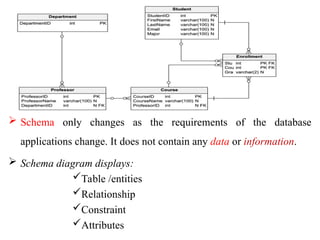
 Schema only changes as the requirements of the database
applications change. It does not contain any data or information.
 Schema diagram displays:
Table /entities
Relationship
Constraint
Attributes
Instance
The data in the database at a particular moment in time.
Also called database state or snapshot or the current set
of occurrences or extension of schema.
The actual data in a database may change quite
frequently, as any addition, deletion, or update of an item
changes the state of the database from one instance to
another.
Database instances tend to change with time.
Cont…
When we define a new database, we specify its database
schema only to the DBMS. At this point, the
corresponding database state is the empty state with no
data.
DBMS ensures that its every instance (state) must be a
valid state by keeping up to all validation, constraints
and condition that database designers has imposed or it
is expected from DBMS itself.
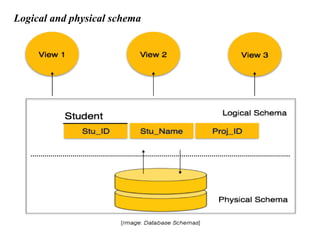
Database schema can be divided broadly in two categories:
1) Logical Database Schema: defines:-
 All logical constraints that need to be applied on data
stored.
Tables, views and integrity constraints etc.
2) Physical Database Schema:
Pertains to the actual storage of data and its form of
storage like files, indices etc.
It defines the how data will be stored in secondary
storage etc.
Logical and physical schema
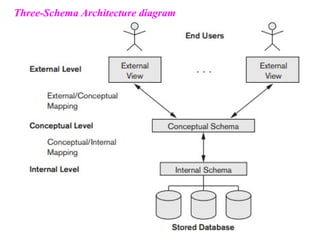
The Three-Schema Architecture
In this architecture, schemas can be defined at the following three levels:
1)The internal level has internal schema describes:
The physical storage structure of the database.
The complete details of data storage and access paths for the
database.
2) The conceptual level has a conceptual schema, describes:
The structure of the whole database for a community of users.
Entities, general data types, relationships, user operations, and
constraints.
Hides the details of physical storage structures
3) The external or view level
 Includes a number of external schemas or user views.
 Describes the part of the database that a particular user group is
interested in and hides the rest of the database from that user
group.
 The processes of transforming requests and results between
levels are called mappings.
Three-Schema Architecture diagram
Data Independence
 The capacity to change the schema at one level of a database system
without having to change the schema at the next higher level.
 Two types of data independence:
1) Logical data independence:
 The capacity to change the conceptual schema without having to
change external schemas or application programs.
 Only the view definition and the mappings need to be changed in a
DBMS that supports logical data independence.
 Sometimes change to the conceptual schema is done to expand &
reduce the database, however remaining data should not be affected
2) Physical data independence
 Change the internal schema without having to change the
conceptual schema and the external schemas.
 Changes to the internal schema may be needed because some
physical files were reorganized.
for example, by creating additional access structures to
improve the performance of retrieval or update.
 Logical data independence is harder to achieve because it allows
structural and constraint changes without affecting application
programs a much stricter requirement.
Architectures for DBMS
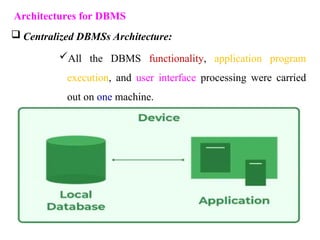
 Centralized DBMSs Architecture:
All the DBMS functionality, application program
execution, and user interface processing were carried
out on one machine.
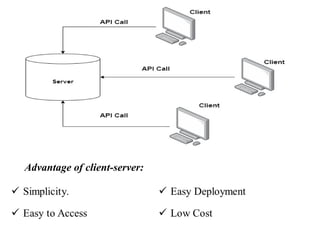
Client/Server Architectures (two-tier)
 Consists of many PCs/workstations and mobile devices as well as
a smaller number of server machines, connected via wireless
networks or LANs and other types of computer networks to access
resource from specialized server.
 Client machines provide the user with the appropriate interfaces to
utilize the servers, as well as with local processing power to run
local applications and send request to the server.
 A server machine is a system containing both hardware and
software that can provide services to the client machines, such as
file access, printing, archiving, or database access.
Advantage of client-server:
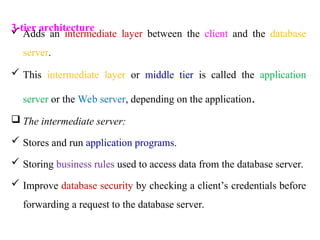
3-tier architecture
 Adds an intermediate layer between the client and the database
server.
 This intermediate layer or middle tier is called the application
server or the Web server, depending on the application.
 The intermediate server:
 Stores and run application programs.
 Storing business rules used to access data from the database server.
 Improve database security by checking a client’s credentials before
forwarding a request to the database server.
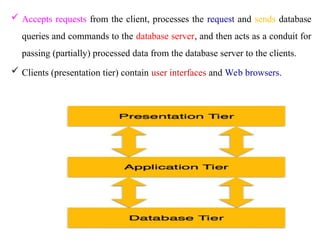
 Accepts requests from the client, processes the request and sends database
queries and commands to the database server, and then acts as a conduit for
passing (partially) processed data from the database server to the clients.
 Clients (presentation tier) contain user interfaces and Web browsers.
Database Languages and Interfaces
 The DBMS must provide appropriate languages and interfaces for
each category of users.
 Categories of DBMS language
1) Data definition language:
 Used by the DBA and database designers to define both conceptual
and internal schemas where no strict separation of levels is
maintained.
 The DBMS will have a DDL compiler whose function is to process
DDL statements in order to identify descriptions of the schema
constructs and to store the schema description in the DBMS catalog.
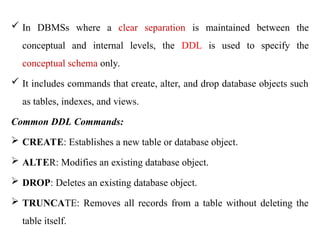
 In DBMSs where a clear separation is maintained between the
conceptual and internal levels, the DDL is used to specify the
conceptual schema only.
 It includes commands that create, alter, and drop database objects such
as tables, indexes, and views.
Common DDL Commands:
 CREATE: Establishes a new table or database object.
 ALTER: Modifies an existing database object.
 DROP: Deletes an existing database object.
 TRUNCATE: Removes all records from a table without deleting the
table itself.
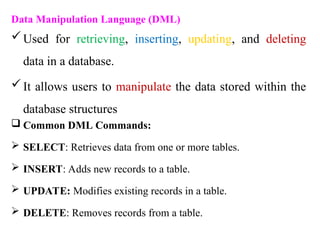
Data Manipulation Language (DML)
Used for retrieving, inserting, updating, and deleting
data in a database.
It allows users to manipulate the data stored within the
database structures
 Common DML Commands:
 SELECT: Retrieves data from one or more tables.
 INSERT: Adds new records to a table.
 UPDATE: Modifies existing records in a table.
 DELETE: Removes records from a table.
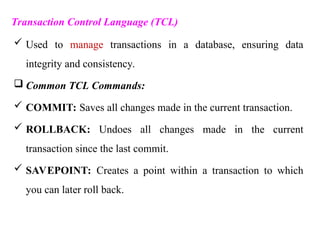
Transaction Control Language (TCL)
 Used to manage transactions in a database, ensuring data
integrity and consistency.
 Common TCL Commands:
 COMMIT: Saves all changes made in the current transaction.
 ROLLBACK: Undoes all changes made in the current
transaction since the last commit.
 SAVEPOINT: Creates a point within a transaction to which
you can later roll back.
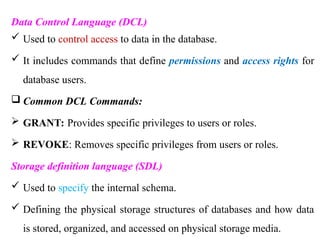
Data Control Language (DCL)
 Used to control access to data in the database.
 It includes commands that define permissions and access rights for
database users.
 Common DCL Commands:
 GRANT: Provides specific privileges to users or roles.
 REVOKE: Removes specific privileges from users or roles.
Storage definition language (SDL)
 Used to specify the internal schema.
 Defining the physical storage structures of databases and how data
is stored, organized, and accessed on physical storage media.
DBMS Interfaces
 The interfaces provided by a DBMS include the following:
Menu-based Interfaces.
 Present the user with lists of options (called menus) or navigation
menu
 Popular technique in Web-based user interfaces.
 E.g. WordPress, Joomla, phpMyAdmin and MySQL
Apps for Mobile Devices:
 Allow users to access their data through a mobile phone or mobile
device.
 E.g. banking, reservations, and insurance companies.
Forms-based Interfaces
 Displays a form to each user.
 Users can fill out all of the form entries to insert new data, or they
can fill out only certain entries.
Graphical User Interfaces.
 Allows users to interact with the database through visual elements
like buttons, forms, and tables.
 Utilize both menus and forms.
Natural Language Interfaces:
 Accept requests written in English or some other language and
attempt to understand them.
Keyword-based Database Search
 Allows users to input keywords to retrieve relevant information
from a database.
 Use predefined indexes on words and use ranking functions to
retrieve and present resulting documents in a decreasing degree
of match.
Speech Input and Output
 Allows users to interact with a database system through speech
recognition for input and text-to-speech (TTS) for output.
Interfaces for the DBA
 Contain privileged commands that can be used only by the
DBA staff.
 These include commands like:
Creating accounts.
Setting system parameters.
Granting account authorization.
Changing a schema, and
Reorganizing the storage structures of a database.
The Database System Environment
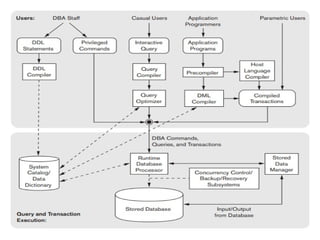
 A DBMS is a complex software system which consists of
several component modules, each serving a specific purpose in
database operations.
DBMS Component Modules
Three level of DBMS modules:
1) User Interface Module
2) Compilation and optimization module.
3) Runtime Database Processor module.
1) User interface module
 Provides a way for users to interact with the DBMS.
 This can include graphical user interfaces (GUIs), command-line
interfaces (CLIs), or web-based interfaces.
2) Compilation and optimization module (query processor)
Responsible for interpreting and executing user queries.
Components:
1) Parser: reads the SQL query and checks it for syntax correctness
2) DDL Compiler: Handles schema-related commands and updates
metadata.
3) Query Compiler: Parses and prepares DML queries for execution.
4) Optimizer: Improves execution plans for better performance.
5) Execution Plan Generator: Takes the optimized plan and
prepares it for execution.
3) Runtime Database Processor module.
Responsible for executing the compiled queries and managing the
actual data retrieval and manipulation processes.
Handles the execution of the plans generated by the Query
Compiler and manages transactions and concurrency control.
Operates during the execution of database transactions and queries
Major components
1) Query Execution Engine components: executing the parsed
and optimized queries generated by the query processor.
2) Transaction Management Component: Manages the
execution of database transactions to ensure they adhere to
ACID properties.
3) Buffer Management System: Manages the in-memory buffer
pool where data pages are temporarily stored during
processing.
Cont…
4) Concurrency Control Manager: Multiple transactions can
operate concurrently without leading to inconsistencies in the
database.
5) Access Methods: Provides various strategies for accessing data
stored in the database.
6) Data Retrieval and Manipulation Modules: handle the retrieval
and manipulation of data.
7) Error Handling and Recovery Mechanism: Manages errors that
occur during runtime and facilitates recovery from failures.
Classification of DBMS
 Database Management Systems (DBMS) can be classified
into several categories based on various criteria.
1) Data Model: DBMS can be classified as Hierarchical,
network, relational, object-oriented and NoSQL.
2) Number of Users: single and multi-user DBMS
3) Architecture: Single-tier, two-tier and three-tier.
4) Usage: operational and analytical
5) Data Accessibility: cloud and on-premises
Thank You
Any
Question?
welcome
62

Chapter 2 Database Systems Architectures

  • 1.
    Chapter 2 Instructor: Adane(Msc) Database System Architecture
  • 2.
    Outline  Overview ofData Models  Data models, Schemas, and Instances  Architecture and Data Independence  Database Language and Interface  The Database System Environment  Classification of DBMS
  • 3.
    1. Overview ofData Models Data models: a description of the way the data is stored in a database. It defines: How Data is Arranged: like tables, trees, or documents. How Data Relates: It shows how one piece of data connects to another (like a student to their classes). What Data Can Be Stored: It sets rules (constraints) for what types of information you can keep. E.g of data type (text, number, date…etc)
  • 4.
     Common typeof Data model  Tables: Like a spreadsheet with rows and columns (this is used in most databases).  Trees: Information is organized in a top-down structure (like a family tree).  Documents: Information is saved in files with a flexible format (like a Word document)  Helps to ensure the database is organized and that the data is meaningful and usable!  A data model helps you understand how to keep and manage data in a database!
  • 5.
    Some constraints inthe databases: Certain fields must have data (e.g., every student must have a name). Values in specific fields must be unique (e.g., each student ID must be different). Default settings if no data is provided for certain fields (e.g., if no age is given, set it to 18). Categories of data models include: 1) Record-based 2) Object-based 3) Physical
  • 6.
    1) Record-based datamodel  Consist of a number of pre-defined fixed format records.  Each record type defines a fixed number of fields.  Each field is typically of a fixed length. Example: Product Inventory Record Field Name Data Type Fixed Length Description ProductID Integer 10 Unique identifier for each product ProductName Text 30 Name of the product Category Text 15 Category of the product Price Decimal 10 Price of the product (including decimals) QuantityInStock Integer 5 Quantity available in stock
  • 7.
    Types of recordbased data model: i. Hierarchical Data Model ii. Network Data Model iii. Relational Data Model Hierarchical Data Model  It is based on the assumption that all relationships in a conceptual data model (i.e. all the relationships linking the data together) can be structured as hierarchies.  Organizes data in a tree-like structure with parent- child relationships
  • 8.
     Good forrepresenting structured data with a clear hierarchy.  Each record can have multiple child records but only one parent Dean Head of Department Staff
  • 9.
    In the exampleabove: you would say that the “Dean” is the parent or owner of the “Head of Department”, and that the HOD is the same for the “Staff”.  “Dean”, “Head of Department (HOD),” and “Staff” can indeed be referred to as segments or sections. These segments correspond to entities defined in the conceptual data model and represent distinct levels of the hierarchy.
  • 10.
    Rules & Concepts Thereis only one segment that has no parent. Called the “root” of the database model. A segment can be parent to any number of children. Including 0, in which case it is called a “leaf segment”. A segment has one and only one parent. With the sole exception of the root, which has none.
  • 11.
    There is aunique path in the hierarchy that goes from the root of the structure to any given segment. Segments along this path are called the “ancestors” of the segment, which is said to be a dependant segment of all its ancestors (associates).
  • 12.
    The graphical representationof a hierarchical data model uses boxes and arrows:  Each segment is represented in a box.  An arrow represents a PCR (the arrow going from parent to child), implies upside down tree structure. Individual trees can be completely extracted from the main structure and divided into subtree. Any segment in a tree can be the root of a sub trees.
  • 13.
     Consider thefollowing E-R model, which is a subset of the organization of a small company:  This implemented in a hierarchical data model as follow: Manager Employee Tasks PC
  • 14.
    This would bethe physical data that would be recorded in the database. Shurube Girma Mulugeta PC-01 PC-02 Accountant Secretary PR Manager
  • 15.
    Physical storage  Segmentswill be stored as records in one or several files.  Files would be linked together using physical pointers, or addresses, that would yield the address of the parent record (physical address of the record on the disk
  • 16.
    Strength or advantageof hierarchical data model Conceptually simple: a tree structure is easy to design and understand. Allows fast and efficient searches on the data. Weakness or disadvantage of hierarchical data model Rigidity Inability to store “many to many” (“N:N”) relationships, it limited to “1:1” and “1:N”. Linked to the use of physical pointers. Difficulty of using it and application programming on it.
  • 17.
    Network data model Developed and formalized in the late 1960’s to solve the main problem of hierarchical data models, namely the inability to store N:N relationships.  Records can have multiple parent and child relationships, meaning that a child record can be linked to multiple parent records, enabling a many-to-many relationship.  This flexibility allows for more complex data relationships than the hierarchical model.  For example: Students can enroll in multiple courses Courses can have multiple students.
  • 18.
    Network data modeldiagram CSIT Department Marc Sarma Binyam Zecharias
  • 19.
     The graphicalrepresentation of a network is done using a mathematical tool called a direct graph.  Direct graph constituted of two types of components: Nodes (graphically, circles or boxes), which represent records. Edges (graphically, arrows), which represent relationships between the nodes.  Even it is extension of hierarchical model . It has, however, its own specific nomenclature that is different.
  • 20.
    Comparison of thenomenclature Network Model Hierarchical Model Record Record Set Level Owner Parent Record Member Child Record Pointer Link Path Tree Traversal Schema Hierarchical Structure
  • 21.
     Efficient Access. Flexibility. Weakness of the network model  It includes all the weaknesses of the hierarchical model, as it only addresses one its limitations which was related to relationship.  Complex due to having multiple parent and child.  No single “path” to access a specific data item. Strength of the network model
  • 22.
    Relational Data Model At the beginning of the 1970’s, a better way to store data was invented.  The main difference with the previous two models is that this one gets rid (free) of physical pointers and of all the ensuing limitations. Physical pointer replaced with foreign key.  In this model, the DBMS itself keeps track of all table relationships, independent of hardware or outside programming languages.  A user or an application programmer only needs to understand the logical structure of data, not how it is physically stored.
  • 23.
    Terminologies in relationaldata model  Relation: Two dimensional table.  Stores information or data in the form of tables rows and columns.  A row of the table is called tuple equivalent to record.  A column of a table is called attribute equivalent to fields.  Data value is the value of the Attribute.  Records are related by the data stored jointly in the fields of records in two tables or files.
  • 24.
    Cont…  The relatedtables contain information that creates the relation.  The tables seem to be independent but are related somehow.  No physical consideration of the storage is required by the user  Many tables are merged together to come up with a new virtual view of the  Conducts searches by using data in specified columns of one table to find additional data in another table. Alternative terminologies Relation Table File Tuple Row Record
  • 25.
    Cont…  In conductingsearches, a relational database matches information from a field in one table with information in a corresponding field of another table to produce a third table that combines requested data from both tables.  Principles in a relational data model are:  Tuples are ordered lists of values.  Components of a tuple are identified by unique names, called attributes.  Relations are two-dimensional tables of data: they are sets of tuples. An easy way to think of a relation is to see it as a spreadsheet (such as in MS Excel).
  • 26.
    Cont… Name Father-Name Birth-YearAcademic-Status Nebiyu Mulugeta 1982 Warning Sewit Getachu 1984 Dean's List Abdellah Oumer 1981 Promoted  The spreadsheet data above can be linked to the relational data model concepts in the following way:  The entire spreadsheet above is a relation, which we could call “Student-Status”.  (Nebiyu, Mulugeta, 1982, Warning), and (Sewit, Getachu, 1984, Dean’s List) are the first two tuples of this relation.  “Name”, “Father-Name”, “Birth-Year”, and “Academic-Status” are the attributes of the relation.
  • 27.
    Relation above fulfilbasic rules of the relational data model.  The order of the rows does not matter – the relation would be the same if we re-ordered the records in alphabetical order of the name.  The order of the columns does not matter – if “academic-status” came before “birth-year”, the relation would still be the same.  Each row is unique (we will come back to that later on).  Values in one column are all of the same kind.  The domains (or data types) for the values in the tuples must be atomic; which means that: Allowed: elementary data types such as text strings, integers, dates, etc… Not allowed: tuples, lists, sets, etc…
  • 28.
     In caseof relational data model physical pointers are removed and replaced by “primary key” and “foreign keys”. House (ID, Size, Address, Landlord_ID) Landlord (Landlord ID, Name, Father_Name)  These relations has a single attribute primary key, called ID and Landlord ID respectively.  To store the relation between “House” and “Landlord” (each house is owned by one and only one landlord), we use the “Landlord_ID” field in “House”,  “Landlord-ID” field is called a foreign key (in the sense that it is the primary key of another relation, that is foreign to the one where it is located)
  • 29.
    Cont…  And canbe seen as a logical pointer as opposed to the physical pointers that we used in previous data models.  Strengths It is simple to understand. It is highly flexible and easy to use.  Weaknesses Search and access times are relatively slow.
  • 30.
    Schemas, Instances, andDatabase State  The description of a database is called the database schema.  Skeleton structure of entire database to represents the logical view of entire database.  It tells about: how the data is organized. how relation among them is associated. formulates all database constraints that would be put on data in relations, which resides in database.  Specified during database design and is not expected to change frequently also difficult to change.
  • 31.
     Schema onlychanges as the requirements of the database applications change. It does not contain any data or information.  Schema diagram displays: Table /entities Relationship Constraint Attributes
  • 32.
    Instance The data inthe database at a particular moment in time. Also called database state or snapshot or the current set of occurrences or extension of schema. The actual data in a database may change quite frequently, as any addition, deletion, or update of an item changes the state of the database from one instance to another. Database instances tend to change with time.
  • 33.
    Cont… When we definea new database, we specify its database schema only to the DBMS. At this point, the corresponding database state is the empty state with no data. DBMS ensures that its every instance (state) must be a valid state by keeping up to all validation, constraints and condition that database designers has imposed or it is expected from DBMS itself.
  • 34.
    Database schema canbe divided broadly in two categories: 1) Logical Database Schema: defines:-  All logical constraints that need to be applied on data stored. Tables, views and integrity constraints etc. 2) Physical Database Schema: Pertains to the actual storage of data and its form of storage like files, indices etc. It defines the how data will be stored in secondary storage etc.
  • 35.
  • 36.
    The Three-Schema Architecture Inthis architecture, schemas can be defined at the following three levels: 1)The internal level has internal schema describes: The physical storage structure of the database. The complete details of data storage and access paths for the database. 2) The conceptual level has a conceptual schema, describes: The structure of the whole database for a community of users. Entities, general data types, relationships, user operations, and constraints. Hides the details of physical storage structures
  • 37.
    3) The externalor view level  Includes a number of external schemas or user views.  Describes the part of the database that a particular user group is interested in and hides the rest of the database from that user group.  The processes of transforming requests and results between levels are called mappings.
  • 38.
  • 39.
    Data Independence  Thecapacity to change the schema at one level of a database system without having to change the schema at the next higher level.  Two types of data independence: 1) Logical data independence:  The capacity to change the conceptual schema without having to change external schemas or application programs.  Only the view definition and the mappings need to be changed in a DBMS that supports logical data independence.  Sometimes change to the conceptual schema is done to expand & reduce the database, however remaining data should not be affected
  • 40.
    2) Physical dataindependence  Change the internal schema without having to change the conceptual schema and the external schemas.  Changes to the internal schema may be needed because some physical files were reorganized. for example, by creating additional access structures to improve the performance of retrieval or update.  Logical data independence is harder to achieve because it allows structural and constraint changes without affecting application programs a much stricter requirement.
  • 41.
    Architectures for DBMS Centralized DBMSs Architecture: All the DBMS functionality, application program execution, and user interface processing were carried out on one machine.
  • 42.
    Client/Server Architectures (two-tier) Consists of many PCs/workstations and mobile devices as well as a smaller number of server machines, connected via wireless networks or LANs and other types of computer networks to access resource from specialized server.  Client machines provide the user with the appropriate interfaces to utilize the servers, as well as with local processing power to run local applications and send request to the server.  A server machine is a system containing both hardware and software that can provide services to the client machines, such as file access, printing, archiving, or database access.
  • 43.
  • 44.
    3-tier architecture  Addsan intermediate layer between the client and the database server.  This intermediate layer or middle tier is called the application server or the Web server, depending on the application.  The intermediate server:  Stores and run application programs.  Storing business rules used to access data from the database server.  Improve database security by checking a client’s credentials before forwarding a request to the database server.
  • 45.
     Accepts requestsfrom the client, processes the request and sends database queries and commands to the database server, and then acts as a conduit for passing (partially) processed data from the database server to the clients.  Clients (presentation tier) contain user interfaces and Web browsers.
  • 46.
    Database Languages andInterfaces  The DBMS must provide appropriate languages and interfaces for each category of users.  Categories of DBMS language 1) Data definition language:  Used by the DBA and database designers to define both conceptual and internal schemas where no strict separation of levels is maintained.  The DBMS will have a DDL compiler whose function is to process DDL statements in order to identify descriptions of the schema constructs and to store the schema description in the DBMS catalog.
  • 47.
     In DBMSswhere a clear separation is maintained between the conceptual and internal levels, the DDL is used to specify the conceptual schema only.  It includes commands that create, alter, and drop database objects such as tables, indexes, and views. Common DDL Commands:  CREATE: Establishes a new table or database object.  ALTER: Modifies an existing database object.  DROP: Deletes an existing database object.  TRUNCATE: Removes all records from a table without deleting the table itself.
  • 48.
    Data Manipulation Language(DML) Used for retrieving, inserting, updating, and deleting data in a database. It allows users to manipulate the data stored within the database structures  Common DML Commands:  SELECT: Retrieves data from one or more tables.  INSERT: Adds new records to a table.  UPDATE: Modifies existing records in a table.  DELETE: Removes records from a table.
  • 49.
    Transaction Control Language(TCL)  Used to manage transactions in a database, ensuring data integrity and consistency.  Common TCL Commands:  COMMIT: Saves all changes made in the current transaction.  ROLLBACK: Undoes all changes made in the current transaction since the last commit.  SAVEPOINT: Creates a point within a transaction to which you can later roll back.
  • 50.
    Data Control Language(DCL)  Used to control access to data in the database.  It includes commands that define permissions and access rights for database users.  Common DCL Commands:  GRANT: Provides specific privileges to users or roles.  REVOKE: Removes specific privileges from users or roles. Storage definition language (SDL)  Used to specify the internal schema.  Defining the physical storage structures of databases and how data is stored, organized, and accessed on physical storage media.
  • 51.
    DBMS Interfaces  Theinterfaces provided by a DBMS include the following: Menu-based Interfaces.  Present the user with lists of options (called menus) or navigation menu  Popular technique in Web-based user interfaces.  E.g. WordPress, Joomla, phpMyAdmin and MySQL Apps for Mobile Devices:  Allow users to access their data through a mobile phone or mobile device.  E.g. banking, reservations, and insurance companies.
  • 52.
    Forms-based Interfaces  Displaysa form to each user.  Users can fill out all of the form entries to insert new data, or they can fill out only certain entries. Graphical User Interfaces.  Allows users to interact with the database through visual elements like buttons, forms, and tables.  Utilize both menus and forms. Natural Language Interfaces:  Accept requests written in English or some other language and attempt to understand them.
  • 53.
    Keyword-based Database Search Allows users to input keywords to retrieve relevant information from a database.  Use predefined indexes on words and use ranking functions to retrieve and present resulting documents in a decreasing degree of match. Speech Input and Output  Allows users to interact with a database system through speech recognition for input and text-to-speech (TTS) for output.
  • 54.
    Interfaces for theDBA  Contain privileged commands that can be used only by the DBA staff.  These include commands like: Creating accounts. Setting system parameters. Granting account authorization. Changing a schema, and Reorganizing the storage structures of a database.
  • 55.
    The Database SystemEnvironment  A DBMS is a complex software system which consists of several component modules, each serving a specific purpose in database operations. DBMS Component Modules Three level of DBMS modules: 1) User Interface Module 2) Compilation and optimization module. 3) Runtime Database Processor module.
  • 56.
    1) User interfacemodule  Provides a way for users to interact with the DBMS.  This can include graphical user interfaces (GUIs), command-line interfaces (CLIs), or web-based interfaces. 2) Compilation and optimization module (query processor) Responsible for interpreting and executing user queries. Components: 1) Parser: reads the SQL query and checks it for syntax correctness 2) DDL Compiler: Handles schema-related commands and updates metadata. 3) Query Compiler: Parses and prepares DML queries for execution.
  • 57.
    4) Optimizer: Improvesexecution plans for better performance. 5) Execution Plan Generator: Takes the optimized plan and prepares it for execution. 3) Runtime Database Processor module. Responsible for executing the compiled queries and managing the actual data retrieval and manipulation processes. Handles the execution of the plans generated by the Query Compiler and manages transactions and concurrency control. Operates during the execution of database transactions and queries
  • 58.
    Major components 1) QueryExecution Engine components: executing the parsed and optimized queries generated by the query processor. 2) Transaction Management Component: Manages the execution of database transactions to ensure they adhere to ACID properties. 3) Buffer Management System: Manages the in-memory buffer pool where data pages are temporarily stored during processing.
  • 59.
    Cont… 4) Concurrency ControlManager: Multiple transactions can operate concurrently without leading to inconsistencies in the database. 5) Access Methods: Provides various strategies for accessing data stored in the database. 6) Data Retrieval and Manipulation Modules: handle the retrieval and manipulation of data. 7) Error Handling and Recovery Mechanism: Manages errors that occur during runtime and facilitates recovery from failures.
  • 61.
    Classification of DBMS Database Management Systems (DBMS) can be classified into several categories based on various criteria. 1) Data Model: DBMS can be classified as Hierarchical, network, relational, object-oriented and NoSQL. 2) Number of Users: single and multi-user DBMS 3) Architecture: Single-tier, two-tier and three-tier. 4) Usage: operational and analytical 5) Data Accessibility: cloud and on-premises
  • 62.