Unit 54: Raster &
Vector Graphics
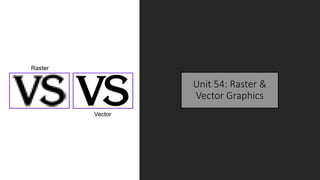
Raster
Vector
Raster Graphics
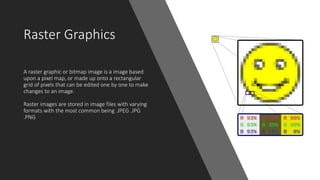
A raster graphic or bitmap image is a image based
upon a pixel map, or made up onto a rectangular
grid of pixels that can be edited one by one to make
changes to an image.
Raster images are stored in image files with varying
formats with the most common being .JPEG .JPG
.PNG
Vector Graphics
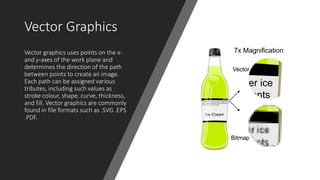
Vector graphics uses points on the x-
and y-axes of the work plane and
determines the direction of the path
between points to create an image.
Each path can be assigned various
tributes, including such values as
stroke colour, shape, curve, thickness,
and fill. Vector graphics are commonly
found in file formats such as .SVG .EPS
.PDF.
Raster File Formats
Plus Many More
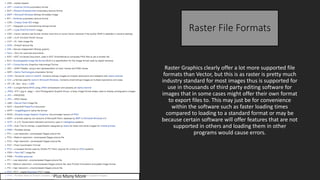
Raster Graphics clearly offer a lot more supported file
formats than Vector, but this is as raster is pretty much
industry standard for most images thus is supported for
use in thousands of third party editing software for
images that in some cases might offer their own format
to export files to. This may just be for convenience
within the software such as faster loading times
compared to loading to a standard format or may be
because certain software will offer features that are not
supported in others and loading them in other
programs would cause errors.
Vector File Formats
Vector formats are a little more scarce with the Vector
being a relatively new format for images after only
becoming widely known following the launch of Adobe
Illustrator. Third party software still offers uncommon
file extensions for vector files although not as many as
raster offers. This is because as previously mentioned
Vector is still a recent format and Vector files just don’t
have the same usage capabilities as raster so is only
used for specific tasks such as logo creation thus isn’t as
popular.
Advantages of Raster
Graphics
• Raster files generally end up a smaller file size than a
vector file, this is because less is processed into the
final image compared to a Vector file which because
of its format can hold more detail in an image of the
same resolution and dpi.
• Raster images are the natural choice when
representing images like photos. They store a value
for each pixel, compressing the images with various
schemes.
• Because of the simple data storage technique, Raster
files are usually easy to access between different
programs and are generally faster to transfer and
open.
Disadvantages of
Raster Graphics
• Vector files cannot easily be used to
store extremely complex images, such
as some photographs, where colour
information is important and may vary
on a pixel basis
• Vector data displays best on vectored
output devices such as plotters and
random scan displays.
• Reconstruction of vector data may take
considerably longer than that in a
bitmap file of equivalent complexity,
because each image element must be
drawn individually and in sequence.
Advantages of Vector
Graphics
• Graphic outputs of images are higher
clarity than if created as a raster image.
• Offers power of scalability. Enlarging an
image as a vector, it will remain in its
best quality unlike enlarging a raster
graphic
• Any line or object can be edited in
anyway possible and still maintain the
same sharp, high quality.
Disadvantages of
Vector Graphics
• The drawing image containing trapping
information can only be scaled up to
20% larger or smaller.
• Thin lines in a vector image may auto
delete if the size is reduced too much
• Photographs cannot be taken in a vector
format. It must be drawn by the artist,
and must be edited in specific software
such as Adobe Illustrator.

Raster and vector

  • 1.
    Unit 54: Raster& Vector Graphics Raster Vector
  • 2.
    Raster Graphics A rastergraphic or bitmap image is a image based upon a pixel map, or made up onto a rectangular grid of pixels that can be edited one by one to make changes to an image. Raster images are stored in image files with varying formats with the most common being .JPEG .JPG .PNG
  • 3.
    Vector Graphics Vector graphicsuses points on the x- and y-axes of the work plane and determines the direction of the path between points to create an image. Each path can be assigned various tributes, including such values as stroke colour, shape, curve, thickness, and fill. Vector graphics are commonly found in file formats such as .SVG .EPS .PDF.
  • 4.
    Raster File Formats PlusMany More Raster Graphics clearly offer a lot more supported file formats than Vector, but this is as raster is pretty much industry standard for most images thus is supported for use in thousands of third party editing software for images that in some cases might offer their own format to export files to. This may just be for convenience within the software such as faster loading times compared to loading to a standard format or may be because certain software will offer features that are not supported in others and loading them in other programs would cause errors.
  • 5.
    Vector File Formats Vectorformats are a little more scarce with the Vector being a relatively new format for images after only becoming widely known following the launch of Adobe Illustrator. Third party software still offers uncommon file extensions for vector files although not as many as raster offers. This is because as previously mentioned Vector is still a recent format and Vector files just don’t have the same usage capabilities as raster so is only used for specific tasks such as logo creation thus isn’t as popular.
  • 6.
    Advantages of Raster Graphics •Raster files generally end up a smaller file size than a vector file, this is because less is processed into the final image compared to a Vector file which because of its format can hold more detail in an image of the same resolution and dpi. • Raster images are the natural choice when representing images like photos. They store a value for each pixel, compressing the images with various schemes. • Because of the simple data storage technique, Raster files are usually easy to access between different programs and are generally faster to transfer and open.
  • 7.
    Disadvantages of Raster Graphics •Vector files cannot easily be used to store extremely complex images, such as some photographs, where colour information is important and may vary on a pixel basis • Vector data displays best on vectored output devices such as plotters and random scan displays. • Reconstruction of vector data may take considerably longer than that in a bitmap file of equivalent complexity, because each image element must be drawn individually and in sequence.
  • 8.
    Advantages of Vector Graphics •Graphic outputs of images are higher clarity than if created as a raster image. • Offers power of scalability. Enlarging an image as a vector, it will remain in its best quality unlike enlarging a raster graphic • Any line or object can be edited in anyway possible and still maintain the same sharp, high quality.
  • 9.
    Disadvantages of Vector Graphics •The drawing image containing trapping information can only be scaled up to 20% larger or smaller. • Thin lines in a vector image may auto delete if the size is reduced too much • Photographs cannot be taken in a vector format. It must be drawn by the artist, and must be edited in specific software such as Adobe Illustrator.