Raspberry and Pharo
Pharo run on RaspberryPI
• ArmVM: http://files.pharo.org/vm/pharo-spur32/
linux/armv6/latest.zip
• JIT
• FFI
• OSProcess/OSSubprocess
• https://github.com/marianopeck/
OSSubprocess
Low level GPIO libraries
• WiringPI bindings from Jean Baptiste
• http://smalltalkhub.com/#!/~Pharo/IoT
• docs http://wiringpi.com
• Pigpio bindings from Tim Rowledge
• http://www.squeaksource.com/HardwarePeripherals.html
• docs http://abyz.co.uk/rpi/pigpio/
• Required old compiler to install in Pharo
Remote development of Raspberry
1. Prepare Raspberry image
• Download Pharo 6 and install server part of PharmIDE
Metacello new
smalltalkhubUser: 'Pharo' project: ‘PharmDIE';
configuration: 'PharmIDE';
version: #stable;
load: ‘Server’.
2. Save image with running server where IDE will connect
PrmRemoteUIManager registerOnPort: 40423
3. Or start image on Raspberry with command line option
pharo --headless Server.image remotePharo --startServerOnPort=40423
Remote development of Raspberry
• Prepare development image:
• Download Pharo 6 and install client part of PharmIDE
Metacello new
smalltalkhubUser: 'Pharo' project: ‘PharmDIE';
configuration: 'PharmIDE';
version: #stable;
load: ‘Client’.
• Connect to running Raspberry image from playground:
remotePharo := PrmRemoteIDE connectTo: (TCPAddress ip: #[193 51 236 167] port: 40423)
• Script Raspberry from remote playground:
remotePharo openPlayground
• Browse/edit Raspberry image from remote browser:
remotePharo openBrowser
Remote playground
Remote browser
Online docs on GPIO
High level tools
• Low level libraries are not object based
• Pharo IoT project
• Load to Raspberry image with:
Metacello new
smalltalkhubUser: 'Pharo' project: 'IoT';
configuration: 'IoT';
version: #stable;
load: 'RemoteToolsServer'.
• Load to client dev image with:
Metacello new
smalltalkhubUser: 'Pharo' project: 'IoT';
configuration: 'IoT';
version: #stable;
load: 'RemoteToolsClient'.
Pharo IoT project
• Includes remote development tools
• Simple object model for boards
• pins are objects
• hierarchy of boards with specific configuration of pins
• RpiModelBRev1 with single connector P1
• RpiModelBRev2 with two connectors P1 and P2
• more in future
• BeagleBoard’s in future
• Advanced tools to manage peripherals
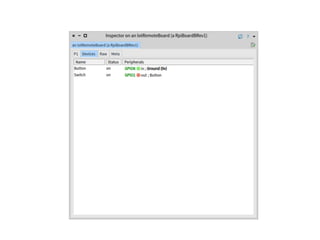
remoteBoard := remotePharo evaluate: [ RpiBoardBRev1 current].
remoteBoard inspect
Devices model to program physical
things connected to board
Remote debugger
Deploy
• Save image at the end
remotePharo saveImage
• On start up all board state is recovered
• Set up image as service with Linux tools
Future
• More RaspberryPI models
• Beaglebone models
• Deploying as service from image
• Zeroconf for armVM+IoT
• Improve code management
• General evolution of PharmIDE
• Automatic detection of running images in network
• Remote refactoring
• Security
• many other things
The end

Raspberry and Pharo

  • 1.
  • 2.
    Pharo run onRaspberryPI • ArmVM: http://files.pharo.org/vm/pharo-spur32/ linux/armv6/latest.zip • JIT • FFI • OSProcess/OSSubprocess • https://github.com/marianopeck/ OSSubprocess
  • 3.
    Low level GPIOlibraries • WiringPI bindings from Jean Baptiste • http://smalltalkhub.com/#!/~Pharo/IoT • docs http://wiringpi.com • Pigpio bindings from Tim Rowledge • http://www.squeaksource.com/HardwarePeripherals.html • docs http://abyz.co.uk/rpi/pigpio/ • Required old compiler to install in Pharo
  • 4.
    Remote development ofRaspberry 1. Prepare Raspberry image • Download Pharo 6 and install server part of PharmIDE Metacello new smalltalkhubUser: 'Pharo' project: ‘PharmDIE'; configuration: 'PharmIDE'; version: #stable; load: ‘Server’. 2. Save image with running server where IDE will connect PrmRemoteUIManager registerOnPort: 40423 3. Or start image on Raspberry with command line option pharo --headless Server.image remotePharo --startServerOnPort=40423
  • 5.
    Remote development ofRaspberry • Prepare development image: • Download Pharo 6 and install client part of PharmIDE Metacello new smalltalkhubUser: 'Pharo' project: ‘PharmDIE'; configuration: 'PharmIDE'; version: #stable; load: ‘Client’. • Connect to running Raspberry image from playground: remotePharo := PrmRemoteIDE connectTo: (TCPAddress ip: #[193 51 236 167] port: 40423) • Script Raspberry from remote playground: remotePharo openPlayground • Browse/edit Raspberry image from remote browser: remotePharo openBrowser
  • 6.
  • 7.
  • 8.
  • 9.
    High level tools •Low level libraries are not object based • Pharo IoT project • Load to Raspberry image with: Metacello new smalltalkhubUser: 'Pharo' project: 'IoT'; configuration: 'IoT'; version: #stable; load: 'RemoteToolsServer'. • Load to client dev image with: Metacello new smalltalkhubUser: 'Pharo' project: 'IoT'; configuration: 'IoT'; version: #stable; load: 'RemoteToolsClient'.
  • 10.
    Pharo IoT project •Includes remote development tools • Simple object model for boards • pins are objects • hierarchy of boards with specific configuration of pins • RpiModelBRev1 with single connector P1 • RpiModelBRev2 with two connectors P1 and P2 • more in future • BeagleBoard’s in future • Advanced tools to manage peripherals remoteBoard := remotePharo evaluate: [ RpiBoardBRev1 current]. remoteBoard inspect
  • 12.
    Devices model toprogram physical things connected to board
  • 14.
  • 16.
    Deploy • Save imageat the end remotePharo saveImage • On start up all board state is recovered • Set up image as service with Linux tools
  • 17.
    Future • More RaspberryPImodels • Beaglebone models • Deploying as service from image • Zeroconf for armVM+IoT • Improve code management • General evolution of PharmIDE • Automatic detection of running images in network • Remote refactoring • Security • many other things
  • 18.