Rails+AJAX
    and

Universal
 Design
Today’s talk in 3 parts

Universal Design, Accessibility and Usability

User centered design for the Agile process

Ajax and Rails make Universal Design easy
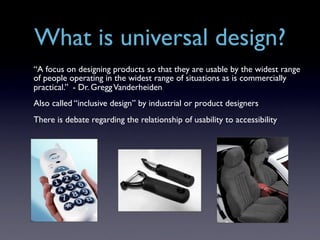
What is universal design?
“A focus on designing products so that they are usable by the widest range
of people operating in the widest range of situations as is commercially
practical.” - Dr. Gregg Vanderheiden
Also called “inclusive design” by industrial or product designers
There is debate regarding the relationship of usability to accessibility
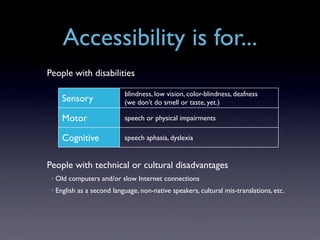
Accessibility is for...
People with disabilities

                             blindness, low vision, color-blindness, deafness
       Sensory               (we don’t do smell or taste, yet.)

       Motor                 speech or physical impairments

       Cognitive             speech aphasia, dyslexia


People with technical or cultural disadvantages
 •   Old computers and/or slow Internet connections
 •   English as a second language, non-native speakers, cultural mis-translations, etc.
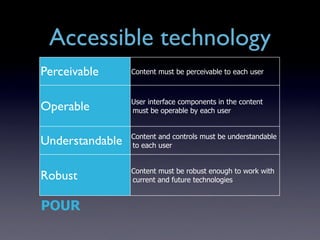
Accessible technology
Perceivable      Content must be perceivable to each user


                 User interface components in the content
Operable         must be operable by each user


                 Content and controls must be understandable
Understandable   to each user


                 Content must be robust enough to work with
Robust           current and future technologies


POUR
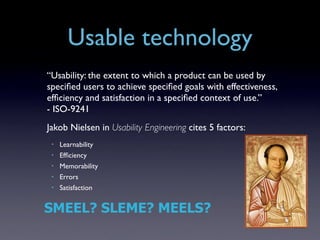
Usable technology
“Usability: the extent to which a product can be used by
specified users to achieve specified goals with effectiveness,
efficiency and satisfaction in a specified context of use.”
- ISO-9241
Jakob Nielsen in Usability Engineering cites 5 factors:
 •   Learnability
 •   Efficiency
 •   Memorability
 •   Errors
 •   Satisfaction


SMEEL? SLEME? MEELS?
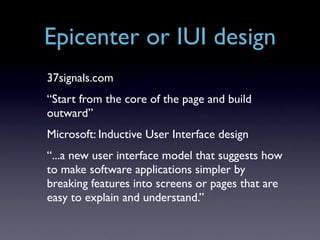
Epicenter or IUI design
37signals.com
“Start from the core of the page and build
outward”
Microsoft: Inductive User Interface design
“...a new user interface model that suggests how
to make software applications simpler by
breaking features into screens or pages that are
easy to explain and understand.”
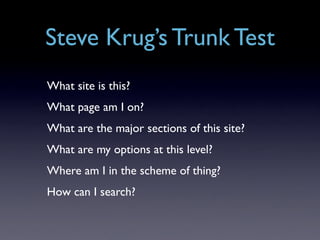
Steve Krug’s Trunk Test
What site is this?
What page am I on?
What are the major sections of this site?
What are my options at this level?
Where am I in the scheme of thing?
How can I search?
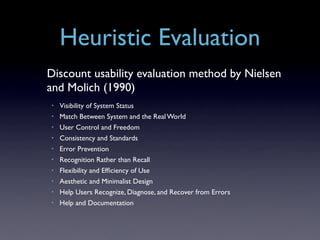
Heuristic Evaluation
Discount usability evaluation method by Nielsen
and Molich (1990)
•   Visibility of System Status
•   Match Between System and the Real World
•   User Control and Freedom
•   Consistency and Standards
•   Error Prevention
•   Recognition Rather than Recall
•   Flexibility and Efficiency of Use
•   Aesthetic and Minimalist Design
•   Help Users Recognize, Diagnose, and Recover from Errors
•   Help and Documentation
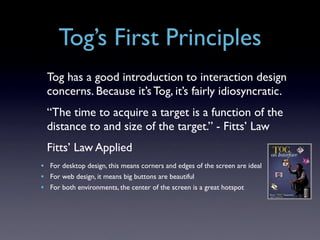
Tog’s First Principles
  Tog has a good introduction to interaction design
  concerns. Because it’s Tog, it’s fairly idiosyncratic.
  “The time to acquire a target is a function of the
  distance to and size of the target.” - Fitts’ Law
  Fitts’ Law Applied
• For desktop design, this means corners and edges of the screen are ideal
• For web design, it means big buttons are beautiful
• For both environments, the center of the screen is a great hotspot
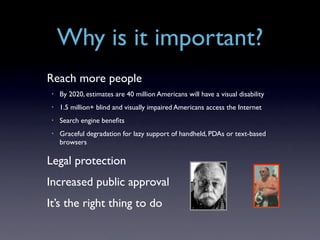
Why is it important?
Reach more people
 •   By 2020, estimates are 40 million Americans will have a visual disability
 •   1.5 million+ blind and visually impaired Americans access the Internet
 •   Search engine benefits
 •   Graceful degradation for lazy support of handheld, PDAs or text-based
     browsers

Legal protection
Increased public approval
It’s the right thing to do
How do we
     accommodate users?
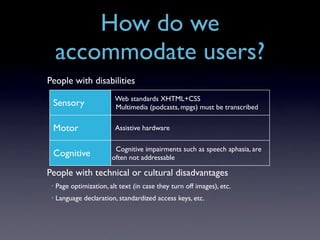
People with disabilities
                          Web standards XHTML+CSS
 Sensory                  Multimedia (podcasts, mpgs) must be transcribed


 Motor                    Assistive hardware

                          Cognitive impairments such as speech aphasia, are
 Cognitive               often not addressable

People with technical or cultural disadvantages
 •   Page optimization, alt text (in case they turn off images), etc.
 •   Language declaration, standardized access keys, etc.
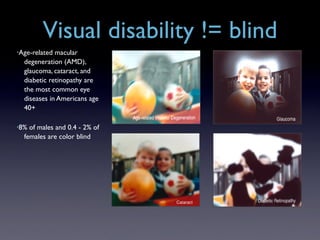
Visual disability != blind
•Age-related macular
  degeneration (AMD),
  glaucoma, cataract, and
  diabetic retinopathy are
  the most common eye
  diseases in Americans age
  40+

•8% of males and 0.4 - 2% of
  females are color blind
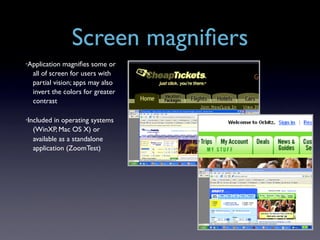
Screen magnifiers
•Application  magnifies some or
  all of screen for users with
  partial vision; apps may also
  invert the colors for greater
  contrast

•Included in operating systems
  (WinXP, Mac OS X) or
  available as a standalone
  application (ZoomTest)
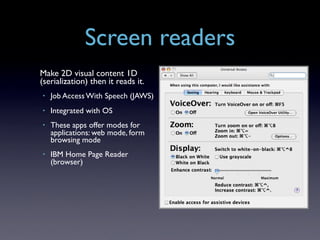
Screen readers
Make 2D visual content 1D
(serialization) then it reads it.
•   Job Access With Speech (JAWS)
•   Integrated with OS
•   These apps offer modes for
    applications: web mode, form
    browsing mode
•   IBM Home Page Reader
    (browser)
Blind users
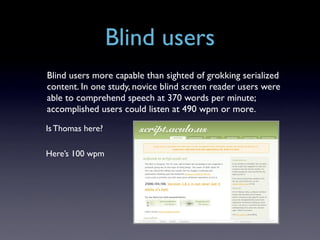
Blind users more capable than sighted of grokking serialized
content. In one study, novice blind screen reader users were
able to comprehend speech at 370 words per minute;
accomplished users could listen at 490 wpm or more.

Is Thomas here?

Here’s 100 wpm
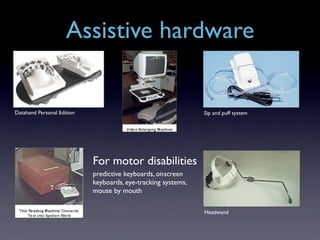
Assistive hardware


Datahand Personal Edition                                      Sip and puff system


                            For motor disabilities
                            predictive keyboards, on screen
                            keyboards, eye-tracking systems,
                            mouse by mouth

                                                               Headwand
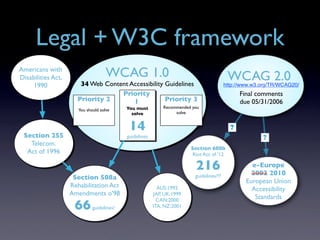
Legal + W3C framework
Americans with
Disabilities Act,                    WCAG 1.0                                              WCAG 2.0
     1990              34 Web Content Accessibility Guidelines                            http://www.w3.org/TR/WCAG20/
                                   Priority                                                     Final comments
                      Priority 2       1            Priority 3                                  due 05/31/2006
                                            You must         Recommended you
                       You should solve
                                              solve               solve


                                             14                                             ?
 Section 255                                guidelines                                                  ?
   Telecom.
                                                                        Section 608b
  Act of 1996                                                            Riot Act of '12

                                                                          216                       e-Europe
                                                                                                    2002 2010
                     Section 508a                                         guidelines?!?
                                                                                                  European Union
                    Rehabilitation Act                     AUS:1992                                 Accessibility
                    Amendments o'98                      JAP, UK:1999
                                                           CAN:2000
                                                                                                     Standards
                     66       guidelines!                ITA, NZ:2001
Ewwwww... lawyers
These cases are often to shame the site or service into accessibility
•   Ramada.com and Priceline.com investigated in NY state under ADA

•   Access Now, Inc. v. Southwest Airlines, Co.

•   America Online sued

•   Target.com sued February, 2006 for excluding “the blind from full and
    equal participation in the growing Internet economy”
Why do I care?
You may be a developer, designer, or sweeper. Regardless, the
user is your responsibility.
Yes, you, the one who argues the pros and cons of distributed
DB transactions and multiple inheritance with your friends.
You have a form factor that is mutable in appearance,
behavior, content and context.
Good software lets customers have their cake and eat it, too.
Don’t bar users with special needs or make them sit at the
“separate but equal” lunch counter.
Black turtleneck optional.
How do I know what I’m
   doing to whom?
Introduction to personas
 Alan Cooper has a saying:
 When boarding a plane, software engineers turn
 left, mere mortals turn right.
 Most of us don’t want to know how the plane
 flies, we just want to get where we’re going.
Why personas?
You are not a user.
Your customer may be a user, but not a typical
one. Users don’t often get to design the UI.
Cooper’s 4 truisms:
 •   There is no “Elastic User”
 •   Being the victim of a problem doesn’t mean you know the solution
 •   Designing with equal weight for all users leads to a weak interface
 •   Real users (an audience of one) are often quirky. Personas smooth out the
     rough edges

from About Face 2.0
Agile Personas
Cooper and Reimann make the point that coders cannot
simultaneously be designers. They claim it is a mental stretch
that isn’t easily made.
Cooper invests weeks or months in doing discovery and
primary research to drive product development strategically.
It’s okay, we’re not doing it solo.
We are going to go Agile, and work with the customer to
define our personas.
Agile Personas
Core Principles of Agile Modeling
  • Assume Simplicity
  • Embrace Change
  • Enabling the Next Effort is Your Secondary Goal
  • Incremental Change
  • Maximize Stakeholder Investment
  • Model With a Purpose
  • Multiple Models
  • Quality Work
  • Rapid Feedback
  • Software Is Your Primary Goal
  • Travel Light
Personas in action
Make many personas, and as you work with the customer,
you will discover the primary persona. (Multiple models,
Maximize stakeholder investment)
Dial in to the level of fidelity you need now. You can always
add metadata like education, emotional profiles, etc., later.
(Embrace change, incremental change)
Often times the work can provide insight, but you need to
turn it into results.
Update personas over time, keep them current as you learn
about your users and their demands change.
Persona attributes
Name, sex, age range, technical/domain experience, job.
User goals. The most important part.
Primary, secondary or negative personas. The most... well,
another important part.
One to two paragraph narrative of persona’s personal
experience.
Can have multiple personas in any role.
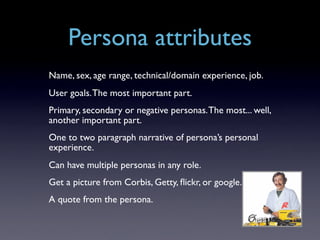
Get a picture from Corbis, Getty, flickr, or google.
A quote from the persona.
Where do you find data?
 From your customer
  •   They may have marketing segmentation studies, surveys, or contact info for
      users
  •   Don’t let them be evil about it.

 Do a task analysis or contextual inquiry
 Grab some research from Jupiter Research, etc.
 Google for personas you can extend
 Use diveintoaccessibility.org’s personas for people with
 disabilities
 Examine your logs
 Engage groups--user groups, support groups, pay a
 recruitment firm
Task analysis
Helps to understand how people do analogous
tasks in the world today.
•   It may be a software-based solution to improve (more on this later)
•   You could be creating something entirely new, and be looking for convenient
    metaphors

Common questions:
•   How often (frequency) do you...
•   How long (duration) do you...
•   Importance (critical function, like stopping a reactor) to you...
•   What tools do they use to do it today?
•   Do they use forms to do it (paper, online, etc.)?
•   Probe for internet usage, technical experience
•   Try to get a sense of their day to day world
Um, this is RailsConf!
Intelligent URL design, with three or fewer attributes, helps users and
search engines. Use labels and terms that resonate with the personas.
Scaffold forms are accessible out of the box, there’s comprehensive
layouts and shared partials to provide accessibility features such as
jump navigation, accesskeys, and relative links. Consistent filenaming
conventions aids both search engines and the disabled, especially if
you use whole words, and not abbreviations.
Um, this is RailsConf!
 Rail’s newness lends to a progressive enhancement technique
 as you build new sites and products
 Rail 1.1’s adoption of new methods (e.g., Streamlined) offer
 the possibility of componetizing those aspects of accessibility
 once strategies are developed.
 Check out http://diveintoaccessibility.org/ Mark Pilgrim lays
 out the code-related issues far better than I could hope to
 here.
 I also highly recommend Jim Thatcher’s site and the book he
 edited http://www.jimthatcher.com/ and Constructing Accessible
 Websites.
Graceful degradation,
Progressive enhancement
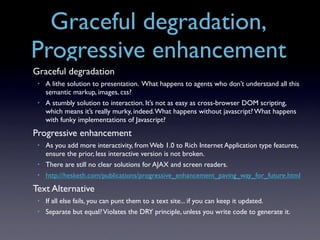
Graceful degradation
 •   A lithe solution to presentation. What happens to agents who don’t understand all this
     semantic markup, images, css?
 •   A stumbly solution to interaction. It’s not as easy as cross-browser DOM scripting,
     which means it’s really murky, indeed. What happens without javascript? What happens
     with funky implementations of Javascript?
Progressive enhancement
 •   As you add more interactivity, from Web 1.0 to Rich Internet Application type features,
     ensure the prior, less interactive version is not broken.
 •   There are still no clear solutions for AJAX and screen readers.
 •   http://hesketh.com/publications/progressive_enhancement_paving_way_for_future.html
Text Alternative
 •   If all else fails, you can punt them to a text site... if you can keep it updated.
 •   Separate but equal? Violates the DRY principle, unless you write code to generate it.
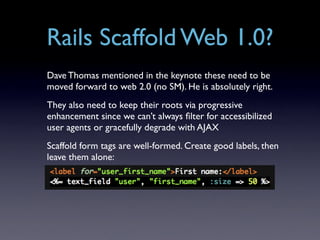
Rails Scaffold Web 1.0?
Dave Thomas mentioned in the keynote these need to be
moved forward to web 2.0 (no SM). He is absolutely right.
They also need to keep their roots via progressive
enhancement since we can’t always filter for accessibilized
user agents or gracefully degrade with AJAX
Scaffold form tags are well-formed. Create good labels, then
leave them alone:
Ajax and Screenreaders
Support is uneven across agents. Disabled users
could be using the same browser you are right
now.
On Script.aculo.us with JAWS:
 •   Autocomplete works fine
 •   Using the drag’n’drop cart you don’t hear a whisper.

James Edwards has some recent findings here:
http://www.sitepoint.com/article/ajax-screenreaders-work
No accessibility,
  no usability
 (no product)
Accessibility without usability
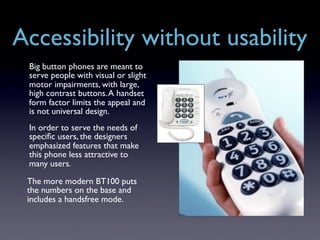
 Big button phones are meant to
 serve people with visual or slight
 motor impairments, with large,
 high contrast buttons. A handset
 form factor limits the appeal and
 is not universal design.
 In order to serve the needs of
 specific users, the designers
 emphasized features that make
 this phone less attractive to
 many users.

 The more modern BT100 puts
 the numbers on the base and
 includes a handsfree mode.
Usability without accessibility


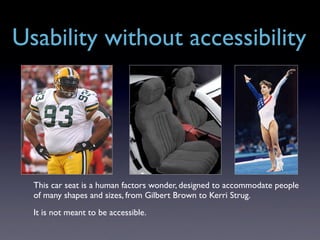
  This car seat is a human factors wonder, designed to accommodate people
  of many shapes and sizes, from Gilbert Brown to Kerri Strug.
  It is not meant to be accessible.
Accessibility as usability
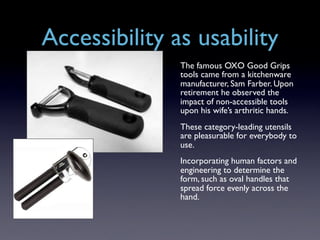
               The famous OXO Good Grips
               tools came from a kitchenware
               manufacturer, Sam Farber. Upon
               retirement he observed the
               impact of non-accessible tools
               upon his wife’s arthritic hands.
               These category-leading utensils
               are pleasurable for everybody to
               use.
               Incorporating human factors and
               engineering to determine the
               form, such as oval handles that
               spread force evenly across the
               hand.
Big future endnote
Ruby on Rails is fast becoming the API for web
applications, UI to DB, like the Windows API
once was for desktop applications.


Let’s build this platform for everyone, and learn
from the mistakes of the past, when accessibility
was an afterthought.
Thanks, Errata, and Apologies
   I said I’d have more examples, and I simply ran out of time.
   Please do download a screenreader or use VoiceOver. Feel
   the frustration.
   My apologies to other speakers--I struggled with a sick
   daughter all week, and finalized this presentation on-site.
   Sorry for being the rude guy typing in the back of the room,
   believe me, it hurt me more than it hurt you.


   All the links and references mentioned here can be found at:
   http://del.icio.us/jdkunesh/ tagged accessibilty and/or usabiility
                          jason@kuniform.org
Shameless pluggery

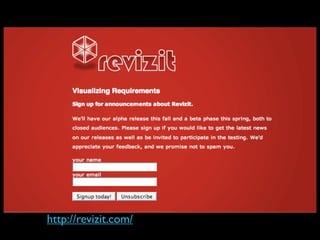
I worked out many of the methods for doing this
while working on revizit.com in graduate school.


If you’re interested, you can sign up to be a part
of our beta test group, and tell us how bad the
app sucks. You guys are a negative persona. ;-)
http://revizit.com/

Rails Ajax Universal Design

  • 1.
    Rails+AJAX and Universal Design
  • 2.
    Today’s talk in3 parts Universal Design, Accessibility and Usability User centered design for the Agile process Ajax and Rails make Universal Design easy
  • 3.
    What is universaldesign? “A focus on designing products so that they are usable by the widest range of people operating in the widest range of situations as is commercially practical.” - Dr. Gregg Vanderheiden Also called “inclusive design” by industrial or product designers There is debate regarding the relationship of usability to accessibility
  • 4.
    Accessibility is for... Peoplewith disabilities blindness, low vision, color-blindness, deafness Sensory (we don’t do smell or taste, yet.) Motor speech or physical impairments Cognitive speech aphasia, dyslexia People with technical or cultural disadvantages • Old computers and/or slow Internet connections • English as a second language, non-native speakers, cultural mis-translations, etc.
  • 5.
    Accessible technology Perceivable Content must be perceivable to each user User interface components in the content Operable must be operable by each user Content and controls must be understandable Understandable to each user Content must be robust enough to work with Robust current and future technologies POUR
  • 6.
    Usable technology “Usability: theextent to which a product can be used by specified users to achieve specified goals with effectiveness, efficiency and satisfaction in a specified context of use.” - ISO-9241 Jakob Nielsen in Usability Engineering cites 5 factors: • Learnability • Efficiency • Memorability • Errors • Satisfaction SMEEL? SLEME? MEELS?
  • 7.
    Epicenter or IUIdesign 37signals.com “Start from the core of the page and build outward” Microsoft: Inductive User Interface design “...a new user interface model that suggests how to make software applications simpler by breaking features into screens or pages that are easy to explain and understand.”
  • 8.
    Steve Krug’s TrunkTest What site is this? What page am I on? What are the major sections of this site? What are my options at this level? Where am I in the scheme of thing? How can I search?
  • 9.
    Heuristic Evaluation Discount usabilityevaluation method by Nielsen and Molich (1990) • Visibility of System Status • Match Between System and the Real World • User Control and Freedom • Consistency and Standards • Error Prevention • Recognition Rather than Recall • Flexibility and Efficiency of Use • Aesthetic and Minimalist Design • Help Users Recognize, Diagnose, and Recover from Errors • Help and Documentation
  • 10.
    Tog’s First Principles Tog has a good introduction to interaction design concerns. Because it’s Tog, it’s fairly idiosyncratic. “The time to acquire a target is a function of the distance to and size of the target.” - Fitts’ Law Fitts’ Law Applied • For desktop design, this means corners and edges of the screen are ideal • For web design, it means big buttons are beautiful • For both environments, the center of the screen is a great hotspot
  • 11.
    Why is itimportant? Reach more people • By 2020, estimates are 40 million Americans will have a visual disability • 1.5 million+ blind and visually impaired Americans access the Internet • Search engine benefits • Graceful degradation for lazy support of handheld, PDAs or text-based browsers Legal protection Increased public approval It’s the right thing to do
  • 12.
    How do we accommodate users? People with disabilities Web standards XHTML+CSS Sensory Multimedia (podcasts, mpgs) must be transcribed Motor Assistive hardware Cognitive impairments such as speech aphasia, are Cognitive often not addressable People with technical or cultural disadvantages • Page optimization, alt text (in case they turn off images), etc. • Language declaration, standardized access keys, etc.
  • 13.
    Visual disability !=blind •Age-related macular degeneration (AMD), glaucoma, cataract, and diabetic retinopathy are the most common eye diseases in Americans age 40+ •8% of males and 0.4 - 2% of females are color blind
  • 14.
    Screen magnifiers •Application magnifies some or all of screen for users with partial vision; apps may also invert the colors for greater contrast •Included in operating systems (WinXP, Mac OS X) or available as a standalone application (ZoomTest)
  • 15.
    Screen readers Make 2Dvisual content 1D (serialization) then it reads it. • Job Access With Speech (JAWS) • Integrated with OS • These apps offer modes for applications: web mode, form browsing mode • IBM Home Page Reader (browser)
  • 16.
    Blind users Blind usersmore capable than sighted of grokking serialized content. In one study, novice blind screen reader users were able to comprehend speech at 370 words per minute; accomplished users could listen at 490 wpm or more. Is Thomas here? Here’s 100 wpm
  • 17.
    Assistive hardware Datahand PersonalEdition Sip and puff system For motor disabilities predictive keyboards, on screen keyboards, eye-tracking systems, mouse by mouth Headwand
  • 18.
    Legal + W3Cframework Americans with Disabilities Act, WCAG 1.0 WCAG 2.0 1990 34 Web Content Accessibility Guidelines http://www.w3.org/TR/WCAG20/ Priority Final comments Priority 2 1 Priority 3 due 05/31/2006 You must Recommended you You should solve solve solve 14 ? Section 255 guidelines ? Telecom. Section 608b Act of 1996 Riot Act of '12 216 e-Europe 2002 2010 Section 508a guidelines?!? European Union Rehabilitation Act AUS:1992 Accessibility Amendments o'98 JAP, UK:1999 CAN:2000 Standards 66 guidelines! ITA, NZ:2001
  • 19.
    Ewwwww... lawyers These casesare often to shame the site or service into accessibility • Ramada.com and Priceline.com investigated in NY state under ADA • Access Now, Inc. v. Southwest Airlines, Co. • America Online sued • Target.com sued February, 2006 for excluding “the blind from full and equal participation in the growing Internet economy”
  • 20.
    Why do Icare? You may be a developer, designer, or sweeper. Regardless, the user is your responsibility. Yes, you, the one who argues the pros and cons of distributed DB transactions and multiple inheritance with your friends. You have a form factor that is mutable in appearance, behavior, content and context. Good software lets customers have their cake and eat it, too. Don’t bar users with special needs or make them sit at the “separate but equal” lunch counter. Black turtleneck optional.
  • 21.
    How do Iknow what I’m doing to whom?
  • 22.
    Introduction to personas Alan Cooper has a saying: When boarding a plane, software engineers turn left, mere mortals turn right. Most of us don’t want to know how the plane flies, we just want to get where we’re going.
  • 23.
    Why personas? You arenot a user. Your customer may be a user, but not a typical one. Users don’t often get to design the UI. Cooper’s 4 truisms: • There is no “Elastic User” • Being the victim of a problem doesn’t mean you know the solution • Designing with equal weight for all users leads to a weak interface • Real users (an audience of one) are often quirky. Personas smooth out the rough edges from About Face 2.0
  • 24.
    Agile Personas Cooper andReimann make the point that coders cannot simultaneously be designers. They claim it is a mental stretch that isn’t easily made. Cooper invests weeks or months in doing discovery and primary research to drive product development strategically. It’s okay, we’re not doing it solo. We are going to go Agile, and work with the customer to define our personas.
  • 25.
    Agile Personas Core Principlesof Agile Modeling • Assume Simplicity • Embrace Change • Enabling the Next Effort is Your Secondary Goal • Incremental Change • Maximize Stakeholder Investment • Model With a Purpose • Multiple Models • Quality Work • Rapid Feedback • Software Is Your Primary Goal • Travel Light
  • 26.
    Personas in action Makemany personas, and as you work with the customer, you will discover the primary persona. (Multiple models, Maximize stakeholder investment) Dial in to the level of fidelity you need now. You can always add metadata like education, emotional profiles, etc., later. (Embrace change, incremental change) Often times the work can provide insight, but you need to turn it into results. Update personas over time, keep them current as you learn about your users and their demands change.
  • 27.
    Persona attributes Name, sex,age range, technical/domain experience, job. User goals. The most important part. Primary, secondary or negative personas. The most... well, another important part. One to two paragraph narrative of persona’s personal experience. Can have multiple personas in any role. Get a picture from Corbis, Getty, flickr, or google. A quote from the persona.
  • 28.
    Where do youfind data? From your customer • They may have marketing segmentation studies, surveys, or contact info for users • Don’t let them be evil about it. Do a task analysis or contextual inquiry Grab some research from Jupiter Research, etc. Google for personas you can extend Use diveintoaccessibility.org’s personas for people with disabilities Examine your logs Engage groups--user groups, support groups, pay a recruitment firm
  • 29.
    Task analysis Helps tounderstand how people do analogous tasks in the world today. • It may be a software-based solution to improve (more on this later) • You could be creating something entirely new, and be looking for convenient metaphors Common questions: • How often (frequency) do you... • How long (duration) do you... • Importance (critical function, like stopping a reactor) to you... • What tools do they use to do it today? • Do they use forms to do it (paper, online, etc.)? • Probe for internet usage, technical experience • Try to get a sense of their day to day world
  • 30.
    Um, this isRailsConf! Intelligent URL design, with three or fewer attributes, helps users and search engines. Use labels and terms that resonate with the personas. Scaffold forms are accessible out of the box, there’s comprehensive layouts and shared partials to provide accessibility features such as jump navigation, accesskeys, and relative links. Consistent filenaming conventions aids both search engines and the disabled, especially if you use whole words, and not abbreviations.
  • 31.
    Um, this isRailsConf! Rail’s newness lends to a progressive enhancement technique as you build new sites and products Rail 1.1’s adoption of new methods (e.g., Streamlined) offer the possibility of componetizing those aspects of accessibility once strategies are developed. Check out http://diveintoaccessibility.org/ Mark Pilgrim lays out the code-related issues far better than I could hope to here. I also highly recommend Jim Thatcher’s site and the book he edited http://www.jimthatcher.com/ and Constructing Accessible Websites.
  • 32.
    Graceful degradation, Progressive enhancement Gracefuldegradation • A lithe solution to presentation. What happens to agents who don’t understand all this semantic markup, images, css? • A stumbly solution to interaction. It’s not as easy as cross-browser DOM scripting, which means it’s really murky, indeed. What happens without javascript? What happens with funky implementations of Javascript? Progressive enhancement • As you add more interactivity, from Web 1.0 to Rich Internet Application type features, ensure the prior, less interactive version is not broken. • There are still no clear solutions for AJAX and screen readers. • http://hesketh.com/publications/progressive_enhancement_paving_way_for_future.html Text Alternative • If all else fails, you can punt them to a text site... if you can keep it updated. • Separate but equal? Violates the DRY principle, unless you write code to generate it.
  • 33.
    Rails Scaffold Web1.0? Dave Thomas mentioned in the keynote these need to be moved forward to web 2.0 (no SM). He is absolutely right. They also need to keep their roots via progressive enhancement since we can’t always filter for accessibilized user agents or gracefully degrade with AJAX Scaffold form tags are well-formed. Create good labels, then leave them alone:
  • 34.
    Ajax and Screenreaders Supportis uneven across agents. Disabled users could be using the same browser you are right now. On Script.aculo.us with JAWS: • Autocomplete works fine • Using the drag’n’drop cart you don’t hear a whisper. James Edwards has some recent findings here: http://www.sitepoint.com/article/ajax-screenreaders-work
  • 35.
    No accessibility, no usability (no product)
  • 36.
    Accessibility without usability Big button phones are meant to serve people with visual or slight motor impairments, with large, high contrast buttons. A handset form factor limits the appeal and is not universal design. In order to serve the needs of specific users, the designers emphasized features that make this phone less attractive to many users. The more modern BT100 puts the numbers on the base and includes a handsfree mode.
  • 37.
    Usability without accessibility This car seat is a human factors wonder, designed to accommodate people of many shapes and sizes, from Gilbert Brown to Kerri Strug. It is not meant to be accessible.
  • 38.
    Accessibility as usability The famous OXO Good Grips tools came from a kitchenware manufacturer, Sam Farber. Upon retirement he observed the impact of non-accessible tools upon his wife’s arthritic hands. These category-leading utensils are pleasurable for everybody to use. Incorporating human factors and engineering to determine the form, such as oval handles that spread force evenly across the hand.
  • 39.
    Big future endnote Rubyon Rails is fast becoming the API for web applications, UI to DB, like the Windows API once was for desktop applications. Let’s build this platform for everyone, and learn from the mistakes of the past, when accessibility was an afterthought.
  • 40.
    Thanks, Errata, andApologies I said I’d have more examples, and I simply ran out of time. Please do download a screenreader or use VoiceOver. Feel the frustration. My apologies to other speakers--I struggled with a sick daughter all week, and finalized this presentation on-site. Sorry for being the rude guy typing in the back of the room, believe me, it hurt me more than it hurt you. All the links and references mentioned here can be found at: http://del.icio.us/jdkunesh/ tagged accessibilty and/or usabiility jason@kuniform.org
  • 41.
    Shameless pluggery I workedout many of the methods for doing this while working on revizit.com in graduate school. If you’re interested, you can sign up to be a part of our beta test group, and tell us how bad the app sucks. You guys are a negative persona. ;-) http://revizit.com/