R Programming
Fundamentals
Ragia A. Ibrahim
Objectives
• How to program in R ?
• Installing and sitting working directory?
• Introduction , what is R?
Data Types ,Operations on them
• Formulating First Script .
• Visualize data
WHAT &WHY
Ross Ihaka
Robert
Gentleman
•R dialect From S
•S is a statistical programming language
•R developed in 1991, to public in 1993,1995 R developers uses
GNU and R become Free
•GNU
• Lots of help available online
• similar to Matlab( not free) , but more user friendly.
•Excellent graphics capabilities
•built-in basic & advanced statistical and numerical analysis tools
Why R ?
WHAT IS R?
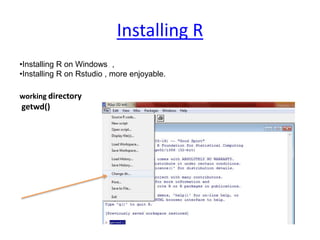
Installing R
•Installing R on Windows ,
•Installing R on Rstudio , more enjoyable.
working directory
getwd()
Data Types & Operators
## comments
Operators
x<-5
︡x
[1] 5
<- assignment operator
: sequence
x <- 1:5
x
[1] 1 2 3 4 5
#Please Make
#it readable
Logical
Y==6
X>Y
Data Types & Operators
Create Vector
Data Types
X<-c(1,2,2)
X<-c(1,2,NA,3)
is.na(X)Missing Values
?
x<-c(1:4) nummeric
X<-(TRUE,FALSE) logical
bad<-is.na(X)
X[!bad]
mean(X)
mean(X[!bad])
max(X)
max(X[!bad]) #var..
Data Types & Operators
Data Types
Create Matrix (all obj the same)
m <- matrix(nrow=2, ncol=3) #dim(m), attributes(m)
m[1][3] <- 6 #.....
M <-matrix( 1:6, nrow=2,ncol=3)
M
M<-matrix(c(4,5,6,7,8,9), nrow=2,ncol=3)
x<-matrix(c(2:16),nrow=3,ncol=5)
M%*%x ; M+M;M*M
subsiting a matrix , M[1,2]; M[1,];M[1,]
Data Types & Operators
#[[]] , vectors with singel [] but lists not.
L <- list(“a”,1,TRUE)
Subseting a list
[[1]], [1]
single [] returns a list, [[]] different data type.
Data Types
Create List ((different elements)
Data Types & Operators
> list1<-c(4,5,6)
> list2<-c(5,6,1,2,3)
> my_l<-list(list1,list2)
 my_l
 my_l[[3]]<-c(4,1)
 my_l[[length(my_l)+1]]<-c(4,1)
Data Types
Create List OF Lists
Data Types & Operators
Data Frame (tabulated data)
each column is a list (each col. same type)
> Df<-
data.frame(name=c("Amal","Basem","Cren"))
> Df<-cbind(Df,degree=c(6.4,3.5,4))
> Df
Df$name , use $ to retrieve object that has name.
Mean, degree ?
Data Types
Data Frame
Control Structure [Control the flow]
If else –-----------------
for – execute loop for fixed number of
times
while – execute while the condition of
while is true
…
d
Control Structure [Cont….]
If (x>3)
{y<-2 }
Else
{y<-0}
…
X<-
c(“a”,”b”,”c”,”d”)
For ( i in 1:4)
print(x[i])
If (x>3)
{ print (“Pass”)}
For(i in 1:10)
{print(i) }
Count<-0
# careful ..infinite
loops
While(count<10)
{count<-count+1
Print(count)
}}
IF FOR While
Writing a function
Ready! Your first function…
# in your script.
My_add<-function(x,y)
{ x+y}
# propmpet
My_add(6,4)
[take 2 number and add them together]
# what about * / ?
Example
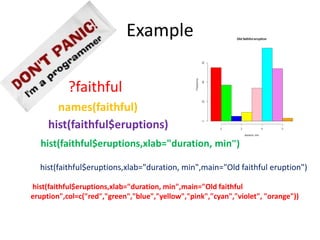
?faithful
names(faithful)
hist(faithful$eruptions)
hist(faithful$eruptions,xlab="duration, min")
hist(faithful$eruptions,xlab="duration, min",main="Old faithful eruption")
hist(faithful$eruptions,xlab="duration, min",main="Old faithful
eruption",col=c("red","green","blue","yellow","pink","cyan","violet", "orange"))
Thanks…

R programming Fundamentals

  • 1.
  • 2.
    Objectives • How toprogram in R ? • Installing and sitting working directory? • Introduction , what is R? Data Types ,Operations on them • Formulating First Script . • Visualize data
  • 3.
    WHAT &WHY Ross Ihaka Robert Gentleman •Rdialect From S •S is a statistical programming language •R developed in 1991, to public in 1993,1995 R developers uses GNU and R become Free •GNU • Lots of help available online • similar to Matlab( not free) , but more user friendly. •Excellent graphics capabilities •built-in basic & advanced statistical and numerical analysis tools Why R ? WHAT IS R?
  • 4.
    Installing R •Installing Ron Windows , •Installing R on Rstudio , more enjoyable. working directory getwd()
  • 5.
    Data Types &Operators ## comments Operators x<-5 ︡x [1] 5 <- assignment operator : sequence x <- 1:5 x [1] 1 2 3 4 5 #Please Make #it readable Logical Y==6 X>Y
  • 6.
    Data Types &Operators Create Vector Data Types X<-c(1,2,2) X<-c(1,2,NA,3) is.na(X)Missing Values ? x<-c(1:4) nummeric X<-(TRUE,FALSE) logical bad<-is.na(X) X[!bad] mean(X) mean(X[!bad]) max(X) max(X[!bad]) #var..
  • 7.
    Data Types &Operators Data Types Create Matrix (all obj the same) m <- matrix(nrow=2, ncol=3) #dim(m), attributes(m) m[1][3] <- 6 #..... M <-matrix( 1:6, nrow=2,ncol=3) M M<-matrix(c(4,5,6,7,8,9), nrow=2,ncol=3) x<-matrix(c(2:16),nrow=3,ncol=5) M%*%x ; M+M;M*M subsiting a matrix , M[1,2]; M[1,];M[1,]
  • 8.
    Data Types &Operators #[[]] , vectors with singel [] but lists not. L <- list(“a”,1,TRUE) Subseting a list [[1]], [1] single [] returns a list, [[]] different data type. Data Types Create List ((different elements)
  • 9.
    Data Types &Operators > list1<-c(4,5,6) > list2<-c(5,6,1,2,3) > my_l<-list(list1,list2)  my_l  my_l[[3]]<-c(4,1)  my_l[[length(my_l)+1]]<-c(4,1) Data Types Create List OF Lists
  • 10.
    Data Types &Operators Data Frame (tabulated data) each column is a list (each col. same type) > Df<- data.frame(name=c("Amal","Basem","Cren")) > Df<-cbind(Df,degree=c(6.4,3.5,4)) > Df Df$name , use $ to retrieve object that has name. Mean, degree ? Data Types Data Frame
  • 11.
    Control Structure [Controlthe flow] If else –----------------- for – execute loop for fixed number of times while – execute while the condition of while is true … d
  • 12.
    Control Structure [Cont….] If(x>3) {y<-2 } Else {y<-0} … X<- c(“a”,”b”,”c”,”d”) For ( i in 1:4) print(x[i]) If (x>3) { print (“Pass”)} For(i in 1:10) {print(i) } Count<-0 # careful ..infinite loops While(count<10) {count<-count+1 Print(count) }} IF FOR While
  • 13.
    Writing a function Ready!Your first function… # in your script. My_add<-function(x,y) { x+y} # propmpet My_add(6,4) [take 2 number and add them together] # what about * / ?
  • 14.
    Example ?faithful names(faithful) hist(faithful$eruptions) hist(faithful$eruptions,xlab="duration, min") hist(faithful$eruptions,xlab="duration, min",main="Oldfaithful eruption") hist(faithful$eruptions,xlab="duration, min",main="Old faithful eruption",col=c("red","green","blue","yellow","pink","cyan","violet", "orange"))
  • 15.

Editor's Notes

  • #4 S is a statistical programming language developed primarily by John Chambers and (in earlier versions) Rick Becker and Allan Wilks of Bell Laboratories. The aim of the language, as expressed by John Chambers, is "to turn ideas into software, quickly and faithfully.“ Bell Labs and formerly known as AT&T Bell Laboratories and Bell Telephone Laboratories) is the research and development subsidiary of Alcatel-Lucent. Bell Laboratories operates its headquarters in Murray Hill, New Jersey, United States, and has research and development facilities throughout the world. Researchers working at Bell Labs are credited with the development of radio astronomy, the transistor, the laser, the charge-coupled device (CCD), information theory, the UNIX operating system, the C programming language, S programming language and the C++ programming language. Eight Nobel Prizes have been awarded for work completed at Bell Laboratories. he R language is widely used among statisticians and data miners for developing statistical software[2][3] and data analysis.[3] Polls and surveys of data miners are showing R's popularity has increased substantially in recent year Packages The capabilities of R are extended through user-created packages, which allow specialized statistical techniques, graphical devices (ggplot2), import/export capabilities, reporting tools (knitr, Sweave), etc. These packages are developed primarily in R, and sometimes in Java, C and Fortran. A core set of packages is included with the installation of R, with more than 5,800 additional packages and 120,000 functions (as of June 2014) available at the Comprehensive R Archive Network (CRAN), Bioconductor, and other repositories. [6 The GNU Project i/ɡnuː/[3] is a free software, mass collaboration project, announced on 27 September 1983, by Richard Stallman at MIT. Its aim is to give computer users freedom and control in their use of their computers and computing devices, by collaboratively developing and providing software that is based on the following freedom rights: users are free to run the software, share it (copy, distribute), study it and modify it. GNU software guarantees these freedom-rights legally (via its license), and is therefore free software; the use of the word "free" always being taken to refer to freedom.
  • #5 R was first created by Ross Ihaka and Robert Gentleman at the University of Auckland in 1993 This is the directory/folder on your computer where you will store project files, data, and code. It's important that you tell R where the working directory is that you will be using so that it knows where to find the appropriate file (the working directory can be any directory on your computer). working directory getwd()
  • #6 Inf NAN
  • #7 Inf NAN
  • #8 Inf NAN
  • #9 Inf NAN
  • #10 Inf NAN
  • #11 Inf NAN
  • #12 Inf NAN
  • #13 Inf NAN
  • #14 Inf NAN
  • #15 Inf NAN