



DevOps Maturity and Automation
BUILDING AN AGILE ENTERPRISE OF TOMORROW
Speakers
2
Nandini Pobbati
Integration Architect
Kellton Tech Solutions
Varun Tummala
Sr. Manager
Kellton Tech Solutions
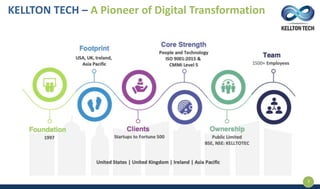
KELLTON TECH – A Pioneer of Digital Transformation
3
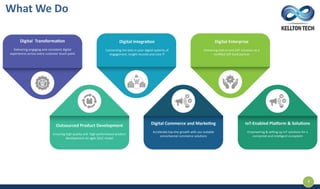
What We Do
4
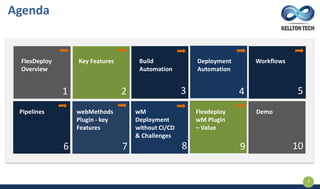
FlexDeploy
Overview
Key Features Build
Automation
Deployment
Automation
Workflows
Pipelines webMethods
Plugin - key
Features
Agenda
wM
Deployment
without CI/CD
& Challenges
Flexdeploy
wM Plugin
– Value
Demo
1 2 3 4 5
6 7 8 9 10
5
Flex Deploy DevOps
Platform
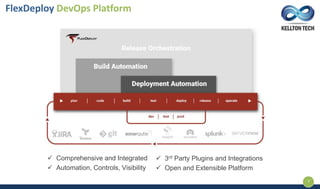
 Comprehensive and Integrated
 Automation, Controls, Visibility
 3rd Party Plugins and Integrations
 Open and Extensible Platform
FlexDeploy DevOps Platform
7
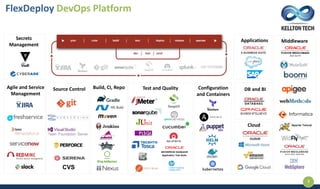
Application Test Suite
Build, CI, Repo Test and Quality
Applications Middleware
Cloud
DB and BIConfiguration
and Containers
Secrets
Management
CVS
Source ControlAgile and Service
Management
FlexDeploy DevOps Platform
8
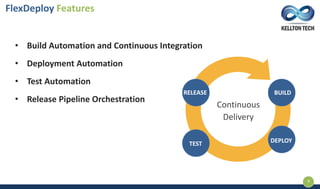
FlexDeploy Features
9
• Build Automation and Continuous Integration
• Deployment Automation
• Test Automation
• Release Pipeline Orchestration
Continuous
Delivery
RELEASE BUILD
TEST DEPLOY
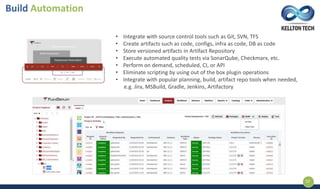
• Integrate with source control tools such as Git, SVN, TFS
• Create artifacts such as code, configs, infra as code, DB as code
• Store versioned artifacts in Artifact Repository
• Execute automated quality tests via SonarQube, Checkmarx, etc.
• Perform on demand, scheduled, CI, or API
• Eliminate scripting by using out of the box plugin operations
• Integrate with popular planning, build, artifact repo tools when needed,
e.g. Jira, MSBuild, Gradle, Jenkins, Artifactory
Build Automation
10
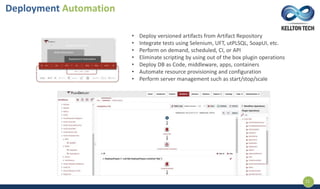
• Deploy versioned artifacts from Artifact Repository
• Integrate tests using Selenium, UFT, utPLSQL, SoapUI, etc.
• Perform on demand, scheduled, CI, or API
• Eliminate scripting by using out of the box plugin operations
• Deploy DB as Code, middleware, apps, containers
• Automate resource provisioning and configuration
• Perform server management such as start/stop/scale
Deployment Automation
11
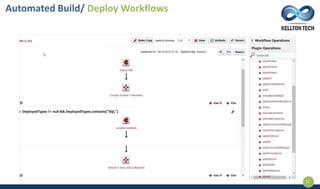
Automated Build/ Deploy Workflows
12
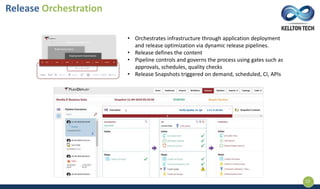
• Orchestrates infrastructure through application deployment
and release optimization via dynamic release pipelines.
• Release defines the content
• Pipeline controls and governs the process using gates such as
approvals, schedules, quality checks
• Release Snapshots triggered on demand, scheduled, CI, APIs
Release Orchestration
13
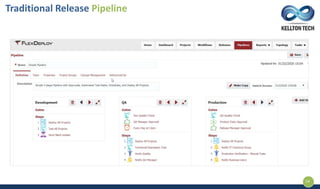
Traditional Release Pipeline
14
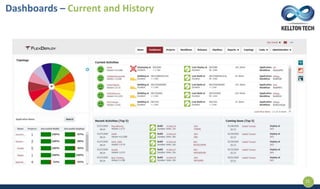
Dashboards – Current and History
15
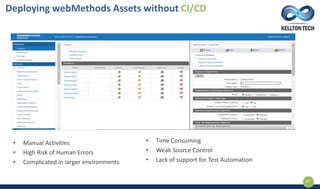
• Manual Activities
• High Risk of Human Errors
• Complicated in larger environments
Deploying webMethods Assets without CI/CD
16
• Time Consuming
• Weak Source Control
• Lack of support for Test Automation
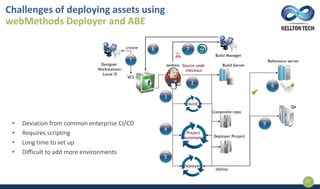
Challenges of deploying assets using
webMethods Deployer and ABE
17
• Deviation from common enterprise CI/CD
• Requires scripting
• Long time to set up
• Difficult to add more environments
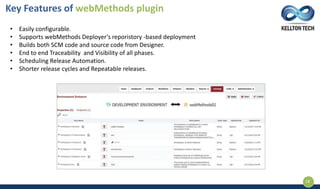
• Easily configurable.
• Supports webMethods Deployer’s reporistory -based deployment
• Builds both SCM code and source code from Designer.
• End to end Traceability and Visibility of all phases.
• Scheduling Release Automation.
• Shorter release cycles and Repeatable releases.
Key Features of webMethods plugin
18
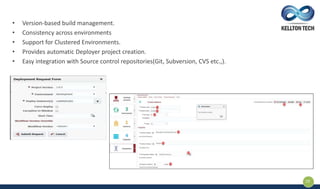
• Version-based build management.
• Consistency across environments
• Support for Clustered Environments.
• Provides automatic Deployer project creation.
• Easy integration with Source control repositories(Git, Subversion, CVS etc.,).
19
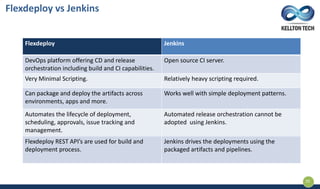
Flexdeploy Jenkins
DevOps platform offering CD and release
orchestration including build and CI capabilities.
Open source CI server.
Very Minimal Scripting. Relatively heavy scripting required.
Can package and deploy the artifacts across
environments, apps and more.
Works well with simple deployment patterns.
Automates the lifecycle of deployment,
scheduling, approvals, issue tracking and
management.
Automated release orchestration cannot be
adopted using Jenkins.
Flexdeploy REST API’s are used for build and
deployment process.
Jenkins drives the deployments using the
packaged artifacts and pipelines.
Flexdeploy vs Jenkins
20
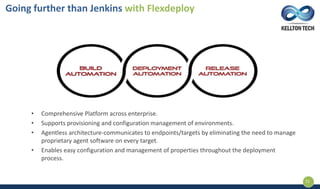
• Comprehensive Platform across enterprise.
• Supports provisioning and configuration management of environments.
• Agentless architecture-communicates to endpoints/targets by eliminating the need to manage
proprietary agent software on every target.
• Enables easy configuration and management of properties throughout the deployment
process.
Going further than Jenkins with Flexdeploy
21
DEMO
22
23
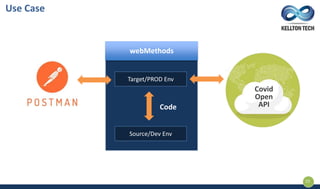
Use Case
Target/PROD Env
Source/Dev Env
webMethods
Code
Covid
Open
API
Table of Contents
• Build Automation.
• Deployment Automation.
• Automated Build/Deploy workflows.
24
25
Q & A
26
DevOps Automation and Maturity using FlexDeploy, webMethods demo: Kellton Webinar

DevOps Automation and Maturity using FlexDeploy, webMethods demo: Kellton Webinar

  • 1.
    DevOps Maturity andAutomation BUILDING AN AGILE ENTERPRISE OF TOMORROW
  • 2.
    Speakers 2 Nandini Pobbati Integration Architect KelltonTech Solutions Varun Tummala Sr. Manager Kellton Tech Solutions
  • 3.
    KELLTON TECH –A Pioneer of Digital Transformation 3
  • 4.
  • 5.
    FlexDeploy Overview Key Features Build Automation Deployment Automation Workflows PipelineswebMethods Plugin - key Features Agenda wM Deployment without CI/CD & Challenges Flexdeploy wM Plugin – Value Demo 1 2 3 4 5 6 7 8 9 10 5
  • 6.
  • 7.
     Comprehensive andIntegrated  Automation, Controls, Visibility  3rd Party Plugins and Integrations  Open and Extensible Platform FlexDeploy DevOps Platform 7
  • 8.
    Application Test Suite Build,CI, Repo Test and Quality Applications Middleware Cloud DB and BIConfiguration and Containers Secrets Management CVS Source ControlAgile and Service Management FlexDeploy DevOps Platform 8
  • 9.
    FlexDeploy Features 9 • BuildAutomation and Continuous Integration • Deployment Automation • Test Automation • Release Pipeline Orchestration Continuous Delivery RELEASE BUILD TEST DEPLOY
  • 10.
    • Integrate withsource control tools such as Git, SVN, TFS • Create artifacts such as code, configs, infra as code, DB as code • Store versioned artifacts in Artifact Repository • Execute automated quality tests via SonarQube, Checkmarx, etc. • Perform on demand, scheduled, CI, or API • Eliminate scripting by using out of the box plugin operations • Integrate with popular planning, build, artifact repo tools when needed, e.g. Jira, MSBuild, Gradle, Jenkins, Artifactory Build Automation 10
  • 11.
    • Deploy versionedartifacts from Artifact Repository • Integrate tests using Selenium, UFT, utPLSQL, SoapUI, etc. • Perform on demand, scheduled, CI, or API • Eliminate scripting by using out of the box plugin operations • Deploy DB as Code, middleware, apps, containers • Automate resource provisioning and configuration • Perform server management such as start/stop/scale Deployment Automation 11
  • 12.
  • 13.
    • Orchestrates infrastructurethrough application deployment and release optimization via dynamic release pipelines. • Release defines the content • Pipeline controls and governs the process using gates such as approvals, schedules, quality checks • Release Snapshots triggered on demand, scheduled, CI, APIs Release Orchestration 13
  • 14.
  • 15.
    Dashboards – Currentand History 15
  • 16.
    • Manual Activities •High Risk of Human Errors • Complicated in larger environments Deploying webMethods Assets without CI/CD 16 • Time Consuming • Weak Source Control • Lack of support for Test Automation
  • 17.
    Challenges of deployingassets using webMethods Deployer and ABE 17 • Deviation from common enterprise CI/CD • Requires scripting • Long time to set up • Difficult to add more environments
  • 18.
    • Easily configurable. •Supports webMethods Deployer’s reporistory -based deployment • Builds both SCM code and source code from Designer. • End to end Traceability and Visibility of all phases. • Scheduling Release Automation. • Shorter release cycles and Repeatable releases. Key Features of webMethods plugin 18
  • 19.
    • Version-based buildmanagement. • Consistency across environments • Support for Clustered Environments. • Provides automatic Deployer project creation. • Easy integration with Source control repositories(Git, Subversion, CVS etc.,). 19
  • 20.
    Flexdeploy Jenkins DevOps platformoffering CD and release orchestration including build and CI capabilities. Open source CI server. Very Minimal Scripting. Relatively heavy scripting required. Can package and deploy the artifacts across environments, apps and more. Works well with simple deployment patterns. Automates the lifecycle of deployment, scheduling, approvals, issue tracking and management. Automated release orchestration cannot be adopted using Jenkins. Flexdeploy REST API’s are used for build and deployment process. Jenkins drives the deployments using the packaged artifacts and pipelines. Flexdeploy vs Jenkins 20
  • 21.
    • Comprehensive Platformacross enterprise. • Supports provisioning and configuration management of environments. • Agentless architecture-communicates to endpoints/targets by eliminating the need to manage proprietary agent software on every target. • Enables easy configuration and management of properties throughout the deployment process. Going further than Jenkins with Flexdeploy 21
  • 22.
  • 23.
    23 Use Case Target/PROD Env Source/DevEnv webMethods Code Covid Open API
  • 24.
    Table of Contents •Build Automation. • Deployment Automation. • Automated Build/Deploy workflows. 24
  • 25.
  • 26.