Symbian OSQuickstart andCarbide.c++ UI-Designv2.0a – 21 March 2008
DisclaimerThese slides are provided free of charge at http://www.symbianresources.com and are used during Symbian OS courses at the University of Applied Sciences in Hagenberg, Austria ( http://www.fh-hagenberg.at/ )Respecting the copyright laws, you are allowed to use them:for your own, personal, non-commercial usein the academic environmentIn all other cases (e.g. for commercial training), please contact andreas.jakl@fh-hagenberg.atThe correctness of the contents of these materials cannot be guaranteed. Andreas Jakl is not liable for incorrect information or damage that may arise from using the materials.Parts of these materials are based on information from Symbian Press-books published by John Wiley & Sons, Ltd. This document contains copyright materials which are proprietary to Symbian, UIQ, Nokia and SonyEricsson. “S60™” is a trademark of Nokia. “UIQ™” is a trademark of UIQ Technology. Pictures of mobile phones or applications are copyright their respective manufacturers / developers. “Symbian ™”, “Symbian OS ™” and all other Symbian-based marks and logos are trademarks of Symbian Software Limited and are used under license. © Symbian Software Limited 2006. Andreas Jakl, 20072
ContentsShort overviewofbasicconceptsInstallingtherequiredtoolsHelloWorld, WorkflowAndreas Jakl, 20073
ConventionsSymbian OS andtheworldof C++Andreas Jakl, 20074
Whyis Symbian OS different?Standard C++ is different to Symbian OS C++C++ is too manifold for a mobile phone (e.g. complete multiple inheritance)C++ isn't enough for a mobile phone (no exactly defined data types, no DLLs)Symbian OS was created before exceptions and smart pointers were introduced to C++Different requirements concerning applications, error handling, clean-up and efficiencyAndreas Jakl, 20075
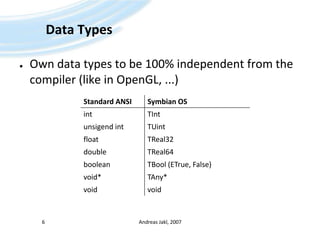
Data TypesOwn data types to be 100% independent from the compiler (like in OpenGL, ...)Andreas Jakl, 20076
NamingConventionsWhy?Make code more self-explaining(“... and where's this variable coming from?”)Get rid of references using “this->” for instance variablesImportant for clean-up(Instance variables stored on the heap have to be deleted in the destructor of your class)Common syntax no matter who developed the codeAndreas Jakl, 20077
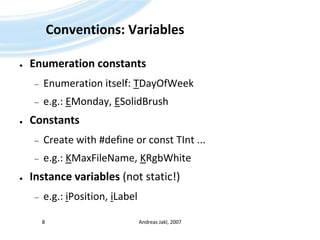
Conventions: VariablesEnumeration constantsEnumeration itself: TDayOfWeeke.g.: EMonday, ESolidBrushConstantsCreate with #define or const TInt ...e.g.: KMaxFileName, KRgbWhiteInstance variables (not static!)e.g.: iPosition, iLabelAndreas Jakl, 20078
Conventions: VariablesParameters (Arguments)„a“ is for „Argument“. Therefore – no „an“!e.g.: aPosition, aTextAutomatic variablesWithout special prefixe.g.: position, textAndreas Jakl, 20079
Conventions: ClassesClassification of categoriesIndirectly describe properties and behaviorImportant when creating an instance of the class and for clean-up!No rule without exception (HBufC)Andreas Jakl, 200710
Conventions: ClassesT-ClassesMust not own data on the heap: no destructor allowede.g.: Simple data types of Symbian OS (TBuf, TPoint, (TInt))C-ClassesAlways create them on the heap (using new())Derived from CBase (compare to Java's Object)e.g.: CEikLabel, CActiveAndreas Jakl, 200711
Conventions: ClassesR-Classes“R” = Handle to an external ResourceTypical functions: Open(), Create(), Initialize()Don't forget: Close with Close() or Release()!e.g.: RFile, RTimer, RWindowM-ClassesFor abstract interfaces (see Java)Static ClassesWithout prefix. E.g.: User::After(1000)Andreas Jakl, 200712
Jump-StartSymbian OSAndreas Jakl, 200713
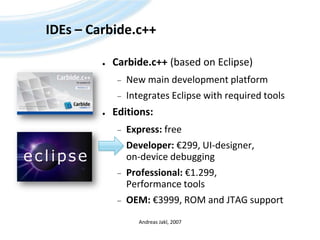
IDEs – Carbide.c++Carbide.c++(based on Eclipse)New main development platformIntegrates Eclipse with required toolsEditions:Express: freeDeveloper: €299, UI-designer, on-device debuggingProfessional: €1.299, Performance toolsOEM: €3999, ROM and JTAG supportAndreas Jakl, 2007
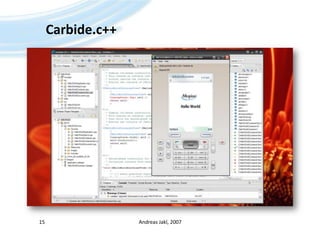
Carbide.c++Andreas Jakl, 200715
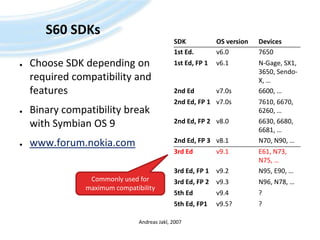
S60 SDKsChoose SDK depending on required compatibility and featuresBinary compatibility break with Symbian OS 9www.forum.nokia.comAndreas Jakl, 2007Commonly used for maximum compatibility
InstallationCarbide.c++ 1.3 Developer Edition (orlater / better)http://www.forum.nokia.com/main/resources/tools_and_sdks/carbide/index.htmlPerl 5.6.x (Set thepath variable!)  – not 5.8!http://downloads.activestate.com/ActivePerl/Windows/5.6/ActivePerl-5.6.1.638-MSWin32-x86.msiSDK(s) (S60 3rd Ed. MR)http://forum.nokia.com/info/sw.nokia.com/id/4a7149a5-95a5-4726-913a-3c6f21eb65a5/S60-SDK-0616-3.0-mr.htmlAndreas Jakl, 200717
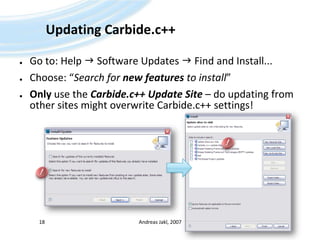
Updating Carbide.c++Go to: Help  Software Updates  Find and Install...Choose: “Search for new features to install”Only use the Carbide.c++ Update Site – do updating from other sites might overwrite Carbide.c++ settings!Andreas Jakl, 200718!!
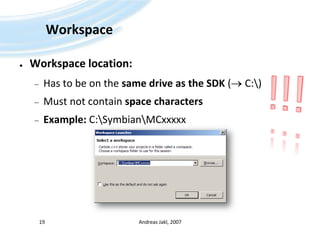
WorkspaceWorkspace location:Has to be on the same drive as the SDK ( C:\)Must not contain space charactersExample: C:\Symbian\MCxxxxxAndreas Jakl, 200719!!!
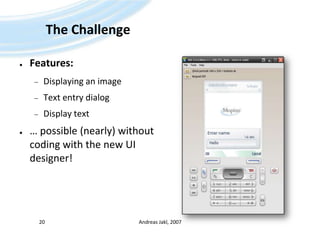
The ChallengeFeatures:Displaying an imageText entry dialogDisplay text… possible (nearly) without coding with the new UI designer!Andreas Jakl, 200720
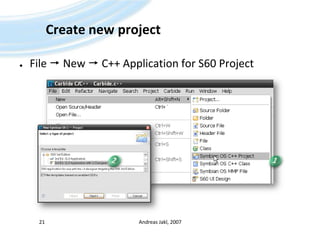
Create newprojectFile  New  C++ Applicationfor S60 ProjectAndreas Jakl, 20072112
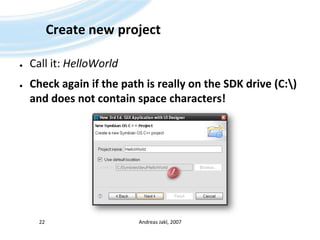
Create newprojectCall it: HelloWorldCheck againifthepathisreally on the SDK drive (C:\) anddoes not containspacecharacters!Andreas Jakl, 200722!
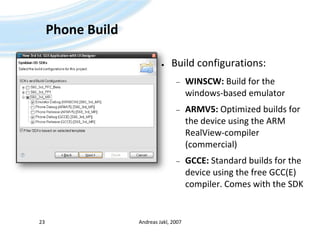
Phone BuildBuild configurations:WINSCW: Build for the windows-based emulatorARMV5: Optimized builds for the device using the ARM RealView-compiler (commercial)GCCE: Standard builds for the device using the free GCC(E) compiler. Comes with the SDKAndreas Jakl, 200723
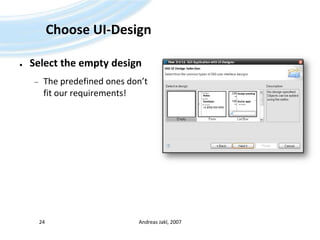
Choose UI-DesignSelect the empty designThe predefined ones don’t fit our requirements!Andreas Jakl, 200724
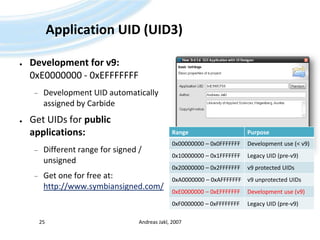
Application UID (UID3)Development for v9: 0xE0000000 - 0xEFFFFFFFDevelopment UID automatically assigned by CarbideGet UIDs for public applications:Different range for signed / unsignedGet one for free at: http://www.symbiansigned.com/Andreas Jakl, 200725
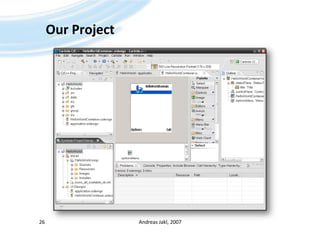
Our ProjectAndreas Jakl, 200726
CompileFirst testsAndreas Jakl, 200727
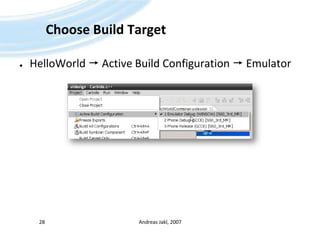
ChooseBuild TargetHelloWorld ActiveBuildConfiguration  EmulatorAndreas Jakl, 200728
Compile Project(optional) Project  Build ProjectRun  Run HelloWorld Emulator Debug […]Or:Andreas Jakl, 200729You can only use the mouse to navigate on the screen on touch-enabled emulators! Otherwise, use the buttons below.
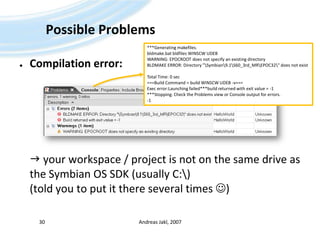
Possible ProblemsCompilation error: your workspace / project is not on the same drive as the Symbian OS SDK (usually C:\)(told you to put it there several times )Andreas Jakl, 200730***Generating makefiles.bldmake.bat bldfiles WINSCW UDEB WARNING: EPOCROOT does not specify an existing directoryBLDMAKE ERROR: Directory "\Symbian\9.1\S60_3rd_MR\EPOC32\" does not existTotal Time: 0 sec===Build Command = build WINSCW UDEB -v===Exec error:Launching failed***build returned with exit value = -1***Stopping. Check the Problems view or Console output for errors.-1
Possible Problems IIEmulator starts in text shell modee.g. if configured like this by previous coursesOpen [SDK-directory]\Data\epoc.iniComment the entry textshell by putting a # in front of it  #textshellAndreas Jakl, 200731
EmulatorApplication added to the end of the list in the “Installat.” folderCan be moved with “Options  Move [to folder]”Useful when working on the same project for more than 10 minutesAndreas Jakl, 200732
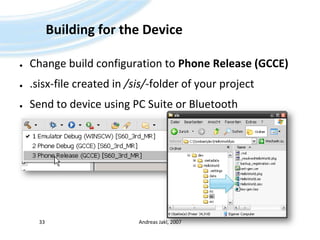
Building for the DeviceChange build configuration to Phone Release (GCCE).sisx-file created in /sis/-folder of your projectSend to device using PC Suite or BluetoothAndreas Jakl, 200733
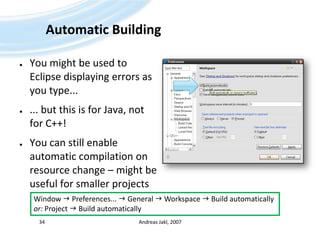
Automatic BuildingYou might be used to Eclipse displaying errors as you type...... but this is for Java, not for C++!You can still enable automatic compilation on resource change – might be useful for smaller projectsAndreas Jakl, 200734Window  Preferences...  General  Workspace  Build automaticallyor: Project  Build automatically
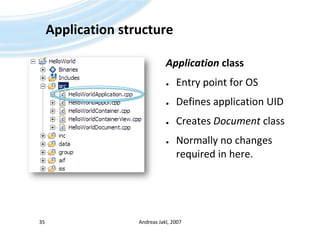
ApplicationstructureApplicationclassEntry pointfor OSDefinesapplication UIDCreatesDocumentclassNormallynochangesrequired in here.Andreas Jakl, 200735
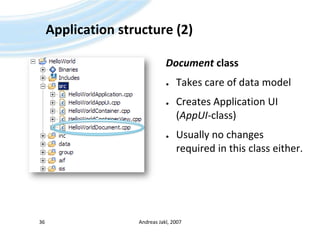
Applicationstructure (2)DocumentclassTakes careofdata modelCreatesApplication UI (AppUI-class)Usuallynochangesrequired in thisclasseither.Andreas Jakl, 200736
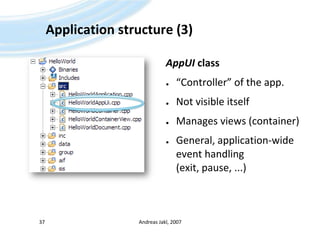
Application structure (3)AppUI class“Controller” of the app.Not visible itselfManages views (container)General, application-wide event handling (exit, pause, ...)Andreas Jakl, 200737
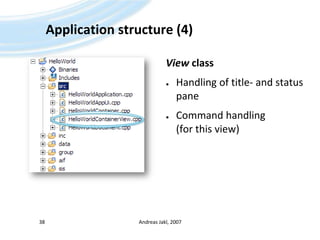
Applicationstructure (4)ViewclassHandling of title- andstatuspaneCommand handling(forthisview)Andreas Jakl, 200738
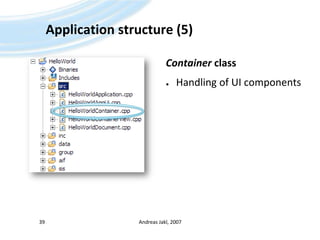
Applicationstructure (5)ContainerclassHandling of UI componentsAndreas Jakl, 200739
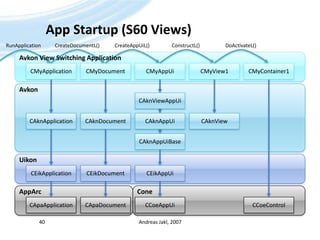
App Startup (S60 Views)Andreas Jakl, 200740CreateDocumentL()CreateAppUiL()ConstructL()DoActivateL()RunApplicationAvkon View SwitchingApplicationCMyApplicationCMyDocumentCMyAppUiCMyView1CMyContainer1AvkonCAknViewAppUiCAknApplicationCAknDocumentCAknViewCAknAppUiCAknAppUiBaseUikonCEikAppUiCEikDocumentCEikApplicationConeAppArcCCoeAppUiCApaDocumentCApaApplicationCCoeControl
Displaying an ImageUI-DesignAndreas Jakl, 200741
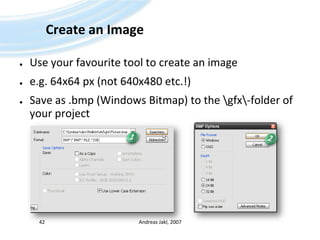
Create an ImageUse your favourite tool to create an imagee.g. 64x64 px (not 640x480 etc.!)Save as .bmp (Windows Bitmap) to the \gfx\-folder of your projectAndreas Jakl, 20074212
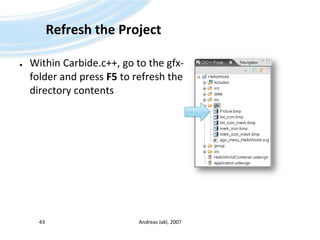
Refresh the ProjectWithin Carbide.c++, go to the gfx-folder and press F5 to refresh the directory contentsAndreas Jakl, 200743
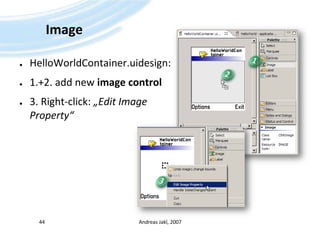
ImageHelloWorldContainer.uidesign:1.+2. addnewimagecontrol3. Right-click: „Edit Image Property“Andreas Jakl, 200744123
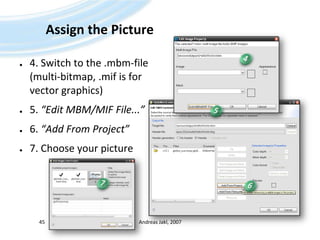
Assign the Picture4. Switch to the .mbm-file (multi-bitmap, .mif is for vector graphics)5. “Edit MBM/MIF File...”6. “Add From Project”7. Choose your pictureAndreas Jakl, 2007454576
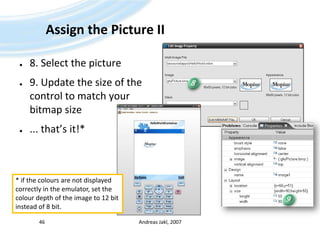
Assign the Picture II8. Select the picture9. Update the size of the control to match your bitmap size... that’s it!*Andreas Jakl, 2007468* if the colours are not displayedcorrectly in the emulator, set thecolour depth of the image to 12 bitinstead of 8 bit.9
DefinethemenuInteractionAndreas Jakl, 200747
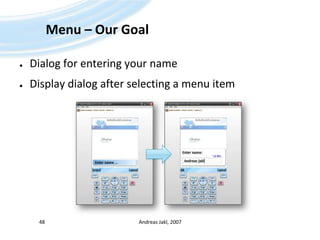
Menu – Our GoalDialog forenteringyournameDisplay dialog after selecting a menu itemAndreas Jakl, 200748
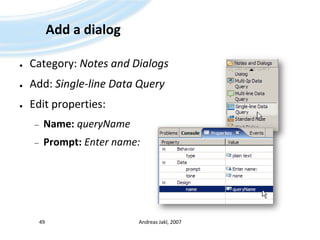
Add a dialogCategory: Notes and DialogsAdd: Single-line Data QueryEdit properties:Name:queryNamePrompt: Entername:Andreas Jakl, 200749
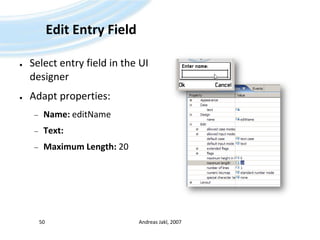
Edit Entry FieldSelect entryfield in the UI designerAdaptproperties:Name: editNameText: Maximum Length: 20Andreas Jakl, 200750
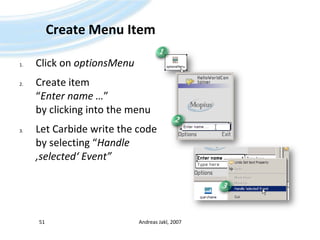
Create Menu ItemClick on optionsMenuCreate item “Enter name …”by clicking into the menuLet Carbide write the code by selecting “Handle ‚selected‘ Event”Andreas Jakl, 200751123
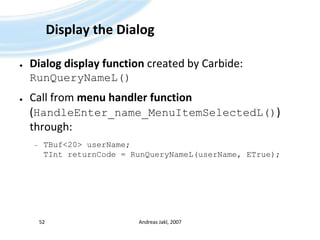
Display the DialogDialog display function created by Carbide: RunQueryNameL()Call from menu handler function (HandleEnter_name_MenuItemSelectedL()) through:TBuf<20> userName;TIntreturnCode = RunQueryNameL(userName, ETrue);Andreas Jakl, 200752
DescriptorsStrings in Symbian OSAndreas Jakl, 200753
DescriptorsWhy no standard strings?Use minimal memoryEfficiency:ROM (Literals: _LIT!) – Stack – Heap?Constant – modifiable?Unicode(TBuf16 – TBuf8)Takes several months to get used to descriptors :-)Andreas Jakl, 200754
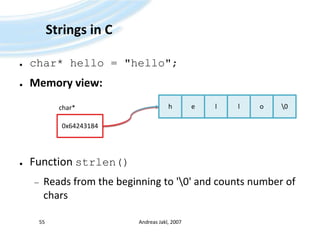
Andreas Jakl, 200755hello\0Strings in Cchar* hello = "hello";Memory view:Function strlen()Reads from the beginning to '\0' and counts number of charschar*0x64243184
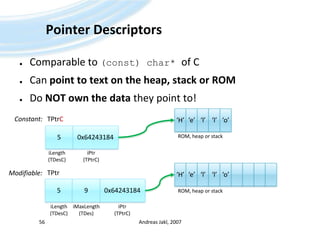
Pointer DescriptorsComparable to (const) char* of CCan point to text on the heap, stack or ROMDo NOT own the data they point to!Andreas Jakl, 200756‘H’‘e’‘l’‘l’‘o’Constant:TPtrC0x642431845ROM, heaporstackiLength(TDesC)iPtr(TPtrC)‘H’‘e’‘l’‘l’‘o’TPtrModifiable:0x6424318459ROM, heaporstackiLength(TDesC)iPtr(TPtrC)iMaxLength(TDes)
Buffer DescriptorsComparable to (const) char[]of CDirectly contain the stringUse C++ templates to specify length (parameter)Andreas Jakl, 200757TBufC<5>Constant:‘H’5‘e’‘l’‘l’‘o’iLength(TDesC)Modifiable:TBuf<9>9‘H’5‘e’‘l’‘l’‘o’iLength(TDesC)iMaxLength(TDes)
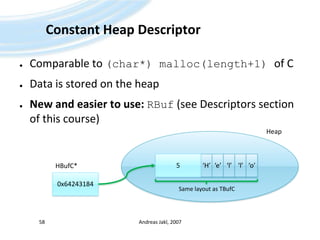
Constant Heap DescriptorComparable to (char*) malloc(length+1) of CData is stored on the heapNew and easier to use:RBuf (see Descriptors section of this course)Andreas Jakl, 200758Heap‘H’5‘e’‘l’‘l’‘o’HBufC*0x64243184Same layout as TBufC
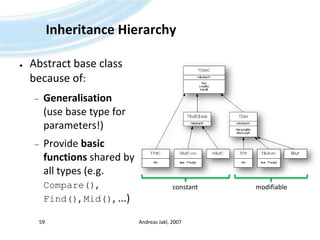
Inheritance HierarchyAbstract base class because of:Generalisation(use base type for parameters!)Provide basic functions shared by all types (e.g. Compare(), Find(), Mid(), ...)Andreas Jakl, 200759constantmodifiable
LiteralsIn reality _LIT is a macro, expands to create a:Constant descriptor, compiled to program binaryNot localisable  only use for testing, very simple applications or fixed strings (e.g. for protocols)!_LIT(KHello, “Hello”);Builds a named object called KHello of type TLitC16Stores the string Hello into the objectThe string is written to the program binaryAndreas Jakl, 200760
Displaying TextLabel controlforAndreas Jakl, 200761
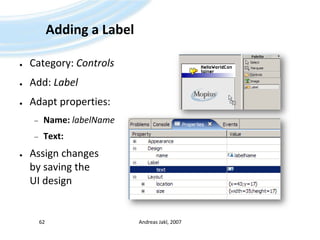
Adding a LabelCategory: ControlsAdd: LabelAdaptproperties:Name:labelNameText:AssignchangesbysavingtheUI designAndreas Jakl, 200762
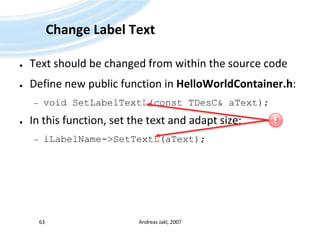
Change Label TextText should be changed from within the source codeDefine new public function in HelloWorldContainer.h:void SetLabelTextL(const TDesC& aText);In this function, set the text and adapt size:iLabelName->SetTextL(aText);Andreas Jakl, 200763!
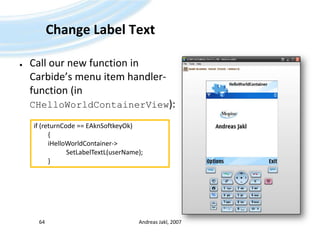
Change Label TextCall our new function in Carbide’s menu item handler-function (in CHelloWorldContainerView):Andreas Jakl, 200764if (returnCode == EAknSoftkeyOk)	{iHelloWorldContainer-> 				           SetLabelTextL(userName);	}
Leaves & PanicsVeryshortoverviewof…Andreas Jakl, 200765
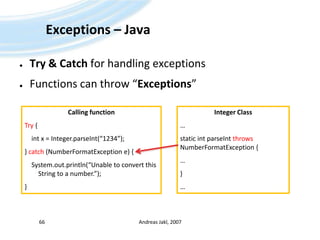
Exceptions – JavaTry & Catch for handling exceptionsFunctions can throw “Exceptions”Andreas Jakl, 200766Calling functionTry {int x = Integer.parseInt(“1234”);} catch (NumberFormatException e) {System.out.println(“Unable to convert this String to a number.”);}Integer Class…static intparseIntthrowsNumberFormatException {…}…
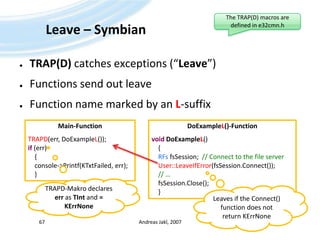
Leave – SymbianTRAP(D) catches exceptions (“Leave”)Functions send out leaveFunction name marked by an L-suffixAndreas Jakl, 200767The TRAP(D) macros are defined in e32cmn.hMain-FunctionTRAPD(err, DoExampleL());if (err)    {    console->Printf(KTxtFailed, err);    }DoExampleL()-FunctionvoidDoExampleL()    {RFsfsSession;  // Connect to the file serverUser::LeaveIfError(fsSession.Connect()); // …fsSession.Close();    }TRAPD-Makro declares err as TInt and = KErrNoneLeaves if the Connect() function does not return KErrNone
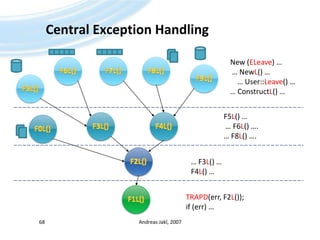
Central ExceptionHandlingAndreas Jakl, 200768New (ELeave) … … NewL() …    … User::Leave() …… ConstructL() …F6L()F7L()F8L()F9L()F5L()F5L() … … F6L() ….… F8L() ….F3L()F4L()F0L()F2L()… F3L() …F4L() …F1L()TRAPD(err, F2L());if(err) …
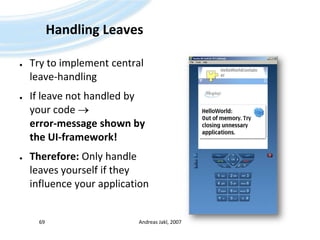
Handling LeavesTry to implement central leave-handlingIf leave not handled by your code  error-message shown by the UI-framework!Therefore: Only handle leaves yourself if they influence your applicationAndreas Jakl, 200769
When can a function leave?Caused by your own code:User::Leave(), User::LeaveIfError(), User::LeaveNoMemory() or User::LeaveIfNull()Failed object-constructionwhen using the “new (ELeave)”-operatorCalling a function that potentially causes a leavee.g. x->DoSomethingL()Andreas Jakl, 200770
Details: Causing a LeaveUser::Leave(TIntaReason)Error code (aReason) = value that will be received by TRAPCauses leave in any caseUser::LeaveIfError(TIntaReason)Causes leave if parameter is negative, e.g.:TIntfoundAt = iElementArray.Find(example, aRelation);User::LeaveIfError(foundAt);	// Leaves if foundAt == KErrNotFound (-1)User::LeaveNoMemory()Is the same as: User:Leave(KErrNoMem);User::LeaveIfNull(TAny* aPtr)Andreas Jakl, 200771
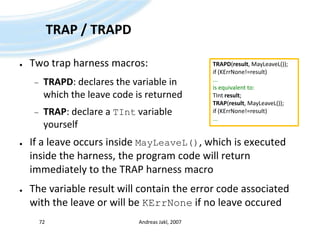
TRAP / TRAPDTwo trap harness macros:TRAPD: declares the variable in which the leave code is returnedTRAP: declare a TIntvariable yourselfIf a leave occurs inside MayLeaveL(), which is executed inside the harness, the program code will return immediately to the TRAP harness macroThe variable result will contain the error code associated with the leave or will be KErrNoneif no leave occuredAndreas Jakl, 200772TRAPD(result, MayLeaveL());if (KErrNone!=result)...is equivalent to:TIntresult;TRAP(result, MayLeaveL());if (KErrNone!=result)...
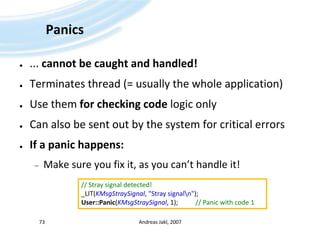
Panics... cannot be caught and handled!Terminates thread (= usually the whole application)Use them for checking code logic onlyCan also be sent out by the system for critical errorsIf a panic happens:Make sure you fix it, as you can’t handle it!Andreas Jakl, 200773// Stray signal detected!_LIT(KMsgStraySignal, "Stray signal\n");User::Panic(KMsgStraySignal, 1);		// Panic with code 1
What does a leave look like?Adapt the code:Trap the leave:Andreas Jakl, 200774void CHelloWorldContainer::SetLabelTextL(const TDesC& aText)    {iLabelName->SetTextL (aText);User::Leave(KErrAccessDenied);    }TBoolCHelloWorldContainerView::HandleEnter_name_MenuItemSelectedL( TIntaCommand )    {    // […]TRAPD(err, iHelloWorldContainer->SetLabelTextL(userName));    // [...]    }
What does a panic look like?Adapt the code: Will crash the emulator in release modeAndreas Jakl, 200775TBoolCHelloWorldContainerView::HandleEnter_name_MenuItemSelectedL( TIntaCommand )    {TBuf<20> userName;_LIT(KLongText, "This text is too long for a maximum length of 20, so a panic will occur.");userName.Copy(KLongText);    // [...]    }
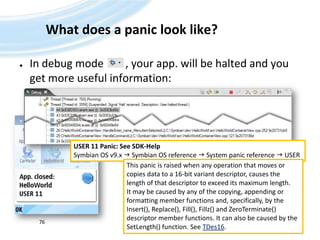
What does a panic look like?In debug mode        , your app. will be halted and you get more useful information:Andreas Jakl, 200776USER 11 Panic: See SDK-HelpSymbian OS v9.x  Symbian OS reference  System panic reference  USERThis panic is raised when any operation that moves or copies data to a 16-bit variant descriptor, causes the length of that descriptor to exceed its maximum length. It may be caused by any of the copying, appending or formatting member functions and, specifically, by the Insert(), Replace(), Fill(), Fillz() and ZeroTerminate() descriptor member functions. It can also be caused by the SetLength() function. See TDes16.
Thanks for your attentionThat’s it!Andreas Jakl, 200777

Symbian OS - Quick Start

  • 1.
    Symbian OSQuickstart andCarbide.c++UI-Designv2.0a – 21 March 2008
  • 2.
    DisclaimerThese slides areprovided free of charge at http://www.symbianresources.com and are used during Symbian OS courses at the University of Applied Sciences in Hagenberg, Austria ( http://www.fh-hagenberg.at/ )Respecting the copyright laws, you are allowed to use them:for your own, personal, non-commercial usein the academic environmentIn all other cases (e.g. for commercial training), please contact andreas.jakl@fh-hagenberg.atThe correctness of the contents of these materials cannot be guaranteed. Andreas Jakl is not liable for incorrect information or damage that may arise from using the materials.Parts of these materials are based on information from Symbian Press-books published by John Wiley & Sons, Ltd. This document contains copyright materials which are proprietary to Symbian, UIQ, Nokia and SonyEricsson. “S60™” is a trademark of Nokia. “UIQ™” is a trademark of UIQ Technology. Pictures of mobile phones or applications are copyright their respective manufacturers / developers. “Symbian ™”, “Symbian OS ™” and all other Symbian-based marks and logos are trademarks of Symbian Software Limited and are used under license. © Symbian Software Limited 2006. Andreas Jakl, 20072
  • 3.
  • 4.
  • 5.
    Whyis Symbian OSdifferent?Standard C++ is different to Symbian OS C++C++ is too manifold for a mobile phone (e.g. complete multiple inheritance)C++ isn't enough for a mobile phone (no exactly defined data types, no DLLs)Symbian OS was created before exceptions and smart pointers were introduced to C++Different requirements concerning applications, error handling, clean-up and efficiencyAndreas Jakl, 20075
  • 6.
    Data TypesOwn datatypes to be 100% independent from the compiler (like in OpenGL, ...)Andreas Jakl, 20076
  • 7.
    NamingConventionsWhy?Make code moreself-explaining(“... and where's this variable coming from?”)Get rid of references using “this->” for instance variablesImportant for clean-up(Instance variables stored on the heap have to be deleted in the destructor of your class)Common syntax no matter who developed the codeAndreas Jakl, 20077
  • 8.
    Conventions: VariablesEnumeration constantsEnumerationitself: TDayOfWeeke.g.: EMonday, ESolidBrushConstantsCreate with #define or const TInt ...e.g.: KMaxFileName, KRgbWhiteInstance variables (not static!)e.g.: iPosition, iLabelAndreas Jakl, 20078
  • 9.
    Conventions: VariablesParameters (Arguments)„a“is for „Argument“. Therefore – no „an“!e.g.: aPosition, aTextAutomatic variablesWithout special prefixe.g.: position, textAndreas Jakl, 20079
  • 10.
    Conventions: ClassesClassification ofcategoriesIndirectly describe properties and behaviorImportant when creating an instance of the class and for clean-up!No rule without exception (HBufC)Andreas Jakl, 200710
  • 11.
    Conventions: ClassesT-ClassesMust notown data on the heap: no destructor allowede.g.: Simple data types of Symbian OS (TBuf, TPoint, (TInt))C-ClassesAlways create them on the heap (using new())Derived from CBase (compare to Java's Object)e.g.: CEikLabel, CActiveAndreas Jakl, 200711
  • 12.
    Conventions: ClassesR-Classes“R” =Handle to an external ResourceTypical functions: Open(), Create(), Initialize()Don't forget: Close with Close() or Release()!e.g.: RFile, RTimer, RWindowM-ClassesFor abstract interfaces (see Java)Static ClassesWithout prefix. E.g.: User::After(1000)Andreas Jakl, 200712
  • 13.
  • 14.
    IDEs – Carbide.c++Carbide.c++(basedon Eclipse)New main development platformIntegrates Eclipse with required toolsEditions:Express: freeDeveloper: €299, UI-designer, on-device debuggingProfessional: €1.299, Performance toolsOEM: €3999, ROM and JTAG supportAndreas Jakl, 2007
  • 15.
  • 16.
    S60 SDKsChoose SDKdepending on required compatibility and featuresBinary compatibility break with Symbian OS 9www.forum.nokia.comAndreas Jakl, 2007Commonly used for maximum compatibility
  • 17.
    InstallationCarbide.c++ 1.3 DeveloperEdition (orlater / better)http://www.forum.nokia.com/main/resources/tools_and_sdks/carbide/index.htmlPerl 5.6.x (Set thepath variable!) – not 5.8!http://downloads.activestate.com/ActivePerl/Windows/5.6/ActivePerl-5.6.1.638-MSWin32-x86.msiSDK(s) (S60 3rd Ed. MR)http://forum.nokia.com/info/sw.nokia.com/id/4a7149a5-95a5-4726-913a-3c6f21eb65a5/S60-SDK-0616-3.0-mr.htmlAndreas Jakl, 200717
  • 18.
    Updating Carbide.c++Go to:Help  Software Updates  Find and Install...Choose: “Search for new features to install”Only use the Carbide.c++ Update Site – do updating from other sites might overwrite Carbide.c++ settings!Andreas Jakl, 200718!!
  • 19.
    WorkspaceWorkspace location:Has tobe on the same drive as the SDK ( C:\)Must not contain space charactersExample: C:\Symbian\MCxxxxxAndreas Jakl, 200719!!!
  • 20.
    The ChallengeFeatures:Displaying animageText entry dialogDisplay text… possible (nearly) without coding with the new UI designer!Andreas Jakl, 200720
  • 21.
    Create newprojectFile New  C++ Applicationfor S60 ProjectAndreas Jakl, 20072112
  • 22.
    Create newprojectCall it:HelloWorldCheck againifthepathisreally on the SDK drive (C:\) anddoes not containspacecharacters!Andreas Jakl, 200722!
  • 23.
    Phone BuildBuild configurations:WINSCW:Build for the windows-based emulatorARMV5: Optimized builds for the device using the ARM RealView-compiler (commercial)GCCE: Standard builds for the device using the free GCC(E) compiler. Comes with the SDKAndreas Jakl, 200723
  • 24.
    Choose UI-DesignSelect theempty designThe predefined ones don’t fit our requirements!Andreas Jakl, 200724
  • 25.
    Application UID (UID3)Developmentfor v9: 0xE0000000 - 0xEFFFFFFFDevelopment UID automatically assigned by CarbideGet UIDs for public applications:Different range for signed / unsignedGet one for free at: http://www.symbiansigned.com/Andreas Jakl, 200725
  • 26.
  • 27.
  • 28.
  • 29.
    Compile Project(optional) Project Build ProjectRun  Run HelloWorld Emulator Debug […]Or:Andreas Jakl, 200729You can only use the mouse to navigate on the screen on touch-enabled emulators! Otherwise, use the buttons below.
  • 30.
    Possible ProblemsCompilation error:your workspace / project is not on the same drive as the Symbian OS SDK (usually C:\)(told you to put it there several times )Andreas Jakl, 200730***Generating makefiles.bldmake.bat bldfiles WINSCW UDEB WARNING: EPOCROOT does not specify an existing directoryBLDMAKE ERROR: Directory "\Symbian\9.1\S60_3rd_MR\EPOC32\" does not existTotal Time: 0 sec===Build Command = build WINSCW UDEB -v===Exec error:Launching failed***build returned with exit value = -1***Stopping. Check the Problems view or Console output for errors.-1
  • 31.
    Possible Problems IIEmulatorstarts in text shell modee.g. if configured like this by previous coursesOpen [SDK-directory]\Data\epoc.iniComment the entry textshell by putting a # in front of it  #textshellAndreas Jakl, 200731
  • 32.
    EmulatorApplication added tothe end of the list in the “Installat.” folderCan be moved with “Options  Move [to folder]”Useful when working on the same project for more than 10 minutesAndreas Jakl, 200732
  • 33.
    Building for theDeviceChange build configuration to Phone Release (GCCE).sisx-file created in /sis/-folder of your projectSend to device using PC Suite or BluetoothAndreas Jakl, 200733
  • 34.
    Automatic BuildingYou mightbe used to Eclipse displaying errors as you type...... but this is for Java, not for C++!You can still enable automatic compilation on resource change – might be useful for smaller projectsAndreas Jakl, 200734Window  Preferences...  General  Workspace  Build automaticallyor: Project  Build automatically
  • 35.
    ApplicationstructureApplicationclassEntry pointfor OSDefinesapplicationUIDCreatesDocumentclassNormallynochangesrequired in here.Andreas Jakl, 200735
  • 36.
    Applicationstructure (2)DocumentclassTakes careofdatamodelCreatesApplication UI (AppUI-class)Usuallynochangesrequired in thisclasseither.Andreas Jakl, 200736
  • 37.
    Application structure (3)AppUIclass“Controller” of the app.Not visible itselfManages views (container)General, application-wide event handling (exit, pause, ...)Andreas Jakl, 200737
  • 38.
    Applicationstructure (4)ViewclassHandling oftitle- andstatuspaneCommand handling(forthisview)Andreas Jakl, 200738
  • 39.
    Applicationstructure (5)ContainerclassHandling ofUI componentsAndreas Jakl, 200739
  • 40.
    App Startup (S60Views)Andreas Jakl, 200740CreateDocumentL()CreateAppUiL()ConstructL()DoActivateL()RunApplicationAvkon View SwitchingApplicationCMyApplicationCMyDocumentCMyAppUiCMyView1CMyContainer1AvkonCAknViewAppUiCAknApplicationCAknDocumentCAknViewCAknAppUiCAknAppUiBaseUikonCEikAppUiCEikDocumentCEikApplicationConeAppArcCCoeAppUiCApaDocumentCApaApplicationCCoeControl
  • 41.
  • 42.
    Create an ImageUseyour favourite tool to create an imagee.g. 64x64 px (not 640x480 etc.!)Save as .bmp (Windows Bitmap) to the \gfx\-folder of your projectAndreas Jakl, 20074212
  • 43.
    Refresh the ProjectWithinCarbide.c++, go to the gfx-folder and press F5 to refresh the directory contentsAndreas Jakl, 200743
  • 44.
  • 45.
    Assign the Picture4.Switch to the .mbm-file (multi-bitmap, .mif is for vector graphics)5. “Edit MBM/MIF File...”6. “Add From Project”7. Choose your pictureAndreas Jakl, 2007454576
  • 46.
    Assign the PictureII8. Select the picture9. Update the size of the control to match your bitmap size... that’s it!*Andreas Jakl, 2007468* if the colours are not displayedcorrectly in the emulator, set thecolour depth of the image to 12 bitinstead of 8 bit.9
  • 47.
  • 48.
    Menu – OurGoalDialog forenteringyournameDisplay dialog after selecting a menu itemAndreas Jakl, 200748
  • 49.
    Add a dialogCategory:Notes and DialogsAdd: Single-line Data QueryEdit properties:Name:queryNamePrompt: Entername:Andreas Jakl, 200749
  • 50.
    Edit Entry FieldSelectentryfield in the UI designerAdaptproperties:Name: editNameText: Maximum Length: 20Andreas Jakl, 200750
  • 51.
    Create Menu ItemClickon optionsMenuCreate item “Enter name …”by clicking into the menuLet Carbide write the code by selecting “Handle ‚selected‘ Event”Andreas Jakl, 200751123
  • 52.
    Display the DialogDialogdisplay function created by Carbide: RunQueryNameL()Call from menu handler function (HandleEnter_name_MenuItemSelectedL()) through:TBuf<20> userName;TIntreturnCode = RunQueryNameL(userName, ETrue);Andreas Jakl, 200752
  • 53.
    DescriptorsStrings in SymbianOSAndreas Jakl, 200753
  • 54.
    DescriptorsWhy no standardstrings?Use minimal memoryEfficiency:ROM (Literals: _LIT!) – Stack – Heap?Constant – modifiable?Unicode(TBuf16 – TBuf8)Takes several months to get used to descriptors :-)Andreas Jakl, 200754
  • 55.
    Andreas Jakl, 200755hello\0Stringsin Cchar* hello = "hello";Memory view:Function strlen()Reads from the beginning to '\0' and counts number of charschar*0x64243184
  • 56.
    Pointer DescriptorsComparable to(const) char* of CCan point to text on the heap, stack or ROMDo NOT own the data they point to!Andreas Jakl, 200756‘H’‘e’‘l’‘l’‘o’Constant:TPtrC0x642431845ROM, heaporstackiLength(TDesC)iPtr(TPtrC)‘H’‘e’‘l’‘l’‘o’TPtrModifiable:0x6424318459ROM, heaporstackiLength(TDesC)iPtr(TPtrC)iMaxLength(TDes)
  • 57.
    Buffer DescriptorsComparable to(const) char[]of CDirectly contain the stringUse C++ templates to specify length (parameter)Andreas Jakl, 200757TBufC<5>Constant:‘H’5‘e’‘l’‘l’‘o’iLength(TDesC)Modifiable:TBuf<9>9‘H’5‘e’‘l’‘l’‘o’iLength(TDesC)iMaxLength(TDes)
  • 58.
    Constant Heap DescriptorComparableto (char*) malloc(length+1) of CData is stored on the heapNew and easier to use:RBuf (see Descriptors section of this course)Andreas Jakl, 200758Heap‘H’5‘e’‘l’‘l’‘o’HBufC*0x64243184Same layout as TBufC
  • 59.
    Inheritance HierarchyAbstract baseclass because of:Generalisation(use base type for parameters!)Provide basic functions shared by all types (e.g. Compare(), Find(), Mid(), ...)Andreas Jakl, 200759constantmodifiable
  • 60.
    LiteralsIn reality _LITis a macro, expands to create a:Constant descriptor, compiled to program binaryNot localisable  only use for testing, very simple applications or fixed strings (e.g. for protocols)!_LIT(KHello, “Hello”);Builds a named object called KHello of type TLitC16Stores the string Hello into the objectThe string is written to the program binaryAndreas Jakl, 200760
  • 61.
  • 62.
    Adding a LabelCategory:ControlsAdd: LabelAdaptproperties:Name:labelNameText:AssignchangesbysavingtheUI designAndreas Jakl, 200762
  • 63.
    Change Label TextTextshould be changed from within the source codeDefine new public function in HelloWorldContainer.h:void SetLabelTextL(const TDesC& aText);In this function, set the text and adapt size:iLabelName->SetTextL(aText);Andreas Jakl, 200763!
  • 64.
    Change Label TextCallour new function in Carbide’s menu item handler-function (in CHelloWorldContainerView):Andreas Jakl, 200764if (returnCode == EAknSoftkeyOk) {iHelloWorldContainer-> SetLabelTextL(userName); }
  • 65.
  • 66.
    Exceptions – JavaTry& Catch for handling exceptionsFunctions can throw “Exceptions”Andreas Jakl, 200766Calling functionTry {int x = Integer.parseInt(“1234”);} catch (NumberFormatException e) {System.out.println(“Unable to convert this String to a number.”);}Integer Class…static intparseIntthrowsNumberFormatException {…}…
  • 67.
    Leave – SymbianTRAP(D)catches exceptions (“Leave”)Functions send out leaveFunction name marked by an L-suffixAndreas Jakl, 200767The TRAP(D) macros are defined in e32cmn.hMain-FunctionTRAPD(err, DoExampleL());if (err) { console->Printf(KTxtFailed, err); }DoExampleL()-FunctionvoidDoExampleL() {RFsfsSession; // Connect to the file serverUser::LeaveIfError(fsSession.Connect()); // …fsSession.Close(); }TRAPD-Makro declares err as TInt and = KErrNoneLeaves if the Connect() function does not return KErrNone
  • 68.
    Central ExceptionHandlingAndreas Jakl,200768New (ELeave) … … NewL() … … User::Leave() …… ConstructL() …F6L()F7L()F8L()F9L()F5L()F5L() … … F6L() ….… F8L() ….F3L()F4L()F0L()F2L()… F3L() …F4L() …F1L()TRAPD(err, F2L());if(err) …
  • 69.
    Handling LeavesTry toimplement central leave-handlingIf leave not handled by your code  error-message shown by the UI-framework!Therefore: Only handle leaves yourself if they influence your applicationAndreas Jakl, 200769
  • 70.
    When can afunction leave?Caused by your own code:User::Leave(), User::LeaveIfError(), User::LeaveNoMemory() or User::LeaveIfNull()Failed object-constructionwhen using the “new (ELeave)”-operatorCalling a function that potentially causes a leavee.g. x->DoSomethingL()Andreas Jakl, 200770
  • 71.
    Details: Causing aLeaveUser::Leave(TIntaReason)Error code (aReason) = value that will be received by TRAPCauses leave in any caseUser::LeaveIfError(TIntaReason)Causes leave if parameter is negative, e.g.:TIntfoundAt = iElementArray.Find(example, aRelation);User::LeaveIfError(foundAt); // Leaves if foundAt == KErrNotFound (-1)User::LeaveNoMemory()Is the same as: User:Leave(KErrNoMem);User::LeaveIfNull(TAny* aPtr)Andreas Jakl, 200771
  • 72.
    TRAP / TRAPDTwotrap harness macros:TRAPD: declares the variable in which the leave code is returnedTRAP: declare a TIntvariable yourselfIf a leave occurs inside MayLeaveL(), which is executed inside the harness, the program code will return immediately to the TRAP harness macroThe variable result will contain the error code associated with the leave or will be KErrNoneif no leave occuredAndreas Jakl, 200772TRAPD(result, MayLeaveL());if (KErrNone!=result)...is equivalent to:TIntresult;TRAP(result, MayLeaveL());if (KErrNone!=result)...
  • 73.
    Panics... cannot becaught and handled!Terminates thread (= usually the whole application)Use them for checking code logic onlyCan also be sent out by the system for critical errorsIf a panic happens:Make sure you fix it, as you can’t handle it!Andreas Jakl, 200773// Stray signal detected!_LIT(KMsgStraySignal, "Stray signal\n");User::Panic(KMsgStraySignal, 1); // Panic with code 1
  • 74.
    What does aleave look like?Adapt the code:Trap the leave:Andreas Jakl, 200774void CHelloWorldContainer::SetLabelTextL(const TDesC& aText) {iLabelName->SetTextL (aText);User::Leave(KErrAccessDenied); }TBoolCHelloWorldContainerView::HandleEnter_name_MenuItemSelectedL( TIntaCommand ) { // […]TRAPD(err, iHelloWorldContainer->SetLabelTextL(userName)); // [...] }
  • 75.
    What does apanic look like?Adapt the code: Will crash the emulator in release modeAndreas Jakl, 200775TBoolCHelloWorldContainerView::HandleEnter_name_MenuItemSelectedL( TIntaCommand ) {TBuf<20> userName;_LIT(KLongText, "This text is too long for a maximum length of 20, so a panic will occur.");userName.Copy(KLongText); // [...] }
  • 76.
    What does apanic look like?In debug mode , your app. will be halted and you get more useful information:Andreas Jakl, 200776USER 11 Panic: See SDK-HelpSymbian OS v9.x  Symbian OS reference  System panic reference  USERThis panic is raised when any operation that moves or copies data to a 16-bit variant descriptor, causes the length of that descriptor to exceed its maximum length. It may be caused by any of the copying, appending or formatting member functions and, specifically, by the Insert(), Replace(), Fill(), Fillz() and ZeroTerminate() descriptor member functions. It can also be caused by the SetLength() function. See TDes16.
  • 77.
    Thanks for yourattentionThat’s it!Andreas Jakl, 200777