HOW DID YOU USE NEW MEDIA
TECHNOLOGIES IN THE CONSTRUCTION
AND RESEARCH, PLANNING AND
EVALUATION STAGES?
Halima Khan, Lorna Keaton, Iraam Dogar,
Behraam Khan
RESEARCH PLANNING
During the research process, we used
YouTube to research horror movies
that already exist that we could use to
gather some ideas. We also viewed
horror film reviews and posters to help
us identify the key codes and
conventions which we could then use
in our review and poster. We planned
many weeks before actually recording
the film. We done many practice runs
alongside, created a story board to
help us follow each step carefully,
without changing the film dramatically.
We also created a script which we
followed, simply because we did not
want to be changing our speech to
something different every time we
started recording (practice runs). We
believe, researching and planning pre-
hand is highly significant seeing as this
PHOTOSHOP
Photoshop was used to create the Review,
alongside poster for Case-cosis. Through
Photoshop, we were able to edit the images
taken of the characters in the forest, by
adjusting, contrasting, adding filters and so
on. Using Adobe Photoshop allowed us to
create professional images and make it look
as realistic as possible. Photoshop also
helped the audience to pick up a vibe
regarding the characters on the way they
posed, alongside the location where the
picture was taken. The Dark filter that made
the weather look miserable contributed
immensely to the conventions of other
horror posters. The typography used in the
poster alongside review, is a sinister looking
CAMERA EQUIPTMENT
Canon camera (E0S600D)
We used the canon camera to take shots during the film
and of each individual in the team whilst participating in
putting the film together. The canon camera has helped
us immensely in terms of providing us with perfect lighting
and high quality images which builds a suspense for the
audience and makes them eager to find out what the film
is all about.
Panasonic video recorder (HC-X900M)
We used the Panasonic recorder to record the entire film.
This specific recorder captures video that has more detail,
better color, and better sound than the footage. it
produced the sharpest footage in bright light, plus it had
the best stabilization and the least noise in low light. you
can capture the action from across a huge space, which
was brilliant for us seeing as we had done a lot of distant
recording (in the forest).
Audio recorder (Zoom H4n)
We used the audio recorder to connect to professional
Quark
We used Quark to create both the film
review and film poster. Quark helped us
in terms of creating a professional
review and film poster, which helped
meet the conventions of horror. Quark
programme is more advanced and gives
the options of creating a more
professional look to both the review and
poster.
Tools
These were
mainly used
to write text
and photos
and to move
elements
around.
Colours
This
allowed us
to choose a
range of
colours and
colour and
text and
background
Measurements
Measurements
allowed us to choose
type tight faces, adjust
sizes embolden and
underline.
Quark also gave us the option of
choosing what type of layout we
wanted for example A4, A3 and so on.
We also were able to adjust the width
and height of the page, alongside the
orientation of the page e.g. portrait or
landscape, whereas other programmes
such as word do not offer this.
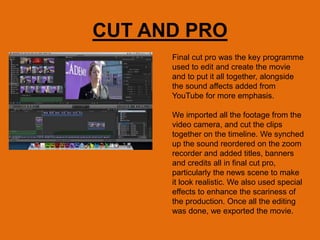
CUT AND PRO
Final cut pro was the key programme
used to edit and create the movie
and to put it all together, alongside
the sound affects added from
YouTube for more emphasis.
We imported all the footage from the
video camera, and cut the clips
together on the timeline. We synched
up the sound reordered on the zoom
recorder and added titles, banners
and credits all in final cut pro,
particularly the news scene to make
it look realistic. We also used special
effects to enhance the scariness of
the production. Once all the editing
was done, we exported the movie.
YOUTUBE
We used YouTube to see previous short horror films that had been
made for media A2, alongside watched a few clips from the most
terrifying movies such as Annabelle, paranormal activity, the
exorcist and so on to get a few ideas that we can then elaborate on
and adjust. We also used YouTube to access terrifying sounds
which we then added into our film not only to make it a lot more
realistic and add emphasis, but to also draw the audience in even
though they may be scared.
We also used…
• Blogger- to create our blog
• PowerPoint/prezzi/audio recorder/powtoon-
to evaluate questions and the review research

Question Three

  • 1.
    HOW DID YOUUSE NEW MEDIA TECHNOLOGIES IN THE CONSTRUCTION AND RESEARCH, PLANNING AND EVALUATION STAGES? Halima Khan, Lorna Keaton, Iraam Dogar, Behraam Khan
  • 2.
    RESEARCH PLANNING During theresearch process, we used YouTube to research horror movies that already exist that we could use to gather some ideas. We also viewed horror film reviews and posters to help us identify the key codes and conventions which we could then use in our review and poster. We planned many weeks before actually recording the film. We done many practice runs alongside, created a story board to help us follow each step carefully, without changing the film dramatically. We also created a script which we followed, simply because we did not want to be changing our speech to something different every time we started recording (practice runs). We believe, researching and planning pre- hand is highly significant seeing as this
  • 3.
    PHOTOSHOP Photoshop was usedto create the Review, alongside poster for Case-cosis. Through Photoshop, we were able to edit the images taken of the characters in the forest, by adjusting, contrasting, adding filters and so on. Using Adobe Photoshop allowed us to create professional images and make it look as realistic as possible. Photoshop also helped the audience to pick up a vibe regarding the characters on the way they posed, alongside the location where the picture was taken. The Dark filter that made the weather look miserable contributed immensely to the conventions of other horror posters. The typography used in the poster alongside review, is a sinister looking
  • 4.
    CAMERA EQUIPTMENT Canon camera(E0S600D) We used the canon camera to take shots during the film and of each individual in the team whilst participating in putting the film together. The canon camera has helped us immensely in terms of providing us with perfect lighting and high quality images which builds a suspense for the audience and makes them eager to find out what the film is all about. Panasonic video recorder (HC-X900M) We used the Panasonic recorder to record the entire film. This specific recorder captures video that has more detail, better color, and better sound than the footage. it produced the sharpest footage in bright light, plus it had the best stabilization and the least noise in low light. you can capture the action from across a huge space, which was brilliant for us seeing as we had done a lot of distant recording (in the forest). Audio recorder (Zoom H4n) We used the audio recorder to connect to professional
  • 5.
    Quark We used Quarkto create both the film review and film poster. Quark helped us in terms of creating a professional review and film poster, which helped meet the conventions of horror. Quark programme is more advanced and gives the options of creating a more professional look to both the review and poster. Tools These were mainly used to write text and photos and to move elements around. Colours This allowed us to choose a range of colours and colour and text and background Measurements Measurements allowed us to choose type tight faces, adjust sizes embolden and underline. Quark also gave us the option of choosing what type of layout we wanted for example A4, A3 and so on. We also were able to adjust the width and height of the page, alongside the orientation of the page e.g. portrait or landscape, whereas other programmes such as word do not offer this.
  • 6.
    CUT AND PRO Finalcut pro was the key programme used to edit and create the movie and to put it all together, alongside the sound affects added from YouTube for more emphasis. We imported all the footage from the video camera, and cut the clips together on the timeline. We synched up the sound reordered on the zoom recorder and added titles, banners and credits all in final cut pro, particularly the news scene to make it look realistic. We also used special effects to enhance the scariness of the production. Once all the editing was done, we exported the movie.
  • 7.
    YOUTUBE We used YouTubeto see previous short horror films that had been made for media A2, alongside watched a few clips from the most terrifying movies such as Annabelle, paranormal activity, the exorcist and so on to get a few ideas that we can then elaborate on and adjust. We also used YouTube to access terrifying sounds which we then added into our film not only to make it a lot more realistic and add emphasis, but to also draw the audience in even though they may be scared.
  • 8.
    We also used… •Blogger- to create our blog • PowerPoint/prezzi/audio recorder/powtoon- to evaluate questions and the review research