What have you learnt
about technologies
from the process of
constructing this
product?
By Megan Kavanagh
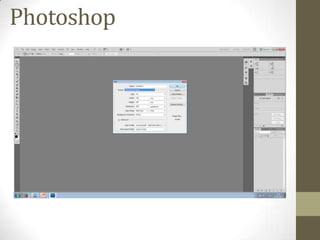
Photoshop
Photoshop
Throughout the process of constructing my product the main technology
used was Photoshop. This was a media I was already used to, however I
have discovered many new tools and processes to make professional and
affective effects.
Using Photoshop enabled me to edit photos and create backgrounds that
helped my magazine pages look unique and original. As well as the front
cover, I also used Photoshop on the contents page and the double page
spread; to create effects and edit photos.
Therefore, without Photoshop I would not have been able to create the
magazine I have done and make it unique and individual to me and the
music genre Alternative Rock.
Photoshop tools
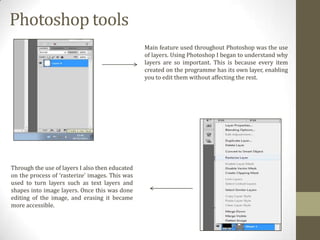
Main feature used throughout Photoshop was the use
of layers. Using Photoshop I began to understand why
layers are so important. This is because every item
created on the programme has its own layer, enabling
you to edit them without affecting the rest.

Through the use of layers I also then educated
on the process of ‘rasterize’ images. This was
used to turn layers such as text layers and
shapes into image layers. Once this was done
editing of the image, and erasing it became
more accessible.
Photoshop tools
Another part of the layers I learnt about during the
construction of my process was the merging of layers.
By merging the layers I was able to transform lots of
images into one single image. This was useful in the
making off my ‘puff’ as I could work with it as one
image. However it was a learning process when I had
some trouble with it, as once I merged the layers I
could not then individually edit them, that resulted in
me having to recreate things.

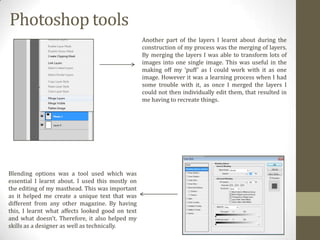
Blending options was a tool used which was
essential I learnt about. I used this mostly on
the editing of my masthead. This was important
as it helped me create a unique text that was
different from any other magazine. By having
this, I learnt what affects looked good on text
and what doesn’t. Therefore, it also helped my
skills as a designer as well as technically.
Photoshop tools
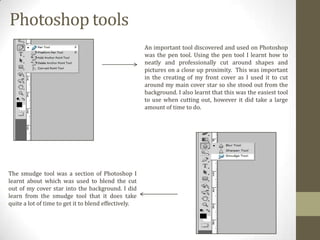
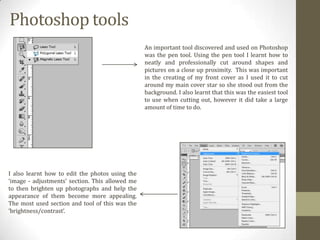
An important tool discovered and used on Photoshop
was the pen tool. Using the pen tool I learnt how to
neatly and professionally cut around shapes and
pictures on a close up proximity. This was important
in the creating of my front cover as I used it to cut
around my main cover star so she stood out from the
background. I also learnt that this was the easiest tool
to use when cutting out, however it did take a large
amount of time to do.

The smudge tool was a section of Photoshop I
learnt about which was used to blend the cut
out of my cover star into the background. I did
learn from the smudge tool that it does take
quite a lot of time to get it to blend effectively.
Photoshop tools
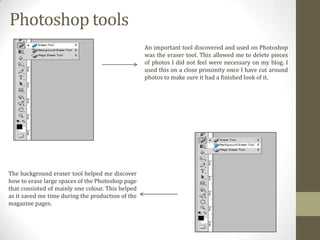
An important tool discovered and used on Photoshop
was the eraser tool. This allowed me to delete pieces
of photos I did not feel were necessary on my blog. I
used this on a close proximity once I have cut around
photos to make sure it had a finished look of it.

The background eraser tool helped me discover
how to erase large spaces of the Photoshop page
that consisted of mainly one colour. This helped
as it saved me time during the production of the
magazine pages.
Photoshop tools
An important tool discovered and used on Photoshop
was the pen tool. Using the pen tool I learnt how to
neatly and professionally cut around shapes and
pictures on a close up proximity. This was important
in the creating of my front cover as I used it to cut
around my main cover star so she stood out from the
background. I also learnt that this was the easiest tool
to use when cutting out, however it did take a large
amount of time to do.

I also learnt how to edit the photos using the
‘image - adjustments’ section. This allowed me
to then brighten up photographs and help the
appearance of them become more appealing.
The most used section and tool of this was the
‘brightness/contrast’.
Quark
Quark
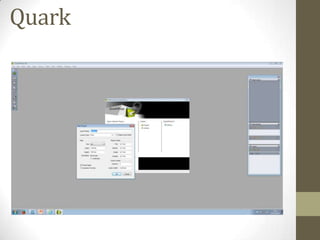
Throughout the process of constructing my product the second main
technology used was Quark. This was a media I was not used to as I had
never used it before.
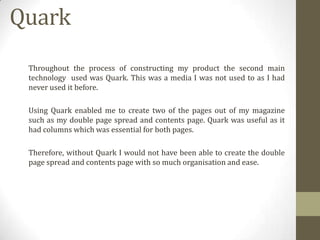
Using Quark enabled me to create two of the pages out of my magazine
such as my double page spread and contents page. Quark was useful as it
had columns which was essential for both pages.
Therefore, without Quark I would not have been able to create the double
page spread and contents page with so much organisation and ease.
Quark tools
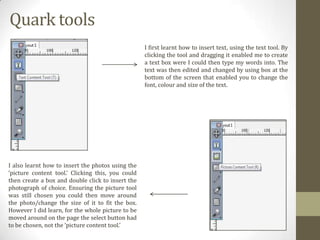
I first learnt how to insert text, using the text tool. By
clicking the tool and dragging it enabled me to create
a text box were I could then type my words into. The
text was then edited and changed by using box at the
bottom of the screen that enabled you to change the
font, colour and size of the text.

I also learnt how to insert the photos using the
‘picture content tool.’ Clicking this, you could
then create a box and double click to insert the
photograph of choice. Ensuring the picture tool
was still chosen you could then move around
the photo/change the size of it to fit the box.
However I did learn, for the whole picture to be
moved around on the page the select button had
to be chosen, not the ‘picture content tool.’
Quark tools
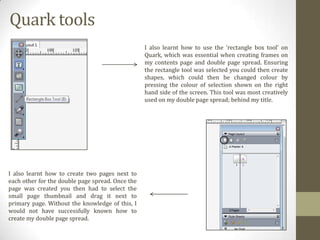
I also learnt how to use the ‘rectangle box tool’ on
Quark, which was essential when creating frames on
my contents page and double page spread. Ensuring
the rectangle tool was selected you could then create
shapes, which could then be changed colour by
pressing the colour of selection shown on the right
hand side of the screen. This tool was most creatively
used on my double page spread; behind my title.

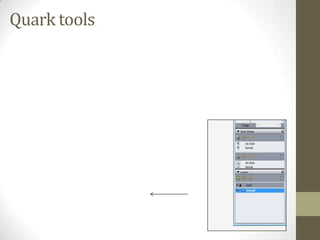
I also learnt how to create two pages next to
each other for the double page spread. Once the
page was created you then had to select the
small page thumbnail and drag it next to
primary page. Without the knowledge of this, I
would not have successfully known how to
create my double page spread.
Quark tools
Digital SLR Camera
Digital SLR Camera
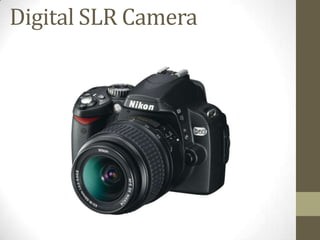
The construction of my piece could not have been done without a Digital
SLR Camera, as my photos would not have been a high quality and
appropriate for my magazine.
Using the camera, I learnt how to focus the lens until the shot was clear and
not blurred, as well as understanding what lighting and conditions were
the best for taking a shot. I learnt that this was usually outside, or
somewhere that had a good use of light.
I also learnt how to use the camera on different settings such as ‘close up’
and ‘auto’. However, it came clear to me after my first photo-shoot that auto
was in fact the best setting to use.
I also learnt how beneficial the use of the flash could be, if the lighting was
not an adequate amount, or if the colours were not as bright when the flash
was not one.

QUESTION 6

  • 1.
    What have youlearnt about technologies from the process of constructing this product? By Megan Kavanagh
  • 2.
  • 3.
    Photoshop Throughout the processof constructing my product the main technology used was Photoshop. This was a media I was already used to, however I have discovered many new tools and processes to make professional and affective effects. Using Photoshop enabled me to edit photos and create backgrounds that helped my magazine pages look unique and original. As well as the front cover, I also used Photoshop on the contents page and the double page spread; to create effects and edit photos. Therefore, without Photoshop I would not have been able to create the magazine I have done and make it unique and individual to me and the music genre Alternative Rock.
  • 4.
    Photoshop tools Main featureused throughout Photoshop was the use of layers. Using Photoshop I began to understand why layers are so important. This is because every item created on the programme has its own layer, enabling you to edit them without affecting the rest. Through the use of layers I also then educated on the process of ‘rasterize’ images. This was used to turn layers such as text layers and shapes into image layers. Once this was done editing of the image, and erasing it became more accessible.
  • 5.
    Photoshop tools Another partof the layers I learnt about during the construction of my process was the merging of layers. By merging the layers I was able to transform lots of images into one single image. This was useful in the making off my ‘puff’ as I could work with it as one image. However it was a learning process when I had some trouble with it, as once I merged the layers I could not then individually edit them, that resulted in me having to recreate things. Blending options was a tool used which was essential I learnt about. I used this mostly on the editing of my masthead. This was important as it helped me create a unique text that was different from any other magazine. By having this, I learnt what affects looked good on text and what doesn’t. Therefore, it also helped my skills as a designer as well as technically.
  • 6.
    Photoshop tools An importanttool discovered and used on Photoshop was the pen tool. Using the pen tool I learnt how to neatly and professionally cut around shapes and pictures on a close up proximity. This was important in the creating of my front cover as I used it to cut around my main cover star so she stood out from the background. I also learnt that this was the easiest tool to use when cutting out, however it did take a large amount of time to do. The smudge tool was a section of Photoshop I learnt about which was used to blend the cut out of my cover star into the background. I did learn from the smudge tool that it does take quite a lot of time to get it to blend effectively.
  • 7.
    Photoshop tools An importanttool discovered and used on Photoshop was the eraser tool. This allowed me to delete pieces of photos I did not feel were necessary on my blog. I used this on a close proximity once I have cut around photos to make sure it had a finished look of it. The background eraser tool helped me discover how to erase large spaces of the Photoshop page that consisted of mainly one colour. This helped as it saved me time during the production of the magazine pages.
  • 8.
    Photoshop tools An importanttool discovered and used on Photoshop was the pen tool. Using the pen tool I learnt how to neatly and professionally cut around shapes and pictures on a close up proximity. This was important in the creating of my front cover as I used it to cut around my main cover star so she stood out from the background. I also learnt that this was the easiest tool to use when cutting out, however it did take a large amount of time to do. I also learnt how to edit the photos using the ‘image - adjustments’ section. This allowed me to then brighten up photographs and help the appearance of them become more appealing. The most used section and tool of this was the ‘brightness/contrast’.
  • 9.
  • 10.
    Quark Throughout the processof constructing my product the second main technology used was Quark. This was a media I was not used to as I had never used it before. Using Quark enabled me to create two of the pages out of my magazine such as my double page spread and contents page. Quark was useful as it had columns which was essential for both pages. Therefore, without Quark I would not have been able to create the double page spread and contents page with so much organisation and ease.
  • 11.
    Quark tools I firstlearnt how to insert text, using the text tool. By clicking the tool and dragging it enabled me to create a text box were I could then type my words into. The text was then edited and changed by using box at the bottom of the screen that enabled you to change the font, colour and size of the text. I also learnt how to insert the photos using the ‘picture content tool.’ Clicking this, you could then create a box and double click to insert the photograph of choice. Ensuring the picture tool was still chosen you could then move around the photo/change the size of it to fit the box. However I did learn, for the whole picture to be moved around on the page the select button had to be chosen, not the ‘picture content tool.’
  • 12.
    Quark tools I alsolearnt how to use the ‘rectangle box tool’ on Quark, which was essential when creating frames on my contents page and double page spread. Ensuring the rectangle tool was selected you could then create shapes, which could then be changed colour by pressing the colour of selection shown on the right hand side of the screen. This tool was most creatively used on my double page spread; behind my title. I also learnt how to create two pages next to each other for the double page spread. Once the page was created you then had to select the small page thumbnail and drag it next to primary page. Without the knowledge of this, I would not have successfully known how to create my double page spread.
  • 13.
  • 14.
  • 15.
    Digital SLR Camera Theconstruction of my piece could not have been done without a Digital SLR Camera, as my photos would not have been a high quality and appropriate for my magazine. Using the camera, I learnt how to focus the lens until the shot was clear and not blurred, as well as understanding what lighting and conditions were the best for taking a shot. I learnt that this was usually outside, or somewhere that had a good use of light. I also learnt how to use the camera on different settings such as ‘close up’ and ‘auto’. However, it came clear to me after my first photo-shoot that auto was in fact the best setting to use. I also learnt how beneficial the use of the flash could be, if the lighting was not an adequate amount, or if the colours were not as bright when the flash was not one.