19
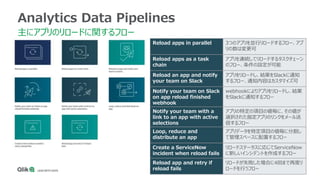
Analytics Data Pipelines
主にアプリのリロードに関するフロー
Reloadapps in parallel 3つのアプリを並行リロードするフロー、アプ
リの数は変更可
Reload apps as a task
chain
アプリを連続してリロードするタスクチェーン
のフロー、条件の設定が可能
Reload an app and notify
your team on Slack
アプリをリロードし、結果をSlackに通知
するフロー、通知内容はカスタマイズ可
Notify your team on Slack
on app reload finished
webhook
webhookによりアプリをリロードし、結果
をSlackに通知するフロー
Notify your team with a
link to an app with active
selections
アプリの特定の項目の値毎に、その値が
選択された指定アプリのリンクをメール送
信するフロー
Loop, reduce and
distribute an app
アプリデータを特定項目の値毎に分割し
て管理スペースに配置するフロー
Create a ServiceNow
incident when reload fails
リロードステータスに応じてServiceNow
に新しいインシデントを作成するフロー
Reload app and retry if
reload fails
リロードが失敗した場合に4回まで再度リ
ロードを行うフロー
20.
20
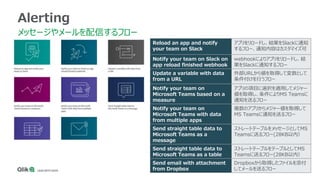
Alerting
メッセージやメールを配信するフロー
Reload an appand notify
your team on Slack
アプリをリロードし、結果をSlackに通知
するフロー、通知内容はカスタマイズ可
Notify your team on Slack on
app reload finished webhook
webhookによりアプリをリロードし、結
果をSlackに通知するフロー
Update a variable with data
from a URL
外部URLから値を取得して変数として
条件付けを行うフロー
Notify your team on
Microsoft Teams based on a
measure
アプリの項目に選択を適用してメジャー
値を取得し、条件によりMS Teamsに
通知を送るフロー
Notify your team on
Microsoft Teams with data
from multiple apps
複数のアプリからメジャー値を取得して
MS Teamsに通知を送るフロー
Send straight table data to
Microsoft Teams as a
message
ストレートテーブルをメッセージとしてMS
Teamsに送るフロー(28KB以内)
Send straight table data to
Microsoft Teams as a table
ストレートテーブルをテーブルとしてMS
Teamsに送るフロー(28KB以内)
Send email with attachment
from Dropbox
Dropboxから取得したファイルを添付
してメールを送るフロー
22
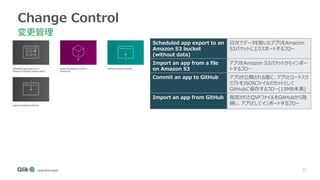
Change Control
変更管理
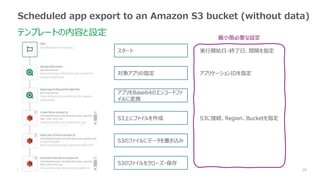
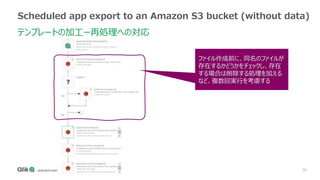
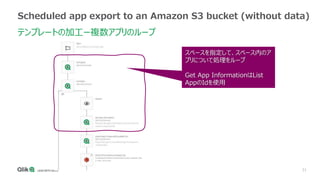
Scheduled appexport to an
Amazon S3 bucket
(without data)
日次でデータを除いたアプリをAmazon
S3バケットにエクスポートするフロー
Import an app from a file
on Amazon S3
アプリをAmazon S3バケットからインポー
トするフロー
Commit an app to GitHub アプリが公開される度に、アプリとロードスク
リプトをJSONファイルのセットとして
GitHubに保存するフロー(15MB未満)
Import an app from GitHub 指定されたQVFファイルをGitHubから取
得し、アプリとしてインポートするフロー
23.
23
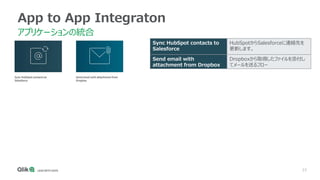
App to AppIntegraton
アプリケーションの統合
Sync HubSpot contacts to
Salesforce
HubSpotからSalesforceに連絡先を
更新します。
Send email with
attachment from Dropbox
Dropboxから取得したファイルを添付し
てメールを送るフロー
24.
24
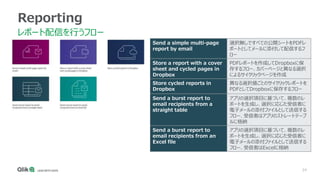
Reporting
レポート配信を行うフロー
Send a simplemulti-page
report by email
選択無しですべての公開シートをPDFレ
ポートとしてメールに添付して配信するフ
ロー
Store a report with a cover
sheet and cycled pages in
Dropbox
PDFレポートを作成してDropboxに保
存するフロー、カバーページと異なる選択
によるサイクリックページを作成
Store cycled reports in
Dropbox
異なる選択値ごとのサイクリックレポートを
PDFとしてDropboxに保存するフロー
Send a burst report to
email recipients from a
straight table
アプリの選択項目に基づいて、複数のレ
ポートを生成し、選択に応じた受信者に
電子メールの添付ファイルとして送信する
フロー、受信者はアプリのストレートテーブ
ルに格納
Send a burst report to
email recipients from an
Excel file
アプリの選択項目に基づいて、複数のレ
ポートを生成し、選択に応じた受信者に
電子メールの添付ファイルとして送信する
フロー、受信者はExcelに格納
25.
25
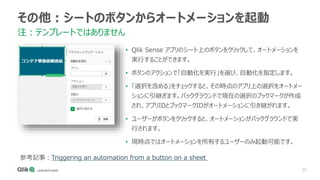
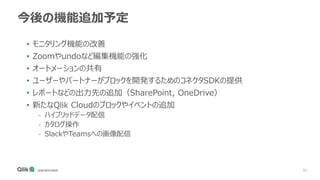
その他:シートのボタンからオートメーションを起動
注:テンプレートではありません
• Qlik Senseアプリのシート上のボタンをクリックして、オートメーションを
実行することができます。
• ボタンのアクションで「自動化を実行」を選び、自動化を指定します。
• 「選択を含める」をチェックすると、その時点のアプリ上の選択をオートメー
ションに引継ぎます。バックグラウンドで現在の選択のブックマークが作成
され、アプリIDとブックマークIDがオートメーションに引き継がれます。
• ユーザーがボタンをクリックすると、オートメーションがバックグラウンドで実
行されます。
• 現時点ではオートメーションを所有するユーザーのみ起動可能です。
参考記事:Triggering an automation from a button on a sheet
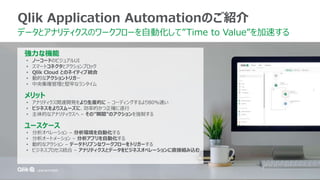
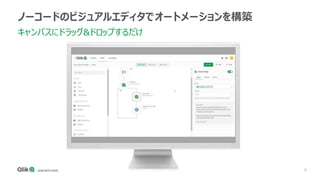
#8 Introducing Qlik Application Automation. It’s a no-code visual design solution for automating your manual workflows.
Data and analytics teams drag and drop configurable blocks onto a canvas instead of writing code to form a sequence of steps that run like a program. These automations flow data through a variety of applications to optimize the end-to-end pipeline between raw data and active intelligence.
#9 Let’s go through some of the basic user interface elements customers are going to see in Qlik Application Automation.
I’ve used various automation tools and low-code/no-code platforms, and I love this maker space.
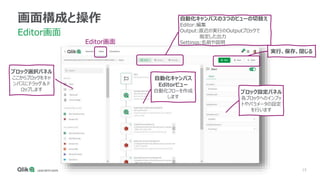
On the left is the block menu, listing all the available blocks developers uses can add to an automation.
In the middle is the canvas, where users drag-and-drop blocks to make the sequence of actions that the automation runs.
On the right side, is the block configurator. Each block has configuration inputs makers fill out to instruct the blocks how to behave and what data to use to carry out their intended function.
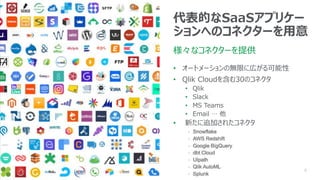
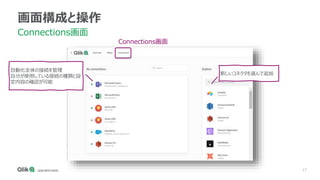
#10 Quickly connect to market leading SaaS applications such as Salesforce, Slack and MS Teams, which are represented as smart blocks that remove the need to technically understand an application’s low-level API.
We’re focusing on making 30 or so connectors available when Qlik App Automation goes GA with the intent to release 2-3 connectors each month based on customer requests and market demand.
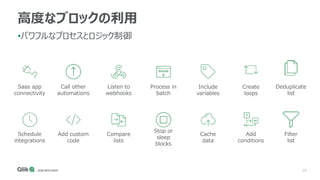
#11 Capabilities:
Running automations
Manual execution
Webhooks
Triggered using API endpoint
Scheduled
Types of blocks
Conditions
Loops
Variables
Niko remark: important slide, message is that workflows are as powerful as code (because you can work with conditions, variables, loops etc.)
#14 Capabilities:
Running automations
Manual execution
Webhooks
Triggered using API endpoint
Scheduled
Types of blocks
Conditions
Loops
Variables
Niko remark: important slide, message is that workflows are as powerful as code (because you can work with conditions, variables, loops etc.)
#15 Capabilities:
Running automations
Manual execution
Webhooks
Triggered using API endpoint
Scheduled
Types of blocks
Conditions
Loops
Variables
Niko remark: important slide, message is that workflows are as powerful as code (because you can work with conditions, variables, loops etc.)
#20 Capabilities:
Running automations
Manual execution
Webhooks
Triggered using API endpoint
Scheduled
Types of blocks
Conditions
Loops
Variables
Niko remark: important slide, message is that workflows are as powerful as code (because you can work with conditions, variables, loops etc.)
#21 Capabilities:
Running automations
Manual execution
Webhooks
Triggered using API endpoint
Scheduled
Types of blocks
Conditions
Loops
Variables
Niko remark: important slide, message is that workflows are as powerful as code (because you can work with conditions, variables, loops etc.)
#22 Capabilities:
Running automations
Manual execution
Webhooks
Triggered using API endpoint
Scheduled
Types of blocks
Conditions
Loops
Variables
Niko remark: important slide, message is that workflows are as powerful as code (because you can work with conditions, variables, loops etc.)
#23 Capabilities:
Running automations
Manual execution
Webhooks
Triggered using API endpoint
Scheduled
Types of blocks
Conditions
Loops
Variables
Niko remark: important slide, message is that workflows are as powerful as code (because you can work with conditions, variables, loops etc.)
#24 Capabilities:
Running automations
Manual execution
Webhooks
Triggered using API endpoint
Scheduled
Types of blocks
Conditions
Loops
Variables
Niko remark: important slide, message is that workflows are as powerful as code (because you can work with conditions, variables, loops etc.)
#25 Capabilities:
Running automations
Manual execution
Webhooks
Triggered using API endpoint
Scheduled
Types of blocks
Conditions
Loops
Variables
Niko remark: important slide, message is that workflows are as powerful as code (because you can work with conditions, variables, loops etc.)
#26 Capabilities:
Running automations
Manual execution
Webhooks
Triggered using API endpoint
Scheduled
Types of blocks
Conditions
Loops
Variables
Niko remark: important slide, message is that workflows are as powerful as code (because you can work with conditions, variables, loops etc.)
#30 Capabilities:
Running automations
Manual execution
Webhooks
Triggered using API endpoint
Scheduled
Types of blocks
Conditions
Loops
Variables
Niko remark: important slide, message is that workflows are as powerful as code (because you can work with conditions, variables, loops etc.)
#31 Capabilities:
Running automations
Manual execution
Webhooks
Triggered using API endpoint
Scheduled
Types of blocks
Conditions
Loops
Variables
Niko remark: important slide, message is that workflows are as powerful as code (because you can work with conditions, variables, loops etc.)
#32 Capabilities:
Running automations
Manual execution
Webhooks
Triggered using API endpoint
Scheduled
Types of blocks
Conditions
Loops
Variables
Niko remark: important slide, message is that workflows are as powerful as code (because you can work with conditions, variables, loops etc.)
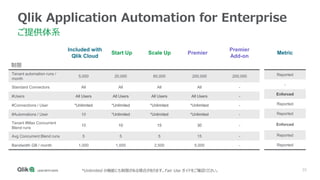
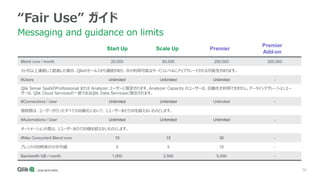
#36 Cover the Tiers and prices
Define each limit
Note all tiers get all connectors, all users
Define reported vs enforced
What happens today if they go over a reported metric, contractually, will there be a charge, do we do nothing until the metrics become enforced, etc
Verizon – Enterprise Customer, can only be sold High volume..
Connector maintenance at scale up and high volume only
$50k+ follows OEM negotiated deals with alternative models/rev share – must commit $50k+ PA
13months, 1 month free.
Ramp up pricing after 6 months – increased discounts within first 6-12 months
Payment terms – monthly?
Margin contribution
90%+ for Plus and Premium, 82% for Enterprise
Margin impacted by #Automations & Bandwidth
Margin improves if limits not approached
Reported
Customers can exceed the stated amount
Consistent over use will require upgrade
Enforced
Limits concurrency without preventing use of product




![13
テンプレートを使用した自動化の作成
ヘルプ(英語):Using templates
[新規追加]>
[新しい自動化]をクリック
名前、最近の使用、お気に入り、カテゴリやコネクタで検索ができます。
テンプレートを使用しない場合は1つ目のBlank Automation を
選びます。
テンプレートを選択してクリック テンプレートを編集
ブロックの追加・削除、
他のブロックへの変更などが行えます。](https://image.slidesharecdn.com/qliktechtalk20220201applicationautomationtemplate-220201065632/85/Qlik-Application-Automation-13-320.jpg)









![[BA10] Dynamics 365 とSkype for Business による営業生産性向上ソリューションの実現と BOT テクノロジーの活用手法](https://cdn.slidesharecdn.com/ss_thumbnails/ba10-170605021446-thumbnail.jpg?width=640&height=640&fit=bounds)


