34
参考記事
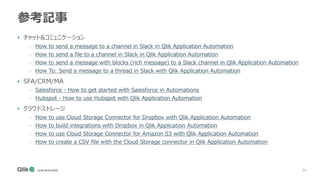
• チャット&コミュニケーション
- Howto send a message to a channel in Slack in Qlik Application Automation
- How to send a file to a channel in Slack in Qlik Application Automation
- How to send a message with blocks (rich message) to a Slack channel in Qlik Application Automation
- How To: Send a message to a thread in Slack with Qlik Application Automation
• SFA/CRM/MA
- Salesforce - How to get started with Salesforce in Automations
- Hubspot - How to use Hubspot with Qlik Application Automation
• クラウドストレージ
- How to use Cloud Storage Connector for Dropbox with Qlik Application Automation
- How to build integrations with Dropbox in Qlik Application Automation
- How to use Cloud Storage Connector for Amazon S3 with Qlik Application Automation
- How to create a CSV file with the Cloud Storage connector in Qlik Application Automation
35.
35
参考記事
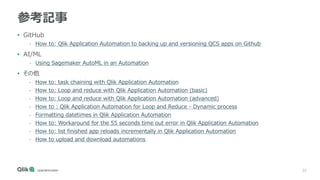
• GitHub
- Howto: Qlik Application Automation to backing up and versioning QCS apps on Github
• AI/ML
- Using Sagemaker AutoML in an Automation
• その他
- How to: task chaining with Qlik Application Automation
- How to: Loop and reduce with Qlik Application Automation (basic)
- How to: Loop and reduce with Qlik Application Automation (advanced)
- How to : Qlik Application Automation for Loop and Reduce - Dynamic process
- Formatting datetimes in Qlik Application Automation
- How to: Workaround for the 55 seconds time out error in Qlik Application Automation
- How to: list finished app reloads incrementally in Qlik Application Automation
- How to upload and download automations
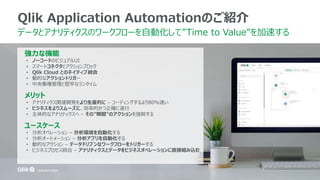
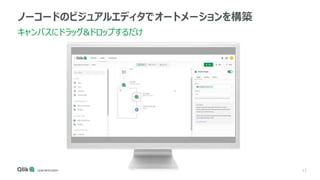
#9 Introducing Qlik Application Automation. It’s a no-code visual design solution for automating your manual workflows.
Data and analytics teams drag and drop configurable blocks onto a canvas instead of writing code to form a sequence of steps that run like a program. These automations flow data through a variety of applications to optimize the end-to-end pipeline between raw data and active intelligence.
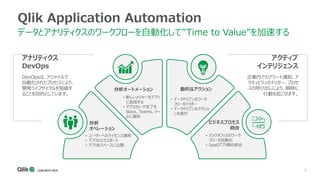
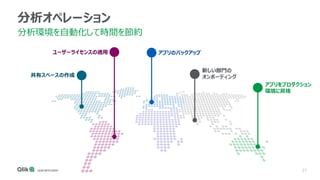
#10 There are 4 categories of use-case for application automation that simplify your workflows to increase your data and analytics efficiencies
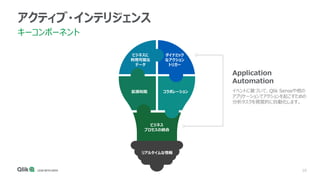
#11 Incidentally while we are talking automation, I’d like to quickly put it in context of Qlik’s vision for Active Intelligence.
As you can see we consider Dynamic Actions and Business Process as two core components that combine to form the concept of Active Intelligence.
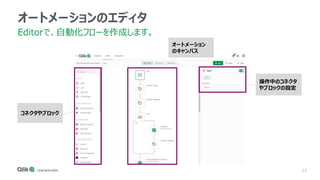
#13 Let’s go through some of the basic user interface elements customers are going to see in Qlik Application Automation.
I’ve used various automation tools and low-code/no-code platforms, and I love this maker space.
On the left is the block menu, listing all the available blocks developers uses can add to an automation.
In the middle is the canvas, where users drag-and-drop blocks to make the sequence of actions that the automation runs.
On the right side, is the block configurator. Each block has configuration inputs makers fill out to instruct the blocks how to behave and what data to use to carry out their intended function.
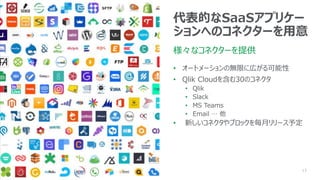
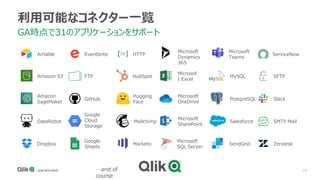
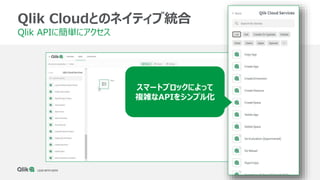
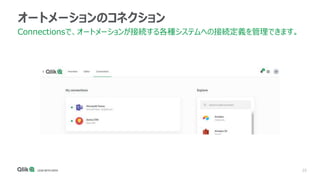
#14 Quickly connect to market leading SaaS applications such as Salesforce, Slack and MS Teams, which are represented as smart blocks that remove the need to technically understand an application’s low-level API.
We’re focusing on making 30 or so connectors available when Qlik App Automation goes GA with the intent to release 2-3 connectors each month based on customer requests and market demand.
#16 Capabilities:
Running automations
Manual execution
Webhooks
Triggered using API endpoint
Scheduled
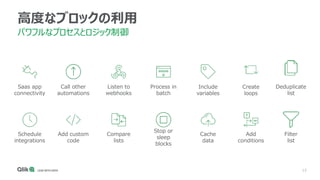
Types of blocks
Conditions
Loops
Variables
Niko remark: important slide, message is that workflows are as powerful as code (because you can work with conditions, variables, loops etc.)
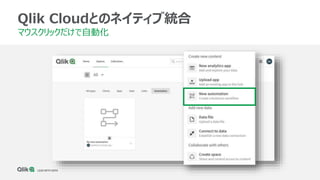
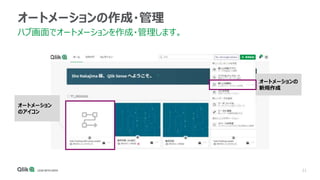
#17 Let’s go through some of the basic user interface elements customers are going to see in Qlik Application Automation. When the tool is released in Qlik Cloud, creating and accessing automations is only a mouse click away within the analytics hub. Automations users create appear as cards in the main window, just like Qlik Sense applications and cataloged data sets.
#18 On the left is the block menu, listing all the available blocks makers can add to an automation.
In the middle is the canvas, where users drag-and-drop blocks to make the sequence of actions that the automation runs.
On the right side, is the block configurator. Each block has configuration inputs makers fill out to instruct the blocks how to behave and what data to use to carry out their intended function.
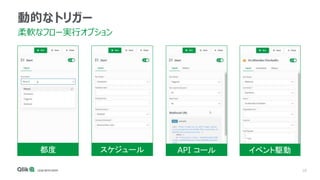
#19 Once you’ve built your flows then there are a variety of mechanisms to trigger them to run that suit specific business needs.
You can trigger ad-hoc automations on demand from the run button, schedule flows to execute at specific times, use webhooks to respond to specific actions, or trigger flows from application events.
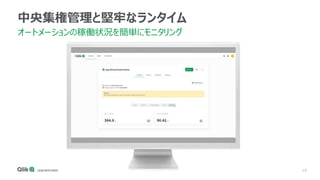
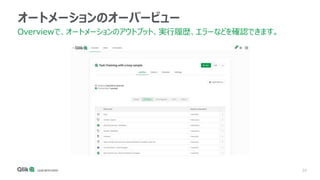
#20 Finally, you can manage and monitor your automations from a single place to ensure that they are running smoothly and efficiently.
#28 One of the first use cases that Qlik users find attractive about App Automation is the ability to create a whole host of flows that can eliminate frequent and repetitive tasks that concern tenant administration. For example, backing up analytics apps on a weekly schedule or provisioning commonly used apps to new shared spaces when onboarding new departments.
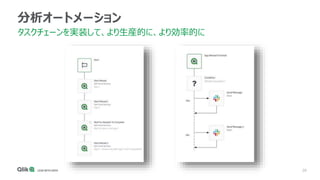
#29 Here’s an example of task chaining Qlik Sense reloads in Qlik Application Automation. On the left, two reloads are being started at the same time. A wait to complete block checks the status of both reloads before continuing to the third reload, ensuring that data from the first two tasks is available before the third reload starts.
Another example shows how to use an event triggered by a Qlik Sense application reload is listened for by Qlik Application Automation. When the webhook is fired, the automation runs, checks to see if the reload succeeded, and sends a message to slack accordingly.
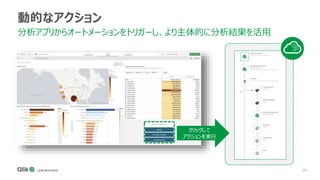
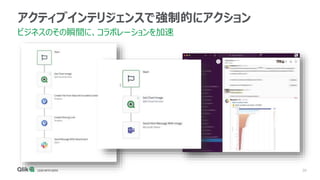
#30 Here’s a more complex example of a dynamic action from a Qlik Sense application.
The analytics consumer is reviewing their dashboard, making selections, and performing analysis.
As a result, they identify outliers in the data. But how do non-analytics users benefit from these insights?
We can enable the analyst to compel an action by invoking an automation from within the Qlik Sense application that automatically feeds data from the dashboard to the relevant business applications, thereby correcting the outlying problem.
For example
Identifying on a sheet the outlying sales opportunities need additional attention that triggers an action to re-assign and re-prioritize in Salesforce, then alert the sales rep and their manager.
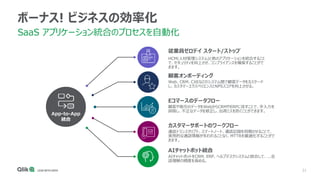
#32 Our bonus use case focuses on more traditional app-to-app integration uses. We’ve listed 5 different examples here, that all share the same problem that although integrating applications offer efficiency benefits, traditional solutions require writing code to achieve the desired results. Qlik Application automation can visually wire these systems together to create really efficient business processes.
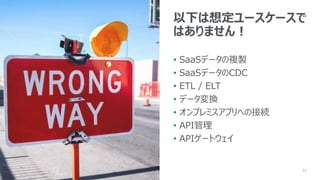
#33 Photo by NeONBRAND on Unsplash
When do you disqualify opportunities that make you unsure if Qlik Application Automation is a good fit?
Let’s start with data replication and CDC. Qlik Application Automation doesn’t do it. Yes, there’s lots of connectivity to SaaS applications in Qlik Application Automation, but they don’t exist to solve replication and change data capture problems. Disqualified
Driving further into the data management landscape, Qlik Application Automation is not a good fit for ETL use cases, data transformation, or as a gateway between on-prem and cloud software. Disqualify it!
All that said, I do see a future where automation grows into orchestration of activities like the ones I mentioned, but that’s a discussion for another time.
Data movement
This is not “SaaS sources” for Replicate
Qlik Application Automation is not an ETL/ELT tool
On-prem
There is NO on-premises option
SaaS Connectors only
No support for Client-Managed APIs
API Management / Gateway
Qlik Application Automation is NOT Boomi or Mulesoft
It can do Automation things, but not API management or API gateway jobs
Niko remark: Can we call this "Disqualify" ?





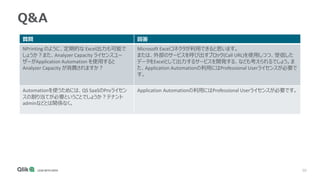
![48
Q&A
質問 回答
Qlik Sense SaaS の利用ユーザーであれば、Application
Automation はすべて無料で利用できる認識でよいで
しょうか?
Qlik Sense Enterprise SaaSのユーザー(Professional User)はすべての機能
を利用可能です。(ただし、Automationの最大同時実行数制限などはあり
ますので、制限事項をご確認ください。)
Application Automation で定期的に複数のオブ
ジェクトを一括で出力するようなことも可能ですか?
さまざまなブロックを活用し、アプリ内のオブジェクトのデータを出力できます。
QSアプリのリロードの直列処理はこの機能で実装できま
すか?
1)データ加工用のアプリを実行し、QVDをスペース
上に作成
2)分析用のアプリを実行し、1で作成したQVDを
取得 など
タスクチェーンの記事をご確認ください。
How to: task chaining with Qlik Application Automation
・[BLOCKS] (Basic,Lists,Advanced,Cloud strage)の
各ブロックの説明はヘルプにございましたが、[Qlik Cloud
Services] の各ブロックの説明ページもございますか?
[Qlik Cloud Services] の各ブロックの説明ページは、ブロックを配置すると、
その設定パネル内に、Descriptionなどとして各種説明が表示されています。
詳しいオンラインヘルプページは無いと思われます。](https://image.slidesharecdn.com/upload20211012techtalkqlikapplicationautomation-211014003807/85/Qlik-Application-Automation-48-320.jpg)
![49
Q&A
質問 回答
・[Qlik Cloud Services] の [Do Evaluation] はなにをする
ブロックでしょうか。
アプリのパフォーマンス評価を行います。ハブから実行できる[パフォーマンス
の評価]をAPIで呼び出しています。
[Qlik Cloud Services] の[Export App] ではアプリが
QCSTemporary ContentService にエクスポートされるよう
ですが、QCSTemporary ContentService の中身はどこか
で確認できますか?
[App From Export Id] で、テンポラリファイル内にエクスポートされたア
プリファイルを実際にスペース内に取り出せる(インポート)できます。
ライセンスの付与が自動化できるとありましたが、ユーザー登
録、ライセンス付与、役割の割当はどこまで自動化できます
か?例えば、Excelで以下項目のユーザーの管理シートを作
成し、それを読み込んで自動で設定するなどは可能でしょう
か?(100名など大規模で利用する際に、以下を自動化し
たいということ)
・ユーザーインポート
・ライセンスの付与
・スペースへの追加
・役割の割当
Excelコネクターがありますのでごご確認ください。また、ユーザー追加やライ
センス付与などQCSの操作については、QCSブロックを確認ください。ブロッ
クが用意されていない場合は、Qlik Cloud Services>Raw API
Requestから直接Qlik APIを呼び出すなどで可能になるでしょう。(もしく
はBlocks>Advanced>Custom Codeからコードを直接書くなど)
今後、ブロックが増えることで、上記のようなRaw APIやCustom Code
を使用せずより簡単に設定できる可能性もあるでしょう。](https://image.slidesharecdn.com/upload20211012techtalkqlikapplicationautomation-211014003807/85/Qlik-Application-Automation-49-320.jpg)