Query By Example (QBE)
QBE – A brief history
 QBE was originally developed by M. M. Zloof at the IBM Yorktown Heights
Research Laboratory.
 QBE is quite old (created in 1970s). Not used much now.
 QBE’s influence can be found in DBMS products like Borland Paradox, MS
Access, etc.
 Zloof specifically designed QBE for use with GUI – both the requests and
results are specified in QBE by filling in tables on the screen.
Introduction
 Query-by-Example (QBE ) is a language for querying (and also for inserting,
updating data like SQL) relational data.
 The user creates a query by creating ‘example tables.’ Hence the name!
 Basic Idea: The user formulates the query by entering an example of a possible
answer in the appropriate place in an empty table.
QBE
 involves relatively few concepts hence a user needs minimal information to get
started in QBE
 QBE is especially suited for queries that are not too complex and can be
expressed in terms of a few tables.
QBE vs. SQL – Difference in Approach
 SQL query: “You describe to the DBMS how to get the data you want through
the SQL query syntax.”
 QBE query: “You describe the data itself through example tables.”
 How to get? (SQL) vs. What to get? (QBE)
Basic QBE syntax
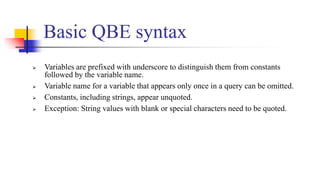
 Variables are prefixed with underscore to distinguish them from constants
followed by the variable name.
 Variable name for a variable that appears only once in a query can be omitted.
 Constants, including strings, appear unquoted.
 Exception: String values with blank or special characters need to be quoted.
Basic QBE syntax
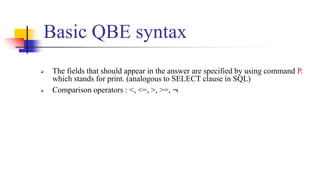
 The fields that should appear in the answer are specified by using command P.
which stands for print. (analogous to SELECT clause in SQL)
 Comparison operators : <, <=, >, >=, ¬
Relations for this presentation
Sailors (sid: integer, sname: string, rating: integer, age:
real)
Boats (bid: integer, bname: string, color: string)
Reserves (sid: integer, bid: integer, day: date)
Queries over single Relation
 Print names and ages of all sailors
 {<N, A> | ∃I, T( <I, N, T, A>∈Sailors)}
P._A
P._N
age
rating
sname
sid
Sailors
Queries over single Relation
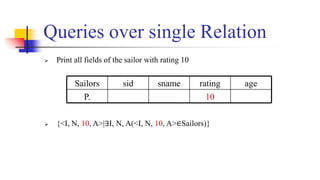
 Print all fields of the sailor with rating 10
 {<I, N, 10, A>|∃I, N, A(<I, N, 10, A>∈Sailors)}
10
P.
age
rating
sname
sid
Sailors
Duplicates and Order
 Duplicates can be eliminated by using UNQ. under the relation name
 The answers can be ordered through the use of .AO (Ascending Order) or
.DO (Descending Order) in conjunction with P.
 Print the names, ages and ratings of all sailors in ascending order by age,
and for each age, in ascending order by rating
P.AO(1)
P.AO(2)
P.
age
rating
sname
sid
Sailors
Duplicates and Order
35.5
9
Horatio
35.5
10
Rusty
33.0
1
Brutus
63.5
3
Bob
55.5
8
Lubber
45.5
7
Dustin
35.5
7
Horatio
25.5
8
Andy
25.5
3
Art
16.0
10
Zorba
Age
rating
sname
Queries over multiple Relation
 We have to select tuples from the two relations with the value in the join
column.
 We do this by placing the same variable in that columns of the two example
relations
_Id
day
bid
sid
Reserves
P._S
_Id
age
rating
sname
sid
Sailors
Negation in the Relation Name Column
 Print the names of the sailors who do not have any reservation
_Id
¬
day
bid
sid
Reserves
P._N
_Id
age
rating
sname
sid
Sailors
 QBE support aggregates operations such as AVG, COUNT, MAX, MIN and
SUM.
 All the aggregate operations will not eliminate duplicates by default except
count.
 To eliminate duplicates, the UNQ command must be added.
 For example: AVG.UNQ
Aggregates
Aggregates
35
7
Hora
44
35
10
Rud
58
45
7
Dustin
22
age
rating
sname
sid
The result printed is 38.3. This implies that the number 35 is counted twice while
computing AVG.
To print the AVG without the duplicates, P.AVG.UNQ has to be used.
P.AVG._A
age
rating
sname
sid
Sailors
Aggregates
Grouping
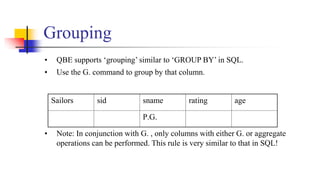
• QBE supports ‘grouping’ similar to ‘GROUP BY’ in SQL.
• Use the G. command to group by that column.
• Note: In conjunction with G. , only columns with either G. or aggregate
operations can be performed. This rule is very similar to that in SQL!
Sailors sid sname rating age
P.G.
• The above query first groups sailors by their rating and for each rating group
computes the average.
• To print the answers in sorted order by rating, we could use G.P.AO or G.P.DO.
instead.
P.AVG._A
_A
G.P.
age
rating
sname
sid
Sailors
Aggregates on Groups
Condition boxes are used in one of the following cases:-
1) Express a condition involving 2 or more columns such as _R/_A >
0.2.
2) Express a condition involving an aggregate operation on a group.
Example, AVG._A>30. It is the same as in the “HAVING” clause
in SQL.
3) Express conditions involving the AND and OR operators
Condition Boxes
Unnamed Columns
 Apart from the existing columns, QBE allows extra unnamed columns in the
example table!
 How are they useful?
Unnamed Columns
Person
P._W/_H
_H
_W
P.
Height
Weight
Name
The unnamed column (the one in green) here has been used to print the
ratio of weight to height of a person.
Unnamed Columns
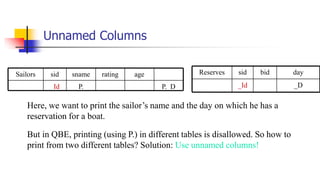
Here, we want to print the sailor’s name and the day on which he has a
reservation for a boat.
But in QBE, printing (using P.) in different tables is disallowed. So how to
print from two different tables? Solution: Use unnamed columns!
age
P._D
P.
_Id
rating
sname
sid
Sailors
_D
_Id
day
bid
sid
Reserves
Conclusion
References
 https://people.cs.pitt.edu/~chang/231/y08/y08sem/semzhouqb
e
 https://www.albany.edu/faculty/shobha/bmsi520/3&4
 https://e-
class.teilar.gr/modules/document/file.php/CS164/EDB_2008/.../q
be2

Any queries??
Thank you

QBE.pptx

  • 1.
  • 2.
    QBE – Abrief history  QBE was originally developed by M. M. Zloof at the IBM Yorktown Heights Research Laboratory.  QBE is quite old (created in 1970s). Not used much now.  QBE’s influence can be found in DBMS products like Borland Paradox, MS Access, etc.  Zloof specifically designed QBE for use with GUI – both the requests and results are specified in QBE by filling in tables on the screen.
  • 3.
    Introduction  Query-by-Example (QBE) is a language for querying (and also for inserting, updating data like SQL) relational data.  The user creates a query by creating ‘example tables.’ Hence the name!  Basic Idea: The user formulates the query by entering an example of a possible answer in the appropriate place in an empty table.
  • 4.
    QBE  involves relativelyfew concepts hence a user needs minimal information to get started in QBE  QBE is especially suited for queries that are not too complex and can be expressed in terms of a few tables.
  • 5.
    QBE vs. SQL– Difference in Approach  SQL query: “You describe to the DBMS how to get the data you want through the SQL query syntax.”  QBE query: “You describe the data itself through example tables.”  How to get? (SQL) vs. What to get? (QBE)
  • 6.
    Basic QBE syntax Variables are prefixed with underscore to distinguish them from constants followed by the variable name.  Variable name for a variable that appears only once in a query can be omitted.  Constants, including strings, appear unquoted.  Exception: String values with blank or special characters need to be quoted.
  • 7.
    Basic QBE syntax The fields that should appear in the answer are specified by using command P. which stands for print. (analogous to SELECT clause in SQL)  Comparison operators : <, <=, >, >=, ¬
  • 8.
    Relations for thispresentation Sailors (sid: integer, sname: string, rating: integer, age: real) Boats (bid: integer, bname: string, color: string) Reserves (sid: integer, bid: integer, day: date)
  • 9.
    Queries over singleRelation  Print names and ages of all sailors  {<N, A> | ∃I, T( <I, N, T, A>∈Sailors)} P._A P._N age rating sname sid Sailors
  • 10.
    Queries over singleRelation  Print all fields of the sailor with rating 10  {<I, N, 10, A>|∃I, N, A(<I, N, 10, A>∈Sailors)} 10 P. age rating sname sid Sailors
  • 11.
    Duplicates and Order Duplicates can be eliminated by using UNQ. under the relation name  The answers can be ordered through the use of .AO (Ascending Order) or .DO (Descending Order) in conjunction with P.  Print the names, ages and ratings of all sailors in ascending order by age, and for each age, in ascending order by rating P.AO(1) P.AO(2) P. age rating sname sid Sailors
  • 12.
  • 13.
    Queries over multipleRelation  We have to select tuples from the two relations with the value in the join column.  We do this by placing the same variable in that columns of the two example relations _Id day bid sid Reserves P._S _Id age rating sname sid Sailors
  • 14.
    Negation in theRelation Name Column  Print the names of the sailors who do not have any reservation _Id ¬ day bid sid Reserves P._N _Id age rating sname sid Sailors
  • 15.
     QBE supportaggregates operations such as AVG, COUNT, MAX, MIN and SUM.  All the aggregate operations will not eliminate duplicates by default except count.  To eliminate duplicates, the UNQ command must be added.  For example: AVG.UNQ Aggregates
  • 16.
  • 17.
    The result printedis 38.3. This implies that the number 35 is counted twice while computing AVG. To print the AVG without the duplicates, P.AVG.UNQ has to be used. P.AVG._A age rating sname sid Sailors Aggregates
  • 18.
    Grouping • QBE supports‘grouping’ similar to ‘GROUP BY’ in SQL. • Use the G. command to group by that column. • Note: In conjunction with G. , only columns with either G. or aggregate operations can be performed. This rule is very similar to that in SQL! Sailors sid sname rating age P.G.
  • 19.
    • The abovequery first groups sailors by their rating and for each rating group computes the average. • To print the answers in sorted order by rating, we could use G.P.AO or G.P.DO. instead. P.AVG._A _A G.P. age rating sname sid Sailors Aggregates on Groups
  • 20.
    Condition boxes areused in one of the following cases:- 1) Express a condition involving 2 or more columns such as _R/_A > 0.2. 2) Express a condition involving an aggregate operation on a group. Example, AVG._A>30. It is the same as in the “HAVING” clause in SQL. 3) Express conditions involving the AND and OR operators Condition Boxes
  • 21.
    Unnamed Columns  Apartfrom the existing columns, QBE allows extra unnamed columns in the example table!  How are they useful?
  • 22.
    Unnamed Columns Person P._W/_H _H _W P. Height Weight Name The unnamedcolumn (the one in green) here has been used to print the ratio of weight to height of a person.
  • 23.
    Unnamed Columns Here, wewant to print the sailor’s name and the day on which he has a reservation for a boat. But in QBE, printing (using P.) in different tables is disallowed. So how to print from two different tables? Solution: Use unnamed columns! age P._D P. _Id rating sname sid Sailors _D _Id day bid sid Reserves
  • 24.
  • 25.
  • 26.
  • 27.